Making the move to Bb9.1 in SED Cath Dyson eLearning Manager Cath Booth Assistant eLearning Manager Faculty of Humanities eLearning team
YOUR SCHOOL PILOTS Who is already using Bb9 to support students
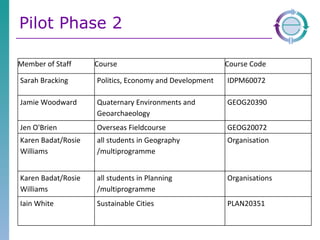
Pilot Phase 2 Member of Staff Course Course Code Sarah Bracking Politics, Economy and Development IDPM60072 Jamie Woodward Quaternary Environments and Geoarchaeology GEOG20390 Jen O'Brien Overseas Fieldcourse GEOG20072 Karen Badat/Rosie Williams all students in Geography /multiprogramme Organisation Karen Badat/Rosie Williams all students in Planning /multiprogramme Organisations Iain White Sustainable Cities PLAN20351
BB9 SUMMARY What are the improvements to Bb9?
Bb9 Summary Improved Interface Enhanced File Management Media rich content and assessments Improved student performance monitoring Email direct to students MLE Developments
Improved Interface No tabs  - just edit on or off More control over the course menu Using items to build up content Drag and drop items around Set your own home page/entry point Standard Course Structure
Enhanced File Management Drag and Drop files Organise on computer then pull them in Structure remains
Web 2.0 Content Mash up tool Adding external content YouTube, SlideShare, Flickr Wiki Simplified Blackboard Wiki Easier to use Gradeable
Assessing Learners New question types in tests YouTube Calculated formula Opinion scale/Likert HotSpot Quiz Bowl Wikis now gradeable
Monitoring Student Performance Grade Centre Smart views Tailored view of student progress e.g. students who scored less than 60 on week 1 quiz Performance Dashboard Notifications/early warning/tracking Base on Grade Rules
MLE Developments Blackboard Mobile Learn Sharing Content across the University Community Provide personalised and targeted information to students integrated with the current portal Enables groups to collaborate and communicate using BB9.1
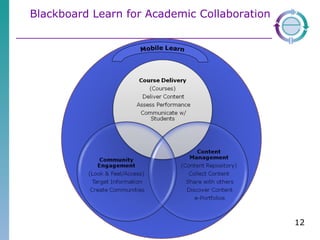
Blackboard Learn for Academic Collaboration
STANDARD COURSE STRUCTURE Help for you, consistency for students, meeting the minimum requirements
Why a Standard Course Unit Structure Makes it easier to start developing Consistency for students – feedback has been that different navigations and different terms are confusing Support for staff in meeting minimum requirements Additional Resources for both staff and students  Schools can build on this Faculty SCS to add content useful to Schools
UOM IMPLEMENTATION OF BB9 The Portal and the ‘Playground’
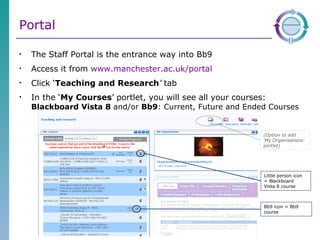
Portal The Staff Portal is the entrance way into Bb9 Access it from  www.manchester.ac.uk/portal   Click ‘ Teaching and Research ’   tab In the ‘ My Courses ’   portlet, you will see all your courses:  Blackboard Vista 8  and/or  Bb9 : Current, Future and Ended Courses Little person icon = Blackboard  Vista 8 course Bb9 icon = Bb9 course (Option to add  ‘My Organisations’ portlet)
Portal for students Students access the portal in the same way The main difference is that they have a ‘ My Studies ’ tab NOT a ‘Teaching and Research’   tab
‘ Organisations’ or ‘Communities’ Provides more flexibility in using the online environment to support students  Definitely for 2011 Programme level spaces Delivery date tbc Other Academic Communities
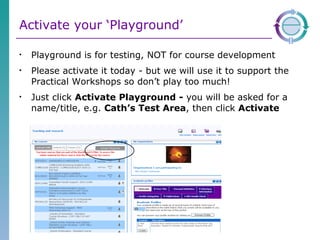
Activate your ‘Playground’ Playground is for testing, NOT for course development  Please activate it today - but we will use it to support the Practical Workshops so don’t play too much! Just click  Activate Playground -  you will be asked for a name/title, e.g.  Cath’s Test Area , then click  Activate
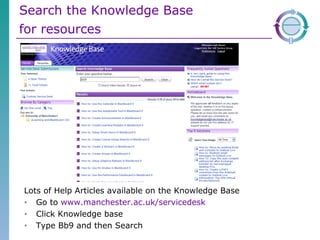
Search the Knowledge Base  for resources   Lots of Help Articles available on the Knowledge Base  Go to  www.manchester.ac.uk/servicedesk   Click Knowledge base  Type Bb9 and then Search
HOW TO MAKE THE TRANSITION Support for the School in Making the Move to Bb9?
Transition overview Aim: Ensure student experience not affected All Schools have timeslots between now and July to move content re-using from Blackboard Vista 8 to Bb9 eLearning team will provide a range of support, presentations, workshops, drop-ins  Academics rebuild courses in Bb9 with content from their computers or content downloaded from BBV8 Other activities working with Schools to  Develop SCS Identify courses that might need extra help
Support for your School Individual School Plans are online at http://www.humanities.manchester.ac.uk/tandl/elearning/bb9/
Support for SED#2 Presentations 6 th  April 3.30-5.00 G030/031 Arthur Lewis Roadshow – First floor Arthur Lewis 4 th -8 th  April 18 th -21 st  April Come and ask questions 12-1 Workshops 19 th , 21 st , 27 th , 28 th  April Drop-ins TBC
What now? Playground via Portal Get to know Bb9 using the Playground and online support Wait until your transition date and we will send an email directing you to the Transition Wizard Activate your courses for Bb9 Using support online and face to face re-build/move content
Finding out more generally Blackboard On-Demand Learning Centre http://ondemand.blackboard.com Knowledge Base articles http://www.manchester.ac.uk/servicedesk   Screen cast of a presentation delivered by Blackboard in June http://www.campus.manchester.ac.uk/elearning/resources/mle_webinars.html MLE Highlights, information about Blackboard 9.1 and the MLE Project include more information about Mobile Learn and Mobile Central http://www.campus.manchester.ac.uk/tlso/newsbulletins/mle/   This presentation is available from  http://www.slideshare.net/humelearningteam/uom-transition-to-bb9-for-sed
Questions?

UoM Transition to BB9 for SED

  • 1.
    Making the moveto Bb9.1 in SED Cath Dyson eLearning Manager Cath Booth Assistant eLearning Manager Faculty of Humanities eLearning team
  • 2.
    YOUR SCHOOL PILOTSWho is already using Bb9 to support students
  • 3.
    Pilot Phase 2Member of Staff Course Course Code Sarah Bracking Politics, Economy and Development IDPM60072 Jamie Woodward Quaternary Environments and Geoarchaeology GEOG20390 Jen O'Brien Overseas Fieldcourse GEOG20072 Karen Badat/Rosie Williams all students in Geography /multiprogramme Organisation Karen Badat/Rosie Williams all students in Planning /multiprogramme Organisations Iain White Sustainable Cities PLAN20351
  • 4.
    BB9 SUMMARY Whatare the improvements to Bb9?
  • 5.
    Bb9 Summary ImprovedInterface Enhanced File Management Media rich content and assessments Improved student performance monitoring Email direct to students MLE Developments
  • 6.
    Improved Interface Notabs - just edit on or off More control over the course menu Using items to build up content Drag and drop items around Set your own home page/entry point Standard Course Structure
  • 7.
    Enhanced File ManagementDrag and Drop files Organise on computer then pull them in Structure remains
  • 8.
    Web 2.0 ContentMash up tool Adding external content YouTube, SlideShare, Flickr Wiki Simplified Blackboard Wiki Easier to use Gradeable
  • 9.
    Assessing Learners Newquestion types in tests YouTube Calculated formula Opinion scale/Likert HotSpot Quiz Bowl Wikis now gradeable
  • 10.
    Monitoring Student PerformanceGrade Centre Smart views Tailored view of student progress e.g. students who scored less than 60 on week 1 quiz Performance Dashboard Notifications/early warning/tracking Base on Grade Rules
  • 11.
    MLE Developments BlackboardMobile Learn Sharing Content across the University Community Provide personalised and targeted information to students integrated with the current portal Enables groups to collaborate and communicate using BB9.1
  • 12.
    Blackboard Learn forAcademic Collaboration
  • 13.
    STANDARD COURSE STRUCTUREHelp for you, consistency for students, meeting the minimum requirements
  • 14.
    Why a StandardCourse Unit Structure Makes it easier to start developing Consistency for students – feedback has been that different navigations and different terms are confusing Support for staff in meeting minimum requirements Additional Resources for both staff and students Schools can build on this Faculty SCS to add content useful to Schools
  • 15.
    UOM IMPLEMENTATION OFBB9 The Portal and the ‘Playground’
  • 16.
    Portal The StaffPortal is the entrance way into Bb9 Access it from www.manchester.ac.uk/portal Click ‘ Teaching and Research ’ tab In the ‘ My Courses ’ portlet, you will see all your courses: Blackboard Vista 8 and/or Bb9 : Current, Future and Ended Courses Little person icon = Blackboard Vista 8 course Bb9 icon = Bb9 course (Option to add ‘My Organisations’ portlet)
  • 17.
    Portal for studentsStudents access the portal in the same way The main difference is that they have a ‘ My Studies ’ tab NOT a ‘Teaching and Research’ tab
  • 18.
    ‘ Organisations’ or‘Communities’ Provides more flexibility in using the online environment to support students Definitely for 2011 Programme level spaces Delivery date tbc Other Academic Communities
  • 19.
    Activate your ‘Playground’Playground is for testing, NOT for course development Please activate it today - but we will use it to support the Practical Workshops so don’t play too much! Just click Activate Playground - you will be asked for a name/title, e.g. Cath’s Test Area , then click Activate
  • 20.
    Search the KnowledgeBase for resources Lots of Help Articles available on the Knowledge Base Go to www.manchester.ac.uk/servicedesk Click Knowledge base Type Bb9 and then Search
  • 21.
    HOW TO MAKETHE TRANSITION Support for the School in Making the Move to Bb9?
  • 22.
    Transition overview Aim:Ensure student experience not affected All Schools have timeslots between now and July to move content re-using from Blackboard Vista 8 to Bb9 eLearning team will provide a range of support, presentations, workshops, drop-ins Academics rebuild courses in Bb9 with content from their computers or content downloaded from BBV8 Other activities working with Schools to Develop SCS Identify courses that might need extra help
  • 23.
    Support for yourSchool Individual School Plans are online at http://www.humanities.manchester.ac.uk/tandl/elearning/bb9/
  • 24.
    Support for SED#2Presentations 6 th April 3.30-5.00 G030/031 Arthur Lewis Roadshow – First floor Arthur Lewis 4 th -8 th April 18 th -21 st April Come and ask questions 12-1 Workshops 19 th , 21 st , 27 th , 28 th April Drop-ins TBC
  • 25.
    What now? Playgroundvia Portal Get to know Bb9 using the Playground and online support Wait until your transition date and we will send an email directing you to the Transition Wizard Activate your courses for Bb9 Using support online and face to face re-build/move content
  • 26.
    Finding out moregenerally Blackboard On-Demand Learning Centre http://ondemand.blackboard.com Knowledge Base articles http://www.manchester.ac.uk/servicedesk Screen cast of a presentation delivered by Blackboard in June http://www.campus.manchester.ac.uk/elearning/resources/mle_webinars.html MLE Highlights, information about Blackboard 9.1 and the MLE Project include more information about Mobile Learn and Mobile Central http://www.campus.manchester.ac.uk/tlso/newsbulletins/mle/ This presentation is available from http://www.slideshare.net/humelearningteam/uom-transition-to-bb9-for-sed
  • 27.

Editor's Notes

  • #4 Already experience being developed within the School Phase 1 about testing Bb9 worked! Phase 2 stretching the features used, broader use of bb9. Lecturers have added their own content. All running smoothly
  • #6 Email is linked to CS, whatever students preferred choice is
  • #12 Communities e.g. LLC have a space for German
  • #17 Presents both Blackboard 8 and Bb9 courses for both students and staff Increased ownership by academic on releasing course
  • #22 Plans still to be agreed formally at TLC Discussed with Martyn and Yoram