Unix file system
Unix file system is logical method of organizing and
storing large amounts of information in a way that makes
it easy to manage.
A file is a smallest unit in which the information is
stored.
Unix file system has several important features.
->all data in Unix is organized into files.
->all files are organized into directories.
-> these directories are organized into a tree like
structure called the file system.
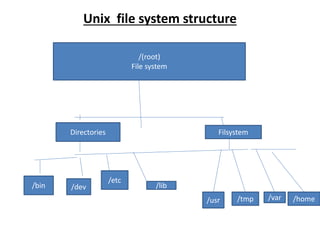
Unix file system structure
/(root)
File system
Directories Filsystem
/bin /dev
/etc
/lib
/usr /tmp /var /home
Directories or files and their description
/: the slash /character alone denotes the root of the file
system tree.
/bin: stands for “binaries” and contains certain fundamental
utilities, such as ls or cp, which are generally needed by all
users.
/boot: contains all the files that are required for successful
booting process.
/dev: stands for “devices”. file representations of peripheral
devices and pseudo-devices.
/etc: contains system-wide configuration files and system
databases. originally also contained “dangerous maintenance
utilities” such as init, but these have typically been moved to
/sbin or elsewhere.
/home: contains the home directories for the users.
Directories or files and their description
• /lib: contains system libraries, and some critical files
such as kernel modules or device drivers.
• /media: default mount point for removable devices,
such as USB sticks, media players, etc.
• /mnt : stands for “mount”. Contains file system
mount points. these are used, for example, if the
system uses multiple hard disks or hard disk
partitions. It is also often used for remote(network)
file system, CD-ROM/DVD dives, and so on.
• /proc : procfs virtual file system showing information
about processes as files.
Directories or files and their description
/root:
• The home directory for the super user “root”-
that is the system administrator.
• This account’s home directory is usually on the
initial file system , and hence not in /home (which
may be a mount point for another file system) in
case specific maintenance needs to be
performed. during which other file system are
not available.
• Such as case could occur. For example , if a hard
disk drive suffers physical failures and can not be
properly mounted.
Directories or files and their description
/tmp:
 A place for temporary files. Many systems
clear this directory upon startup;
 It might have tmpfs mounted a top it, in which
case its contents do not survive a reboot, or it
might be explicitly cleared by a startup script
at boot time.
/usr:
-> originally the directory holding user home
directories, its use has changed.

Unix file system.pptx

  • 1.
    Unix file system Unixfile system is logical method of organizing and storing large amounts of information in a way that makes it easy to manage. A file is a smallest unit in which the information is stored. Unix file system has several important features. ->all data in Unix is organized into files. ->all files are organized into directories. -> these directories are organized into a tree like structure called the file system.
  • 2.
    Unix file systemstructure /(root) File system Directories Filsystem /bin /dev /etc /lib /usr /tmp /var /home
  • 3.
    Directories or filesand their description /: the slash /character alone denotes the root of the file system tree. /bin: stands for “binaries” and contains certain fundamental utilities, such as ls or cp, which are generally needed by all users. /boot: contains all the files that are required for successful booting process. /dev: stands for “devices”. file representations of peripheral devices and pseudo-devices. /etc: contains system-wide configuration files and system databases. originally also contained “dangerous maintenance utilities” such as init, but these have typically been moved to /sbin or elsewhere. /home: contains the home directories for the users.
  • 4.
    Directories or filesand their description • /lib: contains system libraries, and some critical files such as kernel modules or device drivers. • /media: default mount point for removable devices, such as USB sticks, media players, etc. • /mnt : stands for “mount”. Contains file system mount points. these are used, for example, if the system uses multiple hard disks or hard disk partitions. It is also often used for remote(network) file system, CD-ROM/DVD dives, and so on. • /proc : procfs virtual file system showing information about processes as files.
  • 5.
    Directories or filesand their description /root: • The home directory for the super user “root”- that is the system administrator. • This account’s home directory is usually on the initial file system , and hence not in /home (which may be a mount point for another file system) in case specific maintenance needs to be performed. during which other file system are not available. • Such as case could occur. For example , if a hard disk drive suffers physical failures and can not be properly mounted.
  • 6.
    Directories or filesand their description /tmp:  A place for temporary files. Many systems clear this directory upon startup;  It might have tmpfs mounted a top it, in which case its contents do not survive a reboot, or it might be explicitly cleared by a startup script at boot time. /usr: -> originally the directory holding user home directories, its use has changed.