

Universal Search

                                  John Shehata
                               Director of SEO & Social Media
                                             Advance Internet
                                                      Feb, 2011

                                        John Shehata SEO Blog
                                Follow me on Twitter: @JShehata

@JShehata   Universal Search                              Slide 1
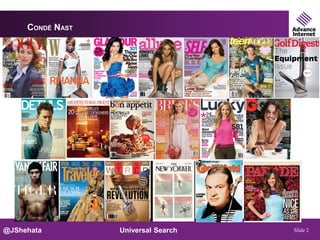
CONDÉ NAST


@JShehata         Universal Search   Slide 2
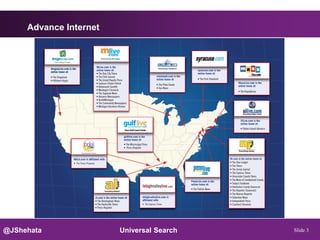
Advance Internet


@JShehata               Universal Search   Slide 3
Newspapers


@JShehata         Universal Search   Slide 4
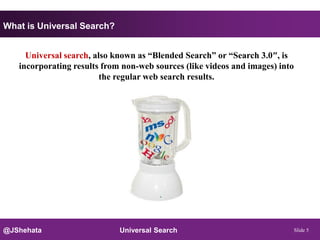
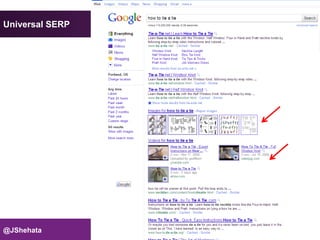
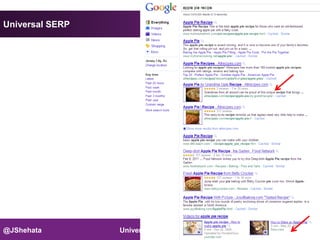
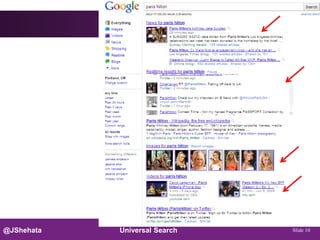
What is Universal Search?


     Universal search, also known as “Blended Search” or “Search 3.0″, is
   incorporating results from non-web sources (like videos and images) into
                         the regular web search results.


@JShehata                    Universal Search                                 Slide 5
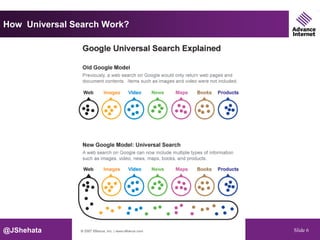
How Universal Search Work?


@JShehata               Universal Search   Slide 6
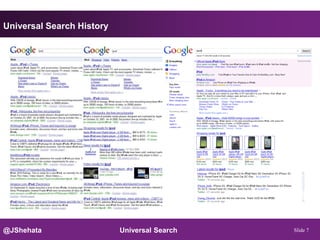
Universal Search History


@JShehata                  Universal Search   Slide 7
Universal SERP


@JShehata        Universal Search   Slide 8
Universal SERP


@JShehata        Universal Search   Slide 9
@JShehata   Universal Search   Slide 10
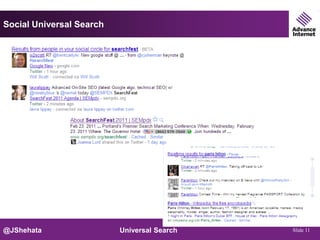
Social Universal Search


@JShehata                 Universal Search   Slide 11
Why Universal Search?


      Command greater SERP real estate

      Excellent for online reputation management

      Leverage your unique content

      Take users directly where they want to go

      Better for Users, Sites, and Engines


@JShehata                  Universal Search        Slide 12
Stats


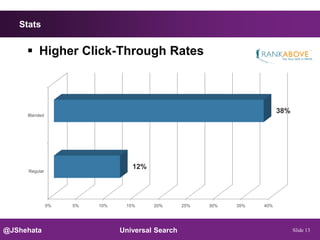
      Higher Click-Through Rates


                                                                          38%
     Blended


                                  12%
     Regular


               0%   5%   10%    15%     20%       25%   30%   35%   40%


@JShehata                      Universal Search                                 Slide 13
Stats


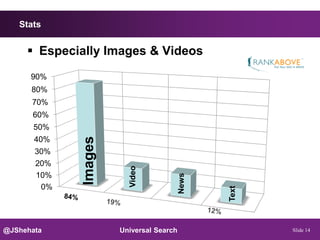
      Especially Images & Videos
      90%
      80%
      70%
      60%
       50%
             Images


       40%
       30%
       20%
                        Video


       10%
                                         News
        0%


@JShehata             Universal Search          Text   Slide 14
Images
@JShehata    Universal Search   Slide 15
On-Site

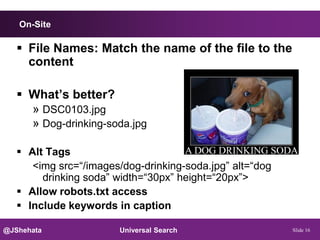
    File Names: Match the name of the file to the
     content

    What’s better?
     » DSC0103.jpg
     » Dog-drinking-soda.jpg

    Alt Tags
      <img src=“/images/dog-drinking-soda.jpg” alt=“dog
        drinking soda” width=“30px” height=“20px”>
    Allow robots.txt access
    Include keywords in caption

@JShehata               Universal Search                  Slide 16
On-Site


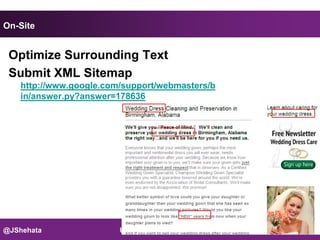
 Optimize Surrounding Text
 Submit XML Sitemap
    http://www.google.com/support/webmasters/b
    in/answer.py?answer=178636


@JShehata                Universal Search        Slide 17
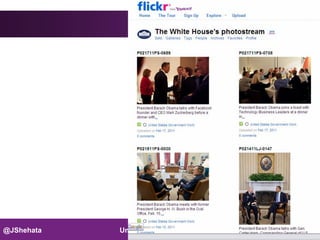
Off-Site Flickr

    http://www.flickr.com/


    Make public


    make sure you tag and describe them, organise into sets
      » decide on copyright and Creative Commons licenses

    Embed your photos in your web site, blog, etc.


    Google alternative http://picasaweb.google.com/


@JShehata                        Universal Search              Slide 18
•www.rba.co.uk   •19
@JShehata   Universal Search             Slide 19
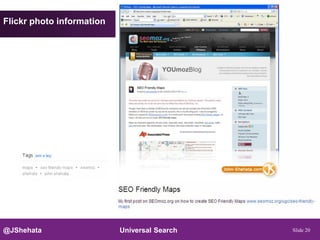
Flickr photo information


@JShehata                  Universal Search   Slide 20
Videos
@JShehata    Universal Search   Slide 21
On-Site


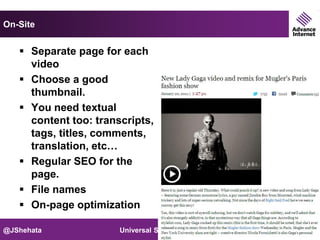
    Separate page for each
     video
    Choose a good
     thumbnail.
    You need textual
     content too: transcripts,
     tags, titles, comments,
     translation, etc…
    Regular SEO for the
     page.
    File names
    On-page optimization

@JShehata              Universal Search   Slide 22
Video Player optimization

      URLs
      Branding
      Call to action
      Sharing tools
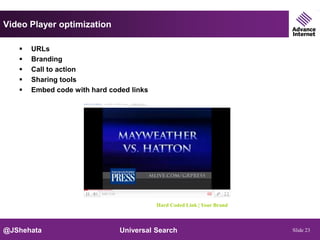
      Embed code with hard coded links


                                          Hard Coded Link | Your Brand


@JShehata                      Universal Search                          Slide 23
On-Site

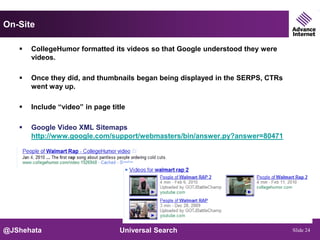
      CollegeHumor formatted its videos so that Google understood they were
       videos.

      Once they did, and thumbnails began being displayed in the SERPS, CTRs
       went way up.

      Include “video” in page title

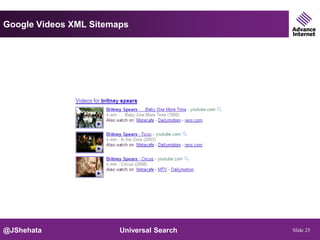
      Google Video XML Sitemaps
       http://www.google.com/support/webmasters/bin/answer.py?answer=80471


@JShehata                         Universal Search                              Slide 24
Google Videos XML Sitemaps


@JShehata               Universal Search   Slide 25
Why YouTube?
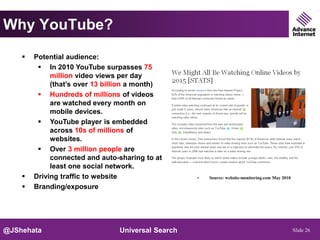
       Potential audience:
          In 2010 YouTube surpasses 75
             million video views per day
             (that’s over 13 billion a month)
          Hundreds of millions of videos
             are watched every month on
             mobile devices.
          YouTube player is embedded
             across 10s of millions of
             websites.
          Over 3 million people are
             connected and auto-sharing to at
             least one social network.
       Driving traffic to website                 •   Source: website-monitoring.com May 2010

       Branding/exposure


@JShehata                       Universal Search                                                 Slide 26
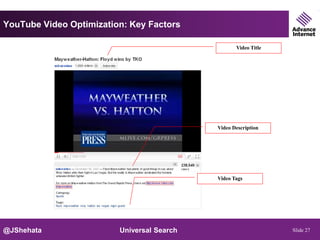
YouTube Video Optimization: Key Factors

                                                   Video Title


                                            Video Description


                                            Video Tags


@JShehata                Universal Search                        Slide 27
YouTube Video Optimization: Other Tips


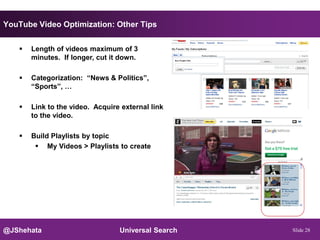
      Length of videos maximum of 3
       minutes. If longer, cut it down.

      Categorization: “News & Politics”,
       “Sports”, …

      Link to the video. Acquire external link
       to the video.

      Build Playlists by topic
         My Videos > Playlists to create


@JShehata                        Universal Search   Slide 28
YouTube Video Optimization: Tips


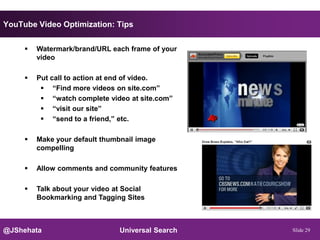
        Watermark/brand/URL each frame of your
         video

        Put call to action at end of video.
           “Find more videos on site.com”
           “watch complete video at site.com”
           “visit our site”
           “send to a friend,” etc.

        Make your default thumbnail image
         compelling

        Allow comments and community features

        Talk about your video at Social
         Bookmarking and Tagging Sites


@JShehata                       Universal Search   Slide 29
Video

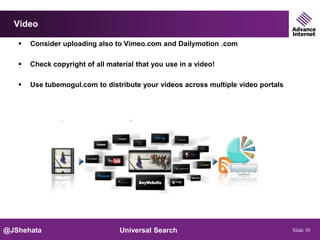
      Consider uploading also to Vimeo.com and Dailymotion .com

      Check copyright of all material that you use in a video!

      Use tubemogul.com to distribute your videos across multiple video portals


@JShehata                         Universal Search                                 Slide 30
Video

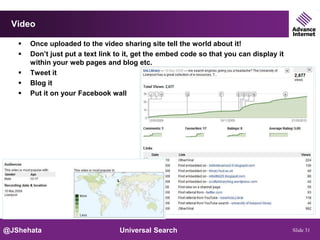
      Once uploaded to the video sharing site tell the world about it!
      Don’t just put a text link to it, get the embed code so that you can display it
       within your web pages and blog etc.
      Tweet it
      Blog it
      Put it on your Facebook wall


@JShehata                         Universal Search                                       Slide 31
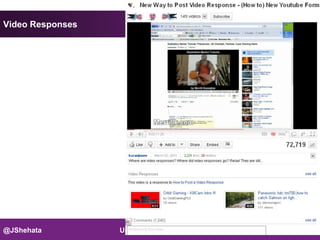
Video Responses


@JShehata         Universal Search   Slide 32
Products
@JShehata     Universal Search   Slide 33
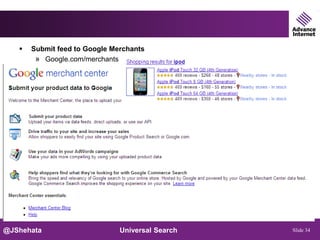
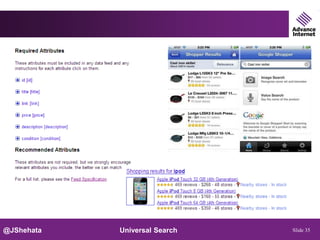
   Submit feed to Google Merchants
        » Google.com/merchants


@JShehata                      Universal Search   Slide 34
@JShehata   Universal Search   Slide 35
Best Practices


      Update your data feed 3 times a week

      Include keywords in your products titles

      Include as many fields as possible


@JShehata                       Universal Search   Slide 36
Blog Posts
@JShehata   Universal Search   Slide 37
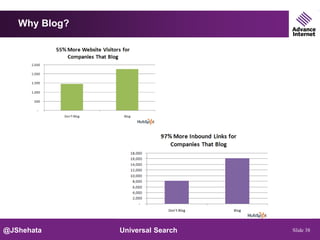
Why Blog?


@JShehata      Universal Search   Slide 38
Setting up your own blog


      Host on the blogging service’s own server or install
       on your site

      Wordpress - free
            » host on http://www.wordpress.com/
            » or host on your own server - software for loading onto your own site at
               http://www.wordpress.org/

        SEO Plugins
          » All in one SEO
          » Automatic SEO Links

        Submit your blog to Google
          » http://blogsearch.google.com/ping


@JShehata                           Universal Search                                    Slide 39
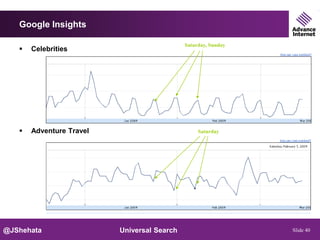
Google Insights

                                             Saturday, Sunday
      Celebrities


      Adventure Travel                           Saturday


@JShehata                 Universal Search                      Slide 40
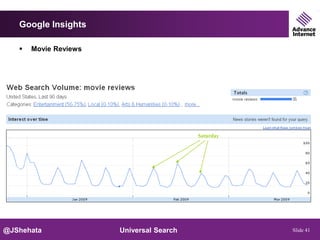
Google Insights

      Movie Reviews


                                          Saturday


@JShehata              Universal Search              Slide 41
News
@JShehata   Universal Search   Slide 42
Press Releases

      OR Produce frequent Press Releases
        » Prweb.com
        » Optimize similar to on-page optimization
        » Include links back to your site
      OR Produce frequent Press Releases
        » Prweb.com
        » Optimize similar to on-page optimization
        » Include links back to your site


@JShehata                         Universal Search   Slide 43
Google News

      Submit Site to Google News
        » Multiple authors
        » Unique content
        » Etc

      Suggest News Source to Google News
        » http://www.google.com/support/news_pub/bin/answer.py?hl=en&answer=191208
          &rd=1


@JShehata                      Universal Search                                 Slide 44
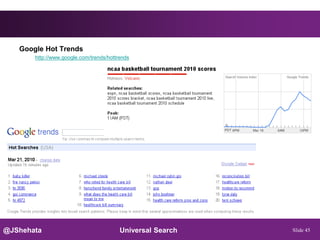
Google Hot Trends
       http://www.google.com/trends/hottrends


@JShehata                                Universal Search   Slide 45
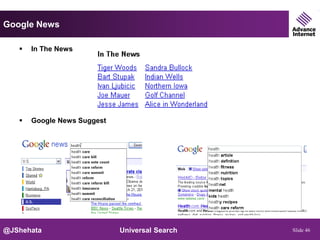
Google News

      In The News


      Google News Suggest


@JShehata                    Universal Search   Slide 46
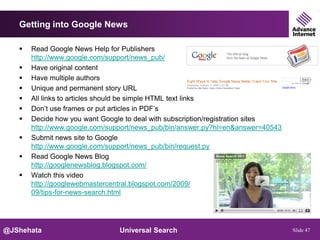
Getting into Google News

      Read Google News Help for Publishers
       http://www.google.com/support/news_pub/
      Have original content
      Have multiple authors
      Unique and permanent story URL
      All links to articles should be simple HTML text links
      Don’t use frames or put articles in PDF’s
      Decide how you want Google to deal with subscription/registration sites
       http://www.google.com/support/news_pub/bin/answer.py?hl=en&answer=40543
      Submit news site to Google
       http://www.google.com/support/news_pub/bin/request.py
      Read Google News Blog
       http://googlenewsblog.blogspot.com/
      Watch this video
       http://googlewebmastercentral.blogspot.com/2009/
       09/tips-for-news-search.html


@JShehata                       Universal Search                                 Slide 47
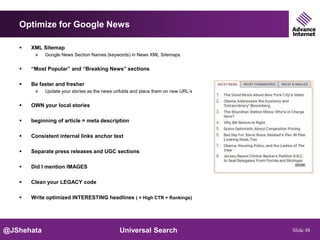
Optimize for Google News

      XML Sitemap
        » Google News Section Names (keywords) in News XML Sitemaps

      “Most Popular” and “Breaking News” sections

      Be faster and fresher
        » Update your stories as the news unfolds and place them on new URL’s

      OWN your local stories

      beginning of article = meta description

      Consistent internal links anchor text

      Separate press releases and UGC sections

      Did I mention IMAGES

      Clean your LEGACY code

      Write optimized INTERESTING headlines ( = High CTR + Rankings)


@JShehata                                    Universal Search                   Slide 48
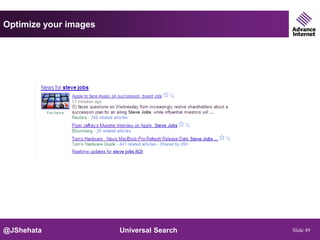
Optimize your images


@JShehata              Universal Search   Slide 49
Other Ideas

      Podcasts

      Rich Snippets
        » http://googlewebmastercentral.blogspot.com/2009/05/introducing-rich-
           snippets.html
        » http://www.google.com/support/webmasters/bin/answer.py?answer=99170

             - Reviews
             - People
             - Products
             - Businesses and organizations
             - Recipes
             - Events


      Slide Shares
      Social Profiles
      etc

@JShehata                        Universal Search                                Slide 50
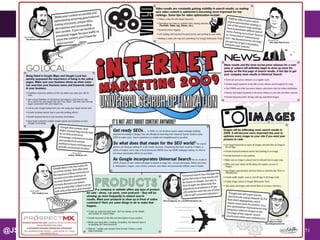
@JShehata   Universal Search   Slide 51
New Marketing Philosophy


      Get found by your best customers by creating an online presence that attracts
      qualified web visitors and leads.


@JShehata                      Universal Search                                   Slide 52
I Don’t Have Content?


@JShehata        Universal Search   Slide 53
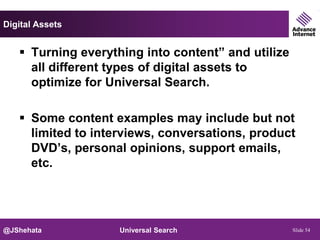
Digital Assets


    Turning everything into content” and utilize
     all different types of digital assets to
     optimize for Universal Search.

    Some content examples may include but not
     limited to interviews, conversations, product
     DVD’s, personal opinions, support emails,
     etc.


@JShehata           Universal Search                Slide 54
@JShehata   Universal Search   Slide 55
@JShehata   Universal Search   Slide 56
@JShehata   Universal Search   Slide 57
@JShehata   Universal Search   Slide 58
@JShehata   Universal Search   Slide 59
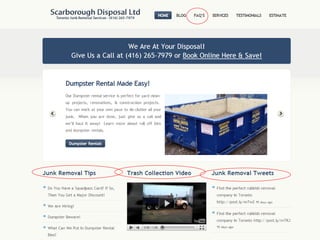
@JShehata   Universal Search   Slide 60
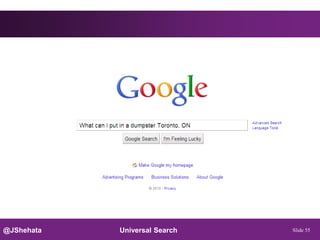
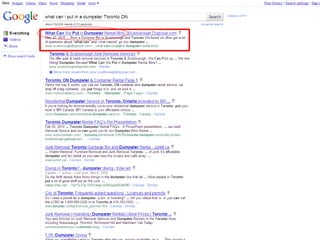
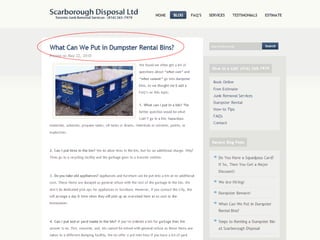
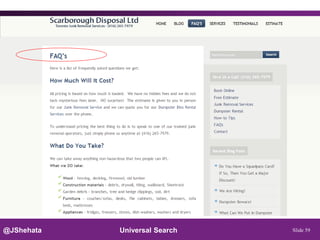
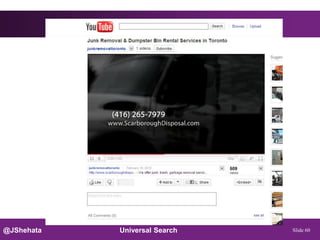
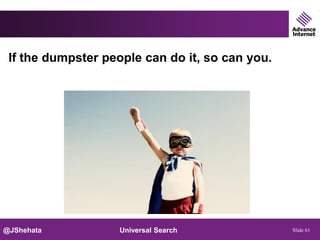
If the dumpster people can do it, so can you.


@JShehata          Universal Search              Slide 61
John Shehata

            Follow Me
             @JShehata
             John-Shehata.com


@JShehata                    Universal Search   Slide 62

Universal Search Optimization - SearchFest 2011 by John Shehata

  • 1.
    Universal Search John Shehata Director of SEO & Social Media Advance Internet Feb, 2011 John Shehata SEO Blog Follow me on Twitter: @JShehata @JShehata Universal Search Slide 1
  • 2.
    CONDÉ NAST @JShehata Universal Search Slide 2
  • 3.
    Advance Internet @JShehata Universal Search Slide 3
  • 4.
    Newspapers @JShehata Universal Search Slide 4
  • 5.
    What is UniversalSearch? Universal search, also known as “Blended Search” or “Search 3.0″, is incorporating results from non-web sources (like videos and images) into the regular web search results. @JShehata Universal Search Slide 5
  • 6.
    How Universal SearchWork? @JShehata Universal Search Slide 6
  • 7.
    Universal Search History @JShehata Universal Search Slide 7
  • 8.
    Universal SERP @JShehata Universal Search Slide 8
  • 9.
    Universal SERP @JShehata Universal Search Slide 9
  • 10.
    @JShehata Universal Search Slide 10
  • 11.
    Social Universal Search @JShehata Universal Search Slide 11
  • 12.
    Why Universal Search?  Command greater SERP real estate  Excellent for online reputation management  Leverage your unique content  Take users directly where they want to go  Better for Users, Sites, and Engines @JShehata Universal Search Slide 12
  • 13.
    Stats  Higher Click-Through Rates 38% Blended 12% Regular 0% 5% 10% 15% 20% 25% 30% 35% 40% @JShehata Universal Search Slide 13
  • 14.
    Stats  Especially Images & Videos 90% 80% 70% 60% 50% Images 40% 30% 20% Video 10% News 0% @JShehata Universal Search Text Slide 14
  • 15.
    Images @JShehata Universal Search Slide 15
  • 16.
    On-Site  File Names: Match the name of the file to the content  What’s better? » DSC0103.jpg » Dog-drinking-soda.jpg  Alt Tags <img src=“/images/dog-drinking-soda.jpg” alt=“dog drinking soda” width=“30px” height=“20px”>  Allow robots.txt access  Include keywords in caption @JShehata Universal Search Slide 16
  • 17.
    On-Site Optimize SurroundingText Submit XML Sitemap http://www.google.com/support/webmasters/b in/answer.py?answer=178636 @JShehata Universal Search Slide 17
  • 18.
    Off-Site Flickr  http://www.flickr.com/  Make public  make sure you tag and describe them, organise into sets » decide on copyright and Creative Commons licenses  Embed your photos in your web site, blog, etc.  Google alternative http://picasaweb.google.com/ @JShehata Universal Search Slide 18
  • 19.
    •www.rba.co.uk •19 @JShehata Universal Search Slide 19
  • 20.
    Flickr photo information @JShehata Universal Search Slide 20
  • 21.
    Videos @JShehata Universal Search Slide 21
  • 22.
    On-Site  Separate page for each video  Choose a good thumbnail.  You need textual content too: transcripts, tags, titles, comments, translation, etc…  Regular SEO for the page.  File names  On-page optimization @JShehata Universal Search Slide 22
  • 23.
    Video Player optimization  URLs  Branding  Call to action  Sharing tools  Embed code with hard coded links Hard Coded Link | Your Brand @JShehata Universal Search Slide 23
  • 24.
    On-Site  CollegeHumor formatted its videos so that Google understood they were videos.  Once they did, and thumbnails began being displayed in the SERPS, CTRs went way up.  Include “video” in page title  Google Video XML Sitemaps http://www.google.com/support/webmasters/bin/answer.py?answer=80471 @JShehata Universal Search Slide 24
  • 25.
    Google Videos XMLSitemaps @JShehata Universal Search Slide 25
  • 26.
    Why YouTube?  Potential audience:  In 2010 YouTube surpasses 75 million video views per day (that’s over 13 billion a month)  Hundreds of millions of videos are watched every month on mobile devices.  YouTube player is embedded across 10s of millions of websites.  Over 3 million people are connected and auto-sharing to at least one social network.  Driving traffic to website • Source: website-monitoring.com May 2010  Branding/exposure @JShehata Universal Search Slide 26
  • 27.
    YouTube Video Optimization:Key Factors Video Title Video Description Video Tags @JShehata Universal Search Slide 27
  • 28.
    YouTube Video Optimization:Other Tips  Length of videos maximum of 3 minutes. If longer, cut it down.  Categorization: “News & Politics”, “Sports”, …  Link to the video. Acquire external link to the video.  Build Playlists by topic  My Videos > Playlists to create @JShehata Universal Search Slide 28
  • 29.
    YouTube Video Optimization:Tips  Watermark/brand/URL each frame of your video  Put call to action at end of video.  “Find more videos on site.com”  “watch complete video at site.com”  “visit our site”  “send to a friend,” etc.  Make your default thumbnail image compelling  Allow comments and community features  Talk about your video at Social Bookmarking and Tagging Sites @JShehata Universal Search Slide 29
  • 30.
    Video  Consider uploading also to Vimeo.com and Dailymotion .com  Check copyright of all material that you use in a video!  Use tubemogul.com to distribute your videos across multiple video portals @JShehata Universal Search Slide 30
  • 31.
    Video  Once uploaded to the video sharing site tell the world about it!  Don’t just put a text link to it, get the embed code so that you can display it within your web pages and blog etc.  Tweet it  Blog it  Put it on your Facebook wall @JShehata Universal Search Slide 31
  • 32.
    Video Responses @JShehata Universal Search Slide 32
  • 33.
    Products @JShehata Universal Search Slide 33
  • 34.
    Submit feed to Google Merchants » Google.com/merchants @JShehata Universal Search Slide 34
  • 35.
    @JShehata Universal Search Slide 35
  • 36.
    Best Practices  Update your data feed 3 times a week  Include keywords in your products titles  Include as many fields as possible @JShehata Universal Search Slide 36
  • 37.
    Blog Posts @JShehata Universal Search Slide 37
  • 38.
    Why Blog? @JShehata Universal Search Slide 38
  • 39.
    Setting up yourown blog  Host on the blogging service’s own server or install on your site  Wordpress - free » host on http://www.wordpress.com/ » or host on your own server - software for loading onto your own site at http://www.wordpress.org/  SEO Plugins » All in one SEO » Automatic SEO Links  Submit your blog to Google » http://blogsearch.google.com/ping @JShehata Universal Search Slide 39
  • 40.
    Google Insights Saturday, Sunday  Celebrities  Adventure Travel Saturday @JShehata Universal Search Slide 40
  • 41.
    Google Insights  Movie Reviews Saturday @JShehata Universal Search Slide 41
  • 42.
    News @JShehata Universal Search Slide 42
  • 43.
    Press Releases  OR Produce frequent Press Releases » Prweb.com » Optimize similar to on-page optimization » Include links back to your site  OR Produce frequent Press Releases » Prweb.com » Optimize similar to on-page optimization » Include links back to your site @JShehata Universal Search Slide 43
  • 44.
    Google News  Submit Site to Google News » Multiple authors » Unique content » Etc  Suggest News Source to Google News » http://www.google.com/support/news_pub/bin/answer.py?hl=en&answer=191208 &rd=1 @JShehata Universal Search Slide 44
  • 45.
    Google Hot Trends http://www.google.com/trends/hottrends @JShehata Universal Search Slide 45
  • 46.
    Google News  In The News  Google News Suggest @JShehata Universal Search Slide 46
  • 47.
    Getting into GoogleNews  Read Google News Help for Publishers http://www.google.com/support/news_pub/  Have original content  Have multiple authors  Unique and permanent story URL  All links to articles should be simple HTML text links  Don’t use frames or put articles in PDF’s  Decide how you want Google to deal with subscription/registration sites http://www.google.com/support/news_pub/bin/answer.py?hl=en&answer=40543  Submit news site to Google http://www.google.com/support/news_pub/bin/request.py  Read Google News Blog http://googlenewsblog.blogspot.com/  Watch this video http://googlewebmastercentral.blogspot.com/2009/ 09/tips-for-news-search.html @JShehata Universal Search Slide 47
  • 48.
    Optimize for GoogleNews  XML Sitemap » Google News Section Names (keywords) in News XML Sitemaps  “Most Popular” and “Breaking News” sections  Be faster and fresher » Update your stories as the news unfolds and place them on new URL’s  OWN your local stories  beginning of article = meta description  Consistent internal links anchor text  Separate press releases and UGC sections  Did I mention IMAGES  Clean your LEGACY code  Write optimized INTERESTING headlines ( = High CTR + Rankings) @JShehata Universal Search Slide 48
  • 49.
    Optimize your images @JShehata Universal Search Slide 49
  • 50.
    Other Ideas  Podcasts  Rich Snippets » http://googlewebmastercentral.blogspot.com/2009/05/introducing-rich- snippets.html » http://www.google.com/support/webmasters/bin/answer.py?answer=99170 - Reviews - People - Products - Businesses and organizations - Recipes - Events  Slide Shares  Social Profiles  etc @JShehata Universal Search Slide 50
  • 51.
    @JShehata Universal Search Slide 51
  • 52.
    New Marketing Philosophy Get found by your best customers by creating an online presence that attracts qualified web visitors and leads. @JShehata Universal Search Slide 52
  • 53.
    I Don’t HaveContent? @JShehata Universal Search Slide 53
  • 54.
    Digital Assets  Turning everything into content” and utilize all different types of digital assets to optimize for Universal Search.  Some content examples may include but not limited to interviews, conversations, product DVD’s, personal opinions, support emails, etc. @JShehata Universal Search Slide 54
  • 55.
    @JShehata Universal Search Slide 55
  • 56.
    @JShehata Universal Search Slide 56
  • 57.
    @JShehata Universal Search Slide 57
  • 58.
    @JShehata Universal Search Slide 58
  • 59.
    @JShehata Universal Search Slide 59
  • 60.
    @JShehata Universal Search Slide 60
  • 61.
    If the dumpsterpeople can do it, so can you. @JShehata Universal Search Slide 61
  • 62.
    John Shehata Follow Me  @JShehata  John-Shehata.com @JShehata Universal Search Slide 62