Introduction to Search Engine
Optimisation
Caroline Rodgers
SEO Consultant, biznet IIS
Caroline.Rodgers@biznetiis.com
Twitter: @caro_biznetiis
Website: www.biznetiis.com
SEM ?
SEM?
• Search engine marketing, or SEM, is a form of
Internet marketing that seeks to promote
websites by increasing their visibility in search
engine result pages (SERPs) through the use
of:
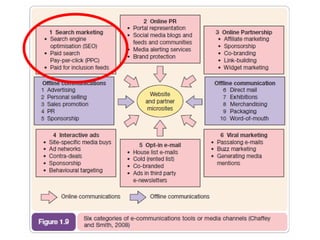
1. search engine optimisation (organic listings)
2. paid placement (PPC)
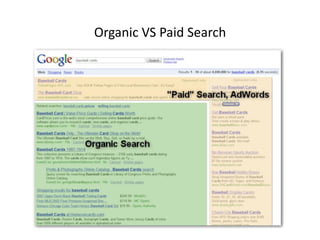
Organic VS Paid Search
Organic SEO Listings
• This is about trying to gain prominence
in the ‘organic’ or ‘natural’ listings - the
results found on the left of the search
results page.
• It doesn’t cost you anything when
someone clicks on these links, but SEO
requires patience, investment and a
long-term approach.
Paid Listings
• These ‘sponsored links’ are essentially results that
advertisers have control over and PAY FOR.
• Companies choose to place ads that are matched to
search queries.
• These links tend to be found on the right of the page and
at the very top.
• You undergo a cost every time somebody clicks on them.
• You define how much you’re prepared to pay – it’s
essentially an auction that governs ad position, with the
top ad typically paying the most per click.
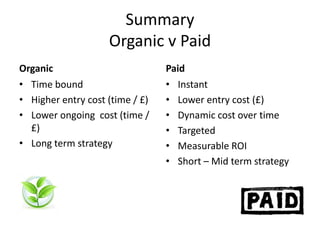
Summary
Organic v Paid
Organic
• Time bound
• Higher entry cost (time / £)
• Lower ongoing cost (time /
£)
• Long term strategy
Paid
• Instant
• Lower entry cost (£)
• Dynamic cost over time
• Targeted
• Measurable ROI
• Short – Mid term strategy
SEO Stats
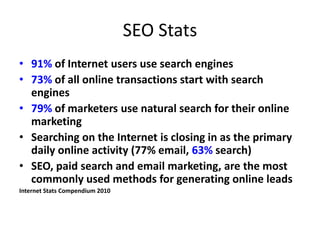
• 91% of Internet users use search engines
• 73% of all online transactions start with search
engines
• 79% of marketers use natural search for their online
marketing
• Searching on the Internet is closing in as the primary
daily online activity (77% email, 63% search)
• SEO, paid search and email marketing, are the most
commonly used methods for generating online leads
Internet Stats Compendium 2010
SEO Benefits
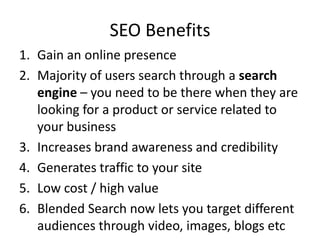
1. Gain an online presence
2. Majority of users search through a search
engine – you need to be there when they are
looking for a product or service related to
your business
3. Increases brand awareness and credibility
4. Generates traffic to your site
5. Low cost / high value
6. Blended Search now lets you target different
audiences through video, images, blogs etc
SEO Challenges
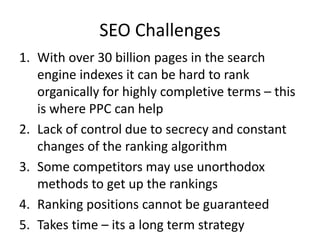
1. With over 30 billion pages in the search
engine indexes it can be hard to rank
organically for highly completive terms – this
is where PPC can help
2. Lack of control due to secrecy and constant
changes of the ranking algorithm
3. Some competitors may use unorthodox
methods to get up the rankings
4. Ranking positions cannot be guaranteed
5. Takes time – its a long term strategy
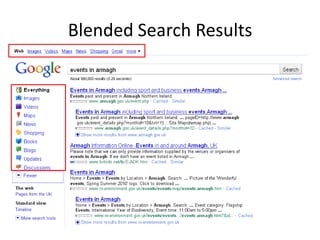
Blended Search Results
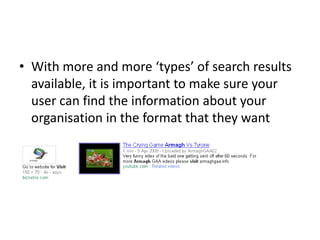
• With more and more ‘types’ of search results
available, it is important to make sure your
user can find the information about your
organisation in the format that they want
When Should SEO Commence ?
• SEO starts as soon as your website is live
• It takes time to generate results – no such
thing as instant results (with organic SEO)
• Once content is placed on your website, the
SEO journey is just starting
• Consider the nature of your content and its
relevance / value to target audiences
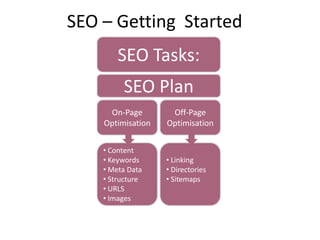
SEO – Getting Started
SEO Tasks:
On-Page
Optimisation
Off-Page
Optimisation
•
• Content
• Keywords
• Meta Data
• Structure
• URLS
• Images
• Linking
• Directories
• Sitemaps
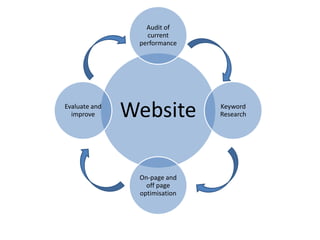
SEO Plan
SEO Plan
1. Set goals that you want to achieve from your
website and how SEO will help you achieve
these
2. Audit your current SEO performance (Google
Analytics, Rank Checker)
3. Start your keyword / phrase analysis
4. Carry out on-page optimisation techniques
5. Carry out off-page optimisation techniques
6. Evaluate and improve
Website
Audit of
current
performance
Keyword
Research
On-page and
off page
optimisation
Evaluate and
improve
Keywords
“Identifying and selecting the
correct keywords for your site
is core to the success of your
SEO strategy”
Keywords
Selecting your keywords
• Brainstorming – Think like a customer, what would they type
into a search engine. e.g “events in Armagh”, “things to do in
Armagh”
• Existing Data - Surveying past data in tools such as Google
Analytics will provide you with invaluable data.
• Applying Data from KW Research Tools - Using these tools
can offer concrete data about trends in keyword selection.
WordTracker (http://www.wordtracker.com), Google Keyword
Tools
(https://adwords.google.com/select/KeywordToolExternal)
Keywords
• Term Selection - Create a matrix or chart that analyses the
terms you believe are valuable and compares traffic,
relevancy, and the likelihood of conversions for each.
• Performance Testing and Analytics - After keyword selection
and implementation of targeting, use analytics programs that
measure web traffic, activity, and conversions that can be
used to further refine keyword selection.
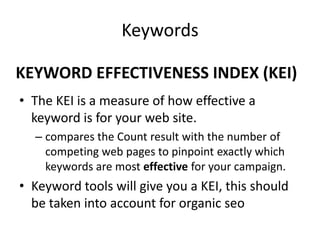
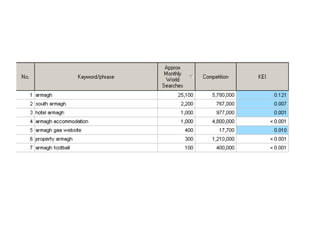
KEYWORD EFFECTIVENESS INDEX (KEI)
• The KEI is a measure of how effective a
keyword is for your web site.
– compares the Count result with the number of
competing web pages to pinpoint exactly which
keywords are most effective for your campaign.
• Keyword tools will give you a KEI, this should
be taken into account for organic seo
Keywords
On-page optimisation
CONTENT
Content
Make it relevant and kept it up to date
• Search Engines like unique, relevant and up to
date content. Appealing and current content
is likely to link a user from a search engine to
a relevant website and you will offer people a
reason to connect to your website
Content
Tips for you website content:
1. Make it concise and to the point
2. Contain your keywords and phrases within the
content
3. Update your content regularly – news stories / blogs
/ videos are ideal for this
4. Do not duplicate content – this is frowned upon by
search engines
5. Try to use feature rich content such as images /
videos / blogs and news stories which will reinforce
static page content.
6. Make sure Images and Videos are tagged for Search
engines
On-page optimisation
META DATA
META Data
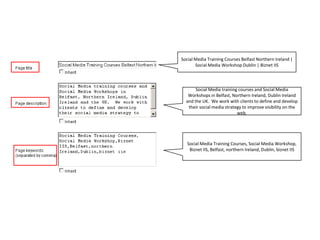
• Meta Data are tags within your website which
identify your site to the search engines.
• The most common meta data tags are for Title,
Description and Keywords. These tags tell search
engines the a description of your website and the
keywords associated to it.
• Ideally meta description and keywords should be
specific and relevant to each page within your
website, this will allow search engines to sort pages
by their subject and relevancy to keywords.
Social Media Training Courses Belfast Northern Ireland |
Social Media Workshop Dublin | Biznet IIS
Social Media training courses and Social Media
Workshops in Belfast, Northern Ireland, Dublin Ireland
and the UK. We work with clients to define and develop
their social media strategy to improve visibility on the
web.
Social Media Training Courses, Social Media Workshop,
Biznet IIS, Belfast, northern Ireland, Dublin, biznet IIS
On-page optimisation
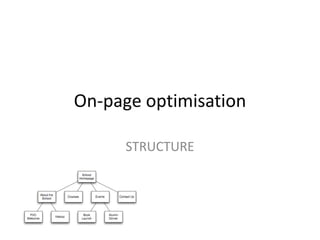
STRUCTURE
Structure
• Structure your content correctly
– Use H1, H2 Tags for titles and sub titles within
your text, make sure they contain keywords
– Inter-link between different sections on your site,
link the keyword not ‘read more’
– Use Alt tags for images
– Bold keywords
– Keyword density on page (4-7%)
– Tag Flash / video for accessibility
On-page optimisation
URLS
URLs
• A factor in the ranking algorithms
• Its not just about your domain name
• Dynamic url’s need to be structured correctly
• Avoid variables id=?yt2343
• Keywords are picked up in the URL’s
URL Examples
• www.carolinescurtains.com
• www.carolinescurtains.com/cat_23?id=prod3
4
• dynamic urls
– Carolinescurtians.com/curtains/tabtop/red
– Carolinescurtians.com/readymadecurtains
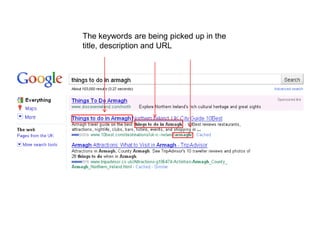
The keywords are being picked up in the
title, description and URL
On-page optimisation
IMAGES
Image Optimisation
• Images should be optimised for the search
engines
• Image searches available and are becoming
more popular
Image Optimisation
TIPS:
• Give the image a relevant name
DSC1098.jpg means nothings
Armagh_planetarium.jpg does
• Give the image a relevant name
• Add ‘alt attributes’ to image and make them
relevant – use keywords if possible
• Avoid spaces in the name as these are picked
up as %20
• In general, keep images a web friendly size
Off-page optimisation
LINKING
Off-Page Optimisation –
Linking
• Incoming links are a vital part of your SEO strategy –
they add to the ‘quality’ of your site in the eyes of
the search engines
• Must be good quality links coming from a relevant
source
• Also link TO relevant websites
• Review your links on a regular basis
• Link to a site which has a higher page rank than you
• E-mail potential link partners and introduce yourself
and your organisation – flattery works very well!
• Pick up the phone and have a conversation
• Analyse incoming links to your site
Directories
• Submit your website to relevant directories
and search engines
– DMOZ – www.dmoz.org
– Yahoo Directory - http://dir.yahoo.com/
– Best of the Web – www.botw.org
– Kelly Search – www.kellysearch.co.uk
– 4NI – www.4ni.co.uk (Paid for but effective)
• Submit to Google Places
Link Building Tips
• What are you competitors doing?
– Where are they listed?
– Go to Yahoo! and find out link:competitorurl.com
– Get yourself listed in the same place
– Find their Google Map listing and click ‘more information’
See who is liking to them and get yourself listed
• Use blogs / forums and Social Media for linking
Off-page optimisation
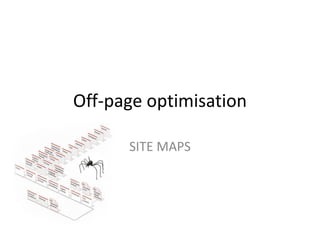
SITE MAPS
Off-Page Optimisation –
Sitemaps
• Make Use of a Sitemap –
– The sitemap should, ideally, offer links to all of the site's
internal pages.
– Have both and HTML and XML site map
– They assist web crawlers to navigate the site
‘Black Hat’ SEO
• Keyword stuffing: Packing long lists of keywords and
nothing else onto your site will get you penalized
eventually by search engines.
• Invisible text: This is putting lists of keywords in
white text on a white background in hopes of
attracting more search engine spiders.
• Doorway Pages: A doorway page is basically a “fake”
page that the user will never see. It is purely for
search engine spiders, and attempts to trick them
into indexing the site higher.
Tools
• Webmaster Tools
• Use free tools to measure success
– http://www.seomoz.org/tools
• Site Analyse
– Tool for checking broken links, accessibility,
spelling errors
SEO Tactics
• What are industry experts doing?
– Set up Google alerts
– Subscribe to blog feeds
• Remember to make all content unique
– Including Meta DATA
• Links are important – don’t under estimate
• Use the power of social media

Getting Started with SEO

  • 1.
    Introduction to SearchEngine Optimisation Caroline Rodgers SEO Consultant, biznet IIS Caroline.Rodgers@biznetiis.com Twitter: @caro_biznetiis Website: www.biznetiis.com
  • 2.
  • 3.
    SEM? • Search enginemarketing, or SEM, is a form of Internet marketing that seeks to promote websites by increasing their visibility in search engine result pages (SERPs) through the use of: 1. search engine optimisation (organic listings) 2. paid placement (PPC)
  • 4.
  • 5.
    Organic SEO Listings •This is about trying to gain prominence in the ‘organic’ or ‘natural’ listings - the results found on the left of the search results page. • It doesn’t cost you anything when someone clicks on these links, but SEO requires patience, investment and a long-term approach.
  • 6.
    Paid Listings • These‘sponsored links’ are essentially results that advertisers have control over and PAY FOR. • Companies choose to place ads that are matched to search queries. • These links tend to be found on the right of the page and at the very top. • You undergo a cost every time somebody clicks on them. • You define how much you’re prepared to pay – it’s essentially an auction that governs ad position, with the top ad typically paying the most per click.
  • 7.
    Summary Organic v Paid Organic •Time bound • Higher entry cost (time / £) • Lower ongoing cost (time / £) • Long term strategy Paid • Instant • Lower entry cost (£) • Dynamic cost over time • Targeted • Measurable ROI • Short – Mid term strategy
  • 8.
    SEO Stats • 91%of Internet users use search engines • 73% of all online transactions start with search engines • 79% of marketers use natural search for their online marketing • Searching on the Internet is closing in as the primary daily online activity (77% email, 63% search) • SEO, paid search and email marketing, are the most commonly used methods for generating online leads Internet Stats Compendium 2010
  • 9.
    SEO Benefits 1. Gainan online presence 2. Majority of users search through a search engine – you need to be there when they are looking for a product or service related to your business 3. Increases brand awareness and credibility 4. Generates traffic to your site 5. Low cost / high value 6. Blended Search now lets you target different audiences through video, images, blogs etc
  • 10.
    SEO Challenges 1. Withover 30 billion pages in the search engine indexes it can be hard to rank organically for highly completive terms – this is where PPC can help 2. Lack of control due to secrecy and constant changes of the ranking algorithm 3. Some competitors may use unorthodox methods to get up the rankings 4. Ranking positions cannot be guaranteed 5. Takes time – its a long term strategy
  • 11.
  • 12.
    • With moreand more ‘types’ of search results available, it is important to make sure your user can find the information about your organisation in the format that they want
  • 13.
    When Should SEOCommence ? • SEO starts as soon as your website is live • It takes time to generate results – no such thing as instant results (with organic SEO) • Once content is placed on your website, the SEO journey is just starting • Consider the nature of your content and its relevance / value to target audiences
  • 14.
    SEO – GettingStarted SEO Tasks: On-Page Optimisation Off-Page Optimisation • • Content • Keywords • Meta Data • Structure • URLS • Images • Linking • Directories • Sitemaps SEO Plan
  • 15.
    SEO Plan 1. Setgoals that you want to achieve from your website and how SEO will help you achieve these 2. Audit your current SEO performance (Google Analytics, Rank Checker) 3. Start your keyword / phrase analysis 4. Carry out on-page optimisation techniques 5. Carry out off-page optimisation techniques 6. Evaluate and improve
  • 16.
  • 17.
    Keywords “Identifying and selectingthe correct keywords for your site is core to the success of your SEO strategy”
  • 18.
    Keywords Selecting your keywords •Brainstorming – Think like a customer, what would they type into a search engine. e.g “events in Armagh”, “things to do in Armagh” • Existing Data - Surveying past data in tools such as Google Analytics will provide you with invaluable data. • Applying Data from KW Research Tools - Using these tools can offer concrete data about trends in keyword selection. WordTracker (http://www.wordtracker.com), Google Keyword Tools (https://adwords.google.com/select/KeywordToolExternal)
  • 19.
    Keywords • Term Selection- Create a matrix or chart that analyses the terms you believe are valuable and compares traffic, relevancy, and the likelihood of conversions for each. • Performance Testing and Analytics - After keyword selection and implementation of targeting, use analytics programs that measure web traffic, activity, and conversions that can be used to further refine keyword selection.
  • 20.
    KEYWORD EFFECTIVENESS INDEX(KEI) • The KEI is a measure of how effective a keyword is for your web site. – compares the Count result with the number of competing web pages to pinpoint exactly which keywords are most effective for your campaign. • Keyword tools will give you a KEI, this should be taken into account for organic seo Keywords
  • 22.
  • 23.
    Content Make it relevantand kept it up to date • Search Engines like unique, relevant and up to date content. Appealing and current content is likely to link a user from a search engine to a relevant website and you will offer people a reason to connect to your website
  • 24.
    Content Tips for youwebsite content: 1. Make it concise and to the point 2. Contain your keywords and phrases within the content 3. Update your content regularly – news stories / blogs / videos are ideal for this 4. Do not duplicate content – this is frowned upon by search engines 5. Try to use feature rich content such as images / videos / blogs and news stories which will reinforce static page content. 6. Make sure Images and Videos are tagged for Search engines
  • 25.
  • 26.
    META Data • MetaData are tags within your website which identify your site to the search engines. • The most common meta data tags are for Title, Description and Keywords. These tags tell search engines the a description of your website and the keywords associated to it. • Ideally meta description and keywords should be specific and relevant to each page within your website, this will allow search engines to sort pages by their subject and relevancy to keywords.
  • 27.
    Social Media TrainingCourses Belfast Northern Ireland | Social Media Workshop Dublin | Biznet IIS Social Media training courses and Social Media Workshops in Belfast, Northern Ireland, Dublin Ireland and the UK. We work with clients to define and develop their social media strategy to improve visibility on the web. Social Media Training Courses, Social Media Workshop, Biznet IIS, Belfast, northern Ireland, Dublin, biznet IIS
  • 28.
  • 29.
    Structure • Structure yourcontent correctly – Use H1, H2 Tags for titles and sub titles within your text, make sure they contain keywords – Inter-link between different sections on your site, link the keyword not ‘read more’ – Use Alt tags for images – Bold keywords – Keyword density on page (4-7%) – Tag Flash / video for accessibility
  • 30.
  • 31.
    URLs • A factorin the ranking algorithms • Its not just about your domain name • Dynamic url’s need to be structured correctly • Avoid variables id=?yt2343 • Keywords are picked up in the URL’s
  • 32.
    URL Examples • www.carolinescurtains.com •www.carolinescurtains.com/cat_23?id=prod3 4 • dynamic urls – Carolinescurtians.com/curtains/tabtop/red – Carolinescurtians.com/readymadecurtains
  • 33.
    The keywords arebeing picked up in the title, description and URL
  • 34.
  • 35.
    Image Optimisation • Imagesshould be optimised for the search engines • Image searches available and are becoming more popular
  • 36.
    Image Optimisation TIPS: • Givethe image a relevant name DSC1098.jpg means nothings Armagh_planetarium.jpg does • Give the image a relevant name • Add ‘alt attributes’ to image and make them relevant – use keywords if possible • Avoid spaces in the name as these are picked up as %20 • In general, keep images a web friendly size
  • 37.
  • 38.
    Off-Page Optimisation – Linking •Incoming links are a vital part of your SEO strategy – they add to the ‘quality’ of your site in the eyes of the search engines • Must be good quality links coming from a relevant source • Also link TO relevant websites • Review your links on a regular basis • Link to a site which has a higher page rank than you • E-mail potential link partners and introduce yourself and your organisation – flattery works very well! • Pick up the phone and have a conversation • Analyse incoming links to your site
  • 39.
    Directories • Submit yourwebsite to relevant directories and search engines – DMOZ – www.dmoz.org – Yahoo Directory - http://dir.yahoo.com/ – Best of the Web – www.botw.org – Kelly Search – www.kellysearch.co.uk – 4NI – www.4ni.co.uk (Paid for but effective) • Submit to Google Places
  • 40.
    Link Building Tips •What are you competitors doing? – Where are they listed? – Go to Yahoo! and find out link:competitorurl.com – Get yourself listed in the same place – Find their Google Map listing and click ‘more information’ See who is liking to them and get yourself listed • Use blogs / forums and Social Media for linking
  • 41.
  • 42.
    Off-Page Optimisation – Sitemaps •Make Use of a Sitemap – – The sitemap should, ideally, offer links to all of the site's internal pages. – Have both and HTML and XML site map – They assist web crawlers to navigate the site
  • 43.
    ‘Black Hat’ SEO •Keyword stuffing: Packing long lists of keywords and nothing else onto your site will get you penalized eventually by search engines. • Invisible text: This is putting lists of keywords in white text on a white background in hopes of attracting more search engine spiders. • Doorway Pages: A doorway page is basically a “fake” page that the user will never see. It is purely for search engine spiders, and attempts to trick them into indexing the site higher.
  • 44.
    Tools • Webmaster Tools •Use free tools to measure success – http://www.seomoz.org/tools • Site Analyse – Tool for checking broken links, accessibility, spelling errors
  • 45.
    SEO Tactics • Whatare industry experts doing? – Set up Google alerts – Subscribe to blog feeds • Remember to make all content unique – Including Meta DATA • Links are important – don’t under estimate • Use the power of social media