













4Ps Marketing 
Evolution or Extinction: 
Survive and Thrive with New 
Google Analytics Features
Hello! 
I am Matt Stannard, Head of Analytics and 
Tech for 4Ps Marketing. 
GAIQ qualified and member of the DAA. 
Strong development background from the 
days when we didn’t have jQuery. 
Passionate about Google Analytics (I could 
talk about this all day……) 
Follow me: 
Twitter: @mattstannard 
G+ : https://plus.google.com/+MattStannard
Experience
This Sessions Objectives 
I want you to leave this session today: 
• Understanding Why Universal 
• Knowing Custom Dimensions and Metrics are Awesome 
• Understanding a customers “touch points” are key with 
Cross Device measurement 
• Seeing that tracking isn’t just about a website 
• Understanding that demographics can help us 
contextualise 
• Be excited about the future, we’ve come a long way!
Evolution and Extinction: 
Why Universal?
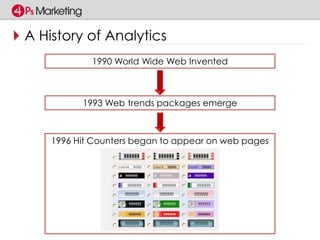
A History of Analytics 
1990 World Wide Web Invented 
1993 Web trends packages emerge 
1996 Hit Counters began to appear on web pages
A History of Analytics 
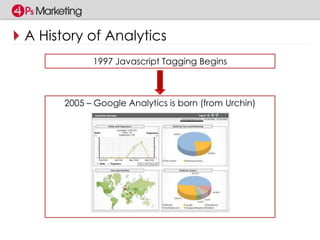
1997 Javascript Tagging Begins 
2005 – Google Analytics is born (from Urchin)
A History of Analytics 
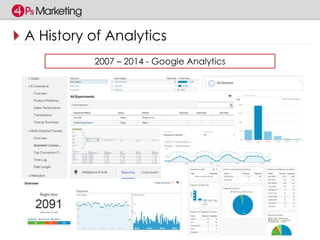
2007 – 2014 - Google Analytics
A History of Analytics 
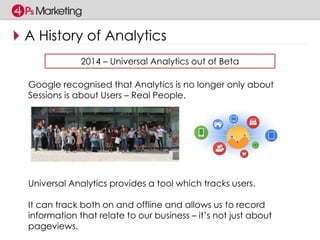
2014 – Universal Analytics out of Beta 
Google recognised that Analytics is no longer only about 
Sessions is about Users – Real People. 
Universal Analytics provides a tool which tracks users. 
It can track both on and offline and allows us to record 
information that relate to our business – it’s not just about 
pageviews.
Why Universal? 
Universal Analytics extends the feature set allowing us to: 
• Define Custom Dimensions and Metrics 
• Track Users across devices (using User-Id) 
• Integrate Offline Sources (through the Measurement 
Protocol) 
• Give us Demographics 
• Access to other features (such as Enhanced Ecommerce)
Evolution and Extinction: 
Custom Dimensions / Metrics
Definition 
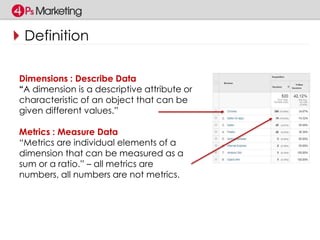
Dimensions : Describe Data 
“A dimension is a descriptive attribute or 
characteristic of an object that can be 
given different values.” 
Metrics : Measure Data 
“Metrics are individual elements of a 
dimension that can be measured as a 
sum or a ratio.” – all metrics are 
numbers, all numbers are not metrics.
What If… 
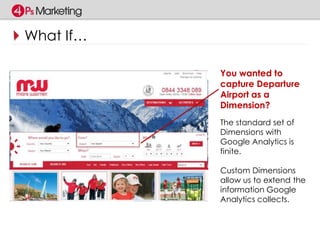
You wanted to 
capture Departure 
Airport as a 
Dimension? 
The standard set of 
Dimensions with 
Google Analytics is 
finite. 
Custom Dimensions 
allow us to extend the 
information Google 
Analytics collects.
Built in Search? 
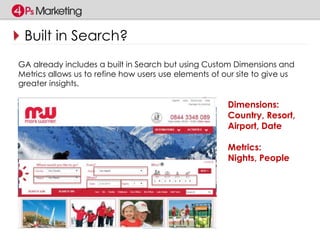
GA already includes a built in Search but using Custom Dimensions and 
Metrics allows us to refine how users use elements of our site to give us 
greater insights. 
Dimensions: 
Country, Resort, 
Airport, Date 
Metrics: 
Nights, People
What does this give us? 
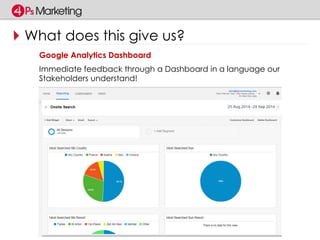
Google Analytics Dashboard 
Immediate feedback through a Dashboard in a language our 
Stakeholders understand!
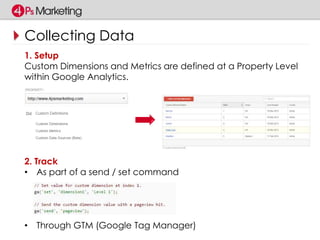
Collecting Data 
1. Setup 
Custom Dimensions and Metrics are defined at a Property Level 
within Google Analytics. 
2. Track 
• As part of a send / set command 
• Through GTM (Google Tag Manager)
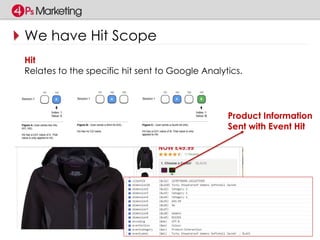
We have Hit Scope 
Hit 
Relates to the specific hit sent to Google Analytics. 
Product Information 
Sent with Event Hit
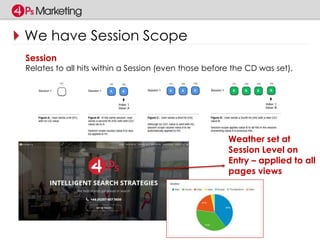
We have Session Scope 
Session 
Relates to all hits within a Session (even those before the CD was set). 
Weather set at 
Session Level on 
Entry – applied to all 
pages views
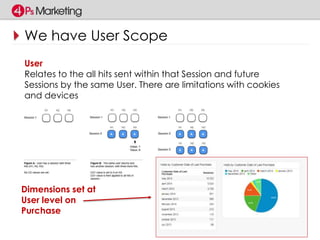
We have User Scope 
User 
Relates to the all hits sent within that Session and future 
Sessions by the same User. There are limitations with cookies 
and devices 
Dimensions set at 
User level on 
Purchase
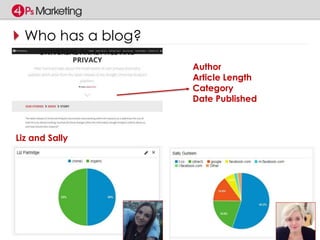
Who has a blog? 
Author 
Article Length 
Category 
Date Published 
Liz and Sally
Summary 
• We can define our own Custom Dimensions and Metrics 
(20 Free, 200 Premium) to compliment those built in. 
• These are configured through GA and tracked either 
using the code or GTM. 
• Custom Dimensions allow us to record data in a language 
relevant to key stakeholders in our business.
Evolution and Extinction: 
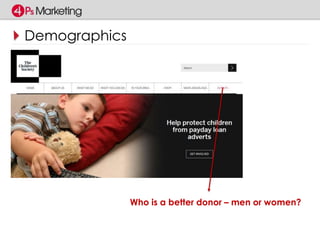
Demographics
Demographics 
Who is a better donor – men or women?
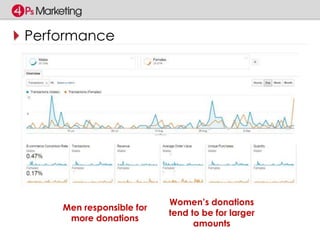
Performance 
Men responsible for 
more donations 
Women’s donations 
tend to be for larger 
amounts
Configuring GA 
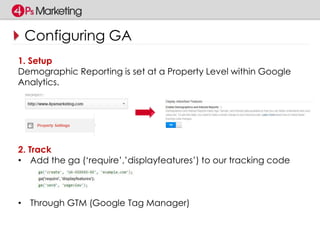
1. Setup 
Demographic Reporting is set at a Property Level within Google 
Analytics. 
2. Track 
• Add the ga (‘require’,’displayfeatures’) to our tracking code 
• Through GTM (Google Tag Manager)
Summary 
• Enable in both Google Analytics User Interface and add 
necessary tracking code. 
• Understand limitations (not all of your users may have a 
Doubleclick Cookie). 
• Create and combine with existing reports, segments and 
dashboards to benchmark demographics.
Evolution and Extinction: 
Cross Device Tracking
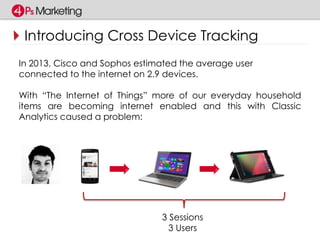
Introducing Cross Device Tracking 
In 2013, Cisco and Sophos estimated the average user 
connected to the internet on 2.9 devices. 
With “The Internet of Things” more of our everyday household 
items are becoming internet enabled and this with Classic 
Analytics caused a problem: 
3 Sessions 
3 Users
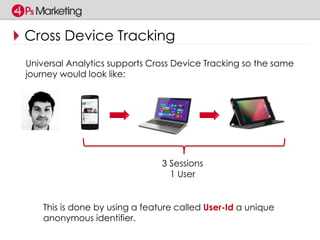
Cross Device Tracking 
Universal Analytics supports Cross Device Tracking so the same 
journey would look like: 
3 Sessions 
1 User 
This is done by using a feature called User-Id a unique 
anonymous identifier.
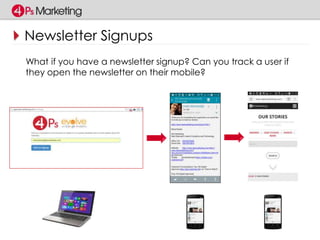
Newsletter Signups 
What if you have a newsletter signup? Can you track a user if 
they open the newsletter on their mobile?
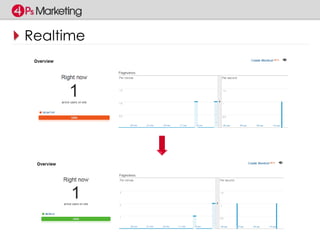
Realtime
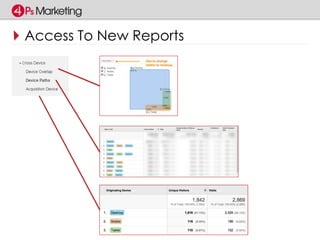
Access To New Reports
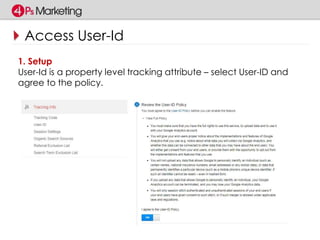
Access User-Id 
1. Setup 
User-Id is a property level tracking attribute – select User-ID and 
agree to the policy.
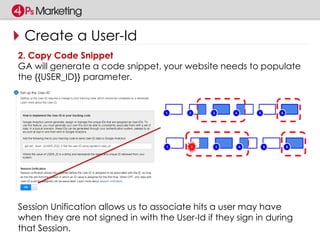
Create a User-Id 
2. Copy Code Snippet 
GA will generate a code snippet, your website needs to populate 
the {{USER_ID}} parameter. 
Session Unification allows us to associate hits a user may have 
when they are not signed in with the User-Id if they sign in during 
that Session.
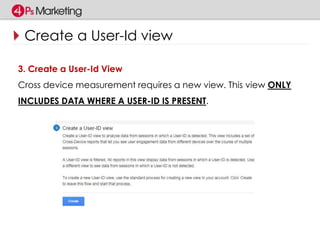
Create a User-Id view 
3. Create a User-Id View 
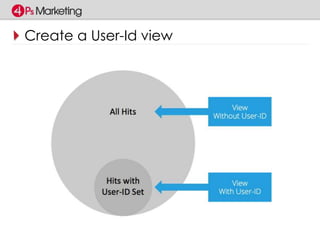
Cross device measurement requires a new view. This view ONLY 
INCLUDES DATA WHERE A USER-ID IS PRESENT.
Create a User-Id view
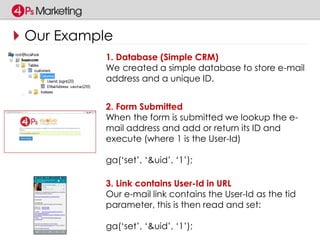
Our Example 
1. Database (Simple CRM) 
We created a simple database to store e-mail 
address and a unique ID. 
2. Form Submitted 
When the form is submitted we lookup the e-mail 
address and add or return its ID and 
execute (where 1 is the User-Id) 
ga(‘set’, ‘&uid’, ‘1’); 
3. Link contains User-Id in URL 
Our e-mail link contains the User-Id as the tid 
parameter, this is then read and set: 
ga(‘set’, ‘&uid’, ‘1’);
Summary : Cross Device 
• Uses its own special view 
- Remember it only includes hits with a User-Id so may be a 
smaller subset 
• Requires User-Id (privacy implications). 
- Cannot store personally identifiable data in GA. 
• Consider how a user will identify themselves and how you 
will issue a Unique Id (CRM, ID Broker / Other) 
• Plan – be clear to involve all necessary stakeholders, 
especially developers.
Evolution and Extinction: 
Offline Tracking
Offline Tracking 
As well as sending data to Google Analytics through 
analytics.js you are also able to use the Measurement 
Protocol. 
The Measurement Protocol defines a set of rules for sending 
data to analytics from pretty much any internet connected 
device using http / https requests. 
This could be using: 
• Excel / Google Docs (See who opens your documents!) 
• Other platforms (such as Twitter) through their API 
• From RFID / NFC or iBeacons 
• A CRM tool to log key offline interactions
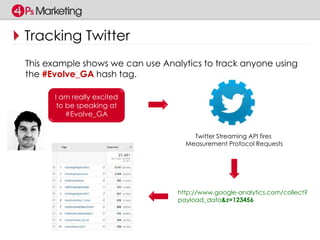
Tracking Twitter 
This example shows we can use Analytics to track anyone using 
the #Evolve_GA hash tag. 
I am really excited 
to be speaking at 
#Evolve_GA 
Twitter Streaming API fires 
Measurement Protocol Requests 
http://www.google-analytics.com/collect? 
payload_data&z=123456
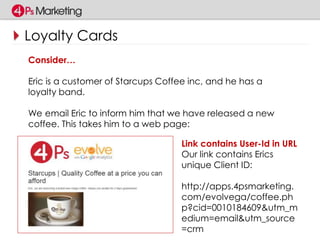
Loyalty Cards 
Consider… 
Eric is a customer of Starcups Coffee inc, and he has a 
loyalty band. 
We email Eric to inform him that we have released a new 
coffee. This takes him to a web page: 
Link contains User-Id in URL 
Our link contains Erics 
unique Client ID: 
http://apps.4psmarketing. 
com/evolvega/coffee.ph 
p?cid=0010184609&utm_m 
edium=email&utm_source 
=crm
How? 
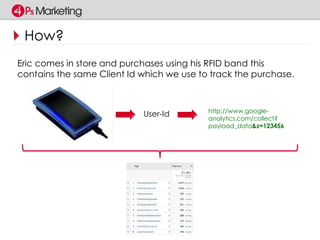
Eric comes in store and purchases using his RFID band this 
contains the same Client Id which we use to track the purchase. 
User-Id http://www.google-analytics. 
com/collect? 
payload_data&z=123456
ID&C
Summary : Offline Tracking 
• Planning is key 
- Are your “offline” devices internet enabled? 
• Do I have a way of identifying the user? 
- RFID has a unique ID built in 
- CRM allows me to lookup data and return an ID 
• Plan – be clear to involve all necessary stakeholders, especially 
developers.
Evolution and Extinction: 
The Past and the Future
The Past 
The Past 
Personally – I think we may have seen the extinction of purely 
looking at Sessions. 
The Future 
Not Big Data but Smart Data – Google Analytics has 
empowered us to begin integrating all sources of user data 
into one package. 
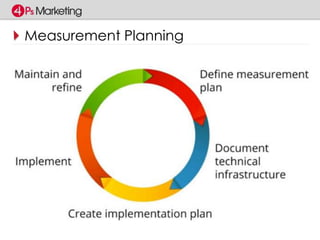
Measurement Planning is key and looking beyond the Web is 
exciting.
The Happiness Index 
We are measuring Happiness of our Staff and Clients
Evolution and Extinction: 
Measurement Planning
Silos
Measurement Planning
Evolution and Extinction: 
Key Takeouts
Why Universal? 
My Key Takeouts For You Are: 
• Define your Custom Dimensions and Metrics 
- Blogs think Author, Publish Date, Article Type 
- Ecommerce – Page Type, Product, Brand (or use EE). 
• Do you need to Track Users across devices? 
- If Yes - how can you integrate a User-Id 
- Create the User-Id view 
• Integrate Offline Sources 
- Discuss the Measurement Protocol with your developers. 
• Embrace Demographics but contextualise with real data. 
• Enjoy and be creative!
References 
4Ps Marketing 
http://www.4psmarketing.com/ 
The Happiness Index 
http://the-happiness-index.com/ 
Measuring Twitter with Universal Analytics 
http://analytics.blogspot.co.uk/2013/10/measuring-twitter-with- 
universal.html 
IDC Bands 
http://www.idcband.co.uk/ 
Measurement Protocol 
https://developers.google.com/analytics/devguides/collecti 
on/protocol/v1/
Want To Know More? 
Please speak to your account manager or email 
Planning@4psmarketing.com
Evolution and Extinction: 
THANK YOU!

Evolution or Extinction: Survive and Thrive with New Google Analytics Features

  • 1.
    4Ps Marketing Evolutionor Extinction: Survive and Thrive with New Google Analytics Features
  • 2.
    Hello! I amMatt Stannard, Head of Analytics and Tech for 4Ps Marketing. GAIQ qualified and member of the DAA. Strong development background from the days when we didn’t have jQuery. Passionate about Google Analytics (I could talk about this all day……) Follow me: Twitter: @mattstannard G+ : https://plus.google.com/+MattStannard
  • 3.
  • 4.
    This Sessions Objectives I want you to leave this session today: • Understanding Why Universal • Knowing Custom Dimensions and Metrics are Awesome • Understanding a customers “touch points” are key with Cross Device measurement • Seeing that tracking isn’t just about a website • Understanding that demographics can help us contextualise • Be excited about the future, we’ve come a long way!
  • 5.
  • 6.
    A History ofAnalytics 1990 World Wide Web Invented 1993 Web trends packages emerge 1996 Hit Counters began to appear on web pages
  • 7.
    A History ofAnalytics 1997 Javascript Tagging Begins 2005 – Google Analytics is born (from Urchin)
  • 8.
    A History ofAnalytics 2007 – 2014 - Google Analytics
  • 9.
    A History ofAnalytics 2014 – Universal Analytics out of Beta Google recognised that Analytics is no longer only about Sessions is about Users – Real People. Universal Analytics provides a tool which tracks users. It can track both on and offline and allows us to record information that relate to our business – it’s not just about pageviews.
  • 10.
    Why Universal? UniversalAnalytics extends the feature set allowing us to: • Define Custom Dimensions and Metrics • Track Users across devices (using User-Id) • Integrate Offline Sources (through the Measurement Protocol) • Give us Demographics • Access to other features (such as Enhanced Ecommerce)
  • 11.
    Evolution and Extinction: Custom Dimensions / Metrics
  • 12.
    Definition Dimensions :Describe Data “A dimension is a descriptive attribute or characteristic of an object that can be given different values.” Metrics : Measure Data “Metrics are individual elements of a dimension that can be measured as a sum or a ratio.” – all metrics are numbers, all numbers are not metrics.
  • 13.
    What If… Youwanted to capture Departure Airport as a Dimension? The standard set of Dimensions with Google Analytics is finite. Custom Dimensions allow us to extend the information Google Analytics collects.
  • 14.
    Built in Search? GA already includes a built in Search but using Custom Dimensions and Metrics allows us to refine how users use elements of our site to give us greater insights. Dimensions: Country, Resort, Airport, Date Metrics: Nights, People
  • 15.
    What does thisgive us? Google Analytics Dashboard Immediate feedback through a Dashboard in a language our Stakeholders understand!
  • 16.
    Collecting Data 1.Setup Custom Dimensions and Metrics are defined at a Property Level within Google Analytics. 2. Track • As part of a send / set command • Through GTM (Google Tag Manager)
  • 17.
    We have HitScope Hit Relates to the specific hit sent to Google Analytics. Product Information Sent with Event Hit
  • 18.
    We have SessionScope Session Relates to all hits within a Session (even those before the CD was set). Weather set at Session Level on Entry – applied to all pages views
  • 19.
    We have UserScope User Relates to the all hits sent within that Session and future Sessions by the same User. There are limitations with cookies and devices Dimensions set at User level on Purchase
  • 20.
    Who has ablog? Author Article Length Category Date Published Liz and Sally
  • 21.
    Summary • Wecan define our own Custom Dimensions and Metrics (20 Free, 200 Premium) to compliment those built in. • These are configured through GA and tracked either using the code or GTM. • Custom Dimensions allow us to record data in a language relevant to key stakeholders in our business.
  • 22.
  • 23.
    Demographics Who isa better donor – men or women?
  • 24.
    Performance Men responsiblefor more donations Women’s donations tend to be for larger amounts
  • 25.
    Configuring GA 1.Setup Demographic Reporting is set at a Property Level within Google Analytics. 2. Track • Add the ga (‘require’,’displayfeatures’) to our tracking code • Through GTM (Google Tag Manager)
  • 26.
    Summary • Enablein both Google Analytics User Interface and add necessary tracking code. • Understand limitations (not all of your users may have a Doubleclick Cookie). • Create and combine with existing reports, segments and dashboards to benchmark demographics.
  • 27.
    Evolution and Extinction: Cross Device Tracking
  • 28.
    Introducing Cross DeviceTracking In 2013, Cisco and Sophos estimated the average user connected to the internet on 2.9 devices. With “The Internet of Things” more of our everyday household items are becoming internet enabled and this with Classic Analytics caused a problem: 3 Sessions 3 Users
  • 29.
    Cross Device Tracking Universal Analytics supports Cross Device Tracking so the same journey would look like: 3 Sessions 1 User This is done by using a feature called User-Id a unique anonymous identifier.
  • 30.
    Newsletter Signups Whatif you have a newsletter signup? Can you track a user if they open the newsletter on their mobile?
  • 31.
  • 32.
  • 33.
    Access User-Id 1.Setup User-Id is a property level tracking attribute – select User-ID and agree to the policy.
  • 34.
    Create a User-Id 2. Copy Code Snippet GA will generate a code snippet, your website needs to populate the {{USER_ID}} parameter. Session Unification allows us to associate hits a user may have when they are not signed in with the User-Id if they sign in during that Session.
  • 35.
    Create a User-Idview 3. Create a User-Id View Cross device measurement requires a new view. This view ONLY INCLUDES DATA WHERE A USER-ID IS PRESENT.
  • 36.
  • 37.
    Our Example 1.Database (Simple CRM) We created a simple database to store e-mail address and a unique ID. 2. Form Submitted When the form is submitted we lookup the e-mail address and add or return its ID and execute (where 1 is the User-Id) ga(‘set’, ‘&uid’, ‘1’); 3. Link contains User-Id in URL Our e-mail link contains the User-Id as the tid parameter, this is then read and set: ga(‘set’, ‘&uid’, ‘1’);
  • 38.
    Summary : CrossDevice • Uses its own special view - Remember it only includes hits with a User-Id so may be a smaller subset • Requires User-Id (privacy implications). - Cannot store personally identifiable data in GA. • Consider how a user will identify themselves and how you will issue a Unique Id (CRM, ID Broker / Other) • Plan – be clear to involve all necessary stakeholders, especially developers.
  • 39.
    Evolution and Extinction: Offline Tracking
  • 40.
    Offline Tracking Aswell as sending data to Google Analytics through analytics.js you are also able to use the Measurement Protocol. The Measurement Protocol defines a set of rules for sending data to analytics from pretty much any internet connected device using http / https requests. This could be using: • Excel / Google Docs (See who opens your documents!) • Other platforms (such as Twitter) through their API • From RFID / NFC or iBeacons • A CRM tool to log key offline interactions
  • 41.
    Tracking Twitter Thisexample shows we can use Analytics to track anyone using the #Evolve_GA hash tag. I am really excited to be speaking at #Evolve_GA Twitter Streaming API fires Measurement Protocol Requests http://www.google-analytics.com/collect? payload_data&z=123456
  • 42.
    Loyalty Cards Consider… Eric is a customer of Starcups Coffee inc, and he has a loyalty band. We email Eric to inform him that we have released a new coffee. This takes him to a web page: Link contains User-Id in URL Our link contains Erics unique Client ID: http://apps.4psmarketing. com/evolvega/coffee.ph p?cid=0010184609&utm_m edium=email&utm_source =crm
  • 43.
    How? Eric comesin store and purchases using his RFID band this contains the same Client Id which we use to track the purchase. User-Id http://www.google-analytics. com/collect? payload_data&z=123456
  • 44.
  • 45.
    Summary : OfflineTracking • Planning is key - Are your “offline” devices internet enabled? • Do I have a way of identifying the user? - RFID has a unique ID built in - CRM allows me to lookup data and return an ID • Plan – be clear to involve all necessary stakeholders, especially developers.
  • 46.
    Evolution and Extinction: The Past and the Future
  • 47.
    The Past ThePast Personally – I think we may have seen the extinction of purely looking at Sessions. The Future Not Big Data but Smart Data – Google Analytics has empowered us to begin integrating all sources of user data into one package. Measurement Planning is key and looking beyond the Web is exciting.
  • 48.
    The Happiness Index We are measuring Happiness of our Staff and Clients
  • 49.
    Evolution and Extinction: Measurement Planning
  • 50.
  • 51.
  • 52.
  • 53.
    Why Universal? MyKey Takeouts For You Are: • Define your Custom Dimensions and Metrics - Blogs think Author, Publish Date, Article Type - Ecommerce – Page Type, Product, Brand (or use EE). • Do you need to Track Users across devices? - If Yes - how can you integrate a User-Id - Create the User-Id view • Integrate Offline Sources - Discuss the Measurement Protocol with your developers. • Embrace Demographics but contextualise with real data. • Enjoy and be creative!
  • 54.
    References 4Ps Marketing http://www.4psmarketing.com/ The Happiness Index http://the-happiness-index.com/ Measuring Twitter with Universal Analytics http://analytics.blogspot.co.uk/2013/10/measuring-twitter-with- universal.html IDC Bands http://www.idcband.co.uk/ Measurement Protocol https://developers.google.com/analytics/devguides/collecti on/protocol/v1/
  • 55.
    Want To KnowMore? Please speak to your account manager or email Planning@4psmarketing.com
  • 56.