Adam Hughes 
Unity Workflow 
For this part of the unit, we need to create a 3D level in the Unity game engine. I began with 
importing assets to the assets folder in order to put them into the game. 
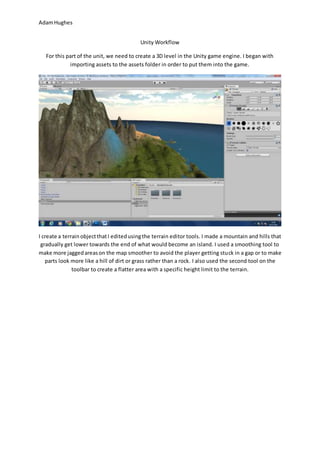
I create a terrain object that I edited using the terrain editor tools. I made a mountain and hills that 
gradually get lower towards the end of what would become an island. I used a smoothing tool to 
make more jagged areas on the map smoother to avoid the player getting stuck in a gap or to make 
parts look more like a hill of dirt or grass rather than a rock. I also used the second tool on the 
toolbar to create a flatter area with a specific height limit to the terrain.
Adam Hughes 
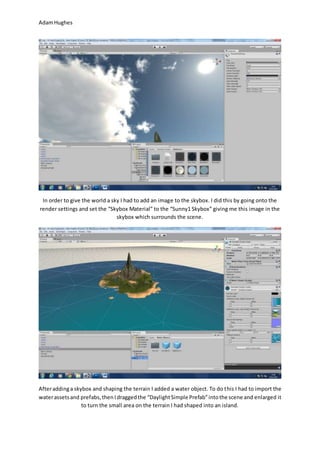
In order to give the world a sky I had to add an image to the skybox. I did this by going onto the 
render settings and set the “Skybox Material” to the “Sunny1 Skybox” giving me this image in the 
skybox which surrounds the scene. 
After adding a skybox and shaping the terrain I added a water object. To do this I had to import the 
water assets and prefabs, then I dragged the “Daylight Simple Prefab” into the scene and enlarged it 
to turn the small area on the terrain I had shaped into an island.
Adam Hughes 
I made the palm trees using the tree creator which is another tool used for editing the terrain. All I 
had to do was go onto “Edit Trees” and add the palm tree, this can be done multiple times with 
different trees so I could actually have a variety of trees in the scene. 
After looking around my scene I noticed an area where the terrain had not raised and decided to 
make it into a rock pool. I imported the assets that allow me to use the rocks seen in the screenshot. 
I placed them around the “pool” and then rotated and re-sized them.
Adam Hughes 
When I had finished with the rocks I added a sand texture for the island’s beech and other sandy 
areas. To do this I found an image of some sand online and copied it into Photoshop, I then copied 
the image again to take up the rest of the 1024x1024 pixel canvas. I used the stamp tool to make it 
look like one whole image; however, the texture still came out looking slightly jagged as the sides of 
the image too different and need to be changed a bit so that the texture looks like one whole image.
Adam Hughes 
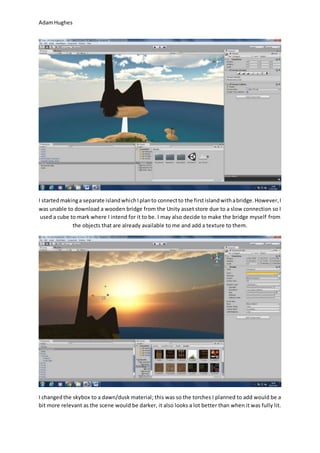
I started making a separate island which I plan to connect to the first island with a bridge. However, I 
was unable to download a wooden bridge from the Unity asset store due to a slow connection so I 
used a cube to mark where I intend for it to be. I may also decide to make the bridge myself from 
the objects that are already available to me and add a texture to them. 
I changed the skybox to a dawn/dusk material; this was so the torches I planned to add would be a 
bit more relevant as the scene would be darker, it also looks a lot better than when it was fully lit.
Adam Hughes 
After changing the intensity of the directional light to make the scene darker, I added torches using 
an asset that I found on the Unity assets store. To get the fire particle effect working I made the 
particles spawn 200 per second to make the flame thicker without changing the start size of the 
particles. I also changed the end size of the particles so that they grow much larger towards the end 
of their “lifetime”. 
I then went on to copy the torch and put nine others along a path that leads to the top of the 
mountain.
Adam Hughes 
I got some campfire assets from the Unity assets store; these were only models, the fire and light on 
the bonfire were copied from the ones that were used on the torches. I then increased the intensity 
of the light and made its range larger. I also made the fire particles larger from the start of their 
lifetime to fit the size of the bonfire. 
I set the directional light to cast soft shadows; this means that anything in the scene will have a 
shadow.
Adam Hughes 
I found a runestone on the asset store and thought it might look good in my game. I also surrounded 
the runestone with rocks, one; to make it look even better, two; to cover up the bottom of the stone 
clipping through the terrain. 
I also added more torches from the campfire assets I had already downloaded. I used the same 
particle effect as the other torches but made them bigger, and the lights were also used on the other 
torches.
Adam Hughes 
I increased the intensity of the torch light for ever torch (which is simple because you can select 
them all at once), I then deleted some that didn’t need to be there due to the increase in light 
intensity. 
I added a mesh collider to every object I have placed in the scene, however; the gaps between the 
wooden planks on the bridge made walking over them an awkward experience. To change this I 
created a box collider and lined it up with the planks on the bridge.
Adam Hughes 
The palm trees in the terrain editor wouldn’t allow me to add a collider to the asset unless I were to 
drag them all onto the scene and then add a collider to them one by one, so I swapped them out for 
regular trees, except for one. 
I’ve added some temple assets to the scene to make the top of the mountain look more like the 
ancient ruins of a shrine of some sort.
Adam Hughes 
On the desert island where I put the small camp; I decided to use the rock assets I was using at the 
start of the development process to create a small cave to make the area look a lot more dynamic. 
I found some simple castle assets on the Unity assets store and thought that I could put them to use. 
I changed the terrain to look like I spikey wasteland and then built the castle using the different 
sections provided in the assets. The greenish glow was made by adding a spot light and changing it’s 
colour.
Adam Hughes 
When I was finished with the castle I added a wooden door and some caved log barricades. 
The castle area is connected to the main island by a path created by raising the terrain to a certain 
height.

Unity 3D Game Workflow

  • 1.
    Adam Hughes UnityWorkflow For this part of the unit, we need to create a 3D level in the Unity game engine. I began with importing assets to the assets folder in order to put them into the game. I create a terrain object that I edited using the terrain editor tools. I made a mountain and hills that gradually get lower towards the end of what would become an island. I used a smoothing tool to make more jagged areas on the map smoother to avoid the player getting stuck in a gap or to make parts look more like a hill of dirt or grass rather than a rock. I also used the second tool on the toolbar to create a flatter area with a specific height limit to the terrain.
  • 2.
    Adam Hughes Inorder to give the world a sky I had to add an image to the skybox. I did this by going onto the render settings and set the “Skybox Material” to the “Sunny1 Skybox” giving me this image in the skybox which surrounds the scene. After adding a skybox and shaping the terrain I added a water object. To do this I had to import the water assets and prefabs, then I dragged the “Daylight Simple Prefab” into the scene and enlarged it to turn the small area on the terrain I had shaped into an island.
  • 3.
    Adam Hughes Imade the palm trees using the tree creator which is another tool used for editing the terrain. All I had to do was go onto “Edit Trees” and add the palm tree, this can be done multiple times with different trees so I could actually have a variety of trees in the scene. After looking around my scene I noticed an area where the terrain had not raised and decided to make it into a rock pool. I imported the assets that allow me to use the rocks seen in the screenshot. I placed them around the “pool” and then rotated and re-sized them.
  • 4.
    Adam Hughes WhenI had finished with the rocks I added a sand texture for the island’s beech and other sandy areas. To do this I found an image of some sand online and copied it into Photoshop, I then copied the image again to take up the rest of the 1024x1024 pixel canvas. I used the stamp tool to make it look like one whole image; however, the texture still came out looking slightly jagged as the sides of the image too different and need to be changed a bit so that the texture looks like one whole image.
  • 5.
    Adam Hughes Istarted making a separate island which I plan to connect to the first island with a bridge. However, I was unable to download a wooden bridge from the Unity asset store due to a slow connection so I used a cube to mark where I intend for it to be. I may also decide to make the bridge myself from the objects that are already available to me and add a texture to them. I changed the skybox to a dawn/dusk material; this was so the torches I planned to add would be a bit more relevant as the scene would be darker, it also looks a lot better than when it was fully lit.
  • 6.
    Adam Hughes Afterchanging the intensity of the directional light to make the scene darker, I added torches using an asset that I found on the Unity assets store. To get the fire particle effect working I made the particles spawn 200 per second to make the flame thicker without changing the start size of the particles. I also changed the end size of the particles so that they grow much larger towards the end of their “lifetime”. I then went on to copy the torch and put nine others along a path that leads to the top of the mountain.
  • 7.
    Adam Hughes Igot some campfire assets from the Unity assets store; these were only models, the fire and light on the bonfire were copied from the ones that were used on the torches. I then increased the intensity of the light and made its range larger. I also made the fire particles larger from the start of their lifetime to fit the size of the bonfire. I set the directional light to cast soft shadows; this means that anything in the scene will have a shadow.
  • 8.
    Adam Hughes Ifound a runestone on the asset store and thought it might look good in my game. I also surrounded the runestone with rocks, one; to make it look even better, two; to cover up the bottom of the stone clipping through the terrain. I also added more torches from the campfire assets I had already downloaded. I used the same particle effect as the other torches but made them bigger, and the lights were also used on the other torches.
  • 9.
    Adam Hughes Iincreased the intensity of the torch light for ever torch (which is simple because you can select them all at once), I then deleted some that didn’t need to be there due to the increase in light intensity. I added a mesh collider to every object I have placed in the scene, however; the gaps between the wooden planks on the bridge made walking over them an awkward experience. To change this I created a box collider and lined it up with the planks on the bridge.
  • 10.
    Adam Hughes Thepalm trees in the terrain editor wouldn’t allow me to add a collider to the asset unless I were to drag them all onto the scene and then add a collider to them one by one, so I swapped them out for regular trees, except for one. I’ve added some temple assets to the scene to make the top of the mountain look more like the ancient ruins of a shrine of some sort.
  • 11.
    Adam Hughes Onthe desert island where I put the small camp; I decided to use the rock assets I was using at the start of the development process to create a small cave to make the area look a lot more dynamic. I found some simple castle assets on the Unity assets store and thought that I could put them to use. I changed the terrain to look like I spikey wasteland and then built the castle using the different sections provided in the assets. The greenish glow was made by adding a spot light and changing it’s colour.
  • 12.
    Adam Hughes WhenI was finished with the castle I added a wooden door and some caved log barricades. The castle area is connected to the main island by a path created by raising the terrain to a certain height.