Cloud Computing
By
S.Divya
Asst. Prof., CSE Dept.
VJIT Cloud Computing Principles and Paradigms
Authors: Rajkumar Buyya, James Broberg,
AndrZejGoscinski
Course Objectives
• To provide comprehensive and in-depth knowledge of Cloud
Computing concepts, technologies, architecture and applications
by introducing and researching state-of-the-art in Cloud
Computing fundamental issues, technologies, applications and
implementations.
• Another objective is to expose the students to frontier areas of
Cloud Computing and information systems, while providing
sufficient foundations to enable further study and research.
Course Outcomes
• Understand different Cloud services
• Analyze different cloud deploy and service models
• Understand various enterprise applications in cloud
computing
• Understand and apply the virtualization concepts
• Understand the data security mechanism and SLA
management in cloud
Introduction
to
Cloud Computing
Unit –I
Chap - 1
Contents:
• Definition’s
• CC in a Nutshell
• Roots of CC
• Layers and Types of Clouds
• Desired Features of Cloud
• Cloud Infrastructure Management
• Infrastructure as a Service Providers
• Platform as a Service Providers
• Challenge and Risks
Cloud computing is a model for allowing
convenient, on-demand access from
anywhere, to a shared pool of computing
resources
WHAT IS CLOUD ?
A ‘cloud’ is a network of shared servers for the
processing storage and delivery of computing
resources.
• Cloud computing gets its name from the internet.
• Internet represented in network diagrams as a cloud.
• It is a cluster, a bunch of servers held together by a network also
supercomputer.
• A cloud can be either a single site cloud or a geo-distributed cloud.
 A single site cloud – servers or compute nodes grouped into
racks(several servers-share same power- switch)
Backend nodes: storage purposes
Frontend nodes: submitting jobs & recv. client requests
Large companies have multiple geographically distributed
datacenters connected to each other
Each site is being a datacenter often called as geo-distributed cloud
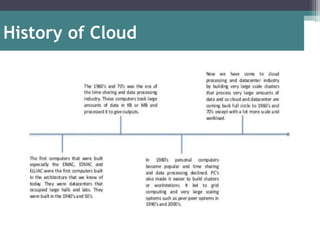
History of Cloud
What is
Cloud Computing ?
Cloud Computing in Nutshell
Definition:
Cloud Computing is a set of service-oriented architectures, which allow users
to access a number of resources in a way that is elastic, cost-effective, and
on-demand
Cloud computing is a model for enabling ubiquitous, convenient, on-demand
network access to a shared pool of configurable computing resources( e.g.,
networks, servers, storage, applications, and services) that can be rapidly
provisioned and released with minimal management effort or service
provider interaction. - U.S. NIST
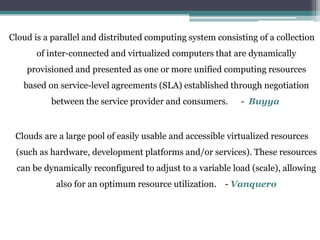
Cloud is a parallel and distributed computing system consisting of a collection
of inter-connected and virtualized computers that are dynamically
provisioned and presented as one or more unified computing resources
based on service-level agreements (SLA) established through negotiation
between the service provider and consumers. - Buyya
Clouds are a large pool of easily usable and accessible virtualized resources
(such as hardware, development platforms and/or services). These resources
can be dynamically reconfigured to adjust to a variable load (scale), allowing
also for an optimum resource utilization. - Vanquero
Clouds are hardware based services offering compute, network, and storage
capacity where: Hardware management is highly abstracted from the buyer,
buyers incur infrastructure costs, and infrastructure capacity is highly
elastic. - McKinsey
Characteristics of cloud computing as
(1) the illusion of infinite computing resources
(2) the elimination of an up-front commitment by cloud users
(3) the ability to pay for use . . . as needed . . . - Berkeley
Data center hardware and software that provide services. - Armbrust
IT infrastructure deployed on an Infrastructure as a Service provider data
center. - Sotomayor
Characteristics of cloud computing
Cloud should have
(i) pay-per-use (no ongoing commitment, utility
prices)
(ii) elastic capacity and the illusion of infinite
resources
(iii) self-service interface
(iv) virtualized (abstracted) resources.
The ultimate goal is allowing customers to run their
everyday IT infrastructure “in the cloud.”
CC Definition in simpler way
OSSM
Read like “awesome”
Potential Problems Internet connection
Cloud site failure
• Completely dependent on network
• Cloud site failure
• Back-end server/network failure
• Result in inaccessible data
• Sensitive information
• How much do you trust the public cloud vendor?
• Application integration – (exchange info when local and
on cloud)
Roots of Cloud Computing
SOA, Web Services, Web 2.0, and Mashups
• Web services (WS) open standards have appreciably
throw in to advance domain of software assimilation.
• WS standards have been created on top of existing
ubiquitous technologies such as HTTP, XML, thus
providing a common mechanism for delivering services,
making them ideal for implementing a service-oriented
architecture i.e. SOA.
• Web information and services may be programmatically
aggregated acting as a building blocks of complex
compositions called service mashups. Google make their
service APIs publically accessible using standard
protocols such as SOAP and REST
• Utility computing is a model in which computing
resources are provided to the customer based on specific
demand. The service provider charges exactly for the
services provided, instead of a flat rate.
▫ Examples of such IT services are computing power,
storage or applications.
• Grid computing is a group of networked computers
which work together as a virtual supercomputer to
perform large tasks, such as analysing huge sets of data ..
Distributed Computing
• Hardware virtualization allows running multiple OS stacks on a
single physical platform
• 3 basic capabilities related to management of workload: isolation,
consolidation and Migration
Hardware Virtualization
• A number of VMM platforms exist that are the basis of many
utility or cloud computing environments
• VMWare ESXi:
▫ Pioneer in virtualization, bare metal hypervisor
▫ Provides advanced virtualization techniques of processor, memory and
I/O
• Xen:
▫ Open-source project
▫ It has pioneered the para-virtualization concept, on which the guest OS,
by means of a specialized kernel, can interact with the hypervisor, thus
significantly improving performance
• KVM:
▫ Is a linux virtualization subsystem
▫ In addition, activities such as memory mang. And scheduling are
carried out by existing kernel
• Improve systems by decreasing human involvement
in their operation.
• Manage themselves, with high-level guidance from
humans.
• Properties :
▫ Self-configuration
▫ Self-optimization
▫ Self-healing
▫ Self-protection
▫ IBM reference Model
▫ MAPE-K
Autonomic Computing
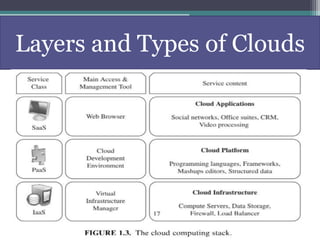
Layers and Types of Clouds
Examples of CC
CC is the use of H/W or S/W off-site that is accessed over N/Ws
The main types of CC includes- SaaS, PaaS, Iaas &
FaaS(popular method)
• Software as a Service- No installation on PC, access online,
Examples include
Square, which processes payments online
Google Apps such as Google Drive or Calendar
Slack, allows collaboration and chat b/w other users
• Infrastructure as a Service – provides infrastructure
components : servers, storage, networking, security on cloud
Examples include
Dropbox, a file storage and sharing system
Microsoft Azure, offers backup and disaster recovery services,
hosting and more
Rackspace, offers data, security and infrastructure services
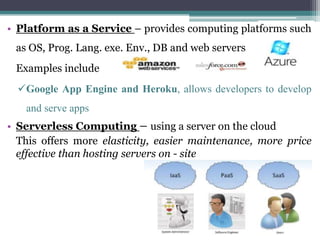
• Platform as a Service – provides computing platforms such
as OS, Prog. Lang. exe. Env., DB and web servers
Examples include
Google App Engine and Heroku, allows developers to develop
and serve apps
• Serverless Computing – using a server on the cloud
This offers more elasticity, easier maintenance, more price
effective than hosting servers on - site
Deployment Models
(i) self-service
(ii) per-usage metered and billed
(iii) Elasticity
(iv) customizable
Desired Features of Cloud
• Management is a challenge
▫ VIM
 The software toolkit responsible for rapidly and dynamically
provision resources to applications(orchestration) is called VIM.
 “Cloud operating system”, “Infrastructure sharing software”, “Virtual
infrastructure engine”
 Cloud toolkit(expose a remote & secure interface) vs. Virtual
infrastructure manager(provide advanced features)
 Availability and management users
CLOUD
INFRASTRUCTURE MANAGEMENT
• Features
▫ basic and advanced features that are usually available in VIMs
 Virtualization support
 Self-service, on-demand resource provisioning
 Multiple backend Hypervisors
 Storage Virtualization
 Interface to Public Clouds
 Virtual Networking
 Dynamic Resource Allocation
 Virtual Clusters
 Reservation and Negotiation Mechanism
 High Availability and Data Recovery
• Case Studies
▫ The most popular VI managers available
• Features
Geographic Presence
 To improve availability and responsiveness, Availability Zones
User Interfaces and Access to Servers
 GUI, CLI, WS
Advance Reservation of Capacity
 Amazon, long period
Automatic Scaling and Load Balancing
• Elasticity, Scale up and down, incoming traffic dist. on servers
Service -Level Agreement(SLAs)
Availability & performance guarantee, penalties for violates
Eg: Amazon EC2 – if annual uptime % for customer drops below 99.95%
for the service year, is eligible to receive service credit equal to 10% of
bill.
Hypervisor and Operation System Choice
INFRASTRUCTURE AS A SERVICE PROVIDERS
• Case studies
- Most popular public IaaS clouds
▫ Amazon Web Services
 S3, EC2, RDS, …
▫ Flexiscale
 100% SLA
▫ Joyent
 Automatic scaling of cpu cores
▫ GoGrid
 Pre-made windows and linux images
▫ Rackspace Cloud Servers
 Fixed size instance
• Offer development and deployment environment
• Features
▫ Programming Models, Languages, and Frameworks
 MapReduce, WebService, Workflow, computational task
▫ Persistence Options
 Allow application to record and recover crashes
 relational DB, distributed storage
• Case studies
▫ Aneka
 .NET, amazon EC2, threads
▫ AppEngine
 python-java, Google
▫ Microsoft Azure
 .NET, Microsoft
▫ Force.com
 Apex, own dc
▫ Heroku
 Ruby, automatic scaling
PLATFORM AS A SERVICE PROVIDERS
• Security, privacy and trust
▫ Third party services
▫ Countries laws
• Data lock-in and standardization
▫ user data are not Portable
▫ CCIF- Cloud Computing Interoperability Forum; work together
• Availability, Fault Tolerance, Disaster Recovery
▫ SLA which include QoS requirements
• Resource Management and Energy efficiency
▫ Migration- when, which VM and where to
▫ Performance- dynamic resource manag. Improve utilization, min.
energy consumption in data centers
CHALLENGES AND RISKS

Unit-I: Introduction to Cloud Computing

  • 1.
    Cloud Computing By S.Divya Asst. Prof.,CSE Dept. VJIT Cloud Computing Principles and Paradigms Authors: Rajkumar Buyya, James Broberg, AndrZejGoscinski
  • 2.
    Course Objectives • Toprovide comprehensive and in-depth knowledge of Cloud Computing concepts, technologies, architecture and applications by introducing and researching state-of-the-art in Cloud Computing fundamental issues, technologies, applications and implementations. • Another objective is to expose the students to frontier areas of Cloud Computing and information systems, while providing sufficient foundations to enable further study and research.
  • 3.
    Course Outcomes • Understanddifferent Cloud services • Analyze different cloud deploy and service models • Understand various enterprise applications in cloud computing • Understand and apply the virtualization concepts • Understand the data security mechanism and SLA management in cloud
  • 4.
  • 5.
    Contents: • Definition’s • CCin a Nutshell • Roots of CC • Layers and Types of Clouds • Desired Features of Cloud • Cloud Infrastructure Management • Infrastructure as a Service Providers • Platform as a Service Providers • Challenge and Risks
  • 6.
    Cloud computing isa model for allowing convenient, on-demand access from anywhere, to a shared pool of computing resources
  • 7.
    WHAT IS CLOUD? A ‘cloud’ is a network of shared servers for the processing storage and delivery of computing resources.
  • 8.
    • Cloud computinggets its name from the internet. • Internet represented in network diagrams as a cloud. • It is a cluster, a bunch of servers held together by a network also supercomputer. • A cloud can be either a single site cloud or a geo-distributed cloud.  A single site cloud – servers or compute nodes grouped into racks(several servers-share same power- switch) Backend nodes: storage purposes Frontend nodes: submitting jobs & recv. client requests Large companies have multiple geographically distributed datacenters connected to each other Each site is being a datacenter often called as geo-distributed cloud
  • 9.
  • 10.
    What is Cloud Computing? Cloud Computing in Nutshell
  • 11.
    Definition: Cloud Computing isa set of service-oriented architectures, which allow users to access a number of resources in a way that is elastic, cost-effective, and on-demand Cloud computing is a model for enabling ubiquitous, convenient, on-demand network access to a shared pool of configurable computing resources( e.g., networks, servers, storage, applications, and services) that can be rapidly provisioned and released with minimal management effort or service provider interaction. - U.S. NIST
  • 12.
    Cloud is aparallel and distributed computing system consisting of a collection of inter-connected and virtualized computers that are dynamically provisioned and presented as one or more unified computing resources based on service-level agreements (SLA) established through negotiation between the service provider and consumers. - Buyya Clouds are a large pool of easily usable and accessible virtualized resources (such as hardware, development platforms and/or services). These resources can be dynamically reconfigured to adjust to a variable load (scale), allowing also for an optimum resource utilization. - Vanquero
  • 13.
    Clouds are hardwarebased services offering compute, network, and storage capacity where: Hardware management is highly abstracted from the buyer, buyers incur infrastructure costs, and infrastructure capacity is highly elastic. - McKinsey Characteristics of cloud computing as (1) the illusion of infinite computing resources (2) the elimination of an up-front commitment by cloud users (3) the ability to pay for use . . . as needed . . . - Berkeley Data center hardware and software that provide services. - Armbrust IT infrastructure deployed on an Infrastructure as a Service provider data center. - Sotomayor
  • 14.
    Characteristics of cloudcomputing Cloud should have (i) pay-per-use (no ongoing commitment, utility prices) (ii) elastic capacity and the illusion of infinite resources (iii) self-service interface (iv) virtualized (abstracted) resources. The ultimate goal is allowing customers to run their everyday IT infrastructure “in the cloud.”
  • 15.
    CC Definition insimpler way OSSM Read like “awesome”
  • 16.
    Potential Problems Internetconnection Cloud site failure • Completely dependent on network • Cloud site failure • Back-end server/network failure • Result in inaccessible data • Sensitive information • How much do you trust the public cloud vendor? • Application integration – (exchange info when local and on cloud)
  • 17.
    Roots of CloudComputing
  • 18.
    SOA, Web Services,Web 2.0, and Mashups • Web services (WS) open standards have appreciably throw in to advance domain of software assimilation. • WS standards have been created on top of existing ubiquitous technologies such as HTTP, XML, thus providing a common mechanism for delivering services, making them ideal for implementing a service-oriented architecture i.e. SOA. • Web information and services may be programmatically aggregated acting as a building blocks of complex compositions called service mashups. Google make their service APIs publically accessible using standard protocols such as SOAP and REST
  • 19.
    • Utility computingis a model in which computing resources are provided to the customer based on specific demand. The service provider charges exactly for the services provided, instead of a flat rate. ▫ Examples of such IT services are computing power, storage or applications. • Grid computing is a group of networked computers which work together as a virtual supercomputer to perform large tasks, such as analysing huge sets of data .. Distributed Computing
  • 20.
    • Hardware virtualizationallows running multiple OS stacks on a single physical platform • 3 basic capabilities related to management of workload: isolation, consolidation and Migration Hardware Virtualization
  • 21.
    • A numberof VMM platforms exist that are the basis of many utility or cloud computing environments • VMWare ESXi: ▫ Pioneer in virtualization, bare metal hypervisor ▫ Provides advanced virtualization techniques of processor, memory and I/O • Xen: ▫ Open-source project ▫ It has pioneered the para-virtualization concept, on which the guest OS, by means of a specialized kernel, can interact with the hypervisor, thus significantly improving performance • KVM: ▫ Is a linux virtualization subsystem ▫ In addition, activities such as memory mang. And scheduling are carried out by existing kernel
  • 22.
    • Improve systemsby decreasing human involvement in their operation. • Manage themselves, with high-level guidance from humans. • Properties : ▫ Self-configuration ▫ Self-optimization ▫ Self-healing ▫ Self-protection ▫ IBM reference Model ▫ MAPE-K Autonomic Computing
  • 23.
  • 24.
    Examples of CC CCis the use of H/W or S/W off-site that is accessed over N/Ws The main types of CC includes- SaaS, PaaS, Iaas & FaaS(popular method) • Software as a Service- No installation on PC, access online, Examples include Square, which processes payments online Google Apps such as Google Drive or Calendar Slack, allows collaboration and chat b/w other users
  • 26.
    • Infrastructure asa Service – provides infrastructure components : servers, storage, networking, security on cloud Examples include Dropbox, a file storage and sharing system Microsoft Azure, offers backup and disaster recovery services, hosting and more Rackspace, offers data, security and infrastructure services
  • 28.
    • Platform asa Service – provides computing platforms such as OS, Prog. Lang. exe. Env., DB and web servers Examples include Google App Engine and Heroku, allows developers to develop and serve apps • Serverless Computing – using a server on the cloud This offers more elasticity, easier maintenance, more price effective than hosting servers on - site
  • 31.
  • 33.
    (i) self-service (ii) per-usagemetered and billed (iii) Elasticity (iv) customizable Desired Features of Cloud
  • 34.
    • Management isa challenge ▫ VIM  The software toolkit responsible for rapidly and dynamically provision resources to applications(orchestration) is called VIM.  “Cloud operating system”, “Infrastructure sharing software”, “Virtual infrastructure engine”  Cloud toolkit(expose a remote & secure interface) vs. Virtual infrastructure manager(provide advanced features)  Availability and management users CLOUD INFRASTRUCTURE MANAGEMENT
  • 35.
    • Features ▫ basicand advanced features that are usually available in VIMs  Virtualization support  Self-service, on-demand resource provisioning  Multiple backend Hypervisors  Storage Virtualization  Interface to Public Clouds  Virtual Networking  Dynamic Resource Allocation  Virtual Clusters  Reservation and Negotiation Mechanism  High Availability and Data Recovery
  • 36.
    • Case Studies ▫The most popular VI managers available
  • 37.
    • Features Geographic Presence To improve availability and responsiveness, Availability Zones User Interfaces and Access to Servers  GUI, CLI, WS Advance Reservation of Capacity  Amazon, long period Automatic Scaling and Load Balancing • Elasticity, Scale up and down, incoming traffic dist. on servers Service -Level Agreement(SLAs) Availability & performance guarantee, penalties for violates Eg: Amazon EC2 – if annual uptime % for customer drops below 99.95% for the service year, is eligible to receive service credit equal to 10% of bill. Hypervisor and Operation System Choice INFRASTRUCTURE AS A SERVICE PROVIDERS
  • 38.
    • Case studies -Most popular public IaaS clouds ▫ Amazon Web Services  S3, EC2, RDS, … ▫ Flexiscale  100% SLA ▫ Joyent  Automatic scaling of cpu cores ▫ GoGrid  Pre-made windows and linux images ▫ Rackspace Cloud Servers  Fixed size instance
  • 40.
    • Offer developmentand deployment environment • Features ▫ Programming Models, Languages, and Frameworks  MapReduce, WebService, Workflow, computational task ▫ Persistence Options  Allow application to record and recover crashes  relational DB, distributed storage • Case studies ▫ Aneka  .NET, amazon EC2, threads ▫ AppEngine  python-java, Google ▫ Microsoft Azure  .NET, Microsoft ▫ Force.com  Apex, own dc ▫ Heroku  Ruby, automatic scaling PLATFORM AS A SERVICE PROVIDERS
  • 43.
    • Security, privacyand trust ▫ Third party services ▫ Countries laws • Data lock-in and standardization ▫ user data are not Portable ▫ CCIF- Cloud Computing Interoperability Forum; work together • Availability, Fault Tolerance, Disaster Recovery ▫ SLA which include QoS requirements • Resource Management and Energy efficiency ▫ Migration- when, which VM and where to ▫ Performance- dynamic resource manag. Improve utilization, min. energy consumption in data centers CHALLENGES AND RISKS