Introduction to
Cloud Computing
Fundamentals of Cloud Computing
Introduction
What is cloud computing?
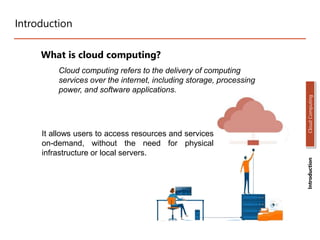
Cloud computing refers to the delivery of computing
services over the internet, including storage, processing
power, and software applications.
Introduction
Cloud
Computing
It allows users to access resources and services
on-demand, without the need for physical
infrastructure or local servers.
Characteristics of Cloud Computing
Key Characteristics of Cloud Computing
• On-Demand Self-Service: Users can provision resources and
services as needed, without requiring human interaction with
service providers.
• Broad Network Access: Services are accessible over the
internet via standard protocols and devices.
• Resource Pooling: Computing resources are pooled together to
serve multiple users, allowing for efficient utilization and
scalability.
• Rapid Elasticity: Resources can be scaled up or down quickly
to meet changing demands.
• Measured Service: Cloud service usage is measured,
monitored, and billed based on actual consumption.
Introduction
Cloud
Computing
Cloud Deployment Models
Introduction
Cloud
Computing
Cloud Deployment Models
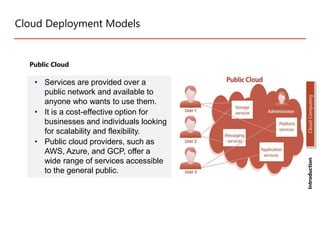
Public Cloud
• Services are provided over a
public network and available to
anyone who wants to use them.
• It is a cost-effective option for
businesses and individuals looking
for scalability and flexibility.
• Public cloud providers, such as
AWS, Azure, and GCP, offer a
wide range of services accessible
to the general public.
Introduction
Cloud
Computing
Cloud Deployment Models
Private Cloud
• Infrastructure is dedicated to a
single organization and may be
located on-premises or off-
premises.
• Private cloud environments are
designed to meet specific security,
compliance, or performance
requirements.
• They offer enhanced control,
customization, and privacy but
require significant upfront
investment.
Introduction
Cloud
Computing
Cloud Deployment Models
Hybrid Cloud
• Combines public and private cloud
environments, allowing for
flexibility and data sharing
between the two.
• Organizations can leverage the
benefits of both public and private
clouds, ensuring optimal resource
allocation.
• Hybrid cloud deployments enable
workload portability and seamless
integration between different
environments.
Introduction
Cloud
Computing
Cloud Deployment Models
Community Cloud
• Community cloud is a deployment
model where infrastructure and
services are shared among a specific
community or group of organizations.
• It caters to the needs of a particular
community, such as government
agencies, educational institutions, or
research organizations.
• Community cloud provides a cost-
effective solution while addressing
specific requirements and compliance
standards of the community.
Introduction
Cloud
Computing
Service Models
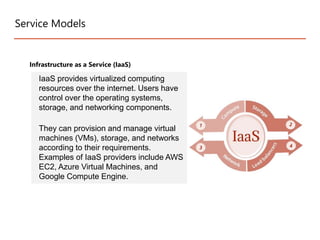
Infrastructure as a Service (IaaS)
IaaS provides virtualized computing
resources over the internet. Users have
control over the operating systems,
storage, and networking components.
They can provision and manage virtual
machines (VMs), storage, and networks
according to their requirements.
Examples of IaaS providers include AWS
EC2, Azure Virtual Machines, and
Google Compute Engine.
Service Models
Platform as a Service (PaaS)
PaaS offers a platform for developing,
testing, and deploying applications.
Users can focus on application
development without worrying about
infrastructure management.
PaaS providers manage the underlying
infrastructure, including servers, storage,
and networking.
Developers can leverage pre-configured
environments, development frameworks,
and deployment tools.
Examples of PaaS providers include
Heroku, Google App Engine, and AWS
Elastic Beanstalk.
Introduction
Cloud
Computing
Service Models
Software as a Service (SaaS)
SaaS delivers software applications over
the internet on a subscription basis.
Users can access and use applications
directly through a web browser or APIs.
The provider hosts and manages the
underlying infrastructure, application,
and data.
Users can typically customize certain
aspects of the application to fit their
needs.
Examples of SaaS include Salesforce,
Microsoft Office 365, and Google
Workspace.
Introduction
Cloud
Computing
Benefits of Cloud
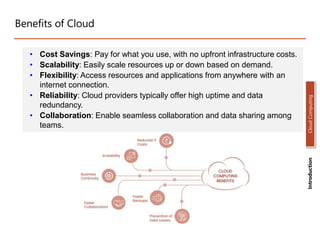
• Cost Savings: Pay for what you use, with no upfront infrastructure costs.
• Scalability: Easily scale resources up or down based on demand.
• Flexibility: Access resources and applications from anywhere with an
internet connection.
• Reliability: Cloud providers typically offer high uptime and data
redundancy.
• Collaboration: Enable seamless collaboration and data sharing among
teams.
Introduction
Cloud
Computing
Common Cloud Computing Use Cases
• Data Storage and Backup: Store and back up large amounts of data
securely.
• Software Development and Testing: Rapidly create and deploy
applications in a scalable environment.
• Web and Mobile Applications: Host web and mobile applications in the
cloud for global accessibility.
• Big Data Analytics: Process and analyze vast amounts of data using
cloud resources.
• Disaster Recovery: Maintain data backups and recovery plans in the
cloud for business continuity.
Introduction
Cloud
Computing
Cloud Architecture
• Cloud architecture refers to the design and structure of cloud computing
environments, including the arrangement of components and the
relationships between them.
• It involves various elements that work together to deliver cloud services
and ensure reliability, scalability, and security.
Introduction
Cloud
Computing
Cloud Architecture
Introduction
Cloud
Computing
NIST Architecture of Cloud
Cont…
• Cloud Consumer: An individual or organization that engages in a business
partnership with Cloud Providers and utilizes their services.
• Cloud Provider: A person, organization, or entity that is accountable for offering
services to individuals or entities who are interested in them.
• Cloud Auditor: A party capable of conducting an impartial evaluation of cloud
services, as well as assessing the performance, security, and operations of the
cloud implementation.
• Cloud Broker: An entity responsible for managing the utilization, performance, and
delivery of cloud services. Additionally, they act as mediators between Cloud
Providers and Cloud Consumers, negotiating relationships between the two
parties.
• Cloud Carrier: An intermediary that facilitates the connectivity and transportation
of cloud services from Cloud Providers to Cloud Consumers.
Cloud Architecture Best Practices
• Up-front Planning: Prioritize up-front planning to understand capacity needs and avoid
unexpected production glitches. Continuously test performance during the architecture
design phase.
• Security First: Implement robust security measures to protect against unauthorized
access. Safeguard all layers of the cloud infrastructure through data encryption, patch
management, and strict security policies. Consider adopting zero-trust security models
for enhanced protection in hybrid and multi-cloud environments.
• Disaster Recovery Readiness: Automate recovery processes to minimize costly
downtime and ensure swift recovery from service disruptions. Implement monitoring
mechanisms to track capacity and utilize redundant networks for a highly available
architecture.
• Maximize Performance: Optimize computing resources by continuously monitoring
business demands and technological requirements. Efficiently manage and allocate
resources to maintain optimal performance levels.
• Cost Optimization: Leverage automated processes, managed service providers, and
utilization tracking to reduce unnecessary cloud computing expenses. Regularly review
and optimize resource allocation to ensure cost-effectiveness.
Introduction
Cloud
Computing
Conclusion
• Cloud computing enables the delivery of computing services over the internet,
eliminating the need for local infrastructure.
• Key characteristics of cloud computing include on-demand self-service, broad network
access, resource pooling, rapid elasticity, and measured service.
• Deployment models include public, private, and hybrid clouds, offering flexibility and
data sharing options.
• Service models such as IaaS, PaaS, and SaaS provide virtualized computing
resources, platform for application development, and software delivery respectively.
• Cloud computing offers benefits like cost savings, scalability, flexibility, reliability, and
enhanced collaboration.
• Cloud computing presents a transformative approach to computing, offering cost-
effective solutions, scalability, and flexibility for organizations across various
industries. By leveraging the benefits of cloud computing and aligning with the
appropriate deployment and service models, organizations can drive innovation,
improve efficiency, and adapt to evolving business needs.
Introduction
Cloud
Computing
Remember
• Understand your specific needs and requirements when selecting a cloud
deployment and service model.
• Prioritize security measures such as data encryption and access controls to protect
against unauthorized access.
• Plan for disaster recovery and high availability to ensure business continuity.
• Continuously monitor and optimize resource utilization for optimal performance and
cost savings.
• Regularly assess and adapt your cloud architecture to evolving business needs and
emerging technologies.
Introduction
Cloud
Computing
THANK YOU

Introduction to Cloud Computing in Computer.ppt

  • 1.
  • 2.
    Introduction What is cloudcomputing? Cloud computing refers to the delivery of computing services over the internet, including storage, processing power, and software applications. Introduction Cloud Computing It allows users to access resources and services on-demand, without the need for physical infrastructure or local servers.
  • 3.
    Characteristics of CloudComputing Key Characteristics of Cloud Computing • On-Demand Self-Service: Users can provision resources and services as needed, without requiring human interaction with service providers. • Broad Network Access: Services are accessible over the internet via standard protocols and devices. • Resource Pooling: Computing resources are pooled together to serve multiple users, allowing for efficient utilization and scalability. • Rapid Elasticity: Resources can be scaled up or down quickly to meet changing demands. • Measured Service: Cloud service usage is measured, monitored, and billed based on actual consumption. Introduction Cloud Computing
  • 4.
  • 5.
    Cloud Deployment Models PublicCloud • Services are provided over a public network and available to anyone who wants to use them. • It is a cost-effective option for businesses and individuals looking for scalability and flexibility. • Public cloud providers, such as AWS, Azure, and GCP, offer a wide range of services accessible to the general public. Introduction Cloud Computing
  • 6.
    Cloud Deployment Models PrivateCloud • Infrastructure is dedicated to a single organization and may be located on-premises or off- premises. • Private cloud environments are designed to meet specific security, compliance, or performance requirements. • They offer enhanced control, customization, and privacy but require significant upfront investment. Introduction Cloud Computing
  • 7.
    Cloud Deployment Models HybridCloud • Combines public and private cloud environments, allowing for flexibility and data sharing between the two. • Organizations can leverage the benefits of both public and private clouds, ensuring optimal resource allocation. • Hybrid cloud deployments enable workload portability and seamless integration between different environments. Introduction Cloud Computing
  • 8.
    Cloud Deployment Models CommunityCloud • Community cloud is a deployment model where infrastructure and services are shared among a specific community or group of organizations. • It caters to the needs of a particular community, such as government agencies, educational institutions, or research organizations. • Community cloud provides a cost- effective solution while addressing specific requirements and compliance standards of the community. Introduction Cloud Computing
  • 9.
    Service Models Infrastructure asa Service (IaaS) IaaS provides virtualized computing resources over the internet. Users have control over the operating systems, storage, and networking components. They can provision and manage virtual machines (VMs), storage, and networks according to their requirements. Examples of IaaS providers include AWS EC2, Azure Virtual Machines, and Google Compute Engine.
  • 10.
    Service Models Platform asa Service (PaaS) PaaS offers a platform for developing, testing, and deploying applications. Users can focus on application development without worrying about infrastructure management. PaaS providers manage the underlying infrastructure, including servers, storage, and networking. Developers can leverage pre-configured environments, development frameworks, and deployment tools. Examples of PaaS providers include Heroku, Google App Engine, and AWS Elastic Beanstalk. Introduction Cloud Computing
  • 11.
    Service Models Software asa Service (SaaS) SaaS delivers software applications over the internet on a subscription basis. Users can access and use applications directly through a web browser or APIs. The provider hosts and manages the underlying infrastructure, application, and data. Users can typically customize certain aspects of the application to fit their needs. Examples of SaaS include Salesforce, Microsoft Office 365, and Google Workspace. Introduction Cloud Computing
  • 12.
    Benefits of Cloud •Cost Savings: Pay for what you use, with no upfront infrastructure costs. • Scalability: Easily scale resources up or down based on demand. • Flexibility: Access resources and applications from anywhere with an internet connection. • Reliability: Cloud providers typically offer high uptime and data redundancy. • Collaboration: Enable seamless collaboration and data sharing among teams. Introduction Cloud Computing
  • 13.
    Common Cloud ComputingUse Cases • Data Storage and Backup: Store and back up large amounts of data securely. • Software Development and Testing: Rapidly create and deploy applications in a scalable environment. • Web and Mobile Applications: Host web and mobile applications in the cloud for global accessibility. • Big Data Analytics: Process and analyze vast amounts of data using cloud resources. • Disaster Recovery: Maintain data backups and recovery plans in the cloud for business continuity. Introduction Cloud Computing
  • 14.
    Cloud Architecture • Cloudarchitecture refers to the design and structure of cloud computing environments, including the arrangement of components and the relationships between them. • It involves various elements that work together to deliver cloud services and ensure reliability, scalability, and security. Introduction Cloud Computing
  • 15.
  • 16.
    Cont… • Cloud Consumer:An individual or organization that engages in a business partnership with Cloud Providers and utilizes their services. • Cloud Provider: A person, organization, or entity that is accountable for offering services to individuals or entities who are interested in them. • Cloud Auditor: A party capable of conducting an impartial evaluation of cloud services, as well as assessing the performance, security, and operations of the cloud implementation. • Cloud Broker: An entity responsible for managing the utilization, performance, and delivery of cloud services. Additionally, they act as mediators between Cloud Providers and Cloud Consumers, negotiating relationships between the two parties. • Cloud Carrier: An intermediary that facilitates the connectivity and transportation of cloud services from Cloud Providers to Cloud Consumers.
  • 17.
    Cloud Architecture BestPractices • Up-front Planning: Prioritize up-front planning to understand capacity needs and avoid unexpected production glitches. Continuously test performance during the architecture design phase. • Security First: Implement robust security measures to protect against unauthorized access. Safeguard all layers of the cloud infrastructure through data encryption, patch management, and strict security policies. Consider adopting zero-trust security models for enhanced protection in hybrid and multi-cloud environments. • Disaster Recovery Readiness: Automate recovery processes to minimize costly downtime and ensure swift recovery from service disruptions. Implement monitoring mechanisms to track capacity and utilize redundant networks for a highly available architecture. • Maximize Performance: Optimize computing resources by continuously monitoring business demands and technological requirements. Efficiently manage and allocate resources to maintain optimal performance levels. • Cost Optimization: Leverage automated processes, managed service providers, and utilization tracking to reduce unnecessary cloud computing expenses. Regularly review and optimize resource allocation to ensure cost-effectiveness. Introduction Cloud Computing
  • 18.
    Conclusion • Cloud computingenables the delivery of computing services over the internet, eliminating the need for local infrastructure. • Key characteristics of cloud computing include on-demand self-service, broad network access, resource pooling, rapid elasticity, and measured service. • Deployment models include public, private, and hybrid clouds, offering flexibility and data sharing options. • Service models such as IaaS, PaaS, and SaaS provide virtualized computing resources, platform for application development, and software delivery respectively. • Cloud computing offers benefits like cost savings, scalability, flexibility, reliability, and enhanced collaboration. • Cloud computing presents a transformative approach to computing, offering cost- effective solutions, scalability, and flexibility for organizations across various industries. By leveraging the benefits of cloud computing and aligning with the appropriate deployment and service models, organizations can drive innovation, improve efficiency, and adapt to evolving business needs. Introduction Cloud Computing
  • 19.
    Remember • Understand yourspecific needs and requirements when selecting a cloud deployment and service model. • Prioritize security measures such as data encryption and access controls to protect against unauthorized access. • Plan for disaster recovery and high availability to ensure business continuity. • Continuously monitor and optimize resource utilization for optimal performance and cost savings. • Regularly assess and adapt your cloud architecture to evolving business needs and emerging technologies. Introduction Cloud Computing
  • 20.