CS 6290
Many-core & Interconnect
Milos Prvulovic
Fall 2007
Interconnection Networks
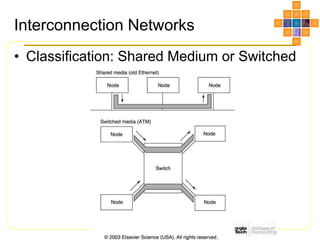
• Classification: Shared Medium or Switched
Shared Media Networks
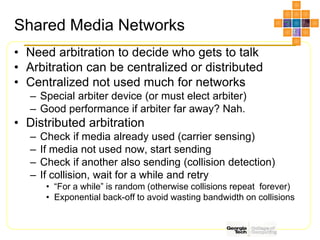
• Need arbitration to decide who gets to talk
• Arbitration can be centralized or distributed
• Centralized not used much for networks
– Special arbiter device (or must elect arbiter)
– Good performance if arbiter far away? Nah.
• Distributed arbitration
– Check if media already used (carrier sensing)
– If media not used now, start sending
– Check if another also sending (collision detection)
– If collision, wait for a while and retry
• “For a while” is random (otherwise collisions repeat forever)
• Exponential back-off to avoid wasting bandwidth on collisions
Switched Networks
• Need switches
– Introduces switching overheads
• No time wasted on arbitration and collisions
• Multiple transfers can be in progress
– If they use different links, of course
• Circuit or Packet Switching
– Circuit switching: end-to-end connections
• Reserves links for a connection (e.g. phone network)
– Packet switching: each packet routed separately
• Links used only when data transferred (e.g. Internet Protocol)
Routing
• Shared media has trivial routing (broadcast)
• In switched media we can have
– Source-based (source specifies route)
– Virtual circuits (end-to-end route created)
• When connection made, set up route
• Switches forward packets along the route
– Destination-based (source specifies destination)
• Switches must route packet toward destination
• Also can be classified into
– Deterministic (one route from a source to a destination)
– Adaptive (different routes can be used)
Routing Methods for Switches
• Store-and-Forward
– Switch receives entire packet, then forwards it
– If error occurs when forwarding, switch can re-send
• Wormhole routing
– Packet consists of flits (a few bytes each)
– First flit contains header w/ destination address
– Switch gets header, decides where to forward
– Other flits forwarded as they arrive
– Looks like packet worming through network
– If an error occurs along the way, sender must re-send
• No switch has the entire packet to re-send it
Cut-Through Routing
• What happens when link busy?
– Header arrives to switch, but outgoing link busy
– What do we do with the other flits of the packet?
• Wormhole routing: stop the tail when head stops
– Now each flit along the way blocks the a link
– One busy link creates other busy links => traffic jam
• Cut-Through Routing
– If outgoing link busy, receive and buffer incoming flits
– The buffered flits stay there until link becomes free
– When link free, the flits start worming out of the switch
– Need packet-sized buffer space in each switch
• Wormhole Routing switch needs to buffer only one flit
Routing: Network Latency
• Switch Delay
– Time from incoming to outgoing link in a switch
• Switches
– Number of switches along the way
• Transfer time
– Time to send the packet through a link
• Store-and-Forward end-to-end transfer time
– (Switches*SwitchDelay)+(TransferTime*(Switches+1))
• Wormhole or Cut-Through end-to-end transfer time
– (Switches*SwitchDelay) + TransferTime
– Much better if there are many switches along the way
– See the example on page 811
Switch Technology
• What do we want in a switch
– Many input and output links
• Usually number of input and output links the same
– Low contention inside the switch
• Best if there is none (only external links cause contention)
– Short switching delay
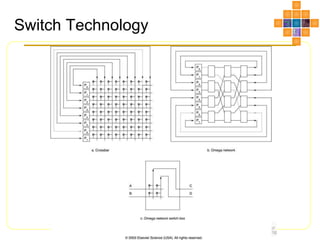
• Crossbar
– Very low switching delay, no internal contention
– Complexity grows as square of number of links
• Can not have too many links (e.g. up to 64 in and 64 out)
Switch Technology
• What do we want in a switch
– Many input and output links
• Usually number of input and output links the same
– Low contention inside the switch
• Best if there is none (only external links cause contention)
– Short switching delay
• Crossbar
– Very low switching delay, no internal contention
– Complexity grows as square of number of links
• Can not have too many links (e.g. up to 64 in and 64 out)
• Omega Network
– Build switches with more ports using small crossbars
– Lower complexity per link, but longer delay and more contention
Switch Technology
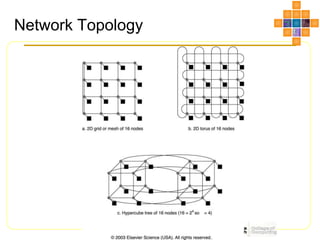
Network Topology
Network Topology
• What do we want in a network topology
– Many nodes, high bandwidth, low contention, low
latency
– Low latency: few switches along any route
• For each (src, dest) pair, we choose shortest route
• Longest such route over all (src,dst) pairs: network diameter
• We want networks with small diameter!
– Low contention: high aggregate bandwidth
• Divide network into two groups, each with half the nodes
• Total bandwidth between groups is bisection bandwidth
• Actually, we use the minimum over all such bisections
On-Chip Networks
• We’ll have many cores on-chip
– Need switched network to provide bandwidth
• Need to map well onto chip surface
– E.g. hypercube is not great
• Mesh or grid should work well, torus OK too
– Limited ports per switch (CPU & 4 neighbors)
– All links short (going to neighbors)
– Many parallel algorithms map well onto grids
• Matrices, grids, etc.
Trouble with shared caches
• Private caches OK
– Each placed with its own processor
• We want a shared cache, too
– Fits more data than if broken into private
caches
• Private caches replicate data
– Dynamically shared
• Threads that need more space get more space
• But how do we make a shared cache fast
Trouble with shared caches
• Private caches OK
– Each placed with its own processor
• We want a shared cache, too
– Fits more data than if broken into private
caches
• Private caches replicate data
– Dynamically shared
• Threads that need more space get more space
• But how do we make a shared cache fast
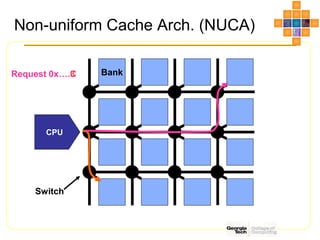
Non-uniform Cache Arch. (NUCA)
Bank
Switch
CPU
Request 0x….3
Request 0x….C
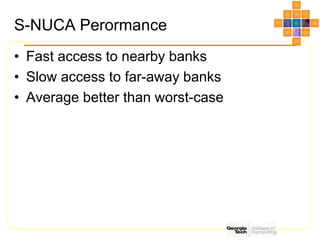
S-NUCA Perormance
• Fast access to nearby banks
• Slow access to far-away banks
• Average better than worst-case
CPU
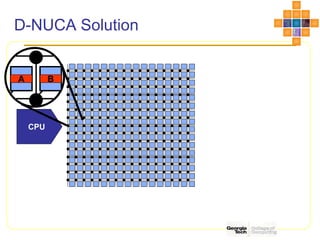
D-NUCA Solution
A B
D-NUCA Perormance
• Fast access to nearby banks
• Slow access to far-away banks
• Average much better than worst-case
• But we keep moving blocks
– Lots of power-hungry activity
• Need smart policies for block migration
– Move blocks less frequently
– But get most of the benefit of being able to
move
D-NUCA Issues
• Blocks keep moving, how do we find them?
• One solution: Use an on-chip directory!
– Use direct mapping to assign a home bank
– If we don’t know where the block is,
ask the home bank
– If we move the block, tell the home bank
– If we think we know where the block is,
look there. If it’s been moved, ask home bank

unit1.ppt

  • 1.
    CS 6290 Many-core &Interconnect Milos Prvulovic Fall 2007
  • 2.
  • 3.
    Shared Media Networks •Need arbitration to decide who gets to talk • Arbitration can be centralized or distributed • Centralized not used much for networks – Special arbiter device (or must elect arbiter) – Good performance if arbiter far away? Nah. • Distributed arbitration – Check if media already used (carrier sensing) – If media not used now, start sending – Check if another also sending (collision detection) – If collision, wait for a while and retry • “For a while” is random (otherwise collisions repeat forever) • Exponential back-off to avoid wasting bandwidth on collisions
  • 4.
    Switched Networks • Needswitches – Introduces switching overheads • No time wasted on arbitration and collisions • Multiple transfers can be in progress – If they use different links, of course • Circuit or Packet Switching – Circuit switching: end-to-end connections • Reserves links for a connection (e.g. phone network) – Packet switching: each packet routed separately • Links used only when data transferred (e.g. Internet Protocol)
  • 5.
    Routing • Shared mediahas trivial routing (broadcast) • In switched media we can have – Source-based (source specifies route) – Virtual circuits (end-to-end route created) • When connection made, set up route • Switches forward packets along the route – Destination-based (source specifies destination) • Switches must route packet toward destination • Also can be classified into – Deterministic (one route from a source to a destination) – Adaptive (different routes can be used)
  • 6.
    Routing Methods forSwitches • Store-and-Forward – Switch receives entire packet, then forwards it – If error occurs when forwarding, switch can re-send • Wormhole routing – Packet consists of flits (a few bytes each) – First flit contains header w/ destination address – Switch gets header, decides where to forward – Other flits forwarded as they arrive – Looks like packet worming through network – If an error occurs along the way, sender must re-send • No switch has the entire packet to re-send it
  • 7.
    Cut-Through Routing • Whathappens when link busy? – Header arrives to switch, but outgoing link busy – What do we do with the other flits of the packet? • Wormhole routing: stop the tail when head stops – Now each flit along the way blocks the a link – One busy link creates other busy links => traffic jam • Cut-Through Routing – If outgoing link busy, receive and buffer incoming flits – The buffered flits stay there until link becomes free – When link free, the flits start worming out of the switch – Need packet-sized buffer space in each switch • Wormhole Routing switch needs to buffer only one flit
  • 8.
    Routing: Network Latency •Switch Delay – Time from incoming to outgoing link in a switch • Switches – Number of switches along the way • Transfer time – Time to send the packet through a link • Store-and-Forward end-to-end transfer time – (Switches*SwitchDelay)+(TransferTime*(Switches+1)) • Wormhole or Cut-Through end-to-end transfer time – (Switches*SwitchDelay) + TransferTime – Much better if there are many switches along the way – See the example on page 811
  • 9.
    Switch Technology • Whatdo we want in a switch – Many input and output links • Usually number of input and output links the same – Low contention inside the switch • Best if there is none (only external links cause contention) – Short switching delay • Crossbar – Very low switching delay, no internal contention – Complexity grows as square of number of links • Can not have too many links (e.g. up to 64 in and 64 out)
  • 10.
    Switch Technology • Whatdo we want in a switch – Many input and output links • Usually number of input and output links the same – Low contention inside the switch • Best if there is none (only external links cause contention) – Short switching delay • Crossbar – Very low switching delay, no internal contention – Complexity grows as square of number of links • Can not have too many links (e.g. up to 64 in and 64 out) • Omega Network – Build switches with more ports using small crossbars – Lower complexity per link, but longer delay and more contention
  • 11.
  • 12.
  • 13.
    Network Topology • Whatdo we want in a network topology – Many nodes, high bandwidth, low contention, low latency – Low latency: few switches along any route • For each (src, dest) pair, we choose shortest route • Longest such route over all (src,dst) pairs: network diameter • We want networks with small diameter! – Low contention: high aggregate bandwidth • Divide network into two groups, each with half the nodes • Total bandwidth between groups is bisection bandwidth • Actually, we use the minimum over all such bisections
  • 14.
    On-Chip Networks • We’llhave many cores on-chip – Need switched network to provide bandwidth • Need to map well onto chip surface – E.g. hypercube is not great • Mesh or grid should work well, torus OK too – Limited ports per switch (CPU & 4 neighbors) – All links short (going to neighbors) – Many parallel algorithms map well onto grids • Matrices, grids, etc.
  • 15.
    Trouble with sharedcaches • Private caches OK – Each placed with its own processor • We want a shared cache, too – Fits more data than if broken into private caches • Private caches replicate data – Dynamically shared • Threads that need more space get more space • But how do we make a shared cache fast
  • 16.
    Trouble with sharedcaches • Private caches OK – Each placed with its own processor • We want a shared cache, too – Fits more data than if broken into private caches • Private caches replicate data – Dynamically shared • Threads that need more space get more space • But how do we make a shared cache fast
  • 17.
    Non-uniform Cache Arch.(NUCA) Bank Switch CPU Request 0x….3 Request 0x….C
  • 18.
    S-NUCA Perormance • Fastaccess to nearby banks • Slow access to far-away banks • Average better than worst-case
  • 19.
  • 20.
    D-NUCA Perormance • Fastaccess to nearby banks • Slow access to far-away banks • Average much better than worst-case • But we keep moving blocks – Lots of power-hungry activity • Need smart policies for block migration – Move blocks less frequently – But get most of the benefit of being able to move
  • 21.
    D-NUCA Issues • Blockskeep moving, how do we find them? • One solution: Use an on-chip directory! – Use direct mapping to assign a home bank – If we don’t know where the block is, ask the home bank – If we move the block, tell the home bank – If we think we know where the block is, look there. If it’s been moved, ask home bank