1
Unit 1
Software Process and Agile Development
Software Engineering:
A Practitioner’s Approach, 7/e
by Roger S. Pressman
2
What is Software?
Software is: (1) instructions (computer
programs) that when executed provide desired
features, function, and performance;
(2) data structures that enable the programs
to adequately manipulate information and
(3) documentation that describes the
operation and use of the programs.
3
What is Software?
 Software is developed or engineered, it is
not manufactured in the classical sense.
 Software doesn't "wear out."
 Although the industry is moving toward
component-based construction, most
software continues to be custom-built.
4
Wear vs. Deterioration
5
Software Applications
 system software
 application software
 engineering/scientific
software
 embedded software
 product-line software
 WebApps (Web
applications)
 AI software
6
Software—New Categories
 Open world computing—pervasive, distributed computing
 Ubiquitous computing—wireless networks
 Netsourcing—the Web as a computing engine
 Open source—”free” source code open to the computing
community (a blessing, but also a potential curse!)
7
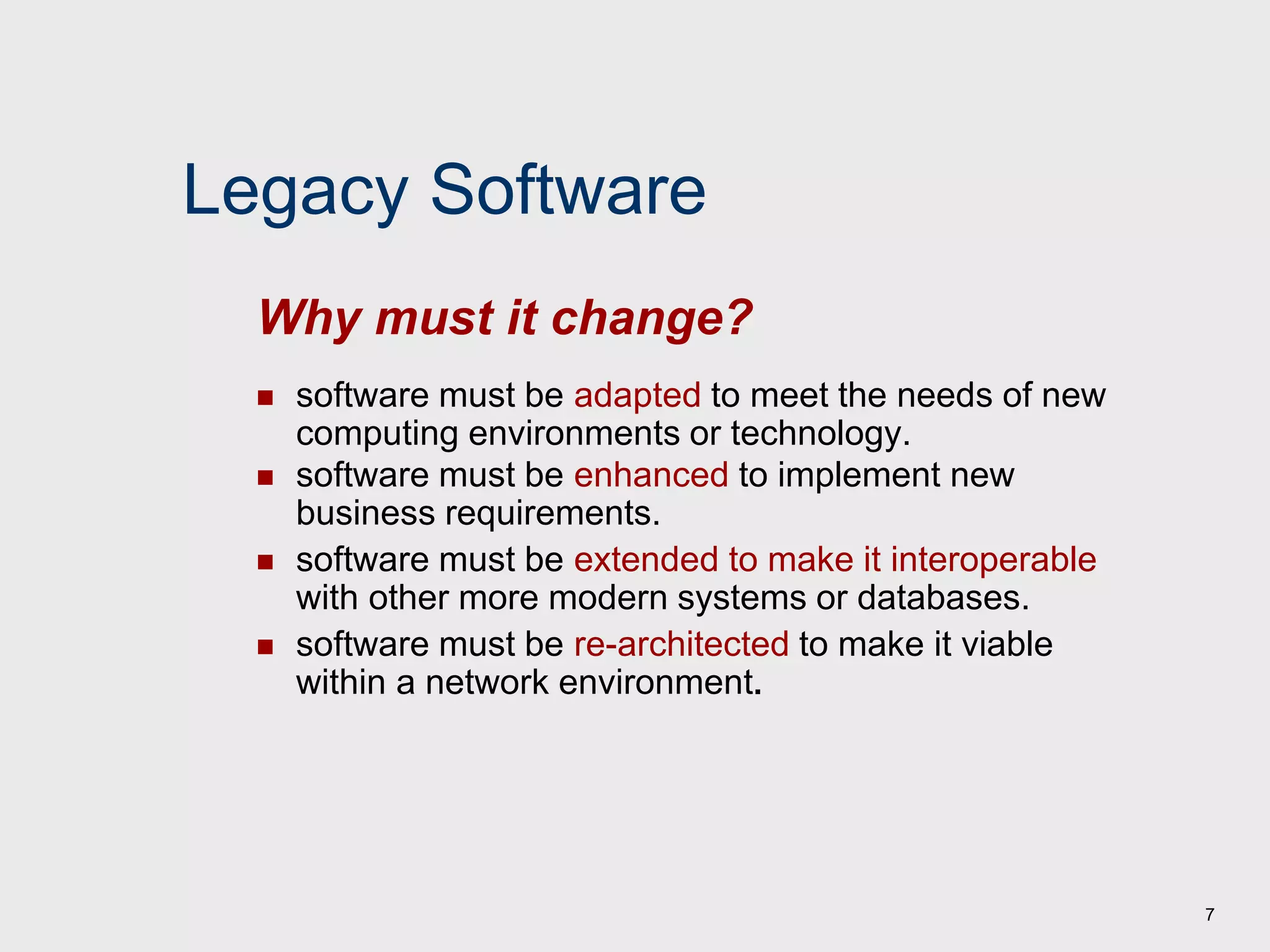
Legacy Software
 software must be adapted to meet the needs of new
computing environments or technology.
 software must be enhanced to implement new
business requirements.
 software must be extended to make it interoperable
with other more modern systems or databases.
 software must be re-architected to make it viable
within a network environment.
Why must it change?
8
Characteristics of WebApps - I
 Network intensiveness. A WebApp resides on a network and
must serve the needs of a diverse community of clients.
 Concurrency. A large number of users may access the
WebApp at one time.
 Unpredictable load. The number of users of the WebApp may
vary by orders of magnitude from day to day.
 Performance. If a WebApp user must wait too long (for
access, for server-side processing, for client-side formatting
and display), he or she may decide to go elsewhere.
 Availability. Although expectation of 100 percent availability is
unreasonable, users of popular WebApps often demand
access on a “24/7/365” basis.
9
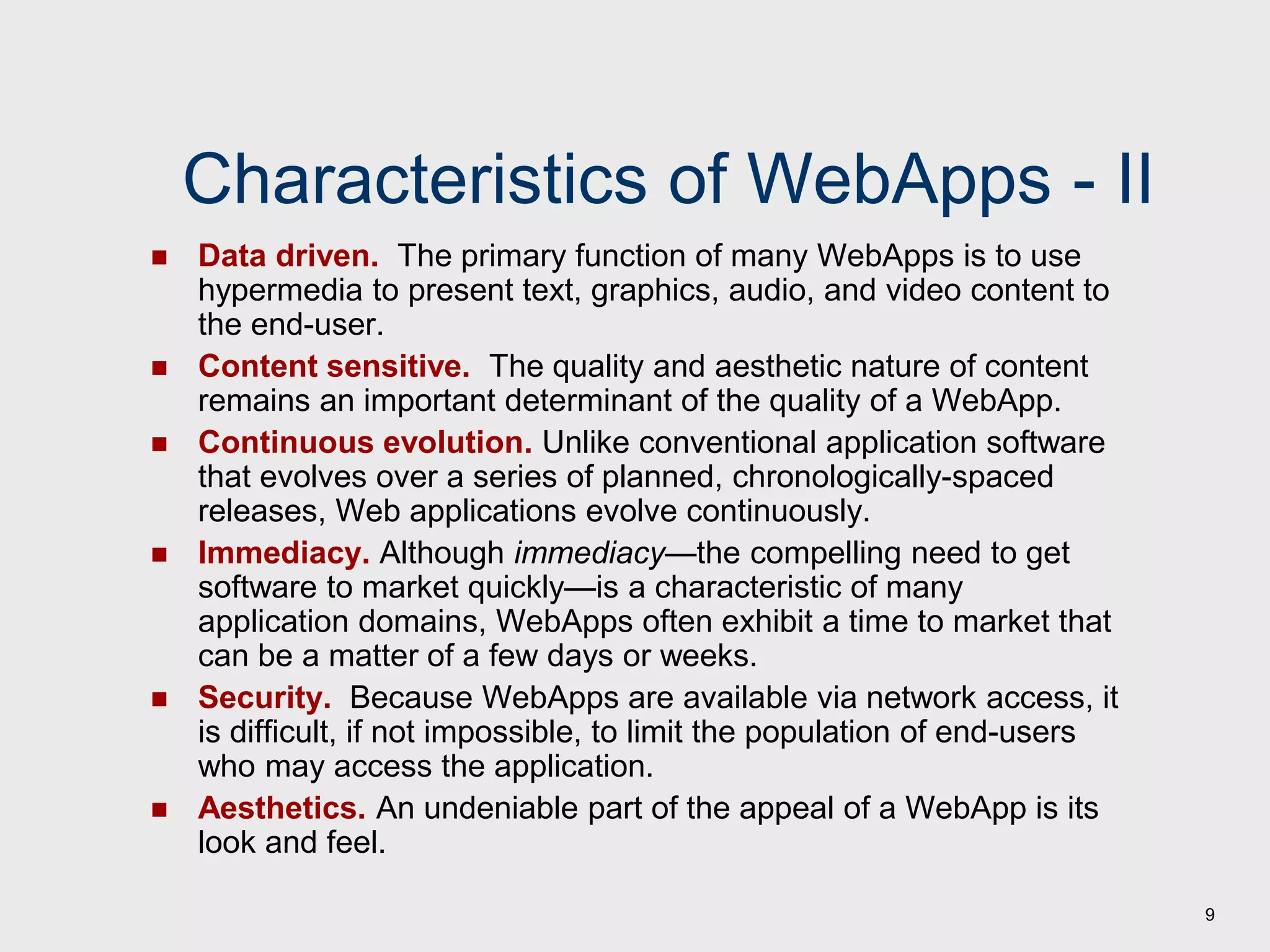
Characteristics of WebApps - II
 Data driven. The primary function of many WebApps is to use
hypermedia to present text, graphics, audio, and video content to
the end-user.
 Content sensitive. The quality and aesthetic nature of content
remains an important determinant of the quality of a WebApp.
 Continuous evolution. Unlike conventional application software
that evolves over a series of planned, chronologically-spaced
releases, Web applications evolve continuously.
 Immediacy. Although immediacy—the compelling need to get
software to market quickly—is a characteristic of many
application domains, WebApps often exhibit a time to market that
can be a matter of a few days or weeks.
 Security. Because WebApps are available via network access, it
is difficult, if not impossible, to limit the population of end-users
who may access the application.
 Aesthetics. An undeniable part of the appeal of a WebApp is its
look and feel.
10
Software Engineering
 The IEEE definition:
 Software Engineering: (1) The application of a
systematic, disciplined, quantifiable approach to
the development, operation, and maintenance of
software; that is, the application of engineering to
software. (2) The study of approaches as in (1).
 The seminal definition:
 [Software engineering is] the establishment and
use of sound engineering principles in order to
obtain economically software that is reliable and
works efficiently on real machines.
11
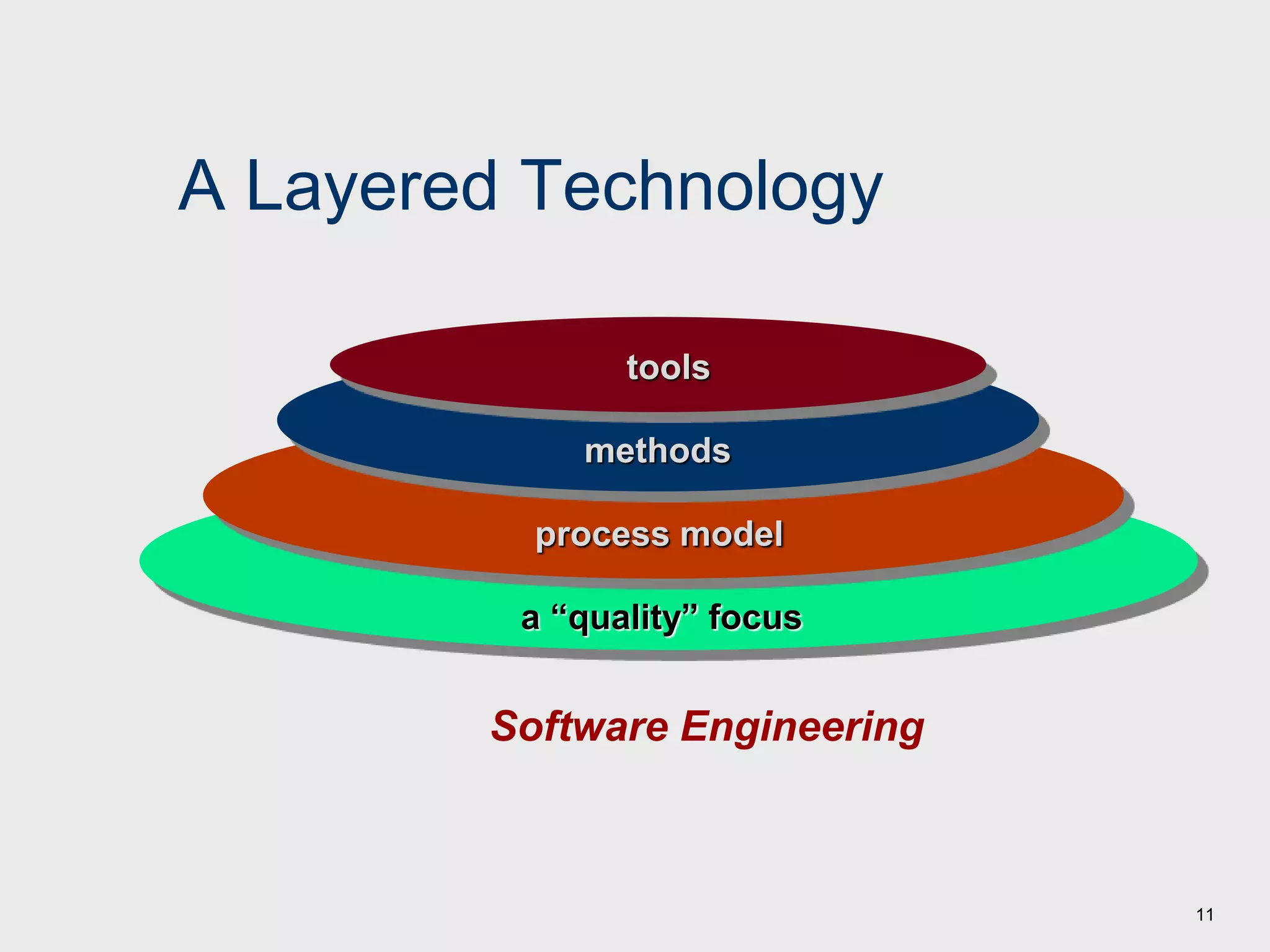
A Layered Technology
Software Engineering
a “quality” focus
process model
methods
tools
12
A Process Framework
Process framework
Framework activities
work tasks
work products
milestones & deliverables
QA checkpoints
Umbrella Activities
13
Framework Activities
 Communication
 Planning
 Modeling
 Analysis of requirements
 Design
 Construction
 Code generation
 Testing
 Deployment
14
Umbrella Activities
 Software project management
 Formal technical reviews
 Software quality assurance
 Software configuration management
 Work product preparation and production
 Reusability management
 Measurement
 Risk management
15
Hooker’s General Principles
 1: The Reason It All Exists
 2: KISS (Keep It Simple, Stupid!)
 3: Maintain the Vision
 4: What You Produce, Others Will Consume
 5: Be Open to the Future
 6: Plan Ahead for Reuse
 7: Think!
16
Chapter 2
 Process Models
17
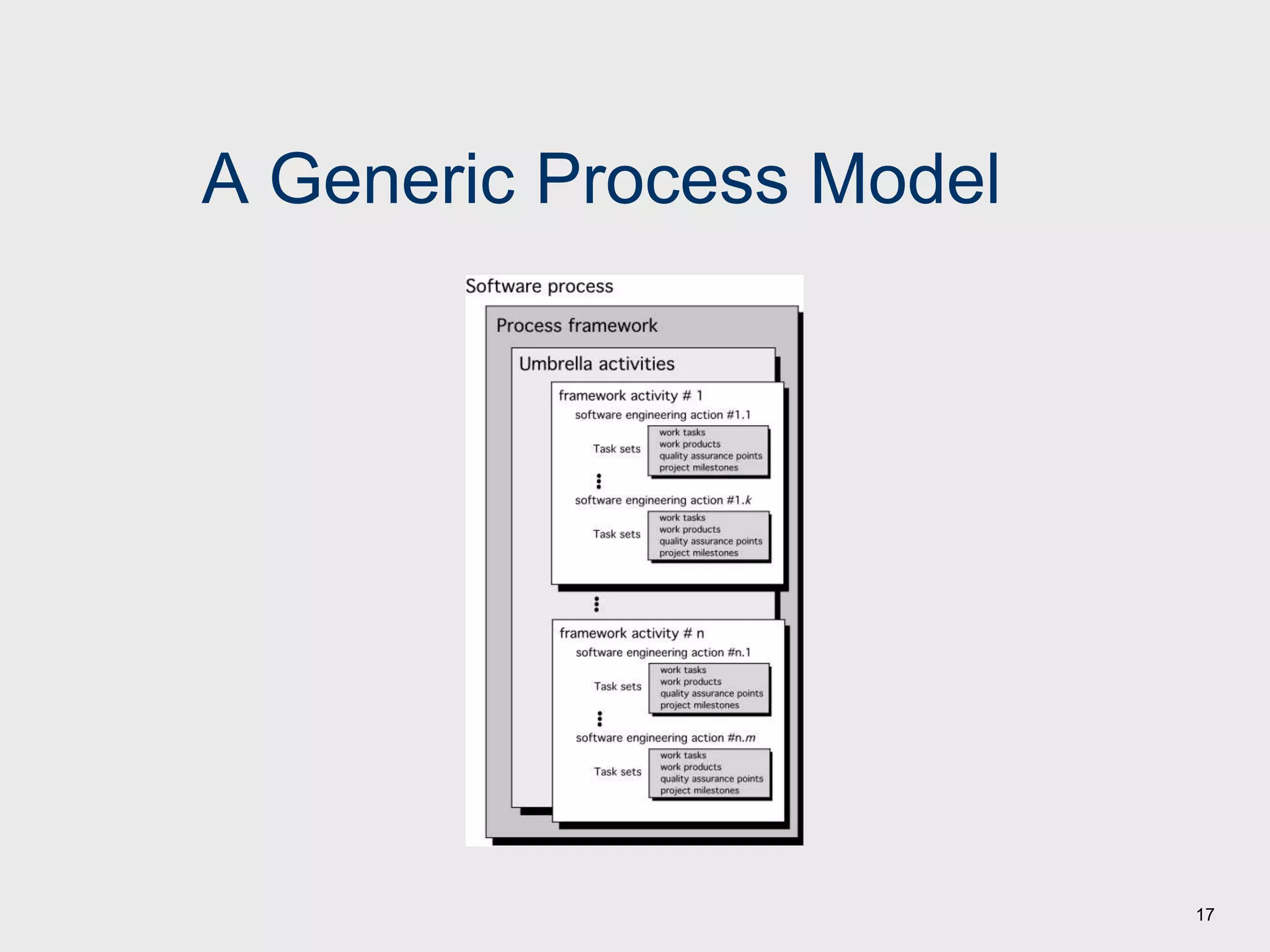
A Generic Process Model
18
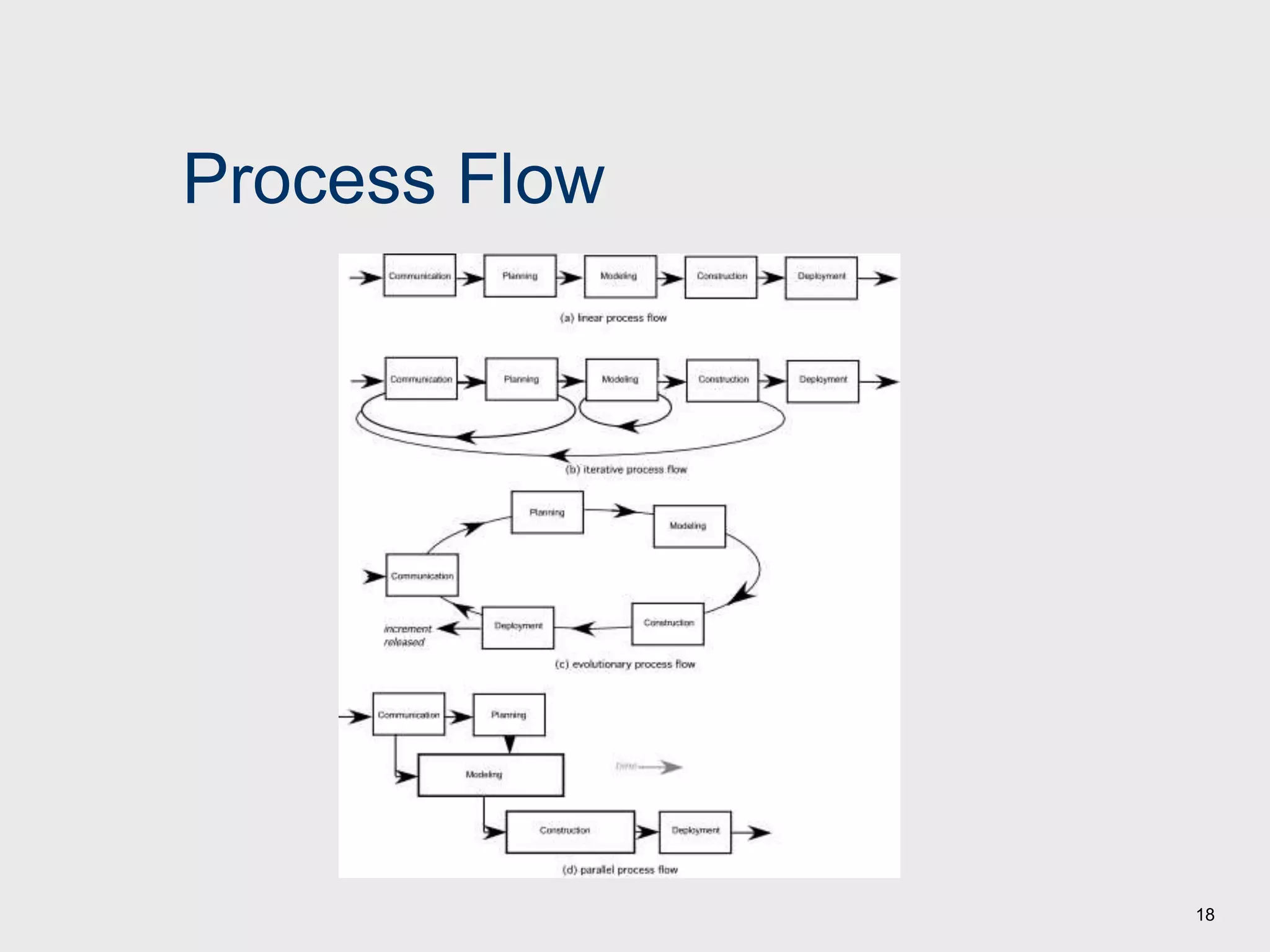
Process Flow
19
Types of Process
1. Perspective Process Models
Water Fall Model
 V-Model
 Incremental Model
Evolutionary Models: Prototyping
Evolutionary Models: Spiral
Evolutionary Models: Concurrent
2. Specialized Process Models
 Component based development
 Formal methods
 AOSD (Aspect Oriented Software Development)
 Unified Process
20
1. Prescriptive Process Models
 Prescriptive process models advocate an orderly
approach to software engineering
That leads to a few questions …
 If prescriptive process models strive for structure and
order, are they inappropriate for a software world that
thrives on change?
 Yet, if we reject traditional process models (and the
order they imply) and replace them with something less
structured, do we make it impossible to achieve
coordination and coherence in software work?
21
The Waterfall Model
Communication
Planning
Modeling
Construction
Deployment
analysis
design
code
t est
project init iat ion
requirement gat hering estimating
scheduling
tracking
delivery
support
f eedback
22
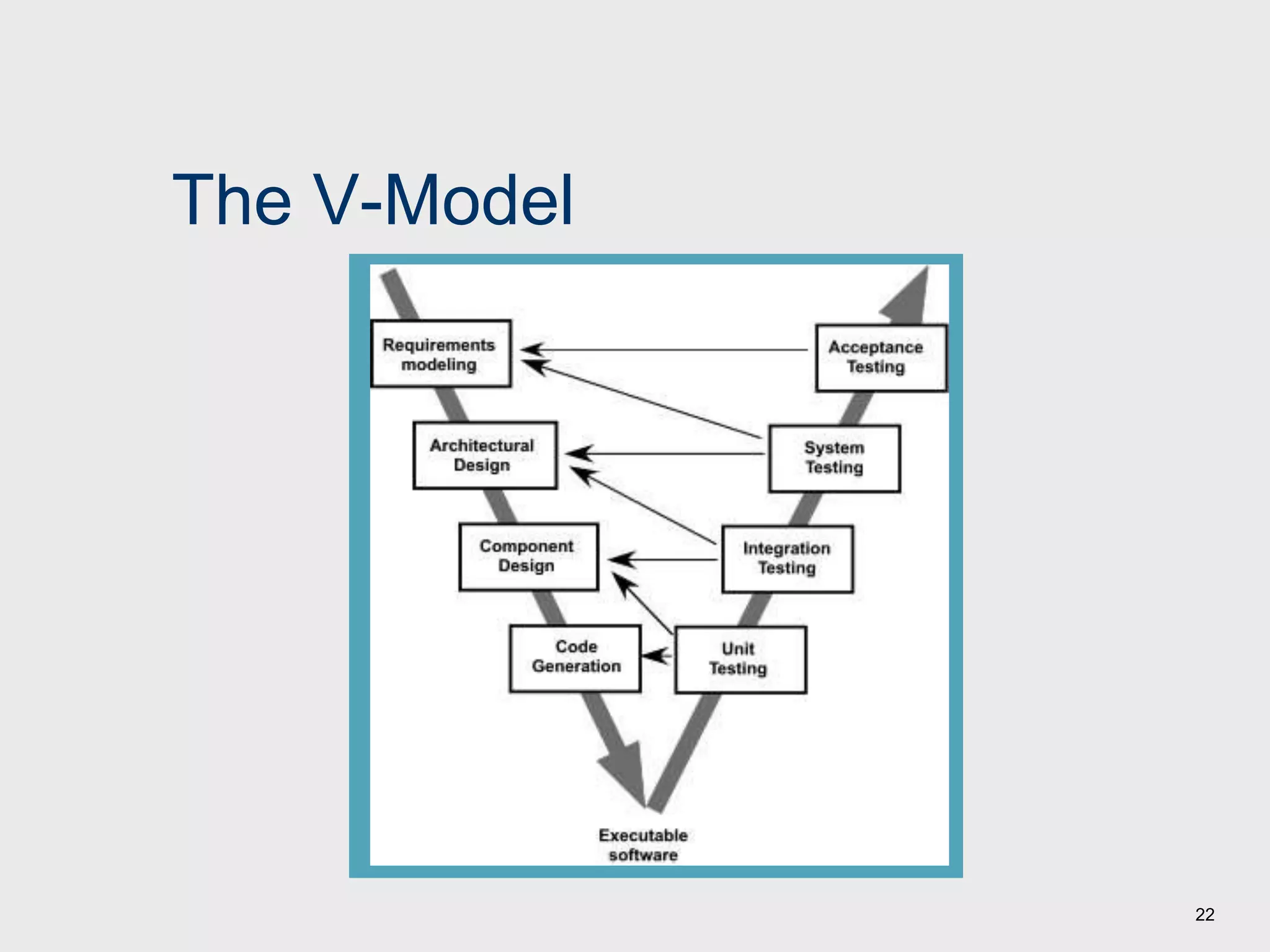
The V-Model
23
The Incremental Model
C o m m u n i c a t i o n
P l a n n i n g
M o d e l i n g
C o n s t r u c t i o n
D e p l o y m e n t
d e l i v e r y
f e e d b a c k
analys is
design c ode
t est
increment # 1
increment # 2
delivery of
1st increment
delivery of
2nd increment
delivery of
nt h increment
increment # n
project calendar time
C o m m u n i c a t i o n
P l a n n i n g
M o d e l i n g
C o n s t r u c t i o n
D e p l o y m e n t
d e l i v e r y
f e e d b a c k
analys is
design c ode
t est
C o m m u n i c a t i o n
P l a n n i n g
M o d e l i n g
C o n s t r u c t i o n
D e p l o y m e n t
d e l i v e r y
f e e d b a c k
analys is
design
c ode
t es t
24
Evolutionary Models: Prototyping
Construction
of prototype
Communicat ion
Quick plan
Const ruct ion
of
prot ot ype
Mode ling
Quick de sign
De live ry
& Fe e dback
Deployment
communication
Quick
plan
Modeling
Quick design
Construction
of prototype
Deployment
delivery &
feedback
25
Evolutionary Models: The Spiral
communication
planning
modeling
construction
deployment
delivery
feedback
start
analysis
design
code
test
estimation
scheduling
risk analysis
26
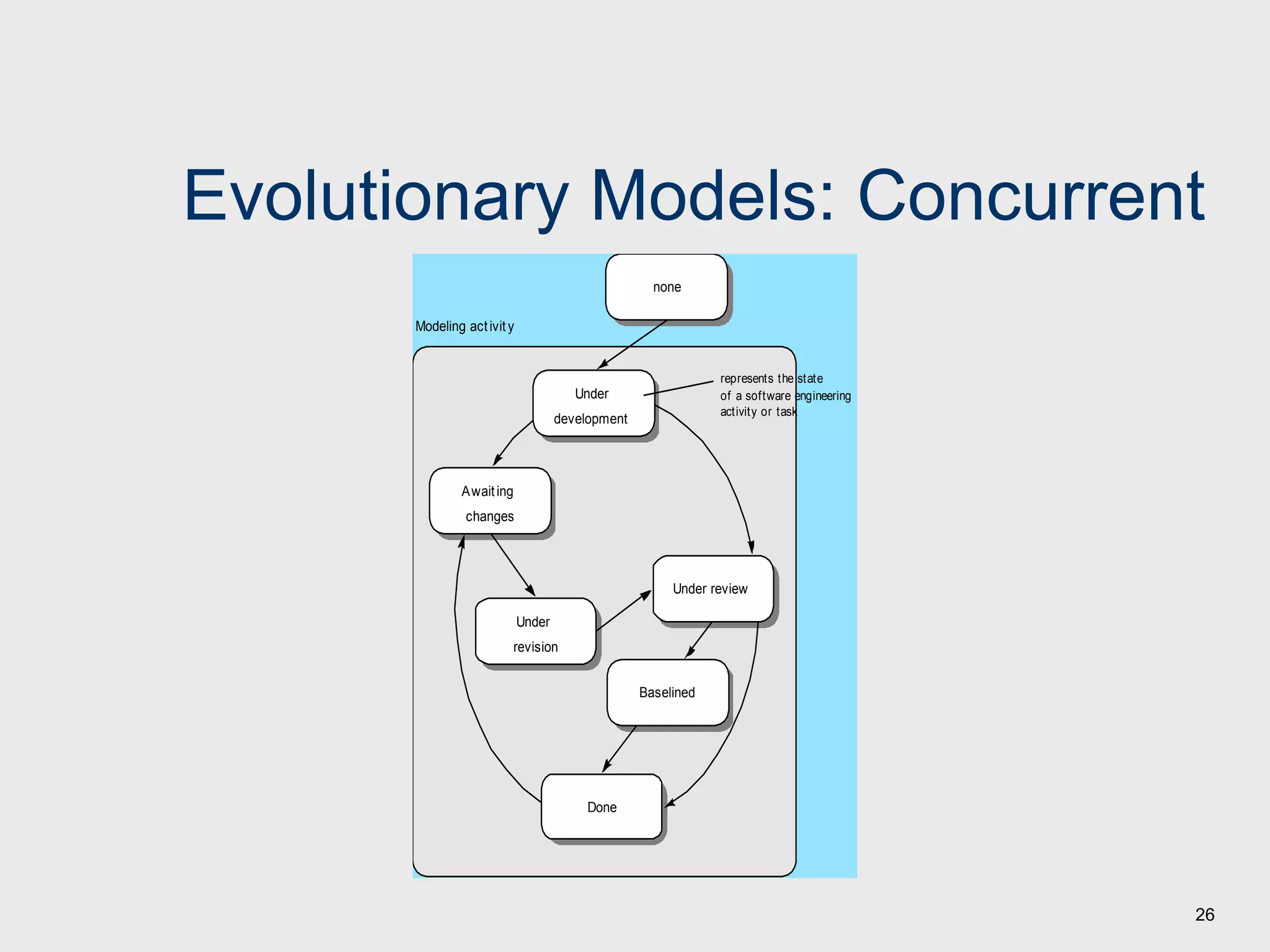
Evolutionary Models: Concurrent
Under review
Baselined
Done
Under
revision
Awaiting
changes
Under
development
none
Modeling activity
represents the state
of a software engineering
activity or task
27
2. Specialized Process Models
 Component based development—the process to
apply when reuse is a development objective
 Formal methods—emphasizes the mathematical
specification of requirements
 AOSD—provides a process and methodological
approach for defining, specifying, designing, and
constructing aspects
 Unified Process—a “use-case driven, architecture-
centric, iterative and incremental” software process
closely aligned with the Unified Modeling Language
(UML)
28
The Unified Process (UP)
software increment
Release
Inception
Elaboration
construction
transition
production
inception
elaboration
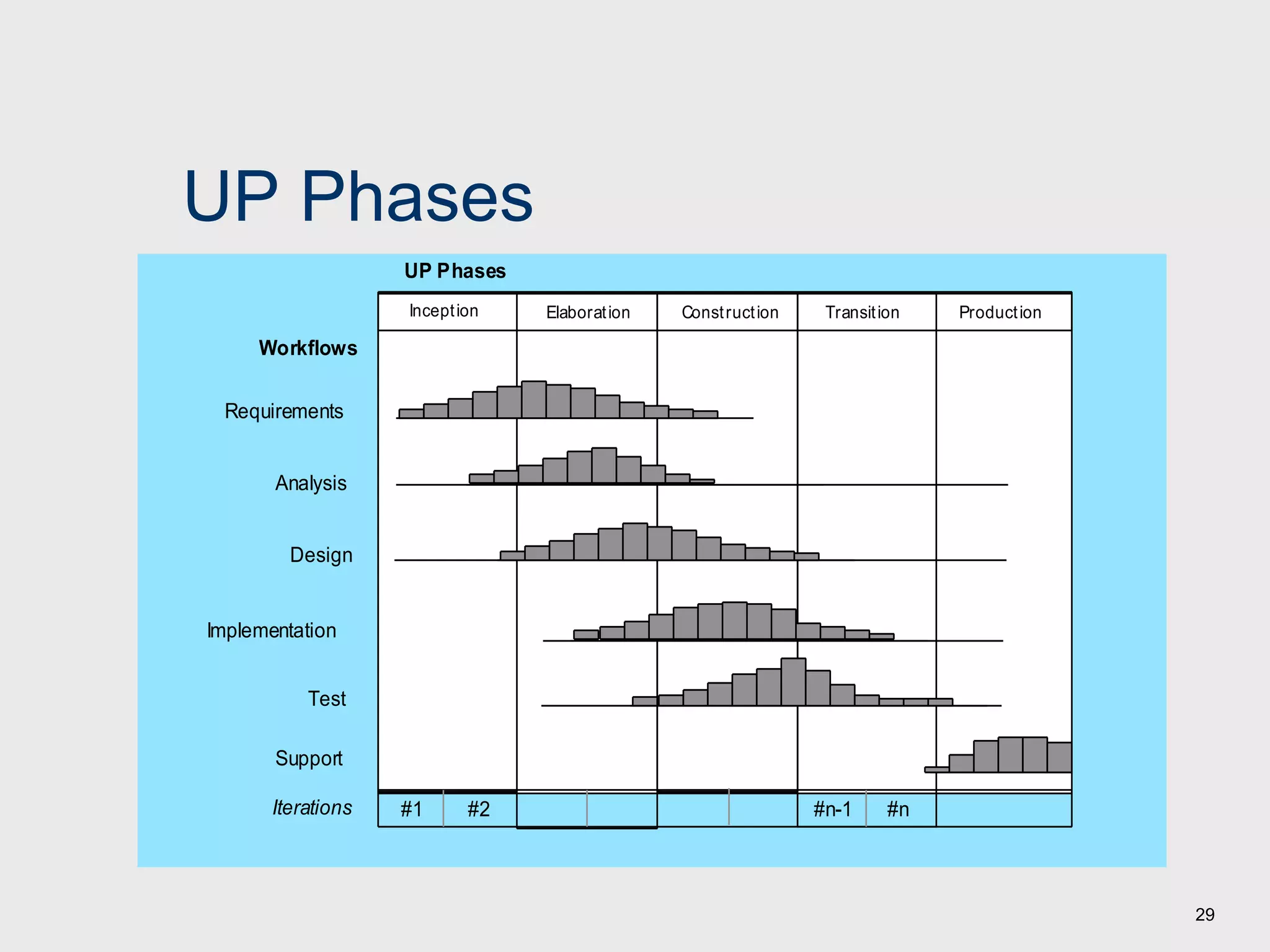
29
UP Phases
Inception Elaboration Construction Transition Production
UP Phases
Workflows
Requirements
Analysis
Design
Implementation
Test
Iterations #1 #2 #n-1 #n
Support
30
UP Work Products
Inception phase
Elaboration phase
Construction phase
Transition phase
Vision document
Init ial use-case model
Init ial project glossary
Init ial business case
Init ial risk assessment .
Project plan,
phases and it erat ions.
Business model,
if necessary.
One or more prot ot ypes
I nc e pt i o
n
Use-case model
Supplement ary requirement s
including non-funct ional
Analysis model
Soft ware archit ect ure
Descript ion.
Execut able archit ect ural
prot ot ype.
Preliminary design model
Revised risk list
Project plan including
it erat ion plan
adapt ed workflows
milest ones
t echnical work product s
Preliminary user manual
Design model
Soft ware component s
Int egrat ed soft ware
increment
Test plan and procedure
Test cases
Support document at ion
user manuals
inst allat ion manuals
descript ion of current
increment
Delivered soft ware increment
Bet a t est report s
General user feedback
31
Chapter 3
 Agile Development
32
What is “Agility”?
 Effective (rapid and adaptive) response to
change
 Effective communication among all stakeholders
 Drawing the customer onto the team
 Organizing a team so that it is in control of the
work performed
Yielding …
 Rapid, incremental delivery of software
33
The Manifesto for Agile Software Development
•Individuals and interactions over processes and tools
•Working software over comprehensive documentation
•Customer collaboration over contract negotiation
•Responding to change over following a plan
Agile Methods
Agile methods are designed to overcome the disadvantages of
the traditional heavy weight methodologies (the difficulty of
efficiently accommodating change requests from customers
during execution of the project).
Agile model is an umbrella term that refers to a group of
development processes, and not any single model of software
development.
There are various agile approaches..
 Crystal Techniques
 Atern (formaly DSDM)
 Feature-driven Development
 Scrum
 Extreme Programming (XP)
34
Agile Methods
 In Agile model the feature requirements are decomposed
into several small parts that can be incrementally developed.
 The agile model adopts an iterative approach.
 Each incremental part is developed over an iteration.
 Each iteration is intended to be small and easily manageable,
and lasts for a couple of weeks only.
 At a time only one increment is planned, developed, and then
deployed at the customer’s site. No long-term plans are
made.
 The time taken to complete an iteration is called a time-box.
The implication of the term ‘time box’ is that the end date for
an iteration does not change.
 The development team can, however, decide to reduce the
delivered functionality during a time box, if necessary, but
the delivery date is considered sacred.
35
Agile Methods
 Agile model emphasizes face-to-face communication over written
documents. Team size is deliberately kept small (5-6 people) to help the
team members effectively communicate with each other and collaborate.
 An agile project usually includes a customer representative in the team.
 At the end of each iteration, the customer representative along
with the stake holders review the progress made, re-evaluate the
requirements, and give suitable feedback to the development team.
 Agile development projects usually deploy pair programming.
 In this approach, two programmers work together at one work
station.
One types the code, the other reviews the code as it typed.
Two programmers switch their roles every hour or so.
 Studies indicate that working in pairs produce compact well-
written programs and commit fewer errors as compared to
programmers working alone
36
37
Agility and the Cost of Change
38
An Agile Process
 Is driven by customer descriptions of what is
required (scenarios)
 Recognizes that plans are short-lived
 Develops software iteratively with a heavy
emphasis on construction activities
 Delivers multiple ‘software increments’
 Adapts as changes occur
39
12 Agility Principles
1. Our highest priority is to satisfy the customer through early and
continuous delivery of valuable software.
2. Welcome changing requirements, even late in development. Agile
processes harness change for the customer's competitive advantage.
3. Deliver working software frequently, from a couple of weeks to a
couple of months, with a preference to the shorter timescale.
4. Business people and developers must work together daily throughout
the project.
5. Build projects around motivated individuals. Give them the
environment and support they need, and trust them to get the job
done.
6. The most efficient and effective method of conveying information to
and within a development team is face–to–face conversation.
40
12 Agility Principles
7. Working software is the primary measure of progress.
8. Agile processes promote sustainable development. The
sponsors, developers, and users should be able to maintain a
constant pace indefinitely.
9. Continuous attention to technical excellence and good design
enhances agility.
10. Simplicity – the art of maximizing the amount of work not
done – is essential.
11. The best architectures, requirements, and designs emerge
from self–organizing teams.
12. At regular intervals, the team reflects on how to become more
effective, then tunes and adjusts its behavior accordingly.
41
Extreme Programming (XP)
 The most widely used agile process, originally
proposed by Kent Beck
 XP Planning
 Begins with the creation of “user stories” by listening
 Customer assigns a value to the story.
 Agile team assesses each story and assigns a cost
 Stories are grouped to for a deliverable increment
 A commitment is made on delivery date
 After the first increment “project velocity” is used to
help define subsequent delivery dates for other
increments
42
Extreme Programming (XP)
 XP Design
 Follows the KIS principle (Keep It Simple)
 Encourage the use of CRC cards
 For difficult design problems, suggests the creation of “spike
solutions”—a design prototype
 Encourages “refactoring”—an iterative refinement of the internal
program design
 XP Coding
 Recommends the construction of a unit test for a story before
coding commences
 Encourages “pair programming”
 XP Testing
 All unit tests are executed daily (whenever code is modified)
 “Acceptance tests” are defined by the customer and executed to
assess customer visible functionality
43
Extreme Programming (XP)
unit t est
cont inuous int egrat ion
accept ance t est ing
pair
programming
Release
user st ories
values
accept ance t est crit eria
it erat ion plan
simple design
CRC cards
spike solut ions
prot ot ypes
refact oring
software increment
project velocity computed

Unit 1.ppt

  • 1.
    1 Unit 1 Software Processand Agile Development Software Engineering: A Practitioner’s Approach, 7/e by Roger S. Pressman
  • 2.
    2 What is Software? Softwareis: (1) instructions (computer programs) that when executed provide desired features, function, and performance; (2) data structures that enable the programs to adequately manipulate information and (3) documentation that describes the operation and use of the programs.
  • 3.
    3 What is Software? Software is developed or engineered, it is not manufactured in the classical sense.  Software doesn't "wear out."  Although the industry is moving toward component-based construction, most software continues to be custom-built.
  • 4.
  • 5.
    5 Software Applications  systemsoftware  application software  engineering/scientific software  embedded software  product-line software  WebApps (Web applications)  AI software
  • 6.
    6 Software—New Categories  Openworld computing—pervasive, distributed computing  Ubiquitous computing—wireless networks  Netsourcing—the Web as a computing engine  Open source—”free” source code open to the computing community (a blessing, but also a potential curse!)
  • 7.
    7 Legacy Software  softwaremust be adapted to meet the needs of new computing environments or technology.  software must be enhanced to implement new business requirements.  software must be extended to make it interoperable with other more modern systems or databases.  software must be re-architected to make it viable within a network environment. Why must it change?
  • 8.
    8 Characteristics of WebApps- I  Network intensiveness. A WebApp resides on a network and must serve the needs of a diverse community of clients.  Concurrency. A large number of users may access the WebApp at one time.  Unpredictable load. The number of users of the WebApp may vary by orders of magnitude from day to day.  Performance. If a WebApp user must wait too long (for access, for server-side processing, for client-side formatting and display), he or she may decide to go elsewhere.  Availability. Although expectation of 100 percent availability is unreasonable, users of popular WebApps often demand access on a “24/7/365” basis.
  • 9.
    9 Characteristics of WebApps- II  Data driven. The primary function of many WebApps is to use hypermedia to present text, graphics, audio, and video content to the end-user.  Content sensitive. The quality and aesthetic nature of content remains an important determinant of the quality of a WebApp.  Continuous evolution. Unlike conventional application software that evolves over a series of planned, chronologically-spaced releases, Web applications evolve continuously.  Immediacy. Although immediacy—the compelling need to get software to market quickly—is a characteristic of many application domains, WebApps often exhibit a time to market that can be a matter of a few days or weeks.  Security. Because WebApps are available via network access, it is difficult, if not impossible, to limit the population of end-users who may access the application.  Aesthetics. An undeniable part of the appeal of a WebApp is its look and feel.
  • 10.
    10 Software Engineering  TheIEEE definition:  Software Engineering: (1) The application of a systematic, disciplined, quantifiable approach to the development, operation, and maintenance of software; that is, the application of engineering to software. (2) The study of approaches as in (1).  The seminal definition:  [Software engineering is] the establishment and use of sound engineering principles in order to obtain economically software that is reliable and works efficiently on real machines.
  • 11.
    11 A Layered Technology SoftwareEngineering a “quality” focus process model methods tools
  • 12.
    12 A Process Framework Processframework Framework activities work tasks work products milestones & deliverables QA checkpoints Umbrella Activities
  • 13.
    13 Framework Activities  Communication Planning  Modeling  Analysis of requirements  Design  Construction  Code generation  Testing  Deployment
  • 14.
    14 Umbrella Activities  Softwareproject management  Formal technical reviews  Software quality assurance  Software configuration management  Work product preparation and production  Reusability management  Measurement  Risk management
  • 15.
    15 Hooker’s General Principles 1: The Reason It All Exists  2: KISS (Keep It Simple, Stupid!)  3: Maintain the Vision  4: What You Produce, Others Will Consume  5: Be Open to the Future  6: Plan Ahead for Reuse  7: Think!
  • 16.
  • 17.
  • 18.
  • 19.
    19 Types of Process 1.Perspective Process Models Water Fall Model  V-Model  Incremental Model Evolutionary Models: Prototyping Evolutionary Models: Spiral Evolutionary Models: Concurrent 2. Specialized Process Models  Component based development  Formal methods  AOSD (Aspect Oriented Software Development)  Unified Process
  • 20.
    20 1. Prescriptive ProcessModels  Prescriptive process models advocate an orderly approach to software engineering That leads to a few questions …  If prescriptive process models strive for structure and order, are they inappropriate for a software world that thrives on change?  Yet, if we reject traditional process models (and the order they imply) and replace them with something less structured, do we make it impossible to achieve coordination and coherence in software work?
  • 21.
    21 The Waterfall Model Communication Planning Modeling Construction Deployment analysis design code test project init iat ion requirement gat hering estimating scheduling tracking delivery support f eedback
  • 22.
  • 23.
    23 The Incremental Model Co m m u n i c a t i o n P l a n n i n g M o d e l i n g C o n s t r u c t i o n D e p l o y m e n t d e l i v e r y f e e d b a c k analys is design c ode t est increment # 1 increment # 2 delivery of 1st increment delivery of 2nd increment delivery of nt h increment increment # n project calendar time C o m m u n i c a t i o n P l a n n i n g M o d e l i n g C o n s t r u c t i o n D e p l o y m e n t d e l i v e r y f e e d b a c k analys is design c ode t est C o m m u n i c a t i o n P l a n n i n g M o d e l i n g C o n s t r u c t i o n D e p l o y m e n t d e l i v e r y f e e d b a c k analys is design c ode t es t
  • 24.
    24 Evolutionary Models: Prototyping Construction ofprototype Communicat ion Quick plan Const ruct ion of prot ot ype Mode ling Quick de sign De live ry & Fe e dback Deployment communication Quick plan Modeling Quick design Construction of prototype Deployment delivery & feedback
  • 25.
    25 Evolutionary Models: TheSpiral communication planning modeling construction deployment delivery feedback start analysis design code test estimation scheduling risk analysis
  • 26.
    26 Evolutionary Models: Concurrent Underreview Baselined Done Under revision Awaiting changes Under development none Modeling activity represents the state of a software engineering activity or task
  • 27.
    27 2. Specialized ProcessModels  Component based development—the process to apply when reuse is a development objective  Formal methods—emphasizes the mathematical specification of requirements  AOSD—provides a process and methodological approach for defining, specifying, designing, and constructing aspects  Unified Process—a “use-case driven, architecture- centric, iterative and incremental” software process closely aligned with the Unified Modeling Language (UML)
  • 28.
    28 The Unified Process(UP) software increment Release Inception Elaboration construction transition production inception elaboration
  • 29.
    29 UP Phases Inception ElaborationConstruction Transition Production UP Phases Workflows Requirements Analysis Design Implementation Test Iterations #1 #2 #n-1 #n Support
  • 30.
    30 UP Work Products Inceptionphase Elaboration phase Construction phase Transition phase Vision document Init ial use-case model Init ial project glossary Init ial business case Init ial risk assessment . Project plan, phases and it erat ions. Business model, if necessary. One or more prot ot ypes I nc e pt i o n Use-case model Supplement ary requirement s including non-funct ional Analysis model Soft ware archit ect ure Descript ion. Execut able archit ect ural prot ot ype. Preliminary design model Revised risk list Project plan including it erat ion plan adapt ed workflows milest ones t echnical work product s Preliminary user manual Design model Soft ware component s Int egrat ed soft ware increment Test plan and procedure Test cases Support document at ion user manuals inst allat ion manuals descript ion of current increment Delivered soft ware increment Bet a t est report s General user feedback
  • 31.
  • 32.
    32 What is “Agility”? Effective (rapid and adaptive) response to change  Effective communication among all stakeholders  Drawing the customer onto the team  Organizing a team so that it is in control of the work performed Yielding …  Rapid, incremental delivery of software
  • 33.
    33 The Manifesto forAgile Software Development •Individuals and interactions over processes and tools •Working software over comprehensive documentation •Customer collaboration over contract negotiation •Responding to change over following a plan
  • 34.
    Agile Methods Agile methodsare designed to overcome the disadvantages of the traditional heavy weight methodologies (the difficulty of efficiently accommodating change requests from customers during execution of the project). Agile model is an umbrella term that refers to a group of development processes, and not any single model of software development. There are various agile approaches..  Crystal Techniques  Atern (formaly DSDM)  Feature-driven Development  Scrum  Extreme Programming (XP) 34
  • 35.
    Agile Methods  InAgile model the feature requirements are decomposed into several small parts that can be incrementally developed.  The agile model adopts an iterative approach.  Each incremental part is developed over an iteration.  Each iteration is intended to be small and easily manageable, and lasts for a couple of weeks only.  At a time only one increment is planned, developed, and then deployed at the customer’s site. No long-term plans are made.  The time taken to complete an iteration is called a time-box. The implication of the term ‘time box’ is that the end date for an iteration does not change.  The development team can, however, decide to reduce the delivered functionality during a time box, if necessary, but the delivery date is considered sacred. 35
  • 36.
    Agile Methods  Agilemodel emphasizes face-to-face communication over written documents. Team size is deliberately kept small (5-6 people) to help the team members effectively communicate with each other and collaborate.  An agile project usually includes a customer representative in the team.  At the end of each iteration, the customer representative along with the stake holders review the progress made, re-evaluate the requirements, and give suitable feedback to the development team.  Agile development projects usually deploy pair programming.  In this approach, two programmers work together at one work station. One types the code, the other reviews the code as it typed. Two programmers switch their roles every hour or so.  Studies indicate that working in pairs produce compact well- written programs and commit fewer errors as compared to programmers working alone 36
  • 37.
    37 Agility and theCost of Change
  • 38.
    38 An Agile Process Is driven by customer descriptions of what is required (scenarios)  Recognizes that plans are short-lived  Develops software iteratively with a heavy emphasis on construction activities  Delivers multiple ‘software increments’  Adapts as changes occur
  • 39.
    39 12 Agility Principles 1.Our highest priority is to satisfy the customer through early and continuous delivery of valuable software. 2. Welcome changing requirements, even late in development. Agile processes harness change for the customer's competitive advantage. 3. Deliver working software frequently, from a couple of weeks to a couple of months, with a preference to the shorter timescale. 4. Business people and developers must work together daily throughout the project. 5. Build projects around motivated individuals. Give them the environment and support they need, and trust them to get the job done. 6. The most efficient and effective method of conveying information to and within a development team is face–to–face conversation.
  • 40.
    40 12 Agility Principles 7.Working software is the primary measure of progress. 8. Agile processes promote sustainable development. The sponsors, developers, and users should be able to maintain a constant pace indefinitely. 9. Continuous attention to technical excellence and good design enhances agility. 10. Simplicity – the art of maximizing the amount of work not done – is essential. 11. The best architectures, requirements, and designs emerge from self–organizing teams. 12. At regular intervals, the team reflects on how to become more effective, then tunes and adjusts its behavior accordingly.
  • 41.
    41 Extreme Programming (XP) The most widely used agile process, originally proposed by Kent Beck  XP Planning  Begins with the creation of “user stories” by listening  Customer assigns a value to the story.  Agile team assesses each story and assigns a cost  Stories are grouped to for a deliverable increment  A commitment is made on delivery date  After the first increment “project velocity” is used to help define subsequent delivery dates for other increments
  • 42.
    42 Extreme Programming (XP) XP Design  Follows the KIS principle (Keep It Simple)  Encourage the use of CRC cards  For difficult design problems, suggests the creation of “spike solutions”—a design prototype  Encourages “refactoring”—an iterative refinement of the internal program design  XP Coding  Recommends the construction of a unit test for a story before coding commences  Encourages “pair programming”  XP Testing  All unit tests are executed daily (whenever code is modified)  “Acceptance tests” are defined by the customer and executed to assess customer visible functionality
  • 43.
    43 Extreme Programming (XP) unitt est cont inuous int egrat ion accept ance t est ing pair programming Release user st ories values accept ance t est crit eria it erat ion plan simple design CRC cards spike solut ions prot ot ypes refact oring software increment project velocity computed