Introduction
 XenServer was developed by Linux foundation and
supported by Intel
 It is a hypervisor using a Microkernal design,providing
services that allow multiple computer operating system
to execute on the same computer hardware concurrently.
Setting up of xenserver
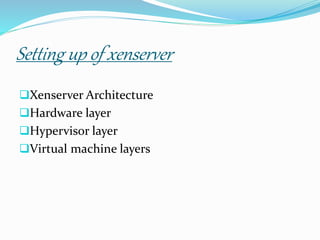
Xenserver Architecture
Hardware layer
Hypervisor layer
Virtual machine layers
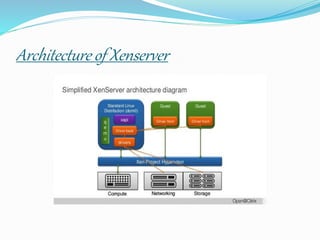
Architecture of Xenserver
Architecture:
 The architectural implementation of the
hypervisor: this includes discussions like “my
hypervisor is thinner than yours” etc. The hardware
assists (Intel-VT, AMD-V) dilemma: “my hypervisor
uses cpu hardware extensions to do what you do in
software so it’s faster than yours” or viceversa. The
paravirtualization dilemma: “my hypervisor can
support this modified guest hence it’s (or it will be)
faster than yours” etc
SIMPLE XENSERVER ARCHITECTURE
Hardware layer:
The hardware layer is the sphere that contains a
hypervisor and its underlying physical hardware.
 The hardware layer participates in the Xen App
infrastructure by running the OS resources and
keeping VM workloads highly available.
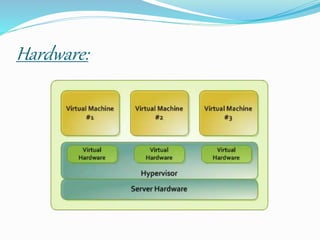
Hardware:
Hypervisor:
 Very large system support
 4 TB; >255 CPUs
 Reliability, Availability, Scalability enhancements
 CPU Pools for system partitioning
 Page sharing enhancements
 Hypervisor emergency paging / compression
 New “xl” lightweight control stack
 Memory Introspection API
 Enhanced SR-IOV support
 Software-implemented Hardware Fault Tolerance
Hypervisor layer:
 On top of the hardware layer, it is responsible for both
sharing of hardware resource and the enforcement of
mandatory access control rules based on the available
hardware resources.
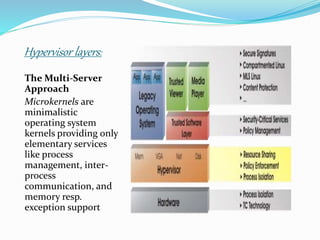
Hypervisor layers:
The Multi-Server
Approach
Microkernels are
minimalistic
operating system
kernels providing only
elementary services
like process
management, inter-
process
communication, and
memory resp.
exception support
VIRTUALIZATION:
 Virtualization is an approach that was developed by
the pioneers of computing systems. It involved using
unused computing resources to create an artificial, but
useful, view of system capabilities.
VIRTUAL MACHINE:
Virtual Machine Hardware
 Virtuozzo virtual machine works like a usual standalone
computer.
By default, virtual machines are created with the following
virtual hardware:
1 VirtIO SCSI HDD, expanding,
1 CD-ROM (IDE for Windows and Debian guests, VirtIO
SCSI for Linux guests except Debian),
1 VirtIO network adapter, bridged,
32MB video card.
Virtual layers:
Layers:
Layer 1:
Allows applications to
work with remote client
devices without change,
even though those remote
devices were never been
thought of or available
when the application was
written. This is
called access
virtualization. Xen
Desktop from Citrix is an
example of products that
work in this layer of
virtualization.
Layer 2:
Allows applications written
for one OS version or OS to
happily execute in another
environment; this
environment can be a new
OS version or an entirely
different OS. This is
called application
virtualization.
Layer 3:
Allows one system to
support workloads as if it
was many systems, or
allows one workload to run
across many systems as if it
was a single computing
resource. This is
called processing
virtualization .
Layer 4:
Allows workloads to access
storage without having to
know where the data is
stored, what type of device
is storing the data, or
whether the storage is
attached directly to the
system hosting the
workload, to a storage
server just down the LAN,
or to storage in the cloud.
This is called storage
virtualization.
Layer 5:
Allows systems to work
with other systems safely
and securely, without
having to care too much
about the details of the
underlying network. This
is called network
virtualization .
Layer 6:
Allows IT administrators
and operators to easily
monitor and manage
virtual environments
across boundaries. The
boundaries can include
the physical location of
systems; OSes in use;
applications or workloads
in use; network topology;
storage implementation;
and how client systems
connect to the
applications. This is
called management of
virtualized environments .
Layer 7:
Monitors and protects all of the other layers of
virtualization so that only authorized use can be made
of the resources. Yes, this is called security for
virtualized environments in the model.
Presented by,
N .Ramya
THANK YOU

xen.pptx

  • 2.
    Introduction  XenServer wasdeveloped by Linux foundation and supported by Intel  It is a hypervisor using a Microkernal design,providing services that allow multiple computer operating system to execute on the same computer hardware concurrently.
  • 3.
    Setting up ofxenserver Xenserver Architecture Hardware layer Hypervisor layer Virtual machine layers
  • 4.
  • 5.
    Architecture:  The architecturalimplementation of the hypervisor: this includes discussions like “my hypervisor is thinner than yours” etc. The hardware assists (Intel-VT, AMD-V) dilemma: “my hypervisor uses cpu hardware extensions to do what you do in software so it’s faster than yours” or viceversa. The paravirtualization dilemma: “my hypervisor can support this modified guest hence it’s (or it will be) faster than yours” etc
  • 6.
  • 7.
    Hardware layer: The hardwarelayer is the sphere that contains a hypervisor and its underlying physical hardware.  The hardware layer participates in the Xen App infrastructure by running the OS resources and keeping VM workloads highly available.
  • 8.
  • 9.
    Hypervisor:  Very largesystem support  4 TB; >255 CPUs  Reliability, Availability, Scalability enhancements  CPU Pools for system partitioning  Page sharing enhancements  Hypervisor emergency paging / compression  New “xl” lightweight control stack  Memory Introspection API  Enhanced SR-IOV support  Software-implemented Hardware Fault Tolerance
  • 10.
    Hypervisor layer:  Ontop of the hardware layer, it is responsible for both sharing of hardware resource and the enforcement of mandatory access control rules based on the available hardware resources.
  • 11.
    Hypervisor layers: The Multi-Server Approach Microkernelsare minimalistic operating system kernels providing only elementary services like process management, inter- process communication, and memory resp. exception support
  • 12.
    VIRTUALIZATION:  Virtualization isan approach that was developed by the pioneers of computing systems. It involved using unused computing resources to create an artificial, but useful, view of system capabilities.
  • 13.
    VIRTUAL MACHINE: Virtual MachineHardware  Virtuozzo virtual machine works like a usual standalone computer. By default, virtual machines are created with the following virtual hardware: 1 VirtIO SCSI HDD, expanding, 1 CD-ROM (IDE for Windows and Debian guests, VirtIO SCSI for Linux guests except Debian), 1 VirtIO network adapter, bridged, 32MB video card.
  • 14.
  • 15.
    Layers: Layer 1: Allows applicationsto work with remote client devices without change, even though those remote devices were never been thought of or available when the application was written. This is called access virtualization. Xen Desktop from Citrix is an example of products that work in this layer of virtualization. Layer 2: Allows applications written for one OS version or OS to happily execute in another environment; this environment can be a new OS version or an entirely different OS. This is called application virtualization.
  • 16.
    Layer 3: Allows onesystem to support workloads as if it was many systems, or allows one workload to run across many systems as if it was a single computing resource. This is called processing virtualization . Layer 4: Allows workloads to access storage without having to know where the data is stored, what type of device is storing the data, or whether the storage is attached directly to the system hosting the workload, to a storage server just down the LAN, or to storage in the cloud. This is called storage virtualization.
  • 17.
    Layer 5: Allows systemsto work with other systems safely and securely, without having to care too much about the details of the underlying network. This is called network virtualization . Layer 6: Allows IT administrators and operators to easily monitor and manage virtual environments across boundaries. The boundaries can include the physical location of systems; OSes in use; applications or workloads in use; network topology; storage implementation; and how client systems connect to the applications. This is called management of virtualized environments .
  • 18.
    Layer 7: Monitors andprotects all of the other layers of virtualization so that only authorized use can be made of the resources. Yes, this is called security for virtualized environments in the model.
  • 19.

Editor's Notes

  • #10 Earlier this year, we released Xen 4.1 I just put up the feature list, but I wont go through it in detail. I did want to point out that the focus of this release was on Support for large systems and easier management of large systems with CPU poolks As well as on security And that is starting a trend to optimize the hypervisor for cloud use cases