
SWTBot: Unit Testing Made EasyEclipse Day India 2011Ankit Goel6th May, 2011
AgendaPART I – About SWTBotIntroduction to SWTBotSWTBot FeaturesSupported WidgetsTest ExecutionsPART II - Integrating SWTBot tests execution with continuous build systemWhat more?Limitations
PART I – About SWTBot
Introduction – What is SWTBot?Java based UI/functional testing tool for testing SWT and Eclipse based applicationsSet of API’s to access and manipulate widgetsCross platformFree and open sourceStill in Incubation Phase in Eclipse
Introduction – Why SWTBot?Why not QTP? Why not PDE Junit? Why not…Provides an intuitive way to access and test UI components in EclipseUI Testing covers all layers of softwareEasy to learn if someone is already familiar with Java and JUnitCan integrate very well within the IDE and provides excellent support for integration with Ant
Introduction – Who is it for?DevelopersUnit testsIntegration with build ensures quality buildsQATest automationQuality product
Setting up Eclipse environmentSWTBot update sitehttp://www.eclipse.org/swtbot/downloads.phpCreate a plugin project and setup dependenciesorg.eclipse.uiorg.eclipse.core.runtimeorg.eclipse.swtbot.eclipse.finderorg.eclipse.swtbot.junit4_xorg.eclipse.swtbot.swt.finderorg.junit4org.hamcrestOr, create a SWTBot test plugin
How does it work?SWTBot = bot which acts on SWT componentsEntry point: org.eclipse.swtbot.eclipse.finder.SWTWorkbenchBotHelper classes for widgetsTo test:Instantiate botSWTWorkbenchBotbot = new SWTWorkbenchBot();Click on buttonSWTBotButton button = bot.button("Hello, World!“);button.click();Congrats! You have just written your first SWTBOT test 
SWTBot FeaturesFinding controls based on visual cuesSupport for simulated mouse and keyboard inputQuerying widgets for stateUI specific assertions like: assertEnabled(Widget)Investigating test failures
SWTBot Features – Finding ControlsControls can be found based on visual cues like:TextLabelGroupTooltipIdsCombination of all or any of the above (Using matchers)Eg:Find textbox that has a label 'Username:‘SWTBotText username = bot.textWithLabel("Username:"); Identify button using tooltip SWTBotToolbarButton save = bot.toolbarButtonWithTooltip("Save");
SWTBot Features – Using matchersSimple matcherswithText(“Finish”)withLabel(“Username:”)withRegex(“Proceed to step * ”)widgetOfType(Button.class)withStyle(SWT.ARROW, “SWT.ARROW”)Combination of matchersallOf(matchers)anyOf(matchers)not(matchers)
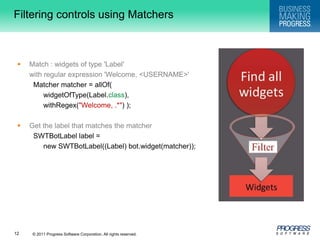
Filtering controls using MatchersMatch : widgets of type 'Label' 	with regular expression 'Welcome, <USERNAME>' Matcher matcher = allOf( widgetOfType(Label.class), withRegex("Welcome, .*") ); Get the label that matches the matcher SWTBotLabel label = 	new SWTBotLabel((Label) bot.widget(matcher));
SWTBot Features – Simulate input  SWTBot provides API to simulate actions on widgetsEg:Click a buttonbutton.click(); Select a item in comboboxcomboBox.select(“Option 12"); Type in a textboxtext.typeText(“This is a demo string"); Expand treetree.expandNode("MyProject", "src", "com", "example", "MyClass.java");
SWTBot Features – Querying widgetsProvides operations to query the state of widgetsSome generic queries like: getText(), isEnabled(), isVisible() are available on all widgetsEg:Check state of a checkboxbooleanchecked = checkbox.isChecked();Check if a radio button is selectedboolean selected = radio.isSelected();
SWTBot Features – Investigating test failuresStack trace in Junit viewCapturing screen shot when test case fails@RunWith(SWTBotJunit4ClassRunner.class)publicclassMessageCreateTest{... …}
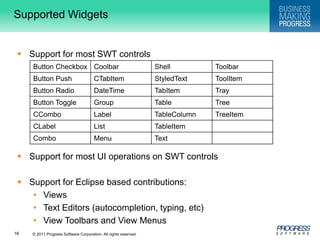
Supported WidgetsSupport for most SWT controlsSupport for most UI operations on SWT controlsSupport for Eclipse based contributions:ViewsText Editors (autocompletion, typing, etc)View Toolbars and View Menus
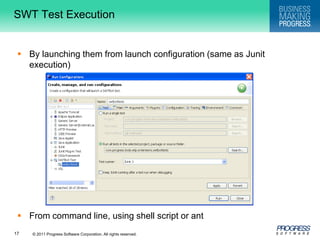
SWT Test ExecutionBy launching them from launch configuration (same as Junit execution)From command line, using shell script or ant
DemoA small SWTBot example illustrating the simplicity of SWTBotYour first SWTBot
PART II – Integrating SWTBot tests execution with continuous build system
Integration of test execution with continuous buildBuild plugins to be testedBuild SWTBot test pluginsInstall plugins to be tested, test plugins and headless testing framework (http://www.eclipse.org/swtbot/downloads.php) into eclipseStart SWTBot test case executionFormat the generated report and mail if required
Pre-requisiteEach test plugin must contain test.xmlSet appropriate propertiesDelegate execution of test to a library fileTest plugins should always be ‘unpacked’
Under the covers…For each test pluginInvoke test.xml which willSet required properties like class name, plugin name, directory to use as temp workspace etcInvoke target ‘swtbot-test’ of library file located in ‘org.eclipse.swtbot.eclipse.junit4.headless’ plugin which will then launch and execute all test casesInvoke target ‘collect’ of library file located in ‘org.eclipse.swtbot.eclipse.junit4.headless’ plugin which will consolidate test case results in one fileFormat the generated results file (xml file) into desired format (usually html)
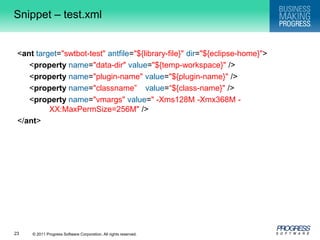
Snippet – test.xml<anttarget="swtbot-test"antfile="${library-file}"dir="${eclipse-home}">	<property name="data-dir"value="${temp-workspace}" />	<propertyname="plugin-name"value="${plugin-name}" />	<propertyname="classname”value=“${class-name}" />	<propertyname="vmargs"value=" -Xms128M -Xmx368M -	XX:MaxPermSize=256M" /></ant>
Still confused ?This would surely help
What more?Parse results file and fail build if any of the test fails – ensuring only quality builds go to QACode Coverage – write more tests to test uncovered code
LimitationsLess documentation availableSome SWT widgets not supported yet!No support for other UI toolkits – GEF, Nebula etc
SwtBot: Unit Testing Made Easy

SwtBot: Unit Testing Made Easy

  • 1.
    SWTBot: Unit TestingMade EasyEclipse Day India 2011Ankit Goel6th May, 2011
  • 2.
    AgendaPART I –About SWTBotIntroduction to SWTBotSWTBot FeaturesSupported WidgetsTest ExecutionsPART II - Integrating SWTBot tests execution with continuous build systemWhat more?Limitations
  • 3.
    PART I –About SWTBot
  • 4.
    Introduction – Whatis SWTBot?Java based UI/functional testing tool for testing SWT and Eclipse based applicationsSet of API’s to access and manipulate widgetsCross platformFree and open sourceStill in Incubation Phase in Eclipse
  • 5.
    Introduction – WhySWTBot?Why not QTP? Why not PDE Junit? Why not…Provides an intuitive way to access and test UI components in EclipseUI Testing covers all layers of softwareEasy to learn if someone is already familiar with Java and JUnitCan integrate very well within the IDE and provides excellent support for integration with Ant
  • 6.
    Introduction – Whois it for?DevelopersUnit testsIntegration with build ensures quality buildsQATest automationQuality product
  • 7.
    Setting up EclipseenvironmentSWTBot update sitehttp://www.eclipse.org/swtbot/downloads.phpCreate a plugin project and setup dependenciesorg.eclipse.uiorg.eclipse.core.runtimeorg.eclipse.swtbot.eclipse.finderorg.eclipse.swtbot.junit4_xorg.eclipse.swtbot.swt.finderorg.junit4org.hamcrestOr, create a SWTBot test plugin
  • 8.
    How does itwork?SWTBot = bot which acts on SWT componentsEntry point: org.eclipse.swtbot.eclipse.finder.SWTWorkbenchBotHelper classes for widgetsTo test:Instantiate botSWTWorkbenchBotbot = new SWTWorkbenchBot();Click on buttonSWTBotButton button = bot.button("Hello, World!“);button.click();Congrats! You have just written your first SWTBOT test 
  • 9.
    SWTBot FeaturesFinding controlsbased on visual cuesSupport for simulated mouse and keyboard inputQuerying widgets for stateUI specific assertions like: assertEnabled(Widget)Investigating test failures
  • 10.
    SWTBot Features –Finding ControlsControls can be found based on visual cues like:TextLabelGroupTooltipIdsCombination of all or any of the above (Using matchers)Eg:Find textbox that has a label 'Username:‘SWTBotText username = bot.textWithLabel("Username:"); Identify button using tooltip SWTBotToolbarButton save = bot.toolbarButtonWithTooltip("Save");
  • 11.
    SWTBot Features –Using matchersSimple matcherswithText(“Finish”)withLabel(“Username:”)withRegex(“Proceed to step * ”)widgetOfType(Button.class)withStyle(SWT.ARROW, “SWT.ARROW”)Combination of matchersallOf(matchers)anyOf(matchers)not(matchers)
  • 12.
    Filtering controls usingMatchersMatch : widgets of type 'Label' with regular expression 'Welcome, <USERNAME>' Matcher matcher = allOf( widgetOfType(Label.class), withRegex("Welcome, .*") ); Get the label that matches the matcher SWTBotLabel label = new SWTBotLabel((Label) bot.widget(matcher));
  • 13.
    SWTBot Features –Simulate input SWTBot provides API to simulate actions on widgetsEg:Click a buttonbutton.click(); Select a item in comboboxcomboBox.select(“Option 12"); Type in a textboxtext.typeText(“This is a demo string"); Expand treetree.expandNode("MyProject", "src", "com", "example", "MyClass.java");
  • 14.
    SWTBot Features –Querying widgetsProvides operations to query the state of widgetsSome generic queries like: getText(), isEnabled(), isVisible() are available on all widgetsEg:Check state of a checkboxbooleanchecked = checkbox.isChecked();Check if a radio button is selectedboolean selected = radio.isSelected();
  • 15.
    SWTBot Features –Investigating test failuresStack trace in Junit viewCapturing screen shot when test case fails@RunWith(SWTBotJunit4ClassRunner.class)publicclassMessageCreateTest{... …}
  • 16.
    Supported WidgetsSupport formost SWT controlsSupport for most UI operations on SWT controlsSupport for Eclipse based contributions:ViewsText Editors (autocompletion, typing, etc)View Toolbars and View Menus
  • 17.
    SWT Test ExecutionBylaunching them from launch configuration (same as Junit execution)From command line, using shell script or ant
  • 18.
    DemoA small SWTBotexample illustrating the simplicity of SWTBotYour first SWTBot
  • 19.
    PART II –Integrating SWTBot tests execution with continuous build system
  • 20.
    Integration of testexecution with continuous buildBuild plugins to be testedBuild SWTBot test pluginsInstall plugins to be tested, test plugins and headless testing framework (http://www.eclipse.org/swtbot/downloads.php) into eclipseStart SWTBot test case executionFormat the generated report and mail if required
  • 21.
    Pre-requisiteEach test pluginmust contain test.xmlSet appropriate propertiesDelegate execution of test to a library fileTest plugins should always be ‘unpacked’
  • 22.
    Under the covers…Foreach test pluginInvoke test.xml which willSet required properties like class name, plugin name, directory to use as temp workspace etcInvoke target ‘swtbot-test’ of library file located in ‘org.eclipse.swtbot.eclipse.junit4.headless’ plugin which will then launch and execute all test casesInvoke target ‘collect’ of library file located in ‘org.eclipse.swtbot.eclipse.junit4.headless’ plugin which will consolidate test case results in one fileFormat the generated results file (xml file) into desired format (usually html)
  • 23.
    Snippet – test.xml<anttarget="swtbot-test"antfile="${library-file}"dir="${eclipse-home}"> <propertyname="data-dir"value="${temp-workspace}" /> <propertyname="plugin-name"value="${plugin-name}" /> <propertyname="classname”value=“${class-name}" /> <propertyname="vmargs"value=" -Xms128M -Xmx368M - XX:MaxPermSize=256M" /></ant>
  • 24.
    Still confused ?Thiswould surely help
  • 25.
    What more?Parse resultsfile and fail build if any of the test fails – ensuring only quality builds go to QACode Coverage – write more tests to test uncovered code
  • 26.
    LimitationsLess documentation availableSomeSWT widgets not supported yet!No support for other UI toolkits – GEF, Nebula etc

Editor's Notes

  • #6 QTP:Pre-work required – repositoryNot cross platform – runs only on windows – no linux supportEven though its one of the fastest tools in the market – its still slower than SWTBotLearning requiredBetter because multiple types of apps can be supportedSWTBot provides APIs that are simple to read and write.No-hassle tool for writing powerful tests
  • #7 SWTBot provides APIs that are simple to read and write. These APIs hide away the complexities of SWT and Eclipse. This makes it suitable for use by everyone and not just developers.
  • #16 If you scroll down the stack trace in the JUnit view, you’ll see the cause of the error.The@RunWith(SWTBotJunit4ClassRunner.class)annotation captures a screenshot in a screenshots directory in your project. Refresh your project to see the new folder.
  • #17 List of Not Yet Supported SWT WidgetsButton Arrow,Browser,Canvas,Composite,CTabFolder,Link,ProgressBar,Sash,Scale, ScrolledComposite,Slider,Spinner,TabFolderNot Yet Supported UI ToolkitsGEFEclipse FormsNebulaeSWT &amp; eRCPRAP (work in progress)Native Dialogs (MessageBox, FileDialog, ColorDialog etc.)Most of it is planned to be supported them ASAP
  • #19 A demo mapping all the theory learnt so far into a practical example
  • #20 It&apos;s generally accepted that writing tests as part of software development is a very good thing indeed. It&apos;s also generally accepted that automating the running of tests in an automated or nightly build is good engineering practice. Let&apos;s face it, if tests are not run automatically then there&apos;s a good chance they won&apos;t be run at all, and tests that are not run are next to useless.SWTBot provides an excellent framework to write and run unit tests for your plug-ins that can be run from within the Eclipse environment.Once you have taken the time and effort to write these valuable unit tests, how do you automate the running of these unit tests so that you can integrate them into your automated build?
  • #25 A demo showing how execution on unit tests can be integrated with the regular build system
  • #27 List of Not Yet Supported SWT WidgetsButton Arrow,Browser,Canvas,Composite,CTabFolder,Link,ProgressBar,Sash,Scale, ScrolledComposite,Slider,Spinner,TabFolderNot Yet Supported UI ToolkitsGEFEclipse FormsNebulaeSWT &amp; eRCPRAP (work in progress)Native Dialogs (MessageBox, FileDialog, ColorDialog etc.)Most of it is planned to be supported them ASAP