Introduction
to
Microcontrollers
8051 Microcontroller 2
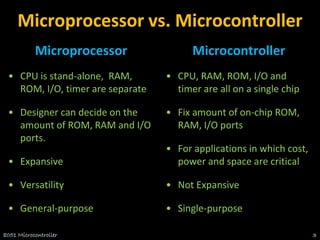
Microprocessor vs. Microcontroller
Microprocessor
• CPU is stand-alone, RAM,
ROM, I/O, timer are separate
• Designer can decide on the
amount of ROM, RAM and I/O
ports.
• Expansive
• Versatility
• General-purpose
Microcontroller
• CPU, RAM, ROM, I/O and
timer are all on a single chip
• Fix amount of on-chip ROM,
RAM, I/O ports
• For applications in which cost,
power and space are critical
• Not Expansive
• Single-purpose
8051 Microcontroller 3
8051 CPU Operation
1. Features
2. Pin Diagram
3. Block Diagram
8051 Microcontroller 4
8051 Microcontroller
• Intel introduced 8051, referred as MCS- 51, in
1981.
• The 8051 is an 8-bit processor
– The CPU can work on only 8 bits of data at a time
• The 8051 became widely popular after allowing
other manufactures to make and market any
flavor of the 8051.
8051 Microcontroller 5
8051 Family
• The 8051 is a subset of the 8052
• The 8031 is a ROM-less 8051
– Add external ROM to it
– You lose two ports, and leave only 2 ports for I/O operations
8051 Microcontroller 6
8051 Features
• 64KB Program Memory address space
• 64KB Data Memory address space
• 4K bytes of on-chip Program Memory
• 128 bytes of on-chip Data RAM
• 32 bidirectional and individually addressable I/0 lines
• Two 16-bit timer/counters
• Full duplex UART
• 6-source/5-vector interrupt structure with two priority
levels
• On-chip clock oscillator
8051 Microcontroller 7
Pin Description of the 8051
• 8051 family members (e.g., 8751, 89C51, 89C52,
DS89C4x0)
– Have 40 pins dedicated for various functions such as I/O, RD,
WR, address, data, and interrupts.
– Come in different packages, such as
• DIP(dual in-line package),
• QFP(quad flat package), and
• LLC(leadless chip carrier)
• Some companies provide a 20-pin version of the 8051
with a reduced number of I/O ports for less demanding
applications
8051 Microcontroller 8
Pin Diagram of the 8051
8051 Microcontroller 9
XTAL1 and XTAL2
• The 8051 has an on-chip oscillator but requires an
external clock to run it
– A quartz crystal oscillator is connected to inputs XTAL1 (pin19)
and XTAL2 (pin18)
– The quartz crystal oscillator also needs two capacitors of 30 pF
value
8051 Microcontroller 10
XTAL1 and XTAL2 …..
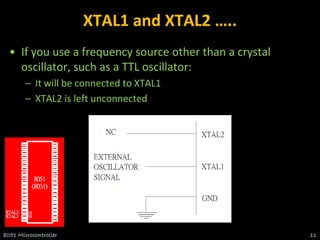
• If you use a frequency source other than a crystal
oscillator, such as a TTL oscillator:
– It will be connected to XTAL1
– XTAL2 is left unconnected
8051 Microcontroller 11
XTAL1 and XTAL2 …..
• The speed of 8051 refers to the maximum oscillator
frequency connected to XTAL.
• We can observe the frequency on the XTAL2 pin using
the oscilloscope.
8051 Microcontroller 12
RST
• RESET pin is an input and is active high (normally low)
• Upon applying a high pulse to this pin, the microcontroller will
reset and terminate all activities
• This is often referred to as a power-on reset
• Activating a power-on reset will cause all values in the registers to
be lost
8051 Microcontroller 13
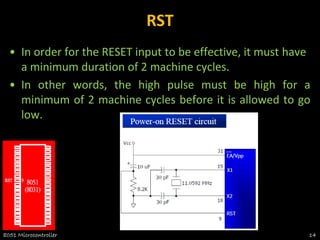
RST
• In order for the RESET input to be effective, it must have
a minimum duration of 2 machine cycles.
• In other words, the high pulse must be high for a
minimum of 2 machine cycles before it is allowed to go
low.
8051 Microcontroller 14
EA’
• EA’, “external access’’, is an input pin and
must be connected to Vcc or GND
• The 8051 family members all come with on-
chip ROM to store programs and also have
an external code and data memory.
• Normally EA pin is connected to Vcc
• EA pin must be connected to GND to
indicate that the code or data is stored
externally.
8051 Microcontroller 15
PSEN’ and ALE
• PSEN, “program store enable’’, is an
output pin
• This pin is connected to the OE pin of the
external memory.
• For External Code Memory, PSEN’ = 0
• For External Data Memory, PSEN’ = 1
• ALE pin is used for demultiplexing the
address and data.
8051 Microcontroller 16
I/O Port Pins
• The four 8-bit I/O ports P0, P1, P2
and P3 each uses 8 pins.
• All the ports upon RESET are
configured as output, ready to be
used as input ports by the external
device.
8051 Microcontroller 17
Port 0
• Port 0 is also designated as AD0-AD7.
• When connecting an 8051 to an external
memory, port 0 provides both address and
data.
• The 8051 multiplexes address and data
through port 0 to save pins.
• ALE indicates if P0 has address or data.
– When ALE=0, it provides data D0-D7
– When ALE=1, it has address A0-A7
8051 Microcontroller 18
Port 1 and Port 2
• In 8051-based systems with no external
memory connection:
– Both P1 and P2 are used as simple I/O.
• In 8051-based systems with external
memory connections:
– Port 2 must be used along with P0 to provide
the 16-bit address for the external memory.
– P0 provides the lower 8 bits via A0 – A7.
– P2 is used for the upper 8 bits of the 16-bit
address, designated as A8 – A15, and it cannot
be used for I/O.
8051 Microcontroller 19
Port 3
• Port 3 can be used as input or output.
• Port 3 has the additional function of
providing some extremely important
signals
8051 Microcontroller 20
Pin Description Summary
8051 Microcontroller 21
PIN TYPE NAME AND FUNCTION
Vss I Ground: 0 V reference.
Vcc I Power Supply: This is the power supply voltage for normal,
idle, and power-down operation.
P0.0 - P0.7 I/O Port 0: Port 0 is an open-drain, bi-directional I/O port. Port
0 is also the multiplexed low-order address and data bus
during accesses to external program and data memory.
P1.0 - P1.7 I/O Port 1: Port I is an 8-bit bi-directional I/O port.
P2.0 - P2.7 I/O Port 2: Port 2 is an 8-bit bidirectional I/O. Port 2 emits the
high order address byte during fetches from external
program memory and during accesses to external data
memory that use 16 bit addresses.
P3.0 - P3.7 I/O Port 3: Port 3 is an 8 bit bidirectional I/O port. Port 3 also
serves special features as explained.
Pin Description Summary
8051 Microcontroller 22
PIN TYPE NAME AND FUNCTION
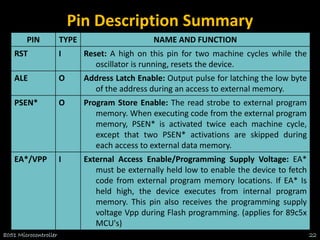
RST I Reset: A high on this pin for two machine cycles while the
oscillator is running, resets the device.
ALE O Address Latch Enable: Output pulse for latching the low byte
of the address during an access to external memory.
PSEN* O Program Store Enable: The read strobe to external program
memory. When executing code from the external program
memory, PSEN* is activated twice each machine cycle,
except that two PSEN* activations are skipped during
each access to external data memory.
EA*/VPP I External Access Enable/Programming Supply Voltage: EA*
must be externally held low to enable the device to fetch
code from external program memory locations. If EA* Is
held high, the device executes from internal program
memory. This pin also receives the programming supply
voltage Vpp during Flash programming. (applies for 89c5x
MCU's)
Interrupt
Control
CPU
4K
ROM
128 B
RAM
OSC
Bus
Control
4 I/O Ports
Serial
Port
Timer 1
Timer 0
General Block Diagram of 8051
TXD RXD
P0 P1 P2 P3
Detailed Block Diagram
8051 Microcontroller 24
8051
Memory Space
8051 Microcontroller 25
8051 Memory Structure
External
EXT INT
128
SFR
External
Program Memory Data Memory
64K 64K
EA = 0 EA = 1
4K
60K
8051 Microcontroller 26
Internal RAM Structure
Direct &
Indirect
Addressing
Direct
Addressing
Only
SFR [ Special Function
Registers]
128 Byte Internal RAM
8051 Microcontroller 27
Special Function Registers [SFR]
8051 Microcontroller 28
Program Status Word [PSW]
8051 Microcontroller 29
C AC F0 RS1 RS0 OV F1 P
Register Bank Select
Carry
Auxiliary Carry
User Flag 0
Parity
User Flag 1
Overflow
8051 instructions that affects flag
8051 Microcontroller 30
128 Byte RAM
• There are 128 bytes of RAM in the 8051.
– Assigned addresses 00 to 7FH
• The 128 bytes are divided into 3 different
groups as follows:
1. A total of 32 bytes from locations 00 to 1F
hex are set aside for register banks and the
stack.
2. A total of 16 bytes from locations 20H to 2FH
are set aside for bit-addressable read/write
memory.
3. A total of 80 bytes from locations 30H to 7FH
are used for read and write storage, called
scratch pad.
8051 Microcontroller 31
128 BYTE
INTERNAL RAM
Register Banks
Reg Bank 0
Reg Bank 1
Reg Bank 2
Reg Bank 3
BIT Addressable
Area
General Purpose
Area
8051 RAM with addresses
8051 Microcontroller 32
8051 Register Bank Structure
Bank 0
R0 R1 R2 R3 R4 R5 R6 R7
Bank 3
R0 R1 R2 R3 R4 R5 R6 R7
Bank 2
R0 R1 R2 R3 R4 R5 R6 R7
Bank 1
R0 R1 R2 R3 R4 R5 R6 R7
8051 Microcontroller 33
8051 Register Banks with address
8051 Microcontroller 34
8051 Programming Model
8051 Microcontroller 35
8051 Stack
• The stack is a section of RAM used by the CPU to store
information temporarily.
– This information could be data or an address
• The register used to access the stack is called the SP
(stack pointer) register
– The stack pointer in the 8051 is only 8 bit wide, which means
that it can take value of 00 to FFH
– When the 8051 is powered up, the SP register contains value
07
– RAM location 08 is the first location begin used for the stack by
the 8051
8051 Microcontroller 36
8051 Stack
• The storing of a CPU register in the stack is called a PUSH
– SP is pointing to the last used location of the stack
– As we push data onto the stack, the SP is incremented by one
– This is different from many microprocessors
• Loading the contents of the stack back into a CPU
register is called a POP
– With every pop, the top byte of the stack is copied to the
register specified by the instruction and the stack pointer is
decremented once
8051 Microcontroller 37
Bit Addressable & Byte Addressable
8051 Microcontroller 38
Single bit Instructions
8051 Microcontroller 39
Bit Addressable Programming
• Example: Find out to which by each of the following bits
belongs. Give the address of the RAM byte in hex
(a) SETB 42H, (b) CLR 67H, (c) CLR 0FH (d) SETB 28H, (e) CLR 12, (f) SETB 05
8051 Microcontroller 40
8051 Peripheral Overview
1. Timers
2. Serial Port
3. Interrupts
8051 Microcontroller 41
8051
TIMERS
8051 Microcontroller 42
8051 Timer/Counter
8051 Microcontroller 43
OSC ÷12
TLx
(8 Bit)
/ 0
C T 
/ 1
C T 
INT PIN
Gate
TR
T PIN
THx
(8 Bit)
TFx
(1 Bit)
INTERRUPT
TMOD Register
8051 Microcontroller 44
GATE:
When set, timer/counter x is enabled, if INTx pin is high
and TRx is set.
When cleared, timer/counter x is enabled, if TRx bit set.
C/T*:
When set, counter operation (input from Tx input pin).
When cleared, timer operation (input from internal clock).
TMOD Register
8051 Microcontroller 45
The TMOD byte is not bit addressable.
TCON Register
8051 Microcontroller 46
8051 Timer Modes
8051 Microcontroller 47
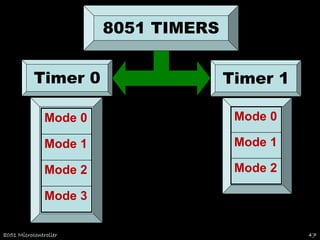
Timer 0
Mode 3
Mode 2
Mode 1
Mode 0
Mode 2
Mode 1
Mode 0
Timer 1
8051 TIMERS
OSC ÷12
TL0
/ 0
C T 
/ 1
C T 
0
INT PIN
Gate
0
TR
0
T PIN
TH0
INTERRUPT
TIMER 0
TF0
TL0
(5 Bit)
INTERRUPT
TIMER 0 – Mode 0
OSC ÷12
/ 0
C T 
/ 1
C T 
0
INT PIN
Gate
0
TR
0
T PIN
TH0
(8 Bit)
TF0
13 Bit Timer / Counter
Maximum Count = 1FFFh (0001111111111111)
TL0
(8 Bit)
INTERRUPT
TIMER 0 – Mode 1
OSC ÷12
/ 0
C T 
/ 1
C T 
0
INT PIN
Gate
0
TR
0
T PIN
TH0
(8 Bit)
TF0
16 Bit Timer / Counter
Maximum Count = FFFFh (1111111111111111)
TH0
(8 Bit)
Reload
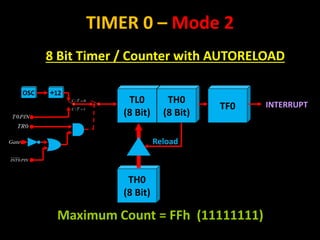
TIMER 0 – Mode 2
8 Bit Timer / Counter with AUTORELOAD
TL0
(8 Bit)
OSC ÷12
/ 0
C T 
/ 1
C T 
0
INT PIN
Gate
0
TR
0
T PIN
TH0
(8 Bit)
TF0 INTERRUPT
Maximum Count = FFh (11111111)
TL0
(8 Bit)
INTERRUPT
TIMER 0 – Mode 3
OSC ÷12
/ 0
C T 
/ 1
C T 
0
INT PIN
Gate
0
TR
0
T PIN
TF0
Two - 8 Bit Timer / Counter
OSC ÷12
1
TR
TH0
(8 Bit)
INTERRUPT
TF1
OSC ÷12
TL1
/ 0
C T 
/ 1
C T 
Gate
TH1
INTERRUPT
TIMER 1
TF1
1
INT PIN
1
TR
1
T PIN
TL1
(5 Bit)
INTERRUPT
TIMER 1 – Mode 0
OSC ÷12
/ 0
C T 
/ 1
C T 
Gate
TH1
(8 Bit)
TF1
13 Bit Timer / Counter
Maximum Count = 1FFFh (0001111111111111)
1
INT PIN
1
TR
1
T PIN
TL1
(8 Bit)
INTERRUPT
TIMER 1 – Mode 1
OSC ÷12
/ 0
C T 
/ 1
C T 
Gate
TH1
(8 Bit)
TF1
16 Bit Timer / Counter
Maximum Count = FFFFh (1111111111111111)
1
INT PIN
1
TR
1
T PIN
TH1
(8 Bit)
Reload
TIMER 1 – Mode 2
8 Bit Timer / Counter with AUTORELOAD
TL1
(8 Bit)
OSC ÷12
/ 0
C T 
/ 1
C T 
Gate
TH1
(8 Bit)
TF1 INTERRUPT
Maximum Count = FFh (11111111)
1
INT PIN
1
TR
1
T PIN
Programming Timers
• Example: Indicate which mode and which timer are
selected for each of the following.
(a) MOV TMOD, #01H (b) MOV TMOD, #20H (c) MOV
TMOD, #12H
• Solution: We convert the value from hex to binary.
(a) TMOD = 00000001, mode 1 of timer 0 is selected.
(b) TMOD = 00100000, mode 2 of timer 1 is selected.
(c) TMOD = 00010010, mode 2 of timer 0, and mode 1 of timer 1
are selected.
8051 Microcontroller 57
Programming Timers
• Find the timer’s clock frequency and its period for
various 8051-based system, with the crystal frequency
11.0592 MHz when C/T bit of TMOD is 0.
• Solution:
8051 Microcontroller 58
1/12 × 11.0529 MHz = 921.6 MHz;
T = 1/921.6 kHz = 1.085 us
8051
Serial
Port
8051 Microcontroller 59
Basics of Serial Communication
• Computers transfer data in two ways:
– Parallel: Often 8 or more lines (wire conductors) are used to
transfer data to a device that is only a few feet away.
– Serial: To transfer to a device located many meters away, the
serial method is used. The data is sent one bit at a time.
8051 Microcontroller 60
Basics of Serial Communication
• Serial data communication uses two methods
– Synchronous method transfers a block of data at a time
– Asynchronous method transfers a single byte at a time
• There are special IC’s made by many manufacturers for
serial communications.
– UART (universal asynchronous Receiver transmitter)
– USART (universal synchronous-asynchronous Receiver-
transmitter)
8051 Microcontroller 61
Asynchronous – Start & Stop Bit
• Asynchronous serial data communication is widely used
for character-oriented transmissions
– Each character is placed in between start and stop bits, this is
called framing.
– Block-oriented data transfers use the synchronous method.
• The start bit is always one bit, but the stop bit can be
one or two bits
• The start bit is always a 0 (low) and the stop bit(s) is 1
(high)
8051 Microcontroller 62
Asynchronous – Start & Stop Bit
8051 Microcontroller 63
Data Transfer Rate
• The rate of data transfer in serial data communication is
stated in bps (bits per second).
• Another widely used terminology for bps is baud rate.
– It is modem terminology and is defined as the number of
signal changes per second
– In modems, there are occasions when a single change of signal
transfers several bits of data
• As far as the conductor wire is concerned, the baud rate
and bps are the same.
8051 Microcontroller 64
8051 Serial Port
• Synchronous and Asynchronous
• SCON Register is used to Control
• Data Transfer through TXd & RXd pins
• Some time - Clock through TXd Pin
• Four Modes of Operation:
8051 Microcontroller 65
Mode 0 :Synchronous Serial Communication
Mode 1 :8-Bit UART with Timer Data Rate
Mode 2 :9-Bit UART with Set Data Rate
Mode 3 :9-Bit UART with Timer Data Rate
Registers related to Serial
Communication
1. SBUF Register
2. SCON Register
3. PCON Register
8051 Microcontroller 66
SBUF Register
• SBUF is an 8-bit register used solely for serial communication.
• For a byte data to be transferred via the TxD line, it must be
placed in the SBUF register.
• The moment a byte is written into SBUF, it is framed with the
start and stop bits and transferred serially via the TxD line.
• SBUF holds the byte of data when it is received by 8051 RxD
line.
• When the bits are received serially via RxD, the 8051 deframes
it by eliminating the stop and start bits, making a byte out of
the data received, and then placing it in SBUF.
8051 Microcontroller 67
SBUF Register
• Sample Program:
8051 Microcontroller 68
SCON Register
8051 Microcontroller 69
SM0 SM1 SM2 REN TB8 RB8 TI RI
Enable Multiprocessor
Communication Mode
Set to Enable
Serial Data
reception
9th Data Bit
Sent in Mode 2,3
9th Data Bit
Received in Mode 2,3
Set when Stop bit Txed
Set when a Cha-
ractor received
8051 Serial Port – Mode 0
The Serial Port in Mode-0 has the following features:
1. Serial data enters and exits through RXD
2. TXD outputs the clock
3. 8 bits are transmitted / received
4. The baud rate is fixed at (1/12) of the oscillator frequency
8051 Microcontroller 70
8051 Serial Port – Mode 1
The Serial Port in Mode-1 has the following features:
1. Serial data enters through RXD
2. Serial data exits through TXD
3. On receive, the stop bit goes into RB8 in SCON
4. 10 bits are transmitted / received
1. Start bit (0)
2. Data bits (8)
3. Stop Bit (1)
5. Baud rate is determined by the Timer 1 over flow rate.
8051 Microcontroller 71
8051 Serial Port – Mode 2
The Serial Port in Mode-2 has the following features:
1. Serial data enters through RXD
2. Serial data exits through TXD
3. 9th data bit (TB8) can be assign value 0 or 1
4. On receive, the 9th data bit goes into RB8 in SCON
5. 11 bits are transmitted / received
1.Start bit (0)
2.Data bits (9)
3.Stop Bit (1)
6. Baud rate is programmable
8051 Microcontroller 72
8051 Serial Port – Mode 3
The Serial Port in Mode-3 has the following features:
1. Serial data enters through RXD
2. Serial data exits through TXD
3. 9th data bit (TB8) can be assign value 0 or 1
4. On receive, the 9th data bit goes into RB8 in SCON
5. 11 bits are transmitted / received
1.Start bit (0)
2.Data bits (9)
3.Stop Bit (1)
6. Baud rate is determined by Timer 1 overflow rate.
8051 Microcontroller 73
Programming Serial Data Transmission
1. TMOD register is loaded with the value 20H, indicating the use of timer
1 in mode 2 (8-bit auto-reload) to set baud rate.
2. The TH1 is loaded with one of the values to set baud rate for serial data
transfer.
3. The SCON register is loaded with the value 50H, indicating serial mode
1, where an 8- bit data is framed with start and stop bits.
4. TR1 is set to 1 to start timer 1
5. TI is cleared by CLR TI instruction
6. The character byte to be transferred serially is written into SBUF
register.
7. The TI flag bit is monitored with the use of instruction JNB TI, xx to see
if the character has been transferred completely.
8. To transfer the next byte, go to step 5
8051 Microcontroller 74
Programming Serial Data Reception
1. TMOD register is loaded with the value 20H, indicating the use of timer 1
in mode 2 (8-bit auto-reload) to set baud rate.
2. TH1 is loaded to set baud rate
3. The SCON register is loaded with the value 50H, indicating serial mode 1,
where an 8- bit data is framed with start and stop bits.
4. TR1 is set to 1 to start timer 1
5. RI is cleared by CLR RI instruction
6. The RI flag bit is monitored with the use of instruction JNB RI, xx to see if
an entire character has been received yet
7. When RI is raised, SBUF has the byte, its contents are moved into a safe
place.
8. To receive the next character, go to step 5.
8051 Microcontroller 75
Doubling Baud Rate
• There are two ways to increase the baud rate of data
transfer
1. By using a higher frequency crystal
2. By changing a bit in the PCON register
• PCON register is an 8-bit register.
8051 Microcontroller 76
•When 8051 is powered up, SMOD is zero
•We can set it to high by software and thereby double the baud rate.
Doubling Baud Rate (cont…)
8051 Microcontroller 77
8051
Interrupts
8051 Microcontroller 78
INTERRUPTS
• An interrupt is an external or internal event that
interrupts the microcontroller to inform it that a device
needs its service
• A single microcontroller can serve several devices by two
ways:
1. Interrupt
2. Polling
8051 Microcontroller 79
Interrupt Vs Polling
1. Interrupts
– Whenever any device needs its service, the device notifies the
microcontroller by sending it an interrupt signal.
– Upon receiving an interrupt signal, the microcontroller
interrupts whatever it is doing and serves the device.
– The program which is associated with the interrupt is called the
interrupt service routine (ISR) or interrupt handler.
2. Polling
– The microcontroller continuously monitors the status of a
given device.
– When the conditions met, it performs the service.
– After that, it moves on to monitor the next device until every
one is serviced.
8051 Microcontroller 80
Interrupt Vs Polling
• The polling method is not efficient, since it wastes much of
the microcontroller’s time by polling devices that do not
need service.
• The advantage of interrupts is that the microcontroller can
serve many devices (not all at the same time).
• Each devices can get the attention of the microcontroller
based on the assigned priority.
• For the polling method, it is not possible to assign priority
since it checks all devices in a round-robin fashion.
• The microcontroller can also ignore (mask) a device request
for service in Interrupt.
8051 Microcontroller 81
Steps in Executing an Interrupt
1. It finishes the instruction it is executing and saves the address of
the next instruction (PC) on the stack.
2. It also saves the current status of all the interrupts internally (i.e:
not on the stack).
3. It jumps to a fixed location in memory, called the interrupt
vector table, that holds the address of the ISR.
4. The microcontroller gets the address of the ISR from the
interrupt vector table and jumps to it.
5. It starts to execute the interrupt service subroutine until it
reaches the last instruction of the subroutine which is RETI
(return from interrupt).
6. Upon executing the RETI instruction, the microcontroller returns
to the place where it was interrupted.
8051 Microcontroller 82
Six Interrupts in 8051
Six interrupts are allocated as follows:
1. Reset – power-up reset.
2. Two interrupts are set aside for the timers.
– one for timer 0 and one for timer 1
3. Two interrupts are set aside for hardware external
interrupts.
– P3.2 and P3.3 are for the external hardware interrupts INT0
(or EX1), and INT1 (or EX2)
4. Serial communication has a single interrupt that
belongs to both receive and transfer.
8051 Microcontroller 83
What events can trigger Interrupts?
• We can configure the 8051 so that any of the following
events will cause an interrupt:
– Timer 0 Overflow.
– Timer 1 Overflow.
– Reception/Transmission of Serial Character.
– External Event 0.
– External Event 1.
• We can configure the 8051 so that when Timer 0
Overflows or when a character is sent/received, the
appropriate interrupt handler routines are called.
8051 Microcontroller 84
8051 Interrupt Vectors
8051 Microcontroller 85
8051 Interrupt related Registers
• The various registers associated with the use of
interrupts are:
– TCON - Edge and Type bits for External Interrupts 0/1
– SCON - RI and TI interrupt flags for RS232
– IE - Enable interrupt sources
– IP - Specify priority of interrupts
8051 Microcontroller 86
Enabling and Disabling an Interrupt
• Upon reset, all interrupts are disabled (masked),
meaning that none will be responded to by the
microcontroller if they are activated.
• The interrupts must be enabled by software in order for
the microcontroller to respond to them.
• There is a register called IE (interrupt enable) that is
responsible for enabling (unmasking) and disabling
(masking) the interrupts.
8051 Microcontroller 87
Interrupt Enable (IE) Register
8051 Microcontroller 88
• EA : Global enable/disable.
• --- : Reserved for additional interrupt hardware.
• ES : Enable Serial port interrupt.
• ET1 : Enable Timer 1 control bit.
• EX1 : Enable External 1 interrupt.
• ET0 : Enable Timer 0 control bit.
• EX0 : Enable External 0 interrupt.
MOV IE,#08h
or
SETB ET1
--
Enabling and Disabling an Interrupt
• Example: Show the instructions to (a) enable the serial interrupt,
timer 0 interrupt, and external hardware interrupt 1 and (b)
disable (mask) the timer 0 interrupt, then (c) show how to disable
all the interrupts with a single instruction.
• Solution:
– (a) MOV IE,#10010110B ;enable serial, timer 0, EX1
• Another way to perform the same manipulation is:
– SETB IE.7 ;EA=1, global enable
– SETB IE.4 ;enable serial interrupt
– SETB IE.1 ;enable Timer 0 interrupt
– SETB IE.2 ;enable EX1
– (b) CLR IE.1 ;mask (disable) timer 0 interrupt only
– (c) CLR IE.7 ;disable all interrupts
8051 Microcontroller 89
Interrupt Priority
• When the 8051 is powered up, the priorities are assigned according
to the following.
• In reality, the priority scheme is nothing but an internal polling
sequence in which the 8051 polls the interrupts in the sequence
listed and responds accordingly.
8051 Microcontroller 90
Interrupt Priority
• We can alter the sequence of interrupt priority by assigning a
higher priority to any one of the interrupts by programming a
register called IP (interrupt priority).
• To give a higher priority to any of the interrupts, we make the
corresponding bit in the IP register high.
8051 Microcontroller 91
Interrupt Priority (IP) Register
8051 Microcontroller 92
PS PT1 PX1 PT0 PX0
Reserved
Serial Port
Timer 1 Pin
INT 1 Pin Timer 0 Pin
INT 0 Pin
Priority bit=1 assigns high priority
Priority bit=0 assigns low priority
 Port 1 is denoted by P1.
 P1.0 ~ P1.7
 We use P1 as examples to show the operations on ports.
 P1 as an output port (i.e., write CPU data to the external pin)
 P1 as an input port (i.e., read pin data into CPU bus)
RMKCET/EEE/VAC/ES

Port 1(pins 1-8)
RMKCET/EEE/VAC/ES
8051 IC
D Q
Clk Q
Vcc
Load(L1)
Read latch
Read pin
Write to
latch
Internal
CPU bus
M
1
P1.X
pin
P1.X
TB1
TB2
P0.x
 Each pin of I/O ports
 Internal CPU bus:communicate with CPU
 A D latch store the value of this pin
 D latch is controlled by “Write to latch”
 Write to latch=1:write data into the D latch
 2 Tri-state buffer:
 TB1: controlled by “Read pin”
 Read pin=1:really read the data present at the pin
 TB2: controlled by “Read latch”
 Read latch=1:read value from internal latch
 A transistor M1 gate
 Gate=0: open
 Gate=1: close
RMKCET/EEE/VAC/ES
RMKCET/EEE/VAC/ES
Output Input
Tri-state control
(active high)
L H Low
Highimpedance
(open-circuit)
H
H
L H

RMKCET/EEE/VAC/ES
D Q
Clk Q
Vcc
Load(L1)
Read latch
Read pin
Write to
latch
Internal
CPU bus
M
1
P1.X
pin
P1.X
8051 IC
2. output pin
is Vcc
1. write a 1 to the pin
1
0 output 1
TB1
TB2
RMKCET/EEE/VAC/ES
D Q
Clk Q
Vcc
Load(L1)
Read latch
Read pin
Write to
latch
Internal
CPU bus
M
1
P1.X
pin
P1.X
8051 IC
2. output pin
is ground
1. write a 0 to the pin
0
1 output 0
TB1
TB2
 Send data to Port 1:
MOV A,#55H
BACK: MOV P1,A
ACALL DELAY
CPL A
SJMP BACK
 Let P1 toggle.
 You can write to P1 directly.
RMKCET/EEE/VAC/ES
 When reading ports, there are two possibilities:
 Read the status of the input pin. (from external pin value)
 MOV A, PX
 JNB P2.1, TARGET ; jump if P2.1 is not set
 JB P2.1, TARGET ; jump if P2.1 is set
 Figures C-11, C-12
 Read the internal latch of the output port.
 ANL P1, A ; P1 ← P1 AND A
 ORL P1, A ; P1 ← P1 OR A
 INC P1 ; increase P1
 Figure C-17
 Table C-6 Read-Modify-Write Instruction (or Table 8-5)
 See Section 8.3
RMKCET/EEE/VAC/ES
RMKCET/EEE/VAC/ES
D Q
Clk Q
Vcc
Load(L1)
Read latch
Read pin
Write to latch
Internal CPU
bus
M1
P1.X pin
P1.X
8051 IC
2. MOV A,P1
external pin=High
1. write a 1 to the pin MOV
P1,#0FFH
1
0
3. Read pin=1 Read
latch=0 Write to latch=1
1
TB1
TB2
RMKCET/EEE/VAC/ES
D Q
Clk Q
Vcc
Load(L1)
Read latch
Read pin
Write to latch
Internal CPU
bus
M1
P1.X pin
P1.X
8051 IC
2. MOV A,P1
external pin=Low
1. write a 1 to the pin
MOV P1,#0FFH
1
0
3. Read pin=1 Read
latch=0 Write to latch=1
0
TB1
TB2
 In order to make P1 an input, the port must be programmed by writing 1
to all the bit.
MOV A,#0FFH ;A=11111111B
MOV P1,A ;make P1 an input port
BACK: MOV A,P1 ;get data from P0
MOV P2,A ;send data to P2
SJMP BACK
 To be an input port, P0, P1, P2 and P3 have similar methods.
RMKCET/EEE/VAC/ES
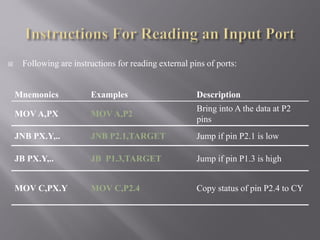
Mnemonics Examples Description
MOV A,PX MOV A,P2
Bring into A the data at P2
pins
JNB PX.Y,.. JNB P2.1,TARGET Jump if pin P2.1 is low
JB PX.Y,.. JB P1.3,TARGET Jump if pin P1.3 is high
MOV C,PX.Y MOV C,P2.4 Copy status of pin P2.4 to CY
 Following are instructions for reading external pins of ports:
 Exclusive-or the Port 1:
MOV P1,#55H ;P1=01010101
ORL P1,#0F0H ;P1=11110101
1. The read latch activates TB2 and bring the data from the Q latch into
CPU.
 Read P1.0=0
2. CPU performs an operation.
 This data is ORed with bit 1 of register A. Get 1.
3. The latch is modified.
 D latch of P1.0 has value 1.
4. The result is written to the external pin.
 External pin (pin 1: P1.0) has value 1.
RMKCET/EEE/VAC/ES
RMKCET/EEE/VAC/ES
D Q
Clk Q
Vcc
Load(L1)
Read latch
Read pin
Write to latch
Internal CPU
bus
M1
P1.X pin
P1.X
8051 IC
4. P1.X=1
2. CPU compute P1.X OR 1
0
0
1. Read pin=0 Read latch=1 Write to
latch=0 (Assume P1.X=0 initially)
1
TB1
TB2
3. write result to latch Read
pin=0 Read latch=0
Write to latch=1
1
0
 Read-modify-write Instructions
 Table C-6
 This features combines 3 actions in a single instruction:
1. CPU reads the latch of the port
2. CPU perform the operation
3. Modifying the latch
4. Writing to the pin
 Note that 8 pins of P1 work independently.
RMKCET/EEE/VAC/ES
 Exclusive-or the Port 1:
MOV P1,#55H ;P1=01010101
AGAIN: XOR P1,#0FFH ;complement
ACALL DELAY
SJMP AGAIN
 Note that the XOR of 55H and FFH gives AAH.
 XOR of AAH and FFH gives 55H.
 The instruction read the data in the latch (not from the pin).
 The instruction result will put into the latch and the pin.
RMKCET/EEE/VAC/ES
RMKCET/EEE/VAC/ES
Example
Mnemonics
SETB P1.4
SETB PX.Y
CLR P1.3
CLR PX.Y
MOV P1.2,C
MOV PX.Y,C
DJNZ P1,TARGET
DJNZ PX,
TARGET
INC P1
INC
CPL P1.2
CPL
JBC P1.1,
TARGET
JBC PX.Y,
TARGET
XRL P1,A
XRL
ORL P1,A
ORL
ANL P1,A
ANL
DEC P1
DEC
 How to write the data to a pin?
 How to read the data from the pin?
 Read the value present at the external pin.
 Why we need to set the pin first?
 Read the value come from the latch(not from the external
pin).
 Why the instruction is called read-modify write?
RMKCET/EEE/VAC/ES
 P1, P2, and P3 have internal pull-up resisters.
 P1, P2, and P3 are not open drain.
 P0 has no internal pull-up resistors and does not connects to
Vcc inside the 8051.
 P0 is open drain.
 Compare the figures of P1.X and P0.X. 
 However, for a programmer, it is the same to program P0, P1,
P2 and P3.
 All the ports upon RESET are configured as output.
RMKCET/EEE/VAC/ES
RMKCET/EEE/VAC/ES
8051 IC
D Q
Clk Q
Read latch
Read pin
Write to
latch
Internal
CPU bus
M
1
P0.X
pin
P1.X
TB1
TB2
P1.x
 P0 is an open drain.
 Open drain is a term used for MOS chips in the same way
that open collector is used for TTL chips. 
 When P0 is used for simple data I/O we must connect it to
external pull-up resistors.
 Each pin of P0 must be connected externally to a 10K
ohm pull-up resistor.
 With external pull-up resistors connected upon reset, port
0 is configured as an output port.
RMKCET/EEE/VAC/ES
RMKCET/EEE/VAC/ES
P0.0
P0.1
P0.2
P0.3
P0.4
P0.5
P0.6
P0.7
DS5000
8751
8951
Vcc
10 K
Port
0
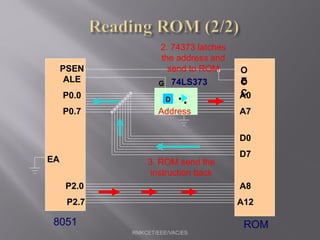
 When connecting an 8051/8031 to an external memory, the 8051
uses ports to send addresses and read instructions.
 8031 is capable of accessing 64K bytes of external memory.
 16-bit address:P0 provides both address A0-A7, P2 provides
address A8-A15.
 Also, P0 provides data lines D0-D7.
 When P0 is used for address/data multiplexing, it is connected to
the 74LS373 to latch the address.
 There is no need for external pull-up resistors as shown in
Chapter 14.
RMKCET/EEE/VAC/ES
RMKCET/EEE/VAC/ES
D
74LS373
ALE
P0.0
P0.7
PSEN
A0
A7
D0
D7
P2.0
P2.7
A8
A15
O
E
O
C
EA
G
8051 ROM
RMKCET/EEE/VAC/ES
D
74LS373
ALE
P0.0
P0.7
PSEN
A0
A7
D0
D7
P2.0
P2.7
A8
A12
O
E
O
C
EA
G
8051 ROM
1. Send address
to ROM
2. 74373 latches
the address and
send to ROM
Address
RMKCET/EEE/VAC/ES
D
74LS373
ALE
P0.0
P0.7
PSEN
A0
A7
D0
D7
P2.0
P2.7
A8
A12
O
E
O
C
EA
G
8051 ROM
2. 74373 latches
the address and
send to ROM
Address
3. ROM send the
instruction back

UNIT III Introduction to Microcontroller.pdf

  • 2.
  • 3.
    Microprocessor vs. Microcontroller Microprocessor •CPU is stand-alone, RAM, ROM, I/O, timer are separate • Designer can decide on the amount of ROM, RAM and I/O ports. • Expansive • Versatility • General-purpose Microcontroller • CPU, RAM, ROM, I/O and timer are all on a single chip • Fix amount of on-chip ROM, RAM, I/O ports • For applications in which cost, power and space are critical • Not Expansive • Single-purpose 8051 Microcontroller 3
  • 4.
    8051 CPU Operation 1.Features 2. Pin Diagram 3. Block Diagram 8051 Microcontroller 4
  • 5.
    8051 Microcontroller • Intelintroduced 8051, referred as MCS- 51, in 1981. • The 8051 is an 8-bit processor – The CPU can work on only 8 bits of data at a time • The 8051 became widely popular after allowing other manufactures to make and market any flavor of the 8051. 8051 Microcontroller 5
  • 6.
    8051 Family • The8051 is a subset of the 8052 • The 8031 is a ROM-less 8051 – Add external ROM to it – You lose two ports, and leave only 2 ports for I/O operations 8051 Microcontroller 6
  • 7.
    8051 Features • 64KBProgram Memory address space • 64KB Data Memory address space • 4K bytes of on-chip Program Memory • 128 bytes of on-chip Data RAM • 32 bidirectional and individually addressable I/0 lines • Two 16-bit timer/counters • Full duplex UART • 6-source/5-vector interrupt structure with two priority levels • On-chip clock oscillator 8051 Microcontroller 7
  • 8.
    Pin Description ofthe 8051 • 8051 family members (e.g., 8751, 89C51, 89C52, DS89C4x0) – Have 40 pins dedicated for various functions such as I/O, RD, WR, address, data, and interrupts. – Come in different packages, such as • DIP(dual in-line package), • QFP(quad flat package), and • LLC(leadless chip carrier) • Some companies provide a 20-pin version of the 8051 with a reduced number of I/O ports for less demanding applications 8051 Microcontroller 8
  • 9.
    Pin Diagram ofthe 8051 8051 Microcontroller 9
  • 10.
    XTAL1 and XTAL2 •The 8051 has an on-chip oscillator but requires an external clock to run it – A quartz crystal oscillator is connected to inputs XTAL1 (pin19) and XTAL2 (pin18) – The quartz crystal oscillator also needs two capacitors of 30 pF value 8051 Microcontroller 10
  • 11.
    XTAL1 and XTAL2….. • If you use a frequency source other than a crystal oscillator, such as a TTL oscillator: – It will be connected to XTAL1 – XTAL2 is left unconnected 8051 Microcontroller 11
  • 12.
    XTAL1 and XTAL2….. • The speed of 8051 refers to the maximum oscillator frequency connected to XTAL. • We can observe the frequency on the XTAL2 pin using the oscilloscope. 8051 Microcontroller 12
  • 13.
    RST • RESET pinis an input and is active high (normally low) • Upon applying a high pulse to this pin, the microcontroller will reset and terminate all activities • This is often referred to as a power-on reset • Activating a power-on reset will cause all values in the registers to be lost 8051 Microcontroller 13
  • 14.
    RST • In orderfor the RESET input to be effective, it must have a minimum duration of 2 machine cycles. • In other words, the high pulse must be high for a minimum of 2 machine cycles before it is allowed to go low. 8051 Microcontroller 14
  • 15.
    EA’ • EA’, “externalaccess’’, is an input pin and must be connected to Vcc or GND • The 8051 family members all come with on- chip ROM to store programs and also have an external code and data memory. • Normally EA pin is connected to Vcc • EA pin must be connected to GND to indicate that the code or data is stored externally. 8051 Microcontroller 15
  • 16.
    PSEN’ and ALE •PSEN, “program store enable’’, is an output pin • This pin is connected to the OE pin of the external memory. • For External Code Memory, PSEN’ = 0 • For External Data Memory, PSEN’ = 1 • ALE pin is used for demultiplexing the address and data. 8051 Microcontroller 16
  • 17.
    I/O Port Pins •The four 8-bit I/O ports P0, P1, P2 and P3 each uses 8 pins. • All the ports upon RESET are configured as output, ready to be used as input ports by the external device. 8051 Microcontroller 17
  • 18.
    Port 0 • Port0 is also designated as AD0-AD7. • When connecting an 8051 to an external memory, port 0 provides both address and data. • The 8051 multiplexes address and data through port 0 to save pins. • ALE indicates if P0 has address or data. – When ALE=0, it provides data D0-D7 – When ALE=1, it has address A0-A7 8051 Microcontroller 18
  • 19.
    Port 1 andPort 2 • In 8051-based systems with no external memory connection: – Both P1 and P2 are used as simple I/O. • In 8051-based systems with external memory connections: – Port 2 must be used along with P0 to provide the 16-bit address for the external memory. – P0 provides the lower 8 bits via A0 – A7. – P2 is used for the upper 8 bits of the 16-bit address, designated as A8 – A15, and it cannot be used for I/O. 8051 Microcontroller 19
  • 20.
    Port 3 • Port3 can be used as input or output. • Port 3 has the additional function of providing some extremely important signals 8051 Microcontroller 20
  • 21.
    Pin Description Summary 8051Microcontroller 21 PIN TYPE NAME AND FUNCTION Vss I Ground: 0 V reference. Vcc I Power Supply: This is the power supply voltage for normal, idle, and power-down operation. P0.0 - P0.7 I/O Port 0: Port 0 is an open-drain, bi-directional I/O port. Port 0 is also the multiplexed low-order address and data bus during accesses to external program and data memory. P1.0 - P1.7 I/O Port 1: Port I is an 8-bit bi-directional I/O port. P2.0 - P2.7 I/O Port 2: Port 2 is an 8-bit bidirectional I/O. Port 2 emits the high order address byte during fetches from external program memory and during accesses to external data memory that use 16 bit addresses. P3.0 - P3.7 I/O Port 3: Port 3 is an 8 bit bidirectional I/O port. Port 3 also serves special features as explained.
  • 22.
    Pin Description Summary 8051Microcontroller 22 PIN TYPE NAME AND FUNCTION RST I Reset: A high on this pin for two machine cycles while the oscillator is running, resets the device. ALE O Address Latch Enable: Output pulse for latching the low byte of the address during an access to external memory. PSEN* O Program Store Enable: The read strobe to external program memory. When executing code from the external program memory, PSEN* is activated twice each machine cycle, except that two PSEN* activations are skipped during each access to external data memory. EA*/VPP I External Access Enable/Programming Supply Voltage: EA* must be externally held low to enable the device to fetch code from external program memory locations. If EA* Is held high, the device executes from internal program memory. This pin also receives the programming supply voltage Vpp during Flash programming. (applies for 89c5x MCU's)
  • 23.
    Interrupt Control CPU 4K ROM 128 B RAM OSC Bus Control 4 I/OPorts Serial Port Timer 1 Timer 0 General Block Diagram of 8051 TXD RXD P0 P1 P2 P3
  • 24.
    Detailed Block Diagram 8051Microcontroller 24
  • 25.
  • 26.
    8051 Memory Structure External EXTINT 128 SFR External Program Memory Data Memory 64K 64K EA = 0 EA = 1 4K 60K 8051 Microcontroller 26
  • 27.
    Internal RAM Structure Direct& Indirect Addressing Direct Addressing Only SFR [ Special Function Registers] 128 Byte Internal RAM 8051 Microcontroller 27
  • 28.
    Special Function Registers[SFR] 8051 Microcontroller 28
  • 29.
    Program Status Word[PSW] 8051 Microcontroller 29 C AC F0 RS1 RS0 OV F1 P Register Bank Select Carry Auxiliary Carry User Flag 0 Parity User Flag 1 Overflow
  • 30.
    8051 instructions thataffects flag 8051 Microcontroller 30
  • 31.
    128 Byte RAM •There are 128 bytes of RAM in the 8051. – Assigned addresses 00 to 7FH • The 128 bytes are divided into 3 different groups as follows: 1. A total of 32 bytes from locations 00 to 1F hex are set aside for register banks and the stack. 2. A total of 16 bytes from locations 20H to 2FH are set aside for bit-addressable read/write memory. 3. A total of 80 bytes from locations 30H to 7FH are used for read and write storage, called scratch pad. 8051 Microcontroller 31 128 BYTE INTERNAL RAM Register Banks Reg Bank 0 Reg Bank 1 Reg Bank 2 Reg Bank 3 BIT Addressable Area General Purpose Area
  • 32.
    8051 RAM withaddresses 8051 Microcontroller 32
  • 33.
    8051 Register BankStructure Bank 0 R0 R1 R2 R3 R4 R5 R6 R7 Bank 3 R0 R1 R2 R3 R4 R5 R6 R7 Bank 2 R0 R1 R2 R3 R4 R5 R6 R7 Bank 1 R0 R1 R2 R3 R4 R5 R6 R7 8051 Microcontroller 33
  • 34.
    8051 Register Bankswith address 8051 Microcontroller 34
  • 35.
    8051 Programming Model 8051Microcontroller 35
  • 36.
    8051 Stack • Thestack is a section of RAM used by the CPU to store information temporarily. – This information could be data or an address • The register used to access the stack is called the SP (stack pointer) register – The stack pointer in the 8051 is only 8 bit wide, which means that it can take value of 00 to FFH – When the 8051 is powered up, the SP register contains value 07 – RAM location 08 is the first location begin used for the stack by the 8051 8051 Microcontroller 36
  • 37.
    8051 Stack • Thestoring of a CPU register in the stack is called a PUSH – SP is pointing to the last used location of the stack – As we push data onto the stack, the SP is incremented by one – This is different from many microprocessors • Loading the contents of the stack back into a CPU register is called a POP – With every pop, the top byte of the stack is copied to the register specified by the instruction and the stack pointer is decremented once 8051 Microcontroller 37
  • 38.
    Bit Addressable &Byte Addressable 8051 Microcontroller 38
  • 39.
    Single bit Instructions 8051Microcontroller 39
  • 40.
    Bit Addressable Programming •Example: Find out to which by each of the following bits belongs. Give the address of the RAM byte in hex (a) SETB 42H, (b) CLR 67H, (c) CLR 0FH (d) SETB 28H, (e) CLR 12, (f) SETB 05 8051 Microcontroller 40
  • 41.
    8051 Peripheral Overview 1.Timers 2. Serial Port 3. Interrupts 8051 Microcontroller 41
  • 42.
  • 43.
    8051 Timer/Counter 8051 Microcontroller43 OSC ÷12 TLx (8 Bit) / 0 C T  / 1 C T  INT PIN Gate TR T PIN THx (8 Bit) TFx (1 Bit) INTERRUPT
  • 44.
    TMOD Register 8051 Microcontroller44 GATE: When set, timer/counter x is enabled, if INTx pin is high and TRx is set. When cleared, timer/counter x is enabled, if TRx bit set. C/T*: When set, counter operation (input from Tx input pin). When cleared, timer operation (input from internal clock).
  • 45.
    TMOD Register 8051 Microcontroller45 The TMOD byte is not bit addressable.
  • 46.
  • 47.
    8051 Timer Modes 8051Microcontroller 47 Timer 0 Mode 3 Mode 2 Mode 1 Mode 0 Mode 2 Mode 1 Mode 0 Timer 1 8051 TIMERS
  • 48.
    OSC ÷12 TL0 / 0 CT  / 1 C T  0 INT PIN Gate 0 TR 0 T PIN TH0 INTERRUPT TIMER 0 TF0
  • 49.
    TL0 (5 Bit) INTERRUPT TIMER 0– Mode 0 OSC ÷12 / 0 C T  / 1 C T  0 INT PIN Gate 0 TR 0 T PIN TH0 (8 Bit) TF0 13 Bit Timer / Counter Maximum Count = 1FFFh (0001111111111111)
  • 50.
    TL0 (8 Bit) INTERRUPT TIMER 0– Mode 1 OSC ÷12 / 0 C T  / 1 C T  0 INT PIN Gate 0 TR 0 T PIN TH0 (8 Bit) TF0 16 Bit Timer / Counter Maximum Count = FFFFh (1111111111111111)
  • 51.
    TH0 (8 Bit) Reload TIMER 0– Mode 2 8 Bit Timer / Counter with AUTORELOAD TL0 (8 Bit) OSC ÷12 / 0 C T  / 1 C T  0 INT PIN Gate 0 TR 0 T PIN TH0 (8 Bit) TF0 INTERRUPT Maximum Count = FFh (11111111)
  • 52.
    TL0 (8 Bit) INTERRUPT TIMER 0– Mode 3 OSC ÷12 / 0 C T  / 1 C T  0 INT PIN Gate 0 TR 0 T PIN TF0 Two - 8 Bit Timer / Counter OSC ÷12 1 TR TH0 (8 Bit) INTERRUPT TF1
  • 53.
    OSC ÷12 TL1 / 0 CT  / 1 C T  Gate TH1 INTERRUPT TIMER 1 TF1 1 INT PIN 1 TR 1 T PIN
  • 54.
    TL1 (5 Bit) INTERRUPT TIMER 1– Mode 0 OSC ÷12 / 0 C T  / 1 C T  Gate TH1 (8 Bit) TF1 13 Bit Timer / Counter Maximum Count = 1FFFh (0001111111111111) 1 INT PIN 1 TR 1 T PIN
  • 55.
    TL1 (8 Bit) INTERRUPT TIMER 1– Mode 1 OSC ÷12 / 0 C T  / 1 C T  Gate TH1 (8 Bit) TF1 16 Bit Timer / Counter Maximum Count = FFFFh (1111111111111111) 1 INT PIN 1 TR 1 T PIN
  • 56.
    TH1 (8 Bit) Reload TIMER 1– Mode 2 8 Bit Timer / Counter with AUTORELOAD TL1 (8 Bit) OSC ÷12 / 0 C T  / 1 C T  Gate TH1 (8 Bit) TF1 INTERRUPT Maximum Count = FFh (11111111) 1 INT PIN 1 TR 1 T PIN
  • 57.
    Programming Timers • Example:Indicate which mode and which timer are selected for each of the following. (a) MOV TMOD, #01H (b) MOV TMOD, #20H (c) MOV TMOD, #12H • Solution: We convert the value from hex to binary. (a) TMOD = 00000001, mode 1 of timer 0 is selected. (b) TMOD = 00100000, mode 2 of timer 1 is selected. (c) TMOD = 00010010, mode 2 of timer 0, and mode 1 of timer 1 are selected. 8051 Microcontroller 57
  • 58.
    Programming Timers • Findthe timer’s clock frequency and its period for various 8051-based system, with the crystal frequency 11.0592 MHz when C/T bit of TMOD is 0. • Solution: 8051 Microcontroller 58 1/12 × 11.0529 MHz = 921.6 MHz; T = 1/921.6 kHz = 1.085 us
  • 59.
  • 60.
    Basics of SerialCommunication • Computers transfer data in two ways: – Parallel: Often 8 or more lines (wire conductors) are used to transfer data to a device that is only a few feet away. – Serial: To transfer to a device located many meters away, the serial method is used. The data is sent one bit at a time. 8051 Microcontroller 60
  • 61.
    Basics of SerialCommunication • Serial data communication uses two methods – Synchronous method transfers a block of data at a time – Asynchronous method transfers a single byte at a time • There are special IC’s made by many manufacturers for serial communications. – UART (universal asynchronous Receiver transmitter) – USART (universal synchronous-asynchronous Receiver- transmitter) 8051 Microcontroller 61
  • 62.
    Asynchronous – Start& Stop Bit • Asynchronous serial data communication is widely used for character-oriented transmissions – Each character is placed in between start and stop bits, this is called framing. – Block-oriented data transfers use the synchronous method. • The start bit is always one bit, but the stop bit can be one or two bits • The start bit is always a 0 (low) and the stop bit(s) is 1 (high) 8051 Microcontroller 62
  • 63.
    Asynchronous – Start& Stop Bit 8051 Microcontroller 63
  • 64.
    Data Transfer Rate •The rate of data transfer in serial data communication is stated in bps (bits per second). • Another widely used terminology for bps is baud rate. – It is modem terminology and is defined as the number of signal changes per second – In modems, there are occasions when a single change of signal transfers several bits of data • As far as the conductor wire is concerned, the baud rate and bps are the same. 8051 Microcontroller 64
  • 65.
    8051 Serial Port •Synchronous and Asynchronous • SCON Register is used to Control • Data Transfer through TXd & RXd pins • Some time - Clock through TXd Pin • Four Modes of Operation: 8051 Microcontroller 65 Mode 0 :Synchronous Serial Communication Mode 1 :8-Bit UART with Timer Data Rate Mode 2 :9-Bit UART with Set Data Rate Mode 3 :9-Bit UART with Timer Data Rate
  • 66.
    Registers related toSerial Communication 1. SBUF Register 2. SCON Register 3. PCON Register 8051 Microcontroller 66
  • 67.
    SBUF Register • SBUFis an 8-bit register used solely for serial communication. • For a byte data to be transferred via the TxD line, it must be placed in the SBUF register. • The moment a byte is written into SBUF, it is framed with the start and stop bits and transferred serially via the TxD line. • SBUF holds the byte of data when it is received by 8051 RxD line. • When the bits are received serially via RxD, the 8051 deframes it by eliminating the stop and start bits, making a byte out of the data received, and then placing it in SBUF. 8051 Microcontroller 67
  • 68.
    SBUF Register • SampleProgram: 8051 Microcontroller 68
  • 69.
    SCON Register 8051 Microcontroller69 SM0 SM1 SM2 REN TB8 RB8 TI RI Enable Multiprocessor Communication Mode Set to Enable Serial Data reception 9th Data Bit Sent in Mode 2,3 9th Data Bit Received in Mode 2,3 Set when Stop bit Txed Set when a Cha- ractor received
  • 70.
    8051 Serial Port– Mode 0 The Serial Port in Mode-0 has the following features: 1. Serial data enters and exits through RXD 2. TXD outputs the clock 3. 8 bits are transmitted / received 4. The baud rate is fixed at (1/12) of the oscillator frequency 8051 Microcontroller 70
  • 71.
    8051 Serial Port– Mode 1 The Serial Port in Mode-1 has the following features: 1. Serial data enters through RXD 2. Serial data exits through TXD 3. On receive, the stop bit goes into RB8 in SCON 4. 10 bits are transmitted / received 1. Start bit (0) 2. Data bits (8) 3. Stop Bit (1) 5. Baud rate is determined by the Timer 1 over flow rate. 8051 Microcontroller 71
  • 72.
    8051 Serial Port– Mode 2 The Serial Port in Mode-2 has the following features: 1. Serial data enters through RXD 2. Serial data exits through TXD 3. 9th data bit (TB8) can be assign value 0 or 1 4. On receive, the 9th data bit goes into RB8 in SCON 5. 11 bits are transmitted / received 1.Start bit (0) 2.Data bits (9) 3.Stop Bit (1) 6. Baud rate is programmable 8051 Microcontroller 72
  • 73.
    8051 Serial Port– Mode 3 The Serial Port in Mode-3 has the following features: 1. Serial data enters through RXD 2. Serial data exits through TXD 3. 9th data bit (TB8) can be assign value 0 or 1 4. On receive, the 9th data bit goes into RB8 in SCON 5. 11 bits are transmitted / received 1.Start bit (0) 2.Data bits (9) 3.Stop Bit (1) 6. Baud rate is determined by Timer 1 overflow rate. 8051 Microcontroller 73
  • 74.
    Programming Serial DataTransmission 1. TMOD register is loaded with the value 20H, indicating the use of timer 1 in mode 2 (8-bit auto-reload) to set baud rate. 2. The TH1 is loaded with one of the values to set baud rate for serial data transfer. 3. The SCON register is loaded with the value 50H, indicating serial mode 1, where an 8- bit data is framed with start and stop bits. 4. TR1 is set to 1 to start timer 1 5. TI is cleared by CLR TI instruction 6. The character byte to be transferred serially is written into SBUF register. 7. The TI flag bit is monitored with the use of instruction JNB TI, xx to see if the character has been transferred completely. 8. To transfer the next byte, go to step 5 8051 Microcontroller 74
  • 75.
    Programming Serial DataReception 1. TMOD register is loaded with the value 20H, indicating the use of timer 1 in mode 2 (8-bit auto-reload) to set baud rate. 2. TH1 is loaded to set baud rate 3. The SCON register is loaded with the value 50H, indicating serial mode 1, where an 8- bit data is framed with start and stop bits. 4. TR1 is set to 1 to start timer 1 5. RI is cleared by CLR RI instruction 6. The RI flag bit is monitored with the use of instruction JNB RI, xx to see if an entire character has been received yet 7. When RI is raised, SBUF has the byte, its contents are moved into a safe place. 8. To receive the next character, go to step 5. 8051 Microcontroller 75
  • 76.
    Doubling Baud Rate •There are two ways to increase the baud rate of data transfer 1. By using a higher frequency crystal 2. By changing a bit in the PCON register • PCON register is an 8-bit register. 8051 Microcontroller 76 •When 8051 is powered up, SMOD is zero •We can set it to high by software and thereby double the baud rate.
  • 77.
    Doubling Baud Rate(cont…) 8051 Microcontroller 77
  • 78.
  • 79.
    INTERRUPTS • An interruptis an external or internal event that interrupts the microcontroller to inform it that a device needs its service • A single microcontroller can serve several devices by two ways: 1. Interrupt 2. Polling 8051 Microcontroller 79
  • 80.
    Interrupt Vs Polling 1.Interrupts – Whenever any device needs its service, the device notifies the microcontroller by sending it an interrupt signal. – Upon receiving an interrupt signal, the microcontroller interrupts whatever it is doing and serves the device. – The program which is associated with the interrupt is called the interrupt service routine (ISR) or interrupt handler. 2. Polling – The microcontroller continuously monitors the status of a given device. – When the conditions met, it performs the service. – After that, it moves on to monitor the next device until every one is serviced. 8051 Microcontroller 80
  • 81.
    Interrupt Vs Polling •The polling method is not efficient, since it wastes much of the microcontroller’s time by polling devices that do not need service. • The advantage of interrupts is that the microcontroller can serve many devices (not all at the same time). • Each devices can get the attention of the microcontroller based on the assigned priority. • For the polling method, it is not possible to assign priority since it checks all devices in a round-robin fashion. • The microcontroller can also ignore (mask) a device request for service in Interrupt. 8051 Microcontroller 81
  • 82.
    Steps in Executingan Interrupt 1. It finishes the instruction it is executing and saves the address of the next instruction (PC) on the stack. 2. It also saves the current status of all the interrupts internally (i.e: not on the stack). 3. It jumps to a fixed location in memory, called the interrupt vector table, that holds the address of the ISR. 4. The microcontroller gets the address of the ISR from the interrupt vector table and jumps to it. 5. It starts to execute the interrupt service subroutine until it reaches the last instruction of the subroutine which is RETI (return from interrupt). 6. Upon executing the RETI instruction, the microcontroller returns to the place where it was interrupted. 8051 Microcontroller 82
  • 83.
    Six Interrupts in8051 Six interrupts are allocated as follows: 1. Reset – power-up reset. 2. Two interrupts are set aside for the timers. – one for timer 0 and one for timer 1 3. Two interrupts are set aside for hardware external interrupts. – P3.2 and P3.3 are for the external hardware interrupts INT0 (or EX1), and INT1 (or EX2) 4. Serial communication has a single interrupt that belongs to both receive and transfer. 8051 Microcontroller 83
  • 84.
    What events cantrigger Interrupts? • We can configure the 8051 so that any of the following events will cause an interrupt: – Timer 0 Overflow. – Timer 1 Overflow. – Reception/Transmission of Serial Character. – External Event 0. – External Event 1. • We can configure the 8051 so that when Timer 0 Overflows or when a character is sent/received, the appropriate interrupt handler routines are called. 8051 Microcontroller 84
  • 85.
    8051 Interrupt Vectors 8051Microcontroller 85
  • 86.
    8051 Interrupt relatedRegisters • The various registers associated with the use of interrupts are: – TCON - Edge and Type bits for External Interrupts 0/1 – SCON - RI and TI interrupt flags for RS232 – IE - Enable interrupt sources – IP - Specify priority of interrupts 8051 Microcontroller 86
  • 87.
    Enabling and Disablingan Interrupt • Upon reset, all interrupts are disabled (masked), meaning that none will be responded to by the microcontroller if they are activated. • The interrupts must be enabled by software in order for the microcontroller to respond to them. • There is a register called IE (interrupt enable) that is responsible for enabling (unmasking) and disabling (masking) the interrupts. 8051 Microcontroller 87
  • 88.
    Interrupt Enable (IE)Register 8051 Microcontroller 88 • EA : Global enable/disable. • --- : Reserved for additional interrupt hardware. • ES : Enable Serial port interrupt. • ET1 : Enable Timer 1 control bit. • EX1 : Enable External 1 interrupt. • ET0 : Enable Timer 0 control bit. • EX0 : Enable External 0 interrupt. MOV IE,#08h or SETB ET1 --
  • 89.
    Enabling and Disablingan Interrupt • Example: Show the instructions to (a) enable the serial interrupt, timer 0 interrupt, and external hardware interrupt 1 and (b) disable (mask) the timer 0 interrupt, then (c) show how to disable all the interrupts with a single instruction. • Solution: – (a) MOV IE,#10010110B ;enable serial, timer 0, EX1 • Another way to perform the same manipulation is: – SETB IE.7 ;EA=1, global enable – SETB IE.4 ;enable serial interrupt – SETB IE.1 ;enable Timer 0 interrupt – SETB IE.2 ;enable EX1 – (b) CLR IE.1 ;mask (disable) timer 0 interrupt only – (c) CLR IE.7 ;disable all interrupts 8051 Microcontroller 89
  • 90.
    Interrupt Priority • Whenthe 8051 is powered up, the priorities are assigned according to the following. • In reality, the priority scheme is nothing but an internal polling sequence in which the 8051 polls the interrupts in the sequence listed and responds accordingly. 8051 Microcontroller 90
  • 91.
    Interrupt Priority • Wecan alter the sequence of interrupt priority by assigning a higher priority to any one of the interrupts by programming a register called IP (interrupt priority). • To give a higher priority to any of the interrupts, we make the corresponding bit in the IP register high. 8051 Microcontroller 91
  • 92.
    Interrupt Priority (IP)Register 8051 Microcontroller 92 PS PT1 PX1 PT0 PX0 Reserved Serial Port Timer 1 Pin INT 1 Pin Timer 0 Pin INT 0 Pin Priority bit=1 assigns high priority Priority bit=0 assigns low priority
  • 93.
     Port 1is denoted by P1.  P1.0 ~ P1.7  We use P1 as examples to show the operations on ports.  P1 as an output port (i.e., write CPU data to the external pin)  P1 as an input port (i.e., read pin data into CPU bus) RMKCET/EEE/VAC/ES  Port 1(pins 1-8)
  • 94.
    RMKCET/EEE/VAC/ES 8051 IC D Q ClkQ Vcc Load(L1) Read latch Read pin Write to latch Internal CPU bus M 1 P1.X pin P1.X TB1 TB2 P0.x
  • 95.
     Each pinof I/O ports  Internal CPU bus:communicate with CPU  A D latch store the value of this pin  D latch is controlled by “Write to latch”  Write to latch=1:write data into the D latch  2 Tri-state buffer:  TB1: controlled by “Read pin”  Read pin=1:really read the data present at the pin  TB2: controlled by “Read latch”  Read latch=1:read value from internal latch  A transistor M1 gate  Gate=0: open  Gate=1: close RMKCET/EEE/VAC/ES
  • 96.
    RMKCET/EEE/VAC/ES Output Input Tri-state control (activehigh) L H Low Highimpedance (open-circuit) H H L H 
  • 97.
    RMKCET/EEE/VAC/ES D Q Clk Q Vcc Load(L1) Readlatch Read pin Write to latch Internal CPU bus M 1 P1.X pin P1.X 8051 IC 2. output pin is Vcc 1. write a 1 to the pin 1 0 output 1 TB1 TB2
  • 98.
    RMKCET/EEE/VAC/ES D Q Clk Q Vcc Load(L1) Readlatch Read pin Write to latch Internal CPU bus M 1 P1.X pin P1.X 8051 IC 2. output pin is ground 1. write a 0 to the pin 0 1 output 0 TB1 TB2
  • 99.
     Send datato Port 1: MOV A,#55H BACK: MOV P1,A ACALL DELAY CPL A SJMP BACK  Let P1 toggle.  You can write to P1 directly. RMKCET/EEE/VAC/ES
  • 100.
     When readingports, there are two possibilities:  Read the status of the input pin. (from external pin value)  MOV A, PX  JNB P2.1, TARGET ; jump if P2.1 is not set  JB P2.1, TARGET ; jump if P2.1 is set  Figures C-11, C-12  Read the internal latch of the output port.  ANL P1, A ; P1 ← P1 AND A  ORL P1, A ; P1 ← P1 OR A  INC P1 ; increase P1  Figure C-17  Table C-6 Read-Modify-Write Instruction (or Table 8-5)  See Section 8.3 RMKCET/EEE/VAC/ES
  • 101.
    RMKCET/EEE/VAC/ES D Q Clk Q Vcc Load(L1) Readlatch Read pin Write to latch Internal CPU bus M1 P1.X pin P1.X 8051 IC 2. MOV A,P1 external pin=High 1. write a 1 to the pin MOV P1,#0FFH 1 0 3. Read pin=1 Read latch=0 Write to latch=1 1 TB1 TB2
  • 102.
    RMKCET/EEE/VAC/ES D Q Clk Q Vcc Load(L1) Readlatch Read pin Write to latch Internal CPU bus M1 P1.X pin P1.X 8051 IC 2. MOV A,P1 external pin=Low 1. write a 1 to the pin MOV P1,#0FFH 1 0 3. Read pin=1 Read latch=0 Write to latch=1 0 TB1 TB2
  • 103.
     In orderto make P1 an input, the port must be programmed by writing 1 to all the bit. MOV A,#0FFH ;A=11111111B MOV P1,A ;make P1 an input port BACK: MOV A,P1 ;get data from P0 MOV P2,A ;send data to P2 SJMP BACK  To be an input port, P0, P1, P2 and P3 have similar methods. RMKCET/EEE/VAC/ES
  • 104.
    Mnemonics Examples Description MOVA,PX MOV A,P2 Bring into A the data at P2 pins JNB PX.Y,.. JNB P2.1,TARGET Jump if pin P2.1 is low JB PX.Y,.. JB P1.3,TARGET Jump if pin P1.3 is high MOV C,PX.Y MOV C,P2.4 Copy status of pin P2.4 to CY  Following are instructions for reading external pins of ports:
  • 105.
     Exclusive-or thePort 1: MOV P1,#55H ;P1=01010101 ORL P1,#0F0H ;P1=11110101 1. The read latch activates TB2 and bring the data from the Q latch into CPU.  Read P1.0=0 2. CPU performs an operation.  This data is ORed with bit 1 of register A. Get 1. 3. The latch is modified.  D latch of P1.0 has value 1. 4. The result is written to the external pin.  External pin (pin 1: P1.0) has value 1. RMKCET/EEE/VAC/ES
  • 106.
    RMKCET/EEE/VAC/ES D Q Clk Q Vcc Load(L1) Readlatch Read pin Write to latch Internal CPU bus M1 P1.X pin P1.X 8051 IC 4. P1.X=1 2. CPU compute P1.X OR 1 0 0 1. Read pin=0 Read latch=1 Write to latch=0 (Assume P1.X=0 initially) 1 TB1 TB2 3. write result to latch Read pin=0 Read latch=0 Write to latch=1 1 0
  • 107.
     Read-modify-write Instructions Table C-6  This features combines 3 actions in a single instruction: 1. CPU reads the latch of the port 2. CPU perform the operation 3. Modifying the latch 4. Writing to the pin  Note that 8 pins of P1 work independently. RMKCET/EEE/VAC/ES
  • 108.
     Exclusive-or thePort 1: MOV P1,#55H ;P1=01010101 AGAIN: XOR P1,#0FFH ;complement ACALL DELAY SJMP AGAIN  Note that the XOR of 55H and FFH gives AAH.  XOR of AAH and FFH gives 55H.  The instruction read the data in the latch (not from the pin).  The instruction result will put into the latch and the pin. RMKCET/EEE/VAC/ES
  • 109.
    RMKCET/EEE/VAC/ES Example Mnemonics SETB P1.4 SETB PX.Y CLRP1.3 CLR PX.Y MOV P1.2,C MOV PX.Y,C DJNZ P1,TARGET DJNZ PX, TARGET INC P1 INC CPL P1.2 CPL JBC P1.1, TARGET JBC PX.Y, TARGET XRL P1,A XRL ORL P1,A ORL ANL P1,A ANL DEC P1 DEC
  • 110.
     How towrite the data to a pin?  How to read the data from the pin?  Read the value present at the external pin.  Why we need to set the pin first?  Read the value come from the latch(not from the external pin).  Why the instruction is called read-modify write? RMKCET/EEE/VAC/ES
  • 111.
     P1, P2,and P3 have internal pull-up resisters.  P1, P2, and P3 are not open drain.  P0 has no internal pull-up resistors and does not connects to Vcc inside the 8051.  P0 is open drain.  Compare the figures of P1.X and P0.X.   However, for a programmer, it is the same to program P0, P1, P2 and P3.  All the ports upon RESET are configured as output. RMKCET/EEE/VAC/ES
  • 112.
    RMKCET/EEE/VAC/ES 8051 IC D Q ClkQ Read latch Read pin Write to latch Internal CPU bus M 1 P0.X pin P1.X TB1 TB2 P1.x
  • 113.
     P0 isan open drain.  Open drain is a term used for MOS chips in the same way that open collector is used for TTL chips.   When P0 is used for simple data I/O we must connect it to external pull-up resistors.  Each pin of P0 must be connected externally to a 10K ohm pull-up resistor.  With external pull-up resistors connected upon reset, port 0 is configured as an output port. RMKCET/EEE/VAC/ES
  • 114.
  • 115.
     When connectingan 8051/8031 to an external memory, the 8051 uses ports to send addresses and read instructions.  8031 is capable of accessing 64K bytes of external memory.  16-bit address:P0 provides both address A0-A7, P2 provides address A8-A15.  Also, P0 provides data lines D0-D7.  When P0 is used for address/data multiplexing, it is connected to the 74LS373 to latch the address.  There is no need for external pull-up resistors as shown in Chapter 14. RMKCET/EEE/VAC/ES

  • 116.
  • 117.
  • 118.
    RMKCET/EEE/VAC/ES D 74LS373 ALE P0.0 P0.7 PSEN A0 A7 D0 D7 P2.0 P2.7 A8 A12 O E O C EA G 8051 ROM 2. 74373latches the address and send to ROM Address 3. ROM send the instruction back