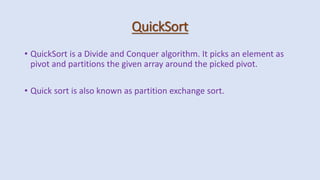
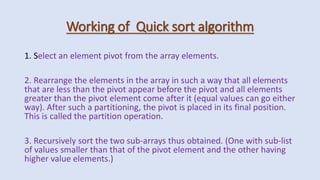
Quicksort is a divide and conquer algorithm that picks an element as a pivot and partitions the array around that pivot. It recursively sorts the sub-arrays on each side of the pivot. The algorithm involves picking a pivot element, partitioning the array by the pivot value, and then recursively sorting the sub-arrays. Quicksort has average case performance of O(n log n) time but can perform poorly on worst-case inputs.

![Technique of Quick sort
1. Set the index of the first element in the array to loc and left variables. Also,
set the index of the last element of the array to the right variable.
That is, loc = 0, left = 0, and right = n–1 (where n in the number of elements
in the array)
2. Start from the element pointed by right and scan the array from right to
left, comparing each element on the way with the element pointed by the
variable loc.That is, a[loc] should be less than a[right].
• If that is the case, then simply continue comparing until right becomes equal
to loc. Once right = loc, it means the pivot has been placed in its correct
position.
• However, if at any point, we have a[loc] > a[right], then interchange the two
values and jump to Step 3.
• Set loc = right](https://image.slidesharecdn.com/unit2-quicksort-221128041425-2ca65e2a/85/Unit-2-Quick-Sort-pptx-4-320.jpg)
![Continue...
3. Start from the element pointed by left and scan the array from left to right,
comparing each element on the way with the element pointed by loc.
That is, a[loc] should be greater than a[left].
• If that is the case, then simply continue comparing until left becomes equal to
loc. Once left = loc, it means the pivot has been placed in its correct position.
• However, if at any point, we have a[loc] < a[left], then interchange the two
values and jump to Step 2.
• Set loc = left.](https://image.slidesharecdn.com/unit2-quicksort-221128041425-2ca65e2a/85/Unit-2-Quick-Sort-pptx-5-320.jpg)
![Example Of Quick Sort for following
27 10 36 18 25 45
We choose the first element as the
pivot.
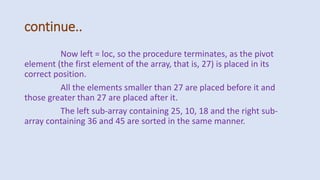
Set loc =0 left=0 & right=5
loc right
left
27 10 36 18 25 45
Scan from right to left.
Since a[loc] < a[right], decrease the
value of right
loc right
left
27 10 36 18 25 45](https://image.slidesharecdn.com/unit2-quicksort-221128041425-2ca65e2a/85/Unit-2-Quick-Sort-pptx-6-320.jpg)
![Continue...
25 10 36 18 27 45 25 10 36 18 27 45
Since a[loc] > a[right] , interchange
the two values and set loc=right
left right
loc
Start scanning from left to
right. Since a[loc] > a[left], increment
the value of left
left right
loc](https://image.slidesharecdn.com/unit2-quicksort-221128041425-2ca65e2a/85/Unit-2-Quick-Sort-pptx-7-320.jpg)
![continue..
25 10 27 18 36 45
Scan from right to left. Since a[loc]
< a[right], decrement the value of right.
left right
loc
25 10 27 18 36 45
Since a[loc] < a[left], interchange
the values and set loc = left
left right
loc](https://image.slidesharecdn.com/unit2-quicksort-221128041425-2ca65e2a/85/Unit-2-Quick-Sort-pptx-8-320.jpg)
![continue..
Scan from left to right. Since a[loc]
> a[left], increment the value of left.
right
loc
left
Since a[loc] > a[right], interchange
the two values and set loc = right.
left right
loc
25 10 18 27 36 45 25 10 18 27 36 45](https://image.slidesharecdn.com/unit2-quicksort-221128041425-2ca65e2a/85/Unit-2-Quick-Sort-pptx-9-320.jpg)
![Algorithm of Quick Sort
PARTITION (ARR, BEG, END, LOC)
Step 1: [INITIALIZE] SET LEFT = BEG, RIGHT = END, LOC = BEG, FLAG =0
Step 2: Repeat Steps 3 to 6 while FLAG =0
Step 3: Repeat while ARR[LOC] <= ARR[RIGHT] AND LOC != RIGHT
SET RIGHT = RIGHT-1
[END OF LOOP]
Step 4: IF LOC = RIGHT
SET FLAG=1
ELSE IF ARR[LOC] > ARR[RIGHT]
SWAP ARR[LOC] with ARR[RIGHT]
SET LOC = RIGHT
[END OF IF]](https://image.slidesharecdn.com/unit2-quicksort-221128041425-2ca65e2a/85/Unit-2-Quick-Sort-pptx-11-320.jpg)
![Continue...
Step 5: IF FLAG =0
Repeat while ARR[LOC] >= ARR[LEFT] AND LOC != LEFT
SET LEFT = LEFT+1
[END OF LOOP]
Step 6: IF LOC = LEFT
SET FLAG=1
ELSE IF ARR[LOC] < ARR[LEFT]
SWAP ARR[LOC] with ARR[LEFT]
SET LOC = LEFT
[END OF IF]
[END OF IF]
Step 7: [END OF LOOP]
Step 8: END](https://image.slidesharecdn.com/unit2-quicksort-221128041425-2ca65e2a/85/Unit-2-Quick-Sort-pptx-12-320.jpg)
![Continue..
QUICK_SORT (ARR, BEG, END)
Step 1: IF (BEG < END)
CALL PARTITION (ARR, BEG, END, LOC)
CALL QUICKSORT(ARR, BEG, LOC-1)
CALL QUICKSORT(ARR, LOC+1, END)
[END OF IF]
Step 2: END](https://image.slidesharecdn.com/unit2-quicksort-221128041425-2ca65e2a/85/Unit-2-Quick-Sort-pptx-13-320.jpg)
![program of Quick sort
#include <stdio.h>
#include <conio.h>
#define size 100
int partition(int a[], int beg, int end);
void quick_sort(int a[], int beg, int end);
void main()
{
int arr[size], i, n;
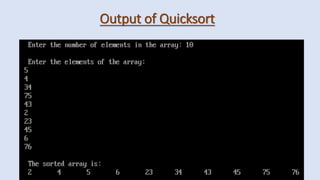
printf("n Enter the number of elements
in the array: ");
scanf("%d", &n);
printf("n Enter the elements of the
array: ");
for(i=0;i<n;i++)
{
scanf("%d", &arr[i]);
}
quick_sort(arr, 0, n-1);
printf("n The sorted array is: n");
for(i=0;i<n;i++)
printf(" %dt", arr[i]);
getch();
}](https://image.slidesharecdn.com/unit2-quicksort-221128041425-2ca65e2a/85/Unit-2-Quick-Sort-pptx-14-320.jpg)
![continue..
int partition(int a[], int beg, int end)
{
int left, right, temp, loc, flag;
loc = left = beg;
right = end;
flag = 0;
while(flag != 1)
{
while((a[loc] <= a[right]) && (loc!=right))
right--;
if(loc==right)
flag =1;
else
if(a[loc]>a[right])
{
temp = a[loc];
a[loc] = a[right];
a[right] = temp;
loc = right;
}
if(flag!=1)
{
while((a[loc] >= a[left]) && (loc!=left))
left++;
if(loc==left)
flag =1;
else](https://image.slidesharecdn.com/unit2-quicksort-221128041425-2ca65e2a/85/Unit-2-Quick-Sort-pptx-15-320.jpg)
![continue..
if(a[loc] <a[left])
{
temp = a[loc];
a[loc] = a[left];
a[left] = temp;
loc = left;
}
}
}
return loc;
}
void quick_sort(int a[], int beg, int end)
{
int loc;
if(beg<end)
{
loc = partition(a, beg, end);
quick_sort(a, beg, loc-1);
quick_sort(a, loc+1, end);
}
}](https://image.slidesharecdn.com/unit2-quicksort-221128041425-2ca65e2a/85/Unit-2-Quick-Sort-pptx-16-320.jpg)


![ppt daaa[1].pptxdaaaaaaaaaaaaaaaaaaaaaaaaaaaaaaaaa](https://cdn.slidesharecdn.com/ss_thumbnails/pptdaaa1-251211161628-1cb28a51-thumbnail.jpg?width=640&height=640&fit=bounds)


