Python- Strings
• Stringsare amongst the most popular types in Python.
• We can create them simply by enclosing characters in quotes.
• Python treats single quotes the same as double quotes.
• Creating strings is as simple as assigning a value to a variable.
For example
var1 = 'Hello World!'
var2 = "Python Programming"
Accessing Values in Strings
• Python does not support a character type; these are treated as strings of length one, thus
also considered a substring.
• To access substrings, use the square brackets for slicing along with the index or indices to
obtain your substring.
1
2.
Python- Strings
• Example:
var1= 'Hello World!'
var2 = "Python Programming"
print ("var1[0]: ", var1[0])
print ("var2[1:5]: ", var2[1:5])
• Updating Strings
You can "update" an existing string by (re)assigning a variable to another string.
The new value can be related to its previous value or to a completely different string
altogether.
For example-
#!/usr/bin/python3
var1 = 'Hello World!'
print ("Updated String :- ", var1[:6] + 'Python')
Output:
var1[0]: H
var2[1:5]: ytho
Output:
Updated String :- Hello Python
2
3.
Python- Strings
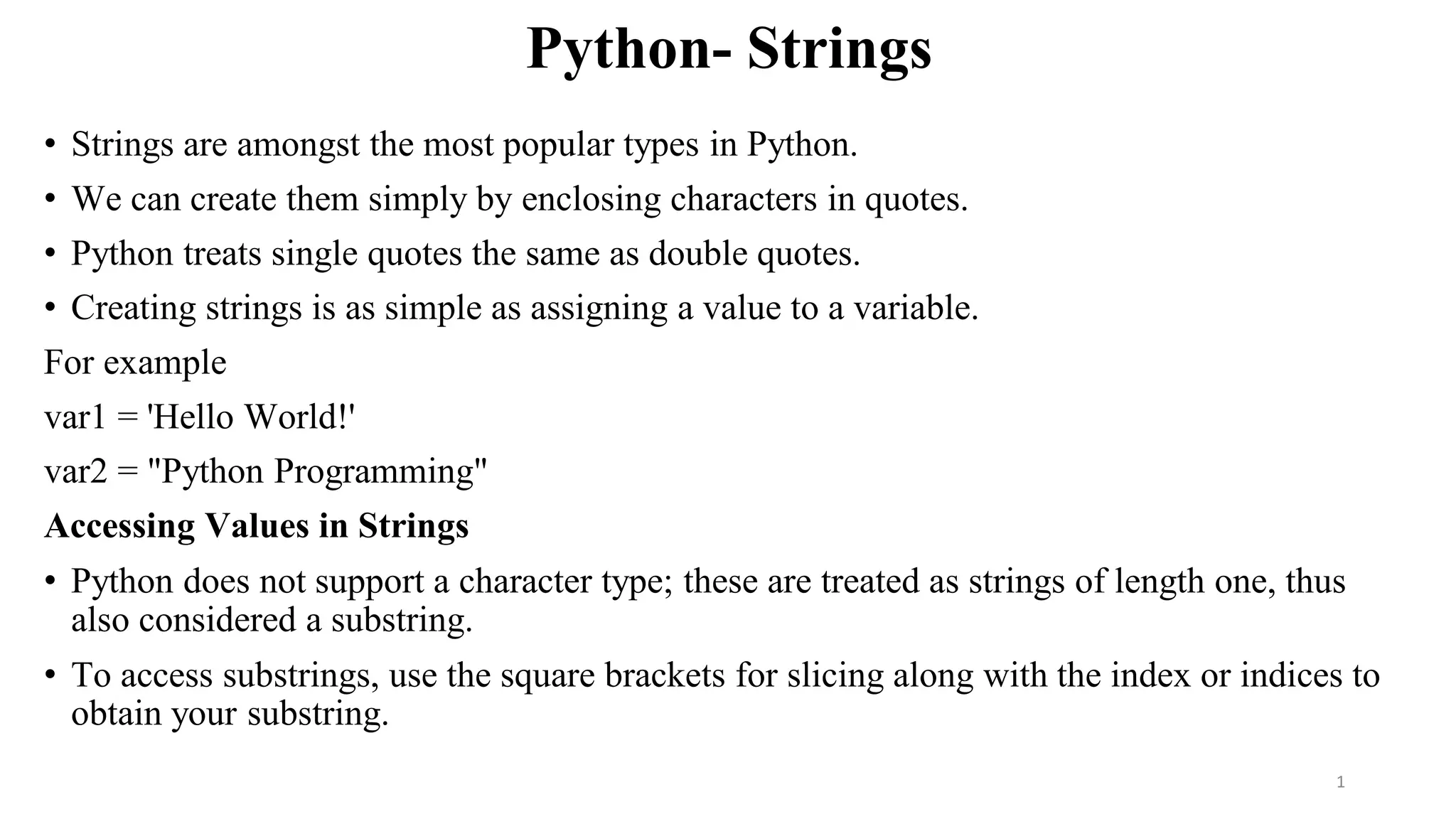
• EscapeCharacters
• Following table is a list of escape or non-printable characters that can be represented with
backslash notation.
• An escape character gets interpreted; in a single quoted as well as double quoted strings.
3
4.
Python- Strings
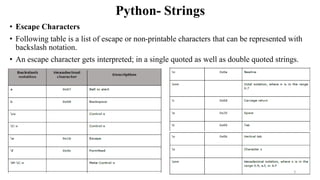
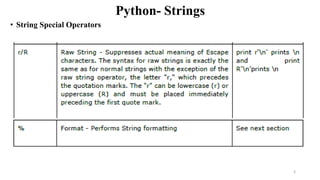
• StringSpecial Operators
• Assume string variable a holds 'Hello' and variable b holds 'Python', then-
4
Python- Strings
• UnicodeString
• In Python 3, all strings are represented in Unicode. In Python 2 are stored internally as 8-
bit ASCII, hence it is required to attach 'u' to make it Unicode. It is no longer necessary
now.
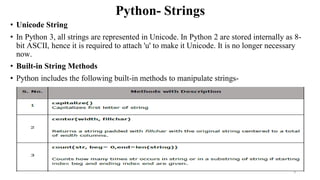
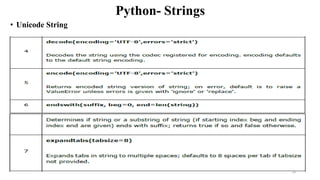
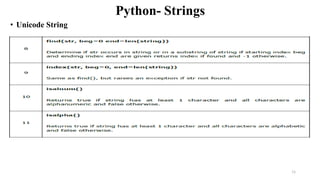
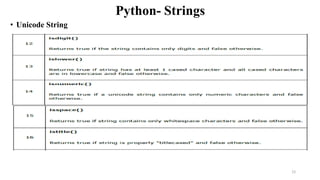
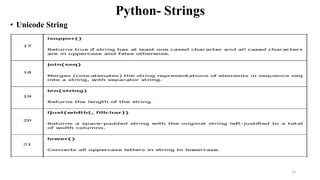
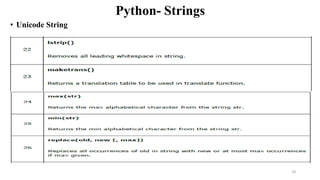
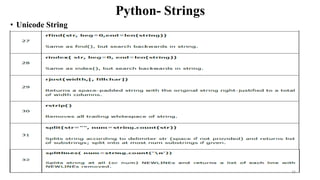
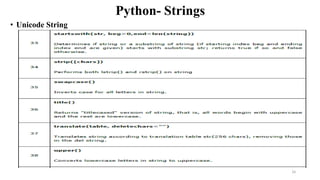
• Built-in String Methods
• Python includes the following built-in methods to manipulate strings-
9
Python- Strings
• UnicodeString
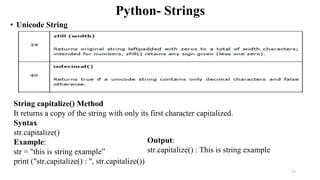
String capitalize() Method
It returns a copy of the string with only its first character capitalized.
Syntax
str.capitalize()
Example:
str = "this is string example”
print ("str.capitalize() : ", str.capitalize())
Output:
str.capitalize() : This is string example
17
18.
Python- Strings
Output:
str.capitalize() :This is string example
str.center(40, 'a') : aaaathis is string
exampleaaaa
String center() Method
The method center() returns centered in a string of length width. Padding is done using
the specified fillchar. Default filler is a space.
Syntax
str.center(width[, fillchar])
Parameters
• width - This is the total width of the string.
• fillchar - This is the filler character.
Return Value
This method returns a string that is at least width characters wide, created by padding the
string with the character fillchar (default is a space).
Example
The following example shows the usage of the center() method.
#!/usr/bin/python3
str = "this is string example.
print ("str.center(40, 'a') : ", str.center(40, 'a'))
18
![Python- Strings
• Example:
var1 = 'Hello World!'
var2 = "Python Programming"
print ("var1[0]: ", var1[0])
print ("var2[1:5]: ", var2[1:5])
• Updating Strings
You can "update" an existing string by (re)assigning a variable to another string.
The new value can be related to its previous value or to a completely different string
altogether.
For example-
#!/usr/bin/python3
var1 = 'Hello World!'
print ("Updated String :- ", var1[:6] + 'Python')
Output:
var1[0]: H
var2[1:5]: ytho
Output:
Updated String :- Hello Python
2](https://image.slidesharecdn.com/unit1-part-3-stringmanipulation-250616033013-d2890a5d/85/Unit-1-Part-3-String-Manipulation-pdf-2-320.jpg)
![Python- Strings
Output:
str.capitalize() : This is string example
str.center(40, 'a') : aaaathis is string
exampleaaaa
String center() Method
The method center() returns centered in a string of length width. Padding is done using
the specified fillchar. Default filler is a space.
Syntax
str.center(width[, fillchar])
Parameters
• width - This is the total width of the string.
• fillchar - This is the filler character.
Return Value
This method returns a string that is at least width characters wide, created by padding the
string with the character fillchar (default is a space).
Example
The following example shows the usage of the center() method.
#!/usr/bin/python3
str = "this is string example.
print ("str.center(40, 'a') : ", str.center(40, 'a'))
18](https://image.slidesharecdn.com/unit1-part-3-stringmanipulation-250616033013-d2890a5d/85/Unit-1-Part-3-String-Manipulation-pdf-18-320.jpg)


