 Digital Single-Lens Reflex cameras usually consist of:
 A camera body and
 One or more interchangeable lenses
 DSLR’s ability to change lenses opens up a world of possibilities
for photographers.
 DSLR cameras adapt to different situations dues to a large range of
other accessories (flashes, filters etc.)
Why Do I Want A DSLR?
Typically an upgrade customer who:
Wants a camera that brings the action closer
Wants a camera without shutter delay
Wants interchangeable lenses
Wants to add accessories
Wants a camera that takes better pictures than his/her last one
Who Is an SLR Customer?
 Absolutely Not!
 Most people who purchase an SLR aren't experts.
 They just want to have great photos
 Digital SLRs offer easy automatic shooting.
 SLRs also have full manual functionality
 This let’s you be creative with picture taking
Do You Have to Be
An Expert To Use an DSLR?
Photo by: Gabe Vasquez
 Absolutely!
 They permit you to learn as you go.
 From automatic /
 Digital SLRs offer easy automatic shooting.
 SLRs also have full manual functionality
 This let’s you be creative with picture taking
 You just try out an exposure setting, check the results, delete the shots that
didn't work, and try again.
Are DSLR Cameras Affordable?
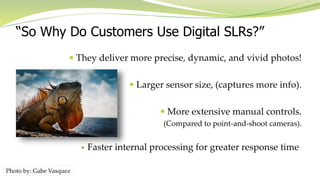
 They deliver more precise, dynamic, and vivid photos!
 Larger sensor size, (captures more info).
 More extensive manual controls.
(Compared to point-and-shoot cameras).
 Faster internal processing for greater response time
“So Why Do Customers Use Digital SLRs?”
Photo by: Gabe Vasquez
 The cameras viewfinder uses a 45° angled mirror
 The reflection of the image reflection lets you see and compose your
subject through and is why it is called "single-lens reflex”
 The mirror lifts up and out of sight briefly
when you press the shutter button
 This allows the image sensor to capture the photo.
The DSLR Mirror
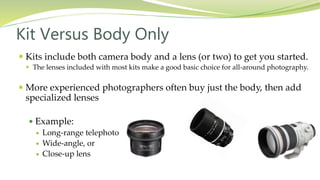
 Kits include both camera body and a lens (or two) to get you started.
 The lenses included with most kits make a good basic choice for all-around photography.
 More experienced photographers often buy just the body, then add
specialized lenses
 Example:
 Long-range telephoto
 Wide-angle, or
 Close-up lens
Kit Versus Body Only
LCD Viewscreen
 Most cameras' LCDs measure between 1.8" and 3.5" diagonally,
 Screen resolutions are between 100,000 and 240,000 pixels.
 The higher the LCD's resolution, the clearer your view will be of
images and camera menus.
LCD Image Screen
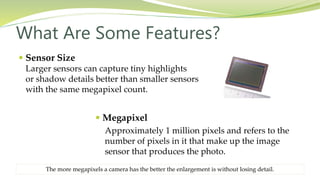
 Sensor Size
Larger sensors can capture tiny highlights
or shadow details better than smaller sensors
with the same megapixel count.
What Are Some Features?
 Megapixel
Approximately 1 million pixels and refers to the
number of pixels in it that make up the image
sensor that produces the photo.
The more megapixels a camera has the better the enlargement is without losing detail.
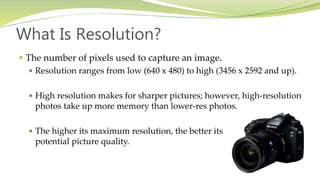
 The number of pixels used to capture an image.
 Resolution ranges from low (640 x 480) to high (3456 x 2592 and up).
 High resolution makes for sharper pictures; however, high-resolution
photos take up more memory than lower-res photos.
 The higher its maximum resolution, the better its
potential picture quality.
What Is Resolution?
Histogram
A simple display graph of brightness
and darkness values as an objective
view of exposure of a photograph.
Speaking of Image Resolution
Darkness
Brightness
 How fast a camera's shutter exposes the image
sensor to light.
 A shutter speed of 1/60 means that the sensor is
exposed to light for 1/60th of a second.
 Faster shutter speeds are good for "freezing
“fast-moving action;
 Slow ones allow you to intentionally blur the
movement of your subject to emphasize motion.
Shutter Speed
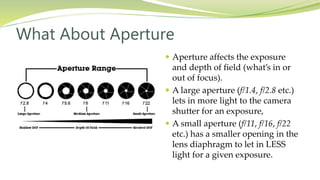
 Aperture affects the exposure
and depth of field (what’s in or
out of focus).
 A large aperture (f/1.4, f/2.8 etc.)
lets in more light to the camera
shutter for an exposure,
 A small aperture (f/11, f/16, f/22
etc.) has a smaller opening in the
lens diaphragm to let in LESS
light for a given exposure.
What About Aperture
 DSLRs offer a wide array of ISO
settings and flexibility when shooting
in different conditions.
 Changing your ISO setting means
adjusting your camera's sensitivity
to light.
 The lower the ISO number, the less
sensitive it is to the light. A higher ISO
number increases the sensitivity of your
camera to light.
 Lower number = Lower sensitivity = finer
quality photos.
ISO Range
(International Standards Organization)
 Electronic adjustment of light levels to
remove unrealistic color tones or hues.
 All digital cameras offer automatic white
balance, and most feature additional preset
levels or even custom manual settings.
 Used so that objects that appear white in
person are rendered white in your photos.
White Balance
Without With
 Counteracts the effects of camera
shake so you can take sharper pictures
in low-light settings and at slower
shutter speeds.
 Comes in two different ways:
 As part of an IS lens attached to the camera
 Built into the camera body itself
 (Called Vibration Reduction by Nikon and
SteadyShot by Sony)
Image Stabilization
 Allows you to press and hold the camera's shutter button to
capture a series of shots in rapid succession.
 The images taken are temporarily stored in the cam's buffer
memory and then written to the memory card.
Continuous Shooting Mode (Burst)
Great for sports or fast-moving subjects (sports, cars & kids)
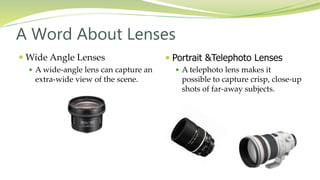
 Portrait &Telephoto Lenses
 A telephoto lens makes it
possible to capture crisp, close-up
shots of far-away subjects.
 Wide Angle Lenses
 A wide-angle lens can capture an
extra-wide view of the scene.
A Word About Lenses
 Identify your needs and what fits your
lifestyle before purchasing a DSLR.
 What kind of photos do you take
 Portraits, Landscapes, Kids, Sports…
 Where will you be using it most?
 Indoor or Outdoor shots?
 Family Events/Portraits?
 Landscape/Nature?
Summary
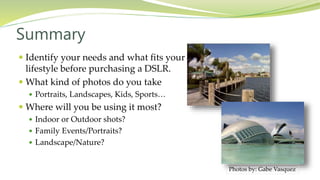
Photos by: Gabe Vasquez

Understanding DSLR Cameras

  • 2.
     Digital Single-LensReflex cameras usually consist of:  A camera body and  One or more interchangeable lenses  DSLR’s ability to change lenses opens up a world of possibilities for photographers.  DSLR cameras adapt to different situations dues to a large range of other accessories (flashes, filters etc.) Why Do I Want A DSLR?
  • 3.
    Typically an upgradecustomer who: Wants a camera that brings the action closer Wants a camera without shutter delay Wants interchangeable lenses Wants to add accessories Wants a camera that takes better pictures than his/her last one Who Is an SLR Customer?
  • 4.
     Absolutely Not! Most people who purchase an SLR aren't experts.  They just want to have great photos  Digital SLRs offer easy automatic shooting.  SLRs also have full manual functionality  This let’s you be creative with picture taking Do You Have to Be An Expert To Use an DSLR? Photo by: Gabe Vasquez
  • 5.
     Absolutely!  Theypermit you to learn as you go.  From automatic /  Digital SLRs offer easy automatic shooting.  SLRs also have full manual functionality  This let’s you be creative with picture taking  You just try out an exposure setting, check the results, delete the shots that didn't work, and try again. Are DSLR Cameras Affordable?
  • 6.
     They delivermore precise, dynamic, and vivid photos!  Larger sensor size, (captures more info).  More extensive manual controls. (Compared to point-and-shoot cameras).  Faster internal processing for greater response time “So Why Do Customers Use Digital SLRs?” Photo by: Gabe Vasquez
  • 7.
     The camerasviewfinder uses a 45° angled mirror  The reflection of the image reflection lets you see and compose your subject through and is why it is called "single-lens reflex”  The mirror lifts up and out of sight briefly when you press the shutter button  This allows the image sensor to capture the photo. The DSLR Mirror
  • 8.
     Kits includeboth camera body and a lens (or two) to get you started.  The lenses included with most kits make a good basic choice for all-around photography.  More experienced photographers often buy just the body, then add specialized lenses  Example:  Long-range telephoto  Wide-angle, or  Close-up lens Kit Versus Body Only
  • 9.
    LCD Viewscreen  Mostcameras' LCDs measure between 1.8" and 3.5" diagonally,  Screen resolutions are between 100,000 and 240,000 pixels.  The higher the LCD's resolution, the clearer your view will be of images and camera menus. LCD Image Screen
  • 10.
     Sensor Size Largersensors can capture tiny highlights or shadow details better than smaller sensors with the same megapixel count. What Are Some Features?  Megapixel Approximately 1 million pixels and refers to the number of pixels in it that make up the image sensor that produces the photo. The more megapixels a camera has the better the enlargement is without losing detail.
  • 11.
     The numberof pixels used to capture an image.  Resolution ranges from low (640 x 480) to high (3456 x 2592 and up).  High resolution makes for sharper pictures; however, high-resolution photos take up more memory than lower-res photos.  The higher its maximum resolution, the better its potential picture quality. What Is Resolution?
  • 12.
    Histogram A simple displaygraph of brightness and darkness values as an objective view of exposure of a photograph. Speaking of Image Resolution Darkness Brightness
  • 13.
     How fasta camera's shutter exposes the image sensor to light.  A shutter speed of 1/60 means that the sensor is exposed to light for 1/60th of a second.  Faster shutter speeds are good for "freezing “fast-moving action;  Slow ones allow you to intentionally blur the movement of your subject to emphasize motion. Shutter Speed
  • 14.
     Aperture affectsthe exposure and depth of field (what’s in or out of focus).  A large aperture (f/1.4, f/2.8 etc.) lets in more light to the camera shutter for an exposure,  A small aperture (f/11, f/16, f/22 etc.) has a smaller opening in the lens diaphragm to let in LESS light for a given exposure. What About Aperture
  • 15.
     DSLRs offera wide array of ISO settings and flexibility when shooting in different conditions.  Changing your ISO setting means adjusting your camera's sensitivity to light.  The lower the ISO number, the less sensitive it is to the light. A higher ISO number increases the sensitivity of your camera to light.  Lower number = Lower sensitivity = finer quality photos. ISO Range (International Standards Organization)
  • 16.
     Electronic adjustmentof light levels to remove unrealistic color tones or hues.  All digital cameras offer automatic white balance, and most feature additional preset levels or even custom manual settings.  Used so that objects that appear white in person are rendered white in your photos. White Balance Without With
  • 17.
     Counteracts theeffects of camera shake so you can take sharper pictures in low-light settings and at slower shutter speeds.  Comes in two different ways:  As part of an IS lens attached to the camera  Built into the camera body itself  (Called Vibration Reduction by Nikon and SteadyShot by Sony) Image Stabilization
  • 18.
     Allows youto press and hold the camera's shutter button to capture a series of shots in rapid succession.  The images taken are temporarily stored in the cam's buffer memory and then written to the memory card. Continuous Shooting Mode (Burst) Great for sports or fast-moving subjects (sports, cars & kids)
  • 19.
     Portrait &TelephotoLenses  A telephoto lens makes it possible to capture crisp, close-up shots of far-away subjects.  Wide Angle Lenses  A wide-angle lens can capture an extra-wide view of the scene. A Word About Lenses
  • 20.
     Identify yourneeds and what fits your lifestyle before purchasing a DSLR.  What kind of photos do you take  Portraits, Landscapes, Kids, Sports…  Where will you be using it most?  Indoor or Outdoor shots?  Family Events/Portraits?  Landscape/Nature? Summary Photos by: Gabe Vasquez