Photography 101: Introduction to Digital Photography
Overview

What is digital photography?
   •Tips in Buying a Digicam
   •Basic Camera Control
   •Rules of Good Composition
   • Post Production
Digital Photography

•is a form of photography that uses digital
 technology to make images of subjects.
•digital photographs can be
 displayed, printed, stored, manipulated, t
 ransmitted, and archived using digital
 and computer techniques,
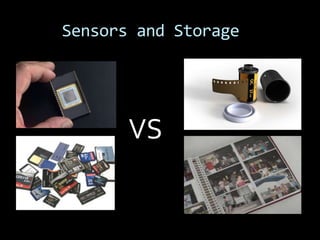
Sensors and Storage


       VS
Advantages of Consumer
Digital Cameras over
Film
•Instant review of pictures
• Minimal ongoing costs
• Photos may be copied from one digital
medium to another without
  any degradation
• Pictures do not need to be scanned before
viewing them on a
  computer
• Ability to print photos using a computer and
Advantages of Consumer
         Digital Cameras over Film

•Ability to capture and store hundreds of
photographs on the same media device
• Many digital cameras now include an AV-
out connector (and cable) to allow the
reviewing of photographs to an audience
using a television
• Anti-shake functionality (increasingly
common in inexpensive cameras) allow
taking sharper hand-held pictures where
previously a tripod was required
• Ability to change ISO speed settings more
Advantages of Consumer
Digital Cameras over Film


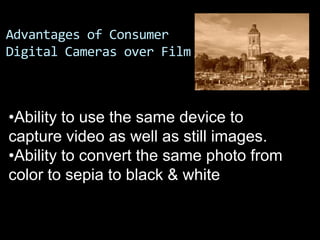
•Ability to use the same device to
capture video as well as still images.
•Ability to convert the same photo from
color to sepia to black & white
Types of Digital Cameras
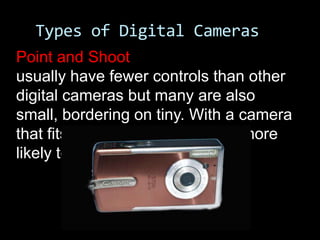
Point and Shoot
usually have fewer controls than other
digital cameras but many are also
small, bordering on tiny. With a camera
that fits into your pocket, you're more
likely to have it when you need it.
Types of Digital Cameras
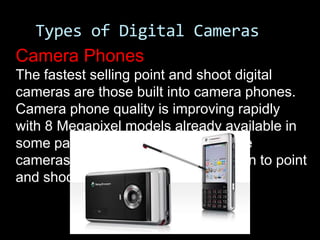
Camera Phones
The fastest selling point and shoot digital
cameras are those built into camera phones.
Camera phone quality is improving rapidly
with 8 Megapixel models already available in
some parts of the world. In time these
cameras may present real competition to point
and shoot cameras.
Types of Digital Cameras
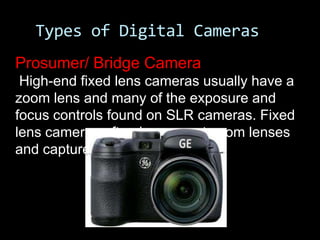
Prosumer/ Bridge Camera
 High-end fixed lens cameras usually have a
zoom lens and many of the exposure and
focus controls found on SLR cameras. Fixed
lens cameras often have great zoom lenses
and capture large images.
Types of Digital Cameras
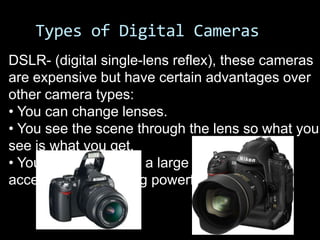
DSLR- (digital single-lens reflex), these cameras
are expensive but have certain advantages over
other camera types:
• You can change lenses.
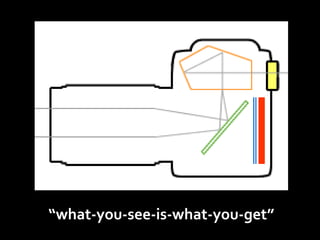
• You see the scene through the lens so what you
see is what you get.
• You can select from a large variety of
accessories, including powerful flash units.
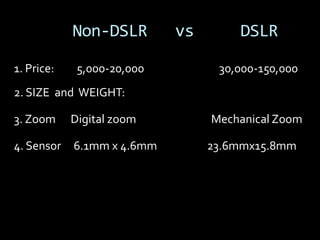
Non-DSLR        vs       DSLR

1. Price:    5,000-20,000         30,000-150,000
2. SIZE and WEIGHT:

3. Zoom     Digital zoom         Mechanical Zoom

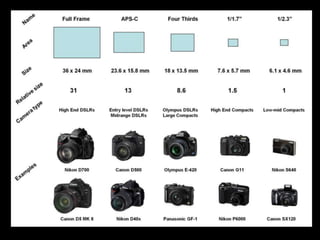
4. Sensor   6.1mm x 4.6mm        23.6mmx15.8mm
Non-DSLR                vs         DSLR
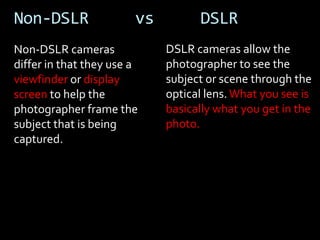
Non-DSLR cameras             DSLR cameras allow the
differ in that they use a    photographer to see the
viewfinder or display        subject or scene through the
screen to help the           optical lens. What you see is
photographer frame the       basically what you get in the
subject that is being        photo.
captured.
“what-you-see-is-what-you-get”
Buying Digital Camera
Understanding the Pixel
Pixel, or pel , (picture element) is a
 single point (dot) in a graphic image.

The number of pixels n for a given
maximum resolution
 (w horizontal pixels by h vertical pixels)
is the product n = w × h.
PIXEL
Understanding the Pixel
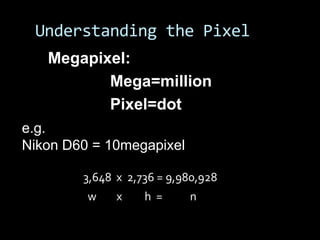
   Megapixel:
          Mega=million
          Pixel=dot
e.g.
Nikon D60 = 10megapixel

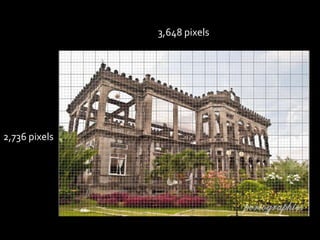
        3,648 x 2,736 = 9,980,928
         w    x    h =     n
3,648 pixels


2,736 pixels
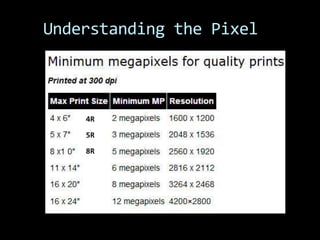
Understanding the Pixel


    4R
    5R

    8R
Buying Digital Camera

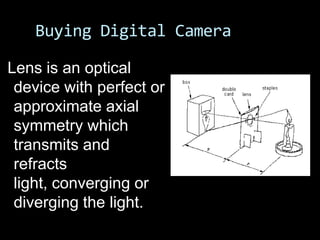
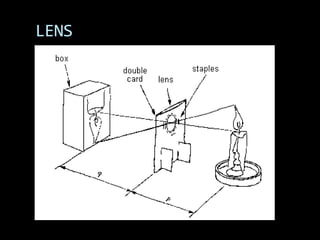
Lens is an optical
 device with perfect or
 approximate axial
 symmetry which
 transmits and
 refracts
 light, converging or
 diverging the light.
LENS
Buying Digital Camera
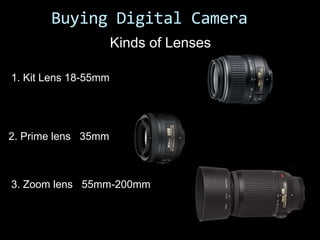
                      Kinds of Lenses

1. Kit Lens 18-55mm


2. Prime lens 35mm


3. Zoom lens 55mm-200mm
Buying a Digital Camera
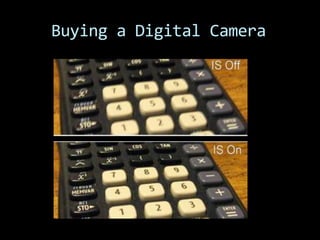
Image Stabilization
   is a family of techniques used to
   increase the stability of an image.
    Nikon (Vibration Reduction/VR)
    Canon (Image Stabilization/IS)
    Panasonic/Leica (MegaOIS)
    Sony (Super Steady Shot)
    Sigma (Optical Stabilization)
    Pentax (Shake Reduction)
Buying a Digital Camera
Basic Camera Control
Basic Camera Controls


   READ
   YOUR
  MANUAL!
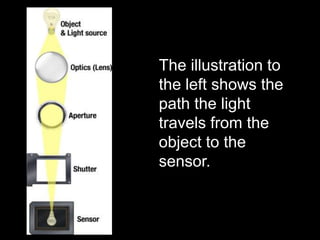
The illustration to
the left shows the
path the light
travels from the
object to the
sensor.
APERTURE
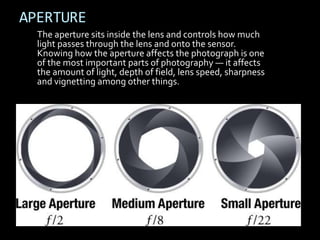
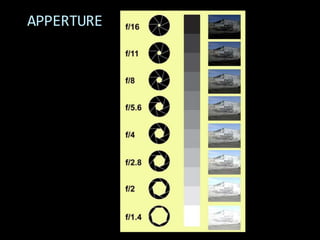
  The aperture sits inside the lens and controls how much
  light passes through the lens and onto the sensor.
  Knowing how the aperture affects the photograph is one
  of the most important parts of photography — it affects
  the amount of light, depth of field, lens speed, sharpness
  and vignetting among other things.
APPERTURE
SHUTTER
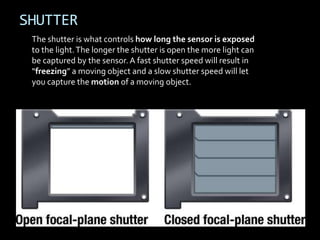
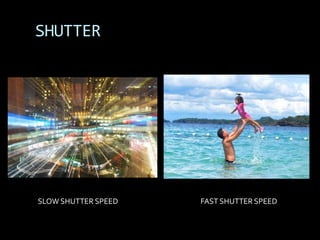
 The shutter is what controls how long the sensor is exposed
 to the light. The longer the shutter is open the more light can
 be captured by the sensor. A fast shutter speed will result in
 “freezing” a moving object and a slow shutter speed will let
 you capture the motion of a moving object.
SHUTTER


SLOW SHUTTER SPEED   FAST SHUTTER SPEED
ISO
   The ISO speed (the name comes from the
    International Organization for Standardization) is a
    measure of the film speed, or its sensitivity to light.

   A low ISO speed requires a longer exposure and is
    referred to as slow, a high ISO speed requires less time
    to give the same exposure and is therefore referred to
    as fast.

 ISO measures the sensitivity of the image
    sensor
ISO
 Auto ISO
 Fortunately most of the time you don’t need
 to worry about selecting the correct ISO. Most
 cameras have an “Auto ISO” setting. With
 Auto ISO, the camera will look at the amount
 of light in the scene and change the ISO
 appropriately so that the shutter speed
 doesn’t get too slow.
ISO Value
If you choose to use a manual ISO, what values should you
use?

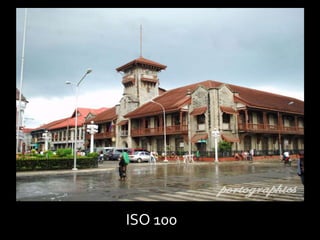
ISO 50-100. Suitable for bright light (like outdoors on a
sunny day).

ISO 200. Great for overcast or cloudy days.

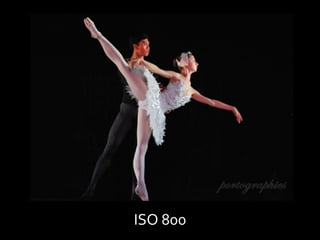
ISO 400 and 800. Use these values when the light is
getting dim but it is not yet night.

ISO 1600 and above. Use for indoor or night shots. Also
useful to freeze the action in sports shots. These values
will produce the most noise.
ISO 100
ISO 800
Basic Camera Controls
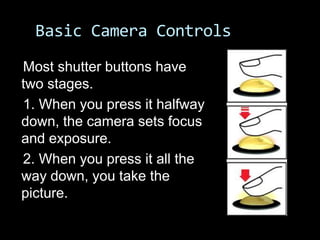
Most shutter buttons have
two stages.
1. When you press it halfway
down, the camera sets focus
and exposure.
2. When you press it all the
way down, you take the
picture.
“It’s not the
Pana,
It’s the
Indian.”


  Thank You!!!
“It’s not the
Pana,
It’s the
Indian.”


  Thank You!!!

Photography 101

  • 1.
    Photography 101: Introductionto Digital Photography
  • 2.
    Overview What is digitalphotography? •Tips in Buying a Digicam •Basic Camera Control •Rules of Good Composition • Post Production
  • 3.
    Digital Photography •is aform of photography that uses digital technology to make images of subjects. •digital photographs can be displayed, printed, stored, manipulated, t ransmitted, and archived using digital and computer techniques,
  • 4.
  • 5.
    Advantages of Consumer DigitalCameras over Film •Instant review of pictures • Minimal ongoing costs • Photos may be copied from one digital medium to another without any degradation • Pictures do not need to be scanned before viewing them on a computer • Ability to print photos using a computer and
  • 6.
    Advantages of Consumer Digital Cameras over Film •Ability to capture and store hundreds of photographs on the same media device • Many digital cameras now include an AV- out connector (and cable) to allow the reviewing of photographs to an audience using a television • Anti-shake functionality (increasingly common in inexpensive cameras) allow taking sharper hand-held pictures where previously a tripod was required • Ability to change ISO speed settings more
  • 7.
    Advantages of Consumer DigitalCameras over Film •Ability to use the same device to capture video as well as still images. •Ability to convert the same photo from color to sepia to black & white
  • 11.
  • 12.
    Types of DigitalCameras Point and Shoot usually have fewer controls than other digital cameras but many are also small, bordering on tiny. With a camera that fits into your pocket, you're more likely to have it when you need it.
  • 13.
    Types of DigitalCameras Camera Phones The fastest selling point and shoot digital cameras are those built into camera phones. Camera phone quality is improving rapidly with 8 Megapixel models already available in some parts of the world. In time these cameras may present real competition to point and shoot cameras.
  • 15.
    Types of DigitalCameras Prosumer/ Bridge Camera High-end fixed lens cameras usually have a zoom lens and many of the exposure and focus controls found on SLR cameras. Fixed lens cameras often have great zoom lenses and capture large images.
  • 16.
    Types of DigitalCameras DSLR- (digital single-lens reflex), these cameras are expensive but have certain advantages over other camera types: • You can change lenses. • You see the scene through the lens so what you see is what you get. • You can select from a large variety of accessories, including powerful flash units.
  • 17.
    Non-DSLR vs DSLR 1. Price: 5,000-20,000 30,000-150,000 2. SIZE and WEIGHT: 3. Zoom Digital zoom Mechanical Zoom 4. Sensor 6.1mm x 4.6mm 23.6mmx15.8mm
  • 19.
    Non-DSLR vs DSLR Non-DSLR cameras DSLR cameras allow the differ in that they use a photographer to see the viewfinder or display subject or scene through the screen to help the optical lens. What you see is photographer frame the basically what you get in the subject that is being photo. captured.
  • 20.
  • 21.
  • 22.
    Understanding the Pixel Pixel,or pel , (picture element) is a single point (dot) in a graphic image. The number of pixels n for a given maximum resolution (w horizontal pixels by h vertical pixels) is the product n = w × h.
  • 23.
  • 24.
    Understanding the Pixel Megapixel: Mega=million Pixel=dot e.g. Nikon D60 = 10megapixel 3,648 x 2,736 = 9,980,928 w x h = n
  • 25.
  • 26.
  • 27.
    Buying Digital Camera Lensis an optical device with perfect or approximate axial symmetry which transmits and refracts light, converging or diverging the light.
  • 28.
  • 29.
    Buying Digital Camera Kinds of Lenses 1. Kit Lens 18-55mm 2. Prime lens 35mm 3. Zoom lens 55mm-200mm
  • 30.
    Buying a DigitalCamera Image Stabilization is a family of techniques used to increase the stability of an image. Nikon (Vibration Reduction/VR) Canon (Image Stabilization/IS) Panasonic/Leica (MegaOIS) Sony (Super Steady Shot) Sigma (Optical Stabilization) Pentax (Shake Reduction)
  • 31.
  • 32.
  • 33.
    Basic Camera Controls READ YOUR MANUAL!
  • 34.
    The illustration to theleft shows the path the light travels from the object to the sensor.
  • 35.
    APERTURE Theaperture sits inside the lens and controls how much light passes through the lens and onto the sensor. Knowing how the aperture affects the photograph is one of the most important parts of photography — it affects the amount of light, depth of field, lens speed, sharpness and vignetting among other things.
  • 36.
  • 37.
    SHUTTER The shutteris what controls how long the sensor is exposed to the light. The longer the shutter is open the more light can be captured by the sensor. A fast shutter speed will result in “freezing” a moving object and a slow shutter speed will let you capture the motion of a moving object.
  • 38.
    SHUTTER SLOW SHUTTER SPEED FAST SHUTTER SPEED
  • 39.
    ISO  The ISO speed (the name comes from the International Organization for Standardization) is a measure of the film speed, or its sensitivity to light.  A low ISO speed requires a longer exposure and is referred to as slow, a high ISO speed requires less time to give the same exposure and is therefore referred to as fast.  ISO measures the sensitivity of the image sensor
  • 40.
    ISO Auto ISO Fortunately most of the time you don’t need to worry about selecting the correct ISO. Most cameras have an “Auto ISO” setting. With Auto ISO, the camera will look at the amount of light in the scene and change the ISO appropriately so that the shutter speed doesn’t get too slow.
  • 41.
    ISO Value If youchoose to use a manual ISO, what values should you use? ISO 50-100. Suitable for bright light (like outdoors on a sunny day). ISO 200. Great for overcast or cloudy days. ISO 400 and 800. Use these values when the light is getting dim but it is not yet night. ISO 1600 and above. Use for indoor or night shots. Also useful to freeze the action in sports shots. These values will produce the most noise.
  • 42.
  • 43.
  • 44.
    Basic Camera Controls Mostshutter buttons have two stages. 1. When you press it halfway down, the camera sets focus and exposure. 2. When you press it all the way down, you take the picture.
  • 45.
    “It’s not the Pana, It’sthe Indian.” Thank You!!!
  • 46.
    “It’s not the Pana, It’sthe Indian.” Thank You!!!