UDL Series
Strategies for
Presenting Content
Join the
Discussion
Browse to
pollev.com/um3d
Or text
UM3D to 37607
“These purpose of education is
not to make information
accessible, but rather to teach
learners how to transform
accessible information into
useable knowledge.”
National Center on Universal Design for Learning, 2015
What is UDL?
UDL is a set of
principles for
curriculum
development that
give all individuals
equal opportunities
to learn.
UDL Principles
Multiple Means of:
Representation
Action & Expression
Engagement
Multiple Means of
Representation
The “What” of Learning
Provide Options for
Comprehension
Provide
Background
Knowledge
Give examples for
students to use to
create relevance to
a concept or module.
● Use concept maps or
visual diagrams
● Administer self
assessments to
activate content
knowledge.
● Make explicit
connections between
related content within
the course or
profession.
Tips
Highlight
Content
Patterns
Provide explicit cues
or prompts for
students to identify
existing
knowledge.
● Emphasize key
elements in content.
● Provide a glossary to
identify key terms and
relationships.
● Provide weekly
overviews to highlight
previously learned
material.
Tips
Guide
Information
Processing
Provide options for
students to navigate
the content based
on their diverse
learning abilities.
● Chunk content into
smaller elements.
● Progressively release
content and material.
● Remove content that
is not essential to the
instructional goal.
● Provide multiple
entry points or
pathways to learning.
Tips
Maximize
Knowledge
Transfer
Provide options for
students to
strategically plan
and engage in
learning.
● Provide checklists
and due dates on
assessments, content
and activities as
reminders.
● Create options for
reviewing content.
● Provide assignment
templates or
examples.
Tips
Provide Options for
Perception
“Learning is impossible if
information is imperceptible to
the learner.”
National Center on Universal Design for Learning, 2015
Provide learners
with options for
accessing
instructional
materials and
information through
different
modalities.
Instructional
Materials
● Provide instructions
via audio/video in
addition to written
text.
● Encourage students to
express knowledge
via different platforms
and software.
Tips
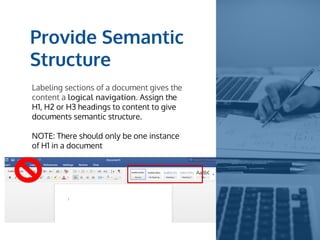
Provide Semantic
Structure
Labeling sections of a document gives the
content a logical navigation. Assign the
H1, H2 or H3 headings to content to give
documents semantic structure.
NOTE: There should only be one instance
of H1 in a document
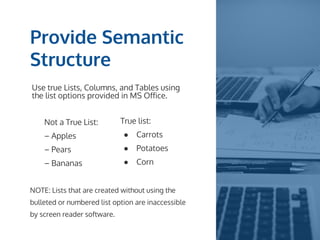
Provide Semantic
Structure
Use true Lists, Columns, and Tables using
the list options provided in MS Office.
Not a True List:
– Apples
– Pears
– Bananas
True list:
● Carrots
● Potatoes
● Corn
NOTE: Lists that are created without using the
bulleted or numbered list option are inaccessible
by screen reader software.
Maximize
Readability
Make your text more readable for all
students, but especially for students with
cognitive disabilities.
● Divide large blocks of text into
smaller chunks.
● Use white space.
● Avoid long or overly complex
sentences.
● Use at least 12 point Sans Serif font.
Provide Alt Text
Alt text is required for all images,
graphs, charts, etc.
● Include clear, concise descriptions
that conveys the meaning or
purpose of the media content.
● Provide a long description if alt text
alone cannot convey the image’s
meaning.
● If an image is decorative, use the
null tag “” for alt text (minimizes
irrelevant alt text for the student to
read).
Avoid Using Color
to Convey Meaning
Content that uses color as its sole
differentiator will be inaccessible to blind,
low-vision, or color blind students.
Include text labeling to determine categories
or correct choice if using color coded content.
Color-coded highlighting is not accessible to
visually impaired students, but it may be
helpful for students with cognitive or
learning disabilities.
Use Descriptive
Hyperlink Text
Descriptive hyperlink text is important for
people who use assistive technology to view
available text.
● Links should make sense out of context
(avoid using “click here” or “email”)
● Using URL text is also discouraged
(screen reader will read every character of
the URL).
● Hyperlink text should describe the
destination of the link.
Make Multimedia
Accessible
Video and audio files need to be made
accessible to all students including those with
sensory disabilities.
● Audio files need an accompanying text
transcript
● Videos should include a text description of
key visual elements
● Videos with audio need time-synched
closed captions
Provide Options for
Language & Expression
Vocabulary and
Symbols
Key terms should be
linked to alternate
representations of
their meaning.
Strategy: Include a
glossary or list of key
definitions
Mathematical
Notation
Allow frequent and
meaningful exposure
to notations prior to
assessments.
Strategy: Use
text-to-speech when
explaining a graphical
equation
Language
Provide linguistic
alternatives for key
information or
vocabulary.
Strategy: Use a legend or
key to define specific
vocabulary
Resources
UDLonCampus.cast.org
@UDLonCampus
Castprofessionallearning.org
UDL-IRN.org
Contact Us:
um3d@memphis.edu

UDL Series: Strategies for Presenting Content