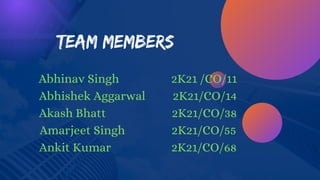
Team Members
Abhinav Singh 2K21 /CO/11
Abhishek Aggarwal 2K21/CO/14
Akash Bhatt 2K21/CO/38
Amarjeet Singh 2K21/CO/55
Ankit Kumar 2K21/CO/68
Acknowledgement
The acknowledgment section of this presentation is
written to show gratitude to Prof. Rajni Jindal who
significantly contributed during the presentation and
helped us complete our project.
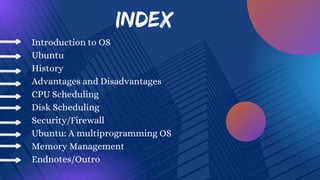
INDEX
Introduction to OS
Ubuntu
History
Advantages and Disadvantages
CPU Scheduling
Disk Scheduling
Security/Firewall
Ubuntu: A multiprogramming OS
Memory Management
Endnotes/Outro
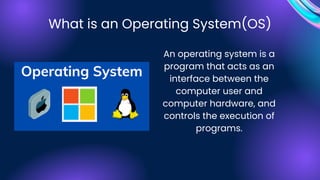
An operating system is a
program that acts as an
interface between the
computer user and
computer hardware, and
controls the execution of
programs.
What is an Operating System(OS)
An operating system is the most important
software that runs on a computer. It
manages the computer's memory and
processes, as well as all of its software and
hardware.
It also allows you to communicate with the
computer without knowing how to speak the
computer's language.
Without an operating system, a computer is useless
Types of
Operating
Systems
General-Purpose
Mobile OS
Network OS
Embedded OS
Real-Time OS
Ubuntu is a Linux-based operating system. It is designed for
computers, smartphones, and network servers.
The system is developed by a UK based company called Canonical
Ltd.
All the principles used to develop the Ubuntu software are based on
the principles of Open Source software development.
Linux was already established in 2004, but it was
fragmented into proprietary and unsupported community
editions, and free software was not a part of everyday life for
most computer users. That’s when Mark Shuttleworth
gathered a small team of Debian developers who together
founded Canonical and set out to create an easy-to-use
Linux desktop called Ubuntu.
Where did it all began?
In October 2004 the first Ubuntu release, Ubuntu 4.10,
debuted. Codenamed Warty Warthog because it
was rough around the edges, Ubuntu 4.10
inaugurated a tradition of releasing new version of
Ubuntu each April and October that Canonical has
maintained up to the present — with the exception of
Ubuntu 6.06, which came out a couple of months
late in 2006.
History of UBUNTU
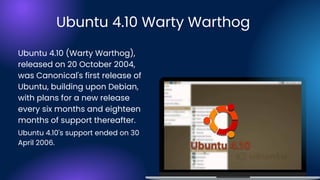
Ubuntu 4.10 (Warty Warthog),
released on 20 October 2004,
was Canonical's first release of
Ubuntu, building upon Debian,
with plans for a new release
every six months and eighteen
months of support thereafter.
Ubuntu 4.10 Warty Warthog
Ubuntu 4.10's support ended on 30
April 2006.
Ubuntu 7.04 (Feisty Fawn)
Migration assistant
Faster searching with Tracke
Plug and play network sharing with Avahi
Kernel Virtual Machine
Thin client management
The final stable version was released in 19th April
2007.
Ubuntu 9.04 (Jaunty Jackalope)
The final stable version was released in 23 April 2009.
Faster boot time
X.Org server 1.6
gnome-display-properties has new features to
support multi-monitors.
Ext4 filesystem support
Ubuntu 12.04.3 LTS (Precise Pangolin)
Released on 26 April 2012.
Named after the pangolin anteater.
Much faster boot up time.
Switched default mediia player from Banshee
back to RhythmBox.
Removed the window dodge feature for all the
upcoming launches.
Ubuntu 14.04.2 LTS (Trusty Tahr)
Mark Shuttleworth announced on 31 October 2011 that by
Ubuntu 14.04, Ubuntu would support smartphones, tablets,
TVs and smart screens.
On 18 October 2013, it was announced that Ubuntu 14.04
would be dubbed "Trusty Tahr"
The development cycle for this release focused on the
tablet interface, specifically for the Nexus 7 and Nexus 10
tablets.
There were few changes to the desktop, as 14.04 used the
existing mature Unity 7 interface
Ubuntu 16.04.1 LTS (Xenial Xerus)
Released on 21 April 2016.
The default desktop environment continues to be
Unity 7, with an option for Unity 8.
Users were given the choice to have Unity 8 and
Mir or Unity 7 and X.org in their system
QML-based USB Startup Creator
3D support in the virtual GPU driver
Support for TPM 2.0 chips
Ubuntu 18.04 LTS (Bionic Beaver)
Ubuntu 18.04 LTS Bionic Beaver[296] is a long-term
support version that was released on 26 April 2018.
Ubuntu 18.04 LTS introduced new features, such as colour
emoticons a new To-Do application preinstalled in the
default installation, and added the option of a "Minimal
Install" to the Ubuntu 18.04 LTS installer, which only installs
a web browser and system tools
This release employed Linux kernel version 4.15, which
incorporated a CPU controller for the cgroup v2 interface
Ubuntu 20.04 LTS (Focal Fossa)
Ubuntu 20.04 LTS, codenamed Focal Fossa, is a long-term
support release and was released on 23 April 2020.
Ubuntu 20.04.1 LTS was released on 6 August 2020.
As an LTS release, it will provide maintenance updates for
5 years, until April 2025
An updated toolchain offers glibc 2.31, OpenJDK 11, Python
3.8.2, php 7.4, perl 5.30 and Go 1.13. Python 2 is no longer
used and has been moved to the universe repository.
Ubuntu 22.10 (Kinetic Kudu)
Ubuntu 22.10, codenamed Kinetic Kudu, is interim release
and was made on 20 October 2022.
It is the latest realease as per today.
The release uses the 5.19 Linux kernel, which improves the
power efficiency on Intel-based computers and supports
multithreaded decompression.
Ubuntu 22.10 also adds support for MicroPython on
microcontrollers such as the Raspberry Pi Pico W, as well
as support for RISC-V processors
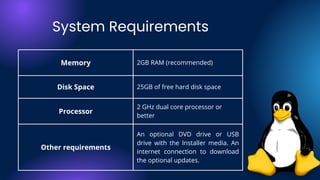
Memory 2GB RAM (recommended)
Disk Space 25GB of free hard disk space
Processor
2 GHz dual core processor or
better
Other requirements
An optional DVD drive or USB
drive with the Installer media. An
internet connection to download
the optional updates.
System Requirements
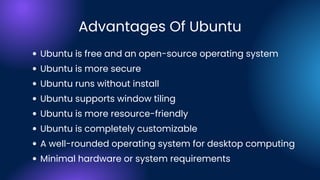
Advantages Of Ubuntu
Ubuntu is free and an open-source operating system
Ubuntu is more secure
Ubuntu runs without install
Ubuntu supports window tiling
Ubuntu is more resource-friendly
Ubuntu is completely customizable
A well-rounded operating system for desktop computing
Minimal hardware or system requirements
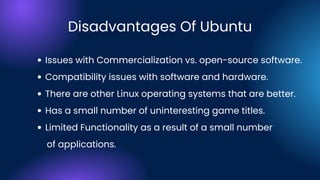
Issues with Commercialization vs. open-source software.
Compatibility issues with software and hardware.
There are other Linux operating systems that are better.
Has a small number of uninteresting game titles.
Limited Functionality as a result of a small number
of applications.
Disadvantages Of Ubuntu
CPU
SCHEDULING
CPU SCHEDULING
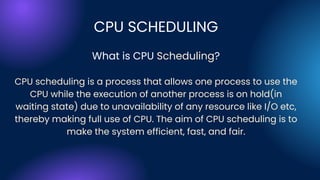
What is CPU Scheduling?
CPU scheduling is a process that allows one process to use the
CPU while the execution of another process is on hold(in
waiting state) due to unavailability of any resource like I/O etc,
thereby making full use of CPU. The aim of CPU scheduling is to
make the system efficient, fast, and fair.
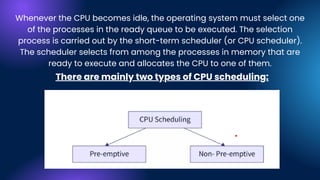
Whenever the CPU becomes idle, the operating system must select one
of the processes in the ready queue to be executed. The selection
process is carried out by the short-term scheduler (or CPU scheduler).
The scheduler selects from among the processes in memory that are
ready to execute and allocates the CPU to one of them.
There are mainly two types of CPU scheduling:
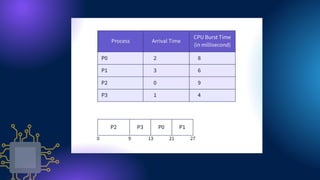
Non-Preemptive Scheduling
In the case of non-preemptive scheduling, new processes are
executed only after the current process has completed its
execution. The process holds the resources of the CPU (CPU time)
till its state changes to terminated or is pushed to the process
waiting state.
If a process is currently being executed by the CPU, it is not interrupted
till it is completed. Once the process has completed its execution, the
processer picks the next process from the ready queue
Preemptive Scheduling
Preemptive scheduling takes into consideration the fact
that some processes could have a higher priority and
hence must be executed before the processes that have a
lower priority.
In preemptive scheduling, the CPU resource are allocated to a
process for only a limited period of time and then those
resources are taken back and assigned to another process (the
next in execution).
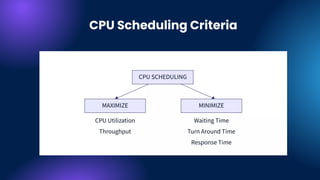
CPU Scheduling Criteria
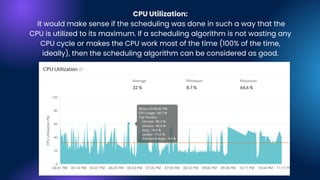
CPU Utilization:
It would make sense if the scheduling was done in such a way that the
CPU is utilized to its maximum. If a scheduling algorithm is not wasting any
CPU cycle or makes the CPU work most of the time (100% of the time,
ideally), then the scheduling algorithm can be considered as good.
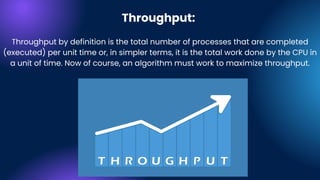
Throughput:
Throughput by definition is the total number of processes that are completed
(executed) per unit time or, in simpler terms, it is the total work done by the CPU in
a unit of time. Now of course, an algorithm must work to maximize throughput.
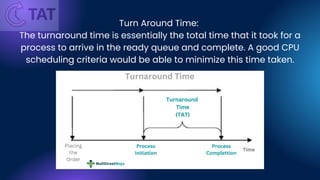
Turn Around Time:
The turnaround time is essentially the total time that it took for a
process to arrive in the ready queue and complete. A good CPU
scheduling criteria would be able to minimize this time taken.
Waiting Time:
A scheduling algorithm obviously cannot change the time that is
required by a process to complete its execution, however, it can
minimize the waiting time of the process.
Response Time:
If your system is interactive, then taking into consideration simply the
turnaround time to judge a scheduling algorithm is not good enough. A
process might produce results quicker, and then continue to compute
new results while the outputs of previous operations are being shown to
the user. Hence, we have another CPU scheduling criteria, which is the
response time (time taken from submission of the process until its first
'response' is produced). The goal of the CPU would be to minimize this
time.
First Come First Serve (FCFS)
Shortest-Job-First (SJF) Scheduling
Shortest Remaining Time
Priority Scheduling
Round Robin Scheduling
Multilevel Queue Scheduling
There are multiple types of CPU scheduling algorithm such as:
But the algorithm Ubuntu and Linux based OS use is CFS or the
Completely Fair Scheduling.
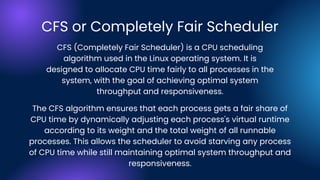
CFS or Completely Fair Scheduler
The CFS algorithm ensures that each process gets a fair share of
CPU time by dynamically adjusting each process's virtual runtime
according to its weight and the total weight of all runnable
processes. This allows the scheduler to avoid starving any process
of CPU time while still maintaining optimal system throughput and
responsiveness.
CFS (Completely Fair Scheduler) is a CPU scheduling
algorithm used in the Linux operating system. It is
designed to allocate CPU time fairly to all processes in the
system, with the goal of achieving optimal system
throughput and responsiveness.
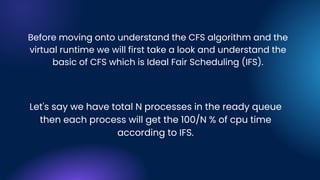
Before moving onto understand the CFS algorithm and the
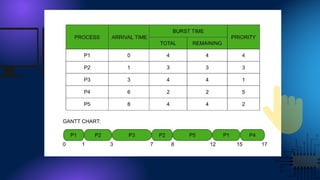
virtual runtime we will first take a look and understand the
basic of CFS which is Ideal Fair Scheduling (IFS).
Let's say we have total N processes in the ready queue
then each process will get the 100/N % of cpu time
according to IFS.
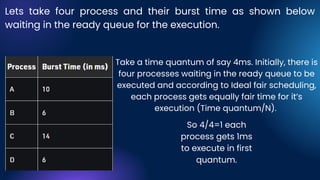
Lets take four process and their burst time as shown below
waiting in the ready queue for the execution.
Take a time quantum of say 4ms. Initially, there is
four processes waiting in the ready queue to be
executed and according to Ideal fair scheduling,
each process gets equally fair time for it’s
execution (Time quantum/N).
So 4/4=1 each
process gets 1ms
to execute in first
quantum.
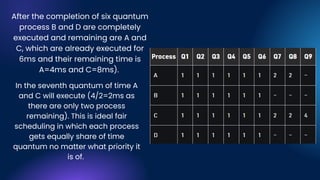
After the completion of six quantum
process B and D are completely
executed and remaining are A and
C, which are already executed for
6ms and their remaining time is
A=4ms and C=8ms).
In the seventh quantum of time A
and C will execute (4/2=2ms as
there are only two process
remaining). This is ideal fair
scheduling in which each process
gets equally share of time
quantum no matter what priority it
is of.
VIRTUAL RUNTIME
vruntime is a measure of the "runtime" of the thread - the amount
of time it has spent on the processor. The whole point of CFS is to
be fair to all; hence, the algo kind of boils down to a simple thing:
(among the tasks on a given runqueue) the task with the lowest
vruntime is the task that most deserves to run, hence select it as
'next'.
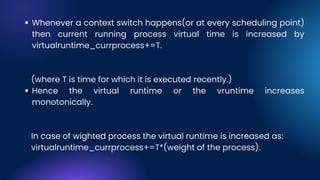
Whenever a context switch happens(or at every scheduling point)
then current running process virtual time is increased by
virtualruntime_currprocess+=T.
Hence the virtual runtime or the vruntime increases
monotonically.
(where T is time for which it is executed recently.)
In case of wighted process the virtual runtime is increased as:
virtualruntime_currprocess+=T*(weight of the process).
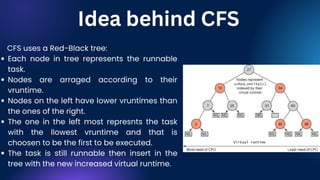
Each node in tree represents the runnable
task.
Nodes are arraged according to their
vruntime.
Nodes on the left have lower vruntimes than
the ones of the right.
The one in the left most represnts the task
with the llowest vruntime and that is
choosen to be the first to be executed.
The task is still runnable then insert in the
tree with the new increased virtual runtime.
CFS uses a Red-Black tree:
Idea behind CFS
Why Red Black Tree?
No path in the tree will be twice as long as any other path.
Self Balancing
Insertion in red black trees takes O(logn).
Finding the node with lowest virtual time is O(1) as we can
maintain a pointer.
Less Time Complexity
Disk
Scheduling
What is disk scheduling
'Disk Scheduling Algorithm' is an algorithm that keeps and manages input
and output requests arriving for the disk in a system. As we know, for
executing any process memory is required. And when it comes to
accessing things from a hard disk, the process becomes very slow as a
hard disk is the slowest part of our computer. There are various methods by
which the process can be scheduled and can be done efficiently.
"Disk Scheduling Algorithms" in an operating system can be referred to as a
manager of a grocery store that manages all the incoming and outgoing
requests for goods of that store. He keeps a record of what is available in-
store, what we need further, and manages the timetable of transaction of
goods.
Why is Disk Scheduling needed?
Multiple requests are being sent to the disc simultaneously in our system,
creating a queue of requests. There will be a longer wait for requests as a
result of this queue. The requests hold off until the execution of the
underprocessing request. Disk Scheduling is significant in our Operating
System in order to avoid this queuing and control the time of these
requests. Additionally, it's possible that the two distinct requests are far
apart. Disk scheduling techniques assist and lessen the disc arm moment
in situations when one request is at a location from which the disc arm is
close and the second request is at a different location on the drive from
which the disc arm is farther. demands made in close proximity to the disc
arm
kyber
mq-deadline
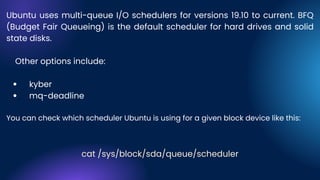
Ubuntu uses multi-queue I/O schedulers for versions 19.10 to current. BFQ
(Budget Fair Queueing) is the default scheduler for hard drives and solid
state disks.
Other options include:
You can check which scheduler Ubuntu is using for a given block device like this:
cat /sys/block/sda/queue/scheduler
Budget Fair Queuing
BFQ stands for Budget Fair Queueing, which is an I/O scheduler
algorithm used in the Ubuntu operating system.
It was developed by Paolo Valente and is designed to provide
low latency and high throughput for block I/O
operations in a fair and efficient manner.
BFQ works by prioritizing I/O requests based on their budget, which is a
measure of the amount of time a
process should be allowed to use the disk before its requests are
preempted by another process. This allows
processes with high I/O requirements to get a larger share of the disk
bandwidth, while still ensuring that
other processes are not starved of I/O.
How BFQ Works?
BFQ also uses a technique called anticipatory I/O scheduling, which
involves predicting the I/O needs of
a process based on its previous behavior and adjusting its budget
accordingly.
Overall, BFQ is well-suited for desktop and interactive workloads
where low latency and high responsiveness
are important. It is available as an option in the Linux kernel
and can be enabled by changing the I/O scheduler
settings for a particular device.
Security
Canonical puts security at the heart of Ubuntu
Ubuntu is configured to be secure by default. A fresh installation of
Ubuntu Desktop does not open up any network ports that could be
abused by an attacker, and has a firewall already enabled. In order to
limit the potential damage from unknown attacks, Ubuntu uses
AppArmor, which is a sandboxing mechanism built into the Linux kernel
that sets predefined constraints on what applications are allowed to do
on the system. So, for example, if a malicious website tried to exploit a
vulnerability in the Firefox browser, AppArmor would prevent the exploit
code from compromising the whole system.
AppArmor
AppArmor is a Linux Security Module implementation of name-based
mandatory access controls. AppArmor confines individual programs to
a set of listed files.
AppArmor is installed and loaded by default. It uses profiles of an
application to determine what files and permissions the application
requires. Some packages will install their own profiles, and additional
profiles can be found in the apparmor-profiles package.
The Linux kernel includes the Netfilter subsystem, which is used to
manipulate or decide the fate of network traffic headed into or through
your server. All modern Linux firewall solutions use this system for
packet filtering.
The kernel’s packet filtering system would be of little use to
administrators without a userspace interface to manage it. This is the
purpose of iptables: When a packet reaches your server, it will be
handed off to the Netfilter subsystem for acceptance, manipulation, or
rejection based on the rules supplied to it from userspace via iptables.
Thus, iptables is all you need to manage your firewall, if you’re familiar
with it, but many frontends are available to simplify the task.
Firewall
The term Memory can be defined as a collection of data in a
specific format. It is used to store instructions and process data.
To achieve a degree of multiprogramming and proper utilization
of memory, memory management is important. Many memory
management methods exist, reflecting various approaches, and
the effectiveness of each algorithm depends on the situation.
Memory Management
What we usually call memory capacity, actually refers to physical
memory. Physical memory is also called main memory, and the
main memory used by most computers is dynamic random access
memory (DRAM). Only the kernel has direct access to physical
memory. So, what should a process do when it wants to access
memory?
The Linux kernel provides each process with an independent virtual
address space, and this address space is contiguous. In this way,
the process can easily access memory, more precisely the virtual
memory.
Memory Map
1. Contiguous memory management schemes:
Contiguous memory allocation means assigning continuous
blocksof memory to the process. The best example of it is Array.
2. Non-Contiguous memory management schemes:
In this, the program is divided into blocks(fixed size or variable
size)and loaded at different portions of memory. That means
program blocks are not stored adjacent to each other.
Memory Allocation Schements
It generally leads to faster program startup times since the
library’s code is copied into the executable file.
It makes it easier to debug programs since all symbols are
resolved at compile time.
Static linking
Static linking is the process of incorporating the code of a program
or library into a program so that it is linked at compile time.
Advantages
Static Linking And Dynamic Linking
It can make programs harder to update since all of the
code for a given library is copied into each program.
More computation cost as executable file size will be big.
This can lead to increased disk usage and memory usage.
It can lead to symbol clashes, where two different libraries
define the same symbol.
Disadvantages
In this, the library is not copied into the program’s code. Instead, the
program has a reference to where the library is located. When the
program is run, it will load the library from that location.
Saves memory space.
Low maintenance cost.
Shared files are used.
Advantages
Dynamic linking
Page fault can occur when the shared code is not found, then
the program loads modules in the memory.
Disadvantages
External fragmentation
Fragmentation occurs when most free blocks are too small/large to satisfy
any request perfectly. There are two types of fragmentation.
External fragmentation occurs when there is free space in the memory
that is not big enough to hold the process that needs to be allocated
because it is not available in a contiguous way. This means there are
holes(free spaces) in the memory, and the operating system cannot use
this space for anything. As a result, the file may have to be split into
several pieces and stored in different parts of the disk.For eg. when the
process is of 5 Kb and the free space is available in 2 Kb,2 Kb and 1 Kb at
different locations of memory not as 5 Kb in continuos way.The solution is
compaction.
Fragmentation
Internal fragmentation
Internal fragmentation occurs when the operating system allocates
more memory than is needed for a process. This happens because
blocks come in fixed sizes, and a file may not fit perfectly into one
block. When this happens, part of the file is stored in the next block,
leading to internal fragmentation.For eg.If 2Kb is required to store a
process and the available space is 6 Kb.Then 4Kb space is wasted.
The Round Robin algorithm is executing in which quantum process is
supposed to preempt after running for some time. In that case, that
process is swapped out, and the new process is swapped in.
Swapping
When process is to be executed then that process is taken from secondary
memory to stored in RAM.But RAM have limited space so we have to take out
and take in the process from RAM time to time. This process is called
swapping. The purpose is to make a free space for other processes. And later
on, that process is swapped back to the main memory.
The situations in which swapping takes place
Memory Management Techniques
When there is a priority assigned to each process, the process with low
priority is swapped out, and the higher priority process is swapped in.
After its execution, the lower priority process is again swapped in, and
this process is so fast that users will not know anything about it.
In shortest time remaining first algorithm when the next process(which
arrive in ready queue) is having less burst time,then executing process
is preempted.
When process have to do I/O operations,then that process temporaily
swapped out.
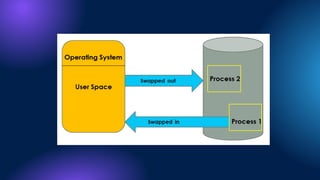
Swap-in: Swap-in means removing a program from the
hard disk and putting it back in the RAM.
Swap-out: Swap-out means removing a program from the
RAM and putting it into the hard disk.
It is further divided into two types:
Paging
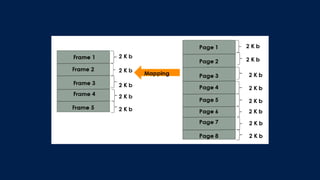
Paging is the memory management technique in which secondary
memory is divided into fixed-size blocks called pages, and main memory
is divided into fixed-size blocks called frames. The Frame has the same
size as that of a Page. The processes are initially in secondary memory,
from where the processes are shifted to main memory(RAM) when there is
a requirement. Each process is mainly divided into parts where the size of
each part is the same as the page size. One page of a process is mainly
stored in one of the memory frames. Paging follows no contiguous
memory allocation. That means pages in the main memory can be stored
at different locations in the memory.
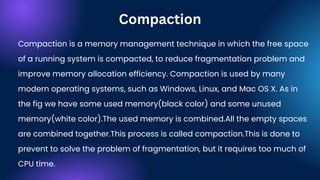
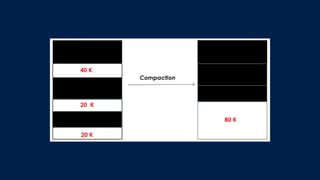
Compaction is a memory management technique in which the free space
of a running system is compacted, to reduce fragmentation problem and
improve memory allocation efficiency. Compaction is used by many
modern operating systems, such as Windows, Linux, and Mac OS X. As in
the fig we have some used memory(black color) and some unused
memory(white color).The used memory is combined.All the empty spaces
are combined together.This process is called compaction.This is done to
prevent to solve the problem of fragmentation, but it requires too much of
CPU time.
Compaction
Copying all pages that are not in use to one large contiguous area.
Then write the pages that are in use into the newly freed space.
The compaction process usually consists of two steps:
By compacting memory, the operating system can reduce or
eliminate fragmentation and make it easier for programs to
allocate and use memory.
Segmentation is another memory management technique used
by operating systems. The process is divided into segments of
different sizes and then put in the main memory. The
program/process is divided into modules, unlike paging, in which
the process was divided into fixed-size pages or frames. The
corresponding segments are loaded into the main memory when
the process is executed. Segments contain the program’s utility
functions, main function, and so on.
3) Segmentation
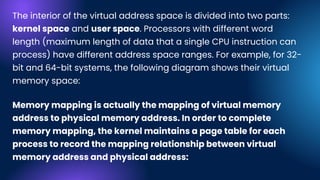
The interior of the virtual address space is divided into two parts:
kernel space and user space. Processors with different word
length (maximum length of data that a single CPU instruction can
process) have different address space ranges. For example, for 32-
bit and 64-bit systems, the following diagram shows their virtual
memory space:
Memory mapping is actually the mapping of virtual memory
address to physical memory address. In order to complete
memory mapping, the kernel maintains a page table for each
process to record the mapping relationship between virtual
memory address and physical address:
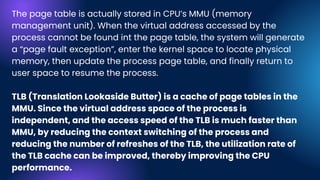
The page table is actually stored in CPU’s MMU (memory
management unit). When the virtual address accessed by the
process cannot be found int the page table, the system will generate
a “page fault exception”, enter the kernel space to locate physical
memory, then update the process page table, and finally return to
user space to resume the process.
TLB (Translation Lookaside Butter) is a cache of page tables in the
MMU. Since the virtual address space of the process is
independent, and the access speed of the TLB is much faster than
MMU, by reducing the context switching of the process and
reducing the number of refreshes of the TLB, the utilization rate of
the TLB cache can be improved, thereby improving the CPU
performance.
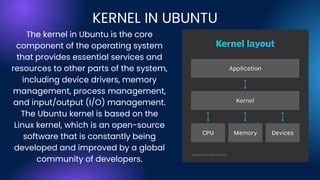
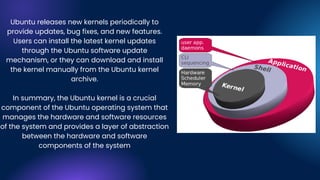
The kernel in Ubuntu is the core
component of the operating system
that provides essential services and
resources to other parts of the system,
including device drivers, memory
management, process management,
and input/output (I/O) management.
The Ubuntu kernel is based on the
Linux kernel, which is an open-source
software that is constantly being
developed and improved by a global
community of developers.
KERNEL IN UBUNTU
The Ubuntu kernel is responsible
for managing the system's
hardware and software resources
and provides a layer of
abstraction between the
hardware and software
components of the system. It also
provides a set of interfaces and
system calls that enable
applications and other system
components to interact with the
hardware.
Ubuntu releases new kernels periodically to
provide updates, bug fixes, and new features.
Users can install the latest kernel updates
through the Ubuntu software update
mechanism, or they can download and install
the kernel manually from the Ubuntu kernel
archive.
In summary, the Ubuntu kernel is a crucial
component of the Ubuntu operating system that
manages the hardware and software resources
of the system and provides a layer of abstraction
between the hardware and software
components of the system
A Multiprogramming OS
An operating system that is capable of running multiple
programs on a single processor is known as a
multiprogramming operating system
A program has to wait for an I/O transfer in a
multiprogramming operating system, other programs
utilize the CPU and other resources meanwhile.
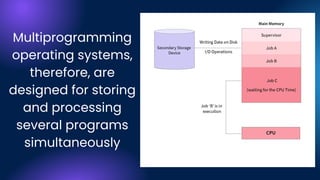
Multiprogramming
operating systems,
therefore, are
designed for storing
and processing
several programs
simultaneously
Advantages of Multiprogramming Operating
Systems
Processor is utilized most of the time and rarely becomes idle
unless there are no jobs to execute.
The system is fast because all the jobs run parallel amongst
themselves.
Jobs that would require CPU for a short duration are finished
earlier in comparison to those with long CPU requirement time.
Multiprogramming operating systems support multiple users
on the computer system.
Resources utilization is efficient and even.
Total time required to execute a job reduced.
Disadvantages of Multiprogramming Operating
Systems
Sometimes, processes requiring long CPU times have to wait for
other jobs (usually relatively shorter jobs) to finish.
It's not easy keeping track of a large number of processes in
multiprogramming.
Multiprogramming operating systems is not an easy job owing to
the complex nature of schedule handling.
Multiprogramming operating systems have to use CPU scheduling.
Memory management should be very efficient.
While a program executes, there cannot be any interaction
between it and the user
Why UBUNTU and Why not UBUNTU
We will take a look at some pros and cons of ubuntu and will
simultaneously contrast between it and the most popular os in
market i.e. Windows:
Ubuntu is free and open source.
But open source is about more than just cost. Open source means that
many people can develop Ubuntu at any time — in fact, anyone can
contribute code to the project. Open-source software is well-supported,
well-documented, and often well-loved by its community.
Comparatively, Windows is a licensed product. While there’s a lot of
documentation and support available for Windows, it’s provided through
Microsoft and Microsoft-affiliated companies — not through the community
at large.
1. Licensing: Open Source vs. Licensed
2. Performance and Speed: Lightweight vs. Cumbersome
It’s no secret that Linux distros tend to be much lighter in weight than
Windows. Windows has everything that you need. But distros like Ubuntu
let you install only what you actually want.
Because of that, Linux is much faster in general — Ubuntu included. Linux is
going to perform very well. It will be reliable and stable.
3. Customization: Full Kernel Support vs. Customization
Features
Microsoft supports less customization.
You need to use the internal features of
Microsoft to customize the system. You
can drag and drop items and change
the general look and feel of your
desktop, but you really can’t radically
change the interface — and that’s
intended.
When installing Ubuntu, you can customize
almost everything about the installation. And
you are always allowed to dig into the source
code. With open-source operating systems,
you can change pretty much everything
about the program you’re using.
4. Security: Impenetrable vs. Separate
For Windows installations, security
looks like a large array of firewalls,
antivirus solutions, and malware
detection programs. Windows
comes with Windows Defender
pre-installed, but you likely need
other solutions as well to avoid
viruses, worms, ransomware, and
other malicious programs.
But Ubuntu doesn’t have any
of that. Viruses generally don’t
work on Ubuntu. Not only are
Linux-based systems not
generally targeted, but their
open-source nature means
that patches are quickly
churned out, and exploits are
resolved as soon as they are
revealed.
5. Entertainment and Gaming:
Workarounds vs. Included
Entertainment and gaming is a clear area in which Windows
wins out. There are very few games or streaming sites that will
work easily on Ubuntu. You would need to run a Windows
simulation under Ubuntu to run most games or streaming
services. So, you can create this in Ubuntu, but only through a
workaround.
Still Curious ?
Just Scan the code
and know more
about Ubuntu
Thank You

UBUNTU (1) (2).pdf

  • 2.
    Team Members Abhinav Singh2K21 /CO/11 Abhishek Aggarwal 2K21/CO/14 Akash Bhatt 2K21/CO/38 Amarjeet Singh 2K21/CO/55 Ankit Kumar 2K21/CO/68
  • 3.
    Acknowledgement The acknowledgment sectionof this presentation is written to show gratitude to Prof. Rajni Jindal who significantly contributed during the presentation and helped us complete our project.
  • 4.
    INDEX Introduction to OS Ubuntu History Advantagesand Disadvantages CPU Scheduling Disk Scheduling Security/Firewall Ubuntu: A multiprogramming OS Memory Management Endnotes/Outro
  • 5.
    An operating systemis a program that acts as an interface between the computer user and computer hardware, and controls the execution of programs. What is an Operating System(OS)
  • 6.
    An operating systemis the most important software that runs on a computer. It manages the computer's memory and processes, as well as all of its software and hardware. It also allows you to communicate with the computer without knowing how to speak the computer's language. Without an operating system, a computer is useless
  • 7.
  • 8.
    Ubuntu is aLinux-based operating system. It is designed for computers, smartphones, and network servers. The system is developed by a UK based company called Canonical Ltd. All the principles used to develop the Ubuntu software are based on the principles of Open Source software development.
  • 9.
    Linux was alreadyestablished in 2004, but it was fragmented into proprietary and unsupported community editions, and free software was not a part of everyday life for most computer users. That’s when Mark Shuttleworth gathered a small team of Debian developers who together founded Canonical and set out to create an easy-to-use Linux desktop called Ubuntu. Where did it all began?
  • 10.
    In October 2004the first Ubuntu release, Ubuntu 4.10, debuted. Codenamed Warty Warthog because it was rough around the edges, Ubuntu 4.10 inaugurated a tradition of releasing new version of Ubuntu each April and October that Canonical has maintained up to the present — with the exception of Ubuntu 6.06, which came out a couple of months late in 2006. History of UBUNTU
  • 11.
    Ubuntu 4.10 (WartyWarthog), released on 20 October 2004, was Canonical's first release of Ubuntu, building upon Debian, with plans for a new release every six months and eighteen months of support thereafter. Ubuntu 4.10 Warty Warthog Ubuntu 4.10's support ended on 30 April 2006.
  • 12.
    Ubuntu 7.04 (FeistyFawn) Migration assistant Faster searching with Tracke Plug and play network sharing with Avahi Kernel Virtual Machine Thin client management The final stable version was released in 19th April 2007.
  • 13.
    Ubuntu 9.04 (JauntyJackalope) The final stable version was released in 23 April 2009. Faster boot time X.Org server 1.6 gnome-display-properties has new features to support multi-monitors. Ext4 filesystem support
  • 14.
    Ubuntu 12.04.3 LTS(Precise Pangolin) Released on 26 April 2012. Named after the pangolin anteater. Much faster boot up time. Switched default mediia player from Banshee back to RhythmBox. Removed the window dodge feature for all the upcoming launches.
  • 15.
    Ubuntu 14.04.2 LTS(Trusty Tahr) Mark Shuttleworth announced on 31 October 2011 that by Ubuntu 14.04, Ubuntu would support smartphones, tablets, TVs and smart screens. On 18 October 2013, it was announced that Ubuntu 14.04 would be dubbed "Trusty Tahr" The development cycle for this release focused on the tablet interface, specifically for the Nexus 7 and Nexus 10 tablets. There were few changes to the desktop, as 14.04 used the existing mature Unity 7 interface
  • 16.
    Ubuntu 16.04.1 LTS(Xenial Xerus) Released on 21 April 2016. The default desktop environment continues to be Unity 7, with an option for Unity 8. Users were given the choice to have Unity 8 and Mir or Unity 7 and X.org in their system QML-based USB Startup Creator 3D support in the virtual GPU driver Support for TPM 2.0 chips
  • 17.
    Ubuntu 18.04 LTS(Bionic Beaver) Ubuntu 18.04 LTS Bionic Beaver[296] is a long-term support version that was released on 26 April 2018. Ubuntu 18.04 LTS introduced new features, such as colour emoticons a new To-Do application preinstalled in the default installation, and added the option of a "Minimal Install" to the Ubuntu 18.04 LTS installer, which only installs a web browser and system tools This release employed Linux kernel version 4.15, which incorporated a CPU controller for the cgroup v2 interface
  • 18.
    Ubuntu 20.04 LTS(Focal Fossa) Ubuntu 20.04 LTS, codenamed Focal Fossa, is a long-term support release and was released on 23 April 2020. Ubuntu 20.04.1 LTS was released on 6 August 2020. As an LTS release, it will provide maintenance updates for 5 years, until April 2025 An updated toolchain offers glibc 2.31, OpenJDK 11, Python 3.8.2, php 7.4, perl 5.30 and Go 1.13. Python 2 is no longer used and has been moved to the universe repository.
  • 19.
    Ubuntu 22.10 (KineticKudu) Ubuntu 22.10, codenamed Kinetic Kudu, is interim release and was made on 20 October 2022. It is the latest realease as per today. The release uses the 5.19 Linux kernel, which improves the power efficiency on Intel-based computers and supports multithreaded decompression. Ubuntu 22.10 also adds support for MicroPython on microcontrollers such as the Raspberry Pi Pico W, as well as support for RISC-V processors
  • 20.
    Memory 2GB RAM(recommended) Disk Space 25GB of free hard disk space Processor 2 GHz dual core processor or better Other requirements An optional DVD drive or USB drive with the Installer media. An internet connection to download the optional updates. System Requirements
  • 21.
    Advantages Of Ubuntu Ubuntuis free and an open-source operating system Ubuntu is more secure Ubuntu runs without install Ubuntu supports window tiling Ubuntu is more resource-friendly Ubuntu is completely customizable A well-rounded operating system for desktop computing Minimal hardware or system requirements
  • 22.
    Issues with Commercializationvs. open-source software. Compatibility issues with software and hardware. There are other Linux operating systems that are better. Has a small number of uninteresting game titles. Limited Functionality as a result of a small number of applications. Disadvantages Of Ubuntu
  • 23.
  • 24.
    CPU SCHEDULING What isCPU Scheduling? CPU scheduling is a process that allows one process to use the CPU while the execution of another process is on hold(in waiting state) due to unavailability of any resource like I/O etc, thereby making full use of CPU. The aim of CPU scheduling is to make the system efficient, fast, and fair.
  • 25.
    Whenever the CPUbecomes idle, the operating system must select one of the processes in the ready queue to be executed. The selection process is carried out by the short-term scheduler (or CPU scheduler). The scheduler selects from among the processes in memory that are ready to execute and allocates the CPU to one of them. There are mainly two types of CPU scheduling:
  • 26.
    Non-Preemptive Scheduling In thecase of non-preemptive scheduling, new processes are executed only after the current process has completed its execution. The process holds the resources of the CPU (CPU time) till its state changes to terminated or is pushed to the process waiting state. If a process is currently being executed by the CPU, it is not interrupted till it is completed. Once the process has completed its execution, the processer picks the next process from the ready queue
  • 28.
    Preemptive Scheduling Preemptive schedulingtakes into consideration the fact that some processes could have a higher priority and hence must be executed before the processes that have a lower priority. In preemptive scheduling, the CPU resource are allocated to a process for only a limited period of time and then those resources are taken back and assigned to another process (the next in execution).
  • 30.
  • 31.
    CPU Utilization: It wouldmake sense if the scheduling was done in such a way that the CPU is utilized to its maximum. If a scheduling algorithm is not wasting any CPU cycle or makes the CPU work most of the time (100% of the time, ideally), then the scheduling algorithm can be considered as good.
  • 32.
    Throughput: Throughput by definitionis the total number of processes that are completed (executed) per unit time or, in simpler terms, it is the total work done by the CPU in a unit of time. Now of course, an algorithm must work to maximize throughput.
  • 33.
    Turn Around Time: Theturnaround time is essentially the total time that it took for a process to arrive in the ready queue and complete. A good CPU scheduling criteria would be able to minimize this time taken.
  • 34.
    Waiting Time: A schedulingalgorithm obviously cannot change the time that is required by a process to complete its execution, however, it can minimize the waiting time of the process.
  • 35.
    Response Time: If yoursystem is interactive, then taking into consideration simply the turnaround time to judge a scheduling algorithm is not good enough. A process might produce results quicker, and then continue to compute new results while the outputs of previous operations are being shown to the user. Hence, we have another CPU scheduling criteria, which is the response time (time taken from submission of the process until its first 'response' is produced). The goal of the CPU would be to minimize this time.
  • 36.
    First Come FirstServe (FCFS) Shortest-Job-First (SJF) Scheduling Shortest Remaining Time Priority Scheduling Round Robin Scheduling Multilevel Queue Scheduling There are multiple types of CPU scheduling algorithm such as: But the algorithm Ubuntu and Linux based OS use is CFS or the Completely Fair Scheduling.
  • 37.
    CFS or CompletelyFair Scheduler The CFS algorithm ensures that each process gets a fair share of CPU time by dynamically adjusting each process's virtual runtime according to its weight and the total weight of all runnable processes. This allows the scheduler to avoid starving any process of CPU time while still maintaining optimal system throughput and responsiveness. CFS (Completely Fair Scheduler) is a CPU scheduling algorithm used in the Linux operating system. It is designed to allocate CPU time fairly to all processes in the system, with the goal of achieving optimal system throughput and responsiveness.
  • 38.
    Before moving ontounderstand the CFS algorithm and the virtual runtime we will first take a look and understand the basic of CFS which is Ideal Fair Scheduling (IFS). Let's say we have total N processes in the ready queue then each process will get the 100/N % of cpu time according to IFS.
  • 39.
    Lets take fourprocess and their burst time as shown below waiting in the ready queue for the execution. Take a time quantum of say 4ms. Initially, there is four processes waiting in the ready queue to be executed and according to Ideal fair scheduling, each process gets equally fair time for it’s execution (Time quantum/N). So 4/4=1 each process gets 1ms to execute in first quantum.
  • 40.
    After the completionof six quantum process B and D are completely executed and remaining are A and C, which are already executed for 6ms and their remaining time is A=4ms and C=8ms). In the seventh quantum of time A and C will execute (4/2=2ms as there are only two process remaining). This is ideal fair scheduling in which each process gets equally share of time quantum no matter what priority it is of.
  • 41.
    VIRTUAL RUNTIME vruntime isa measure of the "runtime" of the thread - the amount of time it has spent on the processor. The whole point of CFS is to be fair to all; hence, the algo kind of boils down to a simple thing: (among the tasks on a given runqueue) the task with the lowest vruntime is the task that most deserves to run, hence select it as 'next'.
  • 42.
    Whenever a contextswitch happens(or at every scheduling point) then current running process virtual time is increased by virtualruntime_currprocess+=T. Hence the virtual runtime or the vruntime increases monotonically. (where T is time for which it is executed recently.) In case of wighted process the virtual runtime is increased as: virtualruntime_currprocess+=T*(weight of the process).
  • 43.
    Each node intree represents the runnable task. Nodes are arraged according to their vruntime. Nodes on the left have lower vruntimes than the ones of the right. The one in the left most represnts the task with the llowest vruntime and that is choosen to be the first to be executed. The task is still runnable then insert in the tree with the new increased virtual runtime. CFS uses a Red-Black tree: Idea behind CFS
  • 44.
    Why Red BlackTree? No path in the tree will be twice as long as any other path. Self Balancing Insertion in red black trees takes O(logn). Finding the node with lowest virtual time is O(1) as we can maintain a pointer. Less Time Complexity
  • 45.
  • 46.
    What is diskscheduling 'Disk Scheduling Algorithm' is an algorithm that keeps and manages input and output requests arriving for the disk in a system. As we know, for executing any process memory is required. And when it comes to accessing things from a hard disk, the process becomes very slow as a hard disk is the slowest part of our computer. There are various methods by which the process can be scheduled and can be done efficiently. "Disk Scheduling Algorithms" in an operating system can be referred to as a manager of a grocery store that manages all the incoming and outgoing requests for goods of that store. He keeps a record of what is available in- store, what we need further, and manages the timetable of transaction of goods.
  • 47.
    Why is DiskScheduling needed? Multiple requests are being sent to the disc simultaneously in our system, creating a queue of requests. There will be a longer wait for requests as a result of this queue. The requests hold off until the execution of the underprocessing request. Disk Scheduling is significant in our Operating System in order to avoid this queuing and control the time of these requests. Additionally, it's possible that the two distinct requests are far apart. Disk scheduling techniques assist and lessen the disc arm moment in situations when one request is at a location from which the disc arm is close and the second request is at a different location on the drive from which the disc arm is farther. demands made in close proximity to the disc arm
  • 49.
    kyber mq-deadline Ubuntu uses multi-queueI/O schedulers for versions 19.10 to current. BFQ (Budget Fair Queueing) is the default scheduler for hard drives and solid state disks. Other options include: You can check which scheduler Ubuntu is using for a given block device like this: cat /sys/block/sda/queue/scheduler
  • 50.
    Budget Fair Queuing BFQstands for Budget Fair Queueing, which is an I/O scheduler algorithm used in the Ubuntu operating system. It was developed by Paolo Valente and is designed to provide low latency and high throughput for block I/O operations in a fair and efficient manner.
  • 51.
    BFQ works byprioritizing I/O requests based on their budget, which is a measure of the amount of time a process should be allowed to use the disk before its requests are preempted by another process. This allows processes with high I/O requirements to get a larger share of the disk bandwidth, while still ensuring that other processes are not starved of I/O. How BFQ Works? BFQ also uses a technique called anticipatory I/O scheduling, which involves predicting the I/O needs of a process based on its previous behavior and adjusting its budget accordingly.
  • 52.
    Overall, BFQ iswell-suited for desktop and interactive workloads where low latency and high responsiveness are important. It is available as an option in the Linux kernel and can be enabled by changing the I/O scheduler settings for a particular device.
  • 53.
    Security Canonical puts securityat the heart of Ubuntu Ubuntu is configured to be secure by default. A fresh installation of Ubuntu Desktop does not open up any network ports that could be abused by an attacker, and has a firewall already enabled. In order to limit the potential damage from unknown attacks, Ubuntu uses AppArmor, which is a sandboxing mechanism built into the Linux kernel that sets predefined constraints on what applications are allowed to do on the system. So, for example, if a malicious website tried to exploit a vulnerability in the Firefox browser, AppArmor would prevent the exploit code from compromising the whole system.
  • 54.
    AppArmor AppArmor is aLinux Security Module implementation of name-based mandatory access controls. AppArmor confines individual programs to a set of listed files. AppArmor is installed and loaded by default. It uses profiles of an application to determine what files and permissions the application requires. Some packages will install their own profiles, and additional profiles can be found in the apparmor-profiles package.
  • 55.
    The Linux kernelincludes the Netfilter subsystem, which is used to manipulate or decide the fate of network traffic headed into or through your server. All modern Linux firewall solutions use this system for packet filtering. The kernel’s packet filtering system would be of little use to administrators without a userspace interface to manage it. This is the purpose of iptables: When a packet reaches your server, it will be handed off to the Netfilter subsystem for acceptance, manipulation, or rejection based on the rules supplied to it from userspace via iptables. Thus, iptables is all you need to manage your firewall, if you’re familiar with it, but many frontends are available to simplify the task. Firewall
  • 57.
    The term Memorycan be defined as a collection of data in a specific format. It is used to store instructions and process data. To achieve a degree of multiprogramming and proper utilization of memory, memory management is important. Many memory management methods exist, reflecting various approaches, and the effectiveness of each algorithm depends on the situation. Memory Management
  • 58.
    What we usuallycall memory capacity, actually refers to physical memory. Physical memory is also called main memory, and the main memory used by most computers is dynamic random access memory (DRAM). Only the kernel has direct access to physical memory. So, what should a process do when it wants to access memory? The Linux kernel provides each process with an independent virtual address space, and this address space is contiguous. In this way, the process can easily access memory, more precisely the virtual memory. Memory Map
  • 59.
    1. Contiguous memorymanagement schemes: Contiguous memory allocation means assigning continuous blocksof memory to the process. The best example of it is Array. 2. Non-Contiguous memory management schemes: In this, the program is divided into blocks(fixed size or variable size)and loaded at different portions of memory. That means program blocks are not stored adjacent to each other. Memory Allocation Schements
  • 60.
    It generally leadsto faster program startup times since the library’s code is copied into the executable file. It makes it easier to debug programs since all symbols are resolved at compile time. Static linking Static linking is the process of incorporating the code of a program or library into a program so that it is linked at compile time. Advantages Static Linking And Dynamic Linking
  • 61.
    It can makeprograms harder to update since all of the code for a given library is copied into each program. More computation cost as executable file size will be big. This can lead to increased disk usage and memory usage. It can lead to symbol clashes, where two different libraries define the same symbol. Disadvantages
  • 62.
    In this, thelibrary is not copied into the program’s code. Instead, the program has a reference to where the library is located. When the program is run, it will load the library from that location. Saves memory space. Low maintenance cost. Shared files are used. Advantages Dynamic linking
  • 63.
    Page fault canoccur when the shared code is not found, then the program loads modules in the memory. Disadvantages
  • 64.
    External fragmentation Fragmentation occurswhen most free blocks are too small/large to satisfy any request perfectly. There are two types of fragmentation. External fragmentation occurs when there is free space in the memory that is not big enough to hold the process that needs to be allocated because it is not available in a contiguous way. This means there are holes(free spaces) in the memory, and the operating system cannot use this space for anything. As a result, the file may have to be split into several pieces and stored in different parts of the disk.For eg. when the process is of 5 Kb and the free space is available in 2 Kb,2 Kb and 1 Kb at different locations of memory not as 5 Kb in continuos way.The solution is compaction. Fragmentation
  • 65.
    Internal fragmentation Internal fragmentationoccurs when the operating system allocates more memory than is needed for a process. This happens because blocks come in fixed sizes, and a file may not fit perfectly into one block. When this happens, part of the file is stored in the next block, leading to internal fragmentation.For eg.If 2Kb is required to store a process and the available space is 6 Kb.Then 4Kb space is wasted.
  • 66.
    The Round Robinalgorithm is executing in which quantum process is supposed to preempt after running for some time. In that case, that process is swapped out, and the new process is swapped in. Swapping When process is to be executed then that process is taken from secondary memory to stored in RAM.But RAM have limited space so we have to take out and take in the process from RAM time to time. This process is called swapping. The purpose is to make a free space for other processes. And later on, that process is swapped back to the main memory. The situations in which swapping takes place Memory Management Techniques
  • 67.
    When there isa priority assigned to each process, the process with low priority is swapped out, and the higher priority process is swapped in. After its execution, the lower priority process is again swapped in, and this process is so fast that users will not know anything about it. In shortest time remaining first algorithm when the next process(which arrive in ready queue) is having less burst time,then executing process is preempted. When process have to do I/O operations,then that process temporaily swapped out.
  • 68.
    Swap-in: Swap-in meansremoving a program from the hard disk and putting it back in the RAM. Swap-out: Swap-out means removing a program from the RAM and putting it into the hard disk. It is further divided into two types:
  • 70.
    Paging Paging is thememory management technique in which secondary memory is divided into fixed-size blocks called pages, and main memory is divided into fixed-size blocks called frames. The Frame has the same size as that of a Page. The processes are initially in secondary memory, from where the processes are shifted to main memory(RAM) when there is a requirement. Each process is mainly divided into parts where the size of each part is the same as the page size. One page of a process is mainly stored in one of the memory frames. Paging follows no contiguous memory allocation. That means pages in the main memory can be stored at different locations in the memory.
  • 72.
    Compaction is amemory management technique in which the free space of a running system is compacted, to reduce fragmentation problem and improve memory allocation efficiency. Compaction is used by many modern operating systems, such as Windows, Linux, and Mac OS X. As in the fig we have some used memory(black color) and some unused memory(white color).The used memory is combined.All the empty spaces are combined together.This process is called compaction.This is done to prevent to solve the problem of fragmentation, but it requires too much of CPU time. Compaction
  • 74.
    Copying all pagesthat are not in use to one large contiguous area. Then write the pages that are in use into the newly freed space. The compaction process usually consists of two steps: By compacting memory, the operating system can reduce or eliminate fragmentation and make it easier for programs to allocate and use memory.
  • 75.
    Segmentation is anothermemory management technique used by operating systems. The process is divided into segments of different sizes and then put in the main memory. The program/process is divided into modules, unlike paging, in which the process was divided into fixed-size pages or frames. The corresponding segments are loaded into the main memory when the process is executed. Segments contain the program’s utility functions, main function, and so on. 3) Segmentation
  • 76.
    The interior ofthe virtual address space is divided into two parts: kernel space and user space. Processors with different word length (maximum length of data that a single CPU instruction can process) have different address space ranges. For example, for 32- bit and 64-bit systems, the following diagram shows their virtual memory space: Memory mapping is actually the mapping of virtual memory address to physical memory address. In order to complete memory mapping, the kernel maintains a page table for each process to record the mapping relationship between virtual memory address and physical address:
  • 77.
    The page tableis actually stored in CPU’s MMU (memory management unit). When the virtual address accessed by the process cannot be found int the page table, the system will generate a “page fault exception”, enter the kernel space to locate physical memory, then update the process page table, and finally return to user space to resume the process. TLB (Translation Lookaside Butter) is a cache of page tables in the MMU. Since the virtual address space of the process is independent, and the access speed of the TLB is much faster than MMU, by reducing the context switching of the process and reducing the number of refreshes of the TLB, the utilization rate of the TLB cache can be improved, thereby improving the CPU performance.
  • 78.
    The kernel inUbuntu is the core component of the operating system that provides essential services and resources to other parts of the system, including device drivers, memory management, process management, and input/output (I/O) management. The Ubuntu kernel is based on the Linux kernel, which is an open-source software that is constantly being developed and improved by a global community of developers. KERNEL IN UBUNTU
  • 79.
    The Ubuntu kernelis responsible for managing the system's hardware and software resources and provides a layer of abstraction between the hardware and software components of the system. It also provides a set of interfaces and system calls that enable applications and other system components to interact with the hardware.
  • 80.
    Ubuntu releases newkernels periodically to provide updates, bug fixes, and new features. Users can install the latest kernel updates through the Ubuntu software update mechanism, or they can download and install the kernel manually from the Ubuntu kernel archive. In summary, the Ubuntu kernel is a crucial component of the Ubuntu operating system that manages the hardware and software resources of the system and provides a layer of abstraction between the hardware and software components of the system
  • 81.
    A Multiprogramming OS Anoperating system that is capable of running multiple programs on a single processor is known as a multiprogramming operating system A program has to wait for an I/O transfer in a multiprogramming operating system, other programs utilize the CPU and other resources meanwhile.
  • 82.
    Multiprogramming operating systems, therefore, are designedfor storing and processing several programs simultaneously
  • 83.
    Advantages of MultiprogrammingOperating Systems Processor is utilized most of the time and rarely becomes idle unless there are no jobs to execute. The system is fast because all the jobs run parallel amongst themselves. Jobs that would require CPU for a short duration are finished earlier in comparison to those with long CPU requirement time. Multiprogramming operating systems support multiple users on the computer system. Resources utilization is efficient and even. Total time required to execute a job reduced.
  • 84.
    Disadvantages of MultiprogrammingOperating Systems Sometimes, processes requiring long CPU times have to wait for other jobs (usually relatively shorter jobs) to finish. It's not easy keeping track of a large number of processes in multiprogramming. Multiprogramming operating systems is not an easy job owing to the complex nature of schedule handling. Multiprogramming operating systems have to use CPU scheduling. Memory management should be very efficient. While a program executes, there cannot be any interaction between it and the user
  • 85.
    Why UBUNTU andWhy not UBUNTU We will take a look at some pros and cons of ubuntu and will simultaneously contrast between it and the most popular os in market i.e. Windows:
  • 86.
    Ubuntu is freeand open source. But open source is about more than just cost. Open source means that many people can develop Ubuntu at any time — in fact, anyone can contribute code to the project. Open-source software is well-supported, well-documented, and often well-loved by its community. Comparatively, Windows is a licensed product. While there’s a lot of documentation and support available for Windows, it’s provided through Microsoft and Microsoft-affiliated companies — not through the community at large. 1. Licensing: Open Source vs. Licensed
  • 87.
    2. Performance andSpeed: Lightweight vs. Cumbersome It’s no secret that Linux distros tend to be much lighter in weight than Windows. Windows has everything that you need. But distros like Ubuntu let you install only what you actually want. Because of that, Linux is much faster in general — Ubuntu included. Linux is going to perform very well. It will be reliable and stable.
  • 88.
    3. Customization: FullKernel Support vs. Customization Features Microsoft supports less customization. You need to use the internal features of Microsoft to customize the system. You can drag and drop items and change the general look and feel of your desktop, but you really can’t radically change the interface — and that’s intended. When installing Ubuntu, you can customize almost everything about the installation. And you are always allowed to dig into the source code. With open-source operating systems, you can change pretty much everything about the program you’re using.
  • 89.
    4. Security: Impenetrablevs. Separate For Windows installations, security looks like a large array of firewalls, antivirus solutions, and malware detection programs. Windows comes with Windows Defender pre-installed, but you likely need other solutions as well to avoid viruses, worms, ransomware, and other malicious programs. But Ubuntu doesn’t have any of that. Viruses generally don’t work on Ubuntu. Not only are Linux-based systems not generally targeted, but their open-source nature means that patches are quickly churned out, and exploits are resolved as soon as they are revealed.
  • 90.
    5. Entertainment andGaming: Workarounds vs. Included Entertainment and gaming is a clear area in which Windows wins out. There are very few games or streaming sites that will work easily on Ubuntu. You would need to run a Windows simulation under Ubuntu to run most games or streaming services. So, you can create this in Ubuntu, but only through a workaround.
  • 91.
    Still Curious ? JustScan the code and know more about Ubuntu
  • 92.