RMUASP April Virtual Meetup
April 7, 2020
2 | www.pix4d.com
Announcements
● OEDIT (Office of Economic Development & International Trade)
○ COVID-19 Business Resource Center https://choosecolorado.com/covid/19
● Xponential - May 4th - 7th, 2020
● POSTPONED
● Spring UAS Round Up - April 19th - 20th
○ POSTPONED
● UAS Colorado launching closer collaboration with
Rocky Mountain AUVSI
● Other Announcements?
Christopher Cressy
Managing Director, North America
Joshua Haga
Technical Sales Engineer
Jennifer Gamurot
Sales Representative
New Pix4D Products
Christopher Cressy
5 | pix4d.com
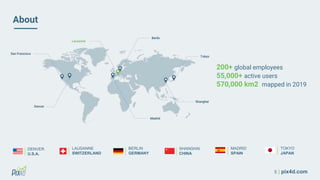
About
200+ global employees
55,000+ active users
570,000 km2 mapped in 2019
LAUSANNE
SWITZERLAND
DENVER
U.S.A.
SHANGHAI
CHINA
BERLIN
GERMANY
MADRID
SPAIN
TOKYO
JAPAN
6 | www.pix4d.com
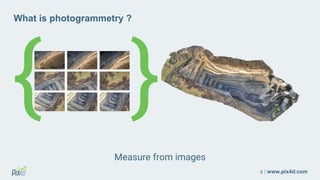
{ }
What is photogrammetry ?
Measure from images
7 | pix4d.com
Agenda
● Pix4Dmapper
● Pix4Dreact
● Pix4Dfields
● Pix4Dsurvey
● Pix4Dmatic
● Pix4Dscan & Pix4Dinspect
● Pix4D Training
The leading photogrammetry software
for professional drone mapping
Accurate 3D maps and models, purely from imagesPix4Dmapper
9 | www.pix4d.com
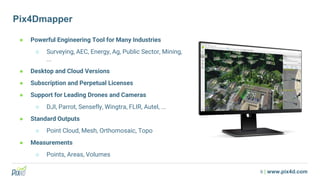
Pix4Dmapper
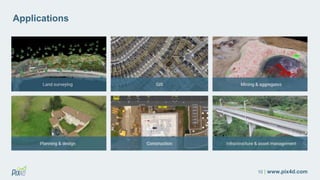
● Powerful Engineering Tool for Many Industries
○ Surveying, AEC, Energy, Ag, Public Sector, Mining,
...
● Desktop and Cloud Versions
● Subscription and Perpetual Licenses
● Support for Leading Drones and Cameras
○ DJI, Parrot, Sensefly, Wingtra, FLIR, Autel, ...
● Standard Outputs
○ Point Cloud, Mesh, Orthomosaic, Topo
● Measurements
○ Points, Areas, Volumes
10 | www.pix4d.com
Applications
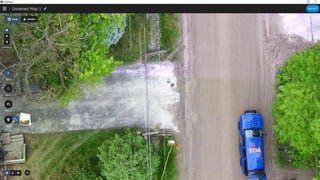
2D fast-mapping
for emergency response
and public safety
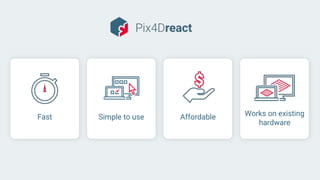
Works on existing
hardware
AffordableSimple to useFast
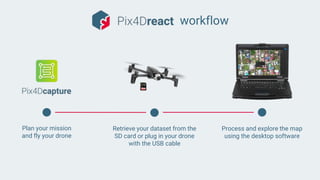
workflow
Plan your mission
and fly your drone
Retrieve your dataset from the
SD card or plug in your drone
with the USB cable
Process and explore the map
using the desktop software
14 | www.pix4d.com
recorded
demo
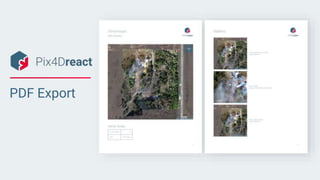
PDF Export
Advanced agriculture
mapping for aerial crop
analysis and digital
farming
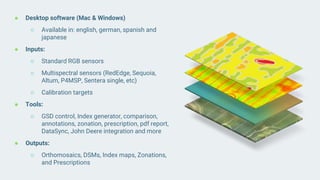
● Desktop software (Mac & Windows)
○ Available in: english, german, spanish and
japanese
● Inputs:
○ Standard RGB sensors
○ Multispectral sensors (RedEdge, Sequoia,
Altum, P4MSP, Sentera single, etc)
○ Calibration targets
● Tools:
○ GSD control, Index generator, comparison,
annotations, zonation, prescription, pdf report,
DataSync, John Deere integration and more
● Outputs:
○ Orthomosaics, DSMs, Index maps, Zonations,
and Prescriptions
18 | www.pix4d.com
“[...] Being able to work offline is crucial [...]”
Nick Guadagnoli,
Technology Solutions Manager for 4Rivers Equipment
What makes Pix4Dfields
unique #1?
In field results
Create maps rapidly (no internet
connection required) for decision making
and action, without leaving the field
What makes Pix4Dfields
unique #2?
Reliable maps
Always get maps of your fields and crops
at any critical stage regardless of satellite
availability and cloud cover.
“Processing speed coupled with great
analytics, [...] No other software can
achieve this level of efficiency”
Nicholaus Helwig
Owner Pinpoint Aerial Solutions
What makes Pix4Dfields
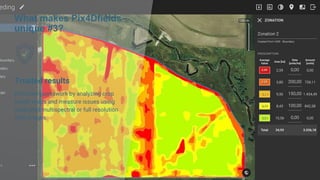
unique #3?
Trusted results
Eliminate guesswork by analyzing crop
health maps and measure issues using
calibrated multispectral or full resolution
RGB images.
Radiometry matters
Pix4Dfields is continuously being developed to
meet the needs of the agriculture industry,
focusing on reducing the speed of processing
while incorporating the highest radiometry
standards backed up with years of scientific
research
What makes Pix4Dfields
unique #4?
Connected
Connect your data to platforms like the
John Deere Operations Center,
synchronize and access your data in-
office and in-field for streamlined
collaboration
“it also eliminates mistakes caused by
handwritten documentation [...] which can
lead to costly crop destruction due to
under or over-application of the product.”
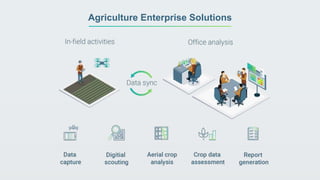
Agriculture Enterprise Solutions
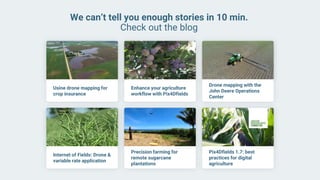
We can’t tell you enough stories in 10 min.
Check out the blog
Usine drone mapping for
crop insurance
Enhance your agriculture
workflow with Pix4Dfields
Drone mapping with the
John Deere Operations
Center
Internet of Fields: Drone &
variable rate application
Precision farming for
remote sugarcane
plantations
Pix4Dfields 1.7: best
practices for digital
agriculture
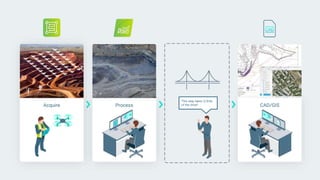
Bridging the gap between
photogrammetry and CAD
Acquire Process CAD/GIS
This step takes 2/3rds
of the time!!
Why does this gap exist?
● Big sets of images
● Huge point clouds, orthomosaics and DTMs
● CAD software cannot easily handle large point clouds
● Many software tools = long learning curve
● Disconnected workflows
Extract the data you need
A next step in Pix4D
photogrammetry workflows to
simplify your connection to GIS
and CAD, making planning and
design easier.
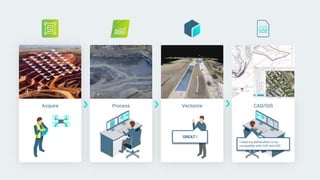
CAD/GISAcquire Process Vectorize
I need my deliverables to be
compatible with CAD and GIS!
GREAT !
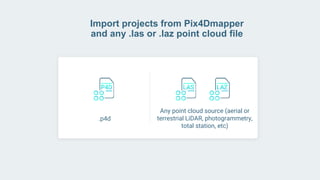
Import projects from Pix4Dmapper
and any .las or .laz point cloud file
.p4d
Any point cloud source (aerial or
terrestrial LiDAR, photogrammetry,
total station, etc)
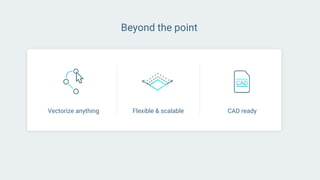
Beyond the point
Vectorize anything Flexible & scalable CAD ready
Outcomes
● Reduce overall surveying time
● Improve the compatibility with GIS
and CAD tools
● Simplify the 3D data
reduction/extraction process
● Leverage the power of the rayCloudtm
for detailed vectorizing
● Expand possibilities
Demo
Demo
30-day Free Trial
Photogrammetry
at a large scale
Drone-based photogrammetry has
entered the large mapping space
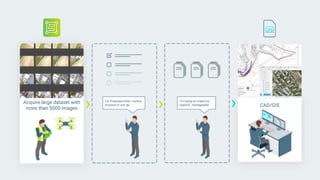
Acquire CAD/GIS
I'm trying to make my
exports manageable
I'm frustrated that I cannot
process in one go
Acquire large dataset with
more than 5000 images
Challenges with large data mapping today
● Cumbersome workflows to manage the large data
● High uncertainty on the success of a project
● Time lost in waiting
● Making exports manageable
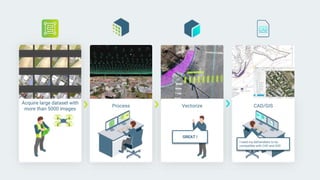
CAD/GISProcess Vectorize
I need my deliverables to be
compatible with CAD and GIS!
GREAT !
Acquire large dataset with
more than 5000 images
Pix4Dmatic's highlights
● Optimised for datasets with more than 5000
images without compromising on the accuracy
● Integrated workflow with Pix4Dsurvey: Convert
your large dense point cloud to manageable
vectors for your CAD deliverables
Pix4Dmatic's highlights
● Supports the major drone manufacturers:
○ Parrot
○ SenseFly
○ Wingtra
○ DJI
● For Windows and Mac
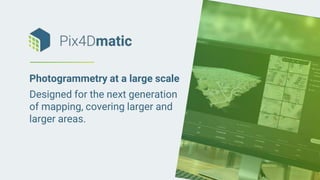
Photogrammetry at a large scale
Designed for the next generation
of mapping, covering larger and
larger areas.
Beta program open for application
Commercial release this summer
Automating
industrial inspection
and asset management
The professional drone flight
app for industrial inspection
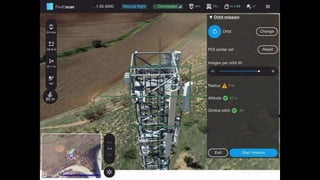
1. Select a mission
2. Adjust your flight
3. Start and fly
4. Upload your data
Pix4Dscan workflow
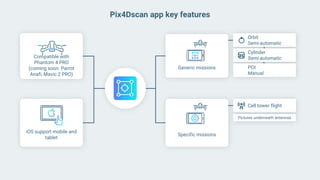
Compatible with
Phantom 4 PRO
(coming soon: Parrot
Anafi, Mavic 2 PRO)
iOS support mobile and
tablet
Orbit
Semi-automatic
Pix4Dscan app key features
Generic missions
Specific missions
Cylinder
Semi-automatic
POI
Manual
Cell tower flight
Pictures underneath antennas
Demo Pix4Dscan
Automating industrial
inspection
and asset management
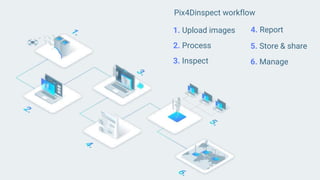
1. Upload images
2. Process
3. Inspect
5. Store & share
Pix4Dinspect workflow
4. Report
6. Manage
Telecom towers
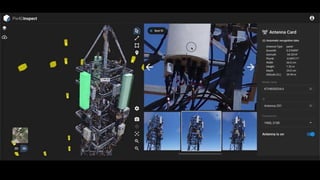
● Automatic detection of antenna
angles and measurements: downtilt,
azimuth, plumb, heights, length, width.
● Available space review: measure
antennas and asses tower capacity
for collocation. Ensure regulatory
compliance.
● Make inventory and lease validation
through antenna identification.
● Analyze tower pre and post-
construction and modifications.
Mount mapping and analysis.
● Structural analysis: analyze mast and
antenna conditions for repairs and
replacement.
● Perform remotely highly-
accurate, end-to-end visual
inspections: 2D and 3D
measurements and annotations
and automatic reports.
● Digitize your portfolio: access
and share your assets
information anytime and
anywhere. Keep track of your
inspection history for predictive
maintenance and informed
decisions.
General applications
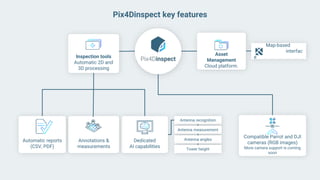
Map-based
interfac
e
Compatible Parrot and DJI
cameras (RGB images)
More camera support is coming
soon
Inspection tools
Automatic 2D and
3D processing
Dedicated
AI capabilities
Automatic reports
(CSV, PDF)
Annotations &
measurements
Asset
Management
Cloud platform.
Antenna recognition
Antenna measurement
Antenna angles
Tower height
Pix4Dinspect key features
Who are Pix4Dscan and Pix4Dinspect for?
Asset owners/managers
Companies or entities that own and/or
manage industrial infrastructure.
● Companies: Telecom, Oil & Gas,
Insurance, Energy utilities...
● Entities (Government/Ministries):
Rails & Roads, Bridges, Dams...
Drone Service Providers
Companies that offers data capture
and/or inspection services.
Inspection companies
Companies that offers inspection
and maintenance services for
industrial infrastructure.
Demo Pix4Dinspect
Streamlined learning
experience
65 | www.pix4d.com
Certification exams
Self-paced
online courses
Instructor-led
workshops or
private training
New training.pix4d.com
An all encompassing platform for everything related to training
66 | www.pix4d.com
Instructor-led workshops
● Available in different countries or
online, and in multiple languages
● Learn about the theory with instructor-
led presentations and then put it into
practice with hands-on exercises
● Network with other professionals in
your field
67 | www.pix4d.com
Private training
● In-person or online sessions are
available to fit your schedule
● Get a deeper understanding of
concepts that are related to your
projects and gloss over the topics
that are irrelevant to you
68 | www.pix4d.com
Self-paced online courses
● Learn at your own pace at your
home or office
● Learn about the theory with
introductory videos and hands-on
exercises
● Collaborate with other students or
a trainer by starting a discussion
in one or more lessons
69 | www.pix4d.com
Certification exam
● Benchmark your skills and
technical knowledge
● Lend yourself credibility in
professional market
● Is composed of multiple-choice
questions and requires at least
80% to receive a certificate
70 | www.pix4d.com
Additional resources
● Pix4D’s support documentation
contains a wealth of information
about all Pix4D products
● Video tutorials highlight the most
critical features and workflows
71 | www.pix4d.com
Contact
● Learn more at training.pix4d.com
● Questions about training? Contact us at training@pix4d.com
Rhéa Garratt
Technical Trainer
Justine Cuevas
Technical Trainer
Andrew McIntyre
Technical Trainer
Ana Soares
Head of Training
Aaron Woods
Technical Trainer
www.pix4d.com/webinar-pix4d-new-professional-products-us
Giveaway Question
Enter Your Answer in the Chat
First to answer correctly wins
● 2-Month License for one Pix4D product
(Mapper, React, Fields, Survey, BIM)
or
● Free Online Course and Certification Exam
Training Discount
As a thank you for joining us, please email us to
Thank you
pix4d.com/contact-us
us.sales@pix4d.com
Q&A

UAS RMUASP Meetup with PIX4D

  • 1.
    RMUASP April VirtualMeetup April 7, 2020
  • 2.
    2 | www.pix4d.com Announcements ●OEDIT (Office of Economic Development & International Trade) ○ COVID-19 Business Resource Center https://choosecolorado.com/covid/19 ● Xponential - May 4th - 7th, 2020 ● POSTPONED ● Spring UAS Round Up - April 19th - 20th ○ POSTPONED ● UAS Colorado launching closer collaboration with Rocky Mountain AUVSI ● Other Announcements?
  • 3.
    Christopher Cressy Managing Director,North America Joshua Haga Technical Sales Engineer Jennifer Gamurot Sales Representative
  • 4.
  • 5.
    5 | pix4d.com About 200+global employees 55,000+ active users 570,000 km2 mapped in 2019 LAUSANNE SWITZERLAND DENVER U.S.A. SHANGHAI CHINA BERLIN GERMANY MADRID SPAIN TOKYO JAPAN
  • 6.
    6 | www.pix4d.com {} What is photogrammetry ? Measure from images
  • 7.
    7 | pix4d.com Agenda ●Pix4Dmapper ● Pix4Dreact ● Pix4Dfields ● Pix4Dsurvey ● Pix4Dmatic ● Pix4Dscan & Pix4Dinspect ● Pix4D Training
  • 8.
    The leading photogrammetrysoftware for professional drone mapping Accurate 3D maps and models, purely from imagesPix4Dmapper
  • 9.
    9 | www.pix4d.com Pix4Dmapper ●Powerful Engineering Tool for Many Industries ○ Surveying, AEC, Energy, Ag, Public Sector, Mining, ... ● Desktop and Cloud Versions ● Subscription and Perpetual Licenses ● Support for Leading Drones and Cameras ○ DJI, Parrot, Sensefly, Wingtra, FLIR, Autel, ... ● Standard Outputs ○ Point Cloud, Mesh, Orthomosaic, Topo ● Measurements ○ Points, Areas, Volumes
  • 10.
  • 11.
    2D fast-mapping for emergencyresponse and public safety
  • 12.
  • 13.
    workflow Plan your mission andfly your drone Retrieve your dataset from the SD card or plug in your drone with the USB cable Process and explore the map using the desktop software
  • 14.
  • 15.
  • 16.
    Advanced agriculture mapping foraerial crop analysis and digital farming
  • 17.
    ● Desktop software(Mac & Windows) ○ Available in: english, german, spanish and japanese ● Inputs: ○ Standard RGB sensors ○ Multispectral sensors (RedEdge, Sequoia, Altum, P4MSP, Sentera single, etc) ○ Calibration targets ● Tools: ○ GSD control, Index generator, comparison, annotations, zonation, prescription, pdf report, DataSync, John Deere integration and more ● Outputs: ○ Orthomosaics, DSMs, Index maps, Zonations, and Prescriptions
  • 18.
    18 | www.pix4d.com “[...]Being able to work offline is crucial [...]” Nick Guadagnoli, Technology Solutions Manager for 4Rivers Equipment What makes Pix4Dfields unique #1? In field results Create maps rapidly (no internet connection required) for decision making and action, without leaving the field
  • 19.
    What makes Pix4Dfields unique#2? Reliable maps Always get maps of your fields and crops at any critical stage regardless of satellite availability and cloud cover. “Processing speed coupled with great analytics, [...] No other software can achieve this level of efficiency” Nicholaus Helwig Owner Pinpoint Aerial Solutions
  • 20.
    What makes Pix4Dfields unique#3? Trusted results Eliminate guesswork by analyzing crop health maps and measure issues using calibrated multispectral or full resolution RGB images.
  • 21.
    Radiometry matters Pix4Dfields iscontinuously being developed to meet the needs of the agriculture industry, focusing on reducing the speed of processing while incorporating the highest radiometry standards backed up with years of scientific research
  • 22.
    What makes Pix4Dfields unique#4? Connected Connect your data to platforms like the John Deere Operations Center, synchronize and access your data in- office and in-field for streamlined collaboration “it also eliminates mistakes caused by handwritten documentation [...] which can lead to costly crop destruction due to under or over-application of the product.”
  • 23.
  • 24.
    We can’t tellyou enough stories in 10 min. Check out the blog Usine drone mapping for crop insurance Enhance your agriculture workflow with Pix4Dfields Drone mapping with the John Deere Operations Center Internet of Fields: Drone & variable rate application Precision farming for remote sugarcane plantations Pix4Dfields 1.7: best practices for digital agriculture
  • 25.
    Bridging the gapbetween photogrammetry and CAD
  • 26.
    Acquire Process CAD/GIS Thisstep takes 2/3rds of the time!!
  • 27.
    Why does thisgap exist? ● Big sets of images ● Huge point clouds, orthomosaics and DTMs ● CAD software cannot easily handle large point clouds ● Many software tools = long learning curve ● Disconnected workflows
  • 28.
    Extract the datayou need A next step in Pix4D photogrammetry workflows to simplify your connection to GIS and CAD, making planning and design easier.
  • 29.
    CAD/GISAcquire Process Vectorize Ineed my deliverables to be compatible with CAD and GIS! GREAT !
  • 30.
    Import projects fromPix4Dmapper and any .las or .laz point cloud file .p4d Any point cloud source (aerial or terrestrial LiDAR, photogrammetry, total station, etc)
  • 31.
    Beyond the point Vectorizeanything Flexible & scalable CAD ready
  • 32.
    Outcomes ● Reduce overallsurveying time ● Improve the compatibility with GIS and CAD tools ● Simplify the 3D data reduction/extraction process ● Leverage the power of the rayCloudtm for detailed vectorizing ● Expand possibilities
  • 33.
  • 34.
  • 35.
  • 36.
  • 37.
  • 38.
    Acquire CAD/GIS I'm tryingto make my exports manageable I'm frustrated that I cannot process in one go Acquire large dataset with more than 5000 images
  • 39.
    Challenges with largedata mapping today ● Cumbersome workflows to manage the large data ● High uncertainty on the success of a project ● Time lost in waiting ● Making exports manageable
  • 40.
    CAD/GISProcess Vectorize I needmy deliverables to be compatible with CAD and GIS! GREAT ! Acquire large dataset with more than 5000 images
  • 41.
    Pix4Dmatic's highlights ● Optimisedfor datasets with more than 5000 images without compromising on the accuracy ● Integrated workflow with Pix4Dsurvey: Convert your large dense point cloud to manageable vectors for your CAD deliverables
  • 42.
    Pix4Dmatic's highlights ● Supportsthe major drone manufacturers: ○ Parrot ○ SenseFly ○ Wingtra ○ DJI ● For Windows and Mac
  • 43.
    Photogrammetry at alarge scale Designed for the next generation of mapping, covering larger and larger areas.
  • 44.
    Beta program openfor application Commercial release this summer
  • 45.
  • 46.
    The professional droneflight app for industrial inspection
  • 47.
    1. Select amission 2. Adjust your flight 3. Start and fly 4. Upload your data Pix4Dscan workflow
  • 48.
    Compatible with Phantom 4PRO (coming soon: Parrot Anafi, Mavic 2 PRO) iOS support mobile and tablet Orbit Semi-automatic Pix4Dscan app key features Generic missions Specific missions Cylinder Semi-automatic POI Manual Cell tower flight Pictures underneath antennas
  • 49.
  • 51.
  • 52.
    1. Upload images 2.Process 3. Inspect 5. Store & share Pix4Dinspect workflow 4. Report 6. Manage
  • 53.
    Telecom towers ● Automaticdetection of antenna angles and measurements: downtilt, azimuth, plumb, heights, length, width. ● Available space review: measure antennas and asses tower capacity for collocation. Ensure regulatory compliance. ● Make inventory and lease validation through antenna identification. ● Analyze tower pre and post- construction and modifications. Mount mapping and analysis. ● Structural analysis: analyze mast and antenna conditions for repairs and replacement.
  • 54.
    ● Perform remotelyhighly- accurate, end-to-end visual inspections: 2D and 3D measurements and annotations and automatic reports. ● Digitize your portfolio: access and share your assets information anytime and anywhere. Keep track of your inspection history for predictive maintenance and informed decisions. General applications
  • 55.
    Map-based interfac e Compatible Parrot andDJI cameras (RGB images) More camera support is coming soon Inspection tools Automatic 2D and 3D processing Dedicated AI capabilities Automatic reports (CSV, PDF) Annotations & measurements Asset Management Cloud platform. Antenna recognition Antenna measurement Antenna angles Tower height Pix4Dinspect key features
  • 56.
    Who are Pix4Dscanand Pix4Dinspect for? Asset owners/managers Companies or entities that own and/or manage industrial infrastructure. ● Companies: Telecom, Oil & Gas, Insurance, Energy utilities... ● Entities (Government/Ministries): Rails & Roads, Bridges, Dams... Drone Service Providers Companies that offers data capture and/or inspection services. Inspection companies Companies that offers inspection and maintenance services for industrial infrastructure.
  • 57.
  • 59.
  • 60.
    65 | www.pix4d.com Certificationexams Self-paced online courses Instructor-led workshops or private training New training.pix4d.com An all encompassing platform for everything related to training
  • 61.
    66 | www.pix4d.com Instructor-ledworkshops ● Available in different countries or online, and in multiple languages ● Learn about the theory with instructor- led presentations and then put it into practice with hands-on exercises ● Network with other professionals in your field
  • 62.
    67 | www.pix4d.com Privatetraining ● In-person or online sessions are available to fit your schedule ● Get a deeper understanding of concepts that are related to your projects and gloss over the topics that are irrelevant to you
  • 63.
    68 | www.pix4d.com Self-pacedonline courses ● Learn at your own pace at your home or office ● Learn about the theory with introductory videos and hands-on exercises ● Collaborate with other students or a trainer by starting a discussion in one or more lessons
  • 64.
    69 | www.pix4d.com Certificationexam ● Benchmark your skills and technical knowledge ● Lend yourself credibility in professional market ● Is composed of multiple-choice questions and requires at least 80% to receive a certificate
  • 65.
    70 | www.pix4d.com Additionalresources ● Pix4D’s support documentation contains a wealth of information about all Pix4D products ● Video tutorials highlight the most critical features and workflows
  • 66.
    71 | www.pix4d.com Contact ●Learn more at training.pix4d.com ● Questions about training? Contact us at training@pix4d.com Rhéa Garratt Technical Trainer Justine Cuevas Technical Trainer Andrew McIntyre Technical Trainer Ana Soares Head of Training Aaron Woods Technical Trainer
  • 67.
  • 68.
    Giveaway Question Enter YourAnswer in the Chat First to answer correctly wins ● 2-Month License for one Pix4D product (Mapper, React, Fields, Survey, BIM) or ● Free Online Course and Certification Exam
  • 69.
    Training Discount As athank you for joining us, please email us to
  • 70.
  • 71.