Twitter, Tweeter, T–WHAT?
 Using Twitter to
 Brand & Grow
 Your Business
Glena Stephenson
   Business owner since 1981
   Social Media Director Powerful Women
    International since 2011
   Social Media Consultant
   Constant Contact Email Marketing Solution
    Provider
   Researcher for Writers, Authors & Bloggers
Twitter account since Feb 8, 2009

    Didn’t use it much
    I didn’t know what I was doing
    Love it now for research and connecting on
     the go
    Have created a business twitter account
     @glenastep
    What about You? (Participants)
What we will cover

 Twitter basics: sign up, handle, profile, etc.
 Twitter Best Practices
 Anatomy of a Tweet
 Who to Follow & Why
 Value of twitter for Business
 Twitter Marketing Campaigns
Sign up Page Oct 2012
Your Twitter Handle
 Make it short if possible
 Make it part of your brand
 Keep it simple, so that people can find you
 You may want to use your own name to brand
  yourself
 My twitter handle @glenastephenson

  (16 characters) is too long. My tweets must be
  no longer than 116 so that others can retweet.
 I created a new Business Account @glenastep
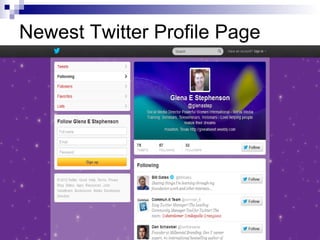
Newest Twitter Profile Page
Settings: Online Bio
   You only have160 characters

   You do want to come across as human
    and let a little personality come out

   Tell about your products

   Use Key words
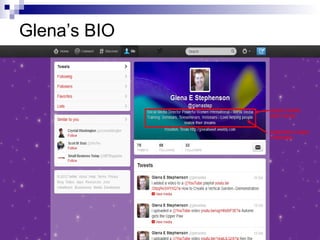
Glena’s BIO
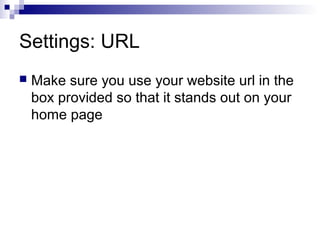
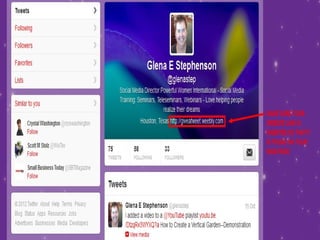
Settings: URL
   Make sure you use your website url in the
    box provided so that it stands out on your
    home page
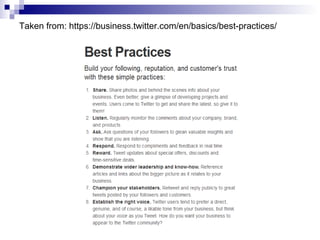
Basic Signs & Etiquette
Taken from: https://business.twitter.com/en/basics/best-practices/
Twitter Limits
 You cannot follow more than 500 people a
  day
 You initially can follow only 2000 people
 After you reach 2000 Twitter computes the
  # of followers to how many you’re
  following and you can follow more
 50 tweets per day
 250 Direct Messages a day
Video Clip
   The best of Twitter TV

   http://www.youtube.com/watch?
    v=1cfzSYYj8qk&feature=channel
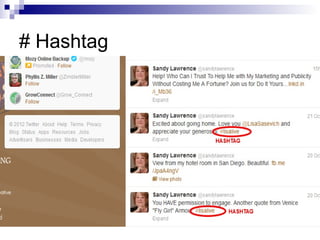
# Hashtag
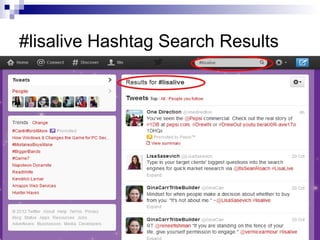
#lisalive Hashtag Search Results
# Hashtag
 Lets people group messages by category
 It’s an ongoing conversation #lisalive
  #occupywallstreet
 Collect Ideas by asking a question and
  use to track the conversation #favnovel
 Share an Experience #americanIdol
 Tracking tools for conversations:
  http://tweetgrid.com or
  http://tweetchat.com or Hashtags.org
@ Mention


   @yourname is a public message to you

@ can be used to acknowledge
“Thanks @glenastep for the great
 information about twitter”
RT
 RT – Retweet is a way of reposting
  someone’s message
 Make sure you are Retweetable by leaving
  enough room for others to add their user
  name
 Can re-write or comment: aim for clear
  message & add their @name for credit
DM
 DM – Direct Messages; This is active if
  you are following and being followed by
  someone.
 It gives some privacy if you want to
  answer a question that may be sensitive
 It can still be found through searches
 Either person can delete it and it is
  completely deleted
Who to Follow & Build Your
Following
Who to Follow
 Search on the twitter search bar at the top
  or search.twitter.com
 Find people who are tweeting about your
  topic or market niche
 Follow people primarily related to your
  niche
 Fewer followers who are interested are
  much more valuable than many followers
 Follow people who follow you (yes & no)
Follow the Experts
 Follow key players in your niche
 Follow some of their followers
 Reply to their tweets (authentic
  comments)
 RT - Retweet their relevant tweets
 Tweet – Your opinion or take on what the
  “expert” said & use “via” to reference them
Building Your Following
 Provide education and information
 Generate interest with article titles
 Add links to the full article that lead to your
  website
 Tweets need to contain Key words that relate to
  your market niche
Engage Your Followers
 Initiate conversations with followers
 Provide information
 Answer questions
 Retweet
 Follow @glenastep & each other
 Acknowledge @glenastep for the great
  twitter seminar
 Care more than others & be helpful
Value of Twitter
 It’s the real-time value of tweeting and
 Twitter that makes it such a unique social
 networking tool.
Video
   Faster than Earthquakes

   http://youtu.be/0UFsJhYBxzY
Value of Tweeting
What differentiates Twitter from other forms
  of Social Media:
 Immediate & mobile
 The ability to write quick, short, easy to
  read messages
 Viewable in public by cell phone via SMS
  text
VIDEO
   Bookstore

   http://www.youtube.com/watch?
    v=dB6_mmXiH50&feature=g-user-
    u&context=G22f85f4UCGXQYbcTJ33ZPv
    zbpS5EcDun7OV_oCKpeTRjmPWAYbpA
Tweet Headlines
 Grab attention so they will click through
 Emotional: Get what you want - Lose
  weight
 How to eat the right foods to burn fat
 Tricks of the Trade
 Stock Market secrets exposed
 Learn to read faster and retain more
Marketing Campaign
 Why are you using Twitter
 What are the advantages
 Short term goals
 Long term goals
 Strategies to meet these goals
Marketing
 Promotions: Use twitter specific discount
  codes
 Post special offers, sales items, etc.
 Contests: Generates fun and interest
 Sale announcements next hour get free
  pie with coffee
 New product announcements
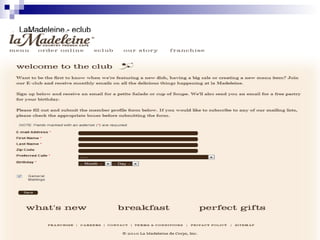
La Madeleine Website
LaMadeleine - eclub
Establishing Your Presence
 Tweet daily: min of 5 times max 10
 Tweet some personal stuff to reveal your
  personality
 Provide information
 Use headlines like a newspaper and
  provide links (1:10 ratio) to your website or
  blog or article
Set Low to Moderate Expectations
Goals may be:
 • Increasing customer base
 •   Better serving existing customers
 •   Offering customer service
 •   Connect with potential partners
 •   Branding
Create Business only Twitter Account
Publish Your Twitter Handle
 Create Business only Twitter Account
 Business Cards
 Website
 Facebook Business Page
 Facebook Profile Page
 LinkedIn
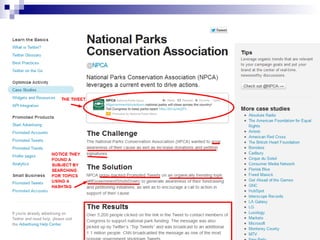
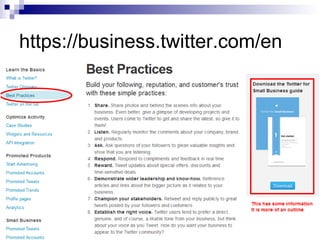
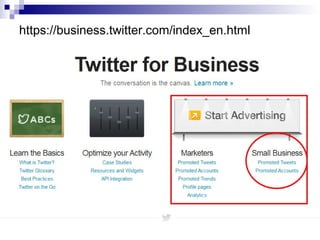
https://business.twitter.com/index_en.html
https://business.twitter.com/en
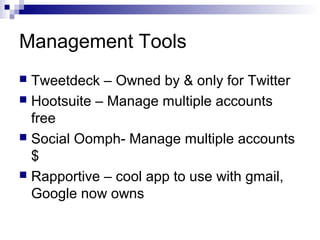
Management Tools
 Tweetdeck – Owned by & only for Twitter
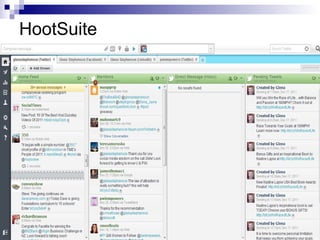
 Hootsuite – Manage multiple accounts
  free
 Social Oomph- Manage multiple accounts
  $
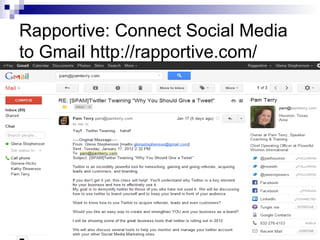
 Rapportive – cool app to use with gmail,
  Google now owns
HootSuite
Rapportive: Connect Social Media
to Gmail http://rapportive.com/
Video
   The Twitter Experiment Classroom

Twitter,tweeter,t what-oct-2012

  • 1.
    Twitter, Tweeter, T–WHAT? Using Twitter to Brand & Grow Your Business
  • 2.
    Glena Stephenson  Business owner since 1981  Social Media Director Powerful Women International since 2011  Social Media Consultant  Constant Contact Email Marketing Solution Provider  Researcher for Writers, Authors & Bloggers
  • 3.
    Twitter account sinceFeb 8, 2009  Didn’t use it much  I didn’t know what I was doing  Love it now for research and connecting on the go  Have created a business twitter account @glenastep  What about You? (Participants)
  • 4.
    What we willcover  Twitter basics: sign up, handle, profile, etc.  Twitter Best Practices  Anatomy of a Tweet  Who to Follow & Why  Value of twitter for Business  Twitter Marketing Campaigns
  • 5.
    Sign up PageOct 2012
  • 6.
    Your Twitter Handle Make it short if possible  Make it part of your brand  Keep it simple, so that people can find you  You may want to use your own name to brand yourself  My twitter handle @glenastephenson (16 characters) is too long. My tweets must be no longer than 116 so that others can retweet.  I created a new Business Account @glenastep
  • 7.
  • 8.
    Settings: Online Bio  You only have160 characters  You do want to come across as human and let a little personality come out  Tell about your products  Use Key words
  • 9.
  • 10.
    Settings: URL  Make sure you use your website url in the box provided so that it stands out on your home page
  • 11.
    Basic Signs &Etiquette
  • 12.
  • 13.
    Twitter Limits  Youcannot follow more than 500 people a day  You initially can follow only 2000 people  After you reach 2000 Twitter computes the # of followers to how many you’re following and you can follow more  50 tweets per day  250 Direct Messages a day
  • 14.
    Video Clip  The best of Twitter TV  http://www.youtube.com/watch? v=1cfzSYYj8qk&feature=channel
  • 15.
  • 16.
  • 17.
    # Hashtag  Letspeople group messages by category  It’s an ongoing conversation #lisalive #occupywallstreet  Collect Ideas by asking a question and use to track the conversation #favnovel  Share an Experience #americanIdol  Tracking tools for conversations: http://tweetgrid.com or http://tweetchat.com or Hashtags.org
  • 18.
    @ Mention  @yourname is a public message to you @ can be used to acknowledge “Thanks @glenastep for the great information about twitter”
  • 19.
    RT  RT –Retweet is a way of reposting someone’s message  Make sure you are Retweetable by leaving enough room for others to add their user name  Can re-write or comment: aim for clear message & add their @name for credit
  • 20.
    DM  DM –Direct Messages; This is active if you are following and being followed by someone.  It gives some privacy if you want to answer a question that may be sensitive  It can still be found through searches  Either person can delete it and it is completely deleted
  • 21.
    Who to Follow& Build Your Following
  • 22.
    Who to Follow Search on the twitter search bar at the top or search.twitter.com  Find people who are tweeting about your topic or market niche  Follow people primarily related to your niche  Fewer followers who are interested are much more valuable than many followers  Follow people who follow you (yes & no)
  • 23.
    Follow the Experts Follow key players in your niche  Follow some of their followers  Reply to their tweets (authentic comments)  RT - Retweet their relevant tweets  Tweet – Your opinion or take on what the “expert” said & use “via” to reference them
  • 24.
    Building Your Following Provide education and information  Generate interest with article titles  Add links to the full article that lead to your website  Tweets need to contain Key words that relate to your market niche
  • 25.
    Engage Your Followers Initiate conversations with followers  Provide information  Answer questions  Retweet  Follow @glenastep & each other  Acknowledge @glenastep for the great twitter seminar  Care more than others & be helpful
  • 26.
    Value of Twitter It’s the real-time value of tweeting and Twitter that makes it such a unique social networking tool.
  • 27.
    Video  Faster than Earthquakes  http://youtu.be/0UFsJhYBxzY
  • 28.
    Value of Tweeting Whatdifferentiates Twitter from other forms of Social Media:  Immediate & mobile  The ability to write quick, short, easy to read messages  Viewable in public by cell phone via SMS text
  • 29.
    VIDEO  Bookstore  http://www.youtube.com/watch? v=dB6_mmXiH50&feature=g-user- u&context=G22f85f4UCGXQYbcTJ33ZPv zbpS5EcDun7OV_oCKpeTRjmPWAYbpA
  • 30.
    Tweet Headlines  Grabattention so they will click through  Emotional: Get what you want - Lose weight  How to eat the right foods to burn fat  Tricks of the Trade  Stock Market secrets exposed  Learn to read faster and retain more
  • 31.
    Marketing Campaign  Whyare you using Twitter  What are the advantages  Short term goals  Long term goals  Strategies to meet these goals
  • 32.
    Marketing  Promotions: Usetwitter specific discount codes  Post special offers, sales items, etc.  Contests: Generates fun and interest  Sale announcements next hour get free pie with coffee  New product announcements
  • 33.
  • 34.
  • 35.
    Establishing Your Presence Tweet daily: min of 5 times max 10  Tweet some personal stuff to reveal your personality  Provide information  Use headlines like a newspaper and provide links (1:10 ratio) to your website or blog or article
  • 36.
    Set Low toModerate Expectations Goals may be: • Increasing customer base • Better serving existing customers • Offering customer service • Connect with potential partners • Branding
  • 37.
    Create Business onlyTwitter Account Publish Your Twitter Handle  Create Business only Twitter Account  Business Cards  Website  Facebook Business Page  Facebook Profile Page  LinkedIn
  • 38.
  • 40.
  • 41.
    Management Tools  Tweetdeck– Owned by & only for Twitter  Hootsuite – Manage multiple accounts free  Social Oomph- Manage multiple accounts $  Rapportive – cool app to use with gmail, Google now owns
  • 42.
  • 43.
    Rapportive: Connect SocialMedia to Gmail http://rapportive.com/
  • 44.
    Video  The Twitter Experiment Classroom

Editor's Notes

  • #5 *From Twitter Terms of Service
  • #27 Show video of SF EarthQuake
  • #29 This is not as true today with smart phones.
  • #33 Tip: add the contest to your website with the details REMEMBER:
  • #35 Email- Add Twitter handle for instant savings