
Twittering: frittering or fabulous? Or…Twitter as a case study for assessing the usefulness of a social media tool in YOUR work context. Nancy White Full Circle Associates http://www.fullcirc.com
With seemingly  endless  opportunities to  try   yet another  social media tool, how do we assess the  value  of any one of them in our  work ?
Let’s look at  as a case study to experiment and develop practical social media tool assessment and adoption approaches .
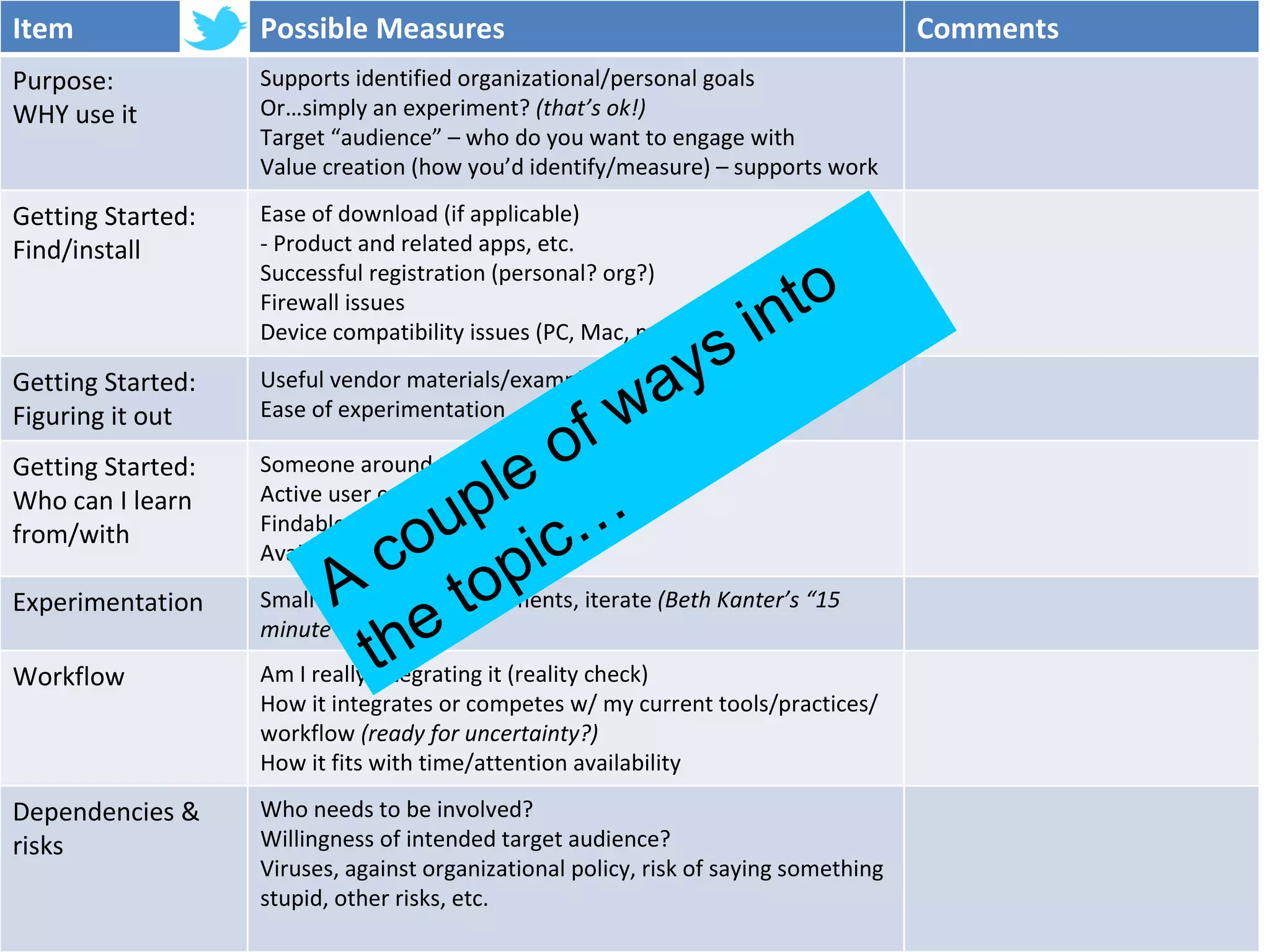
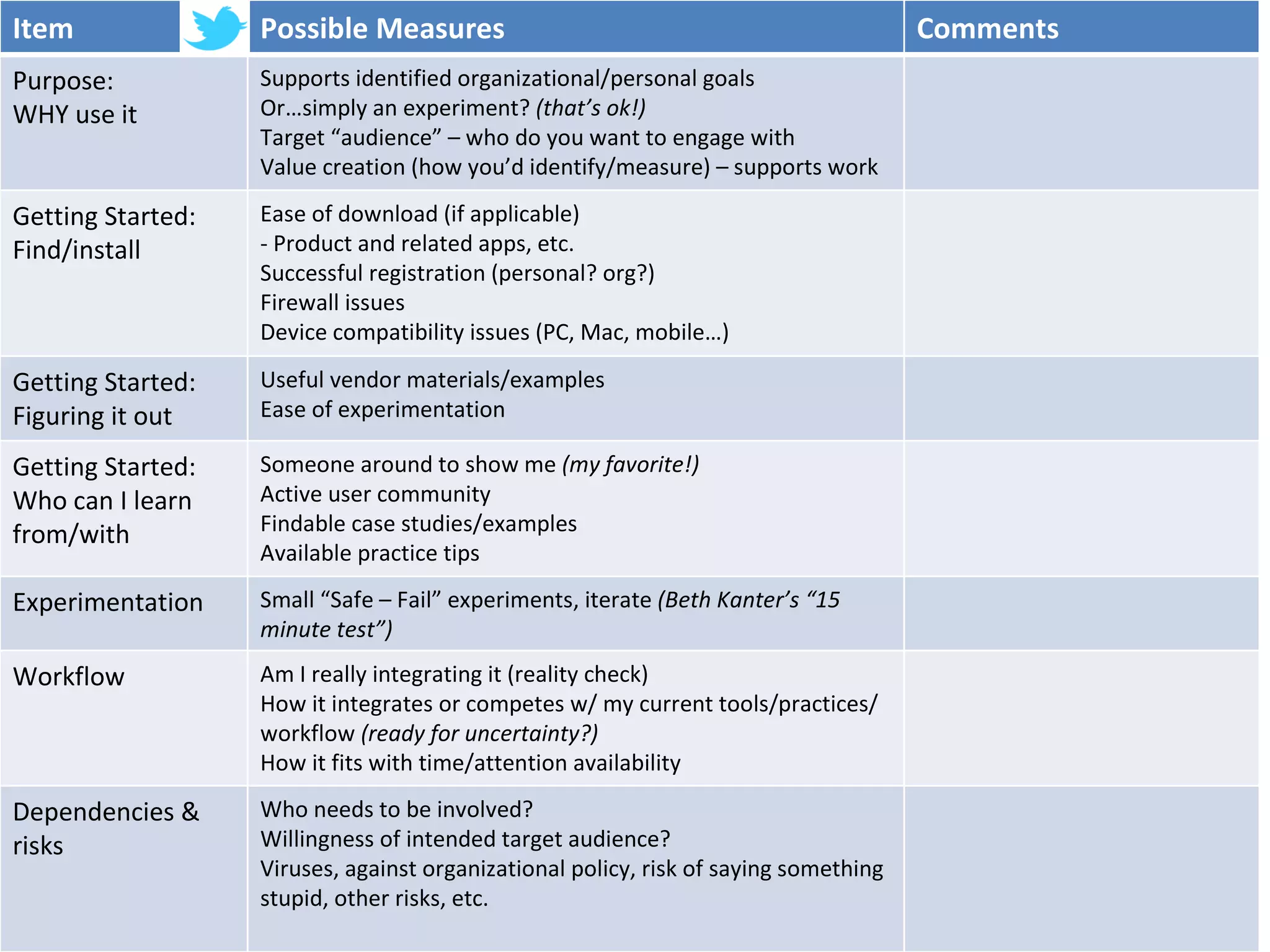
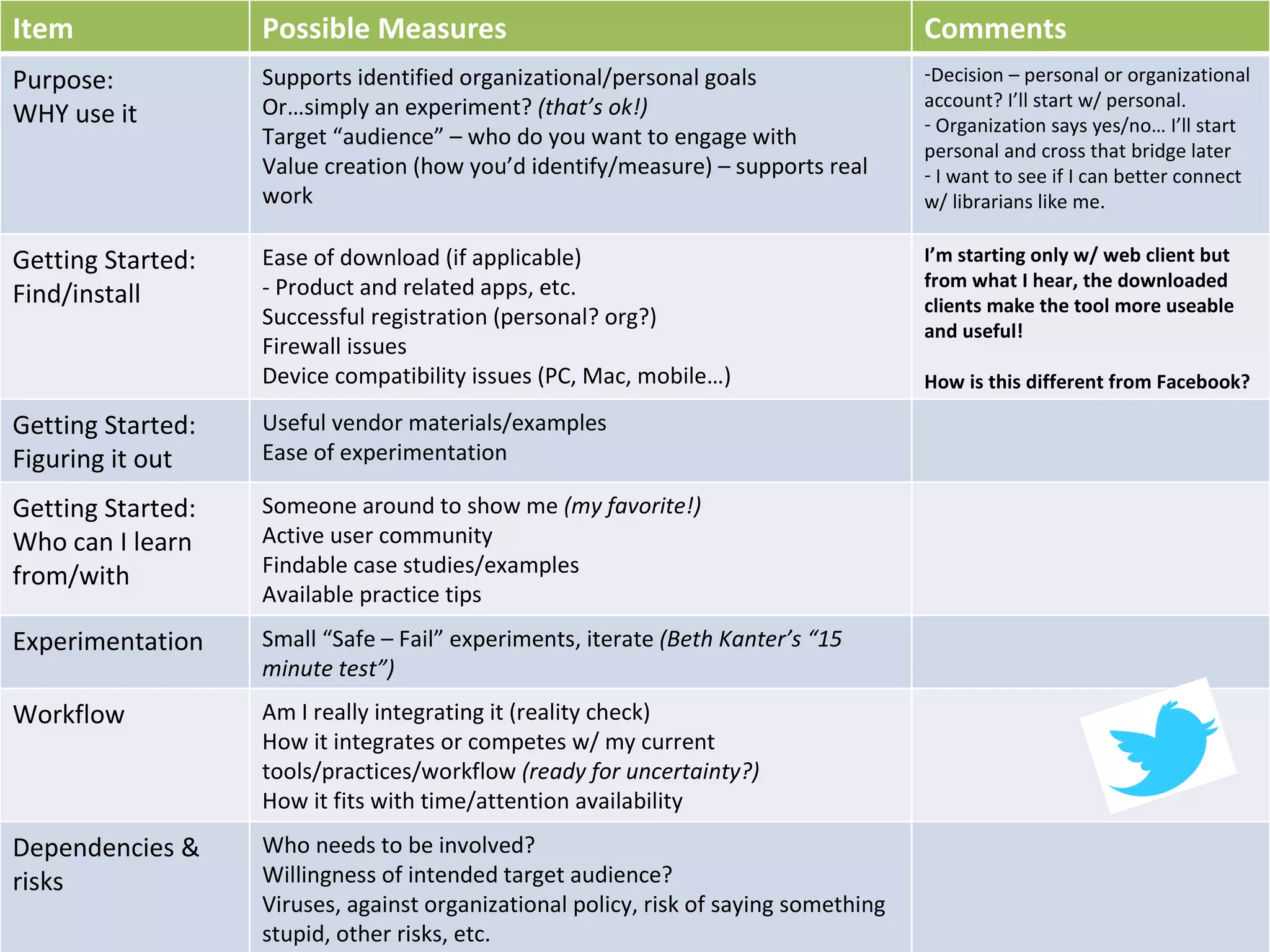
A couple of ways into the topic… Item Possible Measures Comments Purpose:  WHY use it Supports identified organizational/personal goals Or…simply an experiment?  (that’s ok!) Target “audience” – who do you want to engage with Value creation (how you’d identify/measure) – supports work Getting Started: Find/install Ease of download (if applicable) - Product and related apps, etc. Successful registration (personal? org?) Firewall issues Device compatibility issues (PC, Mac, mobile…) Getting Started: Figuring it out Useful vendor materials/examples  Ease of experimentation Getting Started:  Who can I learn from/with Someone around to show me  (my favorite!) Active user community Findable case studies/examples Available practice tips Experimentation Small “Safe – Fail” experiments, iterate  (Beth Kanter’s “15 minute test”) Workflow Am I really integrating it (reality check) How it integrates or competes w/ my current tools/practices/workflow  (ready for uncertainty?) How it fits with time/attention availability Dependencies & risks Who needs to be involved?  Willingness of intended target audience? Viruses, against organizational policy, risk of saying something stupid, other risks, etc.
Item Possible Measures Comments Purpose:  WHY use it Supports identified organizational/personal goals Or…simply an experiment?  (that’s ok!) Target “audience” – who do you want to engage with Value creation (how you’d identify/measure) – supports work Getting Started: Find/install Ease of download (if applicable) - Product and related apps, etc. Successful registration (personal? org?) Firewall issues Device compatibility issues (PC, Mac, mobile…) Getting Started: Figuring it out Useful vendor materials/examples  Ease of experimentation Getting Started:  Who can I learn from/with Someone around to show me  (my favorite!) Active user community Findable case studies/examples Available practice tips Experimentation Small “Safe – Fail” experiments, iterate  (Beth Kanter’s “15 minute test”) Workflow Am I really integrating it (reality check) How it integrates or competes w/ my current tools/practices/workflow  (ready for uncertainty?) How it fits with time/attention availability Dependencies & risks Who needs to be involved?  Willingness of intended target audience? Viruses, against organizational policy, risk of saying something stupid, other risks, etc.
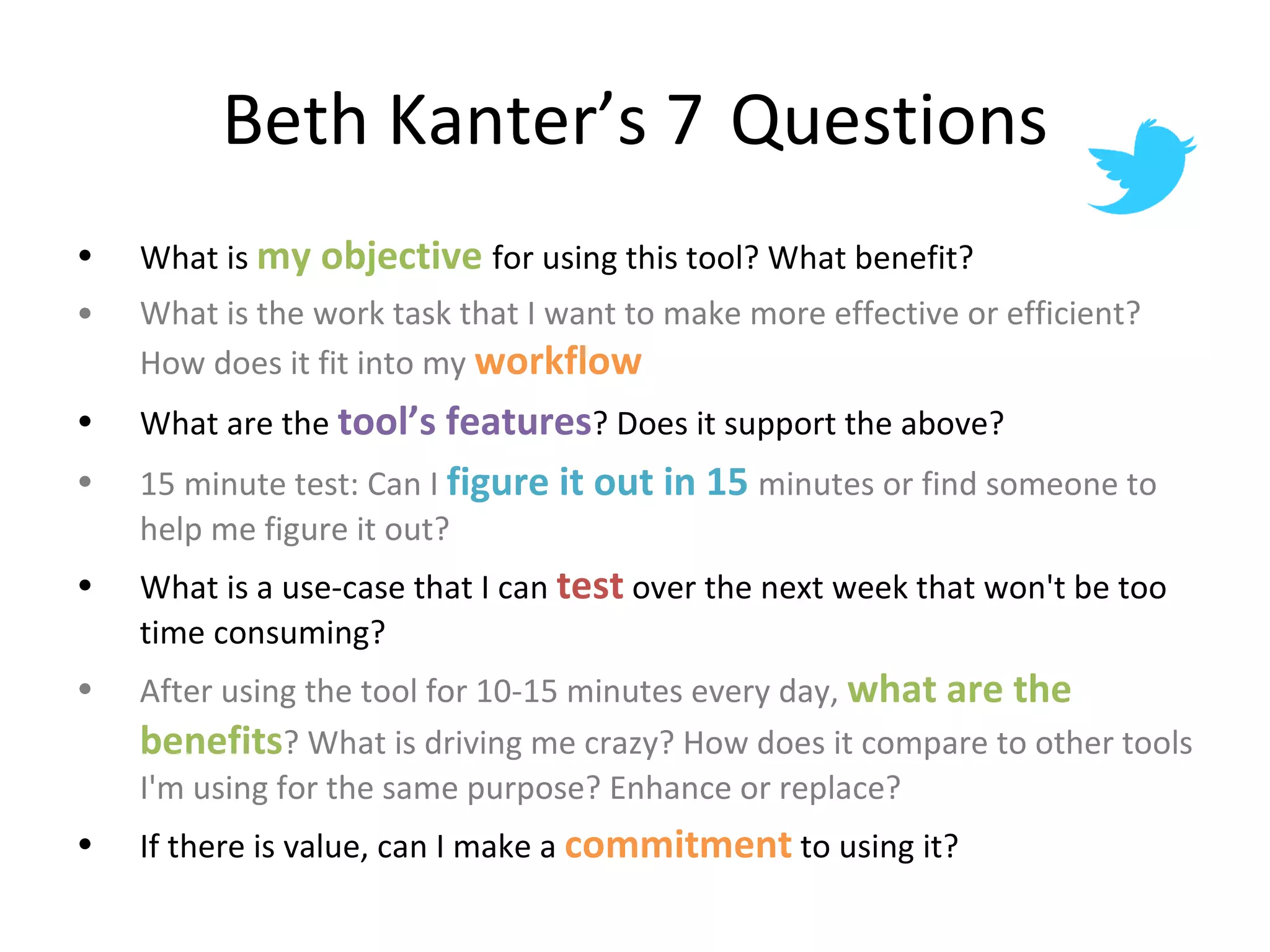
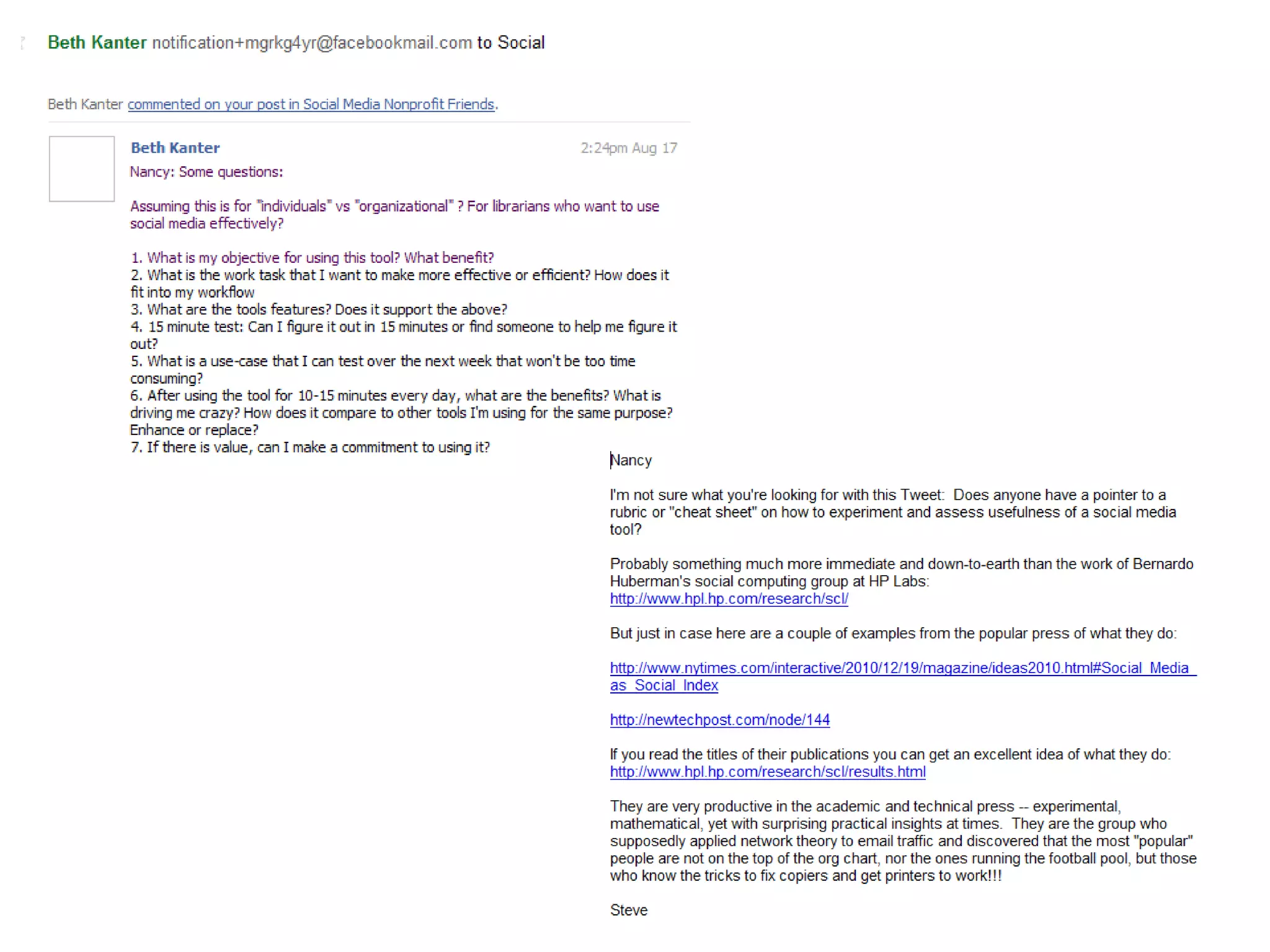
Beth Kanter’s 7  Questions What is  my objective  for using this tool? What benefit? What is the work task that I want to make more effective or efficient? How does it fit into my  workflow What are the  tool’s features ? Does it support the above?  15 minute test: Can I  figure it out in 15  minutes or find someone to help me figure it out? What is a use-case that I can  test  over the next week that won't be too time consuming? After using the tool for 10-15 minutes every day,  what are the benefits ? What is driving me crazy? How does it compare to other tools I'm using for the same purpose? Enhance or replace? If there is value, can I make a  commitment  to using it?
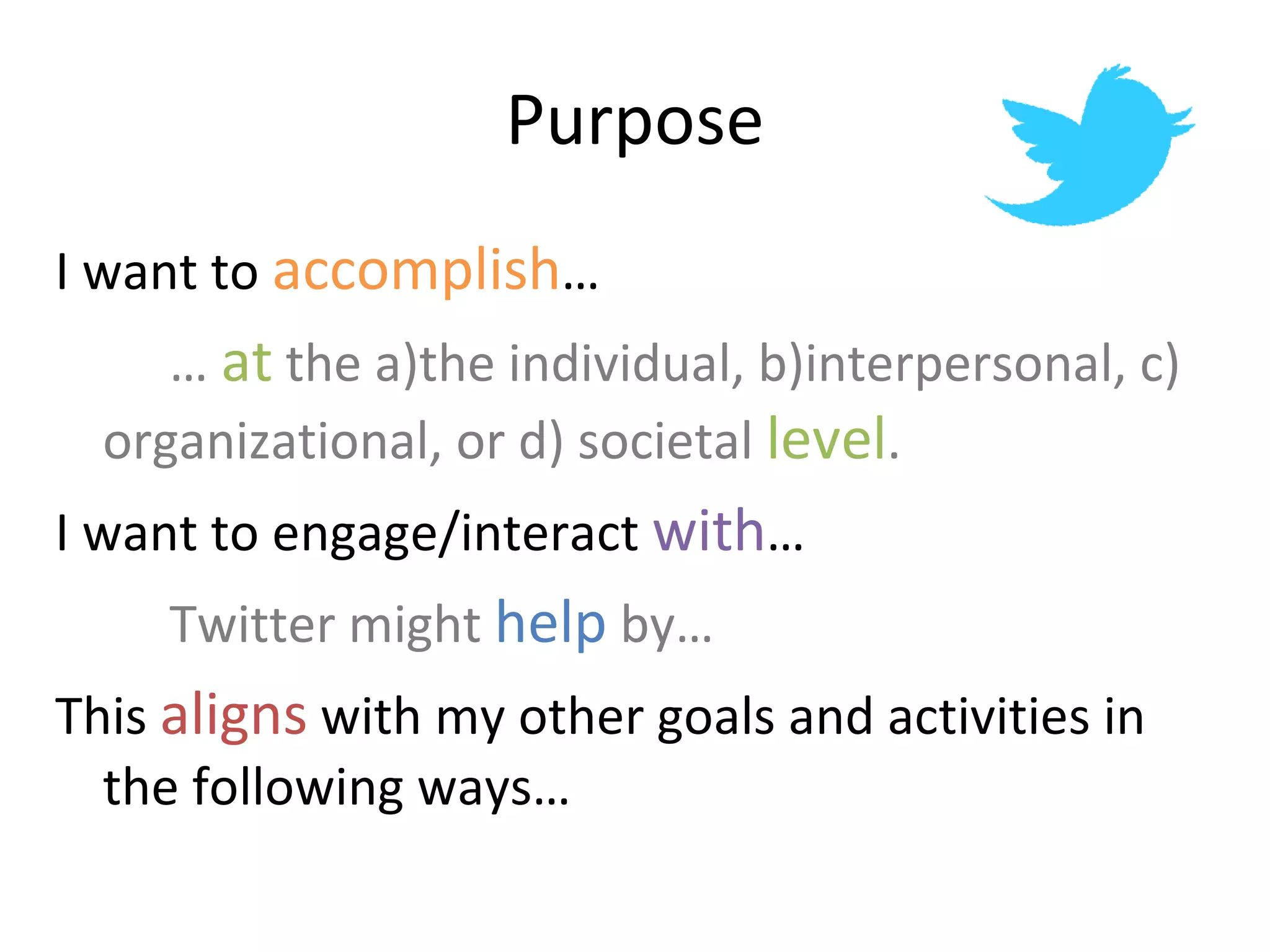
Purpose I want to  accomplish … …  at  the a)the individual, b)interpersonal, c)  organizational, or d) societal  level . I want to engage/interact  with … Twitter might  help  by… This  aligns  with my other goals and activities in the following ways…
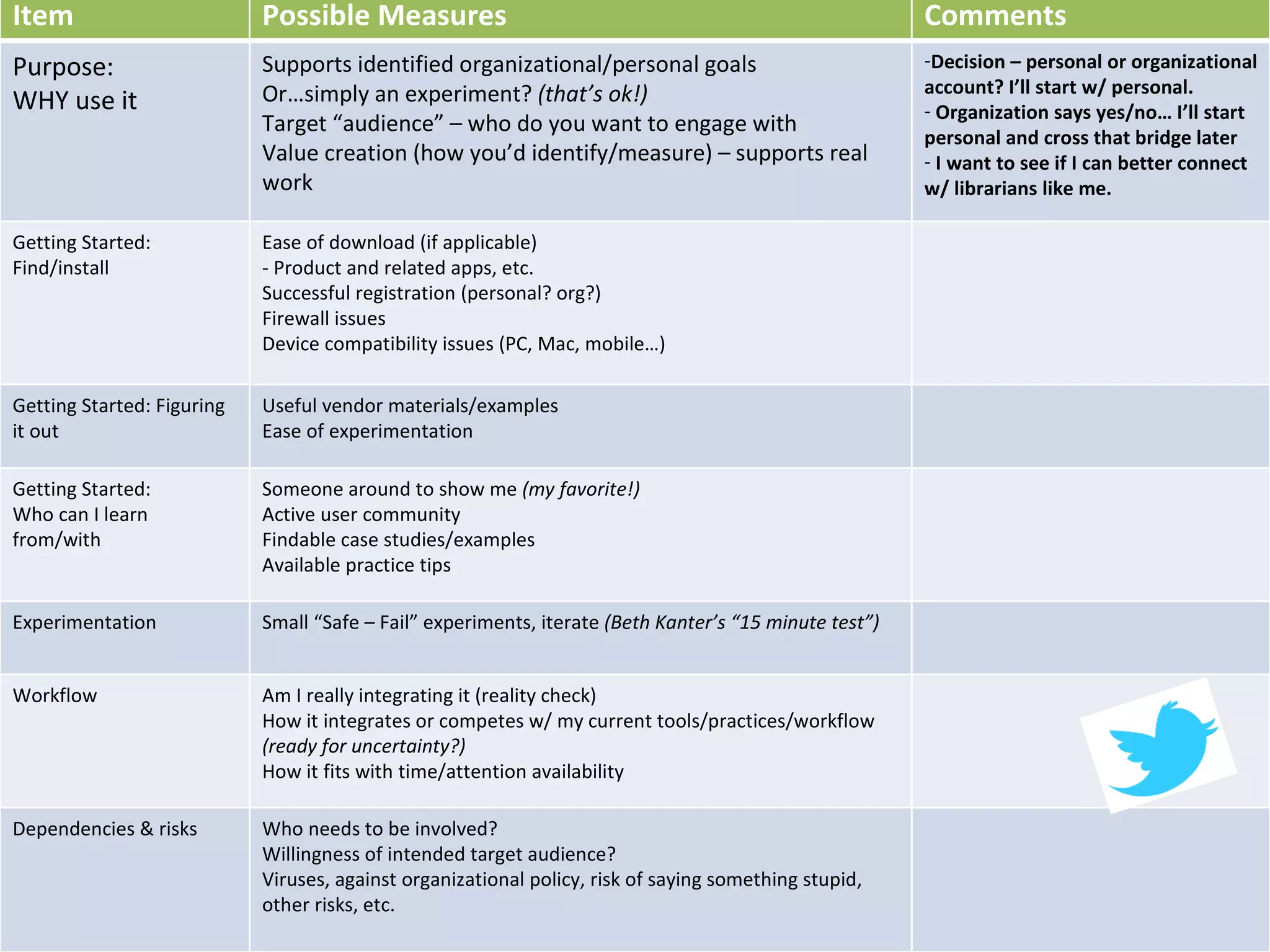
Item Possible Measures Comments Purpose:  WHY use it Supports identified organizational/personal goals Or…simply an experiment?  (that’s ok!) Target “audience” – who do you want to engage with Value creation (how you’d identify/measure) – supports real work Decision – personal or organizational account? I’ll start w/ personal. Organization says yes/no… I’ll start personal and cross that bridge later I want to see if I can better connect w/ librarians like me. Getting Started: Find/install Ease of download (if applicable) - Product and related apps, etc. Successful registration (personal? org?) Firewall issues Device compatibility issues (PC, Mac, mobile…) Getting Started: Figuring it out Useful vendor materials/examples  Ease of experimentation Getting Started:  Who can I learn from/with Someone around to show me  (my favorite!) Active user community Findable case studies/examples Available practice tips Experimentation Small “Safe – Fail” experiments, iterate  (Beth Kanter’s “15 minute test”) Workflow Am I really integrating it (reality check) How it integrates or competes w/ my current tools/practices/workflow  (ready for uncertainty?) How it fits with time/attention availability Dependencies & risks Who needs to be involved?  Willingness of intended target audience? Viruses, against organizational policy, risk of saying something stupid, other risks, etc.
Installing  Twitter Is this OK in my IT organization?  Firewalls? Does it replicate, replace or fill a tool gap?      Some rights reserved  by  Eleaf   http://www.flickr.com/photos/eleaf/2536358399/sizes/m/in/photostream/
Item Possible Measures Comments Purpose:  WHY use it Supports identified organizational/personal goals Or…simply an experiment?  (that’s ok!) Target “audience” – who do you want to engage with Value creation (how you’d identify/measure) – supports real work Decision – personal or organizational account? I’ll start w/ personal. Organization says yes/no… I’ll start personal and cross that bridge later I want to see if I can better connect w/ librarians like me. Getting Started: Find/install Ease of download (if applicable) - Product and related apps, etc. Successful registration (personal? org?) Firewall issues Device compatibility issues (PC, Mac, mobile…) I’m starting only w/ web client but from what I hear, the downloaded clients make the tool more useable and useful! How is this different from Facebook? Getting Started: Figuring it out Useful vendor materials/examples  Ease of experimentation Getting Started:  Who can I learn from/with Someone around to show me  (my favorite!) Active user community Findable case studies/examples Available practice tips Experimentation Small “Safe – Fail” experiments, iterate  (Beth Kanter’s “15 minute test”) Workflow Am I really integrating it (reality check) How it integrates or competes w/ my current tools/practices/workflow  (ready for uncertainty?) How it fits with time/attention availability Dependencies & risks Who needs to be involved?  Willingness of intended target audience? Viruses, against organizational policy, risk of saying something stupid, other risks, etc.
Make an account at  http://www.twitter.com Personal or organizational? Set up Twitter home page  Bio? Logos? How to do it well? Tips? Twitter applications and clients Tweetdeck Hootsuite Facebook Useful resources  (more at end ) Using Twitter http://www.flickr.com/photos/beardenb/59207597/
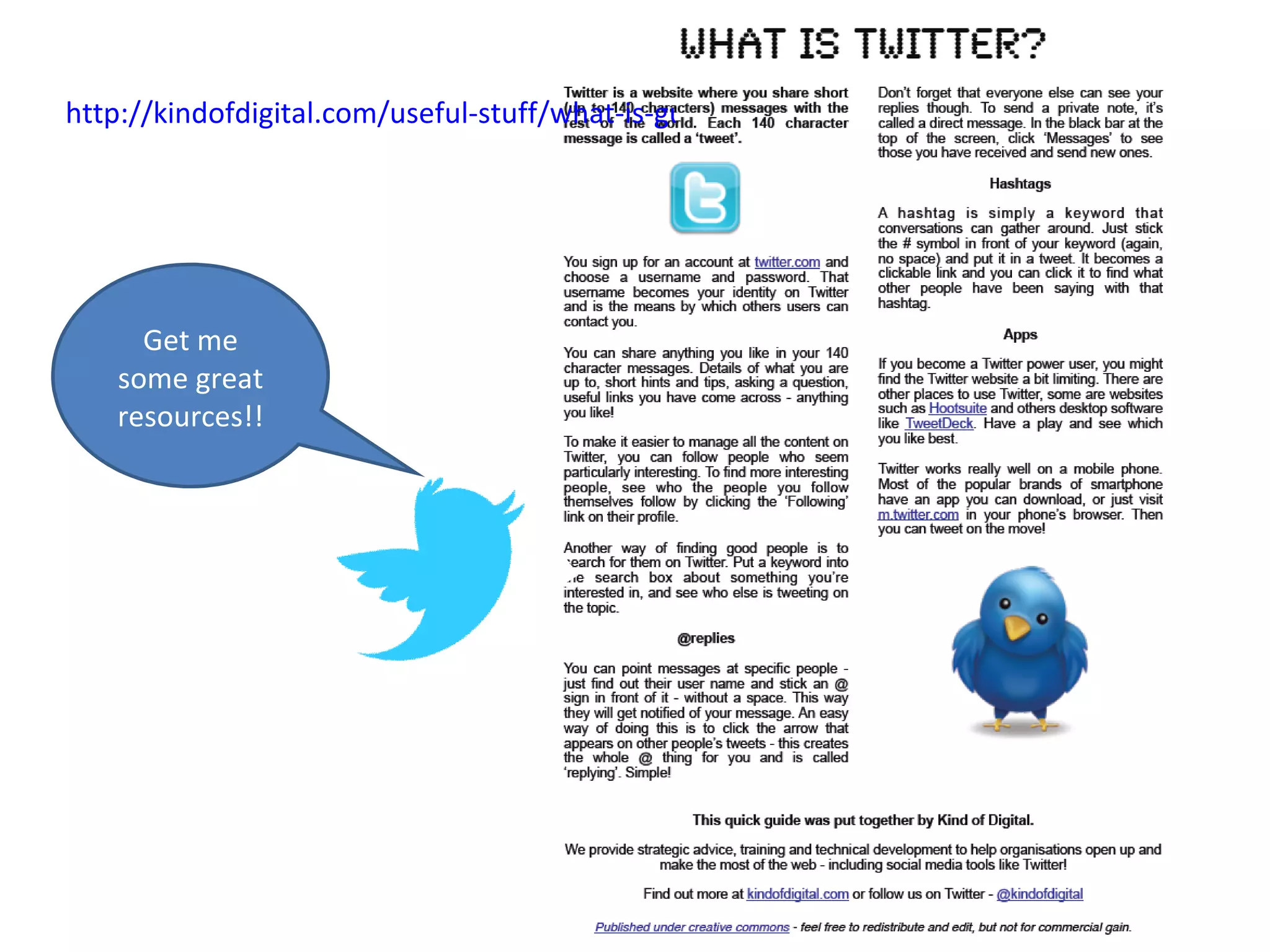
http://kindofdigital.com/useful-stuff/what-is-guides/ Get me some great resources!!
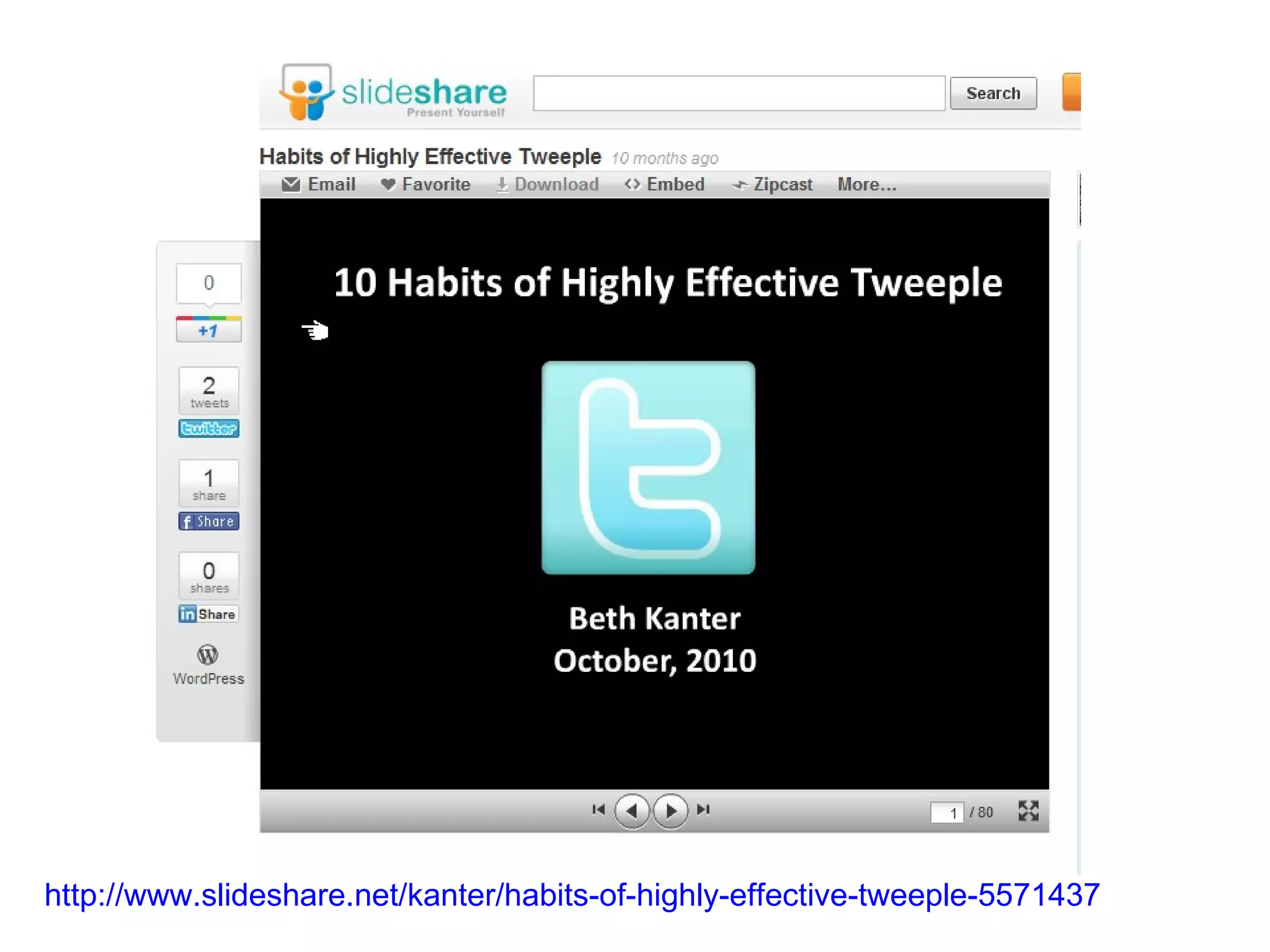
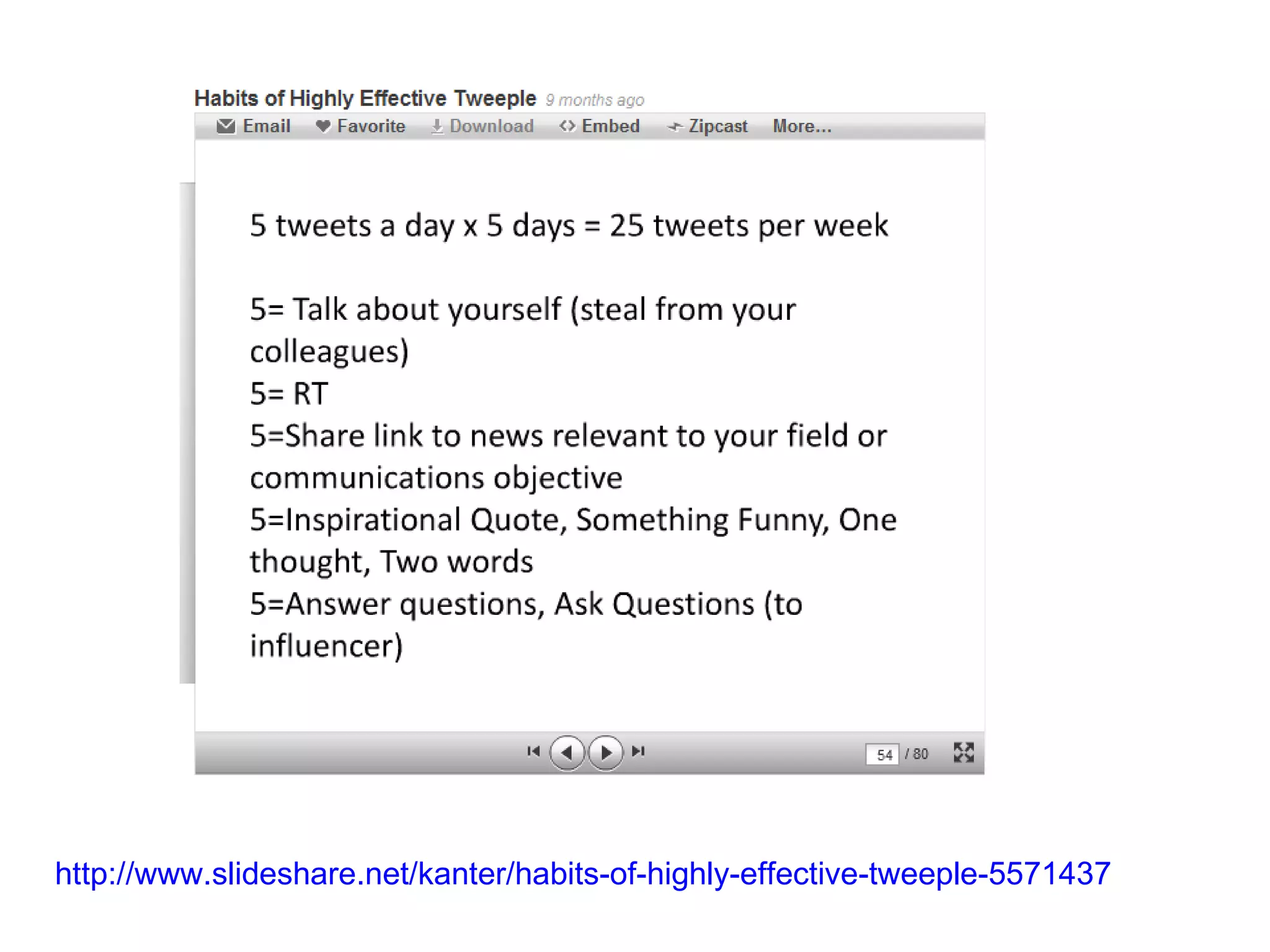
http://www.slideshare.net/kanter/habits-of-highly-effective-tweeple-5571437
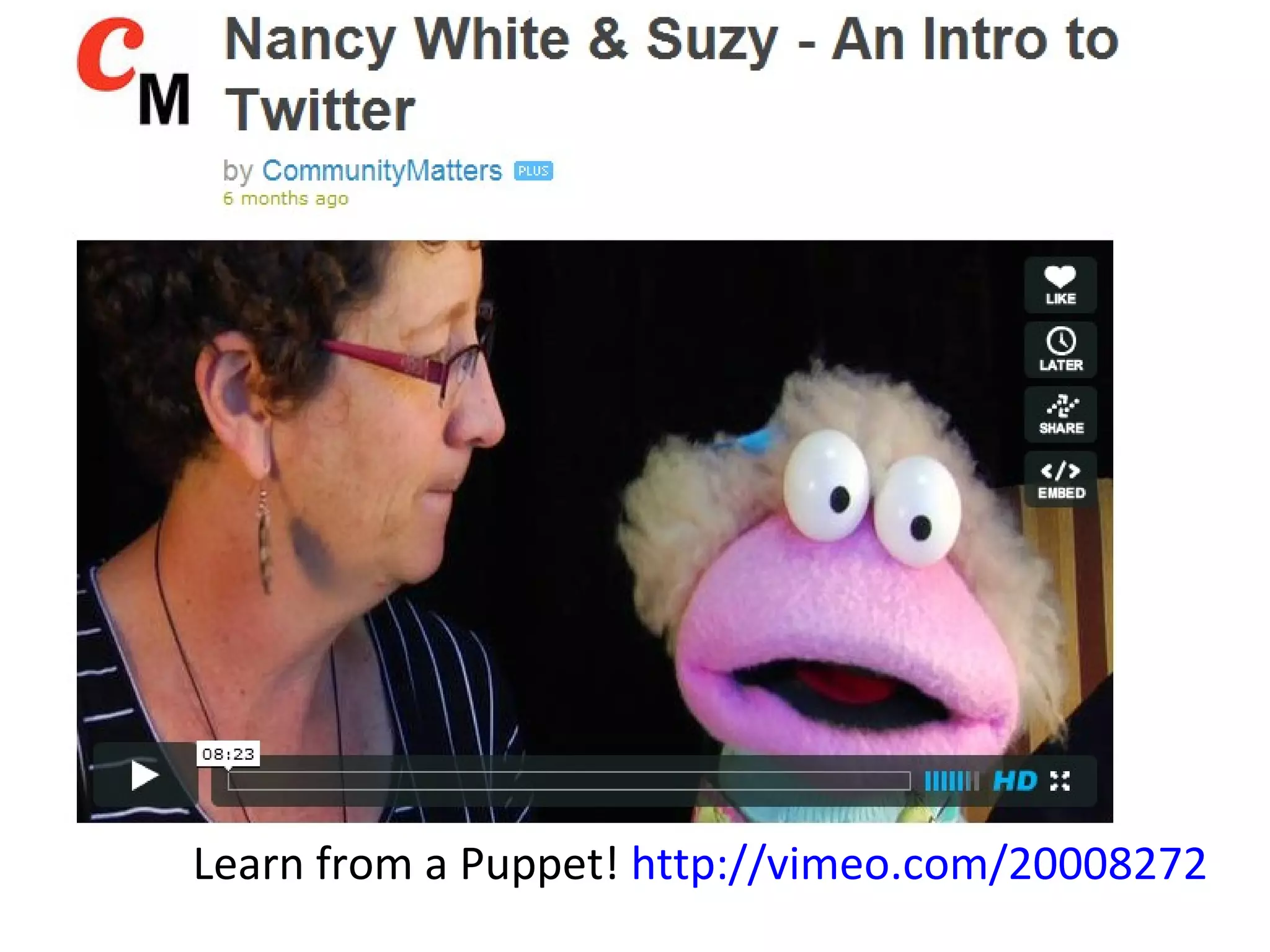
Learn from a Puppet!  http://vimeo.com/20008272
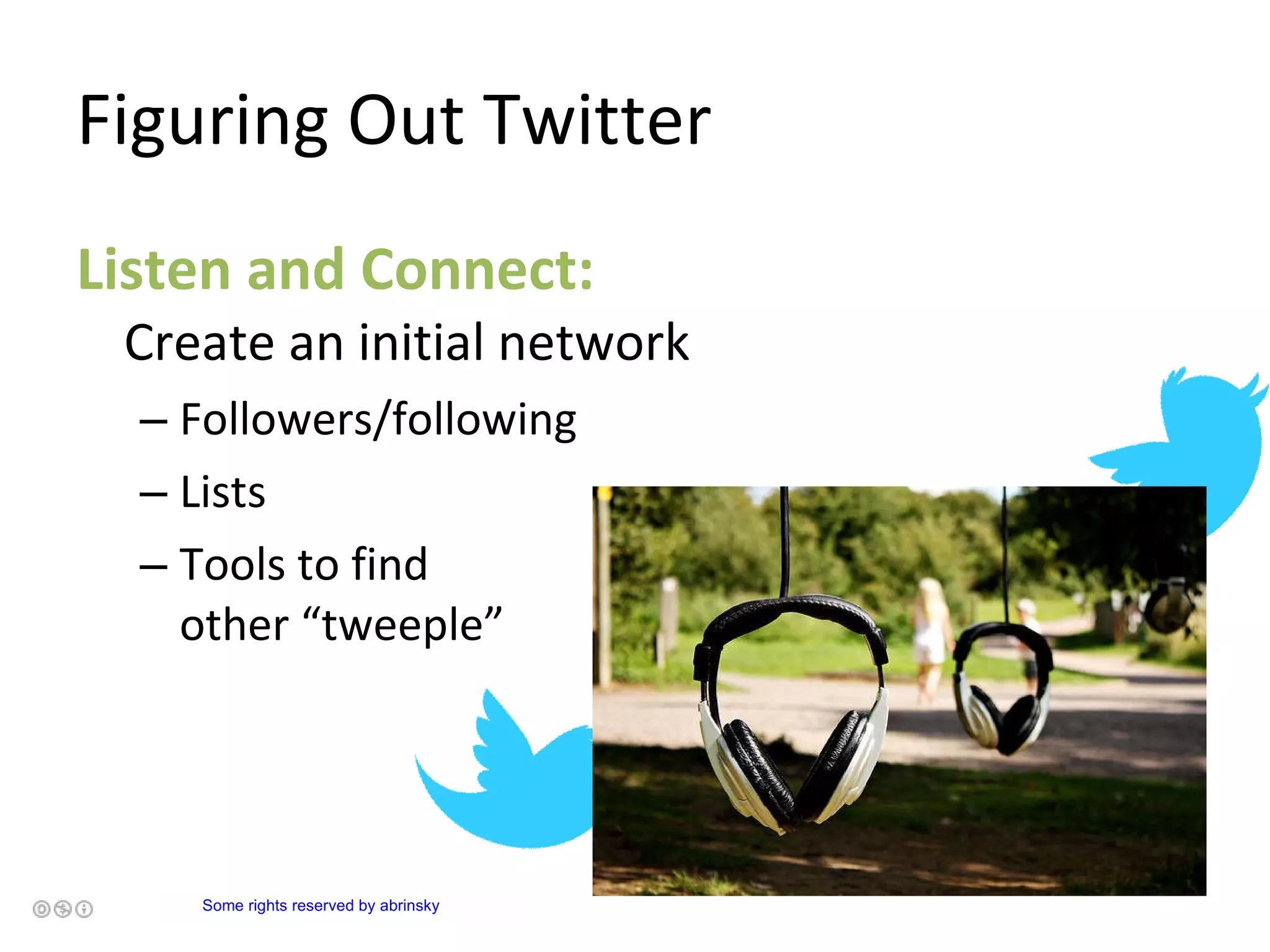
Figuring Out Twitter Listen and Connect:  Create an initial network Followers/following Lists Tools to find  other “tweeple”           Some rights reserved  by  abrinsky
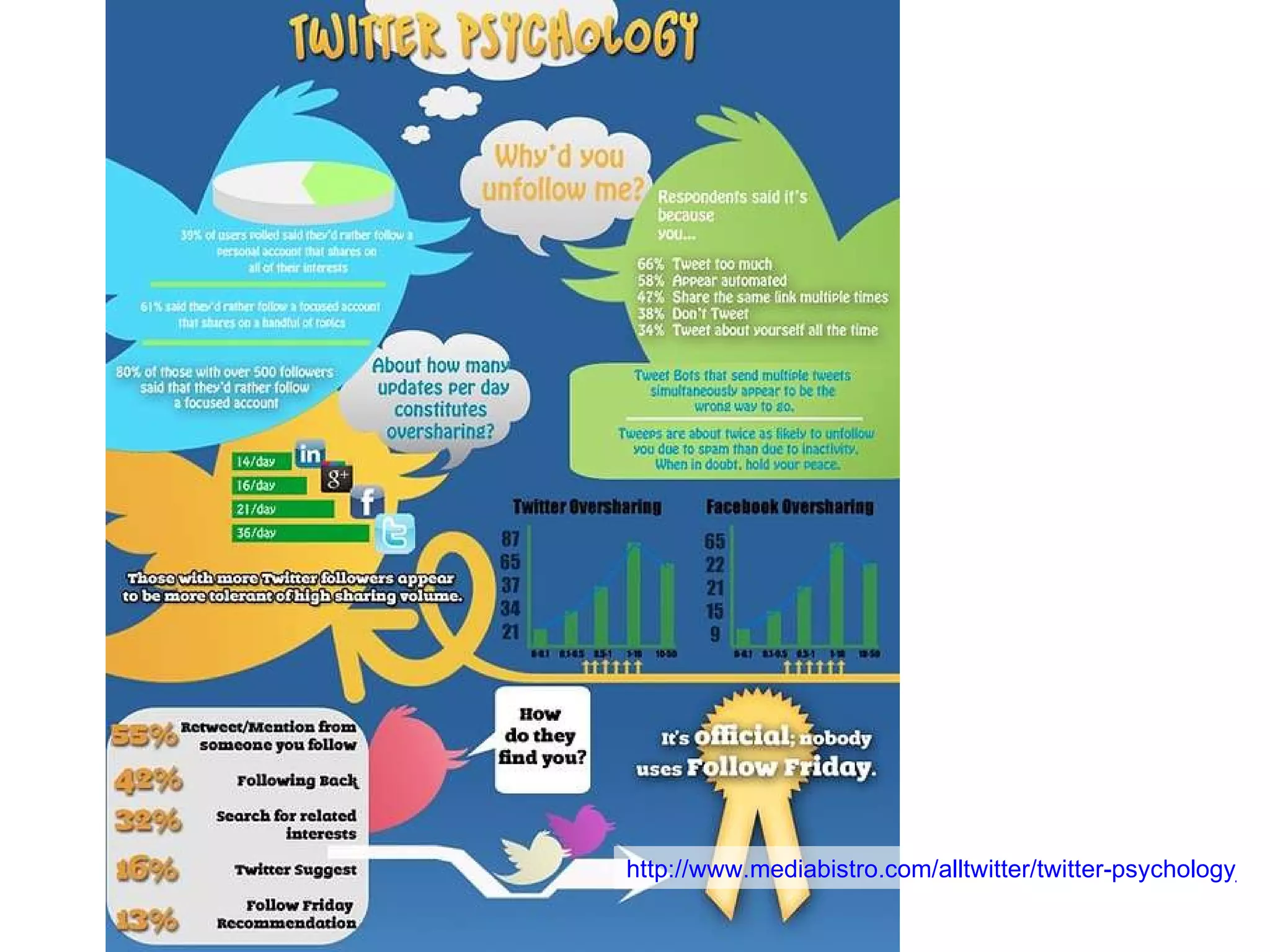
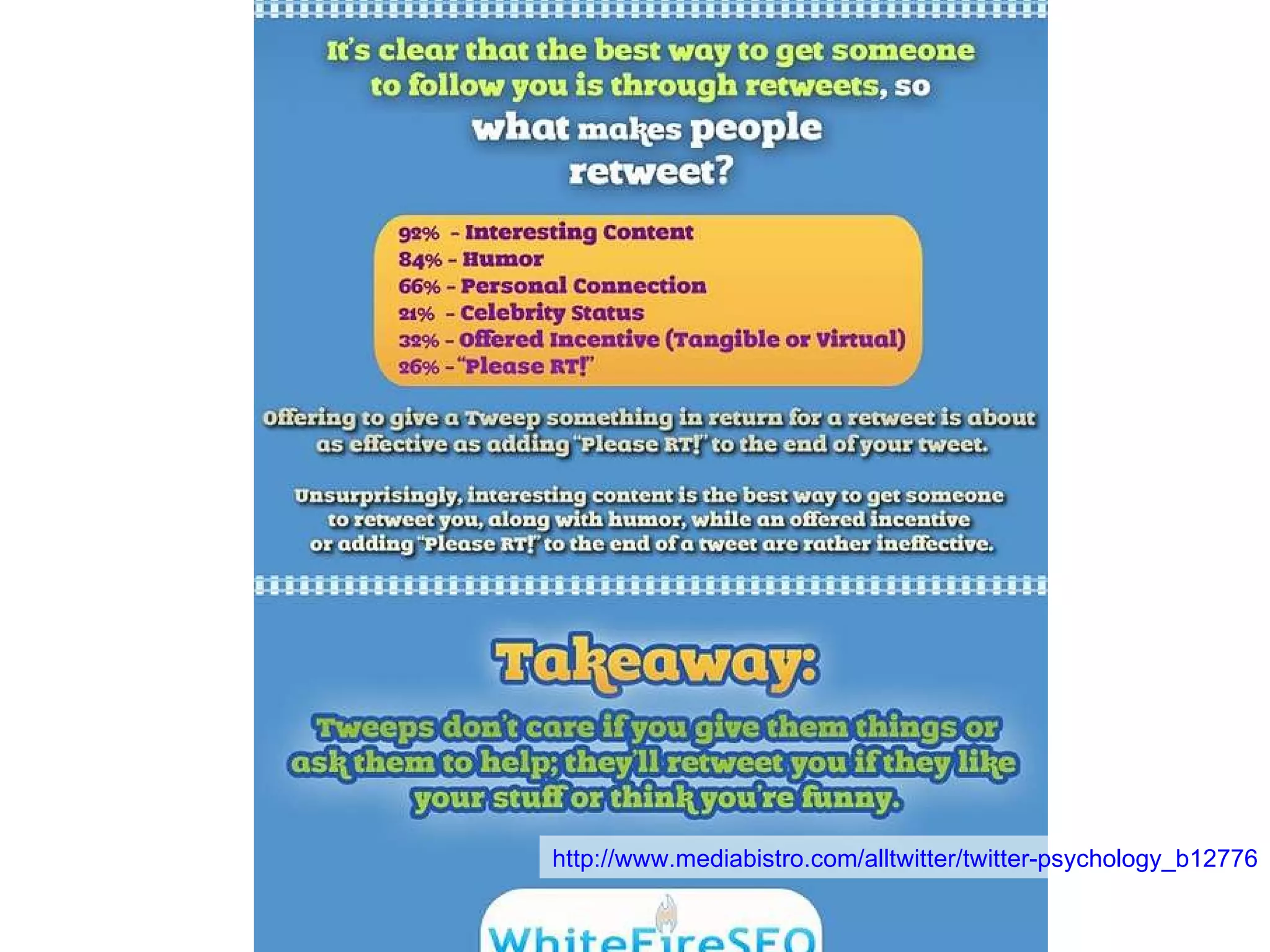
http://www.mediabistro.com/alltwitter/twitter-psychology_b12776
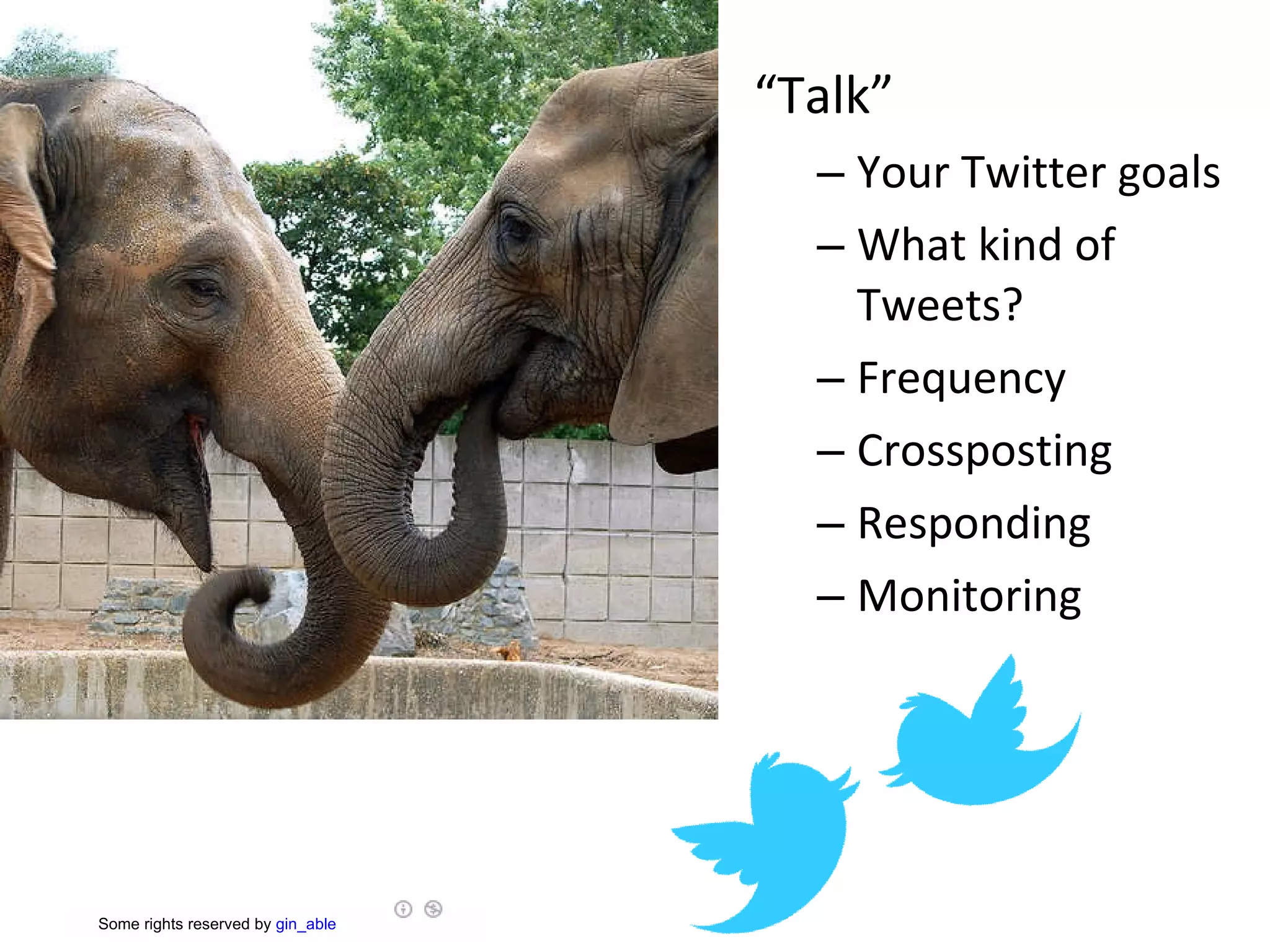
“ Talk” Your Twitter goals What kind of Tweets?  Frequency Crossposting Responding Monitoring        Some rights reserved  by  gin_able
http://www.mediabistro.com/alltwitter/twitter-psychology_b12776
A Few More  Application Realities Who  do you want to interact with and how much do they/are they willing to use the tool you are considering? Because this is online, how does it represent you? ( Identity )
Safe-Fail /15 Minute Experiments      Some rights reserved  by  Josef Dunne   http://www.flickr.com/photos/josefdunne/4319306255/sizes/z/in/photostream/
http://www.slideshare.net/kanter/habits-of-highly-effective-tweeple-5571437
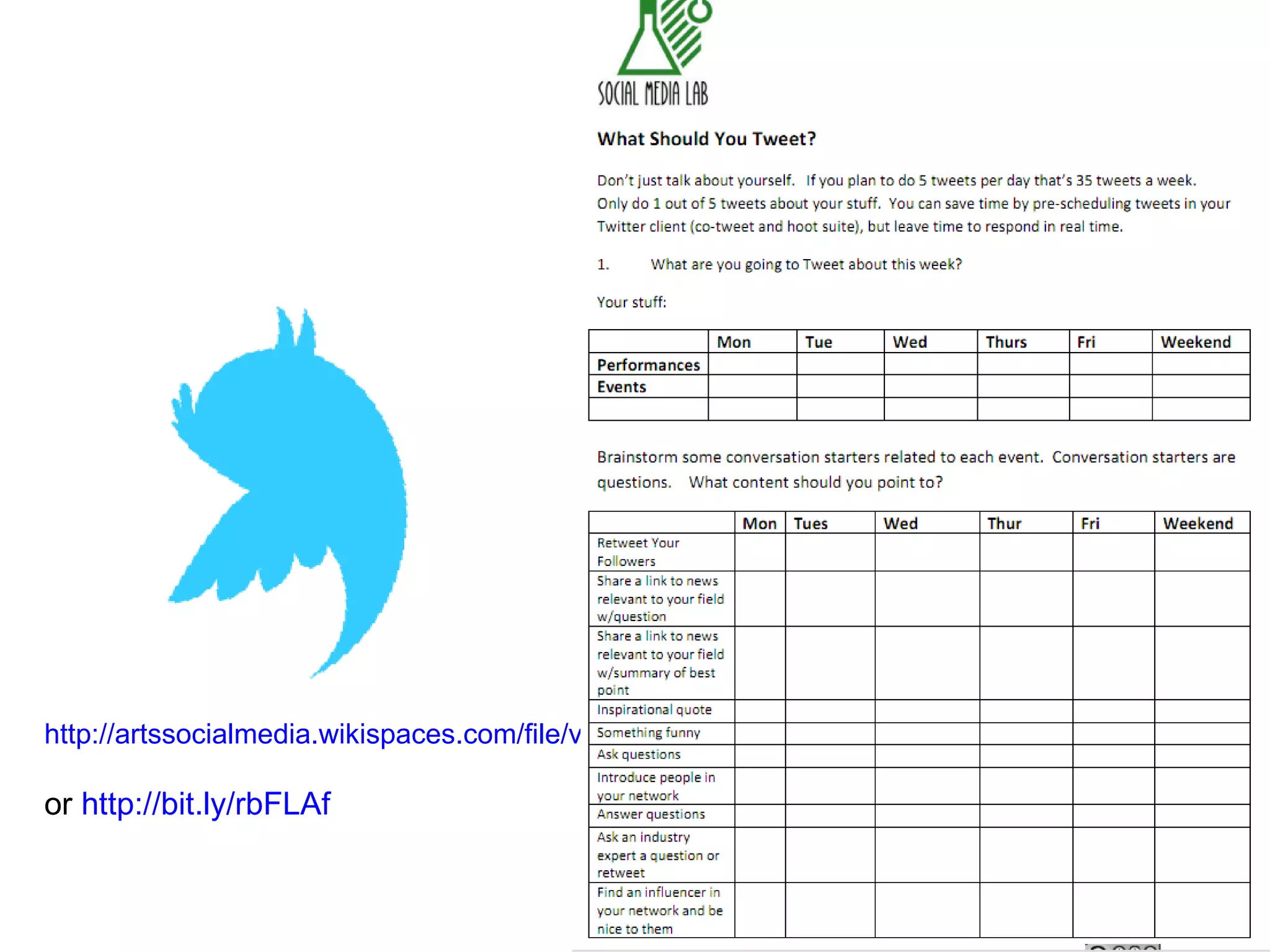
http://artssocialmedia.wikispaces.com/file/view/what%20to%20tweet%20worksheet.pdf   or  http://bit.ly/rbFLAf
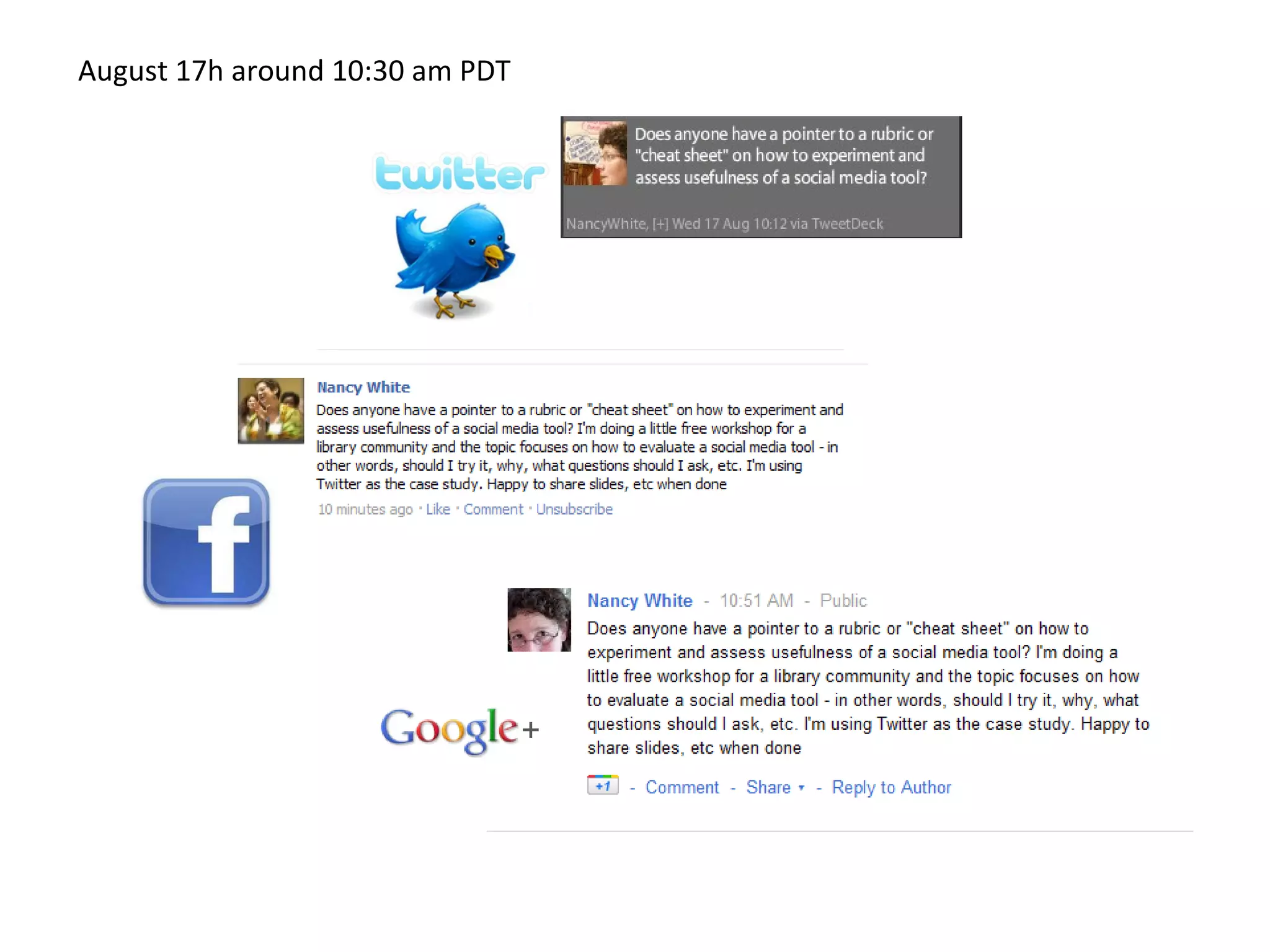
August 17h around 10:30 am PDT


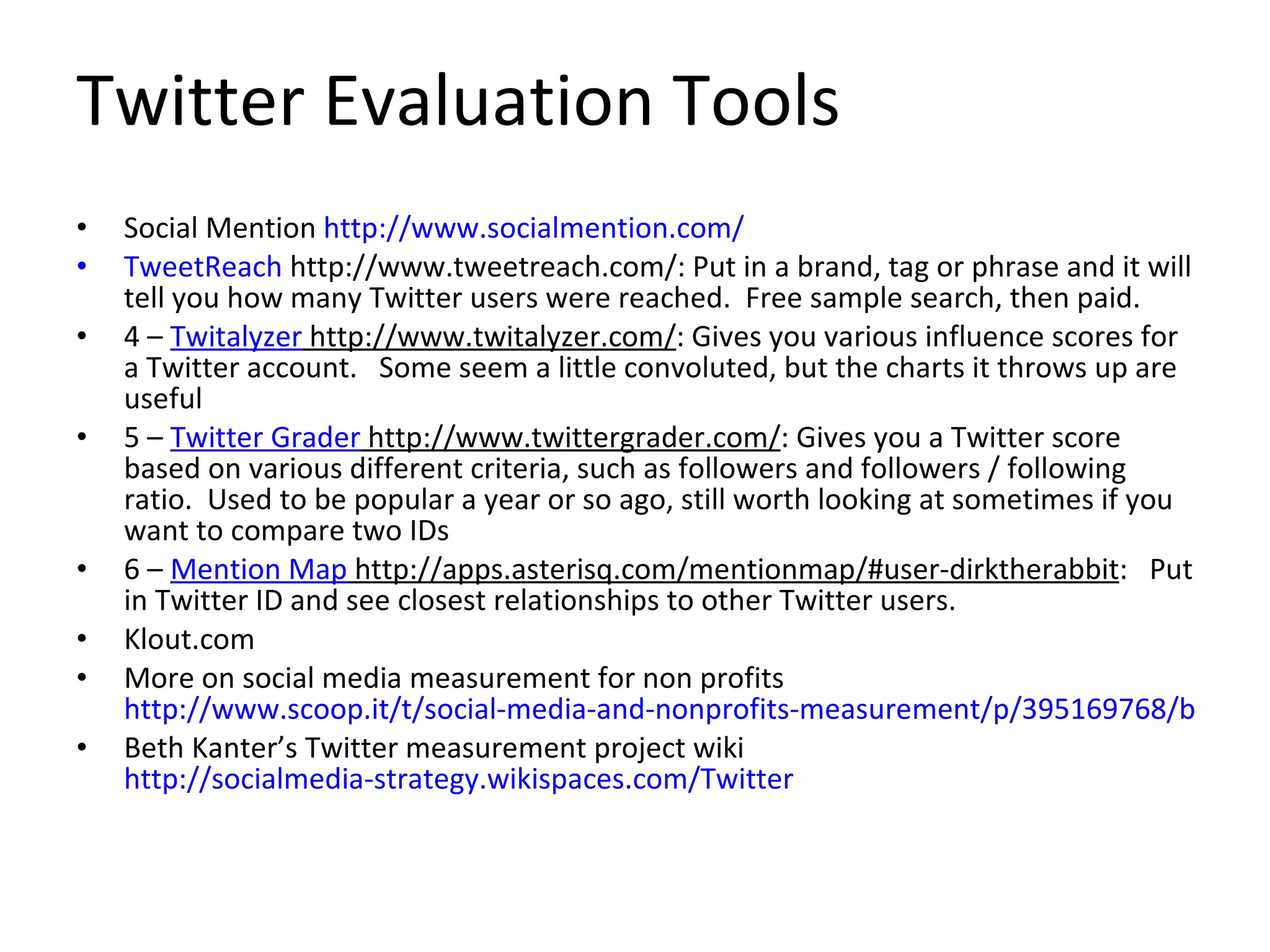
Twitter Evaluation Tools Social Mention  http://www.socialmention.com/ TweetReach  http://www.tweetreach.com/: Put in a brand, tag or phrase and it will tell you how many Twitter users were reached.  Free sample search, then paid. 4 –  Twitalyzer  http://www.twitalyzer.com/ : Gives you various influence scores for a Twitter account.   Some seem a little convoluted, but the charts it throws up are useful 5 –  Twitter Grader  http://www.twittergrader.com/ : Gives you a Twitter score based on various different criteria, such as followers and followers / following ratio.  Used to be popular a year or so ago, still worth looking at sometimes if you want to compare two IDs 6 –  Mention Map  http://apps.asterisq.com/mentionmap/#user-dirktherabbit :   Put in Twitter ID and see closest relationships to other Twitter users.  Klout.com More on social media measurement for non profits  http://www.scoop.it/t/social-media-and-nonprofits-measurement/p/395169768/bloom-s-taxonomy-and-ipad-apps-langwitches-blog Beth Kanter’s Twitter measurement project wiki  http://socialmedia-strategy.wikispaces.com/Twitter
So what did you learn? How do you measure your  success ? How do you learn from any  failures ?
What’s next?
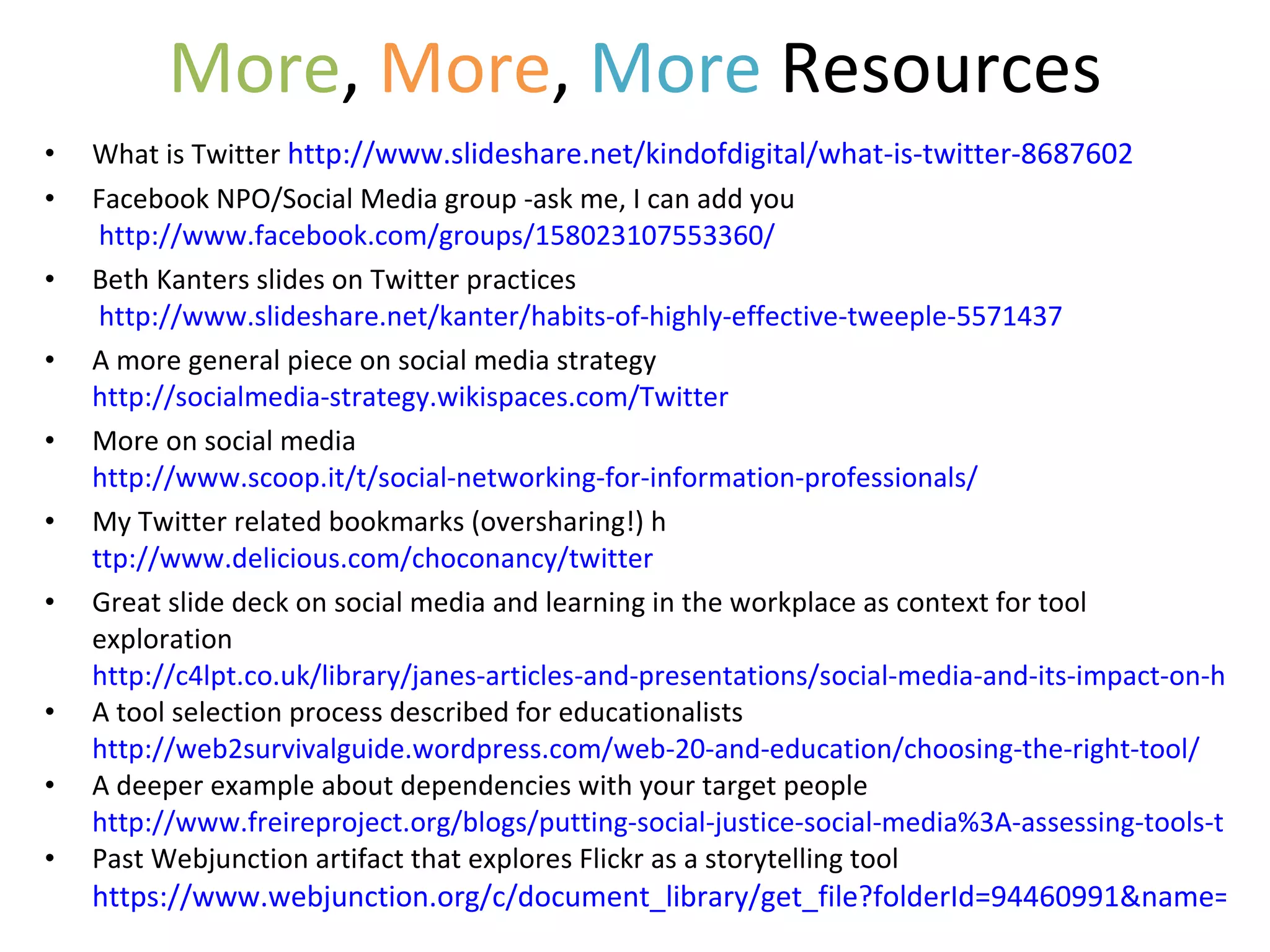
More ,  More ,  More  Resources What is Twitter  http://www.slideshare.net/kindofdigital/what-is-twitter-8687602 Facebook NPO/Social Media group -ask me, I can add you   http://www.facebook.com/groups/158023107553360/ Beth Kanters slides on Twitter practices   http://www.slideshare.net/kanter/habits-of-highly-effective-tweeple-5571437 A more general piece on social media strategy  http://socialmedia-strategy.wikispaces.com/Twitter More on social media  http://www.scoop.it/t/social-networking-for-information-professionals/ My Twitter related bookmarks (oversharing!) h ttp://www.delicious.com/choconancy/twitter Great slide deck on social media and learning in the workplace as context for tool exploration  http://c4lpt.co.uk/library/janes-articles-and-presentations/social-media-and-its-impact-on-how-we-learn-in-the-workplace-2/ A tool selection process described for educationalists  http://web2survivalguide.wordpress.com/web-20-and-education/choosing-the-right-tool/ A deeper example about dependencies with your target people http://www.freireproject.org/blogs/putting-social-justice-social-media%3A-assessing-tools-trends Past Webjunction artifact that explores Flickr as a storytelling tool  https://www.webjunction.org/c/document_library/get_file?folderId=94460991&name=DLFE-25280001.pdf

Twittering or Frittering: assessing the value of a social media tool in your life

  • 1.
    Twittering: frittering orfabulous? Or…Twitter as a case study for assessing the usefulness of a social media tool in YOUR work context. Nancy White Full Circle Associates http://www.fullcirc.com
  • 2.
    With seemingly endless opportunities to try yet another social media tool, how do we assess the value of any one of them in our work ?
  • 3.
    Let’s look at as a case study to experiment and develop practical social media tool assessment and adoption approaches .
  • 4.
    A couple ofways into the topic… Item Possible Measures Comments Purpose: WHY use it Supports identified organizational/personal goals Or…simply an experiment? (that’s ok!) Target “audience” – who do you want to engage with Value creation (how you’d identify/measure) – supports work Getting Started: Find/install Ease of download (if applicable) - Product and related apps, etc. Successful registration (personal? org?) Firewall issues Device compatibility issues (PC, Mac, mobile…) Getting Started: Figuring it out Useful vendor materials/examples Ease of experimentation Getting Started: Who can I learn from/with Someone around to show me (my favorite!) Active user community Findable case studies/examples Available practice tips Experimentation Small “Safe – Fail” experiments, iterate (Beth Kanter’s “15 minute test”) Workflow Am I really integrating it (reality check) How it integrates or competes w/ my current tools/practices/workflow (ready for uncertainty?) How it fits with time/attention availability Dependencies & risks Who needs to be involved? Willingness of intended target audience? Viruses, against organizational policy, risk of saying something stupid, other risks, etc.
  • 5.
    Item Possible MeasuresComments Purpose: WHY use it Supports identified organizational/personal goals Or…simply an experiment? (that’s ok!) Target “audience” – who do you want to engage with Value creation (how you’d identify/measure) – supports work Getting Started: Find/install Ease of download (if applicable) - Product and related apps, etc. Successful registration (personal? org?) Firewall issues Device compatibility issues (PC, Mac, mobile…) Getting Started: Figuring it out Useful vendor materials/examples Ease of experimentation Getting Started: Who can I learn from/with Someone around to show me (my favorite!) Active user community Findable case studies/examples Available practice tips Experimentation Small “Safe – Fail” experiments, iterate (Beth Kanter’s “15 minute test”) Workflow Am I really integrating it (reality check) How it integrates or competes w/ my current tools/practices/workflow (ready for uncertainty?) How it fits with time/attention availability Dependencies & risks Who needs to be involved? Willingness of intended target audience? Viruses, against organizational policy, risk of saying something stupid, other risks, etc.
  • 6.
    Beth Kanter’s 7 Questions What is my objective for using this tool? What benefit? What is the work task that I want to make more effective or efficient? How does it fit into my workflow What are the tool’s features ? Does it support the above?  15 minute test: Can I figure it out in 15 minutes or find someone to help me figure it out? What is a use-case that I can test over the next week that won't be too time consuming? After using the tool for 10-15 minutes every day, what are the benefits ? What is driving me crazy? How does it compare to other tools I'm using for the same purpose? Enhance or replace? If there is value, can I make a commitment to using it?
  • 7.
    Purpose I wantto accomplish … … at the a)the individual, b)interpersonal, c) organizational, or d) societal level . I want to engage/interact with … Twitter might help by… This aligns with my other goals and activities in the following ways…
  • 8.
    Item Possible MeasuresComments Purpose: WHY use it Supports identified organizational/personal goals Or…simply an experiment? (that’s ok!) Target “audience” – who do you want to engage with Value creation (how you’d identify/measure) – supports real work Decision – personal or organizational account? I’ll start w/ personal. Organization says yes/no… I’ll start personal and cross that bridge later I want to see if I can better connect w/ librarians like me. Getting Started: Find/install Ease of download (if applicable) - Product and related apps, etc. Successful registration (personal? org?) Firewall issues Device compatibility issues (PC, Mac, mobile…) Getting Started: Figuring it out Useful vendor materials/examples Ease of experimentation Getting Started: Who can I learn from/with Someone around to show me (my favorite!) Active user community Findable case studies/examples Available practice tips Experimentation Small “Safe – Fail” experiments, iterate (Beth Kanter’s “15 minute test”) Workflow Am I really integrating it (reality check) How it integrates or competes w/ my current tools/practices/workflow (ready for uncertainty?) How it fits with time/attention availability Dependencies & risks Who needs to be involved? Willingness of intended target audience? Viruses, against organizational policy, risk of saying something stupid, other risks, etc.
  • 9.
    Installing TwitterIs this OK in my IT organization? Firewalls? Does it replicate, replace or fill a tool gap?   Some rights reserved  by  Eleaf http://www.flickr.com/photos/eleaf/2536358399/sizes/m/in/photostream/
  • 10.
    Item Possible MeasuresComments Purpose: WHY use it Supports identified organizational/personal goals Or…simply an experiment? (that’s ok!) Target “audience” – who do you want to engage with Value creation (how you’d identify/measure) – supports real work Decision – personal or organizational account? I’ll start w/ personal. Organization says yes/no… I’ll start personal and cross that bridge later I want to see if I can better connect w/ librarians like me. Getting Started: Find/install Ease of download (if applicable) - Product and related apps, etc. Successful registration (personal? org?) Firewall issues Device compatibility issues (PC, Mac, mobile…) I’m starting only w/ web client but from what I hear, the downloaded clients make the tool more useable and useful! How is this different from Facebook? Getting Started: Figuring it out Useful vendor materials/examples Ease of experimentation Getting Started: Who can I learn from/with Someone around to show me (my favorite!) Active user community Findable case studies/examples Available practice tips Experimentation Small “Safe – Fail” experiments, iterate (Beth Kanter’s “15 minute test”) Workflow Am I really integrating it (reality check) How it integrates or competes w/ my current tools/practices/workflow (ready for uncertainty?) How it fits with time/attention availability Dependencies & risks Who needs to be involved? Willingness of intended target audience? Viruses, against organizational policy, risk of saying something stupid, other risks, etc.
  • 11.
    Make an accountat http://www.twitter.com Personal or organizational? Set up Twitter home page Bio? Logos? How to do it well? Tips? Twitter applications and clients Tweetdeck Hootsuite Facebook Useful resources (more at end ) Using Twitter http://www.flickr.com/photos/beardenb/59207597/
  • 12.
  • 13.
  • 14.
    Learn from aPuppet! http://vimeo.com/20008272
  • 15.
    Figuring Out TwitterListen and Connect: Create an initial network Followers/following Lists Tools to find other “tweeple”   Some rights reserved  by  abrinsky
  • 16.
  • 17.
    “ Talk” YourTwitter goals What kind of Tweets? Frequency Crossposting Responding Monitoring   Some rights reserved  by  gin_able
  • 18.
  • 19.
    A Few More Application Realities Who do you want to interact with and how much do they/are they willing to use the tool you are considering? Because this is online, how does it represent you? ( Identity )
  • 20.
    Safe-Fail /15 MinuteExperiments   Some rights reserved  by  Josef Dunne http://www.flickr.com/photos/josefdunne/4319306255/sizes/z/in/photostream/
  • 21.
  • 22.
  • 23.
    August 17h around10:30 am PDT
  • 24.
  • 25.
  • 26.
  • 27.
    Twitter Evaluation ToolsSocial Mention http://www.socialmention.com/ TweetReach http://www.tweetreach.com/: Put in a brand, tag or phrase and it will tell you how many Twitter users were reached.  Free sample search, then paid. 4 –  Twitalyzer http://www.twitalyzer.com/ : Gives you various influence scores for a Twitter account.   Some seem a little convoluted, but the charts it throws up are useful 5 –  Twitter Grader http://www.twittergrader.com/ : Gives you a Twitter score based on various different criteria, such as followers and followers / following ratio.  Used to be popular a year or so ago, still worth looking at sometimes if you want to compare two IDs 6 –  Mention Map http://apps.asterisq.com/mentionmap/#user-dirktherabbit :  Put in Twitter ID and see closest relationships to other Twitter users. Klout.com More on social media measurement for non profits http://www.scoop.it/t/social-media-and-nonprofits-measurement/p/395169768/bloom-s-taxonomy-and-ipad-apps-langwitches-blog Beth Kanter’s Twitter measurement project wiki http://socialmedia-strategy.wikispaces.com/Twitter
  • 28.
    So what didyou learn? How do you measure your success ? How do you learn from any failures ?
  • 29.
  • 30.
    More , More , More Resources What is Twitter http://www.slideshare.net/kindofdigital/what-is-twitter-8687602 Facebook NPO/Social Media group -ask me, I can add you http://www.facebook.com/groups/158023107553360/ Beth Kanters slides on Twitter practices http://www.slideshare.net/kanter/habits-of-highly-effective-tweeple-5571437 A more general piece on social media strategy http://socialmedia-strategy.wikispaces.com/Twitter More on social media http://www.scoop.it/t/social-networking-for-information-professionals/ My Twitter related bookmarks (oversharing!) h ttp://www.delicious.com/choconancy/twitter Great slide deck on social media and learning in the workplace as context for tool exploration http://c4lpt.co.uk/library/janes-articles-and-presentations/social-media-and-its-impact-on-how-we-learn-in-the-workplace-2/ A tool selection process described for educationalists http://web2survivalguide.wordpress.com/web-20-and-education/choosing-the-right-tool/ A deeper example about dependencies with your target people http://www.freireproject.org/blogs/putting-social-justice-social-media%3A-assessing-tools-trends Past Webjunction artifact that explores Flickr as a storytelling tool https://www.webjunction.org/c/document_library/get_file?folderId=94460991&name=DLFE-25280001.pdf

Editor's Notes

  • #5 We all learn and practice in different ways, so I want to show a couple of examples… rather than just one way to assess a social media tool like Twitter.
  • #6 We can look at this from the perspective of a rubric… a set of criteria to assess an activity. I’ll show you a second one in a minute – one that groups questions into areas, and a terrific 7 question set from Beth Kanter. You will find similarities but you, personally, may prefer one form over the other. Lets take a look at the grouped one here. We always start with purpose. Why would you explore a new tool… what do you want to accomplish. Most of us won’t experiment just for experimentation’s sake. (However, make sure you make friends with people who DO do this. They are great explorers to find out what is up and coming!) Then we progress through technical, practice and assessment issues. Now lets look at a second approach…
  • #7 You can see Beth’s list starts with the same sort of “purpose” question. The table gives you something a bit more analytical. I like Beth’s list because it is more informal and VERY personal. So if you are exploring a tool for yourself, you might prefer this tool. If you are evaluating for your library or organization, you might prefer the chart. Whatever works!
  • #8 Let’s start with the purpose question as it is shared in both approaches. Throughout this webinar, I’ll be asking YOU these questions. You can type in the chat box or grab the mic to share your ideas. Don’t worry if something sounds half-baked. That’s always a great place to start! See a similar process described for educationalists and choosing social media tools http://web2survivalguide.wordpress.com/web-20-and-education/choosing-the-right-tool/ For a deeper example about dependencies with your target people, see this interesting article on the social justice implications of social media tools http://www.freireproject.org/blogs/putting-social-justice-social-media%3A-assessing-tools-trends
  • #9 If you were using a table like this, you would start filling in the comments side.
  • #10 http://www.flickr.com/photos/eleaf/2536358399/sizes/m/in/photostream/ Next we get into the technical fiddly bits. Since most of you are librarians, there are always organizational questions to ask. But it is also important to examine the tool in the context of YOUR existing tool set. (I like to call this my “personal tool configuration!” All the tools I use. Have you ever listed yours out? It can be amazing to consider…)
  • #11 What sort of “technical fiddly bits” do you run into? Worry most about?
  • #12 http://www.flickr.com/photos/beardenb/59207597/ Next come the bits about USING the tool. Let’s talk about some of these… I personally enjoy little getting started checklists. Speaking of checklists, there are tons of existing resources you can tap. From a quick Google search or from recommendations from friends and colleagues…
  • #13 I like to draw on what others have already learned and shared. That saves me a lot of time.
  • #14 Here is yet another resource from Beth Kanter on effective Twitter habits.
  • #15 Here is a very off the wall video introducing Twitter practices… yes, with a puppet.
  • #16 http://www.flickr.com/photos/abrinsky/3754792367/sizes/z/in/photostream/ As with most social media tools, we can think of the listening and talking sides. Start with the listening. http://bethkanter.wikispaces.com/Listening+101
  • #17 http://visualoop.tumblr.com/post/9060286920/the-psychology-of-twitter
  • #18 http://www.flickr.com/photos/ginable/325235488/sizes/m/in/photostream/
  • #19 http://www.mediabistro.com/alltwitter/twitter-psychology_b12776
  • #21 http://www.flickr.com/photos/josefdunne/4319306255/sizes/z/in/photostream/
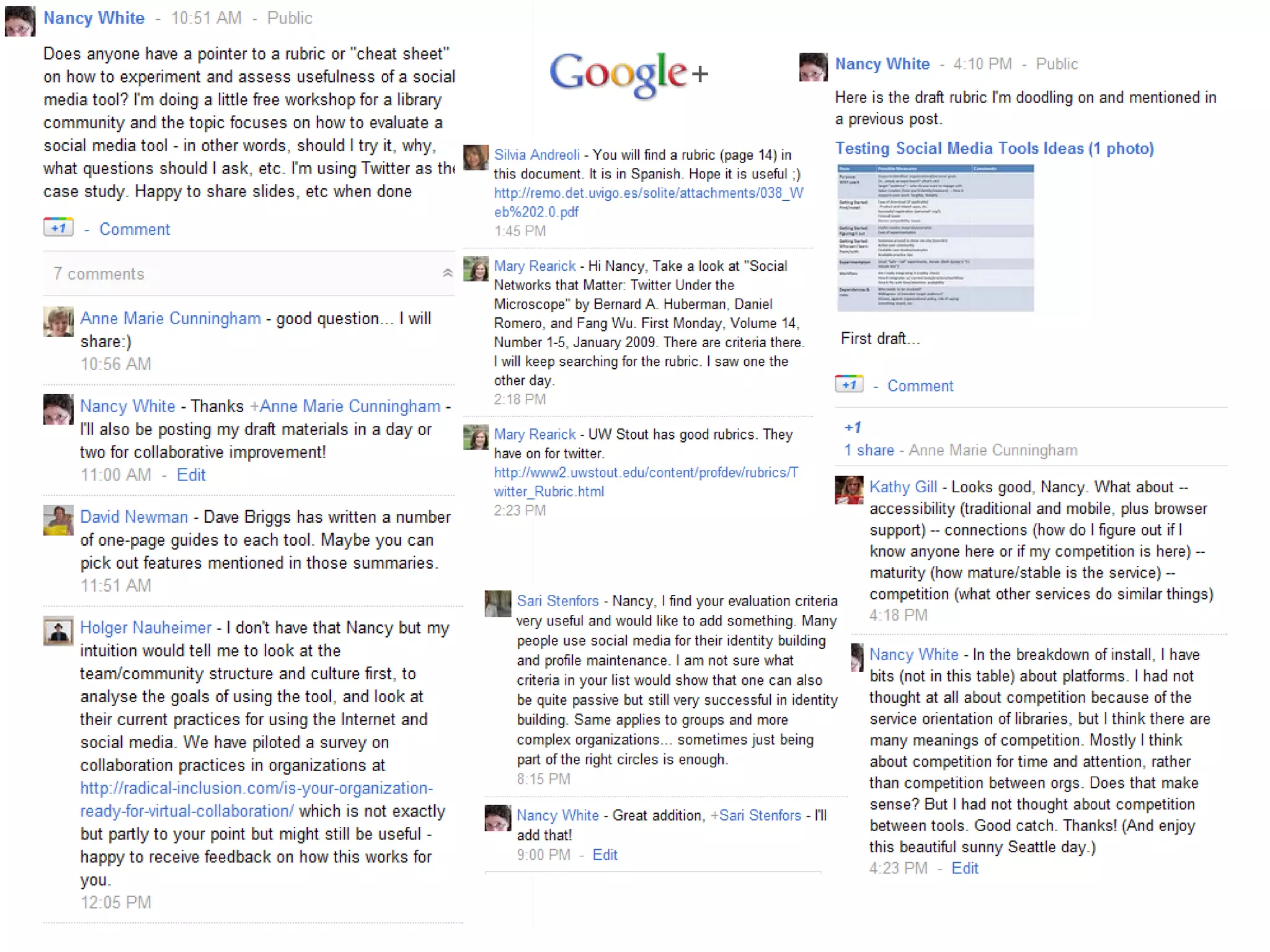
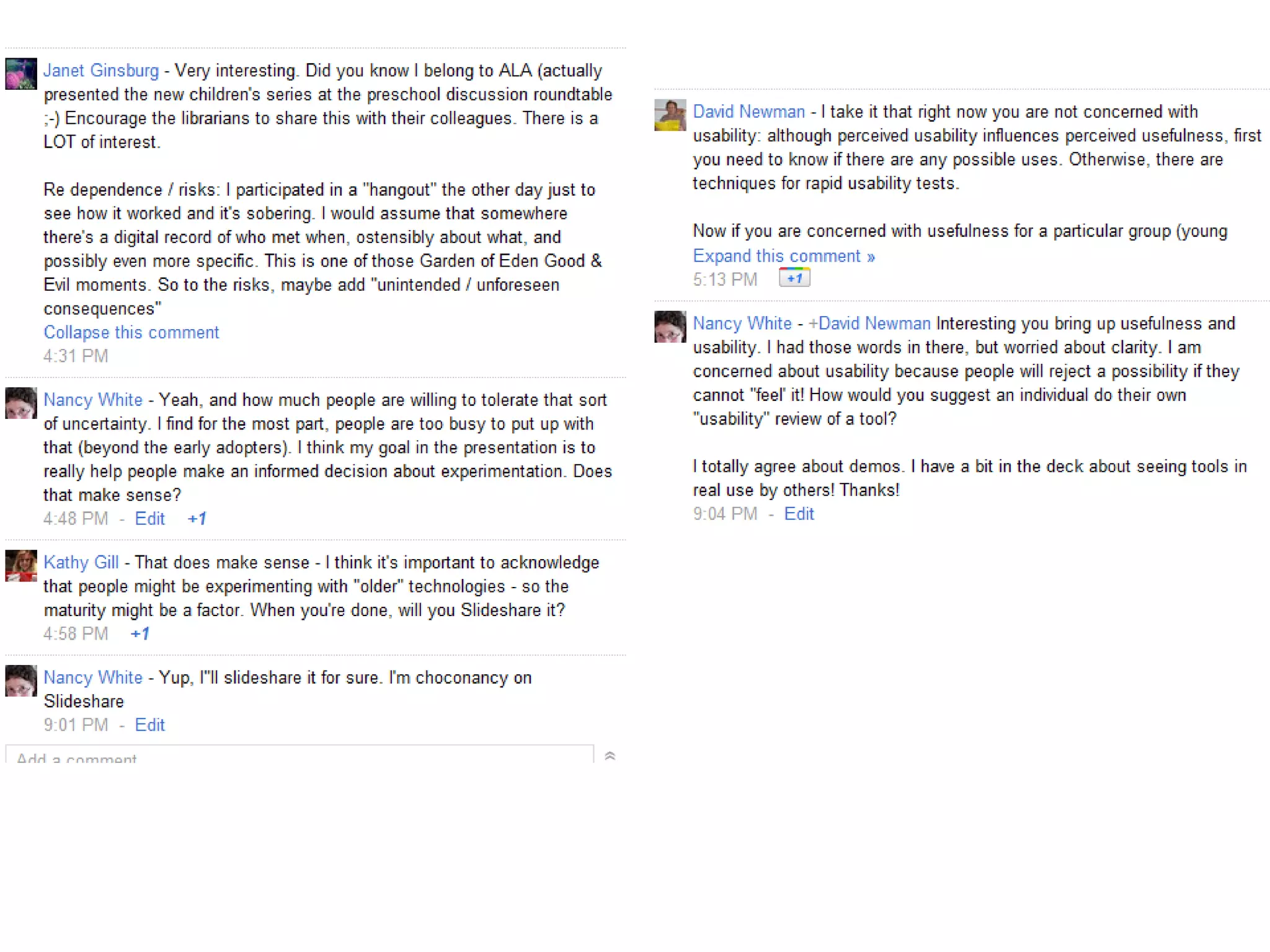
  • #24 Here is a little experiment I did to prepare for this webinar… (I’ll tell you the story)
  • #28 http://www.scoop.it/t/social-media-and-nonprofits-measurement/p/381840650/hootsuite-blog-social-media-dashboard-measuring-social-media-roi-hootsuite-white-paper-series http://liesdamnedliesstatistics.com/2010/04/evaluation.html
  • #29 Debriefing is key to successful and useful experimentation.
  • #30 What is one social media experiment you might want to try?