Download to read offline
![TV SystemsRevolution AnalogyThe nature of digital technology allows it to cram lots of those 1s and 0s together into the same space an analog signal uses. Like your button-rich phone at work or your 200-plus digital cable service, that means more features can be crammed into the digital signal.2011Hossam A.ZeinKnow How…!?2/8/2011<br />Analog. Digital. What’s the Difference? Analog phone lines. Analog signals. Digital security. Digital PBX. Analog-to-digital adapters. What does it all mean? In the telecom world, understanding analog versus digital isn't as simple as comparing one technology to another. It depends on what product—and in some cases, which product feature—you happen to be talking about. Analog at a glanceAs a technology, analog is the process of taking an audio or video signal (in most cases, the human voice) and translating it into electronic pulses. Digital on the other hand is breaking the signal into a binary format where the audio or video data is represented by a series of \"
1\"
s and \"
0\"
s. Simple enough when it's the device—analog or digital phone, fax, modem, … that does all the converting for User. Is one technology better than the other? Analog technology has been around for decades. It's not that complicated a concept and it's fairly inexpensive to use. That's why we can buy a $20 telephone or watch a few TV stations with the use of a well-placed antenna. The trouble is, analog signals have size limitations as to how much data they can carry. So with our $20 phones and inexpensive TVs, we only get so much. Enter digital The newer of the two, digital technology breaks your voice (or television) signal into binary code—a series of 1s and 0s—transfers it to the other end where another device (phone, modem or TV) takes all the numbers and reassembles them into the original signal. The beauty of digital is that it knows what it should be when it reaches the end of the transmission. That way, it can correct any errors that may have occurred in the data transfer. What does all that mean to you? Clarity. In most cases, you'll get distortion-free conversations and clearer TV pictures.Advantage: You'll get more, too. The nature of digital technology allows it to cram lots of those 1s and 0s together into the same space an analog signal uses. Like your button-rich phone at work or your 200-plus digital cable service, that means more features can be crammed into the digital signal.Compare your simple home phone with the one you may have at the office. At home you have mute, redial, and maybe a few speed-dial buttons. Your phone at work is loaded with function keys, call transfer buttons, and even voice mail. Now, before audiophiles start yelling at me through their PC screens, yes, analog can deliver better sound quality than digital…for now. Digital offers better clarity, but analog gives you richer quality. But like any new technology, digital has a few shortcomings. Since devices are constantly translating, coding, and reassembling your voice, you won't get the same rich sound quality as you do with analog. And for now, digital is still relatively expensive. But slowly, digital—like the VCR or the CD—is coming down in cost and coming out in everything from cell phones to satellite dishes. When you're shopping in the telecom world, you often see products touted as \"
all digital.\"
Or warnings such as \"
analog lines only.\"
What does it mean? The basic analog and digital technologies vary a bit in definition depending on how they're implemented. Read on. What to buy? The first thing to consider when buying analog or digital equipment is where you'll be using it. If you're buying for a proprietary PBX phone system, you'll need to get the digital phone designed for that particular system. Need to connect a conferencer on your digital system? Opt for a digital-to-analog adapter. Shopping for home office equipment? Most everything you'll consider is analog. Want an all-in-one cellular phone—paging, voice mail, web? A digital cellular phone will deliver it all. In fact, the only head-scratcher may be your cordless phone purchase. Looking for security and distortion-free conversations in your small office? Go with a digital 900 MHz or 2.4 GHz cordless phone. Using a cordless at home? An analog phone will give you the richest sound quality and usually enough range. <br />TV Evolution<br />Early television (-History-)<br />Experiments in television systems using radio broadcasts date to the 19th century, but it was not until the 20th century that advances in electronics and light detectors made development practical. A key problem was the need to convert a 2D image into a \"
1D\"
radio signal; some form of image scanning was needed to make this work. Early systems generally used a device known as a \"
Nipkow disk\"
, which was a spinning disk with a series of holes punched in it that caused the spots to scan across and down the image. A single photo detector behind the disk captured the image brightness at any given spot, which was converted into a radio signal and broadcast. A similar disk was used at the receiver side, with a light source behind the disk instead of a detector.<br />A number of such systems were used experimentally starting as early as the 1920s, the best-known being John Logie Baird's system that was broadcast for a time in Britain. In spite of these early successes, all mechanical television systems shared a number of serious problems. Being mechanically driven, even slight differences in syncing between the signal and disk motor resulted in major image distortion. Another problem was that the image was captured in a roughly rectangular area of the disk, covering only a small portion of the face; making a larger display required increasingly unwieldy disks. Additionally, the resolution of the system was limited to the number of holes that could be punched into the disk, which was normally under 100, although there are rare examples with as many as 200 holes in them.<br />It was clear to a number of developers that a completely electronic scanning system would be superior, and that the scanning could be achieved in a vacuum tube via electrostatic or magnetic means. Converting this concept into a usable system took years of development and several independent advances. The two key advances were Philo Farnsworth's electronic scanning system, and Vladimir Zworykin's Iconoscope camera. The Iconoscope based on Kálmán Tihanyi's early patents, this system superseded the Farnsworth-system. With these systems, the BBC began regularly scheduled black and white television broadcasts in 1936, but these were shut down again with the start of World War II in 1939. In 1941 the first NTSC meetings produced a single standard for US broadcasts. US television broadcasts began in earnest in the immediate post-war era, and by 1950 there were 6 million televisions in the United States.<br />A LED-backlight LCD television<br /> is an LCD TV that uses LED backlighting rather than the cold cathode fluorescent lights (CCFLs) used in traditional LCD televisions. It is not a true LED display but is often called \"
LED TV\"
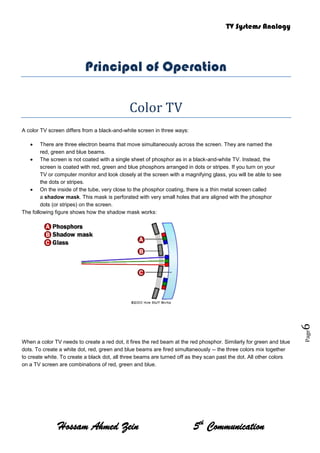
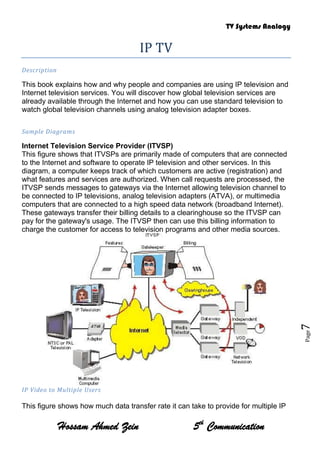
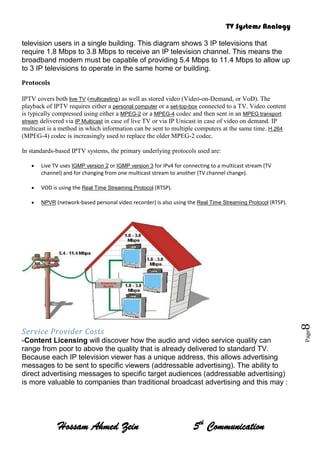
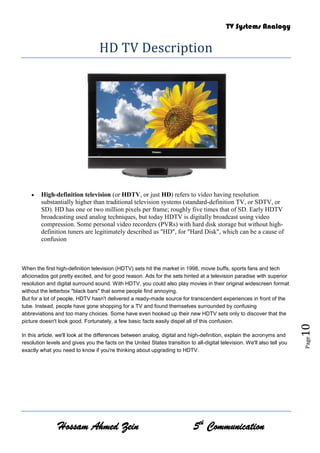
by some manufacturers.[3] The use of LED backlighting has a dramatic impact, resulting in a thinner panel, less power consumption, and a brighter display with better contrast levels. It also generates less heat than an ordinary LCD TV.<br />The LEDs can come in three forms: dynamic RGB LEDs which are positioned behind the panel, white Edge-LEDs positioned around the rim of the screen which use a special diffusion panel to spread the light evenly behind the screen (the most common) and full-array which are arranged behind the screen but they are incapable of dimming or brightening individually.[4][5]<br />LED backlighting techniques<br />RGB dynamic LEDs<br />This method of backlighting allows dimming to occur in locally specific areas of darkness on the screen. This can show truer blacks, whites and PR those much higher dynamic contrast ratios, at the cost of less detail in small bright objects on a dark background, such as star fields. <br />Edge-LEDs<br />This method of backlighting allows for LED-backlit TVs to become extremely thin. The light is diffused across the screen by a special panel which produces a uniform color range across the screen.<br />Full Array LEDs<br />Many brands use LED backlighting technology and may offer a range of benefits over CCFL LCD TVs such as reduced energy consumption, better contrast and brightness, greater colour range, more rapid response to changes in scene and a capacity to provide the means to render an image more accurately.[7]<br />Differences between LED-backlit and CCFL-backlit LCD displays<br />LED-backlit LCD TVs differ from conventional CCFL-backlit LCD TVs in the following:<br />Produce images with greater dynamic contrast. <br />With Edge-LED lighting they can be extremely slim. Models on the market can be approximately one inch thick. <br />Offer a wider color gamut, especially when RGB-LED backlighting is used. <br />Less environmental pollution on disposal. <br />Higher sales price. <br />Generally 20-30% lower power consumption.<br />Technology (Comparison)<br />TV manufacturers can use an LED backlight instead of the standard Cold Cathode Fluorescent Lamps (LCD-CCFL) used in most LCD televisions. It is important to distinguish this method of simply backlighting a conventional LCD panel, from a hypothetical true LED display, or an Organic light-emitting diode (OLED) display. LCD-based televisions described as 'LED TVs' are vastly different from self-illuminating OLED, OEL or AMOLED display technologies. In terms of the use of the term 'LED TV' in the UK, the ASA (Advertising Standards Authority) has made it clear in prior correspondence that it does not object to the use of the term, but does require it to be clarified in any advertising. There are several methods of backlighting an LCD panel using LEDs including the use of either White or RGB (Red, Green and Blue) LED arrays positioned behind the panel; and Edge-LED lighting, which uses white LEDs arranged around the inside frame of the TV along with a special light diffusion panel designed to spread the light evenly behind the LCD panel.<br />An LED backlight offers several general benefits over regular CCFL backlight TVs, typically higher brightness. Compared to regular CCFL backlighting, there may also be benefits to color gamut. However advancements in CCFL technology mean wide color gamuts and lower power consumption are also possible. The principal barrier to wide use of LED backlighting on LCD televisions is cost.<br />The variations of LED backlighting do offer different benefits. The first commercial LED backlit LCD TV was the Sony Qualia 005 (introduced in 2004). This featured RGB LED arrays to offer a color gamut around twice that of a conventional CCFL LCD television (the combined light output from red, green and blue LEDs produces a more pure white light than is possible with a single white light LED). RGB LED technology continues to be used on selected Sony BRAVIA LCD models, with the addition of 'local dimming' which enables excellent on-screen contrast through selectively turning off the LEDs behind dark parts of a picture frame.<br />Edge LED lighting was also first introduced by Sony (September 2008) .The principal benefit of Edge-LED lighting for LCD televisions is the ability to build thinner housings. Samsung has also introduced a range of Edge-LED lit LCD televisions with extremely thin housings.<br />LED-backlit LCD TVs are considered a more sustainable choice, with a longer life and better energy efficiency than plasmas and conventional LCD TVs.[10] Unlike CCFL backlights, LEDs also use no mercury in their manufacture. However, other elements such as gallium and arsenic are used in the manufacture of the LED emitters themselves, meaning there is some debate over whether they are a significantly better long term solution to the problem of TV disposal.<br />Because LEDs are able to be switched on and off more quickly than CCFL displays and can offer a higher light output, it is theoretically possible to offer very high contrast ratios. They can produce deep blacks (LEDs off) and a high brightness (LEDs on), however care should be taken with measurements made from pure black and pure white outputs, as technologies like Edge-LED lighting do not allow these outputs to be reproduced simultaneously on-screen.<br />Principal of Operation<br />Color TV<br />A color TV screen differs from a black-and-white screen in three ways:<br />There are three electron beams that move simultaneously across the screen. They are named the red, green and blue beams.<br />The screen is not coated with a single sheet of phosphor as in a black-and-white TV. Instead, the screen is coated with red, green and blue phosphors arranged in dots or stripes. If you turn on your TV or computer monitor and look closely at the screen with a magnifying glass, you will be able to see the dots or stripes.<br />On the inside of the tube, very close to the phosphor coating, there is a thin metal screen called a shadow mask. This mask is perforated with very small holes that are aligned with the phosphor dots (or stripes) on the screen.<br />The following figure shows how the shadow mask works:<br />3086100-806450533400-56515<br />When a color TV needs to create a red dot, it fires the red beam at the red phosphor. Similarly for green and blue dots. To create a white dot, red, green and blue beams are fired simultaneously -- the three colors mix together to create white. To create a black dot, all three beams are turned off as they scan past the dot. All other colors on a TV screen are combinations of red, green and blue.<br />IP TV <br />Description<br />This book explains how and why people and companies are using IP television and Internet television services. You will discover how global television services are already available through the Internet and how you can use standard television to watch global television channels using analog television adapter boxes.<br />Sample Diagrams<br />Internet Television Service Provider (ITVSP)<br />This figure shows that ITVSPs are primarily made of computers that are connected to the Internet and software to operate IP television and other services. In this diagram, a computer keeps track of which customers are active (registration) and what features and services are authorized. When call requests are processed, the ITVSP sends messages to gateways via the Internet allowing television channel to be connected to IP televisions, analog television adapters (ATVA), or multimedia computers that are connected to a high speed data network (broadband Internet). These gateways transfer their billing details to a clearinghouse so the ITVSP can pay for the gateway's usage. The ITVSP then can use this billing information to charge the customer for access to television programs and other media sources.<br />IP Video to Multiple UsersThis figure shows how much data transfer rate it can take to provide for multiple IP television users in a single building. This diagram shows 3 IP televisions that require 1.8 Mbps to 3.8 Mbps to receive an IP television channel. This means the broadband modem must be capable of providing 5.4 Mbps to 11.4 Mbps to allow up to 3 IP televisions to operate in the same home or building.<br />Protocols<br />IPTV covers both live TV (multicasting) as well as stored video (Video-on-Demand, or VoD). The playback of IPTV requires either a personal computer or a set-top-box connected to a TV. Video content is typically compressed using either a MPEG-2 or a MPEG-4 codec and then sent in an MPEG transport stream delivered via IP Multicast in case of live TV or via IP Unicast in case of video on demand. IP multicast is a method in which information can be sent to multiple computers at the same time. H.264 (MPEG-4) codec is increasingly used to replace the older MPEG-2 codec.<br />In standards-based IPTV systems, the primary underlying protocols used are:<br />Live TV uses IGMP version 2 or IGMP version 3 for IPv4 for connecting to a multicast stream (TV channel) and for changing from one multicast stream to another (TV channel change).<br />VOD is using the Real Time Streaming Protocol (RTSP).<br />NPVR (network-based personal video recorder) is also using the Real Time Streaming Protocol (RTSP).<br />Service Provider Costs -Content Licensing will discover how the audio and video service quality can range from poor to above the quality that is already delivered to standard TV.<br />Because each IP television viewer has a unique address, this allows advertising messages to be sent to specific viewers (addressable advertising). The ability to direct advertising messages to specific target audiences (addressable advertising) is more valuable to companies than traditional broadcast advertising and this may :<br />Advantages<br />1-result in reduced viewing costs.<br />2-Some of the most important topics featured are:<br />3-Fundamentals of how IP Television works4-How to use regular televisions to watch IP TV5-Global television channels6-Internet television service quality7-The costs of IP Television8-Control of Internet television services9-Internet television service providers10-Advanced Internet television features11-Electronic programming guides12-IP television Media formats<br />HD TV Description<br />High-definition television (or HDTV, or just HD) refers to video having resolution substantially higher than traditional television systems (standard-definition TV, or SDTV, or SD). HD has one or two million pixels per frame; roughly five times that of SD. Early HDTV broadcasting used analog techniques, but today HDTV is digitally broadcast using video compression. Some personal video recorders (PVRs) with hard disk storage but without high-definition tuners are legitimately described as "HD", for "Hard Disk", which can be a cause of confusionWhen the first high-definition television (HDTV) sets hit the market in 1998, movie buffs, sports fans and tech aficionados got pretty excited, and for good reason. Ads for the sets hinted at a television paradise with superior resolution and digital surround sound. With HDTV, you could also play movies in their original widescreen format without the letterbox \"
black bars\"
that some people find annoying.<br />But for a lot of people, HDTV hasn't delivered a ready-made source for transcendent experiences in front of the tube. Instead, people have gone shopping for a TV and found themselves surrounded by confusing abbreviations and too many choices. Some have even hooked up their new HDTV sets only to discover that the picture doesn't look good. Fortunately, a few basic facts easily dispel all of this confusion.<br />In this article, we'll look at the differences between analog, digital and high-definition, explain the acronyms and resolution levels and gives you the facts on the United States transition to all-digital television. We'll also tell you exactly what you need to know if you're thinking about upgrading to HDTV. <br />Mirror TV<br />A \"
Mirror TV\"
or \"
TV Mirror\"
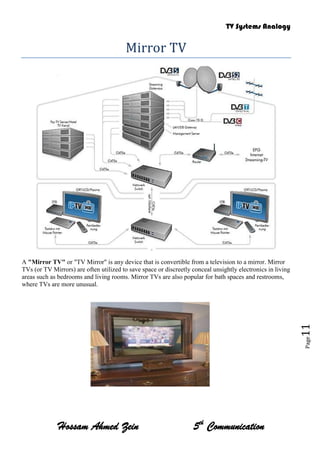
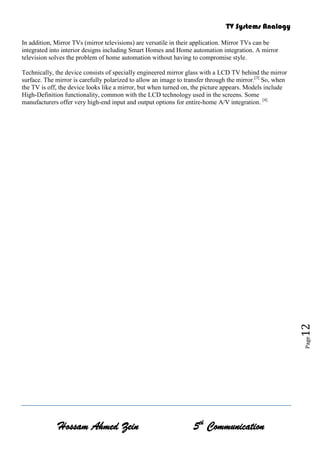
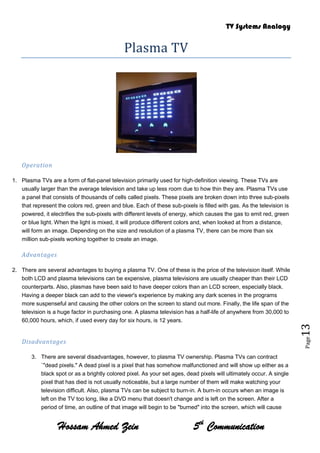
is any device that is convertible from a television to a mirror. Mirror TVs (or TV Mirrors) are often utilized to save space or discreetly conceal unsightly electronics in living areas such as bedrooms and living rooms. Mirror TVs are also popular for bath spaces and restrooms, where TVs are more unusual.<br />1627505158750<br />In addition, Mirror TVs (mirror televisions) are versatile in their application. Mirror TVs can be integrated into interior designs including Smart Homes and Home automation integration. A mirror television solves the problem of home automation without having to compromise style.<br />Technically, the device consists of specially engineered mirror glass with a LCD TV behind the mirror surface. The mirror is carefully polarized to allow an image to transfer through the mirror.[3] So, when the TV is off, the device looks like a mirror, but when turned on, the picture appears. Models include High-Definition functionality, common with the LCD technology used in the screens. Some manufacturers offer very high-end input and output options for entire-home A/V integration. [4]<br />Plasma TV<br />Operation<br />Plasma TVs are a form of flat-panel television primarily used for high-definition viewing. These TVs are usually larger than the average television and take up less room due to how thin they are. Plasma TVs use a panel that consists of thousands of cells called pixels. These pixels are broken down into three sub-pixels that represent the colors red, green and blue. Each of these sub-pixels is filled with gas. As the television is powered, it electrifies the sub-pixels with different levels of energy, which causes the gas to emit red, green or blue light. When the light is mixed, it will produce different colors and, when looked at from a distance, will form an image. Depending on the size and resolution of a plasma TV, there can be more than six million sub-pixels working together to create an image.Advantages<br />2.There are several advantages to buying a plasma TV. One of these is the price of the television itself. While both LCD and plasma televisions can be expensive, plasma televisions are usually cheaper than their LCD counterparts. Also, plasmas have been said to have deeper colors than an LCD screen, especially black. Having a deeper black can add to the viewer's experience by making any dark scenes in the programs more suspenseful and causing the other colors on the screen to stand out more. Finally, the life span of the television is a huge factor in purchasing one. A plasma television has a half-life of anywhere from 30,000 to 60,000 hours, which, if used every day for six hours, is 12 years.<br />Disadvantages<br />3.There are several disadvantages, however, to plasma TV ownership. Plasma TVs can contract `\"
dead pixels.\"
A dead pixel is a pixel that has somehow malfunctioned and will show up either as a black spot or as a brightly colored pixel. As your set ages, dead pixels will ultimately occur. A single pixel that has died is not usually noticeable, but a large number of them will make watching your television difficult. Also, plasma TVs can be subject to burn-in. A burn-in occurs when an image is left on the TV too long, like a DVD menu that doesn't change and is left on the screen. After a period of time, an outline of that image will begin to be \"
burned\"
into the screen, which will cause you to see parts of it every time the unit is turned on. The best way to avoid this is to make sure you do not leave an image on the screen for too long. Finally, a plasma TV gives off a lot of heat. They have a natural internal cooling system that keeps the unit cool, but if there is anything placed in front of the vents, the unit will heat up and may get damaged. Be sure to keep the vents clear from any debris or blockage.<br />](https://image.slidesharecdn.com/tvsystems-110225111334-phpapp01/85/TV-Systems-Analogy-1-320.jpg)
![TV SystemsRevolution AnalogyThe nature of digital technology allows it to cram lots of those 1s and 0s together into the same space an analog signal uses. Like your button-rich phone at work or your 200-plus digital cable service, that means more features can be crammed into the digital signal.2011Hossam A.ZeinKnow How…!?2/8/2011<br />Analog. Digital. What’s the Difference? Analog phone lines. Analog signals. Digital security. Digital PBX. Analog-to-digital adapters. What does it all mean? In the telecom world, understanding analog versus digital isn't as simple as comparing one technology to another. It depends on what product—and in some cases, which product feature—you happen to be talking about. Analog at a glanceAs a technology, analog is the process of taking an audio or video signal (in most cases, the human voice) and translating it into electronic pulses. Digital on the other hand is breaking the signal into a binary format where the audio or video data is represented by a series of \"
1\"
s and \"
0\"
s. Simple enough when it's the device—analog or digital phone, fax, modem, … that does all the converting for User. Is one technology better than the other? Analog technology has been around for decades. It's not that complicated a concept and it's fairly inexpensive to use. That's why we can buy a $20 telephone or watch a few TV stations with the use of a well-placed antenna. The trouble is, analog signals have size limitations as to how much data they can carry. So with our $20 phones and inexpensive TVs, we only get so much. Enter digital The newer of the two, digital technology breaks your voice (or television) signal into binary code—a series of 1s and 0s—transfers it to the other end where another device (phone, modem or TV) takes all the numbers and reassembles them into the original signal. The beauty of digital is that it knows what it should be when it reaches the end of the transmission. That way, it can correct any errors that may have occurred in the data transfer. What does all that mean to you? Clarity. In most cases, you'll get distortion-free conversations and clearer TV pictures.Advantage: You'll get more, too. The nature of digital technology allows it to cram lots of those 1s and 0s together into the same space an analog signal uses. Like your button-rich phone at work or your 200-plus digital cable service, that means more features can be crammed into the digital signal.Compare your simple home phone with the one you may have at the office. At home you have mute, redial, and maybe a few speed-dial buttons. Your phone at work is loaded with function keys, call transfer buttons, and even voice mail. Now, before audiophiles start yelling at me through their PC screens, yes, analog can deliver better sound quality than digital…for now. Digital offers better clarity, but analog gives you richer quality. But like any new technology, digital has a few shortcomings. Since devices are constantly translating, coding, and reassembling your voice, you won't get the same rich sound quality as you do with analog. And for now, digital is still relatively expensive. But slowly, digital—like the VCR or the CD—is coming down in cost and coming out in everything from cell phones to satellite dishes. When you're shopping in the telecom world, you often see products touted as \"
all digital.\"
Or warnings such as \"
analog lines only.\"
What does it mean? The basic analog and digital technologies vary a bit in definition depending on how they're implemented. Read on. What to buy? The first thing to consider when buying analog or digital equipment is where you'll be using it. If you're buying for a proprietary PBX phone system, you'll need to get the digital phone designed for that particular system. Need to connect a conferencer on your digital system? Opt for a digital-to-analog adapter. Shopping for home office equipment? Most everything you'll consider is analog. Want an all-in-one cellular phone—paging, voice mail, web? A digital cellular phone will deliver it all. In fact, the only head-scratcher may be your cordless phone purchase. Looking for security and distortion-free conversations in your small office? Go with a digital 900 MHz or 2.4 GHz cordless phone. Using a cordless at home? An analog phone will give you the richest sound quality and usually enough range. <br />TV Evolution<br />Early television (-History-)<br />Experiments in television systems using radio broadcasts date to the 19th century, but it was not until the 20th century that advances in electronics and light detectors made development practical. A key problem was the need to convert a 2D image into a \"
1D\"
radio signal; some form of image scanning was needed to make this work. Early systems generally used a device known as a \"
Nipkow disk\"
, which was a spinning disk with a series of holes punched in it that caused the spots to scan across and down the image. A single photo detector behind the disk captured the image brightness at any given spot, which was converted into a radio signal and broadcast. A similar disk was used at the receiver side, with a light source behind the disk instead of a detector.<br />A number of such systems were used experimentally starting as early as the 1920s, the best-known being John Logie Baird's system that was broadcast for a time in Britain. In spite of these early successes, all mechanical television systems shared a number of serious problems. Being mechanically driven, even slight differences in syncing between the signal and disk motor resulted in major image distortion. Another problem was that the image was captured in a roughly rectangular area of the disk, covering only a small portion of the face; making a larger display required increasingly unwieldy disks. Additionally, the resolution of the system was limited to the number of holes that could be punched into the disk, which was normally under 100, although there are rare examples with as many as 200 holes in them.<br />It was clear to a number of developers that a completely electronic scanning system would be superior, and that the scanning could be achieved in a vacuum tube via electrostatic or magnetic means. Converting this concept into a usable system took years of development and several independent advances. The two key advances were Philo Farnsworth's electronic scanning system, and Vladimir Zworykin's Iconoscope camera. The Iconoscope based on Kálmán Tihanyi's early patents, this system superseded the Farnsworth-system. With these systems, the BBC began regularly scheduled black and white television broadcasts in 1936, but these were shut down again with the start of World War II in 1939. In 1941 the first NTSC meetings produced a single standard for US broadcasts. US television broadcasts began in earnest in the immediate post-war era, and by 1950 there were 6 million televisions in the United States.<br />A LED-backlight LCD television<br /> is an LCD TV that uses LED backlighting rather than the cold cathode fluorescent lights (CCFLs) used in traditional LCD televisions. It is not a true LED display but is often called \"
LED TV\"
by some manufacturers.[3] The use of LED backlighting has a dramatic impact, resulting in a thinner panel, less power consumption, and a brighter display with better contrast levels. It also generates less heat than an ordinary LCD TV.<br />The LEDs can come in three forms: dynamic RGB LEDs which are positioned behind the panel, white Edge-LEDs positioned around the rim of the screen which use a special diffusion panel to spread the light evenly behind the screen (the most common) and full-array which are arranged behind the screen but they are incapable of dimming or brightening individually.[4][5]<br />LED backlighting techniques<br />RGB dynamic LEDs<br />This method of backlighting allows dimming to occur in locally specific areas of darkness on the screen. This can show truer blacks, whites and PR those much higher dynamic contrast ratios, at the cost of less detail in small bright objects on a dark background, such as star fields. <br />Edge-LEDs<br />This method of backlighting allows for LED-backlit TVs to become extremely thin. The light is diffused across the screen by a special panel which produces a uniform color range across the screen.<br />Full Array LEDs<br />Many brands use LED backlighting technology and may offer a range of benefits over CCFL LCD TVs such as reduced energy consumption, better contrast and brightness, greater colour range, more rapid response to changes in scene and a capacity to provide the means to render an image more accurately.[7]<br />Differences between LED-backlit and CCFL-backlit LCD displays<br />LED-backlit LCD TVs differ from conventional CCFL-backlit LCD TVs in the following:<br />Produce images with greater dynamic contrast. <br />With Edge-LED lighting they can be extremely slim. Models on the market can be approximately one inch thick. <br />Offer a wider color gamut, especially when RGB-LED backlighting is used. <br />Less environmental pollution on disposal. <br />Higher sales price. <br />Generally 20-30% lower power consumption.<br />Technology (Comparison)<br />TV manufacturers can use an LED backlight instead of the standard Cold Cathode Fluorescent Lamps (LCD-CCFL) used in most LCD televisions. It is important to distinguish this method of simply backlighting a conventional LCD panel, from a hypothetical true LED display, or an Organic light-emitting diode (OLED) display. LCD-based televisions described as 'LED TVs' are vastly different from self-illuminating OLED, OEL or AMOLED display technologies. In terms of the use of the term 'LED TV' in the UK, the ASA (Advertising Standards Authority) has made it clear in prior correspondence that it does not object to the use of the term, but does require it to be clarified in any advertising. There are several methods of backlighting an LCD panel using LEDs including the use of either White or RGB (Red, Green and Blue) LED arrays positioned behind the panel; and Edge-LED lighting, which uses white LEDs arranged around the inside frame of the TV along with a special light diffusion panel designed to spread the light evenly behind the LCD panel.<br />An LED backlight offers several general benefits over regular CCFL backlight TVs, typically higher brightness. Compared to regular CCFL backlighting, there may also be benefits to color gamut. However advancements in CCFL technology mean wide color gamuts and lower power consumption are also possible. The principal barrier to wide use of LED backlighting on LCD televisions is cost.<br />The variations of LED backlighting do offer different benefits. The first commercial LED backlit LCD TV was the Sony Qualia 005 (introduced in 2004). This featured RGB LED arrays to offer a color gamut around twice that of a conventional CCFL LCD television (the combined light output from red, green and blue LEDs produces a more pure white light than is possible with a single white light LED). RGB LED technology continues to be used on selected Sony BRAVIA LCD models, with the addition of 'local dimming' which enables excellent on-screen contrast through selectively turning off the LEDs behind dark parts of a picture frame.<br />Edge LED lighting was also first introduced by Sony (September 2008) .The principal benefit of Edge-LED lighting for LCD televisions is the ability to build thinner housings. Samsung has also introduced a range of Edge-LED lit LCD televisions with extremely thin housings.<br />LED-backlit LCD TVs are considered a more sustainable choice, with a longer life and better energy efficiency than plasmas and conventional LCD TVs.[10] Unlike CCFL backlights, LEDs also use no mercury in their manufacture. However, other elements such as gallium and arsenic are used in the manufacture of the LED emitters themselves, meaning there is some debate over whether they are a significantly better long term solution to the problem of TV disposal.<br />Because LEDs are able to be switched on and off more quickly than CCFL displays and can offer a higher light output, it is theoretically possible to offer very high contrast ratios. They can produce deep blacks (LEDs off) and a high brightness (LEDs on), however care should be taken with measurements made from pure black and pure white outputs, as technologies like Edge-LED lighting do not allow these outputs to be reproduced simultaneously on-screen.<br />Principal of Operation<br />Color TV<br />A color TV screen differs from a black-and-white screen in three ways:<br />There are three electron beams that move simultaneously across the screen. They are named the red, green and blue beams.<br />The screen is not coated with a single sheet of phosphor as in a black-and-white TV. Instead, the screen is coated with red, green and blue phosphors arranged in dots or stripes. If you turn on your TV or computer monitor and look closely at the screen with a magnifying glass, you will be able to see the dots or stripes.<br />On the inside of the tube, very close to the phosphor coating, there is a thin metal screen called a shadow mask. This mask is perforated with very small holes that are aligned with the phosphor dots (or stripes) on the screen.<br />The following figure shows how the shadow mask works:<br />3086100-806450533400-56515<br />When a color TV needs to create a red dot, it fires the red beam at the red phosphor. Similarly for green and blue dots. To create a white dot, red, green and blue beams are fired simultaneously -- the three colors mix together to create white. To create a black dot, all three beams are turned off as they scan past the dot. All other colors on a TV screen are combinations of red, green and blue.<br />IP TV <br />Description<br />This book explains how and why people and companies are using IP television and Internet television services. You will discover how global television services are already available through the Internet and how you can use standard television to watch global television channels using analog television adapter boxes.<br />Sample Diagrams<br />Internet Television Service Provider (ITVSP)<br />This figure shows that ITVSPs are primarily made of computers that are connected to the Internet and software to operate IP television and other services. In this diagram, a computer keeps track of which customers are active (registration) and what features and services are authorized. When call requests are processed, the ITVSP sends messages to gateways via the Internet allowing television channel to be connected to IP televisions, analog television adapters (ATVA), or multimedia computers that are connected to a high speed data network (broadband Internet). These gateways transfer their billing details to a clearinghouse so the ITVSP can pay for the gateway's usage. The ITVSP then can use this billing information to charge the customer for access to television programs and other media sources.<br />IP Video to Multiple UsersThis figure shows how much data transfer rate it can take to provide for multiple IP television users in a single building. This diagram shows 3 IP televisions that require 1.8 Mbps to 3.8 Mbps to receive an IP television channel. This means the broadband modem must be capable of providing 5.4 Mbps to 11.4 Mbps to allow up to 3 IP televisions to operate in the same home or building.<br />Protocols<br />IPTV covers both live TV (multicasting) as well as stored video (Video-on-Demand, or VoD). The playback of IPTV requires either a personal computer or a set-top-box connected to a TV. Video content is typically compressed using either a MPEG-2 or a MPEG-4 codec and then sent in an MPEG transport stream delivered via IP Multicast in case of live TV or via IP Unicast in case of video on demand. IP multicast is a method in which information can be sent to multiple computers at the same time. H.264 (MPEG-4) codec is increasingly used to replace the older MPEG-2 codec.<br />In standards-based IPTV systems, the primary underlying protocols used are:<br />Live TV uses IGMP version 2 or IGMP version 3 for IPv4 for connecting to a multicast stream (TV channel) and for changing from one multicast stream to another (TV channel change).<br />VOD is using the Real Time Streaming Protocol (RTSP).<br />NPVR (network-based personal video recorder) is also using the Real Time Streaming Protocol (RTSP).<br />Service Provider Costs -Content Licensing will discover how the audio and video service quality can range from poor to above the quality that is already delivered to standard TV.<br />Because each IP television viewer has a unique address, this allows advertising messages to be sent to specific viewers (addressable advertising). The ability to direct advertising messages to specific target audiences (addressable advertising) is more valuable to companies than traditional broadcast advertising and this may :<br />Advantages<br />1-result in reduced viewing costs.<br />2-Some of the most important topics featured are:<br />3-Fundamentals of how IP Television works4-How to use regular televisions to watch IP TV5-Global television channels6-Internet television service quality7-The costs of IP Television8-Control of Internet television services9-Internet television service providers10-Advanced Internet television features11-Electronic programming guides12-IP television Media formats<br />HD TV Description<br />High-definition television (or HDTV, or just HD) refers to video having resolution substantially higher than traditional television systems (standard-definition TV, or SDTV, or SD). HD has one or two million pixels per frame; roughly five times that of SD. Early HDTV broadcasting used analog techniques, but today HDTV is digitally broadcast using video compression. Some personal video recorders (PVRs) with hard disk storage but without high-definition tuners are legitimately described as "HD", for "Hard Disk", which can be a cause of confusionWhen the first high-definition television (HDTV) sets hit the market in 1998, movie buffs, sports fans and tech aficionados got pretty excited, and for good reason. Ads for the sets hinted at a television paradise with superior resolution and digital surround sound. With HDTV, you could also play movies in their original widescreen format without the letterbox \"
black bars\"
that some people find annoying.<br />But for a lot of people, HDTV hasn't delivered a ready-made source for transcendent experiences in front of the tube. Instead, people have gone shopping for a TV and found themselves surrounded by confusing abbreviations and too many choices. Some have even hooked up their new HDTV sets only to discover that the picture doesn't look good. Fortunately, a few basic facts easily dispel all of this confusion.<br />In this article, we'll look at the differences between analog, digital and high-definition, explain the acronyms and resolution levels and gives you the facts on the United States transition to all-digital television. We'll also tell you exactly what you need to know if you're thinking about upgrading to HDTV. <br />Mirror TV<br />A \"
Mirror TV\"
or \"
TV Mirror\"
is any device that is convertible from a television to a mirror. Mirror TVs (or TV Mirrors) are often utilized to save space or discreetly conceal unsightly electronics in living areas such as bedrooms and living rooms. Mirror TVs are also popular for bath spaces and restrooms, where TVs are more unusual.<br />1627505158750<br />In addition, Mirror TVs (mirror televisions) are versatile in their application. Mirror TVs can be integrated into interior designs including Smart Homes and Home automation integration. A mirror television solves the problem of home automation without having to compromise style.<br />Technically, the device consists of specially engineered mirror glass with a LCD TV behind the mirror surface. The mirror is carefully polarized to allow an image to transfer through the mirror.[3] So, when the TV is off, the device looks like a mirror, but when turned on, the picture appears. Models include High-Definition functionality, common with the LCD technology used in the screens. Some manufacturers offer very high-end input and output options for entire-home A/V integration. [4]<br />Plasma TV<br />Operation<br />Plasma TVs are a form of flat-panel television primarily used for high-definition viewing. These TVs are usually larger than the average television and take up less room due to how thin they are. Plasma TVs use a panel that consists of thousands of cells called pixels. These pixels are broken down into three sub-pixels that represent the colors red, green and blue. Each of these sub-pixels is filled with gas. As the television is powered, it electrifies the sub-pixels with different levels of energy, which causes the gas to emit red, green or blue light. When the light is mixed, it will produce different colors and, when looked at from a distance, will form an image. Depending on the size and resolution of a plasma TV, there can be more than six million sub-pixels working together to create an image.Advantages<br />2.There are several advantages to buying a plasma TV. One of these is the price of the television itself. While both LCD and plasma televisions can be expensive, plasma televisions are usually cheaper than their LCD counterparts. Also, plasmas have been said to have deeper colors than an LCD screen, especially black. Having a deeper black can add to the viewer's experience by making any dark scenes in the programs more suspenseful and causing the other colors on the screen to stand out more. Finally, the life span of the television is a huge factor in purchasing one. A plasma television has a half-life of anywhere from 30,000 to 60,000 hours, which, if used every day for six hours, is 12 years.<br />Disadvantages<br />3.There are several disadvantages, however, to plasma TV ownership. Plasma TVs can contract `\"
dead pixels.\"
A dead pixel is a pixel that has somehow malfunctioned and will show up either as a black spot or as a brightly colored pixel. As your set ages, dead pixels will ultimately occur. A single pixel that has died is not usually noticeable, but a large number of them will make watching your television difficult. Also, plasma TVs can be subject to burn-in. A burn-in occurs when an image is left on the TV too long, like a DVD menu that doesn't change and is left on the screen. After a period of time, an outline of that image will begin to be \"
burned\"
into the screen, which will cause you to see parts of it every time the unit is turned on. The best way to avoid this is to make sure you do not leave an image on the screen for too long. Finally, a plasma TV gives off a lot of heat. They have a natural internal cooling system that keeps the unit cool, but if there is anything placed in front of the vents, the unit will heat up and may get damaged. Be sure to keep the vents clear from any debris or blockage.<br />](https://image.slidesharecdn.com/tvsystems-110225111334-phpapp01/75/TV-Systems-Analogy-1-2048.jpg)


1. The document discusses the differences between analog and digital technologies, explaining that analog translates signals into electronic pulses while digital breaks signals down into binary 1s and 0s. 2. It notes that while analog has been around longer and is cheaper, digital can carry more data in the same space and offers better clarity through error correction. 3. The document then provides details on the evolution of television, including early mechanical systems using Nipkow disks and the transition to fully electronic scanning using the Iconoscope camera, enabling the start of regular TV broadcasts.


![Tv 101[1]](https://cdn.slidesharecdn.com/ss_thumbnails/tv1011-12648274753543-phpapp01-thumbnail.jpg?width=640&height=640&fit=bounds)


