Graphics and Mouse Programming
in Turbo C
Graphics in Turbo C
1
Header file for Graphics Functions
graphics.h header file is included which contain
functions to draw different shapes, display text in
different fonts, change colors, etc.
 initgraph(); Used to initialize graphics mode.
Syntax: void initgraph ( int *driver, int *mode, char *path);
Initializing Graphical mode
 graphresult(); It returns error code if occur in initializing
graphics.
Syntax: int graphresult (void);
 grapherrormsg(); It returns corresponding error message
of error code.
Syntax: char grapherrormsg (int errorcode);
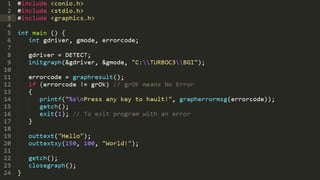
 outtext(); Used to print string in graphic mode at
current position.
Syntax: void outtext (char textstring);
Displaying Text on screen
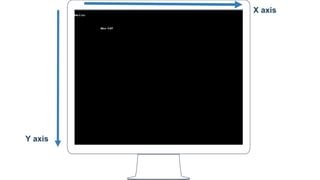
 outtextxy(); Used to print string in graphic mode at
given coordinates.
Syntax: void outtextxy (int x, int y, char textstring);
Y axis
X axis
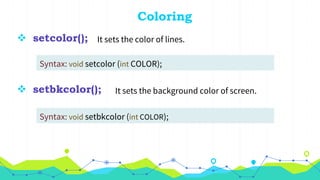
 setcolor(); It sets the color of lines.
Syntax: void setcolor (int COLOR);
Coloring
 setbkcolor(); It sets the background color of screen.
Syntax: void setbkcolor (int COLOR);
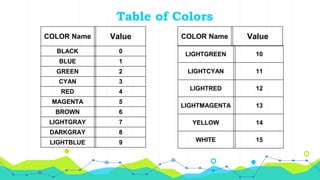
Table of Colors
COLOR Name Value
BLACK 0
BLUE 1
GREEN 2
CYAN 3
RED 4
MAGENTA 5
BROWN 6
LIGHTGRAY 7
DARKGRAY 8
LIGHTBLUE 9
LIGHTGREEN 10
LIGHTCYAN 11
LIGHTRED 12
LIGHTMAGENTA 13
YELLOW 14
WHITE 15
COLOR Name Value
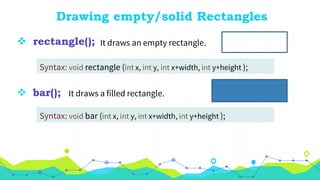
 rectangle(); It draws an empty rectangle.
Syntax: void rectangle (int x, int y, int x+width, int y+height );
Drawing empty/solid Rectangles
 bar();
It draws a filled rectangle.Syntax: void bar (int x, int y, int x+width, int y+height );
It draws a filled rectangle.
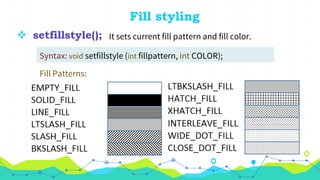
 setfillstyle(); It sets current fill pattern and fill color.
Syntax: void setfillstyle (int fillpattern, int COLOR);
Fill styling
Fill Patterns:
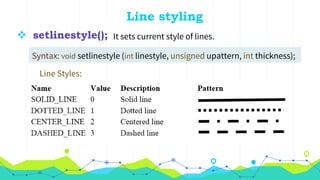
 setlinestyle(); It sets current style of lines.
Syntax: void setlinestyle (int linestyle, unsigned upattern, int thickness);
Line styling
Line Styles:
 cleardevice(); It erases the screen and move CP to origin.
Syntax: void cleardevice (void);
Some more functions
 closegraph();
Syntax: void closegraph (void);
It closes the graphics mode and returns
the screen to text mode.
Mouse Programming in Turbo C
2
Mouse Programming
Mouse programming in C is done by interacting
with registers and interrupts. dos.h also include
functions for Mouse Programming.
 Interrupt: Signal sent by a hardware for immediate
processing is known as interrupt.
Interacting with interrupts
 Register: Small data holding place of Processor.
 int86();
Syntax: int int86 (int interrupt, union REGS *inreg, union REGS *outreg);
This function is used to interact with
interrupts using registers.
The interrupt for Mouse is: 0x33
Union Data Type
union is a special data type in C which allows to
store different data types in the same memory
location.
Example:
union Data {
int I; float f;
} data;
 First Parameter of int86() function is 0x33 to interact with Mouse.
 Second Parameter is address of a union REGS type integer which is
used to input data for interrupt.
 Third Parameter is also address of a union REGS type integer in
which output by interrupt is stored.
 Both union REGS type variables are declared before main()
function. Like:
Using int86();
union REGS input, output;
 ax, bx, cx and dx register are used to input and output data.
 Syntax to input and out data from registers is:
Using int86();
// To send data to register
input.x.ax = 0;
int86( 0x33, &input, &output);
// Now output.x.ax is storing out from interrupt
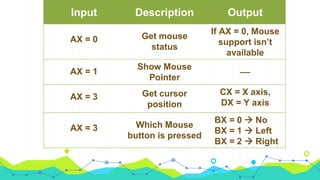
Input Description Output
AX = 0 Get mouse
status
If AX = 0, Mouse
support isn’t
available
AX = 1
Show Mouse
Pointer
__
AX = 3 Get cursor
position
CX = X axis,
DX = Y axis
AX = 3 Which Mouse
button is pressed
BX = 0  No
BX = 1  Left
BX = 2  Right
Turbo C Graphics and Mouse Programming

Turbo C Graphics and Mouse Programming

  • 1.
    Graphics and MouseProgramming in Turbo C
  • 2.
  • 3.
    Header file forGraphics Functions graphics.h header file is included which contain functions to draw different shapes, display text in different fonts, change colors, etc.
  • 4.
     initgraph(); Usedto initialize graphics mode. Syntax: void initgraph ( int *driver, int *mode, char *path); Initializing Graphical mode  graphresult(); It returns error code if occur in initializing graphics. Syntax: int graphresult (void);  grapherrormsg(); It returns corresponding error message of error code. Syntax: char grapherrormsg (int errorcode);
  • 5.
     outtext(); Usedto print string in graphic mode at current position. Syntax: void outtext (char textstring); Displaying Text on screen  outtextxy(); Used to print string in graphic mode at given coordinates. Syntax: void outtextxy (int x, int y, char textstring);
  • 7.
  • 8.
     setcolor(); Itsets the color of lines. Syntax: void setcolor (int COLOR); Coloring  setbkcolor(); It sets the background color of screen. Syntax: void setbkcolor (int COLOR);
  • 9.
    Table of Colors COLORName Value BLACK 0 BLUE 1 GREEN 2 CYAN 3 RED 4 MAGENTA 5 BROWN 6 LIGHTGRAY 7 DARKGRAY 8 LIGHTBLUE 9 LIGHTGREEN 10 LIGHTCYAN 11 LIGHTRED 12 LIGHTMAGENTA 13 YELLOW 14 WHITE 15 COLOR Name Value
  • 10.
     rectangle(); Itdraws an empty rectangle. Syntax: void rectangle (int x, int y, int x+width, int y+height ); Drawing empty/solid Rectangles  bar(); It draws a filled rectangle.Syntax: void bar (int x, int y, int x+width, int y+height ); It draws a filled rectangle.
  • 11.
     setfillstyle(); Itsets current fill pattern and fill color. Syntax: void setfillstyle (int fillpattern, int COLOR); Fill styling Fill Patterns:
  • 12.
     setlinestyle(); Itsets current style of lines. Syntax: void setlinestyle (int linestyle, unsigned upattern, int thickness); Line styling Line Styles:
  • 13.
     cleardevice(); Iterases the screen and move CP to origin. Syntax: void cleardevice (void); Some more functions  closegraph(); Syntax: void closegraph (void); It closes the graphics mode and returns the screen to text mode.
  • 14.
  • 15.
    Mouse Programming Mouse programmingin C is done by interacting with registers and interrupts. dos.h also include functions for Mouse Programming.
  • 16.
     Interrupt: Signalsent by a hardware for immediate processing is known as interrupt. Interacting with interrupts  Register: Small data holding place of Processor.  int86(); Syntax: int int86 (int interrupt, union REGS *inreg, union REGS *outreg); This function is used to interact with interrupts using registers. The interrupt for Mouse is: 0x33
  • 17.
    Union Data Type unionis a special data type in C which allows to store different data types in the same memory location. Example: union Data { int I; float f; } data;
  • 18.
     First Parameterof int86() function is 0x33 to interact with Mouse.  Second Parameter is address of a union REGS type integer which is used to input data for interrupt.  Third Parameter is also address of a union REGS type integer in which output by interrupt is stored.  Both union REGS type variables are declared before main() function. Like: Using int86(); union REGS input, output;
  • 19.
     ax, bx,cx and dx register are used to input and output data.  Syntax to input and out data from registers is: Using int86(); // To send data to register input.x.ax = 0; int86( 0x33, &input, &output); // Now output.x.ax is storing out from interrupt
  • 20.
    Input Description Output AX= 0 Get mouse status If AX = 0, Mouse support isn’t available AX = 1 Show Mouse Pointer __ AX = 3 Get cursor position CX = X axis, DX = Y axis AX = 3 Which Mouse button is pressed BX = 0  No BX = 1  Left BX = 2  Right