Trusted Types - W3C TPAC
Krzysztof Kotowicz, Google
koto@google.com
https://github.com/WICG/trusted-types
Slides: https://tinyurl.com/tttpac
DOM XSS
DOM XSS is a growing, prevalent problem
source ⇒ sink
location.hash ⇒ bar.innerHTML
● At Google, DOM XSS is already the most common XSS variant
Reasons:
● Growing complexity of client-side code
● Easy to introduce, hard to prevent & detect
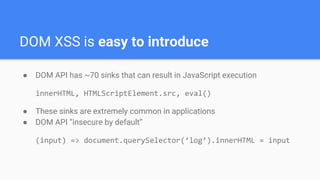
DOM XSS is easy to introduce
● DOM API has ~70 sinks that can result in JavaScript execution
innerHTML, HTMLScriptElement.src, eval()
● These sinks are extremely common in applications
● DOM API “insecure by default”
(input) => document.querySelector(‘log’).innerHTML = input
● Sources far away from sinks, complex data flows (e.g. server roundtrip)
● Static checks don’t work reliably:
foo.innerHTML = bar // what is bar?
foo[(_ => "innerHTML")()] = bar
foo[k] = v
● Manual review is infeasible
● Dynamic (taint-tracking, fuzzing) has a small code coverage
DOM XSS is hard to detect
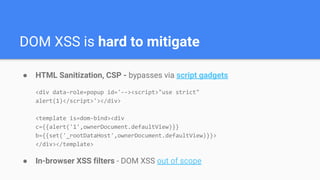
DOM XSS is hard to mitigate
● HTML Sanitization, CSP - bypasses via script gadgets
<div data-role=popup id='--><script>"use strict"
alert(1)</script>'></div>
<template is=dom-bind><div
c={{alert('1',ownerDocument.defaultView)}}
b={{set('_rootDataHost',ownerDocument.defaultView)}}>
</div></template>
● In-browser XSS filters - DOM XSS out of scope
Addressing DOM XSS @ Google
● Stop tracking a string, leverage the type system
● https://github.com/google/safe-html-types/blob/master/doc/safehtml-typ
es.md
● Wrappers for strings, representing values known to be safe to use in
various HTML contexts and with various DOM APIs:
○ SafeHTML (<b>I’m safe</b>)
○ SafeURL (https://click.me)
○ TrustedResourceURL (https://i.am.a/script.js)
○ …
Safe HTML Types
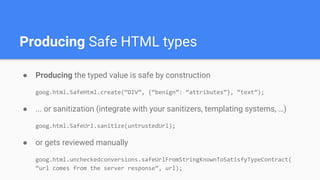
● Producing the typed value is safe by construction
goog.html.SafeHtml.create(“DIV”, {“benign”: “attributes”}, “text”);
● ... or sanitization (integrate with your sanitizers, templating systems, …)
goog.html.SafeUrl.sanitize(untrustedUrl);
● or gets reviewed manually
goog.html.uncheckedconversions.safeUrlFromStringKnownToSatisfyTypeContract(
“url comes from the server response”, url);
Producing Safe HTML types
Consuming Safe HTML types
● A typed object is propagated throughout the application code
● Taint tracking not necessary
● Wrappers over DOM XSS sinks that accept only typed values
goog.dom.safe.setLocationHref(locationObj, safeURL)
● Compiler prohibits the use of native sinks
let foo = “bar”; location.href = foo
Compile error!
● DOM is secure by default
● Only the code producing a safe type can introduce XSS
● Reduce the security-relevant code by orders of magnitude
○ Stable components (sanitizers, templating libs)
○ Custom application code producing the types
○ Scales extremely well (<1 headcount for all of Google)
● Very successful at preventing XSS
● … as understood by the compiler
Safe HTML Types advantages
Safe HTML Types limitations
● Reliance on compilation
○ Not all code is compiled
○ Different compilation units
○ Cross-language boundaries
● Compiler limitations
○ JS type system is unsound
○ Reflection, dynamic code
○ Missing type information
○ False positive/false negative tradeoff
● No protection at runtime
Trusted Types
Trusted Types
Safe HTML types
built into the platform
Trusted Types
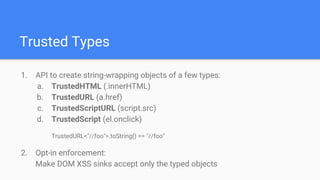
1. API to create string-wrapping objects of a few types:
a. TrustedHTML (.innerHTML)
b. TrustedURL (a.href)
c. TrustedScriptURL (script.src)
d. TrustedScript (el.onclick)
TrustedURL<"//foo">.toString() == "//foo"
2. Opt-in enforcement:
Make DOM XSS sinks accept only the typed objects
Trusted Types
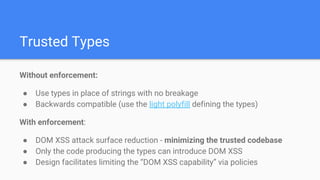
Without enforcement:
● Use types in place of strings with no breakage
● Backwards compatible (use the light polyfill defining the types)
With enforcement:
● DOM XSS attack surface reduction - minimizing the trusted codebase
● Only the code producing the types can introduce DOM XSS
● Design facilitates limiting the “DOM XSS capability” via policies
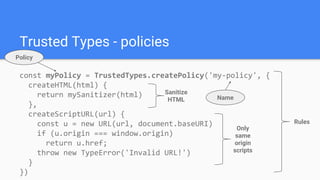
const myPolicy = TrustedTypes.createPolicy('my-policy', {
createHTML(html) {
return mySanitizer(html)
},
createScriptURL(url) {
const u = new URL(url, document.baseURI)
if (u.origin === window.origin)
return u.href;
throw new TypeError('Invalid URL!')
}
})
Trusted Types - policies
Name
Rules
Sanitize
HTML
Only
same
origin
scripts
Policy
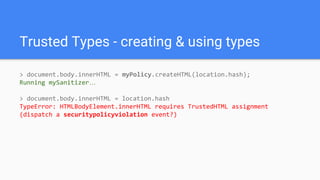
Trusted Types - creating & using types
> document.body.innerHTML = myPolicy.createHTML(location.hash);
Running mySanitizer…
> document.body.innerHTML = location.hash
TypeError: HTMLBodyElement.innerHTML requires TrustedHTML assignment
(dispatch a securitypolicyviolation event?)
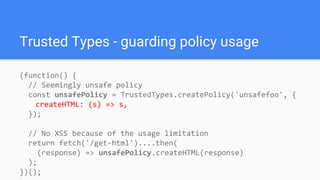
(function() {
// Seemingly unsafe policy
const unsafePolicy = TrustedTypes.createPolicy('unsafefoo', {
createHTML: (s) => s,
});
// No XSS because of the usage limitation
return fetch('/get-html')....then(
(response) => unsafePolicy.createHTML(response)
);
})();
Trusted Types - guarding policy usage
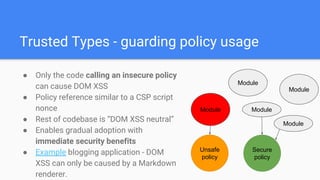
● Only the code calling an insecure policy
can cause DOM XSS
● Policy reference similar to a CSP script
nonce
● Rest of codebase is “DOM XSS neutral”
● Enables gradual adoption with
immediate security benefits
● Example blogging application - DOM
XSS can only be caused by a Markdown
renderer.
Module
Unsafe
policy
Secure
policy
Module
Module
Module
Module
Trusted Types - guarding policy usage
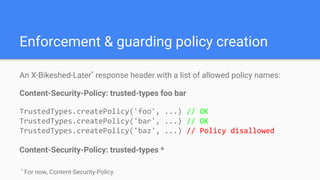
Enforcement & guarding policy creation
An X-Bikeshed-Later*
response header with a list of allowed policy names:
Content-Security-Policy: trusted-types foo bar
TrustedTypes.createPolicy('foo', ...) // OK
TrustedTypes.createPolicy('bar', ...) // OK
TrustedTypes.createPolicy('baz', ...) // Policy disallowed
Content-Security-Policy: trusted-types *
*
For now, Content-Security-Policy
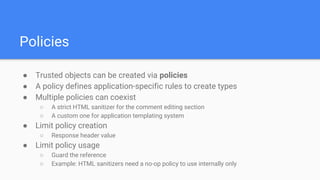
● Trusted objects can be created via policies
● A policy defines application-specific rules to create types
● Multiple policies can coexist
○ A strict HTML sanitizer for the comment editing section
○ A custom one for application templating system
● Limit policy creation
○ Response header value
● Limit policy usage
○ Guard the reference
○ Example: HTML sanitizers need a no-op policy to use internally only
Policies
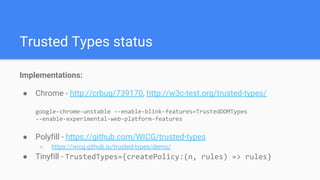
Implementations:
● Chrome - http://crbug/739170, http://w3c-test.org/trusted-types/
google-chrome-unstable --enable-blink-features=TrustedDOMTypes
--enable-experimental-web-platform-features
● Polyfill - https://github.com/WICG/trusted-types
○ https://wicg.github.io/trusted-types/demo/
● Tinyfill - TrustedTypes={createPolicy:(n, rules) => rules}
Trusted Types status
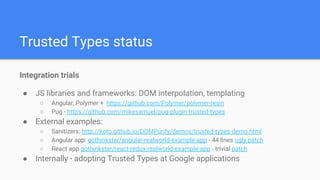
Integration trials
● JS libraries and frameworks: DOM interpolation, templating
○ Angular, Polymer + https://github.com/Polymer/polymer-resin
○ Pug - https://github.com/mikesamuel/pug-plugin-trusted-types
● External examples:
○ Sanitizers: http://koto.github.io/DOMPurify/demos/trusted-types-demo.html
○ Angular app: gothinkster/angular-realworld-example-app - 44 lines ugly patch
○ React app gothinkster/react-redux-realworld-example-app - trivial patch
● Internally - adopting Trusted Types at Google applications
Trusted Types status
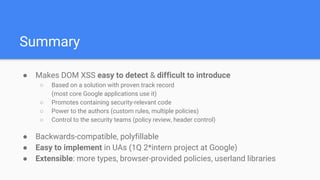
● Makes DOM XSS easy to detect & difficult to introduce
○ Based on a solution with proven track record
(most core Google applications use it)
○ Promotes containing security-relevant code
○ Power to the authors (custom rules, multiple policies)
○ Control to the security teams (policy review, header control)
● Backwards-compatible, polyfillable
● Easy to implement in UAs (1Q 2*intern project at Google)
● Extensible: more types, browser-provided policies, userland libraries
Summary

Trusted Types @ W3C TPAC 2018

  • 1.
    Trusted Types -W3C TPAC Krzysztof Kotowicz, Google koto@google.com https://github.com/WICG/trusted-types Slides: https://tinyurl.com/tttpac
  • 2.
  • 3.
    DOM XSS isa growing, prevalent problem source ⇒ sink location.hash ⇒ bar.innerHTML ● At Google, DOM XSS is already the most common XSS variant Reasons: ● Growing complexity of client-side code ● Easy to introduce, hard to prevent & detect
  • 4.
    DOM XSS iseasy to introduce ● DOM API has ~70 sinks that can result in JavaScript execution innerHTML, HTMLScriptElement.src, eval() ● These sinks are extremely common in applications ● DOM API “insecure by default” (input) => document.querySelector(‘log’).innerHTML = input
  • 5.
    ● Sources faraway from sinks, complex data flows (e.g. server roundtrip) ● Static checks don’t work reliably: foo.innerHTML = bar // what is bar? foo[(_ => "innerHTML")()] = bar foo[k] = v ● Manual review is infeasible ● Dynamic (taint-tracking, fuzzing) has a small code coverage DOM XSS is hard to detect
  • 6.
    DOM XSS ishard to mitigate ● HTML Sanitization, CSP - bypasses via script gadgets <div data-role=popup id='--><script>"use strict" alert(1)</script>'></div> <template is=dom-bind><div c={{alert('1',ownerDocument.defaultView)}} b={{set('_rootDataHost',ownerDocument.defaultView)}}> </div></template> ● In-browser XSS filters - DOM XSS out of scope
  • 7.
  • 8.
    ● Stop trackinga string, leverage the type system ● https://github.com/google/safe-html-types/blob/master/doc/safehtml-typ es.md ● Wrappers for strings, representing values known to be safe to use in various HTML contexts and with various DOM APIs: ○ SafeHTML (<b>I’m safe</b>) ○ SafeURL (https://click.me) ○ TrustedResourceURL (https://i.am.a/script.js) ○ … Safe HTML Types
  • 9.
    ● Producing thetyped value is safe by construction goog.html.SafeHtml.create(“DIV”, {“benign”: “attributes”}, “text”); ● ... or sanitization (integrate with your sanitizers, templating systems, …) goog.html.SafeUrl.sanitize(untrustedUrl); ● or gets reviewed manually goog.html.uncheckedconversions.safeUrlFromStringKnownToSatisfyTypeContract( “url comes from the server response”, url); Producing Safe HTML types
  • 10.
    Consuming Safe HTMLtypes ● A typed object is propagated throughout the application code ● Taint tracking not necessary ● Wrappers over DOM XSS sinks that accept only typed values goog.dom.safe.setLocationHref(locationObj, safeURL) ● Compiler prohibits the use of native sinks let foo = “bar”; location.href = foo Compile error!
  • 11.
    ● DOM issecure by default ● Only the code producing a safe type can introduce XSS ● Reduce the security-relevant code by orders of magnitude ○ Stable components (sanitizers, templating libs) ○ Custom application code producing the types ○ Scales extremely well (<1 headcount for all of Google) ● Very successful at preventing XSS ● … as understood by the compiler Safe HTML Types advantages
  • 12.
    Safe HTML Typeslimitations ● Reliance on compilation ○ Not all code is compiled ○ Different compilation units ○ Cross-language boundaries ● Compiler limitations ○ JS type system is unsound ○ Reflection, dynamic code ○ Missing type information ○ False positive/false negative tradeoff ● No protection at runtime
  • 13.
  • 14.
    Trusted Types Safe HTMLtypes built into the platform
  • 15.
    Trusted Types 1. APIto create string-wrapping objects of a few types: a. TrustedHTML (.innerHTML) b. TrustedURL (a.href) c. TrustedScriptURL (script.src) d. TrustedScript (el.onclick) TrustedURL<"//foo">.toString() == "//foo" 2. Opt-in enforcement: Make DOM XSS sinks accept only the typed objects
  • 16.
    Trusted Types Without enforcement: ●Use types in place of strings with no breakage ● Backwards compatible (use the light polyfill defining the types) With enforcement: ● DOM XSS attack surface reduction - minimizing the trusted codebase ● Only the code producing the types can introduce DOM XSS ● Design facilitates limiting the “DOM XSS capability” via policies
  • 17.
    const myPolicy =TrustedTypes.createPolicy('my-policy', { createHTML(html) { return mySanitizer(html) }, createScriptURL(url) { const u = new URL(url, document.baseURI) if (u.origin === window.origin) return u.href; throw new TypeError('Invalid URL!') } }) Trusted Types - policies Name Rules Sanitize HTML Only same origin scripts Policy
  • 18.
    Trusted Types -creating & using types > document.body.innerHTML = myPolicy.createHTML(location.hash); Running mySanitizer… > document.body.innerHTML = location.hash TypeError: HTMLBodyElement.innerHTML requires TrustedHTML assignment (dispatch a securitypolicyviolation event?)
  • 19.
    (function() { // Seeminglyunsafe policy const unsafePolicy = TrustedTypes.createPolicy('unsafefoo', { createHTML: (s) => s, }); // No XSS because of the usage limitation return fetch('/get-html')....then( (response) => unsafePolicy.createHTML(response) ); })(); Trusted Types - guarding policy usage
  • 20.
    ● Only thecode calling an insecure policy can cause DOM XSS ● Policy reference similar to a CSP script nonce ● Rest of codebase is “DOM XSS neutral” ● Enables gradual adoption with immediate security benefits ● Example blogging application - DOM XSS can only be caused by a Markdown renderer. Module Unsafe policy Secure policy Module Module Module Module Trusted Types - guarding policy usage
  • 21.
    Enforcement & guardingpolicy creation An X-Bikeshed-Later* response header with a list of allowed policy names: Content-Security-Policy: trusted-types foo bar TrustedTypes.createPolicy('foo', ...) // OK TrustedTypes.createPolicy('bar', ...) // OK TrustedTypes.createPolicy('baz', ...) // Policy disallowed Content-Security-Policy: trusted-types * * For now, Content-Security-Policy
  • 22.
    ● Trusted objectscan be created via policies ● A policy defines application-specific rules to create types ● Multiple policies can coexist ○ A strict HTML sanitizer for the comment editing section ○ A custom one for application templating system ● Limit policy creation ○ Response header value ● Limit policy usage ○ Guard the reference ○ Example: HTML sanitizers need a no-op policy to use internally only Policies
  • 23.
    Implementations: ● Chrome -http://crbug/739170, http://w3c-test.org/trusted-types/ google-chrome-unstable --enable-blink-features=TrustedDOMTypes --enable-experimental-web-platform-features ● Polyfill - https://github.com/WICG/trusted-types ○ https://wicg.github.io/trusted-types/demo/ ● Tinyfill - TrustedTypes={createPolicy:(n, rules) => rules} Trusted Types status
  • 24.
    Integration trials ● JSlibraries and frameworks: DOM interpolation, templating ○ Angular, Polymer + https://github.com/Polymer/polymer-resin ○ Pug - https://github.com/mikesamuel/pug-plugin-trusted-types ● External examples: ○ Sanitizers: http://koto.github.io/DOMPurify/demos/trusted-types-demo.html ○ Angular app: gothinkster/angular-realworld-example-app - 44 lines ugly patch ○ React app gothinkster/react-redux-realworld-example-app - trivial patch ● Internally - adopting Trusted Types at Google applications Trusted Types status
  • 25.
    ● Makes DOMXSS easy to detect & difficult to introduce ○ Based on a solution with proven track record (most core Google applications use it) ○ Promotes containing security-relevant code ○ Power to the authors (custom rules, multiple policies) ○ Control to the security teams (policy review, header control) ● Backwards-compatible, polyfillable ● Easy to implement in UAs (1Q 2*intern project at Google) ● Extensible: more types, browser-provided policies, userland libraries Summary