Manipulating Data - III
Transpose and manipulating character strings.
Rupak Roy
 This function reshapes the data frame between ‘wide’ format and ‘long’
format with the repeated measurements in separate records.
 To understand the reshape() functions lets understand the ‘wide’ format and
the ‘long’ format
Wide format: the variables are stored in a columnar wise. For example the first
row is the header i.e. the labels to identify each columns.
Most of the data are in ‘wide’ format.
Long format: is the vice versa of the ‘wide’ format
Transpose using reshape()
Wide Format
Long
Format
>install.packages(reshape2)
>library(reshape2)
>t_data<-read.csv(“wideFormat.csv”,header = T)
#from ‘wide’ format to ‘long’ format use melt()
>melted<- melt(t_data, id.vars=“Name”,value.names= “values”)
Where id.vars= column name
value.names= name of the variable used to store values
#from ‘long’ format to ‘wide’ format use dcast()
>dcasted<-dcast(melted,Name~variable,value.var = "values")
Where Name is the 1st column name,
variable is the 2nd col name, value.var = is the 3rd column
>View(dcasted)
reshape2::melt()
 Another simple way to transpose the data is by using t() from base R-package.
#from ‘wide’ format to ‘long’ format
>t_data<-t(dcasted)
>View(t_data)
#from ‘long’ format to ‘wide’ format
>t_data1<-t(t_data)
>View(t_data)
Base R-package::t()
>charData<-read.csv(“characterData.csv”,header = T) #load the dataset
>View(charData)
#extracting only the important column but remember to convert it with as.data.frame
>cdata<-as.data.frame(charData$Product_Name)
>names(cdata)[1]<- “product” #renaming the column name
#transform product variable to character data type as substr works with char data type
>cdata$product<-as.character(cdata$product)
#using substr
>cdata$substr<-as.data.frame(substr(cdata$product,start = 2,stop = 10))
#transform into Lowercase and Uppercase
>cdata$toUpper<-as.data.frame(toupper(cdata$product))
>cdata$tolower<-as.data.frame(tolower(cdata$product))
Manipulating Character Strings
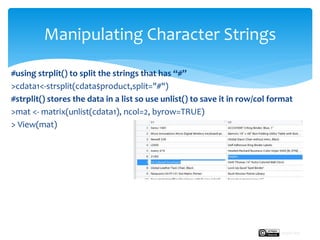
#using strplit() to split the strings that has “#”
>cdata1<-strsplit(cdata$product,split="#")
#strplit() stores the data in a list so use unlist() to save it in row/col format
>mat <- matrix(unlist(cdata1), ncol=2, byrow=TRUE)
> View(mat)
Manipulating Character Strings
Rupak Roy
grep() is use to extract/grab the data that matches with the pattern
For example:
>grep(" x",cdata$product)
where x is the pattern and cdata$product is the data object
>grepl(" x",cdata$product)
The only difference between grep() and grepl() is grep() function will give the
positions i.e. the index values of the data that matches with the pattern and
grepl() is a logical indicator (True/False) of the data that matches with the
pattern.
#grab only the rows that has “x” character in it.
For example: Tenex 46" x 60" Computer
>gdata<-cdata[grepl(" x",cdata$product),]
To know more about grep() and grepl() use ?grep
Pattern Matching and Replacement
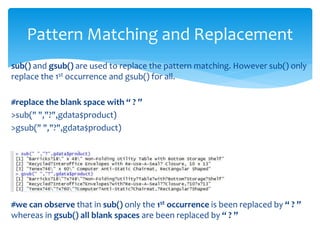
sub() and gsub() are used to replace the pattern matching. However sub() only
replace the 1st occurrence and gsub() for all.
#replace the blank space with “ ? ”
>sub(" ","?",gdata$product)
>gsub(" ","?",gdata$product)
#we can observe that in sub() only the 1st occurrence is been replaced by “ ? ”
whereas in gsub() all blank spaces are been replaced by “ ? ”
Pattern Matching and Replacement
Next:
We will see how to visualize the data to create data stories.
Manipulating Data - III
Rupak Roy

Transpose and manipulate character strings

  • 1.
    Manipulating Data -III Transpose and manipulating character strings. Rupak Roy
  • 2.
     This functionreshapes the data frame between ‘wide’ format and ‘long’ format with the repeated measurements in separate records.  To understand the reshape() functions lets understand the ‘wide’ format and the ‘long’ format Wide format: the variables are stored in a columnar wise. For example the first row is the header i.e. the labels to identify each columns. Most of the data are in ‘wide’ format. Long format: is the vice versa of the ‘wide’ format Transpose using reshape() Wide Format Long Format
  • 3.
    >install.packages(reshape2) >library(reshape2) >t_data<-read.csv(“wideFormat.csv”,header = T) #from‘wide’ format to ‘long’ format use melt() >melted<- melt(t_data, id.vars=“Name”,value.names= “values”) Where id.vars= column name value.names= name of the variable used to store values #from ‘long’ format to ‘wide’ format use dcast() >dcasted<-dcast(melted,Name~variable,value.var = "values") Where Name is the 1st column name, variable is the 2nd col name, value.var = is the 3rd column >View(dcasted) reshape2::melt()
  • 4.
     Another simpleway to transpose the data is by using t() from base R-package. #from ‘wide’ format to ‘long’ format >t_data<-t(dcasted) >View(t_data) #from ‘long’ format to ‘wide’ format >t_data1<-t(t_data) >View(t_data) Base R-package::t()
  • 5.
    >charData<-read.csv(“characterData.csv”,header = T)#load the dataset >View(charData) #extracting only the important column but remember to convert it with as.data.frame >cdata<-as.data.frame(charData$Product_Name) >names(cdata)[1]<- “product” #renaming the column name #transform product variable to character data type as substr works with char data type >cdata$product<-as.character(cdata$product) #using substr >cdata$substr<-as.data.frame(substr(cdata$product,start = 2,stop = 10)) #transform into Lowercase and Uppercase >cdata$toUpper<-as.data.frame(toupper(cdata$product)) >cdata$tolower<-as.data.frame(tolower(cdata$product)) Manipulating Character Strings
  • 6.
    #using strplit() tosplit the strings that has “#” >cdata1<-strsplit(cdata$product,split="#") #strplit() stores the data in a list so use unlist() to save it in row/col format >mat <- matrix(unlist(cdata1), ncol=2, byrow=TRUE) > View(mat) Manipulating Character Strings Rupak Roy
  • 7.
    grep() is useto extract/grab the data that matches with the pattern For example: >grep(" x",cdata$product) where x is the pattern and cdata$product is the data object >grepl(" x",cdata$product) The only difference between grep() and grepl() is grep() function will give the positions i.e. the index values of the data that matches with the pattern and grepl() is a logical indicator (True/False) of the data that matches with the pattern. #grab only the rows that has “x” character in it. For example: Tenex 46" x 60" Computer >gdata<-cdata[grepl(" x",cdata$product),] To know more about grep() and grepl() use ?grep Pattern Matching and Replacement
  • 8.
    sub() and gsub()are used to replace the pattern matching. However sub() only replace the 1st occurrence and gsub() for all. #replace the blank space with “ ? ” >sub(" ","?",gdata$product) >gsub(" ","?",gdata$product) #we can observe that in sub() only the 1st occurrence is been replaced by “ ? ” whereas in gsub() all blank spaces are been replaced by “ ? ” Pattern Matching and Replacement
  • 9.
    Next: We will seehow to visualize the data to create data stories. Manipulating Data - III Rupak Roy