Projects
Working with projects in TransparentChoice
What is a project?
• Any decision you are making using TransparentChoice is a project
• A project consists of;
– A “project name and description”
– A set of alternatives (the list of options available to you as an outcome of
your decision)
– A set of criteria (the list of factors that you will use to evaluate your
criteria)
– Optionally, a set of scales and / or attributes
– A team
– Results and analysis
Confidential
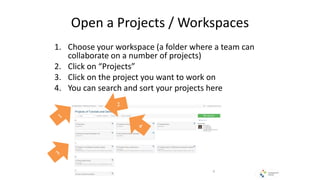
Open a Projects / Workspaces
1. Choose your workspace (a folder where a team can
collaborate on a number of projects)
2. Click on “Projects”
3. Click on the project you want to work on
4. You can search and sort your projects here
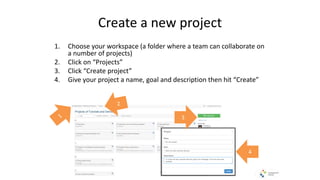
Create a new project
1. Choose your workspace (a folder where a team can collaborate on
a number of projects)
2. Click on “Projects”
3. Click “Create project”
4. Give your project a name, goal and description then hit “Create”
3
4
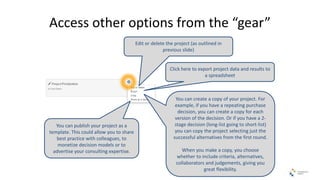
Access other options from the “gear”
Edit or delete the project (as outlined in
previous slide)
Click here to export project data and results to
a spreadsheet
You can create a copy of your project. For
example, if you have a repeating purchase
decision, you can create a copy for each
version of the decision. Or if you have a 2-
stage decision (long-list going to short-list)
you can copy the project selecting just the
successful alternatives from the first round.
When you make a copy, you choose
whether to include criteria, alternatives,
collaborators and judgements, giving you
great flexibility.
You can publish your project as a
template. This could allow you to share
best practice with colleagues, to
monetize decision models or to
advertise your consulting expertise.

TransparentChoice Projects Tutorial May 2015

  • 1.
    Projects Working with projectsin TransparentChoice
  • 2.
    What is aproject? • Any decision you are making using TransparentChoice is a project • A project consists of; – A “project name and description” – A set of alternatives (the list of options available to you as an outcome of your decision) – A set of criteria (the list of factors that you will use to evaluate your criteria) – Optionally, a set of scales and / or attributes – A team – Results and analysis Confidential
  • 3.
    Open a Projects/ Workspaces 1. Choose your workspace (a folder where a team can collaborate on a number of projects) 2. Click on “Projects” 3. Click on the project you want to work on 4. You can search and sort your projects here
  • 4.
    Create a newproject 1. Choose your workspace (a folder where a team can collaborate on a number of projects) 2. Click on “Projects” 3. Click “Create project” 4. Give your project a name, goal and description then hit “Create” 3 4
  • 5.
    Access other optionsfrom the “gear” Edit or delete the project (as outlined in previous slide) Click here to export project data and results to a spreadsheet You can create a copy of your project. For example, if you have a repeating purchase decision, you can create a copy for each version of the decision. Or if you have a 2- stage decision (long-list going to short-list) you can copy the project selecting just the successful alternatives from the first round. When you make a copy, you choose whether to include criteria, alternatives, collaborators and judgements, giving you great flexibility. You can publish your project as a template. This could allow you to share best practice with colleagues, to monetize decision models or to advertise your consulting expertise.