Latest changes
1. Disagreement metric
2. Export votes
3. Free App: QuickRanking
4. Academic Subsidy Program
5. Moving projects between workspaces
6. Vote generator
7. Saving scores to an attribute
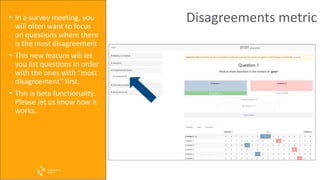
Disagreements metric• In a survey meeting, you
will often want to focus
on questions where there
is the most disagreement
• This new feature will let
you list questions in order
with the ones with “most
disagreement” first.
• This is beta functionality.
Please let us know how it
works.
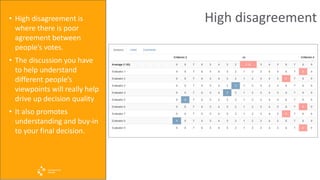
High disagreement• High disagreement is
where there is poor
agreement between
people’s votes.
• The discussion you have
to help understand
different people’s
viewpoints will really help
drive up decision quality
• It also promotes
understanding and buy-in
to your final decision.
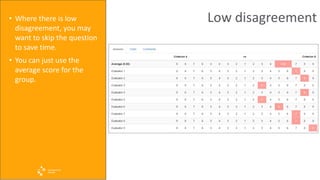
Low disagreement• Where there is low
disagreement, you may
want to skip the question
to save time.
• You can just use the
average score for the
group.
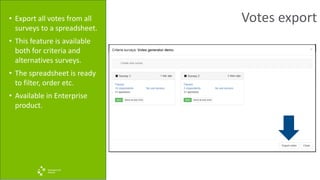
Votes export• Export all votes from all
surveys to a spreadsheet.
• This feature is available
both for criteria and
alternatives surveys.
• The spreadsheet is ready
to filter, order etc.
• Available in Enterprise
product.
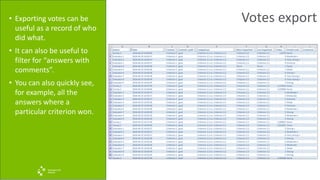
Votes export• Exporting votes can be
useful as a record of who
did what.
• It can also be useful to
filter for “answers with
comments”.
• You can also quickly see,
for example, all the
answers where a
particular criterion won.
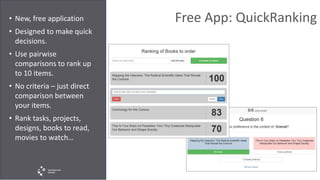
Free App: QuickRanking• New, free application
• Designed to make quick
decisions.
• Use pairwise
comparisons to rank up
to 10 items.
• No criteria – just direct
comparison between
your items.
• Rank tasks, projects,
designs, books to read,
movies to watch…
Academic Subsidy Program• This program gives
academics access to our
Enterprise software at
massively reduced prices.
• Details:
https://content.transpare
ntchoice.com/transparen
tchoice-academic-
sponsorship
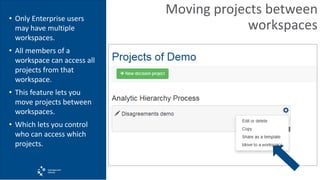
Moving projects between
workspaces
• Only Enterprise users
may have multiple
workspaces.
• All members of a
workspace can access all
projects from that
workspace.
• This feature lets you
move projects between
workspaces.
• Which lets you control
who can access which
projects.
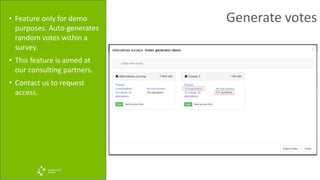
Generate votes• Feature only for demo
purposes. Auto-generates
random votes within a
survey.
• This feature is aimed at
our consulting partners.
• Contact us to request
access.
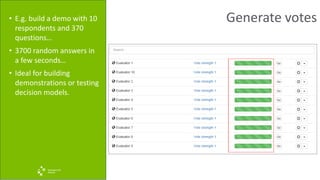
Generate votes• E.g. build a demo with 10
respondents and 370
questions…
• 3700 random answers in
a few seconds…
• Ideal for building
demonstrations or testing
decision models.
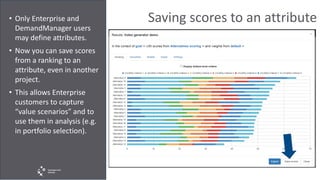
Saving scores to an attribute• Only Enterprise and
DemandManager users
may define attributes.
• Now you can save scores
from a ranking to an
attribute, even in another
project.
• This allows Enterprise
customers to capture
“value scenarios” and to
use them in analysis (e.g.
in portfolio selection).
Questions or comments?
Please ask questions or make comments
below.
We use your feedback to shape the
product, making it more useful to you!

New features and improvements

  • 1.
    Latest changes 1. Disagreementmetric 2. Export votes 3. Free App: QuickRanking 4. Academic Subsidy Program 5. Moving projects between workspaces 6. Vote generator 7. Saving scores to an attribute
  • 2.
    Disagreements metric• Ina survey meeting, you will often want to focus on questions where there is the most disagreement • This new feature will let you list questions in order with the ones with “most disagreement” first. • This is beta functionality. Please let us know how it works.
  • 3.
    High disagreement• Highdisagreement is where there is poor agreement between people’s votes. • The discussion you have to help understand different people’s viewpoints will really help drive up decision quality • It also promotes understanding and buy-in to your final decision.
  • 4.
    Low disagreement• Wherethere is low disagreement, you may want to skip the question to save time. • You can just use the average score for the group.
  • 5.
    Votes export• Exportall votes from all surveys to a spreadsheet. • This feature is available both for criteria and alternatives surveys. • The spreadsheet is ready to filter, order etc. • Available in Enterprise product.
  • 6.
    Votes export• Exportingvotes can be useful as a record of who did what. • It can also be useful to filter for “answers with comments”. • You can also quickly see, for example, all the answers where a particular criterion won.
  • 7.
    Free App: QuickRanking•New, free application • Designed to make quick decisions. • Use pairwise comparisons to rank up to 10 items. • No criteria – just direct comparison between your items. • Rank tasks, projects, designs, books to read, movies to watch…
  • 8.
    Academic Subsidy Program•This program gives academics access to our Enterprise software at massively reduced prices. • Details: https://content.transpare ntchoice.com/transparen tchoice-academic- sponsorship
  • 9.
    Moving projects between workspaces •Only Enterprise users may have multiple workspaces. • All members of a workspace can access all projects from that workspace. • This feature lets you move projects between workspaces. • Which lets you control who can access which projects.
  • 10.
    Generate votes• Featureonly for demo purposes. Auto-generates random votes within a survey. • This feature is aimed at our consulting partners. • Contact us to request access.
  • 11.
    Generate votes• E.g.build a demo with 10 respondents and 370 questions… • 3700 random answers in a few seconds… • Ideal for building demonstrations or testing decision models.
  • 12.
    Saving scores toan attribute• Only Enterprise and DemandManager users may define attributes. • Now you can save scores from a ranking to an attribute, even in another project. • This allows Enterprise customers to capture “value scenarios” and to use them in analysis (e.g. in portfolio selection).
  • 13.
    Questions or comments? Pleaseask questions or make comments below. We use your feedback to shape the product, making it more useful to you!