Image: "Lattice Cube Sequence" by Bas Schouten. Creative Commons licence CC BY-NC-ND - https://www.flickr.com/photos/bas_schouten/6203887064/
2nd International Conference on Higher Education Advances (HEAd’16)
21-23 June 2016
Universitat Politècnica de València, Valencia, Spain
Dr Bill Ashraf, Wayne Barry & Sam McFarlane
Canterbury Christ Church University, UK
Follow Us: @CCCUTEL | Join Us: cccutel.wordpress.com
#HEAd16
Towards Consistency
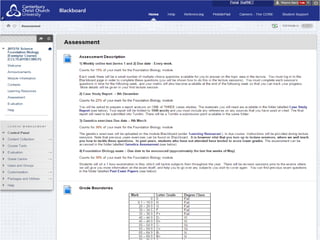
Digital Learning Thresholds
Image: "Canterbury Christ Church University campus" by Zoltan Gaal. Creative Commons licence CC BY - https://www.flickr.com/photos/zoltangaal/8298143490/
Our Institutional Context
• C of E Foundation | Post 1992 University | Million+ Group | Cathedrals Group
• 4 x Campuses across the County of Kent, UK | 4 x Faculties | School-based
• Predominantly offers courses for Public Sector careers
• @ 18,000 FTE Students | @ 3000 FT & PT Staff (1600 Academics)
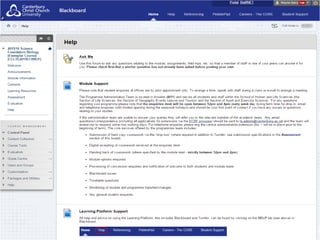
Virtual Learning Environment (VLE):
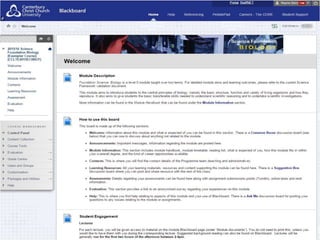
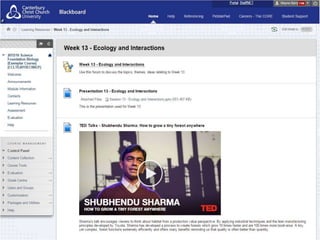
• Introduced VLE in 2002 using Blackboard
• Host to: @20000 student | @4000 staff | @2000 L&T courses
• Mixed Configuration: Module | Programme | Cohort
• Mixed Usage: Repository | Communications | Interaction
• Students have voiced dissatisfaction on the lack of consistent “look and feel”
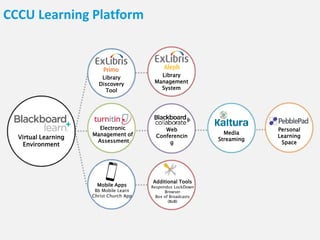
CCCU Learning Platform
Electronic
Management of
Assessment
Web
Conferencin
g
Media
Streaming
Personal
Learning
Space
Library
Discovery
Tool
Library
Management
System
Mobile Apps
Bb Mobile Learn
Christ Church App
Additional Tools
Respondus LockDown
Browser
Box of Broadcasts
(BoB)
Virtual Learning
Environment
Why Digital Learning Thresholds?
Image: "Tablets" by Ministerio TIC Colombia. Creative Commons licence CC BY - https://www.flickr.com/photos/ministerio_tic/6966968685/
The notion of threshold is grounded in threshold concepts (Meyer & Land,
2003) conceived as a means of opening up “previously inaccessible way[s] of
thinking about something” (ibid., p.1).
The principle aim of the CCCU DLT is that all CCCU students will have access to
digital learning, and that all staff and students will have clear expectations
about how, why and when to use digital learning.
Strategic Vision:
• Aligned to VLE Consistency Project
• Inculcate Digital Literacy
• Consistency in Electronic Management of Assessment (EMA)
• University strategic aim to increase more Flexible Modes of Delivery
• Affiliated with Internationalisation, Sustainability, Employability and
Inclusion (Post DSA) agendas
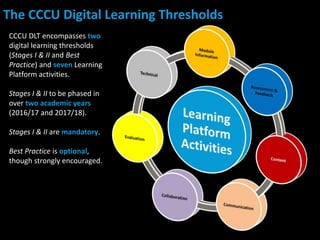
CCCU DLT encompasses two
digital learning thresholds
(Stages I & II and Best
Practice) and seven Learning
Platform activities.
Stages I & II to be phased in
over two academic years
(2016/17 and 2017/18).
Stages I & II are mandatory.
Best Practice is optional,
though strongly encouraged.
The CCCU Digital Learning Thresholds
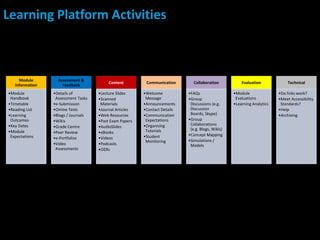
Learning Platform Activities
Module
Information
•Module
Handbook
•Timetable
•Reading List
•Learning
Outcomes
•Key Dates
•Module
Expectations
Assessment &
Feedback
•Details of
Assessment Tasks
•e-Submission
•Online Tests
•Blogs / Journals
•Wikis
•Grade Centre
•Peer Review
•e-Portfolios
•Video
Assessments
Content
•Lecture Slides
•Scanned
Materials
•Journal Articles
•Web Resources
•Past Exam Papers
•AudioSlides
•eBooks
•Videos
•Podcasts
•OERs
Communication
•Welcome
Message
•Announcements
•Contact Details
•Communication
Expectations
•Organising
Tutorials
•Student
Monitoring
Collaboration
•FAQs
•Group
Discussions (e.g.
Discussion
Boards, Skype)
•Group
Collaborations
(e.g. Blogs, Wikis)
•Concept Mapping
•Simulations /
Models
Evaluation
•Module
Evaluations
•Learning Analytics
Technical
•Do links work?
•Meet Accessibility
Standards?
•Help
•Archiving
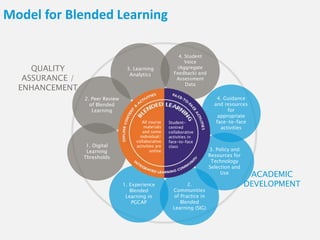
Model for Blended Learning
1. Experience
Blended
Learning in
PGCAP
2.
Communities
of Practice in
Blended
Learning (SIG)
3. Policy and
Resources for
Technology
Selection and
Use
2. Peer Review
of Blended
Learning
3. Learning
Analytics
4. Student
Voice
(Aggregate
Feedback) and
Assessment
Data
1. Digital
Learning
Thresholds
QUALITY
ASSURANCE /
ENHANCEMENT
4. Guidance
and resources
for
appropriate
face-to-face
activities
ACADEMIC
DEVELOPMENT
All course
materials
and some
individual/
collaborative
activities are
online
Student-
centred
collaborative
activities in
face-to-face
class
Image: “Question Mark” by djking. Creative Commons licence CC BY-NC-SA - http://www.flickr.com/photos/djking/8578067721/
Thank You & Questions?

Towards Consistency: Digital Learning Thresholds

  • 1.
    Image: "Lattice CubeSequence" by Bas Schouten. Creative Commons licence CC BY-NC-ND - https://www.flickr.com/photos/bas_schouten/6203887064/ 2nd International Conference on Higher Education Advances (HEAd’16) 21-23 June 2016 Universitat Politècnica de València, Valencia, Spain Dr Bill Ashraf, Wayne Barry & Sam McFarlane Canterbury Christ Church University, UK Follow Us: @CCCUTEL | Join Us: cccutel.wordpress.com #HEAd16 Towards Consistency Digital Learning Thresholds
  • 2.
    Image: "Canterbury ChristChurch University campus" by Zoltan Gaal. Creative Commons licence CC BY - https://www.flickr.com/photos/zoltangaal/8298143490/ Our Institutional Context • C of E Foundation | Post 1992 University | Million+ Group | Cathedrals Group • 4 x Campuses across the County of Kent, UK | 4 x Faculties | School-based • Predominantly offers courses for Public Sector careers • @ 18,000 FTE Students | @ 3000 FT & PT Staff (1600 Academics) Virtual Learning Environment (VLE): • Introduced VLE in 2002 using Blackboard • Host to: @20000 student | @4000 staff | @2000 L&T courses • Mixed Configuration: Module | Programme | Cohort • Mixed Usage: Repository | Communications | Interaction • Students have voiced dissatisfaction on the lack of consistent “look and feel”
  • 3.
    CCCU Learning Platform Electronic Managementof Assessment Web Conferencin g Media Streaming Personal Learning Space Library Discovery Tool Library Management System Mobile Apps Bb Mobile Learn Christ Church App Additional Tools Respondus LockDown Browser Box of Broadcasts (BoB) Virtual Learning Environment
  • 4.
    Why Digital LearningThresholds? Image: "Tablets" by Ministerio TIC Colombia. Creative Commons licence CC BY - https://www.flickr.com/photos/ministerio_tic/6966968685/ The notion of threshold is grounded in threshold concepts (Meyer & Land, 2003) conceived as a means of opening up “previously inaccessible way[s] of thinking about something” (ibid., p.1). The principle aim of the CCCU DLT is that all CCCU students will have access to digital learning, and that all staff and students will have clear expectations about how, why and when to use digital learning. Strategic Vision: • Aligned to VLE Consistency Project • Inculcate Digital Literacy • Consistency in Electronic Management of Assessment (EMA) • University strategic aim to increase more Flexible Modes of Delivery • Affiliated with Internationalisation, Sustainability, Employability and Inclusion (Post DSA) agendas
  • 5.
    CCCU DLT encompassestwo digital learning thresholds (Stages I & II and Best Practice) and seven Learning Platform activities. Stages I & II to be phased in over two academic years (2016/17 and 2017/18). Stages I & II are mandatory. Best Practice is optional, though strongly encouraged. The CCCU Digital Learning Thresholds
  • 6.
    Learning Platform Activities Module Information •Module Handbook •Timetable •ReadingList •Learning Outcomes •Key Dates •Module Expectations Assessment & Feedback •Details of Assessment Tasks •e-Submission •Online Tests •Blogs / Journals •Wikis •Grade Centre •Peer Review •e-Portfolios •Video Assessments Content •Lecture Slides •Scanned Materials •Journal Articles •Web Resources •Past Exam Papers •AudioSlides •eBooks •Videos •Podcasts •OERs Communication •Welcome Message •Announcements •Contact Details •Communication Expectations •Organising Tutorials •Student Monitoring Collaboration •FAQs •Group Discussions (e.g. Discussion Boards, Skype) •Group Collaborations (e.g. Blogs, Wikis) •Concept Mapping •Simulations / Models Evaluation •Module Evaluations •Learning Analytics Technical •Do links work? •Meet Accessibility Standards? •Help •Archiving
  • 11.
    Model for BlendedLearning 1. Experience Blended Learning in PGCAP 2. Communities of Practice in Blended Learning (SIG) 3. Policy and Resources for Technology Selection and Use 2. Peer Review of Blended Learning 3. Learning Analytics 4. Student Voice (Aggregate Feedback) and Assessment Data 1. Digital Learning Thresholds QUALITY ASSURANCE / ENHANCEMENT 4. Guidance and resources for appropriate face-to-face activities ACADEMIC DEVELOPMENT All course materials and some individual/ collaborative activities are online Student- centred collaborative activities in face-to-face class
  • 12.
    Image: “Question Mark”by djking. Creative Commons licence CC BY-NC-SA - http://www.flickr.com/photos/djking/8578067721/ Thank You & Questions?