Sutton University:
             Computers/Technical
                                      PowerPoint Tips: Deleting a Slide

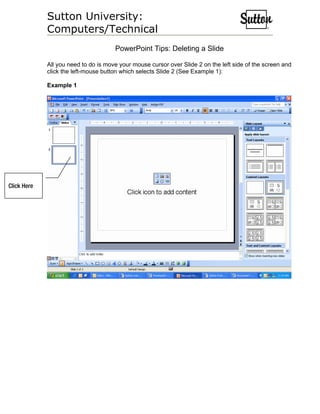
             All you need to do is move your mouse cursor over Slide 2 on the left side of the screen and
             click the left-mouse button which selects Slide 2 (See Example 1):

             Example 1


Click Here
Sutton University:
             Computers/Technical
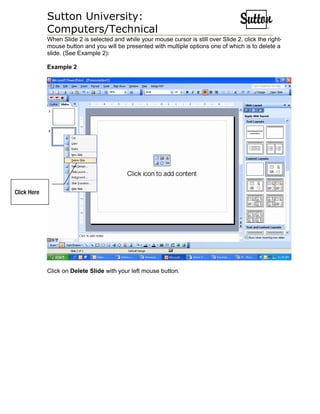
             When Slide 2 is selected and while your mouse cursor is still over Slide 2, click the right-
             mouse button and you will be presented with multiple options one of which is to delete a
             slide. (See Example 2):

             Example 2


Click Here


             Click on Delete Slide with your left mouse button.
Sutton University:
Computers/Technical
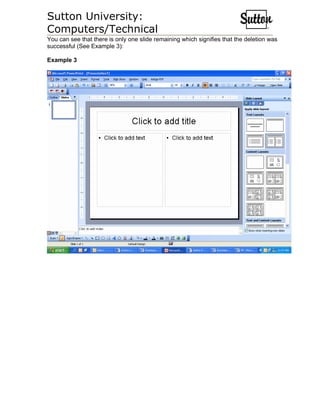
You can see that there is only one slide remaining which signifies that the deletion was
successful (See Example 3):

Example 3

Power point deleting a slide

  • 1.
    Sutton University: Computers/Technical PowerPoint Tips: Deleting a Slide All you need to do is move your mouse cursor over Slide 2 on the left side of the screen and click the left-mouse button which selects Slide 2 (See Example 1): Example 1 Click Here
  • 2.
    Sutton University: Computers/Technical When Slide 2 is selected and while your mouse cursor is still over Slide 2, click the right- mouse button and you will be presented with multiple options one of which is to delete a slide. (See Example 2): Example 2 Click Here Click on Delete Slide with your left mouse button.
  • 3.
    Sutton University: Computers/Technical You cansee that there is only one slide remaining which signifies that the deletion was successful (See Example 3): Example 3