Tips – How to use Google Search efficiently

I am using Google Search engine almost all the time since 2006 and learned lots of
things to manipulate Google search in much easier way. I know I am little late to share
this and you will have lots of such posts over the internet. But, presentation and
thoughts for the same things are always different for different authors. I would basically
show you the real power of Google Search engine and strong evidence to prove that
why I love and prefer Google Search Only :D

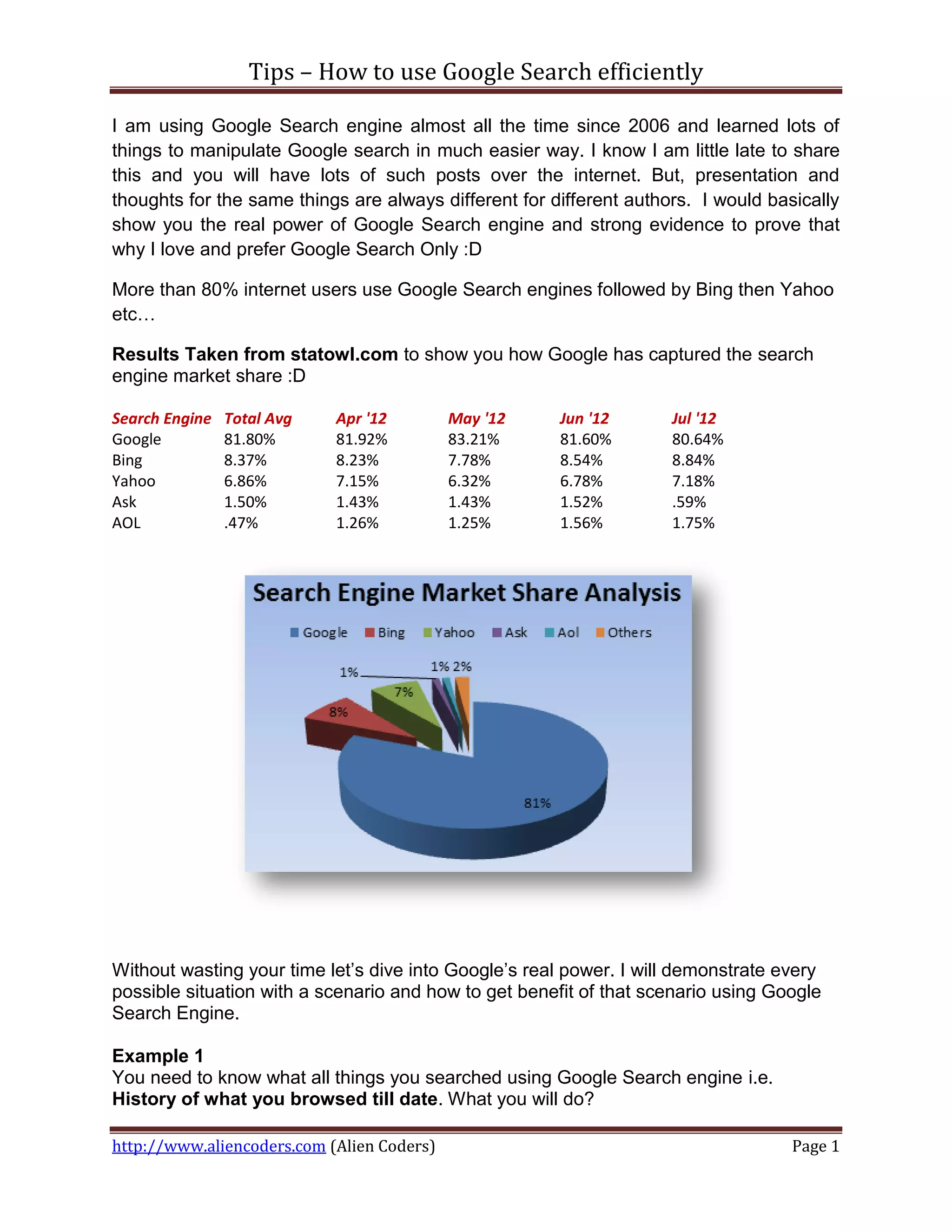
More than 80% internet users use Google Search engines followed by Bing then Yahoo
etc…

Results Taken from statowl.com to show you how Google has captured the search
engine market share :D

Search Engine   Total Avg   Apr '12         May '12    Jun '12       Jul '12
Google          81.80%      81.92%          83.21%     81.60%        80.64%
Bing            8.37%       8.23%           7.78%      8.54%         8.84%
Yahoo           6.86%       7.15%           6.32%      6.78%         7.18%
Ask             1.50%       1.43%           1.43%      1.52%         .59%
AOL             .47%        1.26%           1.25%      1.56%         1.75%


Without wasting your time let’s dive into Google’s real power. I will demonstrate every
possible situation with a scenario and how to get benefit of that scenario using Google
Search Engine.

Example 1
You need to know what all things you searched using Google Search engine i.e.
History of what you browsed till date. What you will do?

http://www.aliencoders.com (Alien Coders)                                           Page 1
Tips – How to use Google Search efficiently


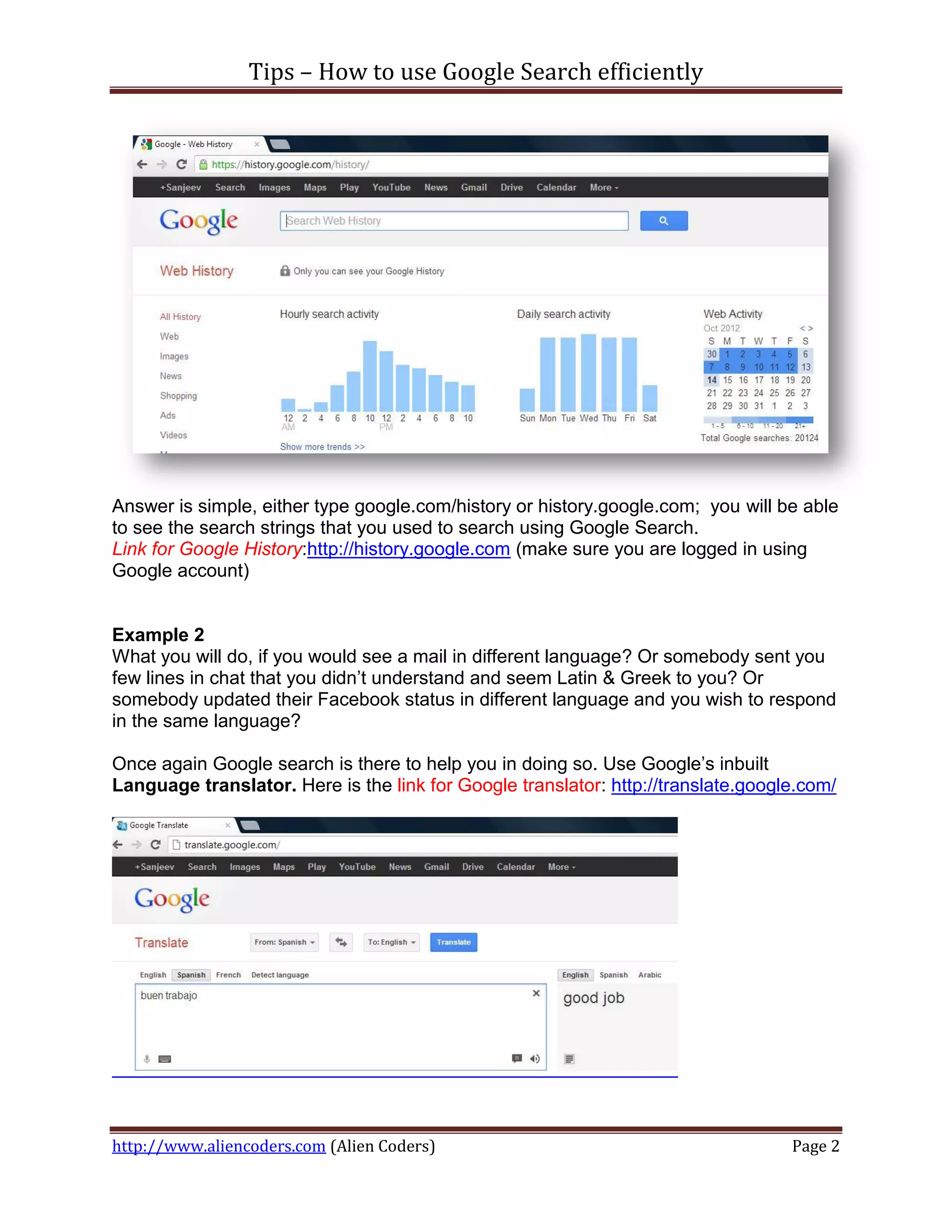
Answer is simple, either type google.com/history or history.google.com; you will be able
to see the search strings that you used to search using Google Search.
Link for Google History:http://history.google.com (make sure you are logged in using
Google account)


Example 2
What you will do, if you would see a mail in different language? Or somebody sent you
few lines in chat that you didn’t understand and seem Latin & Greek to you? Or
somebody updated their Facebook status in different language and you wish to respond
in the same language?

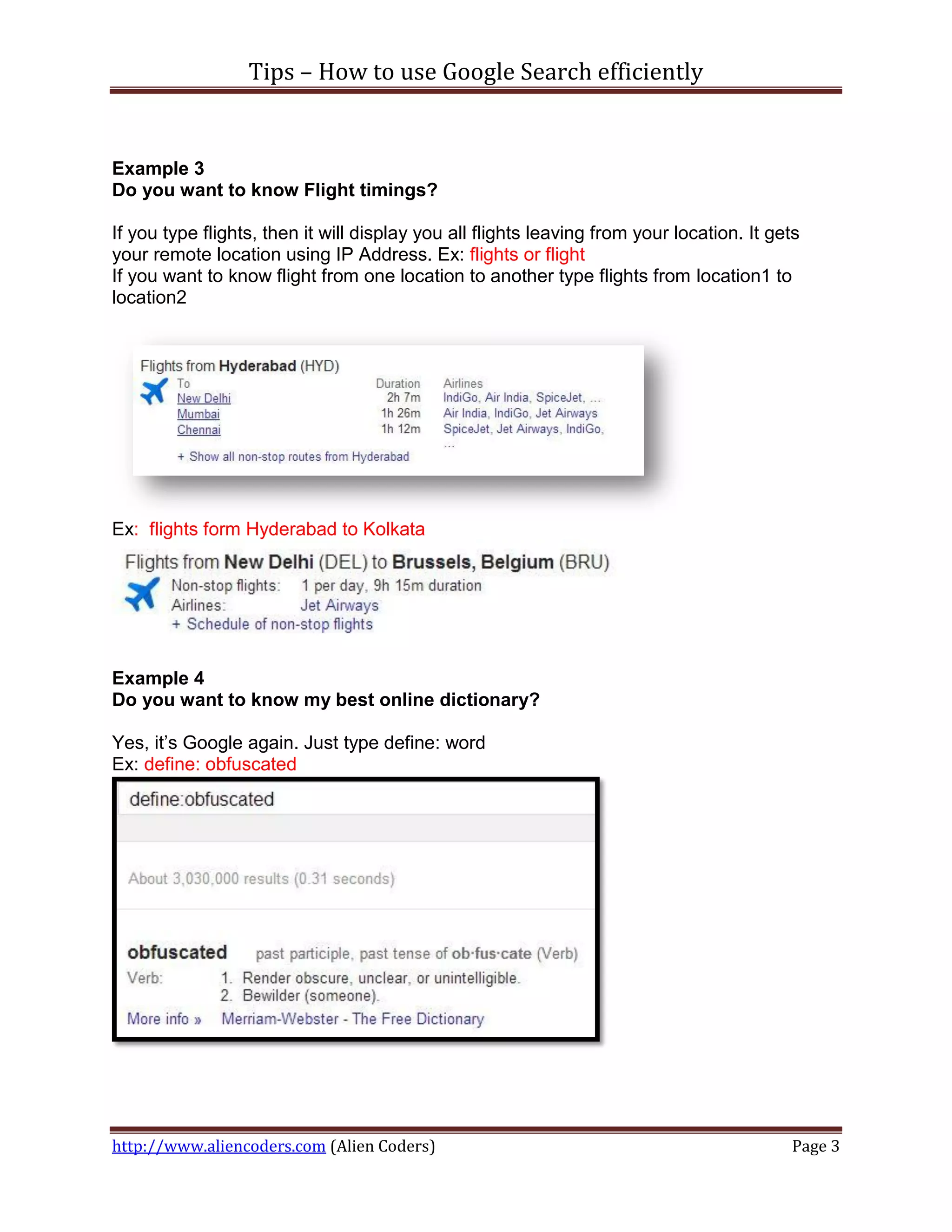
Once again Google search is there to help you in doing so. Use Google’s inbuilt
Language translator. Here is the link for Google translator: http://translate.google.com/


http://www.aliencoders.com (Alien Coders)                                          Page 2
Tips – How to use Google Search efficiently


Example 3
Do you want to know Flight timings?

If you type flights, then it will display you all flights leaving from your location. It gets
your remote location using IP Address. Ex: flights or flight
If you want to know flight from one location to another type flights from location1 to
location2


Ex: flights form Hyderabad to Kolkata


Example 4
Do you want to know my best online dictionary?

Yes, it’s Google again. Just type define: word
Ex: define: obfuscated


http://www.aliencoders.com (Alien Coders)                                                  Page 3
Tips – How to use Google Search efficiently

Example 5
What if you don’t know the correct spelling or misspelled some words?

Don’t worry now Google is damn smart to rectify it automatically and will display you
result for the correct one. If you didn’t mean what Google shows, still you have option


to search for whatever you typed.


Example 6
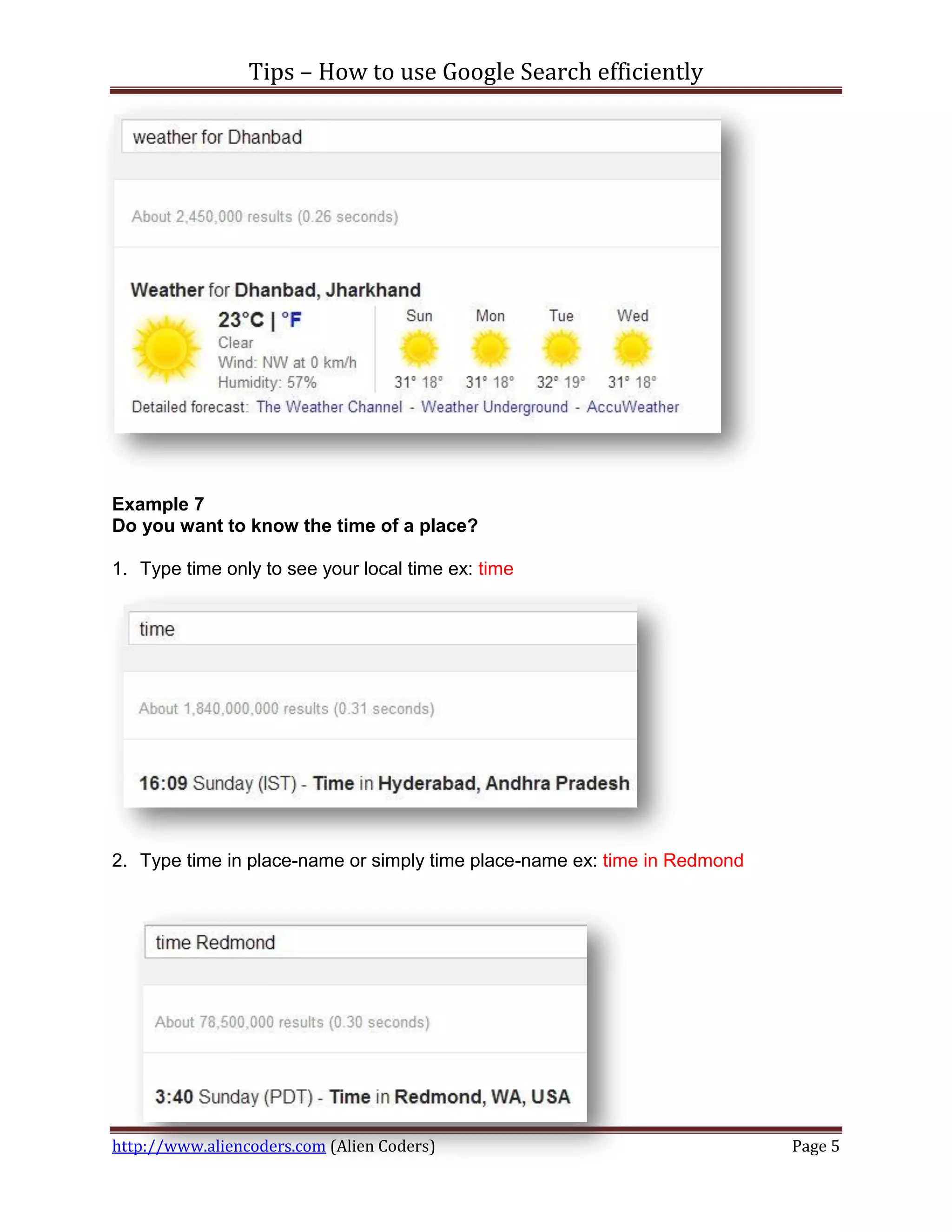
Is it rainy season or sunny at Dhanbad? Do you need to know weather forecast
where you live or any place?

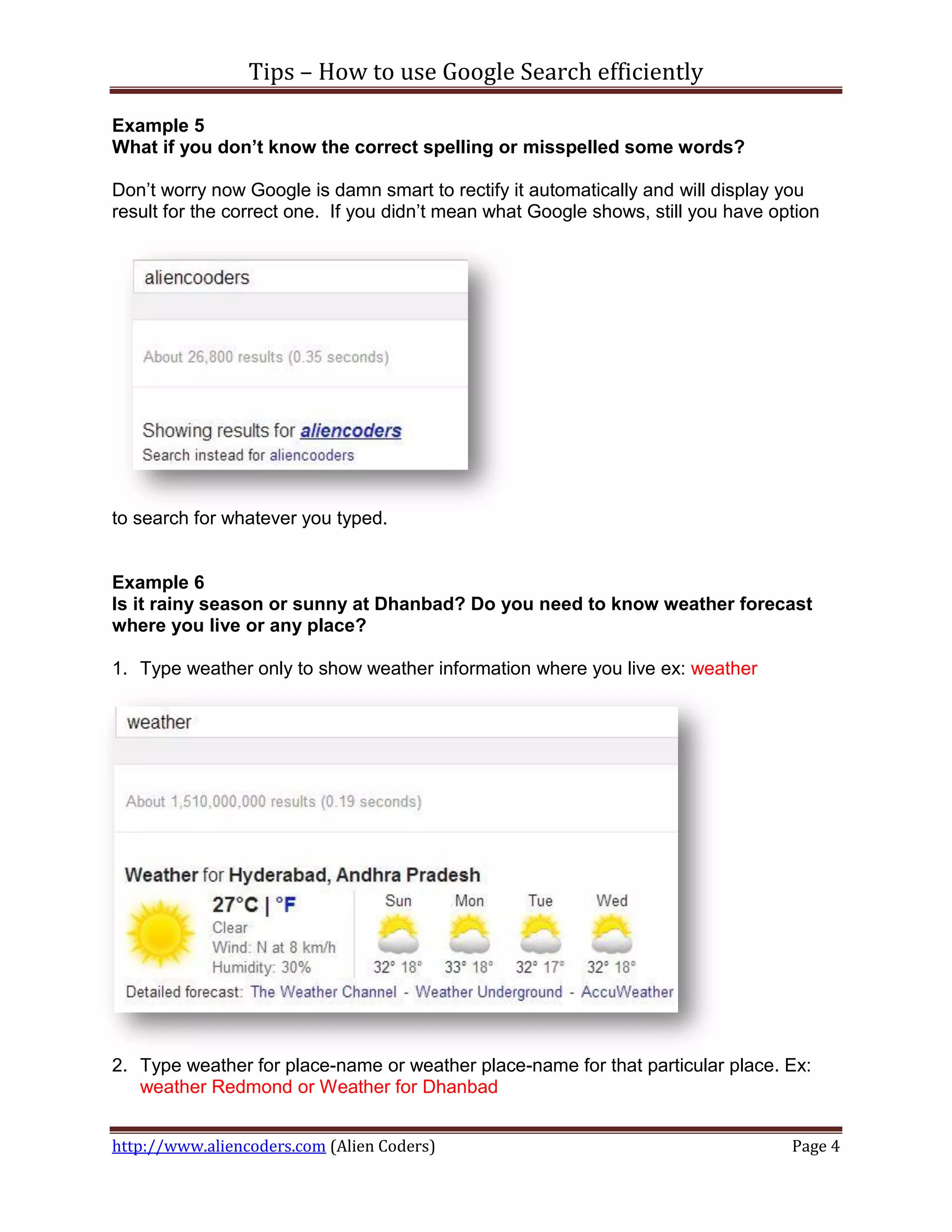
1. Type weather only to show weather information where you live ex: weather


2. Type weather for place-name or weather place-name for that particular place. Ex:
   weather Redmond or Weather for Dhanbad


http://www.aliencoders.com (Alien Coders)                                          Page 4
Tips – How to use Google Search efficiently


Example 7
Do you want to know the time of a place?

1. Type time only to see your local time ex: time


2. Type time in place-name or simply time place-name ex: time in Redmond


http://www.aliencoders.com (Alien Coders)                                  Page 5
Tips – How to use Google Search efficiently

Example 8
It’s movie time dude!

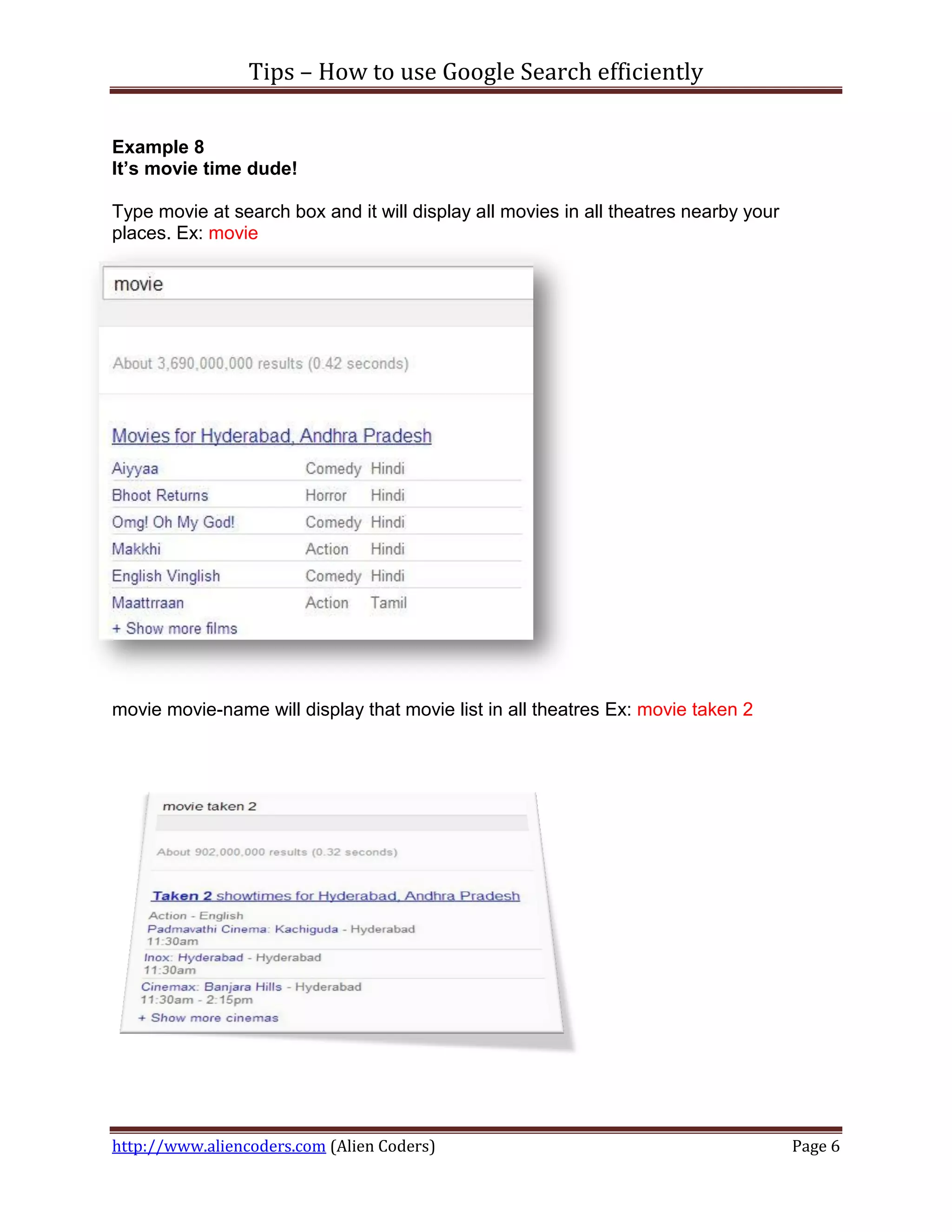
Type movie at search box and it will display all movies in all theatres nearby your
places. Ex: movie


movie movie-name will display that movie list in all theatres Ex: movie taken 2


http://www.aliencoders.com (Alien Coders)                                             Page 6
Tips – How to use Google Search efficiently

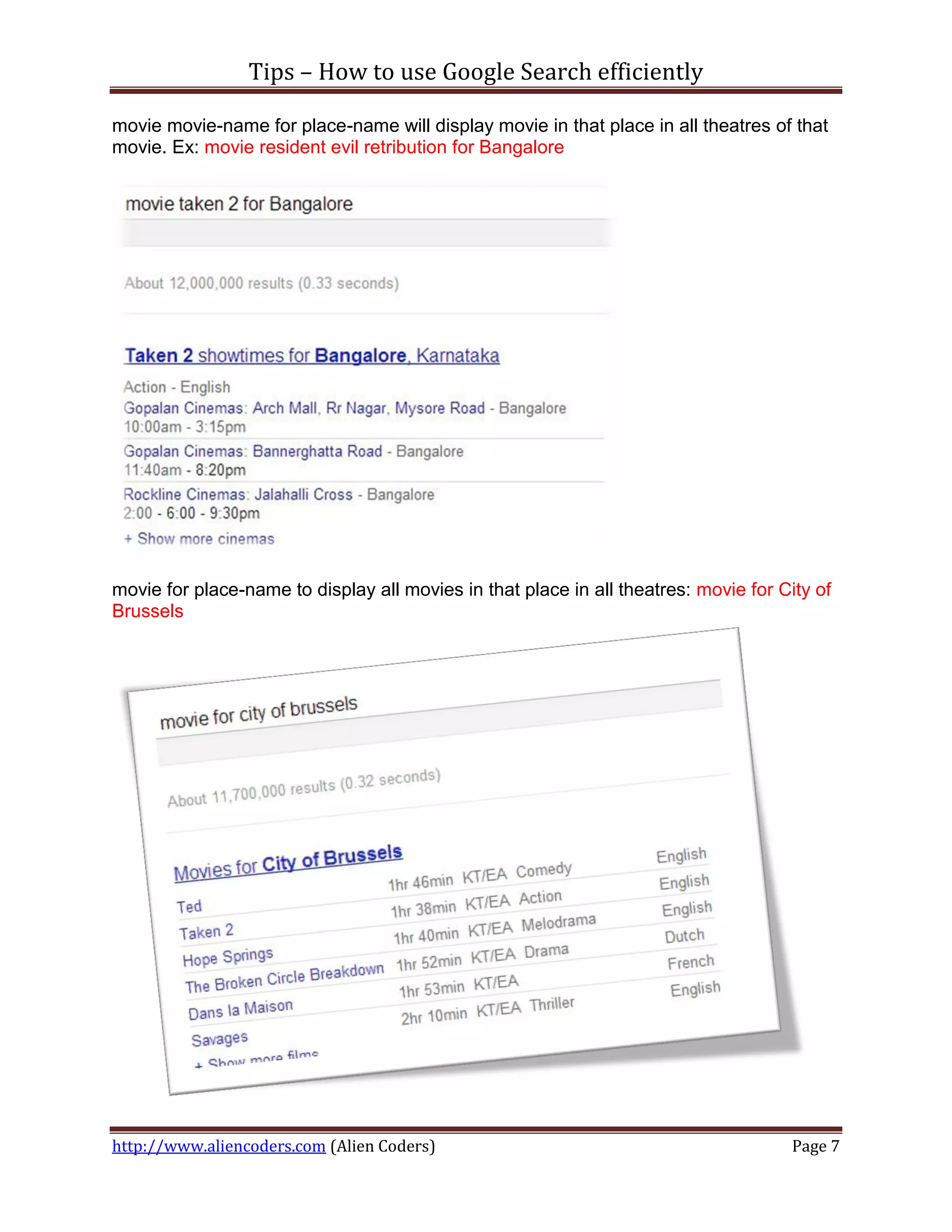
movie movie-name for place-name will display movie in that place in all theatres of that
movie. Ex: movie resident evil retribution for Bangalore


movie for place-name to display all movies in that place in all theatres: movie for City of
Brussels


http://www.aliencoders.com (Alien Coders)                                             Page 7
Tips – How to use Google Search efficiently


Example 9
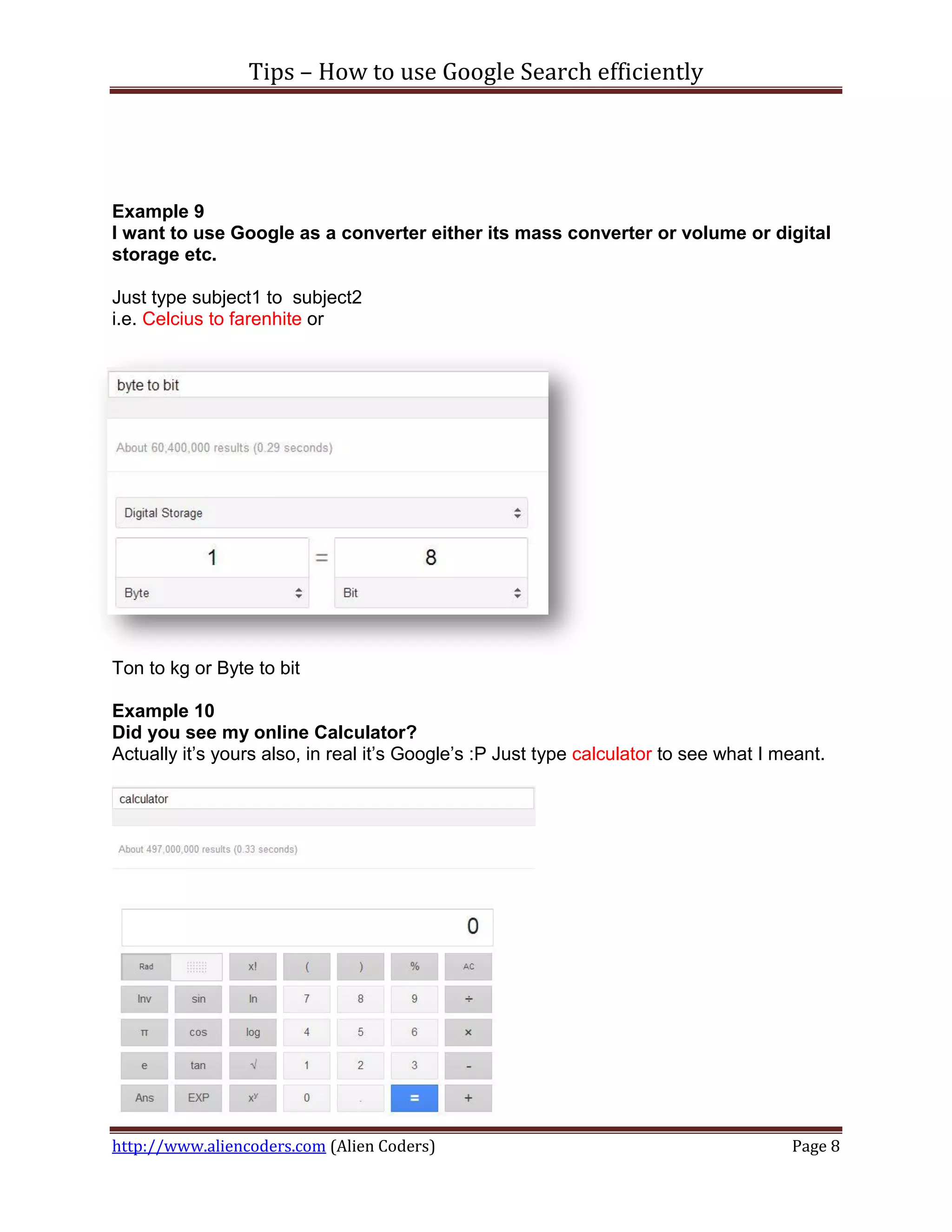
I want to use Google as a converter either its mass converter or volume or digital
storage etc.

Just type subject1 to subject2
i.e. Celcius to farenhite or


Ton to kg or Byte to bit

Example 10
Did you see my online Calculator?
Actually it’s yours also, in real it’s Google’s :P Just type calculator to see what I meant.


http://www.aliencoders.com (Alien Coders)                                              Page 8
Tips – How to use Google Search efficiently

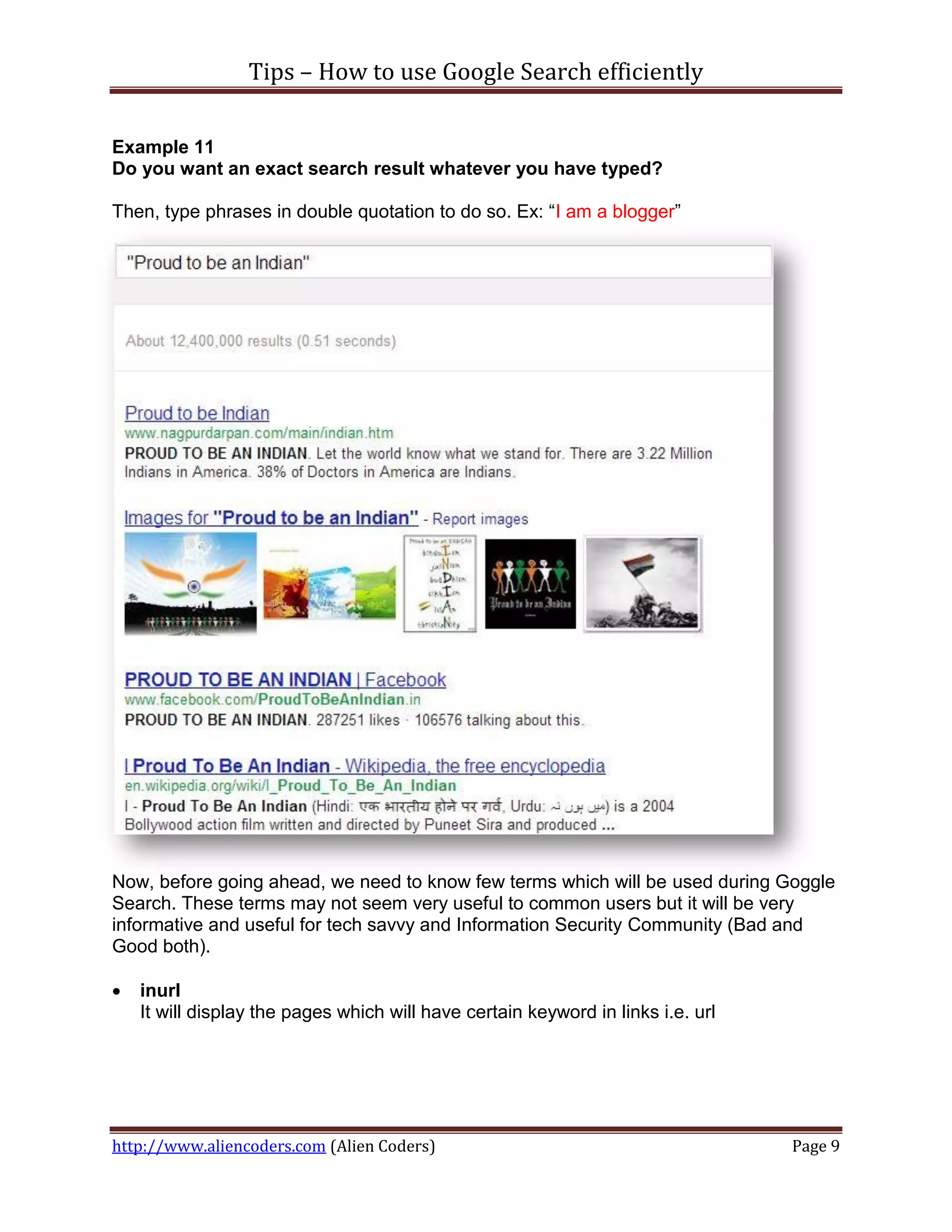
Example 11
Do you want an exact search result whatever you have typed?

Then, type phrases in double quotation to do so. Ex: “I am a blogger”


Now, before going ahead, we need to know few terms which will be used during Goggle
Search. These terms may not seem very useful to common users but it will be very
informative and useful for tech savvy and Information Security Community (Bad and
Good both).

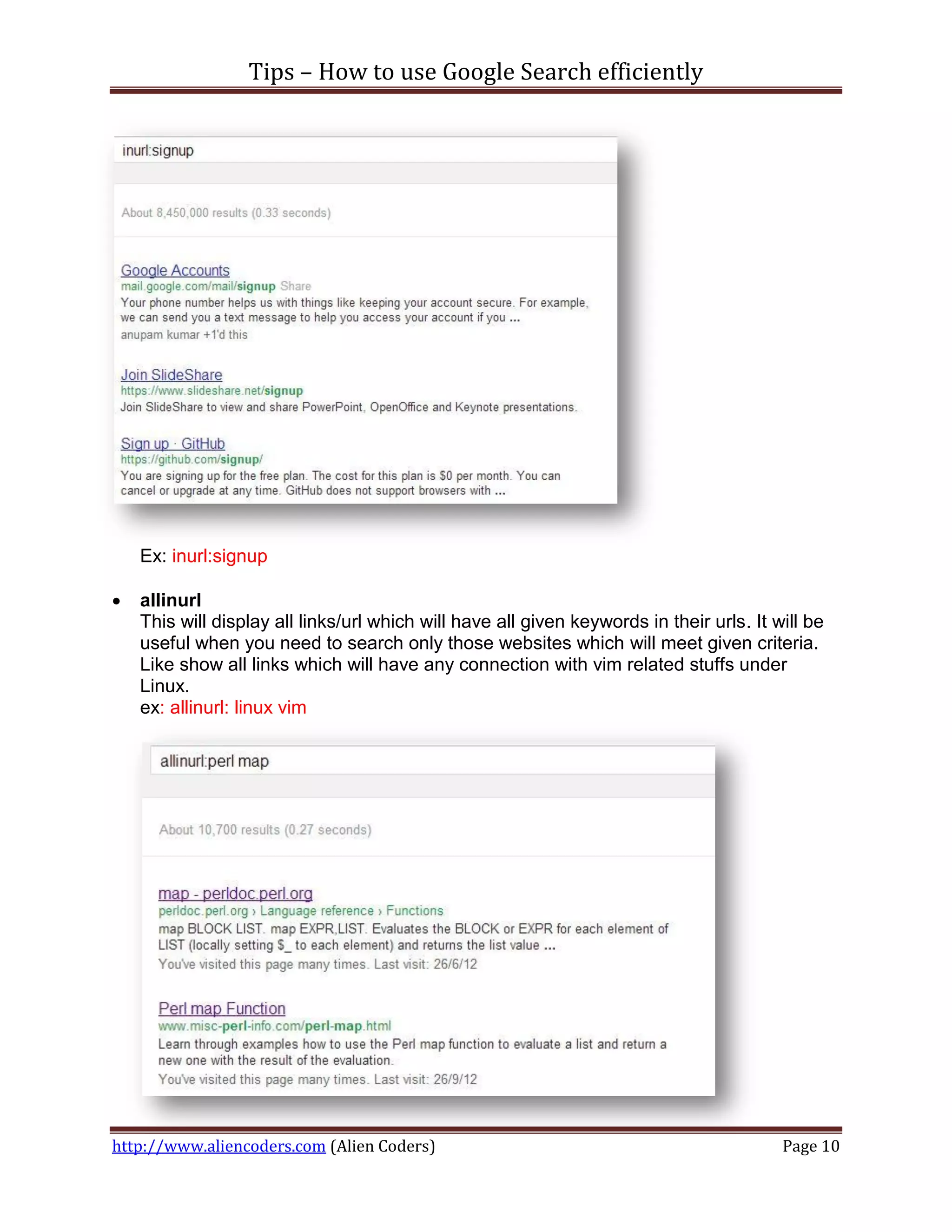
   inurl
    It will display the pages which will have certain keyword in links i.e. url


http://www.aliencoders.com (Alien Coders)                                         Page 9
Tips – How to use Google Search efficiently


    Ex: inurl:signup

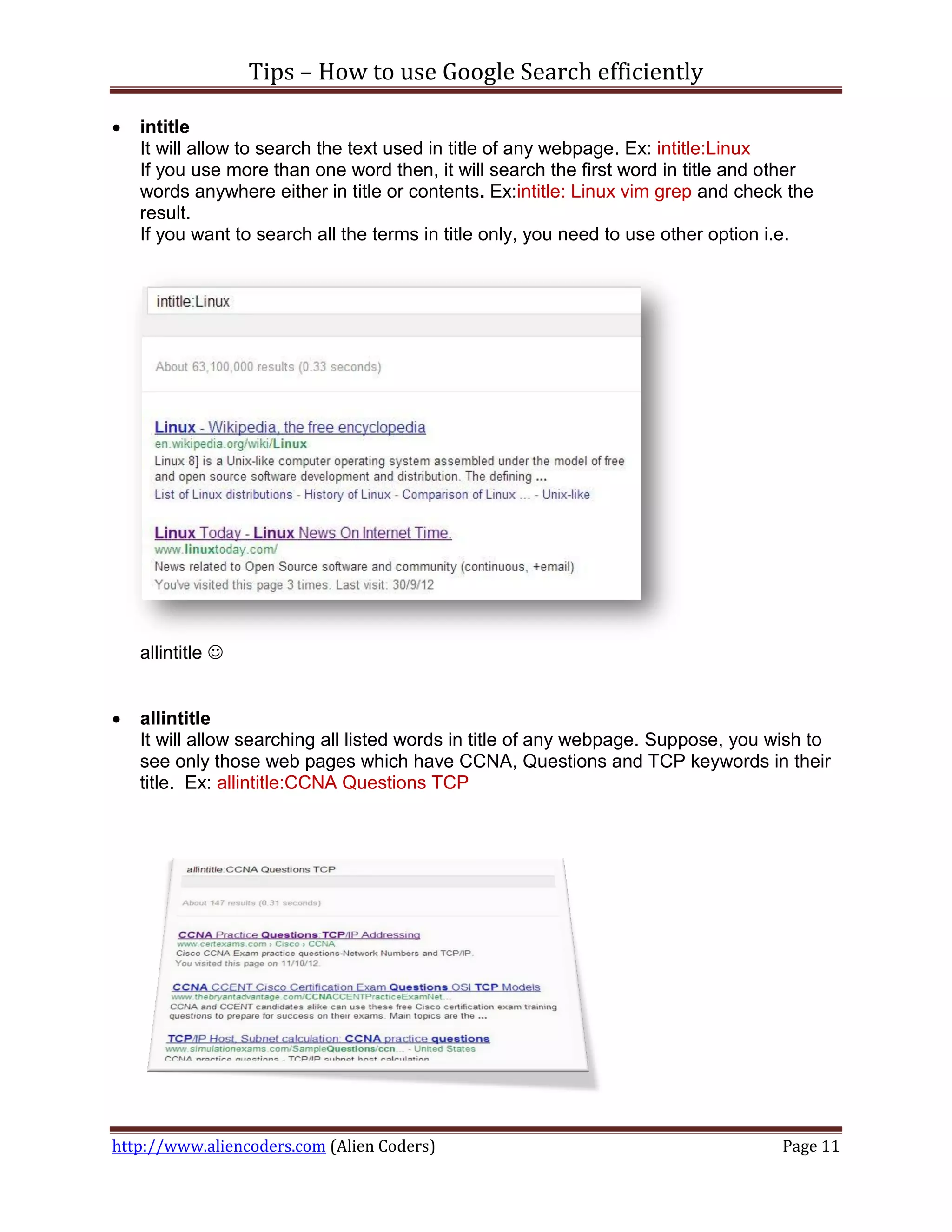
   allinurl
    This will display all links/url which will have all given keywords in their urls. It will be
    useful when you need to search only those websites which will meet given criteria.
    Like show all links which will have any connection with vim related stuffs under
    Linux.
    ex: allinurl: linux vim


http://www.aliencoders.com (Alien Coders)                                                 Page 10
Tips – How to use Google Search efficiently

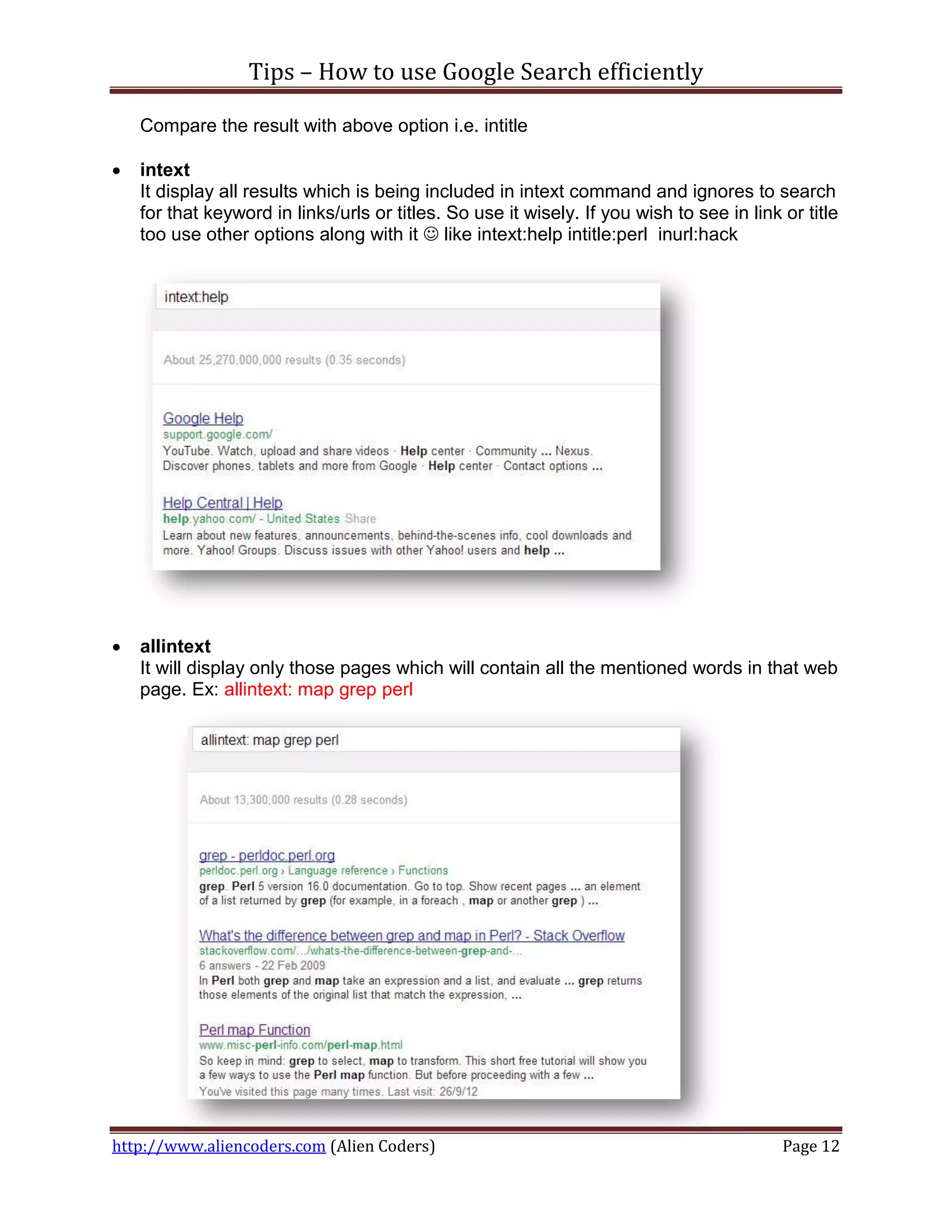
   intitle
    It will allow to search the text used in title of any webpage. Ex: intitle:Linux
    If you use more than one word then, it will search the first word in title and other
    words anywhere either in title or contents. Ex:intitle: Linux vim grep and check the
    result.
    If you want to search all the terms in title only, you need to use other option i.e.


    allintitle 


   allintitle
    It will allow searching all listed words in title of any webpage. Suppose, you wish to
    see only those web pages which have CCNA, Questions and TCP keywords in their
    title. Ex: allintitle:CCNA Questions TCP


http://www.aliencoders.com (Alien Coders)                                           Page 11
Tips – How to use Google Search efficiently

    Compare the result with above option i.e. intitle

   intext
    It display all results which is being included in intext command and ignores to search
    for that keyword in links/urls or titles. So use it wisely. If you wish to see in link or title
    too use other options along with it  like intext:help intitle:perl inurl:hack


   allintext
    It will display only those pages which will contain all the mentioned words in that web
    page. Ex: allintext: map grep perl


http://www.aliencoders.com (Alien Coders)                                                  Page 12
Tips – How to use Google Search efficiently


   filetype
    This will restrict Google to show only those links which will have those filetype in that
    urls/links
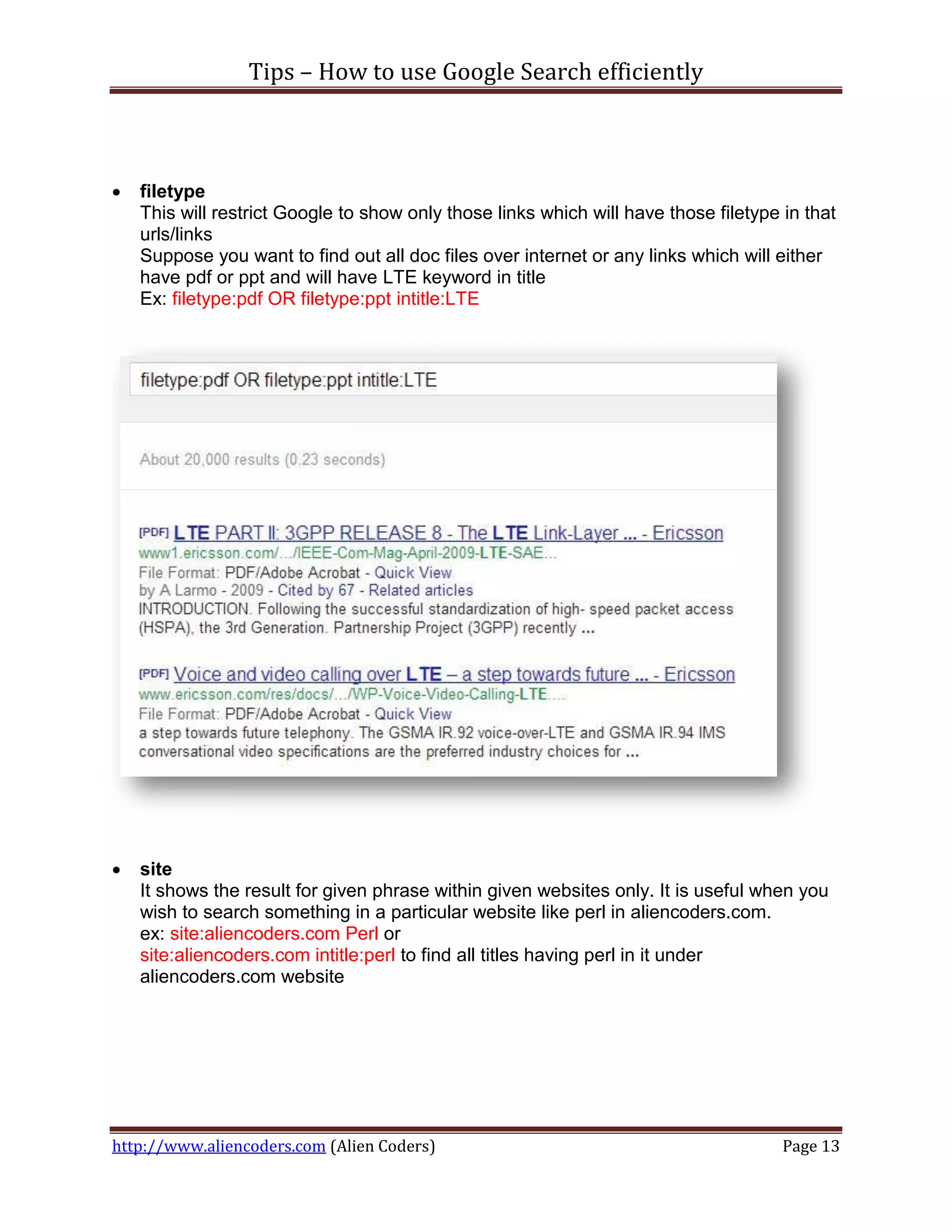
    Suppose you want to find out all doc files over internet or any links which will either
    have pdf or ppt and will have LTE keyword in title
    Ex: filetype:pdf OR filetype:ppt intitle:LTE


   site
    It shows the result for given phrase within given websites only. It is useful when you
    wish to search something in a particular website like perl in aliencoders.com.
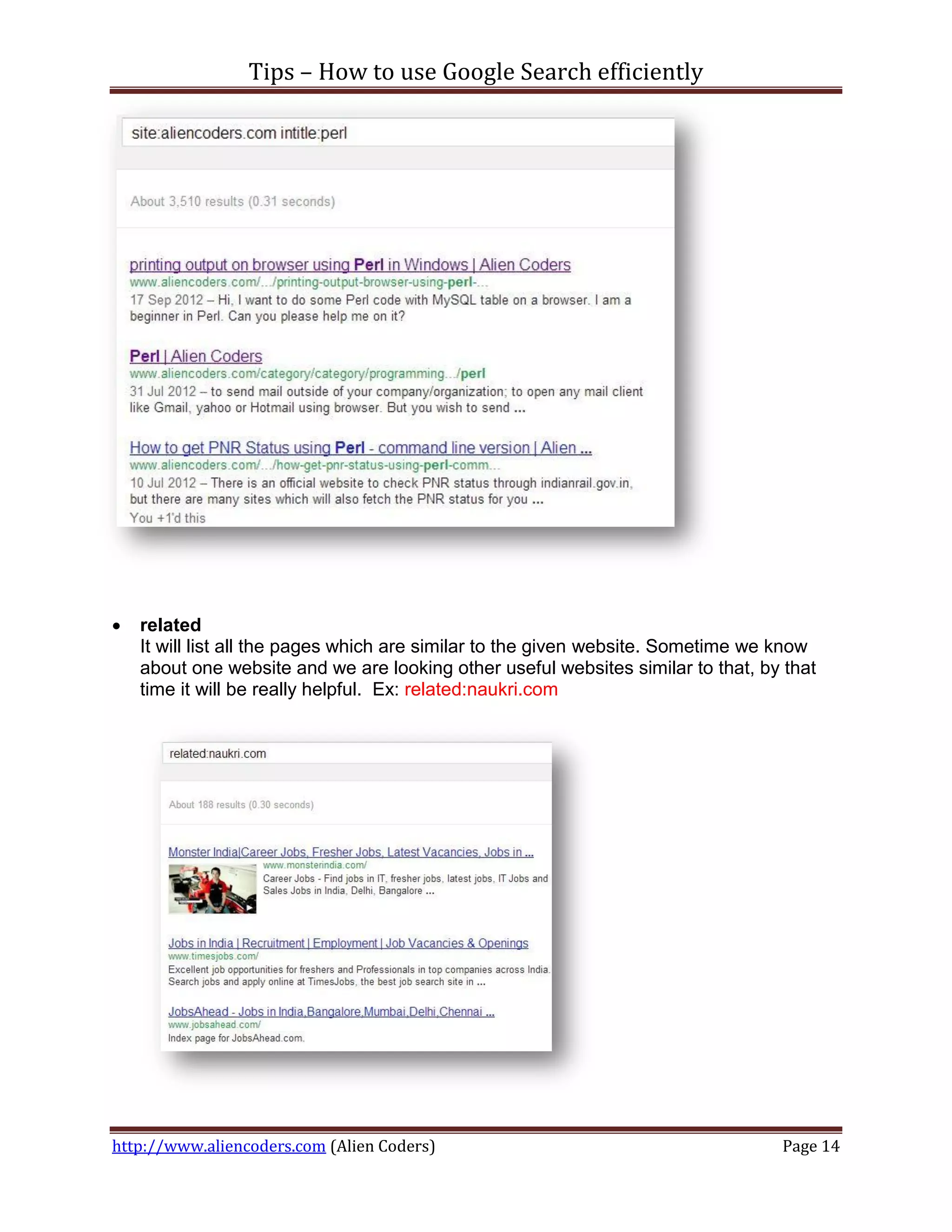
    ex: site:aliencoders.com Perl or
    site:aliencoders.com intitle:perl to find all titles having perl in it under
    aliencoders.com website


http://www.aliencoders.com (Alien Coders)                                             Page 13
Tips – How to use Google Search efficiently


   related
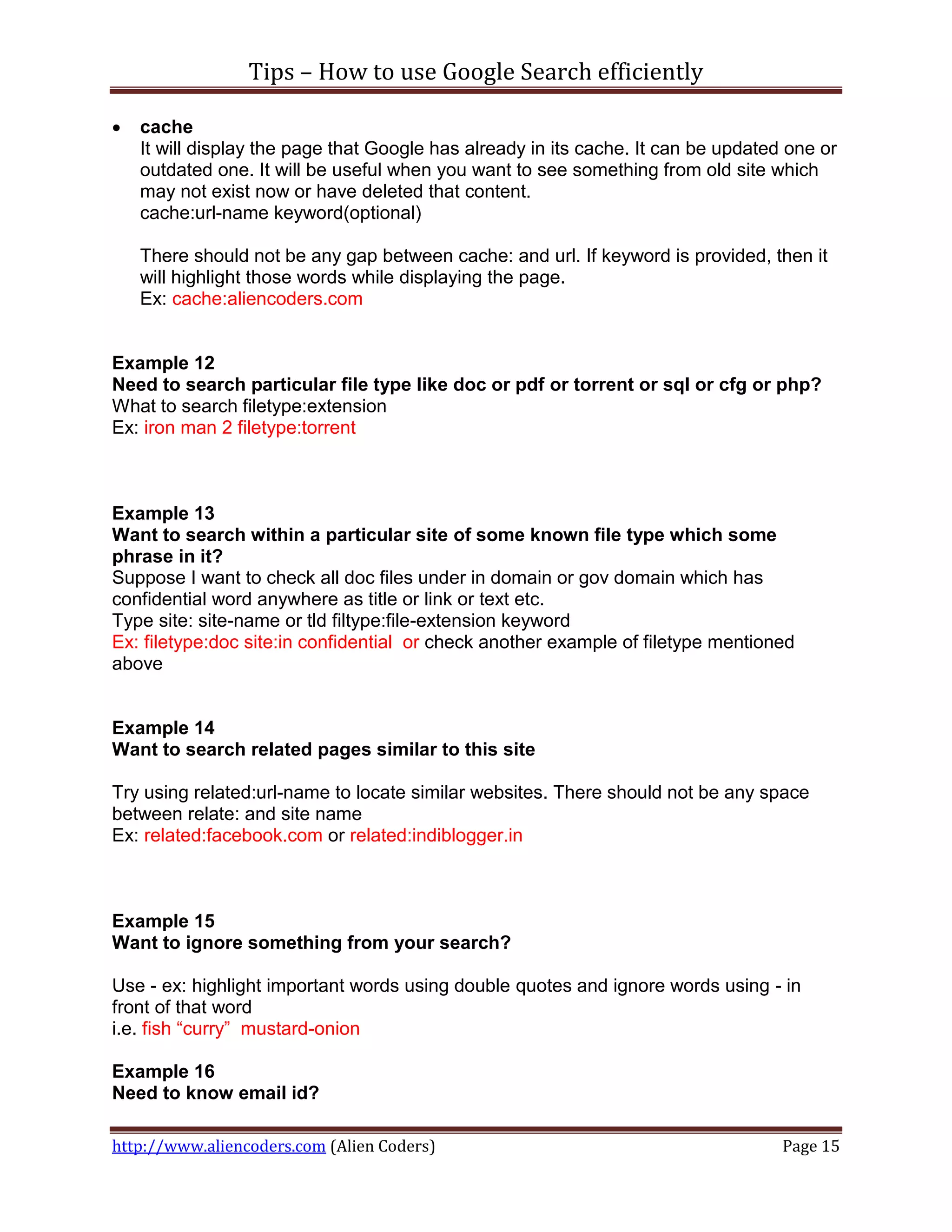
    It will list all the pages which are similar to the given website. Sometime we know
    about one website and we are looking other useful websites similar to that, by that
    time it will be really helpful. Ex: related:naukri.com


http://www.aliencoders.com (Alien Coders)                                         Page 14
Tips – How to use Google Search efficiently

   cache
    It will display the page that Google has already in its cache. It can be updated one or
    outdated one. It will be useful when you want to see something from old site which
    may not exist now or have deleted that content.
    cache:url-name keyword(optional)

    There should not be any gap between cache: and url. If keyword is provided, then it
    will highlight those words while displaying the page.
    Ex: cache:aliencoders.com


Example 12
Need to search particular file type like doc or pdf or torrent or sql or cfg or php?
What to search filetype:extension
Ex: iron man 2 filetype:torrent


Example 13
Want to search within a particular site of some known file type which some
phrase in it?
Suppose I want to check all doc files under in domain or gov domain which has
confidential word anywhere as title or link or text etc.
Type site: site-name or tld filtype:file-extension keyword
Ex: filetype:doc site:in confidential or check another example of filetype mentioned
above


Example 14
Want to search related pages similar to this site

Try using related:url-name to locate similar websites. There should not be any space
between relate: and site name
Ex: related:facebook.com or related:indiblogger.in


Example 15
Want to ignore something from your search?

Use - ex: highlight important words using double quotes and ignore words using - in
front of that word
i.e. fish “curry” mustard-onion

Example 16
Need to know email id?

http://www.aliencoders.com (Alien Coders)                                           Page 15
Tips – How to use Google Search efficiently

All Gmail ids stored in excel sheet and contains IISc. keyword too
intext:@gmail.com filetype:xls IISc

All IISc official ids
intext:@iisc.ernet.in filetype:xls IISc

Official email id of specific person stored in either doc or pdf or xls format
intext:@iisc.ernet.in filetype:xls OR filetype:doc OR filetype:pdf "Anil Kumar Sharma"
or
intext:@iisc.ernet.in filetype:xls OR filetype:doc OR filetype:pdf "AnubhavSinha"

Example 17
Want to find key/patches of software?

Try typing crack:software-name version
Ex: crack:Camtasia Studio v8.0.2.918

Example 18
We need to list all urls which has indexing enabled and contain perl related stuffs
in chm or pdf format.

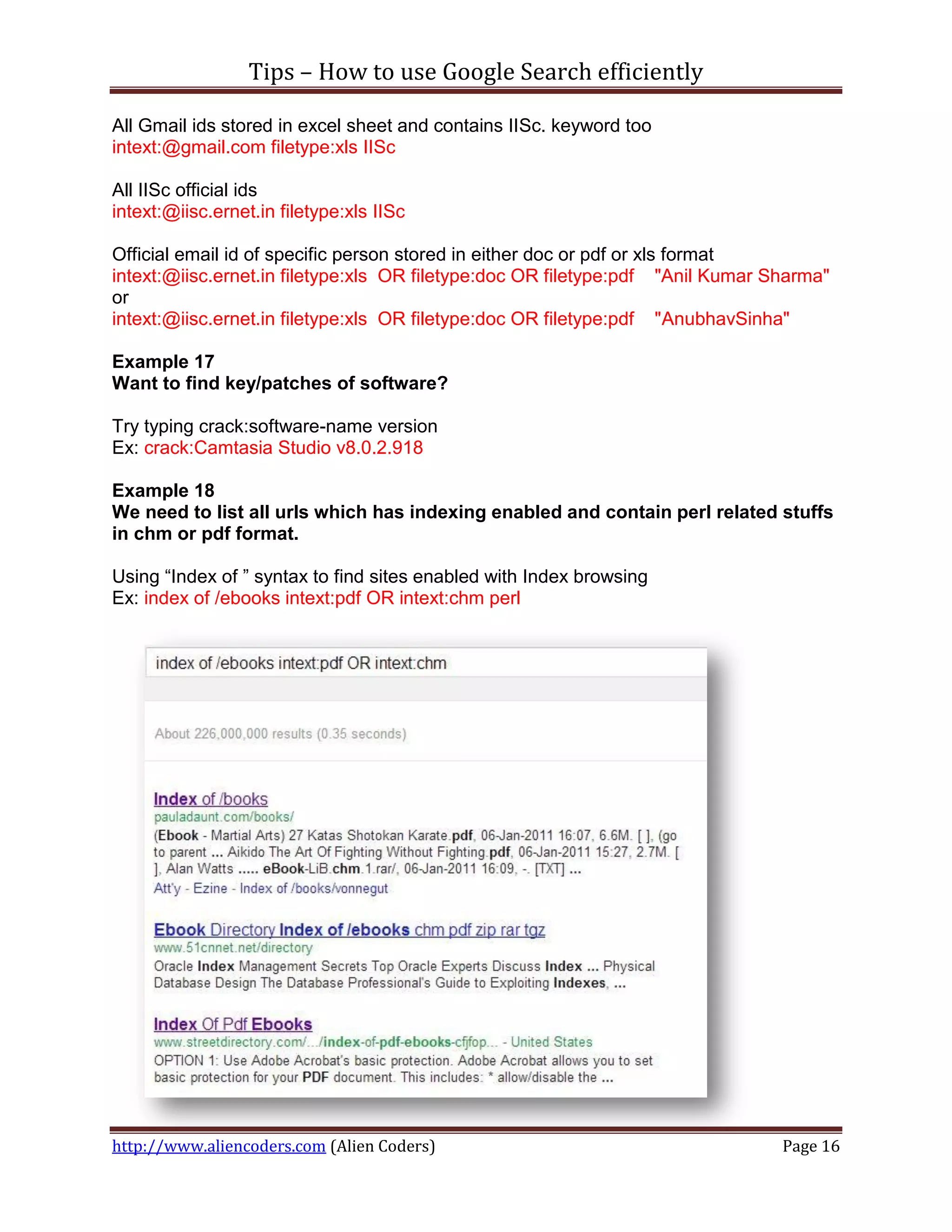
Using “Index of ” syntax to find sites enabled with Index browsing
Ex: index of /ebooks intext:pdf OR intext:chm perl


http://www.aliencoders.com (Alien Coders)                                       Page 16
Tips – How to use Google Search efficiently

How it plays an important role for hacker/crackers/penetration testers?
It can be used to gather the basic information required for further process of hacking or
penetration testing of any websites. According to my experience, this would be the part
of social engineering.
They will not do anything. They will just combine one or more such techniques shown
above to get desired result. Like password file, configuration file, database details,
server details etc.


Some more tips:
   Google search is not case-sensitive, so don’t bother about case stuffs
   Use lesser words to get accurate and more results
   Use web friendly word like headache instead of my head is paining
   Punctuation marks never matter for Google search. (bad news for grammar
     pedantic :P )


Source (I got some help from here too!)
http://www.google.com/insidesearch/tipstricks/all.html


Author: Sanjeev Kumar Jaiswal (Jassi)
Email id: admin@aliencoders.com (feel free to mail or comment on this article)
Website: http://www.aliencoders.com
Facebook Page: https://www.facebook.com/aliencoders
Twitter : http://www.twitter.com/aliencoders


http://www.aliencoders.com (Alien Coders)                                          Page 17

[Tips] how to use google search efficiently

  • 1.
    Tips – Howto use Google Search efficiently I am using Google Search engine almost all the time since 2006 and learned lots of things to manipulate Google search in much easier way. I know I am little late to share this and you will have lots of such posts over the internet. But, presentation and thoughts for the same things are always different for different authors. I would basically show you the real power of Google Search engine and strong evidence to prove that why I love and prefer Google Search Only :D More than 80% internet users use Google Search engines followed by Bing then Yahoo etc… Results Taken from statowl.com to show you how Google has captured the search engine market share :D Search Engine Total Avg Apr '12 May '12 Jun '12 Jul '12 Google 81.80% 81.92% 83.21% 81.60% 80.64% Bing 8.37% 8.23% 7.78% 8.54% 8.84% Yahoo 6.86% 7.15% 6.32% 6.78% 7.18% Ask 1.50% 1.43% 1.43% 1.52% .59% AOL .47% 1.26% 1.25% 1.56% 1.75% Without wasting your time let’s dive into Google’s real power. I will demonstrate every possible situation with a scenario and how to get benefit of that scenario using Google Search Engine. Example 1 You need to know what all things you searched using Google Search engine i.e. History of what you browsed till date. What you will do? http://www.aliencoders.com (Alien Coders) Page 1
  • 2.
    Tips – Howto use Google Search efficiently Answer is simple, either type google.com/history or history.google.com; you will be able to see the search strings that you used to search using Google Search. Link for Google History:http://history.google.com (make sure you are logged in using Google account) Example 2 What you will do, if you would see a mail in different language? Or somebody sent you few lines in chat that you didn’t understand and seem Latin & Greek to you? Or somebody updated their Facebook status in different language and you wish to respond in the same language? Once again Google search is there to help you in doing so. Use Google’s inbuilt Language translator. Here is the link for Google translator: http://translate.google.com/ http://www.aliencoders.com (Alien Coders) Page 2
  • 3.
    Tips – Howto use Google Search efficiently Example 3 Do you want to know Flight timings? If you type flights, then it will display you all flights leaving from your location. It gets your remote location using IP Address. Ex: flights or flight If you want to know flight from one location to another type flights from location1 to location2 Ex: flights form Hyderabad to Kolkata Example 4 Do you want to know my best online dictionary? Yes, it’s Google again. Just type define: word Ex: define: obfuscated http://www.aliencoders.com (Alien Coders) Page 3
  • 4.
    Tips – Howto use Google Search efficiently Example 5 What if you don’t know the correct spelling or misspelled some words? Don’t worry now Google is damn smart to rectify it automatically and will display you result for the correct one. If you didn’t mean what Google shows, still you have option to search for whatever you typed. Example 6 Is it rainy season or sunny at Dhanbad? Do you need to know weather forecast where you live or any place? 1. Type weather only to show weather information where you live ex: weather 2. Type weather for place-name or weather place-name for that particular place. Ex: weather Redmond or Weather for Dhanbad http://www.aliencoders.com (Alien Coders) Page 4
  • 5.
    Tips – Howto use Google Search efficiently Example 7 Do you want to know the time of a place? 1. Type time only to see your local time ex: time 2. Type time in place-name or simply time place-name ex: time in Redmond http://www.aliencoders.com (Alien Coders) Page 5
  • 6.
    Tips – Howto use Google Search efficiently Example 8 It’s movie time dude! Type movie at search box and it will display all movies in all theatres nearby your places. Ex: movie movie movie-name will display that movie list in all theatres Ex: movie taken 2 http://www.aliencoders.com (Alien Coders) Page 6
  • 7.
    Tips – Howto use Google Search efficiently movie movie-name for place-name will display movie in that place in all theatres of that movie. Ex: movie resident evil retribution for Bangalore movie for place-name to display all movies in that place in all theatres: movie for City of Brussels http://www.aliencoders.com (Alien Coders) Page 7
  • 8.
    Tips – Howto use Google Search efficiently Example 9 I want to use Google as a converter either its mass converter or volume or digital storage etc. Just type subject1 to subject2 i.e. Celcius to farenhite or Ton to kg or Byte to bit Example 10 Did you see my online Calculator? Actually it’s yours also, in real it’s Google’s :P Just type calculator to see what I meant. http://www.aliencoders.com (Alien Coders) Page 8
  • 9.
    Tips – Howto use Google Search efficiently Example 11 Do you want an exact search result whatever you have typed? Then, type phrases in double quotation to do so. Ex: “I am a blogger” Now, before going ahead, we need to know few terms which will be used during Goggle Search. These terms may not seem very useful to common users but it will be very informative and useful for tech savvy and Information Security Community (Bad and Good both).  inurl It will display the pages which will have certain keyword in links i.e. url http://www.aliencoders.com (Alien Coders) Page 9
  • 10.
    Tips – Howto use Google Search efficiently Ex: inurl:signup  allinurl This will display all links/url which will have all given keywords in their urls. It will be useful when you need to search only those websites which will meet given criteria. Like show all links which will have any connection with vim related stuffs under Linux. ex: allinurl: linux vim http://www.aliencoders.com (Alien Coders) Page 10
  • 11.
    Tips – Howto use Google Search efficiently  intitle It will allow to search the text used in title of any webpage. Ex: intitle:Linux If you use more than one word then, it will search the first word in title and other words anywhere either in title or contents. Ex:intitle: Linux vim grep and check the result. If you want to search all the terms in title only, you need to use other option i.e. allintitle   allintitle It will allow searching all listed words in title of any webpage. Suppose, you wish to see only those web pages which have CCNA, Questions and TCP keywords in their title. Ex: allintitle:CCNA Questions TCP http://www.aliencoders.com (Alien Coders) Page 11
  • 12.
    Tips – Howto use Google Search efficiently Compare the result with above option i.e. intitle  intext It display all results which is being included in intext command and ignores to search for that keyword in links/urls or titles. So use it wisely. If you wish to see in link or title too use other options along with it  like intext:help intitle:perl inurl:hack  allintext It will display only those pages which will contain all the mentioned words in that web page. Ex: allintext: map grep perl http://www.aliencoders.com (Alien Coders) Page 12
  • 13.
    Tips – Howto use Google Search efficiently  filetype This will restrict Google to show only those links which will have those filetype in that urls/links Suppose you want to find out all doc files over internet or any links which will either have pdf or ppt and will have LTE keyword in title Ex: filetype:pdf OR filetype:ppt intitle:LTE  site It shows the result for given phrase within given websites only. It is useful when you wish to search something in a particular website like perl in aliencoders.com. ex: site:aliencoders.com Perl or site:aliencoders.com intitle:perl to find all titles having perl in it under aliencoders.com website http://www.aliencoders.com (Alien Coders) Page 13
  • 14.
    Tips – Howto use Google Search efficiently  related It will list all the pages which are similar to the given website. Sometime we know about one website and we are looking other useful websites similar to that, by that time it will be really helpful. Ex: related:naukri.com http://www.aliencoders.com (Alien Coders) Page 14
  • 15.
    Tips – Howto use Google Search efficiently  cache It will display the page that Google has already in its cache. It can be updated one or outdated one. It will be useful when you want to see something from old site which may not exist now or have deleted that content. cache:url-name keyword(optional) There should not be any gap between cache: and url. If keyword is provided, then it will highlight those words while displaying the page. Ex: cache:aliencoders.com Example 12 Need to search particular file type like doc or pdf or torrent or sql or cfg or php? What to search filetype:extension Ex: iron man 2 filetype:torrent Example 13 Want to search within a particular site of some known file type which some phrase in it? Suppose I want to check all doc files under in domain or gov domain which has confidential word anywhere as title or link or text etc. Type site: site-name or tld filtype:file-extension keyword Ex: filetype:doc site:in confidential or check another example of filetype mentioned above Example 14 Want to search related pages similar to this site Try using related:url-name to locate similar websites. There should not be any space between relate: and site name Ex: related:facebook.com or related:indiblogger.in Example 15 Want to ignore something from your search? Use - ex: highlight important words using double quotes and ignore words using - in front of that word i.e. fish “curry” mustard-onion Example 16 Need to know email id? http://www.aliencoders.com (Alien Coders) Page 15
  • 16.
    Tips – Howto use Google Search efficiently All Gmail ids stored in excel sheet and contains IISc. keyword too intext:@gmail.com filetype:xls IISc All IISc official ids intext:@iisc.ernet.in filetype:xls IISc Official email id of specific person stored in either doc or pdf or xls format intext:@iisc.ernet.in filetype:xls OR filetype:doc OR filetype:pdf "Anil Kumar Sharma" or intext:@iisc.ernet.in filetype:xls OR filetype:doc OR filetype:pdf "AnubhavSinha" Example 17 Want to find key/patches of software? Try typing crack:software-name version Ex: crack:Camtasia Studio v8.0.2.918 Example 18 We need to list all urls which has indexing enabled and contain perl related stuffs in chm or pdf format. Using “Index of ” syntax to find sites enabled with Index browsing Ex: index of /ebooks intext:pdf OR intext:chm perl http://www.aliencoders.com (Alien Coders) Page 16
  • 17.
    Tips – Howto use Google Search efficiently How it plays an important role for hacker/crackers/penetration testers? It can be used to gather the basic information required for further process of hacking or penetration testing of any websites. According to my experience, this would be the part of social engineering. They will not do anything. They will just combine one or more such techniques shown above to get desired result. Like password file, configuration file, database details, server details etc. Some more tips:  Google search is not case-sensitive, so don’t bother about case stuffs  Use lesser words to get accurate and more results  Use web friendly word like headache instead of my head is paining  Punctuation marks never matter for Google search. (bad news for grammar pedantic :P ) Source (I got some help from here too!) http://www.google.com/insidesearch/tipstricks/all.html Author: Sanjeev Kumar Jaiswal (Jassi) Email id: admin@aliencoders.com (feel free to mail or comment on this article) Website: http://www.aliencoders.com Facebook Page: https://www.facebook.com/aliencoders Twitter : http://www.twitter.com/aliencoders http://www.aliencoders.com (Alien Coders) Page 17