
Start Time: 2:00pm EST
Live Webinar:
Webinar Audio:
You can dial the telephone numbers located on your webinar panel.
Or listen in using your microphone or computer speakers.
Welcome!
Employer Solutions
Tips and Tricks
from the Net@work Help Desk
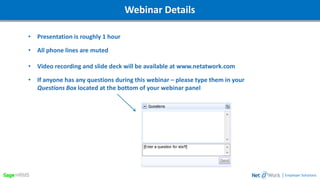
Webinar DetailsWebinar Details
• Presentation is roughly 1 hour
• All phone lines are muted
• Video recording and slide deck will be available at www.netatwork.com
• If anyone has any questions during this webinar – please type them in your
Questions Box located at the bottom of your webinar panel
| Employer Solutions
Webinar DetailsToday’s Presenter
Mark Boutilier | Net@Work
Senior Solutions Engineer
• Over 30 years developing and implementing HR and Payroll solutions
• HR Practitioner for over 10 years
• Sage Certified trainer and consultant for Sage HRMS
• American Payroll Association Member
| Employer Solutions
| Employer Solutions
Agenda
• What is the Net@work Help Desk?
• Tip #1 – Import Calculations
• Tip #2 – Setting Up Group Term Life
• Tip # 3 – Customizing the HRMS Login Page Message
• Tip #4 - User Preferences
• Tip # 5 – Getting Back the ‘Main Menu’
• Tip # 6 – Recovering Unused ESS Licenses
• Tip # 7 – Changing Employee Numbers
• Tip #8 – Adding Your Customer Number
• Tip # 9 – Modifying Connected Services and My Links
• Tip # 10 – Suggesting Improvements to Sage
• Bonus Tip - Fast and Focused
| Employer Solutions
8/17/20175
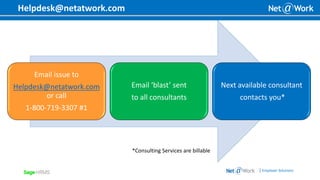
Helpdesk@netatwork.com
Email issue to
Helpdesk@netatwork.com
or call
1-800-719-3307 #1
Email ‘blast’ sent
to all consultants
Next available consultant
contacts you*
*Consulting Services are billable
| Employer Solutions
Tips and Tricks
| Employer Solutions
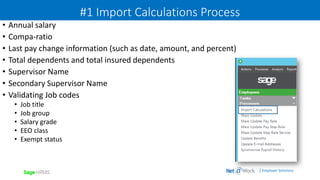
#1 Import Calculations Process
• Annual salary
• Compa-ratio
• Last pay change information (such as date, amount, and percent)
• Total dependents and total insured dependents
• Supervisor Name
• Secondary Supervisor Name
• Validating Job codes
• Job title
• Job group
• Salary grade
• EEO class
• Exempt status
| Employer Solutions
#2 Group Term Life – Taxable Fringe Benefit
• Employer Paid portion
• Coverage over $50,000
• Age Banded
• Taxable for Federal Income Tax, social
security and Medicare
• Employee Contributions are not taxed and
are subtracted from the calculated fringe
benefit.
| Employer Solutions
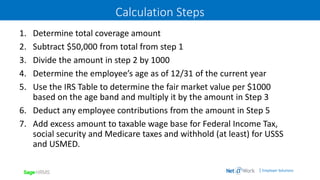
Calculation Steps
1. Determine total coverage amount
2. Subtract $50,000 from total from step 1
3. Divide the amount in step 2 by 1000
4. Determine the employee’s age as of 12/31 of the current year
5. Use the IRS Table to determine the fair market value per $1000
based on the age band and multiply it by the amount in Step 3
6. Deduct any employee contributions from the amount in Step 5
7. Add excess amount to taxable wage base for Federal Income Tax,
social security and Medicare taxes and withhold (at least) for USSS
and USMED.
| Employer Solutions
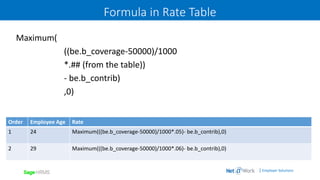
Formula in Rate Table
Maximum(
((be.b_coverage-50000)/1000
*.## (from the table))
- be.b_contrib)
,0)
Order Employee Age Rate
1 24 Maximum(((be.b_coverage-50000)/1000*.05)- be.b_contrib),0)
2 29 Maximum(((be.b_coverage-50000)/1000*.06)- be.b_contrib),0)
| Employer Solutions
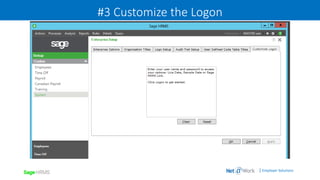
#3 Customize the Logon
| Employer Solutions
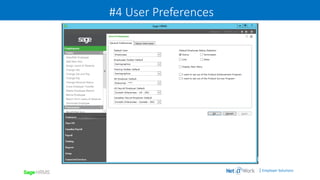
#4 User Preferences
| Employer Solutions
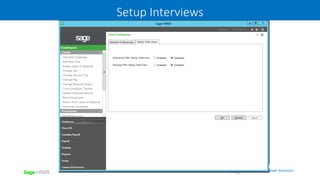
Setup Interviews
| Employer Solutions
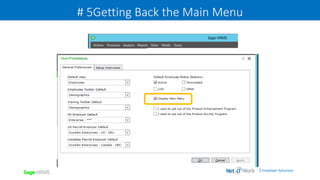
# 5Getting Back the Main Menu
| Employer Solutions
# 6 ESS Recovering Unused ESS Licenses
Error: "The number of user licenses has been met"
No longer able to create new logins for Employee Self Service
| Employer Solutions
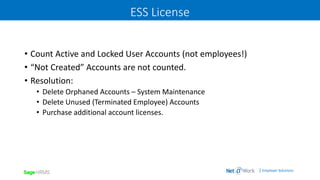
ESS License
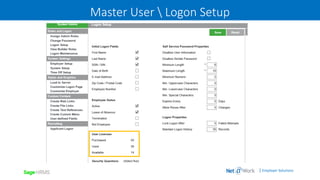
• Count Active and Locked User Accounts (not employees!)
• “Not Created” Accounts are not counted.
• Resolution:
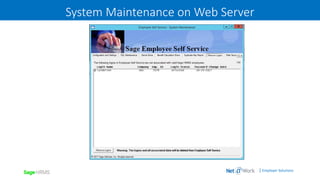
• Delete Orphaned Accounts – System Maintenance
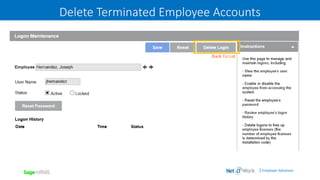
• Delete Unused (Terminated Employee) Accounts
• Purchase additional account licenses.
| Employer Solutions
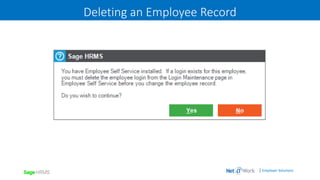
Deleting an Employee Record
| Employer Solutions
System Maintenance on Web Server
| Employer Solutions
Delete Terminated Employee Accounts
| Employer Solutions
Master User  Logon Setup
| Employer Solutions
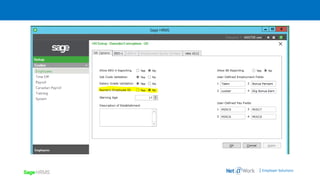
# 7 Changing Employee Numbering
• Should be set to Alpha-numeric
• Will be required eventually for HRMS 2017
• Makes HRPR reporting possible
• Does have a ‘downstream’ impact on ESS
• Still allows ‘Next Employee Number’ to be presented for New Hire
• Can take several hours to process
| Employer Solutions
| Employer Solutions
Can Take a Long Time
| Employer Solutions
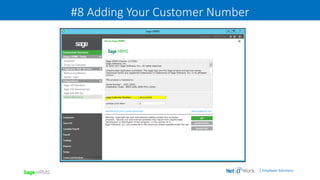
#8 Adding Your Customer Number
| Employer Solutions
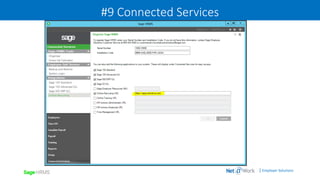
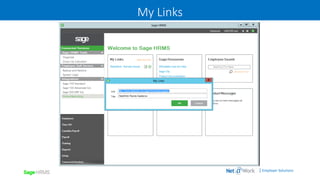
#9 Connected Services
| Employer Solutions
My Links
| Employer Solutions
#10 Recommending an improvement
• Navigate to https:sagecity.na.sage.com (link on Welcome page)
• Search for HRMS
• Log into group
• Click on the New button
• Click on Ideas to see other suggestions and upvote good ideas!
| Employer Solutions
Bonus: Fast and Focused
Friday afternoons at 1:00 – 1:45 PM EST
Sign up at www.netatwork.com
Always Free!
Webinar DetailsThank You For Attending!
Mark Boutilier | Net@Work
Senior Solutions Engineer
(P) 800-719-3307 Ext 4805
mboutilier@netatwork.com
| Employer Solutions
800-719-3307
www.netatwork.com
netatwork.com/blog
Net@Work YouTube
Follow us on Twitter: @netatwork_corp
Follow Net@Work on LinkedIn
Follow Net@Work on Google+
Follow Net@Work on Facebook
Connect with

Tips and Tricks from the Net@work Help Desk

  • 1.
    Start Time: 2:00pmEST Live Webinar: Webinar Audio: You can dial the telephone numbers located on your webinar panel. Or listen in using your microphone or computer speakers. Welcome! Employer Solutions Tips and Tricks from the Net@work Help Desk
  • 2.
    Webinar DetailsWebinar Details •Presentation is roughly 1 hour • All phone lines are muted • Video recording and slide deck will be available at www.netatwork.com • If anyone has any questions during this webinar – please type them in your Questions Box located at the bottom of your webinar panel | Employer Solutions
  • 3.
    Webinar DetailsToday’s Presenter MarkBoutilier | Net@Work Senior Solutions Engineer • Over 30 years developing and implementing HR and Payroll solutions • HR Practitioner for over 10 years • Sage Certified trainer and consultant for Sage HRMS • American Payroll Association Member | Employer Solutions
  • 4.
    | Employer Solutions Agenda •What is the Net@work Help Desk? • Tip #1 – Import Calculations • Tip #2 – Setting Up Group Term Life • Tip # 3 – Customizing the HRMS Login Page Message • Tip #4 - User Preferences • Tip # 5 – Getting Back the ‘Main Menu’ • Tip # 6 – Recovering Unused ESS Licenses • Tip # 7 – Changing Employee Numbers • Tip #8 – Adding Your Customer Number • Tip # 9 – Modifying Connected Services and My Links • Tip # 10 – Suggesting Improvements to Sage • Bonus Tip - Fast and Focused
  • 5.
    | Employer Solutions 8/17/20175 Helpdesk@netatwork.com Emailissue to Helpdesk@netatwork.com or call 1-800-719-3307 #1 Email ‘blast’ sent to all consultants Next available consultant contacts you* *Consulting Services are billable
  • 6.
  • 7.
    | Employer Solutions #1Import Calculations Process • Annual salary • Compa-ratio • Last pay change information (such as date, amount, and percent) • Total dependents and total insured dependents • Supervisor Name • Secondary Supervisor Name • Validating Job codes • Job title • Job group • Salary grade • EEO class • Exempt status
  • 8.
    | Employer Solutions #2Group Term Life – Taxable Fringe Benefit • Employer Paid portion • Coverage over $50,000 • Age Banded • Taxable for Federal Income Tax, social security and Medicare • Employee Contributions are not taxed and are subtracted from the calculated fringe benefit.
  • 9.
    | Employer Solutions CalculationSteps 1. Determine total coverage amount 2. Subtract $50,000 from total from step 1 3. Divide the amount in step 2 by 1000 4. Determine the employee’s age as of 12/31 of the current year 5. Use the IRS Table to determine the fair market value per $1000 based on the age band and multiply it by the amount in Step 3 6. Deduct any employee contributions from the amount in Step 5 7. Add excess amount to taxable wage base for Federal Income Tax, social security and Medicare taxes and withhold (at least) for USSS and USMED.
  • 10.
    | Employer Solutions Formulain Rate Table Maximum( ((be.b_coverage-50000)/1000 *.## (from the table)) - be.b_contrib) ,0) Order Employee Age Rate 1 24 Maximum(((be.b_coverage-50000)/1000*.05)- be.b_contrib),0) 2 29 Maximum(((be.b_coverage-50000)/1000*.06)- be.b_contrib),0)
  • 11.
    | Employer Solutions #3Customize the Logon
  • 12.
    | Employer Solutions #4User Preferences
  • 13.
  • 14.
    | Employer Solutions #5Getting Back the Main Menu
  • 15.
    | Employer Solutions #6 ESS Recovering Unused ESS Licenses Error: "The number of user licenses has been met" No longer able to create new logins for Employee Self Service
  • 16.
    | Employer Solutions ESSLicense • Count Active and Locked User Accounts (not employees!) • “Not Created” Accounts are not counted. • Resolution: • Delete Orphaned Accounts – System Maintenance • Delete Unused (Terminated Employee) Accounts • Purchase additional account licenses.
  • 17.
  • 18.
    | Employer Solutions SystemMaintenance on Web Server
  • 19.
    | Employer Solutions DeleteTerminated Employee Accounts
  • 20.
  • 21.
    | Employer Solutions #7 Changing Employee Numbering • Should be set to Alpha-numeric • Will be required eventually for HRMS 2017 • Makes HRPR reporting possible • Does have a ‘downstream’ impact on ESS • Still allows ‘Next Employee Number’ to be presented for New Hire • Can take several hours to process
  • 22.
  • 23.
    | Employer Solutions CanTake a Long Time
  • 24.
    | Employer Solutions #8Adding Your Customer Number
  • 25.
    | Employer Solutions #9Connected Services
  • 26.
  • 27.
    | Employer Solutions #10Recommending an improvement • Navigate to https:sagecity.na.sage.com (link on Welcome page) • Search for HRMS • Log into group • Click on the New button • Click on Ideas to see other suggestions and upvote good ideas!
  • 28.
    | Employer Solutions Bonus:Fast and Focused Friday afternoons at 1:00 – 1:45 PM EST Sign up at www.netatwork.com Always Free!
  • 29.
    Webinar DetailsThank YouFor Attending! Mark Boutilier | Net@Work Senior Solutions Engineer (P) 800-719-3307 Ext 4805 mboutilier@netatwork.com | Employer Solutions 800-719-3307 www.netatwork.com netatwork.com/blog Net@Work YouTube Follow us on Twitter: @netatwork_corp Follow Net@Work on LinkedIn Follow Net@Work on Google+ Follow Net@Work on Facebook Connect with