Tingling Wifi Security
-Rashid feroz
@Whoami
• Rashid Feroz
• B.Tech In ECE, 3rd year
• An Information security enthusiast
Basics of WLAN
• WLAN can operate in 3 different frequency
range. (2.4 GHZ, 3.6 GHZ, 5.0 GHZ)
• Each of these is divided into multiple
channels.
• Every access point is configured with an
SSID.
• The SSID acts as a network name for
discovery.
• AP sends out broadcast frames called
beacon frames to announce it’s presence.
• WLAN headers are not encrypted – that’s
something to worry about.
Wireless Attacks
Getting Hidden SSID’s name`
Bypassing MAC filters
Evil twin and MiTM attack
Hacking Isolated clients
WEP/WPA cracking
Getting Hidden SSID’s name
• Network name is not broadcasted over the
air when SSID broadcasting is turned off
• Association and authentication packets
contain SSID value.
• If we monitor an authentication request,
we could get the SSID value.
Bypassing MAC filters
• We can easily monitor the authorized
clients connected to the AP.
• All we need to do is to clone that MAC
address.
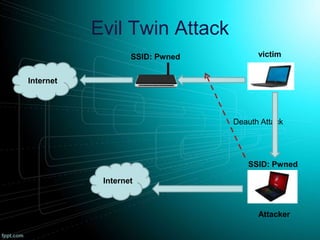
Evil Twin Attack
Internet
victimSSID: Pwned
Internet
Attacker
SSID: Pwned
Deauth Attack
Hacking Isolated clients
• Client send probe requests periodically to
previously connected clients.
• If the clients finds an open network with
the same SSID, the client would
automatically connect with it.
• It depends on the OS behavior.
Cracking WEP/WPA
• WEP can be very easily cracked.
• WPA/WPA2 can be also be cracked if the
password is weak.
• WPS pin bruteforcing.
• Router vulnerabilities.
Why you need to worry?
• Attackers can use your wifi network to
commit dangerous cyber crimes.
• Hacker’s can access your personal
information, steal sensitive data, plant a
backdoor, etc.
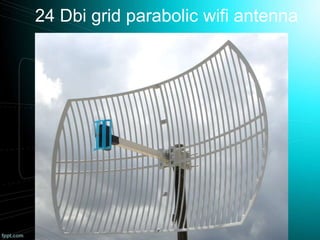
24 Dbi grid parabolic wifi antenna
How to secure your wireless network
• Never use WEP!
• Use WPA2 with strong password.
• Turn the router’s firewall on.
• Change the router’s default password.
• Never depend on techniques like MAC
filtering or Hidden SSID.
• Reduce the range of wifi.
• Never connect to unknown and open wifi
networks.
• Use a good antivirus and firewall.
Thank you 
Contact:
Email : rashid.2008feroz@gmail.com
: facebook.com/rashid.feroz1

Tingling wireless security

  • 1.
  • 2.
    @Whoami • Rashid Feroz •B.Tech In ECE, 3rd year • An Information security enthusiast
  • 3.
    Basics of WLAN •WLAN can operate in 3 different frequency range. (2.4 GHZ, 3.6 GHZ, 5.0 GHZ) • Each of these is divided into multiple channels. • Every access point is configured with an SSID.
  • 4.
    • The SSIDacts as a network name for discovery. • AP sends out broadcast frames called beacon frames to announce it’s presence. • WLAN headers are not encrypted – that’s something to worry about.
  • 5.
    Wireless Attacks Getting HiddenSSID’s name` Bypassing MAC filters Evil twin and MiTM attack Hacking Isolated clients WEP/WPA cracking
  • 6.
    Getting Hidden SSID’sname • Network name is not broadcasted over the air when SSID broadcasting is turned off • Association and authentication packets contain SSID value. • If we monitor an authentication request, we could get the SSID value.
  • 7.
    Bypassing MAC filters •We can easily monitor the authorized clients connected to the AP. • All we need to do is to clone that MAC address.
  • 8.
    Evil Twin Attack Internet victimSSID:Pwned Internet Attacker SSID: Pwned Deauth Attack
  • 9.
    Hacking Isolated clients •Client send probe requests periodically to previously connected clients. • If the clients finds an open network with the same SSID, the client would automatically connect with it. • It depends on the OS behavior.
  • 10.
    Cracking WEP/WPA • WEPcan be very easily cracked. • WPA/WPA2 can be also be cracked if the password is weak. • WPS pin bruteforcing. • Router vulnerabilities.
  • 12.
    Why you needto worry? • Attackers can use your wifi network to commit dangerous cyber crimes. • Hacker’s can access your personal information, steal sensitive data, plant a backdoor, etc.
  • 13.
    24 Dbi gridparabolic wifi antenna
  • 14.
    How to secureyour wireless network • Never use WEP! • Use WPA2 with strong password. • Turn the router’s firewall on. • Change the router’s default password. • Never depend on techniques like MAC filtering or Hidden SSID. • Reduce the range of wifi. • Never connect to unknown and open wifi networks. • Use a good antivirus and firewall.
  • 15.
    Thank you  Contact: Email: rashid.2008feroz@gmail.com : facebook.com/rashid.feroz1