Blogs and Wikis – an easy, quick and effective way to put learning resources online
Creating blogs and wikisFree and easy way to create a websiteCollate and publish learning content for studentsContent added, and design done, directly online to the hosting server Usually public, optional privacy settings availableBlogs - usually created and maintained by an individualWikis - usually more collaborative, with multiple contributors
Blog exampleshttp://informationliteracy.blogsome.com  Polytechnic Library & Museum Technology projecthttp://thewriterspotonline.com/2010/05/12/the-good-side-to-bad-writing/Writer’s bloghttp://thestickytongue.com/Herpetology, zoology and conservationhttp://Kendalastronomer.wordpress.com PhD astronomy student’s bloghttp://rdasouthtas.wordpress.com Polytechnic staff member’s blogWordpressblog publishing application – over 2,000,000 wordpressblogsites worldwide.
Wiki exampleshttp://meintassie.wikispaces.comAMES innovations project wikihttp://intranet.secure.edu/help/wiki/Wiki%20Pages/Campbell%20Parking%20Club.aspxCampbell parking wiki http://educationalsoftware.wikispaces.com/Technology resources for schools
HostsBlogs:http://wordpress.comhttp://blogsome.comhttp://www.blogger.comhttp://edublogs.orgWikis:http://wikispaces.comhttp://pbworks.comMost famous of all: http://wikipedia.org(not a place to host your own wiki, but you can freely contribute)Phoenix intranet for your own wiki. Blogs coming soon.
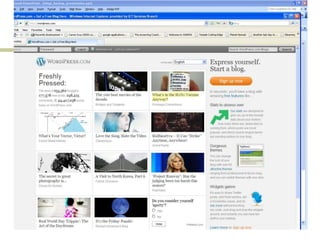
Finding blogs and wikisWordpress home page selects blogs relating to current issues each day.Blog services display selected links on their home pages.Search for blogs at: http://blogsearch.google.com.au/
Comparison with an LMSBlogs and WikisQuick and easy to buildLimited file type uploadsBuilt directly online – easy version control Easily edited.Open access to anyone, no password neededCan customise appearance, but still has the blog or wiki look and feelAt the mercy of the blog and wiki server owners.May have to tolerate advertisingWidely recognised social networking web 2.0 tool, popular acceptanceLMSNeed some specialist skill/training/support  to build and editLarge range of options for content typeCan work on content offline and then upload.Need to exercise version controlPassword protected. Powerful student tracking and recording.The institution owns and manages the server. No unwanted advertisingMay be perceived to be old-fashioned and institutional

Timtam blogs presentation_upload

  • 1.
    Blogs and Wikis– an easy, quick and effective way to put learning resources online
  • 2.
    Creating blogs andwikisFree and easy way to create a websiteCollate and publish learning content for studentsContent added, and design done, directly online to the hosting server Usually public, optional privacy settings availableBlogs - usually created and maintained by an individualWikis - usually more collaborative, with multiple contributors
  • 3.
    Blog exampleshttp://informationliteracy.blogsome.com Polytechnic Library & Museum Technology projecthttp://thewriterspotonline.com/2010/05/12/the-good-side-to-bad-writing/Writer’s bloghttp://thestickytongue.com/Herpetology, zoology and conservationhttp://Kendalastronomer.wordpress.com PhD astronomy student’s bloghttp://rdasouthtas.wordpress.com Polytechnic staff member’s blogWordpressblog publishing application – over 2,000,000 wordpressblogsites worldwide.
  • 4.
    Wiki exampleshttp://meintassie.wikispaces.comAMES innovationsproject wikihttp://intranet.secure.edu/help/wiki/Wiki%20Pages/Campbell%20Parking%20Club.aspxCampbell parking wiki http://educationalsoftware.wikispaces.com/Technology resources for schools
  • 5.
    HostsBlogs:http://wordpress.comhttp://blogsome.comhttp://www.blogger.comhttp://edublogs.orgWikis:http://wikispaces.comhttp://pbworks.comMost famous ofall: http://wikipedia.org(not a place to host your own wiki, but you can freely contribute)Phoenix intranet for your own wiki. Blogs coming soon.
  • 6.
    Finding blogs andwikisWordpress home page selects blogs relating to current issues each day.Blog services display selected links on their home pages.Search for blogs at: http://blogsearch.google.com.au/
  • 8.
    Comparison with anLMSBlogs and WikisQuick and easy to buildLimited file type uploadsBuilt directly online – easy version control Easily edited.Open access to anyone, no password neededCan customise appearance, but still has the blog or wiki look and feelAt the mercy of the blog and wiki server owners.May have to tolerate advertisingWidely recognised social networking web 2.0 tool, popular acceptanceLMSNeed some specialist skill/training/support to build and editLarge range of options for content typeCan work on content offline and then upload.Need to exercise version controlPassword protected. Powerful student tracking and recording.The institution owns and manages the server. No unwanted advertisingMay be perceived to be old-fashioned and institutional