The Wonderful World of Blogging (10 mins) Exploring the Potential of Blogs in an Educational Context  (20 mins) Setting up and adding content to a subject specific blog  (1 hr 15 mins) Introducing Wikis  (15 mins) ST IVO SCHOOL ICT TRAINING – Monday 9 th  June 2007 [email_address]   Blogs and Wikis Setting Up Educational Weblogs
http://www.youtube.com/watch?v=aEFKfXiCbLw
Websites, VLEs, Blogs, Podcasts & Wikis “ When I go to school I have to power down”  (unknown) “ Becoming part of the online revolution” “ Instead of making kids power down when they enter school, why don’t we let them use their mobile computer devices and ipods to continue their high powered learning”? Ewan MacIntosh  Why not make use of the technology that more and more of our students have readily available and become part of the online revolution? www.geobytes.org.uk
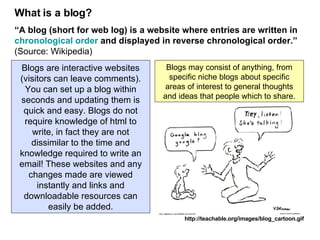
What is a blog? “ A blog (short for web log) is a website where entries are written in  chronological order  and displayed in reverse chronological order.”   (Source: Wikipedia) http://teachable.org/images/blog_cartoon.gif Blogs are interactive websites (visitors can leave comments). You can set up a blog within seconds and updating them is quick and easy. Blogs do not require knowledge of html to write, in fact they are not dissimilar to the time and knowledge required to write an email! These websites and any changes made are viewed instantly and links and downloadable resources can easily be added. Blogs may consist of anything, from specific niche blogs about specific areas of interest to general thoughts and ideas that people which to share.
In her presentation “A blogs not just for Christmas” Val Vannet recognises the links between blogs and ‘constructivist’ teaching methodologies: Knowledge is ‘created’ through an active process by the learner. Some features are that… Learning is active and interactive There is a shift of focus from teacher to student Teachers engage in dialogue with students Knowledge is dynamic, and changes with our experiences The process of learning is as important as the product Students are encouraged to collaborate with others i.e. ‘social constructivism’ Source:  www.ablogsnotjustforchristmas.blogspot.com
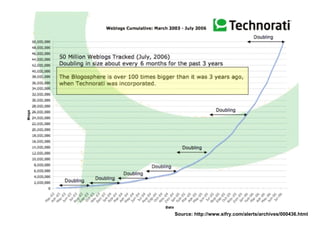
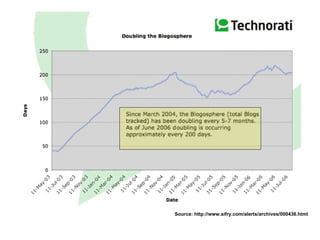
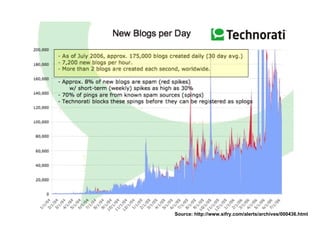
Source:  http://www.sifry.com/alerts/archives/000436.html
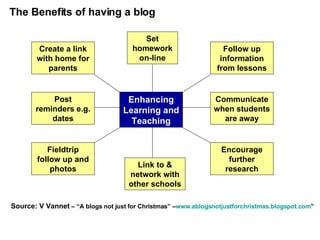
The Benefits of having a blog Source: V Vannet  – “A blogs not just for Christmas” – www.ablogsnotjustforchristmas.blogspot.com ”   Set homework on-line Link to & network with other schools Enhancing Learning and Teaching Follow up information from lessons Communicate when students are away Encourage further research Create a link with home for parents Post reminders e.g. dates Fieldtrip follow up and photos
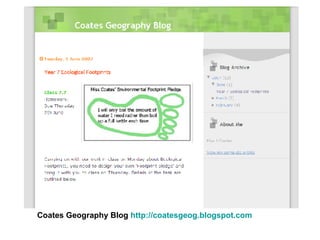
Coates Geography Blog  http://coatesgeog.blogspot.com
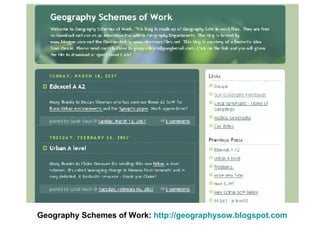
Geography Schemes of Work:  http://geographysow.blogspot.com
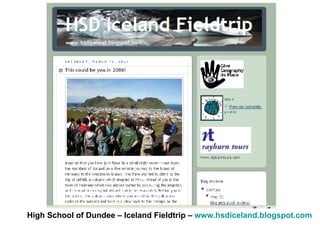
High School of Dundee – Iceland Fieldtrip –  www.hsdiceland.blogspot.com
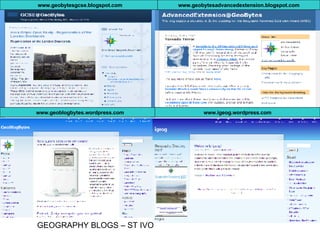
www.geobytesgcse.blogspot.com www.geobytesadvancedextension.blogspot.com www.geoblogbytes.wordpress.com www.igeog.wordpress.com GEOGRAPHY BLOGS – ST IVO
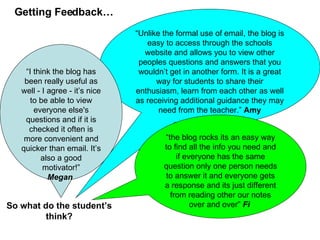
“ Unlike the formal use of email, the blog is easy to access through the schools website and allows you to view other peoples questions and answers that you wouldn’t get in another form. It is a great way for students to share their enthusiasm, learn from each other as well as receiving additional guidance they may need from the teacher.”  Amy “ I think the blog has been really useful as well - I agree - it’s nice to be able to view everyone else's questions and if it is checked it often is more convenient and quicker than email. It’s also a good motivator!” Megan   Getting Feedback… So what do the student’s think? “ the blog rocks its an easy way to find all the info you need and if everyone has the same question only one person needs to answer it and everyone gets a response and its just different from reading other our notes over and over”  Fi
Setting up your own Blog… For the greatest flexibility it is possible to host blogs on your own webspace or pay for access to more advanced blogging facilities (e.g. www.typepad.com) – however there are many great free blogging services available which are widely used by teachers and require very little technological knowledge! In fact you can literally set a blog up in 5 minutes! http://www.xanga.com/ http://www.wordpress.com http://www.livejournal.com www.blogger.com http://www.myblogsite.com / http://spaces.live.com/
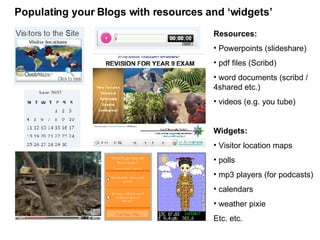
Resources: Powerpoints (slideshare) pdf files (Scribd) word documents (scribd / 4shared etc.) videos (e.g. you tube) Widgets: Visitor location maps polls mp3 players (for podcasts) calendars weather pixie Etc. etc.  Populating your Blogs with resources and ‘widgets’
Blogs – Issues for Consideration Common concerns from teachers   (identifed by A November “Blogging: shift of control” in “Coming of Age – an introduction to the new world wide web) Blogs give too much freedom for students to express themselves teachers will never be able to control comments students and parents will have too much access to other student’s published work students will feel too much pressure to improve as they see the work and comments of others Issues for staff to consider.. copyright issues rules needed (against cyber bulling) moderation evaluation of plausibility / accuracy of information school / county policies?
Wikis
http://www.youtube.com/watch?v=ZmByB0sIPog
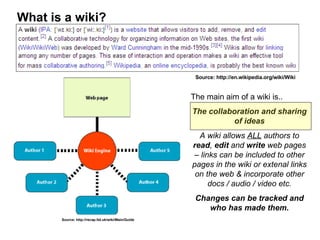
What is a wiki? Source: http://en.wikipedia.org/wiki/Wiki Source: http://recap.ltd.uk/wiki/Main/Guide The main aim of a wiki is.. The collaboration and sharing of ideas A wiki allows  ALL  authors to  read ,  edit  and  write  web pages – links can be included to other pages in the wiki or extenal links on the web & incorporate other docs / audio / video etc. Changes can be tracked and who has made them.
What can we use Wikis for? http://www.youtube.com/watch?v=9hSzJ0Hj_eo
What can be done with a Wiki? Wikis have many possible uses including amongst others…. Lesson summaries (to include use of hyperlinks to related material) gathering and collaborating on ideas for policies or strategies (e.g. generating discussion on the new KS3 or A’level specifications) collaboration of notes – students working together to draw together notes on a particular topic area (can include and make hyperlinks to resources – including other sites on the world wide web). disseminating information to a wider audience Good Article:  The art of using Wiki to teach  http://coolcatteacher.blogspot.com/2005/12/wiki-wiki-teaching-art-of-using-wiki.html   Examples: Use by Students – Court Fields School (Somerset) – Noel Jenkins Use by Staff – SLN Wiki (Geolinks)
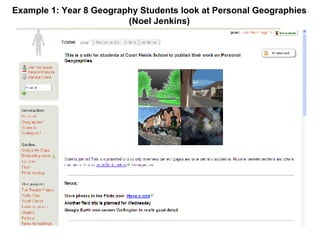
Example 1: Year 8 Geography Students look at Personal Geographies (Noel Jenkins)
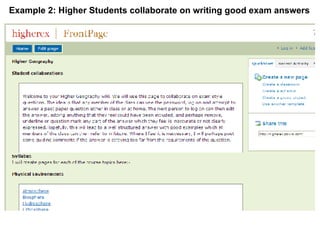
Example 2: Higher Students collaborate on writing good exam answers

Blogs And Wikis

  • 1.
    The Wonderful Worldof Blogging (10 mins) Exploring the Potential of Blogs in an Educational Context (20 mins) Setting up and adding content to a subject specific blog (1 hr 15 mins) Introducing Wikis (15 mins) ST IVO SCHOOL ICT TRAINING – Monday 9 th June 2007 [email_address] Blogs and Wikis Setting Up Educational Weblogs
  • 2.
  • 3.
    Websites, VLEs, Blogs,Podcasts & Wikis “ When I go to school I have to power down” (unknown) “ Becoming part of the online revolution” “ Instead of making kids power down when they enter school, why don’t we let them use their mobile computer devices and ipods to continue their high powered learning”? Ewan MacIntosh Why not make use of the technology that more and more of our students have readily available and become part of the online revolution? www.geobytes.org.uk
  • 4.
    What is ablog? “ A blog (short for web log) is a website where entries are written in chronological order and displayed in reverse chronological order.” (Source: Wikipedia) http://teachable.org/images/blog_cartoon.gif Blogs are interactive websites (visitors can leave comments). You can set up a blog within seconds and updating them is quick and easy. Blogs do not require knowledge of html to write, in fact they are not dissimilar to the time and knowledge required to write an email! These websites and any changes made are viewed instantly and links and downloadable resources can easily be added. Blogs may consist of anything, from specific niche blogs about specific areas of interest to general thoughts and ideas that people which to share.
  • 5.
    In her presentation“A blogs not just for Christmas” Val Vannet recognises the links between blogs and ‘constructivist’ teaching methodologies: Knowledge is ‘created’ through an active process by the learner. Some features are that… Learning is active and interactive There is a shift of focus from teacher to student Teachers engage in dialogue with students Knowledge is dynamic, and changes with our experiences The process of learning is as important as the product Students are encouraged to collaborate with others i.e. ‘social constructivism’ Source: www.ablogsnotjustforchristmas.blogspot.com
  • 6.
  • 7.
  • 8.
  • 9.
    The Benefits ofhaving a blog Source: V Vannet – “A blogs not just for Christmas” – www.ablogsnotjustforchristmas.blogspot.com ” Set homework on-line Link to & network with other schools Enhancing Learning and Teaching Follow up information from lessons Communicate when students are away Encourage further research Create a link with home for parents Post reminders e.g. dates Fieldtrip follow up and photos
  • 10.
    Coates Geography Blog http://coatesgeog.blogspot.com
  • 11.
    Geography Schemes ofWork: http://geographysow.blogspot.com
  • 12.
    High School ofDundee – Iceland Fieldtrip – www.hsdiceland.blogspot.com
  • 13.
  • 14.
    “ Unlike theformal use of email, the blog is easy to access through the schools website and allows you to view other peoples questions and answers that you wouldn’t get in another form. It is a great way for students to share their enthusiasm, learn from each other as well as receiving additional guidance they may need from the teacher.” Amy “ I think the blog has been really useful as well - I agree - it’s nice to be able to view everyone else's questions and if it is checked it often is more convenient and quicker than email. It’s also a good motivator!” Megan Getting Feedback… So what do the student’s think? “ the blog rocks its an easy way to find all the info you need and if everyone has the same question only one person needs to answer it and everyone gets a response and its just different from reading other our notes over and over” Fi
  • 15.
    Setting up yourown Blog… For the greatest flexibility it is possible to host blogs on your own webspace or pay for access to more advanced blogging facilities (e.g. www.typepad.com) – however there are many great free blogging services available which are widely used by teachers and require very little technological knowledge! In fact you can literally set a blog up in 5 minutes! http://www.xanga.com/ http://www.wordpress.com http://www.livejournal.com www.blogger.com http://www.myblogsite.com / http://spaces.live.com/
  • 16.
    Resources: Powerpoints (slideshare)pdf files (Scribd) word documents (scribd / 4shared etc.) videos (e.g. you tube) Widgets: Visitor location maps polls mp3 players (for podcasts) calendars weather pixie Etc. etc. Populating your Blogs with resources and ‘widgets’
  • 17.
    Blogs – Issuesfor Consideration Common concerns from teachers (identifed by A November “Blogging: shift of control” in “Coming of Age – an introduction to the new world wide web) Blogs give too much freedom for students to express themselves teachers will never be able to control comments students and parents will have too much access to other student’s published work students will feel too much pressure to improve as they see the work and comments of others Issues for staff to consider.. copyright issues rules needed (against cyber bulling) moderation evaluation of plausibility / accuracy of information school / county policies?
  • 18.
  • 19.
  • 20.
    What is awiki? Source: http://en.wikipedia.org/wiki/Wiki Source: http://recap.ltd.uk/wiki/Main/Guide The main aim of a wiki is.. The collaboration and sharing of ideas A wiki allows ALL authors to read , edit and write web pages – links can be included to other pages in the wiki or extenal links on the web & incorporate other docs / audio / video etc. Changes can be tracked and who has made them.
  • 21.
    What can weuse Wikis for? http://www.youtube.com/watch?v=9hSzJ0Hj_eo
  • 22.
    What can bedone with a Wiki? Wikis have many possible uses including amongst others…. Lesson summaries (to include use of hyperlinks to related material) gathering and collaborating on ideas for policies or strategies (e.g. generating discussion on the new KS3 or A’level specifications) collaboration of notes – students working together to draw together notes on a particular topic area (can include and make hyperlinks to resources – including other sites on the world wide web). disseminating information to a wider audience Good Article: The art of using Wiki to teach http://coolcatteacher.blogspot.com/2005/12/wiki-wiki-teaching-art-of-using-wiki.html Examples: Use by Students – Court Fields School (Somerset) – Noel Jenkins Use by Staff – SLN Wiki (Geolinks)
  • 23.
    Example 1: Year8 Geography Students look at Personal Geographies (Noel Jenkins)
  • 24.
    Example 2: HigherStudents collaborate on writing good exam answers