The myth of time management:
New technologies, distributed
selves, and the accelerated
age of anxiety
Dr. Brad Mehlenbacher
College of Education
NC State University (USA)
brad_m@ncsu.edu
Thomas Jefferson
Scholars Meeting 2015
March 23, 2015
Mehlenbacher, B. (2010). Instruction and Technology: Designs for Everyday Learning. Cambridge, MA: MIT Press.
Excerpts from:
Managing time
 Suddenly, “time” and timing” are everywhere. Speed,
acceleration, just in time, and Internet time are just a few
concepts making headlines in the popular press. Academic
journals also have seen a proliferation of research papers on
time and timing
 New terms, metaphors, and theories are emerging (e.g., time
famine, polychronicity, chronos and kairos, temporal linkages.
As the pace of research dramatically accelerates, time and
timing have moved from the background to the foreground
Ancona, D. G., Okhuysen, G. A., & Perlow, L. A. (2001). Taking time to integrate temporal research. Academy of Management
Review, 26 (4), 512-529.
Adopted from:
New technologies
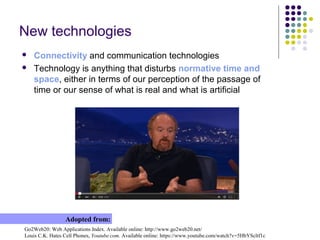
 Connectivity and communication technologies
 Technology is anything that disturbs normative time and
space, either in terms of our perception of the passage of
time or our sense of what is real and what is artificial
Go2Web20: Web Applications Index. Available online: http://www.go2web20.net/
Louis C.K. Hates Cell Phones, Youtube.com. Available online: https://www.youtube.com/watch?v=5HbYScltf1c
Adopted from:
Life is tremendously sad
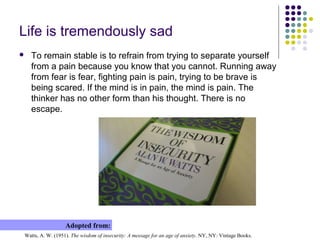
 To remain stable is to refrain from trying to separate yourself
from a pain because you know that you cannot. Running away
from fear is fear, fighting pain is pain, trying to be brave is
being scared. If the mind is in pain, the mind is pain. The
thinker has no other form than his thought. There is no
escape.
Watts, A. W. (1951). The wisdom of insecurity: A message for an age of anxiety. NY, NY: Vintage Books.
Adopted from:
Managing multiple work-learning worlds
Gleick, J. (1999). Faster: The acceleration of just about everything. NY, NY: Pantheon Books.
Ong, W. J. (1982). Orality and literacy: The technologizing of the word. NY, NY: Methuen, pp. 82-83.
Adopted from:
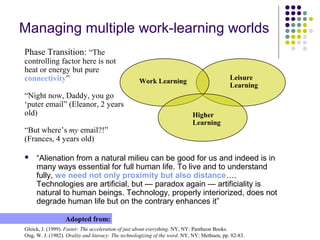
Phase Transition: “The
controlling factor here is not
heat or energy but pure
connectivity”
“Night now, Daddy, you go
‘puter email” (Eleanor, 2 years
old)
“But where’s my email?!”
(Frances, 4 years old)
Work Learning Leisure
Learning
Higher
Learning
 “Alienation from a natural milieu can be good for us and indeed is in
many ways essential for full human life. To live and to understand
fully, we need not only proximity but also distance….
Technologies are artificial, but — paradox again — artificiality is
natural to human beings. Technology, properly interiorized, does not
degrade human life but on the contrary enhances it”
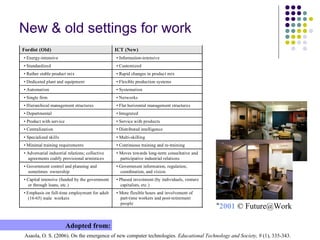
New & old settings for work
Asaola, O. S. (2006). On the emergence of new computer technologies. Educational Technology and Society, 9 (1), 335-343.
Adopted from:
“2001 © Future@Work
Fordist (Old) ICT (New)
• Energy-intensive • Information-intensive
• Standardized • Customized
• Rather stable product mix • Rapid changes in product mix
• Dedicated plant and equipment • Flexible production systems
• Automation • Systemation
• Single firm • Networks
• Hierarchical management structures • Flat horizontal management structures
• Departmental • Integrated
• Product with service • Service with products
• Centralization • Distributed intelligence
• Specialized skills • Multi-skilling
• Minimal training requirements • Continuous training and re-training
• Adversarial industrial relations; collective
agreements codify provisional armistices
• Moves towards long-term consultative and
participative industrial relations
• Government control and planning and
sometimes ownership
• Government information, regulation,
coordination, and vision
• Capital intensive (funded by the government
or through loans, etc.)
• Phased investment (by individuals, venture
capitalists, etc.)
• Emphasis on full-time employment for adult
(16-65) male workers
• More flexible hours and involvement of
part-time workers and post-retirement
people
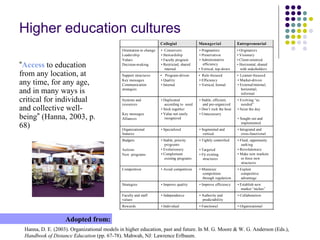
Higher education cultures
Hanna, D. E. (2003). Organizational models in higher education, past and future. In M. G. Moore & W. G. Anderson (Eds.),
Handbook of Distance Education (pp. 67-78). Mahwah, NJ: Lawrence Erlbaum.
Adopted from:
“Access to education
from any location, at
any time, for any age,
and in many ways is
critical for individual
and collective well-
being” (Hanna, 2003, p.
68)
Collegial Managerial Entrepreneurial
Orientation to change
Leadership
Values
Decision-making
• Conservers
• Stewardship
• Faculty program
• Restricted, shared
internal
• Pragmatists
• Preservation
• Administrative
efficiency
• Vertical, top-down
• Originators
• Visionary
• Client-oriented
• Horizontal, shared
with stakeholders
Support structures
Key messages
Communication
strategies
• Program-driven
• Quality
• Internal
• Rule-focused
• Efficiency
• Vertical, formal
• Learner-focused
• Market-driven
• External/internal,
horizontal,
informal
Systems and
resources
Key messages
Alliances
• Duplicated
according to need
• Stick together
• Value not easily
recognized
• Stable, efficient,
and pre-organized
• Don’t rock the boat
• Unnecessary
• Evolving “as
needed”
• Seize the day
• Sought out and
implemented
Organizational
features
• Specialized • Segmented and
vertical
• Integrated and
cross-functional
Budgets
Actions
New programs
• Stable, priority
programs
• Evolutionary
• Complement
existing programs
• Tightly controlled
• Targeted
• Fit existing
structures
• Fluid, opportunity
seeking
• Revolutionary
• Make new markets
or force new
structures
Competition • Avoid competition • Minimize
competition
through regulation
• Exploit
competitive
advantage
Strategies • Improve quality • Improve efficiency • Establish new
market “niches”
Faculty and staff
values
• Independence • Authority and
predictability
• Collaboration
Rewards • Individual • Functional • Organizational
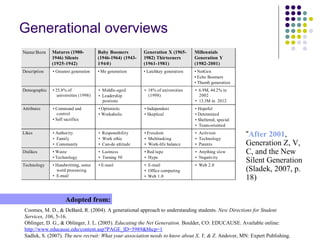
Generational overviews
Coomes, M. D., & DeBard, R. (2004). A generational approach to understanding students. New Directions for Student
Services, 106, 5-16.
Oblinger, D. G., & Oblinger, J. L. (2005). Educating the Net Generation. Boulder, CO: EDUCAUSE. Available online:
http://www.educause.edu/content.asp?PAGE_ID=5989&bhcp=1
Sadlek, S. (2007). The new recruit: What your association needs to know about X, Y, & Z. Andover, MN: Expert Publishing.
Adopted from:
“After 2001,
Generation Z, V,
C, and the New
Silent Generation
(Sladek, 2007, p.
18)
Name/Born Matures (1900-
1946) Silents
(1925-1942)
Baby Boomers
(1946-1964) (1943-
1960)
Generation X (1965-
1982) Thirteeners
(1961-1981)
Millennials
Generation Y
(1982-2001)
Description • Greatest generation • Me generation • Latchkey generation • NetGen
• Echo Boomers
• Thumb generation
Demographic • 25.8% of
universities (1998)
• Middle-aged
• Leadership
postions
• 18% of universities
(1998)
• 6.9M, 44.2% in
2002
• 13.3M in 2012
Attributes • Command and
control
• Self sacrifice
• Optimistic
• Workaholic
• Independent
• Skeptical
• Hopeful
• Determined
• Sheltered, special
• Team-oriented
Likes • Authority
• Family
• Community
• Responsibility
• Work ethic
• Can-do attitude
• Freedom
• Multitasking
• Work-life balance
• Activism
• Technology
• Parents
Dislikes • Waste
• Technology
• Laziness
• Turning 50
• Red tape
• Hype
• Anything slow
• Negativity
Technology • Handwritting, some
word processing
• E-mail
• E-mail • E-mail
• Office computing
• Web 1.0
• Web 2.0
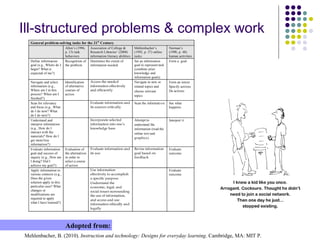
Ill-structured problems & complex work
Mehlenbacher, B. (2010). Instruction and technology: Designs for everyday learning. Cambridge, MA: MIT P.
Adopted from:
General problem-solving tasks for the 21st
Century
Allen’s (1996,
p. 13) task
behaviors
Association of College &
Research Libraries’ (2000)
information literacy abilities
Mehlenbacher’s
(1992, p. 37) online
tasks
Norman’s
(1990, p. 48)
human activities
Define information
goal (e.g., Where do I
begin? What is
expected of me?)
Recognition of
the problem
Determine the extent of
information needed
Set an information
goal to represent task
(combine prior
knowledge and
information goals)
Form a goal
Navigate and select
information (e.g.,
Where am I in this
process? When am I
finished?)
Identification
of alternative
courses of
action
Access the needed
information effectively
and efficiently
Navigate to new or
related topics and
choose relevant
topics
Form an intent
Specify actions
Do actions
Scan for relevancy
and focus (e.g., What
do I do now? What
do I do next?)
Evaluate information and
its sources critically
Scan the informati on See what
happens
Understand and
interpret information
(e.g., How do I
interact with the
materials? How do I
get more/less
information?)
Incorporate selected
information into one’s
knowledge base
Attempt to
understand the
information (read the
online text and
graphics)
Interpret it
Evaluate information
goal and success of
inquiry (e.g., How am
I doing? Did I
achieve my goal?)
Evaluation of
the alternatives
in order to
select a course
of action
Evaluate information and
its use
Revise information
goal based on
feedback
Evaluate
outcome
Apply information to
various contexts (e.g.,
Does the given
solution apply to this
particular case? What
changes or
modifications are
required to apply
what I have learned?)
Use information
effectively to accomplish
a specific purpose
Understand the
economic, legal, and
social issues surrounding
the use of information,
and access and use
information ethically and
legally
Evaluate
outcome
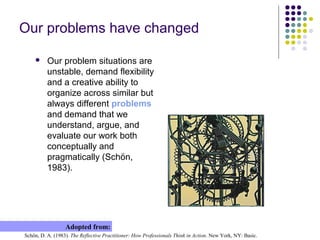
Our problems have changed
 Our problem situations are
unstable, demand flexibility
and a creative ability to
organize across similar but
always different problems
and demand that we
understand, argue, and
evaluate our work both
conceptually and
pragmatically (Schön,
1983).
Schön, D. A. (1983). The Reflective Practitioner: How Professionals Think in Action. New York, NY: Basic.
Adopted from:
Our understanding of knowledge has
changed
 Our understanding of knowledge
has changed: knowledge is no
longer represented in the form of
lists, primary sources, controlled
areas of expertise, or fixed private
states of understanding; instead,
knowledge is contingent, framed
by higher-order and changing
structures, publicly distributed, and
drawn from multiple, emergent
sources (Resnick, Lesgold, & Hall,
2005).
Resnick, L. B., Lesgold, A., and Hall, M. W. (2005). Technology and the new culture of learning: Tools for education
professionals. In P. Gårdenfors and P. Johansson (eds.), Cognition, Education, and Communication Technology (pp. 77–107).
Mahwah, NJ: Lawrence Erlbaum.
Adopted from:
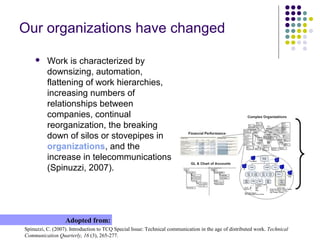
Our organizations have changed
 Work is characterized by
downsizing, automation,
flattening of work hierarchies,
increasing numbers of
relationships between
companies, continual
reorganization, the breaking
down of silos or stovepipes in
organizations, and the
increase in telecommunications
(Spinuzzi, 2007).
Spinuzzi, C. (2007). Introduction to TCQ Special Issue: Technical communication in the age of distributed work. Technical
Communication Quarterly, 16 (3), 265-277.
Adopted from:
Our definitions of expertise have
changed
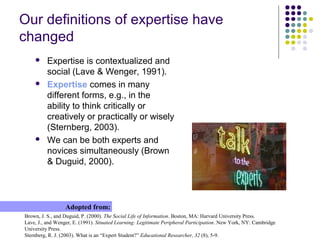
 Expertise is contextualized and
social (Lave & Wenger, 1991).
 Expertise comes in many
different forms, e.g., in the
ability to think critically or
creatively or practically or wisely
(Sternberg, 2003).
 We can be both experts and
novices simultaneously (Brown
& Duguid, 2000).
Brown, J. S., and Duguid, P. (2000). The Social Life of Information. Boston, MA: Harvard University Press.
Lave, J., and Wenger, E. (1991). Situated Learning: Legitimate Peripheral Participation. New York, NY: Cambridge
University Press.
Sternberg, R. J. (2003). What is an “Expert Student?” Educational Researcher, 32 (8), 5-9.
Adopted from:
Balancing proximity & distance
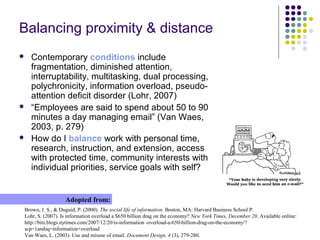
 Contemporary conditions include
fragmentation, diminished attention,
interruptability, multitasking, dual processing,
polychronicity, information overload, pseudo-
attention deficit disorder (Lohr, 2007)
 “Employees are said to spend about 50 to 90
minutes a day managing email” (Van Waes,
2003, p. 279)
 How do I balance work with personal time,
research, instruction, and extension, access
with protected time, community interests with
individual priorities, service goals with self?
Brown, J. S., & Duguid, P. (2000). The social life of information. Boston, MA: Harvard Business School P.
Lohr, S. (2007). Is information overload a $650 billion drag on the economy? New York Times, December 20. Available online:
http://bits.blogs.nytimes.com/2007/12/20/is-information -overload-a-650-billion-drag-on-the-economy/?
scp=1andsq=information+overload
Van Waes, L. (2003). Use and misuse of email. Document Design, 4 (3), 279-280.
Adopted from:
E-mail is pervasive & ubiquitous
 Email “has evolved beyond a
passive communication system”
(MacKay, 1989, p. 395)
 Email “is woven into the general
system of coordinated activity”
(Wattenberg, 2005, p. 144)
 74% of American adults use
Internet; 69% online daily
 91% of them use e-mail
 71% of workers regard email as
“essential” for their everyday work
(Whittaker, 2005, p. 49).
MacKay, W. E. (1989). Diversity in the use of electronic mail: A preliminary inquiry. ACM Transactions on Office Information
Systems, 6 (4), 380-397.
PEW Internet & American Project. (2009). Online Activities and Internet: The mainstreaming of online life. Available online:
http://www.pewinternet.org
Wattenberg, M., Rohall, S. L., Gruen, D., & Kerr, B. (2005). Email research: Targeting the enterprise. Human-Computer
Interaction, 20 (1/2), 139-162.
Whittaker, S. (2005). Supporting collaborative task management in email. Human-Computer Interaction, 20 (1/2), 49-88.
Adopted from:
 Knowledge workers average
checking email 50 times/day,
instant messaging 77 times, and
visited over 40 websites
 Email volume has doubled over
last 5 years, to 40B person-to-
person emails everyday (IBM
Podcast, 2008)
Characterizing your e-mail use
 How many messages did you
send today?
 How many messages did you
receive today?
 Is this a typical day?
 How many mail folders do you
have?
 How many messages are in
your inbox?
 Is this typical?
 How many distribution lists do
you subscribe to?
 How often do you read your
email?
 Do you read all of your email?
MacKay, W. E. (1989). Diversity in the use of electronic mail: A preliminary inquiry. ACM Transactions on Office Information
Systems, 6 (4), 380-397.
Whittaker, S. (2005). Supporting collaborative task management in email. Human-Computer Interaction, 20 (1/2), 49-88.
Adopted from:
 What percentage of
messages do you wish
you had never seen?
(MacKay, 1989, p. 396)
 Do you keep reminders?
 Do you keep an
electronic or hardcopy
calendar?
 Do you keep a separate
to-do list(s)?
 Can you identify
messages related to
most important work
tasks? (Whittaker, 2005).
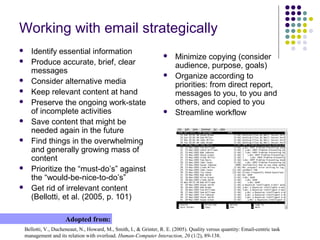
Employing simple email tactics
 Regularly scanning the inbox; often scrolling up and down
 Turning off ping; avoiding dependence on constant email updates
 Learning keystroke shortcuts and exploring your email application
 Sorting, by sender, flags, other prioritizing systems, to find items
more easily than in the default time-and-date-based view
 Deleting items to clean-out irrelevant, distracting content in the inbox
 Storing currently relevant items in task application
 Marking email messages as unread (or critical or important, etc.)
 Storing items in appropriately labeled email folders and subfolders to
be worked on together in the future
 Archiving messages in email folders for reference
 Inspecting or searching in folders in email and using other technical
or nontechnical methods of keeping work prioritized
 Making a calendar event to remind oneself to do something (Bellotti,
et al., 2005, p. 102)
Bellotti, V., Ducheneaut, N., Howard, M., Smith, I., & Grinter, R. E. (2005). Quality versus quantity: Email-centric task
management and its relation with overload. Human-Computer Interaction, 20 (1/2), 89-138.
Adopted from:
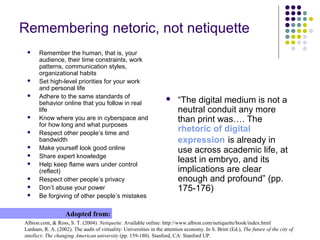
Working with email strategically
 Identify essential information
 Produce accurate, brief, clear
messages
 Consider alternative media
 Keep relevant content at hand
 Preserve the ongoing work-state
of incomplete activities
 Save content that might be
needed again in the future
 Find things in the overwhelming
and generally growing mass of
content
 Prioritize the “must-do’s” against
the “would-be-nice-to-do’s”
 Get rid of irrelevant content
(Bellotti, et al. (2005, p. 101)
Bellotti, V., Ducheneaut, N., Howard, M., Smith, I., & Grinter, R. E. (2005). Quality versus quantity: Email-centric task
management and its relation with overload. Human-Computer Interaction, 20 (1/2), 89-138.
Adopted from:
 Minimize copying (consider
audience, purpose, goals)
 Organize according to
priorities: from direct report,
messages to you, to you and
others, and copied to you
 Streamline workflow
Remembering netoric, not netiquette
Albion.com, & Ross, S. T. (2004). Netiquette. Available online: http://www.albion.com/netiquette/book/index.html
Lanham, R. A. (2002). The audit of virtuality: Universities in the attention economy. In S. Brint (Ed.), The future of the city of
intellect: The changing American university (pp. 159-180). Stanford, CA: Stanford UP.
Adopted from:
 Remember the human, that is, your
audience, their time constraints, work
patterns, communication styles,
organizational habits
 Set high-level priorities for your work
and personal life
 Adhere to the same standards of
behavior online that you follow in real
life
 Know where you are in cyberspace and
for how long and what purposes
 Respect other people’s time and
bandwidth
 Make yourself look good online
 Share expert knowledge
 Help keep flame wars under control
(reflect)
 Respect other people’s privacy
 Don’t abuse your power
 Be forgiving of other people’s mistakes
 “The digital medium is not a
neutral conduit any more
than print was…. The
rhetoric of digital
expression is already in
use across academic life, at
least in embryo, and its
implications are clear
enough and profound” (pp.
175-176)
Internalizing netoric
Felder, R. M. (2006). A whole new mind for a flat world. Chemical Engineering Education, 40(2), 96–97.
Putnam, R. D. (2000). Bowling Alone: The Collapse and Revival of American Community. New York: Simon and Schuster.
Adopted from:
 Knowledge work is
creative, entrepreneurial,
holistic, multidisciplinary,
global, interpersonal,
relational, self-directed, and
flexible (Felder, 2006, p. 96)
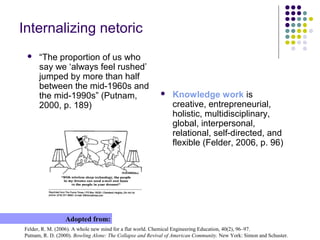
 “The proportion of us who
say we ‘always feel rushed’
jumped by more than half
between the mid-1960s and
the mid-1990s” (Putnam,
2000, p. 189)
Issues for healthy digital living
 Separating private from
public
 Managing multiple selves
 Organizing records of past
activities
 Operating in multiple
spaces
 Working with people who
are inattentive, time
efficient, cost driven, service
and convenience oriented
 Negotiating time and space
 Designing for many
modalities
 Prioritizing intentions and
event actions
 Distinguishing multitasking
and polychronicity from
inter-ruptability, information
overload, and pseudo-
attention deficit disorder
Questions?
 Technology inserts itself between
perceptions of time and notions of
self
 Almost everything we call
“progress” is actually measured
by the degree to which it enables
us to conduct ourselves without
the need to bring thought into
conscious relationship with
movement or feeling
Needleman, J. (2003). Time and the soul: Where has all the meaningful time gone—and can we get it back? San Francisco, CA:
Berrett-Koehler.
Adopted from:

The myth of time management: New technologies, distributed selves, and the accelerated age of anxiety

  • 1.
    The myth oftime management: New technologies, distributed selves, and the accelerated age of anxiety Dr. Brad Mehlenbacher College of Education NC State University (USA) brad_m@ncsu.edu Thomas Jefferson Scholars Meeting 2015 March 23, 2015 Mehlenbacher, B. (2010). Instruction and Technology: Designs for Everyday Learning. Cambridge, MA: MIT Press. Excerpts from:
  • 2.
    Managing time  Suddenly,“time” and timing” are everywhere. Speed, acceleration, just in time, and Internet time are just a few concepts making headlines in the popular press. Academic journals also have seen a proliferation of research papers on time and timing  New terms, metaphors, and theories are emerging (e.g., time famine, polychronicity, chronos and kairos, temporal linkages. As the pace of research dramatically accelerates, time and timing have moved from the background to the foreground Ancona, D. G., Okhuysen, G. A., & Perlow, L. A. (2001). Taking time to integrate temporal research. Academy of Management Review, 26 (4), 512-529. Adopted from:
  • 3.
    New technologies  Connectivityand communication technologies  Technology is anything that disturbs normative time and space, either in terms of our perception of the passage of time or our sense of what is real and what is artificial Go2Web20: Web Applications Index. Available online: http://www.go2web20.net/ Louis C.K. Hates Cell Phones, Youtube.com. Available online: https://www.youtube.com/watch?v=5HbYScltf1c Adopted from:
  • 4.
    Life is tremendouslysad  To remain stable is to refrain from trying to separate yourself from a pain because you know that you cannot. Running away from fear is fear, fighting pain is pain, trying to be brave is being scared. If the mind is in pain, the mind is pain. The thinker has no other form than his thought. There is no escape. Watts, A. W. (1951). The wisdom of insecurity: A message for an age of anxiety. NY, NY: Vintage Books. Adopted from:
  • 5.
    Managing multiple work-learningworlds Gleick, J. (1999). Faster: The acceleration of just about everything. NY, NY: Pantheon Books. Ong, W. J. (1982). Orality and literacy: The technologizing of the word. NY, NY: Methuen, pp. 82-83. Adopted from: Phase Transition: “The controlling factor here is not heat or energy but pure connectivity” “Night now, Daddy, you go ‘puter email” (Eleanor, 2 years old) “But where’s my email?!” (Frances, 4 years old) Work Learning Leisure Learning Higher Learning  “Alienation from a natural milieu can be good for us and indeed is in many ways essential for full human life. To live and to understand fully, we need not only proximity but also distance…. Technologies are artificial, but — paradox again — artificiality is natural to human beings. Technology, properly interiorized, does not degrade human life but on the contrary enhances it”
  • 6.
    New & oldsettings for work Asaola, O. S. (2006). On the emergence of new computer technologies. Educational Technology and Society, 9 (1), 335-343. Adopted from: “2001 © Future@Work Fordist (Old) ICT (New) • Energy-intensive • Information-intensive • Standardized • Customized • Rather stable product mix • Rapid changes in product mix • Dedicated plant and equipment • Flexible production systems • Automation • Systemation • Single firm • Networks • Hierarchical management structures • Flat horizontal management structures • Departmental • Integrated • Product with service • Service with products • Centralization • Distributed intelligence • Specialized skills • Multi-skilling • Minimal training requirements • Continuous training and re-training • Adversarial industrial relations; collective agreements codify provisional armistices • Moves towards long-term consultative and participative industrial relations • Government control and planning and sometimes ownership • Government information, regulation, coordination, and vision • Capital intensive (funded by the government or through loans, etc.) • Phased investment (by individuals, venture capitalists, etc.) • Emphasis on full-time employment for adult (16-65) male workers • More flexible hours and involvement of part-time workers and post-retirement people
  • 7.
    Higher education cultures Hanna,D. E. (2003). Organizational models in higher education, past and future. In M. G. Moore & W. G. Anderson (Eds.), Handbook of Distance Education (pp. 67-78). Mahwah, NJ: Lawrence Erlbaum. Adopted from: “Access to education from any location, at any time, for any age, and in many ways is critical for individual and collective well- being” (Hanna, 2003, p. 68) Collegial Managerial Entrepreneurial Orientation to change Leadership Values Decision-making • Conservers • Stewardship • Faculty program • Restricted, shared internal • Pragmatists • Preservation • Administrative efficiency • Vertical, top-down • Originators • Visionary • Client-oriented • Horizontal, shared with stakeholders Support structures Key messages Communication strategies • Program-driven • Quality • Internal • Rule-focused • Efficiency • Vertical, formal • Learner-focused • Market-driven • External/internal, horizontal, informal Systems and resources Key messages Alliances • Duplicated according to need • Stick together • Value not easily recognized • Stable, efficient, and pre-organized • Don’t rock the boat • Unnecessary • Evolving “as needed” • Seize the day • Sought out and implemented Organizational features • Specialized • Segmented and vertical • Integrated and cross-functional Budgets Actions New programs • Stable, priority programs • Evolutionary • Complement existing programs • Tightly controlled • Targeted • Fit existing structures • Fluid, opportunity seeking • Revolutionary • Make new markets or force new structures Competition • Avoid competition • Minimize competition through regulation • Exploit competitive advantage Strategies • Improve quality • Improve efficiency • Establish new market “niches” Faculty and staff values • Independence • Authority and predictability • Collaboration Rewards • Individual • Functional • Organizational
  • 8.
    Generational overviews Coomes, M.D., & DeBard, R. (2004). A generational approach to understanding students. New Directions for Student Services, 106, 5-16. Oblinger, D. G., & Oblinger, J. L. (2005). Educating the Net Generation. Boulder, CO: EDUCAUSE. Available online: http://www.educause.edu/content.asp?PAGE_ID=5989&bhcp=1 Sadlek, S. (2007). The new recruit: What your association needs to know about X, Y, & Z. Andover, MN: Expert Publishing. Adopted from: “After 2001, Generation Z, V, C, and the New Silent Generation (Sladek, 2007, p. 18) Name/Born Matures (1900- 1946) Silents (1925-1942) Baby Boomers (1946-1964) (1943- 1960) Generation X (1965- 1982) Thirteeners (1961-1981) Millennials Generation Y (1982-2001) Description • Greatest generation • Me generation • Latchkey generation • NetGen • Echo Boomers • Thumb generation Demographic • 25.8% of universities (1998) • Middle-aged • Leadership postions • 18% of universities (1998) • 6.9M, 44.2% in 2002 • 13.3M in 2012 Attributes • Command and control • Self sacrifice • Optimistic • Workaholic • Independent • Skeptical • Hopeful • Determined • Sheltered, special • Team-oriented Likes • Authority • Family • Community • Responsibility • Work ethic • Can-do attitude • Freedom • Multitasking • Work-life balance • Activism • Technology • Parents Dislikes • Waste • Technology • Laziness • Turning 50 • Red tape • Hype • Anything slow • Negativity Technology • Handwritting, some word processing • E-mail • E-mail • E-mail • Office computing • Web 1.0 • Web 2.0
  • 9.
    Ill-structured problems &complex work Mehlenbacher, B. (2010). Instruction and technology: Designs for everyday learning. Cambridge, MA: MIT P. Adopted from: General problem-solving tasks for the 21st Century Allen’s (1996, p. 13) task behaviors Association of College & Research Libraries’ (2000) information literacy abilities Mehlenbacher’s (1992, p. 37) online tasks Norman’s (1990, p. 48) human activities Define information goal (e.g., Where do I begin? What is expected of me?) Recognition of the problem Determine the extent of information needed Set an information goal to represent task (combine prior knowledge and information goals) Form a goal Navigate and select information (e.g., Where am I in this process? When am I finished?) Identification of alternative courses of action Access the needed information effectively and efficiently Navigate to new or related topics and choose relevant topics Form an intent Specify actions Do actions Scan for relevancy and focus (e.g., What do I do now? What do I do next?) Evaluate information and its sources critically Scan the informati on See what happens Understand and interpret information (e.g., How do I interact with the materials? How do I get more/less information?) Incorporate selected information into one’s knowledge base Attempt to understand the information (read the online text and graphics) Interpret it Evaluate information goal and success of inquiry (e.g., How am I doing? Did I achieve my goal?) Evaluation of the alternatives in order to select a course of action Evaluate information and its use Revise information goal based on feedback Evaluate outcome Apply information to various contexts (e.g., Does the given solution apply to this particular case? What changes or modifications are required to apply what I have learned?) Use information effectively to accomplish a specific purpose Understand the economic, legal, and social issues surrounding the use of information, and access and use information ethically and legally Evaluate outcome
  • 10.
    Our problems havechanged  Our problem situations are unstable, demand flexibility and a creative ability to organize across similar but always different problems and demand that we understand, argue, and evaluate our work both conceptually and pragmatically (Schön, 1983). Schön, D. A. (1983). The Reflective Practitioner: How Professionals Think in Action. New York, NY: Basic. Adopted from:
  • 11.
    Our understanding ofknowledge has changed  Our understanding of knowledge has changed: knowledge is no longer represented in the form of lists, primary sources, controlled areas of expertise, or fixed private states of understanding; instead, knowledge is contingent, framed by higher-order and changing structures, publicly distributed, and drawn from multiple, emergent sources (Resnick, Lesgold, & Hall, 2005). Resnick, L. B., Lesgold, A., and Hall, M. W. (2005). Technology and the new culture of learning: Tools for education professionals. In P. Gårdenfors and P. Johansson (eds.), Cognition, Education, and Communication Technology (pp. 77–107). Mahwah, NJ: Lawrence Erlbaum. Adopted from:
  • 12.
    Our organizations havechanged  Work is characterized by downsizing, automation, flattening of work hierarchies, increasing numbers of relationships between companies, continual reorganization, the breaking down of silos or stovepipes in organizations, and the increase in telecommunications (Spinuzzi, 2007). Spinuzzi, C. (2007). Introduction to TCQ Special Issue: Technical communication in the age of distributed work. Technical Communication Quarterly, 16 (3), 265-277. Adopted from:
  • 13.
    Our definitions ofexpertise have changed  Expertise is contextualized and social (Lave & Wenger, 1991).  Expertise comes in many different forms, e.g., in the ability to think critically or creatively or practically or wisely (Sternberg, 2003).  We can be both experts and novices simultaneously (Brown & Duguid, 2000). Brown, J. S., and Duguid, P. (2000). The Social Life of Information. Boston, MA: Harvard University Press. Lave, J., and Wenger, E. (1991). Situated Learning: Legitimate Peripheral Participation. New York, NY: Cambridge University Press. Sternberg, R. J. (2003). What is an “Expert Student?” Educational Researcher, 32 (8), 5-9. Adopted from:
  • 14.
    Balancing proximity &distance  Contemporary conditions include fragmentation, diminished attention, interruptability, multitasking, dual processing, polychronicity, information overload, pseudo- attention deficit disorder (Lohr, 2007)  “Employees are said to spend about 50 to 90 minutes a day managing email” (Van Waes, 2003, p. 279)  How do I balance work with personal time, research, instruction, and extension, access with protected time, community interests with individual priorities, service goals with self? Brown, J. S., & Duguid, P. (2000). The social life of information. Boston, MA: Harvard Business School P. Lohr, S. (2007). Is information overload a $650 billion drag on the economy? New York Times, December 20. Available online: http://bits.blogs.nytimes.com/2007/12/20/is-information -overload-a-650-billion-drag-on-the-economy/? scp=1andsq=information+overload Van Waes, L. (2003). Use and misuse of email. Document Design, 4 (3), 279-280. Adopted from:
  • 15.
    E-mail is pervasive& ubiquitous  Email “has evolved beyond a passive communication system” (MacKay, 1989, p. 395)  Email “is woven into the general system of coordinated activity” (Wattenberg, 2005, p. 144)  74% of American adults use Internet; 69% online daily  91% of them use e-mail  71% of workers regard email as “essential” for their everyday work (Whittaker, 2005, p. 49). MacKay, W. E. (1989). Diversity in the use of electronic mail: A preliminary inquiry. ACM Transactions on Office Information Systems, 6 (4), 380-397. PEW Internet & American Project. (2009). Online Activities and Internet: The mainstreaming of online life. Available online: http://www.pewinternet.org Wattenberg, M., Rohall, S. L., Gruen, D., & Kerr, B. (2005). Email research: Targeting the enterprise. Human-Computer Interaction, 20 (1/2), 139-162. Whittaker, S. (2005). Supporting collaborative task management in email. Human-Computer Interaction, 20 (1/2), 49-88. Adopted from:  Knowledge workers average checking email 50 times/day, instant messaging 77 times, and visited over 40 websites  Email volume has doubled over last 5 years, to 40B person-to- person emails everyday (IBM Podcast, 2008)
  • 16.
    Characterizing your e-mailuse  How many messages did you send today?  How many messages did you receive today?  Is this a typical day?  How many mail folders do you have?  How many messages are in your inbox?  Is this typical?  How many distribution lists do you subscribe to?  How often do you read your email?  Do you read all of your email? MacKay, W. E. (1989). Diversity in the use of electronic mail: A preliminary inquiry. ACM Transactions on Office Information Systems, 6 (4), 380-397. Whittaker, S. (2005). Supporting collaborative task management in email. Human-Computer Interaction, 20 (1/2), 49-88. Adopted from:  What percentage of messages do you wish you had never seen? (MacKay, 1989, p. 396)  Do you keep reminders?  Do you keep an electronic or hardcopy calendar?  Do you keep a separate to-do list(s)?  Can you identify messages related to most important work tasks? (Whittaker, 2005).
  • 17.
    Employing simple emailtactics  Regularly scanning the inbox; often scrolling up and down  Turning off ping; avoiding dependence on constant email updates  Learning keystroke shortcuts and exploring your email application  Sorting, by sender, flags, other prioritizing systems, to find items more easily than in the default time-and-date-based view  Deleting items to clean-out irrelevant, distracting content in the inbox  Storing currently relevant items in task application  Marking email messages as unread (or critical or important, etc.)  Storing items in appropriately labeled email folders and subfolders to be worked on together in the future  Archiving messages in email folders for reference  Inspecting or searching in folders in email and using other technical or nontechnical methods of keeping work prioritized  Making a calendar event to remind oneself to do something (Bellotti, et al., 2005, p. 102) Bellotti, V., Ducheneaut, N., Howard, M., Smith, I., & Grinter, R. E. (2005). Quality versus quantity: Email-centric task management and its relation with overload. Human-Computer Interaction, 20 (1/2), 89-138. Adopted from:
  • 18.
    Working with emailstrategically  Identify essential information  Produce accurate, brief, clear messages  Consider alternative media  Keep relevant content at hand  Preserve the ongoing work-state of incomplete activities  Save content that might be needed again in the future  Find things in the overwhelming and generally growing mass of content  Prioritize the “must-do’s” against the “would-be-nice-to-do’s”  Get rid of irrelevant content (Bellotti, et al. (2005, p. 101) Bellotti, V., Ducheneaut, N., Howard, M., Smith, I., & Grinter, R. E. (2005). Quality versus quantity: Email-centric task management and its relation with overload. Human-Computer Interaction, 20 (1/2), 89-138. Adopted from:  Minimize copying (consider audience, purpose, goals)  Organize according to priorities: from direct report, messages to you, to you and others, and copied to you  Streamline workflow
  • 19.
    Remembering netoric, notnetiquette Albion.com, & Ross, S. T. (2004). Netiquette. Available online: http://www.albion.com/netiquette/book/index.html Lanham, R. A. (2002). The audit of virtuality: Universities in the attention economy. In S. Brint (Ed.), The future of the city of intellect: The changing American university (pp. 159-180). Stanford, CA: Stanford UP. Adopted from:  Remember the human, that is, your audience, their time constraints, work patterns, communication styles, organizational habits  Set high-level priorities for your work and personal life  Adhere to the same standards of behavior online that you follow in real life  Know where you are in cyberspace and for how long and what purposes  Respect other people’s time and bandwidth  Make yourself look good online  Share expert knowledge  Help keep flame wars under control (reflect)  Respect other people’s privacy  Don’t abuse your power  Be forgiving of other people’s mistakes  “The digital medium is not a neutral conduit any more than print was…. The rhetoric of digital expression is already in use across academic life, at least in embryo, and its implications are clear enough and profound” (pp. 175-176)
  • 20.
    Internalizing netoric Felder, R.M. (2006). A whole new mind for a flat world. Chemical Engineering Education, 40(2), 96–97. Putnam, R. D. (2000). Bowling Alone: The Collapse and Revival of American Community. New York: Simon and Schuster. Adopted from:  Knowledge work is creative, entrepreneurial, holistic, multidisciplinary, global, interpersonal, relational, self-directed, and flexible (Felder, 2006, p. 96)  “The proportion of us who say we ‘always feel rushed’ jumped by more than half between the mid-1960s and the mid-1990s” (Putnam, 2000, p. 189)
  • 21.
    Issues for healthydigital living  Separating private from public  Managing multiple selves  Organizing records of past activities  Operating in multiple spaces  Working with people who are inattentive, time efficient, cost driven, service and convenience oriented  Negotiating time and space  Designing for many modalities  Prioritizing intentions and event actions  Distinguishing multitasking and polychronicity from inter-ruptability, information overload, and pseudo- attention deficit disorder
  • 22.
    Questions?  Technology insertsitself between perceptions of time and notions of self  Almost everything we call “progress” is actually measured by the degree to which it enables us to conduct ourselves without the need to bring thought into conscious relationship with movement or feeling Needleman, J. (2003). Time and the soul: Where has all the meaningful time gone—and can we get it back? San Francisco, CA: Berrett-Koehler. Adopted from: