White Paper
              version 5.0
      FRACTALIA Software
2


A.          INTRODUCTION ......................................................................................................................................................................... 4 
B.          TOOLS ........................................................................................................................................................................................ 5 
      1.          ADMINISTRATION ................................................................................................................................................................................... 5 
      2.          PROTECTION OF THE HARD DISK ................................................................................................................................................................. 5 
      3.          MASSIVE DISTRIBUTION OF SOFTWARE P2P  ................................................................................................................................................ 5 
                                                                         .
      4.          DETECTION OF PATCHES ........................................................................................................................................................................... 6 
      5.          INVENTORY, EVENTS AND ALARMS .............................................................................................................................................................. 6 
      6.          ACCESS CONTROL AND SECURITY POLICIES  .................................................................................................................................................. 7 
                                                                       .
      7.          REMOTE CONTROL  ................................................................................................................................................................................. 7 
                                        .
      8.          BAND WIDTH ......................................................................................................................................................................................... 7 
      9.          VPRO ................................................................................................................................................................................................... 7 
      10.         INSTANTANEOUS OPERATIONS .................................................................................................................................................................. 9 
      11.         LICENCES .............................................................................................................................................................................................. 9 
      12.         PATCH MANAGEMENT  ............................................................................................................................................................................ 9 
                                             .
      13.         REPORT SERVER ..................................................................................................................................................................................... 9 
      14.         ANTIFRAUD PROTECTION ......................................................................................................................................................................... 9 
      15.         FRACTALIA BUSINESS INTELLIGENCE ............................................................................................................................................................ 9 
      16.         FRACTALIA REMOTE ASSISTANCE ............................................................................................................................................................. 10 
C.          FRACTALIA MANAGER (FM)  ..................................................................................................................................................... 11 
                                  .
      1.    ARCHITECTURE ..................................................................................................................................................................................... 11 
      2.    SERVER ............................................................................................................................................................................................... 12 
      3.    AGENT ............................................................................................................................................................................................... 12 
         1.  Layer of Fractalia Manager  ........................................................................................................................................................ 12 
                                                         .
         2.  Layer IriScene Recovery System .................................................................................................................................................. 13 
      4.  CHARACTERISTIC’S ................................................................................................................................................................................ 14 
         1.  Total management from a single consol .................................................................................................................................... 14 
         2.  Instant Recovery System (IRS) ..................................................................................................................................................... 15 
         3.  Distribution of software .............................................................................................................................................................. 15 
         4.  Hardware and software inventory .............................................................................................................................................. 16 
         5.  Events report ............................................................................................................................................................................... 16 
         6.  Remote Control ........................................................................................................................................................................... 17 
         7.  Dynamic Groups .......................................................................................................................................................................... 18 
D.          REQUISITES OF THE SYSTEM ..................................................................................................................................................... 20 
      5.    AS REGARDS THE SERVER ........................................................................................................................................................................ 20 
            1. Hardware Requisites ................................................................................................................................................................... 20 
            2. Software Requisites .................................................................................................................................................................... 20 
      6.  AS REGARDS THE CLIENT ......................................................................................................................................................................... 21 
         1.  Hardware Requisites ................................................................................................................................................................... 21 
         2.  Software Requisites .................................................................................................................................................................... 21 
      7.  NETWORK CONNECTIVITY ....................................................................................................................................................................... 21 
         1.  Typology of the connectivity ....................................................................................................................................................... 21 
         2.  Band width required ................................................................................................................................................................... 22 
E.          INSTALLATION PROCEDURE  ..................................................................................................................................................... 24 
                                  .
      1.          ANALYSIS AND/OR DEFINITION OF THE COMMUNICATIONS NETWORK .............................................................................................................. 24 
      2.          POSSIBLE ALTERNATIVE INSTALLATIONS IN CLIENT COMPUTERS ....................................................................................................................... 24 
      3.          IMPLEMENTATION ................................................................................................................................................................................ 25 
F.          CONCLUSIONS.......................................................................................................................................................................... 27 


                                                                                     T. 917 801 100 F. 917 081 102
Fractalia Remote Systems, S.L. Registered in the Mercantile Registry of Madrid Volume 14,699 Section 8 Sheet 223, Page M-243866 Tax No. B-82513425
3


                           About Fractalia Software
                  Fractalia Software is an Information Technology Research & Development Company, a
                  leader in the development of robust and effective solutions for the management and control
                  of large computer networks. Development and innovation is our aim. We have developed the
                  most advanced system of large PC networks, Fractalia Manager, a vanguard solution which
                  guarantees the maximum level of operation. Large companies and organisations have placed
                  their trust in our solution, which provides their business with a new concept of remote
                  management of computer networks.


                                                      T. 917 801 100 F. 917 081 102
Fractalia Remote Systems, S.L. Registered in the Mercantile Registry of Madrid Volume 14,699 Section 8 Sheet 223, Page M-243866 Tax No. B-82513425
4


      A. Introduction
                  Fractalia Manager (FM) is an innovative solution which joins all the tools required for effective
                  management of your computing area in a single interface.


                     Administration: “Master Admin” profile in the server for easy management of multi-client
                     environments.

                     Protection of the hard disk: this guarantees the maximum operability of your PCs

                     Massive distribution of P2P software: this keeps your PCs always updated and
                     personalised.

                     Detection of patches: this is always updated automatically.

                     Inventory, events and alarms: this knows the state of your network in detail and in real
                     time, and improves the backup services

                     Access control and Security Policies: this controls the applications which are executed
                     in your PCs, it monitors processes and URLs accessed and blocks the devices you wish to
                     be blocked.

                     Remote Control: this obtains the maximum response speed in the event of incidences

                     Measurement of broadband: this permits the diagnosis of the network flow.

                     VPro: Intel technology integrated into Fractalia Manager.

                     Instantaneous operations: this executes instantaneous operations in terminals which are
                     in networks protected by a proxy.

                     Licences: this makes it possible to assign a number of licences for terminals to a
                     determined company which uses the tool.

                     Patch Management: management of patches and updates, integrated with Microsoft
                     WSUS.

                     Report Server: a new server that offers reports via the web to final users. Predefined
                     reports for Inventory, Distribution of SW and application use.

                     Antifraud Protection: helps the operator combat user abuses when employing the
                     terminals.

                     Fractalia Business Intelligence: provides a platform for the automation of data mining.
                     The results of the analysis of such data, operational and functional in character, will
                     provide valuable information to support more effective business intelligence processes.

                     Fractalia Remote Assistance: a system of remote assistance on user request.

            Regardless of the type of network of your computer resources, it reduces costs, increases their
            functioning time and saves in costly technical visits. It is the fastest, simplest and most secure
            solution for managing, controlling and backing up your PC network.


                                                      T. 917 801 100 F. 917 081 102
Fractalia Remote Systems, S.L. Registered in the Mercantile Registry of Madrid Volume 14,699 Section 8 Sheet 223, Page M-243866 Tax No. B-82513425
5


      B. Tools

      1. Administration
                  “Master Admin” profile in the server for easy management of multi-client environments.

                  Single user to “replace” company administrator users, permits a user to enter remotely to
                  share the same environment and verify the correct operation of a company from the client’s
                  point of view.

                  Creation of update packets is available to all companies.

      2. Protection of the hard disk
                  The Instant Recovery System (IRS) technology is particular to FM and working at a very low
                  level (at sector level) it enables us to establish the recovery points of the hard disk and to
                  return to a previous known state. Both actions establish and recover a known state, and this
                  can be done locally or remotely, individually or massively to a group of terminals.

                  The process for establishing a recovery point only takes a few moments and there is no
                  interference with the user, it also consumes very few hard disk resources as it does not make
                  a total copy of the hard disk.

                  Multiple recovery points can be established. This technology enables us to have total control
                  over the state of the terminals distributed as we always have the possibility of returning to a
                  known recovery point at which the equipment functions correctly.


      3. Massive Distribution of software P2P
                  It is a fundamental module in a solution for remote management of terminals. It allows us to
                  install applications, updates, patches, hot fixes in short, any software package in a massive
                  and unattended way.

                  It uses Peer-to-Peer (P2P) technology that segments each software packet into fragments
                  that are shared among the terminals that form part of the PC fleet (peers).

                  The certification at shared fragment level guarantees security in the download and can make
                  massive distribution more efficient.

                  FM is a highly scalable solution with this technology, as the bottleneck that downloading
                  packets from a server or a middleware network supposed is no longer critical.

                  This module interacts with the hard disk protection module (IRS) offering a combination of
                  high availability and up-to-dateness for a distributed PC fleet.

                  All the communications protocol is encapsulated in HTTP (transparent for firewalls), supports
                  proxies, so that the solution is versatile, and performs correctly in very heterogeneous
                  networks.

                  Generation of packets and update groups at server and not only at company level.

                  It allows the generation of packets at server level to offer to multiple companies with the
                  advantage of only one publication. Companies can use these packets and update groups


                                                      T. 917 801 100 F. 917 081 102
Fractalia Remote Systems, S.L. Registered in the Mercantile Registry of Madrid Volume 14,699 Section 8 Sheet 223, Page M-243866 Tax No. B-82513425
6


                  without the possibility of modification. This facilitates the distribution of common packages
                  without a specific licence (utilities, “acrobat reader”, etc...) to all the clients of MSP.

                  Software Self-Service

                  Utility that lets the users themselves select applications and install them in their equipment.
                  Totally integrated with FM, the administrator selects the applications that will be public and
                  visible for each PC and the user selects those that they consider opportune.

                  When the selection is made, these applications are assigned by the platform to the PCs and
                  are downloaded, installed, etc like any other package and incorporated into reports, events,
                  etc.

                  SET (“Secure Evolution Technology”)

                  This allows a comfortable management and technological evolution of the distribution of SW,
                  packages and applications.

                  Installation and uninstallation of the applications is automatic, on assigning and unassigning
                  these packages to the terminals.

                  It allows the configuration of profiles and groups, installation and uninstallation of applications
                  when a profile or group is changed.

                  Reinstallation of applications after an uninstallation by the user: this forces the content of the
                  affected profile.


      4. Detection of patches
                  The terminals are catalogued by their hardware and software, and automatically receive the
                  relevant updates of Windows, Office, Acrobat, depending on the group they belong to.

                  The detection of patches uses all the power and technology of the massive distribution of
                  software.


      5. Inventory, events and alarms
                  This is an extremely complete tool which provides very precise information on the hardware
                  components of the equipment, as well as on the applications installed.

                  It is a detailed, high resolution inventory which provides reports and filtered material so that
                  we select terminals which comply with certain requisites in order to operate on these
                  (establish a recovery point, distribute software, etc.).

                  It notifies the changes which have taken place as regards software and hardware and, at any
                  time, we know the state of the terminal resources.

                  Alarms can be programmed in accordance with defined conditions and a set of software tools
                  for development (SDK) are placed at the disposal of the client in order to obtain specific
                  information from the terminals and integrate this with other solutions.


                                                      T. 917 801 100 F. 917 081 102
Fractalia Remote Systems, S.L. Registered in the Mercantile Registry of Madrid Volume 14,699 Section 8 Sheet 223, Page M-243866 Tax No. B-82513425
7


      6. Access Control and Security Policies
                  This supervises the state of the terminals, deploys critical security actions and generates
                  events and alarms. It can interact with the protection module of the hard disk (IRS) in order to
                  return to a known point if this is necessary.

                  This controls and manages the access of groups of users to determined Web Sites as well as
                  the execution of certain applications. Moreover, it permits the restriction of the execution of
                  the black and white lists of applications at kernel level.

                  It permits the filtering of the access of families of external peripherals to the computer devices
                  and entry and exit points.


      7. Remote Control
                  This permits remote access to the terminals and interaction with the desktop, it is totally
                  integrated with the solution and bases its technology on the ‘Ultra Virtual Network Computing’
                  (UVNC) protocol.

                  The remote control can be initiated by the administrator of the network or at the request of a
                  user with problems in his terminal.

                  This tool makes it possible to enable the need for access permits, automatic access without
                  acceptance from the user, as well as the collection of logs of operations in order to guarantee
                  their correct use.

                  As an additional advantage, the FM system makes it possible to remotely control this
                  equipment with no need to open entrance ports in the final components of the networks:
                  Routers, firewalls, etc.

                  It also permits the establishment of remote connections with terminals protected by an HTTP
                  proxy.


      8. Band width
                  This tool makes it possible to diagnose the network flow of a group of terminals through the
                  downloading of a resource by the terminals registered in this group.


      9. VPro
                  This takes the inventory of the PCs, and diagnoses and repairs the systems from a remote
                  centre, therefore, it reduces costly visits to the work posts.

                  This keeps the security patches updated or adds new security layers to all the PCs in its
                  organisation even though the environment of the user is not available.

                  The PCs with Intel VPro and Centrino Pro processing technology for laptops provide
                  exceptional performance as regards the demanding computer tasks, and are ideal for
                  professional environments, in a low energy consumption encapsulation, together with the
                  virtualisation system, the AMT (Active Management Technology) technology and the graphic
                  double nucleus integrated processor.

                  The main functionalities of VPro with Fractalia Manager are the following:


                                                      T. 917 801 100 F. 917 081 102
Fractalia Remote Systems, S.L. Registered in the Mercantile Registry of Madrid Volume 14,699 Section 8 Sheet 223, Page M-243866 Tax No. B-82513425
8


                     Remote control of the BIOS.

                     This makes it possible to redirect the start-up of the PC to a disk image, or an extractable
                     floppy type device or a CD/DVD, which permits a hardware diagnosis in order to identify
                     possible problems in the client equipment, using the VT100 or ANSI emulation and several
                     translations of keys.

                     The possibility to remotely block certain peripherals of the PC client and even the
                     execution of scripts.

                     Direct connection with the mapping of ports or as a repeater to access from the exterior
                     with no need to map ports. To do this, at least one of the pieces of equipment must be ON,
                     and with this it is possible to control and send orders to the rest of the network equipment,
                     such as executing the action switching this on at a determined time or carrying out the
                     specific action involved in forcing the hardware inventory, having the configuration and the
                     state updated through the AMTService.

                     Access by remote control to the Instant Recovery System consol, with the possibility of
                     restoring a PC which does not start up, with no need for visits or interaction by the user,
                     recovering the equipment in a minimum time so that it becomes operative again.

                     To obtain the list of Recovery Points, even when the equipment is turned off.

                     Enterprise Mode: integration with Active Directory and encrypted connections.

                     It remotely updates the BIOS/fFMware.

                     It keeps the equipment updated, for example, by sending an order to turn on during the
                     night and thus updating the software so that the user always has his equipment updated
                     the following day, reducing the time of activity to the maximum.

                     It detects the need for critical patches and installs these through vPro.

                     It detects network problems and their alerts problems and it can even cut off the network
                     traffic if this is wished and if the patterns found are dangerous, thus avoiding the intrusion
                     of viruses and worms in the organisation.

                     The possibility of writing the software inventory in a non-volatile memory.

                     Notification and filtering in the Fractalia Manager system of own or vPro SNMP (Simple
                     Network Management Protocol) or those defined within the Fractalia Manager system.

                     To carry out vPro operations instantaneously through remoting technology (Genuine
                     Channels).

                     To execute operations on groups of terminals.

                     The possibility to change the user and password which are initially entered in the BIOS of
                     the AMT.


                                                      T. 917 801 100 F. 917 081 102
Fractalia Remote Systems, S.L. Registered in the Mercantile Registry of Madrid Volume 14,699 Section 8 Sheet 223, Page M-243866 Tax No. B-82513425
9


      10.         Instantaneous Operations
                  This tool makes it possible to assign operations to the terminals and have these carried out
                  immediately.


      11.         Licences
                  This tool is very useful for companies which are in charge of distributing the Fractalia
                  Manager tool to other companies as it makes it possible to create licences of use for each of
                  the companies which are registered in the system.


      12.         Patch Management
                  Patch and update management is integrated with Microsoft WSUS. This allows the
                  integration of WSUS update packages with P2P software distribution and SET “Secure
                  evolution Technology” management.


      13.         Report Server
                  A new server to offer reports to final users via the web. Predefined reports on Inventory, SW
                  Distribution and use of applications. This allows direct reports to be offered to clients without
                  using the operator management tool.

                  Total terminals managed
                          Global list of terminals
                          Detailed SW and HW inventory related to the above

                  SW packages distributed
                        List of SW packages distributed to terminals
                        Number of terminals assigned to each package
                        Number and list of packages for each terminal

                  Application Usage
                          List of applications installed and used by users in the client’s network

      14.         Antifraud Protection
                  Assures the normal activity of the Fractalia Manager agent and thus guarantees its correct
                  operation in the managed terminal. In case any user seeks to misuse a terminal and
                  interrupts the communication between the Fractalia Manager agent and its server to do so
                  (for example, by using the terminal exclusively off line), Poison Pill will block the terminal so
                  that it will only be operative again after the intervention of the Fractalia Manager operator.

                  In the same way, Poison Pill guarantees the operator the possibility of blocking any given
                  terminal in any given moment; then, as in the previous scenario, the terminal can only be
                  freed by the intervention of the operator.


      15.         Fractalia Business Intelligence
                  Search big terminal networks for patterns to be used as input to take a chain of decisions
                  whether they are of a technical or strategic nature.


                                                      T. 917 801 100 F. 917 081 102
Fractalia Remote Systems, S.L. Registered in the Mercantile Registry of Madrid Volume 14,699 Section 8 Sheet 223, Page M-243866 Tax No. B-82513425
10


      16.         Fractalia Remote Assistance
                  In this system of remote assistance, a terminal user can request online support by connecting
                  an operator to their terminal to give them the necessary help. The use of Fractalia Remote
                  Assistance is advantageous in comparison with other systems such as assistance by phone
                  or remote control (VNC and similar):

                     The assistance session is carried out inside a safe virtual network that assures direct IP
                     visibility.

                     The operator interface of Fractalia Remote Assistance facilitates operator support allowing
                     them to run solutions to concrete problems in the terminal being assisted, reduce the time
                     necessary to perform the support tasks and the experience necessary for an operator to be
                     effective.

                     Fractalia Remote Assistance registers all actions carried out by a support operator for their
                     later audit.


                                                      T. 917 801 100 F. 917 081 102
Fractalia Remote Systems, S.L. Registered in the Mercantile Registry of Madrid Volume 14,699 Section 8 Sheet 223, Page M-243866 Tax No. B-82513425
11


      C. Fractalia Manager (FM)

      1. Architecture

                  Fractalia Manager (FM) functions on any network architecture, both for fixed terminals behind
                  any type of network (including private networks, Internet, fixed IPs, dynamic IPs, etc.) as
                  itinerant terminals. On condition that the Terminal has Internet, it will have 100% of the
                  functionalities of FM, even in the case that it crosses intermediate components (firewall,
                  Proxy). The peer2peer distribution system provides an efficient use of the network resources
                  (both at LAN and WAN levels).


                                                Figure 1. Architecture of the Fractalia Manager

                  The FM consol uses smart client technology, therefore, it takes advantage of the client-server
                  development, but it avoids the associated problems concerning usability and quality of use
                  similar to a consol which can be executed locally. In addition, it keeps its own directory but it
                  can be synchronised with directory systems on the market, and can even work with dynamic
                  groups established depending on specific consultations.

                  FM functions with Microsoft clients. The deployment of FM is very simple and permits
                  massive implementations practically automatically. The simplicity and usability with which it is


                                                      T. 917 801 100 F. 917 081 102
Fractalia Remote Systems, S.L. Registered in the Mercantile Registry of Madrid Volume 14,699 Section 8 Sheet 223, Page M-243866 Tax No. B-82513425
12


                  designed makes it possible to obtain yield from its functionalities from day 1 of its
                  implementation. Its use reduces the total cost of the use of a PC by between 30% and 40%
                  throughout its lifetime.

                  The FM server has the following logical machines: a database server and a Web server.
                  These machines can be mounted on Windows (SQL and IIS) architectures respectively. The
                  open architecture permits easy integration with other systems and the execution of specific
                  reports.


      2. Server
                  The FM server controls and manages work stations through the Internet. The access to the
                  system is via the Web so that the administrator can access by using a Web navigator and an
                  Internet connection, and in the cases where it is necessary, security credentials.


      3. Agent


                                                        Figure 2. Details of layers


            1. Layer of Fractalia Manager
                  In the client part, the FM layer is in charge of ensuring the correct downloading of the content
                  and the execution of actions which are ordered from the server.

                  The technology based on the Peer-to-Peer protocol reduces the consumption of band width
                  to a minimum as the large packs are distributed to multiple users with no re-configurations for
                  the hardware or the router. It uses the local band width in order to access the packs
                  previously handed over to a specific sub-network and the efficacy of the distribution of the
                  software can be improved by configuring the functioning mode depending on the network
                  architecture.


                                                      T. 917 801 100 F. 917 081 102
Fractalia Remote Systems, S.L. Registered in the Mercantile Registry of Madrid Volume 14,699 Section 8 Sheet 223, Page M-243866 Tax No. B-82513425
13


            2. Layer IriScene Recovery System
                  The capacity to protect and recover the information and the system, which is a key, tactical
                  point of all organisations. Instant Recovery System completely recovers all the partition of a
                  hard disk and discards all types of changes made to it by the user (installation of software,
                  changes of the configuration, damage due to viruses, files or directories eliminated, changes
                  in the register of Windows, etc.).

                  Functionality:

                     One or more protected partitions.

                     Once the system of the Terminal has been recovered, any subsequent change will be
                     undone.

                     Instantaneous Recovery Points of the hard disk.

                     Instant Recovery System increases the availability and reduces the probabilities of losing
                     information.

                     The recovery process takes a few seconds and is carried out when the Terminal reinitiates
                     the system or as a programmed task. This uses approximately 5% of the capacity of the
                     hard disk.

                     Instant Recovery System has a local application in the event that the corporate policies
                     permit the users to take their own Recovery Points in order to return to previous recovery
                     points.

                  The protected partition is only an area of the hard disk which is protected de facto by the
                  Instant Recovery System module, and any type of change will be automatically discarded
                  during the reinitiating of the equipment when the functioning mode instructs this.

                  The partition of common files (data) of the user is not protected between changes and a
                  maximum of 105 of its capacity for storing the Recovery Point is used. The protection of all
                  the changes must not be lost after reinitiating.

                  The partition of data will not be necessary, but is recommendable for offices or corporation
                  work stations, where the user requires space for storage.


                                                      T. 917 801 100 F. 917 081 102
Fractalia Remote Systems, S.L. Registered in the Mercantile Registry of Madrid Volume 14,699 Section 8 Sheet 223, Page M-243866 Tax No. B-82513425
14


                                                   Figure 3. Instant Recovery System


      4. Characteristic’s

            1. Total management from a single consol

                  The graphic interface implemented for the management of FM uses smart client technology,
                  which facilitates the administration thanks to its intuitive interface and all the functionalities of
                  a network administrator.

                  Some of the benefits of the new interface are: the management of an extensive network of
                  PCs becomes more simple, productivity increases and the control of the network is improved.


                                                      T. 917 801 100 F. 917 081 102
Fractalia Remote Systems, S.L. Registered in the Mercantile Registry of Madrid Volume 14,699 Section 8 Sheet 223, Page M-243866 Tax No. B-82513425
15


                                     Figure 4. Management consol based on Smart Client Web


            2. Instant Recovery System (IRS)
                  The capacity to protect and recover the information and the system , which is a key, tactical
                  point of all organisations. IRS completely recovers all the partition of a hard disk and discards
                  all types of changes made to it by the user (installation of software, changes of the
                  configuration, damage due to viruses, files or directories eliminated, changes in the register
                  of Windows, etc.).


            3. Distribution of software
                  The software distribution module software makes it possible to remotely update and install
                  the software of a work station or of a determined group with no need to use additional
                  resources of network equipment, and is based on the peer-to-peer protocol. The connection
                  between this system and the IRS recovery system has substantial scalability for the work
                  stations and makes it possible to apply evolutionary changes to the solution.

                     P2P in LAN. The Terminal is not directly connected to the server, it requires another
                     Terminal which is in the “Act as Proxy for other peers” mode so that this one
                     communicates with the server and subsequently sends it the pack requested.

                     Direct to the Server. The Terminal communicates directly with the server, and does not
                     require an intermediate Terminal to receive updating packs.


                                                      T. 917 801 100 F. 917 081 102
Fractalia Remote Systems, S.L. Registered in the Mercantile Registry of Madrid Volume 14,699 Section 8 Sheet 223, Page M-243866 Tax No. B-82513425
16


                     Acting as Proxy for other peers. This carries out the “mirror” action when it sees that a
                     Terminal in “P2P in LAN” mode is requesting an Update, it makes the request to the server
                     and then it is sent to the Terminal which was requesting.


                                                    Figure 5. Distribution of software


            4. Hardware and software inventory

                  The inventory module manually or automatically detects and deep saves the register of all the
                  versions of software installed in a work station, as well as the hardware components hand the
                  devices of the terminals distributed in the company network, which avoids the unnecessary
                  movement of technical personnel in order to resolve the problem.


            5. Events report

                  The events report shows the logs of the actions taken by the server or by the agent of the
                  client.

                  The types of events we can receive are as follows:

                     Generic: information is received on the turning on of the machine.

                     Inventory: information is received on the actions of the IRS assigned to a Terminal.


                                                      T. 917 801 100 F. 917 081 102
Fractalia Remote Systems, S.L. Registered in the Mercantile Registry of Madrid Volume 14,699 Section 8 Sheet 223, Page M-243866 Tax No. B-82513425
17


                     Instant Recovery System: information is received on the actions of the IRS.

                     Remote updating: information is received on the state of the updates.

                     Remote control: information is received on the remote control actions.


            6. Remote Control
                  This module is used for the remote control and management of any work station in the
                  network in an efficient, organised and exhaustive manner. It is used with for the purposes of
                  technical backup and on line support for users. It makes it possible to take control of the
                  screen, the keyboard and the mouse of a remote user through a VNC session in order to
                  solve the problem or teach the user how something specific functions. There are three modes
                  for taking remote control depending on the configuration of the network, the existence of a
                  firewall, nats, proxies or another type of restriction which the network of the user or the
                  administrator of the network might have.

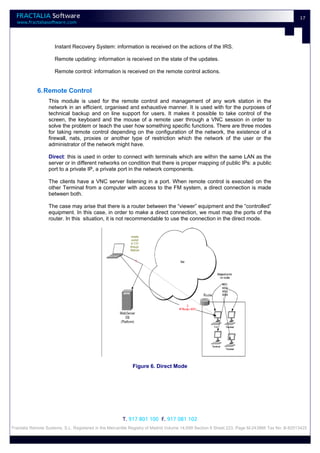
                  Direct: this is used in order to connect with terminals which are within the same LAN as the
                  server or in different networks on condition that there is proper mapping of public IPs: a public
                  port to a private IP, a private port in the network components.

                  The clients have a VNC server listening in a port. When remote control is executed on the
                  other Terminal from a computer with access to the FM system, a direct connection is made
                  between both.

                  The case may arise that there is a router between the “viewer” equipment and the “controlled”
                  equipment. In this case, in order to make a direct connection, we must map the ports of the
                  router. In this situation, it is not recommendable to use the connection in the direct mode.


                                                           Figure 6. Direct Mode


                                                      T. 917 801 100 F. 917 081 102
Fractalia Remote Systems, S.L. Registered in the Mercantile Registry of Madrid Volume 14,699 Section 8 Sheet 223, Page M-243866 Tax No. B-82513425
18


                  Normal: this is used in cases in which it is not possible to map any type of inlet port or the
                  terminals do not have fixed IPs.

                  The clients have a VNC server listening in a port, but they also have the capacity to send a
                  “VNC video” as an outlet connection to any machine, prepared to receive it.

                  Additionally, a machine is located in a network which has no restrictions for the mapping of
                  ports. This machine will have two applications:

                  Remoting. The Remoting application is responsible for placing the request for remote control
                  in touch with the proper client. The following open a permanent outlet TCP socket, with the
                  Remoting port of this machine. The requests for remote control from the FM system arrive at
                  this same port.

                  When the machine over which remote control is being attempted is decided, the application
                  gives instructions to send a “VNC video” to this machine through the “Server” port.

                  Repeater. This application only places the “VNC video” which it receives through the “Server”
                  from the client in touch with the “Viewer” port, which is where the viewer of the COM operator
                  attacks.


                                                           Figure 7. Normal Mode


            7. Dynamic Groups

                  The dynamic groups are mainly intended for the situations in which it is intended to work with
                  certain groups or terminals for certain temporary periods. By dragging a group and/or one or
                  more terminals to the window specified for this purpose, we generate a dynamic group which
                  can subsequently be assigned update packs or work in a similar fashion to how work was
                  done with the permanent groups and terminals.


                                                      T. 917 801 100 F. 917 081 102
Fractalia Remote Systems, S.L. Registered in the Mercantile Registry of Madrid Volume 14,699 Section 8 Sheet 223, Page M-243866 Tax No. B-82513425
19


                                                        Figure 8. Dynamic Groups


                                                      T. 917 801 100 F. 917 081 102
Fractalia Remote Systems, S.L. Registered in the Mercantile Registry of Madrid Volume 14,699 Section 8 Sheet 223, Page M-243866 Tax No. B-82513425
20


      D. Requisites of the system

                  Each software instance of Fractalia Manager which is installed, is capable of working with
                  small networks with less than 100 PCs up to large corporate networks with up to a 100,000
                  PCs.

                  In the following sections we show the hardware and software requisites needed for the
                  implementation of the solution.


      5. As regards the server

            1. Hardware Requisites

            Minimum*               < 10 000 terminals           Between 10000 and 25000             Between 25000 y
                                                                terminals                           100000 terminals
                                                                                                    **
            WEB                    (x1)              (x1)                   (x1)                    (x2)
            Applications
            Servers
            Processor              Pentium IV        Pentium III Xeon       Pentium III Xeon        Pentium III Xeon
                                   2.0 GHz
            RAM Memory             256 MB            2 GB RAM               4 GB RAM                4 GB RAM
            Hard Disk              20 GB             120 GB                 120 GB                  120 GB
            Database               (x1)              (x1)                   (x1)                    (x2)
            Servers
            Processor              Pentium IV        Pentium III Xeon       Pentium III Xeon        Pentium III Xeon
                                   2.0 GHz
            RAM Memory             256 MB            2 GB RAM               4 GB RAM                4 GB RAM
            Hard Disk              20 GB             RAID 1 SCSI            RAID 1 SCSI with        RAID 1 SCSI with
                                                     with 2 Disks of        2 Disks of 120          3 Disks of 120 GB
                                                     120 GB                 GB


                  * This configuration is the machine for making the system function with a reduced number of
                  PCs. In this, the Web applications server and the database server can be the same physical
                  machine.

                  ** The Webb servers are mounted as farms, while the database servers are mounted in
                  clusters in order to balance requests.


            2. Software Requisites
                  The Web Server(s) require the following basic software:

                     Windows 2000 Server Standard Edition or higher.
                     Microsoft .NET Frameworks 2.0 installed.
                     Internet Information Server 6.0 installed.
                     Adobe Flash Player


                                                      T. 917 801 100 F. 917 081 102
Fractalia Remote Systems, S.L. Registered in the Mercantile Registry of Madrid Volume 14,699 Section 8 Sheet 223, Page M-243866 Tax No. B-82513425
21


                  The database server(s) will need the following basic software:

                     Windows 2000 Sever Standard Edition or higher.
                     Microsoft .NET Frameworks 2.0 installed
                     Microsoft SQL Server 2005 (depending on whether a farm of servers is mounted or not,
                     one or two SQL Server licences will be required).


      6. As regards the client

            1. Hardware Requisites
                  The minimum hardware configuration of equipment in order to execute the Fractalia Manager
                  is as follows:

                     Processor: Celaron D at 1.8 GHz
                     RAM: 256 MB (recommended 512 MB)
                     Hard Disk: 40 GB
                     Graphic card with minimum resolution of 1024x768
                     Network card (Ethernet or WIFI)

            2. Software Requisites

                  Windows Operative System 2000 (SP4) or superior.
                  Microsoft .NET Frameworks 2.0 installed.
                  Internet Explorer 6.0 or superior installed.


      7. Network Connectivity

            1. Typology of the connectivity
                  From the point of view of connectivity, two interfaces must be differentiated, the connection
                  between server and clients, and the connection between clients as regards P2P sharing of
                  content.

                           Connection between server and client
                  The network connection between the server and clients is supported by any type of network
                  which has http protocol on TCP/IP. The connectivity between the server and clients can
                  generally be established through:

                     Internet.
                     Extranet.
                     Local Area Network.
                     Virtual Private Network.

                           Connection between clients
                  In order to use all the Peer to Peer distribution power between clients when downloading
                  content, it is necessary for these to see each other directly. Therefore, there are the following
                  networks:


                                                      T. 917 801 100 F. 917 081 102
Fractalia Remote Systems, S.L. Registered in the Mercantile Registry of Madrid Volume 14,699 Section 8 Sheet 223, Page M-243866 Tax No. B-82513425
22


                    Local area networks.
                    Virtual private network
                  These networks must permit http communications on TCP/IP

                  The topology connection between these (star, bus, ring) this does not matter as long as the
                  previous conditions are ensured.


            2. Band width required

                           Connection between server and client
                  The following table shows a scaling of the speed required in a server in order to download
                  content:

                  In order to calculate the speed required in a server, the following premises have been fixed:

                     An average of 10MB of the content to be downloaded.
                     The content is updated daily overnight (with the network completely downloaded).
                     The centres have a connection with the server with, at least, 1 Mbps. This connection is
                     more than sufficient to download 10MB in a night time schedule of 8 hours.

                      ESTIMATION OF BAND WIDTH FOR DOWNLOADING IN MULTIPLE CENTRES

                      Size of content (MB)                                             10
                      No. of Centres                                                  200       500        1000       5000       10000

                      Total size of the Server Downloading (MB)                      2000       5000      10000      50000       10000
                                                                                                                                   0
                      Downloading time (night time schedule)                           8          8          8          8          8
                      (hours)
                      ADSL speed at centres (Mbps)                                     1          1          1          1           1

                      Speed required in server (Mbps):                                0.6        1.4        2.8        13.9       27.8


                  It can be seen that with a greater number of centres, there must be a greater width of band
                  on the server side. However, with a reasonable number of centres, the band width required
                  on the server side is easily assumed through an assigned hosting.

                           Connection between clients
                  The following table shows the costs of Peer to Peer sharing between the clients of a local
                  area network at a centre.

                  We assume the following hypothesis:
                  The equipment has network 10/100 Base T cards
                  The intermediary components of the local network (SWITCH, Bridges, etc.) limit the switching
                  capacity of the network to 20 Gbps
                  We suppose that there are 500 computers per centre.

                  The objective of the calculation is to determine how long it would take to obtain a content of
                  10MB (regardless of the source) for each of the computers in the network, supposing
                  exclusive dedication of the network.


                                                      T. 917 801 100 F. 917 081 102
Fractalia Remote Systems, S.L. Registered in the Mercantile Registry of Madrid Volume 14,699 Section 8 Sheet 223, Page M-243866 Tax No. B-82513425
23


                          ESTIMATION OF DOWNLOADING TIME ON A LOCAL AREA NETWORK

                          Limit of the Local Network (Gbps)                                    20
                          Size of content (MB)                                                 10
                          Real speed of downloading Equipment (Mbps)                          100
                          No. of pieces of equipment                                          500

                          Theoretical downloading speed (Mbps)                               40.0

                          Downloading times (seconds)                                         2.0

                  It can be seen that starting from a non-demanding network configuration, the P2P distribution
                  does not lead to substantial disruptions in the network.


                                                      T. 917 801 100 F. 917 081 102
Fractalia Remote Systems, S.L. Registered in the Mercantile Registry of Madrid Volume 14,699 Section 8 Sheet 223, Page M-243866 Tax No. B-82513425
24


          E. Installation procedure

                      Despite the complexity entailed by the implementation of a new software solution in a
                      corporate environment, the installation of the Irisene Remote Manager solution is not invasive
                      and is easily adaptable to any environment.

                      Fractalia Remote Systems recommends that the installation steps be followed.


                1. Analysis and/or definition of the communications network
                      Before the installation of the solution, it is necessary to ensure that the communications
                      network complies with the minimum characteristics described up to now
:

                         Connection speeds in client and server.
                         To enable the exchange of information through http on TCP/IP. Therefore, it is necessary
                         to permit connectivity by the 80 port in all the network.
                         Depending on the needs of the company, to analyse whether a single central server which
                         controls all the centres is required or a server which controls one or several centres s.

                2. Possible alternative installations in client computers
                      The installation of the FM solution has two differentiated parts:

                      Installation of the remote management system in the central server(s).

                      Installation of the FM agent in the client computers. This agent is responsible for periodically
                      interrogating the server in order to download new content and reproduce these once the
                      period of activity of the system is exceeded.

                      As regards the implementation in a corporation, the critical point is precisely the installation of
                      the software in all the client computers rapidly and efficiently. Below e provide the possible
                      alternatives for installing the FM agent.

                               Through remote software distribution tools
                      The following options facilitate the remote unattended installation with no need for an
                      operator to interact with the equipment at the time of the installation.


                      Active Directory

                      If the terminals are integrated into a directory such as the Active Directory of Microsoft, the
                      facilities of these types of tools can be used to distribute and install the software

                      Software installation tools of the company itself

                      If the company has a software distribution tool, SMS, Tivoli, etc. It can choose to distribute
                      the installable of the FM Agent with these tools.

                      Fractalia Lan Installer


                                                          T. 917 801 100 F. 917 081 102
    Fractalia Remote Systems, S.L. Registered in the Mercantile Registry of Madrid Volume 14,699 Section 8 Sheet 223, Page M-243866 Tax No. B-82513425
25


                  Fractalia Remote Systems can provide the company with its own massive software
                  installation tool.
                  This tool can describe PCs within a range of PCs provided and, knowing the login and
                  password of the administrator of each piece of equipment, remotely install any type of
                  software.

                  This is only valid for LAN (including on VPN) environments.


                           With no remote software distribution tools
                  The following options are validated for those companies which do not have remote software
                  distribution tools and do not wish to incur the cost of acquisition.

                  These require a person to manually execute the installation programme in each PC.

                  Manual installation

                  One possibility is to copy and install the executable of the FM agent PC by PC.

                  Distribution via e-mail

                  Using e-mail, there are two fast methods for distributing the software to all the organisation.

                  Attached application: an e-mail can be distributed with an executable attached and the
                  receivers are requested to install this.

                  Web download application: The e-mail can include only a link to a web address with the
                  executable, this link must be accessed and the user clicks on “Run” in the Windows dialogue
                  box.


            3. Implementation

                           Definition of technical objectives
                  Before starting the massive installation, a number of indicators regarding this massive
                  installation must be defined, and this makes it possible to forecast:

                     The estimated installation times
                     The percentage of the use of the communications networks involved in the system
                     The speed of the updating of content.
                     The effectiveness of the installation selected. Possible improvements.
                     To determine the most effective communications backup to be shown through ICS (HTML,
                     flash, pdf, powerpoint, video…)


                           Implementation in a pilot project
                  Before carrying out a massive installation, it is advisable to carry out a pilot project from
                  which the indicators described above can be obtained and to tune the installation process
                  selected.


                                                      T. 917 801 100 F. 917 081 102
Fractalia Remote Systems, S.L. Registered in the Mercantile Registry of Madrid Volume 14,699 Section 8 Sheet 223, Page M-243866 Tax No. B-82513425
26


                  It is useful to carry out the pilot project in a simple environment with no complications and
                  progressively increase the complexity in successive pilot projects as confidence is gained
                  with the installation procedures designed.


                           Evaluation of the achievement of objectives
                  After the pilot project, all the results obtained must be analysed in order to re-plan the
                  massive installation depending on the experience obtained.


                           Massive implementation
                  Once a pilot project which provides sufficient security for the implementation has been carried
                  out, the massive implementation of the solution will be carried out, centre by centre, and the
                  indicators described above will be constantly monitored.


                                                      T. 917 801 100 F. 917 081 102
Fractalia Remote Systems, S.L. Registered in the Mercantile Registry of Madrid Volume 14,699 Section 8 Sheet 223, Page M-243866 Tax No. B-82513425
27


      F. Conclusions
                  Fractalia Manager is a system for the administration, control and remotely controlled
                  maintenance of the micro-computing systems distributed.

                  It ensures the stability of the equipment as well as the availability of the applications at all
                  times.

                  It guarantees the correct use of the applications installed in the equipment.

                  It keeps the Hardware and Software inventories continually updated.

                  It increases the productivity of both terminals and users, substantially reducing the time out.

                  It reduces the complexity of administrating and managing the terminals of the network.

                  It makes direct assistance in the event of incidences practically unnecessary.

                  It optimises the “helpdesk” resources and reduces the costs associated to the maintenance of
                  the information technology.

                  It enables the simultaneous control of several companies, the possibility to generate several
                  types of permits, at reading and writing level and at modular level, as well as the option to
                  create dynamic groups. It also has other outstanding implementations such as the knowledge
                  of the state of the updates, whether they are being downloaded, being installed or whether
                  the installation has been completed and the remote control.

                  It permits the control of the band width in order to avoid the use of all the resources of the
                  network when downloading commences within a Terminal.


                                                      T. 917 801 100 F. 917 081 102
Fractalia Remote Systems, S.L. Registered in the Mercantile Registry of Madrid Volume 14,699 Section 8 Sheet 223, Page M-243866 Tax No. B-82513425

White paper en

  • 1.
    White Paper version 5.0 FRACTALIA Software
  • 2.
    2 A.  INTRODUCTION ......................................................................................................................................................................... 4  B.  TOOLS ........................................................................................................................................................................................ 5  1.  ADMINISTRATION ................................................................................................................................................................................... 5  2.  PROTECTION OF THE HARD DISK ................................................................................................................................................................. 5  3.  MASSIVE DISTRIBUTION OF SOFTWARE P2P  ................................................................................................................................................ 5  . 4.  DETECTION OF PATCHES ........................................................................................................................................................................... 6  5.  INVENTORY, EVENTS AND ALARMS .............................................................................................................................................................. 6  6.  ACCESS CONTROL AND SECURITY POLICIES  .................................................................................................................................................. 7  . 7.  REMOTE CONTROL  ................................................................................................................................................................................. 7  . 8.  BAND WIDTH ......................................................................................................................................................................................... 7  9.  VPRO ................................................................................................................................................................................................... 7  10.  INSTANTANEOUS OPERATIONS .................................................................................................................................................................. 9  11.  LICENCES .............................................................................................................................................................................................. 9  12.  PATCH MANAGEMENT  ............................................................................................................................................................................ 9  . 13.  REPORT SERVER ..................................................................................................................................................................................... 9  14.  ANTIFRAUD PROTECTION ......................................................................................................................................................................... 9  15.  FRACTALIA BUSINESS INTELLIGENCE ............................................................................................................................................................ 9  16.  FRACTALIA REMOTE ASSISTANCE ............................................................................................................................................................. 10  C.  FRACTALIA MANAGER (FM)  ..................................................................................................................................................... 11  . 1.  ARCHITECTURE ..................................................................................................................................................................................... 11  2.  SERVER ............................................................................................................................................................................................... 12  3.  AGENT ............................................................................................................................................................................................... 12  1.  Layer of Fractalia Manager  ........................................................................................................................................................ 12  . 2.  Layer IriScene Recovery System .................................................................................................................................................. 13  4.  CHARACTERISTIC’S ................................................................................................................................................................................ 14  1.  Total management from a single consol .................................................................................................................................... 14  2.  Instant Recovery System (IRS) ..................................................................................................................................................... 15  3.  Distribution of software .............................................................................................................................................................. 15  4.  Hardware and software inventory .............................................................................................................................................. 16  5.  Events report ............................................................................................................................................................................... 16  6.  Remote Control ........................................................................................................................................................................... 17  7.  Dynamic Groups .......................................................................................................................................................................... 18  D.  REQUISITES OF THE SYSTEM ..................................................................................................................................................... 20  5.  AS REGARDS THE SERVER ........................................................................................................................................................................ 20  1. Hardware Requisites ................................................................................................................................................................... 20  2. Software Requisites .................................................................................................................................................................... 20  6.  AS REGARDS THE CLIENT ......................................................................................................................................................................... 21  1.  Hardware Requisites ................................................................................................................................................................... 21  2.  Software Requisites .................................................................................................................................................................... 21  7.  NETWORK CONNECTIVITY ....................................................................................................................................................................... 21  1.  Typology of the connectivity ....................................................................................................................................................... 21  2.  Band width required ................................................................................................................................................................... 22  E.  INSTALLATION PROCEDURE  ..................................................................................................................................................... 24  . 1.  ANALYSIS AND/OR DEFINITION OF THE COMMUNICATIONS NETWORK .............................................................................................................. 24  2.  POSSIBLE ALTERNATIVE INSTALLATIONS IN CLIENT COMPUTERS ....................................................................................................................... 24  3.  IMPLEMENTATION ................................................................................................................................................................................ 25  F.  CONCLUSIONS.......................................................................................................................................................................... 27  T. 917 801 100 F. 917 081 102 Fractalia Remote Systems, S.L. Registered in the Mercantile Registry of Madrid Volume 14,699 Section 8 Sheet 223, Page M-243866 Tax No. B-82513425
  • 3.
    3 About Fractalia Software Fractalia Software is an Information Technology Research & Development Company, a leader in the development of robust and effective solutions for the management and control of large computer networks. Development and innovation is our aim. We have developed the most advanced system of large PC networks, Fractalia Manager, a vanguard solution which guarantees the maximum level of operation. Large companies and organisations have placed their trust in our solution, which provides their business with a new concept of remote management of computer networks. T. 917 801 100 F. 917 081 102 Fractalia Remote Systems, S.L. Registered in the Mercantile Registry of Madrid Volume 14,699 Section 8 Sheet 223, Page M-243866 Tax No. B-82513425
  • 4.
    4 A. Introduction Fractalia Manager (FM) is an innovative solution which joins all the tools required for effective management of your computing area in a single interface. Administration: “Master Admin” profile in the server for easy management of multi-client environments. Protection of the hard disk: this guarantees the maximum operability of your PCs Massive distribution of P2P software: this keeps your PCs always updated and personalised. Detection of patches: this is always updated automatically. Inventory, events and alarms: this knows the state of your network in detail and in real time, and improves the backup services Access control and Security Policies: this controls the applications which are executed in your PCs, it monitors processes and URLs accessed and blocks the devices you wish to be blocked. Remote Control: this obtains the maximum response speed in the event of incidences Measurement of broadband: this permits the diagnosis of the network flow. VPro: Intel technology integrated into Fractalia Manager. Instantaneous operations: this executes instantaneous operations in terminals which are in networks protected by a proxy. Licences: this makes it possible to assign a number of licences for terminals to a determined company which uses the tool. Patch Management: management of patches and updates, integrated with Microsoft WSUS. Report Server: a new server that offers reports via the web to final users. Predefined reports for Inventory, Distribution of SW and application use. Antifraud Protection: helps the operator combat user abuses when employing the terminals. Fractalia Business Intelligence: provides a platform for the automation of data mining. The results of the analysis of such data, operational and functional in character, will provide valuable information to support more effective business intelligence processes. Fractalia Remote Assistance: a system of remote assistance on user request. Regardless of the type of network of your computer resources, it reduces costs, increases their functioning time and saves in costly technical visits. It is the fastest, simplest and most secure solution for managing, controlling and backing up your PC network. T. 917 801 100 F. 917 081 102 Fractalia Remote Systems, S.L. Registered in the Mercantile Registry of Madrid Volume 14,699 Section 8 Sheet 223, Page M-243866 Tax No. B-82513425
  • 5.
    5 B. Tools 1. Administration “Master Admin” profile in the server for easy management of multi-client environments. Single user to “replace” company administrator users, permits a user to enter remotely to share the same environment and verify the correct operation of a company from the client’s point of view. Creation of update packets is available to all companies. 2. Protection of the hard disk The Instant Recovery System (IRS) technology is particular to FM and working at a very low level (at sector level) it enables us to establish the recovery points of the hard disk and to return to a previous known state. Both actions establish and recover a known state, and this can be done locally or remotely, individually or massively to a group of terminals. The process for establishing a recovery point only takes a few moments and there is no interference with the user, it also consumes very few hard disk resources as it does not make a total copy of the hard disk. Multiple recovery points can be established. This technology enables us to have total control over the state of the terminals distributed as we always have the possibility of returning to a known recovery point at which the equipment functions correctly. 3. Massive Distribution of software P2P It is a fundamental module in a solution for remote management of terminals. It allows us to install applications, updates, patches, hot fixes in short, any software package in a massive and unattended way. It uses Peer-to-Peer (P2P) technology that segments each software packet into fragments that are shared among the terminals that form part of the PC fleet (peers). The certification at shared fragment level guarantees security in the download and can make massive distribution more efficient. FM is a highly scalable solution with this technology, as the bottleneck that downloading packets from a server or a middleware network supposed is no longer critical. This module interacts with the hard disk protection module (IRS) offering a combination of high availability and up-to-dateness for a distributed PC fleet. All the communications protocol is encapsulated in HTTP (transparent for firewalls), supports proxies, so that the solution is versatile, and performs correctly in very heterogeneous networks. Generation of packets and update groups at server and not only at company level. It allows the generation of packets at server level to offer to multiple companies with the advantage of only one publication. Companies can use these packets and update groups T. 917 801 100 F. 917 081 102 Fractalia Remote Systems, S.L. Registered in the Mercantile Registry of Madrid Volume 14,699 Section 8 Sheet 223, Page M-243866 Tax No. B-82513425
  • 6.
    6 without the possibility of modification. This facilitates the distribution of common packages without a specific licence (utilities, “acrobat reader”, etc...) to all the clients of MSP. Software Self-Service Utility that lets the users themselves select applications and install them in their equipment. Totally integrated with FM, the administrator selects the applications that will be public and visible for each PC and the user selects those that they consider opportune. When the selection is made, these applications are assigned by the platform to the PCs and are downloaded, installed, etc like any other package and incorporated into reports, events, etc. SET (“Secure Evolution Technology”) This allows a comfortable management and technological evolution of the distribution of SW, packages and applications. Installation and uninstallation of the applications is automatic, on assigning and unassigning these packages to the terminals. It allows the configuration of profiles and groups, installation and uninstallation of applications when a profile or group is changed. Reinstallation of applications after an uninstallation by the user: this forces the content of the affected profile. 4. Detection of patches The terminals are catalogued by their hardware and software, and automatically receive the relevant updates of Windows, Office, Acrobat, depending on the group they belong to. The detection of patches uses all the power and technology of the massive distribution of software. 5. Inventory, events and alarms This is an extremely complete tool which provides very precise information on the hardware components of the equipment, as well as on the applications installed. It is a detailed, high resolution inventory which provides reports and filtered material so that we select terminals which comply with certain requisites in order to operate on these (establish a recovery point, distribute software, etc.). It notifies the changes which have taken place as regards software and hardware and, at any time, we know the state of the terminal resources. Alarms can be programmed in accordance with defined conditions and a set of software tools for development (SDK) are placed at the disposal of the client in order to obtain specific information from the terminals and integrate this with other solutions. T. 917 801 100 F. 917 081 102 Fractalia Remote Systems, S.L. Registered in the Mercantile Registry of Madrid Volume 14,699 Section 8 Sheet 223, Page M-243866 Tax No. B-82513425
  • 7.
    7 6. Access Control and Security Policies This supervises the state of the terminals, deploys critical security actions and generates events and alarms. It can interact with the protection module of the hard disk (IRS) in order to return to a known point if this is necessary. This controls and manages the access of groups of users to determined Web Sites as well as the execution of certain applications. Moreover, it permits the restriction of the execution of the black and white lists of applications at kernel level. It permits the filtering of the access of families of external peripherals to the computer devices and entry and exit points. 7. Remote Control This permits remote access to the terminals and interaction with the desktop, it is totally integrated with the solution and bases its technology on the ‘Ultra Virtual Network Computing’ (UVNC) protocol. The remote control can be initiated by the administrator of the network or at the request of a user with problems in his terminal. This tool makes it possible to enable the need for access permits, automatic access without acceptance from the user, as well as the collection of logs of operations in order to guarantee their correct use. As an additional advantage, the FM system makes it possible to remotely control this equipment with no need to open entrance ports in the final components of the networks: Routers, firewalls, etc. It also permits the establishment of remote connections with terminals protected by an HTTP proxy. 8. Band width This tool makes it possible to diagnose the network flow of a group of terminals through the downloading of a resource by the terminals registered in this group. 9. VPro This takes the inventory of the PCs, and diagnoses and repairs the systems from a remote centre, therefore, it reduces costly visits to the work posts. This keeps the security patches updated or adds new security layers to all the PCs in its organisation even though the environment of the user is not available. The PCs with Intel VPro and Centrino Pro processing technology for laptops provide exceptional performance as regards the demanding computer tasks, and are ideal for professional environments, in a low energy consumption encapsulation, together with the virtualisation system, the AMT (Active Management Technology) technology and the graphic double nucleus integrated processor. The main functionalities of VPro with Fractalia Manager are the following: T. 917 801 100 F. 917 081 102 Fractalia Remote Systems, S.L. Registered in the Mercantile Registry of Madrid Volume 14,699 Section 8 Sheet 223, Page M-243866 Tax No. B-82513425
  • 8.
    8 Remote control of the BIOS. This makes it possible to redirect the start-up of the PC to a disk image, or an extractable floppy type device or a CD/DVD, which permits a hardware diagnosis in order to identify possible problems in the client equipment, using the VT100 or ANSI emulation and several translations of keys. The possibility to remotely block certain peripherals of the PC client and even the execution of scripts. Direct connection with the mapping of ports or as a repeater to access from the exterior with no need to map ports. To do this, at least one of the pieces of equipment must be ON, and with this it is possible to control and send orders to the rest of the network equipment, such as executing the action switching this on at a determined time or carrying out the specific action involved in forcing the hardware inventory, having the configuration and the state updated through the AMTService. Access by remote control to the Instant Recovery System consol, with the possibility of restoring a PC which does not start up, with no need for visits or interaction by the user, recovering the equipment in a minimum time so that it becomes operative again. To obtain the list of Recovery Points, even when the equipment is turned off. Enterprise Mode: integration with Active Directory and encrypted connections. It remotely updates the BIOS/fFMware. It keeps the equipment updated, for example, by sending an order to turn on during the night and thus updating the software so that the user always has his equipment updated the following day, reducing the time of activity to the maximum. It detects the need for critical patches and installs these through vPro. It detects network problems and their alerts problems and it can even cut off the network traffic if this is wished and if the patterns found are dangerous, thus avoiding the intrusion of viruses and worms in the organisation. The possibility of writing the software inventory in a non-volatile memory. Notification and filtering in the Fractalia Manager system of own or vPro SNMP (Simple Network Management Protocol) or those defined within the Fractalia Manager system. To carry out vPro operations instantaneously through remoting technology (Genuine Channels). To execute operations on groups of terminals. The possibility to change the user and password which are initially entered in the BIOS of the AMT. T. 917 801 100 F. 917 081 102 Fractalia Remote Systems, S.L. Registered in the Mercantile Registry of Madrid Volume 14,699 Section 8 Sheet 223, Page M-243866 Tax No. B-82513425
  • 9.
    9 10. Instantaneous Operations This tool makes it possible to assign operations to the terminals and have these carried out immediately. 11. Licences This tool is very useful for companies which are in charge of distributing the Fractalia Manager tool to other companies as it makes it possible to create licences of use for each of the companies which are registered in the system. 12. Patch Management Patch and update management is integrated with Microsoft WSUS. This allows the integration of WSUS update packages with P2P software distribution and SET “Secure evolution Technology” management. 13. Report Server A new server to offer reports to final users via the web. Predefined reports on Inventory, SW Distribution and use of applications. This allows direct reports to be offered to clients without using the operator management tool. Total terminals managed Global list of terminals Detailed SW and HW inventory related to the above SW packages distributed List of SW packages distributed to terminals Number of terminals assigned to each package Number and list of packages for each terminal Application Usage List of applications installed and used by users in the client’s network 14. Antifraud Protection Assures the normal activity of the Fractalia Manager agent and thus guarantees its correct operation in the managed terminal. In case any user seeks to misuse a terminal and interrupts the communication between the Fractalia Manager agent and its server to do so (for example, by using the terminal exclusively off line), Poison Pill will block the terminal so that it will only be operative again after the intervention of the Fractalia Manager operator. In the same way, Poison Pill guarantees the operator the possibility of blocking any given terminal in any given moment; then, as in the previous scenario, the terminal can only be freed by the intervention of the operator. 15. Fractalia Business Intelligence Search big terminal networks for patterns to be used as input to take a chain of decisions whether they are of a technical or strategic nature. T. 917 801 100 F. 917 081 102 Fractalia Remote Systems, S.L. Registered in the Mercantile Registry of Madrid Volume 14,699 Section 8 Sheet 223, Page M-243866 Tax No. B-82513425
  • 10.
    10 16. Fractalia Remote Assistance In this system of remote assistance, a terminal user can request online support by connecting an operator to their terminal to give them the necessary help. The use of Fractalia Remote Assistance is advantageous in comparison with other systems such as assistance by phone or remote control (VNC and similar): The assistance session is carried out inside a safe virtual network that assures direct IP visibility. The operator interface of Fractalia Remote Assistance facilitates operator support allowing them to run solutions to concrete problems in the terminal being assisted, reduce the time necessary to perform the support tasks and the experience necessary for an operator to be effective. Fractalia Remote Assistance registers all actions carried out by a support operator for their later audit. T. 917 801 100 F. 917 081 102 Fractalia Remote Systems, S.L. Registered in the Mercantile Registry of Madrid Volume 14,699 Section 8 Sheet 223, Page M-243866 Tax No. B-82513425
  • 11.
    11 C. Fractalia Manager (FM) 1. Architecture Fractalia Manager (FM) functions on any network architecture, both for fixed terminals behind any type of network (including private networks, Internet, fixed IPs, dynamic IPs, etc.) as itinerant terminals. On condition that the Terminal has Internet, it will have 100% of the functionalities of FM, even in the case that it crosses intermediate components (firewall, Proxy). The peer2peer distribution system provides an efficient use of the network resources (both at LAN and WAN levels). Figure 1. Architecture of the Fractalia Manager The FM consol uses smart client technology, therefore, it takes advantage of the client-server development, but it avoids the associated problems concerning usability and quality of use similar to a consol which can be executed locally. In addition, it keeps its own directory but it can be synchronised with directory systems on the market, and can even work with dynamic groups established depending on specific consultations. FM functions with Microsoft clients. The deployment of FM is very simple and permits massive implementations practically automatically. The simplicity and usability with which it is T. 917 801 100 F. 917 081 102 Fractalia Remote Systems, S.L. Registered in the Mercantile Registry of Madrid Volume 14,699 Section 8 Sheet 223, Page M-243866 Tax No. B-82513425
  • 12.
    12 designed makes it possible to obtain yield from its functionalities from day 1 of its implementation. Its use reduces the total cost of the use of a PC by between 30% and 40% throughout its lifetime. The FM server has the following logical machines: a database server and a Web server. These machines can be mounted on Windows (SQL and IIS) architectures respectively. The open architecture permits easy integration with other systems and the execution of specific reports. 2. Server The FM server controls and manages work stations through the Internet. The access to the system is via the Web so that the administrator can access by using a Web navigator and an Internet connection, and in the cases where it is necessary, security credentials. 3. Agent Figure 2. Details of layers 1. Layer of Fractalia Manager In the client part, the FM layer is in charge of ensuring the correct downloading of the content and the execution of actions which are ordered from the server. The technology based on the Peer-to-Peer protocol reduces the consumption of band width to a minimum as the large packs are distributed to multiple users with no re-configurations for the hardware or the router. It uses the local band width in order to access the packs previously handed over to a specific sub-network and the efficacy of the distribution of the software can be improved by configuring the functioning mode depending on the network architecture. T. 917 801 100 F. 917 081 102 Fractalia Remote Systems, S.L. Registered in the Mercantile Registry of Madrid Volume 14,699 Section 8 Sheet 223, Page M-243866 Tax No. B-82513425
  • 13.
    13 2. Layer IriScene Recovery System The capacity to protect and recover the information and the system, which is a key, tactical point of all organisations. Instant Recovery System completely recovers all the partition of a hard disk and discards all types of changes made to it by the user (installation of software, changes of the configuration, damage due to viruses, files or directories eliminated, changes in the register of Windows, etc.). Functionality: One or more protected partitions. Once the system of the Terminal has been recovered, any subsequent change will be undone. Instantaneous Recovery Points of the hard disk. Instant Recovery System increases the availability and reduces the probabilities of losing information. The recovery process takes a few seconds and is carried out when the Terminal reinitiates the system or as a programmed task. This uses approximately 5% of the capacity of the hard disk. Instant Recovery System has a local application in the event that the corporate policies permit the users to take their own Recovery Points in order to return to previous recovery points. The protected partition is only an area of the hard disk which is protected de facto by the Instant Recovery System module, and any type of change will be automatically discarded during the reinitiating of the equipment when the functioning mode instructs this. The partition of common files (data) of the user is not protected between changes and a maximum of 105 of its capacity for storing the Recovery Point is used. The protection of all the changes must not be lost after reinitiating. The partition of data will not be necessary, but is recommendable for offices or corporation work stations, where the user requires space for storage. T. 917 801 100 F. 917 081 102 Fractalia Remote Systems, S.L. Registered in the Mercantile Registry of Madrid Volume 14,699 Section 8 Sheet 223, Page M-243866 Tax No. B-82513425
  • 14.
    14 Figure 3. Instant Recovery System 4. Characteristic’s 1. Total management from a single consol The graphic interface implemented for the management of FM uses smart client technology, which facilitates the administration thanks to its intuitive interface and all the functionalities of a network administrator. Some of the benefits of the new interface are: the management of an extensive network of PCs becomes more simple, productivity increases and the control of the network is improved. T. 917 801 100 F. 917 081 102 Fractalia Remote Systems, S.L. Registered in the Mercantile Registry of Madrid Volume 14,699 Section 8 Sheet 223, Page M-243866 Tax No. B-82513425
  • 15.
    15 Figure 4. Management consol based on Smart Client Web 2. Instant Recovery System (IRS) The capacity to protect and recover the information and the system , which is a key, tactical point of all organisations. IRS completely recovers all the partition of a hard disk and discards all types of changes made to it by the user (installation of software, changes of the configuration, damage due to viruses, files or directories eliminated, changes in the register of Windows, etc.). 3. Distribution of software The software distribution module software makes it possible to remotely update and install the software of a work station or of a determined group with no need to use additional resources of network equipment, and is based on the peer-to-peer protocol. The connection between this system and the IRS recovery system has substantial scalability for the work stations and makes it possible to apply evolutionary changes to the solution. P2P in LAN. The Terminal is not directly connected to the server, it requires another Terminal which is in the “Act as Proxy for other peers” mode so that this one communicates with the server and subsequently sends it the pack requested. Direct to the Server. The Terminal communicates directly with the server, and does not require an intermediate Terminal to receive updating packs. T. 917 801 100 F. 917 081 102 Fractalia Remote Systems, S.L. Registered in the Mercantile Registry of Madrid Volume 14,699 Section 8 Sheet 223, Page M-243866 Tax No. B-82513425
  • 16.
    16 Acting as Proxy for other peers. This carries out the “mirror” action when it sees that a Terminal in “P2P in LAN” mode is requesting an Update, it makes the request to the server and then it is sent to the Terminal which was requesting. Figure 5. Distribution of software 4. Hardware and software inventory The inventory module manually or automatically detects and deep saves the register of all the versions of software installed in a work station, as well as the hardware components hand the devices of the terminals distributed in the company network, which avoids the unnecessary movement of technical personnel in order to resolve the problem. 5. Events report The events report shows the logs of the actions taken by the server or by the agent of the client. The types of events we can receive are as follows: Generic: information is received on the turning on of the machine. Inventory: information is received on the actions of the IRS assigned to a Terminal. T. 917 801 100 F. 917 081 102 Fractalia Remote Systems, S.L. Registered in the Mercantile Registry of Madrid Volume 14,699 Section 8 Sheet 223, Page M-243866 Tax No. B-82513425
  • 17.
    17 Instant Recovery System: information is received on the actions of the IRS. Remote updating: information is received on the state of the updates. Remote control: information is received on the remote control actions. 6. Remote Control This module is used for the remote control and management of any work station in the network in an efficient, organised and exhaustive manner. It is used with for the purposes of technical backup and on line support for users. It makes it possible to take control of the screen, the keyboard and the mouse of a remote user through a VNC session in order to solve the problem or teach the user how something specific functions. There are three modes for taking remote control depending on the configuration of the network, the existence of a firewall, nats, proxies or another type of restriction which the network of the user or the administrator of the network might have. Direct: this is used in order to connect with terminals which are within the same LAN as the server or in different networks on condition that there is proper mapping of public IPs: a public port to a private IP, a private port in the network components. The clients have a VNC server listening in a port. When remote control is executed on the other Terminal from a computer with access to the FM system, a direct connection is made between both. The case may arise that there is a router between the “viewer” equipment and the “controlled” equipment. In this case, in order to make a direct connection, we must map the ports of the router. In this situation, it is not recommendable to use the connection in the direct mode. Figure 6. Direct Mode T. 917 801 100 F. 917 081 102 Fractalia Remote Systems, S.L. Registered in the Mercantile Registry of Madrid Volume 14,699 Section 8 Sheet 223, Page M-243866 Tax No. B-82513425
  • 18.
    18 Normal: this is used in cases in which it is not possible to map any type of inlet port or the terminals do not have fixed IPs. The clients have a VNC server listening in a port, but they also have the capacity to send a “VNC video” as an outlet connection to any machine, prepared to receive it. Additionally, a machine is located in a network which has no restrictions for the mapping of ports. This machine will have two applications: Remoting. The Remoting application is responsible for placing the request for remote control in touch with the proper client. The following open a permanent outlet TCP socket, with the Remoting port of this machine. The requests for remote control from the FM system arrive at this same port. When the machine over which remote control is being attempted is decided, the application gives instructions to send a “VNC video” to this machine through the “Server” port. Repeater. This application only places the “VNC video” which it receives through the “Server” from the client in touch with the “Viewer” port, which is where the viewer of the COM operator attacks. Figure 7. Normal Mode 7. Dynamic Groups The dynamic groups are mainly intended for the situations in which it is intended to work with certain groups or terminals for certain temporary periods. By dragging a group and/or one or more terminals to the window specified for this purpose, we generate a dynamic group which can subsequently be assigned update packs or work in a similar fashion to how work was done with the permanent groups and terminals. T. 917 801 100 F. 917 081 102 Fractalia Remote Systems, S.L. Registered in the Mercantile Registry of Madrid Volume 14,699 Section 8 Sheet 223, Page M-243866 Tax No. B-82513425
  • 19.
    19 Figure 8. Dynamic Groups T. 917 801 100 F. 917 081 102 Fractalia Remote Systems, S.L. Registered in the Mercantile Registry of Madrid Volume 14,699 Section 8 Sheet 223, Page M-243866 Tax No. B-82513425
  • 20.
    20 D. Requisites of the system Each software instance of Fractalia Manager which is installed, is capable of working with small networks with less than 100 PCs up to large corporate networks with up to a 100,000 PCs. In the following sections we show the hardware and software requisites needed for the implementation of the solution. 5. As regards the server 1. Hardware Requisites Minimum* < 10 000 terminals Between 10000 and 25000 Between 25000 y terminals 100000 terminals ** WEB (x1) (x1) (x1) (x2) Applications Servers Processor Pentium IV Pentium III Xeon Pentium III Xeon Pentium III Xeon 2.0 GHz RAM Memory 256 MB 2 GB RAM 4 GB RAM 4 GB RAM Hard Disk 20 GB 120 GB 120 GB 120 GB Database (x1) (x1) (x1) (x2) Servers Processor Pentium IV Pentium III Xeon Pentium III Xeon Pentium III Xeon 2.0 GHz RAM Memory 256 MB 2 GB RAM 4 GB RAM 4 GB RAM Hard Disk 20 GB RAID 1 SCSI RAID 1 SCSI with RAID 1 SCSI with with 2 Disks of 2 Disks of 120 3 Disks of 120 GB 120 GB GB * This configuration is the machine for making the system function with a reduced number of PCs. In this, the Web applications server and the database server can be the same physical machine. ** The Webb servers are mounted as farms, while the database servers are mounted in clusters in order to balance requests. 2. Software Requisites The Web Server(s) require the following basic software: Windows 2000 Server Standard Edition or higher. Microsoft .NET Frameworks 2.0 installed. Internet Information Server 6.0 installed. Adobe Flash Player T. 917 801 100 F. 917 081 102 Fractalia Remote Systems, S.L. Registered in the Mercantile Registry of Madrid Volume 14,699 Section 8 Sheet 223, Page M-243866 Tax No. B-82513425
  • 21.
    21 The database server(s) will need the following basic software: Windows 2000 Sever Standard Edition or higher. Microsoft .NET Frameworks 2.0 installed Microsoft SQL Server 2005 (depending on whether a farm of servers is mounted or not, one or two SQL Server licences will be required). 6. As regards the client 1. Hardware Requisites The minimum hardware configuration of equipment in order to execute the Fractalia Manager is as follows: Processor: Celaron D at 1.8 GHz RAM: 256 MB (recommended 512 MB) Hard Disk: 40 GB Graphic card with minimum resolution of 1024x768 Network card (Ethernet or WIFI) 2. Software Requisites Windows Operative System 2000 (SP4) or superior. Microsoft .NET Frameworks 2.0 installed. Internet Explorer 6.0 or superior installed. 7. Network Connectivity 1. Typology of the connectivity From the point of view of connectivity, two interfaces must be differentiated, the connection between server and clients, and the connection between clients as regards P2P sharing of content. Connection between server and client The network connection between the server and clients is supported by any type of network which has http protocol on TCP/IP. The connectivity between the server and clients can generally be established through: Internet. Extranet. Local Area Network. Virtual Private Network. Connection between clients In order to use all the Peer to Peer distribution power between clients when downloading content, it is necessary for these to see each other directly. Therefore, there are the following networks: T. 917 801 100 F. 917 081 102 Fractalia Remote Systems, S.L. Registered in the Mercantile Registry of Madrid Volume 14,699 Section 8 Sheet 223, Page M-243866 Tax No. B-82513425
  • 22.
    22 Local area networks. Virtual private network These networks must permit http communications on TCP/IP The topology connection between these (star, bus, ring) this does not matter as long as the previous conditions are ensured. 2. Band width required Connection between server and client The following table shows a scaling of the speed required in a server in order to download content: In order to calculate the speed required in a server, the following premises have been fixed: An average of 10MB of the content to be downloaded. The content is updated daily overnight (with the network completely downloaded). The centres have a connection with the server with, at least, 1 Mbps. This connection is more than sufficient to download 10MB in a night time schedule of 8 hours. ESTIMATION OF BAND WIDTH FOR DOWNLOADING IN MULTIPLE CENTRES Size of content (MB) 10 No. of Centres 200 500 1000 5000 10000 Total size of the Server Downloading (MB) 2000 5000 10000 50000 10000 0 Downloading time (night time schedule) 8 8 8 8 8 (hours) ADSL speed at centres (Mbps) 1 1 1 1 1 Speed required in server (Mbps): 0.6 1.4 2.8 13.9 27.8 It can be seen that with a greater number of centres, there must be a greater width of band on the server side. However, with a reasonable number of centres, the band width required on the server side is easily assumed through an assigned hosting. Connection between clients The following table shows the costs of Peer to Peer sharing between the clients of a local area network at a centre. We assume the following hypothesis: The equipment has network 10/100 Base T cards The intermediary components of the local network (SWITCH, Bridges, etc.) limit the switching capacity of the network to 20 Gbps We suppose that there are 500 computers per centre. The objective of the calculation is to determine how long it would take to obtain a content of 10MB (regardless of the source) for each of the computers in the network, supposing exclusive dedication of the network. T. 917 801 100 F. 917 081 102 Fractalia Remote Systems, S.L. Registered in the Mercantile Registry of Madrid Volume 14,699 Section 8 Sheet 223, Page M-243866 Tax No. B-82513425
  • 23.
    23 ESTIMATION OF DOWNLOADING TIME ON A LOCAL AREA NETWORK Limit of the Local Network (Gbps) 20 Size of content (MB) 10 Real speed of downloading Equipment (Mbps) 100 No. of pieces of equipment 500 Theoretical downloading speed (Mbps) 40.0 Downloading times (seconds) 2.0 It can be seen that starting from a non-demanding network configuration, the P2P distribution does not lead to substantial disruptions in the network. T. 917 801 100 F. 917 081 102 Fractalia Remote Systems, S.L. Registered in the Mercantile Registry of Madrid Volume 14,699 Section 8 Sheet 223, Page M-243866 Tax No. B-82513425
  • 24.
    24 E. Installation procedure Despite the complexity entailed by the implementation of a new software solution in a corporate environment, the installation of the Irisene Remote Manager solution is not invasive and is easily adaptable to any environment. Fractalia Remote Systems recommends that the installation steps be followed. 1. Analysis and/or definition of the communications network Before the installation of the solution, it is necessary to ensure that the communications network complies with the minimum characteristics described up to now : Connection speeds in client and server. To enable the exchange of information through http on TCP/IP. Therefore, it is necessary to permit connectivity by the 80 port in all the network. Depending on the needs of the company, to analyse whether a single central server which controls all the centres is required or a server which controls one or several centres s. 2. Possible alternative installations in client computers The installation of the FM solution has two differentiated parts: Installation of the remote management system in the central server(s). Installation of the FM agent in the client computers. This agent is responsible for periodically interrogating the server in order to download new content and reproduce these once the period of activity of the system is exceeded. As regards the implementation in a corporation, the critical point is precisely the installation of the software in all the client computers rapidly and efficiently. Below e provide the possible alternatives for installing the FM agent. Through remote software distribution tools The following options facilitate the remote unattended installation with no need for an operator to interact with the equipment at the time of the installation. Active Directory If the terminals are integrated into a directory such as the Active Directory of Microsoft, the facilities of these types of tools can be used to distribute and install the software Software installation tools of the company itself If the company has a software distribution tool, SMS, Tivoli, etc. It can choose to distribute the installable of the FM Agent with these tools. Fractalia Lan Installer T. 917 801 100 F. 917 081 102 Fractalia Remote Systems, S.L. Registered in the Mercantile Registry of Madrid Volume 14,699 Section 8 Sheet 223, Page M-243866 Tax No. B-82513425
  • 25.
    25 Fractalia Remote Systems can provide the company with its own massive software installation tool. This tool can describe PCs within a range of PCs provided and, knowing the login and password of the administrator of each piece of equipment, remotely install any type of software. This is only valid for LAN (including on VPN) environments. With no remote software distribution tools The following options are validated for those companies which do not have remote software distribution tools and do not wish to incur the cost of acquisition. These require a person to manually execute the installation programme in each PC. Manual installation One possibility is to copy and install the executable of the FM agent PC by PC. Distribution via e-mail Using e-mail, there are two fast methods for distributing the software to all the organisation. Attached application: an e-mail can be distributed with an executable attached and the receivers are requested to install this. Web download application: The e-mail can include only a link to a web address with the executable, this link must be accessed and the user clicks on “Run” in the Windows dialogue box. 3. Implementation Definition of technical objectives Before starting the massive installation, a number of indicators regarding this massive installation must be defined, and this makes it possible to forecast: The estimated installation times The percentage of the use of the communications networks involved in the system The speed of the updating of content. The effectiveness of the installation selected. Possible improvements. To determine the most effective communications backup to be shown through ICS (HTML, flash, pdf, powerpoint, video…) Implementation in a pilot project Before carrying out a massive installation, it is advisable to carry out a pilot project from which the indicators described above can be obtained and to tune the installation process selected. T. 917 801 100 F. 917 081 102 Fractalia Remote Systems, S.L. Registered in the Mercantile Registry of Madrid Volume 14,699 Section 8 Sheet 223, Page M-243866 Tax No. B-82513425
  • 26.
    26 It is useful to carry out the pilot project in a simple environment with no complications and progressively increase the complexity in successive pilot projects as confidence is gained with the installation procedures designed. Evaluation of the achievement of objectives After the pilot project, all the results obtained must be analysed in order to re-plan the massive installation depending on the experience obtained. Massive implementation Once a pilot project which provides sufficient security for the implementation has been carried out, the massive implementation of the solution will be carried out, centre by centre, and the indicators described above will be constantly monitored. T. 917 801 100 F. 917 081 102 Fractalia Remote Systems, S.L. Registered in the Mercantile Registry of Madrid Volume 14,699 Section 8 Sheet 223, Page M-243866 Tax No. B-82513425
  • 27.
    27 F. Conclusions Fractalia Manager is a system for the administration, control and remotely controlled maintenance of the micro-computing systems distributed. It ensures the stability of the equipment as well as the availability of the applications at all times. It guarantees the correct use of the applications installed in the equipment. It keeps the Hardware and Software inventories continually updated. It increases the productivity of both terminals and users, substantially reducing the time out. It reduces the complexity of administrating and managing the terminals of the network. It makes direct assistance in the event of incidences practically unnecessary. It optimises the “helpdesk” resources and reduces the costs associated to the maintenance of the information technology. It enables the simultaneous control of several companies, the possibility to generate several types of permits, at reading and writing level and at modular level, as well as the option to create dynamic groups. It also has other outstanding implementations such as the knowledge of the state of the updates, whether they are being downloaded, being installed or whether the installation has been completed and the remote control. It permits the control of the band width in order to avoid the use of all the resources of the network when downloading commences within a Terminal. T. 917 801 100 F. 917 081 102 Fractalia Remote Systems, S.L. Registered in the Mercantile Registry of Madrid Volume 14,699 Section 8 Sheet 223, Page M-243866 Tax No. B-82513425