THE TRUTH ABOUT PARTITIONING
APJ Live Webinar on 24th March, 2020
Beena J Emerson, Senior Software Engineer, EDB
© Copyright EnterpriseDB Corporation, 2020. All Rights Reserved.
AGENDA
© Copyright EnterpriseDB Corporation, 2020. All Rights Reserved.
WHO IS EDB?
The world leader in
open-source based Postgres
software and services
• Founded in 2004
• 300+ employees
• Offices worldwide
• Customer base >4000
• Recognized RDBMS leader by:
- Gartner
- Forrester
EnterpriseDB (EDB) delivers the premier open source-based, multi-model data platform for
new applications, cloud re-platforming, application modernization, and legacy migration.
© Copyright EnterpriseDB Corporation, 2020. All Rights Reserved.
Poll Question 1
Q: Do you use Postgres partitioning?
● Already using
● Planning to use
● Not using
© Copyright EnterpriseDB Corporation, 2020. All Rights Reserved.
Poll Question 2
Q: Are you using partitioning in another database?
● Oracle
● Microsoft SQL
● Others
© Copyright EnterpriseDB Corporation, 2020. All Rights Reserved.
INTRODUCTION
● What is Partitioning?
● Key Terms
● Partitioning Benefits
© Copyright EnterpriseDB Corporation, 2020. All Rights Reserved.
What is Partitioning?
PARENT TABLE
CHILD TABLES
© Copyright EnterpriseDB Corporation, 2020. All Rights Reserved.
Key Terms
ID Col 1 Col 2 Col3
PARTITION KEY
1 -
10000
10000 -
20000
20000 -
30000
PARTITION
BOUNDS
PARTITIONED
TABLE
PARTITIONS
}
© Copyright EnterpriseDB Corporation, 2020. All Rights Reserved.
FASTER DISK
Partitioning Benefits
Data Segregation
JAN
2020
DEC
2019
NOV
2019
SEP
2019
© Copyright EnterpriseDB Corporation, 2020. All Rights Reserved.
Partitioning Benefits
Maintenance
10 mn
rows
2
mn
5000
ms
300
ms
200
ms
VACUUM
© Copyright EnterpriseDB Corporation, 2020. All Rights Reserved.
Partitioning Benefits
Performance / Scalability
10 mn
rows
2
mn
Scanning smaller tables can take less time.
A = 100?
© Copyright EnterpriseDB Corporation, 2020. All Rights Reserved.
STYLE OF PARTITIONING IN POSTGRESQL
● Inheritance (Trigger- based) Partition
● Declarative Partitioning
© Copyright EnterpriseDB Corporation, 2020. All Rights Reserved.
Inheritance (Trigger-Based) Partitions
A = 3
PARENT TABLE TRIGGER
CHECK CHILD TABLES
● Manual
● Error-prone
● Constraints not mutually
exclusive
● Hard to maintain
partitions
© Copyright EnterpriseDB Corporation, 2020. All Rights Reserved.
Declarative Partitioning
● PostgreSQL 10
● Automated - No manual handling of triggers.
● Simpler syntax
● Easy management of partitions
© Copyright EnterpriseDB Corporation, 2020. All Rights Reserved.
PARTITIONING STRATEGIES
● List
● Range
● Hash
© Copyright EnterpriseDB Corporation, 2020. All Rights Reserved.
List Partitioning
DELHI
MUMBAI, GOA
HYDERABAD
BANGLORE,
MYSORE
● PostgreSQL 10
● Explicitly mention values for partition
key - single or multiple
© Copyright EnterpriseDB Corporation, 2020. All Rights Reserved.
Range Partitioning
MINVALUE -
100
100 - 500
500 - 1000
1000 -
MAXVALUE
● PostgreSQL 10
● Range boundaries
○ Lower inclusive (>=)
○ Upper exclusive (<)
● Unbounded values
○ MINVALUE
○ MAXVALUE
© Copyright EnterpriseDB Corporation, 2020. All Rights Reserved.
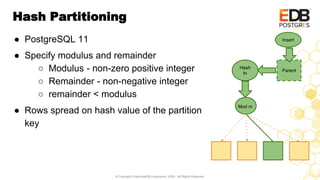
Hash Partitioning
Parent
Insert
Hash
fn
Mod m
● PostgreSQL 11
● Specify modulus and remainder
○ Modulus - non-zero positive integer
○ Remainder - non-negative integer
○ remainder < modulus
● Rows spread on hash value of the partition
key
© Copyright EnterpriseDB Corporation, 2020. All Rights Reserved.
DECLARATIVE PARTITIONING SYNTAX
● Create partitioned table
● Create partitions
● Add a partition
● Remove a partition
© Copyright EnterpriseDB Corporation, 2020. All Rights Reserved.
Create Partitioned Table
CREATE TABLE parent ( <col list > )
PARTITION BY <strategy> ( <partition key> );
List:
CREATE TABLE plist(id int, col1 varchar)
PARTITION BY LIST (col1);
Range:
CREATE TABLE prange(id int, col1 int, col2 int)
PARTITION BY RANGE (col1);
Hash:
CREATE TABLE phash(id int, col1 int, col2 int)
PARTITION BY HASH (col1);
© Copyright EnterpriseDB Corporation, 2020. All Rights Reserved.
Create Partitions
CREATE TABLE child PARTITION OF parent
FOR VALUES <partition bounds>
List:
CREATE TABLE clist PARTITION OF plist
FOR VALUES IN (‘CHENNAI’, ‘OOTY’);
Range:
CREATE TABLE crange PARTITION OF prange
FOR VALUES FROM (10) TO (20);
Hash:
CREATE TABLE chash PARTITION OF phash
FOR VALUES WITH (MODULUS 5, REMAINDER 0);
© Copyright EnterpriseDB Corporation, 2020. All Rights Reserved.
Add a Partition
ALTER TABLE parent ATTACH PARTITION child
FOR VALUES <partition bounds>
List:
ALTER TABLE plist ATTACH PARTITION clist2
FOR VALUES IN (‘MUMBAI’);
Range:
CREATE TABLE prange ATTACH PARTITION
crange2 FOR VALUES FROM (20) TO (50);
Hash:
CREATE TABLE phash ATTACH PARTITION
chash2 FOR VALUES WITH (MODULUS 5,
REMAINDER 1);
* All entries in the child will be checked to confirm if they meet
© Copyright EnterpriseDB Corporation, 2020. All Rights Reserved.
Remove Partition
ALTER TABLE parent
DETACH PARTITION child;
● It will no longer have the partition bound restriction.
● It will retain all the other constraints and triggers.
● If you no longer want the partition data then you
may simply use DROP command to remove the
table completely.
© Copyright EnterpriseDB Corporation, 2020. All Rights Reserved.
TYPES OF PARTITIONING
● Multi column partitioning
● Multi level partitioning
© Copyright EnterpriseDB Corporation, 2020. All Rights Reserved.
Multicolumn Partitioning
● Multiple columns as partition key
● Supported for range and hash
● Column limit : 32
© Copyright EnterpriseDB Corporation, 2020. All Rights Reserved.
Multicolumn Range Partitioning
● Specify the lower and upper bound for each of the partition key
involved.
CREATE TABLE prange (col1 int, col2 int, col3 int)
PARTITION BY RANGE (col1, col2, col3);
CREATE TABLE crange2 PARTITION OF prange
FOR VALUES FROM (10, 100, 50) TO (500, 500, 150);
© Copyright EnterpriseDB Corporation, 2020. All Rights Reserved.
Multicolumn Range Partitioning
● Every column following MAXVALUE / MINVALUE must also be the
same.
CREATE TABLE crange1 PARTITION OF prange
FOR VALUES FROM (10, MINVALUE, MINVALUE)
TO (10, 100, 50);
CREATE TABLE crange3 PARTITION OF prange
FOR VALUES FROM (500, 500, 150)
TO (MAXVALUE, MAXVALUE, MAXVALUE);
© Copyright EnterpriseDB Corporation, 2020. All Rights Reserved.
Multicolumn Range Partitioning
● The row comparison operator is used for insert
○ Elements are compared left-to-right, stopping at first unequal
pair of elements.
Consider partition (0, 0) TO (100, 50)
(0, 199), (100, 49) fits while
(100, 50), (101, 10) does not.
© Copyright EnterpriseDB Corporation, 2020. All Rights Reserved.
Multicolumn Hash Partitioning
● Only one bound is specified - The hash of each of partition key is
calculated and combined to get a single hash value based on which
the child partition is determined.
CREATE TABLE phash (col1 int, col2 int) PARTITION BY
HASH (col1, col2);
CREATE TABLE phash1 PARTITION OF hparent FOR VALUES
WITH (MODULUS 3, REMAINDER 2);
CREATE TABLE phash2 PARTITION OF hparent FOR VALUES
WITH (MODULUS 3, REMAINDER 1);
© Copyright EnterpriseDB Corporation, 2020. All Rights Reserved.
Multilevel Partitioning
1 - 20
20 -30
30 -50
A
B
C
1 - 100
100 - 200
col3
col1
col4
● Different strategies and partition key
can be used at different levels.
● Example:
CREATE TABLE child1 PARTITION
OF parent
FOR VALUES FROM (1) TO (20)
PARTITION BY LIST (col3);
© Copyright EnterpriseDB Corporation, 2020. All Rights Reserved.
BENCHMARKING
● pgbench options
● Bulk load performance
● Read-only query performance
● Sequential scan performance
© Copyright EnterpriseDB Corporation, 2020. All Rights Reserved.
pgbench options
pgbench -i --partitions <integer>
[--partition-method <method>]
● partitions : positive non-zero integer value
● partition-method : Default range. Hash also supported.
● Error if the --partition-method is specified without a valid --
partitions option.
● The pgbench_accounts table is partitioned on aid PRIMARY KEY
© Copyright EnterpriseDB Corporation, 2020. All Rights Reserved.
pgbench options
● For range partitions, scale is equally split across partitions.
○ lower bound of the first partition is MINVALUE,
○ upper bound of the last partition is MAXVALUE.
pgbench_accounts_1 FOR VALUES FROM (MINVALUE) TO (10001)....
pgbench_accounts_10 FOR VALUES FROM (90001) TO (MAXVALUE)
● For hash partitions, the number of partitions specified is used in the
modulo operation and the remainder ranges from 0 to partitions - 1
pgbench_accounts_1 FOR VALUES WITH (modulus 10, remainder 0)..
pgbench_accounts_10 FOR VALUES WITH (modulus 10, remainder 9)
(Examples are using scale 1 and --partitions as 10.)
© Copyright EnterpriseDB Corporation, 2020. All Rights Reserved.
Bulk load: range partitioning
● bulkload command
COPY is used to
populate accounts table
● range-partitioned table
takes a slightly longer
time
● partition count hardly
influences the load time.
© Copyright EnterpriseDB Corporation, 2020. All Rights Reserved.
Bulk load: hash partitioning
● number of partitions has
heavily impacted the
load time
● All partitions (tables) are
constantly switched.
© Copyright EnterpriseDB Corporation, 2020. All Rights Reserved.
Bulk load: Conclusion
● data ordered on the partition key column, no matter the size
or the number of partitions, the operation would take about 20–
25% more time than an unpartitioned table.
● If the data being copied is unordered with respect to the
partition key then the time taken will depend on how often the
partition has to be switched while insertions.
© Copyright EnterpriseDB Corporation, 2020. All Rights Reserved.
Seq Scan: default point query
● Remove the index
created by pgbench
● non-partitioned table
entire data scanned.
● Partition pruning -
chosen partition scanned
● ~50 GB data
● The amount of data in each partition reduces as the number of
partitions increase
© Copyright EnterpriseDB Corporation, 2020. All Rights Reserved.
Read-only: default point query
● default query
● ~50GB data + 10GB
indexes (scale=5000)
● target only one row in
one particular partition.
● 40% drop: overhead of
handling of a large
number of partitions
● slow degradation as
number of partitions
increase
© Copyright EnterpriseDB Corporation, 2020. All Rights Reserved.
Read-only: custom range query
● index scan
● targeting 0.02% rows in
sequence
● range: at most two
partitions touched
● hash: all partitions
touched
● ~50 GB
© Copyright EnterpriseDB Corporation, 2020. All Rights Reserved.
OTHER FEATURES
● Default partitions
● Runtime Partition Pruning
● Partition-wise join
● Partition-level aggregation
● Partition Tree Information
© Copyright EnterpriseDB Corporation, 2020. All Rights Reserved.
Default Partition
● PostgreSQL 11
● Catch tuples that do not match
partition bounds of others.
● Support for: list, range
● Syntax:
CREATE TABLE child
PARTITION OF parent
DEFAULT;
A
B
C
DEFAULT
Z
(NOT (col1 IS NOT NULL) AND
(col1 = ANY (ARRAY[ 'A', 'B', 'C' ])))
© Copyright EnterpriseDB Corporation, 2020. All Rights Reserved.
Add new partition
All the rows in default partition
are scanned.
Amount of time taken depends
on the number of rows in the
default partition
Sample:
1382 ms to add partition when
one Cr rows in default partition
but 2 ms when it is empty.
ERROR: updated partition
constraint for default
partition "part_def" would
be violated by some row
1 - 500
500 - 1000
DEF: 2207, 5000...
2000 - 2500
Default Partition
© Copyright EnterpriseDB Corporation, 2020. All Rights Reserved.
● PostgreSQL 11
● Performed at two levels
○ Executor Initialization - prepared query
○ Actual Execution
● SET enable_partition_pruning. Default is on.
Runtime Partition Pruning
© Copyright EnterpriseDB Corporation, 2020. All Rights Reserved.
Executor Initialization
PREPARE prep (int) as SELECT * from t1 where pkey < $1;
EXPLAIN EXECUTE prep(1500);
Append (cost=0.00..168.06 rows=3012 width=8)
Subplans Removed: 2
-> Seq Scan on p1 t1_1 (cost=0.00..38.25 rows=753 width=8)
Filter: (pkey < $1)
-> Seq Scan on p2 t1_2 (cost=0.00..38.25 rows=753 width=8)
Filter: (pkey < $1)
(6 rows)
Runtime Partition Pruning
© Copyright EnterpriseDB Corporation, 2020. All Rights Reserved.
Actual Execution - Unpartitioned Case
Considering a table with 6000 rows performs nest loop join with another
containing 4000 rows but only 2000 rows match the join condition.
Nested Loop (actual rows=1000 loops=1)
-> Seq Scan on ltbl (actual rows=6000 loops=1)
-> Index Scan using rtbl_pkey on rtbl (actual rows=0 loops=6000)
Index Cond: (col1 = ltbl.col1)
Planning Time: 0.248 ms
Execution Time: 15.265 ms
(6 rows)
Runtime Partition Pruning
© Copyright EnterpriseDB Corporation, 2020. All Rights Reserved.
Actual Execution - Partitoined Case
Consider that the table with 4000 rows is partitioned.
Nested Loop (actual rows=1000 loops=1)
-> Seq Scan on ltbl (actual rows=6000 loops=1)
-> Append (actual rows=0 loops=6000)
-> Index Scan using p1_pkey on p1 t1_1 (actual rows=1 loops=1500)
Index Cond: (pkey = ltbl.col1)
-> Index Scan using p2_pkey on p2 t1_2 (never executed)
Index Cond: (pkey = ltbl.col1)
-> Index Scan using p3_pkey on p3 t1_3 (actual rows=0 loops=500)
Index Cond: (pkey = ltbl.col1)
Planning Time: 0.325 ms
Execution Time: 10.632 ms (~30% drop)
Runtime Partition Pruning
© Copyright EnterpriseDB Corporation, 2020. All Rights Reserved.
● PostgreSQL 11
● SET enable_partitionwise_join. Default is off.
● Join should be on partition key and both partitions should have same
bounds for partitions.
Partition-wise join
1 - 20
20 -30
30 -50
1 - 20
20 -30
30 -50
© Copyright EnterpriseDB Corporation, 2020. All Rights Reserved.
Hash Join (actual rows=20000 loops=1)
Hash Cond: (a.col1 = b.col1)
-> Append (actual rows=40000 loops=1)
-> Seq Scan on a1 a_1 (actual rows=10000 loops=1)
-> Seq Scan on a2 a_2 (actual rows=10000 loops=1)
-> Seq Scan on a3 a_3 (actual rows=10000 loops=1)
-> Seq Scan on a4 a_4 (actual rows=10000 loops=1)
-> Hash (actual rows=20000 loops=1)
Buckets: 32768 Batches: 1 Memory Usage: 1038kB
-> Append (actual rows=20000 loops=1)
-> Seq Scan on b1 b_1 (actual rows=10000 loops=1)
-> Seq Scan on b2 b_2 (actual rows=10000 loops=1)
-> Seq Scan on b3 b_3 (actual rows=0 loops=1)
-> Seq Scan on b4 b_4 (actual rows=0 loops=1)
Planning Time: 0.119 ms
Execution Time: 37.121 ms
Partition-wise join
© Copyright EnterpriseDB Corporation, 2020. All Rights Reserved.
SET enable_partitionwise_join =on;
Append (actual rows=20000 loops=1)
-> Hash Join (actual rows=10000 loops=1)
Hash Cond: (a_1.col1 = b_1.col1)
-> Seq Scan on a1 a_1 (actual rows=10000 loops=1)
-> Hash (actual rows=10000 loops=1)
-> Seq Scan on b1 b_1 (actual rows=10000 loops=1)
-> Hash Join (actual rows=10000 loops=1)
Hash Cond: (a_2.col1 = b_2.col1)
-> Seq Scan on a2 a_2 (actual rows=10000 loops=1)
-> Hash (actual rows=10000 loops=1)
-> Seq Scan on b2 b_2 (actual rows=10000 loops=1)
.(repeat for a3, b3 and a4, b4)
.
Planning Time: 0.250 ms
Execution Time: 19.422 ms
Almost 50% reduction in execution time.
Partition-wise join
© Copyright EnterpriseDB Corporation, 2020. All Rights Reserved.
● PostgreSQL 11
● manually set enable_partitionwise_aggregate (default is off)
● When GROUP BY uses partition key, aggregate individual partition.
● When grouped on non-partition key, PartialAggregate performed
on partitions and then combined.
● Aggregate pushed down if partition is foreign table.
Partition-level Aggregation
© Copyright EnterpriseDB Corporation, 2020. All Rights Reserved.
Table is partitioned on col1 and has 3 partitions with total of 25,000
rows.
Non-partitioned case:
SELECT col1, count(*) FROM t1 GROUP BY col1;
HashAggregate (actual rows=8 loops=1)
Group Key: t1_p1.col1
-> Append (actual rows=25000 loops=1)
-> Seq Scan on t1_p1 (actual rows=10000 loops=1)
-> Seq Scan on t1_p2 (actual rows=6000 loops=1)
-> Seq Scan on t1_p3 (actual rows=9000 loops=1)
Planning Time: 0.193 ms
Execution Time: 11.498 ms
Partition-level Aggregation : Example
© Copyright EnterpriseDB Corporation, 2020. All Rights Reserved.
SET enable_partitionwise_aggregate=on;
Partitioned: GROUP KEY using partition key
Append (actual rows=7 loops=1)
-> HashAggregate (actual rows=2 loops=1)
Group Key: t1_p1.col1
-> Seq Scan on t1_p1 (actual rows=10000 loops=1)
-> HashAggregate (actual rows=2 loops=1)
Group Key: t1_p2.col1
-> Seq Scan on t1_p2 (actual rows=6000 loops=1)
-> HashAggregate (actual rows=3 loops=1)
Group Key: t1_p3.col1
-> Seq Scan on t1_p3 (actual rows=9000 loops=1)
Planning Time: 0.161 ms
Execution Time: 9.046 ms
about 20% decrease in execution time
Partition-level Aggregation : Example
© Copyright EnterpriseDB Corporation, 2020. All Rights Reserved.
When Aggregate does not use partition key
Finalize HashAggregate (actual rows=7 loops=1)
Group Key: t1_p1.col2
-> Append (actual rows=10 loops=1)
-> Partial HashAggregate (actual rows=2 loops=1)
Group Key: t1_p1.col2
-> Seq Scan on t1_p1 (actual rows=10000 loops=1)
-> Partial HashAggregate (actual rows=2 loops=1)
Group Key: t1_p2.col2
-> Seq Scan on t1_p2 (actual rows=6000 loops=1)
-> Partial HashAggregate (actual rows=3 loops=1)
Group Key: t1_p3.col2
-> Seq Scan on t1_p3 (actual rows=9000 loops=1)
Planning Time: 0.235 ms
Execution Time: 9.541 ms
Partition-level Aggregation : Example
A = 15
B = 20
C = 30
D = 25
E = 5
A = 10
B = 20
A = 5
C = 30
D = 25
E = 5
© Copyright EnterpriseDB Corporation, 2020. All Rights Reserved.
● PostgreSQL 12
● pg_partition_tree: Displays the entire partition tree in table format.
● pg_partition_ancestors: Displays all the ancestors from the partition
specified to the root.
● pg_partition_root: Displays the topmost root partitioned table.
Partition Tree Information
© Copyright EnterpriseDB Corporation, 2020. All Rights Reserved.
SELECT * FROM pg_partition_tree ('t1');
relid | parentrelid | isleaf | level
-------+-------------+--------+-------
t1 | | f | 0
p1 | t1 | f | 1
p11 | p1 | f | 2
p12 | p1 | t | 2
(4 rows)
Partition Tree Information
t1 p1
p11
p12
© Copyright EnterpriseDB Corporation, 2020. All Rights Reserved.
SELECT * FROM pg_partition_root('p12');
pg_partition_root
-------------------
t1
(1 row)
SELECT * FROM pg_partition_ancestors('p12');
relid
-------
p12
p1
t1
(3 rows)
Partition Tree Information
© Copyright EnterpriseDB Corporation, 2020. All Rights Reserved.
CONCLUSION
● Partition helps in certain scenarios not all.
● Know your data and system, experiment to
determine the best partition parameters for
your database table.
● Bad partition strategy could make your
system slower.
© Copyright EnterpriseDB Corporation, 2020. All Rights Reserved.
Confused about best partition approach?
EDB can help!
● DBA services for Postgres in the Cloud or Postgres in your
data centre
● Advice and consulting for Postgres deployments
● Technical Account Management to provide a knowledgeable
point of contact between your team and EDB technical team.
Email info@enterprisedb.com
QUESTIONS ?
59
Next APJ Live Webinar
When:
Wednesday, 15 April, 2020
Topic:
No Time to Waste: Migrate from Oracle to EDB Postgres in
Minutes
Look out for the email invite

The Truth About Partitioning

  • 1.
    THE TRUTH ABOUTPARTITIONING APJ Live Webinar on 24th March, 2020 Beena J Emerson, Senior Software Engineer, EDB
  • 2.
    © Copyright EnterpriseDBCorporation, 2020. All Rights Reserved. AGENDA
  • 3.
    © Copyright EnterpriseDBCorporation, 2020. All Rights Reserved. WHO IS EDB? The world leader in open-source based Postgres software and services • Founded in 2004 • 300+ employees • Offices worldwide • Customer base >4000 • Recognized RDBMS leader by: - Gartner - Forrester EnterpriseDB (EDB) delivers the premier open source-based, multi-model data platform for new applications, cloud re-platforming, application modernization, and legacy migration.
  • 4.
    © Copyright EnterpriseDBCorporation, 2020. All Rights Reserved. Poll Question 1 Q: Do you use Postgres partitioning? ● Already using ● Planning to use ● Not using
  • 5.
    © Copyright EnterpriseDBCorporation, 2020. All Rights Reserved. Poll Question 2 Q: Are you using partitioning in another database? ● Oracle ● Microsoft SQL ● Others
  • 6.
    © Copyright EnterpriseDBCorporation, 2020. All Rights Reserved. INTRODUCTION ● What is Partitioning? ● Key Terms ● Partitioning Benefits
  • 7.
    © Copyright EnterpriseDBCorporation, 2020. All Rights Reserved. What is Partitioning? PARENT TABLE CHILD TABLES
  • 8.
    © Copyright EnterpriseDBCorporation, 2020. All Rights Reserved. Key Terms ID Col 1 Col 2 Col3 PARTITION KEY 1 - 10000 10000 - 20000 20000 - 30000 PARTITION BOUNDS PARTITIONED TABLE PARTITIONS }
  • 9.
    © Copyright EnterpriseDBCorporation, 2020. All Rights Reserved. FASTER DISK Partitioning Benefits Data Segregation JAN 2020 DEC 2019 NOV 2019 SEP 2019
  • 10.
    © Copyright EnterpriseDBCorporation, 2020. All Rights Reserved. Partitioning Benefits Maintenance 10 mn rows 2 mn 5000 ms 300 ms 200 ms VACUUM
  • 11.
    © Copyright EnterpriseDBCorporation, 2020. All Rights Reserved. Partitioning Benefits Performance / Scalability 10 mn rows 2 mn Scanning smaller tables can take less time. A = 100?
  • 12.
    © Copyright EnterpriseDBCorporation, 2020. All Rights Reserved. STYLE OF PARTITIONING IN POSTGRESQL ● Inheritance (Trigger- based) Partition ● Declarative Partitioning
  • 13.
    © Copyright EnterpriseDBCorporation, 2020. All Rights Reserved. Inheritance (Trigger-Based) Partitions A = 3 PARENT TABLE TRIGGER CHECK CHILD TABLES ● Manual ● Error-prone ● Constraints not mutually exclusive ● Hard to maintain partitions
  • 14.
    © Copyright EnterpriseDBCorporation, 2020. All Rights Reserved. Declarative Partitioning ● PostgreSQL 10 ● Automated - No manual handling of triggers. ● Simpler syntax ● Easy management of partitions
  • 15.
    © Copyright EnterpriseDBCorporation, 2020. All Rights Reserved. PARTITIONING STRATEGIES ● List ● Range ● Hash
  • 16.
    © Copyright EnterpriseDBCorporation, 2020. All Rights Reserved. List Partitioning DELHI MUMBAI, GOA HYDERABAD BANGLORE, MYSORE ● PostgreSQL 10 ● Explicitly mention values for partition key - single or multiple
  • 17.
    © Copyright EnterpriseDBCorporation, 2020. All Rights Reserved. Range Partitioning MINVALUE - 100 100 - 500 500 - 1000 1000 - MAXVALUE ● PostgreSQL 10 ● Range boundaries ○ Lower inclusive (>=) ○ Upper exclusive (<) ● Unbounded values ○ MINVALUE ○ MAXVALUE
  • 18.
    © Copyright EnterpriseDBCorporation, 2020. All Rights Reserved. Hash Partitioning Parent Insert Hash fn Mod m ● PostgreSQL 11 ● Specify modulus and remainder ○ Modulus - non-zero positive integer ○ Remainder - non-negative integer ○ remainder < modulus ● Rows spread on hash value of the partition key
  • 19.
    © Copyright EnterpriseDBCorporation, 2020. All Rights Reserved. DECLARATIVE PARTITIONING SYNTAX ● Create partitioned table ● Create partitions ● Add a partition ● Remove a partition
  • 20.
    © Copyright EnterpriseDBCorporation, 2020. All Rights Reserved. Create Partitioned Table CREATE TABLE parent ( <col list > ) PARTITION BY <strategy> ( <partition key> ); List: CREATE TABLE plist(id int, col1 varchar) PARTITION BY LIST (col1); Range: CREATE TABLE prange(id int, col1 int, col2 int) PARTITION BY RANGE (col1); Hash: CREATE TABLE phash(id int, col1 int, col2 int) PARTITION BY HASH (col1);
  • 21.
    © Copyright EnterpriseDBCorporation, 2020. All Rights Reserved. Create Partitions CREATE TABLE child PARTITION OF parent FOR VALUES <partition bounds> List: CREATE TABLE clist PARTITION OF plist FOR VALUES IN (‘CHENNAI’, ‘OOTY’); Range: CREATE TABLE crange PARTITION OF prange FOR VALUES FROM (10) TO (20); Hash: CREATE TABLE chash PARTITION OF phash FOR VALUES WITH (MODULUS 5, REMAINDER 0);
  • 22.
    © Copyright EnterpriseDBCorporation, 2020. All Rights Reserved. Add a Partition ALTER TABLE parent ATTACH PARTITION child FOR VALUES <partition bounds> List: ALTER TABLE plist ATTACH PARTITION clist2 FOR VALUES IN (‘MUMBAI’); Range: CREATE TABLE prange ATTACH PARTITION crange2 FOR VALUES FROM (20) TO (50); Hash: CREATE TABLE phash ATTACH PARTITION chash2 FOR VALUES WITH (MODULUS 5, REMAINDER 1); * All entries in the child will be checked to confirm if they meet
  • 23.
    © Copyright EnterpriseDBCorporation, 2020. All Rights Reserved. Remove Partition ALTER TABLE parent DETACH PARTITION child; ● It will no longer have the partition bound restriction. ● It will retain all the other constraints and triggers. ● If you no longer want the partition data then you may simply use DROP command to remove the table completely.
  • 24.
    © Copyright EnterpriseDBCorporation, 2020. All Rights Reserved. TYPES OF PARTITIONING ● Multi column partitioning ● Multi level partitioning
  • 25.
    © Copyright EnterpriseDBCorporation, 2020. All Rights Reserved. Multicolumn Partitioning ● Multiple columns as partition key ● Supported for range and hash ● Column limit : 32
  • 26.
    © Copyright EnterpriseDBCorporation, 2020. All Rights Reserved. Multicolumn Range Partitioning ● Specify the lower and upper bound for each of the partition key involved. CREATE TABLE prange (col1 int, col2 int, col3 int) PARTITION BY RANGE (col1, col2, col3); CREATE TABLE crange2 PARTITION OF prange FOR VALUES FROM (10, 100, 50) TO (500, 500, 150);
  • 27.
    © Copyright EnterpriseDBCorporation, 2020. All Rights Reserved. Multicolumn Range Partitioning ● Every column following MAXVALUE / MINVALUE must also be the same. CREATE TABLE crange1 PARTITION OF prange FOR VALUES FROM (10, MINVALUE, MINVALUE) TO (10, 100, 50); CREATE TABLE crange3 PARTITION OF prange FOR VALUES FROM (500, 500, 150) TO (MAXVALUE, MAXVALUE, MAXVALUE);
  • 28.
    © Copyright EnterpriseDBCorporation, 2020. All Rights Reserved. Multicolumn Range Partitioning ● The row comparison operator is used for insert ○ Elements are compared left-to-right, stopping at first unequal pair of elements. Consider partition (0, 0) TO (100, 50) (0, 199), (100, 49) fits while (100, 50), (101, 10) does not.
  • 29.
    © Copyright EnterpriseDBCorporation, 2020. All Rights Reserved. Multicolumn Hash Partitioning ● Only one bound is specified - The hash of each of partition key is calculated and combined to get a single hash value based on which the child partition is determined. CREATE TABLE phash (col1 int, col2 int) PARTITION BY HASH (col1, col2); CREATE TABLE phash1 PARTITION OF hparent FOR VALUES WITH (MODULUS 3, REMAINDER 2); CREATE TABLE phash2 PARTITION OF hparent FOR VALUES WITH (MODULUS 3, REMAINDER 1);
  • 30.
    © Copyright EnterpriseDBCorporation, 2020. All Rights Reserved. Multilevel Partitioning 1 - 20 20 -30 30 -50 A B C 1 - 100 100 - 200 col3 col1 col4 ● Different strategies and partition key can be used at different levels. ● Example: CREATE TABLE child1 PARTITION OF parent FOR VALUES FROM (1) TO (20) PARTITION BY LIST (col3);
  • 31.
    © Copyright EnterpriseDBCorporation, 2020. All Rights Reserved. BENCHMARKING ● pgbench options ● Bulk load performance ● Read-only query performance ● Sequential scan performance
  • 32.
    © Copyright EnterpriseDBCorporation, 2020. All Rights Reserved. pgbench options pgbench -i --partitions <integer> [--partition-method <method>] ● partitions : positive non-zero integer value ● partition-method : Default range. Hash also supported. ● Error if the --partition-method is specified without a valid -- partitions option. ● The pgbench_accounts table is partitioned on aid PRIMARY KEY
  • 33.
    © Copyright EnterpriseDBCorporation, 2020. All Rights Reserved. pgbench options ● For range partitions, scale is equally split across partitions. ○ lower bound of the first partition is MINVALUE, ○ upper bound of the last partition is MAXVALUE. pgbench_accounts_1 FOR VALUES FROM (MINVALUE) TO (10001).... pgbench_accounts_10 FOR VALUES FROM (90001) TO (MAXVALUE) ● For hash partitions, the number of partitions specified is used in the modulo operation and the remainder ranges from 0 to partitions - 1 pgbench_accounts_1 FOR VALUES WITH (modulus 10, remainder 0).. pgbench_accounts_10 FOR VALUES WITH (modulus 10, remainder 9) (Examples are using scale 1 and --partitions as 10.)
  • 34.
    © Copyright EnterpriseDBCorporation, 2020. All Rights Reserved. Bulk load: range partitioning ● bulkload command COPY is used to populate accounts table ● range-partitioned table takes a slightly longer time ● partition count hardly influences the load time.
  • 35.
    © Copyright EnterpriseDBCorporation, 2020. All Rights Reserved. Bulk load: hash partitioning ● number of partitions has heavily impacted the load time ● All partitions (tables) are constantly switched.
  • 36.
    © Copyright EnterpriseDBCorporation, 2020. All Rights Reserved. Bulk load: Conclusion ● data ordered on the partition key column, no matter the size or the number of partitions, the operation would take about 20– 25% more time than an unpartitioned table. ● If the data being copied is unordered with respect to the partition key then the time taken will depend on how often the partition has to be switched while insertions.
  • 37.
    © Copyright EnterpriseDBCorporation, 2020. All Rights Reserved. Seq Scan: default point query ● Remove the index created by pgbench ● non-partitioned table entire data scanned. ● Partition pruning - chosen partition scanned ● ~50 GB data ● The amount of data in each partition reduces as the number of partitions increase
  • 38.
    © Copyright EnterpriseDBCorporation, 2020. All Rights Reserved. Read-only: default point query ● default query ● ~50GB data + 10GB indexes (scale=5000) ● target only one row in one particular partition. ● 40% drop: overhead of handling of a large number of partitions ● slow degradation as number of partitions increase
  • 39.
    © Copyright EnterpriseDBCorporation, 2020. All Rights Reserved. Read-only: custom range query ● index scan ● targeting 0.02% rows in sequence ● range: at most two partitions touched ● hash: all partitions touched ● ~50 GB
  • 40.
    © Copyright EnterpriseDBCorporation, 2020. All Rights Reserved. OTHER FEATURES ● Default partitions ● Runtime Partition Pruning ● Partition-wise join ● Partition-level aggregation ● Partition Tree Information
  • 41.
    © Copyright EnterpriseDBCorporation, 2020. All Rights Reserved. Default Partition ● PostgreSQL 11 ● Catch tuples that do not match partition bounds of others. ● Support for: list, range ● Syntax: CREATE TABLE child PARTITION OF parent DEFAULT; A B C DEFAULT Z (NOT (col1 IS NOT NULL) AND (col1 = ANY (ARRAY[ 'A', 'B', 'C' ])))
  • 42.
    © Copyright EnterpriseDBCorporation, 2020. All Rights Reserved. Add new partition All the rows in default partition are scanned. Amount of time taken depends on the number of rows in the default partition Sample: 1382 ms to add partition when one Cr rows in default partition but 2 ms when it is empty. ERROR: updated partition constraint for default partition "part_def" would be violated by some row 1 - 500 500 - 1000 DEF: 2207, 5000... 2000 - 2500 Default Partition
  • 43.
    © Copyright EnterpriseDBCorporation, 2020. All Rights Reserved. ● PostgreSQL 11 ● Performed at two levels ○ Executor Initialization - prepared query ○ Actual Execution ● SET enable_partition_pruning. Default is on. Runtime Partition Pruning
  • 44.
    © Copyright EnterpriseDBCorporation, 2020. All Rights Reserved. Executor Initialization PREPARE prep (int) as SELECT * from t1 where pkey < $1; EXPLAIN EXECUTE prep(1500); Append (cost=0.00..168.06 rows=3012 width=8) Subplans Removed: 2 -> Seq Scan on p1 t1_1 (cost=0.00..38.25 rows=753 width=8) Filter: (pkey < $1) -> Seq Scan on p2 t1_2 (cost=0.00..38.25 rows=753 width=8) Filter: (pkey < $1) (6 rows) Runtime Partition Pruning
  • 45.
    © Copyright EnterpriseDBCorporation, 2020. All Rights Reserved. Actual Execution - Unpartitioned Case Considering a table with 6000 rows performs nest loop join with another containing 4000 rows but only 2000 rows match the join condition. Nested Loop (actual rows=1000 loops=1) -> Seq Scan on ltbl (actual rows=6000 loops=1) -> Index Scan using rtbl_pkey on rtbl (actual rows=0 loops=6000) Index Cond: (col1 = ltbl.col1) Planning Time: 0.248 ms Execution Time: 15.265 ms (6 rows) Runtime Partition Pruning
  • 46.
    © Copyright EnterpriseDBCorporation, 2020. All Rights Reserved. Actual Execution - Partitoined Case Consider that the table with 4000 rows is partitioned. Nested Loop (actual rows=1000 loops=1) -> Seq Scan on ltbl (actual rows=6000 loops=1) -> Append (actual rows=0 loops=6000) -> Index Scan using p1_pkey on p1 t1_1 (actual rows=1 loops=1500) Index Cond: (pkey = ltbl.col1) -> Index Scan using p2_pkey on p2 t1_2 (never executed) Index Cond: (pkey = ltbl.col1) -> Index Scan using p3_pkey on p3 t1_3 (actual rows=0 loops=500) Index Cond: (pkey = ltbl.col1) Planning Time: 0.325 ms Execution Time: 10.632 ms (~30% drop) Runtime Partition Pruning
  • 47.
    © Copyright EnterpriseDBCorporation, 2020. All Rights Reserved. ● PostgreSQL 11 ● SET enable_partitionwise_join. Default is off. ● Join should be on partition key and both partitions should have same bounds for partitions. Partition-wise join 1 - 20 20 -30 30 -50 1 - 20 20 -30 30 -50
  • 48.
    © Copyright EnterpriseDBCorporation, 2020. All Rights Reserved. Hash Join (actual rows=20000 loops=1) Hash Cond: (a.col1 = b.col1) -> Append (actual rows=40000 loops=1) -> Seq Scan on a1 a_1 (actual rows=10000 loops=1) -> Seq Scan on a2 a_2 (actual rows=10000 loops=1) -> Seq Scan on a3 a_3 (actual rows=10000 loops=1) -> Seq Scan on a4 a_4 (actual rows=10000 loops=1) -> Hash (actual rows=20000 loops=1) Buckets: 32768 Batches: 1 Memory Usage: 1038kB -> Append (actual rows=20000 loops=1) -> Seq Scan on b1 b_1 (actual rows=10000 loops=1) -> Seq Scan on b2 b_2 (actual rows=10000 loops=1) -> Seq Scan on b3 b_3 (actual rows=0 loops=1) -> Seq Scan on b4 b_4 (actual rows=0 loops=1) Planning Time: 0.119 ms Execution Time: 37.121 ms Partition-wise join
  • 49.
    © Copyright EnterpriseDBCorporation, 2020. All Rights Reserved. SET enable_partitionwise_join =on; Append (actual rows=20000 loops=1) -> Hash Join (actual rows=10000 loops=1) Hash Cond: (a_1.col1 = b_1.col1) -> Seq Scan on a1 a_1 (actual rows=10000 loops=1) -> Hash (actual rows=10000 loops=1) -> Seq Scan on b1 b_1 (actual rows=10000 loops=1) -> Hash Join (actual rows=10000 loops=1) Hash Cond: (a_2.col1 = b_2.col1) -> Seq Scan on a2 a_2 (actual rows=10000 loops=1) -> Hash (actual rows=10000 loops=1) -> Seq Scan on b2 b_2 (actual rows=10000 loops=1) .(repeat for a3, b3 and a4, b4) . Planning Time: 0.250 ms Execution Time: 19.422 ms Almost 50% reduction in execution time. Partition-wise join
  • 50.
    © Copyright EnterpriseDBCorporation, 2020. All Rights Reserved. ● PostgreSQL 11 ● manually set enable_partitionwise_aggregate (default is off) ● When GROUP BY uses partition key, aggregate individual partition. ● When grouped on non-partition key, PartialAggregate performed on partitions and then combined. ● Aggregate pushed down if partition is foreign table. Partition-level Aggregation
  • 51.
    © Copyright EnterpriseDBCorporation, 2020. All Rights Reserved. Table is partitioned on col1 and has 3 partitions with total of 25,000 rows. Non-partitioned case: SELECT col1, count(*) FROM t1 GROUP BY col1; HashAggregate (actual rows=8 loops=1) Group Key: t1_p1.col1 -> Append (actual rows=25000 loops=1) -> Seq Scan on t1_p1 (actual rows=10000 loops=1) -> Seq Scan on t1_p2 (actual rows=6000 loops=1) -> Seq Scan on t1_p3 (actual rows=9000 loops=1) Planning Time: 0.193 ms Execution Time: 11.498 ms Partition-level Aggregation : Example
  • 52.
    © Copyright EnterpriseDBCorporation, 2020. All Rights Reserved. SET enable_partitionwise_aggregate=on; Partitioned: GROUP KEY using partition key Append (actual rows=7 loops=1) -> HashAggregate (actual rows=2 loops=1) Group Key: t1_p1.col1 -> Seq Scan on t1_p1 (actual rows=10000 loops=1) -> HashAggregate (actual rows=2 loops=1) Group Key: t1_p2.col1 -> Seq Scan on t1_p2 (actual rows=6000 loops=1) -> HashAggregate (actual rows=3 loops=1) Group Key: t1_p3.col1 -> Seq Scan on t1_p3 (actual rows=9000 loops=1) Planning Time: 0.161 ms Execution Time: 9.046 ms about 20% decrease in execution time Partition-level Aggregation : Example
  • 53.
    © Copyright EnterpriseDBCorporation, 2020. All Rights Reserved. When Aggregate does not use partition key Finalize HashAggregate (actual rows=7 loops=1) Group Key: t1_p1.col2 -> Append (actual rows=10 loops=1) -> Partial HashAggregate (actual rows=2 loops=1) Group Key: t1_p1.col2 -> Seq Scan on t1_p1 (actual rows=10000 loops=1) -> Partial HashAggregate (actual rows=2 loops=1) Group Key: t1_p2.col2 -> Seq Scan on t1_p2 (actual rows=6000 loops=1) -> Partial HashAggregate (actual rows=3 loops=1) Group Key: t1_p3.col2 -> Seq Scan on t1_p3 (actual rows=9000 loops=1) Planning Time: 0.235 ms Execution Time: 9.541 ms Partition-level Aggregation : Example A = 15 B = 20 C = 30 D = 25 E = 5 A = 10 B = 20 A = 5 C = 30 D = 25 E = 5
  • 54.
    © Copyright EnterpriseDBCorporation, 2020. All Rights Reserved. ● PostgreSQL 12 ● pg_partition_tree: Displays the entire partition tree in table format. ● pg_partition_ancestors: Displays all the ancestors from the partition specified to the root. ● pg_partition_root: Displays the topmost root partitioned table. Partition Tree Information
  • 55.
    © Copyright EnterpriseDBCorporation, 2020. All Rights Reserved. SELECT * FROM pg_partition_tree ('t1'); relid | parentrelid | isleaf | level -------+-------------+--------+------- t1 | | f | 0 p1 | t1 | f | 1 p11 | p1 | f | 2 p12 | p1 | t | 2 (4 rows) Partition Tree Information t1 p1 p11 p12
  • 56.
    © Copyright EnterpriseDBCorporation, 2020. All Rights Reserved. SELECT * FROM pg_partition_root('p12'); pg_partition_root ------------------- t1 (1 row) SELECT * FROM pg_partition_ancestors('p12'); relid ------- p12 p1 t1 (3 rows) Partition Tree Information
  • 57.
    © Copyright EnterpriseDBCorporation, 2020. All Rights Reserved. CONCLUSION ● Partition helps in certain scenarios not all. ● Know your data and system, experiment to determine the best partition parameters for your database table. ● Bad partition strategy could make your system slower.
  • 58.
    © Copyright EnterpriseDBCorporation, 2020. All Rights Reserved. Confused about best partition approach? EDB can help! ● DBA services for Postgres in the Cloud or Postgres in your data centre ● Advice and consulting for Postgres deployments ● Technical Account Management to provide a knowledgeable point of contact between your team and EDB technical team. Email info@enterprisedb.com
  • 59.
  • 60.
    Next APJ LiveWebinar When: Wednesday, 15 April, 2020 Topic: No Time to Waste: Migrate from Oracle to EDB Postgres in Minutes Look out for the email invite