Sprinting With Runtime Fabric
November 06, 2019
Dallas MuleSoft Meetup Group
All contents © MuleSoft Inc.
Agenda
2
• 6:00PM – Doors open
• 6:00PM - 6:30PM – Network, Eat, and Socialize
• 6:30PM – 7:30PM – Runtime Fabric Presentation and Demo
• 7:30PM - 7:45PM – Q&A
• 7:45PM - 8:00PM – Open Floor, Suggestions for Future Topics and
Speakers
All contents © MuleSoft Inc.
Introductions
3
• About the organizer:
– Big Compass
– Tim Merkel
– Aaron Lieberman
– Linda Gunn
• Runtime Fabric Overview
• Key Benefits and Use Cases
• Installation
• Lessons Learned
• Runtime Fabric Management
• Mule 3 and Mule 4 Demo
• High Availability Demo
Runtime Fabric
Runtime Fabric
Introduction
All contents © MuleSoft Inc.
Runtime Fabric – What is it?
6
• Container service that allows
for automated deployments
and management in the cloud
• Runs on your infrastructure,
but connects on-prem to the
cloud
All contents © MuleSoft Inc.
Runtime Fabric Capabilities
7
• Application isolation
• Capability to run multiple versions
of the Mule runtime on the same
set of resources
• Easily scale applications
• Automated application fail-over
• Out of the box management
portal with Anypoint Runtime
Manager
All contents © MuleSoft Inc.
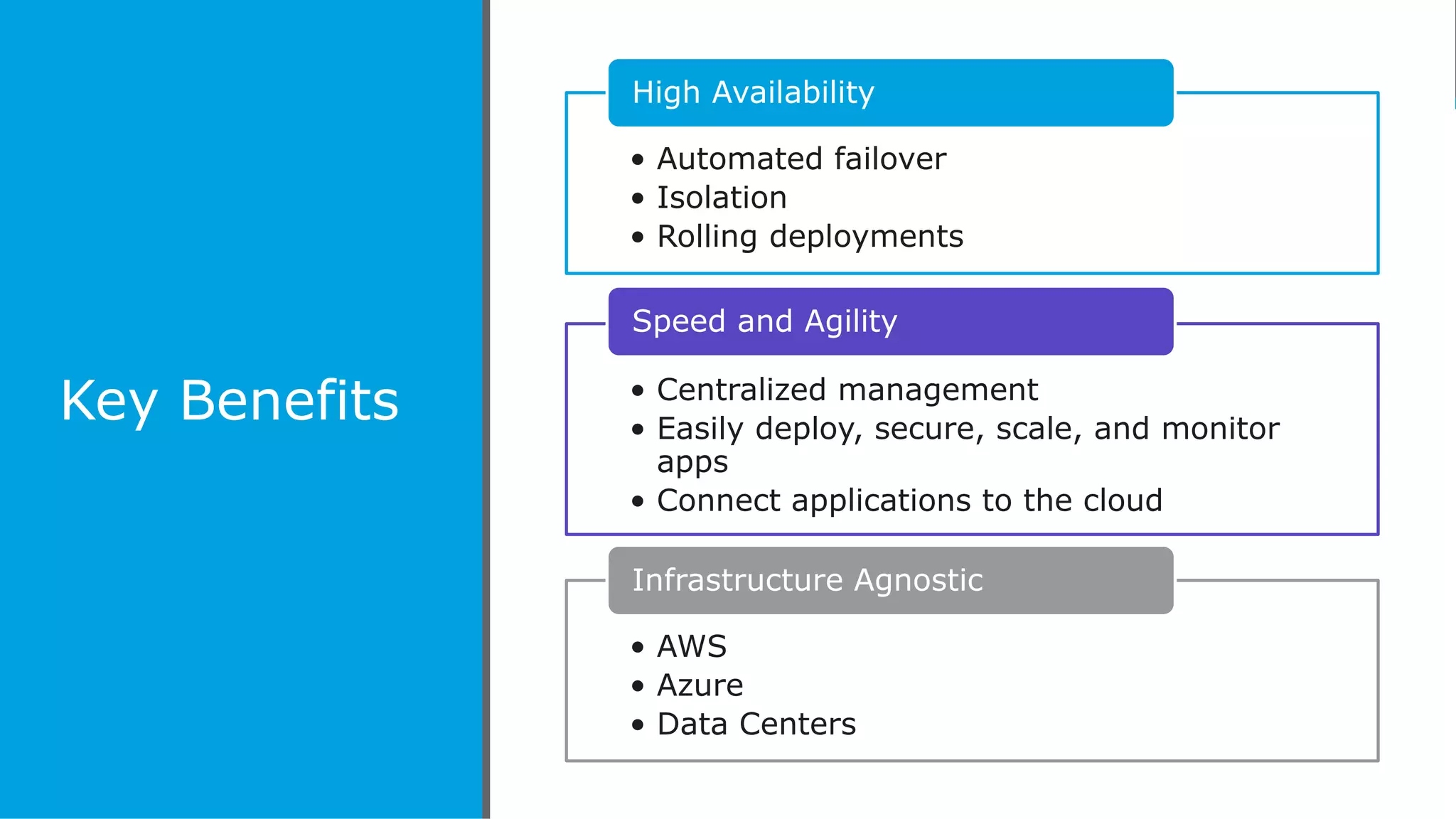
Key Benefits
• Automated failover
• Isolation
• Rolling deployments
High Availability
• Centralized management
• Easily deploy, secure, scale, and monitor
apps
• Connect applications to the cloud
Speed and Agility
• AWS
• Azure
• Data Centers
Infrastructure Agnostic
All contents © MuleSoft Inc.
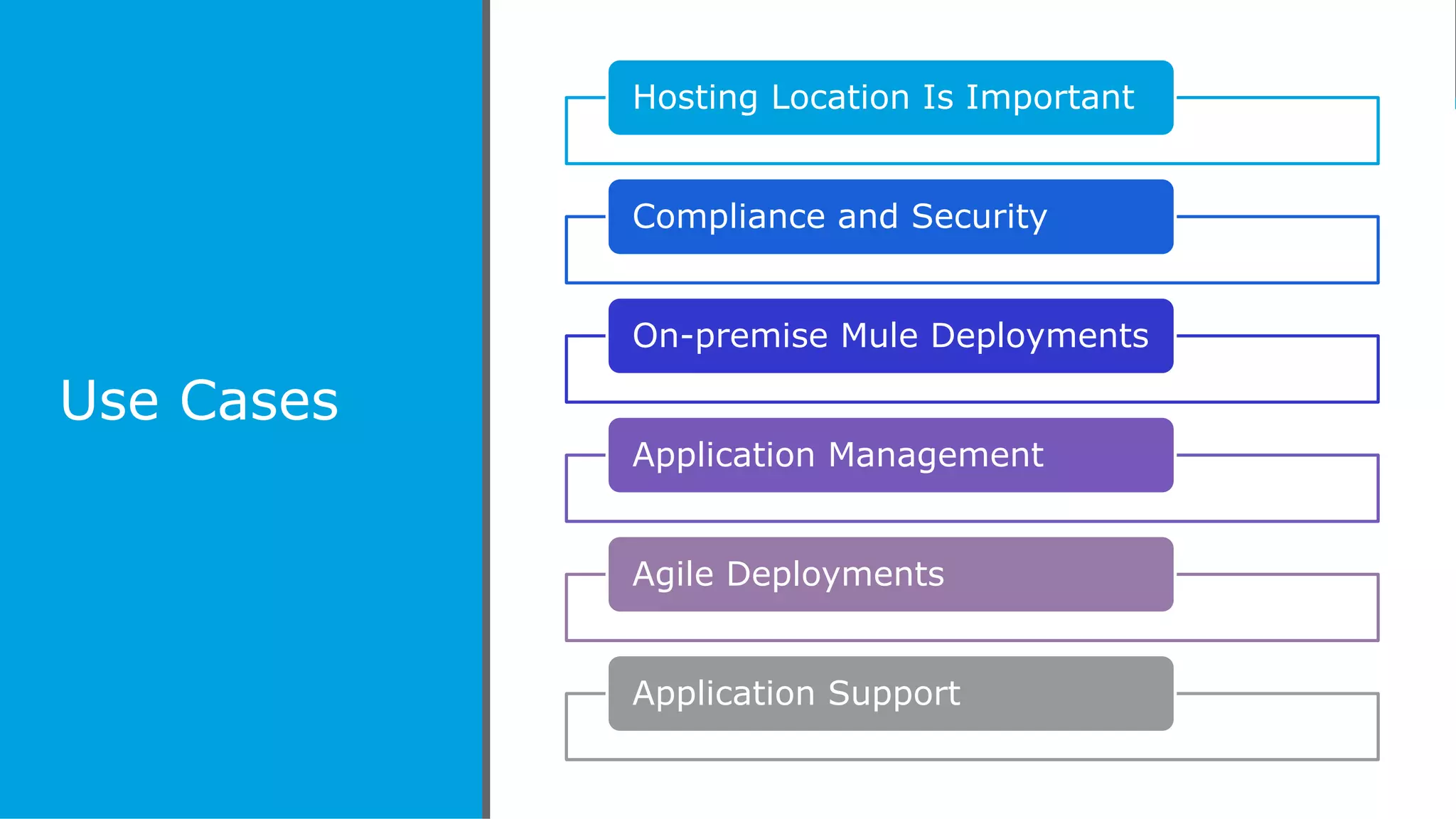
Use Cases
Hosting Location Is Important
Compliance and Security
On-premise Mule Deployments
Application Management
Agile Deployments
Application Support
All contents © MuleSoft Inc.
Key
Differences
• Runs on your infrastructure
• Manage using Anypoint Control Plane
• Lack of isolation and agility
On-Premise
• Enablement in MuleSoft’s cloud
• Cloud-like application management
• Rolling deployments
CloudHub
• Runs on your infrastructure
• Cloud-like application management
• Rolling deployments
Runtime Fabric
Can you name 3 providers that Runtime Fabric can
run on?
Giveaway!
Runtime Fabric
Components
All contents © MuleSoft Inc.
Runtime Fabric Architecture
13
All contents © MuleSoft Inc.
Runtime Fabric Data Flow
14
All contents © MuleSoft Inc.
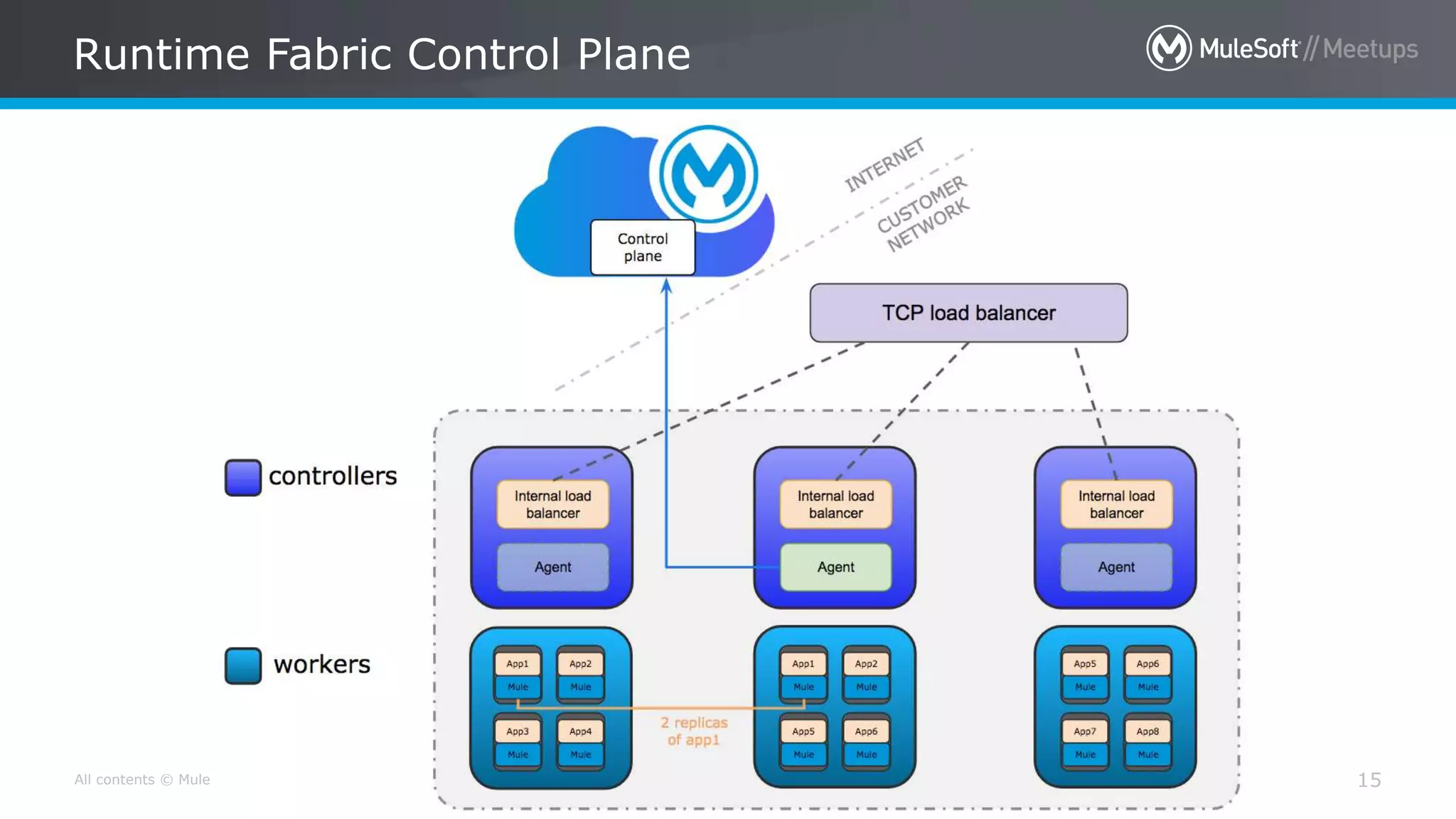
Runtime Fabric Control Plane
15
All contents © MuleSoft Inc.
Runtime Fabric Management
16
• Ops Center
– Logging
– Monitoring
– Kubernetes
• Application management in
Runtime Manager
– Scale
– Deploy
– Modify
– Secure
What is the purpose of a controller and a worker in
Runtime Fabric?
Giveaway!
All contents © MuleSoft Inc.
Runtime Fabric Installation Steps
18
1. Obtain license
2. Create Runtime Fabric in Runtime
Manager
3. Assign appropriate roles
4. Run Terraform script
5. Verify installation by logging into
OpsCenter
6. Associate business groups and
environments
7. Enable inbound traffic if necessary
All contents © MuleSoft Inc.
Lessons Learned
19
• Plan/design before installing!
• Have necessary information/assets
ready
• Size of servers matter
• Plan for number of servers
Demo
1. Management
2. Security
3. Logging
4. Mule 3 and Mule 4 Combined
5. ”Alexa: Explode My System” - High Availability In Action
All contents © MuleSoft Inc.
References and Documentation
21
• Project Code
– Logging project code: https://github.com/BigCompass/mulesoft-meetup-logging-
demo
– Custom Connector project code: https://github.com/BigCompass/custom-logger-
connector
• Runtime Fabric
– https://docs.mulesoft.com/runtime-fabric/1.3/
– https://docs.mulesoft.com/runtime-fabric/1.3/architecture
– https://docs.mulesoft.com/runtime-fabric/1.3/deploy-resource-allocation
– https://docs.mulesoft.com/runtime-fabric/1.0/install-aws
– https://docs.mulesoft.com/runtime-fabric/1.3/using-opscenter
– https://docs.mulesoft.com/runtime-fabric/1.3/manage-index
– https://docs.mulesoft.com/runtime-fabric/1.3/app-versioning
Questions?
All contents © MuleSoft Inc.
What’s Next?
23
• Share:
– Tweet your pictures with the hashtag #MuleMeetup
– Invite your network to join: https://meetups.mulesoft.com/denver/
• Feedback:
– Contact your organizer aaron@bigcompass.com or linda.gunn@bigcompass.com
to suggest topics
– Contact MuleSoft at meetup@mulesoft.com for ways to improve the program
• Our next meetup:
– Date: January or February 2020 – Happy New Year!
– Location: TBD
– Topic: TBD
See you next time
Please send topic suggestions to the organizer
Sprinting with Anypoint Runtime Fabric

Sprinting with Anypoint Runtime Fabric

  • 1.
    Sprinting With RuntimeFabric November 06, 2019 Dallas MuleSoft Meetup Group
  • 2.
    All contents ©MuleSoft Inc. Agenda 2 • 6:00PM – Doors open • 6:00PM - 6:30PM – Network, Eat, and Socialize • 6:30PM – 7:30PM – Runtime Fabric Presentation and Demo • 7:30PM - 7:45PM – Q&A • 7:45PM - 8:00PM – Open Floor, Suggestions for Future Topics and Speakers
  • 3.
    All contents ©MuleSoft Inc. Introductions 3 • About the organizer: – Big Compass – Tim Merkel – Aaron Lieberman – Linda Gunn
  • 4.
    • Runtime FabricOverview • Key Benefits and Use Cases • Installation • Lessons Learned • Runtime Fabric Management • Mule 3 and Mule 4 Demo • High Availability Demo Runtime Fabric
  • 5.
  • 6.
    All contents ©MuleSoft Inc. Runtime Fabric – What is it? 6 • Container service that allows for automated deployments and management in the cloud • Runs on your infrastructure, but connects on-prem to the cloud
  • 7.
    All contents ©MuleSoft Inc. Runtime Fabric Capabilities 7 • Application isolation • Capability to run multiple versions of the Mule runtime on the same set of resources • Easily scale applications • Automated application fail-over • Out of the box management portal with Anypoint Runtime Manager
  • 8.
    All contents ©MuleSoft Inc. Key Benefits • Automated failover • Isolation • Rolling deployments High Availability • Centralized management • Easily deploy, secure, scale, and monitor apps • Connect applications to the cloud Speed and Agility • AWS • Azure • Data Centers Infrastructure Agnostic
  • 9.
    All contents ©MuleSoft Inc. Use Cases Hosting Location Is Important Compliance and Security On-premise Mule Deployments Application Management Agile Deployments Application Support
  • 10.
    All contents ©MuleSoft Inc. Key Differences • Runs on your infrastructure • Manage using Anypoint Control Plane • Lack of isolation and agility On-Premise • Enablement in MuleSoft’s cloud • Cloud-like application management • Rolling deployments CloudHub • Runs on your infrastructure • Cloud-like application management • Rolling deployments Runtime Fabric
  • 11.
    Can you name3 providers that Runtime Fabric can run on? Giveaway!
  • 12.
  • 13.
    All contents ©MuleSoft Inc. Runtime Fabric Architecture 13
  • 14.
    All contents ©MuleSoft Inc. Runtime Fabric Data Flow 14
  • 15.
    All contents ©MuleSoft Inc. Runtime Fabric Control Plane 15
  • 16.
    All contents ©MuleSoft Inc. Runtime Fabric Management 16 • Ops Center – Logging – Monitoring – Kubernetes • Application management in Runtime Manager – Scale – Deploy – Modify – Secure
  • 17.
    What is thepurpose of a controller and a worker in Runtime Fabric? Giveaway!
  • 18.
    All contents ©MuleSoft Inc. Runtime Fabric Installation Steps 18 1. Obtain license 2. Create Runtime Fabric in Runtime Manager 3. Assign appropriate roles 4. Run Terraform script 5. Verify installation by logging into OpsCenter 6. Associate business groups and environments 7. Enable inbound traffic if necessary
  • 19.
    All contents ©MuleSoft Inc. Lessons Learned 19 • Plan/design before installing! • Have necessary information/assets ready • Size of servers matter • Plan for number of servers
  • 20.
    Demo 1. Management 2. Security 3.Logging 4. Mule 3 and Mule 4 Combined 5. ”Alexa: Explode My System” - High Availability In Action
  • 21.
    All contents ©MuleSoft Inc. References and Documentation 21 • Project Code – Logging project code: https://github.com/BigCompass/mulesoft-meetup-logging- demo – Custom Connector project code: https://github.com/BigCompass/custom-logger- connector • Runtime Fabric – https://docs.mulesoft.com/runtime-fabric/1.3/ – https://docs.mulesoft.com/runtime-fabric/1.3/architecture – https://docs.mulesoft.com/runtime-fabric/1.3/deploy-resource-allocation – https://docs.mulesoft.com/runtime-fabric/1.0/install-aws – https://docs.mulesoft.com/runtime-fabric/1.3/using-opscenter – https://docs.mulesoft.com/runtime-fabric/1.3/manage-index – https://docs.mulesoft.com/runtime-fabric/1.3/app-versioning
  • 22.
  • 23.
    All contents ©MuleSoft Inc. What’s Next? 23 • Share: – Tweet your pictures with the hashtag #MuleMeetup – Invite your network to join: https://meetups.mulesoft.com/denver/ • Feedback: – Contact your organizer aaron@bigcompass.com or linda.gunn@bigcompass.com to suggest topics – Contact MuleSoft at meetup@mulesoft.com for ways to improve the program • Our next meetup: – Date: January or February 2020 – Happy New Year! – Location: TBD – Topic: TBD
  • 24.
    See you nexttime Please send topic suggestions to the organizer

Editor's Notes

  • #7 Runtime Fabric combines great facets of on-prem and the cloud by allowing you to manage your applications just like you would in the cloud, but runs on your infrastructure so it has a lot of different benefits and use cases
  • #8 Application isolation Although apps can run on the same set of resources, each app is isolated from one another with the use of Kubernetes and Docker and uses core allotment to dedicate resources to each app on your infrastructure Capability to run multiple versions of the Mule runtime on the same set of resources Mule 3 or Mule 4 Easily scale applications The use of Kubernetes under the hood allows you to scale your applications just as you would using CloudHub – great management and extreme ease of use for on-prem resources/deployments Automated application fail-over If your application crashes, Runtime Fabric is smart enough to keep tabs on the number of replicas of an application you want running at any one time, and will deploy another replica of your app in the event of an application failure Out of the box management portal with Anypoint Runtime Manager Unprecedented application management for on-prem resources Again, combines great facets of on-prem and the cloud
  • #9 High availabilty Automated failover Isolation Rolling deployments Speed and agility - Combining the features of on-prem + cloud Management is a crucial benefit here. You can scale, monitor, secure, deploy, modify, and connect your applications with many of the Anypoint Platform features Multi and hybrid cloud AWS Azure Data Centers If you want to bring cloud benefits to on-prem, Runtime Fabric is the way to go Does not require knowledge of what occurs under the covers so you can enable non-technical users
  • #10 Hosting location You can host where your data resides Can power your internal, quarantined systems/apps/processes Compliance and Security If your organization requires that you own your own infrastructure, this is a great option Organizations that cannot deploy to the cloud due to compliance or security regulations On-premise deployments Connect your on-prem deployments to the cloud for ease of management Management A key use case. Centralizing your application management saves time and money and allows organizations to be more agile You can scale, monitor, secure, deploy, modify, and connect your applications with many of the Anypoint Platform features Agile Deployments Deploy at the speed of the cloud thanks to Docker and Kubernetes under the hood Speed up deployments for your organization Rolling deployments with 0 downtime If deployments affect your business continuity, this is a great option Support Open up support to non-technical users Enable technical and non-technical users to support your applications
  • #11 On-premise Hosted on your infrastructure Controlled from MuleSoft’s Control Plane The struggle with on-prem is the lack of isolation, flexibility, and agility, or the manual effort required to get you there Same runtime and applications on the same server can affect one another CloudHub CloudHub is still recommended if possible Ease of management and the agility and speed of the cloud Rolling deployments with 0 downtime Isolation and multiple versions of MuleSoft available on the same infrastructure High availability with load balancing Runtime Fabric Runs on your infrastructure Cloud-like application management Ease of management and the agility and speed of the cloud Rolling deployments with 0 downtime Isolation and multiple versions of MuleSoft available on the same infrastructure High availability with load balancing
  • #12 AWS Azure Data Center
  • #14 Architecture Controllers Used to connect MuleSoft’s control plan to workers Facilitates traffic from clients to workers Connects the external world to your applications on your workers Workers Runs your applications Isolation Facilitated through the use of Docker and Kubernetes Vertical scaling Horizontal scaling Availability Zones used for High Availability Each controller in a different AZ Each worker in a different AZ Controllers separated from workers Runtime Fabric services on each server Each server requires RTF services to be installed on it alongside the controller/worker application There is an external load balancer and internal load balancer External LB directs traffic from clients to the controller Internal LB’s on controller servers direct traffic from the controller to the correct application on a worker that is available This is a recommended Production environment setup with 3 controllers and 3 workers Server Statistics Recommended 3 servers, each with: 2 CPU cores 8 GiB memory 80 GiB dedicated disk for OS 60 GiB dedicated disk with 3000 provisioned IOPS 250 GiB dedicated disk with 1000 provisioned IOPS 1 Gbps network connection between servers 3 servers, each with: 2 CPU cores 15 GiB memory minimum 80 GiB dedicated disk for OS 250 GiB dedicated disk for log/metrics storage 1 Gbps network connection between servers
  • #15 Flow of traffic Client makes request External Load balancer directs request to controller Controller internal load balancer directs request to the correct application on a worker
  • #16 The Control Plane is where you design, create, and manage your applications How does it work? MuleSoft’s control plane connects with a controller server The controller then communicates with other controllers and all workers
  • #17 Ops Center Provides visibility into applications View logs View running servers View Kubernetes setup Monitor applications Runtime Manager Where you can scale, deploy, allocate resources to, and set properties for your application as if it were deployed on CloudHub
  • #18 Controllers Used to connect MuleSoft’s control plan to workers Facilitates traffic from clients to workers Connects the external world to your applications on your workers Workers Runs your applications
  • #19 Installation varies from platform to platform RTF can be installed on AWS Azure Data Center Before you begin on AWS Mule License file Create Runtime Fabric in Runtime Manager Anypoint user has Manage Runtime Role AWS user has full access to create EC2, Disks VPCs etc AWS installation uses Terraform Terraform is a script that provisions required AWS resources This script requires a few environment variables such as activation_data from RTF screen AWS Key_pair number of controllers and workers mule_license Verify installation by logging into OpsCenter OpsCenter is a portal to monitor RTF infrastructure and l Post installation configuration Associate business groups and environments Enable Inbound traffic Generating certificate-key pair Create TLS context for enabling inbound traffic
  • #20 Gather your CloudHub keys, gather your AWS keys, set up roles, obtain certificates, etc before installing – otherwise you will play the hurry up and wait game We run 1 m4.large and 2 r5.large EC2 instances Big Compass’ demo included 3 servers 2 workers and 1 Controller Overall create your plan/design before installing and the install will be smooth All in all we stood up our demo environment in a day