

The Future is Now Leveraging the Cloud with Ruby Robert Dempsey Atlantic Dominion Solutions
CEO, Atlantic Dominion Solutions Founder, Rails For All Chair, acts_as_conference Co-chair, doterati Membership BA, Computer Science, Rollins MBA Candidate 2009 CSM in-training Robert Dempsey
I’m angry
Like mad cow angry
If I hear this one more time… Rails can’t scale
There will be trouble!
Ruby on Rails can scale… … if you understand how to scale it.
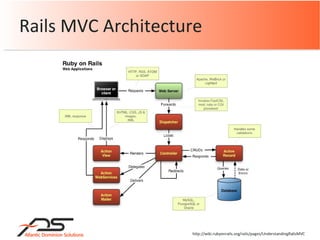
Rails MVC Architecture http://wiki.rubyonrails.org/rails/pages/UnderstandingRailsMVC
Rails MVC Overview http://betterexplained.com/articles/intermediate-rails-understanding-models-views-and-controllers/
 
Where the cloud comes in http://betterexplained.com/articles/intermediate-rails-understanding-models-views-and-controllers/
I want to… Not have to buy anything Not have to think about resources Servers Storage Easily scale my application
What is scalability? “…ability to either handle growing amounts of work in a graceful manner, or to be readily enlarged.” “…it can refer to the capability of a system to increase total throughput under an increased load when resources (typically hardware) are added.” http://en.wikipedia.org/wiki/Scalability
Let’s add to that An application and the resources it uses grow as demand increases.
What I need… Servers Storage Access to other utilities Do it all without buying anything upfront Do it all with Ruby The cloud!
Clusters High-availability (HA) Load-balancing (LB) Grids Life Before The Cloud
High-availability cluster
Load balancing cluster
Grid
You can’t buy it on your personal credit card They are trying to sell you hardware There is no API You need to rearchitect your systems for it It takes more than 10 minutes to provision You need to specify the number of machines you want upfront You own all the hardware It’s not a cloud if… http://www.redmonk.com/jgovernor/2008/03/13/15-ways-to-tell-its-not-cloud-computing/
Compute resources packaged as a utility Can use clusters and grids Pay-as-you-go model Examples Amazon Web Services - EC2, S3 HP Utility Computing Services Sun Microsystems’ Network.com Utility computing
Cloud computing, defined http://www.infoworld.com/article/08/04/07/15FE-cloud-computing-reality_1.html “ A way to increase capacity or add capabilities on the fly without investing in new infrastructure, training new personnel, or licensing new software.” - InfoWorld, April 2008
The cloud is all encompassing SaaS Utility computing Web services in the cloud Platform as a services (PaaS) Managed service providers (MSP) Service commerce platforms Internet integration
Why is this important? "By 2011, early technology adopters will forgo capital expenditures and instead purchase 40 percent of their IT infrastructure as a service. Increased high-speed bandwidth makes it practical to locate infrastructure at other sites and still receive the same response times. Enterprises believe that as service-oriented architecture (SOA) becomes common, 'cloud computing' will take off, thus untying applications from specific infrastructure.” - Gartner Group
No hardware to buy No infrastructure to support Add capability with minimal coding Advantages
Options and Pricing Standard EC2 Deployment Recommendations Code Wrap-up Agenda
Amazon Web Services Mor.ph RightScale Heroku Joyent Accelerator Vertebra – Engine Yard (Coming Soon) What do we have to work with?
PoolParty Scalr ElasticRails WeoCEO DIY Clouds
Amazon EC2 $0.10 - $0.80 / compute hour + transfer costs Amazon S3 $0.15 / GB + transfer costs Amazon SQS $0.01 / 10K requests + transfer costs Amazon SimpleDB $0.14 / machine hour + $1.50/GB/month storage + transfer costs Amazon Web Services
Pros Pay-as-you-go Use one or many No infrastructure purchases Third-party service providers Cons Need to build reliability yourself Configuration overhead with EC2 Amazon Web Services
Morph
Pros Pay-as-you-go 10 minutes sign-up to launch, near 0 configuration One click scaling Fully managed and backed-up, HW load balancing Migrations run on deploy Cons No SSH or file-level access Morph
RightSite $2500 setup and $500/month RightGrid $2500 setup and $500/month RightScale Premium $2500 setup and $750/month AWS fees RightScale
Pros Multitude of configuration options Scale-on-demand capability One-click multi-server deployments Manage everything AWS from single interface Cons Expensive A lot of up-front configuration RightScale
Free (for now) Later Based on “work” Ask them ;) Heroku
Pros Do everything via the browser Automatic scaling Work locally then deploy Cons Heroku.com domain name Choices are made for you Heroku
½ GiB $75/month 1/8 CPU, 512 MB RAM, 10 GB storage  1 GB $125/month ½ CPU, 1 GB RAM, 15 GB storage 2 GB $250/month 1 CPU, 2 GB RAM, 25GB storage Joyent Accelerator
Pros Pay-as-you-go Solid hardware ZFS = scalable storage Cons Call in to scale your app OpenSolaris is fun Not really cloud computing Joyent Accelerator
Free (Ruby gem) + AWS PoolParty
Pros Easy configuration and deployment Highly configurable EC2 instances Cons Lacking documentation Supports only Ubuntu EC2 AMIs Not production ready (June 20) PoolParty
Free (Google code) + AWS $50/month + AWS Scalr
Pros Free for base code Configurable auto-scaling of everything Configurable automatic db backups Cons Have to use their base AMI Scalr
Free Community Edition + AWS $10/month Personal Edition + AWS ElasticRails
Pros Save VM for a virtual environment (VMware) Build a custom bundle and deploy to EC2 GUI management console Cons Elastic server = application stack Community edition = non-commercial use Rails 2.0.2 is the latest ElasticRails
Free + AWS WeoCEO
Pros Automatic load balancing Automatic scaling Set min and max servers Cons Command-line setup No specific documentation on using Rails WeoCEO
Options and Pricing Standard EC2 Deployment Recommendations Code Wrap-up Agenda
Standard EC2 Deploy
Standard EC2 Deploy Small instance: $2.40/day 2 x LB $144  2 x HTTP $144  2 x DB $144  Total $432/month
Options and Pricing Standard EC2 Deployment Recommendations Code Wrap-up Agenda
Developer or sys admin? Pay for it… Morph Scalr RightScale Recommendations
Options and Pricing Standard EC2 Deployment Recommendations Code Books Articles Gems Plugins Code Wrap-up Agenda
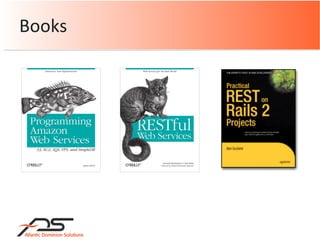
Books
AWS Articles Introduction to AWS for Ruby Developers Economical Use of Amazon S3 with Ruby on Rails Using Amazon S3, EC2, SQS, Lucene, and Ruby for Web Spidering Sample Applications in Ruby for Amazon FPS
Gems right_aws EC2, S3, SQS, SimpleDB  right_http_connection remit poolparty
Plugins S3 paperclip attachment_fu backup_fu SimpleDB AWS SDB Proxy SQS ActiveMessaging
S3: Using Paperclip right_aws right_http_connection Gems to use
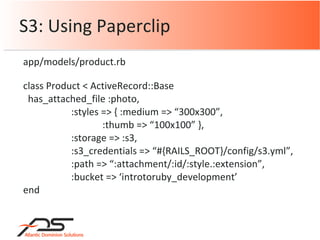
S3: Using Paperclip class Product < ActiveRecord::Base has_attached_file :photo, :styles => { :medium => “300x300”, :thumb => “100x100” }, :storage => :s3, :s3_credentials => “#{RAILS_ROOT}/config/s3.yml”, :path => “:attachment/:id/:style.:extension”, :bucket => ‘introtoruby_development’ end app/models/product.rb
SQS sqs Gems to use
SQS Require ‘rubygems’ Require ‘sqs’ SQS.access_key_id = ‘YOUR_ACCESS_KEY_ID’ SQS.secret_access_key = ‘YOUR_SECRET_ACCESS_KEY’ config/environment.rb
SQS # Get an SQS queue q = SQS.get_queue ”my_sqs_queue_name” # Send a message made up of the job id q.send_message “#{self.id}” # Grab a job from the queue message = queue.receive_message # Delete the job from the queue message.delete app/models/job.rb
SQS: right_aws gem # Create a queue  sqs = RightAws::SqsGen2.new(aws_access_key_id,  aws_secret_access_key) queue1 = sqs.queue('my_awesome_queue') # Create a second queue queue2 = RightAws::SqsGen2::Queue.create(sqs,  ‘ my_cool_queue’, true) puts queue2.size Gems used: right_aws, right_http_connection
SQS: right_aws gem # Pull a message from the queue and make it invisible message1 = queue2.receive message1.visibility = 0 puts message1 # Clear the queue, add a message, delete first accessible msg queue2.clear(true) queue2.send_message(‘Ola-la!’) message2 = queue2.pop
SimpleDB: right_aws gem # Create an instance of the SDB interface sdb = RightAws::SdbInterface.new( :server  => ‘sdb.amazonaws.com’ :port  => 443 :protocol  => ‘https’ :signature_version => '0’ :multi_thread => true|false :logger  => Logger Object) Gems used: right_aws, right_http_connection
SimpleDB: right_aws gem # Create a new domain sdb.create_domain(‘toys’) # Delete a domain Sdb.delete_domain(‘toys’) # Create and save attributes for Jon and Silvia attributes = {} attributes['Jon']  = %w{ car beer } attributes['Silvia'] = %w{ beetle rolling_pin kids } sdb.put_attributes ‘family’, ‘toys’
SimpleDB: right_aws gem # Get attributes sdb.get_attributes(‘family’, ‘toys’) # Get attributes only for cat sdb.get_attributes(‘family’, ‘toys’, ‘cat’) # Query query = ”[‘cat’ = ‘claw’]” sdb.query(‘family’, query) # Query returning 10 items sdb.query(‘family’, query, 10)
Options and Pricing Standard EC2 Deployment Recommendations Code Wrap-up Agenda
 
THANK YOU
Questions? ADS    http ://www.techcfl.com Blog    http://rorblog.techcfl.com Twitter  http://www.twitter.com/rdempsey LinkedIn  http://www.linkedin.com/in/techcfl

The Future is Now: Leveraging the Cloud with Ruby

  • 1.
  • 2.
    The Future isNow Leveraging the Cloud with Ruby Robert Dempsey Atlantic Dominion Solutions
  • 3.
    CEO, Atlantic DominionSolutions Founder, Rails For All Chair, acts_as_conference Co-chair, doterati Membership BA, Computer Science, Rollins MBA Candidate 2009 CSM in-training Robert Dempsey
  • 4.
  • 5.
  • 6.
    If I hearthis one more time… Rails can’t scale
  • 7.
    There will betrouble!
  • 8.
    Ruby on Railscan scale… … if you understand how to scale it.
  • 9.
    Rails MVC Architecturehttp://wiki.rubyonrails.org/rails/pages/UnderstandingRailsMVC
  • 10.
    Rails MVC Overviewhttp://betterexplained.com/articles/intermediate-rails-understanding-models-views-and-controllers/
  • 11.
  • 12.
    Where the cloudcomes in http://betterexplained.com/articles/intermediate-rails-understanding-models-views-and-controllers/
  • 13.
    I want to…Not have to buy anything Not have to think about resources Servers Storage Easily scale my application
  • 14.
    What is scalability?“…ability to either handle growing amounts of work in a graceful manner, or to be readily enlarged.” “…it can refer to the capability of a system to increase total throughput under an increased load when resources (typically hardware) are added.” http://en.wikipedia.org/wiki/Scalability
  • 15.
    Let’s add tothat An application and the resources it uses grow as demand increases.
  • 16.
    What I need…Servers Storage Access to other utilities Do it all without buying anything upfront Do it all with Ruby The cloud!
  • 17.
    Clusters High-availability (HA)Load-balancing (LB) Grids Life Before The Cloud
  • 18.
  • 19.
  • 20.
  • 21.
    You can’t buyit on your personal credit card They are trying to sell you hardware There is no API You need to rearchitect your systems for it It takes more than 10 minutes to provision You need to specify the number of machines you want upfront You own all the hardware It’s not a cloud if… http://www.redmonk.com/jgovernor/2008/03/13/15-ways-to-tell-its-not-cloud-computing/
  • 22.
    Compute resources packagedas a utility Can use clusters and grids Pay-as-you-go model Examples Amazon Web Services - EC2, S3 HP Utility Computing Services Sun Microsystems’ Network.com Utility computing
  • 23.
    Cloud computing, definedhttp://www.infoworld.com/article/08/04/07/15FE-cloud-computing-reality_1.html “ A way to increase capacity or add capabilities on the fly without investing in new infrastructure, training new personnel, or licensing new software.” - InfoWorld, April 2008
  • 24.
    The cloud isall encompassing SaaS Utility computing Web services in the cloud Platform as a services (PaaS) Managed service providers (MSP) Service commerce platforms Internet integration
  • 25.
    Why is thisimportant? &quot;By 2011, early technology adopters will forgo capital expenditures and instead purchase 40 percent of their IT infrastructure as a service. Increased high-speed bandwidth makes it practical to locate infrastructure at other sites and still receive the same response times. Enterprises believe that as service-oriented architecture (SOA) becomes common, 'cloud computing' will take off, thus untying applications from specific infrastructure.” - Gartner Group
  • 26.
    No hardware tobuy No infrastructure to support Add capability with minimal coding Advantages
  • 27.
    Options and PricingStandard EC2 Deployment Recommendations Code Wrap-up Agenda
  • 28.
    Amazon Web ServicesMor.ph RightScale Heroku Joyent Accelerator Vertebra – Engine Yard (Coming Soon) What do we have to work with?
  • 29.
  • 30.
    Amazon EC2 $0.10- $0.80 / compute hour + transfer costs Amazon S3 $0.15 / GB + transfer costs Amazon SQS $0.01 / 10K requests + transfer costs Amazon SimpleDB $0.14 / machine hour + $1.50/GB/month storage + transfer costs Amazon Web Services
  • 31.
    Pros Pay-as-you-go Useone or many No infrastructure purchases Third-party service providers Cons Need to build reliability yourself Configuration overhead with EC2 Amazon Web Services
  • 32.
  • 33.
    Pros Pay-as-you-go 10minutes sign-up to launch, near 0 configuration One click scaling Fully managed and backed-up, HW load balancing Migrations run on deploy Cons No SSH or file-level access Morph
  • 34.
    RightSite $2500 setupand $500/month RightGrid $2500 setup and $500/month RightScale Premium $2500 setup and $750/month AWS fees RightScale
  • 35.
    Pros Multitude ofconfiguration options Scale-on-demand capability One-click multi-server deployments Manage everything AWS from single interface Cons Expensive A lot of up-front configuration RightScale
  • 36.
    Free (for now)Later Based on “work” Ask them ;) Heroku
  • 37.
    Pros Do everythingvia the browser Automatic scaling Work locally then deploy Cons Heroku.com domain name Choices are made for you Heroku
  • 38.
    ½ GiB $75/month1/8 CPU, 512 MB RAM, 10 GB storage 1 GB $125/month ½ CPU, 1 GB RAM, 15 GB storage 2 GB $250/month 1 CPU, 2 GB RAM, 25GB storage Joyent Accelerator
  • 39.
    Pros Pay-as-you-go Solidhardware ZFS = scalable storage Cons Call in to scale your app OpenSolaris is fun Not really cloud computing Joyent Accelerator
  • 40.
    Free (Ruby gem)+ AWS PoolParty
  • 41.
    Pros Easy configurationand deployment Highly configurable EC2 instances Cons Lacking documentation Supports only Ubuntu EC2 AMIs Not production ready (June 20) PoolParty
  • 42.
    Free (Google code)+ AWS $50/month + AWS Scalr
  • 43.
    Pros Free forbase code Configurable auto-scaling of everything Configurable automatic db backups Cons Have to use their base AMI Scalr
  • 44.
    Free Community Edition+ AWS $10/month Personal Edition + AWS ElasticRails
  • 45.
    Pros Save VMfor a virtual environment (VMware) Build a custom bundle and deploy to EC2 GUI management console Cons Elastic server = application stack Community edition = non-commercial use Rails 2.0.2 is the latest ElasticRails
  • 46.
    Free + AWSWeoCEO
  • 47.
    Pros Automatic loadbalancing Automatic scaling Set min and max servers Cons Command-line setup No specific documentation on using Rails WeoCEO
  • 48.
    Options and PricingStandard EC2 Deployment Recommendations Code Wrap-up Agenda
  • 49.
  • 50.
    Standard EC2 DeploySmall instance: $2.40/day 2 x LB $144 2 x HTTP $144 2 x DB $144 Total $432/month
  • 51.
    Options and PricingStandard EC2 Deployment Recommendations Code Wrap-up Agenda
  • 52.
    Developer or sysadmin? Pay for it… Morph Scalr RightScale Recommendations
  • 53.
    Options and PricingStandard EC2 Deployment Recommendations Code Books Articles Gems Plugins Code Wrap-up Agenda
  • 54.
  • 55.
    AWS Articles Introductionto AWS for Ruby Developers Economical Use of Amazon S3 with Ruby on Rails Using Amazon S3, EC2, SQS, Lucene, and Ruby for Web Spidering Sample Applications in Ruby for Amazon FPS
  • 56.
    Gems right_aws EC2,S3, SQS, SimpleDB right_http_connection remit poolparty
  • 57.
    Plugins S3 paperclipattachment_fu backup_fu SimpleDB AWS SDB Proxy SQS ActiveMessaging
  • 58.
    S3: Using Paperclipright_aws right_http_connection Gems to use
  • 59.
    S3: Using Paperclipclass Product < ActiveRecord::Base has_attached_file :photo, :styles => { :medium => “300x300”, :thumb => “100x100” }, :storage => :s3, :s3_credentials => “#{RAILS_ROOT}/config/s3.yml”, :path => “:attachment/:id/:style.:extension”, :bucket => ‘introtoruby_development’ end app/models/product.rb
  • 60.
  • 61.
    SQS Require ‘rubygems’Require ‘sqs’ SQS.access_key_id = ‘YOUR_ACCESS_KEY_ID’ SQS.secret_access_key = ‘YOUR_SECRET_ACCESS_KEY’ config/environment.rb
  • 62.
    SQS # Getan SQS queue q = SQS.get_queue ”my_sqs_queue_name” # Send a message made up of the job id q.send_message “#{self.id}” # Grab a job from the queue message = queue.receive_message # Delete the job from the queue message.delete app/models/job.rb
  • 63.
    SQS: right_aws gem# Create a queue sqs = RightAws::SqsGen2.new(aws_access_key_id, aws_secret_access_key) queue1 = sqs.queue('my_awesome_queue') # Create a second queue queue2 = RightAws::SqsGen2::Queue.create(sqs, ‘ my_cool_queue’, true) puts queue2.size Gems used: right_aws, right_http_connection
  • 64.
    SQS: right_aws gem# Pull a message from the queue and make it invisible message1 = queue2.receive message1.visibility = 0 puts message1 # Clear the queue, add a message, delete first accessible msg queue2.clear(true) queue2.send_message(‘Ola-la!’) message2 = queue2.pop
  • 65.
    SimpleDB: right_aws gem# Create an instance of the SDB interface sdb = RightAws::SdbInterface.new( :server => ‘sdb.amazonaws.com’ :port => 443 :protocol => ‘https’ :signature_version => '0’ :multi_thread => true|false :logger => Logger Object) Gems used: right_aws, right_http_connection
  • 66.
    SimpleDB: right_aws gem# Create a new domain sdb.create_domain(‘toys’) # Delete a domain Sdb.delete_domain(‘toys’) # Create and save attributes for Jon and Silvia attributes = {} attributes['Jon'] = %w{ car beer } attributes['Silvia'] = %w{ beetle rolling_pin kids } sdb.put_attributes ‘family’, ‘toys’
  • 67.
    SimpleDB: right_aws gem# Get attributes sdb.get_attributes(‘family’, ‘toys’) # Get attributes only for cat sdb.get_attributes(‘family’, ‘toys’, ‘cat’) # Query query = ”[‘cat’ = ‘claw’]” sdb.query(‘family’, query) # Query returning 10 items sdb.query(‘family’, query, 10)
  • 68.
    Options and PricingStandard EC2 Deployment Recommendations Code Wrap-up Agenda
  • 69.
  • 70.
  • 71.
    Questions? ADS http ://www.techcfl.com Blog http://rorblog.techcfl.com Twitter http://www.twitter.com/rdempsey LinkedIn http://www.linkedin.com/in/techcfl