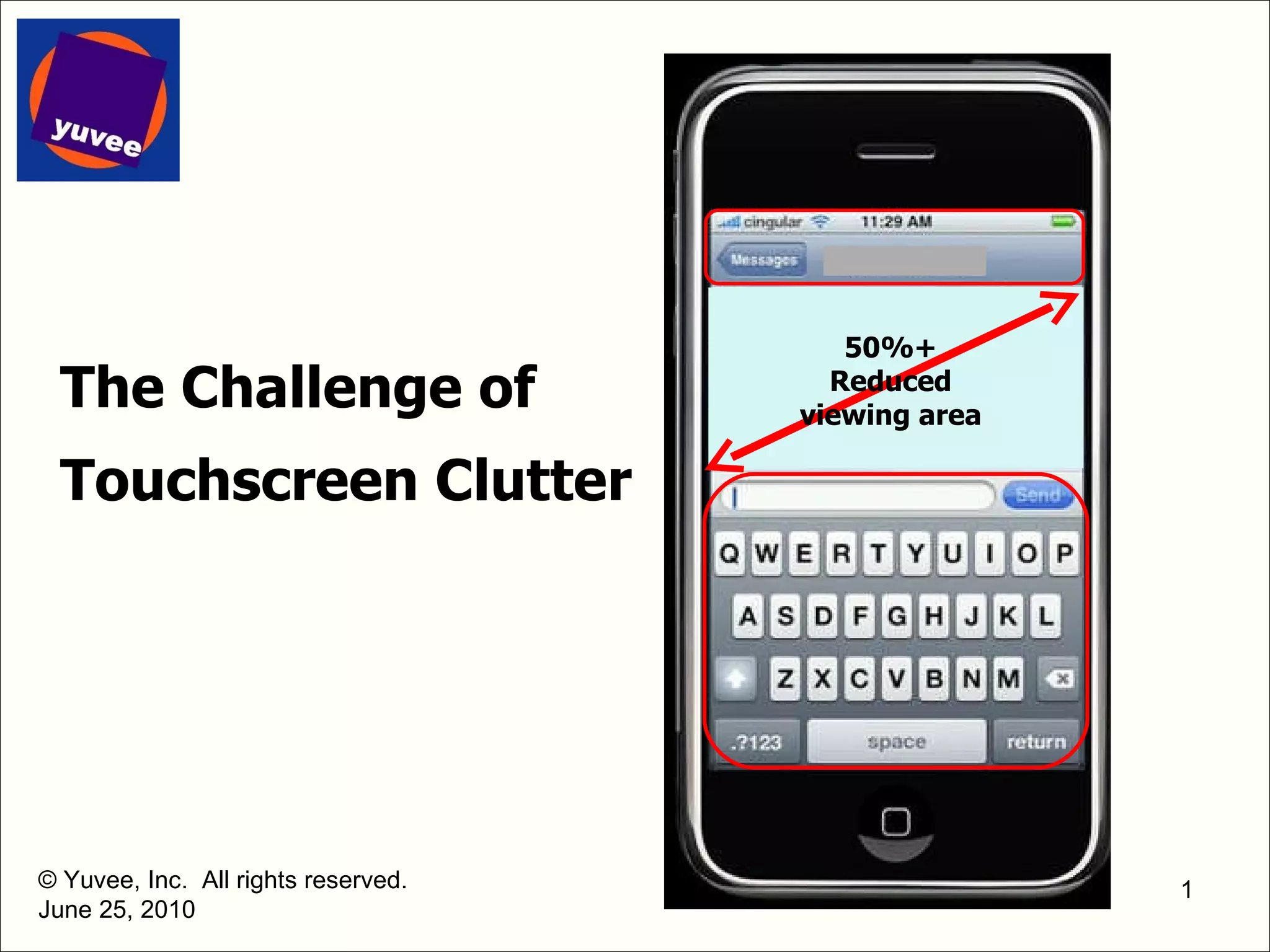
The Challenge of Touchscreen Clutter © Yuvee, Inc.  All rights reserved. June 25, 2010 50%+ Reduced viewing area
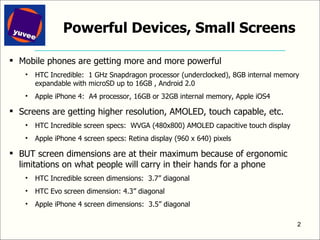
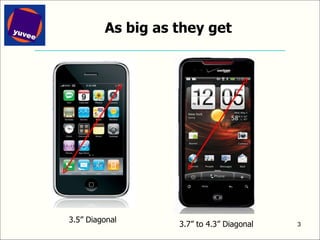
Powerful Devices, Small Screens Mobile phones are getting more and more powerful HTC Incredible:  1 GHz Snapdragon processor (underclocked), 8GB internal memory expandable with microSD up to 16GB , Android 2.0 Apple iPhone 4:  A4 processor, 16GB or 32GB internal memory, Apple iOS4 Screens are getting higher resolution, AMOLED, touch capable, etc. HTC Incredible screen specs:  WVGA (480x800) AMOLED capacitive touch display Apple iPhone 4 screen specs: Retina display (960 x 640) pixels BUT screen dimensions are at their maximum because of ergonomic limitations on what people will carry in their hands for a phone  HTC Incredible screen dimensions:  3.7” diagonal HTC Evo screen dimension: 4.3” diagonal Apple iPhone 4 screen dimensions:  3.5” diagonal
As big as they get 3.5” Diagonal 3.7” to 4.3” Diagonal
Why the Physical Dimensions of Mobile Displays are as Big as They Can Be Mobile screen dimensions are at their maximum size, but  not  because of technical constraints larger screens are clearly technically possible, from tablet-size to large-format TV size Mobile screen dimensions are at their max because of ergonomics and user preferences for their mobile devices need to fit comfortably and with stability in the hand  need to weigh very little need to fit in a pocket
More and More Goes on These Small Screens Icons  (everything gets an icon: apps, websites, camera, system tools, etc) HTC Incredible:  Up to at least 24 icons per screen  Apple iPhone 4:  Up to 20 icons per screen Social Media (Facebook, Foursquare, etc) App content (game graphics, augmented reality, docs, email, …) Web and Media content (photos, movies/video, tv, web pages, etc) App and Device Controls QWERTY keyboard for text entry Tel keypad and other tel controls for telephone mode Still and video camera controls Browser commands for browser app App commands for applications (instead of pull-down menus)
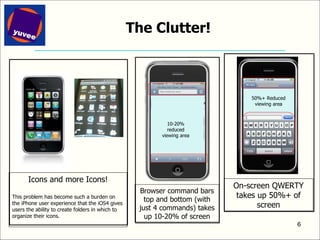
The Clutter! Icons and more Icons! This problem has become such a burden on the iPhone user experience that the iOS4 gives users the ability to create folders in which to organize their icons. On-screen QWERTY takes up 50%+ of screen Browser command bars top and bottom (with just 4 commands) takes up 10-20% of screen 10-20% reduced viewing area 50%+ Reduced viewing area
Demands on Screen Space Threaten the Beauty and Ease of Use of Touchscreen Mobile Devices Too much information and too much overlapping information creates a bad user experience Causes user confusion and inhibits user Clutter and disorganization Value and impact of “eyeball” content is reduced and overlaid with app controls Forces app developers to dumb down their app offerings When app commands and app graphics/media vie for the same space, the app commands must be simplified/reduced App developers cannot put immersive and sophisticated apps on the market successfully when complex commands in an app cannot be presented and accessed in an organized and compartmentalized way (such as pull-down menus) that is easily understood by users
That’s the Problem, What’s the Solution? If small screens cannot get  physically  bigger, what can be done to make them  virtually  bigger?
The Answer Move non-eyeball critical information off the screen: Making Mobile Screens  Big   via the NeoKeys ®  mixed-media keypad
Eyeball-critical Information Eyeball critical information App media and graphics Photos and videos Camera view(s) Web pages Non-eyeball critical information App commands and app command bars Text entry keyboards (QWERTY etc) Even, dare we say it … icons
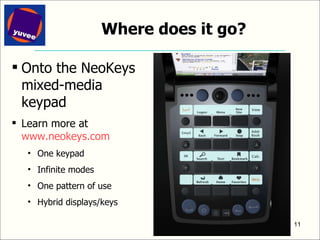
Where does it go? Onto the NeoKeys mixed-media keypad Learn more at  www.neokeys.com One keypad Infinite modes One pattern of use Hybrid displays/keys
Is there a choice? No. As icons proliferate and as users demand more sophisticated apps, moving non-critical eyeball information to a physical keypad is the only viable solution
What about voice commands, etc? Voice commands, haptics, advanced graphical UI will all be a piece of the puzzle They are essentially added complexity to solve an inherent underlying problem, and only have limited utility for numerous reasons. Essentially they are all analogous to predictive text entry software – it can be added to any system, and it provides some help to some people, but in the end it is trying to solve the underlying problem of difficult small keys without really addressing the problem of difficult small keys but instead by adding another layer of technology to partially accommodate for the underlying problem.
Voice commands - More Voice commands are a great example of a promising technology that will become integrated into most mobile devices but that has limited utility Why does it have limited utility? As mobile apps proliferate, and users switch among them, it will be very difficult for users to remember all but a very limited subset of commands for a small number of apps (think how hard it is to remember the commands for voicemail alone) Many mobile contexts do not permit users to give voice commands to their phones (conference rooms, subways, airplanes, restaurants) Many users prefer not to talk on their phones even when they can (eg, people texting to keep a conversation private, such as kids in the backseat of a car, people in subways and trains, etc) Users will feel and look utterly ridiculous dictating commands into their phones when other people are nearby
The Future for Big Mobile Screens:  Multimedia Keypads As icons proliferate and as users demand more sophisticated apps, moving non-critical eyeball information to a mixed-media keypad is the only viable solution Mixed media keypads create the single best next generation mobile user experience very easily and very intuitively for users and app developers across all features, apps and services along with entirely new business and revenue models and entirely new forms of user experience
Related white papers Related “White Paper” Slide Decks The Non-Subscriber Revenue Imperative – ROI on Telecoms CapEx Richness+Simplicity:  The Holy Grail of Mobile UI Yuvee - Mobile User Experience Conference – UX Designers Den Slides Monetizing the Keypad Real Estate on Mobile Devices The Changing Face of User Input on Mobile Devices Compound versus Elemental Devices – New Mobile Device Market Strategies The Incredible Shrinking Search Results Page Dynamic Keypads: Terminology Download these from Links from the “info room” page at  www.yuvee.com/prWhitePapers.php   www.slideshare.net  and  www.scribd.com   Tim Higginson’s profile on  www.linkedin.com   Find them using a Google, Bing or other search
Yuvee develops and licenses advanced user interfaces and related whole device designs for mobile and converged contexts that make the next generation mobile and converged lifestyle effortless and immersive, including the mobile Web and apps provides advisory services in multiple areas relating to mobile and converged devices including differentiated, physical and graphical user interface design mobile and converged device design innovation management processes (“IMP”) optimization Contact Tim Higginson at (847) 962-1623 or info@yuvee.com www.yuvee.com   June 25, 2010 © Yuvee, Inc.  All rights reserved.  Patents issued and pending – see lists at www.yuvee.com. Yuvee and NeoKeys are trademarks of Yuvee, Inc.  Other trademarks are the property of their respective owners. About Yuvee

The challenge of touchscreen clutter 6.25.2010

  • 1.
    The Challenge ofTouchscreen Clutter © Yuvee, Inc. All rights reserved. June 25, 2010 50%+ Reduced viewing area
  • 2.
    Powerful Devices, SmallScreens Mobile phones are getting more and more powerful HTC Incredible: 1 GHz Snapdragon processor (underclocked), 8GB internal memory expandable with microSD up to 16GB , Android 2.0 Apple iPhone 4: A4 processor, 16GB or 32GB internal memory, Apple iOS4 Screens are getting higher resolution, AMOLED, touch capable, etc. HTC Incredible screen specs: WVGA (480x800) AMOLED capacitive touch display Apple iPhone 4 screen specs: Retina display (960 x 640) pixels BUT screen dimensions are at their maximum because of ergonomic limitations on what people will carry in their hands for a phone HTC Incredible screen dimensions: 3.7” diagonal HTC Evo screen dimension: 4.3” diagonal Apple iPhone 4 screen dimensions: 3.5” diagonal
  • 3.
    As big asthey get 3.5” Diagonal 3.7” to 4.3” Diagonal
  • 4.
    Why the PhysicalDimensions of Mobile Displays are as Big as They Can Be Mobile screen dimensions are at their maximum size, but not because of technical constraints larger screens are clearly technically possible, from tablet-size to large-format TV size Mobile screen dimensions are at their max because of ergonomics and user preferences for their mobile devices need to fit comfortably and with stability in the hand need to weigh very little need to fit in a pocket
  • 5.
    More and MoreGoes on These Small Screens Icons (everything gets an icon: apps, websites, camera, system tools, etc) HTC Incredible: Up to at least 24 icons per screen Apple iPhone 4: Up to 20 icons per screen Social Media (Facebook, Foursquare, etc) App content (game graphics, augmented reality, docs, email, …) Web and Media content (photos, movies/video, tv, web pages, etc) App and Device Controls QWERTY keyboard for text entry Tel keypad and other tel controls for telephone mode Still and video camera controls Browser commands for browser app App commands for applications (instead of pull-down menus)
  • 6.
    The Clutter! Iconsand more Icons! This problem has become such a burden on the iPhone user experience that the iOS4 gives users the ability to create folders in which to organize their icons. On-screen QWERTY takes up 50%+ of screen Browser command bars top and bottom (with just 4 commands) takes up 10-20% of screen 10-20% reduced viewing area 50%+ Reduced viewing area
  • 7.
    Demands on ScreenSpace Threaten the Beauty and Ease of Use of Touchscreen Mobile Devices Too much information and too much overlapping information creates a bad user experience Causes user confusion and inhibits user Clutter and disorganization Value and impact of “eyeball” content is reduced and overlaid with app controls Forces app developers to dumb down their app offerings When app commands and app graphics/media vie for the same space, the app commands must be simplified/reduced App developers cannot put immersive and sophisticated apps on the market successfully when complex commands in an app cannot be presented and accessed in an organized and compartmentalized way (such as pull-down menus) that is easily understood by users
  • 8.
    That’s the Problem,What’s the Solution? If small screens cannot get physically bigger, what can be done to make them virtually bigger?
  • 9.
    The Answer Movenon-eyeball critical information off the screen: Making Mobile Screens Big via the NeoKeys ® mixed-media keypad
  • 10.
    Eyeball-critical Information Eyeballcritical information App media and graphics Photos and videos Camera view(s) Web pages Non-eyeball critical information App commands and app command bars Text entry keyboards (QWERTY etc) Even, dare we say it … icons
  • 11.
    Where does itgo? Onto the NeoKeys mixed-media keypad Learn more at www.neokeys.com One keypad Infinite modes One pattern of use Hybrid displays/keys
  • 12.
    Is there achoice? No. As icons proliferate and as users demand more sophisticated apps, moving non-critical eyeball information to a physical keypad is the only viable solution
  • 13.
    What about voicecommands, etc? Voice commands, haptics, advanced graphical UI will all be a piece of the puzzle They are essentially added complexity to solve an inherent underlying problem, and only have limited utility for numerous reasons. Essentially they are all analogous to predictive text entry software – it can be added to any system, and it provides some help to some people, but in the end it is trying to solve the underlying problem of difficult small keys without really addressing the problem of difficult small keys but instead by adding another layer of technology to partially accommodate for the underlying problem.
  • 14.
    Voice commands -More Voice commands are a great example of a promising technology that will become integrated into most mobile devices but that has limited utility Why does it have limited utility? As mobile apps proliferate, and users switch among them, it will be very difficult for users to remember all but a very limited subset of commands for a small number of apps (think how hard it is to remember the commands for voicemail alone) Many mobile contexts do not permit users to give voice commands to their phones (conference rooms, subways, airplanes, restaurants) Many users prefer not to talk on their phones even when they can (eg, people texting to keep a conversation private, such as kids in the backseat of a car, people in subways and trains, etc) Users will feel and look utterly ridiculous dictating commands into their phones when other people are nearby
  • 15.
    The Future forBig Mobile Screens: Multimedia Keypads As icons proliferate and as users demand more sophisticated apps, moving non-critical eyeball information to a mixed-media keypad is the only viable solution Mixed media keypads create the single best next generation mobile user experience very easily and very intuitively for users and app developers across all features, apps and services along with entirely new business and revenue models and entirely new forms of user experience
  • 16.
    Related white papersRelated “White Paper” Slide Decks The Non-Subscriber Revenue Imperative – ROI on Telecoms CapEx Richness+Simplicity: The Holy Grail of Mobile UI Yuvee - Mobile User Experience Conference – UX Designers Den Slides Monetizing the Keypad Real Estate on Mobile Devices The Changing Face of User Input on Mobile Devices Compound versus Elemental Devices – New Mobile Device Market Strategies The Incredible Shrinking Search Results Page Dynamic Keypads: Terminology Download these from Links from the “info room” page at www.yuvee.com/prWhitePapers.php www.slideshare.net and www.scribd.com Tim Higginson’s profile on www.linkedin.com Find them using a Google, Bing or other search
  • 17.
    Yuvee develops andlicenses advanced user interfaces and related whole device designs for mobile and converged contexts that make the next generation mobile and converged lifestyle effortless and immersive, including the mobile Web and apps provides advisory services in multiple areas relating to mobile and converged devices including differentiated, physical and graphical user interface design mobile and converged device design innovation management processes (“IMP”) optimization Contact Tim Higginson at (847) 962-1623 or info@yuvee.com www.yuvee.com June 25, 2010 © Yuvee, Inc. All rights reserved. Patents issued and pending – see lists at www.yuvee.com. Yuvee and NeoKeys are trademarks of Yuvee, Inc. Other trademarks are the property of their respective owners. About Yuvee

Editor's Notes