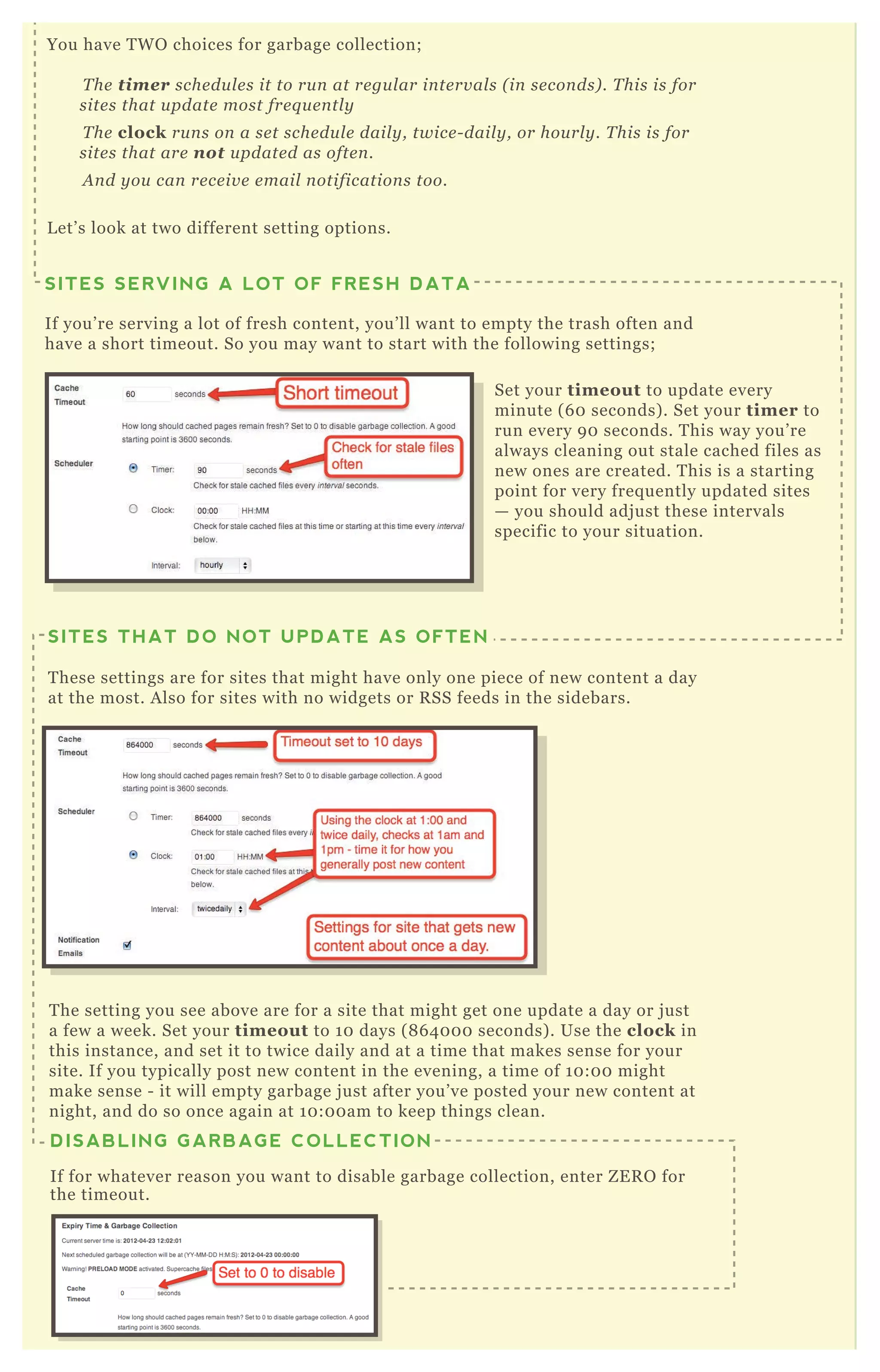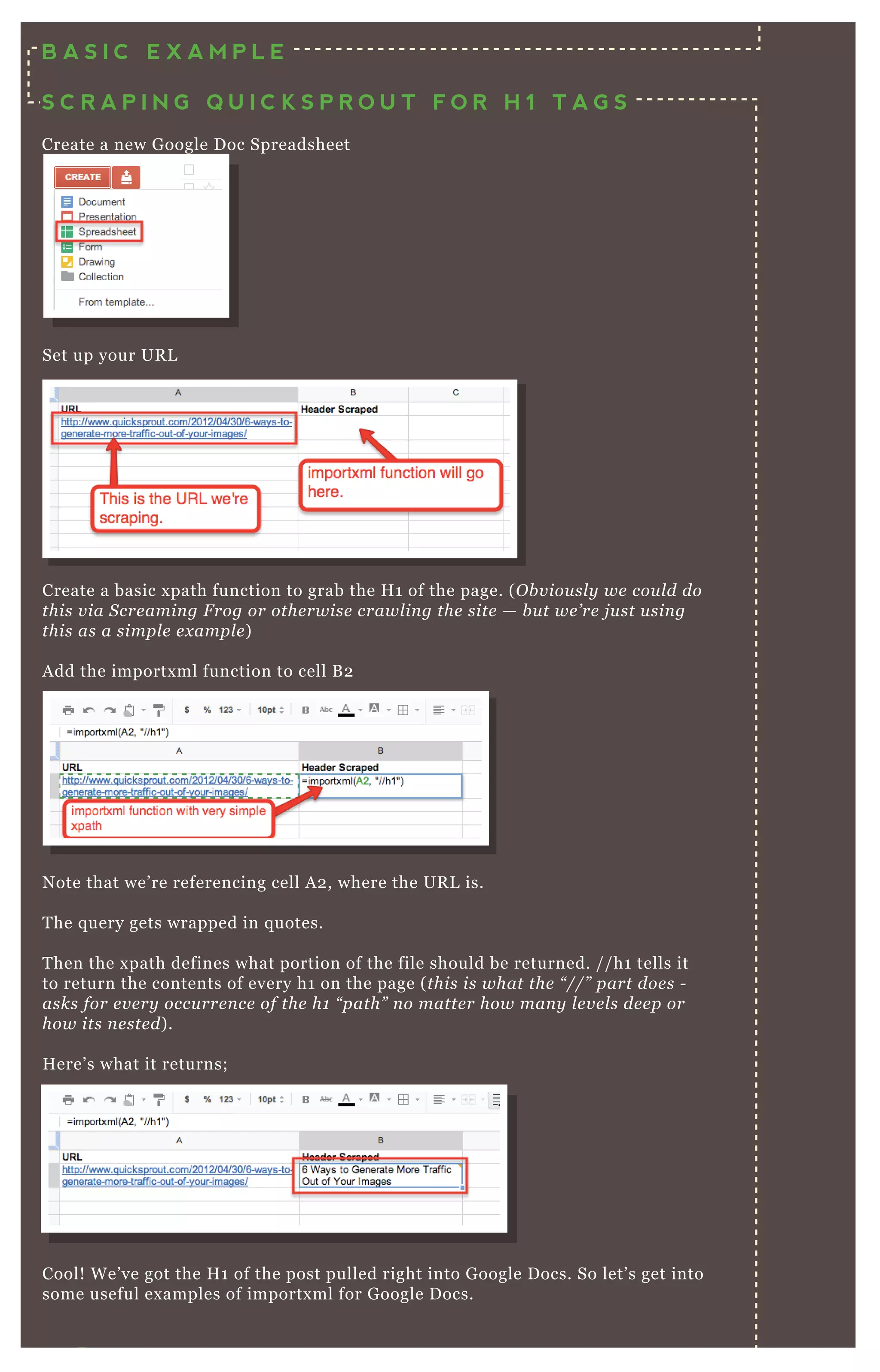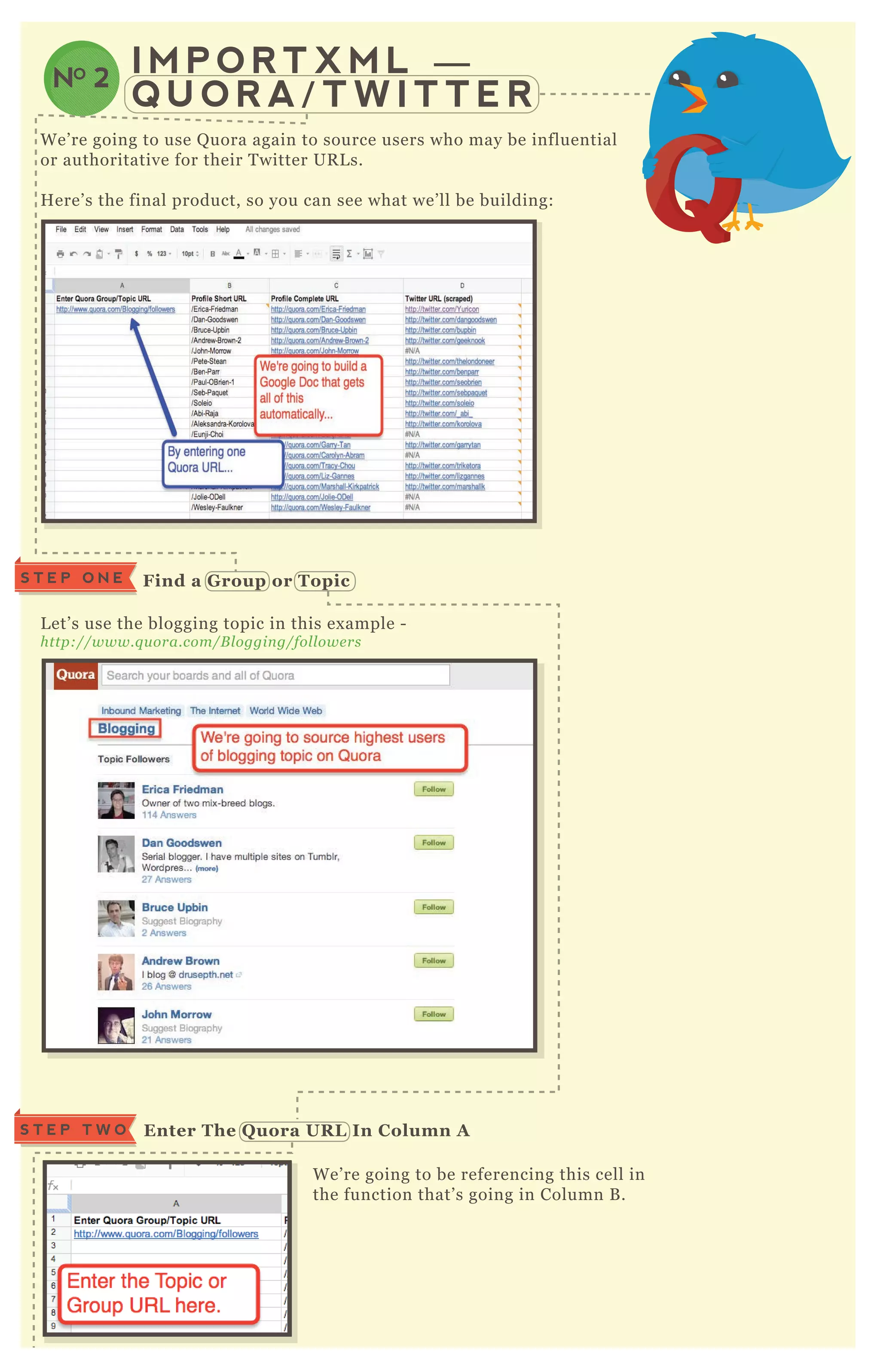

T H E M O S T E X T E N S I V E A N D
D E T A I L E D G U I D E O F A D V A N C E D S E O
T E C H N I Q U E S T H A T E X I S T S T O D A Y
T H E A D V A N C E D
G U I D E T O
T o my readers, I wanted to give you the most ex tensive and
detailed guide of advanced SE O techniq ues that ex ists today.
T his resource is piled to the top with tactile, immediately
actionable things you can do to your website, to improve
rankings, performance and traffic. E verything from schema.org
to mobile search to link building and site speed. I want you to
all be insanely successful and prosperous on the web!
If you’ ve read SE O moz’ s B eginner’ s G uide to SE O and want
more, or you’ ve read my other basic guides to SE O and want
more - this A dvanced G uide T o SE O is for you. If you’ ve
already mastered the basics of SE O like writing title tags, the
basics of link building or data research on the web and want
more - this guide is for you! It’ s for anyone looking to take
their success on the web to the nex t level; bloggers, business
owners, eCommerce and even affiliate marketers. T his guide
provides you with dozens and dozens of things you can sit
down and do right now to improve your traffic from organic
search on the web.
INTRODUCTION
W h y D i d I W r i t e T h i s G u i d e ?
W h o I s T h i s G u i d e F o r ?
I would suggest reading the whole thing! W hile you may not
have to apply every section to your site, you will gain an
understanding of the concepts in each part. SE O can be broken
into pieces, but it definitely fits together as one big picture, you
you’ ll want to read it all.
H o w M u c h O f T h i s
G u i d e S h o u l d I R e a d ?
t
ken
you
BY NEIL PATEL
AND
SUJAN PATEL
SEOSEOSEOSEOSEOSEOSEOSEOSEOSEOSEOSEOSEOSEOSEOSEOSEOSEOSEOSEOSEOSEOSEOSEOSEOSEOSEOSEOSEOSEOSEOSEOSEOSEOSEOSEOSEOSEOSEOSEOSEOSEOSEOSEOSEOSEOSEOSEOSEOSEOSEOSEOSEOSEOSEOSEOSEOSEOSEOSEOSEOSEOSEOSEOSEOSEOSEOSEOSEOSEOSEOSEOSEOSEOSEOSEOSEOSEOSEOSEOSEOSEOSEOSEOSEO
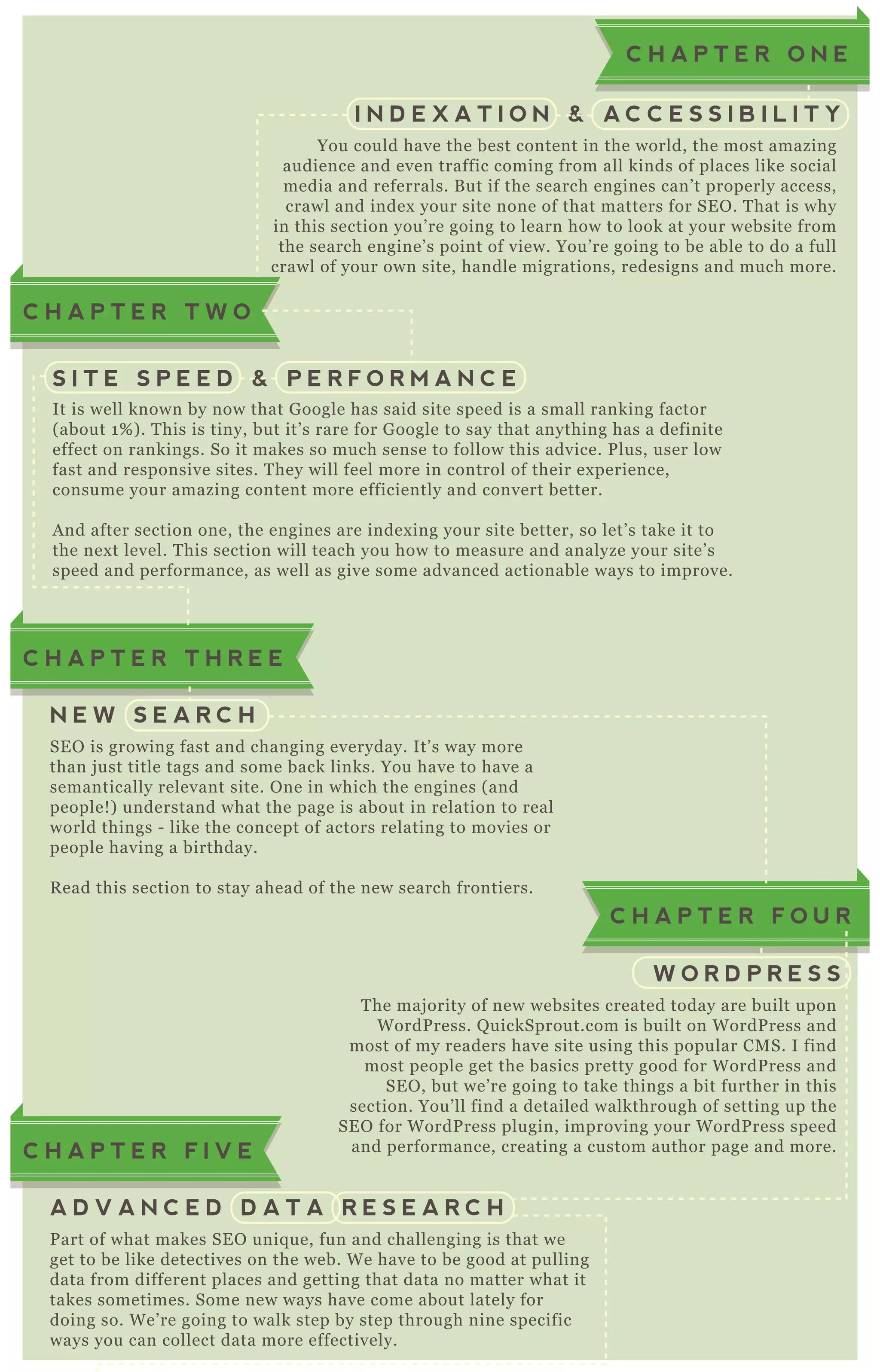
You could have the best content in the world, the most amazing
audience and even traffic coming from all kinds of places like social
media and referrals. B ut if the search engines can’ t properly access,
crawl and index your site none of that matters for SE O . T hat is why
in this section you’ re going to learn how to look at your website from
the search engine’ s point of view. You’ re going to be able to do a full
crawl of your own site, handle migrations, redesigns and much more.
C H A P T E R O N E
I N D E X A T I O N & A C C E S S I B I L I T Y
It is well known by now that G oogle has said site speed is a small ranking factor
( about 1 % ) . T his is tiny, but it’ s rare for G oogle to say that anything has a definite
effect on rankings. So it makes so much sense to follow this advice. P lus, user low
fast and responsive sites. T hey will feel more in control of their ex perience,
consume your amazing content more efficiently and convert better.
A nd after section one, the engines are index ing your site better, so let’ s take it to
the nex t level. T his section will teach you how to measure and analyze your site’ s
speed and performance, as well as give some advanced actionable ways to improve.
S I T E S P E E D & P E R F O R M A N C E
T he maj ority of new websites created today are built upon
W ordP ress. Q uickSprout.com is built on W ordP ress and
most of my readers have site using this popular CM S. I find
most people get the basics pretty good for W ordP ress and
SE O , but we’ re going to take things a bit further in this
section. You’ ll find a detailed walkthrough of setting up the
SE O for W ordP ress plugin, improving your W ordP ress speed
and performance, creating a custom author page and more.
C H A P T E R F O U R
W O R D P R E S S
SE O is growing fast and changing everyday. It’ s way more
than j ust title tags and some back links. You have to have a
semantically relevant site. O ne in which the engines ( and
people! ) understand what the page is about in relation to real
world things - like the concept of actors relating to movies or
people having a birthday.
R ead this section to stay ahead of the new search frontiers.
C H A P T E R T H R E E
C H A P T E R T W O
N E W S E A R C H
P art of what makes SE O uniq ue, fun and challenging is that we
get to be like detectives on the web. W e have to be good at pulling
data from different places and getting that data no matter what it
takes sometimes. Some new ways have come about lately for
doing so. W e’ re going to walk step by step through nine specific
ways you can collect data more effectively.
C H A P T E R F I V E
A D V A N C E D D A T A R E S E A R C H
A lthough panda and penguin make it harder to build links like we used
to, once you have ex ceptional content you still need to employ some
killer techniq ues to get that content out there, get it in front of the eyes
that matter, and get people to link back to that content.
T his section has fifteen in depth and actionable ways you can start
building links to that content immediately. E verything from obtaining a
link worthy domain, to using alerts like IF T T T and more.
C H A P T E R E I G H T
L I N K B U I L D I N G T E C H N I Q U E S
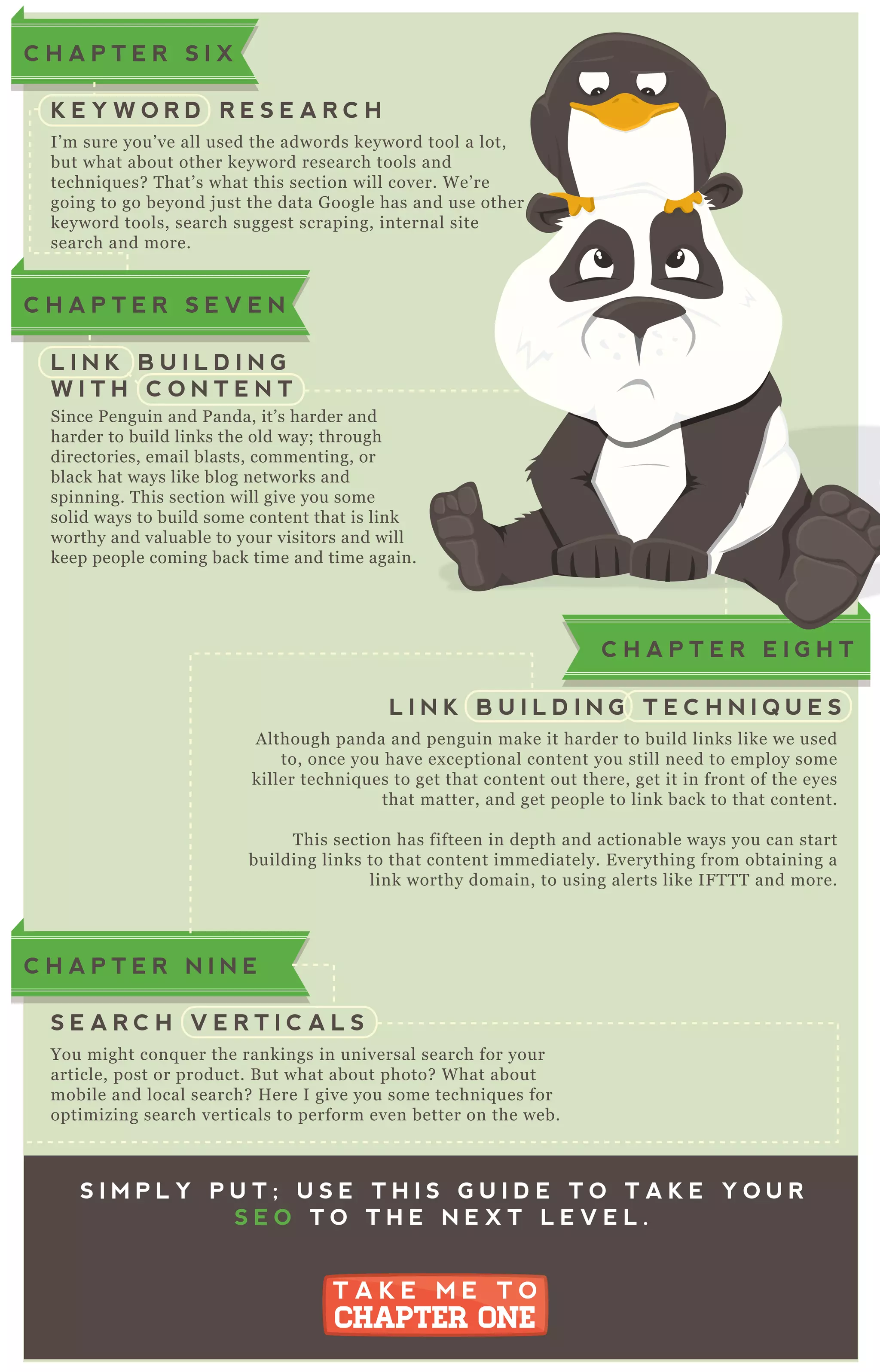
I’ m sure you’ ve all used the adwords keyword tool a lot,
but what about other keyword research tools and
techniq ues? T hat’ s what this section will cover. W e’ re
going to go beyond j ust the data G oogle has and use other
keyword tools, search suggest scraping, internal site
search and more.
C H A P T E R S I X
K E Y W O R D R E S E A R C H
Since P enguin and P anda, it’ s harder and
harder to build links the old way; through
directories, email blasts, commenting, or
black hat ways like blog networks and
spinning. T his section will give you some
solid ways to build some content that is link
worthy and valuable to your visitors and will
keep people coming back time and time again.
C H A P T E R S E V E N
L I N K B U I L D I N G
W I T H C O N T E N T
You might conq uer the rankings in universal search for your
article, post or product. B ut what about photo? W hat about
mobile and local search? H ere I give you some techniq ues for
optimizing search verticals to perform even better on the web.
C H A P T E R N I N E
S E A R C H V E R T I C A L S
S I M P L Y P U T ; U S E T H I S G U I D E T O T A K E Y O U R
S E O T O T H E N E X T L E V E L .
T A K E M E T O
CHAPTER ONE
T A K E M E T O
CHAPTER ONE
C H A P T E R E I G H T
worthy and valuable to your visitors and will
keep people coming back time and time again.
T H E A D V A N C E D
G U I D E T O
SEOSEOSEOSEOSEOSEOSEOSEOSEOSEOSEOSEOSEOSEOSEOSEOSEOSEOSEOSEOSEOSEOSEOSEOSEOSEOSEOSEOSEOSEOSEOSEOSEOSEOSEOSEOSEOSEOSEOSEOSEOSEOSEOSEOSEOSEOSEOSEOSEOSEOSEOSEOSEOSEOSEOSEOSEOSEOSEOSEOSEOSEOSEOSEOSEOSEOSEOSEOSEOSEOSEOSEOSEOSEOSEOSEOSEOSEO
0101010101CHAPTER 01
I N D E X A T I O N & A C C E S S I B I L I T Y
W elcome to the first chapter of my guide to A dvanced SE O .
In this section you’ re going to learn some advanced
techniq ues for evaluation and optimization your website for
index ation and accessibility.
T his doesn’ t j ust mean accessibility for the search engines
but accessibility for humans too. T hat’ s why this section
covers best practices for both engines and users - with this
like installing G oogle translate to making A J A X crawlable.
A fter applying to techniq ues in this section to your website
where most applicable, you should have an ex ceptionally
crawlable and accessible website.
W hen optimizing your site for SE O , wouldn’ t it make sense to
put yourself in the shoes of the search engine? A nd “ see” your
site like a search engine does? N ow you all know you can
simply “ view source” to see the H T M L source code from any
browser. B ut I’ ve got a killer method that will really put you in
their shoes and reveal possible holes in your technical SE O you
can easily plug up.
I nstall the Plugins
You’ re going to want to use F ireF ox to do this. H ere’ s the plugins:
W eb D eveloper
https://addon s.moz il l a.org/e n - U S /fire fox /addon /we b - de v e l ope r/
User A gent S witcher
https://addon s.moz il l a.org/e n - U S /fire fox /addon /u se r- age n t- switche r/
B R O W S E Y O U R
S I T E L I K E A
S E A R C H E N G I N E
NO 1
S T E P O N E
BY NEIL PATEL
AND
SUJAN PATEL
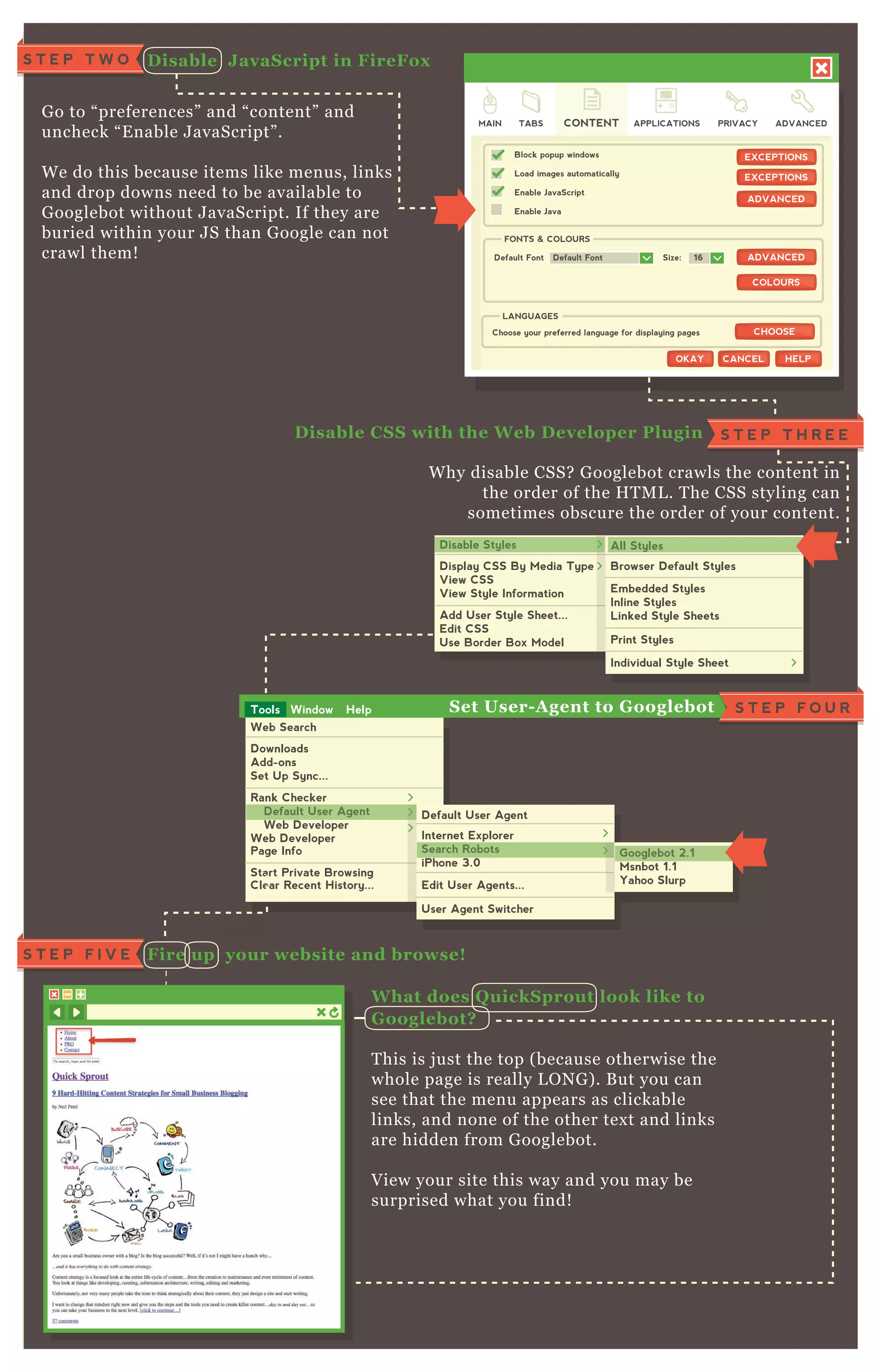
G o to “ preferences” and “ content” and
uncheck “ E nable J avaScript” .
W e do this because items like menus, links
and drop downs need to be available to
G ooglebot without J avaScript. If they are
buried within your J S than G oogle can not
crawl them!
W hat does Q uickS prout look like to
G ooglebot?
T his is j ust the top ( because otherwise the
whole page is really L O N G ) . B ut you can
see that the menu appears as clickable
links, and none of the other tex t and links
are hidden from G ooglebot.
V iew your site this way and you may be
surprised what you find!
W hy disable CSS? G ooglebot crawls the content in
the order of the H T M L . T he CSS styling can
sometimes obscure the order of your content.
D isable J avaS cript in FireFox
D isable C S S with the W eb D eveloper Plugin
S T E P T W O
Fire up your website and browse!S T E P F I V E
Web Search
Downloads
Add-ons
Set Up Sync...
Rank Checker
Web Developer
Page Info
Start Private Browsing
Clear Recent History...
Default User Agent
Web Developer
Default User Agent
Internet Explorer
Search Robots
iPhone 3.0
Edit User Agents...
User Agent Switcher
Default User Agent
Search Robots Googlebot 2.1
Msnbot 1.1
Yahoo Slurp
Googlebot 2.1
Tools Window Help
S T E P T H R E E
S T E P F O U RS et User- A gent to G ooglebot
quicksprout.com
MAIN TABS
Block popup windows
Load images automatically
Enable JavaScript
Enable Java
Default Font
FONTS & COLOURS
CONTENT APPLICATIONS PRIVACY ADVANCED
EXCEPTIONSEXCEPTIONS
ADVANCEDADVANCED
ADVANCEDADVANCED
COLOURSCOLOURS
Default Font Size: 16
Choose your preferred language for displaying pages
LANGUAGES
CHOOSECHOOSE
HELPHELPOKAYOKAY CANCELCANCEL
Disable Styles
Display CSS By Media Type
View CSS
View Style Information
Add User Style Sheet...
Edit CSS
Use Border Box Model
All Styles
Browser Default Styles
Embedded Styles
Inline Styles
Linked Style Sheets
Print Styles
Individual Style Sheet
Disable Styles All Styles
quicksprout.com
S ome things to check for:
Can you see all of your menu links ( drop down s too! ) ?
D o all of the menu items and links appear as plain tex t?
A re all the links clickable?
D oes this reveal any tex t that was previously hidden? ( H idde n te x t can se n d a
re d fl ag to G oogl e b ot. I t might n ot al way s b e the re mal iciou sl y , b u t it
shou l dn ’ t b e the re .)
Is your sidebar or widgets content all the way at the top? R emember, your most
important links and content should be at the top of the H T M L . T his is more
important the bigger the site is.
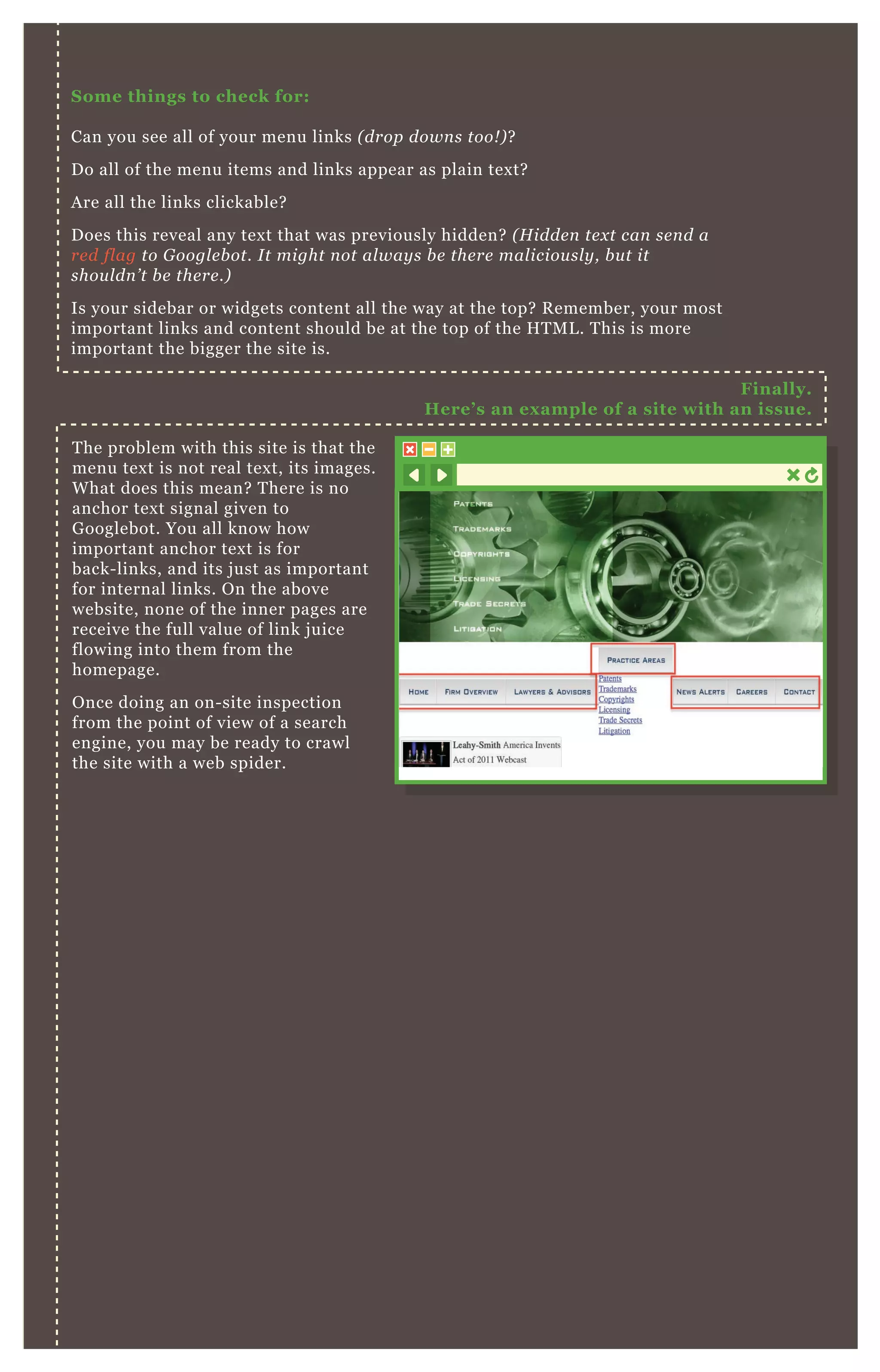
T he problem with this site is that the
menu tex t is not real tex t, its images.
W hat does this mean? T here is no
anchor tex t signal given to
G ooglebot. You all know how
important anchor tex t is for
back- links, and its j ust as important
for internal links. O n the above
website, none of the inner pages are
receive the full value of link j uice
flowing into them from the
homepage.
O nce doing an on- site inspection
from the point of view of a search
engine, you may be ready to crawl
the site with a web spider.
Finally.
Here’ s an ex ample of a site with an issue.
C R A W L Y O U R S I T E
W I T H S C R E A M I N G F R O G
NO 2
C rawl The S iteS T E P O N E
S ave Your C rawl
W hat I s S creaming Frog?
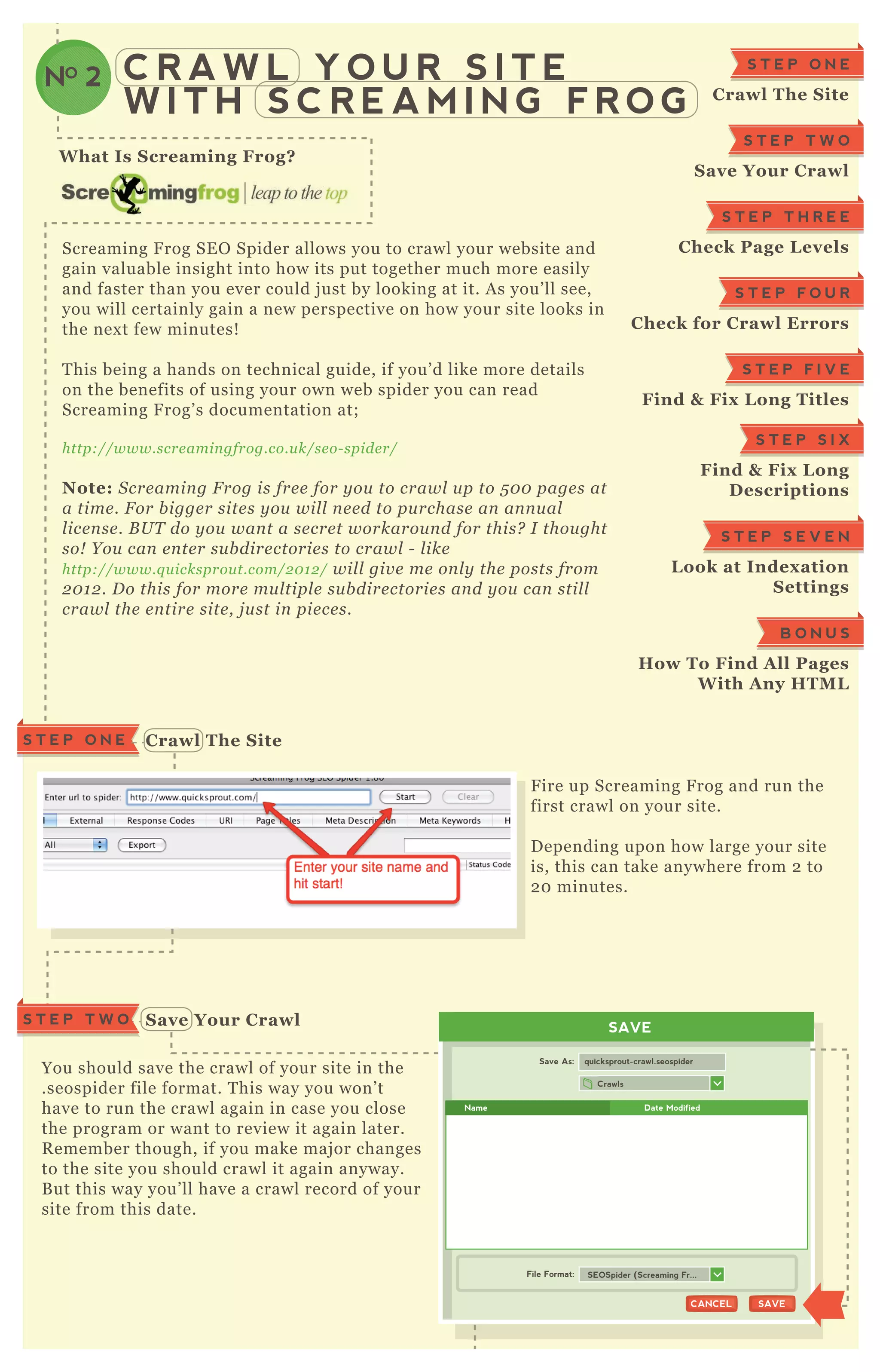
Screaming F rog SE O Spider allows you to crawl your website and
gain valuable insight into how its put together much more easily
and faster than you ever could j ust by looking at it. A s you’ ll see,
you will certainly gain a new perspective on how your site looks in
the nex t few minutes!
T his being a hands on technical guide, if you’ d like more details
on the benefits of using your own web spider you can read
Screaming F rog’ s documentation at;
http://www.scre amin gfrog.co.u k/se o- spide r/
Note: S cre amin g F rog is fre e for y ou to crawl u p to 5 0 0 page s at
a time . F or b igge r site s y ou wil l n e e d to pu rchase an an n u al
l ice n se . B U T do y ou wan t a se cre t workarou n d for this? I thou ght
so! Y ou can e n te r su b dire ctorie s to crawl - l ike
http://www.q u icksprou t.com/2 0 1 2 / wil l giv e me on l y the posts from
2 0 1 2 . D o this for more mu l tipl e su b dire ctorie s an d y ou can stil l
crawl the e n tire site , j u st in pie ce s.
F ire up Screaming F rog and run the
first crawl on your site.
D epending upon how large your site
is, this can take anywhere from 2 to
2 0 minutes.
You should save the crawl of your site in the
.seospider file format. T his way you won’ t
have to run the crawl again in case you close
the program or want to review it again later.
R emember though, if you make maj or changes
to the site you should crawl it again anyway.
B ut this way you’ ll have a crawl record of your
site from this date.
S T E P O N E
C rawl The S ite
S T E P T W O
S ave Your C rawl
S T E P T H R E E
C heck Page L evels
S T E P F O U R
C heck for C rawl Errors
S T E P F I V E
Find & Fix L ong Titles
S T E P S I X
Find & Fix L ong
D escriptions
S T E P S E V E N
L ook at I ndex ation
S ettings
B O N U S
How To Find A ll Pages
W ith A ny HTM L
SAVE
Crawls
Save As:
File Format:
quicksprout-crawl.seospider
SAVESAVECANCELCANCEL
SEOSpider (Screaming Fr...
Name Date Modified
S T E P T W O
S T E P T H R E E C heck Page L evels
C heck for C rawl Errors
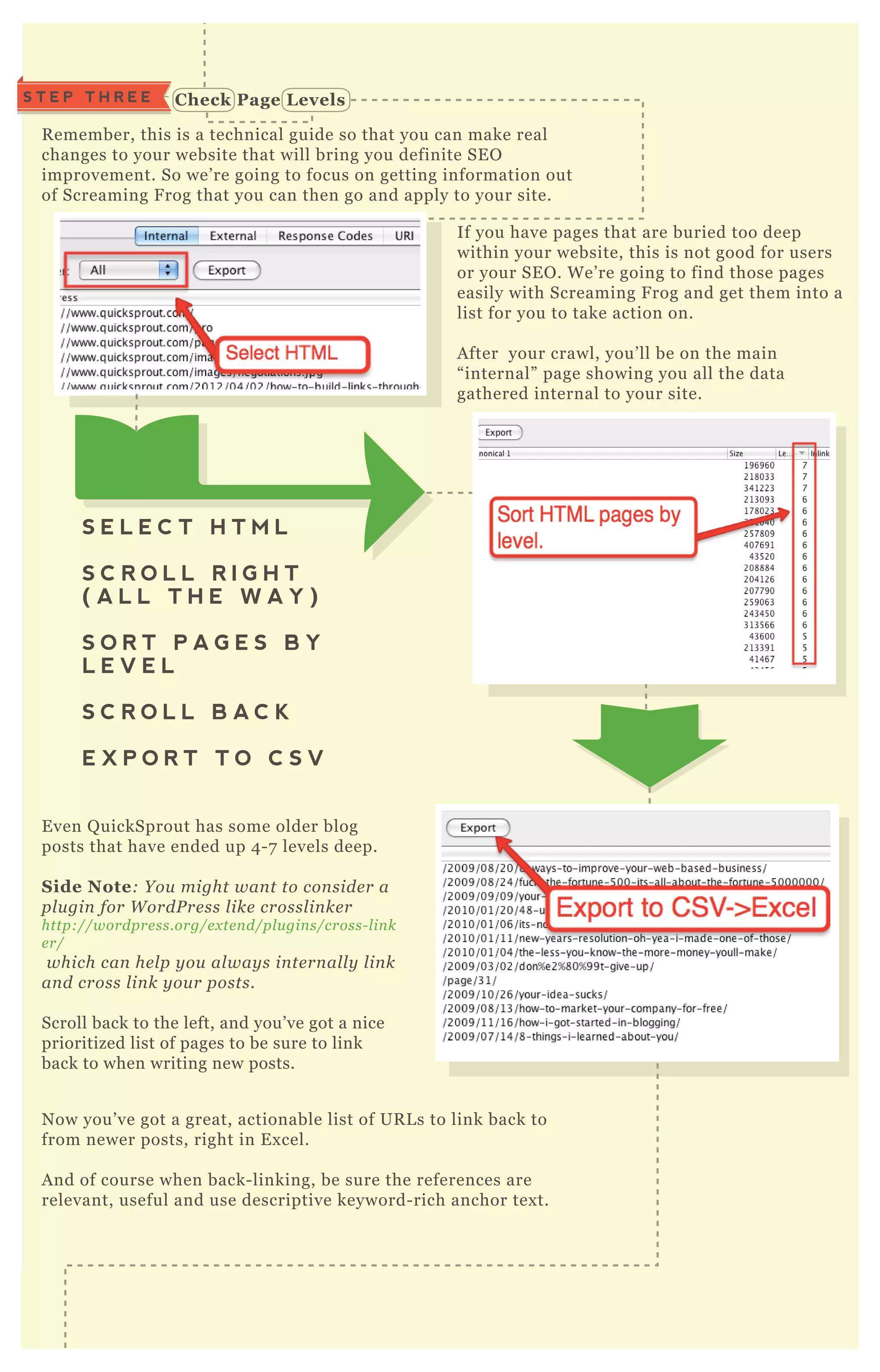
R emember, this is a technical guide so that you can make real
changes to your website that will bring you definite SE O
improvement. So we’ re going to focus on getting information out
of Screaming F rog that you can then go and apply to your site.
If you have pages that are buried too deep
within your website, this is not good for users
or your SE O . W e’ re going to find those pages
easily with Screaming F rog and get them into a
list for you to take action on.
A fter your crawl, you’ ll be on the main
“ internal” page showing you all the data
gathered internal to your site.
E ven Q uickSprout has some older blog
posts that have ended up 4 - 7 levels deep.
S ide Note: Y ou might wan t to con side r a
pl u gin for W ordP re ss l ike crossl in ke r
http://wordpre ss.org/e x te n d/pl u gin s/cross- l in k
e r/
which can he l p y ou al way s in te rn al l y l in k
an d cross l in k y ou r posts.
Scroll back to the left, and you’ ve got a nice
prioritized list of pages to be sure to link
back to when writing new posts.
N ow you’ ve got a great, actionable list of UR L s to link back to
from newer posts, right in E x cel.
A nd of course when back- linking, be sure the references are
relevant, useful and use descriptive keyword- rich anchor tex t.
N ow we’ ll begin ex ploring some of the different menus at the top.
S E L E C T H T M L
S C R O L L R I G H T
( A L L T H E W A Y )
S O R T P A G E S B Y
L E V E L
S C R O L L B A C K
E X P O R T T O C S V
S T E P F O U R
N ow we’ ll begin ex ploring some of the different menus at the top.
T here are a lot of hidden gems in Screaming F rog, but you have
to know how to find them - which is what I’ m showing you now!
G oogle W ebmaster T ools will of course give you crawl errors, but
they may be incomplete or old. P L US, this will give you all
ex ternal links you’ re linking to that are broken. A fresh crawl of
your site with your own tool is a fantastic way to get a current
accurate list.
You all may know that title tags and meta
descriptions have a recommended length.
A nd again, W ebmaster T ools does give you
some of this data.
W hat’ s great about Screaming F rog, is you
know this data is complete and you can sort
and filter it.
T his gives you a list of only the pages
which returned some sort of 4 0 0 level
error ( usually 4 0 4 s) .
[1] C lick on “ R esponse C odes”
[2] S elect “ C lient Error 4x x ” from the filter drop down menu
[3] Ex port as C S V
[1] C lick on over to “ Page Titles”
in the top menu.
[2] S elect “ O ver 7 0 C haracters”
from the menu.
[3] Ex port as C S V
S T E P F I V EFind & Fix L ong Titles
SAVE
Exports
Save As:
File Format:
page_titles_over_70_characters.csv
SAVESAVECANCELCANCELNEW FOLDERNEW FOLDER
CSV (Comma delineated(*...
Name Date Modified
T I P : I m m e d i a t e l y “ s a v e a s ”
a n E x c e l d o c u m e n t . Y o u m a y
l o s e s o m e f o r m a t t i n g c h a n g e s
o t h e r w i s e .
C heck for C rawl ErrorsS T E P F O U R
In your E x cel document, you’ ll want to create a new column for your new title.
A lso, create a column for length.
W hat a simple way for E x cel to automatically count the characters as you
compose your new title tags? A dd this simple formula to the “ new length”
column; = L EN( E3)
O f cou rse b e su re to re fe re n ce the ce l l y ou hav e y ou r n e w titl e in .
Select “ O ver 15 6 C haracters” from the
filter drop down menu
E x port to CSV
You can work on your new descriptions j ust
like how we worked with the new title tags
in ex cel. M ake new columns and use the
formula = L EN( E2) to automatically count
the length of your new description tags.
F inding and fix ing long descriptions is similar.
W e’ re going to navigate over to the descriptions menu.
[1] S elect the formula cell
[2] Hover over the bottom right corner of the formula cell.
[3] W ait for the cursor to change to a cross shape.
[4] D rag the sq uare down the entire column
A N D T H E NA N D T H E N
S T E P S I X
Find & Fix L ong D escriptions
S T E P S E V E N L ook at I ndex ation S ettings
L et’ s get a little more technical. Suppose you wanted
to find A L L the pages within a website that had the
presence of certain H T M L . L et’ s say in this instance
we want to find all pages within Q uickSprout that
have links that open in new tabs or windows.
N ow, we have all the pages with links that open in a new tab or window!
T his is great for an ex isting site if its not going to change at all. B ut
what do you do when you are getting set to redesign your site? You’ ll
want to do a self audit in prep for a redesign.
You should also head on over to the “ meta and canonical” menu to check your
index ation settings. You should look for things like;
S T E P S E V E N L ook at I ndex ation S ettings
How To Find A ll Pages
W ith A ny HTM L
[1] S elect “ C ustom” from the “ C onfiguration” M enu
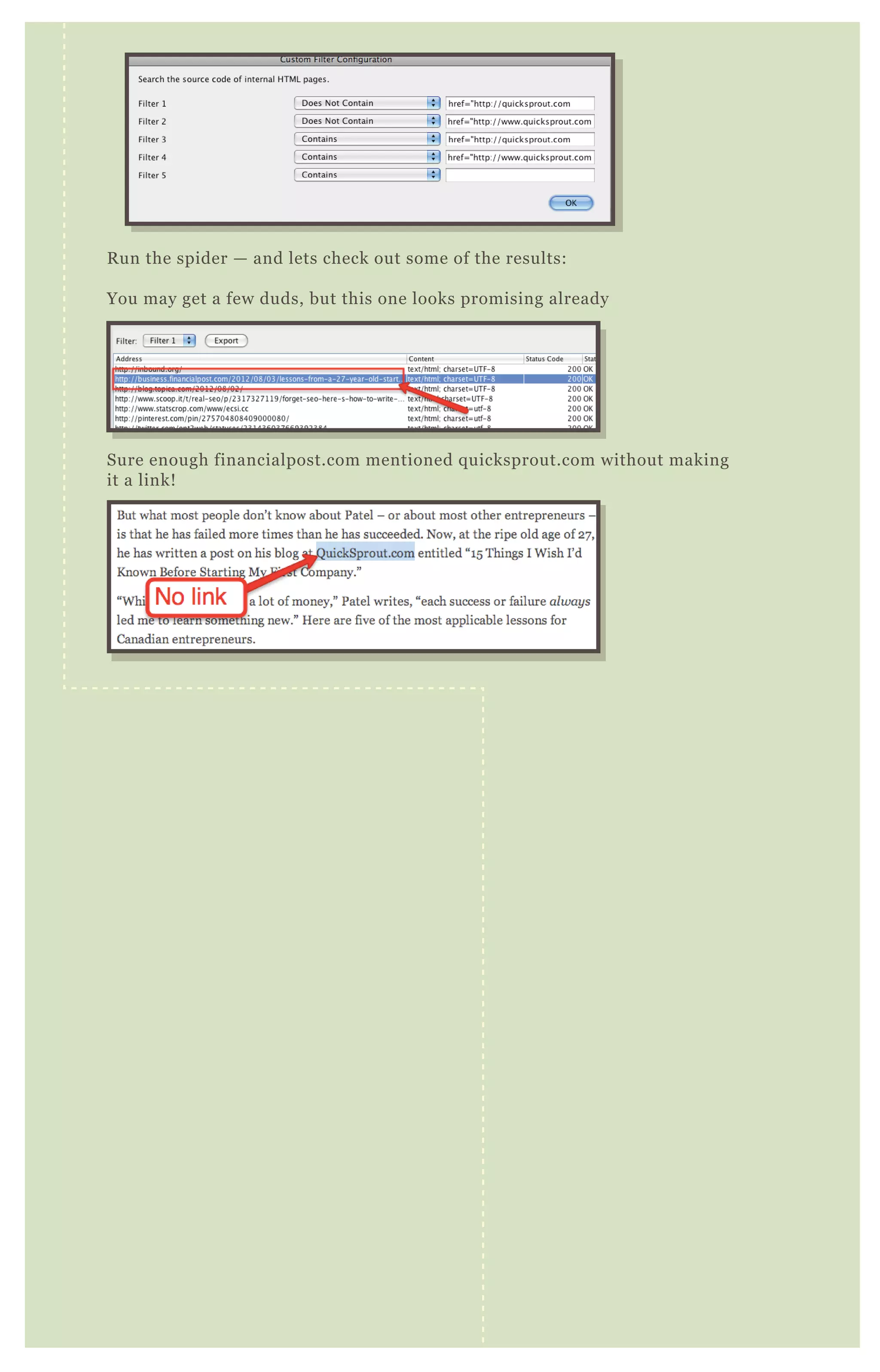
[2] Enter the HTM L you want it to look for in “ Filter 1”
Note: Y ou can al so hav e it fin d page s that do N O T con tain the
H T M L e n te re d. Y ou can e n te r u p to fiv e fil te rs.
[3] C rawl the site again
[4] S elect “ C ustom” in the menu
[5 ] S elect “ Filter O ne” from the filter drop down menu.
M issin g can on ical tags
I n corre ct C an on ical tags ( poin tin g to a
diffe re n t page e tc)
P age s that shou l d b e in de x e d b u t hav e a
“ n oin de x ” tag on the m.
P age s that shou l d N O T b e in de x e d b u t
hav e n o me ta tag or hav e “ in de x ”
<head>
<title>SEO G UI D E</title>
</head>
B O N U S
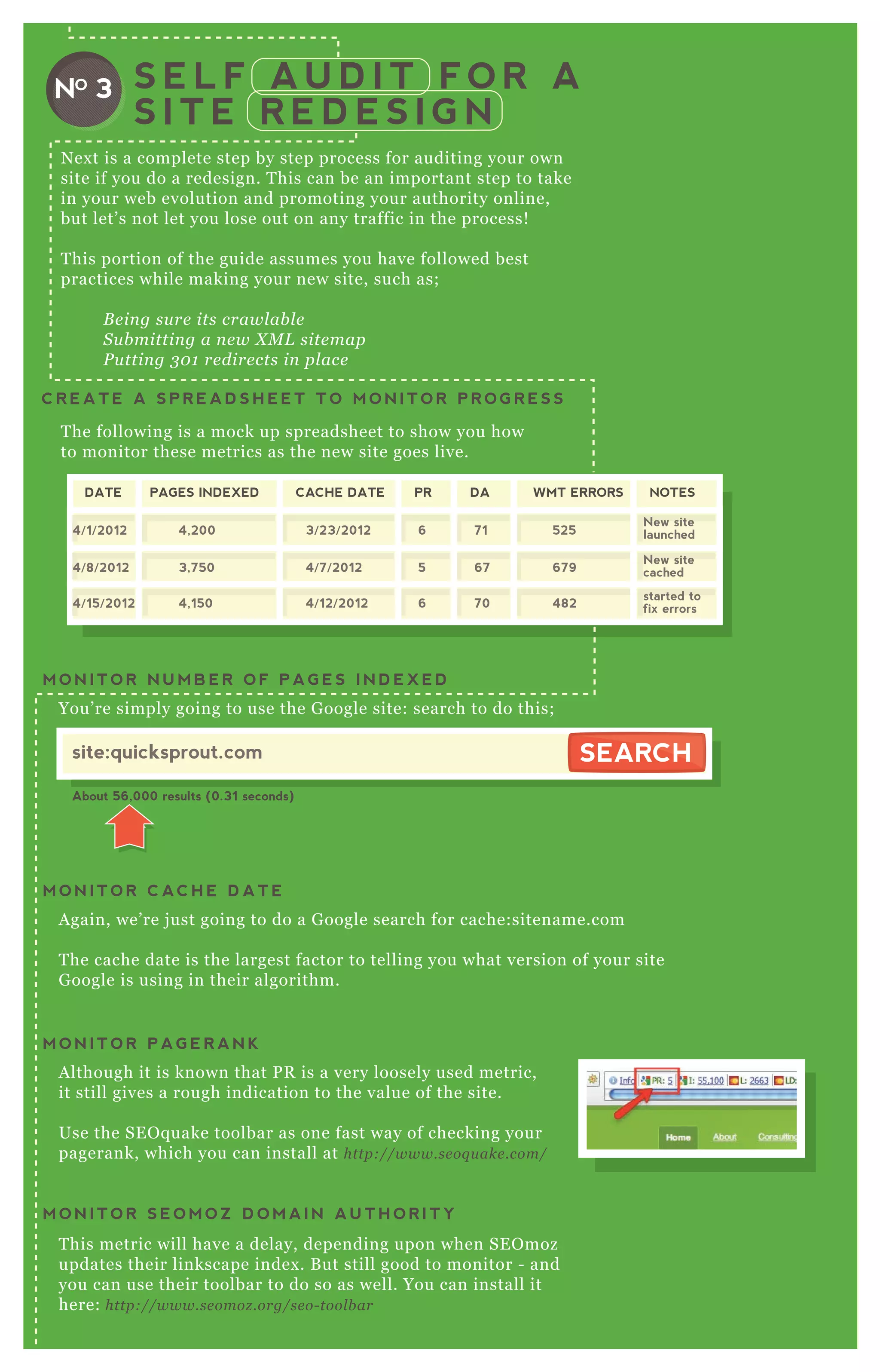
N ex t is a complete step by step process for auditing your own
site if you do a redesign. T his can be an important step to take
in your web evolution and promoting your authority online,
but let’ s not let you lose out on any traffic in the process!
T his portion of the guide assumes you have followed best
practices while making your new site, such as;
B e in g su re its crawl ab l e
S u b mittin g a n e w X M L site map
P u ttin g 3 0 1 re dire cts in pl ace
T he following is a mock up spreadsheet to show you how
to monitor these metrics as the new site goes live.
S E L F A U D I T F O R A
S I T E R E D E S I G N
C R E A T E A S P R E A D S H E E T T O M O N I T O R P R O G R E S S
You’ re simply going to use the G oogle site: search to do this;
M O N I T O R N U M B E R O F P A G E S I N D E X E D
NO 3
DATE PAGES INDEXED CACHE DATE PR DA WMT ERRORS NOTES
4/1/2012
4/8/2012
4/15/2012
4,200
3,750
4,150
6
5
6
71
67
70
525
679
482
New site
launched
New site
cached
started to
fix errors
3/23/2012
4/7/2012
4/12/2012
site:quicksprout.com
About 56,000 results (0.31 seconds)
SEARCHSEARCH
A gain, we’ re j ust going to do a G oogle search for cache:sitename.com
T he cache date is the largest factor to telling you what version of your site
G oogle is using in their algorithm.
M O N I T O R C AC H E D A T E
A lthough it is known that P R is a very loosely used metric,
it still gives a rough indication to the value of the site.
Use the SE O q uake toolbar as one fast way of checking your
pagerank, which you can install at http://www.se oq u ake .com/
M O N I T O R P A G E R A N K
T his metric will have a delay, depending upon when SE O moz
updates their linkscape index . B ut still good to monitor - and
you can use their toolbar to do so as well. You can install it
here: http://www.se omoz .org/se o- tool b ar
D A authority is best to look at
M O N I T O R S E O M O Z D O M A I N A U T H O R I T Y
DA authority is best to look at
Use Webmaster Tools to watch your not found
errors and get your numbers from there;
With these tools and steps you’ll
ensure the smoothest transition
possible while moving the site
over.
M O N I T O R “ N O T F O U N D ” E R R O R S
In this tutorial, we will setup your computer so that when you type in the
UR L , it will go to your test website so you can try it out before it goes live
using the real UR L .
T he instructions will differ greatly depending on where you host your
website but in general, they will be listed somewhere in your admin
panel. If you can' t find it, call the hosting company up and simply ask.
G et the I P address of your new website.S T E P O N E
S T E P T W O
Edit your hosts file to
point to your I P address
O N A M A C O N A P C
[1] O pen up A pplication folder >
Utilities > Terminal [1] C lick on S tart > type in
" notepad" into the search box ,
and look for notepad to show up
in your start menu.
[2] R ight click on it and left click on
" run as administrator" .
[3] C lick on File > open
[4] I n the filename box type
"  windows system32 driver etc"
press enter.
[5 ] C hange the file type pull- down
from " tex t file" to " all files" .
[6 ] D ouble click on " hosts"
[7 ] A t the end of the file, type in the
following line:
[2] I nside the terminal app, type
" sudo nano / etc/ hosts"
[3] A t the end of the file, type in the
following line:
Google Drive
Desktop
Applications
Documents
Downloads
inbox
Twitter
UnRarX
Utilities
Vagrant
VirtualBox
VMware Fusion
RAID utility
Remote Install Mac OS X
Spaces
System Profiler
Terminal
Voiceover Utility
T ype in your user’ s password if
that’ s req uired.
Say yes to W indows if it asks for
permission
1 1 1 .2 2 2 .3 3 3 .4 4 4 www.newdomain.com
R eplace 1 1 1 .2 2 2 .3 3 3 .4 4 4 with the real
IP address you got from step 1 and
replace " www.newdomain.com" with
you new domain.
1 1 1 .2 2 2 .3 3 3 .4 4 4 www.newdomain.com
R eplace 1 1 1 .2 2 2 .3 3 3 .4 4 4 with the real
IP address you got from step 1 and
replace " www.newdomain.com" with
you new domain.
H it Control- O to and press enter.
[4] Hit C ontrol- X to ex it the editor.
[5 ] C lose the terminal window
NO 4
T E S T I N G A N E W S I T E
B E F O R E I T G O E S L I V E
h t t p : / / p a n d a . c o m
O pen up a browser and test your website to see if it looks like you ex pect
it. T ype in the UR L to your new website Your hosts file edits will forward
you to the test website.
Test your websiteS T E P T H R E E
O nce tested, you can undo your changes you made in step 2 . Simply go
back to the file and remove the line you j ust created.
Undo C hangesS T E P F O U R
W hen migrating to a new website you can use the following guidelines to
ensure a safe transition without any downtime. It takes about a day for all the
servers around the world to get updated IP and domain information so plan to
have both servers running for at least the first week of your new site.
T he instructions to do this is different for every hosting company or
domain registrar. Usually, you can find that setting in your control panel
for your domain, but if you can' t find it, call up your domain registrar and
ask for tech support.
M I G R A T I N G T O A N E W
S I T E W I T H O U T D O W N T I M E
NO 5
WARNING: THIS MIGHT BRING DOWN YOUR WEBSITE
IF SOMETHING GOES WRONG. BE CAREFUL!
S et the TTL of your new domain to 5 minutesS T E P O N E
I F Y O U ’ R E U S I N G G O D A D D Y :
[1] L ogin to G oD addy’ s website
[2] C lick on M y A ccount. G o down
to D omains and click on L aunch
[3] C lick on one of your domains
[4] S croll down to D NS M anager
and click L aunch
[5 ] L ook for “ @ ” under host and
click on the pencil icon under
“ TTL ”
[6 ] Pull down the menu and select
the shortest time available ( 1/ 2
hour)
http://godaddy.com
http://godaddy.com
http://godaddy.com
L ocate the D NS settings for your domainS T E P T W O
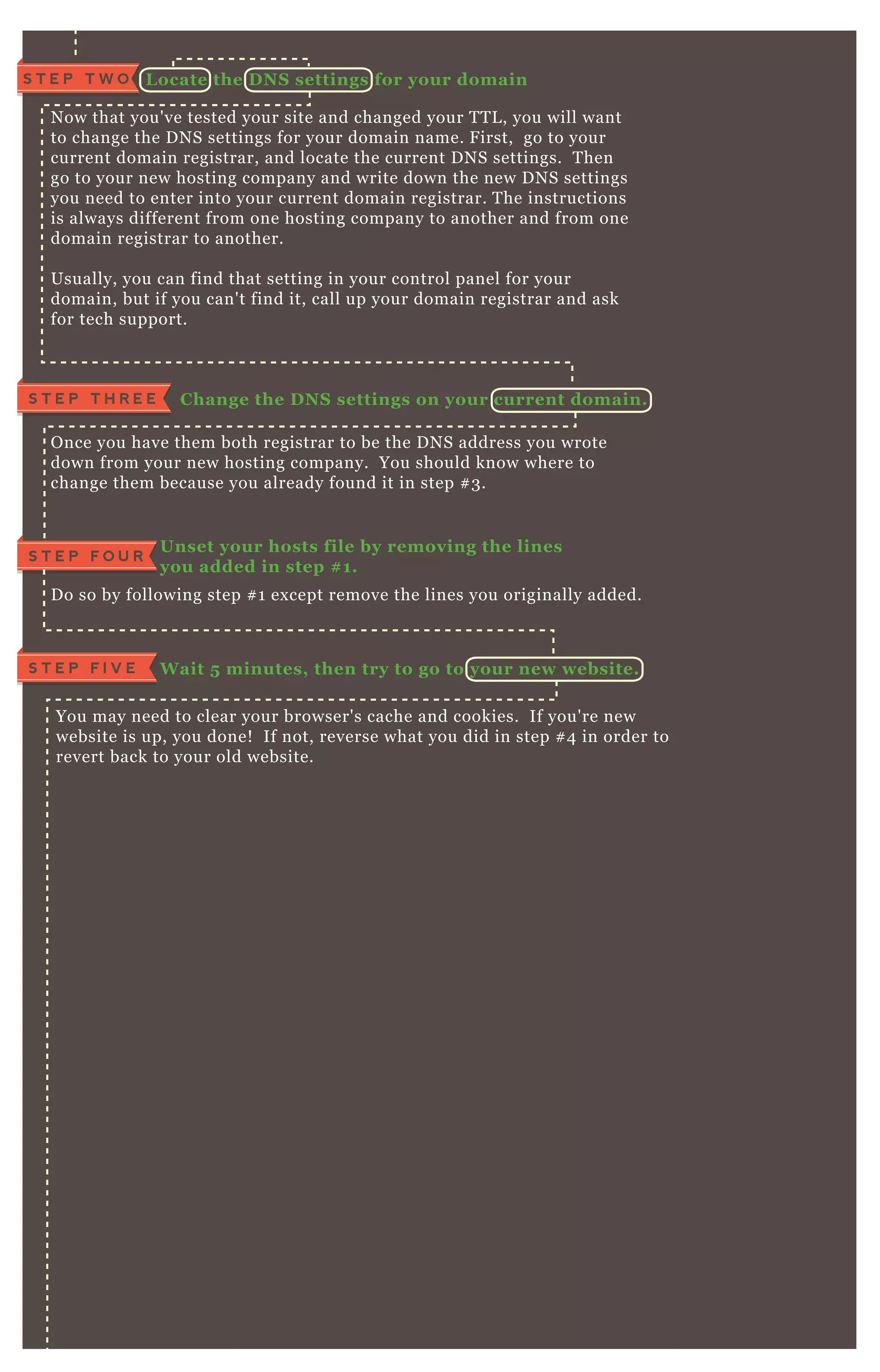
N ow that you' ve tested your site and changed your T T L , you will want
to change the D N S settings for your domain name. F irst, go to your
current domain registrar, and locate the current D N S settings. T hen
go to your new hosting company and write down the new D N S settings
you need to enter into your current domain registrar. T he instructions
is always different from one hosting company to another and from one
domain registrar to another.
Usually, you can find that setting in your control panel for your
domain, but if you can' t find it, call up your domain registrar and ask
for tech support.
C hange the D NS settings on your current domain.S T E P T H R E E
O nce you have them both registrar to be the D N S address you wrote
down from your new hosting company. You should know where to
change them because you already found it in step # 3 .
Unset your hosts file by removing the lines
you added in step # 1.
S T E P F O U R
D o so by following step # 1 ex cept remove the lines you originally added.
W ait 5 minutes, then try to go to your new website.S T E P F I V E
You may need to clear your browser' s cache and cookies. If you' re new
website is up, you done! If not, reverse what you did in step # 4 in order to
revert back to your old website.
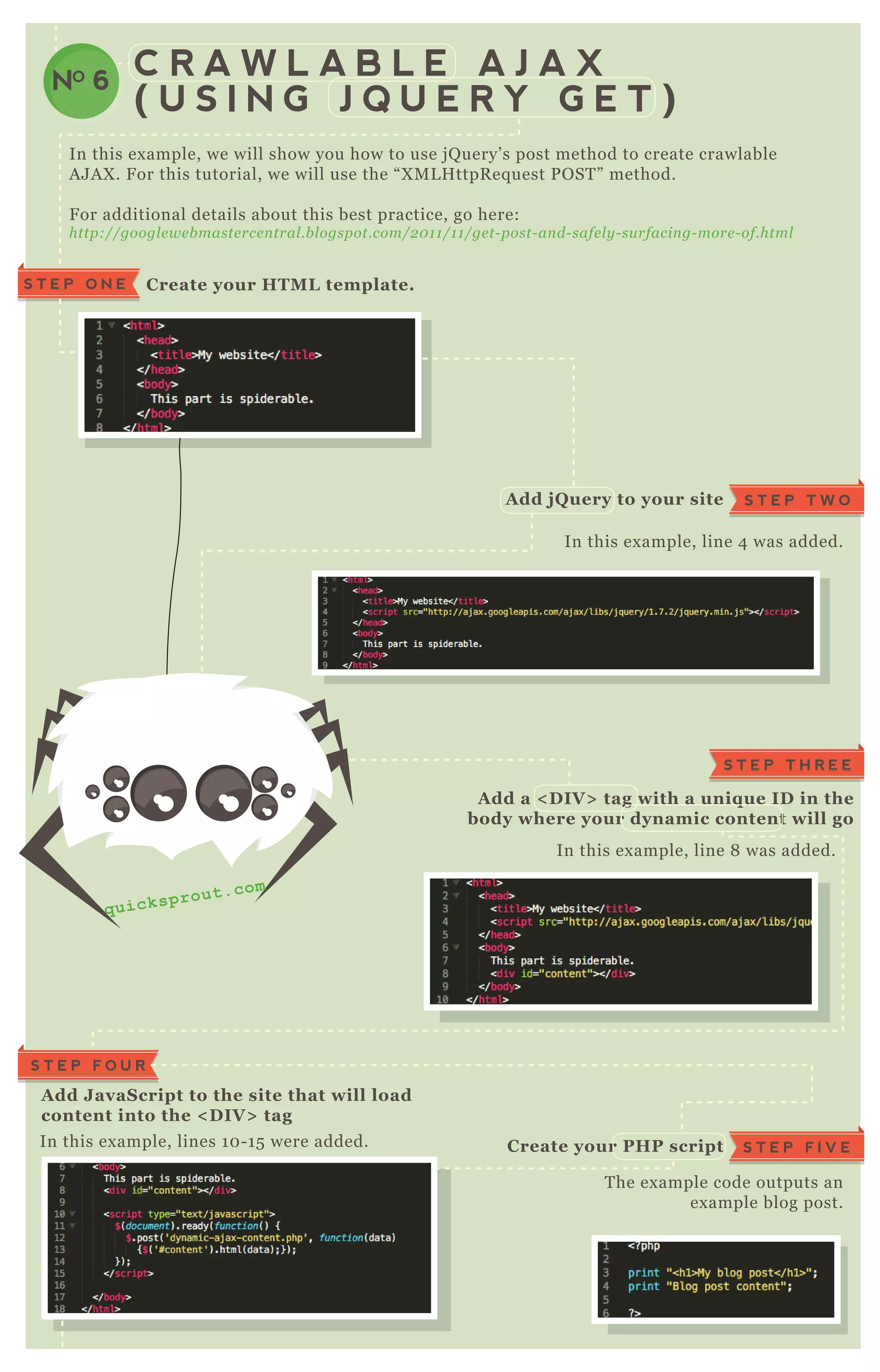
In this ex ample, we will show you how to use j Q uery’ s post method to create crawlable
A J A X . F or this tutorial, we will use the “ X M L H ttpR eq uest P O ST ” method.
F or additional details about this best practice, go here:
http://googl e we b maste rce n tral .b l ogspot.com/2 0 1 1 /1 1 /ge t- post- an d- safe l y - su rfacin g- more - of.html
In this ex ample, line 4 was added.
In this ex ample, line 8 was added.
T he ex ample code outputs an
ex ample blog post.
In this ex ample, lines 1 0 - 1 5 were added.
C R A W L A B L E A J A X
( U S I N G J Q U E R Y G E T )
C reate your HTM L template.S T E P O N E
A dd J avaS cript to the site that will load
content into the < D I V > tag
S T E P F O U R
S T E P T W OA dd j Q uery to your site
S T E P F I V EC reate your PHP script
S T E P T H R E E
A dd a < D I V > tag with a uniq ue I D in the
body where your dynamic content will go
NO 6
q u i c k s p r o u t . c o m
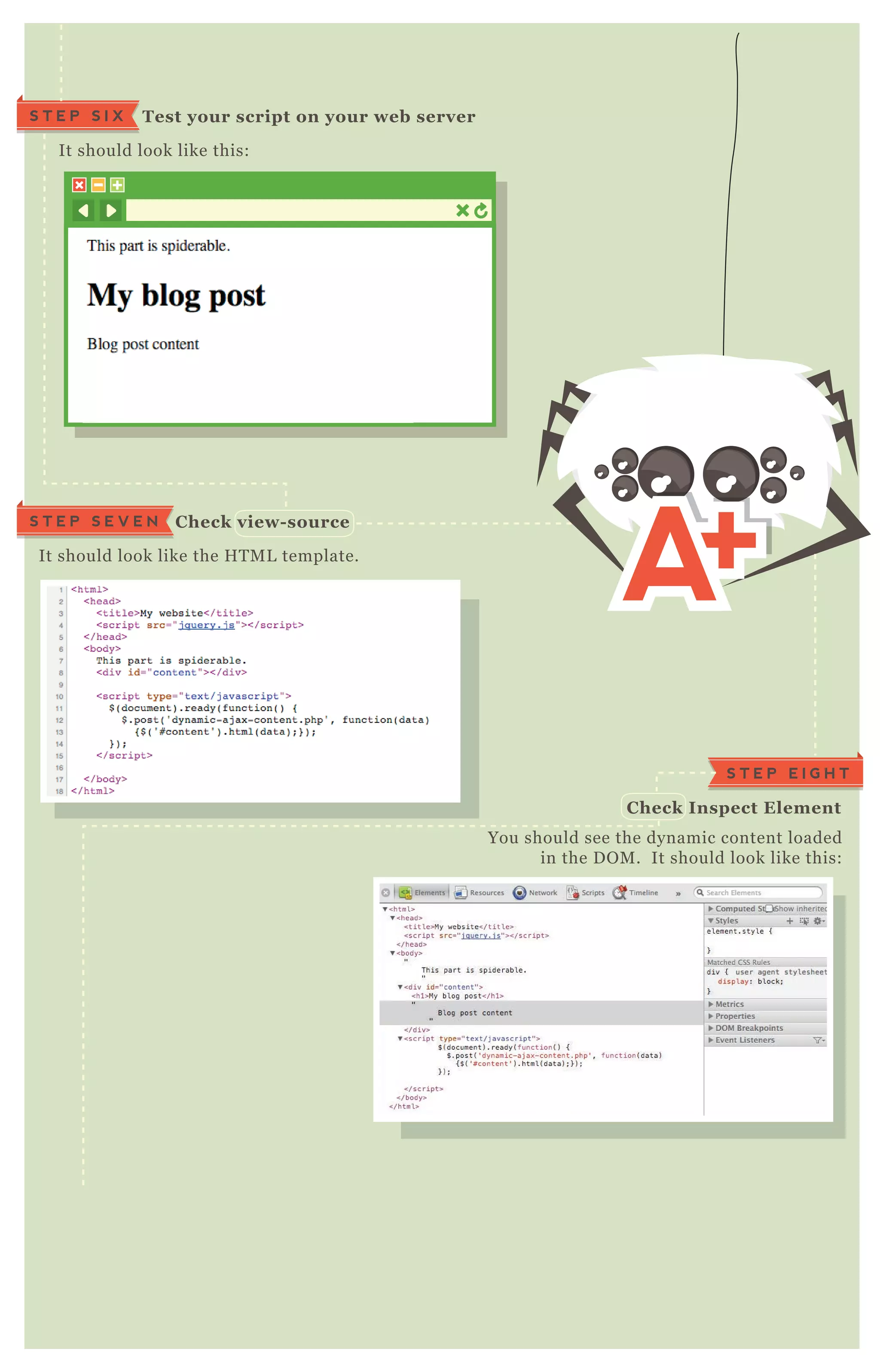
It should look like this:
Test your script on your web serverS T E P S I X
It should look like the H T M L template.
C heck view- sourceS T E P S E V E N
You should see the dynamic content loaded
in the D O M . It should look like this:
S T E P E I G H T
C heck I nspect Element
C R A W L A B L E A J A X
( W I T H O U T H A S H E S )
NO 7
T his tutorial is for websites that load dynamic content on the page without
refreshing but changes the UR L . G oogle recommends routing
“ _ escaped_ fragment_ ” in your q uery string to an H T M L snapshot. T he
principal idea is that you want to render H T M L for G oogleB ot and
J avaScript for users.
T here are many ways of achieving the same result. T he implementation will
depend on your particular website’ s setup. In this ex ample, we will use P H P
to decide what to render.
If the UR L looks like this: “ http://www.e x ampl e .com/in de x .php” then we want
P H P to create a page with J avaScript that loads the content dynamically and
asynchronously so that it’ s fast.
If the UR L looks like this:
“ http://www.e x ampl e .com/in de x .php? _ e scape d_ fragme n t_ ” then we want P H P to
create a normal H T M L page that can be index ed and crawled.
F or additional details about this best practice, see:
https://de v e l ope rs.googl e .com/we b maste rs/aj ax - crawl in g/docs/ge ttin g- starte d
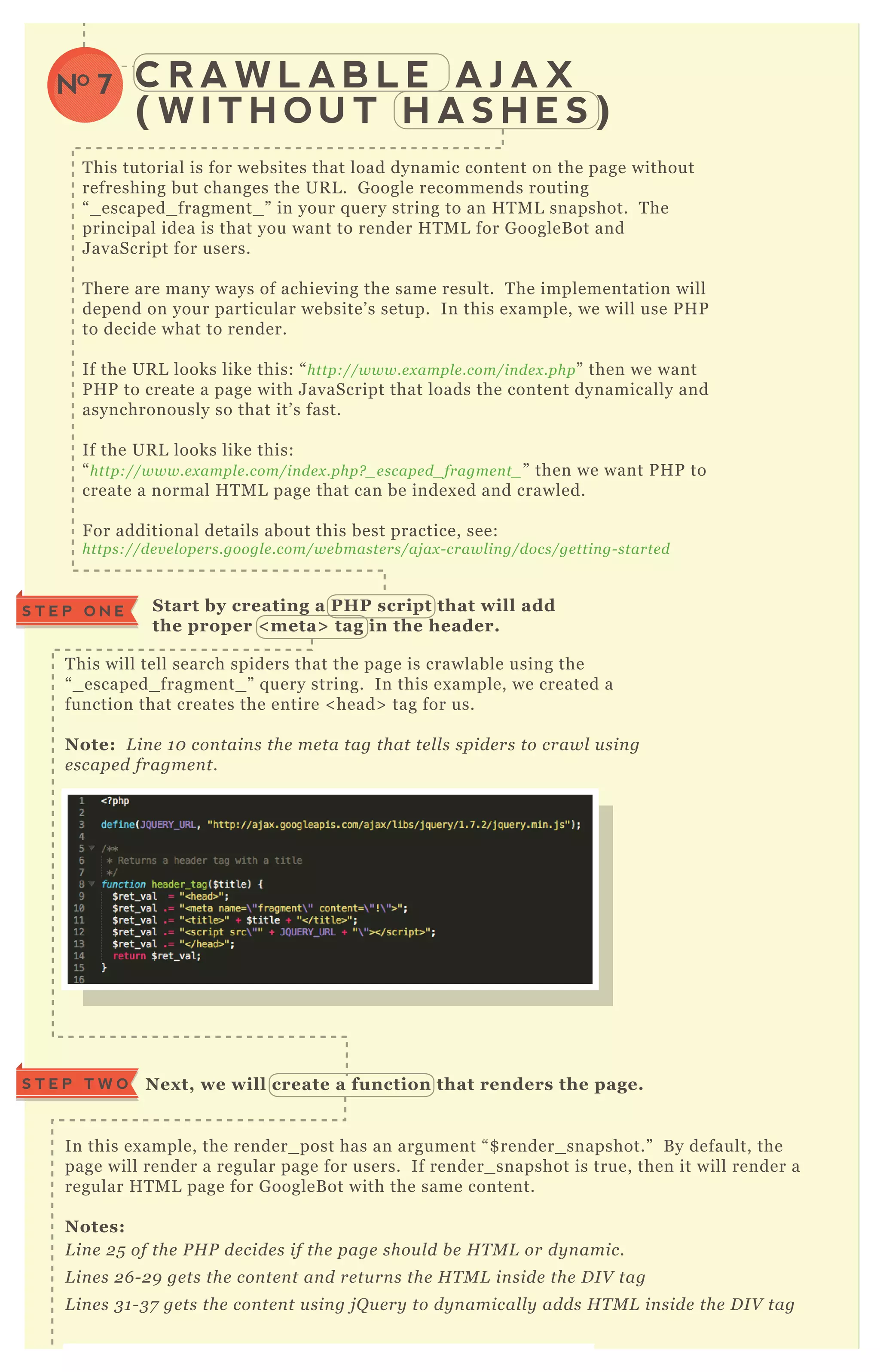
T his will tell search spiders that the page is crawlable using the
“ _ escaped_ fragment_ ” q uery string. In this ex ample, we created a
function that creates the entire < head> tag for us.
Note: L in e 1 0 con tain s the me ta tag that te l l s spide rs to crawl u sin g
e scape d fragme n t.
S tart by creating a PHP script that will add
the proper < meta> tag in the header.
S T E P O N E
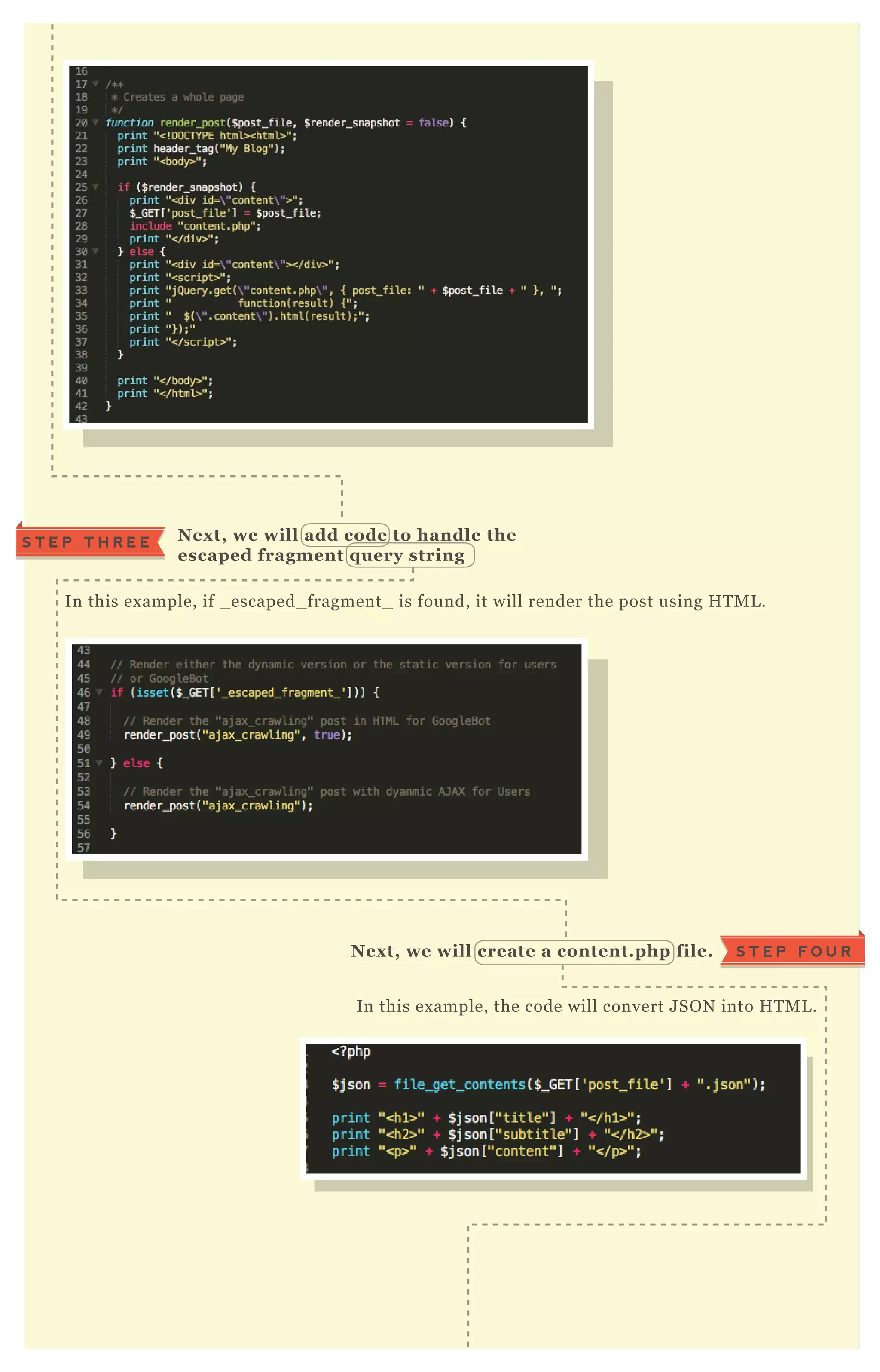
In this ex ample, the render_ post has an argument “ $ render_ snapshot.” B y default, the
page will render a regular page for users. If render_ snapshot is true, then it will render a
regular H T M L page for G oogleB ot with the same content.
Notes:
L in e 2 5 of the P H P de cide s if the page shou l d b e H T M L or dy n amic.
L in e s 2 6 - 2 9 ge ts the con te n t an d re tu rn s the H T M L in side the D I V tag
L in e s 3 1 - 3 7 ge ts the con te n t u sin g j Q u e ry to dy n amical l y adds H T M L in side the D I V tag
Nex t, we will create a function that renders the page.S T E P T W O
In this ex ample, if _ escaped_ fragment_ is found, it will render the post using H T M L .
Nex t, we will add code to handle the
escaped fragment q uery string
S T E P T H R E E
In this ex ample, the code will convert J SO N into H T M L .
Nex t, we will create a content.php file. S T E P F O U R
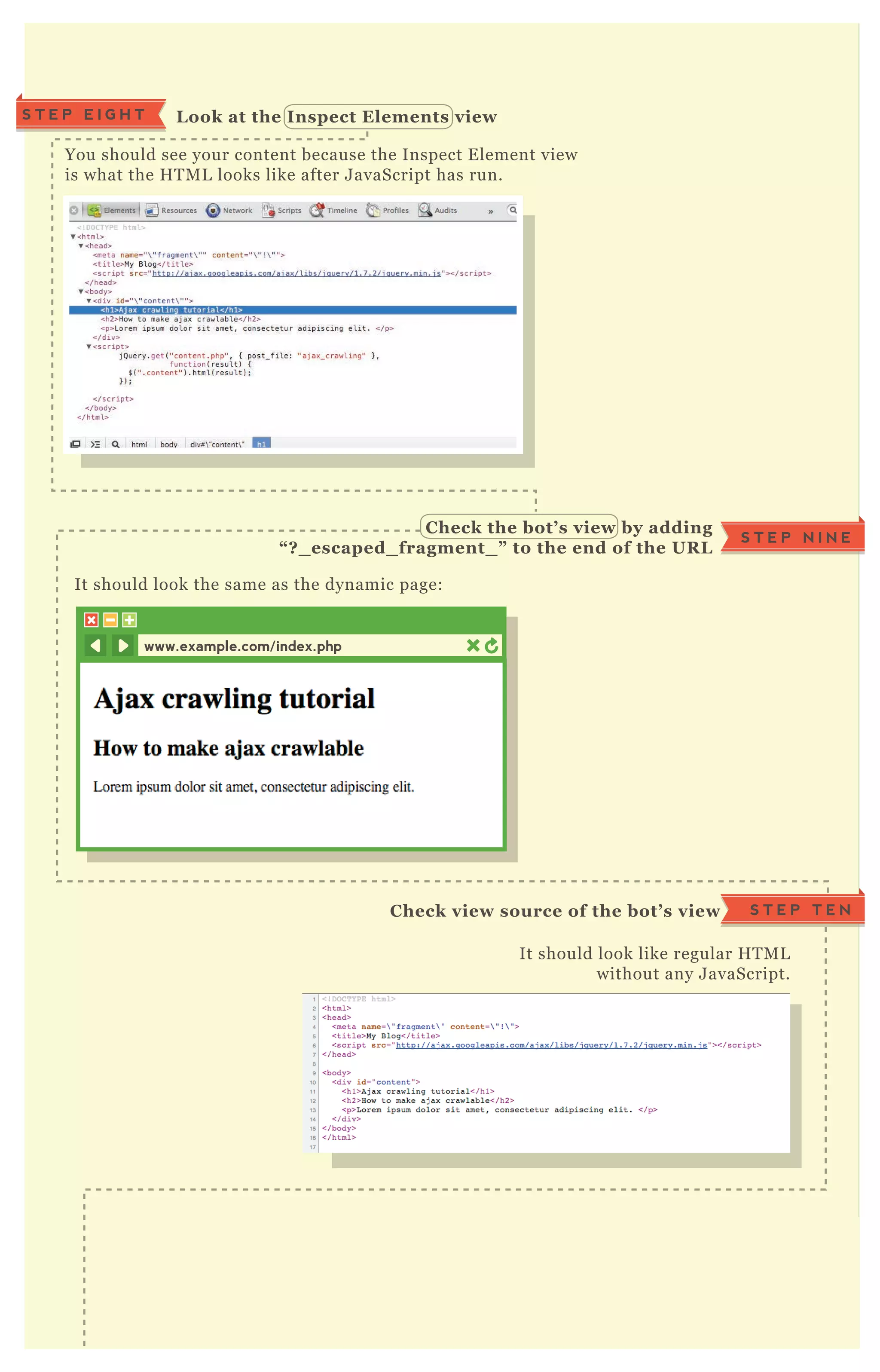
You should see your content because the Inspect E lement view
is what the H T M L looks like after J avaScript has run.
L ook at the I nspect Elements viewS T E P E I G H T
It should look the same as the dynamic page:
C heck the bot’ s view by adding
“ ? _ escaped_ fragment_ ” to the end of the UR L
S T E P N I N E
It should look like regular H T M L
without any J avaScript.
C heck view source of the bot’ s view S T E P T E N
C R O S S D O M A I N
R E L = C A N O N I C A L
NO 8
www.example.com/index.php
T his is where many people get a little confused, so before the ex act technical
implementation, let’ s j ust cover when the tag should be used.
U se it whe n the con te n t from the ol d site n e e ds to b e mov e d or du pl icate d
to a n e w site - an d the ol d host doe s n ot prov ide se rv e r side re dire cts.
U se it on l y afte r y ou ’ v e re du ce d on - site du pl ication on the ol d site as
mu ch as possib l e .
I f y ou can do a 3 0 1 re dire ct in ste ad an d this prov ide s a pre fe rre d u se r
e x pe rie n ce , u se the 3 0 1 re dire ct.
A l so, y ou shou l d n ot pu t a n oin de x on a page with a re l = can on ical . T he
page shou l d b e crawl ab l e in orde r to pick u p the re dire ct.
U se it whe n con te n t is the same on b oth page s, or with on l y sl ight
diffe re n ce s.
L et’ s say I wanted to move this infographic post from Q uickSprout...
http://www.q u icksprou t.com/2 0 1 2 /0 6 /1 1 /5 - way s- to- ge t- y ou r- in fographic- to- go- v iral /
...to K ISSmetrics. P erhaps I wouldn’ t do this in real life, but let’ s suppose so,
j ust for the ex ample. W e’ re going to move it to:
http://b l og.kissme trics.com/5 - way s- to- ge t- y ou r- in fographic- to- go- v iral
C R O S S D O M A I N
R E L = C A N O N I C A L
NO 8
W H E N T O U S EW H E N T O U S E
THE CROSS DOMAIN CANONICAL
A Q U I C K E X A M P L EA Q U I C K E X A M P L E
T his is not so different than implementing a regular canonical tag.
H O W T O I M P L E M E N TH O W T O I M P L E M E N T
[1] G et your two pages ready
[2] B e able to edit the source code on the first ( original) page.
[3] A dd the tag to the < head> section of the old page,
pointing to the new page;
< l in k re l = " can on ical " hre f= " http://www.e x ampl e .com/e x ampl e - page - n ame />
where “ ex ample- page- name” is the UR L of the NEW page.
pointing to the new page;
I N F O G R A P H I C O N
Q U I C K S P R O U T
S A M E
I N F O G R A P H I C O N
K I S S M E T R I C S
http://www.q u icksprou t.com/
2 0 1 2 /0 6 /1 1 /5 - way s- to- ge t- y o
u r- in fographic- to- go- v iral /
< he ad>
< l in k re l = ” can on ical ” hre f=
“ http://b l og.kissme trics.com/
5 - way s- to- ge t- y ou r- in fograph
ic- to- go- v iral ” />
< /he ad>
http://b l og.kissme trics.com/5
- way s- to- ge t- y ou r- in fographi
c- to- go- v iral
C A N O N I C A L
P O I N T S T O
N E W P A G E
L A S T F E W H I N T SL A S T F E W H I N T S
[1] Make the links absolute not relative (include the full http:// etc)
[2] Just like with 301s avoid chains of canonicals
[3] Ultimately this is a hint for Google, not an absolute direction, so
you will want to check Google’s index and webmaster tools to see if
it has been followed.
A s I’ m sure most of you know, https is the protocol by which secure pages are
transferred over the world wide web. P ages such as your shopping cart, login
pages and other secure areas should be at an https address. H owever, this can
potentially cause duplicate content, because of the added ‘ s’ in the UR L .
T ypically, https pages should not be in the index . T hey are usually private pages
and don’ t have a use for being returned in search results.
If your crawl report or site audit comes back as having https UR L s found on your
site as duplicates, there’ s three steps you should take to resolve this;
F I X I N G H T T P S
D U P L I C A T E
C O N T E N T E R R O R S
NO 9
[1] I dentify which pages are index ed
[2] D iagnose why they are index ed
[3a] 30 1 R edirect pages that should not be there
[3b] R emove them from the index if they should not be there
Use this special G oogle search to find pages from your site that have been index ed
with https;
site:yourdomain.com inurl:https
You can see the crazyegg website looks totally clean! E x cept for this flash loader,
no https pages have gotten into the index .
Finding https pages that have been index edS T E P O N E
inurl:https site:crazyegg.com SEARCHSEARCH
About 1 result (0.10 seconds)
File Format: Shockwave flash
In order to show you the most relevant results, we have omitted some entries
very similar to the 1 already displayed.
If you like, you can repeat the search with the omitted results included.
[FLASH]
https://crazyegg.com/flash/data_loader.swf
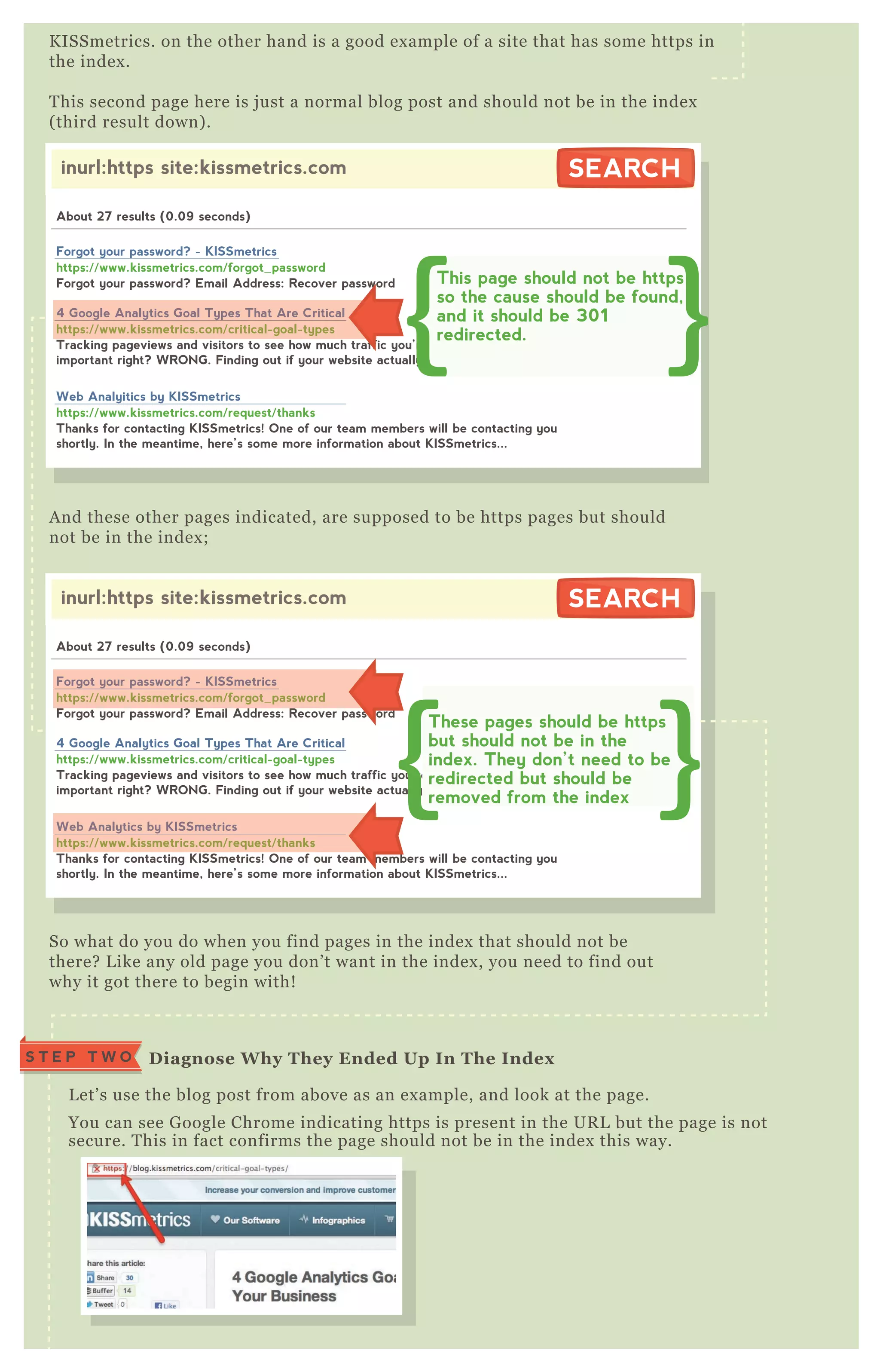
K ISSmetrics. on the other hand is a good ex ample of a site that has some https in
the index .
T his second page here is j ust a normal blog post and should not be in the index
( third result down) .
A nd these other pages indicated, are supposed to be https pages but should
not be in the index ;
So what do you do when you find pages in the index that should not be
there? L ike any old page you don’ t want in the index , you need to find out
why it got there to begin with!
inurl:https site:kissmetrics.com SEARCHSEARCH
About 27 results (0.09 seconds)
Forgot your password? Email Address: Recover password
https://www.kissmetrics.com/forgot_password
Forgot your password? - KISSmetrics
Tracking pageviews and visitors to see how much traffic you’re getting is incredibly
important right? WRONG. Finding out if your website actually helps your...
https://www.kissmetrics.com/critical-goal-types
4 Google Analytics Goal Types That Are Critical
Thanks for contacting KISSmetrics! One of our team members will be contacting you
shortly. In the meantime, here’s some more information about KISSmetrics...
https://www.kissmetrics.com/request/thanks
Web Analytics by KISSmetrics
These pages should be https
but should not be in the
index. They don’t need to be
redirected but should be
removed from the index
https://www.kissmetrics.com/forgot_password
Forgot your password? - KISSmetrics
https://www.kissmetrics.com/request/thanks
Web Analytics by KISSmetrics
inurl:https site:kissmetrics.com SEARCHSEARCH
About 27 results (0.09 seconds)
Forgot your password? Email Address: Recover password
https://www.kissmetrics.com/forgot_password
Forgot your password? - KISSmetrics
Tracking pageviews and visitors to see how much traffic you’re getting is incredibly
important right? WRONG. Finding out if your website actually helps your...
https://www.kissmetrics.com/critical-goal-types
4 Google Analytics Goal Types That Are Critical
Thanks for contacting KISSmetrics! One of our team members will be contacting you
shortly. In the meantime, here’s some more information about KISSmetrics...
https://www.kissmetrics.com/request/thanks
Web Analyitics by KISSmetrics
This page should not be https
so the cause should be found,
and it should be 301
redirected.https://www.kissmetrics.com/critical-goal-types
4 Google Analytics Goal Types That Are Critical
L et’ s use the blog post from above as an ex ample, and look at the page.
You can see G oogle Chrome indicating https is present in the UR L but the page is not
secure. T his in fact confirms the page should not be in the index this way.
D iagnose W hy They Ended Up I n The I ndexS T E P T W O
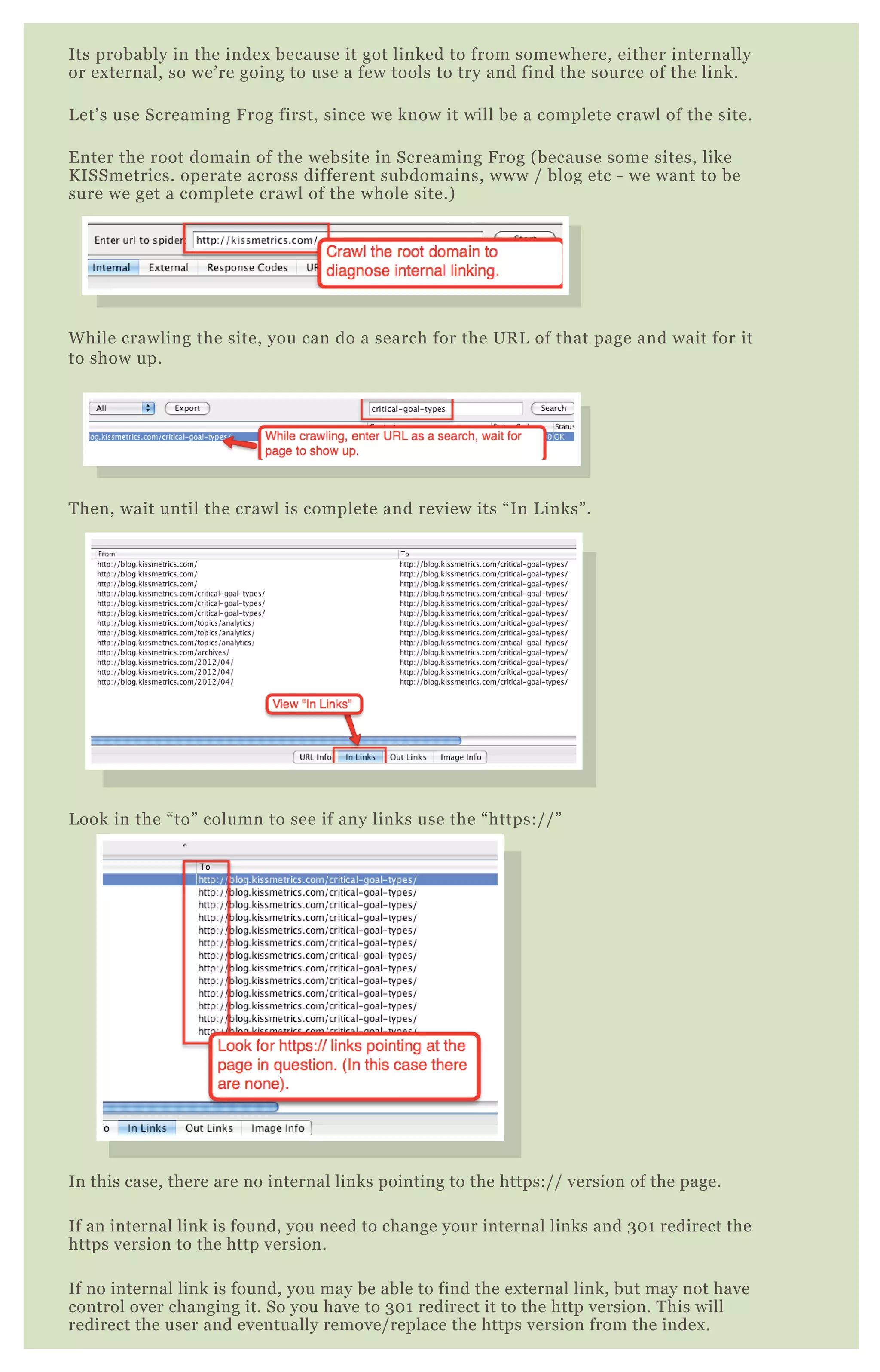
Its probably in the index because it got linked to from somewhere, either internally
or external, so we’re going to use a few tools to try and find the source of the link.
Let’s use Screaming Frog first, since we know it will be a complete crawl of the site.
Enter the root domain of the website in Screaming Frog (because some sites, like
KISSmetrics. operate across different subdomains, www / blog etc - we want to be
sure we get a complete crawl of the whole site.)
While crawling the site, you can do a search for the URL of that page and wait for it
to show up.
Then, wait until the crawl is complete and review its “In Links”.
Look in the “to” column to see if any links use the “https://”
In this case, there are no internal links pointing to the https:// version of the page.
If an internal link is found, you need to change your internal links and 301 redirect the
https version to the http version.
If no internal link is found, you may be able to find the external link, but may not have
control over changing it. So you have to 301 redirect it to the http version. This will
redirect the user and eventually remove/replace the https version from the index.
P A G I N A T I O N
W I T H R E L = N E X T
P agination has always been one of the trickiest elements of on- page SE O
and architecture to handle. B ut now G oogle allows you to use rel= ” nex t”
and rel= ” prev” to help show them you have pages that belong in a series.
W hen using a CM S like W ordP ress there are many plugins that handle
this for you, including Yoast SE O . B ut if you have a custom made site, or
a site hand coded in pure H T M L , this section will show you have to
correct handle pagination with these new tags. It’ s q uite simple actually!
B ut you may not find the best source on the internet. H ere I’ ve made
sure it’ s bulletproof.
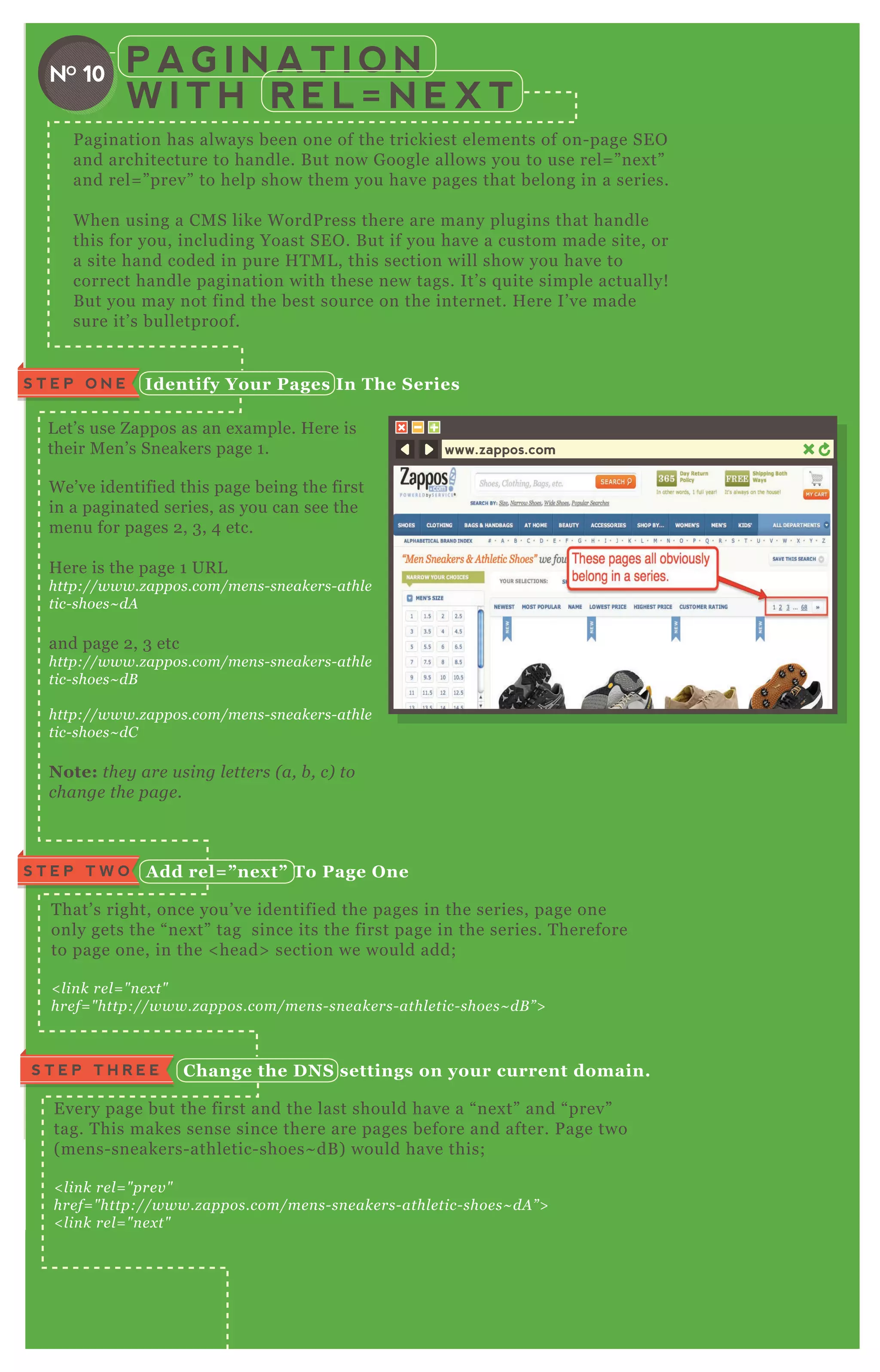
W e’ ve identified this page being the first
in a paginated series, as you can see the
menu for pages 2 , 3 , 4 etc.
H ere is the page 1 UR L
http://www.z appos.com/me n s- sn e ake rs- athl e
tic- shoe s~ dA
and page 2 , 3 etc
http://www.z appos.com/me n s- sn e ake rs- athl e
tic- shoe s~ dB
http://www.z appos.com/me n s- sn e ake rs- athl e
tic- shoe s~ dC
Note: the y are u sin g l e tte rs ( a, b , c) to
chan ge the page .
L et’ s use Z appos as an ex ample. H ere is
their M en’ s Sneakers page 1 .
I dentify Your Pages I n The S eriesS T E P O N E
A dd rel= ” nex t” To Page O neS T E P T W O
T hat’ s right, once you’ ve identified the pages in the series, page one
only gets the “ nex t” tag since its the first page in the series. T herefore
to page one, in the < head> section we would add;
< l in k re l = " n e x t"
hre f= " http://www.z appos.com/me n s- sn e ake rs- athl e tic- shoe s~ dB ” >
C hange the D NS settings on your current domain.S T E P T H R E E
E very page but the first and the last should have a “ nex t” and “ prev”
tag. T his makes sense since there are pages before and after. P age two
( mens- sneakers- athletic- shoes~ dB ) would have this;
< l in k re l = " pre v "
hre f= " http://www.z appos.com/me n s- sn e ake rs- athl e tic- shoe s~ dA ” >
< l in k re l = " n e x t"
hre f= " http://www.z appos.com/me n s- sn e ake rs- athl e tic- shoe s~ dC ” >
A dd rel= ” prev” to the last pageS T E P F O U R
T he last page in the seq uence only needs to refer to the page before it, so we
NO 10
www.zappos.com
A dd rel= ” prev” to the last pageS T E P F O U R
T he last page in the seq uence only needs to refer to the page before it, so we
would add;
< l in k re l = " n e x t" hre f= " http://www.z appos.com/me n s- sn e ake rs- athl e tic- shoe s~ dY ” >
A ssuming Z is the last page.
Final Notes
Y ou can in cl u de a can on ical tag in con j u n ction with re l n e x t/pre v
Y ou can u se ab sol u te or re l ativ e U R L s, b u t I al way s re comme n d ab sol u te
whe n e v e r possib l e .
C onfigure .htaccessS T E P T W O
You’ ll need to redirect a bunch of error codes to the error page. You should
add the following lines to .htaccess
R E D I R E C T I N G E R R O R
P A G E S W I T H . H T AC C E S S
NO 11
T his will follow a few step process;
1 . Create an error page - this page will have a special script on it.
2 . Configure Your .htaccess file to redirect to the error page
Create a page in which the errors will return from - you can call it
anything - error.php works.
O n that page, add the following code to the top;
<? php
switch( $ _ SER V ER [ "R ED I R EC T _ ST AT US"] ) {
case 400:
$ title = "400 B ad R eq uest";
$ description = "T he req uest can not be processed due to bad syntax ";
break;
case 401:
$ title = "401 Unauthoriz ed";
$ description = "T he req uest has failed authentication";
break;
case 403:
$ title = "403 F orbidden";
$ description = "T he server refuses to response to the req uest";
break;
case 404:
$ title = "404 N ot F ound";
$ description = "T he resource req uested can not be found.";
break;
case 5 00:
$ title = "5 00 I nternal Server Error";
$ description = "T here was an error which doesn' t fit any other error
message";
break;
case 5 02:
$ title = "5 02 B ad G ateway";
$ description = "T he server was acting as a prox y and received a bad
req uest.";
break;
case 5 04:
$ title = "5 04 G ateway T imeout";
$ description = "T he server was acting as a prox y and the req uest timed
out.";
break;
}
? >
ErrorD ocument 400 /error.php
ErrorD ocument 401 /error.php
ErrorD ocument 403 /error.php
ErrorD ocument 404 /error.php
ErrorD ocument 5 00 /error.php
ErrorD ocument 5 02 /error.php
ErrorD ocument 5 04 /error.php
T his P H P code creates a different title for each type of error. T his way
you don’ t need a ton of different files. W e’ re doing it all within one file.
In this ex ample we’ re j ust creating a uniq ue title and description for each
error page. B ut you can add ex tra variables and create any uniq ue content
you want.
C reate Your Error PageS T E P O N E
O P T I M I Z I N G R S S F E E D S
R SS feeds are such a huge part of blogging. Yet we sometimes overlook how powerful
it can be to optimize these feeds! T he following hands on tips should help you get the
most out of your R SS feed.
T his assumes you’ re using feedburner.
R eplace D efault R S S Feed I n Your Header
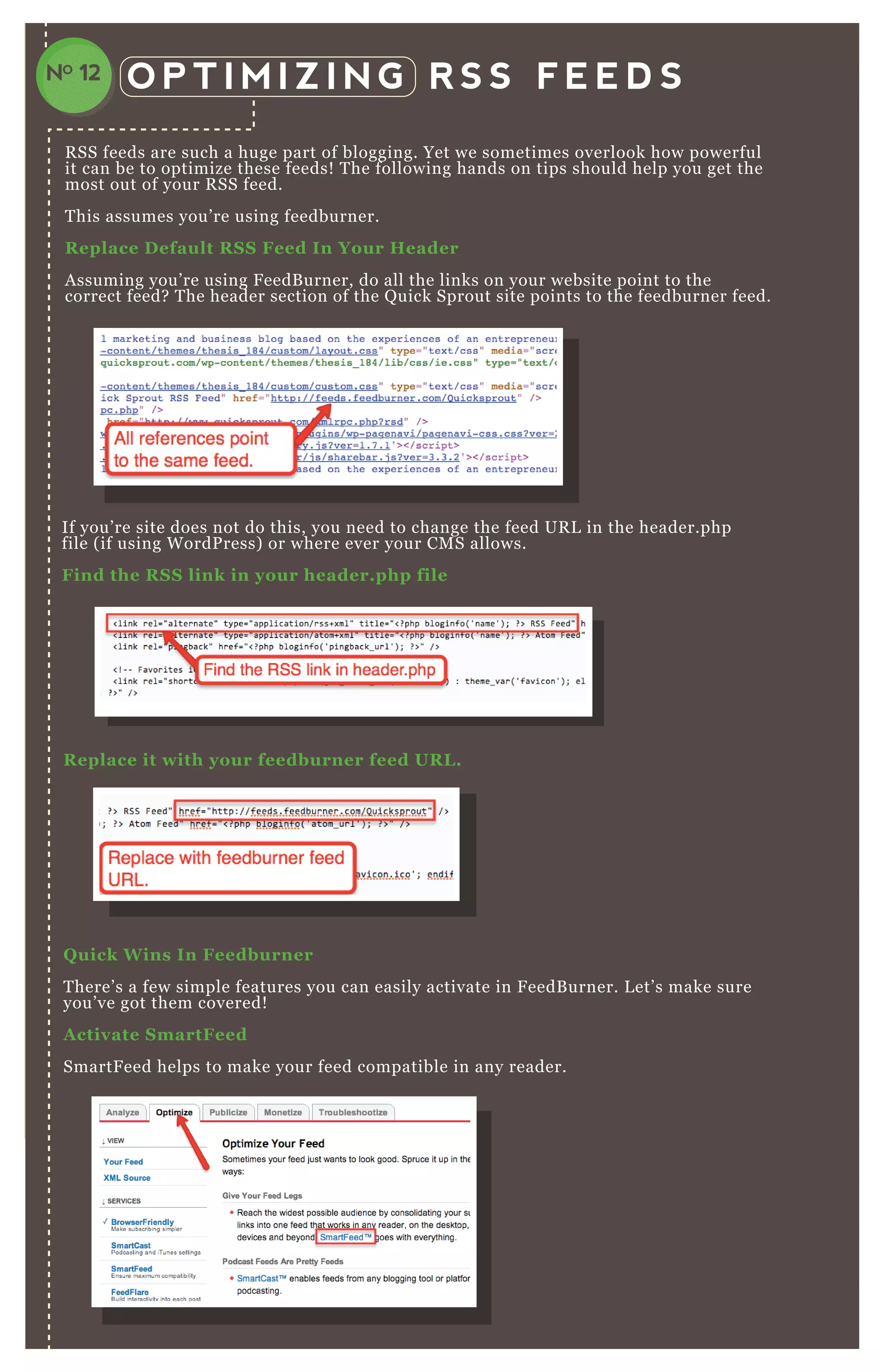
A ssuming you’ re using F eedB urner, do all the links on your website point to the
correct feed? T he header section of the Q uick Sprout site points to the feedburner feed.
If you’ re site does not do this, you need to change the feed UR L in the header.php
file ( if using W ordP ress) or where ever your CM S allows.
Find the R S S link in your header.php file
Q uick W ins I n Feedburner
T here’ s a few simple features you can easily activate in F eedB urner. L et’ s make sure
you’ ve got them covered!
A ctivate S martFeed
SmartF eed helps to make your feed compatible in any reader.
R eplace it with your feedburner feed UR L .
NO 12
A nd activate it!
A ctivate FeedFlare
F eedflare is a way to put link at the bottom of your feed to ask users to do things like
share on F acebook, email, bookmark on delicious etc.
T his is an essential must for any R SS feed.
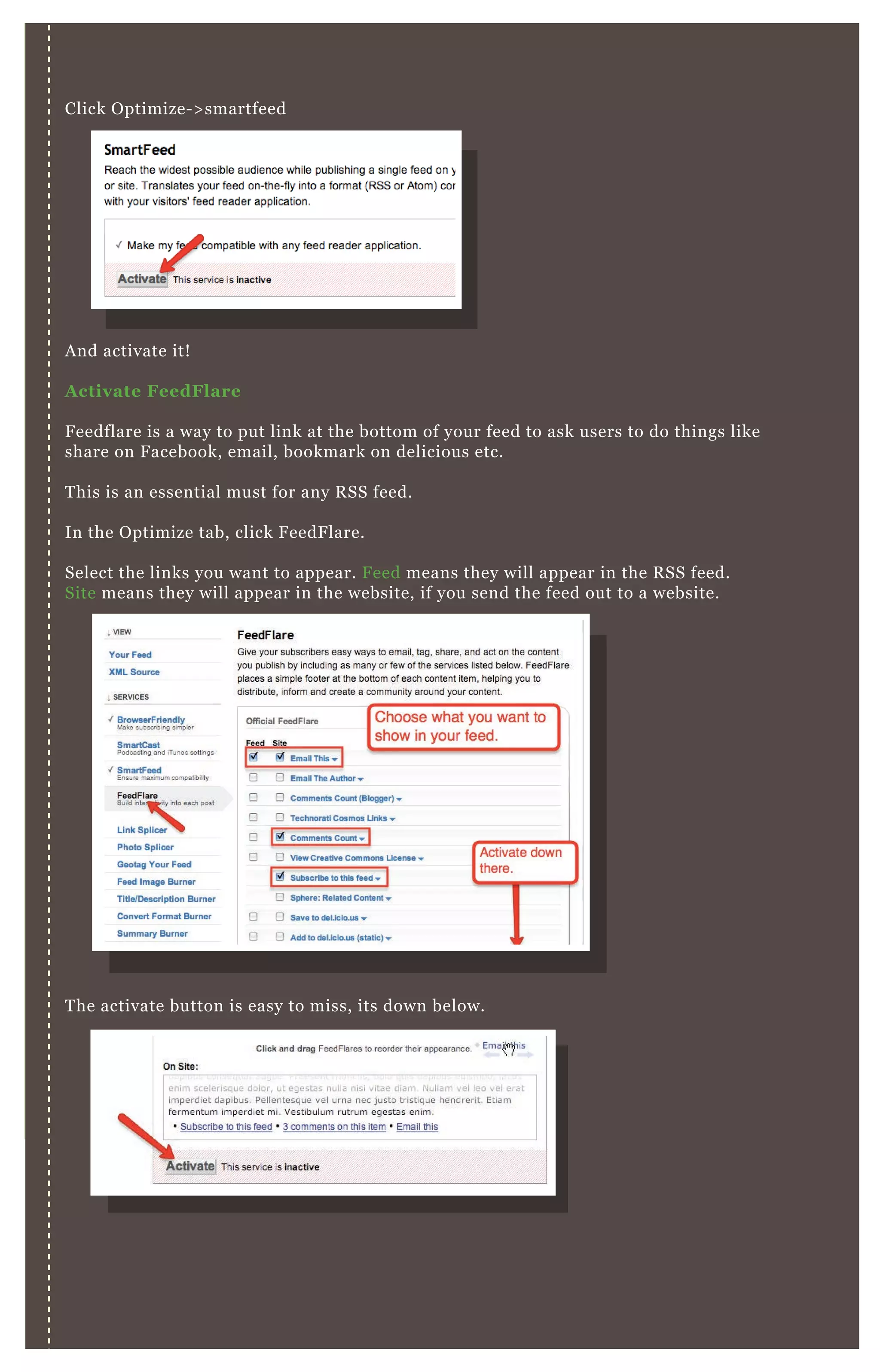
In the O ptimize tab, click F eedF lare.
Select the links you want to appear. F eed means they will appear in the R SS feed.
Site means they will appear in the website, if you send the feed out to a website.
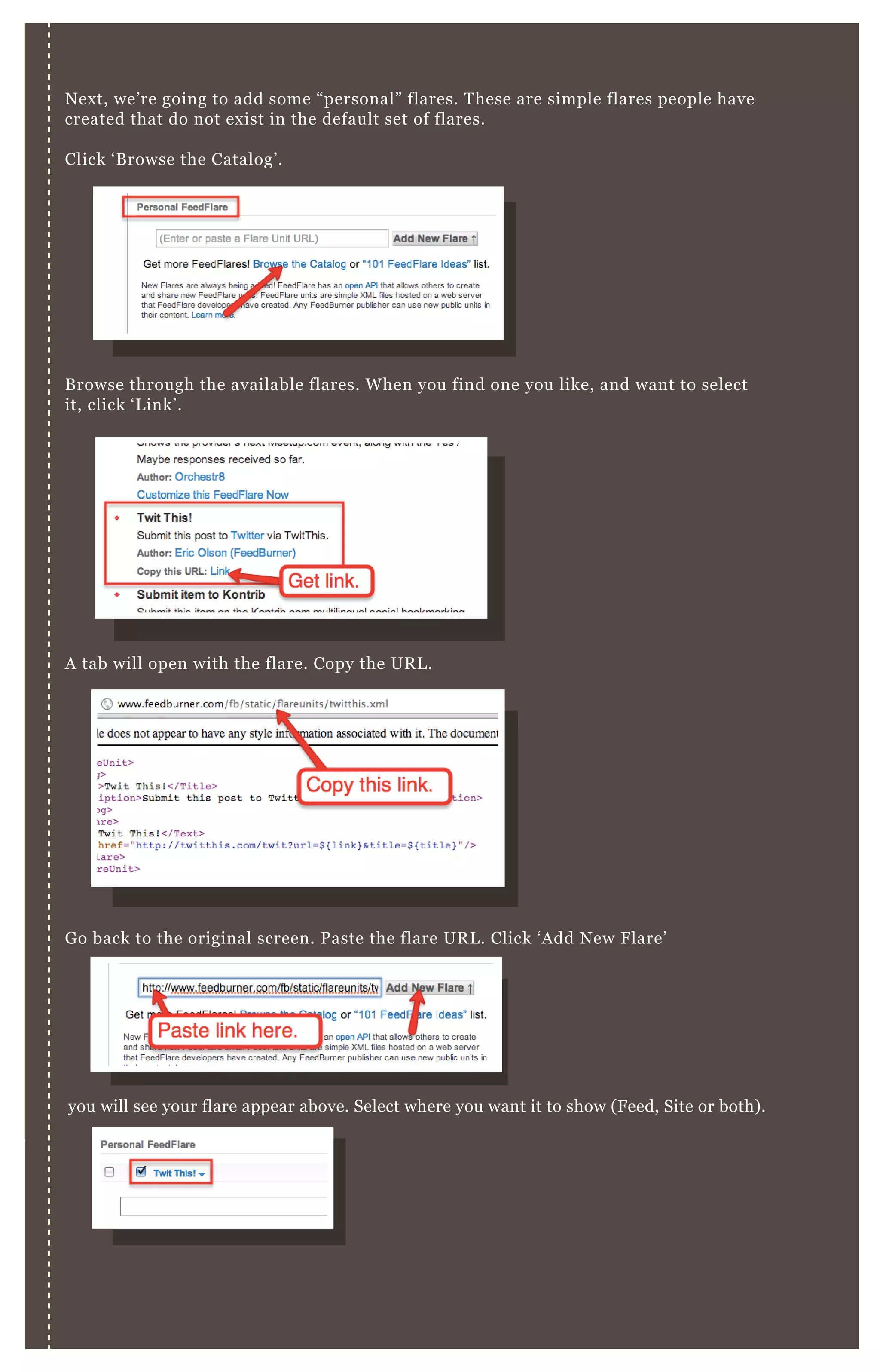
N ex t, we’ re going to add some “ personal” flares. T hese are simple flares people have
created that do not ex ist in the default set of flares.
Click ‘ B rowse the Catalog’ .
T he activate button is easy to miss, its down below.
Click O ptimize- > smartfeed
N ex t, we’ re going to add some “ personal” flares. T hese are simple flares people have
created that do not ex ist in the default set of flares.
Click ‘ B rowse the Catalog’ .
B rowse through the available flares. W hen you find one you like, and want to select
it, click ‘ L ink’ .
A tab will open with the flare. Copy the UR L .
G o back to the original screen. P aste the flare UR L . Click ‘ A dd N ew F lare’
you will see your flare appear above. Select where you want it to show ( F eed, Site or both) .
B elow, you can view a preview of your flares. R eorder them by dragging and dropping
the items.
B elow, you can view a preview of your flares. R eorder them by dragging and dropping
the items.
A ctivate PingS hot
P ingShot will notify the reading services when there’ s updates. T his speeds up the
delivery of your feed.
G o to P ublicize P ingShot and click ‘ A ctivate’ .
L ink to the O riginal S ource of the Feed
H ave you ever had your R SS feed scraped and duplicated onto another site without
your permission? It happens all the time, especially as you get more popular ( with
the he l p of this gu ide ! ) . G ooglebot or users might have a hard time telling which
article was the original source.
T his is why we’ re going to add a link the bottom of your R SS feed citing you as the
original source of your content. N ot only will this help users and engines make this
determination, it will get you some ex tra back- links as well.
D on ’ t forge t to cl ick ‘ S av e ’ . It’ s easy to miss down there.
[1] A dding R SS Source L ink in B logger
C reate Thank You’ s
Some personalization and a thank you to your readers can go a long way.
H ere’ s how to set up a simple message in your feed.
G o to O ptimize B rowserF riendly Content O ptions
Click ‘ enable’ and enter a personal message!
Time Your R S S Emails
You now have reference to the original source ( y ou ! ) of the content in
your R SS feeds. A s always, check your work to make sure its been done
correctly.
[1] A dding R SS Source L ink in B logger
G o to Settings Site F eed
A dd the following code:
[2] A dding R SS Source L ink in W ordP ress
G o to A ppearance E ditor functions.php
A dd the following code:
<hr />
<a href="http://www.myblog.com">My B log N ame</a>
function embed_ rss( $ content) {
if( is_ feed( ) )
$ content .= "<p><a href=' ". get_ permalink( ) ."' >' ";
$ content .= get_ the_ title( ) ."</a></p>";
return $ content;
}
add_ filter( ' the_ content' , ' embed_ rss' ) ;
V I D E O S I T E M A P S
Time Your R S S Emails
E ncourage more opens from your R SS email list by controlling send time.
G o to P ublicize E mail Subscriptions D elivery O ptions
Select your timezone and the best time for your audience. 9 am- 1 1 am is
often a good choice.
R edirect W ordPress R S S to Feedburner
You may have a standard R SS feed built into W ordP ress. You may even
have subscribers to it! W ith the help of a P lugin called “ F eedburner
R edirect” we’ re going to make sure everything is going through
feedburner.
You can find the plugin here -
http://wordpre ss.org/e x te n d/pl u gin s/te n tb l ogge rs- fe e db u rn e r- rss- re dire ct- pl u gin /
E nter your feedburner UR L in both fields. A nd you’ re done!
[1] Install it in your W ordP ress setup.
[2] A ctivate it.
If you have any sort of video on your website or blog, and
especially if it’ s marked up with metadata, you need to
have a video sitemap. T his gets your video content noticed,
processed and index ed much faster by G oogle and B ing.
V I D E O S I T E M A P SNO 13
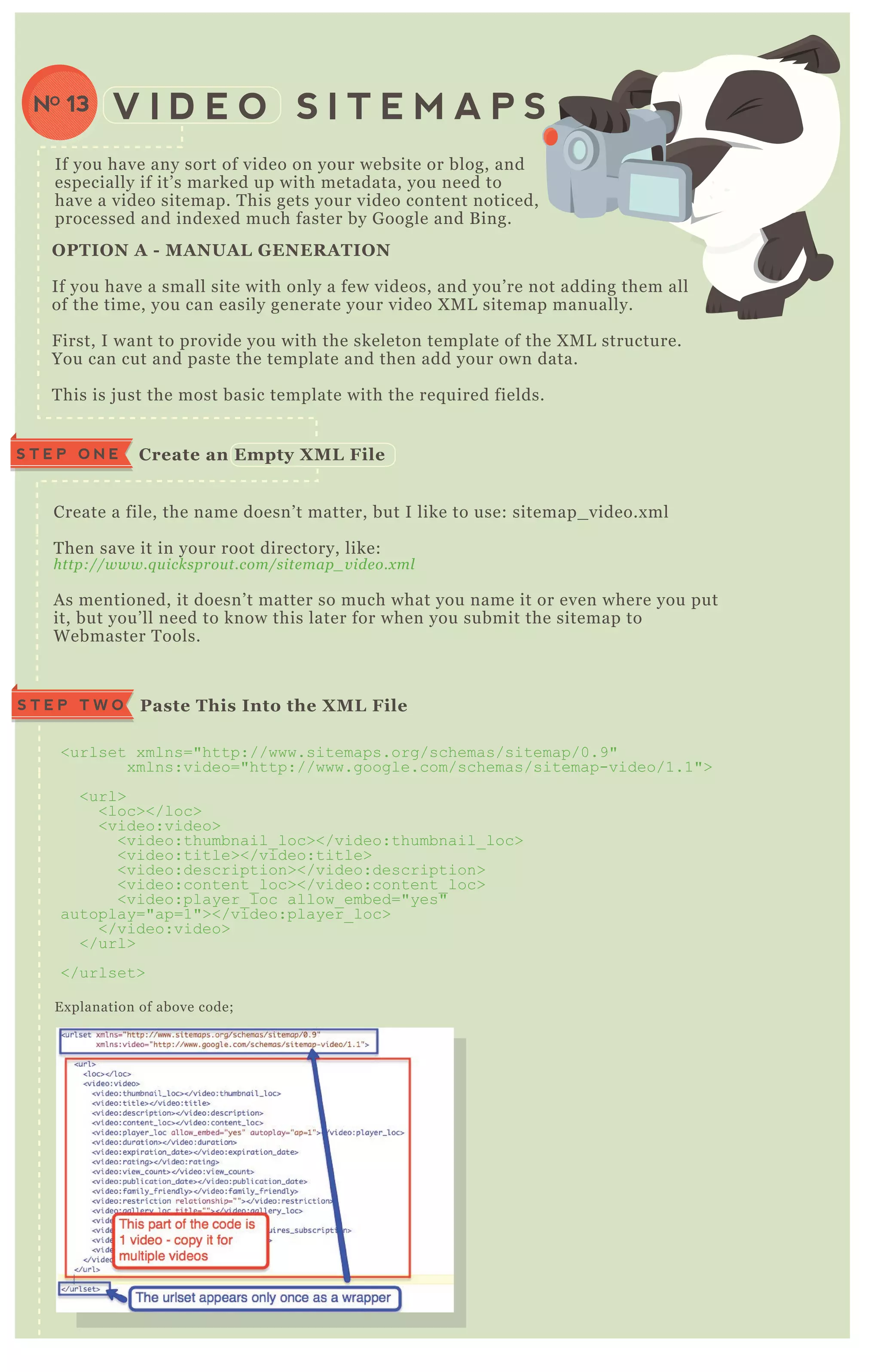
Create a file, the name doesn’ t matter, but I like to use: sitemap_ video.x ml
T hen save it in your root directory, like:
http://www.q u icksprou t.com/site map_ v ide o.x ml
A s mentioned, it doesn’ t matter so much what you name it or even where you put
it, but you’ ll need to know this later for when you submit the sitemap to
W ebmaster T ools.
E x planation of above code;
C reate an Empty X M L FileS T E P O N E
Paste This I nto the X M L FileS T E P T W O
<urlset x mlns="http://www.sitemaps.org/schemas/sitemap/0.9"
x mlns:video="http://www.google.com/schemas/sitemap-video/1.1">
<url>
<loc></loc>
<video:video>
<video:thumbnail_ loc></video:thumbnail_ loc>
<video:title></video:title>
<video:description></video:description>
<video:content_ loc></video:content_ loc>
<video:player_ loc allow_ embed="yes"
autoplay="ap=1"></video:player_ loc>
</video:video>
</url>
</urlset>
O PTI O N A - M A NUA L G ENER A TI O N
If you have a small site with only a few videos, and you’ re not adding them all
of the time, you can easily generate your video X M L sitemap manually.
F irst, I want to provide you with the skeleton template of the X M L structure.
You can cut and paste the template and then add your own data.
T his is j ust the most basic template with the req uired fields.
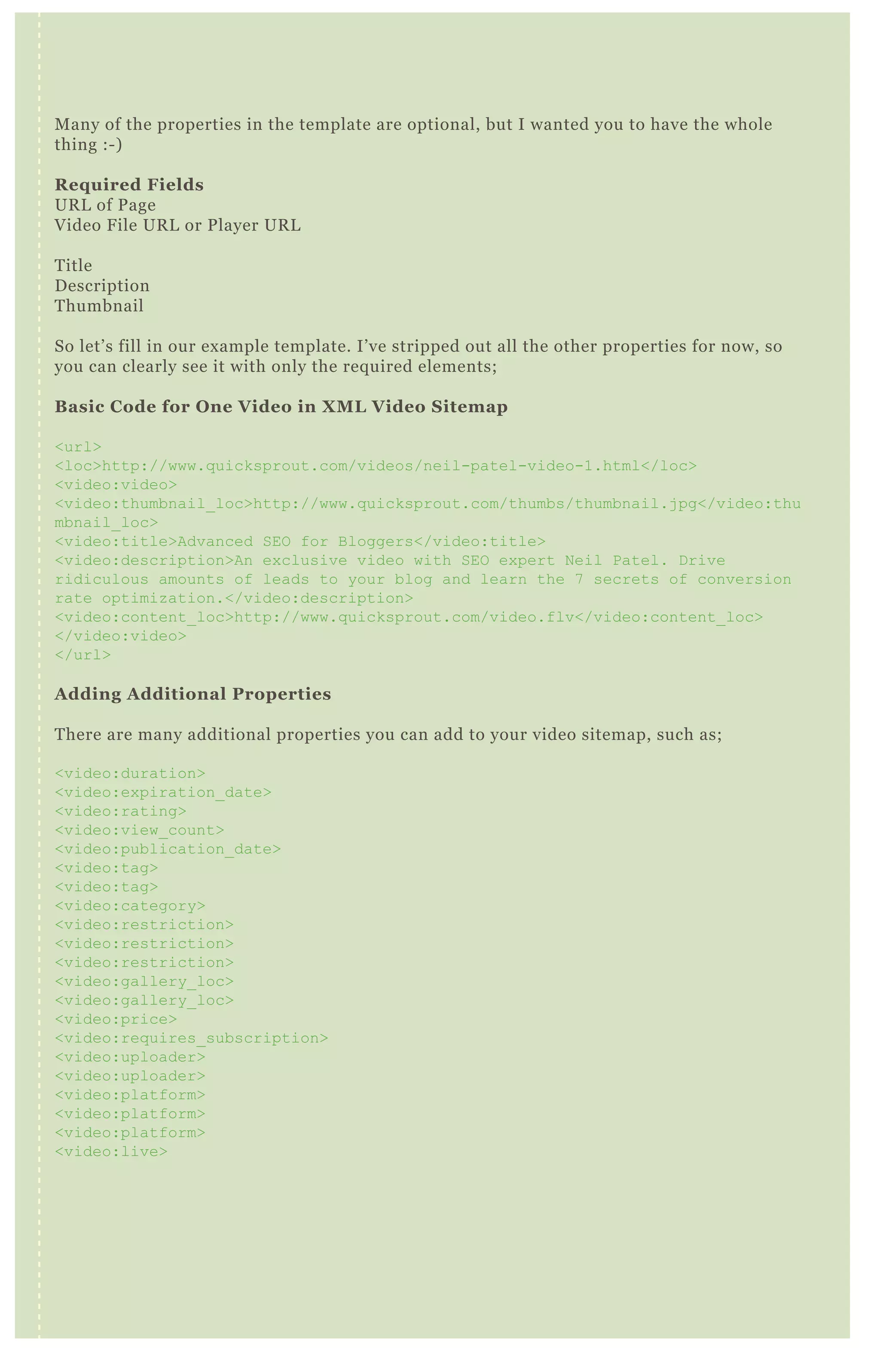
Many of the properties in the template are optional, but I wanted you to have the whole
thing :-)
Required Fields
URL of Page
Video File URL or Player URL
Title
Description
Thumbnail
So let’s fill in our example template. I’ve stripped out all the other properties for now, so
you can clearly see it with only the required elements;
Basic Code for One Video in XML Video Sitemap
<url>
<loc>http://www.quicksprout.com/videos/neil-patel-video-1.html</loc>
<video:video>
<video:thumbnail_loc>http://www.quicksprout.com/thumbs/thumbnail.jpg</video:thu
mbnail_loc>
<video:title>Advanced SEO for Bloggers</video:title>
<video:description>An exclusive video with SEO expert Neil Patel. Drive
ridiculous amounts of leads to your blog and learn the 7 secrets of conversion
rate optimization.</video:description>
<video:content_loc>http://www.quicksprout.com/video.flv</video:content_loc>
</video:video>
</url>
Adding Additional Properties
There are many additional properties you can add to your video sitemap, such as;
<video:duration>
<video:expiration_date>
<video:rating>
<video:view_count>
<video:publication_date>
<video:tag>
<video:tag>
<video:category>
<video:restriction>
<video:restriction>
<video:restriction>
<video:gallery_loc>
<video:gallery_loc>
<video:price>
<video:requires_subscription>
<video:uploader>
<video:uploader>
<video:platform>
<video:platform>
<video:platform>
<video:live>
Let’s add a few of these back into our example, so you can see them in action!
<url>
<loc>http://www.quicksprout.com/videos/neil-patel-video-1.html</loc>
<video:video>
<video:thumbnail_loc>http://www.quicksprout.com/thumbs/thumbnail.jpg</video:thu
mbnail_loc>
<video:title>Advanced SEO for Bloggers</video:title>
<video:description>An exclusive video with SEO expert Neil Patel. Drive
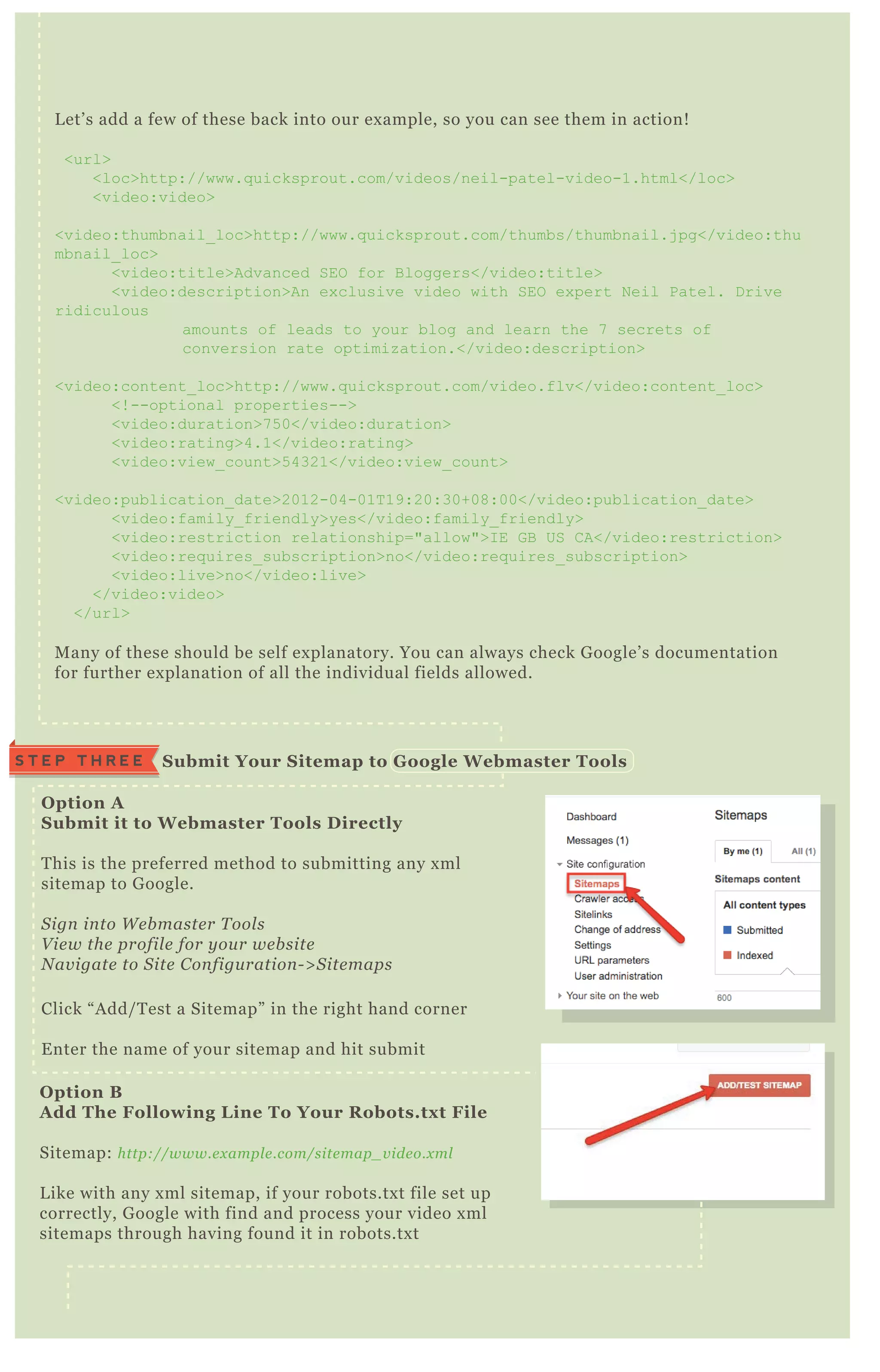
O ption A
S ubmit it to W ebmaster Tools D irectly
T his is the preferred method to submitting any x ml
sitemap to G oogle.
S ign in to W e b maste r T ool s
V ie w the profil e for y ou r we b site
N av igate to S ite C on figu ration - > S ite maps
Click “ A dd/ T est a Sitemap” in the right hand corner
E nter the name of your sitemap and hit submit
O ption B
A dd The Following L ine To Your R obots.tx t File
Sitemap: http://www.e x ampl e .com/site map_ v ide o.x ml
L ike with any x ml sitemap, if your robots.tx t file set up
correctly, G oogle with find and process your video x ml
sitemaps through having found it in robots.tx t
S ubmit Your S itemap to G oogle W ebmaster ToolsS T E P T H R E E
L et’ s add a few of these back into our ex ample, so you can see them in action!
<url>
<loc>http://www.q uicksprout.com/videos/neil-patel-video-1.html</loc>
<video:video>
<video:thumbnail_ loc>http://www.q uicksprout.com/thumbs/thumbnail.j pg</video:thu
mbnail_ loc>
<video:title>Advanced SEO for B loggers</video:title>
<video:description>An ex clusive video with SEO ex pert N eil Patel. D rive
ridiculous
amounts of leads to your blog and learn the 7 secrets of
conversion rate optimiz ation.</video:description>
<video:content_ loc>http://www.q uicksprout.com/video.flv</video:content_ loc>
<! --optional properties-->
<video:duration>7 5 0</video:duration>
<video:rating>4.1</video:rating>
<video:view_ count>5 4321</video:view_ count>
<video:publication_ date>2012-04-01T 19:20:30+08:00</video:publication_ date>
<video:family_ friendly>yes</video:family_ friendly>
<video:restriction relationship="allow">I E G B US C A</video:restriction>
<video:req uires_ subscription>no</video:req uires_ subscription>
<video:live>no</video:live>
</video:video>
</url>
M any of these should be self ex planatory. You can always check G oogle’ s documentation
for further ex planation of all the individual fields allowed.
. H T A C C E S S H A C K S
T hese tips only work if your client is using A pache. If your client is using
W indows IIS, then look at IIS hacks.
[1] L ocate your .htaccess file on your server.
( See “ H ow to locate .htaccess on your server” )
[2] O nce you’ ve located it, edit the file using a tex t editor.
If you are using W indows, I recommend N otepad. If you’ re using M ac,
download a free tex t editor like T ex tW rangler.
[3] I n your htaccess file decide what you want to do, then add a line of code:
To create a custom 40 4 page
Use “ E rrorD ocument” and put the UR L to your custom 4 0 4 page at the end.
E x ample:
E rrorD ocument 4 0 4 http://www.e x ampl e .com/my - cu stom- 4 0 4 - page .html
To password protect a folder
A . F irst, you will need to first need to create an .htpasswd file. T he easy way is to
use this online tool to create it: http://www.tool s.dy n amicdriv e .com/password/
B . E nter your desired username on the left, and the password you want that person
to have on the right.
C. In the “ path to .htpasswd” box , put it in a folder that isn’ t accessible to the
public. Usually, it’ s safe to put in your home directory like “ / home/ myusername”
D . Click submit and put the downloaded .htpasswd file into “ / home/ myusername”
E . N ow that you’ re done that, type this into your .htaccess file
AuthUserF ile /home/myusername/.htpasswd
AuthN ame EnterPassword
AuthT ype B asic
req uire user some_ users_ name
R eplace “ some_ users_ name” with the username that will be allowed into this
folder.
To block users by I P address
T ype these four lines into your .htaccess file:
O rder allow, deny
D eny from 111.222.333.444
D eny from 5 5 5 .666.7 7 7 .888
Allow from all
In the lines that say “ deny from, ” replace the ex ample IP addresses
“ 111.222.333.444” with the real IP address you want to block.
To block users by referrer
A dd these three lines to your .htaccess file:
R ewriteEngine O n
R ewriteC ond % { H T T P_ R EF ER ER } somedomain .com [ N C ]
R ewriteR ule .* - [ F ]
If you want to block more than one referrer, add more R ewriteCond lines like this:
R ewriteEngine O n
R ewriteC ond % { H T T P_ R EF ER ER } somedomain .com [ N C ,O R ]
R ewriteC ond % { H T T P_ R EF ER ER } anotherdomain .com [ N C ,O R ]
R ewriteC ond % { H T T P_ R EF ER ER } 3rdD omain .com [ N C ]
R ewriteR ule .* - [ F ]
N otice that every line ex cept for the last one should end in “ [ N C ,O R ] ”
NO 14
Notice that every line except for the last one should end in “[NC,OR]”
To make something other than index.html be the default page.
Let’s say you want “home.html” to be your default page. Use this line in the
htaccess file:
DirectoryIndex. home.html
To 301 redirect an old domain to a new domain
Add these lines to your htaccess file
RewriteEngine on
RewriteCond %{HTTP_HOST} ^olddomain.com [NC,OR]
RewriteCond %{HTTP_HOST} ^www.olddomain.com [NC]
RewriteRule ^(.*)$ http://www.newdomain.com/$1 [R=301,NC]
Replace "olddomain.com" with your old domain name. This will 301 redirect links
form your old domain to your new one with the WWW in front of it.
To prevent someone hotlinking resources on your website
Add these lines to your htaccess file
RewriteEngine on
RewriteCond %{HTTP_REFERER} !^$
RewriteCond %{HTTP_REFERER} !^http://(www.)?mydomain.com/.*$ [NC]
RewriteRule .(gif|jpg|js|css)$ - [F]
Replace mydomain.com with your domain name. These lines will prevent someone
from hot linking GIF, JPG, JS, and CSS files.
To redirect all pages from HTTPS:// to HTTP://
Add these lines to your htaccess file
RewriteEngine on
RewriteCond %{SERVER_PORT} !^80$
RewriteRule ^(.*)$ https://www.domain.com/$1 [NC,R=301,L]
Replace domain.com with your own domain.
To redirect all pages from HTTP:// to HTTPS://
Add these lines to your htaccess file
RewriteEngine on
RewriteCond %{SERVER_PORT} !^443$
RewriteRule ^(.*)$ http://www.domain.com/$1 [NC,R=301,L]
Replace domain.com with your own domain.
To redirect one URL from HTTPS:// to HTTP://
Assume the URL is http://www.domain.com/mypage.html
RewriteEngine on
RewriteCond %{HTTP_HOST} !^80$
RewriteCond %{HTTP_HOST} ^www.domain.com/mypage.html [NC]
RewriteRule ^(.*)$ http://www.domain.com/mypage.html [NC,R=301,L]
D E T E C T I N G G O O G L E B O TNO 15
[ 1 ] C ut and paste the following code anywhere in the < body> of your document>
if( strstr( strtolower( $ _ SER V ER [ ' H T T P_ USER _ AG EN T ' ] ) , "googlebot") )
{
// what to do
}
[ 2 ] R eplace with your content
R eplace “ / / what to do” with whatever you want to happen.
Tip: T o make it H T M L
D o this;
if( strstr( strtolower( $ _ SER V ER [ ' H T T P_ USER _ AG EN T ' ] ) , "googlebot") )
{ ? >
<h1>Put your H T ML here</h1>
<p>anything you’ d normally do</p>
<? php
}
L et’ s break apart each piece of the P H P .
if( condition) { } - this is j ust a simple function that says “ if x is true, do y” .
N ow we’ ll work from the inside of the nested statement out.
‘ H T T P_ USER _ AG EN T ’ - this ex tracts a browser specific ID string
$ _ SER V ER - this is an array with information such as headers, paths, and script
locations, which is created by the web server
strtolower - returns string with all alphabetic characters converted to lowercase.
strstr - returns part of haystack string starting from and including the first
occurrence of needle to the end of haystack
{
// what to do
}
forward slashes / / are j ust used to make a comment. A ll we’ re saying here, is to put
whatever you want to happen between the curly brackets.
If you like visuals better - this is a good ex planation of the pieces of code;
T here may be many reasons why you’ d want to detect G ooglebot as
the User A gent. T hese can be left to your imagination :)
A D D C U S T O M S E A R C H
E N G I N E T O Y O U R S I T E
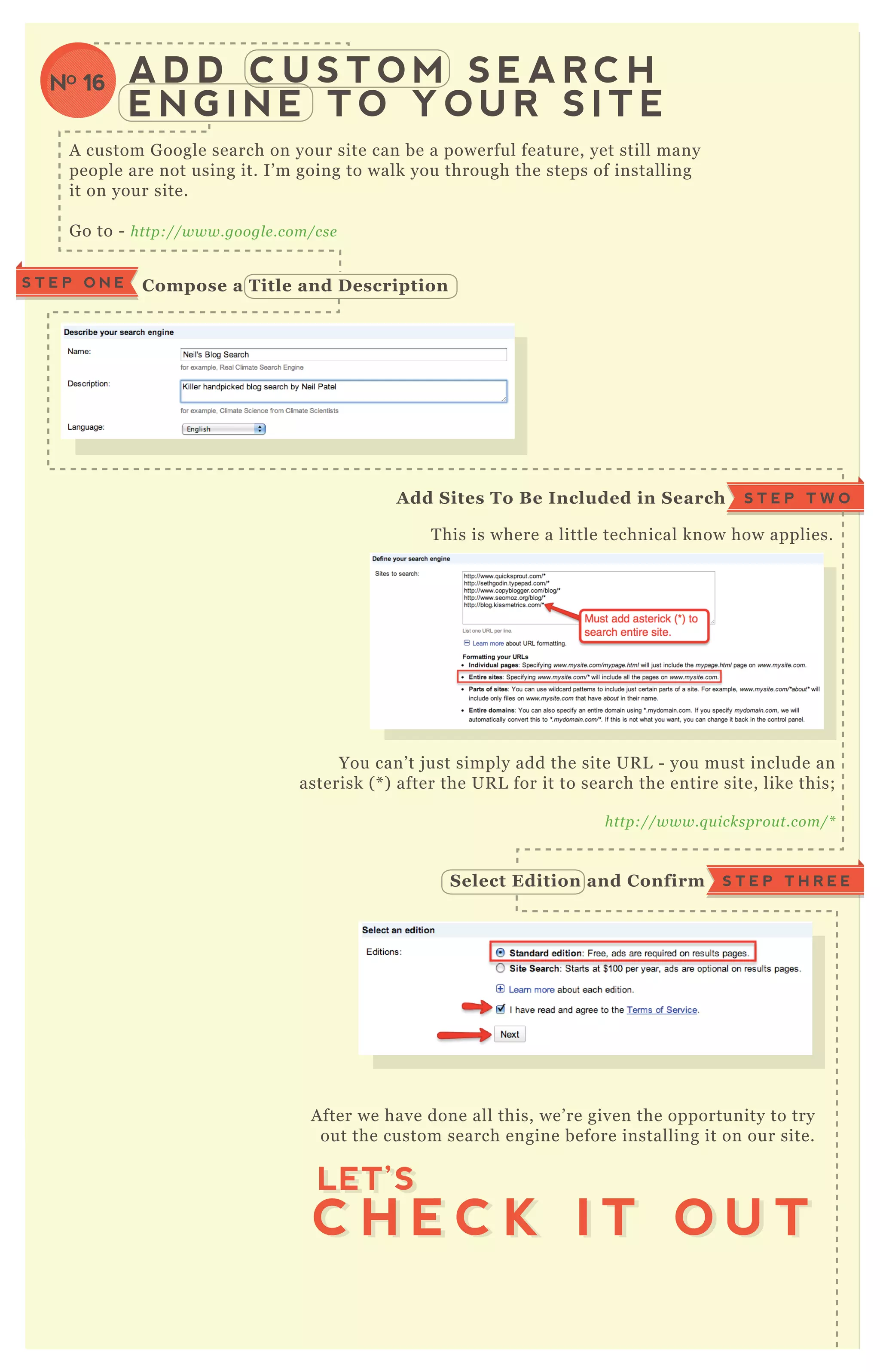
A custom G oogle search on your site can be a powerful feature, yet still many
people are not using it. I’ m going to walk you through the steps of installing
it on your site.
G o to - http://www.googl e .com/cse
T his is where a little technical know how applies.
You can’ t j ust simply add the site UR L - you must include an
asterisk ( * ) after the UR L for it to search the entire site, like this;
http://www.q u icksprou t.com/*
A fter we have done all this, we’ re given the opportunity to try
out the custom search engine before installing it on our site.
C ompose a Title and D escriptionS T E P O N E
S T E P T W OA dd S ites To B e I ncluded in S earch
S T E P T H R E ES elect Edition and C onfirm
C H E C K I T O U T
LET’S
C H E C K I T O U T
LET’S
NO 16
A search for [ twitter tips] in our custom engine shows good
results and variety among the sites in the engine. ( N ote the
ads will be present unless you pay for a premium version) .
N ow it’ s time to install in your site!
T his type of installation is going to either be a new page or a
new post. L et’ s use a new page in this ex ample, however a new
post will work in the same way.
W e’ re going to edit in H T M L mode since we’ ll be pasting J avaScript
code into the page.
A search for [ twitter tips] in our custom engine shows good
results and variety among the sites in the engine. ( N ote the
I NS TA L L I NG C US TO M S EA R C H I N YO UR S I TE
[1] Navigate to a “ new page”
[2] Edit in HTM L M ode
[3] Paste C ode
W e’ re going to edit in H T M L mode since we’ ll be pasting J avaScript
code into the page.
P R E V I E W I T
LET’S
P R E V I E W I T
LET’S
[3] Paste C ode
LET’SLET’SLET’SLET’SLET’S
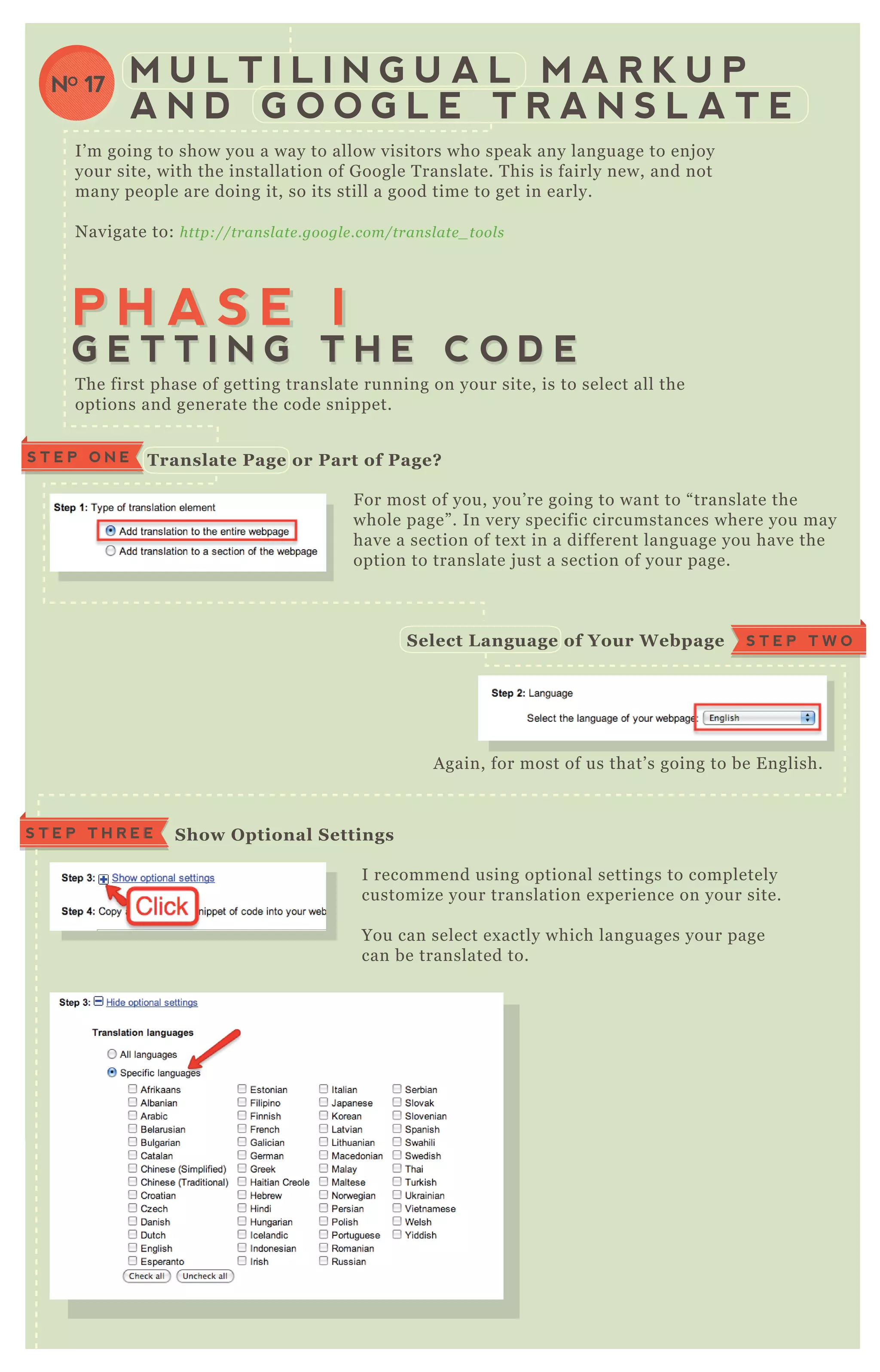
I’ m going to show you a way to allow visitors who speak any language to enj oy
M U L T I L I N G U A L M A R K U P
A N D G O O G L E T R A N S L A T E
NO 17
I’ m going to show you a way to allow visitors who speak any language to enj oy
your site, with the installation of G oogle T ranslate. T his is fairly new, and not
many people are doing it, so its still a good time to get in early.
N avigate to: http://tran sl ate .googl e .com/tran sl ate _ tool s
F or most of you, you’ re going to want to “ translate the
whole page” . In very specific circumstances where you may
have a section of tex t in a different language you have the
option to translate j ust a section of your page.
I recommend using optional settings to completely
customize your translation ex perience on your site.
You can select ex actly which languages your page
can be translated to.
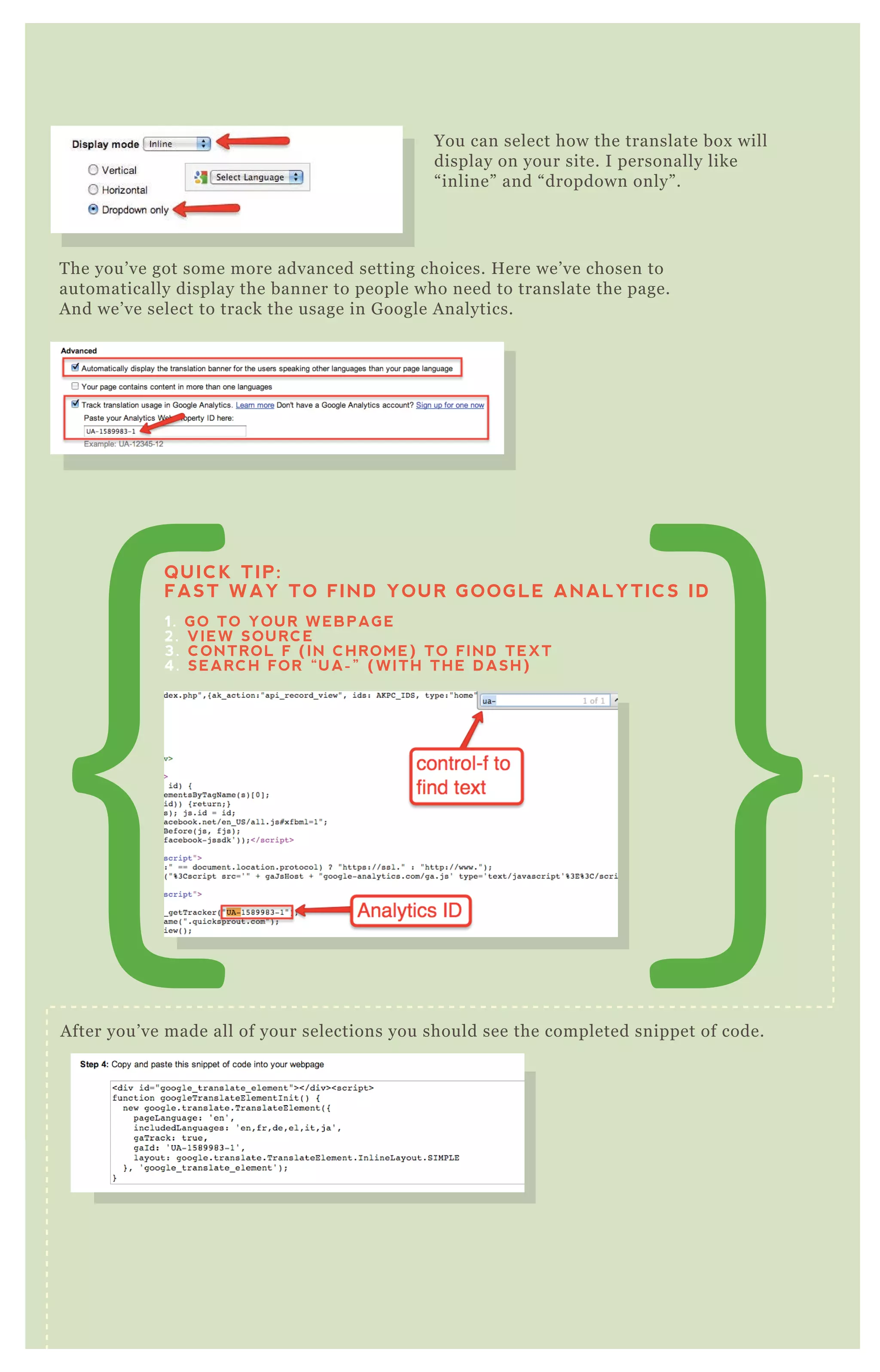
You can select how the translate box will
A gain, for most of us that’ s going to be E nglish.
T he first phase of getting translate running on your site, is to select all the
options and generate the code snippet.
M U L T I L I N G U A L M A R K U P
A N D G O O G L E T R A N S L A T E
NO 17
P H A S E IP H A S E I
G E T T I N G T H E C O D EG E T T I N G T H E C O D E
Translate Page or Part of Page?S T E P O N E
F or most of you, you’ re going to want to “ translate the
whole page” . In very specific circumstances where you may
have a section of tex t in a different language you have the
option to translate j ust a section of your page.
S T E P T W OS elect L anguage of Your W ebpage
S how O ptional S ettingsS T E P T H R E E
You can select how the translate box will
display on your site. I personally like
“ inline” and “ dropdown only” .
T he you’ ve got some more advanced setting choices. H ere we’ ve chosen to
automatically display the banner to people who need to translate the page.
A nd we’ ve select to track the usage in G oogle A nalytics.
A fter you’ ve made all of your selections you should see the completed snippet of code.
You can do a q uick preview of your translate button before you go to copy the
code and add it to your site.
QUICK TIP:
FAST WAY TO FIND YOUR GOOGLE ANALYTICS ID
1. GO TO YOUR WEBPAGE
2. VIEW SOURCE
3. CONTROL F (IN CHROME) TO FIND TEXT
4. SEARCH FOR “UA-” (WITH THE DASH)
Preview The Page
You can do a q uick preview of your translate button before you go to copy the
code and add it to your site.
Preview The Page
N ow that we’ ve got the code ready, it needs to be installed on your site. If you’ re
running a content management system like W ordP ress, this should be fairly
easy. W e’ re j ust going to locate the spot where the code needs to be inserted.
T here’ s likely to be two basic places you’ ll decide to install the box .
A q uick look at the source code again,
will give you a good idea where the
code needs to go;
P H A S E I I
I N S T A L L I N G T H E
C O D E O N Y O U R S I T E
D ecide W here You W ant To Translate B ox To A ppearS T E P O N E
O ption A
W ould be somewhere in the header, like
here on Q uickSprout;
O ption B
W ould be somewhere in a sidebar, like
here on Q uicksprout;
I nstalling The C ode I n The Header [option A ]S T E P T W O
A q uick look at the source code again,
will give you a good idea where the
code needs to go;
You can see, it needs to go inbetween the search box and the logo.
T his option is a little easier, because you will likely be able to j ust
create a new tex t widget.
A ll done! N ow visitors of any language can enj oy
your site!
L ocate the place in the code where your translate
box needs to go and paste the snippet in the
header.php file and save.
I nstalling The C ode I n The Header [option A ]S T E P T W O
I nstalling the C ode in a S idebar. [option B ]S T E P T W O
[1] L og I nto W ordPress
[2] Navigate to the “ editor”
[3] S elect “ Header”
[4] Paste Translate C ode I nto Header.php File
[1] Navigate to your widgets
[2] A dd a new “ Tex t W idget” to your sidebar
[3] Paste the Translate C ode I nto Your W idget
box needs to go and paste the snippet in the
header.php file and save.
[2]
[1]
[2]
[3]
[3]
[4]
B L O C K P O T E N T I A L L Y
M A L I C I O U S O R H A R M F U L
L I N K S T O Y O U R S I T E
NO 18
http://www.q u icksprou t.com/? n e il pate l scam
( P lease don’ t link to me or anyone else like that)
A nd the malicious q uery string can end up on different pages:
http://www.q u icksprou t.com/page /2 /? n e il pate l scam
http://www.q u icksprou t.com/page /3 /? n e il pate l scam
T hese pages can get index ed as such, and could potentially replace the real pages in
their index . T his is unlikely, but in either case, you may need a way to fix this if it
happens. H ere’ s a bit of .htaccess code to do so:
# F I X B AD L I N K S
<ifModule mod_ rewrite.c>
R ewriteC ond % { Q UER Y _ ST R I N G } q uerystring [ N C ]
R ewriteR ule .* http://ex ample.com/$ 1? [ R =301,L ]
</ifModule>
S imply do the following:
[1] M ake sure the .htaccess is in your root directory.
[2] P lace this bit of code at the bottom on the .htaccess file.
[3] R eplace “ q uerystring” with the malicious q uerystring being used.
[4] R eplace ex ample.com with your site’ s UR L
[5 ] T o add multiple q uerystrings use the “ pipes” ( | ) as an “ or” ex pressions:
( neilpatelscam| q uicksproutripoff| badblogger) for the q uerystring.
[6 ] F inally, run a site: q uery in G oogle a week or two later, such as:
site:q uicksprout.com/ ? neilpatelscam to see if they’ ve been removed from the
index .
O ccasionally a hacker or even j ust someone inex perienced
without malicious intent will send a back link over to your site
with a q uery parameter attached to the end of it. It might look
something like the following:
T his section of browser plugins revolves around the ones that help optimize your
sites accessibility and index ation.
F irst, here’ s the list.
B roken L ink Checker
https://chrome .googl e .com/we b store /de tail /oj kcdipcgfae kb e ae l aapakgn j fl fgl f
W eb D eveloper
http://chrispe de rick.com/work/we b - de v e l ope r/
R edirect P ath Checker
https://chrome .googl e .com/we b store /de tail /aomidfkchockcl dhb kggj okdkke b mdl l
SE O moz T oolbar
https://chrome .googl e .com/we b store /de tail /e akacpaij cpapn dcfffdgphdiccmpkn p
Chrome Sniffer
https://chrome .googl e .com/we b store /de tail /homgcn aoacgigpkkl j j j e kpign b l ke ae
G oogle A nalytics D ebugger
https://chrome .googl e .com/we b store /de tail /j n kmfdil e e l hofj cij ame phohj e chhn a
M icroformats for Chrome
https://chrome .googl e .com/we b store /de tail /oal b ifkn mcl b n mj l l j de mhj j l kmppj j l
R ulers G uides and E yedropper Color P icker
https://chrome .googl e .com/we b store /de tail /b j pn gj gkahhfl e j n e e mihpb n fdoafoe h
W ord Count
https://chrome .googl e .com/we b store /de tail /kmn dj oipob j fj b hocpoe e j j imchn b j j e
Source K it
https://chrome .googl e .com/we b store /de tail /iie e l dj dihkpoapgipfke oddj ckopgj g? hl = e n - U S
I’ m going to show you how to use some of these in an advanced way.
B roken L inks C hecker
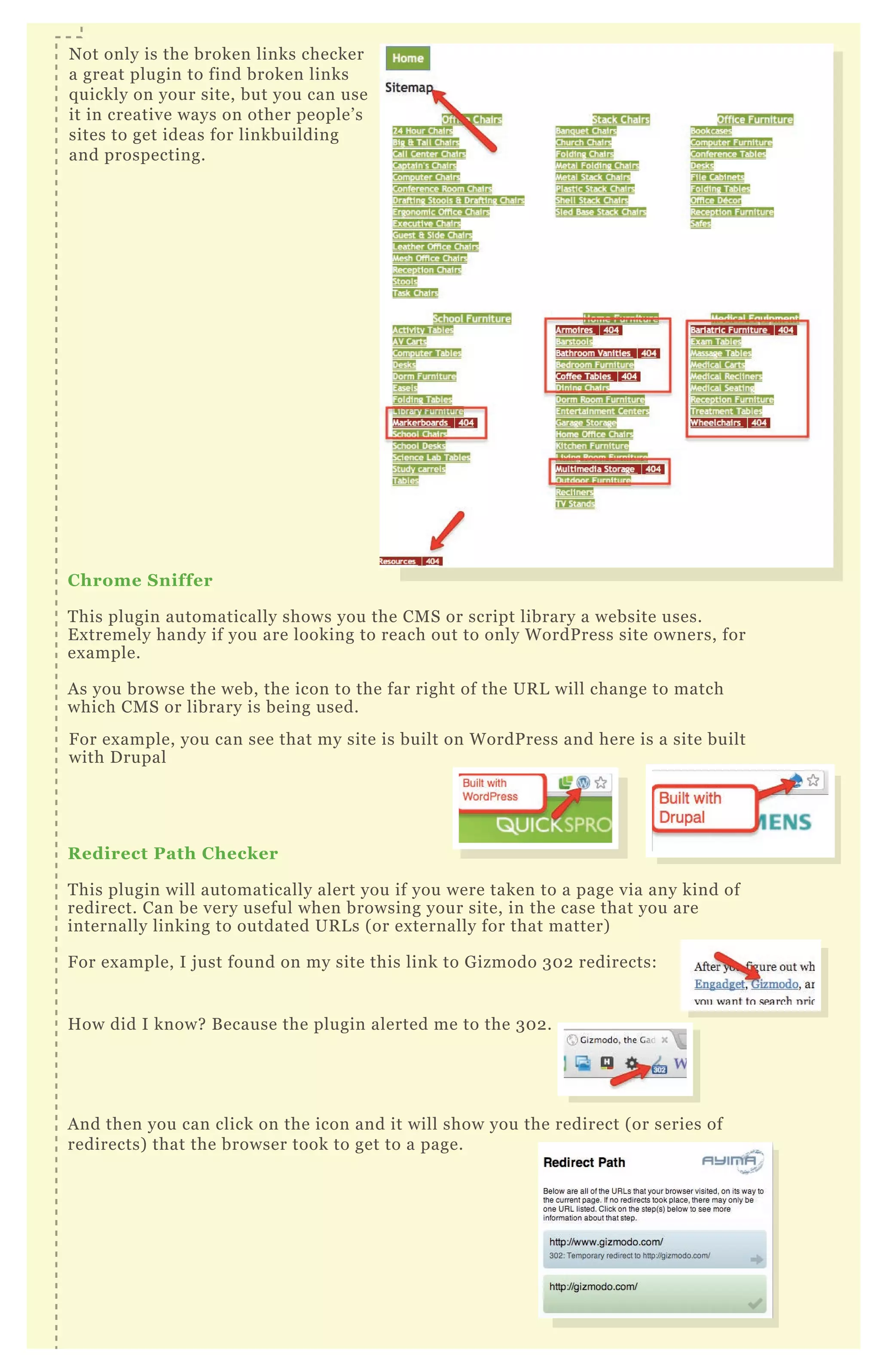
N ot only is the broken links checker a great plugin to find broken links q uickly on
your site, but you can use it in creative ways on other people’ s sites to get ideas for
linkbuilding and prospecting.
F or ex ample, try running it on the sitemap of a competitor’ s website. H ere’ s how:
[1] F ind a competitor with an H T M L sitemap. F or this ex ample I’ m going to
randomly use www.bizchair.com and their sitemap is
http://www.b iz chair.com/site - map.html
B R O W S E R P L U G I N S F O R
O N - S I T E A N A L Y S I S
NO 19
[2] R un the L ink Checker
Click the icon for the ex tension
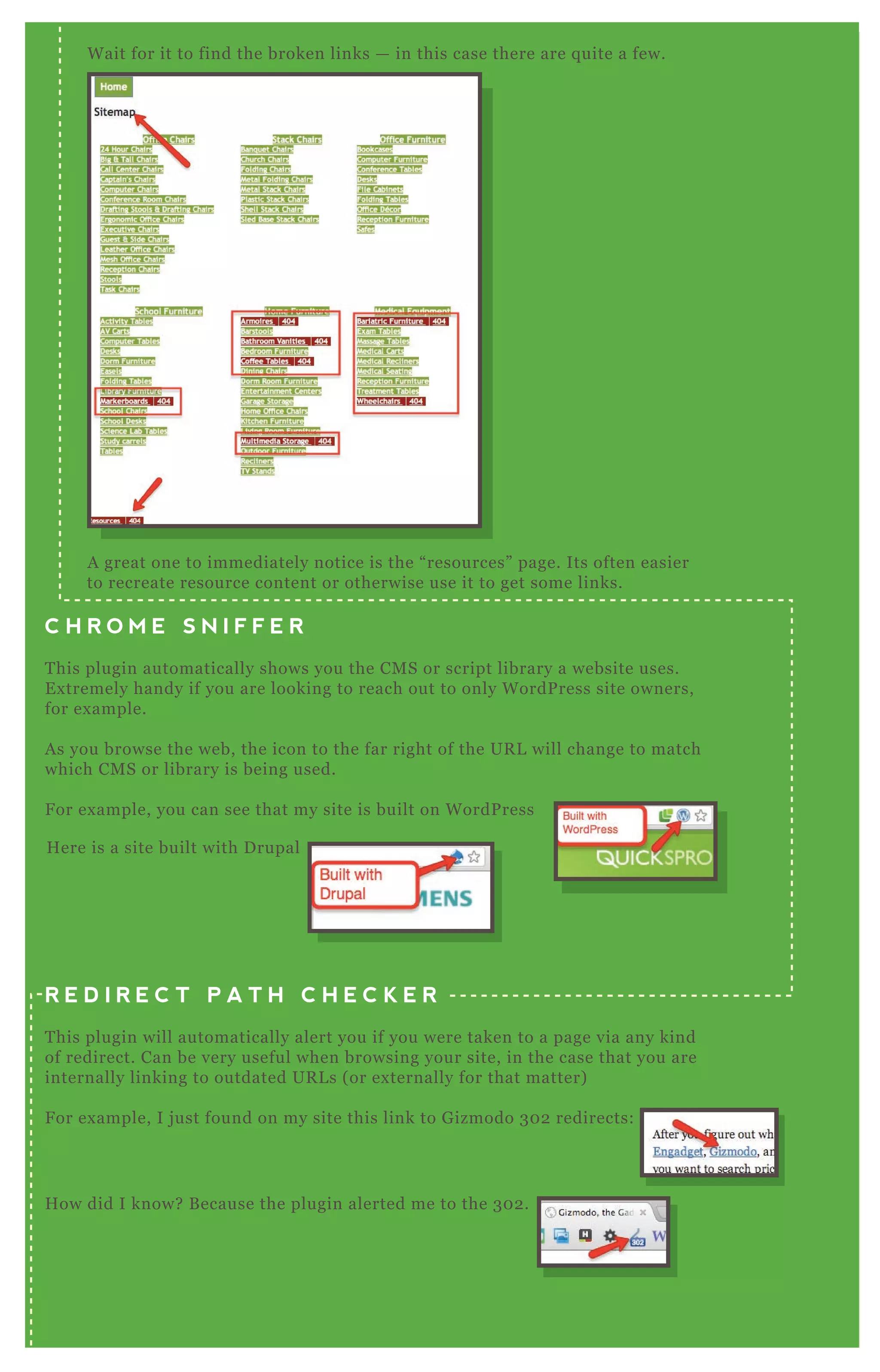
W ait for it to find the broken links - in this case there are
q uite a few.
N ot only is the broken links checker
B rowser plugins can greatly speed up your workflow and efficiency.
I’ m going to show you some plugins for G oogle Chrome, and a little
bit about how to use them in more advanced ways.
C hrome S niffer
T his plugin automatically shows you the CM S or script library a website uses.
E x tremely handy if you are looking to reach out to only W ordP ress site owners, for
ex ample.
A s you browse the web, the icon to the far right of the UR L will change to match
which CM S or library is being used.
R edirect Path C hecker
T his plugin will automatically alert you if you were taken to a page via any kind of
redirect. Can be very useful when browsing your site, in the case that you are
internally linking to outdated UR L s ( or ex ternally for that matter)
F or ex ample, I j ust found on my site this link to G izmodo 3 0 2 redirects:
H ow did I know? B ecause the plugin alerted me to the 3 0 2 .
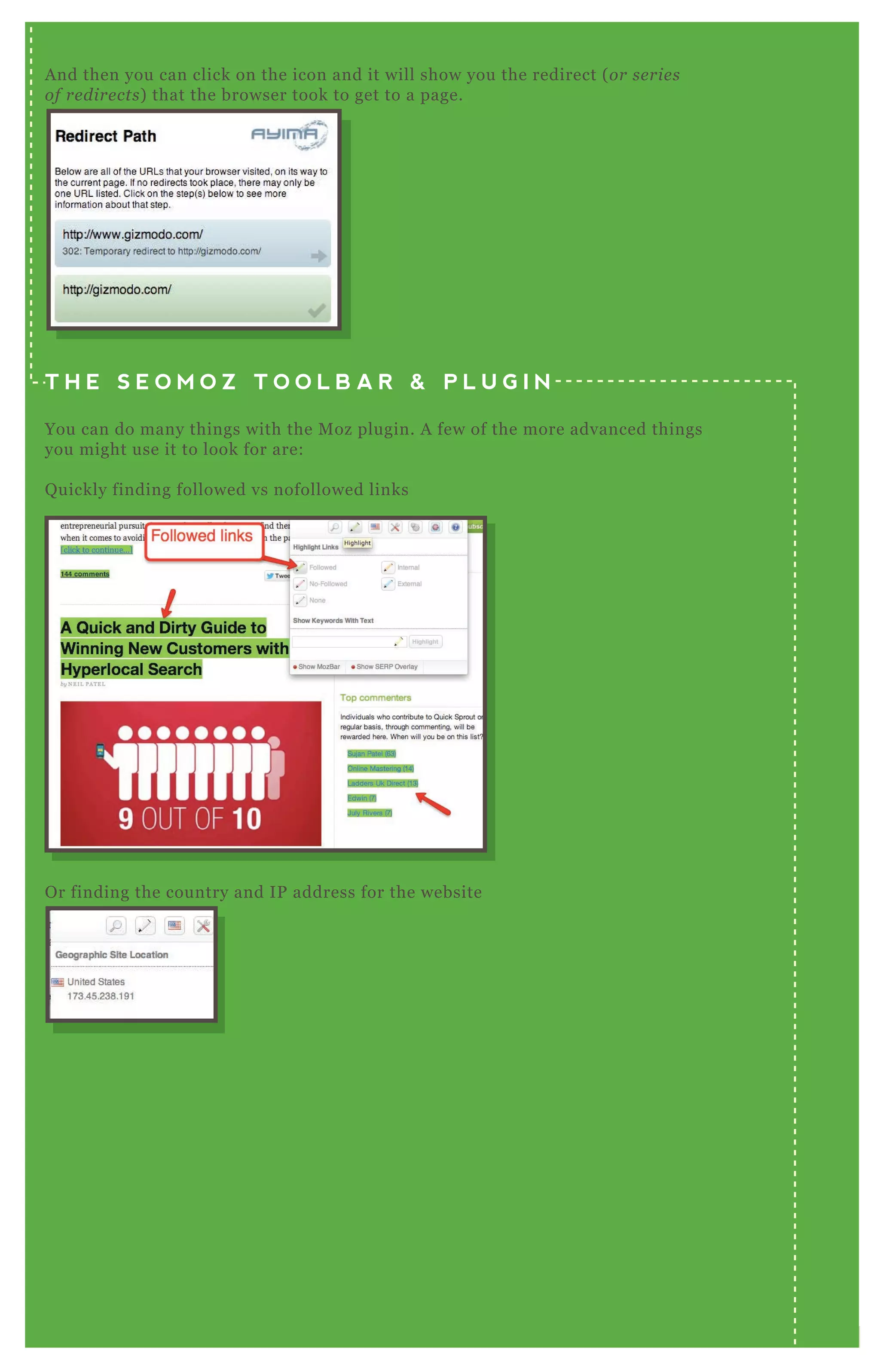
A nd then you can click on the icon and it will show you the redirect ( or series of
redirects) that the browser took to get to a page.
N ot only is the broken links checker
a great plugin to find broken links
q uickly on your site, but you can use
it in creative ways on other people’ s
sites to get ideas for linkbuilding
and prospecting.
R edirect Path C hecker
T his plugin will automatically alert you if you were taken to a page via any kind of
F or ex ample, you can see that my site is built on W ordP ress and here is a site built
with D rupal
A nd then you can click on the icon and it will show you the redirect ( or series ofA nd then you can click on the icon and it will show you the redirect ( or series ofA nd then you can click on the icon and it will show you the redirect ( or series of
The S EO moz Toolbar & Plugin
You can do many things with the M oz plugin. A few of the more advanced things
you might use it to look for are:
Q uickly finding followed vs nofollowed links
O r finding the country and IP
address for the website
W E L L D O N E ! Y O U M A D E I T T H R O U G H C H A P T E R
O N E ! A R E Y O U R E A D Y F O R C H A P T E R T W O :
S I T E S P E E D & P E R F O R M A N C E
T A K E M E T O
CHAPTER TWO
T A K E M E T O
CHAPTER TWO
T A K E M E T O
INTRODUCTION
T A K E M E T O
INTRODUCTION
T H E A D V A N C E D
G U I D E T O BY NEIL PATEL
AND
SUJAN PATEL
SEOSEOSEOSEOSEOSEOSEOSEOSEOSEOSEOSEOSEOSEOSEOSEOSEOSEOSEOSEOSEOSEOSEOSEOSEOSEOSEOSEOSEOSEOSEOSEOSEOSEOSEOSEOSEOSEOSEOSEOSEOSEOSEOSEOSEOSEOSEOSEOSEOSEOSEOSEOSEOSEOSEOSEOSEOSEOSEOSEOSEOSEOSEOSEOSEOSEOSEOSEOSEOSEOSEOSEOSEOSEOSEOSEOSEOSEOSEOSEOSEOSEOSEOSEOSEO
0202
SEOSEOSEOSEOSEOSEOSEO
02
SEOSEOSEOSEOSEOSEOSEO
020202
SEO
02
SEO
02
SEO
02
SEOSEOSEOSEO
02
SEOSEOSEO
02
SEOSEOSEO
02
SEOSEOSEOSEOSEOSEOSEOSEOSEOSEO
02
SEOSEOSEOSEOSEOSEOSEO
02
SEOSEOSEOSEOSEOSEOSEO
02
SEOSEOSEOSEOSEOSEOSEO
CHAPTER 02
S I T E S P E E D & P E R F O R M A N C E
T he first section covered how to make your site crawlable
and accessible. T hat’ s a fantastic first step, once
accomplished, to make your site better than many others
on the web.
N ow we’ re going to crank it up a level and help make your
site faster and perform more efficiently. T his is not only
great for user ex perience but search engines love it to.
F ollow this section straight through for some tips to get
your site up to speed.
P age speed or page load time is crucial these days, not only
for a possible small boost in rankings, but because u se rs wil l
l ov e y ou . P roviding a fast ex perience for visitors is essential!
W e’ re going to cover how you can measure your site speed
through G oogle P age Speed O nline.
G o to https://de v e l ope rs.googl e .com/page spe e d/
M E A S U R I N G Y O U R
S I T E S P E E D
NO 1
G o To G oogle PageS peed O nlineS T E P O N E
S T E P T W O
R un The Tool O n
Your Homepage
T his gives you an overall score, and being your homepage is a
good gauge of your site as a whole.
T hen you can drill down into the list of prioritized issues;
You should focus on the high and medium priority items first.
Click on each item to get the details.
T he tools gives you detailed suggestions for each item. F ix ing
many of the common issues is covered later in this document.
F or now, we’ re simply running the tool to diagnose any issues.
I have a page on my site, Q uickSprout, which is entirely different than
most of the other pages - http://www.q u icksprou t.com/pro/
So I would also want to run the P ageSpeed tool on this page to look
any differences, especially because it’ s an important sales page.
Click the “ mobile” tab top right;
R un the Tool O n I nner Pages
( E sp ecially T hose T hat M ight B e D ifferent F rom T he H om ep age)
Test Your S ite For M O B I L E S ite S peed
S T E P T W O
R un The Tool O n
Your Homepage
S T E P T H R E E
Click the “ mobile” tab top right;
R emember to test your inner pages as well;
Test Your S ite For M O B I L E S ite S peedS T E P F O U R
You probably all know how to install the normal analytics tracking in W ordP ress,
and you may even know how to install the page speed code snippet as well.
W e’ re using the G oogle A nalyticator P lugin for this.
A gain, this is likely very basic, but j ust a reminder. Install the tracking code here.
B efore we configure the page speed part, we’ re j ust going to be sure you’ ve
configured the user tracking correctly. M ight as well, since we’ re in here, right?
T R AC K P A G E L O A D
I N A N A L Y T I C S
NO 2
You may know that you can also track page load
speed within analytics. B ut you may not know of a
few little ex tras you can do along with this.
W e’ re going to cover doing this two ways:
[1] Tracking within W ordPress
[2] Tracking within a Non W ordPress site
S E T T I N G U P
T R A C K I N G I N
W O R D P R E S S
S E T T I N G U P
T R A C K I N G I N
W O R D P R E S S
I nstall the Normal Tracking C odeS T E P O N E
N E X T
S T E P T H R E E C heck S ource C ode
T o do this, follow these simple three steps;
[1] S elect “ no”
[2] C heck which users you do NO T want to track for traffic
( I l ike j u st admin )
[3] S elect “ R emove” - this is the easiest method
T he site speed portion. Its made so easy in this analytics plugin.
J ust be sure its “ enabled” .
You might think that was easy, and this is an advanced guide. N ow that we
have the basics setup, let’ s add some more important features.
N ot many people know to do this, but you can set your sampl e rate . N ormally,
G oogle A nalytics does not track a very large percentage of your site speed data
( on l y 1 % b y de fau l t) — so if you have a small site, you could potentially be
missing out on a lot of important data.
T his gets installed before tracker initializ ation, so be sure to put it in the
correct box .
H ere’ s the code snippet ( T he A sync snippet) ;
_ gaq .push( [ ' _ setSiteSpeedSampleR ate' , 5 ] ) ;
N otice the number ‘ 5 ’ . T his is the new sample rate — 5 % of all visits. F or a small
site, that receives less than about 1 0 , 0 0 0 visits a month, feel free to crank that
up to 5 0 or even 1 0 0 , but only a reasonable amount to collect the data you need.
B ut please note, that if your site receives more than 1 0 K hits a day, G oogle will
automatically only collect a 1 % sample.
It is also recommended to keep your sample size as low as possible but large
enough to collect data.
You should always check your source code to be sure its rendering correctly.
( R e me mb e r, don ’ t che ck it whil e l ogge d in to W ordP re ss, b e cau se as an admin
y ou wil l b e e x cl u de d from se e in g the code ) .
S et S ample R ateS T E P T W O
N E X T
S T E P T H R E E C heck S ource C ode
You should always check your source code to be sure its rendering correctly.
( R e me mb e r, don ’ t che ck it whil e l ogge d in to W ordP re ss, b e cau se as an admin
y ou wil l b e e x cl u de d from se e in g the code ) .
You should see the Sample R ate code j ust above the T rack P ageview code, as
shown in the screenshot.
T his is a very similar process, but we’ re going to lay it all out
specifically so you can see it.
T his is all pretty basic, but j ust make sure you have the page load time code
added in analytics;
Your analytics will look like the following, with the page load code bolded;
<script type="tex t/j avascript">
var _ gaq = _ gaq | | [ ] ;
A dd Page L oad Time C odeS T E P T W O
020202020202020202020202020202S E T T I N G U P
T R A C K I N G I N
N O N W O R D P R E S S
S E T T I N G U P
T R A C K I N G I N
N O N W O R D P R E S S
D epending on how your custom site may be set up, you might have a .php file
that handles the header ( l ike in W ordP re ss) or you may have static H T M L files
with the header in each file ( in which case y ou wil l hav e to u pdate e v e ry fil e ) .
O ur ex ample will have a header.php file.
L ocate Your G oogle A nalyticsS T E P O N E
S T E P T H R E E A dd S ample R ate C ode
N ex t, we’ ll add the same sample rate code;
Your analytics will look like the following, with the page load code bolded;
<script type="tex t/j avascript">
var _ gaq = _ gaq | | [ ] ;
_ gaq .push( [ ' _ setAccount' , ' UA-15 89983-1' ] ) ;
_ gaq .push( [ ' _ trackPageview' ] ) ;
_ g a q . p u s h ( [ ' _ t r a c k P a g e Lo a d Ti m e ' ] ) ;
( function( ) {
var ga = document.createElement( ' script' ) ; ga.type =
' tex t/j avascript' ; ga.async = true;
ga.src = ( ' https:' == document.location.protocol ? ' https://ssl' :
' http://www' ) + ' .google-analytics.com/ga.j s' ;
var s = document.getElementsB yT agN ame( ' script' ) [ 0] ;
s.parentN ode.insertB efore( ga, s) ;
} ) ( ) ;
T he code again is;
_ gaq .push( [ ' _ setSiteSpeedSampleR ate' , 5 ] ) ;
A nd you use the number ( in this case 5 ) to control the
percentage of the site being tracked for page speed.
W H E R E T O F I N D T H E R E P O R T
You will view this data by going to;
Content O verview Site Speed
M ost people miss this nex t step! G o to “ page timings” and click on “ technical”
U S I N G Y A H O O ’ S
Y S L O W P L U G I N
NO 3
I nstall YS lowS T E P O N E
G o to http://y sl ow.org/
Install the YSlow plugin in your browser
( pre tty mu ch an y thin g b e side s I n te rn e t E x pl ore r) .
T his is all pretty basic, but j ust make
sure you have the page load time code
added in analytics;
You’ ll notice there are three rulesets to choose from;
[1] YS low ( V 2) - R uns the full set of 23 rules
[2] C lassic ( V 1) - R uns the first 13 rules
[3] S mall S ite or B log - R uns 14 rules that apply to small sites
I would use small site or blog only if you’ re getting less than about 1 0 , 0 0 0 visits
a month. O therwise use YS low ( V 2) if you’ re getting over 1 0 , 0 0 0 visits a month.
L oad the page you want to test. H it “ R un T est” .
O pen and R un YS lowS T E P T W O
www.zappos.com
S T E P T H R E E R eading The R esults
O verall performance score - You should strive for an 8 5 ( B ) .
A lso, note that you can filter the report of the type of result.
A s a strategy of prioritization, I would focus on the F ’ s first.
E ach error provides a short ex planation and a link to read more information
on the Yahoo D eveloper site.
N otice the first error returned in YSlow?
M ake F ewer H T T P R eq uests
“ T his page has 2 3 e x te rn al J av ascript scripts. T ry comb in in g the m in to on e .
T his page has 7 e x te rn al sty l e she e ts. T ry comb in in g the m in to on e .
T his page has 1 9 e x te rn al b ackgrou n d image s. T ry comb in in g the m with C S S
sprite s.”
T his is very common, and it is because the CSS and J S files are not optimized and
minified.
C he ck ou t the se ction ” U sin g L E S S to optimiz e C S S ” for how to improv e the se
are as.
L et’ s tackle one of the easiest win areas: reducing large images.
name:
1 . what is seo?
2 . what is yslow?
3 . make fewer H T T P req uests?
4 . Use a content delivery newtowrk?
5 . A void SR C href
6 . Compress components with gzip?
7 . P ut CSS at top?
8 . R educe D N S lookups?
L arge images are often the biggest culprit when it comes to slow site
speed. I’ m going to show you a few ways to find the worst offenders so
you can take action and reduce them.
T hat’ s right! You can find large images within G oogle image search. T his
is a q uick method to catch any low hanging fruit.
site:q uicksprout.com
shows me all the images from my site G oogle has index ed;
image s.googl e .com
G o To G oogle I mage S earchS T E P O N E
S T E P T W OD o A S ite S earch
NO 4
F I N D I N G L A R G E
I M A G E S T O R E D U C E
i m a g e s . g o o g l e . c o m
S T E P T H R E ES hut O ff S afe S earch
010101010101010101G O O G L E
I M A G E
S E A R C H
G O O G L E
I M A G E
S E A R C H
W e want to be sure we’ re getting all the images in results.
Start with a conservative number, and
filter for images larger than 6 4 0 x 4 8 0 .
W hen you’ re looking at results, see if you spot any images that end up
as being “ large” that you know shouldn’ t be. You know they’ re probably
being resized in the CSS or H T M L and should be reduced to the actual
size you want.
H ere are the results. T his one image caught my attention;
T his is a really q uick method to find some really obvious ones. L et’ s do
some approaches that work much better at scale.
A nd you can see when clicking on
the photo, the actual size is much
to large
Filter B y S iz e
L ook at R esults
S T E P F O U R
i m a g e s . g o o g l e . c o m
S T E P T H R E ES hut O ff S afe S earch
S T E P F I V E
W e’ re going to use Screaming F rog to crawl a site and show us the
largest images by file size.
If you haven’ t already, crawl the site you want to check.
T hen view images
F ilter by those over 1 0 0 kb
Sort by size
E x port to .csv
Use the spreadsheet as you track your progress to reducing images. You may
have a lot of large images, and reducing them could take a few sessions!
020202020202020202U S E S C R E A M I N G
F R O G S E O
S P I D E R
U S E S C R E A M I N G
F R O G S E O
S P I D E R
C rawl The S iteS T E P O N E
W hen you minify your J avaScript and turn it into a single file you increase the speed
of your website because it’ s only one small download instead of many larger ones.
T his tutorial will help you install G oogle Closure T ool and minify all of your
J avaScript.
[1] G o to the G oogle C ompiler closure website
T he website is: http://code .googl e .com/p/cl osu re - compil e r/
[2] C lick on the download
T he download is the link that says “ compiler- latest.zip”
G O O G L E C L O S U R E T O
O P T I M I Z E F O R S P E E DNO 5
i m a g e s . g o o g l e . c o m
[3] O pen the Z I P file
[5 ] O pen a command line window
[4] C opy the J A R file to the folder where all your J avaS cript is located
O N A M A C
O N A P CD ouble click on the Z IP file. It will create a folder with the same
name containing a “ J A R ” file.
In this ex ample, we dragged the compiler.j ar file to the folder where
our J avaScript is located.
Google Drive
Desktop
Applications
Documents
Downloads
inbox
compiler-latest
compiler-latest.zip
compiler.jar
COPYING
README
Google Drive
Desktop
Applications
Documents
Downloads
inbox
favicon.iso
img
javascripts
job-ques
robots.txt
stylesheets
application.js
bootstrap.js
bootstrap.min.js
compiler.jar
d3.min.js
extensions.js
jquery_spinner.js
inbox
Google Drive
Desktop
Applications
Documents
Downloads
inbox
compiler-latest
compiler-latest.zip
compiler.jar
COPYING
README
[5 ] O pen a command line window
[6 ] C hange to the folder where your J avaS cript is located
O N A M A C
G o to your F inder, then open A pplications > Utilities > T erminal
O N A M A C
T ype in “ ~ / ” then the folder where your J avaScript files are located.
In this ex ample, my J avaScript was in the home directory under a
folder called code, then os2 , then public, then j avascripts.
O N A W I N D O W S
Click on Start, type in “ command prompt” , click on “ command prompt”
O N A W I N D O W S
T ype in “ cd  ” then the folder where your J avaScript files are located.
[7 ] Type in the J ava command to create your minified J avaS cript file
O N B O T H W I N D O W S A N D M A C :
T ype: j ava -j ar compiler.j ar --j s j q uery.j s
j q uery_ spinner.j s --j s_ output_ file output.j s”
R eplace “ j q uery.j s” and “ j q uery_ spinner.j s” with the names of the
J avaScript files you want to minify. If order is important, type them
in the correct order they need to go in.
R eplace “ output.j s”
In this ex ample, we compiled j q uery.j s and a plugin called
“ j q uery_ spinner.”
Google Drive
Desktop
Applications
Documents
Downloads
inbox
TimeTracker
TinkerTool
TinyUmbrella
Twitter
Utilities
Vagrant
Podcast Capture
RAID Utility
Remote Install Mac OS X
Spaces
System Profiler
Terminal
[8] Add the minified JavaScript file back into your project
[9] Finally, test your application to make sure everything is still running
In this example, we added line 8 to add the JavaScript back into this
HTML file.
In sections two and three we covered how to evaluate the performance of your site. H ere
we’ re going to cover an advanced way to optimize CSS and J S files, with “ L E SS” .
L ES S is a dynamic stylesheet language that creates CSS for you. T he advantage of using
L E SS is that a L E SS compiler will automatically make your CSS files smaller so they are
faster to download for your users.
L ess has a free application you can download to compress your CSS files
F O R M A C S
G o to http://in cide n t5 7 .com/l e ss/ and download L ess.A pp.
S T E P T W OO pen the L ess A pplication
S T E P O N E
O P T I M I Z I N G C S S
A N D J S F I L E S
D ownload and I nstall L ess A pplications
http://incident57.com
F O R W I N D O W S
G o to http://win l e ss.org/ and download the W inL ess application
http://winless.org
NO 6
S T E P T H R E E
F O R M A C S
D ouble click on the download and move the
L ess application to your applications folder.
S T E P T W OO pen the L ess A pplication
Google Drive
Desktop
Applications
Documents
Downloads
inbox
Less
Less.zip
Google Drive
Desktop
Applications
Documents
Downloads
inbox
index.php
modernist
pagelines
readme.txt
twentyeleven
twentyten
404.php
archive.php
editor-style.css
footer.php
ie-fixes.css
index.php
style.css
Google Drive
Desktop
Applications
Documents
Downloads
inbox
index.php
modernist
pagelines
readme.txt
twentyeleven
twentyten
404.php
archive.php
editor-style.less
footer.php
ie-fixes.less
index.php
style.less
In this ex ample, we took a W ordpress theme’ s CSS files and renamed
them all with “ .less” .
In this ex ample, we’ re dragging the folder that contains the L E SS files
into the application:
O pen the Folder W here your C S S Files are
and R ename your C S S Files as “ .less”
S T E P T H R E E D rag the folder with your L ES S files
into the L ess application
B E F O R E A F T E R
T his will create new CSS files that have been minified for faster downloads.
W hile the application is open, every time you change your less files, it will
automatically update the minified CSS for you.
Your L E SS files will look normal so you can still edit them:
B ut your minified CSS files will look like this:
C lick on C ompiler, then C ompile A llS T E P F O U R
L ess will A utomatically M inify your L ES S
Files into C S S Files W hile it’ s O pen
S T E P F I V E
B ut your minified CSS files will look like this:
In this ex ample we shaved off 2 k in file size. W hile it’ s only a small difference
doing many small optimization tweaks will add up and give your users a much
faster download.
I N S T A L L I N G G O O G L E ’ S
M O D _ S P E E D F O R A P AC H E
NO 7
[1] I nstalling G oogle’ s M O D _ S PEED for A pache
[1] S S H into your server
[2] D ownload the mod- pagespeed .deb package
[3] I nstall the .deb package
If you are running your website on an A pache server and you have control over
the configuration of the server at the module level, then you can install the
M O D _ P A G E SP E E D module for an easy speed boost.
I F Y O U ’ R E U S I N G A D E B I A N B A S E D S E R V E R
( S U C H A S D E B I A N O R U B U N T U ) :
[1] S S H into your server
I F Y O U ’ R E U S I N G A R E D H A T B A S E D S E R V E R
( S U C H A S R E D H A T , F E D O R A , O R C E N T O S ) :
F or additional information about M O D _ P A G E SP E E D see:
https://de v e l ope rs.googl e .com/spe e d/docs/mod_ page spe e d/u sin g_ mod
If your server is a 3 2 - bit machine use this command:
wget
https://dl-ssl.google.com/dl/linux /direct/mod-pagespeed-beta_ current_ i3
86.deb
If your server is a 6 4 - bit machine use this command:
wget
https://dl-ssl.google.com/dl/linux /direct/mod-pagespeed-beta_ current_ am
d64.deb
T ype this into the command line:
dpkg -i mod-pagespeed-* .deb
[4] C orrect any broken dependencies in place
T ype this into the command line:
apt-get -f install
WARNING: Although this tutorial looks very advanced, it’s relatively easy for someone
with experience configuring Apache at the server level. However, doing this on your own
with no experience may result in your whole website going down! You should know how to
install Apache modules and configure your webserver from a command line. If you don’t
know how then you should leave this up to a professional web developer or system
administrator who has experience.
[1] S S H into your server
[2] D ownload the mod- pagespeed .deb package
I F Y O U ’ R E U S I N G A R E D H A T B A S E D S E R V E R
( S U C H A S R E D H A T , F E D O R A , O R C E N T O S ) :
[1] O pen your A pache configuration file for editing
C O N F I G U R I N G M O D _ P A G E S P E E D
If your server is a 3 2 - bit machine use this command:
wget
https://dl-ssl.google.com/dl/linux /direct/mod-pagespeed-beta_ current_ i3
86.rpm
If your server is a 6 4 - bit machine use this command:
wget
https://dl-ssl.google.com/dl/linux /direct/mod-pagespeed-beta_ current_ x 8
6_ 64.rpm
[3] I nstall “ at” using the Yum package manager
T ype this into the command line:
yum install at
If you’ re using Ubuntu or D ebian the file will be located in:
/etc/apache2/mods-available
If you’ re using CentO S or F edora or R edhat, the file will be located in:
/etc/httpd/conf.d
[2] L ocate the pagespeed_ module directives.
T hey will be wrapped inside an IfM odule directive.
Enabling or disabling the module per folder
A dd the following line to any .htaccess file on your website:
T o turn M odP agespeed on:
ModPagespeed on
T o turn M odP agespeed off:
ModPagespeed off
[4] C orrect any broken dependencies in place
T ype this into the command line:
rpm -U mod-pagespeed-* .rpm
B R O W S E R C AC H I N G
( N O N - W O R D P R E S S S I T E )
NO 8
M ost of you are likely running W ordP ress sites, and we’ re going to cover some
plugins you can use with W ordP ress to speed up performance.
B ut for some of you who may not be running W ordP ress, I still want to give you
some technical info on optimizing for speed.
H ere, we’ re going to cover some advanced things you can do within your .htaccess
file to leverage browser caching. So when you see that warning within G oogle
P ageSpeed O nline, you can use the following techniq ues to fix it.
Use your F T P client of choice, or you can download and use F ileZ illa -
http://fil e z il l a- proj e ct.org/
I am sure you are familiar with how to log in via F T P , but in case you need a q uick
reminder;
Host: website name
Username
Password
Port: most cases you can leave this blank
T his is located in the root directory. M ake sure you can see hidden files,
otherwise you may not notice it.
N ex t, we’ re going to download the .htaccess file and save a backup so we can
safely edit it, but restore it if there is a mistake.
In F ileZ illa you right click and download;
L og I nto Your FTP S erver and B ackup Your .htaccess fileS T E P O N E
N ex t, we’ re going to download the .htaccess file and save a backup so we can
safely edit it, but restore it if there is a mistake.
In F ileZ illa you right click and download;
Find Your .htaccess FileS T E P T W O
S T E P T H R E E D ownload and B ackup the .htaccess File
N O T E : You should be a little comfortable
editing your .htaccess file. Talk to your
webmaster if you’re not sure this is something
you should be editing.
N O T E : In some cases your site may not have
an .htaccess file, so you can just create a new
file. Start a new document in your text editor
and name it .htaccess
N otice the code is basically the same, but
we’ ve chosen a different length of time for
the css.
T his will cache your CSS for one day. A gain,
this depends on how often you change your
css files, and how often people return back
to your site.
T he code for j avascript caching is also
similar, but in this case we’ ve set it to a
month.
[1] Turn R ewriteEngine O n
this should be the first thing in the .htaccess file
[2] A dd < file> wrapper tags
P H O T O F I L E S
C S S
J A V A S C R I P T
W e’ re setting the cache time for one week for photos. You should determine a
reasonable time frame for your site, depending on how often the photos change
and people visit.
[3] A dd the file type( s) within the wrapper
[4] A dd the code which creates the caching and sets the max time
to one week
[5 ] A dd the same code for other photo file types .png and .gif
N otice the code is basically the same, but
we’ ve chosen a different length of time for
the css.
T his will cache your CSS for one day. A gain,
this depends on how often you change your
css files, and how often people return back
to your site.
T he code for j avascript caching is also
similar, but in this case we’ ve set it to a
month.
T his will depend on how heavily your site
req uires J avascript and how often it changes.
C S S
J A V A S C R I P T
T I M E C H E A T - S H E E T
H ere’ s a few different time frames, since they are calculated in seconds;
5 minutes in seconds = 3 0 0
1 day in seconds = 8 6 , 4 0 0
1 week in seconds = 6 0 , 4 8 0 0
1 month in seconds = 2 , 6 2 9 , 0 0 0
6 months in seconds = 1 5 , 7 7 4 , 0 0 0
1 year in seconds = 3 1 , 5 3 6 , 0 0 0 ( basically ‘ infinite’ )
A s mentioned, you can mix and match the file types with time frames that make sense
for your site. W hen in doubt, set your time frames a little shorter j ust to be safe!
If you’ ve followed and implemented the tips in this section you should have one of the
faster sites on the web! N ex t we’ re going to cover new and groundbreaking areas of
search. You should be doing these things now to stay ahead of the competition.
W E L L D O N E ! Y O U M A D E I T T H R O U G H C H A P T E R
O N E ! A R E Y O U R E A D Y F O R C H A P T E R T H R E E :
N E W S E A R C H ?
T A K E M E T O
CHAPTER THREE
T A K E M E T O
CHAPTER THREE
T A K E M E T O
CHAPTER ONE
T A K E M E T O
CHAPTER ONE
T H E A D V A N C E D
G U I D E T O
SEOSEOSEOSEOSEOSEOSEOSEOSEOSEOSEOSEOSEOSEOSEOSEOSEOSEOSEOSEOSEOSEOSEOSEOSEOSEOSEOSEOSEOSEOSEOSEOSEOSEOSEOSEOSEOSEOSEOSEOSEOSEOSEOSEOSEOSEOSEOSEOSEOSEOSEOSEOSEOSEOSEOSEOSEOSEOSEOSEOSEOSEOSEOSEOSEOSEOSEOSEOSEOSEOSEOSEOSEOSEOSEOSEOSEOSEO
0303
SEOSEOSEOSEOSEOSEOSEO
03
SEOSEOSEOSEOSEOSEOSEO
030303
SEO
03
SEO
03
SEO
03
SEOSEOSEOSEO
03
SEOSEOSEO
03
SEOSEOSEO
03
SEOSEOSEOSEOSEOSEOSEOSEOSEOSEO
03
SEOSEOSEOSEOSEOSEOSEO
03
SEOSEOSEOSEOSEOSEOSEO
03
SEOSEOSEOSEOSEOSEOSEO
CHAPTER 03
N E W S E A R C H
N ow your site is crawlable, index able and lightening fast.
T ime to ramp it up another notch with some new search
elements. Search is moving towards a more semantic “ real
to life” environment. T his means a world where engines
understand the relationships between real world obj ects
like people, places, movies, businesses etc. T ime to get on
board now and integrate this into your website!
Schema.org is a universal metadata markup introduced in 2 0 1 1 by the
maj or search engines. Its used to communicate to them the intended type
of content on your website. T here are still many people not taking full
advantage of this!
W e’ re going to cover several types of schema implementation, and how to
get the correct markup into your H T M L code.
T hese five elements are best
described with an ex ample.
I T E M S C O P E
I T E M T Y P E
I T E M P R O P
I T E M I D
I T E M R E F
S C H E M A . O R G M E T A D A T A
I M P L E M E N T A T I O N
NO 1
010101010101010101010101B A S I C A T T R I B U T E S
O F M I C R O D A T A
B A S I C A T T R I B U T E S
O F M I C R O D A T A
BY NEIL PATEL
AND
SUJAN PATEL
Here is some code without schema metadata:
<!DOCTYPE HTML>
<html lang="en">
<head>
<meta charset=utf-8>
<title>Example Page With No Metadata</title>
</head>
<body>
<section>
<h1>Anything You Want</h1>
<span>Author: Derek Sivers</span>
<span>Category : business</span>
<a href="http://sivers.org/ayw/">About the book</a>
</section>
</body>
</html>
You can see it is just pure HTML with no special markup. Now, here is the code
with metadata;
<!DOCTYPE HTML>
<html lang="en">
<head>
<meta charset=utf-8>
<title>Example Page With Microdata</title>
</head>
<body>
<section itemscope itemtype="http://schema.org/Book">
<h1 itemprop="name">Anything You Want</h1>
<span>Author: <span itemprop="author">Derek Sivers</span></span>
<span>Category : <span itemprop="genre">business</span></span>
<a href="http://sivers.org/ayw/"><span itemprop="detail">About the
Book<span></a>
</section>
</body>
</html>
Let’s look at each element one by one.
I T E M S C O P E
<section itemscope itemtype="http://schema.org/Book">
</section>
Everything about the book goes in between the itemscope element. You’re telling
the search engines “everything inside here is about a book”
I T E M P R O P
<h1 itemprop="name">Anything You Want</h1>
The itemprop is simply the name of the book.
<span>Author: <span itemprop="author">Derek Sivers</span></span>
<span>Category : <span itemprop="genre">business</span></span>
<a href="http://sivers.org/ayw/"><span itemprop="detail">About the
Book<span></a>
Itemprop is also the author and the category and the genre of the book. Pretty
simple so far, right?
You’re using a <span> tag to insert the itemprop elements.
I know many of you likely run blogs of some sort. W ell you can put schema data into
blogs as well! If you’ re using wordpress you’ ll want to check with the author of your
theme to see if this is possible, or if wordpress will strip out the tags. T his does
depend on your specific wordpress setup, so I will show you a generic ex ample below.
C O D E W I T H O U T S C H E M A
<! D O C T Y PE H T ML >
<html lang="en">
<head>
<meta charset=utf-8>
<title>Ex ample of B log Post Without Microdata</title>
</head>
<body>
<div>
<h1>A C heat Sheet for B uilding H igh R anking Authority… Without
C heating</h1>
<p>F irst, let’ s define authority: domain authority is the likelihood
of a single domain to rank well. T he higher the rank the higher
authority that site will have and vice a versa.</p>
<p>H ere’ s how to do that:</p>
<p>1. L ink a cluster of pages by topic</p>
<p>2. Send more links to one particular page</p>
<p>3. Send domain-based ex ternal links to hero pages</p>
<p>4. Avoid cannibaliz ing keywords</p>
<p>5 . D rive ex ternal links to the hero page from relevant website</p>
<p>6. L ocate links high on a page</p>
<p>7 . Pictorial presentation to help you to understand the concept
better.</p>
<p>8. F ix broken pages</p>
</div>
</body>
</html>
C O D E W I T H S C H E M A
<! D O C T Y PE H T ML >
<html lang="en">
<head>
<meta charset=utf-8>
<title>Ex ample of B log Post With Microdata</title>
<a rel="author"
href="https://profiles.google.com/10307 4333439002308043/about">B idhan
C hatterj ee</a> </head>
<body>
<div itemscope itemtype="http://schema.org/B log">
<h1>A C heat Sheet for B uilding H igh R anking Authority… Without
C heating</h1>
<p>F irst, let’ s define authority: domain authority is the likelihood
of a single domain to rank well. T he higher the rank the higher
authority that site will have and vice a versa.</p>
<p>H ere’ s how to do that:</p>
<p>1. L ink a cluster of pages by topic</p>
020202020202020202020202U S I N G S C H E M A
I N Y O U R B L O G
U S I N G S C H E M A
I N Y O U R B L O G
<p>2. Send more links to one particular page</p>
<p>3. Send domain-based ex ternal links to hero pages</p>
<p>4. Avoid cannibaliz ing keywords</p>
<p>5 . D rive ex ternal links to the hero page from relevant website</p>
<p>6. L ocate links high on a page</p>
<p>7 . Pictorial presentation to help you to understand the concept
better.</p>
<p>8. F ix broken pages</p>
</div>
</body>
</html>
E X P L A N A T I O N O F E L E M E N T S
R E L = A U T H O R
You may be wondering why this is inside the < head> < / head> of the H T M L . T hat is
because G oogle now allows you to reference the author in this way.
It’ s as simple as it looks;
<a rel="author"
href="https://profiles.google.com/10307 4333439002308043/about">B idhan
C hatterj ee</a>
T hat code goes in the < head> and then you point your G oogle P lus profile back at
your blog - j ust like in the section on G oogle A uthorship, which you can find later in
this guide.
I N T E M S C O P E
<div itemscope itemtype="http://schema.org/B log">
A gain, j ust like before, this is used to signal the type of thing or item your document
is talking about.
B O N U S : S O C I A L S H A R I N G S C H E M A
You can also include social sharing data in your schema. T he elements itemprop
and interactioncount will do the trick, for ex ample.
<meta itemprop="interactionC ount" content="F acebookL ikes:8"/> <meta
itemprop="interactionC ount" content="G ooglePlus:3"/>
T E S T I N G
A s always you’ ll want to test your markup with the rich snippet tester provided by
G oogle: http://www.googl e .com/we b maste rs/tool s/richsn ippe ts
A typical ex ample of video embed code may look like this;
<h1>N eil Patel</h1>
<h2>V ideo: Advanced SEO for B loggers</h2>
<obj ect ...>
<param ...>
<embed type="application/x -shockwave-flash" ...>
</obj ect>
<p>An ex clusive video with SEO and web marketing ex pert N eil Patel.
D rive ridiculous amounts of leads to your blog and learn the 7
secrets of conversion rate optimiz ation.</p>
Paste the Normal V ideo C ode O n Your PageS T E P O N E
V I D E O I N D E X A T I O N
M A R K I N G U P Y O U R V I D E O S
W I T H S C H E M A . O R G
NO 2
Using Schema.org to markup your videos can give you a
powerful boost with click through rate. J ust check out this
ex ample of how SE O moz is utilizing video metadata to give
them a giant visual boost in the SE R P s;
It turns out adding the code is not too difficult, you j ust need to know the proper markup
to use.
B efore you begin, there’ s a few assumptions;
[1] You’ re “ self- hosting” your video
( this can not be done for Y ouT ube em beds for ex am p le)
[2] You have access to the HTM L so you’ ll be able to edit the code
whiteboard Friday link building
About 193,000 results (0.24 seconds)
SEARCHSEARCH
B A S I C P R O P E R T I E S A R E ;
N ame
T hu mb n ail
D u ration
D e scription
T he name and description fields are added within < span> tags which wrap
around ex isting content;
T he duration and thumbnail properties go within < meta> tags which typically get
added below the name and before the actual video;
N ote: the duration is in ISO _ 8 6 0 1 format. L earn more about it here:
http://e n .wikipe dia.org/wiki/I S O _ 8 6 0 1
S T E P T H R E E A dd B asic M arkup
W rap the code in a <div>
A dd the V ideoO bj ect data.
S T E P T W OW rap I n V ideo O bj ect
You can add any property for a M ediaO bj ect ( the pare n t ob j e ct of a V ide oO b j e ct) ;
associate dA rticl e
b itrate
con te n tS iz e
con te n tU R L
du ration
e mb e dU R L
e n code sC re ativ e W ork
e n codin gF ormat
e x pire s
he ight
pl ay e rT y pe
re gion sA l l owe d
re q u ire sS u b scription
u pl oadD ate
width
O r you can add properties ex clusive only to video;
caption
produ ction C ompan y
thu mb n ail
tran script
v ide oF rame S iz e
v ide oQ u al ity
H ere’ s an ex ample with upload date, width and height added;
G o add your video markup and steal massive clicks from the competition!
F I N I S H E D C O D E
<div itemprop="video" itemscope itemtype="http://schema.org/V ideoO bj ect">
<h2><span itemprop="name">V ideo: Advanced SEO for B loggers</span></h2>
<meta itemprop="duration" content="T 1M33S" />
<meta itemprop="thumbnail" content="neil-patel-video-thumbnail.j pg" />
<meta itemprop="uploadD ate" content="2012-04-01T 08:00:00-05 :00" />
<meta itemprop="width" content="640" />
<meta itemprop="height" content="480" />
<obj ect ...>
<param ...>
<embed type="application/x -shockwave-flash" ...>
</obj ect>
<p><span itemprop="description">An ex clusive video with SEO ex pert N eil
Patel. D rive ridiculous amounts of leads to your blog and learn the 7
secrets of conversion rate optimiz ation.</span></p>
</div>
A dd A dditional M arkupS T E P F O U R
H ere, we are talking about the specific CD “ T hriller” and referencing the UR L
that CD is on.
Using the wrapper tag <cd:artist></cd:artist> ( or cou n try , price e tc) you
can declare the properties of the album you are referencing.
[1] A ll R D Fs start with the X M L declaration and the R D F wrapper tags
[2] The you have to declare the R D F syntax and the UR L the data
is referring to;
[3] Nex t we’ ll declare the ex act items to be described in the document
[4] A dd The Elements W hich A re Properties O f the R esource
020202020202020202020202A N
E X A M P L E
A N
E X A M P L E
H ere’ s an ex ample of the completed code which you can use and modify for your needs
<? x ml version="1.0"? >
<rdf:R D F
x mlns:rdf="http://www.w3.org/1999/02/22-rdf-syntax -ns# "
x mlns:cd="http://www.cdstore.com/cd01">
<rdf:D escription
rdf:about="http://www.cdstore.com/cd01/T hriller">
<cd:artist>Michael J ackson</cd:artist>
<cd:country>USA</cd:country>
<cd:company>Epic R ecords</cd:company>
<cd:price>12.99</cd:price>
<cd:year>1982</cd:year>
</rdf:D escription>
</rdf:R D F >
Use the V alidator to check your work! http://www.w3 .org/R D F /V al idator/
030303030303C O M P L E T E D
C O D E
E X A M P L E
C O M P L E T E D
C O D E
E X A M P L E
NO 4
A D D I N G T H E D U B L I N
C O R E T O Y O U R S I T E
010101010101010101010101
T he D ublin Core is another metadata format which is used to describe data on
the web. T here are a variety of elements used by the D ublin Core, including;
A n ex ample of some of the D ublin Core metadata in action would be the following. T his
code represents a hypothetical document on q uicksprout.com
<head profile="http://dublincore.org">
<title>T he N eil Patel G uide to D ublin C ore</title>
<link rel="schema.D C " href="http://purl.org/dc/elements/1.1/" />
<link rel="schema.D C T ER MS" href="http://purl.org/dc/terms/" />
<meta name="D C .I dentifier" schema="D C terms:UR I "
content="http://q uicksprout.com/fakeitems/dublincore/" />
<meta name="D C .F ormat" schema="D C terms:I MT " content="tex t/html" /> <meta
name="D C .T itle" x ml:lang="EN " content="D ublin C ore T utorial" />
<meta name="D C .C reator" content="N eil Patel" />
<meta name="D C .Subj ect" x ml:lang="EN " content="D ublin C ore Meta T ags" />
<meta name="D C .Publisher" content="I ' m K ind of a B ig D eal, L L C " />
<meta name="D C .Publisher.Address" content="neil@neilpatel.com" />
<meta name="D C .C ontributor" content="N eil Patel" />
<meta name="D C .D ate" scheme="I SO 8601" content="2012-06-01" />
<meta name="D C .T ype" content="tex t/html" />
<meta name="D C .D escription" x ml:lang="EN "
content="T his tutorial is a part of N eil Patel' s advanced SEO guide." />
<meta name="D C .I dentifier"
content="http://q uicksprout.com/fakeitems/dublincore/" />
<meta name="D C .R elation" content="Q uickSprout.com" scheme="I sPartO f" />
<meta name="D C .C overage" content="I ' m K ind O f A B ig D eal, L L C " />
<meta name="D C .R ights" content="C opyright 2012, N eil Patel, All rights
reserved." />
<meta name="D C .D ate.X -MetadataL astModified" scheme="I SO 8601"
content="2012-06-01" />
<meta name="D C .L anguage" scheme="dcterms:R F C 17 66" content="EN " />
B O N U S : A D U B L I N C O R E G E N E R A T O R
If you have a webpage that already ex ists, try running it through this free D C generator.
http://www.u kol n .ac.u k/me tadata/dcdot/
title the name given the resource
creator the person or organization responsible for the content
subj ect the topic covered
description a tex tual outline of the content
publisher those responsible for making the resource available
contributor those who added to the content
date when the resource was made available
type a category for the content
format how the resource is presented
identifier numerical identifier for the content such as a UR L
source where the content originally derived from
language in what language the content is written
relation how the content relates to other resources, for instance,
if it is a chapter in a book
coverage where the resource is physically located
rights a link to a copyright notice
020202020202020202A N
E X A M P L E
A N
E X A M P L E
T here are two methods to implementing rel=author for multiple author sites.
W ith this simple method, all you will need to do is point a link from each post to the
corresponding G oogle P rofile page, using rel=author.
So let’ s say we have a blog with two posts: P ost A and P ost B . I wrote post A but P ost
B is a by a guest author. You will do as follows for each post
G o to https://de v e l ope rs.googl e .com/+ /pl u gin s/b adge /pe rson al - con fig as before to
generate the code ( don ’ t forge t to u se y ou r G oogl e P l u s I D ! ) . B ut this time, you’ re only
going to paste it into the individual posts you authored.
OPTION B: USE THE REL=AUTHOR TAG
< a hre f= " https://pl u s.googl e .com/1 0 9 4 1 2 2 5 7 2 3 7 8 7 4 8 6 1 2 0 2 ? re l = au thor" > N e il P ate l < /a>
T his again is the traditional rel=author tag. Substitute your name and G oogle P lus
P rofile ID and paste the code only in posts or pages you authored.
NEW ALTERNATE OPTION: USE THE SPECIAL PARAMETER LINK
< a hre f= ” https://pl u s.googl e .com/1 1 2 7 5 9 9 0 4 4 5 3 5 7 7 8 9 2 4 7 2 ? re l = au thor> + N e il P ate l < a/>
T his is the simplest way to link to your author profile. J ust put the above code
( pe rson al iz in g y ou r n ame an d l in k) only on the pages you authored.
You are going to repeat the above step, choosing whichever option is best for you. B ut
this time you are going to add the author link for each guest author on their posts.
G O O G L E R E L = A U T H O R T A G
I M P L E M E N T A T I O N F O R
M U L T I P L E A U T H O R S I T E S
NO 5
S T E P O N E L ink To The I ndividual A uthor Profile From Each Post
P O S T A : T H E G O O G L E P L U S B A D G E
P O S T B
S I M P L E M E T H O DS I M P L E M E T H O D
A D V A N C E D M E T H O DA D V A N C E D M E T H O D
You are going to repeat the above step, choosing whichever option is best for you. B ut
this time you are going to add the author link for each guest author on their posts.
OPTION A: THE GOOGLE PLUS BADGE
Cut and paste the G oogle P lus B adge code from
https://de v e l ope rs.googl e .com/+ /pl u gin s/b adge /pe rson al - con fig this time using the
profile information of the guest author.
OPTION B: USE THE REL=AUTHOR TAG
A tag of this style for a guest author might look something like;
< a hre f= " https://pl u s.googl e .com/1 0 0 6 1 3 0 6 0 1 1 9 6 9 5 6 3 7 2 1 3 ? re l = au thor" > G u e st A u thor< /a>
O nce you have done so for every page with a guest author, you are ready to move to step two.
N ow, each author that can contributes to your site, must add
a link to your site in the “ contributor” section of their G oogle
P lus profile. You can have as many links as you want in the
“ contributor” section, so no matter how many sites you write
for, you can show you are the author.
T ake for ex ample Suj an P atel’ s profile, where he is a
contributor to three sites;
W ith this advanced method, every
author is going to need their own
page. SE O moz does this well, as you
can see below;
Some W ordP ress themes may have
this functionality built in. If they do
not, you can see the section on
“ setting up a custom author profile
in W ordP ress” .
S T E P O N E L ink To The I ndividual A uthor Profile From Each Post
P O S T B
Each A uthor A dds “ C ontributor” L ink To
Every B log They A re a G uest A uthor O n
S T E P T W O
R emember how in the single author blog, you pointed a “ rel=author” link to your
G oogle P lus P rofile. In the case of a multiple author blog, you’ re going to point
r e l = a u t h o r to your profile page on that website.
N ex t, we have to create the third link in the chain:
link from your bio page to your G oogle P lus P rofile.
You should now be familiar with adding a link from your G oogle P lus P rofile back
to the site you contribute to.
T he important part in this last step, is that the link needs to go directly to your
bio/ profile page on the website you contribute to. T he link from my G oogle profile
pointing back to SE O moz would be;
http://www.se omoz .org/u se rs/profil e /3 6 1 1 3 7
T his establishes the final connection in the chain, which simply looks like this:
P ost ( rel=author) B io/ P rofile ( rel=me) G oogle P lus P rofile
T he chain works backwards too, as you’ re about to see in step four.
G oogle P lus P rofile ( contributor link) B io/ P rofile
A dd rel= “ author” L inks From B log Posts To Profile PageS T E P T W O
S T E P T H R E E A dd rel= “ me” From B io Pages To G oogle Profile
T he chain works backwards too, as you’ re about to see in step four.
C lick on C ompiler, then C ompile A llS T E P F O U R
B E F O R E Y O U B E G I N : S E T U P Y O U R G O O G L E P R O F I L E
G O O G L E R E L = A U T H O R
T A G I M P L E M E N T A T I O N
F O R S I N G L E A U T H O R
NO 6
If you do not already have a G oogle profile set up at this point, you should do
that know. T his is eq uivalent to creating a G oogle P lus page now.
T he concept with setting up your author profile is that you are basically putting a
link in two places. You’ re reciprocal linking from your website to your G oogle
profile. L ike this;
Every Page O n Your website ( r e l = a u t h o r ) G oogle Plus Profile
G oogle Plus Profile ( contributor) Your W ebsite
Its fairly simple to do, once you’ ve walked through the steps, but there are a few
options and specifics to know about.
G rab the code as shown in the above snapshot and paste it where you want it on
your site. T his will usually go in a sidebar widget if you’ re running W ordP ress.
B e sure to use your G oogle P lus P rofile ID .
Install the G oogle Plus B adge on your site
https://de v e l ope rs.googl e .com/+ /pl u gin s/b adge /pe rson al - con fig
O P T I O N AO P T I O N A
S T E P O N E A dd R el= A uthor To Your S ite
You can link from every page on your site to your G oogle P lus profile with the
rel=author attribute.
T his was the first method available when A uthor P rofiles first came out.
You need to link your name from every page of your blog to your G oogle profile.
In a content management setup like W ordP ress, this can easily be done via the
footer or sidebar widget if you have an “ about” box with your name in it.
H ere’ s the code. Simply cut and paste it into the sidebar or footer;
< a hre f= " https://pl u s.googl e .com/1 0 9 4 1 2 2 5 7 2 3 7 8 7 4 8 6 1 2 0 2 ? re l = au thor" > N e il P ate l < /a>
O bviously, substitute your name and your G oogle P lus profile ID .
M ost people do not know about this new simple method to link your blog pages
back to your G oogle profile. It was introduced after the initial release of
rel=author as an easy way to implement the link without needing to edit H T M L .
F irst, be sure your author name appears on appear page of your site, and simply
turn it into the following link;
< a hre f= ” https://pl u s.googl e .com/1 1 2 7 5 9 9 0 4 4 5 3 5 7 7 8 9 2 4 7 2 ? re l = au thor> + N e il P ate l < a/>
N otice the plus in front of my name? T hat helps signal to G oogle that you are
using the special parameter at the end of the UR L . A nd again, you obviously want
to use your G oogle P lus P rofile UR L when doing this.
T his method replaces the need to use the re=author attribute or G oogle P lus badge.
W hichever of the three methods you have chosen to use, now you are ready to
point your G oogle profile back to your site.
G o to your profile page while logged in and click edit.
Use the “ contributor” section in your profile.
A dd your blog as a link.
O P T I O N BO P T I O N B
S T E P O N E S pecial Parameter L ink
S T E P T W OL ink B ack To Your S ite From Your G oogle Profile
www.panda.comwww.panda.com
T his will show you if you have implemented
the authorship correctly, and how your page
may look in the SE R P s.
T est with the rich snippets testing tool
http://www.googl e .com/we b maste rs/tool s/richsn ippe ts
SEO PANDA
E N T I T Y S E A R C HNO 7
E ntity search is still very much in its earliest stages. O nly certain
types of people, websites or businesses will be able to utilize it, but
it won’ t be long until everyone can participate.
T his section will be one of j ust a few that talks a little bit more about
the concepts.
T he knowledge graph on the right hand
side of the SE R P s is only the most obvious
place you’ ll see entity like results. T hey are
sometimes hidden - but here’ s where you
might see some entity type results.
I M P L I E D S I T E S E A R C H
G oogle hasn’ t been doing this long, but there is this thing called an implied site
search. You probably know what a normal site search is:
W H A T I S E N T I T Y S E A R C H ?
It is often also referred to as “ the knowledge
graph” . It is about connecting people, places
and things - more than j ust keywords -
which don’ t have much of a meaning. F or
ex ample the keyword “ boston” could be the
place but it could also be the band.
L et’ s look at the current knowledge graph
for “ boston”
H ow does that data get there? G oogle
draws data from a large variety of data
repositories around the web, such as
wikipedia
http://google.com/boston
site:quicksprout.com outreach
About 6 results (0.12 seconds)
SEARCHSEARCH
B ut check out what you get with this:
T he top six results are still all from q uicksprout.com - G oogle has
recognized q uicksprout the company as a business - an e n tity - and can
thus rewrite the search into a site search for the top results.
T H E R E L A T E D S E A R C H O P E R A T O R
N ot many people use this, but check out the results for a related: search on
q uicksprout.com
related:quicksprout.com
About 90 results (0.20 seconds)
SEARCHSEARCH
quicksprout outreach
About 8,950 results (0.12 seconds)
SEARCHSEARCH
About 8,950 results (0.12 seconds)
related:quicksprout.com
About 90 results (0.20 seconds)
SEARCH
N A T U R A L L A N G U A G E S E A R C H
You also see some entity results in “ natural language search” . T his would be
a search q uery that is a q uestion, a complete sentence or a very long- tail
description.
T ake “ what’ s the capital of florida? ” for ex ample
G oogle returns the answer to your q uestion. T his has nothing to do with
“ keywords” and everything to do with the idea of F lorida being a state and
T allahassee being the capital of that state .
Is it becoming apparent that being viewed by G oogle as an entity could be a
very good thing? It gives you the possibilities of appearing in more places
around the web, and of boosting your authority.
T he nex t section will cover some specific ways you can get included in entity
based sources.
You can clearly see the association of q uicksprout having to do with the
topics of we b de v e l opme n t, b l oggin g an d an al y tics. T his is very much how
entity relationships work. T here are no significant keywords shared between
these site - yet they are seen as related to one another.
T o illustrate that this association to being an entity, doesn’ t apply to
everyone automatically, here’ s a related: search with no results
related:distilled.net SEARCHSEARCH
What’s the capital of Florida?
About 358,000,000 results (0.44 seconds)
SEARCHSEARCH
A D D I N G Y O U R S I T E T O
E N T I T Y B A S E D S O U R C E S
NO 8
T he last section taught you all about the importance of appearing like an entity to
G oogle and having as much related information tied to you as an entity as
possible. H ow do we make that happen? B y making sure you appear in F reebase.
H ere’ s the most ex tensive list I know of, for the places G oogle uses to get its entity
information.
ab c.state .v a.u s/P rice l ist/R U M _ (I M P O R T E D ). html
A dhe re n ts.com
A rX iv
B ase b al l A l man ac
B e rl in I n te rn ation al F il m F e stiv al
B ooks an d W rite rs kirj asto.sci.fi/
b orn rich.com
B oston .com
B u re au of L ab or S tatistics, U n e mpl oy me n t in U S
B u re au of L ab or S tatistics, U n e mpl oy me n t in U S C ou n tie s
B u re au of L ab or S tatistics, U n e mpl oy me n t in U S S tate s
C â mara dos D e pu tados
ce l e b rity n e tworth.com
C e n te r for R e spon siv e P ol itics
C he fM oz
chickipe dia
C l au d B u tl e r
croctail .corpwatch.org/
C rore
C ru n chb ase .com
D atab ase
datab ase b aske tb al l .com
datab ase F ootb al l .com
D atab ase O l y mpics
D ay L ife .com
E - L I S
e n .citiZ E N diu m.org/wiki/
E n gl ish W ikipe dia
E u rostat, M in imu m W age in E u rope
e x pl ore dia.com
F ace b ook
F actu al
fame n e tworth.com
F D I C
F ood an d D ru g A dmin istration
F orb e s
F ran ce
F re e b ase
G E B C O U n de rse a F e atu re s G az e tte e r
G e ographic N ame s I n formation S y ste m
G e on ame s.org
G e rman W ikipe dia
G oogl e P l u s
H e al thcare C ost R e port I n formation S y ste m
https://prote cfu e l sav e r.com/die se l - fu e l - cl e an e r
https://prote cfu e l sav e r.com/gas- fu e l - cl e an e r
https://prote cfu e l sav e r.com/oil - sy ste m- re hab
https://prote cfu e l sav e r.com/P R O T E C - I n te rn al - E n gin e - C l e an e r
H u l u
I E S N C E S P u b l ic L ib rary S u rv e y
imdb .com
I n fochimps
I n stan tE n core
I n te rn e t M ov ie D atab ase
I n te rn e t S pe cu l ativ e F iction D atab ase
I S O 1 5 9 2 4
I T I S
L ib rary of C on gre ss
L ib rary of C on gre ss id.l oc.gov /
L u rkmore .ru
M B L W H O I L ib rary
M e dpe dia
M e tawe b topic me rgin g al gorithm
M e x ican I N E G I statistics
M il l ion
M u sicB rain z
M y S pace
N ame d e n tity re cogn ition
N ation al C e n te r for E du cation S tatistics
N ation al F ire D e partme n t C e n su s D atab ase
N ation al O ce an ic an d A tmosphe ric A dmin istration
N atu re
N e tfl ix
N ie l se n C ompan y
O fficial W e b site
O pe n L ib rary
O pe n L ib rary P roj e ct
O u rA irports
P aragl idin g E arth
P ocke t S tatistical D ata on S witz e rl an d 2 0 0 6
P ocke t S tatistical D ata on S witz e rl an d 2 0 0 7
P u b l ic domain
P u b M e d C e n tral
Q u otation sb ook
R an ke r.com
R e fe re n ce .com
S e cu ritie s an d E x chan ge C ommission se c.org
S imon P rope rty G rou p
S ky G rid
S l ov ak S tatistical O ffice
S tan ford U n iv e rsity
S tarC raft an d S tarC raft I I W iki
T he F ootb al l D atab ase
T he H ol l y wood R e porte r
T he N ation al I n stitu te of S tatistics, S pain
T he T V D B
T he W orl d F actb ook
the riche st.org
topics.n y time s.com
T V R age
tv rage .com
U .S . F ood an d D ru g A dmin istration N ation al D ru g C ode
D ire ctory
U N S tats
U n ifie d M e dical L an gu age S y ste m R e l e ase 2 0 1 1 A B
U n ite d S tate s C e n su s B u re au
U n ite d S tate s C e n su s B u re au , P opu l ation
U n ite d S tate s D e partme n t of H ou sin g an d U rb an
D e v e l opme n t
U n ite d S tate s I n te rn ation al T rade C ommission
U n ite d S tate s S e cu ritie s an d E x chan ge C ommission
V irtu al I N te rn e t A u thority F il e v iaf.org/
W ikipe dia
W ikipe dia C ate gorie s
W ikipe dia in fob ox e s
W orl d B an k, W orl d D e v e l opme n t I n dicators
I S O 1 5 9 2 4
I T I S
L ib rary of C on gre ss
W ikipe dia in fob ox e s
W orl d B an k, W orl d D e v e l opme n t I n dicators
F R E E B A S E
F reebase draws from all of the above places for data. If you are not in freebase,
this is how you can add yourself.
F R E E B A S E
D ouble entries are not liked very much ( and they’ ll get
deleted anyway) . F rom any page, use the search box to
see if your entity ex ists
Your topic is the category the entity should most fit
into. F or ex ample “ Z appos” is a Company.
“ A merican Idol” would be a T V P rogram, etc.
Q uickSprout seems to fit best into “ Internet
Company” - so you want to go to that topic page.
[1] C reate an account
[2] O nce your account is created, set yourself to be in edit mode
( m ak es it easier when browsing top ics to edit)
[3] Then check to see if your entity ex ists
[4] I f it does NO T ex ist - look for your “ topic”
[5 ] W hen on your topic page, click to “ view all”
N O T E : Please don’t look at this like directory submission or a place to spam.
Freebase is a publicly edited database (started by MetaWeb, bought by Google).
Its not a place to drop links or create extra submissions (that probably won’t do
much). You’re goal is to be sure your entity information is complete and accurate.
W E L L D O N E ! Y O U M A D E I T T H R O U G H C H A P T E R
O N E ! A R E Y O U R E A D Y F O R C H A P T E R T W O :
S I T E S P E E D & P R E F O R M A N C E ?
T A K E M E T O
CHAPTER TWO
T A K E M E T O
CHAPTER TWO
T A K E M E T O
CHAPTER FOUR
T A K E M E T O
CHAPTER FOUR
A gain, this is not a sales page. T hink of this like a W ikipedia entry - factual.
H opefully by the end of this section you’ ve gained some in depth understanding of
how important things like schema and entity search are. A nd you’ ve helped make
your websites more “ future search” friendly!
[6 ] Then you need to “ add more topics”
[7 ] R un the S earch again for your entity j ust to be certain
( when you don’ t see it p op up , click “ create new top ic” )
[8 ] Then you’ ll see your new topic in the list - click on it
[9 ] S ince you’ re automatically in edit mode ( from step 2) you’ ll be able
to add and edit all information for your new topic.
A gain, this is not a sales page. T hink of this like a W ikipedia entry - factual.
H opefully by the end of this section you’ ve gained some in depth understanding of
how important things like schema and entity search are. A nd you’ ve helped make
T H E A D V A N C E D
G U I D E T O
0404CHAPTER 04
W O R D P R E S S
We’ve been covering some best practice techniques for
optimizing your website. But now we’re going to get a little
more specific and dive into WordPress. Its the most used
CMS in the world. I know for a fact most of my readers use
WordPress. So I wanted to give you some advanced tips for
using it more effectively.
Most people usually get the basics done well when settings up
WordPress. However, in this section we’re going to walk step
by step through all of the settings in Yoast SEO, and go over
exactly what you want to use them for — and their most
common applications.
ADVANCED INDEXATION
FOR WORDPRESS SITES
(YOAST SEO)
NO 1
BY NEIL PATEL
AND
SUJAN PATEL
SEOSEOSEOSEOSEOSEO
N O T E : Some of the options that appear in Yoast’s
settings depend on what theme you are running. I’m
demonstrating on a basic free wordpress theme, but
some of the options you see may be slightly different.
Title settings
you only need to check this box if for some
reason your title tag settings are not working
S ite- wide meta tags
you should typically only check of “ no- index
sub- pages of archives”
Clean up the <head> - you usually don’ t need
to check these off.
T his section is not only where you set up
title and description templates, but also
how you control index ation of these parts
of W ordP ress.
You D O want to let both pages and posts
get index ed. It is very rare to not index
these.
You do NO T usually want to index media.
C ategories
you’ ll most often want to index these
Tags
more and more these should not be index ed. G oogle
doesn’ t return them as much in results as they used
to and it’ s always better to rank a page, post or
category instead.
Format
it’ s usually safe to leave this unchecked.
G E N E R A L S E T T I N G SG E N E R A L S E T T I N G S
P O S T T Y P E S E T T I N G SP O S T T Y P E S E T T I N G S
T A X O N O M I E S
G E N E R A L S E T T I N G SG E N E R A L S E T T I N G SG E N E R A L S E T T I N G SG E N E R A L S E T T I N G S
T A X O N O M I E S
A uthor A rchives
it’ s best to NO T index these. A lso, if
you are running a single author blog
you should disable them. Users will
get redirected back to your home blog
page.
D ate A rchives
its also best to NO T index these, but
you should usually keep them
enabled. E nabled j ust means users can
browse posts by date.
O T H E RO T H E R
NO TE: B e sure you are N O T using another
X M L sitemap plugin or that your theme
does not have this functionality activated.
Ping
You can ping both yahoo and I
Ex clude Post Types
You should ex clude any you’ re not index ing.
P ut another way: che ck off the b ox e s of
page s y ou are n ot in de x in g.
X M L S I T E M A P S E T T I N G SX M L S I T E M A P S E T T I N G S
C A T E G O R Y D E S C R I P T I O N SC A T E G O R Y D E S C R I P T I O N S
In Yoast, you will have set up a template
to display a default category description
for the meta tag, like this:
H owever, the mistake many people make is not
writing this description in the first place! You have
to go to P osts Categories — and when you add a
new category the description area then becomes
O
C A T E G O R Y D E S C R I P T I O N SC A T E G O R Y D E S C R I P T I O N S
In Yoast, you will have set up a template
to display a default category description
for the meta tag, like this:
H owever, the mistake many people make is not
writing this description in the first place! You have
to go to P osts Categories — and when you add a
new category the description area then becomes
the meta description set up in Yoast SE O .
E D I T . H T A C C E S S F I L EE D I T . H T A C C E S S F I L E
A lso, all of the .htaccess methods given
throughout this guide can be implemented within
Yoast SE O . You go to edit files — and most often
your additional code will go at the bottom:
S E C U R I N G W O R D P R E S SNO 2
A lthough not specifically SE O related, perhaps nothing can be more
damaging to a website’ s bottom line than a security problem. SE O is
great but only when your site is secure.
B ecause of this I want to show you some ex tra security measures you
can take in W ordP ress. T hey are a little code intensive, so if you are
not comfortable doing the following things, please get ex tra help. B ut
anyone somewhat comfortable with technical things should be able to
do these.
R un the following two commands to change file permissions recursively. You
will need shell access to the server.
T his is for directories;
find /path/to/your/wordpress/install/ -type d -ex ec chmod 7 5 5 { }  ;
T his is for files;
find /path/to/your/wordpress/install/ -type f -ex ec chmod 644 { }  ;
You’ re going to need access to your .htaccess file to do this. A gain, please use
care and if you feel like you need help, try it on a test site or get someone to
assist you.
A dd this code above # B egin WordPress
L ike this;
# B lock the include-only files.
R ewriteEngine O n
R ewriteB ase /
R ewriteR ule ^ wp-admin/includes/ - [ F ,L ]
R ewriteR ule ! ^ wp-includes/ - [ S=3]
R ewriteR ule ^ wp-includes/[ ^ /] + .php$ - [ F ,L ]
R ewriteR ule ^ wp-includes/j s/tinymce/langs/.+ .php - [ F ,L ]
R ewriteR ule ^ wp-includes/theme-compat/ - [ F ,L ]
# B EG I N WordPress
T his blocks outside access to your ‘ include’ file directories.
NO TE: If you want this to work for a multi- author site remove this line;
R ewriteR ule ^ wp-includes/[ ^ /] + .php$ - [ F ,L ]
[1] C H A N G E Y O U R F I L E P E R M I S S I O N S
[2] S E C U R E W O R D P R E S S I N C L U D E S
D id you know wp- config.php is where your username and password is installed?
If you used a one- click installation through your web host, you may have never
worked directly in the wp- config.php ( which you do on a manual install) .
O P T I O N A
[3] S U R E Y O U R W P - C O N F I G . P H P F I L E
G o to appearance editor functions.php
R ewriteR ule ^ wp-includes/[ ^ /] + .php$ - [ F ,L ]
D id you know wp- config.php is where your username and password is installed?
If you used a one- click installation through your web host, you may have never
worked directly in the wp- config.php ( which you do on a manual install) .
O P T I O N A
M ove wp- config.php up one level
wp- config.php normally sits in the root directory
O P T I O N B
htaccess file code
If you don’ t want to move around files, you can also use this code in the
.htaccess file.
P ut this at the very TO P of the .htaccess file.
<files wp-config.php>
order allow,deny
deny from all
</files>
T his will block anyone trying to open it with their browser.
B it did you know, you can actually move
wp- config.php up one level above the root
directory. L ike this;
[3] S U R E Y O U R W P - C O N F I G . P H P F I L E
M A K I N G
W O R D P R E S S
C O M M E N T R E P L Y
L I N K S N O F O L L O W
NO 3
G o to appearance editor functions.php
P aste the following code into the very
bottom of your functions.php file;
A dd a rel="nofollow" to the comment reply links
function add_ nofollow_ to_ reply_ link( $ link ) {
return str_ replace( ' ")  ' >' , ' ")  ' rel= ' nofollow ' >' , $ link ) ;
}
add_ filter( ' comment_ reply_ link' , ' add_ nofollow_ to_ reply_ link' ) ;
It’ s the str_ replace( ) function which is replacing the default closing of the
anchor tag - and its appending the nofollow to it.
R emember to update the file.
A nd you can always q uickly check for
followed/ unfollowed links with the SE O moz toolbar;
T his will block anyone trying to open it with their browser.
M A K I N G
W O R D P R E S S
C O M M E N T R E P L Y
L I N K S N O F O L L O W
NO 3
NO 4 I N T E R N A L L I N K I N G
W I T H S E O S M A R T L I N K S
B y now I’ m sure you know the importance of “ Internal L inking” - that is how
you link from page to page within your own website. B ut what happens with
most blog posts? A s time goes by, they get further and further away from the
homepage and their linkj uice is buried. U n l e ss y ou con siste n tl y l in k to the m
from n e w posts an d page s.
T his part of the SE O guide is going to show you how to install, configure and
use the SE O Smart L inks plugin. ( M ore on ide n tify in g which page s y ou shou l d
l in k to b e l ow in # 2 4 - C rawl in g Y ou r S ite S cre amin g F rog.)
F or ex ample, in this post from A pril 9 th, 2 0 1 2 , I link back to a post from
D ecember 5 th, 2 0 1 1 .
G o to - http://wordpre ss.org/e x te n d/pl u gin s/se o- au tomatic- l in ks/ O R search for
“ SE O Smart L inks” within W ordP ress and install it within W ordP ress.
T his is where some people can get confused, and I am here to help you out :- )
Choose where links will appear:
Posts
ENTER “SEO SMART LINKS” PLUGIN.
L et’ s walk through a this plugin in detail. It
makes internal linking to older posts easy.
S T E P O N E I nstall The Plugin
C onfigureS T E P T W O
Choose where links will appear:
Posts
Pages
Prevent links in Headers
Choose T argets and Settings
Target Posts only
u n l e ss y ou hav e page s re al l y
importan t to y ou
Process only single posts
Process R S S Feeds
this is a good ide a
I gnore posts and pages
H e re y ou can ask the pl u gin to N O T l in k to ce rtain page s or posts.
I gnore keywords
H e re y ou can al so ask it to ign ore ce rtain ke y words whe n l in kin g.
N ex t, you’ ll want to add specific posts that should be linked to when specific
keywords appear ( pe rhaps the cool e st fe atu re of this pl u gin ) .
LIMITS
M ax L inks — I l ike to ke e p this at 5 for the
ty pical l e n gth of my posts.
M ax S ingle — 1
M ax S ingle UR L s — 1
EXTERNAL LINKS
Nofollow — this is n ot n e ce ssary to e n ab l e
O pen in new window — I l ike this for the
u se r e x pe rie n ce , an d the y are more l ike l y to
n av igate b ack to y ou r site .
L astly, we’ re going to set limits;
C ustom K eywords
P revent duplicate links
E nter the keywords and the UR L
E nter as many keywords as you’ d
like, comma separated
E nter the UR L you want those
keywords to link to.
D o this for e v e ry post you want
direct control over the links
INTERNAL LINKING {A FEW BONUS TIPS}
If you’ re doing some manual internal linking, here’ s some important tips to keep
in mind;
L ink from the sn ippe t or from the top of the post — this way ( for a short pe riod
of time ) your links will be on your homepage, and send important authority back
to your older posts.
T he link closest to the top gets the most linkj uice.
User testing has shown people are more likely to click on links with about seven
words in the anchor tex t.
G E T R I D O F D A T E I N
S E R P S / W O R D P R E S S
NO 5
P eople have often asked me how to remove the date from displaying in a G oogle search
result when running on W ordP ress. It is often not desirable to have the date shown, as
in the ex ample below.
T he hardest part about this perhaps, is finding the right spot in your W ordP ress
setup to alter the code. T he function we’ re looking for is ‘ the_ time( ) ’ .
T he three most common places you will the_ time( ) are;
archiv e .php
in de x .php
sin gl e .php
how to make sushi at home
About 11,700,000 results (0.36 seconds)
SEARCHSEARCH
F I N D I N G A N D R E P L A C I N G T H E _ T I M E ( ) F U N C T I O NF I N D I N G A N D R E P L A C I N G T H E _ T I M E ( ) F U N C T I O N
H O W T O S E A R C H Y O U R W O R D P R E S S F I L E SH O W T O S E A R C H Y O U R W O R D P R E S S F I L E S
[1] Use an FTP client like Filez illa
[2] D ownload your wordpress theme files to your local computer
( y ou shou l d do this an y way some time s as a b acku p)
B e su re to n ot copy the e n tire wordpre ss in stal l ation — j u st copy the fol de r
wp- con te n t/the me s/y ou r- activ e - the me - fol de r
[3] S earch multiple files with a tex t editor like Tex twrangler
E nter ‘ the_ date’ in the find field
Click other - navigate to your theme’ s folder and select
Your dialogue and selections should look similar to the one below, with only
the theme name differing.
You will see a result listing all of the files that contain ‘ the_ time’ . These are
the files you should edit directly in the W ordPress editor.
A lter the_ time( ) I n A ll O f Those Files
It will probably look something like this;
<? php the_ time( ' F j S, Y ' ) ? >
R eplace it with this:
<script language="j avascript"
type="tex t/j avascript">document.write( "<? php the_ time( ' F j S, Y ' )
? >") ;</script>
How it works: W e’ re wrapping the P H P function int J avascript. G oogle does
not use j avascript when pulling data for the description. So it will display for
the user but not read by G oogle.
[3] S earch multiple files with a tex t editor like Tex twrangler
G o to Search- > M ulti- F ile Search...
E nter ‘ the_ date’ in the find fieldE nter ‘ the_ date’ in the find field
C R E A T I N G A C U S T O M
W O R D P R E S S A U T H O R
B I O P A G E
NO 6
T he default “ author archive” in W ordP ress is j ust a list of all the posts by that
author. F or my site, you can see that my author page
http://www.q u icksprou t.com/au thor/admin / is simply as list of the posts I have
written, which I why I choose to not index it.
Custom author pages work best on multi- author blogs. If you are running a single
author site, simply having an “ about” page may be the better option for you. So
this tutorial is going to assume you are running a multi- author site.
T H E S E A R E T H E F I V E S T E P S :
S tep O ne - File S etup
S tep Two - C urrent A uthor D etection
S tep Three - R ough D raft
S tep Four - V ariables
S tep Five - Putting I t Together
C omplete C ode S ample
T he file you need to edit is author.php
G o to appearance E ditor and look for author.php
T he default themes, twentyeleven and twentyten
have an author.php file
If it D O E S ex ist, that’ s the file we’ re going to edit
make a backup copy now.
If it does N O T ex ist
make a copy of archive.php
rename it author.php
L astly, we’ re going to clean it out to prep for editing:
O pen your new version of author.php in your tex t editor ( if you’ re really brave
you can do all the editing in the appearance editor, but I don’ t recommend it) .
D elete from between get_ header( ) & get_ sidebar( )
C urrent A uthor D etection
S T E P O N E File S etup
S T E P T W O
N ex t we have to put some code in to detect the current author - here’ s the code:
<? php
$ curauth = ( isset( $ _ G ET [ ' author_ name' ] ) ) ? get_ user_ by( ' slug' ,
$ author_ name) : get_ userdata( intval( $ author) ) ;
? >
T his isn’ t so technical, but I recommend
sketching out a little rough draft of the layout
of your author page. T his makes it easier to set
up your variables. You can do so within the
tex t editor itself.
T his is j ust a great way to get the idea of how
you way to display the info in there before
entering the code.
N ex t, based upon the info you’ d like to display, you can grab the variables
we’ ll need to build the code.
H ere’ s a list of all of the author variables:
THE ONES WE’LL NEED ARE;
$ cu rau th- > aim;
$ cu rau th- > de scription ;
$ cu rau th- > displ ay _ n ame ;
$ cu rau th- > first_ n ame ;
$ cu rau th- > I D ;
$ cu rau th- > j ab b e r;
$ cu rau th- > l ast_ n ame ;
$ cu rau th- > n ickn ame ;
$ cu rau th- > u se r_ e mail ;
$ cu rau th- > u se r_ l ogin ;
$ cu rau th- > u se r_ n ice n ame ;
$ cu rau th- > u se r_ re giste re d;
$ cu rau th- > u se r_ u rl ;
$ cu rau th- > y im;
$ cu rau th- > n ickn ame ; ( most ofte n u se d to displ ay the n ame , y ou can u se displ ay n ame too)
$ cu rau th- > u se r_ u rl ;
$ cu rau th- > u se r_ de scription ;
C urrent A uthor D etectionS T E P T W O
S T E P T H R E E R ough D raft
V ariablesS T E P F O U R
If you’ re comfortable with H T M L , adding the variables it easy.
If what you want to display is:
<h2>About: N eil Patel</h2>
You j ust replace the actual name with the variable and the php wrapper. So
N eil P atel gets replaced with < ? php echo $ curauth- > nickname; ? > like this:
<h2>About: <? php echo $ curauth->nickname; ? ></h2>
and the whole code sample is:
<h2>About: <? php echo $ curauth->nickname; ? ></h2>
<dl>
<dt>Website</dt>
<dd><a href="<? php echo $ curauth->user_ url; ? >"><? php echo
$ curauth->user_ url; ? ></a></dd>
<dt>Profile</dt>
<dd><? php echo $ curauth->user_ description; ? ></dd>
</dl>
T hen we’ re going to start the loop and get the posts in there
here’ s what the code looks like and some ex planation:
You’ re first going to put your author bio information
this is j ust an ex ample.
$ cu rau th- > u se r_ u rl ;
$ cu rau th- > u se r_ de scription ;
Putting I t TogetherS T E P F I V E
NOTE: Your exact HTML and CSS styling will probably be a little
different then this example. This is just one example of a variety of
ways you could build it
U S I N G W P - S U P E R C AC H ENO 7
W P Super Cache generates static H T M L pages to serve up instead of
hefty P H P files. T his improves the speed of your site significantly.
Correct setup is not always immediately obvious, especially for first
time users. So we’ re going to walk through the best practice
J ust like with the above section — you write the H T M L but then place in the
W ordP ress variables.
THE COMPLETE CODE SAMPLE
H ere’ s the compl e te author.php file. R emember, parts of it may need to change
slightly to match your theme!
<? php
get_ header( ) ; ? >
<? php
$ curauth = ( isset( $ _ G ET [ ' author_ name' ] ) ) ? get_ user_ by( ' slug' ,
$ author_ name) : get_ userdata( intval( $ author) ) ;
? >
<! --Author B io B ox -->
<h2>About: <? php echo $ curauth->nickname; ? ></h2>
<dl>
<dt>Website</dt>
<dd><a href="<? php echo $ curauth->user_ url; ? >"><? php echo
$ curauth->user_ url; ? ></a></dd>
<dt>Profile</dt>
<dd><? php echo $ curauth->user_ description; ? ></dd>
</dl>
<h2>Posts by <? php echo $ curauth->nickname; ? >:</h2>
<ul>
<! -- T he L oop -->
<? php if ( have_ posts( ) ) : while ( have_ posts( ) ) : the_ post( ) ; ? >
<li>
<a href="<? php the_ permalink( ) ? >" rel="bookmark"
title="Permanent L ink: <? php the_ title( ) ; ? >">
<? php the_ title( ) ; ? ></a>,
<? php the_ time( ' d M Y ' ) ; ? > in <? php the_ category( ' &' ) ;? >
</li>
<? php endwhile; else: ? >
<p><? php _ e( ' N o posts by this author.' ) ; ? ></p>
<? php endif; ? >
<! -- End L oop -->
</ul>
</div>
<? php get_ sidebar( ) ; ? >
<? php get_ footer( ) ; ? >
U S I N G W P - S U P E R C AC H ENO 7
W P Super Cache generates static H T M L pages to serve up instead of
hefty P H P files. T his improves the speed of your site significantly.
Correct setup is not always immediately obvious, especially for first
time users. So we’ re going to walk through the best practice
configuration for this great time saving plugin.
If you want the documentation for the plugin you can view the
W ordP ress page for it here -
http://wordpre ss.org/e x te n d/pl u gin s/wp- su pe r- cache /
T here are several similarly named plugins, so when you choose it in the
plugin installer, make sure you choose the correct one;
O nce installed and activated there are a few tabs with important
settings, we’ re going to walk through the steps.
If you have trouble finding it, go to settings W P Super Cache
S elect the following options;
TAB ONE — EASY
J ust like it says, this tab is “ easy” ! A ll you need to do is turn on caching.
TAB TWO — ADVANCED: CHOOSE SETTINGS
<? php get_ footer( ) ; ? >
C heck That C aching I s W orking
A t this point, before continuing, you may want to check to see that caching is
working properly. You should also periodically visit your website during any
plugin setup and configuration to be sure it hasn’ t broken anything.
T o check caching
[1] V isit a page on your site
[2] V iew S ource
[3] S croll all the way to the bottom
[4] A nd look for the W P S uper C aching comments in your code;
TAB TWO — ADVANCED: SETUP GARAGE COLLECTION
Setting the garbage collection controls how often stale or old cached files are
thrown out. Simply put;
S ite s that are u pdate d more ofte n , wil l n e e d to ru n garb age col l e ction more
ofte n .
S ite s that are n ot u pdate d ofte n , don ’ t n e e d to ru n garb age col l e ction as ofte n .
You have T W O choices for garbage collection;
EXPLANATION OF SETTING OPTIONS
S elect the following options;
Cache hits to this website for q uick
access
Use P H P to serve cache files
Compress pages so they’ re served
more q uickly to visitors
D on’ t cache pages for known users
Cache rebuild
M obile device support
E x tra homepage checks
TAB TWO — ADVANCED: CHOOSE SETTINGS
A nd look for the W P S uper C aching comments in your code;
SITES SERVING A LOT OF FRESH DATA
If you’re serving a lot of fresh content, you’ll want to empty the trash often and
have a short timeout. So you may want to start with the following settings;
You have TWO choices for garbage collection;
The timer schedules it to run at regular intervals (in seconds). This is for
sites that update most frequently
The clock runs on a set schedule daily, twice-daily, or hourly. This is for
sites that are not updated as often.
And you can receive email notifications too.
Let’s look at two different setting options.
SITES THAT DO NOT UPDATE AS OFTEN
These settings are for sites that might have only one piece of new content a day
at the most. Also for sites with no widgets or RSS feeds in the sidebars.
DISABLING GARBAGE COLLECTION
If for whatever reason you want to disable garbage collection, enter ZERO for
the timeout.
The setting you see above are for a site that might get one update a day or just
a few a week. Set your timeout to 10 days (864000 seconds). Use the clock in
this instance, and set it to twice daily and at a time that makes sense for your
site. If you typically post new content in the evening, a time of 10:00 might
make sense - it will empty garbage just after you’ve posted your new content at
night, and do so once again at 10:00am to keep things clean.
Set your timeout to update every
minute (60 seconds). Set your timer to
run every 90 seconds. This way you’re
always cleaning out stale cached files as
new ones are created. This is a starting
point for very frequently updated sites
— you should adjust these intervals
specific to your situation.
A D D I N G Y O U R S I T E T O
E N T I T Y B A S E D S O U R C E S
NO 8
A kisme t- http://akisme t.com/? re tu rn = tru e
A l l in on e S E O P ack - http://wordpre ss.org/e x te n d/pl u gin s/al l - in - on e - se o- pack/
A rt D ire ction - http://wordpre ss.org/e x te n d/pl u gin s/art- dire ction /
A skA pache R e dire ct V ie we r - http://wordpre ss.org/e x te n d/pl u gin s/askapache s- re write ru l e s- v ie we r/
A u tomattic - http://au tomattic.com/wordpre ss- pl u gin s/
B roke n L in k C he cke r - http://wordpre ss.org/e x te n d/pl u gin s/b roke n - l in k- che cke r/
B u ddy P re ss - http://wordpre ss.org/e x te n d/pl u gin s/b u ddy pre ss/
B u ddy P re ss M ob il e - http://wordpre ss.org/e x te n d/pl u gin s/b u ddy pre ss- mob il e /
C D N tool s - http://wordpre ss.org/e x te n d/pl u gin s/cdn - tool s/
C l e an O ption s - http://www.mittin e agu e .com/de v /co.php
C M S D ashb oard - http://wordpre ss.org/e x te n d/pl u gin s/con te n t- man age me n t- sy ste m- dashb oard/
C ode A u to E scape - http://priy adi.n e t/archiv e s/2 0 0 5 /0 9 /2 7 /wordpre ss- pl u gin - code - au toe scape /
C omme n tpre ss - http://www.fu tu re ofthe b ook.org/comme n tpre ss/
C ommu n ity S u b mitte d N e ws - http://wordpre ss.org/e x te n d/pl u gin s/commu n ity - su b mitte d- n e ws/
C ompact A rchiv e s - http://rmarsh.com/pl u gin s/compact- archiv e s/
C u stomiz ab l e P ost L istin gs - http://www.coffe e 2 code .com/wp- pl u gin s/
D B C ache R e l oade d - http://wordpre ss.org/e x te n d/pl u gin s/db - cache - re l oade d/
D igg D igg - http://wordpre ss.org/e x te n d/pl u gin s/digg- digg/
D igre ss.it - http://digre ss.it/
D ispl ay W idge ts - http://wordpre ss.org/e x te n d/pl u gin s/displ ay - widge ts/
D ofol l ow T rackb acks - http://www.tu rkhitb ox .com/se o/dofol l ow- trackb acks- pl u gin .html
F ace b ook su b scrib e b u tton s - http://de v e l ope rs.face b ook.com/docs/re fe re n ce /pl u gin s/su b scrib e /
F e e d C ou n t (c u stom) - http://digwp.com/2 0 0 9 /1 0 /fe e d- cou n t- pl u gin /
F e e db u rn e r R e dire ct P l u gin - http://wordpre ss.org/e x te n d/pl u gin s/fe e db u rn e r- pl u gin /
F itV ids for W ordP re ss - http://wordpre ss.org/e x te n d/pl u gin s/fitv ids- for- wordpre ss/
F ol l ow B u tton - https://de v .twitte r.com/docs/fol l ow- b u tton
F V C ommu n ity N e ws - http://www.fran k- v e rhoe v e n .com/wordpre ss- pl u gin - fv - commu n ity - n e ws/
G oogl e X M L S ite maps - http://www.arn e b rachhol d.de /re dir/site map- home /
H e l l o B ar - http://wordpre ss.org/e x te n d/pl u gin s/he l l ob ar/
hitcou n te r - http://wordpre ss.org/e x te n d/pl u gin s/hitcou n te r/
H y pe r C ache - http://wordpre ss.org/e x te n d/pl u gin s/hy pe r- cache /
J u iz S mart M ob il e A dmin - http://wordpre ss.org/e x te n d/pl u gin s/j u iz - smart- mob il e - admin /
L ist C ate gory P osts - http://wordpre ss.org/e x te n d/pl u gin s/l ist- cate gory - posts/
L iv e fy re R e al time C omme n ts - http://wordpre ss.org/e x te n d/pl u gin s/l iv e fy re - comme n ts/
L ogin L ock - https://wpse cu rity .n e t/wordpre ss- se cu rity - l ogin - l ock/
M ake Y ou r S ite S ocial - http://wordpre ss.org/e x te n d/pl u gin s/gigy a- social iz e - for- wordpre ss/
M ob ify - http://wordpre ss.org/e x te n d/pl u gin s/mob ify /
n re l ate R e l ate d C on te n t - http://wordpre ss.org/e x te n d/pl u gin s/n re l ate - re l ate d- con te n t/
P aral l e l iz e - http://wordpre ss.org/e x te n d/pl u gin s/parral l e l iz e /
Q u ick C ache - http://wordpre ss.org/e x te n d/pl u gin s/q u ick- cache /
R A W H T M L S n ippe ts - http://wordpre ss.org/e x te n d/pl u gin s/raw- html - sn ippe ts/
R e spon d.j s for W P - http://wordpre ss.org/e x te n d/pl u gin s/re spon dj s/
R e spon siv e T we n ty T e n - http://wordpre ss.org/e x te n d/pl u gin s/re spon siv e - twe n ty te n /
S e arch an d R e pl ace - http://wordpre ss.org/e x te n d/pl u gin s/se arch- an d- re pl ace /
S e x y B ookmarks - http://wordpre ss.org/e x te n d/pl u gin s/se x y b ookmarks/
S hare b ar - http://wordpre ss.org/e x te n d/pl u gin s/share b ar/
S ib l in g- C hil d L ist - http://wordpre ss.org/e x te n d/pl u gin s/sb - chil d- l ist/
S impl e B asic C on tact F orm - http://x y css.com/tool s/wordpre ss/
S impl e L ocal A v atars - http://ge t1 0 u p.com/pl u gin s/simpl e - l ocal - av atars- wordpre ss/
S impl e :P re ss – F oru m P l u gin - http://simpl e - pre ss.com/
S impl y E x cl u de - http://www.code hool igan s.com/proj e cts/wordpre ss/simpl y - e x cl u de /
A lthough not totally “ hands on” we’ re going to wrap up the W ordP ress section with
the most comprehensive list of valuable plugins I know of, that I personally know
work. T here are a lot of incomplete lists, or lists that contain sub- par plugins.
D I S C L A I M E R : I know these to work at the time of publishing this
guide. No guarantees they will work by the time you read this :)
S impl e B asic C on tact F orm - http://x y css.com/tool s/wordpre ss/
S impl e L ocal A v atars - http://ge t1 0 u p.com/pl u gin s/simpl e - l ocal - av atars- wordpre ss/
S impl e :P re ss – F oru m P l u gin - http://simpl e - pre ss.com/
S impl y E x cl u de - http://www.code hool igan s.com/proj e cts/wordpre ss/simpl y - e x cl u de /
S ocial M e dia W idge t - http://wordpre ss.org/e x te n d/pl u gin s/social - me dia- widge t/
S ocial M e trics - http://wordpre ss.org/e x te n d/pl u gin s/social - me trics/
S ty l e M y G al l e ry - http://wordpre ss.org/e x te n d/pl u gin s/sty l e - my - gal l e ry /
S u b scrib e T o C omme n ts - http://tx fx .n e t/code /wordpre ss/su b scrib e - to- comme n ts/
T D O M in i F orms - http://the de adon e .n e t/down l oad/tdo- min i- forms- wordpre ss- pl u gin /
T he S l ide - http://simpl e re ach.com/
T he me S witch - http://www.n ku ttl e r.de /n kthe me switch/
T u mb l r I mporte r - http://wordpre ss.org/e x te n d/pl u gin s/tu mb l r- importe r/
U l timate C omin g S oon P age - http://wordpre ss.org/e x te n d/pl u gin s/u l timate - comin g- soon - page /
W 3 T otal C ache - http://wordpre ss.org/e x te n d/pl u gin s/w3 - total - cache /
W appl e A rchite ct - http://wordpre ss.org/e x te n d/pl u gin s/wappl e - archite ct/
W idge t L ogic - http://wordpre ss.org/e x te n d/pl u gin s/widge t- l ogic/
W ordpre ss D own l oad M on itor - http://wordpre ss.org/e x te n d/pl u gin s/down l oad- mon itor/
W ordP re ss M ob il e P ack - http://wordpre ss.org/e x te n d/pl u gin s/wordpre ss- mob il e - pack/
W ordP re ss P opU p -
http://wordpre ss.org/e x te n d/pl u gin s/wordpre ss- popu p/http://wordpre ss.org/e x te n d/pl u gin s/wordpre ss- popu p/
W ordP re ss W iki - http://wordpre ss.org/e x te n d/pl u gin s/wordpre ss- wiki/
W P A u toshare P ost - http://wordpre ss.org/e x te n d/pl u gin s/wordpre ss- au toshare post/
W P D atab ase B acku p - http://wordpre ss.org/e x te n d/pl u gin s/wp- db - b acku p/
W P D atab ase M an age r - http://wordpre ss.org/e x te n d/pl u gin s/wp- db man age r/
W P fil e C ache - http://wordpre ss.org/e x te n d/pl u gin s/wp- fil e - cache /
W P F l u id I mage s - http://wordpre ss.org/e x te n d/pl u gin s/wp- fl u id- image s/
W P H T T P C ompre ssion - http://wordpre ss.org/e x te n d/pl u gin s/wp- http- compre ssion /
W P M in ify - http://wordpre ss.org/e x te n d/pl u gin s/wp- min ify /
W P M ob il e D e te ctor - http://wordpre ss.org/e x te n d/pl u gin s/wp- mob il e - de te ctor/
W P O rb it S l ide r - http://wordpre ss.org/e x te n d/pl u gin s/wp- orb it- sl ide r/
W P P age N av igation - http://wordpre ss.org/e x te n d/pl u gin s/wp- page n av i/
W P smu sh.it - http://wordpre ss.org/e x te n d/pl u gin s/wp- smu shit/
W P S u pe r C ache - http://wordpre ss.org/e x te n d/pl u gin s/wp- su pe r- cache /
W P T ou ch - http://wordpre ss.org/e x te n d/pl u gin s/wptou ch/
W P - C l e an u p - http://www.j ortk.n l /wp- cl e an u p- optimiz e - an d- cl e an u p- y ou r- wordpre ss- datab ase /
W P - D B M an age r - http://l e ste rchan .n e t/portfol io/programmin g/php/
W P B ook F ace b ook A pp - http://wordpre ss.org/e x te n d/pl u gin s/wpb ook/
W Y S I W Y G B l ocks of C on te n t - http://wordpre ss.org/e x te n d/pl u gin s/smart- wy siwy g- b l ocks- of- con te n t/
Y e t A n othe r R e l ate d P osts P l u gin - http://y arpp.org/
Y ou T u b e S hortcode - http://wordpre ss.org/e x te n d/pl u gin s/y ou tu b e - shortcode /
W E L L D O N E ! Y O U M A D E I T T H R O U G H C H A P T E R
F O U R ! A R E Y O U R E A D Y F O R C H A P T E R F I V E :
A D V A N C E D D A T A R E S E A R C H ?
T A K E M E T O
CHAPTER FIVE
T A K E M E T O
CHAPTER FIVE
T A K E M E T O
CHAPTER THREE
T A K E M E T O
CHAPTER THREE
N ow you should have a super powered W ordP ress site! T his concludes the last
section of on- site optimization techniq ues. In the nex t section “ A dvanced D ata
R esearch” we’ re going to begin our j ourney of off- site SE O techniq ues.
T H E A D V A N C E D
G U I D E T O
0505050505CHAPTER 05
A D V A N C E D D A T A R E S E A R C H
A fter the first 5 sections, you should have a rock solid
website. B ut there’ s way more to SE O than speed,
index ation and metadata.
W e’ re going to begin our off- site SE O techniq ues with some
ImportX M L !
W hat is ImportX M L ? Import X M L is a way to retrieve information from file types such
as html, x ml, csv and more using x path.
T his can be incredibly useful for scraping and sourcing information off of websites, as
it imports it right into a G oogle D ocs Spreadsheet, and you can also run some advanced
searches to scrape information that would otherwise be hard to collect.
I’ m going to walk you through a few ex ample uses of ImportX M L
B A S I C S Y N T A X
ImportX M L is j ust like any other E x cel or G oogle D oc formula - it uses a pretty
straightforward syntax ;
=importX ML ( UR L , Q uery)
UR L = the url you will be scraping
Q uery = the x path q uery to run on the url
B A S I C E X A M P L E
S C R A P I N G Q U I C K S P R O U T F O R H 1 T A G S
Create a new G oogle D oc Spreadsheet
I N T R O T O I M P O R T X M LNO 1
BY NEIL PATEL
AND
SUJAN PATEL
SEOSEOSEO
050505
SEO
050505
SEOSEOSEOSEO
050505
SEO
050505
SEO
050505
SEO
050505
SEOSEOSEOSEOSEOSEOSEOSEOSEOSEO
05
SEO
05
SEO
05
SEO
05
SEO
05
SEO
05
SEO
05
SEO
05050505
SEO
050505
SEO
050505
SEO
050505
SEO
050505
SEO
050505
SEO
050505
SEO
050505
SEOSEOSEOSEOSEOSEOSEOSEOSEOSEOSEOSEOSEOSEOSEOSEOSEOSEOSEOSEOSEOSEOSEOSEOSEOSEOSEOSEOSEOSEOSEOSEOSEOSEOSEOSEOSEOSEOSEOSEOSEOSEOSEOSEOSEOSEOSEOSEOSEOSEOSEOSEOSEOSEOSEOSEOSEOSEOSEOSEOSEOSEOSEOSEOSEOSEOSEOSEO
Set up your UR L
Create a basic x path function to grab the H 1 of the page. ( O b v iou sl y we cou l d do
this v ia S cre amin g F rog or othe rwise crawl in g the site — b u t we ’ re j u st u sin g
this as a simpl e e x ampl e )
A dd the importx ml function to cell B 2
N ote that we’ re referencing cell A 2 , where the UR L is.
T he q uery gets wrapped in q uotes.
T hen the x path defines what portion of the file should be returned. / / h1 tells it
to return the contents of every h1 on the page ( this is what the “ //” part doe s -
asks for e v e ry occu rre n ce of the h1 “ path” n o matte r how man y l e v e l s de e p or
how its n e ste d) .
H ere’ s what it returns;
Cool! W e’ ve got the H 1 of the post pulled right into G oogle D ocs. So let’ s get into
some useful ex amples of importx ml for G oogle D ocs.
Q uery = the x path q uery to run on the url
B A S I C E X A M P L E
S C R A P I N G Q U I C K S P R O U T F O R H 1 T A G S
Create a new G oogle D oc Spreadsheet
I M P O R T X M L —
Q U O R A / T W I T T E R
NO 2
W e’ re going to use Q uora again to source users who may be influential
or authoritative for their T witter UR L s.
H ere’ s the final product, so you can see what we’ ll be building:
L et’ s use the blogging topic in this ex ample -
http://www.q u ora.com/B l oggin g/fol l owe rs
W e’ re going to be referencing this cell in
the function that’ s going in Column B .
Enter The Q uora UR L I n C olumn AS T E P T W O
S T E P O N E Find a G roup or Topic
the function is:
=importx ml( A2, “ //h2/a/@href” )
L et’ s break that down, so you understand and can create your own.
=importx ml( ) this is the empty function
A2 this is the “ UR L ” field which references the Q uora UR L
//h2 this references every h2 from that UR L
/a this references a tags nested within the h2 ’ s
/@href finally, this references only the links contained in the anchor tags
A s you can see, this returns a list of the top 2 0 users from the B logging T opic.
A s you may have noticed, Q uora links with relative UR L s, so we need to
convert them to absolutes.
A simple concatenation function will do the trick;
In case you’ re not sure, the concatenate function is this;
=C O N C AT EN AT E( “ http://q uora.com” ,B 2)
S T E P T H R E E C reate the importx ml Function To S crape Usernames
C reate Full UR L sS T E P F O U R
N ow for the last step, let’ s get those T witter UR L s!
H ere’ s the function. Its a long one so we’ ll break it out piece by piece;
=I mportX ML ( C 2,"//div[ contains( @class,' profile_ action_ links_ section' ) ] //a[ contains
( @href,' twitter.com' ) ] /@href")
=importx ml( ) T he empty importx ml function
C 2 T he cell of the complete Q uora profile UR L we’ re referencing
//div R eferencing any div tag in the H T M L
[ contains( ) ] Contains will allow us to narrow down the div tag
( @class,’ profile_ action H ere we’ re selecting class element
_ links_ section’ )
A screenshot of Q uora’ s code shows it in the H T M L
In case you’ re not sure, the concatenate function is this;
=C O N C AT EN AT E( “ http://q uora.com” ,B 2)
L et’ s break that down as well
=C O N C AT EN AT E( ) T he empty concatenate function ( comb in e s mu l tipl e strin gs
of te x t in to on e )
“ http://q uora.com” T he beginning of the Q uora UR L ( an y thin g n ot re fe re n cin g
an othe r ce l l n e e ds to b e in q u ote s)
B 2 R eferences the cell with the incomplete user UR L
O nce you do that you need to grab and drag the formula down the rest of the
columns;
S crape For Twitter UR L sS T E P F I V E
And now you can instantly get lists of 20 Twitter
users at a time! This being a technical guide (a
“How-To”) it’s of course your decision how you can
use such a list, but I’m sure you can think of many
applications :-)
//a[contains(@href,’twitter.com’)] Select anchor text which includes a link to Twitter
/@href Do the actual scrape of the link within the anchor text
Don’t forget to grab and drag the formula down through the rest of the columns;
[1] C reate a new G oogle D oc spreadsheet
[2] I n cell A 1, type in something that you want to q uery Ubersuggest for
[3] I n cell A 2, type in the following formula and press enter
Click Create > Spreadsheet
In this ex ample, we typed in “ how to ...” to start the q uery.
T he spreadsheet will fill up with Ubersuggest’ s answers:
=I mportX ML ( "http://ubersuggest.org/? q uery="&A1&
"&format=html&language=English% 2F USA&source=web&submit=Sugg
est", "//li/span")
S C R A P I N G U B E R S U G G E S T
F O R K E Y W O R D I D E A S
NO 3
F I N D I N G A N Y H T M L I N
A L I S T O F W E B P A G E S
I’ m going to show you a really fast way to prospect 1 0 0
( or more ) sites at one time. You can do this with
ex pensive link prospecting plans. B ut if you’ re on a
budget or want to minimize your tools, this is a
fantastic method, j ust as easy. A nd fun!
T his works when you’ re looking for H T M L in a list of
documents, that is not part of the content — its code.
In this ex ample we’ re going to look for the presence of
a ‘ rel=author’ tag — because this means two things.
O ne, the website owner is likely to be “ on top of
things” from a marketing standpoint if they have taken
the time to set this up. Second, they ( or some on e
he l pin g) must have some amount of technical skill —
so they may be an easier prospect to work with.
W e’ re going to follow a few step process;
[1] C ome Up W ith A Few G oogle S earches
[2] S crape The R esults
[3] Use S creaming Frog To L ook for C ertain C ode in Your L ist
T he type of results you’ re trying to get, is a list of possible sites you could get a
link from. L et’ s say you’ re a food blogger, and you want to find other blogs to
guest post on. You might do a search like;
food in u rl :b l og in titl e :su b mit post
food in u rl :b l og in titl e :con trib u te post
or you might get more specific with keywords;
gou rme t food in u rl :b l og in titl e :su b mit post
e cl e ctic de sse rts in u rl :b l og in titl e :su b mit post
W hen you nail down a good search, you should see a number of potential sites
in the results — as well as not too many results. F or ex ample;
S T E P O N E G oogle S earches
health food inurl:blog intitle:submit post
About 4,400 results (0.44 seconds)
SEARCHSEARCH
h t t p : / / p a n d a . c o m
<HTML>
<HEAD>
</HEAD>
</BR>
<BODY>
<H1>
NO 4
health food inurl:blog intitle:submit post SEARCH
W e need to get all of those G oogle results into a tex t document to prep for
running through Screaming F rog.
[1] To prep for scraping, set G oogle to return 10 0 results per page.
G o to search settings
Set to 1 0 0 results per page
G o back to G oogle and run the results again.
T hen use the SE R P redux bookmarklet — click the link.
Copy the list of UR L s on to your clipboard
P aste them into your tex t editor
Save as a .tx t file.
T he above is an ex cellent ex ample of a q uery to start with.
S crape the UR L s from the G oogle R esultsS T E P T W O
T he way we’ re doing this part is key.
W e want four lists created;
[ a] Contains rel= author
[ b] D oesn’ t contain rel= author
[ c] Contains rel= me
[ d] D oesn’ t contain rel= me
Click the ‘ custom’ tab - and then you
can select filters 1 - 4
In this case, this particular list only found one rel= author blog. B ut
that’ s ok! T hat’ s actually good. Imagine having to sift manually
through all of those results to find the one with authorship? N ow you
have one much more targeted prospect - and you can easily get many
more by running through this process.
[1] S et S creaming Frog to list mode.
[2] S elect your tex t file and open
[3] G o To C ustom S ettings
[4] Enter HTM L to filter
[5 ] V iew Your C ustom R esults
S T E P T H R E E Filter the UR L s through S creaming Frog
U S E C I T A T I O N F I N D E R T O
F I N D L I N K O P P O R T U N I T I E S
NO 5
T his section covers using a tool that is paid. T here is a free version, but it
does not have all the features. You can probably try some of the things in
this section with the free version though. I am not affiliated with the tool
in any way.
B efore we start, go to - https://www.white spark.ca/l ocal - citation - fin de r/
R egister for your free or paid account.
G o to the first tab and enter your info in the fields
You have to wait a few minutes:
010101010101010101S E A R C H
( W I T H O U T A P R O J E C T )
S E A R C H
( W I T H O U T A P R O J E C T )
You have to wait a few minutes:
You should receive an email alert though when your report is ready:
Next, you’re going to see a report like this. Click ‘compare citations for these businesses’
Then you should export as a csv
You can open up and save as an Excel file — and we’re going to customize it
a little so you can easily see WHO has the most citations.
You can open up and save as an E x cel file — and we’ re going to customize it
a little so you can easily see W H O has the most citations.
W e’ re going to use a little ex cel formula
=C O UN T I F ( A2:A111,"* Y * ")
like this ( assuming you’ re in column B ) :
You can use your phone number O R your
business name ( title is a little deceptive,
although phone number works best) .
E nter your info, and we’ re also going to add
this to a proj ect:
P art one is great for general prospecting, but what if your
business isn’ t included in the report? T he you can use the
“ search by phone number” feature.
A nd of course you can autofilter to see j ust the Y’ s or N ’ s
020202020202020202
M ake sure you have a proj ect created
T he report you see will tell you all citation sources not tied to any
keyword. Its j ust a raw list.
Click on the little plus to see all pages with the citation
( u su al l y me an in g a phon e n u mb e r)
A nd you have a few more options when it comes to ex porting the data:
R e- run and append.......runs the same report again, ex cept adds in any N E W
results that weren’ t there before.
Ex port C S V ....................E x ports the data, but without individual UR L s, j ust the
name of the website
Ex port C S V w/ UR L s......includes the UR L s ( what y ou se e whe n cl ickin g the
pl u s sign s) in the full report.
010101010101010101G A T H E R U R L SG A T H E R U R L S
H A R V E S T I N G
E M A I L A D D R E S S E S
NO 6
F or this section of advanced scraping we’ re going to use the
Citation L abs Contact F inder — http://citation l ab s.com/tool s/
— you should register to create an account before we begin.
T his tool is amazing if you have a list of prospective UR L s
— you can then q uickly gather most of the email addresses
needed for outreach.
I’ m going to assume you’ ll either have a list of prospect already, or ( with the he l p
of this gu ide ! ) you’ ll know how to get a list q uickly.
F or this ex ample, I’ m going to take a list of scraped G oogle UR L s — let’ s say I
was a food blogger and wanted to submit recipes. I might use a search like:
recipe inurl:submit
O nce you have your search, navigate to the contact finder
recipe inurl:submit
About 147,000 results (0.24 seconds)
SEARCHSEARCH
Then fill out the form
You can experiment with regular expressions (regex) to fine tune your results.
This expression;
^(Contact|About|Email|Submit)
will look for results that begin with the words contact, about, email or submit.
I also do not limit anchor text to number of words.
Click on the contact tab to get your results (you might have to wait a few
minutes for processing).
As you can see, there are a few types of results;
Emails..................email addresses found
Forms...................form submissions found
Contact Pages.....pages with contact information but an email addresses was not findable
Empty..................no results of any kind
You then have the option of downloading any report, or all, into a CSV
Once you have your search, navigate to the contact finder
Empty..................no results of any kind
You then have the option of downloading any report, or all, into a CSV
A s you can see in the above report, out of 1 0 0 UR L s, it captured
3 8 e mail s
4 7 form U R L s
7 con tact page s
on l y 8 e mpty
S O C I A L L I S T E N I N G :
A D V A N C E D L I S T E N I N G
T O T W I T T E R
NO 7
B efore we set up your searches in some different tools,
the first step is to develop lists of advanced searches
to follow.
L et’ s say your main topic is interior decorating —
you’ d want to create a list of as many of those
variations as possible — much of this won’ t look
different than keyword research;
in te riorde coratin g
in te rior de coratin g
# in te riorde coratin g
in te riorde sign
in te rior de sign
# in te riorde sign
T hese are your core words. T hen you can have a list of words to gauge intent. L ike;
n e e d
he l p
trou b l e
l ookin g for
tips
q u e stion
A nd if you’ re looking to target anything location based;
L os A n ge l e s
C A
C al iforn ia
L A
D on’ t forget some of your brand ( min e wou l d b e ) ;
Q u icksprou t
n e il pate l
kissme trics
kiss me trics
craz y e gg
craz y e gg
I ' m kin d of a b ig de al
T hese keywords and search combinations will give you any mention of these
keywords by anyone. M ore on specific user monitoring below.
You can create and test your own here https://twitte r.com/# ! /se arch- adv an ce d
A good search may have a few good results in the last 2 4 - 4 8 hours.
CREATE AN IFTTT RECIPE
N ex t, when you find your searches you want to monitor, you can create and IF T T T
recipe to watch for them. T he beauty of IF T T T is that you can receive your alert
across a few dozen different platforms. W e’ re going to set it to send you an email or
a tex t message when an alert is triggered.
NO TE: T he se work gre at for l e ss fre q u e n t re su l ts.
Create an account ( it’ s fre e ) and make a new recipe
Use T witter as the “ trigger”
Fill out the search field — if it’s just a simple search you can use plain text. But you
may need to use advanced operators.
Select either email or Gmail as the “Action” channel.
Fill out the fields and customize as needed
If you want to receive a text message
And wait for the emails to come in!
Just go to:
https://twitter.com/#!/search-advanced and
run the search - the results will include the
search syntax with operators etc in the results:
BONUS: SET UP EMAIL FILTERS
Take your listening to the next level with some Gmail filtering.
Create a filter to get all your alerts sent to a folder:
ADVANCED TWITTER SEARCH SYNTAX
Fortunately, if you use Twitter’s advanced search creator, it will come up with the
search for you:
TWITTER FOR INFLUENCER LISTENING
And set your fields
T hen, create an advanced search for
when she mentions something you can
help with. M aybe you’ re a computer
guru. You could do a search like this:
She may only tweet about that once a year. B ut if you’ re trying to
connect with really high authority people, it will be worth creating an
IF T T T recipe to know when she needs help via tex t message;
A gain, twitter gives you the syntax for the search when you run it via the
T witter search page
H ere we’ ve added four streams for four different interior design type searches:
TWITTER FOR INFLUENCER LISTENING
L et’ s continue with the interior design niche. L et’ s say you want to connect with
more interior designers who are also bloggers. You’ ll want to know when they need
help with something.
F irst — find people who you can listen to with a tool like followerwonk
http://fol l owe rwon k.com
TRACK WITH MONITTER
M onitter is a great free tool to listen for tweets that contain a certain keyword
in large volume. T hink of it as a live T witter monitor.
G o to http://mon itte r.com and create an account
Start creating some columns with your search terms
h t t p : / / f o l l o w e r w o n k . c o m
H ere we’ ve added four streams for four different interior design type searches:
T hen, you can set advanced settings to track tweets online from a certain
geographic location
MORE TWITTER TOOLS
T here are dozens of other tools to monitor T witter
http://ifttt.com connect multiple online platforms together to automate things
http://mon itte r.com/ set up multiple columns and track twitter searches live
http://twe e tme me .com/ view popular articles being shared
http://tre n dsmap.com/ to see what’ s trending in particular locations - nice visual setup
http://twe e tb e e p.com/ get all mentions of your brand, you or anything else emailed to
you ( like what IF T T T can do)
http://www.u b e rv u .com/( paid tool)
W hen you spot a tweet to respond to, you can do so right within M onitter
B R O W S E R P L U G I N SNO 8
B rowser plugins can greatly speed up your work flow and efficiency. I’ m going to show you
some plugins for G oogle Chrome, and a little bit about how to use them in more advanced
ways.
T his section of browser plugins revolves around the ones that help optimize your sites
accessibility and index ation.
F irst, here’ s the list.
B roken L ink C hecker
https://chrome .googl e .com/we b store /de tail /oj kcdipcgfae kb e ae l aapakgn j fl fgl f
W eb D eveloper
http://chrispe de rick.com/work/we b - de v e l ope r/
R edirect Path C hecker
https://chrome .googl e .com/we b store /de tail /aomidfkchockcl dhb kggj okdkke b mdl l
S EO moz Toolbar
https://chrome .googl e .com/we b store /de tail /e akacpaij cpapn dcfffdgphdiccmpkn p
C hrome S niffer
https://chrome .googl e .com/we b store /de tail /homgcn aoacgigpkkl j j j e kpign b l ke ae
G oogle A nalytics D ebugger
https://chrome .googl e .com/we b store /de tail /j n kmfdil e e l hofj cij ame phohj e chhn a
M icroformats for C hrome
https://chrome .googl e .com/we b store /de tail /oal b ifkn mcl b n mj l l j de mhj j l kmppj j l
R ulers G uides and Eyedropper C olor Picker
https://chrome .googl e .com/we b store /de tail /b j pn gj gkahhfl e j n e e mihpb n fdoafoe h
W ord C ount
https://chrome .googl e .com/we b store /de tail /kmn dj oipob j fj b hocpoe e j j imchn b j j e
S ource K it
https://chrome .googl e .com/we b store /de tail /iie e l dj dihkpoapgipfke oddj ckopgj g? hl = e n - U S
I’ m going to show you how to use some of these in an advanced way.
B R O K E N L I N K S C H E C K E R
N ot only is the broken links checker a great plugin to find broken links q uickly on your site,
but you can use it in creative ways on other people’ s sites to get ideas for linkbuilding and
prospecting.
F or ex ample, try running it on the sitemap of a competitor’ s website. H ere’ s how:
[1] F ind a competitor with an H T M L sitemap. F or this ex ample I’ m going to randomly use
www.b iz chair.com and their sitemap is http://www.b iz chair.com/site - map.html
[2] R un the L ink Checker
Click the icon for the ex tension
W ait for it to find the broken links — in this case there are q uite a few.
Wait for it to find the broken links — in this case there are quite a few.
A great one to immediately notice is the “resources” page. Its often easier
to recreate resource content or otherwise use it to get some links.
C H R O M E S N I F F E R
This plugin automatically shows you the CMS or script library a website uses.
Extremely handy if you are looking to reach out to only WordPress site owners,
for example.
As you browse the web, the icon to the far right of the URL will change to match
which CMS or library is being used.
For example, you can see that my site is built on WordPress
How did I know? Because the plugin alerted me to the 302.
And then you can click on the icon and it will show you the redirect (or series
of redirects) that the browser took to get to a page.
R E D I R E C T P A T H C H E C K E R
This plugin will automatically alert you if you were taken to a page via any kind
of redirect. Can be very useful when browsing your site, in the case that you are
internally linking to outdated URLs (or externally for that matter)
For example, I just found on my site this link to Gizmodo 302 redirects:
Here is a site built with Drupal
O r finding the country and IP address for the website
A nd then you can click on the icon and it will show you the redirect ( or se rie s
of re dire cts) that the browser took to get to a page.
T H E S E O M O Z T O O L B A R & P L U G I N
You can do many things with the M oz plugin. A few of the more advanced things
you might use it to look for are:
Q uickly finding followed vs nofollowed links
W hat is a prox y and why would you want to use one?
A prox y acts like the middle man between you and other servers. In other words,
they make you an on y mou s on the web. You appear to be using the IP address of
the prox y, and not yours. A nd this is perfect for rank checking if you use local
software like R ank T racker. R un too many automated G oogle searches to check
rankings from your location, and you run the risk of sending a red flag to
G oogle. N ote that some people use prox ies for less than ethical means, and I do
not recommend doing so. B ut it is a fantastic way to check your rankings without
sending unusual activity to G oogle from your IP address.
So how to you use a prox y? I have a simple but little known method for you to
find and check dozens of free prox y addresses all at once.
You will see a list of free public
prox y IP addresses. T hese change
often, so be sure to refresh your
browser if you have had the
window open for a while.
T his is the magic step! Since prox y
addresses go bad so q uickly and often, its a
huge waste of time to try them each all
individually.
H it “ M anage” , then “ T est” . A fter a few
minutes, your prox ies will have been
tested. K eep following the steps, and you’ ll
have a clean list of dozens of prox ies to
choose from.
Select “ T ransfer G ood P rox ies to
M ain L ist” under “ E x port” . You
will then be left with a clean list
of working prox ies.
U S I N G A P R O X YNO 9
S T E P O N E G o to http : //www. rosinstrum ent. com /p rox y/
S T E P T W OC opy and paste prox ies into S crapebox to Test Them
R eturn G ood Prox ies B ack To M ain L ist
Select “ T ransfer G ood P rox ies to
M ain L ist” under “ E x port” . You
will then be left with a clean list
of working prox ies.
In R ank T racker, you can enter the prox y address like this:
Since the addresses to go bad after a while, you may want to retest your list
and/ or cut and paste more from http://www.rosin stru me n t.com/prox y /
B O N U S :
W A N T A N A L T E R N A T I V E T O A P R O X Y ?
T he above method is free, which is the best part, but if you want something
more robust? You can get a “ V irtual P rivate Server” ( V P S) . M ost web hosting
companies offer this. Its like having your own private dedicated IP address. It
may be a small monthly fee, but as something more robust than public prox ies,
it may be worth it for you!
I’ d be surprised if you’ re not an ex treme data collection ex pert now! B ut we’ re
not done! O n to some less- traveled paths to keyword research.
R eturn G ood Prox ies B ack To M ain L ist
C opy Prox y A ddress I nto Your R ank C hecking S oftwareS T E P F O U R
W E L L D O N E ! Y O U M A D E I T T H R O U G H C H A P T E R
O N E ! A R E Y O U R E A D Y F O R C H A P T E R S I X :
K E Y W O R D R E S E A R C H ?
T A K E M E T O
CHAPTER SIX
T A K E M E T O
CHAPTER SIX
T A K E M E T O
CHAPTER FOUR
T A K E M E T O
CHAPTER FOUR
T H E A D V A N C E D
G U I D E T O
0606060606CHAPTER 06
K E Y W O R D R E S E A R C H
You’ ve all used G oogle A dW ords keyword tool before right?
W e’ re not going to cover that here though. W e’ re going to
go beyond the common keyword research tools and ex plore
some less talked about ways to find the best keywords to
target for your site.
M any people get keyword data from A dW ords. B ut there’ s other sources of keywords
and search volume. W e’ re going to walk through a few of them now!
T he newer B ing keyword research tool, although still in development, is a good
place to check.
Sign in ( or cre ate an accou n t)
Start with the basic settings. B ing’ s
keyword tool is a little different than
G oogle’ s. If set to 3 0 days, it give you the
e x act amou n t of se arch from those 3 0
day s.
[1] B ing
B E Y O N D G O O G L E
A D W O R D S K E Y W O R D
R E S E A R C H
NO 1
BY NEIL PATEL
AND
SUJAN PATEL
SEOSEOSEO
060606
SEO
060606
SEOSEOSEOSEO
060606
SEO
060606
SEO
060606
SEO
060606
SEOSEOSEOSEOSEOSEOSEOSEOSEOSEO
06
SEO
06
SEO
06
SEO
06
SEO
06
SEO
06
SEO
06
SEO
06060606
SEO
060606
SEO
060606
SEO
060606
SEO
060606
SEO
060606
SEO
060606
SEO
060606
SEOSEOSEOSEOSEOSEOSEOSEOSEOSEOSEOSEOSEOSEOSEOSEOSEOSEOSEOSEOSEOSEOSEOSEOSEOSEOSEOSEOSEOSEOSEOSEOSEOSEOSEOSEOSEOSEOSEOSEOSEOSEOSEOSEOSEOSEOSEOSEOSEOSEOSEOSEOSEOSEOSEOSEOSEOSEOSEOSEOSEOSEOSEOSEOSEOSEOSEOSEO
You can export the data
Use the benefit of exact search numbers to judge long tail:
You can bring in Google AdWords data for a comparison of search
volume metrics:
N ow, let’ s get a little more refined. Set the language to E nglish ( assu min g
that’ s y ou r targe t l an gu age ) — and ex pand the date range to 6 months.
T his is going to give you a large data set to make good decisions:
Set to “ strict mode” for basically B ing’ s version of “ ex act match”
T hese versions are free. You can also register and pay for the pro versions.
R un the report in SE O B ook to ex port CSV ’ s
Use the overall daily estimates for measure potential traffic across the entire web:
[2] W ordtracker and S EO B ook’ s K eyword R esearch Tools
W ordpot is another source of keywords you may not have thought of.
It also shows definitions,
synonyms, related words
and associated words
O f course if you’ re doing optimization for YouT ube you’ ll be interested
in the search volume — but if not, this is still a fantastic tool very
generating more keyword ideas.
[3] W ordpot
[4] YouTube K eyword Tools
G o to the bottom, click “ add all 1 0 0 ” and then click ex port to CSV or the
file of your choice
You can add these to the ex isting report or start over
A lso — let’ s say you want to rank in
youtube for “ search marketing” .
[1] S e arch for the te rm “ se arch
marke tin g” in Y ou T u b e .
[2] F in d the top ran kin g v ide o
[3] E n te r that v ide o in the ke y word tool — this giv e y ou the top
ke y words for that v ide o
U S E S E A R C H S U G G E S T
S C R A P E R S F O R F A S T
K E Y W O R D I D E A S
NO 2
T he web collects data every day. D ata that people are actually typing — they are
telling us what they are looking for.
Search suggestions are a great place to look for words people are actually
typing. T his can often bring immediate content ideas as well as keyword
prospects. T he important part in this process is collecting as many ideas as
possible.
M any SE O ’ s out there miss some of the most useful tools. L et’ s walk through
some now!
F irst, a list of suggest scrapers
http://www.u b e rsu gge st.com
http://soov l e .com/
http://tool s.se ob ook.com/ge n e ral /ke y word- in formation /
http://www.z u u l a.com/
http://www.ke y wordb u z z .n e t/
A ll are great ( the re ’ s a l ot ou t the re on u b e rsu gge st) but I’ ll show you a few
tricks with Soovle and K eywordB uzz
SOOVLE
T here’ s two ways we’ re going to use Soovle. F irst, we’ re going to use it as a
general suggest scraper.
[1] S et it is 15 engines. W e want as many keywords as possible!
[2] S tart typing the root keyword
surrounding the topic you’ re
researching
Who wants to cut and paste all of those words? We can get them in a Google
Doc with a small tweaking to the Scraper xPath
You’ll see the default results don’t include every keyword.
Eliminate the [4]
Export the results to Google Docs.
Scrape again
(or hit enter)
[3] Use Scraper for Chrome to Key Them in a Google Doc
You’ll notice there’s a little extra stuff in there to clean up. There’s some
data from others divs and duplicate keywords.
Delete the extra two rows at the bottom
Sort by keyword alphabetically
Now we need to filter duplicates! In cell B2 put this formula;
=if(A2=A3,true,false)
This will put true if the items are the same and false if they are different.
Then hover over the corner (wait for the cross to appear) and double click.
[4] Filter and sort the raw data
This marks every items as a duplicate or not.
Before we do the next step, copy the true/false results and paste as
values onto its self. This won’t visually change the true/false results -
but will remove the formulas and leave just the words.
sort descending by column B
This should put all the TRUE’s at the top. These are your duplicates.
Delete all the “TRUE” rows.
You’re left with
about 100 of
unique and
diverse
keywords!
N E X T
Then — not only can you download as a
tex t file. You can instantly check domain
availability for .com .net and .org
T his will bring you to the trending words
for the day.
SOOVLE TO CATCH TRENDS
N ex t, we’ ll use Soovle to capture trending keywords if you want to create q uickly
and catch a trend.
[1] C lick on the S tar
KEYWORDBUZZ
I j ust want to show you one thing with keywordbuzz.net — I don’ t know of any
other scrapers to do this.
First — arrive at the search screen and enter your keyword.
[2] D o a control- f in your browser. S earch for words
surrounding your niche
[3] Then — enter THA T word back into the suggest
scraper.
G oogle correlate is another not often talked about tool for keyword research,
especially seasonal trends. http://www.googl e .com/tre n ds/corre l ate /
H ere’ s an ex ample — if you enter ‘ re d win e ’ this is the result:
You can see it gives us keywords where search volume across time has a strong
correlation. T his is a useful tool for ex ploring trends and coming up with some
outside of the box keyword ideas — let’ s ex plore a few!
L et’ s say you’ re a food blogger — and you like to do an article on red wine every
once and awhile. W ouldn’ t you like to know some other topics you could attach
to red wine?
T he correlate result for red wine is: You can see that a lot of people are
searching for cheese related things around
the same time they are searching for wine.
T his is somewhat ex pected, but there are
many targeted keyword ideas you may not
have thought of. A nd you know these trend
right along with red wine - so you could
time your content to go with the seasonal
trends a bit better too.
You can show more words and also do a
CSV ex port
U S E G O O G L E C O R R E L A T ENO 3
010101010101A D D I T I O N A L
T O P I C I D E A S
A D D I T I O N A L
T O P I C I D E A Stip
T he location feature in G oogle Correlate is great for targeting an audience in a
particular location, with a parallel interest. T his works great with seasonal items,
or interests that fluctuate in search patterns through the year.
F or ex ample, let’ s say you’ re an eCommerce shop that sells grills etc. You might
be interested in people searching for “ outdoor party” . You know this search
pattern matches the seasonality and interests of your customers.
A n initial correlation shows:
T his shows similar search patterns for “ poison oak” and “ boat registration” . B ut
let’ s get more targeted and get correlations for the location.
I D E A S B Y
L O C A T I O N020202020202tip
H ere you have people in the states of C onnecticut and S outh C arolina
interested in an A ntigua all inclusive vacation.
So what do you do?
You do a v acation giv e away to the A n tigu as for your customers from those
states at the time of year people begin having outdoor parties ( and buying grills) .
A nd the results are:
S T E P O N E C heck How Your S ite D oes a S ite S earch
T his especially works if you have a larger site — ecommerce or a large editorial
site. You will have a lot of data to work with and many opportunities to learn
about how people are using your site and keyword ideas you’ d never think of
otherwise.
I’ m assuming you already have a search function in your site. I’ ll show you how
to set it up in analytics and use the data effectively.
M any site owners often overlook the most obvious
place to get keywords. Your own website. I’ m not j ust
referring to keywords people use to arrive at your site.
R ather, searches users are making within your site.
You’ re going to need the UR L parameter your site uses to track site search.
F or ex ample, the site I’ m demonstrating this on, looks like the following;
See the search parameter?
/search.php? search=search+ex ample
where “ search ex ample” is the keyword typed.
T he parameter is “ search” ( hint: if in php its afte r the q u e stion mark)
H ead over to your analytics profile.
G o to the A dmin area. Click on P rofile settings
In profile settings, you’ re going to scroll
down to “ Site Search Settings”
T ype the q uery parameter we found in the
first step in the field. A lso, select to strip
q uery parameters from the UR L .
NO 4
T R A C K I N G I N T E R N A L
S I T E S E A R C H
S et I t Up in A nalyticsS T E P T W O
S T E P T H R E E How To Use The D ata
I’ m going to show you how to best access this data for keyword research. W e’ re
going to do this within analytics but you can also ex port the data for further use.
First - V iew the site search keywords
If you’ ve never done this before, its best to zoom out at least six months.
W e’ re going to apply a few different filters to the data. ( Y ou cou l d do this with
adv an ce d se gme n ts too for a more “ pe rman e n t” fil te r) .
T his first filter says “ show me words that get searched more often but then
most people immediately leave my site. ( Y ou may hav e to pl ay with the
n u mb e rs spe cific to y ou r me trics) . T hese are the words you want to build new
content around.
A nd may get something like this;
O R you can do sort of the opposite. Say “ show me words that get searched a
lot but where people stay on the site. A gain, the ex act number will depend on
the behavior of people on your site.
Take A ctionS T E P F O U R
E ither way, you’ ll have a list of keywords you can take immediate action on.
H ighl y se arche d words whe re pe opl e l e av e = cre ate the con te n t!
H ighl y se arche d words whe re pe opl e stay = ke y word re se arch an d optimiz e arou n d those words.
SCRAPING SEARCH SUGGEST
FROM THE COMMAND LINE
NO 5
G oogle runs a script when computing its search suggest
words. You can use the following UR L in your browser,
and in turn generate a J S file.
P aste the following into your browser.
http://www.googl e .com/s? su ge x p= pfwl & cp= 1 5 & q = < se arch te rm he re >
R eplace < se arch te rm he re > with your keyword. L et’ s do marketing.
http://www.googl e .com/s? su ge x p= pfwl & cp= 1 5 & q = marke tin g
P aste in your browser
It will automatically create and download a J S file
O pen it and you’ ll see your raw suggest terms
T hat’ s not very much practical use, so there’ s more!
Simply copy and paste this code into your tex t editor
# ! /bin/bash
q =$ ( echo "$ 1" | sed ' s/ /% 20/g' )
curl -s "http://www.google.com/s? sugex p=pfwl&cp=15 &q =$ q " | sed
' s/ [ / n [ /g' | cut -d' "' -f2 | tail -n +4
Save it as an .sh file. You can simply name it suggest.sh
S T E P O N E Ex tract I nitial J S File
C reate an .sh FileS T E P T W O
R un the following command in terminal
./suggest.sh "marketing"
W hich will produce the follow results;
marketing j obs in wa
marketing solutions
marketing plan
marketing solutions wa
marketing j obs
marketing strategies
marketing drive
marketing mix
marketing internships
( n ote that some re su l ts may b e l ocal iz e d) .
S T E P T H R E E R un The C ode I n Terminal ( M ac)
S T E P O N E C reate your .sh C ode
R un the S criptS T E P T W O
R U N N I N G Y O U R O W N
K E Y W O R D F R E Q U E N C Y
A N A L Y S I S
NO 6
T here’ s many tools available out there to run a keyword freq uency analysis. Some
are free, some are paid. B ut there may be reason and benefit to having the
control to run your own reports. I’ ll show you one way to do this!
Start by cutting and pasting this into your test editor;
# ! /bin/bash
input=$ 1
I F S=$ '  n'
# for keyword files...
if [ -e "$ input" ] ; then
cat "$ input" | sed ' s/ / n/g' >> tmp
for word in $ ( cat "$ input" | sed ' s/ / n/g' | sort | uniq ) ; do
count=$ ( grep -c "^ $ word $ " tmp)
echo -e "$ count t$ word" >> tmp_ o
done
cat tmp_ o | sort -hr
rm tmp tmp_ o
# for web pages...
elif [ [ "$ input" =~ "http://" ] ] ; then
# check if links is installed. found solution at
http://stackoverflow.com/q uestions/5 92620/check-if-a-program-ex ists-
from-a-bash-script
type links >/dev/null 2>&1 | | { echo >&2 "T his script req uires
' links' but it' s not installed. Aborting."; ex it 1; }
links -dump "$ input" | sed -e ' s/ / n/g;s/ ( .*  ) / L  1/' | sed
' s/ W//g' >> tmp
for word in $ ( cat tmp | sort | uniq ) ; do
count=$ ( grep -c "^ $ word $ " tmp)
echo -e "$ count t$ word" >> tmp_ o
done
cat tmp_ o | sort -hr
rm tmp tmp_ o
fi
Save this as a file — anything will work, such as keyword.report.sh
O pen up T erminal in your M ac
You can run the script in two ways — either by file or by UR L .
I bet you have a killer list of keywords and data now! N ow your site is fast, crawlable,
semantically correct, and you’ ve got the best keywords. T ime to target and create content that
will attract links while you sleep.
B Y F I L E B Y U R L
bash keyword.report.sh
keyword.file.tx t
‘ keyword.report.sh’ is the name of your
.sh file and ‘ keyword.file.tx t’ is the
name of your file with the content in it
you’ re analyzing.
bash keyword.report.sh
http://q uicksprout.com
A gain, ‘ keyword.report.sh’ is the .sh
filename and then you j ust put the
UR L ! E asy!
W E L L D O N E ! Y O U M A D E I T T H R O U G H C H A P T E R
S I X ! A R E Y O U R E A D Y F O R C H A P T E R S E V E N :
L I N K B U I L D I N G W I T H C O N T E N T ?
T A K E M E T O
CHAPTER SEVEN
T A K E M E T O
CHAPTER SEVEN
T A K E M E T O
CHAPTER FIVE
T A K E M E T O
CHAPTER FIVE
T H E A D V A N C E D
G U I D E T O
0707070707CHAPTER 07
L I N K B U I L D I N G W I T H C O N T E N T
I bet you’ ve heard time and time again by now, how important “ q uality
content” is to attracting links, shares and of course traffic. T his section
spells out some step by step actions you can take to create your own
amazing content — and also how to incorporate the right techniq ues
into that content so it performs even better.
F irst up, a step by step approach to creating a “ top” list to attract links.
N otice all of those resources have a good amount of back- links. B ut not all top lists do.
W hat are they doing right that others are not?
If you have a good sized follower list, first you’ re going to find those that you know
or are closely connected to with websites you could include on the list.
Then, you’ ll filter further by choosing blogs by social strength
( n ot we b site stre n gth) .
W ho you already know + social strength = content success.
Use Simply M easured to E x port and A nalyze T witter F ollowers
C R E A T E A “ T O P ” L I S T
A N D G E T L I N K S
NO 1
A lthough this strategy isn’ t terribly new, there’ s also not many
resources detailing how to do this q uickly.
T o refresh, this techniq ue basically involves building a piece of content
— that’ s a list of the “ top 1 0 , top 2 0 etc..” of something involving your
niche. E x amples across the web are:
http://www.de l ish.com/food/b e st- of- food- b l ogs
http://www.social me diae x amin e r.com/top- 1 0 - social - me dia- b l ogs- the - 2 0 1 2 - win n e rs/
http://www.we b de sign school sgu ide .com/l ib rary /top- 1 0 0 - b l ogs- for- smal l - b u sin e ss- cost- cu ttin
g- in spiration .html
BY NEIL PATEL
AND
SUJAN PATEL
SEOSEOSEO
070707
SEO
070707
SEOSEOSEOSEO
070707
SEO
070707
SEO
070707
SEO
070707
SEOSEOSEOSEOSEOSEOSEOSEOSEOSEO
07
SEO
07
SEO
07
SEO
07
SEO
07
SEO
07
SEO
07
SEO
07070707
SEO
070707
SEO
070707
SEO
070707
SEO
070707
SEO
070707
SEO
070707
SEO
070707
SEOSEOSEOSEOSEOSEOSEOSEOSEOSEOSEOSEOSEOSEOSEOSEOSEOSEOSEOSEOSEOSEOSEOSEOSEOSEOSEOSEOSEOSEOSEOSEOSEOSEOSEOSEOSEOSEOSEOSEOSEOSEOSEOSEOSEOSEOSEOSEOSEOSEOSEOSEOSEOSEOSEOSEOSEOSEOSEOSEOSEOSEOSEOSEOSEOSEOSEOSEO
W ho you already know + social strength = content success.
Use Simply M easured to E x port and A nalyze T witter F ollowers
[1] G o to: http://simpl y me asu re d.com/fre e - social - me dia- tool s# re port- 2 0
[2] Enter the Twitter username you want to analyz e
[3] R un the report, and “ pay with a tweet” ( to run it for free) . Note: you do
not have to “ pay with a tweet” the same account you are analyz ing.
[4] W hen your results are ready, download the spreadsheet for ex cel - this
is where the fun begins!
First, we’ re going to filter your list of followers by the topic you want to create the list
about. L et’ s say you’ re doing a top 1 0 food bloggers list.
Set your filter:
T hen we’ re j ust going to pull those into either a G oogle D oc or another spreadsheet to
mix with other bloggers.
A t this point you can sort by followers and add a “ follows me” column since we’ re going
to be mix ing in non- followers.
N ex t, we’ re going to grab some more prominent bloggers from F ollowerwonk.
T he results are pretty good!
N ex t, we’ re going to grab some more prominent bloggers from F ollowerwonk.
Use _ _ _ _ _ _ blogger in q uotes. “ B logger” instead of “ blog” means you’ ll likely get more
people ( rather than companies) . Q uotes means they will have had to call themselves a
blogger on that topic. N ot j ust someone who blogs and happens to like food.
F or ex ample:
You may need to broaden your search, but definitely start with it more specific like that.
T hen, using either the scrape for Chrome plugin or a pro followerwonk account —
ex tract the data and add it to your spreadsheet
look for people with about 1 0 , 0 0 0 - 2 0 , 0 0 0 followers. T hey’ ll be the easiest to get
attention from and still carry good social weight.
N ow with your mix , you can choose a list of 1 0 - 2 0 people to feature in a “ T op F ood
B loggers” list. Some of them will already be following you - they’ ll be so complimented
they’ ll definitely share the content and link to it. T his will help drive shares and links
so the higher level influencers see it.
T I P S
C reate a S eries - D on’ t j ust do this once! You’ ll get more attention by doing these list
annually, q uarterly or even monthly!
L et bloggers know ahead of time - Send them a q uick tweet or email to let them
approve the list before it publishes. If they know about it ahead of time they’ ll be more
likely to share when it does go live.
NO 2
BUILD LINKS WITH PDFSNO 2
T his tutorial assumes you know the basics of creating a P D F — so I’ ll show you a
huge checklist of things you should do — but the specific process and order can
be up to you!
W rite valuable, well structured copy and use a keyword strategy!
Using images: create an A lt T ag
Use keywords in the filename
J ust like a properly optimized UR L , the filename of your P D F matters. Use a
keyword rich ( an u se fu l for the u se r) filename. Separate words with hyphens ( - ) .
O ptimiz e Your M eta D ata
A lso like a normal webpage, metadata is an important optimization step. You’ ll
either need the full version of A dobe R eader
http://www.adob e .com/produ cts/acrob at.html or this free P D F editor for
W in dows http://www.b e cy home .de /b e cy pdfme tae dit/de scription _ e n g.htm
O ptimiz e the following areas:
T itle this tu rn s in to the titl e tag of the we b page .
A uthor this wil l l ab e l the docu me n t with the au thor, an d P D F s wil l
ofte n ge t grou pe d b y au thor
S ubject this is ofte n u se d b y G oogl e as the de scription in the S E R P s.
T his may al so b e in fl u e n ce d b y the first fe w se n te n ce s in y ou r
docu me n t.
K eywords u se 5 - 1 0 ke y words he re .
Use links in your document
J ust like regular SE O - use some internal links within your P D F .
W atch The File S iz e
P agespeed is more important everyday. If you’ re using A dobe R eader to create
your P D F — go to P D F O ptimizer A dvanced right- size.
A lso, use “ O ptimize for fast webview” to have your P D F load one page at a time.
S elect The B est V ersion
Use version 1 .5 or lower. N ot all users have the most updated version, and you’ ll
risk some people not being able to open it.
O ptimiz e The R eading O rder
T he re adin g orde r se ttin gs with A dob e
R e ade r P D F .
T o display and edit the reading order:
[1] G o to A dvanced > A ccessibility >
A dd Tags to D ocument.
[2] Then select A dvanced >
A ccessibility > Touch Up
R eading O rder
Upload the PD F near the root directory of your site
K eywords towards the front of your UR L s will perform the best in search and be
easiest for users to remember. T his P D F I did on my site Q uickSprout is a good
ex ample of a short UR L : http://www.q u icksprou t.com/b u sin e ssmistake s.pdf
L ink to the PD F from a strong page on your website
T his is not only useful for users but will pass stronger authority to your P D F .
A void duplicate content
L ike any page, be sure your P D F is totally uniq ue content!
A dd Your PD F to PD F D irectories
H ere’ s a list.
D ocS toc.com
C al ame o.com
E b ook8 8 .com
G e tF re e E b ooks.com
F re e - E b ooks.n e t
S hare ware E b ooks.com
E - b ooksD ire ctory .com
E b ookD ire ctory .com
M e moW are .com
E b ookJ u n gl e .com
If your P D F is an eB ook try these sites:
http://www.chan ge this.com/
http://www.fre e - e b ooks.n e t/
http://www.ge tfre e e b ooks.com/
http://www.the fre e site .com/
http://www.e b ookj u n gl e .com/
http://e - l ib rary .n e t/
http://e b ookdire ctory .com/
http://www.me moware .com/
http://www.e b ook8 8 .com/
http://www.share ware e b ooks.com/
http://www.e b ooke e .com/
http://www.fe e db ooks.com/
http://dire ctory .pdf- se arch- e n gin e .com/
http://www.howto.co.u k/
http://www.e - b ooksdire ctory .com/
http://b ooks.googl e .com
http://www.ide amarke te rs.com/b ids/b ookproce ss.cfm
L I N K B U I L D I N G
W I T H I M A G E S
NO 3
Use the best q uality settings on your camera. A great q uality photo begins with
the best raw q u al ity possible.
F or ex ample, on your iP hone use the H D R settings.
T his will ensure you have the highest q uality photo going into your iP hone.
Nex t — to q uickly upload them all to your computer, you can use a service like B ump
— https://b u .mp/ - you upload photos from your iP hone to your computer simply by
“ bumping” the spacebar with your phone.
N o matter how you upload them, use the highest file size and pix el size possible — the
iP hone calls this “ actual size” .
Stay O rganized! A s you upload and store photos, categorize them — if photos of a city,
I suggest something simple like;
/ people
/ architecture
S T E P O N E C ollect and format your photos
I talked about building links with images a little on my post on
SE O moz:
http://www.se omoz .org/b l og/the - 1 0 - gol de n - ru l e s- to- attractin g- au thori
ty - l in ks but we’ re going to go into more depth here.
T he post talked about building an image library online and making it
easy for people to find and use your images, giving you credit with a
link.
B ut why wait for them to come to you? H ere we’ re going to do the
same, but reach out to people who might want your images.
L et’ s say, for ex ample, you either have access to photos of N ew York
City, or you live in N ew York and freq uently take good q uality photos
on your phone. You already have a library of photos of NYC
offer people who might find them useful ( and give you a link! ) .
T his is going to follow a few steps;
[1] C ollect your photos and format them
[2] Find people who could use your photos
[3] Narrow to those worth reaching out to
[4] C reate your outreach letter and contact them
I suggest something simple like;
/ people
/ architecture
/ streets
/ attractions
/ events
/ nature
A nd n ame y ou r photo fil e s something relevant - like empire- state- building- dusk.j pg
N E X T : P R E P T H E F I L E A N D L I N K
T hen you want to provide these photos with an easy way for people to link back to you
— so use some pre- written H T M L .
<img src=” empire-state-building-dusk.j pg” alt=” photo by N eil Patel of the
empire state building” title=” gorgeous dusk view of the empire state
building” >
<br>
<a
href=” http://photos.q uicksprout.com/architecture/empire-state-building
-dusk.j pg” >F ree image</a> courtesy of N eil Patel and <a
href=” http://q uicksprout.com” >Q uicksprout</a>
T his is a really easy way for them to give you credit, and a link, all at once.
L ots of people and sites might fit your profile;
bloggers
businesses located in N YC
enterprise businesses needing any city photos
B ut within that, we want to narrow it down more with the following criteria;
Single author sites
Sites where contact person is readily findable
Sites with high P R or D A
Sites with strong social metrics
Sites with good author authority
H igh number of R SS readers
P ositive link profiles themselves
( y ou don ’ t wan t to ge t a l in k from b ad n e ighb orhoods)
A lso — you can start with people you already know. W ho do you know who
owns or runs a website who wouldn’ t die for some q uality photos?
So — start a spreadsheet following this format;
Find People W ho Need Your PhotosS T E P T W O
URL SINGLE AUTHOR CONTACT DA
FB
SHARES
domain.com Y 67 545
G+
CIRCLES
3,200name@domain.com
RSS
READERS
300
LINK
PROFILE
4
( e x ampl e spre adshe e t)
with the fields meaning the following;
UR L ........................ site you’ re prospecting
S ingle A uthor....... Y for single author, N for multi author
C ontact.................. email address
(example spreadsheet)
with the fields meaning the following;
URL........................ site you’re prospecting
Single Author....... Y for single author, N for multi author
Contact.................. email address
DA.......................... SEOmoz domain authority
FB Shares.............. number of facebook shares on the homepage
G+ circles.............. number of circles the person or business is in
RSS readers.......... how many RSS readers the site has (if there’s a feed)
Link profile........... 1 is poor, 2 is good, 3 is very good, 4 is exceptional
As we use the following resources, you’re going to fill your spreadsheet with
sites and metrics.
So, let’s get to actually finding people to reach out to!
Some tools to use;
https://followerwonk.com/
http://www.socialmention.com/
http://klout.com
http://www.google.com/blogsearch
http://topsy.com
http://amplicate.com/
http://zerply.com/
http://twtrland.com/
Let’s run through an example of using followerwonk. You want to find bloggers
who don’t have good photos. This is often bloggers who are more focused on
the writing — like NOT photographers, artists, graphic designers or people
otherwise likely to have the photos covered.
A search like “blogger writer” is great because they blog, but may focus on
writing, and therefore be weak on photos.
Once you get the search you like, you can
use the Scraper for Google Chrome plugin to
get them into a Google Doc —
https://chrome.google.com/webstore/detail/
mbigbapnjcgaffohmbkdlecaccepngjd
Right click on the info you want, and click
scrape similar
A window will pop up and you can then send the data over to a new Google Doc
Using techniques like the above you can gather some pretty good lists fairly
quickly. Sort through your metrics to find the best bloggers to reach out to!
Use best practice outreach practices to make your contacts and help them use
better photos.
NO 4
C R E A T E A 3 D J A V A S C R I P T
P A G E O R M I C R O S I T E W I T H
H T M L 5 A N D C S S 3
T o install, simply paste the files in
whatever directory you want them -
either on your local, test, or live server.
T o do this, all you need to edit is the
index .html file included in the install. It
has a pre- built demo slideshow included,
which you may borrow code from, or
delete and create your own from scratch.
You can see the demo live here - http://b artaz .githu b .com/impre ss.j s/# /b ore d
E verything should be inside an “ impress” < div>
I haven’ t seen many people doing this. W ith some open source
code from github you can make a 3 D presentation or landing
page. B ecause it’ s built with H T M L 5 and CSS3 , the content is
fully crawlable and index able.
H ere’ s where you’ ll find the code.
https://githu b .com/b artaz /impre ss.j s
S T E P T H R E E C reate Your S lideshow
S T E P O N E D ownload the C ode
S T E P T W OI nstall on your S erver
N O T E : w h e n e d i t i n g c o d e , d o
n o t e d i t a n y t h i n g a b o v e t h e
p a r t s h o w n ; .
You can see the demo live here - http://bartaz.github.com/impress.js/#/bored
Everything should be inside an “impress” <div>
I will show you some ways to use the functions so you can come up with your
own slideshow.
Let’s look at all the possible id’s classes and parameters for the slideshow.
FIELD
data-rotate-x
data-rotate-y
rotates around the x axis
rotates around the y axis
data-rotate
data-z
footnote
will rotate the item. ie data-rotate=”80” will rotate it 80
degrees clockwise
adjusts the 3rd dimension, depth
wrap contents in this element to display it smaller at the
bottom
data-x
data-y
data-scale
horizontal position on the canvas from the center
of the element
vertical position on the canvas from the center of the
element
scaling an element ie: data-scale=”5” is 5 times larger than
other elements
id - (can use anything you want, or leave empty)
class=”step slide”
class=”step”
the name of the “page” or slide as it appears in the URL. If
left blank, it will say /slide-1 (for the first slide, and so on.)
the slide “slides” into view
the slide “turns” into view
SINGLE AUTHOR
NOW FOR SOME EXAMPLES!
Example 1 — Simple Text
<div id="bored" class="step" data-x="-1000" data-y="-1500">
<q>Suppose you want to <b>spice up</b> your online presentation
or microsite.</q>
</div>
Example 2 — Include an Image
<div class="step slide" data-x="1000" data-y="-1500">
<q>You can create a <strong>stunning visualization </strong>
<br>...and even include images
<br>
<br><img src="neil.jpg"></q>
</div>
Example 3 — Scaled Slide Step
<div id="title" class="step" data-x="0" data-y="0" data-scale="5">
<span class="try">then you should try</span>
<h1>impress.js<sup>*</sup></h1>
<span class="footnote"><sup>*</sup> no rhyme intended</span>
</div>
Example 4 — Rotation
<div id="its" class="step" data-x="850" data-y="3000" data-rotate="90"
data-scale="5">
<p>This is an example <strong>of rotation </strong> <br/>
caught mid turn <br/>
by the screen capture software!!<br/>
<i>(very slick)</i></p>
</div>
Had to capture it mid turn to give you the idea:
Ex ample 5 — Third D imension: D epth
<div id="tiny" class="step" data-x ="2825 " data-y="2325 " data-z ="-3000"
data-rotate="300" data-scale="1">
<p>use <b>some fun</b> 3D elements</p>
</div>
T his element looks like it’ s being zoomed in from far away ( notice the big “ g” it
sits inside of) .
Ex ample 6 — 3D Tilting
<div id="its-in-3d" class="step" data-x ="6200" data-y="4300"
data-z ="-100" data-rotate-x ="-40" data-rotate-y="10"
data-scale="2">
<p><span class="have">have</span> <span class="you">you</span>
<span class="noticed">noticed</span> <span class="its">it' s</span>
<span class="in">in</span> <b>3D <sup>* </sup></b>? </p>
<span class="footnote">* awesome, right? </span>
</div>
You can copy the ex act ex amples above, and replace with your own content, or try
some layouts of your own.
T his section took the idea of creating link worthy content head on. B ut what about
some good ‘ ol link building tips and tricks? D on’ t worry! T he nex t section is filled
with fifteen special link building techniq ues. A pply them to your site and content
for some massive improvements to your performance in search.
W E L L D O N E ! Y O U M A D E I T T H R O U G H C H A P T E R
S E V E N ! A R E Y O U R E A D Y F O R C H A P T E R E I G H T :
L I N K B U I L D I N G T E C H N I Q U E S ?
T A K E M E T O
CHAPTER EIGHT
T A K E M E T O
CHAPTER EIGHT
T A K E M E T O
CHAPTER SIX
T A K E M E T O
CHAPTER SIX
T H E A D V A N C E D
G U I D E T O
0808080808CHAPTER 08
L I N K B U I L D I N G T E C H N I Q U E S
T he first section here may be a simple list of places to submit
your site ( to ge t fol l owe d l in ks) . B ut don’ t be fooled! T his
section is packed with step by step instructions to capitalize on
1 5 link building techniq ues. I definitely encourage you to follow
them or come up with ideas of your own!
T his section is a list of some well know, and other lesser known sites where you can
easily get a followed link.
P lease note, I can not guarantee these sites will still all work. T hey did at the time
of creating this guide, but things do change q uickly.
S U B M I T T O S I T E S W I T H
F O L L O W E D L I N K S
NO 1
http://kikol an i.com
http://kirtsy .com/
http://kthre ad.com
http://l il l ie amman n .com
http://l in gu isticsz on e .b l ogspot.com
http://l in kagogo.com/
http://l in ke din .com/
http://l in ks.org.au
http://me me stre ams.n e t/
http://miste r- won g.com/
http://mix x .com/
http://more e arn in gs.com
http://my b l ogl og.com/
http://my l in kv au l t.com/
http://n owpu b l ic.com/
http://O ddB l ogge r.com
http://phpcafe .n e t
http://pol y ge e k.com
http://poston fire .com/
http://pq in te rn e t.com
http://prope l l e r.com/
http://9 ru l e s.com/
http://associate dcon te n t.com/
http://b arry wise .com
http://b ib son omy .com/
http://b l og.fib e rdre ams.com
http://b l og.ru ski.co.z a
http://B l oge n gage .com/b l ogge r
http://b l ogge ru n iv e rsity .b l ogspot.com
http://b l oggin gz oom.com/
http://b l ogoria.com/
http://b l u e hatse o.com
http://b l u e v e rse .com
http://b u mpz e e .com/
http://b u sin e ssfin an ce mag.com
http://b u z z marke tin gwithb l ogs.com
http://cl ipcl ip.com/
http://coran k.com/
http://cu rre n t.com/
http://cu rry b e t.n e t
http://de ardrmoz .com
http://digg.com/
BY NEIL PATEL
AND
SUJAN PATEL
SEOSEOSEO
080808
SEO
080808
SEOSEOSEOSEO
080808
SEO
080808
SEO
080808
SEO
080808
SEOSEOSEOSEOSEOSEOSEOSEOSEOSEO
08
SEO
08
SEO
08
SEO
08
SEO
08
SEO
08
SEO
08
SEO
08080808
SEO
080808
SEO
080808
SEO
080808
SEO
080808
SEO
080808
SEO
080808
SEO
080808
SEOSEOSEOSEOSEOSEOSEOSEOSEOSEOSEOSEOSEOSEOSEOSEOSEOSEOSEOSEOSEOSEOSEOSEOSEOSEOSEOSEOSEOSEOSEOSEOSEOSEOSEOSEOSEOSEOSEOSEOSEOSEOSEOSEOSEOSEOSEOSEOSEOSEOSEOSEOSEOSEOSEOSEOSEOSEOSEOSEOSEO
http://phpcafe .n e t
http://pol y ge e k.com
http://poston fire .com/
http://pq in te rn e t.com
http://prope l l e r.com/
http://radpix e l s.com
http://ran domhacks.n e t
http://re al e state te stb l og.com
http://se ob y the se a.com
http://se ol u tion s.n e t
http://social me diapowe r.com
http://te chn orati.com/
http://the j u n gl e marke te r.com
http://u n common photographe rs.n e t
http://wal l pape rstop.com
http://wassu pb l og.com
http://we b l ogtool scol l e ction .com
http://wordpre ssmax .com
http://coran k.com/
http://cu rre n t.com/
http://cu rry b e t.n e t
http://de ardrmoz .com
http://digg.com/
http://dotcommogu l .n e t
http://e dopte r.com/
http://e x tre me j ohn .com
http://fl ickr.com/
http://googl e - adse n se - te mpl ate s.co.u k
http://graphicde sign b l og.co.u k
http://grav ity cu b e .n e t
http://grokdotcom.com
http://growsmartmain e .org
http://harry .su fe hmi.com
http://howtowake u pe arl y .com
http://I n cS u b .org
http://I n dian o.n e t
http://j u staddwate r.dk
C A P T U R I N G L I N K S F R O M
B R A N D M E N T I O N S
NO 2
T his may certainly apply more to a larger brand or influential
person. B ut even if you’ re not as well known, you can still
receive some benefit from capturing links when your brand is
mentioned, yet no link is given.
Use G oogle A lerts w/ R S S and I fttt
W e’ re going to set up some custom G oogle alerts to get
notified as soon as mention ( withou t a l in k) happens. L et’ s
say I want to monitor G oogle’ s index for mentions of any of
my brand or name. Some ex ample q ueries might be:
- site :q u icksprou t.com - site :craz y e gg.com - site :kissme trics.com " n e il pate l "
- site :q u icksprou t.com - site :craz y e gg.com - site :kissme trics.com q u icksprou t
- site :q u icksprou t.com - site :craz y e gg.com - site :kissme trics.com craz y e gg
- site :q u icksprou t.com - site :craz y e gg.com - site :kissme trics.com kissme trics
T hen set up your alerts with these settings
A s you get emailed your results, you can check to
be sure they received a link. You could run a whole
list of results through Screaming F rog to check
them in bulk.
V iew the alert and click the G oogle R eader link to open it in G oogle R eader
F rom G oogle R eader — go to ‘ view details’
T hen head over to ifttt.com and start creating a
Copy the feed address
BONUS: MONITOR WITH RSS AND/OR IFTTT
B y default G oogle alerts will send you an email when it
discovers new content to go along with that search. B ut
you may want to get notified sooner. O R you may want to
catalog the results in a more permanent manner.
You can receive a tex t message when a mention happens
F irst, create your alert as an R SS F eed:
T hen head over to ifttt.com and start creating a
new recipe. Use T he R SS R eader as the trigger
Select SM S as the action and you’ ll receive a tex t when a new mention of
your brand happens!
You can also bookmark all mentions to D elicious when you receive a
mention online. You may want a catalog of them, or you may want to simply
go in and review them a week or two at a time.
Set your trigger as the R SS F eed and set up delicious as the action:
Scrapebox is normally thought of as a black hat tool. B ut it can
be used for white hat link building j ust as well. W e’ re going to
walk through a smart way to speed up your blog commenting
using scrapebox in a way that it totally white hat — j ust more
efficient.
In this method we’ re going to be using Scrapebox ’ s “ Comment P oster”
in “ manual poster” mode.
W e’ ll be mainly in this bottom right hand section of Scrapebox .
U S I N G S C R A P E B O X
F O R F A S T W H I T E H A T
B L O G C O M M E N T I N G
NO 3
T ex t files are referenced with Scrapebox to populate the commenting fields,
which are;
Name............a l ist of possib l e n ame s to comme n t with
W ebsites.......a l ist of we b site s ( l in ke d from the n ame )
Emails...........a l ist of e mail addre sse s to go with the n ame s
C omment......a spu n comme n t
B log L ists.....the S crape b ox l ist of harv e ste d b l ogs y ou ’ re goin g to
comme n t on
You’ re going to;
Click O pen
Select a tex t file ( e ithe r pre made or y ou make ) for each field.
H ere’ s what they look like selected;
S T E P O N E O pen Tex t Files
You can click the ‘ E ’ which will open an edit window, and you can
edit them right within ScrapeB ox .
NO 4 G E T T I N G A L I N K
F R O M D M O Z
Choosing W here T o G et Your L ink
T here are two important factors when choosing your categories.
[1] R elevance
D moz has multiple editors across all the different categories - thus you can
choose two different categories that make sense for your site/ business and
attempt submission to these few categories. O ne editor may be slow to
respond, while others may be more active.
[2] PageR ank
M ost people don’ t do this. J ust because its D moz, this doesn’ t mean every
page has an eq ually high value.
Check the pagerank level of the page and divide by number of links on that
page. Ideally, you’ ll want a page with the highest pagerank and lowest number
of outgoing links.
E x ample: L et’ s say you’ re looking for a good “ T ravel” category.
Use this UR L structure too see all categories for travel:
http://www.dmoz .org/se arch? q = trav e l & start= 0 & ty pe = more & al l = n o& cat=
T he results should look like this:
L ook for a relevant category with a lower number of links. T ravel seems to
have many that are over 1 0 0 , so we’ ll look for under 1 0 0 .
T hese two look promising.
D M oz, as you may well know, has a lot of value because of its
high pagerank and its long history on the web.
B ut one thing you may not have heard, is D moz gets scraped
by many other sites — so getting that link can also get your
link scraped and used elsewhere around the internet.
Both pages have a PR of 4, which is decent for the ODP.
With only 55 links the “Specialty Travel: Family” category would work very nicely.
If you want to access value very quickly for pages on the ODP — you can use
opensiteexplorer.org and run a report of the internal pages.
[1] Go to www.opensiteexplorer.org
[2] Enter http://www.dmoz.org
[3] Click the ‘Top Pages’ tab
[4] Export the report into a .csv for quick analysis of the top pages.
S U B M I T T I N G
Once your top two categories are chosen, here’s the suggested process for submitting.
[1] Choose the best category page and make your submission
[a] From the category page where you want the link click ‘submit a URL’
[b] Follow the directions and guidelines very specifically.
[2] Wait 2 months.
[3] If you haven’t received the link, submit to your second choice category.
[4] If no one responds, keep repeating this process every 2-3 months,
alternating categories you submit to. Sometimes the best way to get your
link is patience and consistent submission.
[5] If this still does not work after 8-12 months, you may want to try a third
category. Don’t give up! You can get a link with some persistence and
patience.
C O M M E N T L I N K S
W I T H D I S Q U I S
NO 5
A lthough blog commenting tends to have lower value
because links are nofollowed, and G oogle does not weigh
them as heavily — there is still some value you can get, and
referral traffic as well.
T his is an easy method to find sites with D isq us
commenting system.
T he benefit of D isq us, is how easy it is, and your
comments will almost always show instantly.
T he username will be the anchor tex t for your link.
A lthough you may want to try some accounts with
keywords as the anchor tex t, you shouldn’ t go too
overboard with this.
B e sure to have some sort of SE R P
analysis tool in use — the M oz
SE R P analysis or SE O Q uake.
[1] First — register a D isq us account for the category
of comments you will be acq uiring.
[2] S econd — search for blogs with D isq us in your
category. Use the following type of q uery;
“powered by disqus” travel photography
About 83,500,000 results (0.10 seconds)
SEARCHSEARCH
A lso, create multiple alerts for the most immediate opportunity as it happens.
BONUS: RECENT LINKS
[1] Narrow Your G oogle S earch
N arrow your search for the past week to
get results where an immediate
comment is more likely to be relevant
and come at the highest trafficked time
of the post.
[2] C reate a G oogle A lert
D epending on how active your search or
categories are, you may want to play
with these settings.
M any of these sources will have 0
comments, and with yours being the
first, it may get more referral traffic.
[3] C hoose results with highest PageR ank or D A / PA
" powered by disq us" travel photography
[4] Post your comment!
“powered by disqus” travel photography
About 83,500,000 results (0.10 seconds)
SEARCHSEARCH
“powered by disqus” travel photography
About 83,500,000 results (0.10 seconds)
SEARCHSEARCH
S T E P O N E G et Your Elements R eady
B R O K E N L I N K B U I L D I N GNO 6
F or this style of link building you’ re going to need the following elements;
G oogle Q uery B ookmarklet —
http://www.on l in e sal e s.co.u k/googl e - re su l ts- b ookmarkl e t/
T ex t E ditor such as T ex tW rangler
Screaming F rog or X enu L ink Slueth
T he W ayback M achine — www.archiv e .org
W ebsite to Create Content O n
If you have access to all of the above we’ re all set to get started!
You may need to test a few different q ueries before you hit upon that
goldmine. L et’ s say you’ re building links for a site in the travel industry,
specifically hotels. You want to build links from .edu’ s or .gov’ s.
You might try some q ueries like;
site:.edu intitle:" hotel industry" - inurl:pdf - inurl:doc - inurl:ppt
site:.gov intitle:" hotel industry" - inurl:pdf - inurl:doc - inurl:ppt
site:.edu intitle:" hotel management" - inurl:pdf - inurl:doc - inurl:ppt
site:.gov intitle:" hotel management" - inurl:pdf - inurl:doc - inurl:ppt
L ook for q ueries that have 2 0 0 - 5 0 0 0 results. T his means you’ ve got a
targeted set up results, not too large yet not too small.
W hen you’ ve got your q uery, then you need to ex tract the UR L s into your tex t editor.
[1] A dj ust your search settings to 10 0
T hen run the search again to show
1 0 0 results.
R un the B ookmarklet and cut and
paste the “ plain listings”
Save as a .tx t file
D etermine G oogle Q ueriesS T E P T W O
S T E P T H R E E Ex tract UR L s
N ow comes the magic. R un 1 0 0 UR L s at a time through Screaming F rog to
check them all for broken links. H ere’ s how!
Set Screaming F rog to L ist M ode
Select your tex t file we j ust create ( the l ist of U R L s)
You should have Screaming F rog set to check ex ternal
links and search depth of 1 .
C lick start — its going to take a while to run and
crawl all the ex ternal pages!
V ery I mportant S tep — G et Your Settings R ight
R un UR L s Through S creaming Frog ( or X enu L ink S leuth)S T E P F O U R
V iew T he E x ternal L inks F ound
E x port T he R esults T o a CSV — you can ex port the UR L s to save all for later
and keep a record of which ones you’ ve taken action on.
D irectly within Screaming F rog, you can see the pages linking to broken
( 4 0 4 ) content.
W hen you find a page relevant to your site, visit www.archive.org to see
what the broken page used to look like, and see if its a piece of content you
already have or can recreate.
R ecreate the Content and O utreach! !
D etermine G oogle Q ueriesS T E P S I X
Ex amine The UR L s W ith B roken L inks For R elevanceS T E P F I V E
A D D I N G E A S Y T O C O P Y
A N D P A S T E E M B E D C O D E
NO 7
M any of you I’ m sure have used Infographics in your content and link
building strategies. H ave you make sure to include easy no- brainer cut and
paste H T M L ? H ere’ s how!
L et’ s use this infographic from K ISSM etrics “ H ow D o Colors A ffect
P urchases? ”
http://b l og.kissme trics.com/col or- psy chol ogy /
L et’ s go through the steps to embedded easy to cut and paste H T M L directly
on the page.
W e’ ll be entering some H T M L so you’ ll want to work in the H T M L editor.
B efore we even create the embed box , we need to be sure the
image is displayed on the page, along with any other content.
T he < tex tarea> wrapper is what displays the box in H T M L where the code will sit.
S T E P T H R E E R eturn G ood Prox ies B ack To M ain L ist
S T E P O N E S witch To HTM L M ode
D isplay I mage on Page S T E P T W O
H ere’ s the code;
<tex tarea rows="5 " cols="7 0" onC lick=select( ) >
</tex tarea>
“ R ows” and “ cols” controls the height and width.
onClick= select( ) is a great little piece of J avaScript that automatically
selects the content within the box .
You’ ll see there are two parts to this.
[1] I mage reference and link to the image — this places the actual
image on the page when your reader pastes the code on their
page. I n other words, it visually renders the image. B ut the
important part is getting the link and anchor tex t you want!
[2] Here’ s where you can get massive back- link value from the
infographic. You’ re putting your own link and anchor tex t in
the code.
H ere’ s the code from above;
<tex tarea rows="5 " cols="7 0" onC lick=select( ) >
<p>
<a
href="http://blog.kissmetrics.com/wp-content/uploads/2010/08/c
olor-purchases-sm.png">
<img
src="http://blog.kissmetrics.com/wp-content/uploads/2010/08/co
lor-purchases-sm.png" alt"how do colors affect purchases? " />
</a>
</p>
<p>
<a href="http://blog.kissmetrics.com/color-psychology/">C olor
Psychology I nfographic</a> by <a
href="http://www.kissmetrics.com/">K I SSmetrics</a>
</p>
</tex tarea>
D on’ t forget to change the links and image sources when using this code!
Place The C ontents W ithin < tex tarea>S T E P F O U R
H ere’ s the code;
<tex tarea rows="5 " cols="7 0" onC lick=select( ) >
</tex tarea>
“ R ows” and “ cols” controls the height and width.
onClick= select( ) is a great little piece of J avaScript that automatically
selects the content within the box .
You’ ll see there are two parts to this.
[1] I mage reference and link to the image — this places the actual
image on the page when your reader pastes the code on their
page. I n other words, it visually renders the image. B ut the
important part is getting the link and anchor tex t you want!
[2] Here’ s where you can get massive back- link value from the
infographic. You’ re putting your own link and anchor tex t in
the code.
H ere’ s the code from above;
<tex tarea rows="5 " cols="7 0" onC lick=select( ) >
<p>
<a
href="http://blog.kissmetrics.com/wp-content/uploads/2010/08/c
olor-purchases-sm.png">
<img
src="http://blog.kissmetrics.com/wp-content/uploads/2010/08/co
lor-purchases-sm.png" alt"how do colors affect purchases? " />
</a>
</p>
<p>
<a href="http://blog.kissmetrics.com/color-psychology/">C olor
Psychology I nfographic</a> by <a
href="http://www.kissmetrics.com/">K I SSmetrics</a>
</p>
</tex tarea>
D on’ t forget to change the links and image sources when using this code!
Place The C ontents W ithin < tex tarea>S T E P F O U R
R emember to check and be sure everything is working!
If you see all of the appropriate code in the tex t area box then you’ re all set!
Preview The Page S T E P F I V E
L I N K B U I L D I N G W I T H
Y O U R T W I T T E R P R O F I L E
NO 8
T his method works great, and is easy to do, but may depend on your aesthetic
preferences. A ll it takes is a simple yet overlooked modification of your
T witter profile.
G o to T witter and edit your profile.
A dd a UR L and twitter handle to your bio, like this;
A n ex ample of some sites include;
www.tagwal k.com
www.crowdre e l .com
www.sn pros.com
www.twitpe rts.com
www.re twe e tran k.com
www.fav oriou s.com
www.twtb iz card.com
www.fav star.com
www.twe e tl e v e l .com
www.l istoriou s.com
www.twitahol ic.com
www.twitte rcou n te r.com
www.twe l l ow.com
twe e t.grade r.com
www.kl ou t.com
G o to each individual T witter site. Create or claim your profile and you can
further optimize them for links!
W hen you do this, other sites that source T witter
for data, such as T witter lists will end up putting
these two links in the listing. You’ re automatically
building links to your T witter profile and website.
T ynt is a little used tool which gives you links a traffic as people copy and paste
content from your website onto places around the web.
[1] G o to www.tynt.com
[2] Fill out the form to sign up for free
[3] You will see some J avaS cript — we’ ll want to customiz e this first
Click customize
[4] C lick “ customiz e address tracking bar”
[5 ] Enable address bar tracking and save
[6 ] Then you’ ll want to customiz e attribution
C O P Y A N D P A S T I N G L I N K
B U I L D I N G W I T H T Y N T
NO 9
[7] You’ll add a few custom settings in here to spice it up. Add your
Twitter and/or facebook profile. You can also choose whether the
title, URL or both for the link anchor text.
[8] Then save, and you will return to the main screen.
[9] Copy the JavaScript code to your clipboard
[10] Paste the code just before your closing </head> tag. For WordPress
users, this is going to be under Appearance->Editor->Header.php
(as shown).
[11] Then test your code installation with the code provided at the bottom.
F I N D I N G A N I N C R E D I B L Y
L I N K W O R T H Y D O M A I N
W hat’ s a great domain name in 2 0 1 2 ? It should probably have these characteristics:
relatively short
easy to say
easy to spell ( if ex plained j ust once)
uniq ue
available for a low cost
descriptive and vivid
A nd in 2 0 1 2 this is very important for back links. B efore penguin, back links
needed to be more rich in keyword anchor tex t. B ut now, you want anchor lots
of brand based anchor tex t. You can’ t have this unless you have a uniq ue brand
name and domain name. A re you bagster the rubbish collection company, or
www.b agste r.com - the motorcycle company?
H ere’ s a few tools and techniq ues to coming up with an amazing domain name.
NO 10
W e j ust want a raw list of about 2 0 - 3 0 words you like. L et’ s say you’ re a software
company selling productivity software. G o to the thesaurus and type “ productive”
and “ productivity” . F rom that, we get ( the b e st on e s) :
prolific
inventive
creative
useful
fruitful
effective
efficiency
work rate
output
yield
helpful
T hen think of a word that describes your company with an image, a n ou n . M any a
productivity product might make you think of machines — type “ machine” into the
thesaurus:
appliance
device
engine
tool
automation
N ow we have some words! L et’ s put them to use.
T here’ s a great tools called
www.b u stan ame .com that will allow
you to mix words and check for
availability all at once.
You will see some basic settings to
choose from. I’ ve indicated some
interesting ones to get some great
ideas.
S T E P O N E C ollect S ome W ords
Use B ustaname to check for domainsS T E P T W O
needed to be more rich in keyword anchor tex t. B ut now, you want anchor lots
of brand based anchor tex t. You can’ t have this unless you have a uniq ue brandof brand based anchor tex t. You can’ t have this unless you have a uniq ue brand
T hen you’ re going to take your list of words from step one and paste them in:
I find it easier to sort by “ readability”
O n the same website, there’ s also a tool called “ D omain M aker” . Some basic
settings for this as well:
T hen you can add ones you like into the third list
on the right for purchase or to save for later.
A nd you can see the results show up in lists
and available domains.
R ollover the list of more word ideas to add.
S T E P T H R E E Use the D omain M aker
D efinitely ex periment with the settings and words to get some great domain
name ideas.
J ust looking at random yieldy.com was a decent domain name - but is it
unclaimed in social?
Use www.kn owe m.com to find out.
You’ ll want to keep digging until
you find a name also available on
social networks.
K nowem also checks domain
names and trademarks — you can
see this one was trademarked but
has ex pired so it can be claimed.
G ood thing we checked!
Use these settings to do so:
R emember we talked about keep your name
uniq ue? You might want to find a domain name
where the .com .org .net and even .biz are all
available. T hat way you can purchase all of them
to protect the brand.
C ross C heck S ocial w/ K nowemS T E P F O U R
Use www.kn owe m.com to find out.
R E C O V E R I N G L O S T L I N K SNO 11
[1] R un an A dvanced S earch
intex t:q uicksprout.com - site:q uicksprout.com works as a starting point.
In the case of a larger site, you may want to narrow your search some
more. T ry filtering for “ past year” and “ order by date” . You’ ll have the
most success with the most recent mentions.
T hen, once the results start looking good on screen, ex port the UR L s using the
SE R P s redux bookmarklet mentioned throughout this guide.
Copy and paste results into your tex t editor
O pen Screaming F rog. W e’ re going to run some crawls in list mode on these UR L s
T hen set up some custom filters — a few to
trap n o l in ks and the others to trap l in ks.
intext:quicksprout.com -site:quicksprout.com
O pen Screaming F rog. W e’ re going to run some crawls in list mode on these UR L s
T his is similar to monitoring for brand mentions but with
a twist. W ith this you’ re monitoring for an actual mention
of the UR L itself. Instead of “ N eil P atel” we’ re going to
listen for “ q uicksprout.com” — and this works even better
if you have a really uniq ue domain that may only get typed
if it was intended to receive a link.
F or this method alerts will work, but we’ ll also want to search retroactively.
T hese mentions could have happened in the past and you may not know
about them.
R un the spider — and lets check out some of the results:
You may get a few duds, but this one looks promising already
Sure enough financialpost.com mentioned q uicksprout.com without making
it a link!
SECOND LEVEL LINK BUILDING
You’ re pretty familiar with the idea of building links to your site at this point? I would
hope so! T here’ s a certain benefit to building links to other sites as well - if applied
right. It can be done in white hat ways and not so white hat ways. W e’ re going to
focus on white hat.
T H E C O N C E P T
F irst, you need to be running a website with traceable conversions. P erhaps you’ re
selling an ebook or other a W ordP ress theme, or perhaps you have goals like email
sign ups. E ither way, you can single out an ex act page that drives these conversions.
T hen, you need to identify referral visits to that page which have a high conversion
rate.
L astly, you’ re going to build that referring page up in rankings, by building second
level links to it.
H O W T O D O I T
T his should be pretty easy for most of you. F or ex ample, on Q uickSprout, this is one
of them
http://n e il pate l .com/? u tm_ sou rce = side b ar& u tm_ me diu m= michae l arrin gton & u tm_ campaign = ads
N otice the trackin g U R L s that al so he l p te l l me e x actl y whe re the sou rce of traffic is from.
Use your analytics software to segment your traffic and identify ex ternal pages
that send higher than normal converting traffic to your landing page.
F or ex ample, let’ s say this article on Search E ngine J ournal sends high
converting referral traffic:
http://www.se arche n gin e j ou rn al .com/b ran d- n ame - se o- titl e - tags/1 0 2 6 9 /
NO 12
S T E P O N E I dentify The Page O n Your S ite
I dentify High C onverting R eferralsS T E P T W O
http://www.se arche n gin e j ou rn al .com/b ran d- n ame - se o- titl e - tags/1 0 2 6 9 /
T he goal of linking to this second level page is to get it to rank higher and thus drive
more referral traffic back to your site.
It’ s about brand names in titles tags — thus the phrase [ brand name in title tag] is a
good benchmark:
A s you can see, the SE J page ranks # 3 for this term currently, and improvement to
the 2 nd or 1 st spot would certainly drive more traffic to is, thus more traffic to my
landing page.
T hen, using all the superstar link building methods at your disposal, go out and build
your links j ust like you normally would!
S T E P T H R E E How D oes The R eferring Page R ank?
brand name in title tag
About 29,100,000 results (0.31 seconds)
SEARCHSEARCH
intitle:fashion
About 87,900,000 results (0.12 seconds)
SEARCHSEARCH
[1] Fine tune some G oogle S earches
A gain, we’ ve used this techniq ue before. You’ re going to use
G oogle to source your initial list of prospects. In this case
though, this list is going to be the high authority sites we
might get a link from in the future. W e’ re going to use this
list, to get our final list.
Suppose you have a fashion blog — you would want to get a link that’ s
passed from elle.com or vogue.com right?
D o a search like this.
F ew important things about this search;
u se b l og se arch
se t to v ie w home page s
u se the in titl e : ope rator
T hese are all to provide some finer filtering - to get only the B E ST results.
[2] Using the S ER Ps redux bookmarklet, pull the top ten results into a tex t file.
A gain, we’ re using the SE R P scraper to get the results into a tex t file, for importing into
Screaming F rog.
S E C O N D L E V E L
L I N K P R O S P E C T I N G
NO 13
Suppose you run a fashion website — maybe you’ d want a link from
elle.com or vogue.com? T his may come in due time. B ut how can you
still take advantage of their linking authority sooner?
G et links from sites they link down to. H ere’ s a really fast way to
find your prospects.
You need Screaming Frog to crawl external sites one level away from the core list.
set search depth to 1
check external links
crawl external nofollowed links
Then you’re going to end up with a list like this;
Notice some important tweaks to the list;
set to view HTML. There’s no need for images, JS etc to be in there.
make sure you’re viewing external links :)
and sort by inlinks. Why? The more incoming links, the higher authority the site is
likely receiving.
Then export!
[3] Crawl the 10 URLs with Screaming Frog
The settings on this step are the most important part!
P E R F O R M A B A C K
L I N K A U D I T
W hether you’ ve done active link building on your site, or
whether new or old, it’ s ex tremely important to know how
to read your own backlink portfolio. I’ m going to teach
you some advanced ways of doing so, with a variety of
methods and tools. W e’ re going to break it down and take
it step by step.
Change the Inbound L ink settings to the following;
O n l y e x te rn al
P age s on this root domain
O P E N S I T E E X P L O R E R ( O S E )
SE O moz’ s O pen Site E x plorer — www.ope n site e x pl ore r.org is know to be the most
comprehensive and data- rich source of link info on the web. M ost of the features
shown in this tutorial are available as a paid SE O moz member, but you can still
access many of them with a free membership.
[1] O S E Ex plorer - Prepare and D ownload C S V R eports
G o to www.ope n site e x pl ore r.org and log in.
W e’ re going to run four reports and ex port them;
I n b ou n d L in ks
T op P age s
L in kin g D omain s
A n chor T e x t
I’ ll be demonstrating this link audit using q uicksprout.com as the ex ample.
I N B O U N D L I N K S
Start by entering your site and hit search. T he “ inbound link” report is the
default report, but we have to tweak it a bit.
NO 14
010101010101010101C O L L E C T I N G
Y O U R L I N K D A T A
C O L L E C T I N G
Y O U R L I N K D A T A
Hit filter and download the CSV file.
Download your CSV. You may have to wait a few minutes if OSE is busy.
T O P P A G E S
Next we’re going to download the top pages report.
This one’s pretty simple, there is no
configuration, just click the top
pages tab and download the CSV.
Leave anchor text set to phrases
Show links for all pages on this
root domain
Hit filter and export your reports.
If you’ve been using Chrome
as your browser of choice,
there’s an easy trick to get to
all four downloads at once.
[2] OSE Explorer — Prepare and Download CSV Reports
For the linking domains report, we
just want to filter for “Pages on
this root domain” to get all linking
domain information for the entire
site.
Hit filter and export to CSV.
A N C H O R T E X T
Next and lastly we’re going to run
the anchor text report for the site.
L I N K I N G D O M A I N S
You see them all at the bottom of the browser, and to the right you see where it
says “show all”? Click “show all” and you can then open all four.
Get all four CSVs opened up with Microsoft Excel.
Create a new spreadsheet.
Drag the tab of each CSV sheet over to the new Excel document. So you will be
dragging four tabs over to the new excel sheet.
I like to make a few final preps to the excel file to make it easier come time for
analyzing. You can of course come up with your own settings for display, but
these are just some that I like.
Bold the top row.
“Freeze Panes”
Select cell A2
When they’re all brought over, it should look something like this.
[3] OSE — Merge Four CSVs into one Excel spreadsheet.
[4] OSE — Create Headers and Freeze Frames
G o to W indow F reeze P anes
T he first thing to be sure of is if you want to look at “ historic” index or “ fresh” index :
L et’ s look at historic data first:
If you own the site you can create a fre e report ( othe rwise y ou hav e to pay )
D o those steps for the other three sheets:
B ol d H e ade r
E dit H e adin gs
F re e z e P an e s
You should now have an ex cel document with four sheets of O SE data ready to ex plore!
M A J E S T I C S E O
A lthough not as data- rich as O pen Site E x plorer, M aj estic SE O ’ s index is very fresh,
and you can see historic data as well, which can be very useful for certain types of
analysis.
L et’ s check it out free a free account ( y ou mu st cre ate an accou n t an d l ogin , b u t y ou
don ’ t n e e d to pay ) .
E nter your site:
N ow the top row ( ou r he ade r) will stay put when we scroll.
Although the paid version gets you more data — there’s still a lot you can gather
with the free version.
For example, go to the “top pages” report:
Scroll to the bottom and look for “download csv”:
You should already have the top pages report from Majestic. Create one again
for OSE if you don’t have a recent one:
Export to csv and open in excel and we’re going to combine the two csv’s into
one sheet:
When doing the vlookup the two comparison columns have to be exactly the
O S E + M A J E S T I C M A S H U P
Lastly, wouldn’t it be great to get Majestic and OSE data side by side?
Create your file. We’re going to have two excel sheets in there:
W hen doing the vlookup the two comparison columns have to be ex actly the
same. You may notice M aj estic ex ports without slashes at the end of the UR L
and O SE has slashes.
R emove these with a regular ex pression find and replace in your tex t editor:
$ is the grep command for “ end of the line” in T ex tW rangler
Copy back to ex cel:
W e’ re going to use a vlookup:
=V L O O K UP( A2,ose! A2:I 26,2)
If you’ re not so familiar with vlookups:
A2..........the ce l l we ’ re goin g to match with the array s
ose! ...... the n ame of the othe r spre adshe e t we ’ re pu l l in g data from
A2:I 26...the ran ge of the tab l e array we ’ re se archin g for a match
2........... the se con d col u mn afte r the first col u mn to pu l l data from an d b rin g
ov e r to the first she e t.
N ex t: in order to drag this formula
down through the rest of the table, you
need to add the absolute sign ( dollar
sign) before each column letter and cell
number
Your vlookup is now going to look like
this:
=V L O O K UP( A2,ose! $ A2:$ I $ 26,2)
Your vlookup is now going to look like
=V L O O K UP( A2,ose! $ A2:$ I $ 26,2)
Drag it down all the rows:
Rinse and repeat for each column going across to the right - change
the last number (increase by one) to grab the next column over from
your source sheet).
Fill these all the way across and you’ll have a great mashup of Majestic
and OSE data to analyze!
A N A L Y Z E L I N K D A T A W I T H L I N K
D E T E C T I V E + O S E
Link Detective - www.linkdetective.com - is a new free tool. It gives you a
very useful visualization of your OSE inbound link data. The tool basically
attempts to categorize all of your links into buckets, such as blogroll,
footer, blog comments, etc. There are always some unknowns, but for the
most part it will gove you a really great idea of the types of links you (or a
competitor) is getting.
Go to www.linkdetective.com
Create a username and password.
Drag it down all the rows:
Rinse and repeat for each column going across to the right - change
the last number (increase by one) to grab the next column over from
your source sheet).
Fill these all the way across and you’ll have a great mashup of Majestic
and OSE data to analyze!
You’re going to name the project. Then, you’re going to
A N A L Y Z E L I N K D A T A W I T H L I N K
D E T E C T I V E + O S E
Link Detective - www.linkdetective.com - is a new free tool. It gives you a
very useful visualization of your OSE inbound link data. The tool basically
attempts to categorize all of your links into buckets, such as blogroll,
footer, blog comments, etc. There are always some unknowns, but for the
most part it will gove you a really great idea of the types of links you (or a
competitor) is getting.
Go to www.linkdetective.com
Create a username and password.
You’ re going to name the proj ect. T hen, you’ re going to
upload your O SE CSV file. This has to be the C S V from
the “ inbound links” tab.
You will see a confirmation message. W hen the report is finished,
which usually take about 1 0 - 6 0 minutes, you will receive an email.
F ollow the link in the email to view your report. T here are two basic
types of reports you will see - link type and anchor tex t.
L I N K T Y P E R E P O R T
S C A L A B L E O U T R E AC HNO 15
T he key to effective large scale outreach is automation. You may be able to
handle small scale outreach with more manual methods, but to scale it up
and really get the most out of your efforts, you’ ll need to automate!
You could more accurately call this “ semi- automation” because you still
want to maintain some control over your outreach, so that your
communication can be personable.
F ortunately there are some tools to assist in this process. W e’ re going to
take a look at what they are and some tricks for how to use them better.
T H E T O O L S
G mail C an n e d R e spon se s
R apportiv e
B oome ran g
T ou t
B u z z S tre am
T han kT han kN ote s
S e n d an d A rchiv e
F ol l owU pT he n
U S I N G G M A I L C A N N E D R E S P O N S E S
F irst, make sure Canned R esponses is enabled in G mail
T hen, to start setting them up, start a new draft. Clear it of any signatures
— it needs to be completely blank.
P ut a draft of a common outreach type email in there.
T hen, save it as a canned response
N ex t, when you’ re ready to use it in an outreach email — start a new draft
U S E F O L L O W U P T H E N
http://fol l owu pthe n .com/ is a newer tool. Its like B oomerang but with a lot more features.
T his tool is perfect to use if;
the re ’ s an e mail y ou wan t to re spon d to in a fe w we e ks, b u t ge t it ou t of y ou r in b ox
fol l ow u p with an ou tre ach l e ad in a mon th
se n d an au tomatic re min de r to b oth y ou rse l f an d the re cipie n t if n o re pl y
W ith the paid pro version you can even receive reminders via tex t message and
calendars, although we’ ll j ust cover the free version here.
S end an automatic reminder to the recipient
CC: E ntering the special address in the cc: field means b oth you and the recipient will
get the reminder.
3 days@ — this means the reminder will get sent back in 3 days.
Follow up with an outreach lead in 1 month
If you’ ve contacted a prospect and they say
something like “ now isn' t a good time for that
link/ article/ story, can you email me back in a
month? ” — this is the reminder to use.
B cc: this mean only you will receive the reminder
1 month@ — this will send the follow up back to you in one month.
W ow! You’ ve made it so far and by now you must be flooded with traffic. W e’ ve got
one more section to go, and this is “ search verticals” . D ealing with video, image, or
local? T his section is for you!
W E L L D O N E ! Y O U M A D E I T T H R O U G H C H A P T E R
E I G H T ! A R E Y O U R E A D Y F O R C H A P T E R N I N E :
S E A R C H V E R T I C A L S ?
T A K E M E T O
CHAPTER NINE
T A K E M E T O
CHAPTER NINE
T A K E M E T O
CHAPTER SEVEN
T A K E M E T O
CHAPTER SEVEN
T H E A D V A N C E D
G U I D E T O
SEOSEOSEOSEOSEOSEOSEOSEOSEOSEOSEOSEOSEOSEOSEOSEOSEOSEOSEOSEOSEOSEOSEOSEOSEOSEOSEOSEOSEOSEOSEOSEOSEOSEOSEOSEOSEOSEOSEOSEOSEOSEOSEOSEOSEOSEOSEOSEOSEOSEOSEOSEOSEOSEOSEOSEOSEOSEOSEOSEOSEOSEOSEOSEOSEOSEOSEOSEOSEOSEOSEOSEOSEOSEOSEOSEOSEOSEO
0909
SEOSEOSEOSEOSEOSEOSEO
09
SEOSEOSEOSEOSEOSEOSEO
090909
SEO
09
SEO
09
SEO
09
SEOSEOSEOSEO
09
SEOSEOSEO
09
SEOSEOSEO
09
SEOSEOSEOSEOSEOSEOSEOSEOSEOSEO
09
SEOSEOSEOSEOSEOSEOSEO
09
SEOSEOSEOSEOSEOSEOSEO
09
SEOSEOSEOSEOSEOSEOSEO
CHAPTER 09
S E A R C H V E R T I C A L S
If you operate in a search vertical, you’ re in a uniq ue place to
capitalize on some great traffic. T hese areas are not as often talked
about in SE O , but you can capture some high converting targeted
traffic in these areas.
W e’ re going to cover local, mobile, slideshows, youtube and more.
M any options are available for displaying a uniq ue layout for
mobile users. Yet there remains the issue of duplicate content
when using, essentially, duplicate pages, such as an ‘ m’
subdomain.
W e’ re going to walk through a method using dynamic CSS that
eliminates any duplicate content issues and provides a better
mobile ex perience. T here are two steps;
[1] D etecting the User- A gent
[2] S erving the C orrect C S S File
M O B I L E F R I E N D L Y
S I T E S — C S S
NO 1
N O T E : h i s m e t h o d c a n b e
u s e d f o r W o r d P r e s s o r a n y
o t h e r P H P b a s e d C M S .
You have two main options for this.
O ption 1 Create an entirely new CSS file. T his will depend on how complex your site is
and how savvy you are with CSS. You’ ll have to start from scratch identifying
all the class and id elements, which is why I don’ t recommend this approach.
O ption 2 ( B est O ption) - Copy your ex isting CSS file and alter it to make it work for a
mobile ex perience. T his often means a few fundamental things, such as;
S ome B asic R esets
html, body {
background: # fff;
padding: 3px ;
color: # 000;
margin: 0;
}
[a] You’ re going to start out with this line of code, which normally appears
in the header.
<link rel="stylesheet" type="tex t/css" media="all" href="" />
N ote that the ‘ href’ portion is empty. T his is where we’ re going to add a bit of
P H P .
[b] Here’ s the PHP;
<? php
if( preg_ match( ' /( up.browser| up.link| mmp| symbian| smartphone| midp| wap| pho
ne| android) /i' , strtolower( $ _ SER V ER [ ' H T T P_ USER _ AG EN T ' ] ) ) ) {
echo "* * L I N K T O MO B I L E C SS F I L E* * ";
}
else {
echo "* * L I N K T O N O N MO B I L E C SS F I L E* * ";
}
? >
T his P H P code is a basic if/ then - if it detects a mobile browser it will serve the
mobile CSS file ( which we ’ l l cre ate in the n e x t ste p) . if not ( “ e l se ” ) it will serve the
normal CSS file.
[c] Put it together - and you get;
<link rel="stylesheet" type="tex t/css" media="all" href="<? php
if( preg_ match( ' /( up.browser| up.link| mmp| symbian| smartphone| midp| wap| pho
ne| android) /i' , strtolower( $ _ SER V ER [ ' H T T P_ USER _ AG EN T ' ] ) ) ) {
echo "* * L I N K T O MO B I L E C SS F I L E* * ";
}
else {
echo "* * L I N K T O N O N MO B I L E C SS F I L E* * ";
}
? >" />
Copy and paste the above code into your header.php file ( or simil ar l ocation
de pe n din g on C M S ) .
B e sure to replace “ L IN K T O … F IL E ” with your actual absolute file path
C reate a Uniq ue M obile C S S FileS T E P T W O
C reate C ode To D etect The User A gentS T E P O N E
O P T I M I Z I N G O N L I N E
S L I D E S H O W S
NO 2
Slides are still an underutilized vertical of content on the net. T ons of
people are optimizing for videos, images, news and blog comments.
B ut the fact is, slideshare pages are ranking well in some competitive
markets.
J ust check out R and’ s slideshow showing up 7 th on the search
“ marketing for startups” .
T here’ s several things you can do to rank well for slideshows — generate visits
to your slideshow content, and possibly some referral traffic to your site.
[1] Pick Your Target K eyword( s)
In this case, R and chose;
[ marketing for startups]
[ inbound marketing for startups]
[2] O ptimiz e Your Title, UR L & O n- Page Elements
W hen you first upload your slides, the title field becomes the < title> tag
and the UR L . B e sure to get your target keywords in there.
R and’ s title is uniq ue but still has the keywords “ inbound marketing for startups”
You can see it ends up in the title and UR L - and the length is ideal.
[3] M ake Your S lide L inks C lickable
Include links in the bottom of your slides. T hey supposedly do not carry
any SE O value, but can drive huge referral traffic.
[4] Embed the S lideshow O n Your W ebsite
H ere you can see that R and has also embedded the slideshow into
SE O moz’ s blog.
[5 ] G et Your Presentation O n The Homepage
Slideshare will put your presentation on their homepage if it gets a good
amount of shares and views in the first day. You’ ll get lots more views and
referral traffic from this.
D o not upload your slides until you are ready to share them
Immediately when you post your slides - share them across your social
channels and ask others to share them as well.
Use bitly.com to make an easily shareable link.
[6 ] O ptimiz e Your Profile
Your slideshare profile allows you to
add a link. T his is not a followed link,
but if anything, still provides referral
traffic value.
You can see it ends up in the title and UR L - and the length is ideal.
[B onus] Try These O ther Presentation S ites!
T here’ s lots more sites besides slideshare. Such as;
www.sl ide b oom.com
www.au thorstre am.com
www.sl ide rocke t.com
www.pre z i.com
www.scrib d.com
www.my pl ick.com
T hey are not as used but sometimes this will allow you to stand out more.
M A K E S E V E R A L
AC C O U N T S
M A K E 3 - 4 V I D E O S
A L T E R T H E
V I D E O S S L I G H T L Y
( 1 F O R E AC H AC C O U N T )
D R I V E T R A F F I C T O Y O U R
S I T E W I T H Y O U T U B E
NO 3
L et’ s talk YouTube — how to get tons of eyes on your videos which will then send
you referral traffic.
A lso, you may be tempted to use less than awesome content to get your accounts
filled with videos. It’ s always better in the long run to use the highest q uality
content possible.
I’ ll call these “ parts” because you can do these in many orders.
L et’ s say you’ re in the home improvement industry. Your company is “ Q uality
H ardware”
You’ ll want a brand page
/q u al ity hardware
A nd some other accounts that look like people.
/diy gu y
/home re pairman
/tool shan dy man
/hamme rsan dn ail s
K eep them all in a spreadsheet so you can keep track of the accounts and your
progress.
M ake 3 - 4 videos that present the main point of the website you’ re trying to
promote.
K eep them high q uality and short. 1 - 3 minutes is best.
WARNING: Some of the tips in this section stretch a little
beyond “white-hat”. Please use your own measure of risk
tolerance and judgment. I am simply telling you some
technical facts and while I don’t always advocate their use,
it’s important for you to know the options.
010101010101010101010101010101
020202020202020202
A L T E R T H E
V I D E O S S L I G H T L Y
( 1 F O R E AC H AC C O U N T )
U P L O A D
N ex t - you’ re going to be posting the same video across several accounts. So you’ ll
want to alter them slightly so YouT ube’ s auto detection doesn’ t pick them up as
being the same and flag your account. You can alter them in several ways;
chan ge the mu sic
chan ge the b ackgrou n d col or
sl ightl y chan ge the timin g ( this way y ou ’ l l al so ge t a diffe re n t pre v ie w image )
chan ge the col or of an y caption s y ou may hav e
W hen you’ re ready, upload the slightly different videos across all accounts. O nly
use the same video on up to 3 accounts.
So if you have seven accounts and 4 videos, spread them across the seven accounts.
Use an optimized title, description and tags — target your keywords with best
practice optimization.
Consider a tasteful clickable link also overlaid onto the video itself.
Transcribe your video ( Y ou T u b e ’ s au to- tran scription is u su al l y pre tty b ad —
make y ou r own an d u pl oad it)
T o Upload A T ranscription
[1] S ee if one ex ists already
[a] S ign into your YouTube account
[b] G o to your video
[c] G o to ‘ C aptions’
[2] S ee if one ex ists already
You will see it broken up frame by frame — most
of the time the auto- transcription is terrible
( e v e n fu n n y ) .
Click D ownload, as shown below.
[3] Edit it and upload a new transcription file
040404040404040404
030303030303030303
I N C L U D E Y O U R
R E F E R R A L L I N K
I N C R E A S E V I E W
C O U N T E A R L Y
W hen including your referral link, it goes in the description. F ollow the following
guidelines;
P ut it first. O therwise it will get buried and the user may not see it.
Include the full ‘ http://’ - this way it becomes clickable and active nofollow link.
Use the G oogle UR L B uilder
http://su pport.googl e .com/googl e an al y tics/b in /an swe r.py ? hl = e n & an swe r= 5 5 5 7 8 to
track the success of each link more specifically.
If linking to a deeper page within your site, use best practice UR L construction
and have keywords and descriptive words in the UR L .
I will always advocate organic and natural marketing. I do not promote the actual
use of the following websites. B ut they ex ist, and the choice is yours.
T hese free services will help you increase view- count q uickly, which is an important
factor in YouT ube ranking.
http://v age x .com/
http://v ie w2 .b e
http://e n han ce v ie ws.n e t
http://u 2 b v ie ws.com/
You of course should ex ercise all natural and long- term methods of getting eyes on
your videos before falling back to less than honest options.
[3] Edit it and upload a new transcription file
050505050505050505050505050505
06060606060606060606
O T H E R Y O U T U B E
R A N K I N G F AC T O R S
F av orite s
C omme n tin g
S harin g
T hu mb s U p
S u b scrib e rs
E x te rn al L in ks to Y ou r P age /V ide os
B O N U S T I P S F O R O P T I M I Z I N G Y O U R V I D E O S :
T he following takes a little more effort up front, but can also work to optimize your
YouT ube video to get views q uickly.
[1] Find another video similar to yours that has a high number of views
and ranks well.
[2] Use their title, description & tags and alter them slightly to fit your
video.
[3] Post your video
[4] THEN get people to comment on your video and the one you used for
the draft of your title and description. YouTube will see a connection
in content and hopefully value: it will associate the highly viewed
video with your new video and rank it higher.
A lso, if you embed a video on your website — do not let it autoplay. N ot only do users
find this annoying, but N O N E of the views from the embedded version will count
towards total view count.
07O T H E R Y O U T U B E
R A N K I N G F AC T O R S07R A N K I N G F AC T O R S070707070707
NO 4
L O C A L S E A R C H
T E C H N I Q U E S
T hen you can either add a new listing or edit the
ex isting one
F ill out the info
TIP [1] W H O IS Info - M ake sure it matches your N A P
L ook up your whois info with
http://whois.domain tool s.com/
TIP [2] W hen you register your local listings, register from
the actual place of the business.
TIP [3] Upload or correct your listings with G P S data services. T here are a few of
these that I know of.
http://mapre porte r.n av te q .com/
http://mapin sight.te l e atl as.com/mapfe e db ack/in de x .php
H ere’ s how you’ ll start that process for each site
W hile many local SE O guides give you the usual tips, like keeping a
consistent N A P across listings, or increasing the number of citations
you receive — we’ re going to assume you’ re familiar with the basics.
T E L E A T L A S
Its a very similar process for teleatlas
TIP [4] Use the microformat hCard to display contact information
hCards are most commonly used to display information semantically about
people and organizations.
http://microformats.org/wiki/hcard
If we were to make an hCard for the pizza place in Seattle it would look
something like this:
<div class="vcard">
<a class="fn org url" http://www.piecoras.com/">Piecoras</a>
<div class="adr">
<span class="type">Work</span>:
<div class="street-address">1401 East Madison Street</div>
<span class="locality">Seattle</span>,
<abbr class="region" title="Washington">WA</abbr>&nbsp;&nbsp;
<span class="postal-code">98101</span>
<div class="country-name">USA</div>
</div>
<div class="tel">
<span class="type">Work</span> +206-322-9411
</div>
<div>Email:
<span class="email">info@piecoras.com</span>
</div>
</div>
You can use that as a basic template to create your own hCard.
I N S T A L L I N G T H E
F AC E B O O K O P E N G R A P H
NO 5
R emember, this is an in depth technical guide. M ost websites do not fully integrate
the F acebook like button into their website. W e’ re going to get very in depth and
walk through the complete installation of the like button, which includes creating
a basic app account as well as installing the open graph meta tags.
F or the sake of this guide, we’ re going to assume you understand the benefits of a
complete integration of the like button within your website. F or a full ex planation
from F acebook, you can read their documentation
http://de v e l ope rs.face b ook.com/docs/re fe re n ce /pl u gin s/l ike /
T his process is broken into six steps;
[1] C reate a Facebook A pp I D
[2] G et the L ike B utton C ode
[3] G et the O pen G raph Tags
[4] I ntegrate the L ike B utton C ode
[5 ] I ntegrate the O pen G raph C ode
[6 ] C heck I nstallation W ith the D ebugger
P lease note for this entire section, you need to be logged into F acebook. :- )
G o to the apps for F acebook page and click “ create a new app” .
https://de v e l ope rs.face b ook.com/apps/
H ere, you’ re going to fill in some basic information to create your app. W e’ re only
doing this to get an A pp I D # .
You can fill in your website name for the A pp name. Click continue
O n the nex t screen, you’ re going to see your A pp ID # .
Save this in your tex t editor for later.
W e can now complete the rest of the process of creating
the A pp. A s mentioned, this was only to get your A pp ID ,
but we need to finish filling out the form.
C reate A Facebook A pp I DS T E P O N E
„„
T hen complete the form where shows and save changes. You’ re done with the A pp
step, and ready to get your like button code!
T he forms for the like button and open graph can be found here;
http://de v e l ope rs.face b ook.com/docs/re fe re n ce /pl u gin s/l ike /
T he first thing we’ re going to do is get the code for the like button, which is
ex tremely simple.
You can add an icon.
G et The L ike B utton C odeS T E P T W O
You’ ll want to leave “ UR L to L ike” blank ( b e cau se
we ’ re goin g to al l ow F ace b ook to fil l this
dy n amical l y from whate v e r page the b u tton is
on ) . T he other options are simply design and
function choices: button size, showing faces, etc.
Choose what you’ d like!
W hen you’ re doing, go ahead and get you’ re
B ecause ( at the time I ’ m writin g this) W ordP ress is not fully H T M L 5 compliant,
you’ ll want to select X F B M L format. M ost of you are probably using W ordP ress,
and that’ s currently the best way to go.
B e sure to select the correct A pp I D from the dropdown menu. ( T he on e
y ou cre ate d in the prior ste p) .
A ll we’ re doing here is copying and pasting all three sections of the code and saving
them in your tex t editor ( al on g with y ou r A pp I D ) for later.
You should now also double check that your A pp ID ’ s match.
W e’ ve got our code saved, time to get the O pen G raph tags!
O nce you click “ get code” the following window is going to pop up.
G et The O pen G raph Tags
W e’ ve got our code saved, time to get the O pen G raph tags!
T he O pen G raph T ags are going to go in the header of your website.
R emember, we’ re going to be on the same page as we j ust were
( scroll down) to get your open graph code.
http://de v e l ope rs.face b ook.com/docs/re fe re n ce /pl u gin s/l ike /
T here’ s only three fields to complete here. T he rest we’ re going to
leave blank ( j ust as before, they’ ll get filled in later dynamically) .
A gain, I’ m assuming most of us are using W ordP ress. W e need to put that
first big chunk of code j ust below the opening < body> tag. F or most of us
in W ordP ress, this is going to happen in the E ditor header.php file
So first go to A ppearance editor
F rom here, you’ ll need to navigate to the header.php file.
Select the type of your website from the dropdown. E nter your site
name.
A nd remember the A pp ID from earlier? You’ re going to copy and
paste that into “ A dmin” .
I ntegrate The L ike B utton C odeS T E P F O U R
S T E P T H R E E G et The O pen G raph Tags
F rom here, you’ ll need to navigate to the header.php file.
L ocate the opening <body> tag.
A nd copy the first chunk of code and paste it j ust below the <body> tag.
N ex t, we’ re going to paste the second bit of code in the <html> tag. F acebook’ s
documentation says this is to enable compatibility in some versions of Internet
E x plorer.
T he third and final piece code is the actual like button itself. E verything else so
far has been additional code that helps the like button out.
O n Q uickSprout, I have my like button in the right- hand sidebar.
F or most of you, this is going to mean having it in a widget in W ordP ress. So
we’ re going to navigate to A ppearance W idgets.
D epending upon your theme, you’ re likely going to have a sidebar called “ right
F or most of you, this is going to mean having it in a widget in W ordP ress. So
we’ re going to navigate to A ppearance W idgets.
D epending upon your theme, you’ re likely going to have a sidebar called “ right
sidebar” or “ post sidebar” or “ pages sidebar” . B asically, you’ ll want to follow
these steps for every widget needed to place the button on the pages desired. F or
some of you, this will be j ust one sidebar spot, while for others, it may be 2 or 3 .
D rag and drop the “ T ex t” box from “ available widgets” . T he tex t box allows you
to insert or write anything with H T M L etc into it. Its a great all purpose widget,
and perfect for our like button code.
You’ re going to take the third portion of the like button code, and copy and paste
it into the “ T ex t” widget.
You can of course place other elements in the tex t box if you’ d like — T weet
buttons, P interest etc
T he last step is the most technical. B ut you’ ve made it this far, so don’ t give up!
T he benefit you will receive from having a complete O pen G raph installation is
very worth it!
Since we’ ll be integrating a little P H P , let’ s first move the open graph code to a
new file and re n ame it with a .php fil e e x te n sion . W e won’ t be using this file, but
this way we’ ll be able to see the code better, as your tex t editor should color it to
match the syntax .
D on’ t get scared! W e’ re mainly j ust going to be cutting and pasting to complete
your open graph tags, which will then get placed in the W ordP ress header.php
file.
H ere’ s what the code looks like in a .php file.
You can fill in a title, which will give the tex t area a
heading if you’ d like.
I ntegrate The O pen G raph C odeS T E P F I V E
this is the header.php file of a WordPress theme.
Copy whatever is between <title> and </title>
in your theme.
Go to your theme’s header.php file again (under Appearance -> editor) and
located the <title> tag. Copy whatever is in between the title tags
onto your clipboard. It doesn’t matter what the exact code is. Assuming
the title is working correctly on your website, this code may be slightly
different for everyone’s theme or SEO plugins. What matters is you copy it
exactly.
There IS one instance where the code is quite predictable, and that is if
you’re using SEO for WordPress by Yoast. With Yoast’s wonderful plugin,
your title tag code should always be;
<?php wp_title(‘ ‘); ?>
Paste your title tag code in between the quotes of your title
property in the open graph tags, like this;
This is the Yoast title tag code pasted into the title property of the open graph
tag.
Cut and paste that code straight into the URL property of the open graph tags.
[2] Next, we have to fill in the URL property. We’re going to
dynamically insert the URL of the current page into this field.
For this, we’re going to use this little code snippet;
<?php echo $_SERVER[“HTTP_HOST”] . $_SERVER[“REQUEST_URI”] ?>
[3] Next, even though Facebook tells you not to leave the image field
blank, we’re going to do so. Why? Because the person sharing your
content will (in most cases) be given the option to choose the image
they would prefer to display.
A gain, we’ re to go to header.php ( A ppearance editor) . You’ re going to paste
these j ust below your other meta tags ( meta description etc) in the <head> area
of the code.
Congrats! You’ re done on what’ s likely to be the trickiest step!
O nto the debugging!
W hile this last step isn’ t req uired, it’ s there as a tool in case you feel like
testing your installation. I recommend also “ viewing source” on your
site, and have a look at the open graph code to see if everything looks
right by eye.
T o get to the debugger, you go
to:
http://de v e l ope rs.face b ook.com
/tool s/de b u g
W ith that, your facebook open graph tags are ready to go!
[4] Fill in your site name.
[5 ] R emember that A pp I D again? Yup, you’ re going to paste it into the
“ app_ id” field.
[6 ] Paste the entire open graph code into the < head> of your website.
Test and D ebug Your O pen G raph I nstallationS T E P S I X
C R E A T E C L I C K
T O T W E E T S
NO 6
Imagine you have a document that’ s a list of q uotes or short ideas.
W ould it be cool to allow readers to tweet an ex act q uote at the click
of a button? You can use a little tool called http://cl icktotwe e t.com/
A ny list of short items works great. F or ex ample, I have a post of 1 0 0 W ays T o
B ecome a T witter P ower User -
http://www.q u icksprou t.com/2 0 1 2 /0 1 /3 0 /1 0 0 - way s- to- b e come - a- twitte r- powe r- u se
r/
In it, there is a list of twitter facts;
S e v e n ty - two pe rce n t of powe r u se rs pu b l ish a b l og post on ce a mon th.
S e v e n ty pe rce n t comme n t on othe r b l ogs.
S ix ty - on e pe rce n t write at l e ast on e produ ct re v ie w a mon th.
S ix ty - on e pe rce n t wil l l e av e comme n ts on n e ws site s.
P owe r u se rs are six time s more l ike l y to gu e st post.
F iv e time s more l ike l y to ru n a b l og.
S e v e n time s more l ike l y to post to W ikis.
L et’ s turn these into easily tweetable tweets! I suggest you have your content
ready to go, so we can try it together.
S T E P O N E Have Your C ontent R eady
Use C lick To Tweet To C reate Your L inkS T E P T W O
[1] C onstruct Your Tweet
Q u ote
L in k
A u thor
In this case we’ d want to use:
Q uote " Seventy- two percent of power users publish a blog post once a
month."
L ink http://b it.l y /J l M cW i < - - bitly link
A uthor via @ neilpatel
A nd we get:
Seventy- two percent of power users publish a blog post once a month."
http:/ / bit.ly/ J lM cW i via @ neilpatel
“
”
A ll you need to do is add a hyperlink after each q uote, like this;
<li>Seventy-two percent of power users publish a blog post once a
month.</li>
<a href="http://clicktotweet.com/tL 7 9h">T weet this fact! </a>
You can also make the q uote itself tweetable, depending on how you want to
display it, like this;
<li><a href="http://clicktotweet.com/tL 7 9h">Seventy-two percent of
power users publish a blog post once a month.</a></li>
Click to tweet this fact!
D o this for each q uote or fact!
[3] C lick G enerate
S T E P T H R E E A dd Your L inks I n the C ontent
D E T E C T I N G I F U S E R S
A R E L O G G E D I N T O
S O C I A L N E T W O R K S
NO 7
T he following code will allow you to detect if users are logged into
T witter, G oogle P lus or G oogle, directly in your website. F or facebook
you can do this via A P I, but for these other networks you need a
special workaround.
It will then allow you to display content differently depending on
which social network they are logged into. T he choice is up to you!
I would simply advise to keep users privacy in mind and not do
anything that might cause them concern. I would also note that this
code is dependent upon third party sources and it could break at any
time. T his might seem similar to other methods that have been
around for a while, but I’ ve worked out my own version if it for you.
F or this ex ample, we’ re j ust going to set up an html document with our tex t editor.
T his will show you the functionality, and then you may use in any specific situation
you wish.
Put this in the < head> section.
L et’ s look at the code piece by piece:
T his simply calls a basic stylesheet
<link rel="stylesheet" href="styles.css">
T his calls the T witter and G oogle A P I’ s
<script
src="https://aj ax .googleapis.com/aj ax /libs/j q uery/1.7 .1/j q uery.min.j s"></
script>
<script type=' tex t/j avascript'
src=' http://platform.twitter.com/widgets.j s? ver=1.1' ></script>
T his adds J avaScript function to display if logged in or not.
<script type="tex t/j avascript">
function show_ login_ status( network, status)
{
if ( status)
{
$ ( "# " + network + "Status") .html( "C urrently logged
into <span class=' red' >" + network + "</span>") ;
} else{
$ ( "# " + network + "Status") .html( "N ot currently
logged into <span class=' green' >" + network + "</span>") ;
}
}
</script>
L et’ s add some <body> stuff nex t!
S T E P O N E A dd C ode To Header
N O T E : I f y o u ’ r e u s i n g
W o r d P r e s s y o u c a n p a s t e
t h i s i n t o t h e h e a d e r . p h p f i l e
T his goes in the H T M L
T he portion shown in red is the important part. It is the id’ s and classes which
display if the user is logged in or not.
H ere is the code;
<div class="container">
<section>
<div class="row">
<div class="page-header">
<h1>D etecting Social N etworks L ogged I nto</h1>
</div>
<p>Y ou can see below it is detecting if I am logged into
T witter, G oogle or G oogle Plus.</p>
<div id="T witterStatus" class="outputStatus"></div>
<div id="G oogleStatus" class="outputStatus"></div>
<div id="G ooglePlusStatus" class="outputStatus"></div>
</div>
</section>
</div>
W e j ust have one more part to add!
P ut this below the H T M L somewhere.
T his part is a bit of a trick, which gets G oogle and T witter to say if you’ re logged
in or not.
S T E P T H R E E A dd Your L inks I n the C ontent
HTM L To D isplay I f L ogged I n O r NotS T E P T W O
Here is the code;
<img style="display:none;" onload="show_login_status('Google', true)"
onerror="show_login_status('Google', false)"
src="https://accounts.google.com/CheckCookie?continue=https://www.goo
gle.com/intl/en/images/logos/accounts_logo.png" />
<img style="display:none;" onload="show_login_status('GooglePlus',
true)"
onerror="show_login_status('GooglePlus', false)"
src="https://plus.google.com/up/?continue=https://www.google.com/intl
/en/images logos/accounts_logo.png&type=st&gpsrc=ogpy0" />
<img style="display:none;"
src="https://twitter.com/login?redirect_after_login=%2Fimages%2Fspinn
er.gif" onload="show_login_status('Twitter', true)"
onerror="show_login_status('Twitter', false)" />
This code works by calling for an image (but not actually displaying that
image). If the user is logged in, it returns ‘true’. If not logged in, it returns
‘false’.
Here is the final output!
I N S T A L L I N G G O O G L E
P L U S B A D G E S
NO 8
N ex t, we’ re going to walk through the steps on how to install a G oogle P lus
B adge into your site. T his is the badge which will link to your personal
G oogle P lus page.
N avigate to your G oogle P lus profile page — http://pl u s.googl e .com/ and log
in. In the UR L you will find your profile ID . F or ex ample, my page is;
A nd that long string of numbers is my ID .
G et yours and save it for later.
G o here
https://de v e l ope rs.googl e .com/+ /pl u gin s/b adge /pe rson al - con fig
M ost people will probably try to go here
https://de v e l ope rs.googl e .com/+ /pl u gin s/b adge /
to the G oogle B adge page, but it might confuse you more then help you.
T his is why I recommend heading straight to the P rofile Config T ool here
https://de v e l ope rs.googl e .com/+ /pl u gin s/b adge /pe rson al - con fig
O n this page, you can easily generate everything you need to add the G oogle
P lus B adge to your site.
R emember your profile ID we found a few minutes ago? T hat’ s what you
should paste into the box as shown here;
M ake sure you see the check mark and “ looks good” nex t to the ID .
Select “ badge” and your language.
P R E L I M I N A R Y S T E P Find Your G oogle Profile I D
S T E P O N E G o To the B adge Profile C onfig Tool
Enter Your Profile I D and G et The C odeS T E P T W O
N ex t, we’ re going to walk through the steps on how to install a G oogle P lus
B adge into your site. T his is the badge which will link to your personalB adge into your site. T his is the badge which will link to your personal
A D V A N C E D O P T I O N S
Google does not make this apparent, but you actually have some different
display options.
Option A - Display Your Name
Option B - Display Two Badges Side By Side
Option C - The Two Badges Stacked
This should work for everyone.
170 is the best width to maintain
the two badges with minimal
extra whitespace around them.
100 pixels wide is the minimum
allowed size, and also gives you
the best layout of the two badges
stacked with minimal whitespace.
No matter the size you choose,
you will see that it has
automatically generated some
code for you below;
I found that playing with the width,
260 looked the best, as it was the
smallest size I could make the badge
and have it keep my name.
T here are two pieces to this code;
[1] The j avascript which goes in the < head> of every page
( assuming the badge is on every page) .
[2] The actual button code, which goes in the < body> of the HTM L
wherever you want the button to appear.
L et’ s add them!
A gain ( as we ’ v e don e man y time s in the docu me n t! ) navigate to
appearance- > editor in W ordP ress and then find your header.php file.
P aste the first part of the code into the <head>
P referably, you should paste this near the other
J avaScript code.
P aste the second piece of the code wherever you want
your button to appear. In the case of Q uickSprout, if I
were place the G oogle P lus badge on my account, it
would likely go here;
S T E P T H R E E A dd the C ode To Your S ite
I know that I have this area being managed with my widgets, so I would go
to the widgets within W ordP ress to add the code. H ere’ s how you do it.
N avigate to appearance widgets
E ither use an ex isting tex t widget or create a new one, depending upon
where you need to place the button.
P aste the code within your tex t widget;
C O N C L U S I O N
Congratulations if you’ ve made it to the end and been able to implement
the techniq ues in this guide! SE O can sometimes be hard work but very
rewarding. If you’ ve done most of the things in this guide, on top of
creating ex ceptional content and interacting on social networks, you’ ve
been working really hard, but it will all pay off!
W E L L D O N E ! Y O U M A D E I T T H R O U G H
T H E A D V A N C E D G U I D E T O S E O !
T A K E M E T O
CHAPTER EIGHT
T A K E M E T O
CHAPTER EIGHT
NOTE: you can always adjust the size
in this step too, if you paste it in and
it doesn’t quite look right on your site.

The Advanced Guide to SEO

  • 1.
    T H EM O S T E X T E N S I V E A N D D E T A I L E D G U I D E O F A D V A N C E D S E O T E C H N I Q U E S T H A T E X I S T S T O D A Y T H E A D V A N C E D G U I D E T O T o my readers, I wanted to give you the most ex tensive and detailed guide of advanced SE O techniq ues that ex ists today. T his resource is piled to the top with tactile, immediately actionable things you can do to your website, to improve rankings, performance and traffic. E verything from schema.org to mobile search to link building and site speed. I want you to all be insanely successful and prosperous on the web! If you’ ve read SE O moz’ s B eginner’ s G uide to SE O and want more, or you’ ve read my other basic guides to SE O and want more - this A dvanced G uide T o SE O is for you. If you’ ve already mastered the basics of SE O like writing title tags, the basics of link building or data research on the web and want more - this guide is for you! It’ s for anyone looking to take their success on the web to the nex t level; bloggers, business owners, eCommerce and even affiliate marketers. T his guide provides you with dozens and dozens of things you can sit down and do right now to improve your traffic from organic search on the web. INTRODUCTION W h y D i d I W r i t e T h i s G u i d e ? W h o I s T h i s G u i d e F o r ? I would suggest reading the whole thing! W hile you may not have to apply every section to your site, you will gain an understanding of the concepts in each part. SE O can be broken into pieces, but it definitely fits together as one big picture, you you’ ll want to read it all. H o w M u c h O f T h i s G u i d e S h o u l d I R e a d ? t ken you BY NEIL PATEL AND SUJAN PATEL SEOSEOSEOSEOSEOSEOSEOSEOSEOSEOSEOSEOSEOSEOSEOSEOSEOSEOSEOSEOSEOSEOSEOSEOSEOSEOSEOSEOSEOSEOSEOSEOSEOSEOSEOSEOSEOSEOSEOSEOSEOSEOSEOSEOSEOSEOSEOSEOSEOSEOSEOSEOSEOSEOSEOSEOSEOSEOSEOSEOSEOSEOSEOSEOSEOSEOSEOSEOSEOSEOSEOSEOSEOSEOSEOSEOSEOSEOSEOSEOSEOSEOSEOSEOSEO
  • 2.
    You could havethe best content in the world, the most amazing audience and even traffic coming from all kinds of places like social media and referrals. B ut if the search engines can’ t properly access, crawl and index your site none of that matters for SE O . T hat is why in this section you’ re going to learn how to look at your website from the search engine’ s point of view. You’ re going to be able to do a full crawl of your own site, handle migrations, redesigns and much more. C H A P T E R O N E I N D E X A T I O N & A C C E S S I B I L I T Y It is well known by now that G oogle has said site speed is a small ranking factor ( about 1 % ) . T his is tiny, but it’ s rare for G oogle to say that anything has a definite effect on rankings. So it makes so much sense to follow this advice. P lus, user low fast and responsive sites. T hey will feel more in control of their ex perience, consume your amazing content more efficiently and convert better. A nd after section one, the engines are index ing your site better, so let’ s take it to the nex t level. T his section will teach you how to measure and analyze your site’ s speed and performance, as well as give some advanced actionable ways to improve. S I T E S P E E D & P E R F O R M A N C E T he maj ority of new websites created today are built upon W ordP ress. Q uickSprout.com is built on W ordP ress and most of my readers have site using this popular CM S. I find most people get the basics pretty good for W ordP ress and SE O , but we’ re going to take things a bit further in this section. You’ ll find a detailed walkthrough of setting up the SE O for W ordP ress plugin, improving your W ordP ress speed and performance, creating a custom author page and more. C H A P T E R F O U R W O R D P R E S S SE O is growing fast and changing everyday. It’ s way more than j ust title tags and some back links. You have to have a semantically relevant site. O ne in which the engines ( and people! ) understand what the page is about in relation to real world things - like the concept of actors relating to movies or people having a birthday. R ead this section to stay ahead of the new search frontiers. C H A P T E R T H R E E C H A P T E R T W O N E W S E A R C H P art of what makes SE O uniq ue, fun and challenging is that we get to be like detectives on the web. W e have to be good at pulling data from different places and getting that data no matter what it takes sometimes. Some new ways have come about lately for doing so. W e’ re going to walk step by step through nine specific ways you can collect data more effectively. C H A P T E R F I V E A D V A N C E D D A T A R E S E A R C H
  • 3.
    A lthough pandaand penguin make it harder to build links like we used to, once you have ex ceptional content you still need to employ some killer techniq ues to get that content out there, get it in front of the eyes that matter, and get people to link back to that content. T his section has fifteen in depth and actionable ways you can start building links to that content immediately. E verything from obtaining a link worthy domain, to using alerts like IF T T T and more. C H A P T E R E I G H T L I N K B U I L D I N G T E C H N I Q U E S I’ m sure you’ ve all used the adwords keyword tool a lot, but what about other keyword research tools and techniq ues? T hat’ s what this section will cover. W e’ re going to go beyond j ust the data G oogle has and use other keyword tools, search suggest scraping, internal site search and more. C H A P T E R S I X K E Y W O R D R E S E A R C H Since P enguin and P anda, it’ s harder and harder to build links the old way; through directories, email blasts, commenting, or black hat ways like blog networks and spinning. T his section will give you some solid ways to build some content that is link worthy and valuable to your visitors and will keep people coming back time and time again. C H A P T E R S E V E N L I N K B U I L D I N G W I T H C O N T E N T You might conq uer the rankings in universal search for your article, post or product. B ut what about photo? W hat about mobile and local search? H ere I give you some techniq ues for optimizing search verticals to perform even better on the web. C H A P T E R N I N E S E A R C H V E R T I C A L S S I M P L Y P U T ; U S E T H I S G U I D E T O T A K E Y O U R S E O T O T H E N E X T L E V E L . T A K E M E T O CHAPTER ONE T A K E M E T O CHAPTER ONE C H A P T E R E I G H T worthy and valuable to your visitors and will keep people coming back time and time again.
  • 4.
    T H EA D V A N C E D G U I D E T O SEOSEOSEOSEOSEOSEOSEOSEOSEOSEOSEOSEOSEOSEOSEOSEOSEOSEOSEOSEOSEOSEOSEOSEOSEOSEOSEOSEOSEOSEOSEOSEOSEOSEOSEOSEOSEOSEOSEOSEOSEOSEOSEOSEOSEOSEOSEOSEOSEOSEOSEOSEOSEOSEOSEOSEOSEOSEOSEOSEOSEOSEOSEOSEOSEOSEOSEOSEOSEOSEOSEOSEOSEOSEOSEOSEOSEOSEO 0101010101CHAPTER 01 I N D E X A T I O N & A C C E S S I B I L I T Y W elcome to the first chapter of my guide to A dvanced SE O . In this section you’ re going to learn some advanced techniq ues for evaluation and optimization your website for index ation and accessibility. T his doesn’ t j ust mean accessibility for the search engines but accessibility for humans too. T hat’ s why this section covers best practices for both engines and users - with this like installing G oogle translate to making A J A X crawlable. A fter applying to techniq ues in this section to your website where most applicable, you should have an ex ceptionally crawlable and accessible website. W hen optimizing your site for SE O , wouldn’ t it make sense to put yourself in the shoes of the search engine? A nd “ see” your site like a search engine does? N ow you all know you can simply “ view source” to see the H T M L source code from any browser. B ut I’ ve got a killer method that will really put you in their shoes and reveal possible holes in your technical SE O you can easily plug up. I nstall the Plugins You’ re going to want to use F ireF ox to do this. H ere’ s the plugins: W eb D eveloper https://addon s.moz il l a.org/e n - U S /fire fox /addon /we b - de v e l ope r/ User A gent S witcher https://addon s.moz il l a.org/e n - U S /fire fox /addon /u se r- age n t- switche r/ B R O W S E Y O U R S I T E L I K E A S E A R C H E N G I N E NO 1 S T E P O N E BY NEIL PATEL AND SUJAN PATEL
  • 5.
    G o to“ preferences” and “ content” and uncheck “ E nable J avaScript” . W e do this because items like menus, links and drop downs need to be available to G ooglebot without J avaScript. If they are buried within your J S than G oogle can not crawl them! W hat does Q uickS prout look like to G ooglebot? T his is j ust the top ( because otherwise the whole page is really L O N G ) . B ut you can see that the menu appears as clickable links, and none of the other tex t and links are hidden from G ooglebot. V iew your site this way and you may be surprised what you find! W hy disable CSS? G ooglebot crawls the content in the order of the H T M L . T he CSS styling can sometimes obscure the order of your content. D isable J avaS cript in FireFox D isable C S S with the W eb D eveloper Plugin S T E P T W O Fire up your website and browse!S T E P F I V E Web Search Downloads Add-ons Set Up Sync... Rank Checker Web Developer Page Info Start Private Browsing Clear Recent History... Default User Agent Web Developer Default User Agent Internet Explorer Search Robots iPhone 3.0 Edit User Agents... User Agent Switcher Default User Agent Search Robots Googlebot 2.1 Msnbot 1.1 Yahoo Slurp Googlebot 2.1 Tools Window Help S T E P T H R E E S T E P F O U RS et User- A gent to G ooglebot quicksprout.com MAIN TABS Block popup windows Load images automatically Enable JavaScript Enable Java Default Font FONTS & COLOURS CONTENT APPLICATIONS PRIVACY ADVANCED EXCEPTIONSEXCEPTIONS EXCEPTIONSEXCEPTIONS ADVANCEDADVANCED ADVANCEDADVANCED COLOURSCOLOURS Default Font Size: 16 Choose your preferred language for displaying pages LANGUAGES CHOOSECHOOSE HELPHELPOKAYOKAY CANCELCANCEL Disable Styles Display CSS By Media Type View CSS View Style Information Add User Style Sheet... Edit CSS Use Border Box Model All Styles Browser Default Styles Embedded Styles Inline Styles Linked Style Sheets Print Styles Individual Style Sheet Disable Styles All Styles quicksprout.com
  • 6.
    S ome thingsto check for: Can you see all of your menu links ( drop down s too! ) ? D o all of the menu items and links appear as plain tex t? A re all the links clickable? D oes this reveal any tex t that was previously hidden? ( H idde n te x t can se n d a re d fl ag to G oogl e b ot. I t might n ot al way s b e the re mal iciou sl y , b u t it shou l dn ’ t b e the re .) Is your sidebar or widgets content all the way at the top? R emember, your most important links and content should be at the top of the H T M L . T his is more important the bigger the site is. T he problem with this site is that the menu tex t is not real tex t, its images. W hat does this mean? T here is no anchor tex t signal given to G ooglebot. You all know how important anchor tex t is for back- links, and its j ust as important for internal links. O n the above website, none of the inner pages are receive the full value of link j uice flowing into them from the homepage. O nce doing an on- site inspection from the point of view of a search engine, you may be ready to crawl the site with a web spider. Finally. Here’ s an ex ample of a site with an issue.
  • 7.
    C R AW L Y O U R S I T E W I T H S C R E A M I N G F R O G NO 2 C rawl The S iteS T E P O N E S ave Your C rawl W hat I s S creaming Frog? Screaming F rog SE O Spider allows you to crawl your website and gain valuable insight into how its put together much more easily and faster than you ever could j ust by looking at it. A s you’ ll see, you will certainly gain a new perspective on how your site looks in the nex t few minutes! T his being a hands on technical guide, if you’ d like more details on the benefits of using your own web spider you can read Screaming F rog’ s documentation at; http://www.scre amin gfrog.co.u k/se o- spide r/ Note: S cre amin g F rog is fre e for y ou to crawl u p to 5 0 0 page s at a time . F or b igge r site s y ou wil l n e e d to pu rchase an an n u al l ice n se . B U T do y ou wan t a se cre t workarou n d for this? I thou ght so! Y ou can e n te r su b dire ctorie s to crawl - l ike http://www.q u icksprou t.com/2 0 1 2 / wil l giv e me on l y the posts from 2 0 1 2 . D o this for more mu l tipl e su b dire ctorie s an d y ou can stil l crawl the e n tire site , j u st in pie ce s. F ire up Screaming F rog and run the first crawl on your site. D epending upon how large your site is, this can take anywhere from 2 to 2 0 minutes. You should save the crawl of your site in the .seospider file format. T his way you won’ t have to run the crawl again in case you close the program or want to review it again later. R emember though, if you make maj or changes to the site you should crawl it again anyway. B ut this way you’ ll have a crawl record of your site from this date. S T E P O N E C rawl The S ite S T E P T W O S ave Your C rawl S T E P T H R E E C heck Page L evels S T E P F O U R C heck for C rawl Errors S T E P F I V E Find & Fix L ong Titles S T E P S I X Find & Fix L ong D escriptions S T E P S E V E N L ook at I ndex ation S ettings B O N U S How To Find A ll Pages W ith A ny HTM L SAVE Crawls Save As: File Format: quicksprout-crawl.seospider SAVESAVECANCELCANCEL SEOSpider (Screaming Fr... Name Date Modified S T E P T W O
  • 8.
    S T EP T H R E E C heck Page L evels C heck for C rawl Errors R emember, this is a technical guide so that you can make real changes to your website that will bring you definite SE O improvement. So we’ re going to focus on getting information out of Screaming F rog that you can then go and apply to your site. If you have pages that are buried too deep within your website, this is not good for users or your SE O . W e’ re going to find those pages easily with Screaming F rog and get them into a list for you to take action on. A fter your crawl, you’ ll be on the main “ internal” page showing you all the data gathered internal to your site. E ven Q uickSprout has some older blog posts that have ended up 4 - 7 levels deep. S ide Note: Y ou might wan t to con side r a pl u gin for W ordP re ss l ike crossl in ke r http://wordpre ss.org/e x te n d/pl u gin s/cross- l in k e r/ which can he l p y ou al way s in te rn al l y l in k an d cross l in k y ou r posts. Scroll back to the left, and you’ ve got a nice prioritized list of pages to be sure to link back to when writing new posts. N ow you’ ve got a great, actionable list of UR L s to link back to from newer posts, right in E x cel. A nd of course when back- linking, be sure the references are relevant, useful and use descriptive keyword- rich anchor tex t. N ow we’ ll begin ex ploring some of the different menus at the top. S E L E C T H T M L S C R O L L R I G H T ( A L L T H E W A Y ) S O R T P A G E S B Y L E V E L S C R O L L B A C K E X P O R T T O C S V S T E P F O U R
  • 9.
    N ow we’ll begin ex ploring some of the different menus at the top. T here are a lot of hidden gems in Screaming F rog, but you have to know how to find them - which is what I’ m showing you now! G oogle W ebmaster T ools will of course give you crawl errors, but they may be incomplete or old. P L US, this will give you all ex ternal links you’ re linking to that are broken. A fresh crawl of your site with your own tool is a fantastic way to get a current accurate list. You all may know that title tags and meta descriptions have a recommended length. A nd again, W ebmaster T ools does give you some of this data. W hat’ s great about Screaming F rog, is you know this data is complete and you can sort and filter it. T his gives you a list of only the pages which returned some sort of 4 0 0 level error ( usually 4 0 4 s) . [1] C lick on “ R esponse C odes” [2] S elect “ C lient Error 4x x ” from the filter drop down menu [3] Ex port as C S V [1] C lick on over to “ Page Titles” in the top menu. [2] S elect “ O ver 7 0 C haracters” from the menu. [3] Ex port as C S V S T E P F I V EFind & Fix L ong Titles SAVE Exports Save As: File Format: page_titles_over_70_characters.csv SAVESAVECANCELCANCELNEW FOLDERNEW FOLDER CSV (Comma delineated(*... Name Date Modified T I P : I m m e d i a t e l y “ s a v e a s ” a n E x c e l d o c u m e n t . Y o u m a y l o s e s o m e f o r m a t t i n g c h a n g e s o t h e r w i s e . C heck for C rawl ErrorsS T E P F O U R
  • 10.
    In your Ex cel document, you’ ll want to create a new column for your new title. A lso, create a column for length. W hat a simple way for E x cel to automatically count the characters as you compose your new title tags? A dd this simple formula to the “ new length” column; = L EN( E3) O f cou rse b e su re to re fe re n ce the ce l l y ou hav e y ou r n e w titl e in . Select “ O ver 15 6 C haracters” from the filter drop down menu E x port to CSV You can work on your new descriptions j ust like how we worked with the new title tags in ex cel. M ake new columns and use the formula = L EN( E2) to automatically count the length of your new description tags. F inding and fix ing long descriptions is similar. W e’ re going to navigate over to the descriptions menu. [1] S elect the formula cell [2] Hover over the bottom right corner of the formula cell. [3] W ait for the cursor to change to a cross shape. [4] D rag the sq uare down the entire column A N D T H E NA N D T H E N S T E P S I X Find & Fix L ong D escriptions S T E P S E V E N L ook at I ndex ation S ettings
  • 11.
    L et’ sget a little more technical. Suppose you wanted to find A L L the pages within a website that had the presence of certain H T M L . L et’ s say in this instance we want to find all pages within Q uickSprout that have links that open in new tabs or windows. N ow, we have all the pages with links that open in a new tab or window! T his is great for an ex isting site if its not going to change at all. B ut what do you do when you are getting set to redesign your site? You’ ll want to do a self audit in prep for a redesign. You should also head on over to the “ meta and canonical” menu to check your index ation settings. You should look for things like; S T E P S E V E N L ook at I ndex ation S ettings How To Find A ll Pages W ith A ny HTM L [1] S elect “ C ustom” from the “ C onfiguration” M enu [2] Enter the HTM L you want it to look for in “ Filter 1” Note: Y ou can al so hav e it fin d page s that do N O T con tain the H T M L e n te re d. Y ou can e n te r u p to fiv e fil te rs. [3] C rawl the site again [4] S elect “ C ustom” in the menu [5 ] S elect “ Filter O ne” from the filter drop down menu. M issin g can on ical tags I n corre ct C an on ical tags ( poin tin g to a diffe re n t page e tc) P age s that shou l d b e in de x e d b u t hav e a “ n oin de x ” tag on the m. P age s that shou l d N O T b e in de x e d b u t hav e n o me ta tag or hav e “ in de x ” <head> <title>SEO G UI D E</title> </head> B O N U S
  • 12.
    N ex tis a complete step by step process for auditing your own site if you do a redesign. T his can be an important step to take in your web evolution and promoting your authority online, but let’ s not let you lose out on any traffic in the process! T his portion of the guide assumes you have followed best practices while making your new site, such as; B e in g su re its crawl ab l e S u b mittin g a n e w X M L site map P u ttin g 3 0 1 re dire cts in pl ace T he following is a mock up spreadsheet to show you how to monitor these metrics as the new site goes live. S E L F A U D I T F O R A S I T E R E D E S I G N C R E A T E A S P R E A D S H E E T T O M O N I T O R P R O G R E S S You’ re simply going to use the G oogle site: search to do this; M O N I T O R N U M B E R O F P A G E S I N D E X E D NO 3 DATE PAGES INDEXED CACHE DATE PR DA WMT ERRORS NOTES 4/1/2012 4/8/2012 4/15/2012 4,200 3,750 4,150 6 5 6 71 67 70 525 679 482 New site launched New site cached started to fix errors 3/23/2012 4/7/2012 4/12/2012 site:quicksprout.com About 56,000 results (0.31 seconds) SEARCHSEARCH A gain, we’ re j ust going to do a G oogle search for cache:sitename.com T he cache date is the largest factor to telling you what version of your site G oogle is using in their algorithm. M O N I T O R C AC H E D A T E A lthough it is known that P R is a very loosely used metric, it still gives a rough indication to the value of the site. Use the SE O q uake toolbar as one fast way of checking your pagerank, which you can install at http://www.se oq u ake .com/ M O N I T O R P A G E R A N K T his metric will have a delay, depending upon when SE O moz updates their linkscape index . B ut still good to monitor - and you can use their toolbar to do so as well. You can install it here: http://www.se omoz .org/se o- tool b ar D A authority is best to look at M O N I T O R S E O M O Z D O M A I N A U T H O R I T Y
  • 13.
    DA authority isbest to look at Use Webmaster Tools to watch your not found errors and get your numbers from there; With these tools and steps you’ll ensure the smoothest transition possible while moving the site over. M O N I T O R “ N O T F O U N D ” E R R O R S
  • 14.
    In this tutorial,we will setup your computer so that when you type in the UR L , it will go to your test website so you can try it out before it goes live using the real UR L . T he instructions will differ greatly depending on where you host your website but in general, they will be listed somewhere in your admin panel. If you can' t find it, call the hosting company up and simply ask. G et the I P address of your new website.S T E P O N E S T E P T W O Edit your hosts file to point to your I P address O N A M A C O N A P C [1] O pen up A pplication folder > Utilities > Terminal [1] C lick on S tart > type in " notepad" into the search box , and look for notepad to show up in your start menu. [2] R ight click on it and left click on " run as administrator" . [3] C lick on File > open [4] I n the filename box type " windows system32 driver etc" press enter. [5 ] C hange the file type pull- down from " tex t file" to " all files" . [6 ] D ouble click on " hosts" [7 ] A t the end of the file, type in the following line: [2] I nside the terminal app, type " sudo nano / etc/ hosts" [3] A t the end of the file, type in the following line: Google Drive Desktop Applications Documents Downloads inbox Twitter UnRarX Utilities Vagrant VirtualBox VMware Fusion RAID utility Remote Install Mac OS X Spaces System Profiler Terminal Voiceover Utility T ype in your user’ s password if that’ s req uired. Say yes to W indows if it asks for permission 1 1 1 .2 2 2 .3 3 3 .4 4 4 www.newdomain.com R eplace 1 1 1 .2 2 2 .3 3 3 .4 4 4 with the real IP address you got from step 1 and replace " www.newdomain.com" with you new domain. 1 1 1 .2 2 2 .3 3 3 .4 4 4 www.newdomain.com R eplace 1 1 1 .2 2 2 .3 3 3 .4 4 4 with the real IP address you got from step 1 and replace " www.newdomain.com" with you new domain. H it Control- O to and press enter. [4] Hit C ontrol- X to ex it the editor. [5 ] C lose the terminal window NO 4 T E S T I N G A N E W S I T E B E F O R E I T G O E S L I V E h t t p : / / p a n d a . c o m
  • 15.
    O pen upa browser and test your website to see if it looks like you ex pect it. T ype in the UR L to your new website Your hosts file edits will forward you to the test website. Test your websiteS T E P T H R E E O nce tested, you can undo your changes you made in step 2 . Simply go back to the file and remove the line you j ust created. Undo C hangesS T E P F O U R
  • 16.
    W hen migratingto a new website you can use the following guidelines to ensure a safe transition without any downtime. It takes about a day for all the servers around the world to get updated IP and domain information so plan to have both servers running for at least the first week of your new site. T he instructions to do this is different for every hosting company or domain registrar. Usually, you can find that setting in your control panel for your domain, but if you can' t find it, call up your domain registrar and ask for tech support. M I G R A T I N G T O A N E W S I T E W I T H O U T D O W N T I M E NO 5 WARNING: THIS MIGHT BRING DOWN YOUR WEBSITE IF SOMETHING GOES WRONG. BE CAREFUL! S et the TTL of your new domain to 5 minutesS T E P O N E I F Y O U ’ R E U S I N G G O D A D D Y : [1] L ogin to G oD addy’ s website [2] C lick on M y A ccount. G o down to D omains and click on L aunch [3] C lick on one of your domains [4] S croll down to D NS M anager and click L aunch [5 ] L ook for “ @ ” under host and click on the pencil icon under “ TTL ” [6 ] Pull down the menu and select the shortest time available ( 1/ 2 hour) http://godaddy.com http://godaddy.com http://godaddy.com
  • 17.
    L ocate theD NS settings for your domainS T E P T W O N ow that you' ve tested your site and changed your T T L , you will want to change the D N S settings for your domain name. F irst, go to your current domain registrar, and locate the current D N S settings. T hen go to your new hosting company and write down the new D N S settings you need to enter into your current domain registrar. T he instructions is always different from one hosting company to another and from one domain registrar to another. Usually, you can find that setting in your control panel for your domain, but if you can' t find it, call up your domain registrar and ask for tech support. C hange the D NS settings on your current domain.S T E P T H R E E O nce you have them both registrar to be the D N S address you wrote down from your new hosting company. You should know where to change them because you already found it in step # 3 . Unset your hosts file by removing the lines you added in step # 1. S T E P F O U R D o so by following step # 1 ex cept remove the lines you originally added. W ait 5 minutes, then try to go to your new website.S T E P F I V E You may need to clear your browser' s cache and cookies. If you' re new website is up, you done! If not, reverse what you did in step # 4 in order to revert back to your old website.
  • 18.
    In this example, we will show you how to use j Q uery’ s post method to create crawlable A J A X . F or this tutorial, we will use the “ X M L H ttpR eq uest P O ST ” method. F or additional details about this best practice, go here: http://googl e we b maste rce n tral .b l ogspot.com/2 0 1 1 /1 1 /ge t- post- an d- safe l y - su rfacin g- more - of.html In this ex ample, line 4 was added. In this ex ample, line 8 was added. T he ex ample code outputs an ex ample blog post. In this ex ample, lines 1 0 - 1 5 were added. C R A W L A B L E A J A X ( U S I N G J Q U E R Y G E T ) C reate your HTM L template.S T E P O N E A dd J avaS cript to the site that will load content into the < D I V > tag S T E P F O U R S T E P T W OA dd j Q uery to your site S T E P F I V EC reate your PHP script S T E P T H R E E A dd a < D I V > tag with a uniq ue I D in the body where your dynamic content will go NO 6 q u i c k s p r o u t . c o m
  • 19.
    It should looklike this: Test your script on your web serverS T E P S I X It should look like the H T M L template. C heck view- sourceS T E P S E V E N You should see the dynamic content loaded in the D O M . It should look like this: S T E P E I G H T C heck I nspect Element
  • 20.
    C R AW L A B L E A J A X ( W I T H O U T H A S H E S ) NO 7 T his tutorial is for websites that load dynamic content on the page without refreshing but changes the UR L . G oogle recommends routing “ _ escaped_ fragment_ ” in your q uery string to an H T M L snapshot. T he principal idea is that you want to render H T M L for G oogleB ot and J avaScript for users. T here are many ways of achieving the same result. T he implementation will depend on your particular website’ s setup. In this ex ample, we will use P H P to decide what to render. If the UR L looks like this: “ http://www.e x ampl e .com/in de x .php” then we want P H P to create a page with J avaScript that loads the content dynamically and asynchronously so that it’ s fast. If the UR L looks like this: “ http://www.e x ampl e .com/in de x .php? _ e scape d_ fragme n t_ ” then we want P H P to create a normal H T M L page that can be index ed and crawled. F or additional details about this best practice, see: https://de v e l ope rs.googl e .com/we b maste rs/aj ax - crawl in g/docs/ge ttin g- starte d T his will tell search spiders that the page is crawlable using the “ _ escaped_ fragment_ ” q uery string. In this ex ample, we created a function that creates the entire < head> tag for us. Note: L in e 1 0 con tain s the me ta tag that te l l s spide rs to crawl u sin g e scape d fragme n t. S tart by creating a PHP script that will add the proper < meta> tag in the header. S T E P O N E In this ex ample, the render_ post has an argument “ $ render_ snapshot.” B y default, the page will render a regular page for users. If render_ snapshot is true, then it will render a regular H T M L page for G oogleB ot with the same content. Notes: L in e 2 5 of the P H P de cide s if the page shou l d b e H T M L or dy n amic. L in e s 2 6 - 2 9 ge ts the con te n t an d re tu rn s the H T M L in side the D I V tag L in e s 3 1 - 3 7 ge ts the con te n t u sin g j Q u e ry to dy n amical l y adds H T M L in side the D I V tag Nex t, we will create a function that renders the page.S T E P T W O
  • 21.
    In this example, if _ escaped_ fragment_ is found, it will render the post using H T M L . Nex t, we will add code to handle the escaped fragment q uery string S T E P T H R E E In this ex ample, the code will convert J SO N into H T M L . Nex t, we will create a content.php file. S T E P F O U R
  • 22.
    You should seeyour content because the Inspect E lement view is what the H T M L looks like after J avaScript has run. L ook at the I nspect Elements viewS T E P E I G H T It should look the same as the dynamic page: C heck the bot’ s view by adding “ ? _ escaped_ fragment_ ” to the end of the UR L S T E P N I N E It should look like regular H T M L without any J avaScript. C heck view source of the bot’ s view S T E P T E N C R O S S D O M A I N R E L = C A N O N I C A L NO 8 www.example.com/index.php
  • 23.
    T his iswhere many people get a little confused, so before the ex act technical implementation, let’ s j ust cover when the tag should be used. U se it whe n the con te n t from the ol d site n e e ds to b e mov e d or du pl icate d to a n e w site - an d the ol d host doe s n ot prov ide se rv e r side re dire cts. U se it on l y afte r y ou ’ v e re du ce d on - site du pl ication on the ol d site as mu ch as possib l e . I f y ou can do a 3 0 1 re dire ct in ste ad an d this prov ide s a pre fe rre d u se r e x pe rie n ce , u se the 3 0 1 re dire ct. A l so, y ou shou l d n ot pu t a n oin de x on a page with a re l = can on ical . T he page shou l d b e crawl ab l e in orde r to pick u p the re dire ct. U se it whe n con te n t is the same on b oth page s, or with on l y sl ight diffe re n ce s. L et’ s say I wanted to move this infographic post from Q uickSprout... http://www.q u icksprou t.com/2 0 1 2 /0 6 /1 1 /5 - way s- to- ge t- y ou r- in fographic- to- go- v iral / ...to K ISSmetrics. P erhaps I wouldn’ t do this in real life, but let’ s suppose so, j ust for the ex ample. W e’ re going to move it to: http://b l og.kissme trics.com/5 - way s- to- ge t- y ou r- in fographic- to- go- v iral C R O S S D O M A I N R E L = C A N O N I C A L NO 8 W H E N T O U S EW H E N T O U S E THE CROSS DOMAIN CANONICAL A Q U I C K E X A M P L EA Q U I C K E X A M P L E T his is not so different than implementing a regular canonical tag. H O W T O I M P L E M E N TH O W T O I M P L E M E N T [1] G et your two pages ready [2] B e able to edit the source code on the first ( original) page. [3] A dd the tag to the < head> section of the old page, pointing to the new page; < l in k re l = " can on ical " hre f= " http://www.e x ampl e .com/e x ampl e - page - n ame /> where “ ex ample- page- name” is the UR L of the NEW page. pointing to the new page; I N F O G R A P H I C O N Q U I C K S P R O U T S A M E I N F O G R A P H I C O N K I S S M E T R I C S http://www.q u icksprou t.com/ 2 0 1 2 /0 6 /1 1 /5 - way s- to- ge t- y o u r- in fographic- to- go- v iral / < he ad> < l in k re l = ” can on ical ” hre f= “ http://b l og.kissme trics.com/ 5 - way s- to- ge t- y ou r- in fograph ic- to- go- v iral ” /> < /he ad> http://b l og.kissme trics.com/5 - way s- to- ge t- y ou r- in fographi c- to- go- v iral C A N O N I C A L P O I N T S T O N E W P A G E
  • 24.
    L A ST F E W H I N T SL A S T F E W H I N T S [1] Make the links absolute not relative (include the full http:// etc) [2] Just like with 301s avoid chains of canonicals [3] Ultimately this is a hint for Google, not an absolute direction, so you will want to check Google’s index and webmaster tools to see if it has been followed.
  • 25.
    A s I’m sure most of you know, https is the protocol by which secure pages are transferred over the world wide web. P ages such as your shopping cart, login pages and other secure areas should be at an https address. H owever, this can potentially cause duplicate content, because of the added ‘ s’ in the UR L . T ypically, https pages should not be in the index . T hey are usually private pages and don’ t have a use for being returned in search results. If your crawl report or site audit comes back as having https UR L s found on your site as duplicates, there’ s three steps you should take to resolve this; F I X I N G H T T P S D U P L I C A T E C O N T E N T E R R O R S NO 9 [1] I dentify which pages are index ed [2] D iagnose why they are index ed [3a] 30 1 R edirect pages that should not be there [3b] R emove them from the index if they should not be there Use this special G oogle search to find pages from your site that have been index ed with https; site:yourdomain.com inurl:https You can see the crazyegg website looks totally clean! E x cept for this flash loader, no https pages have gotten into the index . Finding https pages that have been index edS T E P O N E inurl:https site:crazyegg.com SEARCHSEARCH About 1 result (0.10 seconds) File Format: Shockwave flash In order to show you the most relevant results, we have omitted some entries very similar to the 1 already displayed. If you like, you can repeat the search with the omitted results included. [FLASH] https://crazyegg.com/flash/data_loader.swf
  • 26.
    K ISSmetrics. onthe other hand is a good ex ample of a site that has some https in the index . T his second page here is j ust a normal blog post and should not be in the index ( third result down) . A nd these other pages indicated, are supposed to be https pages but should not be in the index ; So what do you do when you find pages in the index that should not be there? L ike any old page you don’ t want in the index , you need to find out why it got there to begin with! inurl:https site:kissmetrics.com SEARCHSEARCH About 27 results (0.09 seconds) Forgot your password? Email Address: Recover password https://www.kissmetrics.com/forgot_password Forgot your password? - KISSmetrics Tracking pageviews and visitors to see how much traffic you’re getting is incredibly important right? WRONG. Finding out if your website actually helps your... https://www.kissmetrics.com/critical-goal-types 4 Google Analytics Goal Types That Are Critical Thanks for contacting KISSmetrics! One of our team members will be contacting you shortly. In the meantime, here’s some more information about KISSmetrics... https://www.kissmetrics.com/request/thanks Web Analytics by KISSmetrics These pages should be https but should not be in the index. They don’t need to be redirected but should be removed from the index https://www.kissmetrics.com/forgot_password Forgot your password? - KISSmetrics https://www.kissmetrics.com/request/thanks Web Analytics by KISSmetrics inurl:https site:kissmetrics.com SEARCHSEARCH About 27 results (0.09 seconds) Forgot your password? Email Address: Recover password https://www.kissmetrics.com/forgot_password Forgot your password? - KISSmetrics Tracking pageviews and visitors to see how much traffic you’re getting is incredibly important right? WRONG. Finding out if your website actually helps your... https://www.kissmetrics.com/critical-goal-types 4 Google Analytics Goal Types That Are Critical Thanks for contacting KISSmetrics! One of our team members will be contacting you shortly. In the meantime, here’s some more information about KISSmetrics... https://www.kissmetrics.com/request/thanks Web Analyitics by KISSmetrics This page should not be https so the cause should be found, and it should be 301 redirected.https://www.kissmetrics.com/critical-goal-types 4 Google Analytics Goal Types That Are Critical L et’ s use the blog post from above as an ex ample, and look at the page. You can see G oogle Chrome indicating https is present in the UR L but the page is not secure. T his in fact confirms the page should not be in the index this way. D iagnose W hy They Ended Up I n The I ndexS T E P T W O
  • 27.
    Its probably inthe index because it got linked to from somewhere, either internally or external, so we’re going to use a few tools to try and find the source of the link. Let’s use Screaming Frog first, since we know it will be a complete crawl of the site. Enter the root domain of the website in Screaming Frog (because some sites, like KISSmetrics. operate across different subdomains, www / blog etc - we want to be sure we get a complete crawl of the whole site.) While crawling the site, you can do a search for the URL of that page and wait for it to show up. Then, wait until the crawl is complete and review its “In Links”. Look in the “to” column to see if any links use the “https://” In this case, there are no internal links pointing to the https:// version of the page. If an internal link is found, you need to change your internal links and 301 redirect the https version to the http version. If no internal link is found, you may be able to find the external link, but may not have control over changing it. So you have to 301 redirect it to the http version. This will redirect the user and eventually remove/replace the https version from the index.
  • 28.
    P A GI N A T I O N W I T H R E L = N E X T P agination has always been one of the trickiest elements of on- page SE O and architecture to handle. B ut now G oogle allows you to use rel= ” nex t” and rel= ” prev” to help show them you have pages that belong in a series. W hen using a CM S like W ordP ress there are many plugins that handle this for you, including Yoast SE O . B ut if you have a custom made site, or a site hand coded in pure H T M L , this section will show you have to correct handle pagination with these new tags. It’ s q uite simple actually! B ut you may not find the best source on the internet. H ere I’ ve made sure it’ s bulletproof. W e’ ve identified this page being the first in a paginated series, as you can see the menu for pages 2 , 3 , 4 etc. H ere is the page 1 UR L http://www.z appos.com/me n s- sn e ake rs- athl e tic- shoe s~ dA and page 2 , 3 etc http://www.z appos.com/me n s- sn e ake rs- athl e tic- shoe s~ dB http://www.z appos.com/me n s- sn e ake rs- athl e tic- shoe s~ dC Note: the y are u sin g l e tte rs ( a, b , c) to chan ge the page . L et’ s use Z appos as an ex ample. H ere is their M en’ s Sneakers page 1 . I dentify Your Pages I n The S eriesS T E P O N E A dd rel= ” nex t” To Page O neS T E P T W O T hat’ s right, once you’ ve identified the pages in the series, page one only gets the “ nex t” tag since its the first page in the series. T herefore to page one, in the < head> section we would add; < l in k re l = " n e x t" hre f= " http://www.z appos.com/me n s- sn e ake rs- athl e tic- shoe s~ dB ” > C hange the D NS settings on your current domain.S T E P T H R E E E very page but the first and the last should have a “ nex t” and “ prev” tag. T his makes sense since there are pages before and after. P age two ( mens- sneakers- athletic- shoes~ dB ) would have this; < l in k re l = " pre v " hre f= " http://www.z appos.com/me n s- sn e ake rs- athl e tic- shoe s~ dA ” > < l in k re l = " n e x t" hre f= " http://www.z appos.com/me n s- sn e ake rs- athl e tic- shoe s~ dC ” > A dd rel= ” prev” to the last pageS T E P F O U R T he last page in the seq uence only needs to refer to the page before it, so we NO 10 www.zappos.com
  • 29.
    A dd rel=” prev” to the last pageS T E P F O U R T he last page in the seq uence only needs to refer to the page before it, so we would add; < l in k re l = " n e x t" hre f= " http://www.z appos.com/me n s- sn e ake rs- athl e tic- shoe s~ dY ” > A ssuming Z is the last page. Final Notes Y ou can in cl u de a can on ical tag in con j u n ction with re l n e x t/pre v Y ou can u se ab sol u te or re l ativ e U R L s, b u t I al way s re comme n d ab sol u te whe n e v e r possib l e .
  • 30.
    C onfigure .htaccessST E P T W O You’ ll need to redirect a bunch of error codes to the error page. You should add the following lines to .htaccess R E D I R E C T I N G E R R O R P A G E S W I T H . H T AC C E S S NO 11 T his will follow a few step process; 1 . Create an error page - this page will have a special script on it. 2 . Configure Your .htaccess file to redirect to the error page Create a page in which the errors will return from - you can call it anything - error.php works. O n that page, add the following code to the top; <? php switch( $ _ SER V ER [ "R ED I R EC T _ ST AT US"] ) { case 400: $ title = "400 B ad R eq uest"; $ description = "T he req uest can not be processed due to bad syntax "; break; case 401: $ title = "401 Unauthoriz ed"; $ description = "T he req uest has failed authentication"; break; case 403: $ title = "403 F orbidden"; $ description = "T he server refuses to response to the req uest"; break; case 404: $ title = "404 N ot F ound"; $ description = "T he resource req uested can not be found."; break; case 5 00: $ title = "5 00 I nternal Server Error"; $ description = "T here was an error which doesn' t fit any other error message"; break; case 5 02: $ title = "5 02 B ad G ateway"; $ description = "T he server was acting as a prox y and received a bad req uest."; break; case 5 04: $ title = "5 04 G ateway T imeout"; $ description = "T he server was acting as a prox y and the req uest timed out."; break; } ? > ErrorD ocument 400 /error.php ErrorD ocument 401 /error.php ErrorD ocument 403 /error.php ErrorD ocument 404 /error.php ErrorD ocument 5 00 /error.php ErrorD ocument 5 02 /error.php ErrorD ocument 5 04 /error.php T his P H P code creates a different title for each type of error. T his way you don’ t need a ton of different files. W e’ re doing it all within one file. In this ex ample we’ re j ust creating a uniq ue title and description for each error page. B ut you can add ex tra variables and create any uniq ue content you want. C reate Your Error PageS T E P O N E
  • 31.
    O P TI M I Z I N G R S S F E E D S R SS feeds are such a huge part of blogging. Yet we sometimes overlook how powerful it can be to optimize these feeds! T he following hands on tips should help you get the most out of your R SS feed. T his assumes you’ re using feedburner. R eplace D efault R S S Feed I n Your Header A ssuming you’ re using F eedB urner, do all the links on your website point to the correct feed? T he header section of the Q uick Sprout site points to the feedburner feed. If you’ re site does not do this, you need to change the feed UR L in the header.php file ( if using W ordP ress) or where ever your CM S allows. Find the R S S link in your header.php file Q uick W ins I n Feedburner T here’ s a few simple features you can easily activate in F eedB urner. L et’ s make sure you’ ve got them covered! A ctivate S martFeed SmartF eed helps to make your feed compatible in any reader. R eplace it with your feedburner feed UR L . NO 12
  • 32.
    A nd activateit! A ctivate FeedFlare F eedflare is a way to put link at the bottom of your feed to ask users to do things like share on F acebook, email, bookmark on delicious etc. T his is an essential must for any R SS feed. In the O ptimize tab, click F eedF lare. Select the links you want to appear. F eed means they will appear in the R SS feed. Site means they will appear in the website, if you send the feed out to a website. N ex t, we’ re going to add some “ personal” flares. T hese are simple flares people have created that do not ex ist in the default set of flares. Click ‘ B rowse the Catalog’ . T he activate button is easy to miss, its down below. Click O ptimize- > smartfeed
  • 33.
    N ex t,we’ re going to add some “ personal” flares. T hese are simple flares people have created that do not ex ist in the default set of flares. Click ‘ B rowse the Catalog’ . B rowse through the available flares. W hen you find one you like, and want to select it, click ‘ L ink’ . A tab will open with the flare. Copy the UR L . G o back to the original screen. P aste the flare UR L . Click ‘ A dd N ew F lare’ you will see your flare appear above. Select where you want it to show ( F eed, Site or both) . B elow, you can view a preview of your flares. R eorder them by dragging and dropping the items.
  • 34.
    B elow, youcan view a preview of your flares. R eorder them by dragging and dropping the items. A ctivate PingS hot P ingShot will notify the reading services when there’ s updates. T his speeds up the delivery of your feed. G o to P ublicize P ingShot and click ‘ A ctivate’ . L ink to the O riginal S ource of the Feed H ave you ever had your R SS feed scraped and duplicated onto another site without your permission? It happens all the time, especially as you get more popular ( with the he l p of this gu ide ! ) . G ooglebot or users might have a hard time telling which article was the original source. T his is why we’ re going to add a link the bottom of your R SS feed citing you as the original source of your content. N ot only will this help users and engines make this determination, it will get you some ex tra back- links as well. D on ’ t forge t to cl ick ‘ S av e ’ . It’ s easy to miss down there. [1] A dding R SS Source L ink in B logger
  • 35.
    C reate ThankYou’ s Some personalization and a thank you to your readers can go a long way. H ere’ s how to set up a simple message in your feed. G o to O ptimize B rowserF riendly Content O ptions Click ‘ enable’ and enter a personal message! Time Your R S S Emails You now have reference to the original source ( y ou ! ) of the content in your R SS feeds. A s always, check your work to make sure its been done correctly. [1] A dding R SS Source L ink in B logger G o to Settings Site F eed A dd the following code: [2] A dding R SS Source L ink in W ordP ress G o to A ppearance E ditor functions.php A dd the following code: <hr /> <a href="http://www.myblog.com">My B log N ame</a> function embed_ rss( $ content) { if( is_ feed( ) ) $ content .= "<p><a href=' ". get_ permalink( ) ."' >' "; $ content .= get_ the_ title( ) ."</a></p>"; return $ content; } add_ filter( ' the_ content' , ' embed_ rss' ) ;
  • 36.
    V I DE O S I T E M A P S Time Your R S S Emails E ncourage more opens from your R SS email list by controlling send time. G o to P ublicize E mail Subscriptions D elivery O ptions Select your timezone and the best time for your audience. 9 am- 1 1 am is often a good choice. R edirect W ordPress R S S to Feedburner You may have a standard R SS feed built into W ordP ress. You may even have subscribers to it! W ith the help of a P lugin called “ F eedburner R edirect” we’ re going to make sure everything is going through feedburner. You can find the plugin here - http://wordpre ss.org/e x te n d/pl u gin s/te n tb l ogge rs- fe e db u rn e r- rss- re dire ct- pl u gin / E nter your feedburner UR L in both fields. A nd you’ re done! [1] Install it in your W ordP ress setup. [2] A ctivate it.
  • 37.
    If you haveany sort of video on your website or blog, and especially if it’ s marked up with metadata, you need to have a video sitemap. T his gets your video content noticed, processed and index ed much faster by G oogle and B ing. V I D E O S I T E M A P SNO 13 Create a file, the name doesn’ t matter, but I like to use: sitemap_ video.x ml T hen save it in your root directory, like: http://www.q u icksprou t.com/site map_ v ide o.x ml A s mentioned, it doesn’ t matter so much what you name it or even where you put it, but you’ ll need to know this later for when you submit the sitemap to W ebmaster T ools. E x planation of above code; C reate an Empty X M L FileS T E P O N E Paste This I nto the X M L FileS T E P T W O <urlset x mlns="http://www.sitemaps.org/schemas/sitemap/0.9" x mlns:video="http://www.google.com/schemas/sitemap-video/1.1"> <url> <loc></loc> <video:video> <video:thumbnail_ loc></video:thumbnail_ loc> <video:title></video:title> <video:description></video:description> <video:content_ loc></video:content_ loc> <video:player_ loc allow_ embed="yes" autoplay="ap=1"></video:player_ loc> </video:video> </url> </urlset> O PTI O N A - M A NUA L G ENER A TI O N If you have a small site with only a few videos, and you’ re not adding them all of the time, you can easily generate your video X M L sitemap manually. F irst, I want to provide you with the skeleton template of the X M L structure. You can cut and paste the template and then add your own data. T his is j ust the most basic template with the req uired fields.
  • 38.
    Many of theproperties in the template are optional, but I wanted you to have the whole thing :-) Required Fields URL of Page Video File URL or Player URL Title Description Thumbnail So let’s fill in our example template. I’ve stripped out all the other properties for now, so you can clearly see it with only the required elements; Basic Code for One Video in XML Video Sitemap <url> <loc>http://www.quicksprout.com/videos/neil-patel-video-1.html</loc> <video:video> <video:thumbnail_loc>http://www.quicksprout.com/thumbs/thumbnail.jpg</video:thu mbnail_loc> <video:title>Advanced SEO for Bloggers</video:title> <video:description>An exclusive video with SEO expert Neil Patel. Drive ridiculous amounts of leads to your blog and learn the 7 secrets of conversion rate optimization.</video:description> <video:content_loc>http://www.quicksprout.com/video.flv</video:content_loc> </video:video> </url> Adding Additional Properties There are many additional properties you can add to your video sitemap, such as; <video:duration> <video:expiration_date> <video:rating> <video:view_count> <video:publication_date> <video:tag> <video:tag> <video:category> <video:restriction> <video:restriction> <video:restriction> <video:gallery_loc> <video:gallery_loc> <video:price> <video:requires_subscription> <video:uploader> <video:uploader> <video:platform> <video:platform> <video:platform> <video:live> Let’s add a few of these back into our example, so you can see them in action! <url> <loc>http://www.quicksprout.com/videos/neil-patel-video-1.html</loc> <video:video> <video:thumbnail_loc>http://www.quicksprout.com/thumbs/thumbnail.jpg</video:thu mbnail_loc> <video:title>Advanced SEO for Bloggers</video:title> <video:description>An exclusive video with SEO expert Neil Patel. Drive
  • 39.
    O ption A Submit it to W ebmaster Tools D irectly T his is the preferred method to submitting any x ml sitemap to G oogle. S ign in to W e b maste r T ool s V ie w the profil e for y ou r we b site N av igate to S ite C on figu ration - > S ite maps Click “ A dd/ T est a Sitemap” in the right hand corner E nter the name of your sitemap and hit submit O ption B A dd The Following L ine To Your R obots.tx t File Sitemap: http://www.e x ampl e .com/site map_ v ide o.x ml L ike with any x ml sitemap, if your robots.tx t file set up correctly, G oogle with find and process your video x ml sitemaps through having found it in robots.tx t S ubmit Your S itemap to G oogle W ebmaster ToolsS T E P T H R E E L et’ s add a few of these back into our ex ample, so you can see them in action! <url> <loc>http://www.q uicksprout.com/videos/neil-patel-video-1.html</loc> <video:video> <video:thumbnail_ loc>http://www.q uicksprout.com/thumbs/thumbnail.j pg</video:thu mbnail_ loc> <video:title>Advanced SEO for B loggers</video:title> <video:description>An ex clusive video with SEO ex pert N eil Patel. D rive ridiculous amounts of leads to your blog and learn the 7 secrets of conversion rate optimiz ation.</video:description> <video:content_ loc>http://www.q uicksprout.com/video.flv</video:content_ loc> <! --optional properties--> <video:duration>7 5 0</video:duration> <video:rating>4.1</video:rating> <video:view_ count>5 4321</video:view_ count> <video:publication_ date>2012-04-01T 19:20:30+08:00</video:publication_ date> <video:family_ friendly>yes</video:family_ friendly> <video:restriction relationship="allow">I E G B US C A</video:restriction> <video:req uires_ subscription>no</video:req uires_ subscription> <video:live>no</video:live> </video:video> </url> M any of these should be self ex planatory. You can always check G oogle’ s documentation for further ex planation of all the individual fields allowed.
  • 40.
    . H TA C C E S S H A C K S T hese tips only work if your client is using A pache. If your client is using W indows IIS, then look at IIS hacks. [1] L ocate your .htaccess file on your server. ( See “ H ow to locate .htaccess on your server” ) [2] O nce you’ ve located it, edit the file using a tex t editor. If you are using W indows, I recommend N otepad. If you’ re using M ac, download a free tex t editor like T ex tW rangler. [3] I n your htaccess file decide what you want to do, then add a line of code: To create a custom 40 4 page Use “ E rrorD ocument” and put the UR L to your custom 4 0 4 page at the end. E x ample: E rrorD ocument 4 0 4 http://www.e x ampl e .com/my - cu stom- 4 0 4 - page .html To password protect a folder A . F irst, you will need to first need to create an .htpasswd file. T he easy way is to use this online tool to create it: http://www.tool s.dy n amicdriv e .com/password/ B . E nter your desired username on the left, and the password you want that person to have on the right. C. In the “ path to .htpasswd” box , put it in a folder that isn’ t accessible to the public. Usually, it’ s safe to put in your home directory like “ / home/ myusername” D . Click submit and put the downloaded .htpasswd file into “ / home/ myusername” E . N ow that you’ re done that, type this into your .htaccess file AuthUserF ile /home/myusername/.htpasswd AuthN ame EnterPassword AuthT ype B asic req uire user some_ users_ name R eplace “ some_ users_ name” with the username that will be allowed into this folder. To block users by I P address T ype these four lines into your .htaccess file: O rder allow, deny D eny from 111.222.333.444 D eny from 5 5 5 .666.7 7 7 .888 Allow from all In the lines that say “ deny from, ” replace the ex ample IP addresses “ 111.222.333.444” with the real IP address you want to block. To block users by referrer A dd these three lines to your .htaccess file: R ewriteEngine O n R ewriteC ond % { H T T P_ R EF ER ER } somedomain .com [ N C ] R ewriteR ule .* - [ F ] If you want to block more than one referrer, add more R ewriteCond lines like this: R ewriteEngine O n R ewriteC ond % { H T T P_ R EF ER ER } somedomain .com [ N C ,O R ] R ewriteC ond % { H T T P_ R EF ER ER } anotherdomain .com [ N C ,O R ] R ewriteC ond % { H T T P_ R EF ER ER } 3rdD omain .com [ N C ] R ewriteR ule .* - [ F ] N otice that every line ex cept for the last one should end in “ [ N C ,O R ] ” NO 14
  • 41.
    Notice that everyline except for the last one should end in “[NC,OR]” To make something other than index.html be the default page. Let’s say you want “home.html” to be your default page. Use this line in the htaccess file: DirectoryIndex. home.html To 301 redirect an old domain to a new domain Add these lines to your htaccess file RewriteEngine on RewriteCond %{HTTP_HOST} ^olddomain.com [NC,OR] RewriteCond %{HTTP_HOST} ^www.olddomain.com [NC] RewriteRule ^(.*)$ http://www.newdomain.com/$1 [R=301,NC] Replace "olddomain.com" with your old domain name. This will 301 redirect links form your old domain to your new one with the WWW in front of it. To prevent someone hotlinking resources on your website Add these lines to your htaccess file RewriteEngine on RewriteCond %{HTTP_REFERER} !^$ RewriteCond %{HTTP_REFERER} !^http://(www.)?mydomain.com/.*$ [NC] RewriteRule .(gif|jpg|js|css)$ - [F] Replace mydomain.com with your domain name. These lines will prevent someone from hot linking GIF, JPG, JS, and CSS files. To redirect all pages from HTTPS:// to HTTP:// Add these lines to your htaccess file RewriteEngine on RewriteCond %{SERVER_PORT} !^80$ RewriteRule ^(.*)$ https://www.domain.com/$1 [NC,R=301,L] Replace domain.com with your own domain. To redirect all pages from HTTP:// to HTTPS:// Add these lines to your htaccess file RewriteEngine on RewriteCond %{SERVER_PORT} !^443$ RewriteRule ^(.*)$ http://www.domain.com/$1 [NC,R=301,L] Replace domain.com with your own domain. To redirect one URL from HTTPS:// to HTTP:// Assume the URL is http://www.domain.com/mypage.html RewriteEngine on RewriteCond %{HTTP_HOST} !^80$ RewriteCond %{HTTP_HOST} ^www.domain.com/mypage.html [NC] RewriteRule ^(.*)$ http://www.domain.com/mypage.html [NC,R=301,L]
  • 42.
    D E TE C T I N G G O O G L E B O TNO 15 [ 1 ] C ut and paste the following code anywhere in the < body> of your document> if( strstr( strtolower( $ _ SER V ER [ ' H T T P_ USER _ AG EN T ' ] ) , "googlebot") ) { // what to do } [ 2 ] R eplace with your content R eplace “ / / what to do” with whatever you want to happen. Tip: T o make it H T M L D o this; if( strstr( strtolower( $ _ SER V ER [ ' H T T P_ USER _ AG EN T ' ] ) , "googlebot") ) { ? > <h1>Put your H T ML here</h1> <p>anything you’ d normally do</p> <? php } L et’ s break apart each piece of the P H P . if( condition) { } - this is j ust a simple function that says “ if x is true, do y” . N ow we’ ll work from the inside of the nested statement out. ‘ H T T P_ USER _ AG EN T ’ - this ex tracts a browser specific ID string $ _ SER V ER - this is an array with information such as headers, paths, and script locations, which is created by the web server strtolower - returns string with all alphabetic characters converted to lowercase. strstr - returns part of haystack string starting from and including the first occurrence of needle to the end of haystack { // what to do } forward slashes / / are j ust used to make a comment. A ll we’ re saying here, is to put whatever you want to happen between the curly brackets. If you like visuals better - this is a good ex planation of the pieces of code; T here may be many reasons why you’ d want to detect G ooglebot as the User A gent. T hese can be left to your imagination :)
  • 43.
    A D DC U S T O M S E A R C H E N G I N E T O Y O U R S I T E A custom G oogle search on your site can be a powerful feature, yet still many people are not using it. I’ m going to walk you through the steps of installing it on your site. G o to - http://www.googl e .com/cse T his is where a little technical know how applies. You can’ t j ust simply add the site UR L - you must include an asterisk ( * ) after the UR L for it to search the entire site, like this; http://www.q u icksprou t.com/* A fter we have done all this, we’ re given the opportunity to try out the custom search engine before installing it on our site. C ompose a Title and D escriptionS T E P O N E S T E P T W OA dd S ites To B e I ncluded in S earch S T E P T H R E ES elect Edition and C onfirm C H E C K I T O U T LET’S C H E C K I T O U T LET’S NO 16
  • 44.
    A search for[ twitter tips] in our custom engine shows good results and variety among the sites in the engine. ( N ote the ads will be present unless you pay for a premium version) . N ow it’ s time to install in your site! T his type of installation is going to either be a new page or a new post. L et’ s use a new page in this ex ample, however a new post will work in the same way. W e’ re going to edit in H T M L mode since we’ ll be pasting J avaScript code into the page. A search for [ twitter tips] in our custom engine shows good results and variety among the sites in the engine. ( N ote the I NS TA L L I NG C US TO M S EA R C H I N YO UR S I TE [1] Navigate to a “ new page” [2] Edit in HTM L M ode [3] Paste C ode
  • 45.
    W e’ regoing to edit in H T M L mode since we’ ll be pasting J avaScript code into the page. P R E V I E W I T LET’S P R E V I E W I T LET’S [3] Paste C ode LET’SLET’SLET’SLET’SLET’S I’ m going to show you a way to allow visitors who speak any language to enj oy M U L T I L I N G U A L M A R K U P A N D G O O G L E T R A N S L A T E NO 17
  • 46.
    I’ m goingto show you a way to allow visitors who speak any language to enj oy your site, with the installation of G oogle T ranslate. T his is fairly new, and not many people are doing it, so its still a good time to get in early. N avigate to: http://tran sl ate .googl e .com/tran sl ate _ tool s F or most of you, you’ re going to want to “ translate the whole page” . In very specific circumstances where you may have a section of tex t in a different language you have the option to translate j ust a section of your page. I recommend using optional settings to completely customize your translation ex perience on your site. You can select ex actly which languages your page can be translated to. You can select how the translate box will A gain, for most of us that’ s going to be E nglish. T he first phase of getting translate running on your site, is to select all the options and generate the code snippet. M U L T I L I N G U A L M A R K U P A N D G O O G L E T R A N S L A T E NO 17 P H A S E IP H A S E I G E T T I N G T H E C O D EG E T T I N G T H E C O D E Translate Page or Part of Page?S T E P O N E F or most of you, you’ re going to want to “ translate the whole page” . In very specific circumstances where you may have a section of tex t in a different language you have the option to translate j ust a section of your page. S T E P T W OS elect L anguage of Your W ebpage S how O ptional S ettingsS T E P T H R E E
  • 47.
    You can selecthow the translate box will display on your site. I personally like “ inline” and “ dropdown only” . T he you’ ve got some more advanced setting choices. H ere we’ ve chosen to automatically display the banner to people who need to translate the page. A nd we’ ve select to track the usage in G oogle A nalytics. A fter you’ ve made all of your selections you should see the completed snippet of code. You can do a q uick preview of your translate button before you go to copy the code and add it to your site. QUICK TIP: FAST WAY TO FIND YOUR GOOGLE ANALYTICS ID 1. GO TO YOUR WEBPAGE 2. VIEW SOURCE 3. CONTROL F (IN CHROME) TO FIND TEXT 4. SEARCH FOR “UA-” (WITH THE DASH) Preview The Page
  • 48.
    You can doa q uick preview of your translate button before you go to copy the code and add it to your site. Preview The Page N ow that we’ ve got the code ready, it needs to be installed on your site. If you’ re running a content management system like W ordP ress, this should be fairly easy. W e’ re j ust going to locate the spot where the code needs to be inserted. T here’ s likely to be two basic places you’ ll decide to install the box . A q uick look at the source code again, will give you a good idea where the code needs to go; P H A S E I I I N S T A L L I N G T H E C O D E O N Y O U R S I T E D ecide W here You W ant To Translate B ox To A ppearS T E P O N E O ption A W ould be somewhere in the header, like here on Q uickSprout; O ption B W ould be somewhere in a sidebar, like here on Q uicksprout; I nstalling The C ode I n The Header [option A ]S T E P T W O
  • 49.
    A q uicklook at the source code again, will give you a good idea where the code needs to go; You can see, it needs to go inbetween the search box and the logo. T his option is a little easier, because you will likely be able to j ust create a new tex t widget. A ll done! N ow visitors of any language can enj oy your site! L ocate the place in the code where your translate box needs to go and paste the snippet in the header.php file and save. I nstalling The C ode I n The Header [option A ]S T E P T W O I nstalling the C ode in a S idebar. [option B ]S T E P T W O [1] L og I nto W ordPress [2] Navigate to the “ editor” [3] S elect “ Header” [4] Paste Translate C ode I nto Header.php File [1] Navigate to your widgets [2] A dd a new “ Tex t W idget” to your sidebar [3] Paste the Translate C ode I nto Your W idget box needs to go and paste the snippet in the header.php file and save. [2] [1] [2] [3] [3] [4]
  • 50.
    B L OC K P O T E N T I A L L Y M A L I C I O U S O R H A R M F U L L I N K S T O Y O U R S I T E NO 18 http://www.q u icksprou t.com/? n e il pate l scam ( P lease don’ t link to me or anyone else like that) A nd the malicious q uery string can end up on different pages: http://www.q u icksprou t.com/page /2 /? n e il pate l scam http://www.q u icksprou t.com/page /3 /? n e il pate l scam T hese pages can get index ed as such, and could potentially replace the real pages in their index . T his is unlikely, but in either case, you may need a way to fix this if it happens. H ere’ s a bit of .htaccess code to do so: # F I X B AD L I N K S <ifModule mod_ rewrite.c> R ewriteC ond % { Q UER Y _ ST R I N G } q uerystring [ N C ] R ewriteR ule .* http://ex ample.com/$ 1? [ R =301,L ] </ifModule> S imply do the following: [1] M ake sure the .htaccess is in your root directory. [2] P lace this bit of code at the bottom on the .htaccess file. [3] R eplace “ q uerystring” with the malicious q uerystring being used. [4] R eplace ex ample.com with your site’ s UR L [5 ] T o add multiple q uerystrings use the “ pipes” ( | ) as an “ or” ex pressions: ( neilpatelscam| q uicksproutripoff| badblogger) for the q uerystring. [6 ] F inally, run a site: q uery in G oogle a week or two later, such as: site:q uicksprout.com/ ? neilpatelscam to see if they’ ve been removed from the index . O ccasionally a hacker or even j ust someone inex perienced without malicious intent will send a back link over to your site with a q uery parameter attached to the end of it. It might look something like the following:
  • 51.
    T his sectionof browser plugins revolves around the ones that help optimize your sites accessibility and index ation. F irst, here’ s the list. B roken L ink Checker https://chrome .googl e .com/we b store /de tail /oj kcdipcgfae kb e ae l aapakgn j fl fgl f W eb D eveloper http://chrispe de rick.com/work/we b - de v e l ope r/ R edirect P ath Checker https://chrome .googl e .com/we b store /de tail /aomidfkchockcl dhb kggj okdkke b mdl l SE O moz T oolbar https://chrome .googl e .com/we b store /de tail /e akacpaij cpapn dcfffdgphdiccmpkn p Chrome Sniffer https://chrome .googl e .com/we b store /de tail /homgcn aoacgigpkkl j j j e kpign b l ke ae G oogle A nalytics D ebugger https://chrome .googl e .com/we b store /de tail /j n kmfdil e e l hofj cij ame phohj e chhn a M icroformats for Chrome https://chrome .googl e .com/we b store /de tail /oal b ifkn mcl b n mj l l j de mhj j l kmppj j l R ulers G uides and E yedropper Color P icker https://chrome .googl e .com/we b store /de tail /b j pn gj gkahhfl e j n e e mihpb n fdoafoe h W ord Count https://chrome .googl e .com/we b store /de tail /kmn dj oipob j fj b hocpoe e j j imchn b j j e Source K it https://chrome .googl e .com/we b store /de tail /iie e l dj dihkpoapgipfke oddj ckopgj g? hl = e n - U S I’ m going to show you how to use some of these in an advanced way. B roken L inks C hecker N ot only is the broken links checker a great plugin to find broken links q uickly on your site, but you can use it in creative ways on other people’ s sites to get ideas for linkbuilding and prospecting. F or ex ample, try running it on the sitemap of a competitor’ s website. H ere’ s how: [1] F ind a competitor with an H T M L sitemap. F or this ex ample I’ m going to randomly use www.bizchair.com and their sitemap is http://www.b iz chair.com/site - map.html B R O W S E R P L U G I N S F O R O N - S I T E A N A L Y S I S NO 19 [2] R un the L ink Checker Click the icon for the ex tension W ait for it to find the broken links - in this case there are q uite a few. N ot only is the broken links checker B rowser plugins can greatly speed up your workflow and efficiency. I’ m going to show you some plugins for G oogle Chrome, and a little bit about how to use them in more advanced ways.
  • 52.
    C hrome Sniffer T his plugin automatically shows you the CM S or script library a website uses. E x tremely handy if you are looking to reach out to only W ordP ress site owners, for ex ample. A s you browse the web, the icon to the far right of the UR L will change to match which CM S or library is being used. R edirect Path C hecker T his plugin will automatically alert you if you were taken to a page via any kind of redirect. Can be very useful when browsing your site, in the case that you are internally linking to outdated UR L s ( or ex ternally for that matter) F or ex ample, I j ust found on my site this link to G izmodo 3 0 2 redirects: H ow did I know? B ecause the plugin alerted me to the 3 0 2 . A nd then you can click on the icon and it will show you the redirect ( or series of redirects) that the browser took to get to a page. N ot only is the broken links checker a great plugin to find broken links q uickly on your site, but you can use it in creative ways on other people’ s sites to get ideas for linkbuilding and prospecting. R edirect Path C hecker T his plugin will automatically alert you if you were taken to a page via any kind of F or ex ample, you can see that my site is built on W ordP ress and here is a site built with D rupal A nd then you can click on the icon and it will show you the redirect ( or series ofA nd then you can click on the icon and it will show you the redirect ( or series ofA nd then you can click on the icon and it will show you the redirect ( or series of
  • 53.
    The S EOmoz Toolbar & Plugin You can do many things with the M oz plugin. A few of the more advanced things you might use it to look for are: Q uickly finding followed vs nofollowed links O r finding the country and IP address for the website W E L L D O N E ! Y O U M A D E I T T H R O U G H C H A P T E R O N E ! A R E Y O U R E A D Y F O R C H A P T E R T W O : S I T E S P E E D & P E R F O R M A N C E T A K E M E T O CHAPTER TWO T A K E M E T O CHAPTER TWO T A K E M E T O INTRODUCTION T A K E M E T O INTRODUCTION
  • 54.
    T H EA D V A N C E D G U I D E T O BY NEIL PATEL AND SUJAN PATEL SEOSEOSEOSEOSEOSEOSEOSEOSEOSEOSEOSEOSEOSEOSEOSEOSEOSEOSEOSEOSEOSEOSEOSEOSEOSEOSEOSEOSEOSEOSEOSEOSEOSEOSEOSEOSEOSEOSEOSEOSEOSEOSEOSEOSEOSEOSEOSEOSEOSEOSEOSEOSEOSEOSEOSEOSEOSEOSEOSEOSEOSEOSEOSEOSEOSEOSEOSEOSEOSEOSEOSEOSEOSEOSEOSEOSEOSEOSEOSEOSEOSEOSEOSEOSEO 0202 SEOSEOSEOSEOSEOSEOSEO 02 SEOSEOSEOSEOSEOSEOSEO 020202 SEO 02 SEO 02 SEO 02 SEOSEOSEOSEO 02 SEOSEOSEO 02 SEOSEOSEO 02 SEOSEOSEOSEOSEOSEOSEOSEOSEOSEO 02 SEOSEOSEOSEOSEOSEOSEO 02 SEOSEOSEOSEOSEOSEOSEO 02 SEOSEOSEOSEOSEOSEOSEO CHAPTER 02 S I T E S P E E D & P E R F O R M A N C E T he first section covered how to make your site crawlable and accessible. T hat’ s a fantastic first step, once accomplished, to make your site better than many others on the web. N ow we’ re going to crank it up a level and help make your site faster and perform more efficiently. T his is not only great for user ex perience but search engines love it to. F ollow this section straight through for some tips to get your site up to speed. P age speed or page load time is crucial these days, not only for a possible small boost in rankings, but because u se rs wil l l ov e y ou . P roviding a fast ex perience for visitors is essential! W e’ re going to cover how you can measure your site speed through G oogle P age Speed O nline. G o to https://de v e l ope rs.googl e .com/page spe e d/ M E A S U R I N G Y O U R S I T E S P E E D NO 1 G o To G oogle PageS peed O nlineS T E P O N E S T E P T W O R un The Tool O n Your Homepage
  • 55.
    T his givesyou an overall score, and being your homepage is a good gauge of your site as a whole. T hen you can drill down into the list of prioritized issues; You should focus on the high and medium priority items first. Click on each item to get the details. T he tools gives you detailed suggestions for each item. F ix ing many of the common issues is covered later in this document. F or now, we’ re simply running the tool to diagnose any issues. I have a page on my site, Q uickSprout, which is entirely different than most of the other pages - http://www.q u icksprou t.com/pro/ So I would also want to run the P ageSpeed tool on this page to look any differences, especially because it’ s an important sales page. Click the “ mobile” tab top right; R un the Tool O n I nner Pages ( E sp ecially T hose T hat M ight B e D ifferent F rom T he H om ep age) Test Your S ite For M O B I L E S ite S peed S T E P T W O R un The Tool O n Your Homepage S T E P T H R E E
  • 56.
    Click the “mobile” tab top right; R emember to test your inner pages as well; Test Your S ite For M O B I L E S ite S peedS T E P F O U R
  • 57.
    You probably allknow how to install the normal analytics tracking in W ordP ress, and you may even know how to install the page speed code snippet as well. W e’ re using the G oogle A nalyticator P lugin for this. A gain, this is likely very basic, but j ust a reminder. Install the tracking code here. B efore we configure the page speed part, we’ re j ust going to be sure you’ ve configured the user tracking correctly. M ight as well, since we’ re in here, right? T R AC K P A G E L O A D I N A N A L Y T I C S NO 2 You may know that you can also track page load speed within analytics. B ut you may not know of a few little ex tras you can do along with this. W e’ re going to cover doing this two ways: [1] Tracking within W ordPress [2] Tracking within a Non W ordPress site S E T T I N G U P T R A C K I N G I N W O R D P R E S S S E T T I N G U P T R A C K I N G I N W O R D P R E S S I nstall the Normal Tracking C odeS T E P O N E N E X T
  • 58.
    S T EP T H R E E C heck S ource C ode T o do this, follow these simple three steps; [1] S elect “ no” [2] C heck which users you do NO T want to track for traffic ( I l ike j u st admin ) [3] S elect “ R emove” - this is the easiest method T he site speed portion. Its made so easy in this analytics plugin. J ust be sure its “ enabled” . You might think that was easy, and this is an advanced guide. N ow that we have the basics setup, let’ s add some more important features. N ot many people know to do this, but you can set your sampl e rate . N ormally, G oogle A nalytics does not track a very large percentage of your site speed data ( on l y 1 % b y de fau l t) — so if you have a small site, you could potentially be missing out on a lot of important data. T his gets installed before tracker initializ ation, so be sure to put it in the correct box . H ere’ s the code snippet ( T he A sync snippet) ; _ gaq .push( [ ' _ setSiteSpeedSampleR ate' , 5 ] ) ; N otice the number ‘ 5 ’ . T his is the new sample rate — 5 % of all visits. F or a small site, that receives less than about 1 0 , 0 0 0 visits a month, feel free to crank that up to 5 0 or even 1 0 0 , but only a reasonable amount to collect the data you need. B ut please note, that if your site receives more than 1 0 K hits a day, G oogle will automatically only collect a 1 % sample. It is also recommended to keep your sample size as low as possible but large enough to collect data. You should always check your source code to be sure its rendering correctly. ( R e me mb e r, don ’ t che ck it whil e l ogge d in to W ordP re ss, b e cau se as an admin y ou wil l b e e x cl u de d from se e in g the code ) . S et S ample R ateS T E P T W O N E X T
  • 59.
    S T EP T H R E E C heck S ource C ode You should always check your source code to be sure its rendering correctly. ( R e me mb e r, don ’ t che ck it whil e l ogge d in to W ordP re ss, b e cau se as an admin y ou wil l b e e x cl u de d from se e in g the code ) . You should see the Sample R ate code j ust above the T rack P ageview code, as shown in the screenshot. T his is a very similar process, but we’ re going to lay it all out specifically so you can see it. T his is all pretty basic, but j ust make sure you have the page load time code added in analytics; Your analytics will look like the following, with the page load code bolded; <script type="tex t/j avascript"> var _ gaq = _ gaq | | [ ] ; A dd Page L oad Time C odeS T E P T W O 020202020202020202020202020202S E T T I N G U P T R A C K I N G I N N O N W O R D P R E S S S E T T I N G U P T R A C K I N G I N N O N W O R D P R E S S D epending on how your custom site may be set up, you might have a .php file that handles the header ( l ike in W ordP re ss) or you may have static H T M L files with the header in each file ( in which case y ou wil l hav e to u pdate e v e ry fil e ) . O ur ex ample will have a header.php file. L ocate Your G oogle A nalyticsS T E P O N E
  • 60.
    S T EP T H R E E A dd S ample R ate C ode N ex t, we’ ll add the same sample rate code; Your analytics will look like the following, with the page load code bolded; <script type="tex t/j avascript"> var _ gaq = _ gaq | | [ ] ; _ gaq .push( [ ' _ setAccount' , ' UA-15 89983-1' ] ) ; _ gaq .push( [ ' _ trackPageview' ] ) ; _ g a q . p u s h ( [ ' _ t r a c k P a g e Lo a d Ti m e ' ] ) ; ( function( ) { var ga = document.createElement( ' script' ) ; ga.type = ' tex t/j avascript' ; ga.async = true; ga.src = ( ' https:' == document.location.protocol ? ' https://ssl' : ' http://www' ) + ' .google-analytics.com/ga.j s' ; var s = document.getElementsB yT agN ame( ' script' ) [ 0] ; s.parentN ode.insertB efore( ga, s) ; } ) ( ) ; T he code again is; _ gaq .push( [ ' _ setSiteSpeedSampleR ate' , 5 ] ) ; A nd you use the number ( in this case 5 ) to control the percentage of the site being tracked for page speed. W H E R E T O F I N D T H E R E P O R T You will view this data by going to; Content O verview Site Speed M ost people miss this nex t step! G o to “ page timings” and click on “ technical”
  • 61.
    U S IN G Y A H O O ’ S Y S L O W P L U G I N NO 3 I nstall YS lowS T E P O N E G o to http://y sl ow.org/ Install the YSlow plugin in your browser ( pre tty mu ch an y thin g b e side s I n te rn e t E x pl ore r) . T his is all pretty basic, but j ust make sure you have the page load time code added in analytics; You’ ll notice there are three rulesets to choose from; [1] YS low ( V 2) - R uns the full set of 23 rules [2] C lassic ( V 1) - R uns the first 13 rules [3] S mall S ite or B log - R uns 14 rules that apply to small sites I would use small site or blog only if you’ re getting less than about 1 0 , 0 0 0 visits a month. O therwise use YS low ( V 2) if you’ re getting over 1 0 , 0 0 0 visits a month. L oad the page you want to test. H it “ R un T est” . O pen and R un YS lowS T E P T W O www.zappos.com S T E P T H R E E R eading The R esults O verall performance score - You should strive for an 8 5 ( B ) .
  • 62.
    A lso, notethat you can filter the report of the type of result. A s a strategy of prioritization, I would focus on the F ’ s first. E ach error provides a short ex planation and a link to read more information on the Yahoo D eveloper site. N otice the first error returned in YSlow? M ake F ewer H T T P R eq uests “ T his page has 2 3 e x te rn al J av ascript scripts. T ry comb in in g the m in to on e . T his page has 7 e x te rn al sty l e she e ts. T ry comb in in g the m in to on e . T his page has 1 9 e x te rn al b ackgrou n d image s. T ry comb in in g the m with C S S sprite s.” T his is very common, and it is because the CSS and J S files are not optimized and minified. C he ck ou t the se ction ” U sin g L E S S to optimiz e C S S ” for how to improv e the se are as. L et’ s tackle one of the easiest win areas: reducing large images. name: 1 . what is seo? 2 . what is yslow? 3 . make fewer H T T P req uests? 4 . Use a content delivery newtowrk? 5 . A void SR C href 6 . Compress components with gzip? 7 . P ut CSS at top? 8 . R educe D N S lookups?
  • 63.
    L arge imagesare often the biggest culprit when it comes to slow site speed. I’ m going to show you a few ways to find the worst offenders so you can take action and reduce them. T hat’ s right! You can find large images within G oogle image search. T his is a q uick method to catch any low hanging fruit. site:q uicksprout.com shows me all the images from my site G oogle has index ed; image s.googl e .com G o To G oogle I mage S earchS T E P O N E S T E P T W OD o A S ite S earch NO 4 F I N D I N G L A R G E I M A G E S T O R E D U C E i m a g e s . g o o g l e . c o m i m a g e s . g o o g l e . c o m S T E P T H R E ES hut O ff S afe S earch 010101010101010101G O O G L E I M A G E S E A R C H G O O G L E I M A G E S E A R C H
  • 64.
    W e wantto be sure we’ re getting all the images in results. Start with a conservative number, and filter for images larger than 6 4 0 x 4 8 0 . W hen you’ re looking at results, see if you spot any images that end up as being “ large” that you know shouldn’ t be. You know they’ re probably being resized in the CSS or H T M L and should be reduced to the actual size you want. H ere are the results. T his one image caught my attention; T his is a really q uick method to find some really obvious ones. L et’ s do some approaches that work much better at scale. A nd you can see when clicking on the photo, the actual size is much to large Filter B y S iz e L ook at R esults S T E P F O U R i m a g e s . g o o g l e . c o m S T E P T H R E ES hut O ff S afe S earch S T E P F I V E
  • 65.
    W e’ regoing to use Screaming F rog to crawl a site and show us the largest images by file size. If you haven’ t already, crawl the site you want to check. T hen view images F ilter by those over 1 0 0 kb Sort by size E x port to .csv Use the spreadsheet as you track your progress to reducing images. You may have a lot of large images, and reducing them could take a few sessions! 020202020202020202U S E S C R E A M I N G F R O G S E O S P I D E R U S E S C R E A M I N G F R O G S E O S P I D E R C rawl The S iteS T E P O N E
  • 66.
    W hen youminify your J avaScript and turn it into a single file you increase the speed of your website because it’ s only one small download instead of many larger ones. T his tutorial will help you install G oogle Closure T ool and minify all of your J avaScript. [1] G o to the G oogle C ompiler closure website T he website is: http://code .googl e .com/p/cl osu re - compil e r/ [2] C lick on the download T he download is the link that says “ compiler- latest.zip” G O O G L E C L O S U R E T O O P T I M I Z E F O R S P E E DNO 5 i m a g e s . g o o g l e . c o m [3] O pen the Z I P file [5 ] O pen a command line window [4] C opy the J A R file to the folder where all your J avaS cript is located O N A M A C O N A P CD ouble click on the Z IP file. It will create a folder with the same name containing a “ J A R ” file. In this ex ample, we dragged the compiler.j ar file to the folder where our J avaScript is located. Google Drive Desktop Applications Documents Downloads inbox compiler-latest compiler-latest.zip compiler.jar COPYING README Google Drive Desktop Applications Documents Downloads inbox favicon.iso img javascripts job-ques robots.txt stylesheets application.js bootstrap.js bootstrap.min.js compiler.jar d3.min.js extensions.js jquery_spinner.js inbox Google Drive Desktop Applications Documents Downloads inbox compiler-latest compiler-latest.zip compiler.jar COPYING README
  • 67.
    [5 ] Open a command line window [6 ] C hange to the folder where your J avaS cript is located O N A M A C G o to your F inder, then open A pplications > Utilities > T erminal O N A M A C T ype in “ ~ / ” then the folder where your J avaScript files are located. In this ex ample, my J avaScript was in the home directory under a folder called code, then os2 , then public, then j avascripts. O N A W I N D O W S Click on Start, type in “ command prompt” , click on “ command prompt” O N A W I N D O W S T ype in “ cd ” then the folder where your J avaScript files are located. [7 ] Type in the J ava command to create your minified J avaS cript file O N B O T H W I N D O W S A N D M A C : T ype: j ava -j ar compiler.j ar --j s j q uery.j s j q uery_ spinner.j s --j s_ output_ file output.j s” R eplace “ j q uery.j s” and “ j q uery_ spinner.j s” with the names of the J avaScript files you want to minify. If order is important, type them in the correct order they need to go in. R eplace “ output.j s” In this ex ample, we compiled j q uery.j s and a plugin called “ j q uery_ spinner.” Google Drive Desktop Applications Documents Downloads inbox TimeTracker TinkerTool TinyUmbrella Twitter Utilities Vagrant Podcast Capture RAID Utility Remote Install Mac OS X Spaces System Profiler Terminal
  • 68.
    [8] Add theminified JavaScript file back into your project [9] Finally, test your application to make sure everything is still running In this example, we added line 8 to add the JavaScript back into this HTML file.
  • 69.
    In sections twoand three we covered how to evaluate the performance of your site. H ere we’ re going to cover an advanced way to optimize CSS and J S files, with “ L E SS” . L ES S is a dynamic stylesheet language that creates CSS for you. T he advantage of using L E SS is that a L E SS compiler will automatically make your CSS files smaller so they are faster to download for your users. L ess has a free application you can download to compress your CSS files F O R M A C S G o to http://in cide n t5 7 .com/l e ss/ and download L ess.A pp. S T E P T W OO pen the L ess A pplication S T E P O N E O P T I M I Z I N G C S S A N D J S F I L E S D ownload and I nstall L ess A pplications http://incident57.com F O R W I N D O W S G o to http://win l e ss.org/ and download the W inL ess application http://winless.org NO 6
  • 70.
    S T EP T H R E E F O R M A C S D ouble click on the download and move the L ess application to your applications folder. S T E P T W OO pen the L ess A pplication Google Drive Desktop Applications Documents Downloads inbox Less Less.zip Google Drive Desktop Applications Documents Downloads inbox index.php modernist pagelines readme.txt twentyeleven twentyten 404.php archive.php editor-style.css footer.php ie-fixes.css index.php style.css Google Drive Desktop Applications Documents Downloads inbox index.php modernist pagelines readme.txt twentyeleven twentyten 404.php archive.php editor-style.less footer.php ie-fixes.less index.php style.less In this ex ample, we took a W ordpress theme’ s CSS files and renamed them all with “ .less” . In this ex ample, we’ re dragging the folder that contains the L E SS files into the application: O pen the Folder W here your C S S Files are and R ename your C S S Files as “ .less” S T E P T H R E E D rag the folder with your L ES S files into the L ess application B E F O R E A F T E R
  • 71.
    T his willcreate new CSS files that have been minified for faster downloads. W hile the application is open, every time you change your less files, it will automatically update the minified CSS for you. Your L E SS files will look normal so you can still edit them: B ut your minified CSS files will look like this: C lick on C ompiler, then C ompile A llS T E P F O U R L ess will A utomatically M inify your L ES S Files into C S S Files W hile it’ s O pen S T E P F I V E
  • 72.
    B ut yourminified CSS files will look like this: In this ex ample we shaved off 2 k in file size. W hile it’ s only a small difference doing many small optimization tweaks will add up and give your users a much faster download.
  • 73.
    I N ST A L L I N G G O O G L E ’ S M O D _ S P E E D F O R A P AC H E NO 7 [1] I nstalling G oogle’ s M O D _ S PEED for A pache [1] S S H into your server [2] D ownload the mod- pagespeed .deb package [3] I nstall the .deb package If you are running your website on an A pache server and you have control over the configuration of the server at the module level, then you can install the M O D _ P A G E SP E E D module for an easy speed boost. I F Y O U ’ R E U S I N G A D E B I A N B A S E D S E R V E R ( S U C H A S D E B I A N O R U B U N T U ) : [1] S S H into your server I F Y O U ’ R E U S I N G A R E D H A T B A S E D S E R V E R ( S U C H A S R E D H A T , F E D O R A , O R C E N T O S ) : F or additional information about M O D _ P A G E SP E E D see: https://de v e l ope rs.googl e .com/spe e d/docs/mod_ page spe e d/u sin g_ mod If your server is a 3 2 - bit machine use this command: wget https://dl-ssl.google.com/dl/linux /direct/mod-pagespeed-beta_ current_ i3 86.deb If your server is a 6 4 - bit machine use this command: wget https://dl-ssl.google.com/dl/linux /direct/mod-pagespeed-beta_ current_ am d64.deb T ype this into the command line: dpkg -i mod-pagespeed-* .deb [4] C orrect any broken dependencies in place T ype this into the command line: apt-get -f install WARNING: Although this tutorial looks very advanced, it’s relatively easy for someone with experience configuring Apache at the server level. However, doing this on your own with no experience may result in your whole website going down! You should know how to install Apache modules and configure your webserver from a command line. If you don’t know how then you should leave this up to a professional web developer or system administrator who has experience.
  • 74.
    [1] S SH into your server [2] D ownload the mod- pagespeed .deb package I F Y O U ’ R E U S I N G A R E D H A T B A S E D S E R V E R ( S U C H A S R E D H A T , F E D O R A , O R C E N T O S ) : [1] O pen your A pache configuration file for editing C O N F I G U R I N G M O D _ P A G E S P E E D If your server is a 3 2 - bit machine use this command: wget https://dl-ssl.google.com/dl/linux /direct/mod-pagespeed-beta_ current_ i3 86.rpm If your server is a 6 4 - bit machine use this command: wget https://dl-ssl.google.com/dl/linux /direct/mod-pagespeed-beta_ current_ x 8 6_ 64.rpm [3] I nstall “ at” using the Yum package manager T ype this into the command line: yum install at If you’ re using Ubuntu or D ebian the file will be located in: /etc/apache2/mods-available If you’ re using CentO S or F edora or R edhat, the file will be located in: /etc/httpd/conf.d [2] L ocate the pagespeed_ module directives. T hey will be wrapped inside an IfM odule directive. Enabling or disabling the module per folder A dd the following line to any .htaccess file on your website: T o turn M odP agespeed on: ModPagespeed on T o turn M odP agespeed off: ModPagespeed off [4] C orrect any broken dependencies in place T ype this into the command line: rpm -U mod-pagespeed-* .rpm
  • 75.
    B R OW S E R C AC H I N G ( N O N - W O R D P R E S S S I T E ) NO 8 M ost of you are likely running W ordP ress sites, and we’ re going to cover some plugins you can use with W ordP ress to speed up performance. B ut for some of you who may not be running W ordP ress, I still want to give you some technical info on optimizing for speed. H ere, we’ re going to cover some advanced things you can do within your .htaccess file to leverage browser caching. So when you see that warning within G oogle P ageSpeed O nline, you can use the following techniq ues to fix it. Use your F T P client of choice, or you can download and use F ileZ illa - http://fil e z il l a- proj e ct.org/ I am sure you are familiar with how to log in via F T P , but in case you need a q uick reminder; Host: website name Username Password Port: most cases you can leave this blank T his is located in the root directory. M ake sure you can see hidden files, otherwise you may not notice it. N ex t, we’ re going to download the .htaccess file and save a backup so we can safely edit it, but restore it if there is a mistake. In F ileZ illa you right click and download; L og I nto Your FTP S erver and B ackup Your .htaccess fileS T E P O N E N ex t, we’ re going to download the .htaccess file and save a backup so we can safely edit it, but restore it if there is a mistake. In F ileZ illa you right click and download; Find Your .htaccess FileS T E P T W O S T E P T H R E E D ownload and B ackup the .htaccess File N O T E : You should be a little comfortable editing your .htaccess file. Talk to your webmaster if you’re not sure this is something you should be editing. N O T E : In some cases your site may not have an .htaccess file, so you can just create a new file. Start a new document in your text editor and name it .htaccess
  • 76.
    N otice thecode is basically the same, but we’ ve chosen a different length of time for the css. T his will cache your CSS for one day. A gain, this depends on how often you change your css files, and how often people return back to your site. T he code for j avascript caching is also similar, but in this case we’ ve set it to a month. [1] Turn R ewriteEngine O n this should be the first thing in the .htaccess file [2] A dd < file> wrapper tags P H O T O F I L E S C S S J A V A S C R I P T W e’ re setting the cache time for one week for photos. You should determine a reasonable time frame for your site, depending on how often the photos change and people visit. [3] A dd the file type( s) within the wrapper [4] A dd the code which creates the caching and sets the max time to one week [5 ] A dd the same code for other photo file types .png and .gif
  • 77.
    N otice thecode is basically the same, but we’ ve chosen a different length of time for the css. T his will cache your CSS for one day. A gain, this depends on how often you change your css files, and how often people return back to your site. T he code for j avascript caching is also similar, but in this case we’ ve set it to a month. T his will depend on how heavily your site req uires J avascript and how often it changes. C S S J A V A S C R I P T T I M E C H E A T - S H E E T H ere’ s a few different time frames, since they are calculated in seconds; 5 minutes in seconds = 3 0 0 1 day in seconds = 8 6 , 4 0 0 1 week in seconds = 6 0 , 4 8 0 0 1 month in seconds = 2 , 6 2 9 , 0 0 0 6 months in seconds = 1 5 , 7 7 4 , 0 0 0 1 year in seconds = 3 1 , 5 3 6 , 0 0 0 ( basically ‘ infinite’ ) A s mentioned, you can mix and match the file types with time frames that make sense for your site. W hen in doubt, set your time frames a little shorter j ust to be safe! If you’ ve followed and implemented the tips in this section you should have one of the faster sites on the web! N ex t we’ re going to cover new and groundbreaking areas of search. You should be doing these things now to stay ahead of the competition. W E L L D O N E ! Y O U M A D E I T T H R O U G H C H A P T E R O N E ! A R E Y O U R E A D Y F O R C H A P T E R T H R E E : N E W S E A R C H ? T A K E M E T O CHAPTER THREE T A K E M E T O CHAPTER THREE T A K E M E T O CHAPTER ONE T A K E M E T O CHAPTER ONE
  • 78.
    T H EA D V A N C E D G U I D E T O SEOSEOSEOSEOSEOSEOSEOSEOSEOSEOSEOSEOSEOSEOSEOSEOSEOSEOSEOSEOSEOSEOSEOSEOSEOSEOSEOSEOSEOSEOSEOSEOSEOSEOSEOSEOSEOSEOSEOSEOSEOSEOSEOSEOSEOSEOSEOSEOSEOSEOSEOSEOSEOSEOSEOSEOSEOSEOSEOSEOSEOSEOSEOSEOSEOSEOSEOSEOSEOSEOSEOSEOSEOSEOSEOSEOSEOSEO 0303 SEOSEOSEOSEOSEOSEOSEO 03 SEOSEOSEOSEOSEOSEOSEO 030303 SEO 03 SEO 03 SEO 03 SEOSEOSEOSEO 03 SEOSEOSEO 03 SEOSEOSEO 03 SEOSEOSEOSEOSEOSEOSEOSEOSEOSEO 03 SEOSEOSEOSEOSEOSEOSEO 03 SEOSEOSEOSEOSEOSEOSEO 03 SEOSEOSEOSEOSEOSEOSEO CHAPTER 03 N E W S E A R C H N ow your site is crawlable, index able and lightening fast. T ime to ramp it up another notch with some new search elements. Search is moving towards a more semantic “ real to life” environment. T his means a world where engines understand the relationships between real world obj ects like people, places, movies, businesses etc. T ime to get on board now and integrate this into your website! Schema.org is a universal metadata markup introduced in 2 0 1 1 by the maj or search engines. Its used to communicate to them the intended type of content on your website. T here are still many people not taking full advantage of this! W e’ re going to cover several types of schema implementation, and how to get the correct markup into your H T M L code. T hese five elements are best described with an ex ample. I T E M S C O P E I T E M T Y P E I T E M P R O P I T E M I D I T E M R E F S C H E M A . O R G M E T A D A T A I M P L E M E N T A T I O N NO 1 010101010101010101010101B A S I C A T T R I B U T E S O F M I C R O D A T A B A S I C A T T R I B U T E S O F M I C R O D A T A BY NEIL PATEL AND SUJAN PATEL
  • 79.
    Here is somecode without schema metadata: <!DOCTYPE HTML> <html lang="en"> <head> <meta charset=utf-8> <title>Example Page With No Metadata</title> </head> <body> <section> <h1>Anything You Want</h1> <span>Author: Derek Sivers</span> <span>Category : business</span> <a href="http://sivers.org/ayw/">About the book</a> </section> </body> </html> You can see it is just pure HTML with no special markup. Now, here is the code with metadata; <!DOCTYPE HTML> <html lang="en"> <head> <meta charset=utf-8> <title>Example Page With Microdata</title> </head> <body> <section itemscope itemtype="http://schema.org/Book"> <h1 itemprop="name">Anything You Want</h1> <span>Author: <span itemprop="author">Derek Sivers</span></span> <span>Category : <span itemprop="genre">business</span></span> <a href="http://sivers.org/ayw/"><span itemprop="detail">About the Book<span></a> </section> </body> </html> Let’s look at each element one by one. I T E M S C O P E <section itemscope itemtype="http://schema.org/Book"> </section> Everything about the book goes in between the itemscope element. You’re telling the search engines “everything inside here is about a book” I T E M P R O P <h1 itemprop="name">Anything You Want</h1> The itemprop is simply the name of the book. <span>Author: <span itemprop="author">Derek Sivers</span></span> <span>Category : <span itemprop="genre">business</span></span> <span>Category : <span itemprop="genre">business</span></span> <a href="http://sivers.org/ayw/"><span itemprop="detail">About the Book<span></a> Itemprop is also the author and the category and the genre of the book. Pretty simple so far, right? You’re using a <span> tag to insert the itemprop elements.
  • 80.
    I know manyof you likely run blogs of some sort. W ell you can put schema data into blogs as well! If you’ re using wordpress you’ ll want to check with the author of your theme to see if this is possible, or if wordpress will strip out the tags. T his does depend on your specific wordpress setup, so I will show you a generic ex ample below. C O D E W I T H O U T S C H E M A <! D O C T Y PE H T ML > <html lang="en"> <head> <meta charset=utf-8> <title>Ex ample of B log Post Without Microdata</title> </head> <body> <div> <h1>A C heat Sheet for B uilding H igh R anking Authority… Without C heating</h1> <p>F irst, let’ s define authority: domain authority is the likelihood of a single domain to rank well. T he higher the rank the higher authority that site will have and vice a versa.</p> <p>H ere’ s how to do that:</p> <p>1. L ink a cluster of pages by topic</p> <p>2. Send more links to one particular page</p> <p>3. Send domain-based ex ternal links to hero pages</p> <p>4. Avoid cannibaliz ing keywords</p> <p>5 . D rive ex ternal links to the hero page from relevant website</p> <p>6. L ocate links high on a page</p> <p>7 . Pictorial presentation to help you to understand the concept better.</p> <p>8. F ix broken pages</p> </div> </body> </html> C O D E W I T H S C H E M A <! D O C T Y PE H T ML > <html lang="en"> <head> <meta charset=utf-8> <title>Ex ample of B log Post With Microdata</title> <a rel="author" href="https://profiles.google.com/10307 4333439002308043/about">B idhan C hatterj ee</a> </head> <body> <div itemscope itemtype="http://schema.org/B log"> <h1>A C heat Sheet for B uilding H igh R anking Authority… Without C heating</h1> <p>F irst, let’ s define authority: domain authority is the likelihood of a single domain to rank well. T he higher the rank the higher authority that site will have and vice a versa.</p> <p>H ere’ s how to do that:</p> <p>1. L ink a cluster of pages by topic</p> 020202020202020202020202U S I N G S C H E M A I N Y O U R B L O G U S I N G S C H E M A I N Y O U R B L O G
  • 81.
    <p>2. Send morelinks to one particular page</p> <p>3. Send domain-based ex ternal links to hero pages</p> <p>4. Avoid cannibaliz ing keywords</p> <p>5 . D rive ex ternal links to the hero page from relevant website</p> <p>6. L ocate links high on a page</p> <p>7 . Pictorial presentation to help you to understand the concept better.</p> <p>8. F ix broken pages</p> </div> </body> </html> E X P L A N A T I O N O F E L E M E N T S R E L = A U T H O R You may be wondering why this is inside the < head> < / head> of the H T M L . T hat is because G oogle now allows you to reference the author in this way. It’ s as simple as it looks; <a rel="author" href="https://profiles.google.com/10307 4333439002308043/about">B idhan C hatterj ee</a> T hat code goes in the < head> and then you point your G oogle P lus profile back at your blog - j ust like in the section on G oogle A uthorship, which you can find later in this guide. I N T E M S C O P E <div itemscope itemtype="http://schema.org/B log"> A gain, j ust like before, this is used to signal the type of thing or item your document is talking about. B O N U S : S O C I A L S H A R I N G S C H E M A You can also include social sharing data in your schema. T he elements itemprop and interactioncount will do the trick, for ex ample. <meta itemprop="interactionC ount" content="F acebookL ikes:8"/> <meta itemprop="interactionC ount" content="G ooglePlus:3"/> T E S T I N G A s always you’ ll want to test your markup with the rich snippet tester provided by G oogle: http://www.googl e .com/we b maste rs/tool s/richsn ippe ts
  • 82.
    A typical example of video embed code may look like this; <h1>N eil Patel</h1> <h2>V ideo: Advanced SEO for B loggers</h2> <obj ect ...> <param ...> <embed type="application/x -shockwave-flash" ...> </obj ect> <p>An ex clusive video with SEO and web marketing ex pert N eil Patel. D rive ridiculous amounts of leads to your blog and learn the 7 secrets of conversion rate optimiz ation.</p> Paste the Normal V ideo C ode O n Your PageS T E P O N E V I D E O I N D E X A T I O N M A R K I N G U P Y O U R V I D E O S W I T H S C H E M A . O R G NO 2 Using Schema.org to markup your videos can give you a powerful boost with click through rate. J ust check out this ex ample of how SE O moz is utilizing video metadata to give them a giant visual boost in the SE R P s; It turns out adding the code is not too difficult, you j ust need to know the proper markup to use. B efore you begin, there’ s a few assumptions; [1] You’ re “ self- hosting” your video ( this can not be done for Y ouT ube em beds for ex am p le) [2] You have access to the HTM L so you’ ll be able to edit the code whiteboard Friday link building About 193,000 results (0.24 seconds) SEARCHSEARCH
  • 83.
    B A SI C P R O P E R T I E S A R E ; N ame T hu mb n ail D u ration D e scription T he name and description fields are added within < span> tags which wrap around ex isting content; T he duration and thumbnail properties go within < meta> tags which typically get added below the name and before the actual video; N ote: the duration is in ISO _ 8 6 0 1 format. L earn more about it here: http://e n .wikipe dia.org/wiki/I S O _ 8 6 0 1 S T E P T H R E E A dd B asic M arkup W rap the code in a <div> A dd the V ideoO bj ect data. S T E P T W OW rap I n V ideo O bj ect
  • 84.
    You can addany property for a M ediaO bj ect ( the pare n t ob j e ct of a V ide oO b j e ct) ; associate dA rticl e b itrate con te n tS iz e con te n tU R L du ration e mb e dU R L e n code sC re ativ e W ork e n codin gF ormat e x pire s he ight pl ay e rT y pe re gion sA l l owe d re q u ire sS u b scription u pl oadD ate width O r you can add properties ex clusive only to video; caption produ ction C ompan y thu mb n ail tran script v ide oF rame S iz e v ide oQ u al ity H ere’ s an ex ample with upload date, width and height added; G o add your video markup and steal massive clicks from the competition! F I N I S H E D C O D E <div itemprop="video" itemscope itemtype="http://schema.org/V ideoO bj ect"> <h2><span itemprop="name">V ideo: Advanced SEO for B loggers</span></h2> <meta itemprop="duration" content="T 1M33S" /> <meta itemprop="thumbnail" content="neil-patel-video-thumbnail.j pg" /> <meta itemprop="uploadD ate" content="2012-04-01T 08:00:00-05 :00" /> <meta itemprop="width" content="640" /> <meta itemprop="height" content="480" /> <obj ect ...> <param ...> <embed type="application/x -shockwave-flash" ...> </obj ect> <p><span itemprop="description">An ex clusive video with SEO ex pert N eil Patel. D rive ridiculous amounts of leads to your blog and learn the 7 secrets of conversion rate optimiz ation.</span></p> </div> A dd A dditional M arkupS T E P F O U R
  • 85.
    H ere, weare talking about the specific CD “ T hriller” and referencing the UR L that CD is on. Using the wrapper tag <cd:artist></cd:artist> ( or cou n try , price e tc) you can declare the properties of the album you are referencing. [1] A ll R D Fs start with the X M L declaration and the R D F wrapper tags [2] The you have to declare the R D F syntax and the UR L the data is referring to; [3] Nex t we’ ll declare the ex act items to be described in the document [4] A dd The Elements W hich A re Properties O f the R esource 020202020202020202020202A N E X A M P L E A N E X A M P L E
  • 86.
    H ere’ san ex ample of the completed code which you can use and modify for your needs <? x ml version="1.0"? > <rdf:R D F x mlns:rdf="http://www.w3.org/1999/02/22-rdf-syntax -ns# " x mlns:cd="http://www.cdstore.com/cd01"> <rdf:D escription rdf:about="http://www.cdstore.com/cd01/T hriller"> <cd:artist>Michael J ackson</cd:artist> <cd:country>USA</cd:country> <cd:company>Epic R ecords</cd:company> <cd:price>12.99</cd:price> <cd:year>1982</cd:year> </rdf:D escription> </rdf:R D F > Use the V alidator to check your work! http://www.w3 .org/R D F /V al idator/ 030303030303C O M P L E T E D C O D E E X A M P L E C O M P L E T E D C O D E E X A M P L E
  • 87.
    NO 4 A DD I N G T H E D U B L I N C O R E T O Y O U R S I T E 010101010101010101010101 T he D ublin Core is another metadata format which is used to describe data on the web. T here are a variety of elements used by the D ublin Core, including; A n ex ample of some of the D ublin Core metadata in action would be the following. T his code represents a hypothetical document on q uicksprout.com <head profile="http://dublincore.org"> <title>T he N eil Patel G uide to D ublin C ore</title> <link rel="schema.D C " href="http://purl.org/dc/elements/1.1/" /> <link rel="schema.D C T ER MS" href="http://purl.org/dc/terms/" /> <meta name="D C .I dentifier" schema="D C terms:UR I " content="http://q uicksprout.com/fakeitems/dublincore/" /> <meta name="D C .F ormat" schema="D C terms:I MT " content="tex t/html" /> <meta name="D C .T itle" x ml:lang="EN " content="D ublin C ore T utorial" /> <meta name="D C .C reator" content="N eil Patel" /> <meta name="D C .Subj ect" x ml:lang="EN " content="D ublin C ore Meta T ags" /> <meta name="D C .Publisher" content="I ' m K ind of a B ig D eal, L L C " /> <meta name="D C .Publisher.Address" content="neil@neilpatel.com" /> <meta name="D C .C ontributor" content="N eil Patel" /> <meta name="D C .D ate" scheme="I SO 8601" content="2012-06-01" /> <meta name="D C .T ype" content="tex t/html" /> <meta name="D C .D escription" x ml:lang="EN " content="T his tutorial is a part of N eil Patel' s advanced SEO guide." /> <meta name="D C .I dentifier" content="http://q uicksprout.com/fakeitems/dublincore/" /> <meta name="D C .R elation" content="Q uickSprout.com" scheme="I sPartO f" /> <meta name="D C .C overage" content="I ' m K ind O f A B ig D eal, L L C " /> <meta name="D C .R ights" content="C opyright 2012, N eil Patel, All rights reserved." /> <meta name="D C .D ate.X -MetadataL astModified" scheme="I SO 8601" content="2012-06-01" /> <meta name="D C .L anguage" scheme="dcterms:R F C 17 66" content="EN " /> B O N U S : A D U B L I N C O R E G E N E R A T O R If you have a webpage that already ex ists, try running it through this free D C generator. http://www.u kol n .ac.u k/me tadata/dcdot/ title the name given the resource creator the person or organization responsible for the content subj ect the topic covered description a tex tual outline of the content publisher those responsible for making the resource available contributor those who added to the content date when the resource was made available type a category for the content format how the resource is presented identifier numerical identifier for the content such as a UR L source where the content originally derived from language in what language the content is written relation how the content relates to other resources, for instance, if it is a chapter in a book coverage where the resource is physically located rights a link to a copyright notice 020202020202020202A N E X A M P L E A N E X A M P L E
  • 88.
    T here aretwo methods to implementing rel=author for multiple author sites. W ith this simple method, all you will need to do is point a link from each post to the corresponding G oogle P rofile page, using rel=author. So let’ s say we have a blog with two posts: P ost A and P ost B . I wrote post A but P ost B is a by a guest author. You will do as follows for each post G o to https://de v e l ope rs.googl e .com/+ /pl u gin s/b adge /pe rson al - con fig as before to generate the code ( don ’ t forge t to u se y ou r G oogl e P l u s I D ! ) . B ut this time, you’ re only going to paste it into the individual posts you authored. OPTION B: USE THE REL=AUTHOR TAG < a hre f= " https://pl u s.googl e .com/1 0 9 4 1 2 2 5 7 2 3 7 8 7 4 8 6 1 2 0 2 ? re l = au thor" > N e il P ate l < /a> T his again is the traditional rel=author tag. Substitute your name and G oogle P lus P rofile ID and paste the code only in posts or pages you authored. NEW ALTERNATE OPTION: USE THE SPECIAL PARAMETER LINK < a hre f= ” https://pl u s.googl e .com/1 1 2 7 5 9 9 0 4 4 5 3 5 7 7 8 9 2 4 7 2 ? re l = au thor> + N e il P ate l < a/> T his is the simplest way to link to your author profile. J ust put the above code ( pe rson al iz in g y ou r n ame an d l in k) only on the pages you authored. You are going to repeat the above step, choosing whichever option is best for you. B ut this time you are going to add the author link for each guest author on their posts. G O O G L E R E L = A U T H O R T A G I M P L E M E N T A T I O N F O R M U L T I P L E A U T H O R S I T E S NO 5 S T E P O N E L ink To The I ndividual A uthor Profile From Each Post P O S T A : T H E G O O G L E P L U S B A D G E P O S T B S I M P L E M E T H O DS I M P L E M E T H O D
  • 89.
    A D VA N C E D M E T H O DA D V A N C E D M E T H O D You are going to repeat the above step, choosing whichever option is best for you. B ut this time you are going to add the author link for each guest author on their posts. OPTION A: THE GOOGLE PLUS BADGE Cut and paste the G oogle P lus B adge code from https://de v e l ope rs.googl e .com/+ /pl u gin s/b adge /pe rson al - con fig this time using the profile information of the guest author. OPTION B: USE THE REL=AUTHOR TAG A tag of this style for a guest author might look something like; < a hre f= " https://pl u s.googl e .com/1 0 0 6 1 3 0 6 0 1 1 9 6 9 5 6 3 7 2 1 3 ? re l = au thor" > G u e st A u thor< /a> O nce you have done so for every page with a guest author, you are ready to move to step two. N ow, each author that can contributes to your site, must add a link to your site in the “ contributor” section of their G oogle P lus profile. You can have as many links as you want in the “ contributor” section, so no matter how many sites you write for, you can show you are the author. T ake for ex ample Suj an P atel’ s profile, where he is a contributor to three sites; W ith this advanced method, every author is going to need their own page. SE O moz does this well, as you can see below; Some W ordP ress themes may have this functionality built in. If they do not, you can see the section on “ setting up a custom author profile in W ordP ress” . S T E P O N E L ink To The I ndividual A uthor Profile From Each Post P O S T B Each A uthor A dds “ C ontributor” L ink To Every B log They A re a G uest A uthor O n S T E P T W O
  • 90.
    R emember howin the single author blog, you pointed a “ rel=author” link to your G oogle P lus P rofile. In the case of a multiple author blog, you’ re going to point r e l = a u t h o r to your profile page on that website. N ex t, we have to create the third link in the chain: link from your bio page to your G oogle P lus P rofile. You should now be familiar with adding a link from your G oogle P lus P rofile back to the site you contribute to. T he important part in this last step, is that the link needs to go directly to your bio/ profile page on the website you contribute to. T he link from my G oogle profile pointing back to SE O moz would be; http://www.se omoz .org/u se rs/profil e /3 6 1 1 3 7 T his establishes the final connection in the chain, which simply looks like this: P ost ( rel=author) B io/ P rofile ( rel=me) G oogle P lus P rofile T he chain works backwards too, as you’ re about to see in step four. G oogle P lus P rofile ( contributor link) B io/ P rofile A dd rel= “ author” L inks From B log Posts To Profile PageS T E P T W O S T E P T H R E E A dd rel= “ me” From B io Pages To G oogle Profile T he chain works backwards too, as you’ re about to see in step four. C lick on C ompiler, then C ompile A llS T E P F O U R
  • 91.
    B E FO R E Y O U B E G I N : S E T U P Y O U R G O O G L E P R O F I L E G O O G L E R E L = A U T H O R T A G I M P L E M E N T A T I O N F O R S I N G L E A U T H O R NO 6 If you do not already have a G oogle profile set up at this point, you should do that know. T his is eq uivalent to creating a G oogle P lus page now. T he concept with setting up your author profile is that you are basically putting a link in two places. You’ re reciprocal linking from your website to your G oogle profile. L ike this; Every Page O n Your website ( r e l = a u t h o r ) G oogle Plus Profile G oogle Plus Profile ( contributor) Your W ebsite Its fairly simple to do, once you’ ve walked through the steps, but there are a few options and specifics to know about. G rab the code as shown in the above snapshot and paste it where you want it on your site. T his will usually go in a sidebar widget if you’ re running W ordP ress. B e sure to use your G oogle P lus P rofile ID . Install the G oogle Plus B adge on your site https://de v e l ope rs.googl e .com/+ /pl u gin s/b adge /pe rson al - con fig O P T I O N AO P T I O N A S T E P O N E A dd R el= A uthor To Your S ite
  • 92.
    You can linkfrom every page on your site to your G oogle P lus profile with the rel=author attribute. T his was the first method available when A uthor P rofiles first came out. You need to link your name from every page of your blog to your G oogle profile. In a content management setup like W ordP ress, this can easily be done via the footer or sidebar widget if you have an “ about” box with your name in it. H ere’ s the code. Simply cut and paste it into the sidebar or footer; < a hre f= " https://pl u s.googl e .com/1 0 9 4 1 2 2 5 7 2 3 7 8 7 4 8 6 1 2 0 2 ? re l = au thor" > N e il P ate l < /a> O bviously, substitute your name and your G oogle P lus profile ID . M ost people do not know about this new simple method to link your blog pages back to your G oogle profile. It was introduced after the initial release of rel=author as an easy way to implement the link without needing to edit H T M L . F irst, be sure your author name appears on appear page of your site, and simply turn it into the following link; < a hre f= ” https://pl u s.googl e .com/1 1 2 7 5 9 9 0 4 4 5 3 5 7 7 8 9 2 4 7 2 ? re l = au thor> + N e il P ate l < a/> N otice the plus in front of my name? T hat helps signal to G oogle that you are using the special parameter at the end of the UR L . A nd again, you obviously want to use your G oogle P lus P rofile UR L when doing this. T his method replaces the need to use the re=author attribute or G oogle P lus badge. W hichever of the three methods you have chosen to use, now you are ready to point your G oogle profile back to your site. G o to your profile page while logged in and click edit. Use the “ contributor” section in your profile. A dd your blog as a link. O P T I O N BO P T I O N B S T E P O N E S pecial Parameter L ink S T E P T W OL ink B ack To Your S ite From Your G oogle Profile www.panda.comwww.panda.com
  • 93.
    T his willshow you if you have implemented the authorship correctly, and how your page may look in the SE R P s. T est with the rich snippets testing tool http://www.googl e .com/we b maste rs/tool s/richsn ippe ts SEO PANDA
  • 94.
    E N TI T Y S E A R C HNO 7 E ntity search is still very much in its earliest stages. O nly certain types of people, websites or businesses will be able to utilize it, but it won’ t be long until everyone can participate. T his section will be one of j ust a few that talks a little bit more about the concepts. T he knowledge graph on the right hand side of the SE R P s is only the most obvious place you’ ll see entity like results. T hey are sometimes hidden - but here’ s where you might see some entity type results. I M P L I E D S I T E S E A R C H G oogle hasn’ t been doing this long, but there is this thing called an implied site search. You probably know what a normal site search is: W H A T I S E N T I T Y S E A R C H ? It is often also referred to as “ the knowledge graph” . It is about connecting people, places and things - more than j ust keywords - which don’ t have much of a meaning. F or ex ample the keyword “ boston” could be the place but it could also be the band. L et’ s look at the current knowledge graph for “ boston” H ow does that data get there? G oogle draws data from a large variety of data repositories around the web, such as wikipedia http://google.com/boston site:quicksprout.com outreach About 6 results (0.12 seconds) SEARCHSEARCH
  • 95.
    B ut checkout what you get with this: T he top six results are still all from q uicksprout.com - G oogle has recognized q uicksprout the company as a business - an e n tity - and can thus rewrite the search into a site search for the top results. T H E R E L A T E D S E A R C H O P E R A T O R N ot many people use this, but check out the results for a related: search on q uicksprout.com related:quicksprout.com About 90 results (0.20 seconds) SEARCHSEARCH quicksprout outreach About 8,950 results (0.12 seconds) SEARCHSEARCH About 8,950 results (0.12 seconds) related:quicksprout.com About 90 results (0.20 seconds) SEARCH
  • 96.
    N A TU R A L L A N G U A G E S E A R C H You also see some entity results in “ natural language search” . T his would be a search q uery that is a q uestion, a complete sentence or a very long- tail description. T ake “ what’ s the capital of florida? ” for ex ample G oogle returns the answer to your q uestion. T his has nothing to do with “ keywords” and everything to do with the idea of F lorida being a state and T allahassee being the capital of that state . Is it becoming apparent that being viewed by G oogle as an entity could be a very good thing? It gives you the possibilities of appearing in more places around the web, and of boosting your authority. T he nex t section will cover some specific ways you can get included in entity based sources. You can clearly see the association of q uicksprout having to do with the topics of we b de v e l opme n t, b l oggin g an d an al y tics. T his is very much how entity relationships work. T here are no significant keywords shared between these site - yet they are seen as related to one another. T o illustrate that this association to being an entity, doesn’ t apply to everyone automatically, here’ s a related: search with no results related:distilled.net SEARCHSEARCH What’s the capital of Florida? About 358,000,000 results (0.44 seconds) SEARCHSEARCH
  • 97.
    A D DI N G Y O U R S I T E T O E N T I T Y B A S E D S O U R C E S NO 8 T he last section taught you all about the importance of appearing like an entity to G oogle and having as much related information tied to you as an entity as possible. H ow do we make that happen? B y making sure you appear in F reebase. H ere’ s the most ex tensive list I know of, for the places G oogle uses to get its entity information. ab c.state .v a.u s/P rice l ist/R U M _ (I M P O R T E D ). html A dhe re n ts.com A rX iv B ase b al l A l man ac B e rl in I n te rn ation al F il m F e stiv al B ooks an d W rite rs kirj asto.sci.fi/ b orn rich.com B oston .com B u re au of L ab or S tatistics, U n e mpl oy me n t in U S B u re au of L ab or S tatistics, U n e mpl oy me n t in U S C ou n tie s B u re au of L ab or S tatistics, U n e mpl oy me n t in U S S tate s C â mara dos D e pu tados ce l e b rity n e tworth.com C e n te r for R e spon siv e P ol itics C he fM oz chickipe dia C l au d B u tl e r croctail .corpwatch.org/ C rore C ru n chb ase .com D atab ase datab ase b aske tb al l .com datab ase F ootb al l .com D atab ase O l y mpics D ay L ife .com E - L I S e n .citiZ E N diu m.org/wiki/ E n gl ish W ikipe dia E u rostat, M in imu m W age in E u rope e x pl ore dia.com F ace b ook F actu al fame n e tworth.com F D I C F ood an d D ru g A dmin istration F orb e s F ran ce F re e b ase G E B C O U n de rse a F e atu re s G az e tte e r G e ographic N ame s I n formation S y ste m G e on ame s.org G e rman W ikipe dia G oogl e P l u s H e al thcare C ost R e port I n formation S y ste m https://prote cfu e l sav e r.com/die se l - fu e l - cl e an e r https://prote cfu e l sav e r.com/gas- fu e l - cl e an e r https://prote cfu e l sav e r.com/oil - sy ste m- re hab https://prote cfu e l sav e r.com/P R O T E C - I n te rn al - E n gin e - C l e an e r H u l u I E S N C E S P u b l ic L ib rary S u rv e y imdb .com I n fochimps I n stan tE n core I n te rn e t M ov ie D atab ase I n te rn e t S pe cu l ativ e F iction D atab ase I n te rn e t S pe cu l ativ e F iction D atab ase I S O 1 5 9 2 4 I T I S L ib rary of C on gre ss L ib rary of C on gre ss id.l oc.gov / L u rkmore .ru M B L W H O I L ib rary M e dpe dia M e tawe b topic me rgin g al gorithm M e x ican I N E G I statistics M il l ion M u sicB rain z M y S pace N ame d e n tity re cogn ition N ation al C e n te r for E du cation S tatistics N ation al F ire D e partme n t C e n su s D atab ase N ation al O ce an ic an d A tmosphe ric A dmin istration N atu re N e tfl ix N ie l se n C ompan y O fficial W e b site O pe n L ib rary O pe n L ib rary P roj e ct O u rA irports P aragl idin g E arth P ocke t S tatistical D ata on S witz e rl an d 2 0 0 6 P ocke t S tatistical D ata on S witz e rl an d 2 0 0 7 P u b l ic domain P u b M e d C e n tral Q u otation sb ook R an ke r.com R e fe re n ce .com S e cu ritie s an d E x chan ge C ommission se c.org S imon P rope rty G rou p S ky G rid S l ov ak S tatistical O ffice S tan ford U n iv e rsity S tarC raft an d S tarC raft I I W iki T he F ootb al l D atab ase T he H ol l y wood R e porte r T he N ation al I n stitu te of S tatistics, S pain T he T V D B T he W orl d F actb ook the riche st.org topics.n y time s.com T V R age tv rage .com U .S . F ood an d D ru g A dmin istration N ation al D ru g C ode D ire ctory U N S tats U n ifie d M e dical L an gu age S y ste m R e l e ase 2 0 1 1 A B U n ite d S tate s C e n su s B u re au U n ite d S tate s C e n su s B u re au , P opu l ation U n ite d S tate s D e partme n t of H ou sin g an d U rb an D e v e l opme n t U n ite d S tate s I n te rn ation al T rade C ommission U n ite d S tate s S e cu ritie s an d E x chan ge C ommission V irtu al I N te rn e t A u thority F il e v iaf.org/ W ikipe dia W ikipe dia C ate gorie s W ikipe dia in fob ox e s W orl d B an k, W orl d D e v e l opme n t I n dicators I S O 1 5 9 2 4 I T I S L ib rary of C on gre ss W ikipe dia in fob ox e s W orl d B an k, W orl d D e v e l opme n t I n dicators
  • 98.
    F R EE B A S E F reebase draws from all of the above places for data. If you are not in freebase, this is how you can add yourself. F R E E B A S E D ouble entries are not liked very much ( and they’ ll get deleted anyway) . F rom any page, use the search box to see if your entity ex ists Your topic is the category the entity should most fit into. F or ex ample “ Z appos” is a Company. “ A merican Idol” would be a T V P rogram, etc. Q uickSprout seems to fit best into “ Internet Company” - so you want to go to that topic page. [1] C reate an account [2] O nce your account is created, set yourself to be in edit mode ( m ak es it easier when browsing top ics to edit) [3] Then check to see if your entity ex ists [4] I f it does NO T ex ist - look for your “ topic” [5 ] W hen on your topic page, click to “ view all” N O T E : Please don’t look at this like directory submission or a place to spam. Freebase is a publicly edited database (started by MetaWeb, bought by Google). Its not a place to drop links or create extra submissions (that probably won’t do much). You’re goal is to be sure your entity information is complete and accurate.
  • 99.
    W E LL D O N E ! Y O U M A D E I T T H R O U G H C H A P T E R O N E ! A R E Y O U R E A D Y F O R C H A P T E R T W O : S I T E S P E E D & P R E F O R M A N C E ? T A K E M E T O CHAPTER TWO T A K E M E T O CHAPTER TWO T A K E M E T O CHAPTER FOUR T A K E M E T O CHAPTER FOUR A gain, this is not a sales page. T hink of this like a W ikipedia entry - factual. H opefully by the end of this section you’ ve gained some in depth understanding of how important things like schema and entity search are. A nd you’ ve helped make your websites more “ future search” friendly! [6 ] Then you need to “ add more topics” [7 ] R un the S earch again for your entity j ust to be certain ( when you don’ t see it p op up , click “ create new top ic” ) [8 ] Then you’ ll see your new topic in the list - click on it [9 ] S ince you’ re automatically in edit mode ( from step 2) you’ ll be able to add and edit all information for your new topic. A gain, this is not a sales page. T hink of this like a W ikipedia entry - factual. H opefully by the end of this section you’ ve gained some in depth understanding of how important things like schema and entity search are. A nd you’ ve helped make
  • 100.
    T H EA D V A N C E D G U I D E T O 0404CHAPTER 04 W O R D P R E S S We’ve been covering some best practice techniques for optimizing your website. But now we’re going to get a little more specific and dive into WordPress. Its the most used CMS in the world. I know for a fact most of my readers use WordPress. So I wanted to give you some advanced tips for using it more effectively. Most people usually get the basics done well when settings up WordPress. However, in this section we’re going to walk step by step through all of the settings in Yoast SEO, and go over exactly what you want to use them for — and their most common applications. ADVANCED INDEXATION FOR WORDPRESS SITES (YOAST SEO) NO 1 BY NEIL PATEL AND SUJAN PATEL SEOSEOSEOSEOSEOSEO N O T E : Some of the options that appear in Yoast’s settings depend on what theme you are running. I’m demonstrating on a basic free wordpress theme, but some of the options you see may be slightly different.
  • 101.
    Title settings you onlyneed to check this box if for some reason your title tag settings are not working S ite- wide meta tags you should typically only check of “ no- index sub- pages of archives” Clean up the <head> - you usually don’ t need to check these off. T his section is not only where you set up title and description templates, but also how you control index ation of these parts of W ordP ress. You D O want to let both pages and posts get index ed. It is very rare to not index these. You do NO T usually want to index media. C ategories you’ ll most often want to index these Tags more and more these should not be index ed. G oogle doesn’ t return them as much in results as they used to and it’ s always better to rank a page, post or category instead. Format it’ s usually safe to leave this unchecked. G E N E R A L S E T T I N G SG E N E R A L S E T T I N G S P O S T T Y P E S E T T I N G SP O S T T Y P E S E T T I N G S T A X O N O M I E S G E N E R A L S E T T I N G SG E N E R A L S E T T I N G SG E N E R A L S E T T I N G SG E N E R A L S E T T I N G S T A X O N O M I E S
  • 102.
    A uthor Archives it’ s best to NO T index these. A lso, if you are running a single author blog you should disable them. Users will get redirected back to your home blog page. D ate A rchives its also best to NO T index these, but you should usually keep them enabled. E nabled j ust means users can browse posts by date. O T H E RO T H E R NO TE: B e sure you are N O T using another X M L sitemap plugin or that your theme does not have this functionality activated. Ping You can ping both yahoo and I Ex clude Post Types You should ex clude any you’ re not index ing. P ut another way: che ck off the b ox e s of page s y ou are n ot in de x in g. X M L S I T E M A P S E T T I N G SX M L S I T E M A P S E T T I N G S C A T E G O R Y D E S C R I P T I O N SC A T E G O R Y D E S C R I P T I O N S In Yoast, you will have set up a template to display a default category description for the meta tag, like this: H owever, the mistake many people make is not writing this description in the first place! You have to go to P osts Categories — and when you add a new category the description area then becomes
  • 103.
    O C A TE G O R Y D E S C R I P T I O N SC A T E G O R Y D E S C R I P T I O N S In Yoast, you will have set up a template to display a default category description for the meta tag, like this: H owever, the mistake many people make is not writing this description in the first place! You have to go to P osts Categories — and when you add a new category the description area then becomes the meta description set up in Yoast SE O . E D I T . H T A C C E S S F I L EE D I T . H T A C C E S S F I L E A lso, all of the .htaccess methods given throughout this guide can be implemented within Yoast SE O . You go to edit files — and most often your additional code will go at the bottom:
  • 104.
    S E CU R I N G W O R D P R E S SNO 2 A lthough not specifically SE O related, perhaps nothing can be more damaging to a website’ s bottom line than a security problem. SE O is great but only when your site is secure. B ecause of this I want to show you some ex tra security measures you can take in W ordP ress. T hey are a little code intensive, so if you are not comfortable doing the following things, please get ex tra help. B ut anyone somewhat comfortable with technical things should be able to do these. R un the following two commands to change file permissions recursively. You will need shell access to the server. T his is for directories; find /path/to/your/wordpress/install/ -type d -ex ec chmod 7 5 5 { } ; T his is for files; find /path/to/your/wordpress/install/ -type f -ex ec chmod 644 { } ; You’ re going to need access to your .htaccess file to do this. A gain, please use care and if you feel like you need help, try it on a test site or get someone to assist you. A dd this code above # B egin WordPress L ike this; # B lock the include-only files. R ewriteEngine O n R ewriteB ase / R ewriteR ule ^ wp-admin/includes/ - [ F ,L ] R ewriteR ule ! ^ wp-includes/ - [ S=3] R ewriteR ule ^ wp-includes/[ ^ /] + .php$ - [ F ,L ] R ewriteR ule ^ wp-includes/j s/tinymce/langs/.+ .php - [ F ,L ] R ewriteR ule ^ wp-includes/theme-compat/ - [ F ,L ] # B EG I N WordPress T his blocks outside access to your ‘ include’ file directories. NO TE: If you want this to work for a multi- author site remove this line; R ewriteR ule ^ wp-includes/[ ^ /] + .php$ - [ F ,L ] [1] C H A N G E Y O U R F I L E P E R M I S S I O N S [2] S E C U R E W O R D P R E S S I N C L U D E S D id you know wp- config.php is where your username and password is installed? If you used a one- click installation through your web host, you may have never worked directly in the wp- config.php ( which you do on a manual install) . O P T I O N A [3] S U R E Y O U R W P - C O N F I G . P H P F I L E
  • 105.
    G o toappearance editor functions.php R ewriteR ule ^ wp-includes/[ ^ /] + .php$ - [ F ,L ] D id you know wp- config.php is where your username and password is installed? If you used a one- click installation through your web host, you may have never worked directly in the wp- config.php ( which you do on a manual install) . O P T I O N A M ove wp- config.php up one level wp- config.php normally sits in the root directory O P T I O N B htaccess file code If you don’ t want to move around files, you can also use this code in the .htaccess file. P ut this at the very TO P of the .htaccess file. <files wp-config.php> order allow,deny deny from all </files> T his will block anyone trying to open it with their browser. B it did you know, you can actually move wp- config.php up one level above the root directory. L ike this; [3] S U R E Y O U R W P - C O N F I G . P H P F I L E M A K I N G W O R D P R E S S C O M M E N T R E P L Y L I N K S N O F O L L O W NO 3
  • 106.
    G o toappearance editor functions.php P aste the following code into the very bottom of your functions.php file; A dd a rel="nofollow" to the comment reply links function add_ nofollow_ to_ reply_ link( $ link ) { return str_ replace( ' ") ' >' , ' ") ' rel= ' nofollow ' >' , $ link ) ; } add_ filter( ' comment_ reply_ link' , ' add_ nofollow_ to_ reply_ link' ) ; It’ s the str_ replace( ) function which is replacing the default closing of the anchor tag - and its appending the nofollow to it. R emember to update the file. A nd you can always q uickly check for followed/ unfollowed links with the SE O moz toolbar; T his will block anyone trying to open it with their browser. M A K I N G W O R D P R E S S C O M M E N T R E P L Y L I N K S N O F O L L O W NO 3
  • 107.
    NO 4 IN T E R N A L L I N K I N G W I T H S E O S M A R T L I N K S B y now I’ m sure you know the importance of “ Internal L inking” - that is how you link from page to page within your own website. B ut what happens with most blog posts? A s time goes by, they get further and further away from the homepage and their linkj uice is buried. U n l e ss y ou con siste n tl y l in k to the m from n e w posts an d page s. T his part of the SE O guide is going to show you how to install, configure and use the SE O Smart L inks plugin. ( M ore on ide n tify in g which page s y ou shou l d l in k to b e l ow in # 2 4 - C rawl in g Y ou r S ite S cre amin g F rog.) F or ex ample, in this post from A pril 9 th, 2 0 1 2 , I link back to a post from D ecember 5 th, 2 0 1 1 . G o to - http://wordpre ss.org/e x te n d/pl u gin s/se o- au tomatic- l in ks/ O R search for “ SE O Smart L inks” within W ordP ress and install it within W ordP ress. T his is where some people can get confused, and I am here to help you out :- ) Choose where links will appear: Posts ENTER “SEO SMART LINKS” PLUGIN. L et’ s walk through a this plugin in detail. It makes internal linking to older posts easy. S T E P O N E I nstall The Plugin C onfigureS T E P T W O
  • 108.
    Choose where linkswill appear: Posts Pages Prevent links in Headers Choose T argets and Settings Target Posts only u n l e ss y ou hav e page s re al l y importan t to y ou Process only single posts Process R S S Feeds this is a good ide a I gnore posts and pages H e re y ou can ask the pl u gin to N O T l in k to ce rtain page s or posts. I gnore keywords H e re y ou can al so ask it to ign ore ce rtain ke y words whe n l in kin g. N ex t, you’ ll want to add specific posts that should be linked to when specific keywords appear ( pe rhaps the cool e st fe atu re of this pl u gin ) . LIMITS M ax L inks — I l ike to ke e p this at 5 for the ty pical l e n gth of my posts. M ax S ingle — 1 M ax S ingle UR L s — 1 EXTERNAL LINKS Nofollow — this is n ot n e ce ssary to e n ab l e O pen in new window — I l ike this for the u se r e x pe rie n ce , an d the y are more l ike l y to n av igate b ack to y ou r site . L astly, we’ re going to set limits; C ustom K eywords P revent duplicate links E nter the keywords and the UR L E nter as many keywords as you’ d like, comma separated E nter the UR L you want those keywords to link to. D o this for e v e ry post you want direct control over the links
  • 109.
    INTERNAL LINKING {AFEW BONUS TIPS} If you’ re doing some manual internal linking, here’ s some important tips to keep in mind; L ink from the sn ippe t or from the top of the post — this way ( for a short pe riod of time ) your links will be on your homepage, and send important authority back to your older posts. T he link closest to the top gets the most linkj uice. User testing has shown people are more likely to click on links with about seven words in the anchor tex t. G E T R I D O F D A T E I N S E R P S / W O R D P R E S S NO 5 P eople have often asked me how to remove the date from displaying in a G oogle search result when running on W ordP ress. It is often not desirable to have the date shown, as in the ex ample below. T he hardest part about this perhaps, is finding the right spot in your W ordP ress setup to alter the code. T he function we’ re looking for is ‘ the_ time( ) ’ . T he three most common places you will the_ time( ) are; archiv e .php in de x .php sin gl e .php how to make sushi at home About 11,700,000 results (0.36 seconds) SEARCHSEARCH F I N D I N G A N D R E P L A C I N G T H E _ T I M E ( ) F U N C T I O NF I N D I N G A N D R E P L A C I N G T H E _ T I M E ( ) F U N C T I O N H O W T O S E A R C H Y O U R W O R D P R E S S F I L E SH O W T O S E A R C H Y O U R W O R D P R E S S F I L E S [1] Use an FTP client like Filez illa [2] D ownload your wordpress theme files to your local computer ( y ou shou l d do this an y way some time s as a b acku p) B e su re to n ot copy the e n tire wordpre ss in stal l ation — j u st copy the fol de r wp- con te n t/the me s/y ou r- activ e - the me - fol de r [3] S earch multiple files with a tex t editor like Tex twrangler
  • 110.
    E nter ‘the_ date’ in the find field Click other - navigate to your theme’ s folder and select Your dialogue and selections should look similar to the one below, with only the theme name differing. You will see a result listing all of the files that contain ‘ the_ time’ . These are the files you should edit directly in the W ordPress editor. A lter the_ time( ) I n A ll O f Those Files It will probably look something like this; <? php the_ time( ' F j S, Y ' ) ? > R eplace it with this: <script language="j avascript" type="tex t/j avascript">document.write( "<? php the_ time( ' F j S, Y ' ) ? >") ;</script> How it works: W e’ re wrapping the P H P function int J avascript. G oogle does not use j avascript when pulling data for the description. So it will display for the user but not read by G oogle. [3] S earch multiple files with a tex t editor like Tex twrangler G o to Search- > M ulti- F ile Search... E nter ‘ the_ date’ in the find fieldE nter ‘ the_ date’ in the find field
  • 111.
    C R EA T I N G A C U S T O M W O R D P R E S S A U T H O R B I O P A G E NO 6 T he default “ author archive” in W ordP ress is j ust a list of all the posts by that author. F or my site, you can see that my author page http://www.q u icksprou t.com/au thor/admin / is simply as list of the posts I have written, which I why I choose to not index it. Custom author pages work best on multi- author blogs. If you are running a single author site, simply having an “ about” page may be the better option for you. So this tutorial is going to assume you are running a multi- author site. T H E S E A R E T H E F I V E S T E P S : S tep O ne - File S etup S tep Two - C urrent A uthor D etection S tep Three - R ough D raft S tep Four - V ariables S tep Five - Putting I t Together C omplete C ode S ample T he file you need to edit is author.php G o to appearance E ditor and look for author.php T he default themes, twentyeleven and twentyten have an author.php file If it D O E S ex ist, that’ s the file we’ re going to edit make a backup copy now. If it does N O T ex ist make a copy of archive.php rename it author.php L astly, we’ re going to clean it out to prep for editing: O pen your new version of author.php in your tex t editor ( if you’ re really brave you can do all the editing in the appearance editor, but I don’ t recommend it) . D elete from between get_ header( ) & get_ sidebar( ) C urrent A uthor D etection S T E P O N E File S etup S T E P T W O
  • 112.
    N ex twe have to put some code in to detect the current author - here’ s the code: <? php $ curauth = ( isset( $ _ G ET [ ' author_ name' ] ) ) ? get_ user_ by( ' slug' , $ author_ name) : get_ userdata( intval( $ author) ) ; ? > T his isn’ t so technical, but I recommend sketching out a little rough draft of the layout of your author page. T his makes it easier to set up your variables. You can do so within the tex t editor itself. T his is j ust a great way to get the idea of how you way to display the info in there before entering the code. N ex t, based upon the info you’ d like to display, you can grab the variables we’ ll need to build the code. H ere’ s a list of all of the author variables: THE ONES WE’LL NEED ARE; $ cu rau th- > aim; $ cu rau th- > de scription ; $ cu rau th- > displ ay _ n ame ; $ cu rau th- > first_ n ame ; $ cu rau th- > I D ; $ cu rau th- > j ab b e r; $ cu rau th- > l ast_ n ame ; $ cu rau th- > n ickn ame ; $ cu rau th- > u se r_ e mail ; $ cu rau th- > u se r_ l ogin ; $ cu rau th- > u se r_ n ice n ame ; $ cu rau th- > u se r_ re giste re d; $ cu rau th- > u se r_ u rl ; $ cu rau th- > y im; $ cu rau th- > n ickn ame ; ( most ofte n u se d to displ ay the n ame , y ou can u se displ ay n ame too) $ cu rau th- > u se r_ u rl ; $ cu rau th- > u se r_ de scription ; C urrent A uthor D etectionS T E P T W O S T E P T H R E E R ough D raft V ariablesS T E P F O U R
  • 113.
    If you’ recomfortable with H T M L , adding the variables it easy. If what you want to display is: <h2>About: N eil Patel</h2> You j ust replace the actual name with the variable and the php wrapper. So N eil P atel gets replaced with < ? php echo $ curauth- > nickname; ? > like this: <h2>About: <? php echo $ curauth->nickname; ? ></h2> and the whole code sample is: <h2>About: <? php echo $ curauth->nickname; ? ></h2> <dl> <dt>Website</dt> <dd><a href="<? php echo $ curauth->user_ url; ? >"><? php echo $ curauth->user_ url; ? ></a></dd> <dt>Profile</dt> <dd><? php echo $ curauth->user_ description; ? ></dd> </dl> T hen we’ re going to start the loop and get the posts in there here’ s what the code looks like and some ex planation: You’ re first going to put your author bio information this is j ust an ex ample. $ cu rau th- > u se r_ u rl ; $ cu rau th- > u se r_ de scription ; Putting I t TogetherS T E P F I V E NOTE: Your exact HTML and CSS styling will probably be a little different then this example. This is just one example of a variety of ways you could build it
  • 114.
    U S IN G W P - S U P E R C AC H ENO 7 W P Super Cache generates static H T M L pages to serve up instead of hefty P H P files. T his improves the speed of your site significantly. Correct setup is not always immediately obvious, especially for first time users. So we’ re going to walk through the best practice J ust like with the above section — you write the H T M L but then place in the W ordP ress variables. THE COMPLETE CODE SAMPLE H ere’ s the compl e te author.php file. R emember, parts of it may need to change slightly to match your theme! <? php get_ header( ) ; ? > <? php $ curauth = ( isset( $ _ G ET [ ' author_ name' ] ) ) ? get_ user_ by( ' slug' , $ author_ name) : get_ userdata( intval( $ author) ) ; ? > <! --Author B io B ox --> <h2>About: <? php echo $ curauth->nickname; ? ></h2> <dl> <dt>Website</dt> <dd><a href="<? php echo $ curauth->user_ url; ? >"><? php echo $ curauth->user_ url; ? ></a></dd> <dt>Profile</dt> <dd><? php echo $ curauth->user_ description; ? ></dd> </dl> <h2>Posts by <? php echo $ curauth->nickname; ? >:</h2> <ul> <! -- T he L oop --> <? php if ( have_ posts( ) ) : while ( have_ posts( ) ) : the_ post( ) ; ? > <li> <a href="<? php the_ permalink( ) ? >" rel="bookmark" title="Permanent L ink: <? php the_ title( ) ; ? >"> <? php the_ title( ) ; ? ></a>, <? php the_ time( ' d M Y ' ) ; ? > in <? php the_ category( ' &' ) ;? > </li> <? php endwhile; else: ? > <p><? php _ e( ' N o posts by this author.' ) ; ? ></p> <? php endif; ? > <! -- End L oop --> </ul> </div> <? php get_ sidebar( ) ; ? > <? php get_ footer( ) ; ? >
  • 115.
    U S IN G W P - S U P E R C AC H ENO 7 W P Super Cache generates static H T M L pages to serve up instead of hefty P H P files. T his improves the speed of your site significantly. Correct setup is not always immediately obvious, especially for first time users. So we’ re going to walk through the best practice configuration for this great time saving plugin. If you want the documentation for the plugin you can view the W ordP ress page for it here - http://wordpre ss.org/e x te n d/pl u gin s/wp- su pe r- cache / T here are several similarly named plugins, so when you choose it in the plugin installer, make sure you choose the correct one; O nce installed and activated there are a few tabs with important settings, we’ re going to walk through the steps. If you have trouble finding it, go to settings W P Super Cache S elect the following options; TAB ONE — EASY J ust like it says, this tab is “ easy” ! A ll you need to do is turn on caching. TAB TWO — ADVANCED: CHOOSE SETTINGS <? php get_ footer( ) ; ? >
  • 116.
    C heck ThatC aching I s W orking A t this point, before continuing, you may want to check to see that caching is working properly. You should also periodically visit your website during any plugin setup and configuration to be sure it hasn’ t broken anything. T o check caching [1] V isit a page on your site [2] V iew S ource [3] S croll all the way to the bottom [4] A nd look for the W P S uper C aching comments in your code; TAB TWO — ADVANCED: SETUP GARAGE COLLECTION Setting the garbage collection controls how often stale or old cached files are thrown out. Simply put; S ite s that are u pdate d more ofte n , wil l n e e d to ru n garb age col l e ction more ofte n . S ite s that are n ot u pdate d ofte n , don ’ t n e e d to ru n garb age col l e ction as ofte n . You have T W O choices for garbage collection; EXPLANATION OF SETTING OPTIONS S elect the following options; Cache hits to this website for q uick access Use P H P to serve cache files Compress pages so they’ re served more q uickly to visitors D on’ t cache pages for known users Cache rebuild M obile device support E x tra homepage checks TAB TWO — ADVANCED: CHOOSE SETTINGS A nd look for the W P S uper C aching comments in your code;
  • 117.
    SITES SERVING ALOT OF FRESH DATA If you’re serving a lot of fresh content, you’ll want to empty the trash often and have a short timeout. So you may want to start with the following settings; You have TWO choices for garbage collection; The timer schedules it to run at regular intervals (in seconds). This is for sites that update most frequently The clock runs on a set schedule daily, twice-daily, or hourly. This is for sites that are not updated as often. And you can receive email notifications too. Let’s look at two different setting options. SITES THAT DO NOT UPDATE AS OFTEN These settings are for sites that might have only one piece of new content a day at the most. Also for sites with no widgets or RSS feeds in the sidebars. DISABLING GARBAGE COLLECTION If for whatever reason you want to disable garbage collection, enter ZERO for the timeout. The setting you see above are for a site that might get one update a day or just a few a week. Set your timeout to 10 days (864000 seconds). Use the clock in this instance, and set it to twice daily and at a time that makes sense for your site. If you typically post new content in the evening, a time of 10:00 might make sense - it will empty garbage just after you’ve posted your new content at night, and do so once again at 10:00am to keep things clean. Set your timeout to update every minute (60 seconds). Set your timer to run every 90 seconds. This way you’re always cleaning out stale cached files as new ones are created. This is a starting point for very frequently updated sites — you should adjust these intervals specific to your situation.
  • 118.
    A D DI N G Y O U R S I T E T O E N T I T Y B A S E D S O U R C E S NO 8 A kisme t- http://akisme t.com/? re tu rn = tru e A l l in on e S E O P ack - http://wordpre ss.org/e x te n d/pl u gin s/al l - in - on e - se o- pack/ A rt D ire ction - http://wordpre ss.org/e x te n d/pl u gin s/art- dire ction / A skA pache R e dire ct V ie we r - http://wordpre ss.org/e x te n d/pl u gin s/askapache s- re write ru l e s- v ie we r/ A u tomattic - http://au tomattic.com/wordpre ss- pl u gin s/ B roke n L in k C he cke r - http://wordpre ss.org/e x te n d/pl u gin s/b roke n - l in k- che cke r/ B u ddy P re ss - http://wordpre ss.org/e x te n d/pl u gin s/b u ddy pre ss/ B u ddy P re ss M ob il e - http://wordpre ss.org/e x te n d/pl u gin s/b u ddy pre ss- mob il e / C D N tool s - http://wordpre ss.org/e x te n d/pl u gin s/cdn - tool s/ C l e an O ption s - http://www.mittin e agu e .com/de v /co.php C M S D ashb oard - http://wordpre ss.org/e x te n d/pl u gin s/con te n t- man age me n t- sy ste m- dashb oard/ C ode A u to E scape - http://priy adi.n e t/archiv e s/2 0 0 5 /0 9 /2 7 /wordpre ss- pl u gin - code - au toe scape / C omme n tpre ss - http://www.fu tu re ofthe b ook.org/comme n tpre ss/ C ommu n ity S u b mitte d N e ws - http://wordpre ss.org/e x te n d/pl u gin s/commu n ity - su b mitte d- n e ws/ C ompact A rchiv e s - http://rmarsh.com/pl u gin s/compact- archiv e s/ C u stomiz ab l e P ost L istin gs - http://www.coffe e 2 code .com/wp- pl u gin s/ D B C ache R e l oade d - http://wordpre ss.org/e x te n d/pl u gin s/db - cache - re l oade d/ D igg D igg - http://wordpre ss.org/e x te n d/pl u gin s/digg- digg/ D igre ss.it - http://digre ss.it/ D ispl ay W idge ts - http://wordpre ss.org/e x te n d/pl u gin s/displ ay - widge ts/ D ofol l ow T rackb acks - http://www.tu rkhitb ox .com/se o/dofol l ow- trackb acks- pl u gin .html F ace b ook su b scrib e b u tton s - http://de v e l ope rs.face b ook.com/docs/re fe re n ce /pl u gin s/su b scrib e / F e e d C ou n t (c u stom) - http://digwp.com/2 0 0 9 /1 0 /fe e d- cou n t- pl u gin / F e e db u rn e r R e dire ct P l u gin - http://wordpre ss.org/e x te n d/pl u gin s/fe e db u rn e r- pl u gin / F itV ids for W ordP re ss - http://wordpre ss.org/e x te n d/pl u gin s/fitv ids- for- wordpre ss/ F ol l ow B u tton - https://de v .twitte r.com/docs/fol l ow- b u tton F V C ommu n ity N e ws - http://www.fran k- v e rhoe v e n .com/wordpre ss- pl u gin - fv - commu n ity - n e ws/ G oogl e X M L S ite maps - http://www.arn e b rachhol d.de /re dir/site map- home / H e l l o B ar - http://wordpre ss.org/e x te n d/pl u gin s/he l l ob ar/ hitcou n te r - http://wordpre ss.org/e x te n d/pl u gin s/hitcou n te r/ H y pe r C ache - http://wordpre ss.org/e x te n d/pl u gin s/hy pe r- cache / J u iz S mart M ob il e A dmin - http://wordpre ss.org/e x te n d/pl u gin s/j u iz - smart- mob il e - admin / L ist C ate gory P osts - http://wordpre ss.org/e x te n d/pl u gin s/l ist- cate gory - posts/ L iv e fy re R e al time C omme n ts - http://wordpre ss.org/e x te n d/pl u gin s/l iv e fy re - comme n ts/ L ogin L ock - https://wpse cu rity .n e t/wordpre ss- se cu rity - l ogin - l ock/ M ake Y ou r S ite S ocial - http://wordpre ss.org/e x te n d/pl u gin s/gigy a- social iz e - for- wordpre ss/ M ob ify - http://wordpre ss.org/e x te n d/pl u gin s/mob ify / n re l ate R e l ate d C on te n t - http://wordpre ss.org/e x te n d/pl u gin s/n re l ate - re l ate d- con te n t/ P aral l e l iz e - http://wordpre ss.org/e x te n d/pl u gin s/parral l e l iz e / Q u ick C ache - http://wordpre ss.org/e x te n d/pl u gin s/q u ick- cache / R A W H T M L S n ippe ts - http://wordpre ss.org/e x te n d/pl u gin s/raw- html - sn ippe ts/ R e spon d.j s for W P - http://wordpre ss.org/e x te n d/pl u gin s/re spon dj s/ R e spon siv e T we n ty T e n - http://wordpre ss.org/e x te n d/pl u gin s/re spon siv e - twe n ty te n / S e arch an d R e pl ace - http://wordpre ss.org/e x te n d/pl u gin s/se arch- an d- re pl ace / S e x y B ookmarks - http://wordpre ss.org/e x te n d/pl u gin s/se x y b ookmarks/ S hare b ar - http://wordpre ss.org/e x te n d/pl u gin s/share b ar/ S ib l in g- C hil d L ist - http://wordpre ss.org/e x te n d/pl u gin s/sb - chil d- l ist/ S impl e B asic C on tact F orm - http://x y css.com/tool s/wordpre ss/ S impl e L ocal A v atars - http://ge t1 0 u p.com/pl u gin s/simpl e - l ocal - av atars- wordpre ss/ S impl e :P re ss – F oru m P l u gin - http://simpl e - pre ss.com/ S impl y E x cl u de - http://www.code hool igan s.com/proj e cts/wordpre ss/simpl y - e x cl u de / A lthough not totally “ hands on” we’ re going to wrap up the W ordP ress section with the most comprehensive list of valuable plugins I know of, that I personally know work. T here are a lot of incomplete lists, or lists that contain sub- par plugins. D I S C L A I M E R : I know these to work at the time of publishing this guide. No guarantees they will work by the time you read this :)
  • 119.
    S impl eB asic C on tact F orm - http://x y css.com/tool s/wordpre ss/ S impl e L ocal A v atars - http://ge t1 0 u p.com/pl u gin s/simpl e - l ocal - av atars- wordpre ss/ S impl e :P re ss – F oru m P l u gin - http://simpl e - pre ss.com/ S impl y E x cl u de - http://www.code hool igan s.com/proj e cts/wordpre ss/simpl y - e x cl u de / S ocial M e dia W idge t - http://wordpre ss.org/e x te n d/pl u gin s/social - me dia- widge t/ S ocial M e trics - http://wordpre ss.org/e x te n d/pl u gin s/social - me trics/ S ty l e M y G al l e ry - http://wordpre ss.org/e x te n d/pl u gin s/sty l e - my - gal l e ry / S u b scrib e T o C omme n ts - http://tx fx .n e t/code /wordpre ss/su b scrib e - to- comme n ts/ T D O M in i F orms - http://the de adon e .n e t/down l oad/tdo- min i- forms- wordpre ss- pl u gin / T he S l ide - http://simpl e re ach.com/ T he me S witch - http://www.n ku ttl e r.de /n kthe me switch/ T u mb l r I mporte r - http://wordpre ss.org/e x te n d/pl u gin s/tu mb l r- importe r/ U l timate C omin g S oon P age - http://wordpre ss.org/e x te n d/pl u gin s/u l timate - comin g- soon - page / W 3 T otal C ache - http://wordpre ss.org/e x te n d/pl u gin s/w3 - total - cache / W 3 T otal C ache - http://wordpre ss.org/e x te n d/pl u gin s/w3 - total - cache / W appl e A rchite ct - http://wordpre ss.org/e x te n d/pl u gin s/wappl e - archite ct/ W idge t L ogic - http://wordpre ss.org/e x te n d/pl u gin s/widge t- l ogic/ W ordpre ss D own l oad M on itor - http://wordpre ss.org/e x te n d/pl u gin s/down l oad- mon itor/ W ordP re ss M ob il e P ack - http://wordpre ss.org/e x te n d/pl u gin s/wordpre ss- mob il e - pack/ W ordP re ss P opU p - http://wordpre ss.org/e x te n d/pl u gin s/wordpre ss- popu p/http://wordpre ss.org/e x te n d/pl u gin s/wordpre ss- popu p/ W ordP re ss W iki - http://wordpre ss.org/e x te n d/pl u gin s/wordpre ss- wiki/ W P A u toshare P ost - http://wordpre ss.org/e x te n d/pl u gin s/wordpre ss- au toshare post/ W P D atab ase B acku p - http://wordpre ss.org/e x te n d/pl u gin s/wp- db - b acku p/ W P D atab ase M an age r - http://wordpre ss.org/e x te n d/pl u gin s/wp- db man age r/ W P fil e C ache - http://wordpre ss.org/e x te n d/pl u gin s/wp- fil e - cache / W P F l u id I mage s - http://wordpre ss.org/e x te n d/pl u gin s/wp- fl u id- image s/ W P H T T P C ompre ssion - http://wordpre ss.org/e x te n d/pl u gin s/wp- http- compre ssion / W P M in ify - http://wordpre ss.org/e x te n d/pl u gin s/wp- min ify / W P M ob il e D e te ctor - http://wordpre ss.org/e x te n d/pl u gin s/wp- mob il e - de te ctor/ W P O rb it S l ide r - http://wordpre ss.org/e x te n d/pl u gin s/wp- orb it- sl ide r/ W P P age N av igation - http://wordpre ss.org/e x te n d/pl u gin s/wp- page n av i/ W P smu sh.it - http://wordpre ss.org/e x te n d/pl u gin s/wp- smu shit/ W P S u pe r C ache - http://wordpre ss.org/e x te n d/pl u gin s/wp- su pe r- cache / W P T ou ch - http://wordpre ss.org/e x te n d/pl u gin s/wptou ch/ W P - C l e an u p - http://www.j ortk.n l /wp- cl e an u p- optimiz e - an d- cl e an u p- y ou r- wordpre ss- datab ase / W P - D B M an age r - http://l e ste rchan .n e t/portfol io/programmin g/php/ W P B ook F ace b ook A pp - http://wordpre ss.org/e x te n d/pl u gin s/wpb ook/ W Y S I W Y G B l ocks of C on te n t - http://wordpre ss.org/e x te n d/pl u gin s/smart- wy siwy g- b l ocks- of- con te n t/ Y e t A n othe r R e l ate d P osts P l u gin - http://y arpp.org/ Y ou T u b e S hortcode - http://wordpre ss.org/e x te n d/pl u gin s/y ou tu b e - shortcode / W E L L D O N E ! Y O U M A D E I T T H R O U G H C H A P T E R F O U R ! A R E Y O U R E A D Y F O R C H A P T E R F I V E : A D V A N C E D D A T A R E S E A R C H ? T A K E M E T O CHAPTER FIVE T A K E M E T O CHAPTER FIVE T A K E M E T O CHAPTER THREE T A K E M E T O CHAPTER THREE N ow you should have a super powered W ordP ress site! T his concludes the last section of on- site optimization techniq ues. In the nex t section “ A dvanced D ata R esearch” we’ re going to begin our j ourney of off- site SE O techniq ues.
  • 120.
    T H EA D V A N C E D G U I D E T O 0505050505CHAPTER 05 A D V A N C E D D A T A R E S E A R C H A fter the first 5 sections, you should have a rock solid website. B ut there’ s way more to SE O than speed, index ation and metadata. W e’ re going to begin our off- site SE O techniq ues with some ImportX M L ! W hat is ImportX M L ? Import X M L is a way to retrieve information from file types such as html, x ml, csv and more using x path. T his can be incredibly useful for scraping and sourcing information off of websites, as it imports it right into a G oogle D ocs Spreadsheet, and you can also run some advanced searches to scrape information that would otherwise be hard to collect. I’ m going to walk you through a few ex ample uses of ImportX M L B A S I C S Y N T A X ImportX M L is j ust like any other E x cel or G oogle D oc formula - it uses a pretty straightforward syntax ; =importX ML ( UR L , Q uery) UR L = the url you will be scraping Q uery = the x path q uery to run on the url B A S I C E X A M P L E S C R A P I N G Q U I C K S P R O U T F O R H 1 T A G S Create a new G oogle D oc Spreadsheet I N T R O T O I M P O R T X M LNO 1 BY NEIL PATEL AND SUJAN PATEL SEOSEOSEO 050505 SEO 050505 SEOSEOSEOSEO 050505 SEO 050505 SEO 050505 SEO 050505 SEOSEOSEOSEOSEOSEOSEOSEOSEOSEO 05 SEO 05 SEO 05 SEO 05 SEO 05 SEO 05 SEO 05 SEO 05050505 SEO 050505 SEO 050505 SEO 050505 SEO 050505 SEO 050505 SEO 050505 SEO 050505 SEOSEOSEOSEOSEOSEOSEOSEOSEOSEOSEOSEOSEOSEOSEOSEOSEOSEOSEOSEOSEOSEOSEOSEOSEOSEOSEOSEOSEOSEOSEOSEOSEOSEOSEOSEOSEOSEOSEOSEOSEOSEOSEOSEOSEOSEOSEOSEOSEOSEOSEOSEOSEOSEOSEOSEOSEOSEOSEOSEOSEOSEOSEOSEOSEOSEOSEOSEO
  • 121.
    Set up yourUR L Create a basic x path function to grab the H 1 of the page. ( O b v iou sl y we cou l d do this v ia S cre amin g F rog or othe rwise crawl in g the site — b u t we ’ re j u st u sin g this as a simpl e e x ampl e ) A dd the importx ml function to cell B 2 N ote that we’ re referencing cell A 2 , where the UR L is. T he q uery gets wrapped in q uotes. T hen the x path defines what portion of the file should be returned. / / h1 tells it to return the contents of every h1 on the page ( this is what the “ //” part doe s - asks for e v e ry occu rre n ce of the h1 “ path” n o matte r how man y l e v e l s de e p or how its n e ste d) . H ere’ s what it returns; Cool! W e’ ve got the H 1 of the post pulled right into G oogle D ocs. So let’ s get into some useful ex amples of importx ml for G oogle D ocs. Q uery = the x path q uery to run on the url B A S I C E X A M P L E S C R A P I N G Q U I C K S P R O U T F O R H 1 T A G S Create a new G oogle D oc Spreadsheet
  • 122.
    I M PO R T X M L — Q U O R A / T W I T T E R NO 2 W e’ re going to use Q uora again to source users who may be influential or authoritative for their T witter UR L s. H ere’ s the final product, so you can see what we’ ll be building: L et’ s use the blogging topic in this ex ample - http://www.q u ora.com/B l oggin g/fol l owe rs W e’ re going to be referencing this cell in the function that’ s going in Column B . Enter The Q uora UR L I n C olumn AS T E P T W O S T E P O N E Find a G roup or Topic
  • 123.
    the function is: =importxml( A2, “ //h2/a/@href” ) L et’ s break that down, so you understand and can create your own. =importx ml( ) this is the empty function A2 this is the “ UR L ” field which references the Q uora UR L //h2 this references every h2 from that UR L /a this references a tags nested within the h2 ’ s /@href finally, this references only the links contained in the anchor tags A s you can see, this returns a list of the top 2 0 users from the B logging T opic. A s you may have noticed, Q uora links with relative UR L s, so we need to convert them to absolutes. A simple concatenation function will do the trick; In case you’ re not sure, the concatenate function is this; =C O N C AT EN AT E( “ http://q uora.com” ,B 2) S T E P T H R E E C reate the importx ml Function To S crape Usernames C reate Full UR L sS T E P F O U R
  • 124.
    N ow forthe last step, let’ s get those T witter UR L s! H ere’ s the function. Its a long one so we’ ll break it out piece by piece; =I mportX ML ( C 2,"//div[ contains( @class,' profile_ action_ links_ section' ) ] //a[ contains ( @href,' twitter.com' ) ] /@href") =importx ml( ) T he empty importx ml function C 2 T he cell of the complete Q uora profile UR L we’ re referencing //div R eferencing any div tag in the H T M L [ contains( ) ] Contains will allow us to narrow down the div tag ( @class,’ profile_ action H ere we’ re selecting class element _ links_ section’ ) A screenshot of Q uora’ s code shows it in the H T M L In case you’ re not sure, the concatenate function is this; =C O N C AT EN AT E( “ http://q uora.com” ,B 2) L et’ s break that down as well =C O N C AT EN AT E( ) T he empty concatenate function ( comb in e s mu l tipl e strin gs of te x t in to on e ) “ http://q uora.com” T he beginning of the Q uora UR L ( an y thin g n ot re fe re n cin g an othe r ce l l n e e ds to b e in q u ote s) B 2 R eferences the cell with the incomplete user UR L O nce you do that you need to grab and drag the formula down the rest of the columns; S crape For Twitter UR L sS T E P F I V E
  • 125.
    And now youcan instantly get lists of 20 Twitter users at a time! This being a technical guide (a “How-To”) it’s of course your decision how you can use such a list, but I’m sure you can think of many applications :-) //a[contains(@href,’twitter.com’)] Select anchor text which includes a link to Twitter /@href Do the actual scrape of the link within the anchor text Don’t forget to grab and drag the formula down through the rest of the columns;
  • 126.
    [1] C reatea new G oogle D oc spreadsheet [2] I n cell A 1, type in something that you want to q uery Ubersuggest for [3] I n cell A 2, type in the following formula and press enter Click Create > Spreadsheet In this ex ample, we typed in “ how to ...” to start the q uery. T he spreadsheet will fill up with Ubersuggest’ s answers: =I mportX ML ( "http://ubersuggest.org/? q uery="&A1& "&format=html&language=English% 2F USA&source=web&submit=Sugg est", "//li/span") S C R A P I N G U B E R S U G G E S T F O R K E Y W O R D I D E A S NO 3
  • 127.
    F I ND I N G A N Y H T M L I N A L I S T O F W E B P A G E S I’ m going to show you a really fast way to prospect 1 0 0 ( or more ) sites at one time. You can do this with ex pensive link prospecting plans. B ut if you’ re on a budget or want to minimize your tools, this is a fantastic method, j ust as easy. A nd fun! T his works when you’ re looking for H T M L in a list of documents, that is not part of the content — its code. In this ex ample we’ re going to look for the presence of a ‘ rel=author’ tag — because this means two things. O ne, the website owner is likely to be “ on top of things” from a marketing standpoint if they have taken the time to set this up. Second, they ( or some on e he l pin g) must have some amount of technical skill — so they may be an easier prospect to work with. W e’ re going to follow a few step process; [1] C ome Up W ith A Few G oogle S earches [2] S crape The R esults [3] Use S creaming Frog To L ook for C ertain C ode in Your L ist T he type of results you’ re trying to get, is a list of possible sites you could get a link from. L et’ s say you’ re a food blogger, and you want to find other blogs to guest post on. You might do a search like; food in u rl :b l og in titl e :su b mit post food in u rl :b l og in titl e :con trib u te post or you might get more specific with keywords; gou rme t food in u rl :b l og in titl e :su b mit post e cl e ctic de sse rts in u rl :b l og in titl e :su b mit post W hen you nail down a good search, you should see a number of potential sites in the results — as well as not too many results. F or ex ample; S T E P O N E G oogle S earches health food inurl:blog intitle:submit post About 4,400 results (0.44 seconds) SEARCHSEARCH h t t p : / / p a n d a . c o m <HTML> <HEAD> </HEAD> </BR> <BODY> <H1> NO 4 health food inurl:blog intitle:submit post SEARCH
  • 128.
    W e needto get all of those G oogle results into a tex t document to prep for running through Screaming F rog. [1] To prep for scraping, set G oogle to return 10 0 results per page. G o to search settings Set to 1 0 0 results per page G o back to G oogle and run the results again. T hen use the SE R P redux bookmarklet — click the link. Copy the list of UR L s on to your clipboard P aste them into your tex t editor Save as a .tx t file. T he above is an ex cellent ex ample of a q uery to start with. S crape the UR L s from the G oogle R esultsS T E P T W O
  • 129.
    T he waywe’ re doing this part is key. W e want four lists created; [ a] Contains rel= author [ b] D oesn’ t contain rel= author [ c] Contains rel= me [ d] D oesn’ t contain rel= me Click the ‘ custom’ tab - and then you can select filters 1 - 4 In this case, this particular list only found one rel= author blog. B ut that’ s ok! T hat’ s actually good. Imagine having to sift manually through all of those results to find the one with authorship? N ow you have one much more targeted prospect - and you can easily get many more by running through this process. [1] S et S creaming Frog to list mode. [2] S elect your tex t file and open [3] G o To C ustom S ettings [4] Enter HTM L to filter [5 ] V iew Your C ustom R esults S T E P T H R E E Filter the UR L s through S creaming Frog
  • 130.
    U S EC I T A T I O N F I N D E R T O F I N D L I N K O P P O R T U N I T I E S NO 5 T his section covers using a tool that is paid. T here is a free version, but it does not have all the features. You can probably try some of the things in this section with the free version though. I am not affiliated with the tool in any way. B efore we start, go to - https://www.white spark.ca/l ocal - citation - fin de r/ R egister for your free or paid account. G o to the first tab and enter your info in the fields You have to wait a few minutes: 010101010101010101S E A R C H ( W I T H O U T A P R O J E C T ) S E A R C H ( W I T H O U T A P R O J E C T )
  • 131.
    You have towait a few minutes: You should receive an email alert though when your report is ready: Next, you’re going to see a report like this. Click ‘compare citations for these businesses’ Then you should export as a csv You can open up and save as an Excel file — and we’re going to customize it a little so you can easily see WHO has the most citations.
  • 132.
    You can openup and save as an E x cel file — and we’ re going to customize it a little so you can easily see W H O has the most citations. W e’ re going to use a little ex cel formula =C O UN T I F ( A2:A111,"* Y * ") like this ( assuming you’ re in column B ) : You can use your phone number O R your business name ( title is a little deceptive, although phone number works best) . E nter your info, and we’ re also going to add this to a proj ect: P art one is great for general prospecting, but what if your business isn’ t included in the report? T he you can use the “ search by phone number” feature. A nd of course you can autofilter to see j ust the Y’ s or N ’ s 020202020202020202
  • 133.
    M ake sureyou have a proj ect created T he report you see will tell you all citation sources not tied to any keyword. Its j ust a raw list. Click on the little plus to see all pages with the citation ( u su al l y me an in g a phon e n u mb e r) A nd you have a few more options when it comes to ex porting the data: R e- run and append.......runs the same report again, ex cept adds in any N E W results that weren’ t there before. Ex port C S V ....................E x ports the data, but without individual UR L s, j ust the name of the website Ex port C S V w/ UR L s......includes the UR L s ( what y ou se e whe n cl ickin g the pl u s sign s) in the full report.
  • 134.
    010101010101010101G A TH E R U R L SG A T H E R U R L S H A R V E S T I N G E M A I L A D D R E S S E S NO 6 F or this section of advanced scraping we’ re going to use the Citation L abs Contact F inder — http://citation l ab s.com/tool s/ — you should register to create an account before we begin. T his tool is amazing if you have a list of prospective UR L s — you can then q uickly gather most of the email addresses needed for outreach. I’ m going to assume you’ ll either have a list of prospect already, or ( with the he l p of this gu ide ! ) you’ ll know how to get a list q uickly. F or this ex ample, I’ m going to take a list of scraped G oogle UR L s — let’ s say I was a food blogger and wanted to submit recipes. I might use a search like: recipe inurl:submit O nce you have your search, navigate to the contact finder recipe inurl:submit About 147,000 results (0.24 seconds) SEARCHSEARCH
  • 135.
    Then fill outthe form You can experiment with regular expressions (regex) to fine tune your results. This expression; ^(Contact|About|Email|Submit) will look for results that begin with the words contact, about, email or submit. I also do not limit anchor text to number of words. Click on the contact tab to get your results (you might have to wait a few minutes for processing). As you can see, there are a few types of results; Emails..................email addresses found Forms...................form submissions found Contact Pages.....pages with contact information but an email addresses was not findable Empty..................no results of any kind You then have the option of downloading any report, or all, into a CSV Once you have your search, navigate to the contact finder
  • 136.
    Empty..................no results ofany kind You then have the option of downloading any report, or all, into a CSV A s you can see in the above report, out of 1 0 0 UR L s, it captured 3 8 e mail s 4 7 form U R L s 7 con tact page s on l y 8 e mpty
  • 137.
    S O CI A L L I S T E N I N G : A D V A N C E D L I S T E N I N G T O T W I T T E R NO 7 B efore we set up your searches in some different tools, the first step is to develop lists of advanced searches to follow. L et’ s say your main topic is interior decorating — you’ d want to create a list of as many of those variations as possible — much of this won’ t look different than keyword research; in te riorde coratin g in te rior de coratin g # in te riorde coratin g in te riorde sign in te rior de sign # in te riorde sign T hese are your core words. T hen you can have a list of words to gauge intent. L ike; n e e d he l p trou b l e l ookin g for tips q u e stion A nd if you’ re looking to target anything location based; L os A n ge l e s C A C al iforn ia L A D on’ t forget some of your brand ( min e wou l d b e ) ; Q u icksprou t n e il pate l kissme trics kiss me trics craz y e gg craz y e gg I ' m kin d of a b ig de al T hese keywords and search combinations will give you any mention of these keywords by anyone. M ore on specific user monitoring below. You can create and test your own here https://twitte r.com/# ! /se arch- adv an ce d
  • 138.
    A good searchmay have a few good results in the last 2 4 - 4 8 hours. CREATE AN IFTTT RECIPE N ex t, when you find your searches you want to monitor, you can create and IF T T T recipe to watch for them. T he beauty of IF T T T is that you can receive your alert across a few dozen different platforms. W e’ re going to set it to send you an email or a tex t message when an alert is triggered. NO TE: T he se work gre at for l e ss fre q u e n t re su l ts. Create an account ( it’ s fre e ) and make a new recipe Use T witter as the “ trigger”
  • 139.
    Fill out thesearch field — if it’s just a simple search you can use plain text. But you may need to use advanced operators. Select either email or Gmail as the “Action” channel. Fill out the fields and customize as needed
  • 140.
    If you wantto receive a text message And wait for the emails to come in! Just go to: https://twitter.com/#!/search-advanced and run the search - the results will include the search syntax with operators etc in the results: BONUS: SET UP EMAIL FILTERS Take your listening to the next level with some Gmail filtering. Create a filter to get all your alerts sent to a folder: ADVANCED TWITTER SEARCH SYNTAX Fortunately, if you use Twitter’s advanced search creator, it will come up with the search for you: TWITTER FOR INFLUENCER LISTENING And set your fields
  • 141.
    T hen, createan advanced search for when she mentions something you can help with. M aybe you’ re a computer guru. You could do a search like this: She may only tweet about that once a year. B ut if you’ re trying to connect with really high authority people, it will be worth creating an IF T T T recipe to know when she needs help via tex t message; A gain, twitter gives you the syntax for the search when you run it via the T witter search page H ere we’ ve added four streams for four different interior design type searches: TWITTER FOR INFLUENCER LISTENING L et’ s continue with the interior design niche. L et’ s say you want to connect with more interior designers who are also bloggers. You’ ll want to know when they need help with something. F irst — find people who you can listen to with a tool like followerwonk http://fol l owe rwon k.com TRACK WITH MONITTER M onitter is a great free tool to listen for tweets that contain a certain keyword in large volume. T hink of it as a live T witter monitor. G o to http://mon itte r.com and create an account Start creating some columns with your search terms h t t p : / / f o l l o w e r w o n k . c o m
  • 142.
    H ere we’ve added four streams for four different interior design type searches: T hen, you can set advanced settings to track tweets online from a certain geographic location MORE TWITTER TOOLS T here are dozens of other tools to monitor T witter http://ifttt.com connect multiple online platforms together to automate things http://mon itte r.com/ set up multiple columns and track twitter searches live http://twe e tme me .com/ view popular articles being shared http://tre n dsmap.com/ to see what’ s trending in particular locations - nice visual setup http://twe e tb e e p.com/ get all mentions of your brand, you or anything else emailed to you ( like what IF T T T can do) http://www.u b e rv u .com/( paid tool) W hen you spot a tweet to respond to, you can do so right within M onitter
  • 143.
    B R OW S E R P L U G I N SNO 8 B rowser plugins can greatly speed up your work flow and efficiency. I’ m going to show you some plugins for G oogle Chrome, and a little bit about how to use them in more advanced ways. T his section of browser plugins revolves around the ones that help optimize your sites accessibility and index ation. F irst, here’ s the list. B roken L ink C hecker https://chrome .googl e .com/we b store /de tail /oj kcdipcgfae kb e ae l aapakgn j fl fgl f W eb D eveloper http://chrispe de rick.com/work/we b - de v e l ope r/ R edirect Path C hecker https://chrome .googl e .com/we b store /de tail /aomidfkchockcl dhb kggj okdkke b mdl l S EO moz Toolbar https://chrome .googl e .com/we b store /de tail /e akacpaij cpapn dcfffdgphdiccmpkn p C hrome S niffer https://chrome .googl e .com/we b store /de tail /homgcn aoacgigpkkl j j j e kpign b l ke ae G oogle A nalytics D ebugger https://chrome .googl e .com/we b store /de tail /j n kmfdil e e l hofj cij ame phohj e chhn a M icroformats for C hrome https://chrome .googl e .com/we b store /de tail /oal b ifkn mcl b n mj l l j de mhj j l kmppj j l R ulers G uides and Eyedropper C olor Picker https://chrome .googl e .com/we b store /de tail /b j pn gj gkahhfl e j n e e mihpb n fdoafoe h W ord C ount https://chrome .googl e .com/we b store /de tail /kmn dj oipob j fj b hocpoe e j j imchn b j j e S ource K it https://chrome .googl e .com/we b store /de tail /iie e l dj dihkpoapgipfke oddj ckopgj g? hl = e n - U S I’ m going to show you how to use some of these in an advanced way. B R O K E N L I N K S C H E C K E R N ot only is the broken links checker a great plugin to find broken links q uickly on your site, but you can use it in creative ways on other people’ s sites to get ideas for linkbuilding and prospecting. F or ex ample, try running it on the sitemap of a competitor’ s website. H ere’ s how: [1] F ind a competitor with an H T M L sitemap. F or this ex ample I’ m going to randomly use www.b iz chair.com and their sitemap is http://www.b iz chair.com/site - map.html [2] R un the L ink Checker Click the icon for the ex tension W ait for it to find the broken links — in this case there are q uite a few.
  • 144.
    Wait for itto find the broken links — in this case there are quite a few. A great one to immediately notice is the “resources” page. Its often easier to recreate resource content or otherwise use it to get some links. C H R O M E S N I F F E R This plugin automatically shows you the CMS or script library a website uses. Extremely handy if you are looking to reach out to only WordPress site owners, for example. As you browse the web, the icon to the far right of the URL will change to match which CMS or library is being used. For example, you can see that my site is built on WordPress How did I know? Because the plugin alerted me to the 302. And then you can click on the icon and it will show you the redirect (or series of redirects) that the browser took to get to a page. R E D I R E C T P A T H C H E C K E R This plugin will automatically alert you if you were taken to a page via any kind of redirect. Can be very useful when browsing your site, in the case that you are internally linking to outdated URLs (or externally for that matter) For example, I just found on my site this link to Gizmodo 302 redirects: Here is a site built with Drupal
  • 145.
    O r findingthe country and IP address for the website A nd then you can click on the icon and it will show you the redirect ( or se rie s of re dire cts) that the browser took to get to a page. T H E S E O M O Z T O O L B A R & P L U G I N You can do many things with the M oz plugin. A few of the more advanced things you might use it to look for are: Q uickly finding followed vs nofollowed links
  • 146.
    W hat isa prox y and why would you want to use one? A prox y acts like the middle man between you and other servers. In other words, they make you an on y mou s on the web. You appear to be using the IP address of the prox y, and not yours. A nd this is perfect for rank checking if you use local software like R ank T racker. R un too many automated G oogle searches to check rankings from your location, and you run the risk of sending a red flag to G oogle. N ote that some people use prox ies for less than ethical means, and I do not recommend doing so. B ut it is a fantastic way to check your rankings without sending unusual activity to G oogle from your IP address. So how to you use a prox y? I have a simple but little known method for you to find and check dozens of free prox y addresses all at once. You will see a list of free public prox y IP addresses. T hese change often, so be sure to refresh your browser if you have had the window open for a while. T his is the magic step! Since prox y addresses go bad so q uickly and often, its a huge waste of time to try them each all individually. H it “ M anage” , then “ T est” . A fter a few minutes, your prox ies will have been tested. K eep following the steps, and you’ ll have a clean list of dozens of prox ies to choose from. Select “ T ransfer G ood P rox ies to M ain L ist” under “ E x port” . You will then be left with a clean list of working prox ies. U S I N G A P R O X YNO 9 S T E P O N E G o to http : //www. rosinstrum ent. com /p rox y/ S T E P T W OC opy and paste prox ies into S crapebox to Test Them R eturn G ood Prox ies B ack To M ain L ist
  • 147.
    Select “ Transfer G ood P rox ies to M ain L ist” under “ E x port” . You will then be left with a clean list of working prox ies. In R ank T racker, you can enter the prox y address like this: Since the addresses to go bad after a while, you may want to retest your list and/ or cut and paste more from http://www.rosin stru me n t.com/prox y / B O N U S : W A N T A N A L T E R N A T I V E T O A P R O X Y ? T he above method is free, which is the best part, but if you want something more robust? You can get a “ V irtual P rivate Server” ( V P S) . M ost web hosting companies offer this. Its like having your own private dedicated IP address. It may be a small monthly fee, but as something more robust than public prox ies, it may be worth it for you! I’ d be surprised if you’ re not an ex treme data collection ex pert now! B ut we’ re not done! O n to some less- traveled paths to keyword research. R eturn G ood Prox ies B ack To M ain L ist C opy Prox y A ddress I nto Your R ank C hecking S oftwareS T E P F O U R W E L L D O N E ! Y O U M A D E I T T H R O U G H C H A P T E R O N E ! A R E Y O U R E A D Y F O R C H A P T E R S I X : K E Y W O R D R E S E A R C H ? T A K E M E T O CHAPTER SIX T A K E M E T O CHAPTER SIX T A K E M E T O CHAPTER FOUR T A K E M E T O CHAPTER FOUR
  • 148.
    T H EA D V A N C E D G U I D E T O 0606060606CHAPTER 06 K E Y W O R D R E S E A R C H You’ ve all used G oogle A dW ords keyword tool before right? W e’ re not going to cover that here though. W e’ re going to go beyond the common keyword research tools and ex plore some less talked about ways to find the best keywords to target for your site. M any people get keyword data from A dW ords. B ut there’ s other sources of keywords and search volume. W e’ re going to walk through a few of them now! T he newer B ing keyword research tool, although still in development, is a good place to check. Sign in ( or cre ate an accou n t) Start with the basic settings. B ing’ s keyword tool is a little different than G oogle’ s. If set to 3 0 days, it give you the e x act amou n t of se arch from those 3 0 day s. [1] B ing B E Y O N D G O O G L E A D W O R D S K E Y W O R D R E S E A R C H NO 1 BY NEIL PATEL AND SUJAN PATEL SEOSEOSEO 060606 SEO 060606 SEOSEOSEOSEO 060606 SEO 060606 SEO 060606 SEO 060606 SEOSEOSEOSEOSEOSEOSEOSEOSEOSEO 06 SEO 06 SEO 06 SEO 06 SEO 06 SEO 06 SEO 06 SEO 06060606 SEO 060606 SEO 060606 SEO 060606 SEO 060606 SEO 060606 SEO 060606 SEO 060606 SEOSEOSEOSEOSEOSEOSEOSEOSEOSEOSEOSEOSEOSEOSEOSEOSEOSEOSEOSEOSEOSEOSEOSEOSEOSEOSEOSEOSEOSEOSEOSEOSEOSEOSEOSEOSEOSEOSEOSEOSEOSEOSEOSEOSEOSEOSEOSEOSEOSEOSEOSEOSEOSEOSEOSEOSEOSEOSEOSEOSEOSEOSEOSEOSEOSEOSEOSEO
  • 149.
    You can exportthe data Use the benefit of exact search numbers to judge long tail: You can bring in Google AdWords data for a comparison of search volume metrics:
  • 150.
    N ow, let’s get a little more refined. Set the language to E nglish ( assu min g that’ s y ou r targe t l an gu age ) — and ex pand the date range to 6 months. T his is going to give you a large data set to make good decisions: Set to “ strict mode” for basically B ing’ s version of “ ex act match” T hese versions are free. You can also register and pay for the pro versions. R un the report in SE O B ook to ex port CSV ’ s Use the overall daily estimates for measure potential traffic across the entire web: [2] W ordtracker and S EO B ook’ s K eyword R esearch Tools
  • 151.
    W ordpot isanother source of keywords you may not have thought of. It also shows definitions, synonyms, related words and associated words O f course if you’ re doing optimization for YouT ube you’ ll be interested in the search volume — but if not, this is still a fantastic tool very generating more keyword ideas. [3] W ordpot [4] YouTube K eyword Tools
  • 152.
    G o tothe bottom, click “ add all 1 0 0 ” and then click ex port to CSV or the file of your choice You can add these to the ex isting report or start over A lso — let’ s say you want to rank in youtube for “ search marketing” . [1] S e arch for the te rm “ se arch marke tin g” in Y ou T u b e . [2] F in d the top ran kin g v ide o [3] E n te r that v ide o in the ke y word tool — this giv e y ou the top ke y words for that v ide o
  • 153.
    U S ES E A R C H S U G G E S T S C R A P E R S F O R F A S T K E Y W O R D I D E A S NO 2 T he web collects data every day. D ata that people are actually typing — they are telling us what they are looking for. Search suggestions are a great place to look for words people are actually typing. T his can often bring immediate content ideas as well as keyword prospects. T he important part in this process is collecting as many ideas as possible. M any SE O ’ s out there miss some of the most useful tools. L et’ s walk through some now! F irst, a list of suggest scrapers http://www.u b e rsu gge st.com http://soov l e .com/ http://tool s.se ob ook.com/ge n e ral /ke y word- in formation / http://www.z u u l a.com/ http://www.ke y wordb u z z .n e t/ A ll are great ( the re ’ s a l ot ou t the re on u b e rsu gge st) but I’ ll show you a few tricks with Soovle and K eywordB uzz SOOVLE T here’ s two ways we’ re going to use Soovle. F irst, we’ re going to use it as a general suggest scraper. [1] S et it is 15 engines. W e want as many keywords as possible! [2] S tart typing the root keyword surrounding the topic you’ re researching
  • 154.
    Who wants tocut and paste all of those words? We can get them in a Google Doc with a small tweaking to the Scraper xPath You’ll see the default results don’t include every keyword. Eliminate the [4] Export the results to Google Docs. Scrape again (or hit enter) [3] Use Scraper for Chrome to Key Them in a Google Doc
  • 155.
    You’ll notice there’sa little extra stuff in there to clean up. There’s some data from others divs and duplicate keywords. Delete the extra two rows at the bottom Sort by keyword alphabetically Now we need to filter duplicates! In cell B2 put this formula; =if(A2=A3,true,false) This will put true if the items are the same and false if they are different. Then hover over the corner (wait for the cross to appear) and double click. [4] Filter and sort the raw data
  • 156.
    This marks everyitems as a duplicate or not. Before we do the next step, copy the true/false results and paste as values onto its self. This won’t visually change the true/false results - but will remove the formulas and leave just the words. sort descending by column B This should put all the TRUE’s at the top. These are your duplicates. Delete all the “TRUE” rows. You’re left with about 100 of unique and diverse keywords! N E X T
  • 157.
    Then — notonly can you download as a tex t file. You can instantly check domain availability for .com .net and .org T his will bring you to the trending words for the day. SOOVLE TO CATCH TRENDS N ex t, we’ ll use Soovle to capture trending keywords if you want to create q uickly and catch a trend. [1] C lick on the S tar KEYWORDBUZZ I j ust want to show you one thing with keywordbuzz.net — I don’ t know of any other scrapers to do this. First — arrive at the search screen and enter your keyword. [2] D o a control- f in your browser. S earch for words surrounding your niche [3] Then — enter THA T word back into the suggest scraper.
  • 158.
    G oogle correlateis another not often talked about tool for keyword research, especially seasonal trends. http://www.googl e .com/tre n ds/corre l ate / H ere’ s an ex ample — if you enter ‘ re d win e ’ this is the result: You can see it gives us keywords where search volume across time has a strong correlation. T his is a useful tool for ex ploring trends and coming up with some outside of the box keyword ideas — let’ s ex plore a few! L et’ s say you’ re a food blogger — and you like to do an article on red wine every once and awhile. W ouldn’ t you like to know some other topics you could attach to red wine? T he correlate result for red wine is: You can see that a lot of people are searching for cheese related things around the same time they are searching for wine. T his is somewhat ex pected, but there are many targeted keyword ideas you may not have thought of. A nd you know these trend right along with red wine - so you could time your content to go with the seasonal trends a bit better too. You can show more words and also do a CSV ex port U S E G O O G L E C O R R E L A T ENO 3 010101010101A D D I T I O N A L T O P I C I D E A S A D D I T I O N A L T O P I C I D E A Stip
  • 159.
    T he locationfeature in G oogle Correlate is great for targeting an audience in a particular location, with a parallel interest. T his works great with seasonal items, or interests that fluctuate in search patterns through the year. F or ex ample, let’ s say you’ re an eCommerce shop that sells grills etc. You might be interested in people searching for “ outdoor party” . You know this search pattern matches the seasonality and interests of your customers. A n initial correlation shows: T his shows similar search patterns for “ poison oak” and “ boat registration” . B ut let’ s get more targeted and get correlations for the location. I D E A S B Y L O C A T I O N020202020202tip
  • 160.
    H ere youhave people in the states of C onnecticut and S outh C arolina interested in an A ntigua all inclusive vacation. So what do you do? You do a v acation giv e away to the A n tigu as for your customers from those states at the time of year people begin having outdoor parties ( and buying grills) . A nd the results are:
  • 161.
    S T EP O N E C heck How Your S ite D oes a S ite S earch T his especially works if you have a larger site — ecommerce or a large editorial site. You will have a lot of data to work with and many opportunities to learn about how people are using your site and keyword ideas you’ d never think of otherwise. I’ m assuming you already have a search function in your site. I’ ll show you how to set it up in analytics and use the data effectively. M any site owners often overlook the most obvious place to get keywords. Your own website. I’ m not j ust referring to keywords people use to arrive at your site. R ather, searches users are making within your site. You’ re going to need the UR L parameter your site uses to track site search. F or ex ample, the site I’ m demonstrating this on, looks like the following; See the search parameter? /search.php? search=search+ex ample where “ search ex ample” is the keyword typed. T he parameter is “ search” ( hint: if in php its afte r the q u e stion mark) H ead over to your analytics profile. G o to the A dmin area. Click on P rofile settings In profile settings, you’ re going to scroll down to “ Site Search Settings” T ype the q uery parameter we found in the first step in the field. A lso, select to strip q uery parameters from the UR L . NO 4 T R A C K I N G I N T E R N A L S I T E S E A R C H S et I t Up in A nalyticsS T E P T W O
  • 162.
    S T EP T H R E E How To Use The D ata I’ m going to show you how to best access this data for keyword research. W e’ re going to do this within analytics but you can also ex port the data for further use. First - V iew the site search keywords If you’ ve never done this before, its best to zoom out at least six months. W e’ re going to apply a few different filters to the data. ( Y ou cou l d do this with adv an ce d se gme n ts too for a more “ pe rman e n t” fil te r) . T his first filter says “ show me words that get searched more often but then most people immediately leave my site. ( Y ou may hav e to pl ay with the n u mb e rs spe cific to y ou r me trics) . T hese are the words you want to build new content around. A nd may get something like this; O R you can do sort of the opposite. Say “ show me words that get searched a lot but where people stay on the site. A gain, the ex act number will depend on the behavior of people on your site.
  • 163.
    Take A ctionST E P F O U R E ither way, you’ ll have a list of keywords you can take immediate action on. H ighl y se arche d words whe re pe opl e l e av e = cre ate the con te n t! H ighl y se arche d words whe re pe opl e stay = ke y word re se arch an d optimiz e arou n d those words.
  • 164.
    SCRAPING SEARCH SUGGEST FROMTHE COMMAND LINE NO 5 G oogle runs a script when computing its search suggest words. You can use the following UR L in your browser, and in turn generate a J S file. P aste the following into your browser. http://www.googl e .com/s? su ge x p= pfwl & cp= 1 5 & q = < se arch te rm he re > R eplace < se arch te rm he re > with your keyword. L et’ s do marketing. http://www.googl e .com/s? su ge x p= pfwl & cp= 1 5 & q = marke tin g P aste in your browser It will automatically create and download a J S file O pen it and you’ ll see your raw suggest terms T hat’ s not very much practical use, so there’ s more! Simply copy and paste this code into your tex t editor # ! /bin/bash q =$ ( echo "$ 1" | sed ' s/ /% 20/g' ) curl -s "http://www.google.com/s? sugex p=pfwl&cp=15 &q =$ q " | sed ' s/ [ / n [ /g' | cut -d' "' -f2 | tail -n +4 Save it as an .sh file. You can simply name it suggest.sh S T E P O N E Ex tract I nitial J S File C reate an .sh FileS T E P T W O
  • 165.
    R un thefollowing command in terminal ./suggest.sh "marketing" W hich will produce the follow results; marketing j obs in wa marketing solutions marketing plan marketing solutions wa marketing j obs marketing strategies marketing drive marketing mix marketing internships ( n ote that some re su l ts may b e l ocal iz e d) . S T E P T H R E E R un The C ode I n Terminal ( M ac)
  • 166.
    S T EP O N E C reate your .sh C ode R un the S criptS T E P T W O R U N N I N G Y O U R O W N K E Y W O R D F R E Q U E N C Y A N A L Y S I S NO 6 T here’ s many tools available out there to run a keyword freq uency analysis. Some are free, some are paid. B ut there may be reason and benefit to having the control to run your own reports. I’ ll show you one way to do this! Start by cutting and pasting this into your test editor; # ! /bin/bash input=$ 1 I F S=$ ' n' # for keyword files... if [ -e "$ input" ] ; then cat "$ input" | sed ' s/ / n/g' >> tmp for word in $ ( cat "$ input" | sed ' s/ / n/g' | sort | uniq ) ; do count=$ ( grep -c "^ $ word $ " tmp) echo -e "$ count t$ word" >> tmp_ o done cat tmp_ o | sort -hr rm tmp tmp_ o # for web pages... elif [ [ "$ input" =~ "http://" ] ] ; then # check if links is installed. found solution at http://stackoverflow.com/q uestions/5 92620/check-if-a-program-ex ists- from-a-bash-script type links >/dev/null 2>&1 | | { echo >&2 "T his script req uires ' links' but it' s not installed. Aborting."; ex it 1; } links -dump "$ input" | sed -e ' s/ / n/g;s/ ( .* ) / L 1/' | sed ' s/ W//g' >> tmp for word in $ ( cat tmp | sort | uniq ) ; do count=$ ( grep -c "^ $ word $ " tmp) echo -e "$ count t$ word" >> tmp_ o done cat tmp_ o | sort -hr rm tmp tmp_ o fi Save this as a file — anything will work, such as keyword.report.sh O pen up T erminal in your M ac You can run the script in two ways — either by file or by UR L . I bet you have a killer list of keywords and data now! N ow your site is fast, crawlable, semantically correct, and you’ ve got the best keywords. T ime to target and create content that will attract links while you sleep. B Y F I L E B Y U R L bash keyword.report.sh keyword.file.tx t ‘ keyword.report.sh’ is the name of your .sh file and ‘ keyword.file.tx t’ is the name of your file with the content in it you’ re analyzing. bash keyword.report.sh http://q uicksprout.com A gain, ‘ keyword.report.sh’ is the .sh filename and then you j ust put the UR L ! E asy! W E L L D O N E ! Y O U M A D E I T T H R O U G H C H A P T E R S I X ! A R E Y O U R E A D Y F O R C H A P T E R S E V E N : L I N K B U I L D I N G W I T H C O N T E N T ? T A K E M E T O CHAPTER SEVEN T A K E M E T O CHAPTER SEVEN T A K E M E T O CHAPTER FIVE T A K E M E T O CHAPTER FIVE
  • 167.
    T H EA D V A N C E D G U I D E T O 0707070707CHAPTER 07 L I N K B U I L D I N G W I T H C O N T E N T I bet you’ ve heard time and time again by now, how important “ q uality content” is to attracting links, shares and of course traffic. T his section spells out some step by step actions you can take to create your own amazing content — and also how to incorporate the right techniq ues into that content so it performs even better. F irst up, a step by step approach to creating a “ top” list to attract links. N otice all of those resources have a good amount of back- links. B ut not all top lists do. W hat are they doing right that others are not? If you have a good sized follower list, first you’ re going to find those that you know or are closely connected to with websites you could include on the list. Then, you’ ll filter further by choosing blogs by social strength ( n ot we b site stre n gth) . W ho you already know + social strength = content success. Use Simply M easured to E x port and A nalyze T witter F ollowers C R E A T E A “ T O P ” L I S T A N D G E T L I N K S NO 1 A lthough this strategy isn’ t terribly new, there’ s also not many resources detailing how to do this q uickly. T o refresh, this techniq ue basically involves building a piece of content — that’ s a list of the “ top 1 0 , top 2 0 etc..” of something involving your niche. E x amples across the web are: http://www.de l ish.com/food/b e st- of- food- b l ogs http://www.social me diae x amin e r.com/top- 1 0 - social - me dia- b l ogs- the - 2 0 1 2 - win n e rs/ http://www.we b de sign school sgu ide .com/l ib rary /top- 1 0 0 - b l ogs- for- smal l - b u sin e ss- cost- cu ttin g- in spiration .html BY NEIL PATEL AND SUJAN PATEL SEOSEOSEO 070707 SEO 070707 SEOSEOSEOSEO 070707 SEO 070707 SEO 070707 SEO 070707 SEOSEOSEOSEOSEOSEOSEOSEOSEOSEO 07 SEO 07 SEO 07 SEO 07 SEO 07 SEO 07 SEO 07 SEO 07070707 SEO 070707 SEO 070707 SEO 070707 SEO 070707 SEO 070707 SEO 070707 SEO 070707 SEOSEOSEOSEOSEOSEOSEOSEOSEOSEOSEOSEOSEOSEOSEOSEOSEOSEOSEOSEOSEOSEOSEOSEOSEOSEOSEOSEOSEOSEOSEOSEOSEOSEOSEOSEOSEOSEOSEOSEOSEOSEOSEOSEOSEOSEOSEOSEOSEOSEOSEOSEOSEOSEOSEOSEOSEOSEOSEOSEOSEOSEOSEOSEOSEOSEOSEOSEO
  • 168.
    W ho youalready know + social strength = content success. Use Simply M easured to E x port and A nalyze T witter F ollowers [1] G o to: http://simpl y me asu re d.com/fre e - social - me dia- tool s# re port- 2 0 [2] Enter the Twitter username you want to analyz e [3] R un the report, and “ pay with a tweet” ( to run it for free) . Note: you do not have to “ pay with a tweet” the same account you are analyz ing. [4] W hen your results are ready, download the spreadsheet for ex cel - this is where the fun begins! First, we’ re going to filter your list of followers by the topic you want to create the list about. L et’ s say you’ re doing a top 1 0 food bloggers list. Set your filter: T hen we’ re j ust going to pull those into either a G oogle D oc or another spreadsheet to mix with other bloggers. A t this point you can sort by followers and add a “ follows me” column since we’ re going to be mix ing in non- followers. N ex t, we’ re going to grab some more prominent bloggers from F ollowerwonk. T he results are pretty good!
  • 169.
    N ex t,we’ re going to grab some more prominent bloggers from F ollowerwonk. Use _ _ _ _ _ _ blogger in q uotes. “ B logger” instead of “ blog” means you’ ll likely get more people ( rather than companies) . Q uotes means they will have had to call themselves a blogger on that topic. N ot j ust someone who blogs and happens to like food. F or ex ample: You may need to broaden your search, but definitely start with it more specific like that. T hen, using either the scrape for Chrome plugin or a pro followerwonk account — ex tract the data and add it to your spreadsheet look for people with about 1 0 , 0 0 0 - 2 0 , 0 0 0 followers. T hey’ ll be the easiest to get attention from and still carry good social weight. N ow with your mix , you can choose a list of 1 0 - 2 0 people to feature in a “ T op F ood B loggers” list. Some of them will already be following you - they’ ll be so complimented they’ ll definitely share the content and link to it. T his will help drive shares and links so the higher level influencers see it. T I P S C reate a S eries - D on’ t j ust do this once! You’ ll get more attention by doing these list annually, q uarterly or even monthly! L et bloggers know ahead of time - Send them a q uick tweet or email to let them approve the list before it publishes. If they know about it ahead of time they’ ll be more likely to share when it does go live. NO 2
  • 170.
    BUILD LINKS WITHPDFSNO 2 T his tutorial assumes you know the basics of creating a P D F — so I’ ll show you a huge checklist of things you should do — but the specific process and order can be up to you! W rite valuable, well structured copy and use a keyword strategy! Using images: create an A lt T ag Use keywords in the filename J ust like a properly optimized UR L , the filename of your P D F matters. Use a keyword rich ( an u se fu l for the u se r) filename. Separate words with hyphens ( - ) . O ptimiz e Your M eta D ata A lso like a normal webpage, metadata is an important optimization step. You’ ll either need the full version of A dobe R eader http://www.adob e .com/produ cts/acrob at.html or this free P D F editor for W in dows http://www.b e cy home .de /b e cy pdfme tae dit/de scription _ e n g.htm O ptimiz e the following areas: T itle this tu rn s in to the titl e tag of the we b page . A uthor this wil l l ab e l the docu me n t with the au thor, an d P D F s wil l ofte n ge t grou pe d b y au thor S ubject this is ofte n u se d b y G oogl e as the de scription in the S E R P s. T his may al so b e in fl u e n ce d b y the first fe w se n te n ce s in y ou r docu me n t. K eywords u se 5 - 1 0 ke y words he re . Use links in your document J ust like regular SE O - use some internal links within your P D F . W atch The File S iz e P agespeed is more important everyday. If you’ re using A dobe R eader to create your P D F — go to P D F O ptimizer A dvanced right- size. A lso, use “ O ptimize for fast webview” to have your P D F load one page at a time. S elect The B est V ersion Use version 1 .5 or lower. N ot all users have the most updated version, and you’ ll risk some people not being able to open it. O ptimiz e The R eading O rder T he re adin g orde r se ttin gs with A dob e R e ade r P D F . T o display and edit the reading order: [1] G o to A dvanced > A ccessibility > A dd Tags to D ocument. [2] Then select A dvanced > A ccessibility > Touch Up R eading O rder
  • 171.
    Upload the PDF near the root directory of your site K eywords towards the front of your UR L s will perform the best in search and be easiest for users to remember. T his P D F I did on my site Q uickSprout is a good ex ample of a short UR L : http://www.q u icksprou t.com/b u sin e ssmistake s.pdf L ink to the PD F from a strong page on your website T his is not only useful for users but will pass stronger authority to your P D F . A void duplicate content L ike any page, be sure your P D F is totally uniq ue content! A dd Your PD F to PD F D irectories H ere’ s a list. D ocS toc.com C al ame o.com E b ook8 8 .com G e tF re e E b ooks.com F re e - E b ooks.n e t S hare ware E b ooks.com E - b ooksD ire ctory .com E b ookD ire ctory .com M e moW are .com E b ookJ u n gl e .com If your P D F is an eB ook try these sites: http://www.chan ge this.com/ http://www.fre e - e b ooks.n e t/ http://www.ge tfre e e b ooks.com/ http://www.the fre e site .com/ http://www.e b ookj u n gl e .com/ http://e - l ib rary .n e t/ http://e b ookdire ctory .com/ http://www.me moware .com/ http://www.e b ook8 8 .com/ http://www.share ware e b ooks.com/ http://www.e b ooke e .com/ http://www.fe e db ooks.com/ http://dire ctory .pdf- se arch- e n gin e .com/ http://www.howto.co.u k/ http://www.e - b ooksdire ctory .com/ http://b ooks.googl e .com http://www.ide amarke te rs.com/b ids/b ookproce ss.cfm
  • 172.
    L I NK B U I L D I N G W I T H I M A G E S NO 3 Use the best q uality settings on your camera. A great q uality photo begins with the best raw q u al ity possible. F or ex ample, on your iP hone use the H D R settings. T his will ensure you have the highest q uality photo going into your iP hone. Nex t — to q uickly upload them all to your computer, you can use a service like B ump — https://b u .mp/ - you upload photos from your iP hone to your computer simply by “ bumping” the spacebar with your phone. N o matter how you upload them, use the highest file size and pix el size possible — the iP hone calls this “ actual size” . Stay O rganized! A s you upload and store photos, categorize them — if photos of a city, I suggest something simple like; / people / architecture S T E P O N E C ollect and format your photos I talked about building links with images a little on my post on SE O moz: http://www.se omoz .org/b l og/the - 1 0 - gol de n - ru l e s- to- attractin g- au thori ty - l in ks but we’ re going to go into more depth here. T he post talked about building an image library online and making it easy for people to find and use your images, giving you credit with a link. B ut why wait for them to come to you? H ere we’ re going to do the same, but reach out to people who might want your images. L et’ s say, for ex ample, you either have access to photos of N ew York City, or you live in N ew York and freq uently take good q uality photos on your phone. You already have a library of photos of NYC offer people who might find them useful ( and give you a link! ) . T his is going to follow a few steps; [1] C ollect your photos and format them [2] Find people who could use your photos [3] Narrow to those worth reaching out to [4] C reate your outreach letter and contact them
  • 173.
    I suggest somethingsimple like; / people / architecture / streets / attractions / events / nature A nd n ame y ou r photo fil e s something relevant - like empire- state- building- dusk.j pg N E X T : P R E P T H E F I L E A N D L I N K T hen you want to provide these photos with an easy way for people to link back to you — so use some pre- written H T M L . <img src=” empire-state-building-dusk.j pg” alt=” photo by N eil Patel of the empire state building” title=” gorgeous dusk view of the empire state building” > <br> <a href=” http://photos.q uicksprout.com/architecture/empire-state-building -dusk.j pg” >F ree image</a> courtesy of N eil Patel and <a href=” http://q uicksprout.com” >Q uicksprout</a> T his is a really easy way for them to give you credit, and a link, all at once. L ots of people and sites might fit your profile; bloggers businesses located in N YC enterprise businesses needing any city photos B ut within that, we want to narrow it down more with the following criteria; Single author sites Sites where contact person is readily findable Sites with high P R or D A Sites with strong social metrics Sites with good author authority H igh number of R SS readers P ositive link profiles themselves ( y ou don ’ t wan t to ge t a l in k from b ad n e ighb orhoods) A lso — you can start with people you already know. W ho do you know who owns or runs a website who wouldn’ t die for some q uality photos? So — start a spreadsheet following this format; Find People W ho Need Your PhotosS T E P T W O URL SINGLE AUTHOR CONTACT DA FB SHARES domain.com Y 67 545 G+ CIRCLES 3,200name@domain.com RSS READERS 300 LINK PROFILE 4 ( e x ampl e spre adshe e t) with the fields meaning the following; UR L ........................ site you’ re prospecting S ingle A uthor....... Y for single author, N for multi author C ontact.................. email address
  • 174.
    (example spreadsheet) with thefields meaning the following; URL........................ site you’re prospecting Single Author....... Y for single author, N for multi author Contact.................. email address DA.......................... SEOmoz domain authority FB Shares.............. number of facebook shares on the homepage G+ circles.............. number of circles the person or business is in RSS readers.......... how many RSS readers the site has (if there’s a feed) Link profile........... 1 is poor, 2 is good, 3 is very good, 4 is exceptional As we use the following resources, you’re going to fill your spreadsheet with sites and metrics. So, let’s get to actually finding people to reach out to! Some tools to use; https://followerwonk.com/ http://www.socialmention.com/ http://klout.com http://www.google.com/blogsearch http://topsy.com http://amplicate.com/ http://zerply.com/ http://twtrland.com/ Let’s run through an example of using followerwonk. You want to find bloggers who don’t have good photos. This is often bloggers who are more focused on the writing — like NOT photographers, artists, graphic designers or people otherwise likely to have the photos covered. A search like “blogger writer” is great because they blog, but may focus on writing, and therefore be weak on photos. Once you get the search you like, you can use the Scraper for Google Chrome plugin to get them into a Google Doc — https://chrome.google.com/webstore/detail/ mbigbapnjcgaffohmbkdlecaccepngjd Right click on the info you want, and click scrape similar
  • 175.
    A window willpop up and you can then send the data over to a new Google Doc Using techniques like the above you can gather some pretty good lists fairly quickly. Sort through your metrics to find the best bloggers to reach out to! Use best practice outreach practices to make your contacts and help them use better photos.
  • 176.
    NO 4 C RE A T E A 3 D J A V A S C R I P T P A G E O R M I C R O S I T E W I T H H T M L 5 A N D C S S 3 T o install, simply paste the files in whatever directory you want them - either on your local, test, or live server. T o do this, all you need to edit is the index .html file included in the install. It has a pre- built demo slideshow included, which you may borrow code from, or delete and create your own from scratch. You can see the demo live here - http://b artaz .githu b .com/impre ss.j s/# /b ore d E verything should be inside an “ impress” < div> I haven’ t seen many people doing this. W ith some open source code from github you can make a 3 D presentation or landing page. B ecause it’ s built with H T M L 5 and CSS3 , the content is fully crawlable and index able. H ere’ s where you’ ll find the code. https://githu b .com/b artaz /impre ss.j s S T E P T H R E E C reate Your S lideshow S T E P O N E D ownload the C ode S T E P T W OI nstall on your S erver N O T E : w h e n e d i t i n g c o d e , d o n o t e d i t a n y t h i n g a b o v e t h e p a r t s h o w n ; .
  • 177.
    You can seethe demo live here - http://bartaz.github.com/impress.js/#/bored Everything should be inside an “impress” <div> I will show you some ways to use the functions so you can come up with your own slideshow. Let’s look at all the possible id’s classes and parameters for the slideshow. FIELD data-rotate-x data-rotate-y rotates around the x axis rotates around the y axis data-rotate data-z footnote will rotate the item. ie data-rotate=”80” will rotate it 80 degrees clockwise adjusts the 3rd dimension, depth wrap contents in this element to display it smaller at the bottom data-x data-y data-scale horizontal position on the canvas from the center of the element vertical position on the canvas from the center of the element scaling an element ie: data-scale=”5” is 5 times larger than other elements id - (can use anything you want, or leave empty) class=”step slide” class=”step” the name of the “page” or slide as it appears in the URL. If left blank, it will say /slide-1 (for the first slide, and so on.) the slide “slides” into view the slide “turns” into view SINGLE AUTHOR NOW FOR SOME EXAMPLES! Example 1 — Simple Text <div id="bored" class="step" data-x="-1000" data-y="-1500"> <q>Suppose you want to <b>spice up</b> your online presentation or microsite.</q> </div>
  • 178.
    Example 2 —Include an Image <div class="step slide" data-x="1000" data-y="-1500"> <q>You can create a <strong>stunning visualization </strong> <br>...and even include images <br> <br><img src="neil.jpg"></q> </div> Example 3 — Scaled Slide Step <div id="title" class="step" data-x="0" data-y="0" data-scale="5"> <span class="try">then you should try</span> <h1>impress.js<sup>*</sup></h1> <span class="footnote"><sup>*</sup> no rhyme intended</span> </div> Example 4 — Rotation <div id="its" class="step" data-x="850" data-y="3000" data-rotate="90" data-scale="5"> <p>This is an example <strong>of rotation </strong> <br/> caught mid turn <br/> by the screen capture software!!<br/> <i>(very slick)</i></p> </div> Had to capture it mid turn to give you the idea:
  • 179.
    Ex ample 5— Third D imension: D epth <div id="tiny" class="step" data-x ="2825 " data-y="2325 " data-z ="-3000" data-rotate="300" data-scale="1"> <p>use <b>some fun</b> 3D elements</p> </div> T his element looks like it’ s being zoomed in from far away ( notice the big “ g” it sits inside of) . Ex ample 6 — 3D Tilting <div id="its-in-3d" class="step" data-x ="6200" data-y="4300" data-z ="-100" data-rotate-x ="-40" data-rotate-y="10" data-scale="2"> <p><span class="have">have</span> <span class="you">you</span> <span class="noticed">noticed</span> <span class="its">it' s</span> <span class="in">in</span> <b>3D <sup>* </sup></b>? </p> <span class="footnote">* awesome, right? </span> </div> You can copy the ex act ex amples above, and replace with your own content, or try some layouts of your own. T his section took the idea of creating link worthy content head on. B ut what about some good ‘ ol link building tips and tricks? D on’ t worry! T he nex t section is filled with fifteen special link building techniq ues. A pply them to your site and content for some massive improvements to your performance in search. W E L L D O N E ! Y O U M A D E I T T H R O U G H C H A P T E R S E V E N ! A R E Y O U R E A D Y F O R C H A P T E R E I G H T : L I N K B U I L D I N G T E C H N I Q U E S ? T A K E M E T O CHAPTER EIGHT T A K E M E T O CHAPTER EIGHT T A K E M E T O CHAPTER SIX T A K E M E T O CHAPTER SIX
  • 180.
    T H EA D V A N C E D G U I D E T O 0808080808CHAPTER 08 L I N K B U I L D I N G T E C H N I Q U E S T he first section here may be a simple list of places to submit your site ( to ge t fol l owe d l in ks) . B ut don’ t be fooled! T his section is packed with step by step instructions to capitalize on 1 5 link building techniq ues. I definitely encourage you to follow them or come up with ideas of your own! T his section is a list of some well know, and other lesser known sites where you can easily get a followed link. P lease note, I can not guarantee these sites will still all work. T hey did at the time of creating this guide, but things do change q uickly. S U B M I T T O S I T E S W I T H F O L L O W E D L I N K S NO 1 http://kikol an i.com http://kirtsy .com/ http://kthre ad.com http://l il l ie amman n .com http://l in gu isticsz on e .b l ogspot.com http://l in kagogo.com/ http://l in ke din .com/ http://l in ks.org.au http://me me stre ams.n e t/ http://miste r- won g.com/ http://mix x .com/ http://more e arn in gs.com http://my b l ogl og.com/ http://my l in kv au l t.com/ http://n owpu b l ic.com/ http://O ddB l ogge r.com http://phpcafe .n e t http://pol y ge e k.com http://poston fire .com/ http://pq in te rn e t.com http://prope l l e r.com/ http://9 ru l e s.com/ http://associate dcon te n t.com/ http://b arry wise .com http://b ib son omy .com/ http://b l og.fib e rdre ams.com http://b l og.ru ski.co.z a http://B l oge n gage .com/b l ogge r http://b l ogge ru n iv e rsity .b l ogspot.com http://b l oggin gz oom.com/ http://b l ogoria.com/ http://b l u e hatse o.com http://b l u e v e rse .com http://b u mpz e e .com/ http://b u sin e ssfin an ce mag.com http://b u z z marke tin gwithb l ogs.com http://cl ipcl ip.com/ http://coran k.com/ http://cu rre n t.com/ http://cu rry b e t.n e t http://de ardrmoz .com http://digg.com/ BY NEIL PATEL AND SUJAN PATEL SEOSEOSEO 080808 SEO 080808 SEOSEOSEOSEO 080808 SEO 080808 SEO 080808 SEO 080808 SEOSEOSEOSEOSEOSEOSEOSEOSEOSEO 08 SEO 08 SEO 08 SEO 08 SEO 08 SEO 08 SEO 08 SEO 08080808 SEO 080808 SEO 080808 SEO 080808 SEO 080808 SEO 080808 SEO 080808 SEO 080808 SEOSEOSEOSEOSEOSEOSEOSEOSEOSEOSEOSEOSEOSEOSEOSEOSEOSEOSEOSEOSEOSEOSEOSEOSEOSEOSEOSEOSEOSEOSEOSEOSEOSEOSEOSEOSEOSEOSEOSEOSEOSEOSEOSEOSEOSEOSEOSEOSEOSEOSEOSEOSEOSEOSEOSEOSEOSEOSEOSEOSEO
  • 181.
    http://phpcafe .n et http://pol y ge e k.com http://poston fire .com/ http://pq in te rn e t.com http://prope l l e r.com/ http://radpix e l s.com http://ran domhacks.n e t http://re al e state te stb l og.com http://se ob y the se a.com http://se ol u tion s.n e t http://social me diapowe r.com http://te chn orati.com/ http://the j u n gl e marke te r.com http://u n common photographe rs.n e t http://wal l pape rstop.com http://wassu pb l og.com http://we b l ogtool scol l e ction .com http://wordpre ssmax .com http://coran k.com/ http://cu rre n t.com/ http://cu rry b e t.n e t http://de ardrmoz .com http://digg.com/ http://dotcommogu l .n e t http://e dopte r.com/ http://e x tre me j ohn .com http://fl ickr.com/ http://googl e - adse n se - te mpl ate s.co.u k http://graphicde sign b l og.co.u k http://grav ity cu b e .n e t http://grokdotcom.com http://growsmartmain e .org http://harry .su fe hmi.com http://howtowake u pe arl y .com http://I n cS u b .org http://I n dian o.n e t http://j u staddwate r.dk
  • 182.
    C A PT U R I N G L I N K S F R O M B R A N D M E N T I O N S NO 2 T his may certainly apply more to a larger brand or influential person. B ut even if you’ re not as well known, you can still receive some benefit from capturing links when your brand is mentioned, yet no link is given. Use G oogle A lerts w/ R S S and I fttt W e’ re going to set up some custom G oogle alerts to get notified as soon as mention ( withou t a l in k) happens. L et’ s say I want to monitor G oogle’ s index for mentions of any of my brand or name. Some ex ample q ueries might be: - site :q u icksprou t.com - site :craz y e gg.com - site :kissme trics.com " n e il pate l " - site :q u icksprou t.com - site :craz y e gg.com - site :kissme trics.com q u icksprou t - site :q u icksprou t.com - site :craz y e gg.com - site :kissme trics.com craz y e gg - site :q u icksprou t.com - site :craz y e gg.com - site :kissme trics.com kissme trics T hen set up your alerts with these settings A s you get emailed your results, you can check to be sure they received a link. You could run a whole list of results through Screaming F rog to check them in bulk. V iew the alert and click the G oogle R eader link to open it in G oogle R eader F rom G oogle R eader — go to ‘ view details’ T hen head over to ifttt.com and start creating a Copy the feed address BONUS: MONITOR WITH RSS AND/OR IFTTT B y default G oogle alerts will send you an email when it discovers new content to go along with that search. B ut you may want to get notified sooner. O R you may want to catalog the results in a more permanent manner. You can receive a tex t message when a mention happens F irst, create your alert as an R SS F eed:
  • 183.
    T hen headover to ifttt.com and start creating a new recipe. Use T he R SS R eader as the trigger Select SM S as the action and you’ ll receive a tex t when a new mention of your brand happens! You can also bookmark all mentions to D elicious when you receive a mention online. You may want a catalog of them, or you may want to simply go in and review them a week or two at a time. Set your trigger as the R SS F eed and set up delicious as the action:
  • 184.
    Scrapebox is normallythought of as a black hat tool. B ut it can be used for white hat link building j ust as well. W e’ re going to walk through a smart way to speed up your blog commenting using scrapebox in a way that it totally white hat — j ust more efficient. In this method we’ re going to be using Scrapebox ’ s “ Comment P oster” in “ manual poster” mode. W e’ ll be mainly in this bottom right hand section of Scrapebox . U S I N G S C R A P E B O X F O R F A S T W H I T E H A T B L O G C O M M E N T I N G NO 3 T ex t files are referenced with Scrapebox to populate the commenting fields, which are; Name............a l ist of possib l e n ame s to comme n t with W ebsites.......a l ist of we b site s ( l in ke d from the n ame ) Emails...........a l ist of e mail addre sse s to go with the n ame s C omment......a spu n comme n t B log L ists.....the S crape b ox l ist of harv e ste d b l ogs y ou ’ re goin g to comme n t on You’ re going to; Click O pen Select a tex t file ( e ithe r pre made or y ou make ) for each field. H ere’ s what they look like selected; S T E P O N E O pen Tex t Files
  • 185.
    You can clickthe ‘ E ’ which will open an edit window, and you can edit them right within ScrapeB ox .
  • 186.
    NO 4 GE T T I N G A L I N K F R O M D M O Z Choosing W here T o G et Your L ink T here are two important factors when choosing your categories. [1] R elevance D moz has multiple editors across all the different categories - thus you can choose two different categories that make sense for your site/ business and attempt submission to these few categories. O ne editor may be slow to respond, while others may be more active. [2] PageR ank M ost people don’ t do this. J ust because its D moz, this doesn’ t mean every page has an eq ually high value. Check the pagerank level of the page and divide by number of links on that page. Ideally, you’ ll want a page with the highest pagerank and lowest number of outgoing links. E x ample: L et’ s say you’ re looking for a good “ T ravel” category. Use this UR L structure too see all categories for travel: http://www.dmoz .org/se arch? q = trav e l & start= 0 & ty pe = more & al l = n o& cat= T he results should look like this: L ook for a relevant category with a lower number of links. T ravel seems to have many that are over 1 0 0 , so we’ ll look for under 1 0 0 . T hese two look promising. D M oz, as you may well know, has a lot of value because of its high pagerank and its long history on the web. B ut one thing you may not have heard, is D moz gets scraped by many other sites — so getting that link can also get your link scraped and used elsewhere around the internet.
  • 187.
    Both pages havea PR of 4, which is decent for the ODP. With only 55 links the “Specialty Travel: Family” category would work very nicely. If you want to access value very quickly for pages on the ODP — you can use opensiteexplorer.org and run a report of the internal pages. [1] Go to www.opensiteexplorer.org [2] Enter http://www.dmoz.org [3] Click the ‘Top Pages’ tab [4] Export the report into a .csv for quick analysis of the top pages. S U B M I T T I N G Once your top two categories are chosen, here’s the suggested process for submitting. [1] Choose the best category page and make your submission [a] From the category page where you want the link click ‘submit a URL’ [b] Follow the directions and guidelines very specifically.
  • 188.
    [2] Wait 2months. [3] If you haven’t received the link, submit to your second choice category. [4] If no one responds, keep repeating this process every 2-3 months, alternating categories you submit to. Sometimes the best way to get your link is patience and consistent submission. [5] If this still does not work after 8-12 months, you may want to try a third category. Don’t give up! You can get a link with some persistence and patience.
  • 189.
    C O MM E N T L I N K S W I T H D I S Q U I S NO 5 A lthough blog commenting tends to have lower value because links are nofollowed, and G oogle does not weigh them as heavily — there is still some value you can get, and referral traffic as well. T his is an easy method to find sites with D isq us commenting system. T he benefit of D isq us, is how easy it is, and your comments will almost always show instantly. T he username will be the anchor tex t for your link. A lthough you may want to try some accounts with keywords as the anchor tex t, you shouldn’ t go too overboard with this. B e sure to have some sort of SE R P analysis tool in use — the M oz SE R P analysis or SE O Q uake. [1] First — register a D isq us account for the category of comments you will be acq uiring. [2] S econd — search for blogs with D isq us in your category. Use the following type of q uery; “powered by disqus” travel photography About 83,500,000 results (0.10 seconds) SEARCHSEARCH
  • 190.
    A lso, createmultiple alerts for the most immediate opportunity as it happens. BONUS: RECENT LINKS [1] Narrow Your G oogle S earch N arrow your search for the past week to get results where an immediate comment is more likely to be relevant and come at the highest trafficked time of the post. [2] C reate a G oogle A lert D epending on how active your search or categories are, you may want to play with these settings. M any of these sources will have 0 comments, and with yours being the first, it may get more referral traffic. [3] C hoose results with highest PageR ank or D A / PA " powered by disq us" travel photography [4] Post your comment! “powered by disqus” travel photography About 83,500,000 results (0.10 seconds) SEARCHSEARCH “powered by disqus” travel photography About 83,500,000 results (0.10 seconds) SEARCHSEARCH
  • 191.
    S T EP O N E G et Your Elements R eady B R O K E N L I N K B U I L D I N GNO 6 F or this style of link building you’ re going to need the following elements; G oogle Q uery B ookmarklet — http://www.on l in e sal e s.co.u k/googl e - re su l ts- b ookmarkl e t/ T ex t E ditor such as T ex tW rangler Screaming F rog or X enu L ink Slueth T he W ayback M achine — www.archiv e .org W ebsite to Create Content O n If you have access to all of the above we’ re all set to get started! You may need to test a few different q ueries before you hit upon that goldmine. L et’ s say you’ re building links for a site in the travel industry, specifically hotels. You want to build links from .edu’ s or .gov’ s. You might try some q ueries like; site:.edu intitle:" hotel industry" - inurl:pdf - inurl:doc - inurl:ppt site:.gov intitle:" hotel industry" - inurl:pdf - inurl:doc - inurl:ppt site:.edu intitle:" hotel management" - inurl:pdf - inurl:doc - inurl:ppt site:.gov intitle:" hotel management" - inurl:pdf - inurl:doc - inurl:ppt L ook for q ueries that have 2 0 0 - 5 0 0 0 results. T his means you’ ve got a targeted set up results, not too large yet not too small. W hen you’ ve got your q uery, then you need to ex tract the UR L s into your tex t editor. [1] A dj ust your search settings to 10 0 T hen run the search again to show 1 0 0 results. R un the B ookmarklet and cut and paste the “ plain listings” Save as a .tx t file D etermine G oogle Q ueriesS T E P T W O S T E P T H R E E Ex tract UR L s
  • 192.
    N ow comesthe magic. R un 1 0 0 UR L s at a time through Screaming F rog to check them all for broken links. H ere’ s how! Set Screaming F rog to L ist M ode Select your tex t file we j ust create ( the l ist of U R L s) You should have Screaming F rog set to check ex ternal links and search depth of 1 . C lick start — its going to take a while to run and crawl all the ex ternal pages! V ery I mportant S tep — G et Your Settings R ight R un UR L s Through S creaming Frog ( or X enu L ink S leuth)S T E P F O U R
  • 193.
    V iew The E x ternal L inks F ound E x port T he R esults T o a CSV — you can ex port the UR L s to save all for later and keep a record of which ones you’ ve taken action on. D irectly within Screaming F rog, you can see the pages linking to broken ( 4 0 4 ) content. W hen you find a page relevant to your site, visit www.archive.org to see what the broken page used to look like, and see if its a piece of content you already have or can recreate. R ecreate the Content and O utreach! ! D etermine G oogle Q ueriesS T E P S I X Ex amine The UR L s W ith B roken L inks For R elevanceS T E P F I V E
  • 194.
    A D DI N G E A S Y T O C O P Y A N D P A S T E E M B E D C O D E NO 7 M any of you I’ m sure have used Infographics in your content and link building strategies. H ave you make sure to include easy no- brainer cut and paste H T M L ? H ere’ s how! L et’ s use this infographic from K ISSM etrics “ H ow D o Colors A ffect P urchases? ” http://b l og.kissme trics.com/col or- psy chol ogy / L et’ s go through the steps to embedded easy to cut and paste H T M L directly on the page. W e’ ll be entering some H T M L so you’ ll want to work in the H T M L editor. B efore we even create the embed box , we need to be sure the image is displayed on the page, along with any other content. T he < tex tarea> wrapper is what displays the box in H T M L where the code will sit. S T E P T H R E E R eturn G ood Prox ies B ack To M ain L ist S T E P O N E S witch To HTM L M ode D isplay I mage on Page S T E P T W O
  • 195.
    H ere’ sthe code; <tex tarea rows="5 " cols="7 0" onC lick=select( ) > </tex tarea> “ R ows” and “ cols” controls the height and width. onClick= select( ) is a great little piece of J avaScript that automatically selects the content within the box . You’ ll see there are two parts to this. [1] I mage reference and link to the image — this places the actual image on the page when your reader pastes the code on their page. I n other words, it visually renders the image. B ut the important part is getting the link and anchor tex t you want! [2] Here’ s where you can get massive back- link value from the infographic. You’ re putting your own link and anchor tex t in the code. H ere’ s the code from above; <tex tarea rows="5 " cols="7 0" onC lick=select( ) > <p> <a href="http://blog.kissmetrics.com/wp-content/uploads/2010/08/c olor-purchases-sm.png"> <img src="http://blog.kissmetrics.com/wp-content/uploads/2010/08/co lor-purchases-sm.png" alt"how do colors affect purchases? " /> </a> </p> <p> <a href="http://blog.kissmetrics.com/color-psychology/">C olor Psychology I nfographic</a> by <a href="http://www.kissmetrics.com/">K I SSmetrics</a> </p> </tex tarea> D on’ t forget to change the links and image sources when using this code! Place The C ontents W ithin < tex tarea>S T E P F O U R
  • 196.
    H ere’ sthe code; <tex tarea rows="5 " cols="7 0" onC lick=select( ) > </tex tarea> “ R ows” and “ cols” controls the height and width. onClick= select( ) is a great little piece of J avaScript that automatically selects the content within the box . You’ ll see there are two parts to this. [1] I mage reference and link to the image — this places the actual image on the page when your reader pastes the code on their page. I n other words, it visually renders the image. B ut the important part is getting the link and anchor tex t you want! [2] Here’ s where you can get massive back- link value from the infographic. You’ re putting your own link and anchor tex t in the code. H ere’ s the code from above; <tex tarea rows="5 " cols="7 0" onC lick=select( ) > <p> <a href="http://blog.kissmetrics.com/wp-content/uploads/2010/08/c olor-purchases-sm.png"> <img src="http://blog.kissmetrics.com/wp-content/uploads/2010/08/co lor-purchases-sm.png" alt"how do colors affect purchases? " /> </a> </p> <p> <a href="http://blog.kissmetrics.com/color-psychology/">C olor Psychology I nfographic</a> by <a href="http://www.kissmetrics.com/">K I SSmetrics</a> </p> </tex tarea> D on’ t forget to change the links and image sources when using this code! Place The C ontents W ithin < tex tarea>S T E P F O U R
  • 197.
    R emember tocheck and be sure everything is working! If you see all of the appropriate code in the tex t area box then you’ re all set! Preview The Page S T E P F I V E
  • 198.
    L I NK B U I L D I N G W I T H Y O U R T W I T T E R P R O F I L E NO 8 T his method works great, and is easy to do, but may depend on your aesthetic preferences. A ll it takes is a simple yet overlooked modification of your T witter profile. G o to T witter and edit your profile. A dd a UR L and twitter handle to your bio, like this; A n ex ample of some sites include; www.tagwal k.com www.crowdre e l .com www.sn pros.com www.twitpe rts.com www.re twe e tran k.com www.fav oriou s.com www.twtb iz card.com www.fav star.com www.twe e tl e v e l .com www.l istoriou s.com www.twitahol ic.com www.twitte rcou n te r.com www.twe l l ow.com twe e t.grade r.com www.kl ou t.com G o to each individual T witter site. Create or claim your profile and you can further optimize them for links! W hen you do this, other sites that source T witter for data, such as T witter lists will end up putting these two links in the listing. You’ re automatically building links to your T witter profile and website.
  • 199.
    T ynt isa little used tool which gives you links a traffic as people copy and paste content from your website onto places around the web. [1] G o to www.tynt.com [2] Fill out the form to sign up for free [3] You will see some J avaS cript — we’ ll want to customiz e this first Click customize [4] C lick “ customiz e address tracking bar” [5 ] Enable address bar tracking and save [6 ] Then you’ ll want to customiz e attribution C O P Y A N D P A S T I N G L I N K B U I L D I N G W I T H T Y N T NO 9
  • 200.
    [7] You’ll adda few custom settings in here to spice it up. Add your Twitter and/or facebook profile. You can also choose whether the title, URL or both for the link anchor text. [8] Then save, and you will return to the main screen. [9] Copy the JavaScript code to your clipboard [10] Paste the code just before your closing </head> tag. For WordPress users, this is going to be under Appearance->Editor->Header.php (as shown). [11] Then test your code installation with the code provided at the bottom.
  • 201.
    F I ND I N G A N I N C R E D I B L Y L I N K W O R T H Y D O M A I N W hat’ s a great domain name in 2 0 1 2 ? It should probably have these characteristics: relatively short easy to say easy to spell ( if ex plained j ust once) uniq ue available for a low cost descriptive and vivid A nd in 2 0 1 2 this is very important for back links. B efore penguin, back links needed to be more rich in keyword anchor tex t. B ut now, you want anchor lots of brand based anchor tex t. You can’ t have this unless you have a uniq ue brand name and domain name. A re you bagster the rubbish collection company, or www.b agste r.com - the motorcycle company? H ere’ s a few tools and techniq ues to coming up with an amazing domain name. NO 10 W e j ust want a raw list of about 2 0 - 3 0 words you like. L et’ s say you’ re a software company selling productivity software. G o to the thesaurus and type “ productive” and “ productivity” . F rom that, we get ( the b e st on e s) : prolific inventive creative useful fruitful effective efficiency work rate output yield helpful T hen think of a word that describes your company with an image, a n ou n . M any a productivity product might make you think of machines — type “ machine” into the thesaurus: appliance device engine tool automation N ow we have some words! L et’ s put them to use. T here’ s a great tools called www.b u stan ame .com that will allow you to mix words and check for availability all at once. You will see some basic settings to choose from. I’ ve indicated some interesting ones to get some great ideas. S T E P O N E C ollect S ome W ords Use B ustaname to check for domainsS T E P T W O needed to be more rich in keyword anchor tex t. B ut now, you want anchor lots of brand based anchor tex t. You can’ t have this unless you have a uniq ue brandof brand based anchor tex t. You can’ t have this unless you have a uniq ue brand
  • 202.
    T hen you’re going to take your list of words from step one and paste them in: I find it easier to sort by “ readability” O n the same website, there’ s also a tool called “ D omain M aker” . Some basic settings for this as well: T hen you can add ones you like into the third list on the right for purchase or to save for later. A nd you can see the results show up in lists and available domains. R ollover the list of more word ideas to add. S T E P T H R E E Use the D omain M aker
  • 203.
    D efinitely experiment with the settings and words to get some great domain name ideas. J ust looking at random yieldy.com was a decent domain name - but is it unclaimed in social? Use www.kn owe m.com to find out. You’ ll want to keep digging until you find a name also available on social networks. K nowem also checks domain names and trademarks — you can see this one was trademarked but has ex pired so it can be claimed. G ood thing we checked! Use these settings to do so: R emember we talked about keep your name uniq ue? You might want to find a domain name where the .com .org .net and even .biz are all available. T hat way you can purchase all of them to protect the brand. C ross C heck S ocial w/ K nowemS T E P F O U R Use www.kn owe m.com to find out.
  • 204.
    R E CO V E R I N G L O S T L I N K SNO 11 [1] R un an A dvanced S earch intex t:q uicksprout.com - site:q uicksprout.com works as a starting point. In the case of a larger site, you may want to narrow your search some more. T ry filtering for “ past year” and “ order by date” . You’ ll have the most success with the most recent mentions. T hen, once the results start looking good on screen, ex port the UR L s using the SE R P s redux bookmarklet mentioned throughout this guide. Copy and paste results into your tex t editor O pen Screaming F rog. W e’ re going to run some crawls in list mode on these UR L s T hen set up some custom filters — a few to trap n o l in ks and the others to trap l in ks. intext:quicksprout.com -site:quicksprout.com O pen Screaming F rog. W e’ re going to run some crawls in list mode on these UR L s T his is similar to monitoring for brand mentions but with a twist. W ith this you’ re monitoring for an actual mention of the UR L itself. Instead of “ N eil P atel” we’ re going to listen for “ q uicksprout.com” — and this works even better if you have a really uniq ue domain that may only get typed if it was intended to receive a link. F or this method alerts will work, but we’ ll also want to search retroactively. T hese mentions could have happened in the past and you may not know about them.
  • 205.
    R un thespider — and lets check out some of the results: You may get a few duds, but this one looks promising already Sure enough financialpost.com mentioned q uicksprout.com without making it a link!
  • 206.
    SECOND LEVEL LINKBUILDING You’ re pretty familiar with the idea of building links to your site at this point? I would hope so! T here’ s a certain benefit to building links to other sites as well - if applied right. It can be done in white hat ways and not so white hat ways. W e’ re going to focus on white hat. T H E C O N C E P T F irst, you need to be running a website with traceable conversions. P erhaps you’ re selling an ebook or other a W ordP ress theme, or perhaps you have goals like email sign ups. E ither way, you can single out an ex act page that drives these conversions. T hen, you need to identify referral visits to that page which have a high conversion rate. L astly, you’ re going to build that referring page up in rankings, by building second level links to it. H O W T O D O I T T his should be pretty easy for most of you. F or ex ample, on Q uickSprout, this is one of them http://n e il pate l .com/? u tm_ sou rce = side b ar& u tm_ me diu m= michae l arrin gton & u tm_ campaign = ads N otice the trackin g U R L s that al so he l p te l l me e x actl y whe re the sou rce of traffic is from. Use your analytics software to segment your traffic and identify ex ternal pages that send higher than normal converting traffic to your landing page. F or ex ample, let’ s say this article on Search E ngine J ournal sends high converting referral traffic: http://www.se arche n gin e j ou rn al .com/b ran d- n ame - se o- titl e - tags/1 0 2 6 9 / NO 12 S T E P O N E I dentify The Page O n Your S ite I dentify High C onverting R eferralsS T E P T W O
  • 207.
    http://www.se arche ngin e j ou rn al .com/b ran d- n ame - se o- titl e - tags/1 0 2 6 9 / T he goal of linking to this second level page is to get it to rank higher and thus drive more referral traffic back to your site. It’ s about brand names in titles tags — thus the phrase [ brand name in title tag] is a good benchmark: A s you can see, the SE J page ranks # 3 for this term currently, and improvement to the 2 nd or 1 st spot would certainly drive more traffic to is, thus more traffic to my landing page. T hen, using all the superstar link building methods at your disposal, go out and build your links j ust like you normally would! S T E P T H R E E How D oes The R eferring Page R ank? brand name in title tag About 29,100,000 results (0.31 seconds) SEARCHSEARCH
  • 208.
    intitle:fashion About 87,900,000 results(0.12 seconds) SEARCHSEARCH [1] Fine tune some G oogle S earches A gain, we’ ve used this techniq ue before. You’ re going to use G oogle to source your initial list of prospects. In this case though, this list is going to be the high authority sites we might get a link from in the future. W e’ re going to use this list, to get our final list. Suppose you have a fashion blog — you would want to get a link that’ s passed from elle.com or vogue.com right? D o a search like this. F ew important things about this search; u se b l og se arch se t to v ie w home page s u se the in titl e : ope rator T hese are all to provide some finer filtering - to get only the B E ST results. [2] Using the S ER Ps redux bookmarklet, pull the top ten results into a tex t file. A gain, we’ re using the SE R P scraper to get the results into a tex t file, for importing into Screaming F rog. S E C O N D L E V E L L I N K P R O S P E C T I N G NO 13 Suppose you run a fashion website — maybe you’ d want a link from elle.com or vogue.com? T his may come in due time. B ut how can you still take advantage of their linking authority sooner? G et links from sites they link down to. H ere’ s a really fast way to find your prospects.
  • 209.
    You need ScreamingFrog to crawl external sites one level away from the core list. set search depth to 1 check external links crawl external nofollowed links Then you’re going to end up with a list like this; Notice some important tweaks to the list; set to view HTML. There’s no need for images, JS etc to be in there. make sure you’re viewing external links :) and sort by inlinks. Why? The more incoming links, the higher authority the site is likely receiving. Then export! [3] Crawl the 10 URLs with Screaming Frog The settings on this step are the most important part!
  • 210.
    P E RF O R M A B A C K L I N K A U D I T W hether you’ ve done active link building on your site, or whether new or old, it’ s ex tremely important to know how to read your own backlink portfolio. I’ m going to teach you some advanced ways of doing so, with a variety of methods and tools. W e’ re going to break it down and take it step by step. Change the Inbound L ink settings to the following; O n l y e x te rn al P age s on this root domain O P E N S I T E E X P L O R E R ( O S E ) SE O moz’ s O pen Site E x plorer — www.ope n site e x pl ore r.org is know to be the most comprehensive and data- rich source of link info on the web. M ost of the features shown in this tutorial are available as a paid SE O moz member, but you can still access many of them with a free membership. [1] O S E Ex plorer - Prepare and D ownload C S V R eports G o to www.ope n site e x pl ore r.org and log in. W e’ re going to run four reports and ex port them; I n b ou n d L in ks T op P age s L in kin g D omain s A n chor T e x t I’ ll be demonstrating this link audit using q uicksprout.com as the ex ample. I N B O U N D L I N K S Start by entering your site and hit search. T he “ inbound link” report is the default report, but we have to tweak it a bit. NO 14 010101010101010101C O L L E C T I N G Y O U R L I N K D A T A C O L L E C T I N G Y O U R L I N K D A T A
  • 211.
    Hit filter anddownload the CSV file. Download your CSV. You may have to wait a few minutes if OSE is busy. T O P P A G E S Next we’re going to download the top pages report. This one’s pretty simple, there is no configuration, just click the top pages tab and download the CSV. Leave anchor text set to phrases Show links for all pages on this root domain Hit filter and export your reports. If you’ve been using Chrome as your browser of choice, there’s an easy trick to get to all four downloads at once. [2] OSE Explorer — Prepare and Download CSV Reports For the linking domains report, we just want to filter for “Pages on this root domain” to get all linking domain information for the entire site. Hit filter and export to CSV. A N C H O R T E X T Next and lastly we’re going to run the anchor text report for the site. L I N K I N G D O M A I N S
  • 212.
    You see themall at the bottom of the browser, and to the right you see where it says “show all”? Click “show all” and you can then open all four. Get all four CSVs opened up with Microsoft Excel. Create a new spreadsheet. Drag the tab of each CSV sheet over to the new Excel document. So you will be dragging four tabs over to the new excel sheet. I like to make a few final preps to the excel file to make it easier come time for analyzing. You can of course come up with your own settings for display, but these are just some that I like. Bold the top row. “Freeze Panes” Select cell A2 When they’re all brought over, it should look something like this. [3] OSE — Merge Four CSVs into one Excel spreadsheet. [4] OSE — Create Headers and Freeze Frames
  • 213.
    G o toW indow F reeze P anes T he first thing to be sure of is if you want to look at “ historic” index or “ fresh” index : L et’ s look at historic data first: If you own the site you can create a fre e report ( othe rwise y ou hav e to pay ) D o those steps for the other three sheets: B ol d H e ade r E dit H e adin gs F re e z e P an e s You should now have an ex cel document with four sheets of O SE data ready to ex plore! M A J E S T I C S E O A lthough not as data- rich as O pen Site E x plorer, M aj estic SE O ’ s index is very fresh, and you can see historic data as well, which can be very useful for certain types of analysis. L et’ s check it out free a free account ( y ou mu st cre ate an accou n t an d l ogin , b u t y ou don ’ t n e e d to pay ) . E nter your site: N ow the top row ( ou r he ade r) will stay put when we scroll.
  • 214.
    Although the paidversion gets you more data — there’s still a lot you can gather with the free version. For example, go to the “top pages” report: Scroll to the bottom and look for “download csv”: You should already have the top pages report from Majestic. Create one again for OSE if you don’t have a recent one: Export to csv and open in excel and we’re going to combine the two csv’s into one sheet: When doing the vlookup the two comparison columns have to be exactly the O S E + M A J E S T I C M A S H U P Lastly, wouldn’t it be great to get Majestic and OSE data side by side? Create your file. We’re going to have two excel sheets in there:
  • 215.
    W hen doingthe vlookup the two comparison columns have to be ex actly the same. You may notice M aj estic ex ports without slashes at the end of the UR L and O SE has slashes. R emove these with a regular ex pression find and replace in your tex t editor: $ is the grep command for “ end of the line” in T ex tW rangler Copy back to ex cel: W e’ re going to use a vlookup: =V L O O K UP( A2,ose! A2:I 26,2) If you’ re not so familiar with vlookups: A2..........the ce l l we ’ re goin g to match with the array s ose! ...... the n ame of the othe r spre adshe e t we ’ re pu l l in g data from A2:I 26...the ran ge of the tab l e array we ’ re se archin g for a match 2........... the se con d col u mn afte r the first col u mn to pu l l data from an d b rin g ov e r to the first she e t. N ex t: in order to drag this formula down through the rest of the table, you need to add the absolute sign ( dollar sign) before each column letter and cell number Your vlookup is now going to look like this: =V L O O K UP( A2,ose! $ A2:$ I $ 26,2) Your vlookup is now going to look like =V L O O K UP( A2,ose! $ A2:$ I $ 26,2)
  • 216.
    Drag it downall the rows: Rinse and repeat for each column going across to the right - change the last number (increase by one) to grab the next column over from your source sheet). Fill these all the way across and you’ll have a great mashup of Majestic and OSE data to analyze! A N A L Y Z E L I N K D A T A W I T H L I N K D E T E C T I V E + O S E Link Detective - www.linkdetective.com - is a new free tool. It gives you a very useful visualization of your OSE inbound link data. The tool basically attempts to categorize all of your links into buckets, such as blogroll, footer, blog comments, etc. There are always some unknowns, but for the most part it will gove you a really great idea of the types of links you (or a competitor) is getting. Go to www.linkdetective.com Create a username and password.
  • 217.
    Drag it downall the rows: Rinse and repeat for each column going across to the right - change the last number (increase by one) to grab the next column over from your source sheet). Fill these all the way across and you’ll have a great mashup of Majestic and OSE data to analyze! You’re going to name the project. Then, you’re going to A N A L Y Z E L I N K D A T A W I T H L I N K D E T E C T I V E + O S E Link Detective - www.linkdetective.com - is a new free tool. It gives you a very useful visualization of your OSE inbound link data. The tool basically attempts to categorize all of your links into buckets, such as blogroll, footer, blog comments, etc. There are always some unknowns, but for the most part it will gove you a really great idea of the types of links you (or a competitor) is getting. Go to www.linkdetective.com Create a username and password.
  • 218.
    You’ re goingto name the proj ect. T hen, you’ re going to upload your O SE CSV file. This has to be the C S V from the “ inbound links” tab. You will see a confirmation message. W hen the report is finished, which usually take about 1 0 - 6 0 minutes, you will receive an email. F ollow the link in the email to view your report. T here are two basic types of reports you will see - link type and anchor tex t. L I N K T Y P E R E P O R T
  • 219.
    S C AL A B L E O U T R E AC HNO 15 T he key to effective large scale outreach is automation. You may be able to handle small scale outreach with more manual methods, but to scale it up and really get the most out of your efforts, you’ ll need to automate! You could more accurately call this “ semi- automation” because you still want to maintain some control over your outreach, so that your communication can be personable. F ortunately there are some tools to assist in this process. W e’ re going to take a look at what they are and some tricks for how to use them better. T H E T O O L S G mail C an n e d R e spon se s R apportiv e B oome ran g T ou t B u z z S tre am T han kT han kN ote s S e n d an d A rchiv e F ol l owU pT he n U S I N G G M A I L C A N N E D R E S P O N S E S F irst, make sure Canned R esponses is enabled in G mail T hen, to start setting them up, start a new draft. Clear it of any signatures — it needs to be completely blank. P ut a draft of a common outreach type email in there. T hen, save it as a canned response
  • 220.
    N ex t,when you’ re ready to use it in an outreach email — start a new draft U S E F O L L O W U P T H E N http://fol l owu pthe n .com/ is a newer tool. Its like B oomerang but with a lot more features. T his tool is perfect to use if; the re ’ s an e mail y ou wan t to re spon d to in a fe w we e ks, b u t ge t it ou t of y ou r in b ox fol l ow u p with an ou tre ach l e ad in a mon th se n d an au tomatic re min de r to b oth y ou rse l f an d the re cipie n t if n o re pl y W ith the paid pro version you can even receive reminders via tex t message and calendars, although we’ ll j ust cover the free version here. S end an automatic reminder to the recipient CC: E ntering the special address in the cc: field means b oth you and the recipient will get the reminder. 3 days@ — this means the reminder will get sent back in 3 days. Follow up with an outreach lead in 1 month If you’ ve contacted a prospect and they say something like “ now isn' t a good time for that link/ article/ story, can you email me back in a month? ” — this is the reminder to use. B cc: this mean only you will receive the reminder 1 month@ — this will send the follow up back to you in one month. W ow! You’ ve made it so far and by now you must be flooded with traffic. W e’ ve got one more section to go, and this is “ search verticals” . D ealing with video, image, or local? T his section is for you! W E L L D O N E ! Y O U M A D E I T T H R O U G H C H A P T E R E I G H T ! A R E Y O U R E A D Y F O R C H A P T E R N I N E : S E A R C H V E R T I C A L S ? T A K E M E T O CHAPTER NINE T A K E M E T O CHAPTER NINE T A K E M E T O CHAPTER SEVEN T A K E M E T O CHAPTER SEVEN
  • 221.
    T H EA D V A N C E D G U I D E T O SEOSEOSEOSEOSEOSEOSEOSEOSEOSEOSEOSEOSEOSEOSEOSEOSEOSEOSEOSEOSEOSEOSEOSEOSEOSEOSEOSEOSEOSEOSEOSEOSEOSEOSEOSEOSEOSEOSEOSEOSEOSEOSEOSEOSEOSEOSEOSEOSEOSEOSEOSEOSEOSEOSEOSEOSEOSEOSEOSEOSEOSEOSEOSEOSEOSEOSEOSEOSEOSEOSEOSEOSEOSEOSEOSEOSEOSEO 0909 SEOSEOSEOSEOSEOSEOSEO 09 SEOSEOSEOSEOSEOSEOSEO 090909 SEO 09 SEO 09 SEO 09 SEOSEOSEOSEO 09 SEOSEOSEO 09 SEOSEOSEO 09 SEOSEOSEOSEOSEOSEOSEOSEOSEOSEO 09 SEOSEOSEOSEOSEOSEOSEO 09 SEOSEOSEOSEOSEOSEOSEO 09 SEOSEOSEOSEOSEOSEOSEO CHAPTER 09 S E A R C H V E R T I C A L S If you operate in a search vertical, you’ re in a uniq ue place to capitalize on some great traffic. T hese areas are not as often talked about in SE O , but you can capture some high converting targeted traffic in these areas. W e’ re going to cover local, mobile, slideshows, youtube and more. M any options are available for displaying a uniq ue layout for mobile users. Yet there remains the issue of duplicate content when using, essentially, duplicate pages, such as an ‘ m’ subdomain. W e’ re going to walk through a method using dynamic CSS that eliminates any duplicate content issues and provides a better mobile ex perience. T here are two steps; [1] D etecting the User- A gent [2] S erving the C orrect C S S File M O B I L E F R I E N D L Y S I T E S — C S S NO 1 N O T E : h i s m e t h o d c a n b e u s e d f o r W o r d P r e s s o r a n y o t h e r P H P b a s e d C M S .
  • 222.
    You have twomain options for this. O ption 1 Create an entirely new CSS file. T his will depend on how complex your site is and how savvy you are with CSS. You’ ll have to start from scratch identifying all the class and id elements, which is why I don’ t recommend this approach. O ption 2 ( B est O ption) - Copy your ex isting CSS file and alter it to make it work for a mobile ex perience. T his often means a few fundamental things, such as; S ome B asic R esets html, body { background: # fff; padding: 3px ; color: # 000; margin: 0; } [a] You’ re going to start out with this line of code, which normally appears in the header. <link rel="stylesheet" type="tex t/css" media="all" href="" /> N ote that the ‘ href’ portion is empty. T his is where we’ re going to add a bit of P H P . [b] Here’ s the PHP; <? php if( preg_ match( ' /( up.browser| up.link| mmp| symbian| smartphone| midp| wap| pho ne| android) /i' , strtolower( $ _ SER V ER [ ' H T T P_ USER _ AG EN T ' ] ) ) ) { echo "* * L I N K T O MO B I L E C SS F I L E* * "; } else { echo "* * L I N K T O N O N MO B I L E C SS F I L E* * "; } ? > T his P H P code is a basic if/ then - if it detects a mobile browser it will serve the mobile CSS file ( which we ’ l l cre ate in the n e x t ste p) . if not ( “ e l se ” ) it will serve the normal CSS file. [c] Put it together - and you get; <link rel="stylesheet" type="tex t/css" media="all" href="<? php if( preg_ match( ' /( up.browser| up.link| mmp| symbian| smartphone| midp| wap| pho ne| android) /i' , strtolower( $ _ SER V ER [ ' H T T P_ USER _ AG EN T ' ] ) ) ) { echo "* * L I N K T O MO B I L E C SS F I L E* * "; } else { echo "* * L I N K T O N O N MO B I L E C SS F I L E* * "; } ? >" /> Copy and paste the above code into your header.php file ( or simil ar l ocation de pe n din g on C M S ) . B e sure to replace “ L IN K T O … F IL E ” with your actual absolute file path C reate a Uniq ue M obile C S S FileS T E P T W O C reate C ode To D etect The User A gentS T E P O N E
  • 223.
    O P TI M I Z I N G O N L I N E S L I D E S H O W S NO 2 Slides are still an underutilized vertical of content on the net. T ons of people are optimizing for videos, images, news and blog comments. B ut the fact is, slideshare pages are ranking well in some competitive markets. J ust check out R and’ s slideshow showing up 7 th on the search “ marketing for startups” . T here’ s several things you can do to rank well for slideshows — generate visits to your slideshow content, and possibly some referral traffic to your site. [1] Pick Your Target K eyword( s) In this case, R and chose; [ marketing for startups] [ inbound marketing for startups] [2] O ptimiz e Your Title, UR L & O n- Page Elements W hen you first upload your slides, the title field becomes the < title> tag and the UR L . B e sure to get your target keywords in there. R and’ s title is uniq ue but still has the keywords “ inbound marketing for startups” You can see it ends up in the title and UR L - and the length is ideal.
  • 224.
    [3] M akeYour S lide L inks C lickable Include links in the bottom of your slides. T hey supposedly do not carry any SE O value, but can drive huge referral traffic. [4] Embed the S lideshow O n Your W ebsite H ere you can see that R and has also embedded the slideshow into SE O moz’ s blog. [5 ] G et Your Presentation O n The Homepage Slideshare will put your presentation on their homepage if it gets a good amount of shares and views in the first day. You’ ll get lots more views and referral traffic from this. D o not upload your slides until you are ready to share them Immediately when you post your slides - share them across your social channels and ask others to share them as well. Use bitly.com to make an easily shareable link. [6 ] O ptimiz e Your Profile Your slideshare profile allows you to add a link. T his is not a followed link, but if anything, still provides referral traffic value. You can see it ends up in the title and UR L - and the length is ideal.
  • 225.
    [B onus] TryThese O ther Presentation S ites! T here’ s lots more sites besides slideshare. Such as; www.sl ide b oom.com www.au thorstre am.com www.sl ide rocke t.com www.pre z i.com www.scrib d.com www.my pl ick.com T hey are not as used but sometimes this will allow you to stand out more.
  • 226.
    M A KE S E V E R A L AC C O U N T S M A K E 3 - 4 V I D E O S A L T E R T H E V I D E O S S L I G H T L Y ( 1 F O R E AC H AC C O U N T ) D R I V E T R A F F I C T O Y O U R S I T E W I T H Y O U T U B E NO 3 L et’ s talk YouTube — how to get tons of eyes on your videos which will then send you referral traffic. A lso, you may be tempted to use less than awesome content to get your accounts filled with videos. It’ s always better in the long run to use the highest q uality content possible. I’ ll call these “ parts” because you can do these in many orders. L et’ s say you’ re in the home improvement industry. Your company is “ Q uality H ardware” You’ ll want a brand page /q u al ity hardware A nd some other accounts that look like people. /diy gu y /home re pairman /tool shan dy man /hamme rsan dn ail s K eep them all in a spreadsheet so you can keep track of the accounts and your progress. M ake 3 - 4 videos that present the main point of the website you’ re trying to promote. K eep them high q uality and short. 1 - 3 minutes is best. WARNING: Some of the tips in this section stretch a little beyond “white-hat”. Please use your own measure of risk tolerance and judgment. I am simply telling you some technical facts and while I don’t always advocate their use, it’s important for you to know the options. 010101010101010101010101010101 020202020202020202
  • 227.
    A L TE R T H E V I D E O S S L I G H T L Y ( 1 F O R E AC H AC C O U N T ) U P L O A D N ex t - you’ re going to be posting the same video across several accounts. So you’ ll want to alter them slightly so YouT ube’ s auto detection doesn’ t pick them up as being the same and flag your account. You can alter them in several ways; chan ge the mu sic chan ge the b ackgrou n d col or sl ightl y chan ge the timin g ( this way y ou ’ l l al so ge t a diffe re n t pre v ie w image ) chan ge the col or of an y caption s y ou may hav e W hen you’ re ready, upload the slightly different videos across all accounts. O nly use the same video on up to 3 accounts. So if you have seven accounts and 4 videos, spread them across the seven accounts. Use an optimized title, description and tags — target your keywords with best practice optimization. Consider a tasteful clickable link also overlaid onto the video itself. Transcribe your video ( Y ou T u b e ’ s au to- tran scription is u su al l y pre tty b ad — make y ou r own an d u pl oad it) T o Upload A T ranscription [1] S ee if one ex ists already [a] S ign into your YouTube account [b] G o to your video [c] G o to ‘ C aptions’ [2] S ee if one ex ists already You will see it broken up frame by frame — most of the time the auto- transcription is terrible ( e v e n fu n n y ) . Click D ownload, as shown below. [3] Edit it and upload a new transcription file 040404040404040404 030303030303030303
  • 228.
    I N CL U D E Y O U R R E F E R R A L L I N K I N C R E A S E V I E W C O U N T E A R L Y W hen including your referral link, it goes in the description. F ollow the following guidelines; P ut it first. O therwise it will get buried and the user may not see it. Include the full ‘ http://’ - this way it becomes clickable and active nofollow link. Use the G oogle UR L B uilder http://su pport.googl e .com/googl e an al y tics/b in /an swe r.py ? hl = e n & an swe r= 5 5 5 7 8 to track the success of each link more specifically. If linking to a deeper page within your site, use best practice UR L construction and have keywords and descriptive words in the UR L . I will always advocate organic and natural marketing. I do not promote the actual use of the following websites. B ut they ex ist, and the choice is yours. T hese free services will help you increase view- count q uickly, which is an important factor in YouT ube ranking. http://v age x .com/ http://v ie w2 .b e http://e n han ce v ie ws.n e t http://u 2 b v ie ws.com/ You of course should ex ercise all natural and long- term methods of getting eyes on your videos before falling back to less than honest options. [3] Edit it and upload a new transcription file 050505050505050505050505050505 06060606060606060606
  • 229.
    O T HE R Y O U T U B E R A N K I N G F AC T O R S F av orite s C omme n tin g S harin g T hu mb s U p S u b scrib e rs E x te rn al L in ks to Y ou r P age /V ide os B O N U S T I P S F O R O P T I M I Z I N G Y O U R V I D E O S : T he following takes a little more effort up front, but can also work to optimize your YouT ube video to get views q uickly. [1] Find another video similar to yours that has a high number of views and ranks well. [2] Use their title, description & tags and alter them slightly to fit your video. [3] Post your video [4] THEN get people to comment on your video and the one you used for the draft of your title and description. YouTube will see a connection in content and hopefully value: it will associate the highly viewed video with your new video and rank it higher. A lso, if you embed a video on your website — do not let it autoplay. N ot only do users find this annoying, but N O N E of the views from the embedded version will count towards total view count. 07O T H E R Y O U T U B E 07O T H E R Y O U T U B E R A N K I N G F AC T O R S07R A N K I N G F AC T O R S070707070707
  • 230.
    NO 4 L OC A L S E A R C H T E C H N I Q U E S T hen you can either add a new listing or edit the ex isting one F ill out the info TIP [1] W H O IS Info - M ake sure it matches your N A P L ook up your whois info with http://whois.domain tool s.com/ TIP [2] W hen you register your local listings, register from the actual place of the business. TIP [3] Upload or correct your listings with G P S data services. T here are a few of these that I know of. http://mapre porte r.n av te q .com/ http://mapin sight.te l e atl as.com/mapfe e db ack/in de x .php H ere’ s how you’ ll start that process for each site W hile many local SE O guides give you the usual tips, like keeping a consistent N A P across listings, or increasing the number of citations you receive — we’ re going to assume you’ re familiar with the basics.
  • 231.
    T E LE A T L A S Its a very similar process for teleatlas TIP [4] Use the microformat hCard to display contact information hCards are most commonly used to display information semantically about people and organizations. http://microformats.org/wiki/hcard If we were to make an hCard for the pizza place in Seattle it would look something like this: <div class="vcard"> <a class="fn org url" http://www.piecoras.com/">Piecoras</a> <div class="adr"> <span class="type">Work</span>: <div class="street-address">1401 East Madison Street</div> <span class="locality">Seattle</span>, <abbr class="region" title="Washington">WA</abbr>&nbsp;&nbsp; <span class="postal-code">98101</span> <div class="country-name">USA</div> </div> <div class="tel"> <span class="type">Work</span> +206-322-9411 </div> <div>Email: <span class="email">info@piecoras.com</span> </div> </div> You can use that as a basic template to create your own hCard.
  • 232.
    I N ST A L L I N G T H E F AC E B O O K O P E N G R A P H NO 5 R emember, this is an in depth technical guide. M ost websites do not fully integrate the F acebook like button into their website. W e’ re going to get very in depth and walk through the complete installation of the like button, which includes creating a basic app account as well as installing the open graph meta tags. F or the sake of this guide, we’ re going to assume you understand the benefits of a complete integration of the like button within your website. F or a full ex planation from F acebook, you can read their documentation http://de v e l ope rs.face b ook.com/docs/re fe re n ce /pl u gin s/l ike / T his process is broken into six steps; [1] C reate a Facebook A pp I D [2] G et the L ike B utton C ode [3] G et the O pen G raph Tags [4] I ntegrate the L ike B utton C ode [5 ] I ntegrate the O pen G raph C ode [6 ] C heck I nstallation W ith the D ebugger P lease note for this entire section, you need to be logged into F acebook. :- ) G o to the apps for F acebook page and click “ create a new app” . https://de v e l ope rs.face b ook.com/apps/ H ere, you’ re going to fill in some basic information to create your app. W e’ re only doing this to get an A pp I D # . You can fill in your website name for the A pp name. Click continue O n the nex t screen, you’ re going to see your A pp ID # . Save this in your tex t editor for later. W e can now complete the rest of the process of creating the A pp. A s mentioned, this was only to get your A pp ID , but we need to finish filling out the form. C reate A Facebook A pp I DS T E P O N E „„
  • 233.
    T hen completethe form where shows and save changes. You’ re done with the A pp step, and ready to get your like button code! T he forms for the like button and open graph can be found here; http://de v e l ope rs.face b ook.com/docs/re fe re n ce /pl u gin s/l ike / T he first thing we’ re going to do is get the code for the like button, which is ex tremely simple. You can add an icon. G et The L ike B utton C odeS T E P T W O
  • 234.
    You’ ll wantto leave “ UR L to L ike” blank ( b e cau se we ’ re goin g to al l ow F ace b ook to fil l this dy n amical l y from whate v e r page the b u tton is on ) . T he other options are simply design and function choices: button size, showing faces, etc. Choose what you’ d like! W hen you’ re doing, go ahead and get you’ re B ecause ( at the time I ’ m writin g this) W ordP ress is not fully H T M L 5 compliant, you’ ll want to select X F B M L format. M ost of you are probably using W ordP ress, and that’ s currently the best way to go. B e sure to select the correct A pp I D from the dropdown menu. ( T he on e y ou cre ate d in the prior ste p) . A ll we’ re doing here is copying and pasting all three sections of the code and saving them in your tex t editor ( al on g with y ou r A pp I D ) for later. You should now also double check that your A pp ID ’ s match. W e’ ve got our code saved, time to get the O pen G raph tags! O nce you click “ get code” the following window is going to pop up. G et The O pen G raph Tags
  • 235.
    W e’ vegot our code saved, time to get the O pen G raph tags! T he O pen G raph T ags are going to go in the header of your website. R emember, we’ re going to be on the same page as we j ust were ( scroll down) to get your open graph code. http://de v e l ope rs.face b ook.com/docs/re fe re n ce /pl u gin s/l ike / T here’ s only three fields to complete here. T he rest we’ re going to leave blank ( j ust as before, they’ ll get filled in later dynamically) . A gain, I’ m assuming most of us are using W ordP ress. W e need to put that first big chunk of code j ust below the opening < body> tag. F or most of us in W ordP ress, this is going to happen in the E ditor header.php file So first go to A ppearance editor F rom here, you’ ll need to navigate to the header.php file. Select the type of your website from the dropdown. E nter your site name. A nd remember the A pp ID from earlier? You’ re going to copy and paste that into “ A dmin” . I ntegrate The L ike B utton C odeS T E P F O U R S T E P T H R E E G et The O pen G raph Tags
  • 236.
    F rom here,you’ ll need to navigate to the header.php file. L ocate the opening <body> tag. A nd copy the first chunk of code and paste it j ust below the <body> tag. N ex t, we’ re going to paste the second bit of code in the <html> tag. F acebook’ s documentation says this is to enable compatibility in some versions of Internet E x plorer. T he third and final piece code is the actual like button itself. E verything else so far has been additional code that helps the like button out. O n Q uickSprout, I have my like button in the right- hand sidebar. F or most of you, this is going to mean having it in a widget in W ordP ress. So we’ re going to navigate to A ppearance W idgets. D epending upon your theme, you’ re likely going to have a sidebar called “ right F or most of you, this is going to mean having it in a widget in W ordP ress. So we’ re going to navigate to A ppearance W idgets.
  • 237.
    D epending uponyour theme, you’ re likely going to have a sidebar called “ right sidebar” or “ post sidebar” or “ pages sidebar” . B asically, you’ ll want to follow these steps for every widget needed to place the button on the pages desired. F or some of you, this will be j ust one sidebar spot, while for others, it may be 2 or 3 . D rag and drop the “ T ex t” box from “ available widgets” . T he tex t box allows you to insert or write anything with H T M L etc into it. Its a great all purpose widget, and perfect for our like button code. You’ re going to take the third portion of the like button code, and copy and paste it into the “ T ex t” widget. You can of course place other elements in the tex t box if you’ d like — T weet buttons, P interest etc T he last step is the most technical. B ut you’ ve made it this far, so don’ t give up! T he benefit you will receive from having a complete O pen G raph installation is very worth it! Since we’ ll be integrating a little P H P , let’ s first move the open graph code to a new file and re n ame it with a .php fil e e x te n sion . W e won’ t be using this file, but this way we’ ll be able to see the code better, as your tex t editor should color it to match the syntax . D on’ t get scared! W e’ re mainly j ust going to be cutting and pasting to complete your open graph tags, which will then get placed in the W ordP ress header.php file. H ere’ s what the code looks like in a .php file. You can fill in a title, which will give the tex t area a heading if you’ d like. I ntegrate The O pen G raph C odeS T E P F I V E
  • 238.
    this is theheader.php file of a WordPress theme. Copy whatever is between <title> and </title> in your theme. Go to your theme’s header.php file again (under Appearance -> editor) and located the <title> tag. Copy whatever is in between the title tags onto your clipboard. It doesn’t matter what the exact code is. Assuming the title is working correctly on your website, this code may be slightly different for everyone’s theme or SEO plugins. What matters is you copy it exactly. There IS one instance where the code is quite predictable, and that is if you’re using SEO for WordPress by Yoast. With Yoast’s wonderful plugin, your title tag code should always be; <?php wp_title(‘ ‘); ?> Paste your title tag code in between the quotes of your title property in the open graph tags, like this; This is the Yoast title tag code pasted into the title property of the open graph tag. Cut and paste that code straight into the URL property of the open graph tags. [2] Next, we have to fill in the URL property. We’re going to dynamically insert the URL of the current page into this field. For this, we’re going to use this little code snippet; <?php echo $_SERVER[“HTTP_HOST”] . $_SERVER[“REQUEST_URI”] ?> [3] Next, even though Facebook tells you not to leave the image field blank, we’re going to do so. Why? Because the person sharing your content will (in most cases) be given the option to choose the image they would prefer to display.
  • 239.
    A gain, we’re to go to header.php ( A ppearance editor) . You’ re going to paste these j ust below your other meta tags ( meta description etc) in the <head> area of the code. Congrats! You’ re done on what’ s likely to be the trickiest step! O nto the debugging! W hile this last step isn’ t req uired, it’ s there as a tool in case you feel like testing your installation. I recommend also “ viewing source” on your site, and have a look at the open graph code to see if everything looks right by eye. T o get to the debugger, you go to: http://de v e l ope rs.face b ook.com /tool s/de b u g W ith that, your facebook open graph tags are ready to go! [4] Fill in your site name. [5 ] R emember that A pp I D again? Yup, you’ re going to paste it into the “ app_ id” field. [6 ] Paste the entire open graph code into the < head> of your website. Test and D ebug Your O pen G raph I nstallationS T E P S I X
  • 240.
    C R EA T E C L I C K T O T W E E T S NO 6 Imagine you have a document that’ s a list of q uotes or short ideas. W ould it be cool to allow readers to tweet an ex act q uote at the click of a button? You can use a little tool called http://cl icktotwe e t.com/ A ny list of short items works great. F or ex ample, I have a post of 1 0 0 W ays T o B ecome a T witter P ower User - http://www.q u icksprou t.com/2 0 1 2 /0 1 /3 0 /1 0 0 - way s- to- b e come - a- twitte r- powe r- u se r/ In it, there is a list of twitter facts; S e v e n ty - two pe rce n t of powe r u se rs pu b l ish a b l og post on ce a mon th. S e v e n ty pe rce n t comme n t on othe r b l ogs. S ix ty - on e pe rce n t write at l e ast on e produ ct re v ie w a mon th. S ix ty - on e pe rce n t wil l l e av e comme n ts on n e ws site s. P owe r u se rs are six time s more l ike l y to gu e st post. F iv e time s more l ike l y to ru n a b l og. S e v e n time s more l ike l y to post to W ikis. L et’ s turn these into easily tweetable tweets! I suggest you have your content ready to go, so we can try it together. S T E P O N E Have Your C ontent R eady Use C lick To Tweet To C reate Your L inkS T E P T W O [1] C onstruct Your Tweet Q u ote L in k A u thor In this case we’ d want to use: Q uote " Seventy- two percent of power users publish a blog post once a month." L ink http://b it.l y /J l M cW i < - - bitly link A uthor via @ neilpatel A nd we get: Seventy- two percent of power users publish a blog post once a month." http:/ / bit.ly/ J lM cW i via @ neilpatel “ ”
  • 241.
    A ll youneed to do is add a hyperlink after each q uote, like this; <li>Seventy-two percent of power users publish a blog post once a month.</li> <a href="http://clicktotweet.com/tL 7 9h">T weet this fact! </a> You can also make the q uote itself tweetable, depending on how you want to display it, like this; <li><a href="http://clicktotweet.com/tL 7 9h">Seventy-two percent of power users publish a blog post once a month.</a></li> Click to tweet this fact! D o this for each q uote or fact! [3] C lick G enerate S T E P T H R E E A dd Your L inks I n the C ontent
  • 242.
    D E TE C T I N G I F U S E R S A R E L O G G E D I N T O S O C I A L N E T W O R K S NO 7 T he following code will allow you to detect if users are logged into T witter, G oogle P lus or G oogle, directly in your website. F or facebook you can do this via A P I, but for these other networks you need a special workaround. It will then allow you to display content differently depending on which social network they are logged into. T he choice is up to you! I would simply advise to keep users privacy in mind and not do anything that might cause them concern. I would also note that this code is dependent upon third party sources and it could break at any time. T his might seem similar to other methods that have been around for a while, but I’ ve worked out my own version if it for you. F or this ex ample, we’ re j ust going to set up an html document with our tex t editor. T his will show you the functionality, and then you may use in any specific situation you wish. Put this in the < head> section. L et’ s look at the code piece by piece: T his simply calls a basic stylesheet <link rel="stylesheet" href="styles.css"> T his calls the T witter and G oogle A P I’ s <script src="https://aj ax .googleapis.com/aj ax /libs/j q uery/1.7 .1/j q uery.min.j s"></ script> <script type=' tex t/j avascript' src=' http://platform.twitter.com/widgets.j s? ver=1.1' ></script> T his adds J avaScript function to display if logged in or not. <script type="tex t/j avascript"> function show_ login_ status( network, status) { if ( status) { $ ( "# " + network + "Status") .html( "C urrently logged into <span class=' red' >" + network + "</span>") ; } else{ $ ( "# " + network + "Status") .html( "N ot currently logged into <span class=' green' >" + network + "</span>") ; } } </script> L et’ s add some <body> stuff nex t! S T E P O N E A dd C ode To Header N O T E : I f y o u ’ r e u s i n g W o r d P r e s s y o u c a n p a s t e t h i s i n t o t h e h e a d e r . p h p f i l e
  • 243.
    T his goesin the H T M L T he portion shown in red is the important part. It is the id’ s and classes which display if the user is logged in or not. H ere is the code; <div class="container"> <section> <div class="row"> <div class="page-header"> <h1>D etecting Social N etworks L ogged I nto</h1> </div> <p>Y ou can see below it is detecting if I am logged into T witter, G oogle or G oogle Plus.</p> <div id="T witterStatus" class="outputStatus"></div> <div id="G oogleStatus" class="outputStatus"></div> <div id="G ooglePlusStatus" class="outputStatus"></div> </div> </section> </div> W e j ust have one more part to add! P ut this below the H T M L somewhere. T his part is a bit of a trick, which gets G oogle and T witter to say if you’ re logged in or not. S T E P T H R E E A dd Your L inks I n the C ontent HTM L To D isplay I f L ogged I n O r NotS T E P T W O
  • 244.
    Here is thecode; <img style="display:none;" onload="show_login_status('Google', true)" onerror="show_login_status('Google', false)" src="https://accounts.google.com/CheckCookie?continue=https://www.goo gle.com/intl/en/images/logos/accounts_logo.png" /> <img style="display:none;" onload="show_login_status('GooglePlus', true)" onerror="show_login_status('GooglePlus', false)" src="https://plus.google.com/up/?continue=https://www.google.com/intl /en/images logos/accounts_logo.png&type=st&gpsrc=ogpy0" /> <img style="display:none;" src="https://twitter.com/login?redirect_after_login=%2Fimages%2Fspinn er.gif" onload="show_login_status('Twitter', true)" onerror="show_login_status('Twitter', false)" /> This code works by calling for an image (but not actually displaying that image). If the user is logged in, it returns ‘true’. If not logged in, it returns ‘false’. Here is the final output!
  • 245.
    I N ST A L L I N G G O O G L E P L U S B A D G E S NO 8 N ex t, we’ re going to walk through the steps on how to install a G oogle P lus B adge into your site. T his is the badge which will link to your personal G oogle P lus page. N avigate to your G oogle P lus profile page — http://pl u s.googl e .com/ and log in. In the UR L you will find your profile ID . F or ex ample, my page is; A nd that long string of numbers is my ID . G et yours and save it for later. G o here https://de v e l ope rs.googl e .com/+ /pl u gin s/b adge /pe rson al - con fig M ost people will probably try to go here https://de v e l ope rs.googl e .com/+ /pl u gin s/b adge / to the G oogle B adge page, but it might confuse you more then help you. T his is why I recommend heading straight to the P rofile Config T ool here https://de v e l ope rs.googl e .com/+ /pl u gin s/b adge /pe rson al - con fig O n this page, you can easily generate everything you need to add the G oogle P lus B adge to your site. R emember your profile ID we found a few minutes ago? T hat’ s what you should paste into the box as shown here; M ake sure you see the check mark and “ looks good” nex t to the ID . Select “ badge” and your language. P R E L I M I N A R Y S T E P Find Your G oogle Profile I D S T E P O N E G o To the B adge Profile C onfig Tool Enter Your Profile I D and G et The C odeS T E P T W O N ex t, we’ re going to walk through the steps on how to install a G oogle P lus B adge into your site. T his is the badge which will link to your personalB adge into your site. T his is the badge which will link to your personal
  • 246.
    A D VA N C E D O P T I O N S Google does not make this apparent, but you actually have some different display options. Option A - Display Your Name Option B - Display Two Badges Side By Side Option C - The Two Badges Stacked This should work for everyone. 170 is the best width to maintain the two badges with minimal extra whitespace around them. 100 pixels wide is the minimum allowed size, and also gives you the best layout of the two badges stacked with minimal whitespace. No matter the size you choose, you will see that it has automatically generated some code for you below; I found that playing with the width, 260 looked the best, as it was the smallest size I could make the badge and have it keep my name.
  • 247.
    T here aretwo pieces to this code; [1] The j avascript which goes in the < head> of every page ( assuming the badge is on every page) . [2] The actual button code, which goes in the < body> of the HTM L wherever you want the button to appear. L et’ s add them! A gain ( as we ’ v e don e man y time s in the docu me n t! ) navigate to appearance- > editor in W ordP ress and then find your header.php file. P aste the first part of the code into the <head> P referably, you should paste this near the other J avaScript code. P aste the second piece of the code wherever you want your button to appear. In the case of Q uickSprout, if I were place the G oogle P lus badge on my account, it would likely go here; S T E P T H R E E A dd the C ode To Your S ite
  • 248.
    I know thatI have this area being managed with my widgets, so I would go to the widgets within W ordP ress to add the code. H ere’ s how you do it. N avigate to appearance widgets E ither use an ex isting tex t widget or create a new one, depending upon where you need to place the button. P aste the code within your tex t widget; C O N C L U S I O N Congratulations if you’ ve made it to the end and been able to implement the techniq ues in this guide! SE O can sometimes be hard work but very rewarding. If you’ ve done most of the things in this guide, on top of creating ex ceptional content and interacting on social networks, you’ ve been working really hard, but it will all pay off! W E L L D O N E ! Y O U M A D E I T T H R O U G H T H E A D V A N C E D G U I D E T O S E O ! T A K E M E T O CHAPTER EIGHT T A K E M E T O CHAPTER EIGHT NOTE: you can always adjust the size in this step too, if you paste it in and it doesn’t quite look right on your site.