COLLABORATION
Website
Home Page
Facebook Registration Types Private profile  Public profile
Private profile-  Individual   user information  Public profile- User   can become fan of individual  product, service or concept . - Integrated with facebook Advertising  system.
TO CREATE A PRIVATE PROFILE
Hey its very simple to create your profile. Just fill in the required information. Thats it ! For age authenticity and age appropriate
 
Validation All the fields must be filled. Even if one field is empty u cant sign up.
A Code for security which is randomly generated by the Server.
AFTER SIGN UP This list of friends appear from the user E-mail id contacts.
User Can Add friends who are already in the Facebook by giving their E-mail id.
 
 
User Page
TO CREATE A PUBLIC PROFILE
Do You want to market your product? Do you want Publicity? A simple way just create your own page for celebrity, band or business
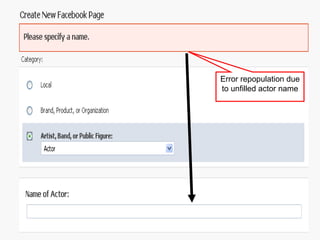
Error repopulation due to unfilled actor name
Hey ! write your name as I mentioned in electronic signature signature or else here is the error
Use audio or text captcha or else here is the error In audio captcha Hear code and enter here In text captcha See the code and enter here
After you click next page is entry of ur id and password as I have arrowed
Select the Group you want to create The various type inside a selected group Predicted location Watch out error
Error rectification guidence
Creator controls
Creator options
Invitations for friends to join my group
Shotouts to advertise After clicking this, followed by the arrow
Post out your details
Pay for advertisement
creator details
Fans interests and involvement
Click here to post on your wall Report the creator if you dislike
Login Session For Users With A Facebook Account
User Page
Micro Blogs
Micro Blogs
Videos
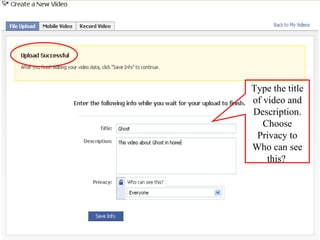
Upload videos or Record videos through webcam.
Type the title of video and Description. Choose Privacy to Who can see this?
After upload the video it can add to my videos.
RSS [ Really Simple Syndication  ]
Import External Blog on your Notes.
After Import RSS feed it show to My Notes.
Groups
If you can create Click here. Join in a group.
Details about the network
Users joined network details
Tagging
Select a Photo.
Uploading  photo on progress.
Type the Caption to appropriate box.
Publish your photo.
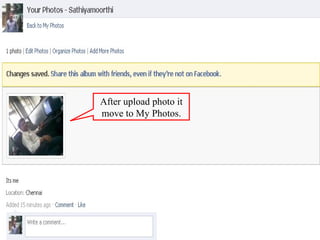
After upload photo it move to My Photos.
PMO Skills
Facebook Developer Wiki Technical reference for developers. It is not the place to ask question regarding our profile or account. standards-based Web service with methods for accessing and contributing Facebook data
To build our own application
 
Steps for setting up our Application Login to our developer application. Begin setting up a new Application. API key. Application secret key. Settings are been edited before getting into the code. Enter a Callback URL. Enter the Canvas page URL. Adding the application to Facebook. Save and Continue.


Steps for Configuring our Application on the Host In Developer Application- click example code link. Copy the contents of this file and paste it into a file called index.php on your server. Test the code- enter the Canvas page URL on the browser. Executed- Facebook Page containing first 25 friends
 
ASK & ANSWER In this session questions can be posted by the user to the forum. It is been answered by the forum team. We can find frequently asked question in the forum.
Ask & Answer What is Facebook Platform? What are applications on Facebook? What is Facebook Connect? Getting started. Authorizing users. Accessing a user's profile data, friends, and stream. Requests, notifications, and publishing to stream. Connect FAQs Application Directory. Application Verification Program. Integration into Facebook profiles, Pages, and Publisher. Insights and analytics. Making money. Other questions? Testing and troubleshooting. Policies and terms. Support for users and third-party application support.
What is Facebook Platform? We released Facebook Platform in 2007 so our developers could create applications that allow users to share and stay connected. Now, over one million developers are helping make the Web more social. You can build rich applications that run on Facebook and let users interact with each other. Or, with Facebook Connect, you can bring the social power of the Facebook Platform to your own website, device or application off of Facebook.com.
CHAT It is possible in the Facebook to chat with the friends by adding them to the chat list.
Chatting in Facebook
E-Mail It is possible to e-mail from the facebook. We have compose message from inbox menu. Photos,videos and links can be attached to the mail.
This box appears when we select the compose message from inbox .
We can type the name of a friend, list or email address to whom we have to send the message We can attach photo video and link.
Photo has been attached  to the mail
Videos can be uploaded from the camera on your system
A link has been attached to the mail
Added Link
Build Tools API Test Console. FBML Test Console. Feed Template Console Registered Templates Console.
Friends.get method is tested
 
This tool is to register a new template bundle on behalf of any one of the applications you own.
 
 
It tests the registered templates
INNOVATION
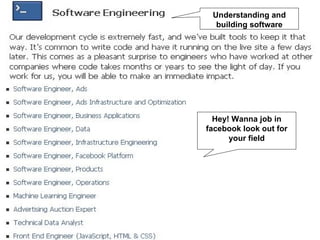
Understanding and building software Hey! Wanna job in facebook look out for your field
Look out for this example job offer
Platform Core Components The API- consists of a number of methods to add social context to your applications. FBML- Facebook Markup Language, ,integrates your application into Facebook.  XFBML, an extension to FBML, lets you incorporate FBML into Facebook Connect sites and IFrame applications.  FQL, Facebook Query Language, which lets you quickly and easily query for Facebook user data without using the API.  FBJS, Facebook's method for letting developers incorporate JavaScript into their applications .
API Add social context to your application by utilizing profile, friend, Page, group, photo, and event data. The API uses a REST-like interface.  Method calls are made over the internet by sending HTTP GET or POST requests to the Facebook API REST server .  Nearly any computer language can be used to communicate over HTTP with the REST server. If you manually form your HTTP POST requests to Facebook, you must include the request data in the POST body
API Methods SOME METHODES IN API admin.getAllocation   Returns the current allocation limit for your application for the specified integration point.  admin.getAppProperties   Returns values of properties for your applications from the Facebook Developer application.  admin.getMetrics   Returns specified metrics for your application, given a time period.  admin.getRestrictionInfo   Returns the demographic restrictions for the application.  admin.setAppProperties   Sets values for properties for your applications in the Facebook Developer application.  admin.setRestrictionInfo   Sets the demographic restrictions for the application.
API Categories API methods that never require a session key, unless a desktop application calls them.  API methods that don't require a session key, but can provide additional functionality if specified  API methods that always require a session key ---always require a session key, whether a Web application or a desktop application calls them.  Session Secret and API Methods ---the application's API key and secret key provide sufficient security for making API calls
FRAME WORK FBML   Faster on first page loads  Has fewer moving parts and the paradigm is closer to that of the traditional Web  Gives you easy access to lots of Facebook elements  Lets your application pages have nice URLs  Has a sensible authorization mechanism
IFrames   easier and faster if you have an existing application, widget, or website if the application utilizes XFBML Are faster if you are doing a lot of AJAX in your application, since the requests don't need to go through Facebook proxy  Debugging regular HTML and JavaScript is easier than for FBML and FBJS given the tools available today  Allow you to use popular JavaScript libraries like jQuery in your code, but you'd have to modify the library to use it in FBJS, and some things just might not work
Fb:dashboard Renders a standard Facebook dashboard header.  Dashboards can contain the following elements:  fb:action   fb:create -button   fb:help
Fb:action Renders a link, usually for navigational purposes. Its appearance depends on its container .
 
Fb:create-button Renders a Create button for adding user-generated content. This tag must be a child of  fb:dashboard .
Fb:help Renders a help link. This tag must be a child of  fb:dashboard .
RIA WIDGETS Fb:comments (XFBML) Displays a Comments Box on a Facebook Connect site or in an IFrame application.  You can modify the Comments Box's colors and fonts, but you  cannot  delete, obscure or modify:  The Facebook favicon  The links to the logged in user and logout  The user's profile picture  The checkbox to let the user agree to publish the comment on their profile The  Post  button
 
Examples  <fb:comments numposts=&quot;4&quot; title=&quot;My Blog Comments&quot; css=&quot;http://www.yourwebsite.com/css/comments.css?1234&quot; simple=&quot;1&quot;></fb:comments>
Fb:live-stream Use this tag to render a Live Stream Box social widget on your FBML canvas pages or Facebook Connect sites .
Web services DynamicFBML/Visibility These elements all control the visibility of an element or a set of elements. Format is clickto*=&quot;id1,id2,id3&quot;.  clicktoshow  - Sets the specified IDs to visible.  clicktohide  - Hides the specified IDs  clicktotoggle  - Will flip the visibility of the specified elements.  clickthrough  - If true, allows checkboxes to change state, buttons to submit forms, etc.; if false, normal behavior of the element is inhibited.
Example   <a id=&quot;show_text&quot; href=&quot;#&quot; clicktohide=&quot;show_text&quot; clicktoshow=&quot;History,hide_text&quot;> Show History</a>  <a id=&quot;hide_text&quot; href=&quot;#&quot; clicktohide=&quot;History, hide_text&quot; clicktoshow=&quot;show_text&quot; style=&quot;display:none&quot;>Hide History</a> <div id=&quot;History&quot; style=&quot;display:none&quot;> THE STUFF </div>
DynamicFBML/MockAJAX Attributes   clickrewriteid - This is the id of the div that will be replaced by the returned data.  clickrewriteurl - This is the (non-canvas) url from which it will grab the data.  clickrewriteform - This is the form to use when submitting.
DynamicFBML/Forms From Facebook Developer Wiki Jump to: navigation, search clicktoenable - Will enable the form elements specified by id.  clicktodisable - Will disable the form elements specified by id.  clickthrough - Will allow clicks on elements using Dynamic FBML to go through to the element.  Example <form> <input type=&quot;text&quot; id=&quot;firstname&quot; name=&quot;firstname&quot; /> <input id=&quot;sendbutton&quot; type=&quot;submit&quot; value=&quot;Submit&quot; clicktodisable=&quot;firstname&quot; clicktohide=&quot;sendbutton&quot; clickthrough=&quot;true&quot; /> </form>
Requirelogin To ensure that the user has authorized your application before accessing the contents of the link or form.  Examples <a href=&quot;http://www.somewheretogo.com/loggedinusersonly.php&quot; requirelogin=1>You must be logged in to follow me</a> <form action=&quot;http://www.somewheretogo.com/loggedinusersonly.php&quot; requirelogin=1> ... your regular form fields, just be sure not to name any field 'submit' ... </form>
UsageNotes/CSS style attributes are allowed, though url() tokens cannot reference JavaScript. id attributes get prefixed with the string  app  followed by the application ID of the calling application, followed by an underscore.  So, this FBML:  <div id=&quot;mybox&quot;></div> would become:  <div id=&quot;app2235437893_mybox&quot;></div>
Images Facebook Platform handles img tags in a special manner. When publishing a page, Facebook servers request any image URLs and then serves these images Rewriting the src attribute of all img tags using a *.facebook.com domain. Facebook's cache of images displays a blank image if there is a problem. You can request your image be re-cached by using facebook.fbml.refreshImgSrc('imgURL').
UsageNotes/Forms Facebook created an override for the HTML form tag to provide applications with special behavior.  This override is for the  fb:request -form  FBML tag.  The FBML code:  <form></form> Would expand to HTML something similar to:  <form> <input type=&quot;hidden&quot; name=&quot;fb_sig_profile&quot; value=&quot;1160&quot;/> <input type=&quot;hidden&quot; name=&quot;fb_sig_user&quot; value=&quot;1160&quot;/>  <input type=&quot;hidden&quot; name=&quot;fb_sig_session_key&quot; value=&quot;b12d7f73fc47536b32e89e-1160&quot;/>  <input type=&quot;hidden&quot; name=&quot;fb_sig_time&quot; value=&quot;1176705186&quot;/> <input type=&quot;hidden&quot; name=&quot;fb_sig&quot; value=&quot;773af1263c2b7bade7958e6b58d3152f&quot;/>  </form>
UsageNotes/Flavors In different contexts, you are allowed to do different things in FBML. These contexts are formalized with a concept called &quot;flavors.&quot;  A concrete example of this is a Facebook Canvas page vs. a profile box.  In a Canvas page, you can have IFRAMEs, while you can't do this in a profile box.
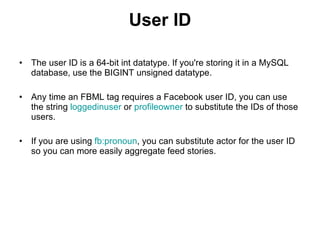
User ID The user ID is a 64-bit int datatype. If you're storing it in a MySQL database, use the BIGINT unsigned datatype.  Any time an FBML tag requires a Facebook user ID, you can use the string  loggedinuser  or  profileowner  to substitute the IDs of those users.  If you are using  fb:pronoun , you can substitute actor for the user ID so you can more easily aggregate feed stories.
Public Canvas Pages Facebook now offers applications the ability to serve canvas pages to users not currently logged in to either Facebook or the application, or the user hasn't agreed to the Terms of Service for the application.  This will afford your application greater exposure, a broader user base, and the ability to be indexed by search engines.
If you use the PHP client library, simply use $user = $facebook->get_loggedin_user() To check whether the user is logged out, you may simply check  $is_logged_out = !$user; If you do not wish to allow public canvas page, continue using  $user = $facebook->require_login()
Web 2.0 Social Networking   Knowing What Tools You Need You can develop your Facebook application in whichever development environment you prefer.  Facebook and other third party application developers have created  client libraries  for these environments.  Facebook supports  PHP  and  JavaScript  client libraries.  Once you set up your environment, you need to prepare the server that will host your Facebook application.
Setting Up Your Server  Verify that your server can serve an HTML file. Upload the appropriate Facebook client library to your server. If your application stores user or application information in a database, install a database such as MySQL on your server  Verify that you can write a database program outside of Facebook Platform.
Adding the Facebook Developer Application  Request up to 100 API keys, customize your application settings, and create and manage the applications you have developed from right inside Facebook.  Connect with the developer community through the discussion boards and find local developer events.  Find the reference material you need, including links to client libraries, sample code and sample applications, to help get you started.  Check out the Facebook Platform Developer Blog
Creating Your Facebook Application  From the Facebook Developer application's home page, click  +Set Up New Application .  The Create Application page appears. Enter a name for your application in the  Application Name  field. Follow the  Terms of Service  link. Click  Save Changes  to save these settings and continue configuring your application.
Configuring Basic Settings You should provide a description of your application in the  Description  field  Click  Change your icon  and browse for one Next to  Logo , click  Change your logo  and browse to an image file. If your application is in a language other than English, select the language in the  Language  list  If there are other developers working on this application with you, enter their names in the  Developers  field
You need to provide an email address in the  Developer Contact E-mail  field.  If you want your users to contact you via email, select  Email  next to  User Support Address  and enter an email address in the field below  If you want your users to contact you via a form on a page on your site, select  URL  next to  User Support Address   Enter the URL to your application's help page in the  Help URL  field.  Enter the URL to your application's terms of service in the  Terms of Service URL  field
Configuring Authentication Settings If you want users to be able to use it, check the  Users  check box  You should specify a URL in the  Post-Authorize Callback URL  field  You need to write server-side code to log or handle what happens when a user removes your application. You should provide a URL to a notification page in the  Post-Remove Callback URL  field.
Web 2.0 Customization   It includes Fb:page-admin-edit-header Fb:js-string Fb:share-button Fb:prompt-permission Fb:attachment-preview Fb:tag Fb:editor Fb:wallpost Fb:comments Fb:chat-invite Fb:friend-selector Fb:photo
Fb:page-admin-edit-header this adds a standardized edit header for canvas pages so that the Page owner can easily jump to their Page's app configuration.
Fb:js-string This tag renders a block of FBML into an FBML block variable instead of rendering it on the page. You can use this variable in your JavaScript with setInnerFBML
Fb:share-button Renders a standard Share button in a profile for the specified URL or content .
Fb:prompt-permission Renders the content of the tag as a link that, when clicked, initiates a dialog requesting the specified extended permissions from the user
Fb:attachment-preview Renders a link in a message attachment that, when clicked, replaces that attachment with newly fetched content.   Attachment Action:  The action in a dropdown or button for creating a message attachment. The action cannot be longer than 20 characters.  Callback URL:  The URL from which to fetch attachment content. The callback URL cannot be longer than 100 characters).
Fb:tag Renders an HTML tag. This is most commonly used in conjunction with  fb:intl  to put translatable text in an attribute of an HTML tag
Fb:editor Creates a form with two columns, just like the form on the edit-profile page .
Fb:wallpost Renders a Wall-style post.
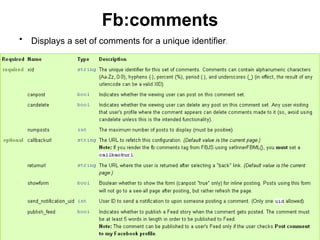
Fb:comments Displays a set of comments for a unique identifier .
Fb:chat-invite Enables your users to initiate Facebook Chat with their friends from within your applications .
Fb:friend-selector Renders a predictive friend selector input for a given person .
Fb:photo Renders a Facebook photo .
NETWORK
PERSONALITY TRAITS Distinguishing qualities or characteristics of a person. Photo Fanatic:   No need to take a camera with you if you have one of  these attention-hungry friends with you. Immediately check the photos they take to see if they are &quot;Facebook-worthy,&quot; and their profile pictures change on a regular basis.
Casual Checker  These are the ones who only sign on maybe once or twice a day  Classroom Clicker   Sit at the back of your computer lab classroom and watch in awe as the infamous blue-and-white home page sprouts up on virtually every computer throughout the lecture.
Reluctant Reader   While they are more scarce than ever, these self-righteous, anti-social site users typically only check their homepage for reasons such as &quot;I only use it to keep up with my out of state friends&quot; or &quot;I just sign on, check to see who wrote me, then sign off.&quot;  Social Stalker   These are the people you meet for the first time, exchange a couple lines of conversation, and suddenly the next day they are adding you as a friend
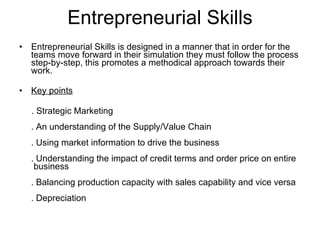
Entrepreneurial Skills Entrepreneurial Skills is designed in a manner that in order for the teams move forward in their simulation they must follow the process step-by-step, this promotes a methodical approach towards their work. Key points . Strategic Marketing . An understanding of the Supply/Value Chain . Using market information to drive the business . Understanding the impact of credit terms and order price on entire  business . Balancing production capacity with sales capability and vice versa . Depreciation
.  Capacity Utilization . Production Lead Times and changeover costs  . Making and interpreting financial reports  . Using the Dupont Financial Model to understand the impact of the  various financial items on the Key Financial Indicators  . Inventory Management  . ABC – Activity Based Costing  . EVA – Economic Value Added  . Cash flow analyses  . Optimum utilization of assets  . Equity building  . New Product and New Market development  .The value of Continuous Improvement
BENIFITS People from various functions get an overview of the complete operation of the business, hence enabling them to see the ‘big picture’.  enables people in all departments to analyze the financial impact of their suggestions before putting them up for approval.  A strategic thinking mindset and long-term approach to business is developed
EVENT PARTICIPATION
SEARCH FOR EVENT CREATE AN EVENT ANY EVENT ARRANGED FROM FRIENDS ANY PAST EVENTS ANY BIRTHDAY EVENTS STEP 1
EVENT SPECIFICATION GUEST WHO ARE CONFIRMED TO ATTEND THE EVENT FILETER EVENTS STEP 2
EVENT TYPES SPECIFICATION WANNA RESERVE CLICK HERE STEP 3
OPTION FOR RESERVATION OF EVENT STEP 4
OPEN SOURCE AWARENESS
POST OUT AWARENESS  DETAILS FOR  THE POST HEY! ITS OPEN SOURCE SINCE WE CAN POST OUT AWARENESS FROM OTHER WEBSITE
WATCH OUT THE EXAMPLE
Employment Readiness  Provides information and referral services in the areas of employment, education, training, transition, and volunteer opportunities to give family members the competitive edge needed to secure employment.    Innovation is paramount in Facebook “ No matter what part of Facebook you join, you'll be building something big and new. You won't simply be finding answers; you'll be framing questions that no one has ever asked before - and identifying unprecedented opportunities.” Said by Mark Zukerberg
LOOK OUT FACEBOOK AS EMPLOYMENT READINESS

Facebook Coin

  • 1.
  • 2.
  • 3.
  • 4.
  • 5.
    Facebook Registration TypesPrivate profile Public profile
  • 6.
    Private profile- Individual user information Public profile- User can become fan of individual product, service or concept . - Integrated with facebook Advertising system.
  • 7.
    TO CREATE APRIVATE PROFILE
  • 8.
    Hey its verysimple to create your profile. Just fill in the required information. Thats it ! For age authenticity and age appropriate
  • 9.
  • 10.
    Validation All thefields must be filled. Even if one field is empty u cant sign up.
  • 11.
    A Code forsecurity which is randomly generated by the Server.
  • 12.
    AFTER SIGN UPThis list of friends appear from the user E-mail id contacts.
  • 13.
    User Can Addfriends who are already in the Facebook by giving their E-mail id.
  • 14.
  • 15.
  • 16.
  • 17.
    TO CREATE APUBLIC PROFILE
  • 18.
    Do You wantto market your product? Do you want Publicity? A simple way just create your own page for celebrity, band or business
  • 19.
    Error repopulation dueto unfilled actor name
  • 20.
    Hey ! writeyour name as I mentioned in electronic signature signature or else here is the error
  • 21.
    Use audio ortext captcha or else here is the error In audio captcha Hear code and enter here In text captcha See the code and enter here
  • 22.
    After you clicknext page is entry of ur id and password as I have arrowed
  • 23.
    Select the Groupyou want to create The various type inside a selected group Predicted location Watch out error
  • 24.
  • 25.
  • 26.
  • 27.
    Invitations for friendsto join my group
  • 28.
    Shotouts to advertiseAfter clicking this, followed by the arrow
  • 29.
  • 30.
  • 31.
  • 32.
    Fans interests andinvolvement
  • 33.
    Click here topost on your wall Report the creator if you dislike
  • 34.
    Login Session ForUsers With A Facebook Account
  • 35.
  • 36.
  • 37.
  • 38.
  • 39.
    Upload videos orRecord videos through webcam.
  • 40.
    Type the titleof video and Description. Choose Privacy to Who can see this?
  • 41.
    After upload thevideo it can add to my videos.
  • 42.
    RSS [ ReallySimple Syndication ]
  • 43.
    Import External Blogon your Notes.
  • 44.
    After Import RSSfeed it show to My Notes.
  • 45.
  • 46.
    If you cancreate Click here. Join in a group.
  • 47.
  • 48.
  • 49.
  • 50.
  • 51.
    Uploading photoon progress.
  • 52.
    Type the Captionto appropriate box.
  • 53.
  • 54.
    After upload photoit move to My Photos.
  • 55.
  • 56.
    Facebook Developer WikiTechnical reference for developers. It is not the place to ask question regarding our profile or account. standards-based Web service with methods for accessing and contributing Facebook data
  • 57.
    To build ourown application
  • 58.
  • 59.
    Steps for settingup our Application Login to our developer application. Begin setting up a new Application. API key. Application secret key. Settings are been edited before getting into the code. Enter a Callback URL. Enter the Canvas page URL. Adding the application to Facebook. Save and Continue.
  • 60.
  • 61.
  • 62.
  • 63.
    Steps for Configuringour Application on the Host In Developer Application- click example code link. Copy the contents of this file and paste it into a file called index.php on your server. Test the code- enter the Canvas page URL on the browser. Executed- Facebook Page containing first 25 friends
  • 64.
  • 65.
    ASK & ANSWERIn this session questions can be posted by the user to the forum. It is been answered by the forum team. We can find frequently asked question in the forum.
  • 66.
    Ask & AnswerWhat is Facebook Platform? What are applications on Facebook? What is Facebook Connect? Getting started. Authorizing users. Accessing a user's profile data, friends, and stream. Requests, notifications, and publishing to stream. Connect FAQs Application Directory. Application Verification Program. Integration into Facebook profiles, Pages, and Publisher. Insights and analytics. Making money. Other questions? Testing and troubleshooting. Policies and terms. Support for users and third-party application support.
  • 67.
    What is FacebookPlatform? We released Facebook Platform in 2007 so our developers could create applications that allow users to share and stay connected. Now, over one million developers are helping make the Web more social. You can build rich applications that run on Facebook and let users interact with each other. Or, with Facebook Connect, you can bring the social power of the Facebook Platform to your own website, device or application off of Facebook.com.
  • 68.
    CHAT It ispossible in the Facebook to chat with the friends by adding them to the chat list.
  • 69.
  • 70.
    E-Mail It ispossible to e-mail from the facebook. We have compose message from inbox menu. Photos,videos and links can be attached to the mail.
  • 71.
    This box appearswhen we select the compose message from inbox .
  • 72.
    We can typethe name of a friend, list or email address to whom we have to send the message We can attach photo video and link.
  • 73.
    Photo has beenattached to the mail
  • 74.
    Videos can beuploaded from the camera on your system
  • 75.
    A link hasbeen attached to the mail
  • 76.
  • 77.
    Build Tools APITest Console. FBML Test Console. Feed Template Console Registered Templates Console.
  • 78.
  • 79.
  • 80.
    This tool isto register a new template bundle on behalf of any one of the applications you own.
  • 81.
  • 82.
  • 83.
    It tests theregistered templates
  • 84.
  • 85.
    Understanding and buildingsoftware Hey! Wanna job in facebook look out for your field
  • 86.
    Look out forthis example job offer
  • 87.
    Platform Core ComponentsThe API- consists of a number of methods to add social context to your applications. FBML- Facebook Markup Language, ,integrates your application into Facebook. XFBML, an extension to FBML, lets you incorporate FBML into Facebook Connect sites and IFrame applications. FQL, Facebook Query Language, which lets you quickly and easily query for Facebook user data without using the API. FBJS, Facebook's method for letting developers incorporate JavaScript into their applications .
  • 88.
    API Add socialcontext to your application by utilizing profile, friend, Page, group, photo, and event data. The API uses a REST-like interface. Method calls are made over the internet by sending HTTP GET or POST requests to the Facebook API REST server . Nearly any computer language can be used to communicate over HTTP with the REST server. If you manually form your HTTP POST requests to Facebook, you must include the request data in the POST body
  • 89.
    API Methods SOMEMETHODES IN API admin.getAllocation Returns the current allocation limit for your application for the specified integration point. admin.getAppProperties Returns values of properties for your applications from the Facebook Developer application. admin.getMetrics Returns specified metrics for your application, given a time period. admin.getRestrictionInfo Returns the demographic restrictions for the application. admin.setAppProperties Sets values for properties for your applications in the Facebook Developer application. admin.setRestrictionInfo Sets the demographic restrictions for the application.
  • 90.
    API Categories APImethods that never require a session key, unless a desktop application calls them. API methods that don't require a session key, but can provide additional functionality if specified API methods that always require a session key ---always require a session key, whether a Web application or a desktop application calls them. Session Secret and API Methods ---the application's API key and secret key provide sufficient security for making API calls
  • 91.
    FRAME WORK FBML Faster on first page loads Has fewer moving parts and the paradigm is closer to that of the traditional Web Gives you easy access to lots of Facebook elements Lets your application pages have nice URLs Has a sensible authorization mechanism
  • 92.
    IFrames easier and faster if you have an existing application, widget, or website if the application utilizes XFBML Are faster if you are doing a lot of AJAX in your application, since the requests don't need to go through Facebook proxy Debugging regular HTML and JavaScript is easier than for FBML and FBJS given the tools available today Allow you to use popular JavaScript libraries like jQuery in your code, but you'd have to modify the library to use it in FBJS, and some things just might not work
  • 93.
    Fb:dashboard Renders astandard Facebook dashboard header. Dashboards can contain the following elements: fb:action fb:create -button fb:help
  • 94.
    Fb:action Renders alink, usually for navigational purposes. Its appearance depends on its container .
  • 95.
  • 96.
    Fb:create-button Renders aCreate button for adding user-generated content. This tag must be a child of fb:dashboard .
  • 97.
    Fb:help Renders ahelp link. This tag must be a child of fb:dashboard .
  • 98.
    RIA WIDGETS Fb:comments(XFBML) Displays a Comments Box on a Facebook Connect site or in an IFrame application. You can modify the Comments Box's colors and fonts, but you cannot delete, obscure or modify: The Facebook favicon The links to the logged in user and logout The user's profile picture The checkbox to let the user agree to publish the comment on their profile The Post button
  • 99.
  • 100.
    Examples <fb:commentsnumposts=&quot;4&quot; title=&quot;My Blog Comments&quot; css=&quot;http://www.yourwebsite.com/css/comments.css?1234&quot; simple=&quot;1&quot;></fb:comments>
  • 101.
    Fb:live-stream Use thistag to render a Live Stream Box social widget on your FBML canvas pages or Facebook Connect sites .
  • 102.
    Web services DynamicFBML/VisibilityThese elements all control the visibility of an element or a set of elements. Format is clickto*=&quot;id1,id2,id3&quot;. clicktoshow - Sets the specified IDs to visible. clicktohide - Hides the specified IDs clicktotoggle - Will flip the visibility of the specified elements. clickthrough - If true, allows checkboxes to change state, buttons to submit forms, etc.; if false, normal behavior of the element is inhibited.
  • 103.
    Example <a id=&quot;show_text&quot; href=&quot;#&quot; clicktohide=&quot;show_text&quot; clicktoshow=&quot;History,hide_text&quot;> Show History</a> <a id=&quot;hide_text&quot; href=&quot;#&quot; clicktohide=&quot;History, hide_text&quot; clicktoshow=&quot;show_text&quot; style=&quot;display:none&quot;>Hide History</a> <div id=&quot;History&quot; style=&quot;display:none&quot;> THE STUFF </div>
  • 104.
    DynamicFBML/MockAJAX Attributes clickrewriteid - This is the id of the div that will be replaced by the returned data. clickrewriteurl - This is the (non-canvas) url from which it will grab the data. clickrewriteform - This is the form to use when submitting.
  • 105.
    DynamicFBML/Forms From FacebookDeveloper Wiki Jump to: navigation, search clicktoenable - Will enable the form elements specified by id. clicktodisable - Will disable the form elements specified by id. clickthrough - Will allow clicks on elements using Dynamic FBML to go through to the element. Example <form> <input type=&quot;text&quot; id=&quot;firstname&quot; name=&quot;firstname&quot; /> <input id=&quot;sendbutton&quot; type=&quot;submit&quot; value=&quot;Submit&quot; clicktodisable=&quot;firstname&quot; clicktohide=&quot;sendbutton&quot; clickthrough=&quot;true&quot; /> </form>
  • 106.
    Requirelogin To ensurethat the user has authorized your application before accessing the contents of the link or form. Examples <a href=&quot;http://www.somewheretogo.com/loggedinusersonly.php&quot; requirelogin=1>You must be logged in to follow me</a> <form action=&quot;http://www.somewheretogo.com/loggedinusersonly.php&quot; requirelogin=1> ... your regular form fields, just be sure not to name any field 'submit' ... </form>
  • 107.
    UsageNotes/CSS style attributesare allowed, though url() tokens cannot reference JavaScript. id attributes get prefixed with the string app followed by the application ID of the calling application, followed by an underscore. So, this FBML: <div id=&quot;mybox&quot;></div> would become: <div id=&quot;app2235437893_mybox&quot;></div>
  • 108.
    Images Facebook Platformhandles img tags in a special manner. When publishing a page, Facebook servers request any image URLs and then serves these images Rewriting the src attribute of all img tags using a *.facebook.com domain. Facebook's cache of images displays a blank image if there is a problem. You can request your image be re-cached by using facebook.fbml.refreshImgSrc('imgURL').
  • 109.
    UsageNotes/Forms Facebook createdan override for the HTML form tag to provide applications with special behavior. This override is for the fb:request -form FBML tag. The FBML code: <form></form> Would expand to HTML something similar to: <form> <input type=&quot;hidden&quot; name=&quot;fb_sig_profile&quot; value=&quot;1160&quot;/> <input type=&quot;hidden&quot; name=&quot;fb_sig_user&quot; value=&quot;1160&quot;/> <input type=&quot;hidden&quot; name=&quot;fb_sig_session_key&quot; value=&quot;b12d7f73fc47536b32e89e-1160&quot;/> <input type=&quot;hidden&quot; name=&quot;fb_sig_time&quot; value=&quot;1176705186&quot;/> <input type=&quot;hidden&quot; name=&quot;fb_sig&quot; value=&quot;773af1263c2b7bade7958e6b58d3152f&quot;/> </form>
  • 110.
    UsageNotes/Flavors In differentcontexts, you are allowed to do different things in FBML. These contexts are formalized with a concept called &quot;flavors.&quot; A concrete example of this is a Facebook Canvas page vs. a profile box. In a Canvas page, you can have IFRAMEs, while you can't do this in a profile box.
  • 111.
    User ID Theuser ID is a 64-bit int datatype. If you're storing it in a MySQL database, use the BIGINT unsigned datatype. Any time an FBML tag requires a Facebook user ID, you can use the string loggedinuser or profileowner to substitute the IDs of those users. If you are using fb:pronoun , you can substitute actor for the user ID so you can more easily aggregate feed stories.
  • 112.
    Public Canvas PagesFacebook now offers applications the ability to serve canvas pages to users not currently logged in to either Facebook or the application, or the user hasn't agreed to the Terms of Service for the application. This will afford your application greater exposure, a broader user base, and the ability to be indexed by search engines.
  • 113.
    If you usethe PHP client library, simply use $user = $facebook->get_loggedin_user() To check whether the user is logged out, you may simply check $is_logged_out = !$user; If you do not wish to allow public canvas page, continue using $user = $facebook->require_login()
  • 114.
    Web 2.0 SocialNetworking Knowing What Tools You Need You can develop your Facebook application in whichever development environment you prefer. Facebook and other third party application developers have created client libraries for these environments. Facebook supports PHP and JavaScript client libraries. Once you set up your environment, you need to prepare the server that will host your Facebook application.
  • 115.
    Setting Up YourServer Verify that your server can serve an HTML file. Upload the appropriate Facebook client library to your server. If your application stores user or application information in a database, install a database such as MySQL on your server Verify that you can write a database program outside of Facebook Platform.
  • 116.
    Adding the FacebookDeveloper Application Request up to 100 API keys, customize your application settings, and create and manage the applications you have developed from right inside Facebook. Connect with the developer community through the discussion boards and find local developer events. Find the reference material you need, including links to client libraries, sample code and sample applications, to help get you started. Check out the Facebook Platform Developer Blog
  • 117.
    Creating Your FacebookApplication From the Facebook Developer application's home page, click +Set Up New Application . The Create Application page appears. Enter a name for your application in the Application Name field. Follow the Terms of Service link. Click Save Changes to save these settings and continue configuring your application.
  • 118.
    Configuring Basic SettingsYou should provide a description of your application in the Description field Click Change your icon and browse for one Next to Logo , click Change your logo and browse to an image file. If your application is in a language other than English, select the language in the Language list If there are other developers working on this application with you, enter their names in the Developers field
  • 119.
    You need toprovide an email address in the Developer Contact E-mail field. If you want your users to contact you via email, select Email next to User Support Address and enter an email address in the field below If you want your users to contact you via a form on a page on your site, select URL next to User Support Address Enter the URL to your application's help page in the Help URL field. Enter the URL to your application's terms of service in the Terms of Service URL field
  • 120.
    Configuring Authentication SettingsIf you want users to be able to use it, check the Users check box You should specify a URL in the Post-Authorize Callback URL field You need to write server-side code to log or handle what happens when a user removes your application. You should provide a URL to a notification page in the Post-Remove Callback URL field.
  • 121.
    Web 2.0 Customization It includes Fb:page-admin-edit-header Fb:js-string Fb:share-button Fb:prompt-permission Fb:attachment-preview Fb:tag Fb:editor Fb:wallpost Fb:comments Fb:chat-invite Fb:friend-selector Fb:photo
  • 122.
    Fb:page-admin-edit-header this addsa standardized edit header for canvas pages so that the Page owner can easily jump to their Page's app configuration.
  • 123.
    Fb:js-string This tagrenders a block of FBML into an FBML block variable instead of rendering it on the page. You can use this variable in your JavaScript with setInnerFBML
  • 124.
    Fb:share-button Renders astandard Share button in a profile for the specified URL or content .
  • 125.
    Fb:prompt-permission Renders thecontent of the tag as a link that, when clicked, initiates a dialog requesting the specified extended permissions from the user
  • 126.
    Fb:attachment-preview Renders alink in a message attachment that, when clicked, replaces that attachment with newly fetched content. Attachment Action: The action in a dropdown or button for creating a message attachment. The action cannot be longer than 20 characters. Callback URL: The URL from which to fetch attachment content. The callback URL cannot be longer than 100 characters).
  • 127.
    Fb:tag Renders anHTML tag. This is most commonly used in conjunction with fb:intl to put translatable text in an attribute of an HTML tag
  • 128.
    Fb:editor Creates aform with two columns, just like the form on the edit-profile page .
  • 129.
    Fb:wallpost Renders aWall-style post.
  • 130.
    Fb:comments Displays aset of comments for a unique identifier .
  • 131.
    Fb:chat-invite Enables yourusers to initiate Facebook Chat with their friends from within your applications .
  • 132.
    Fb:friend-selector Renders apredictive friend selector input for a given person .
  • 133.
    Fb:photo Renders aFacebook photo .
  • 134.
  • 135.
    PERSONALITY TRAITS Distinguishingqualities or characteristics of a person. Photo Fanatic: No need to take a camera with you if you have one of these attention-hungry friends with you. Immediately check the photos they take to see if they are &quot;Facebook-worthy,&quot; and their profile pictures change on a regular basis.
  • 136.
    Casual Checker These are the ones who only sign on maybe once or twice a day Classroom Clicker Sit at the back of your computer lab classroom and watch in awe as the infamous blue-and-white home page sprouts up on virtually every computer throughout the lecture.
  • 137.
    Reluctant Reader While they are more scarce than ever, these self-righteous, anti-social site users typically only check their homepage for reasons such as &quot;I only use it to keep up with my out of state friends&quot; or &quot;I just sign on, check to see who wrote me, then sign off.&quot; Social Stalker These are the people you meet for the first time, exchange a couple lines of conversation, and suddenly the next day they are adding you as a friend
  • 138.
    Entrepreneurial Skills EntrepreneurialSkills is designed in a manner that in order for the teams move forward in their simulation they must follow the process step-by-step, this promotes a methodical approach towards their work. Key points . Strategic Marketing . An understanding of the Supply/Value Chain . Using market information to drive the business . Understanding the impact of credit terms and order price on entire business . Balancing production capacity with sales capability and vice versa . Depreciation
  • 139.
    . CapacityUtilization . Production Lead Times and changeover costs . Making and interpreting financial reports . Using the Dupont Financial Model to understand the impact of the various financial items on the Key Financial Indicators . Inventory Management . ABC – Activity Based Costing . EVA – Economic Value Added . Cash flow analyses . Optimum utilization of assets . Equity building . New Product and New Market development .The value of Continuous Improvement
  • 140.
    BENIFITS People fromvarious functions get an overview of the complete operation of the business, hence enabling them to see the ‘big picture’. enables people in all departments to analyze the financial impact of their suggestions before putting them up for approval. A strategic thinking mindset and long-term approach to business is developed
  • 141.
  • 142.
    SEARCH FOR EVENTCREATE AN EVENT ANY EVENT ARRANGED FROM FRIENDS ANY PAST EVENTS ANY BIRTHDAY EVENTS STEP 1
  • 143.
    EVENT SPECIFICATION GUESTWHO ARE CONFIRMED TO ATTEND THE EVENT FILETER EVENTS STEP 2
  • 144.
    EVENT TYPES SPECIFICATIONWANNA RESERVE CLICK HERE STEP 3
  • 145.
    OPTION FOR RESERVATIONOF EVENT STEP 4
  • 146.
  • 147.
    POST OUT AWARENESS DETAILS FOR THE POST HEY! ITS OPEN SOURCE SINCE WE CAN POST OUT AWARENESS FROM OTHER WEBSITE
  • 148.
  • 149.
    Employment Readiness Provides information and referral services in the areas of employment, education, training, transition, and volunteer opportunities to give family members the competitive edge needed to secure employment. Innovation is paramount in Facebook “ No matter what part of Facebook you join, you'll be building something big and new. You won't simply be finding answers; you'll be framing questions that no one has ever asked before - and identifying unprecedented opportunities.” Said by Mark Zukerberg
  • 150.
    LOOK OUT FACEBOOKAS EMPLOYMENT READINESS