
INTRODUCTION TO SEO
Alli Berry
April 16, 2015
Agenda
• SEO Overview
• Why is SEO Important?
• How Search Engines Work
• SEO and Professional Writing
• SEO Jobs
• How to Break Into SEO
• Q&A
My Background
• SEO Analyst/Specialist for 3+ years
– Performics (Chicago)
– CDK Global (Seattle)
• Roles: Account Management, Copywriting,
Keyword Research, Content Creation,
Competitive Analysis, Link Building
• Run my own cooking blog:
http://thecrockpotcook.com
• Currently a Marketing Specialist at Kaplan
What is SEO?
What is SEO?
• Search Engine Optimization
• Process of improving organic (free) traffic
from search engines
• Matching content on website to what
relevant searchers are looking for
• Improving websites for users too
• No payment; no ads
Source: http://moz.com/beginners-guide-to-seo
What are organic results?
Local Organic Results
Why does
SEO matter?
Why does SEO matter?
• Search engines are the primary method of
navigation for most Internet users
• Provide targeted traffic (meaning: people
who are already looking for what you offer)
• Publicity, revenue, and exposure – extremely
valuable marketing!
Source: http://moz.com/beginners-guide-to-seo
How do search
engines work?
Crawling and Indexing
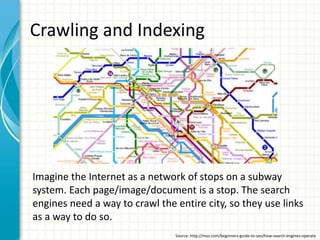
Imagine the Internet as a network of stops on a subway
system. Each page/image/document is a stop. The search
engines need a way to crawl the entire city, so they use links
as a way to do so.
Source: http://moz.com/beginners-guide-to-seo/how-search-engines-operate
Crawl Process
• The crawl process begins with a list of web
addresses from past crawls and sitemaps
provided by website owners
• Search engine bots crawl billions of pages on
the internet via links
• Bots pay special attention to new sites,
changes to existing sites and dead links
• Take information, store in large databases, and
recall later for search queries
Source: http://www.google.com/insidesearch/howsearchworks/crawling-indexing.html
How Search Engines Rank Pages
• Search engines return only those
results that are relevant or useful to
the searcher's query
• They rank those results according to
the popularity of the websites serving
the information
Source: http://moz.com/beginners-guide-to-seo/how-search-engines-operate
How do they determine relevance and
popularity?
• Use incredibly sophisticated algorithms to
sort for relevance and then rank according to
quality/authority
• Hundreds of ranking factors and they can
vary based on type of query
• SEO experts love to study these and
experiment to figure out which ones are
most important
Source: http://moz.com/beginners-guide-to-seo/how-search-engines-operate
Ranking Factors
Some Important Ones:
• Domain name
• # of linking root domains
• Title tags
• H1 tags
• Alt attributes (images)
• Site Speed (especially important for mobile)
• Freshness of Content (depending on topic)
• Social Shares? (debatable)
Domain Name
• Ideal to have relevant keywords in domain
name – need to balance with brand though
http://thecrockpotcook.com
Title Tags
• One of most important factors
• Should emphasize primary keyword, secondary keyword, and brand
• Ideal format: Primary Keyword: Secondary Keyword – Brand Name
• About < 60 characters; 512 pixels wide
Source: http://moz.com/learn/seo/title-tag
H1 Tags
Source: http://blog.woorank.com/2013/04/how-to-use-heading-tags-for-seo/
Surround yourself with
distinction. Surround
yourself with UW-La Crosse.
• Main heading
• Should contain primary keyword
• Should describe content on page
– search engine bots crawl for
relevancy
• Better user experience
• Helps with accessibility for screen
readers
Command-u (Macs) or
Control-u (PCs) and search for
<h1 to find <h1> tag on page.
Alt attributes for Images
Source: http://blog.woorank.com/2013/01/image-alt-text-relevant-for-seo-and-usability/
• Text that describes the image
• Important for both accessibility
and search engine bots to be able
to understand image content
Command-u (Macs) or
Control-u (PCs) and search for
image and look for alt tag on
shortly after that.
HOW DO YOU
KNOW WHAT
KEYWORDS YOU
WANT TO RANK
FOR?
Keyword Research
Free Tools:
• Google Ad Words Keyword Planner: great for finding
search volumes, some keyword discovery
(https://adwords.google.com/KeywordPlanner)
• Ubersuggest: great for discovering new keywords and
finding content topics (http://ubersuggest.org)
• Top Ranked Websites by Keyword Tool: for competitive
research; can type in a keyword and see the top ranking
sites for term(http://www.bruceclay.com/blog/free-seo-
tool-top-ranked-websites-by-keyword/)
Google Adwords Keyword Planner
From: https://adwords.google.com/KeywordPlanner
Google Adwords Keyword Planner
From: https://adwords.google.com/KeywordPlanner
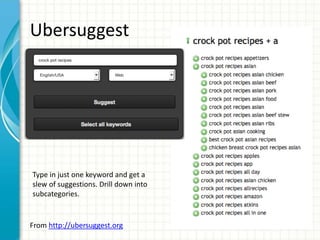
Ubersuggest
From http://ubersuggest.org
Type in just one keyword and get a
slew of suggestions. Drill down into
subcategories.
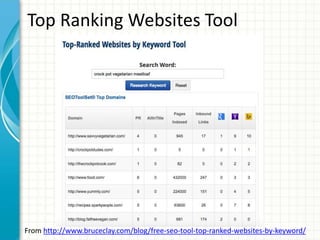
Top Ranking Websites Tool
From http://www.bruceclay.com/blog/free-seo-tool-top-ranked-websites-by-keyword/
HOW DOES THIS
CONNECT TO
PROFESSIONAL
WRITING?
Content is Everything
• SEO used to be about gaming the
system, but search engines algorithms
are smarter now
• Quality of content is key to success!
• You will be a more enticing candidate
for any job with web writing if you
know any SEO
Reading on Content:
http://searchenginewatch.com/sew/news/2383683/quality-
content-essential-for-seo-success-study#
http://relevance.com/content-is-the-new-seo/
JOBS IN THIS FIELD
Common Job Titles
• Content Marketing Specialist
• Copywriter
• Digital Marketing Coordinator
• Digital Marketing Specialist
• Digital Media Coordinator
• Internet Marketing Coordinator
• Internet Marketing Specialist
• Marketing Specialist
• Marketing Strategist
• SEO/SEM(Search Engine Marketing) Specialist
• Web Content Coordinator
• Web Content Specialist
• Web Copywriter
Be wary of anything with sales
in the title – that will not be a
writing job. Companies
sometimes combine sales and
marketing when they really
mean selling ad spaces. 
Internships
• Content Strategist Intern – Critical Mass, Chi.
• Digital Media Intern – Wiley, Chicago
• Digital Media Trainee Program – Performics, Chi.
• Digital/Social Media Intern – Spring Window
Fashions, Madison
• Internet Marketing Intern – Gander Mtn, Mpls.
• Marketing Intern – Press Ganey, Chi.
• Marketing & Communications Intern – Jones Lang
LaSalle, Chi
I found these on www.glassdoor.com - there are many
more if you are willing to spend a semester or summer
in a larger city!
Start Your Own Website
• You don’t need a job or internship to teach you
SEO – you can learn by creating your own website
Why This is a Good Idea:
1. The best way to learn SEO is by practicing it
yourself
2. You have something tangible to prove your skill set
to employers
3. Employers will see that you are a self-starter and a
bad ass
4. It’s an excuse to practice writing about something
you are passionate about
RESOURCES TO CHECK
OUT
SEO Resources
• The Art of SEO by Eric Engh et al. – best comprehensive
SEO guide out there, IMO
• Search and Social by Rob Garner – great read for
understanding how to put together a combined SEO,
content, and social strategy
• Moz Guide: http://moz.com/beginners-guide-to-seo
• Google Guide:
http://static.googleusercontent.com/media/www.google.c
om/en/us/webmasters/docs/search-engine-optimization-
starter-guide.pdf
• Kissmetrics Guide: https://blog.kissmetrics.com/seo-
guide/
Resources for Starting a Website
• Site Wizard
Guide:http://www.thesitewizard.com/gettingsta
rted/startwebsite.shtml
• WikiHow Guide:
http://www.wikihow.com/Start-a-Blog
- To learn SEO well, it’s best to buy your own
domain. I bought my domain through Host Gator
and use a Wordpress.org template. It is super
easy to use!
QUESTIONS

SEO Presentation

  • 1.
    INTRODUCTION TO SEO AlliBerry April 16, 2015
  • 2.
    Agenda • SEO Overview •Why is SEO Important? • How Search Engines Work • SEO and Professional Writing • SEO Jobs • How to Break Into SEO • Q&A
  • 3.
    My Background • SEOAnalyst/Specialist for 3+ years – Performics (Chicago) – CDK Global (Seattle) • Roles: Account Management, Copywriting, Keyword Research, Content Creation, Competitive Analysis, Link Building • Run my own cooking blog: http://thecrockpotcook.com • Currently a Marketing Specialist at Kaplan
  • 4.
  • 5.
    What is SEO? •Search Engine Optimization • Process of improving organic (free) traffic from search engines • Matching content on website to what relevant searchers are looking for • Improving websites for users too • No payment; no ads Source: http://moz.com/beginners-guide-to-seo
  • 6.
  • 7.
  • 8.
  • 9.
    Why does SEOmatter? • Search engines are the primary method of navigation for most Internet users • Provide targeted traffic (meaning: people who are already looking for what you offer) • Publicity, revenue, and exposure – extremely valuable marketing! Source: http://moz.com/beginners-guide-to-seo
  • 10.
  • 11.
    Crawling and Indexing Imaginethe Internet as a network of stops on a subway system. Each page/image/document is a stop. The search engines need a way to crawl the entire city, so they use links as a way to do so. Source: http://moz.com/beginners-guide-to-seo/how-search-engines-operate
  • 12.
    Crawl Process • Thecrawl process begins with a list of web addresses from past crawls and sitemaps provided by website owners • Search engine bots crawl billions of pages on the internet via links • Bots pay special attention to new sites, changes to existing sites and dead links • Take information, store in large databases, and recall later for search queries Source: http://www.google.com/insidesearch/howsearchworks/crawling-indexing.html
  • 13.
    How Search EnginesRank Pages • Search engines return only those results that are relevant or useful to the searcher's query • They rank those results according to the popularity of the websites serving the information Source: http://moz.com/beginners-guide-to-seo/how-search-engines-operate
  • 14.
    How do theydetermine relevance and popularity? • Use incredibly sophisticated algorithms to sort for relevance and then rank according to quality/authority • Hundreds of ranking factors and they can vary based on type of query • SEO experts love to study these and experiment to figure out which ones are most important Source: http://moz.com/beginners-guide-to-seo/how-search-engines-operate
  • 15.
    Ranking Factors Some ImportantOnes: • Domain name • # of linking root domains • Title tags • H1 tags • Alt attributes (images) • Site Speed (especially important for mobile) • Freshness of Content (depending on topic) • Social Shares? (debatable)
  • 16.
    Domain Name • Idealto have relevant keywords in domain name – need to balance with brand though http://thecrockpotcook.com
  • 17.
    Title Tags • Oneof most important factors • Should emphasize primary keyword, secondary keyword, and brand • Ideal format: Primary Keyword: Secondary Keyword – Brand Name • About < 60 characters; 512 pixels wide Source: http://moz.com/learn/seo/title-tag
  • 18.
    H1 Tags Source: http://blog.woorank.com/2013/04/how-to-use-heading-tags-for-seo/ Surroundyourself with distinction. Surround yourself with UW-La Crosse. • Main heading • Should contain primary keyword • Should describe content on page – search engine bots crawl for relevancy • Better user experience • Helps with accessibility for screen readers Command-u (Macs) or Control-u (PCs) and search for <h1 to find <h1> tag on page.
  • 19.
    Alt attributes forImages Source: http://blog.woorank.com/2013/01/image-alt-text-relevant-for-seo-and-usability/ • Text that describes the image • Important for both accessibility and search engine bots to be able to understand image content Command-u (Macs) or Control-u (PCs) and search for image and look for alt tag on shortly after that.
  • 20.
    HOW DO YOU KNOWWHAT KEYWORDS YOU WANT TO RANK FOR?
  • 21.
    Keyword Research Free Tools: •Google Ad Words Keyword Planner: great for finding search volumes, some keyword discovery (https://adwords.google.com/KeywordPlanner) • Ubersuggest: great for discovering new keywords and finding content topics (http://ubersuggest.org) • Top Ranked Websites by Keyword Tool: for competitive research; can type in a keyword and see the top ranking sites for term(http://www.bruceclay.com/blog/free-seo- tool-top-ranked-websites-by-keyword/)
  • 22.
    Google Adwords KeywordPlanner From: https://adwords.google.com/KeywordPlanner
  • 23.
    Google Adwords KeywordPlanner From: https://adwords.google.com/KeywordPlanner
  • 24.
    Ubersuggest From http://ubersuggest.org Type injust one keyword and get a slew of suggestions. Drill down into subcategories.
  • 25.
    Top Ranking WebsitesTool From http://www.bruceclay.com/blog/free-seo-tool-top-ranked-websites-by-keyword/
  • 26.
    HOW DOES THIS CONNECTTO PROFESSIONAL WRITING?
  • 27.
    Content is Everything •SEO used to be about gaming the system, but search engines algorithms are smarter now • Quality of content is key to success! • You will be a more enticing candidate for any job with web writing if you know any SEO Reading on Content: http://searchenginewatch.com/sew/news/2383683/quality- content-essential-for-seo-success-study# http://relevance.com/content-is-the-new-seo/
  • 28.
  • 29.
    Common Job Titles •Content Marketing Specialist • Copywriter • Digital Marketing Coordinator • Digital Marketing Specialist • Digital Media Coordinator • Internet Marketing Coordinator • Internet Marketing Specialist • Marketing Specialist • Marketing Strategist • SEO/SEM(Search Engine Marketing) Specialist • Web Content Coordinator • Web Content Specialist • Web Copywriter Be wary of anything with sales in the title – that will not be a writing job. Companies sometimes combine sales and marketing when they really mean selling ad spaces. 
  • 30.
    Internships • Content StrategistIntern – Critical Mass, Chi. • Digital Media Intern – Wiley, Chicago • Digital Media Trainee Program – Performics, Chi. • Digital/Social Media Intern – Spring Window Fashions, Madison • Internet Marketing Intern – Gander Mtn, Mpls. • Marketing Intern – Press Ganey, Chi. • Marketing & Communications Intern – Jones Lang LaSalle, Chi I found these on www.glassdoor.com - there are many more if you are willing to spend a semester or summer in a larger city!
  • 31.
    Start Your OwnWebsite • You don’t need a job or internship to teach you SEO – you can learn by creating your own website Why This is a Good Idea: 1. The best way to learn SEO is by practicing it yourself 2. You have something tangible to prove your skill set to employers 3. Employers will see that you are a self-starter and a bad ass 4. It’s an excuse to practice writing about something you are passionate about
  • 32.
  • 33.
    SEO Resources • TheArt of SEO by Eric Engh et al. – best comprehensive SEO guide out there, IMO • Search and Social by Rob Garner – great read for understanding how to put together a combined SEO, content, and social strategy • Moz Guide: http://moz.com/beginners-guide-to-seo • Google Guide: http://static.googleusercontent.com/media/www.google.c om/en/us/webmasters/docs/search-engine-optimization- starter-guide.pdf • Kissmetrics Guide: https://blog.kissmetrics.com/seo- guide/
  • 34.
    Resources for Startinga Website • Site Wizard Guide:http://www.thesitewizard.com/gettingsta rted/startwebsite.shtml • WikiHow Guide: http://www.wikihow.com/Start-a-Blog - To learn SEO well, it’s best to buy your own domain. I bought my domain through Host Gator and use a Wordpress.org template. It is super easy to use!
  • 35.

Editor's Notes

  • #5 This is another option for an overview using transitions to advance through several slides.
  • #6 Give a brief overview of the presentation. Describe the major focus of the presentation and why it is important. Introduce each of the major topics. To provide a road map for the audience, you can repeat this Overview slide throughout the presentation, highlighting the particular topic you will discuss next.
  • #10 Give a brief overview of the presentation. Describe the major focus of the presentation and why it is important. Introduce each of the major topics. To provide a road map for the audience, you can repeat this Overview slide throughout the presentation, highlighting the particular topic you will discuss next.
  • #11 This is another option for an overview using transitions to advance through several slides.
  • #12 Give a brief overview of the presentation. Describe the major focus of the presentation and why it is important. Introduce each of the major topics. To provide a road map for the audience, you can repeat this Overview slide throughout the presentation, highlighting the particular topic you will discuss next.
  • #13 Give a brief overview of the presentation. Describe the major focus of the presentation and why it is important. Introduce each of the major topics. To provide a road map for the audience, you can repeat this Overview slide throughout the presentation, highlighting the particular topic you will discuss next.
  • #14 Give a brief overview of the presentation. Describe the major focus of the presentation and why it is important. Introduce each of the major topics. To provide a road map for the audience, you can repeat this Overview slide throughout the presentation, highlighting the particular topic you will discuss next.
  • #15 Give a brief overview of the presentation. Describe the major focus of the presentation and why it is important. Introduce each of the major topics. To provide a road map for the audience, you can repeat this Overview slide throughout the presentation, highlighting the particular topic you will discuss next.
  • #16 Give a brief overview of the presentation. Describe the major focus of the presentation and why it is important. Introduce each of the major topics. To provide a road map for the audience, you can repeat this Overview slide throughout the presentation, highlighting the particular topic you will discuss next.
  • #17 Give a brief overview of the presentation. Describe the major focus of the presentation and why it is important. Introduce each of the major topics. To provide a road map for the audience, you can repeat this Overview slide throughout the presentation, highlighting the particular topic you will discuss next.
  • #18 Give a brief overview of the presentation. Describe the major focus of the presentation and why it is important. Introduce each of the major topics. To provide a road map for the audience, you can repeat this Overview slide throughout the presentation, highlighting the particular topic you will discuss next.
  • #19 Give a brief overview of the presentation. Describe the major focus of the presentation and why it is important. Introduce each of the major topics. To provide a road map for the audience, you can repeat this Overview slide throughout the presentation, highlighting the particular topic you will discuss next.
  • #20 Give a brief overview of the presentation. Describe the major focus of the presentation and why it is important. Introduce each of the major topics. To provide a road map for the audience, you can repeat this Overview slide throughout the presentation, highlighting the particular topic you will discuss next.
  • #22 Give a brief overview of the presentation. Describe the major focus of the presentation and why it is important. Introduce each of the major topics. To provide a road map for the audience, you can repeat this Overview slide throughout the presentation, highlighting the particular topic you will discuss next.
  • #23 Give a brief overview of the presentation. Describe the major focus of the presentation and why it is important. Introduce each of the major topics. To provide a road map for the audience, you can repeat this Overview slide throughout the presentation, highlighting the particular topic you will discuss next.
  • #24 Give a brief overview of the presentation. Describe the major focus of the presentation and why it is important. Introduce each of the major topics. To provide a road map for the audience, you can repeat this Overview slide throughout the presentation, highlighting the particular topic you will discuss next.
  • #28 Give a brief overview of the presentation. Describe the major focus of the presentation and why it is important. Introduce each of the major topics. To provide a road map for the audience, you can repeat this Overview slide throughout the presentation, highlighting the particular topic you will discuss next.
  • #30 Give a brief overview of the presentation. Describe the major focus of the presentation and why it is important. Introduce each of the major topics. To provide a road map for the audience, you can repeat this Overview slide throughout the presentation, highlighting the particular topic you will discuss next.
  • #31 Give a brief overview of the presentation. Describe the major focus of the presentation and why it is important. Introduce each of the major topics. To provide a road map for the audience, you can repeat this Overview slide throughout the presentation, highlighting the particular topic you will discuss next.
  • #32 Give a brief overview of the presentation. Describe the major focus of the presentation and why it is important. Introduce each of the major topics. To provide a road map for the audience, you can repeat this Overview slide throughout the presentation, highlighting the particular topic you will discuss next.
  • #33 Microsoft Confidential
  • #34 Give a brief overview of the presentation. Describe the major focus of the presentation and why it is important. Introduce each of the major topics. To provide a road map for the audience, you can repeat this Overview slide throughout the presentation, highlighting the particular topic you will discuss next.
  • #35 Give a brief overview of the presentation. Describe the major focus of the presentation and why it is important. Introduce each of the major topics. To provide a road map for the audience, you can repeat this Overview slide throughout the presentation, highlighting the particular topic you will discuss next.