Three Techniques
for
Web Security Testing
Using a
Proxy
Paco Hope, Cigital
paco@cigital.com
Twitter: @pacohope
About Me
• Consultant 13 years
• Software security: code, design, risk
• Financial, gaming, retail
• Source code, architecture, security testing
• (ISC)² European Advisory Council
• CISSP and CSSLP exam item author
• Author: 2 books + 1 chapter
• OWASP Mobile Top Ten contributor
• BS and MS in Computer Science
• Passionate about software testers as an untapped
resource in software security
Goals
• Understand the proxy
• HTTP and HTTPS
• How to configure and run it
• Intercept some requests and modify them
• Intercept some replies and modify them
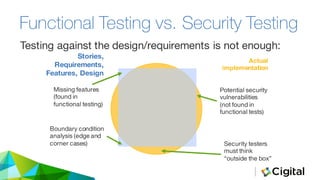
Functional Testing vs. Security Testing
Testing against the design/requirements is not enough:
Stories,
Requirements,
Features, Design
Actual
implementation
Missing features
(found in
functional testing)
Potential security
vulnerabilities
(not found in
functional tests)
Boundary condition
analysis (edge and
corner cases) Security testers
must think
“outside the box”
HTTP
IN A NUTSHELL
Requests and Responses
GET / HTTP/1.1
Host: www.cigital.com
User-Agent: Mozilla/5.0 (Windows NT 6.1;
WOW64; rv:29.0) Gecko/20100101
Firefox/29.0
Accept:
text/html,application/xhtml+xml,applicati
on/xml;q=0.9,*/*;q=0.8
Accept-Language: en-gb,en;q=0.5
Accept-Encoding: gzip, deflate
Connection: keep-alive
HTTP/1.1 200 OK
Date: Thu, 03 Jul 2014 10:24:38 GMT
Server: Apache
X-Powered-By: PHP/5.5.10
X-Pingback:
http://www.cigital.com/xmlrpc.php
Link: <http://www.cigital.com/>;
rel=shortlink
Keep-Alive: timeout=5, max=100
Connection: Keep-Alive
Content-Type: text/html; charset=UTF-8
Content-Length: 27893
[HTML document]
Client¹ Sends Server Responds
¹ ”client” can be a browser, mobile device,
or anything making HTTP requests
HTTP Requests GET /training/ HTTP/1.1
Host: www.cigital.com
User-Agent: Mozilla/5.0 (Windows NT 6.1;
WOW64; rv:29.0) Gecko/20100101
Firefox/29.0
Accept:
text/html,application/xhtml+xml,applicat
ion/xml;q=0.9,*/*;q=0.8
Accept-Language: en-gb,en;q=0.5
Accept-Encoding: gzip, deflate
Referer: http://www.cigital.com/
Cookie:
__utma=269626595.872944553.1402325345.14
02909557.1404383087.3; [truncated...]
Connection: keep-alive
Structure
o Method/path/protocol
version
o Headers
• User-agent and referrer may not
always be there
• Browser includes all the cookies
it has for the site to which it
connects
HTTP/1.1 200 OK
Date: Thu, 20 Mar 2014 17:05:51 GMT
Server: Apache/1.2.34 (Debian)
X-Powered-By: PHP/1.2.3-4+deb7u7
X-Pingback:
http://www.cigital.com/xmlrpc.php
Link: <http://www.cigital.com/?p=4370>;
rel=shortlink
Vary: Accept-Encoding
Content-Type: text/html; charset=UTF-8
Set-Cookie: name=value
Set-Cookie: name2=value2; Expires=Wed, 09
Jun 2021 10:18:14 GMT
Connection: Keep-Alive
[HTML document]
Structure:
• Headers first
• Blank line
• Content
Response codes:
• 200 OK
• 404 Not Found
HTTP Responses
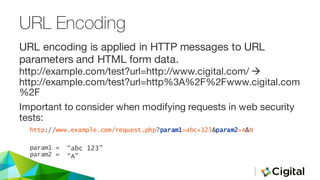
URL Encoding
http://example.com/test?url=http://www.cigital.com/ à
http://example.com/test?url=http%3A%2F%2Fwww.cigital.com
%2F
Important to consider when modifying requests in web security
tests:
http://www.example.com/request.php?param1=abc+123&param2=A&B
param1 =
param2 =
URL encoding is applied in HTTP messages to URL
parameters and HTML form data.
“abc 123”
“A”
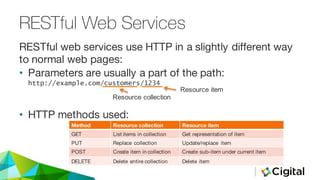
RESTful Web Services
• Parameters are usually a part of the path:
http://example.com/customers/1234
• HTTP methods used:
RESTful web services use HTTP in a slightly different way
to normal web pages:
Method Resource collection Resource item
GET List items in collection Get representation of item
PUT Replace collection Update/replace item
POST Create item in collection Create sub-item under current item
DELETE Delete entire collection Delete item
Resource  collection
Resource  item
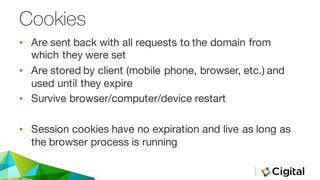
Cookies
• Are sent back with all requests to the domain from
which they were set
• Are stored by client (mobile phone, browser, etc.) and
used until they expire
• Survive browser/computer/device restart
• Session cookies have no expiration and live as long as
the browser process is running
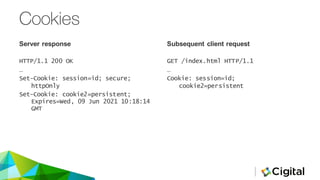
Server  response
HTTP/1.1 200 OK
…
Set-Cookie: session=id; secure;
httpOnly
Set-Cookie: cookie2=persistent;
Expires=Wed, 09 Jun 2021 10:18:14
GMT
Subsequent  client  request
GET /index.html HTTP/1.1
…
Cookie: session=id;
cookie2=persistent
Cookies
Detour into HTTPS (TLS/SSL)
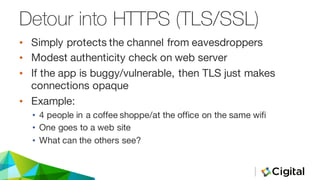
• Simply protects the channel from eavesdroppers
• Modest authenticity check on web server
• If the app is buggy/vulnerable, then TLS just makes
connections opaque
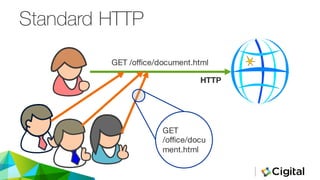
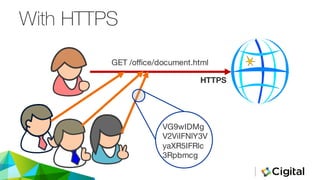
• Example:
• 4 people in a coffee shoppe/at the office on the same wifi
• One goes to a web site
• What can the others see?
Standard HTTP
GET /office/document.html
GET
/office/docu
ment.html
HTTP
With HTTPS
GET /office/document.html
VG9wIDMg
V2ViIFNlY3V
yaXR5IFRlc
3Rpbmcg
HTTPS
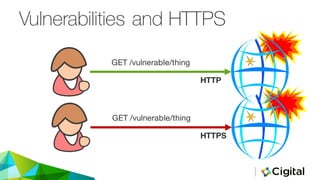
Vulnerabilities and HTTPS
GET /vulnerable/thing
HTTP
GET /vulnerable/thing
HTTPS
PROXIES
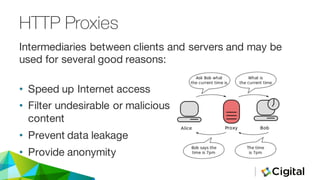
HTTP Proxies
• Speed up Internet access
• Filter undesirable or malicious
content
• Prevent data leakage
• Provide anonymity
Intermediaries between clients and servers and may be
used for several good reasons:
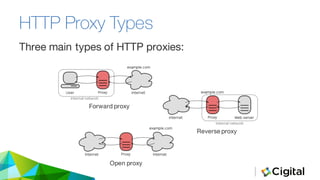
HTTP Proxy Types
Three main types of HTTP proxies:
Forward proxy
Reverse proxy
Open proxy
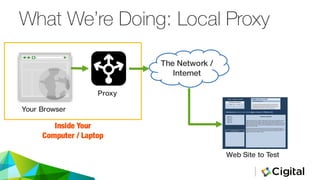
What We’re Doing: Local Proxy
Your Browser
Proxy
The Network /
Internet
Web Site to Test
Inside Your
Computer / Laptop
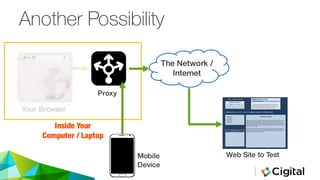
Another Possibility
Your Browser
Proxy
The Network /
Internet
Web Site to Test
Inside Your
Computer / Laptop
Mobile
Device
ROADMAP
• INSTALL
• CONFIGURE
• PITFALLS
• RUN
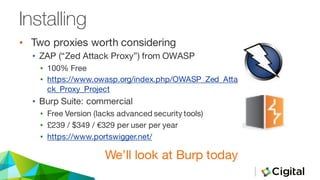
Installing
• Two proxies worth considering
• ZAP (“Zed Attack Proxy”) from OWASP
• 100% Free
• https://www.owasp.org/index.php/OWASP_Zed_Atta
ck_Proxy_Project
• Burp Suite: commercial
• Free Version (lacks advanced security tools)
• £239 / $349 / €329 per user per year
• https://www.portswigger.net/
We’ll look at Burp today
BUILDING SECURITY IN
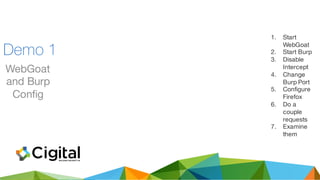
Demo 1
WebGoat
and Burp
Config
1. Start
WebGoat
2. Start Burp
3. Disable
Intercept
4. Change
Burp Port
5. Configure
Firefox
6. Do a
couple
requests
7. Examine
them
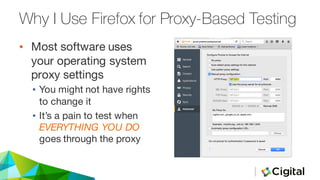
• Most software uses
your operating system
proxy settings
• You might not have rights
to change it
• It’s a pain to test when
EVERYTHING YOU DO
goes through the proxy
Why I Use Firefox for Proxy-Based Testing
• Lots of apps use port
8080
• Tomcat
• WebGoat
• Specialist software
• Proxy (Burp/ZAP) is
often easier to change
• Setting the OS proxy is
disruptive
• Might need to set
“upstream proxy” to
use your corporate
proxy
Other Possible Pitfalls
What Is Proxying Good For?
• Bypassing client-side protections
• Exploring client-side behaviour
• Examining data in transit
BUILDING SECURITY IN
Demo 2
Intercept
and
Tamper
With a
Request
1. Improper
Error
Handling
Lesson
2. Intercept
the Login
Request
3. Remove
the
Password
Parameter
BUILDING SECURITY IN
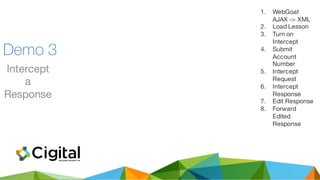
Demo 3
Intercept
a
Response
1. WebGoat
AJAX -> XML
2. Load Lesson
3. Turn on
Intercept
4. Submit
Account
Number
5. Intercept
Request
6. Intercept
Response
7. Edit Response
8. Forward
Edited
Response
CONCLUSIONS
• INSTALL
• CONFIGURE
• PITFALLS
• RUN
• This is way off the
“happy path”
• Allows better coverage
of errors, edge cases,
etc.
• Bypasses client-side
checks
The Value of A Proxy
• Manual testing
• Can spend a lot of
time for few (spectac-
ular) results
• May require deep
insight into the app
Disadvantages
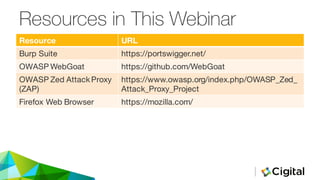
Resources in This Webinar
Resource URL
Burp Suite https://portswigger.net/
OWASP WebGoat https://github.com/WebGoat
OWASP Zed AttackProxy
(ZAP)
https://www.owasp.org/index.php/OWASP_Zed_
Attack_Proxy_Project
Firefox Web Browser https://mozilla.com/
The best time to plant an
oak tree was twenty years
ago.
The next best time is now.
—Ancient Proverb
Paco Hope,
CISSP, CSSLP
paco@cigital.com
Twitter: @pacohope

The 3 Top Techniques for Web Security Testing Using a Proxy

  • 1.
    Three Techniques for Web SecurityTesting Using a Proxy Paco Hope, Cigital paco@cigital.com Twitter: @pacohope
  • 2.
    About Me • Consultant13 years • Software security: code, design, risk • Financial, gaming, retail • Source code, architecture, security testing • (ISC)² European Advisory Council • CISSP and CSSLP exam item author • Author: 2 books + 1 chapter • OWASP Mobile Top Ten contributor • BS and MS in Computer Science • Passionate about software testers as an untapped resource in software security
  • 3.
    Goals • Understand theproxy • HTTP and HTTPS • How to configure and run it • Intercept some requests and modify them • Intercept some replies and modify them
  • 4.
    Functional Testing vs.Security Testing Testing against the design/requirements is not enough: Stories, Requirements, Features, Design Actual implementation Missing features (found in functional testing) Potential security vulnerabilities (not found in functional tests) Boundary condition analysis (edge and corner cases) Security testers must think “outside the box”
  • 5.
  • 6.
    Requests and Responses GET/ HTTP/1.1 Host: www.cigital.com User-Agent: Mozilla/5.0 (Windows NT 6.1; WOW64; rv:29.0) Gecko/20100101 Firefox/29.0 Accept: text/html,application/xhtml+xml,applicati on/xml;q=0.9,*/*;q=0.8 Accept-Language: en-gb,en;q=0.5 Accept-Encoding: gzip, deflate Connection: keep-alive HTTP/1.1 200 OK Date: Thu, 03 Jul 2014 10:24:38 GMT Server: Apache X-Powered-By: PHP/5.5.10 X-Pingback: http://www.cigital.com/xmlrpc.php Link: <http://www.cigital.com/>; rel=shortlink Keep-Alive: timeout=5, max=100 Connection: Keep-Alive Content-Type: text/html; charset=UTF-8 Content-Length: 27893 [HTML document] Client¹ Sends Server Responds ¹ ”client” can be a browser, mobile device, or anything making HTTP requests
  • 7.
    HTTP Requests GET/training/ HTTP/1.1 Host: www.cigital.com User-Agent: Mozilla/5.0 (Windows NT 6.1; WOW64; rv:29.0) Gecko/20100101 Firefox/29.0 Accept: text/html,application/xhtml+xml,applicat ion/xml;q=0.9,*/*;q=0.8 Accept-Language: en-gb,en;q=0.5 Accept-Encoding: gzip, deflate Referer: http://www.cigital.com/ Cookie: __utma=269626595.872944553.1402325345.14 02909557.1404383087.3; [truncated...] Connection: keep-alive Structure o Method/path/protocol version o Headers • User-agent and referrer may not always be there • Browser includes all the cookies it has for the site to which it connects
  • 8.
    HTTP/1.1 200 OK Date:Thu, 20 Mar 2014 17:05:51 GMT Server: Apache/1.2.34 (Debian) X-Powered-By: PHP/1.2.3-4+deb7u7 X-Pingback: http://www.cigital.com/xmlrpc.php Link: <http://www.cigital.com/?p=4370>; rel=shortlink Vary: Accept-Encoding Content-Type: text/html; charset=UTF-8 Set-Cookie: name=value Set-Cookie: name2=value2; Expires=Wed, 09 Jun 2021 10:18:14 GMT Connection: Keep-Alive [HTML document] Structure: • Headers first • Blank line • Content Response codes: • 200 OK • 404 Not Found HTTP Responses
  • 9.
    URL Encoding http://example.com/test?url=http://www.cigital.com/ à http://example.com/test?url=http%3A%2F%2Fwww.cigital.com %2F Importantto consider when modifying requests in web security tests: http://www.example.com/request.php?param1=abc+123&param2=A&B param1 = param2 = URL encoding is applied in HTTP messages to URL parameters and HTML form data. “abc 123” “A”
  • 10.
    RESTful Web Services •Parameters are usually a part of the path: http://example.com/customers/1234 • HTTP methods used: RESTful web services use HTTP in a slightly different way to normal web pages: Method Resource collection Resource item GET List items in collection Get representation of item PUT Replace collection Update/replace item POST Create item in collection Create sub-item under current item DELETE Delete entire collection Delete item Resource  collection Resource  item
  • 11.
    Cookies • Are sentback with all requests to the domain from which they were set • Are stored by client (mobile phone, browser, etc.) and used until they expire • Survive browser/computer/device restart • Session cookies have no expiration and live as long as the browser process is running
  • 12.
    Server  response HTTP/1.1 200OK … Set-Cookie: session=id; secure; httpOnly Set-Cookie: cookie2=persistent; Expires=Wed, 09 Jun 2021 10:18:14 GMT Subsequent  client  request GET /index.html HTTP/1.1 … Cookie: session=id; cookie2=persistent Cookies
  • 13.
    Detour into HTTPS(TLS/SSL) • Simply protects the channel from eavesdroppers • Modest authenticity check on web server • If the app is buggy/vulnerable, then TLS just makes connections opaque • Example: • 4 people in a coffee shoppe/at the office on the same wifi • One goes to a web site • What can the others see?
  • 14.
  • 15.
  • 16.
    Vulnerabilities and HTTPS GET/vulnerable/thing HTTP GET /vulnerable/thing HTTPS
  • 17.
  • 18.
    HTTP Proxies • Speedup Internet access • Filter undesirable or malicious content • Prevent data leakage • Provide anonymity Intermediaries between clients and servers and may be used for several good reasons:
  • 19.
    HTTP Proxy Types Threemain types of HTTP proxies: Forward proxy Reverse proxy Open proxy
  • 20.
    What We’re Doing:Local Proxy Your Browser Proxy The Network / Internet Web Site to Test Inside Your Computer / Laptop
  • 21.
    Another Possibility Your Browser Proxy TheNetwork / Internet Web Site to Test Inside Your Computer / Laptop Mobile Device
  • 22.
  • 23.
    Installing • Two proxiesworth considering • ZAP (“Zed Attack Proxy”) from OWASP • 100% Free • https://www.owasp.org/index.php/OWASP_Zed_Atta ck_Proxy_Project • Burp Suite: commercial • Free Version (lacks advanced security tools) • £239 / $349 / €329 per user per year • https://www.portswigger.net/ We’ll look at Burp today
  • 24.
    BUILDING SECURITY IN Demo1 WebGoat and Burp Config 1. Start WebGoat 2. Start Burp 3. Disable Intercept 4. Change Burp Port 5. Configure Firefox 6. Do a couple requests 7. Examine them
  • 25.
    • Most softwareuses your operating system proxy settings • You might not have rights to change it • It’s a pain to test when EVERYTHING YOU DO goes through the proxy Why I Use Firefox for Proxy-Based Testing
  • 26.
    • Lots ofapps use port 8080 • Tomcat • WebGoat • Specialist software • Proxy (Burp/ZAP) is often easier to change • Setting the OS proxy is disruptive • Might need to set “upstream proxy” to use your corporate proxy Other Possible Pitfalls
  • 27.
    What Is ProxyingGood For? • Bypassing client-side protections • Exploring client-side behaviour • Examining data in transit
  • 28.
    BUILDING SECURITY IN Demo2 Intercept and Tamper With a Request 1. Improper Error Handling Lesson 2. Intercept the Login Request 3. Remove the Password Parameter
  • 29.
    BUILDING SECURITY IN Demo3 Intercept a Response 1. WebGoat AJAX -> XML 2. Load Lesson 3. Turn on Intercept 4. Submit Account Number 5. Intercept Request 6. Intercept Response 7. Edit Response 8. Forward Edited Response
  • 30.
  • 31.
    • This isway off the “happy path” • Allows better coverage of errors, edge cases, etc. • Bypasses client-side checks The Value of A Proxy
  • 32.
    • Manual testing •Can spend a lot of time for few (spectac- ular) results • May require deep insight into the app Disadvantages
  • 33.
    Resources in ThisWebinar Resource URL Burp Suite https://portswigger.net/ OWASP WebGoat https://github.com/WebGoat OWASP Zed AttackProxy (ZAP) https://www.owasp.org/index.php/OWASP_Zed_ Attack_Proxy_Project Firefox Web Browser https://mozilla.com/
  • 34.
    The best timeto plant an oak tree was twenty years ago. The next best time is now. —Ancient Proverb Paco Hope, CISSP, CSSLP paco@cigital.com Twitter: @pacohope