Connect + Learn = Grow
Dynamics under Control
Testing CRM from a 360 View
Wael Hamze
Ramon Tebar
Connect + Learn = Grow
Wael Hamze
• Enterprise Architect
• LinkedIn:
http://www.linkedin.com/in/waelhamze
Connect + Learn = Grow
Ramon Tebar
• Solution Architect
• Microsoft CRM MVP
• http://www.ramontebar.com
Connect + Learn = Grow
Dynamics under Control?
Connect + Learn = Grow
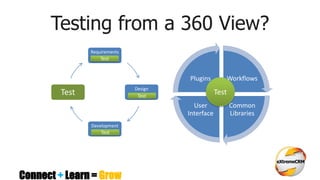
Testing from a 360 View?
Requirements
Design
Development
Test
Workflows
Common
Libraries
User
Interface
Plugins
Test
Test
Test
Test
Connect + Learn = Grow
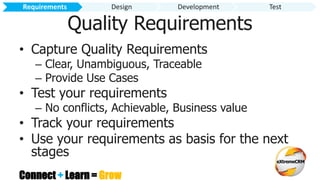
Quality Requirements
• Capture Quality Requirements
– Clear, Unambiguous, Traceable
– Provide Use Cases
• Test your requirements
– No conflicts, Achievable, Business value
• Track your requirements
• Use your requirements as basis for the next
stages
Requirements Design Development Test
Connect + Learn = Grow
Demo
Tracking Requirements
Requirements Design Development Test
Connect + Learn = Grow
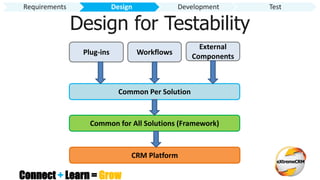
Design for Testability
Requirements Design Development Test
Common Per Solution
Plug-ins Workflows
External
Components
Common for All Solutions (Framework)
CRM Platform
Connect + Learn = Grow
Solution Structure
Requirements Design Development Test
Demo
Connect + Learn = Grow
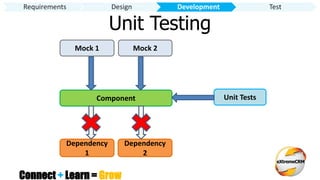
Unit Testing
Dependency
1
Component
Dependency
2
Unit Tests
Mock 1 Mock 2
Requirements Design Development Test
Connect + Learn = Grow
Why Write Unit Tests?
• Validate all components work on their own
• Ability to Test Plug-ins & Custom Workflow
Activities without CRM Environment
• Ability to Test without Deployment
• Tests run much quicker
• Detect bugs very early and fix quickly
• Debug locally with Visual Studio
Requirements Design Development Test
Connect + Learn = Grow
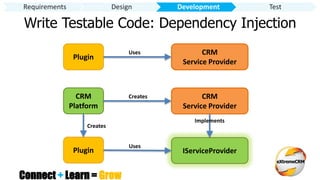
Write Testable Code: Dependency Injection
Plugin
CRM
Service Provider
Uses
CRM
Platform
CRM
Service Provider
Creates
IServiceProviderPlugin
Uses
Implements
Creates
Requirements Design Development Test
Connect + Learn = Grow
Microsoft Fakes
• Framework for isolating code under test
released with .NET 4.5
• Create Mock object implementations for the
required interfaces (Stub) and classes (Shim)
• Mock any properties and methods by creating
standard .NET delegates
• Invoke the Mocked properties and methods
as part of your Unit Test
Requirements Design Development Test
Connect + Learn = Grow
How to test a plugin
using
Microsoft Fakes
Requirements Design Development Test
Demo
Connect + Learn = Grow
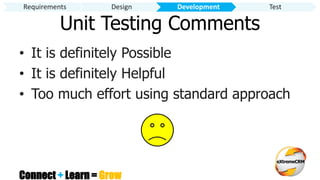
• It is definitely Possible
• It is definitely Helpful
• Too much effort using standard approach
Requirements Design Development Test
Unit Testing Comments
Connect + Learn = Grow
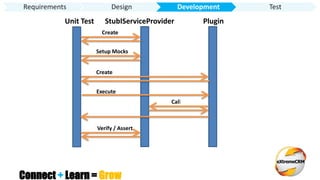
Unit Test StubIServiceProvider Plugin
Create
Setup Mocks
Create
Execute
Call
Verify / Assert
Requirements Design Development Test
Connect + Learn = Grow
Demo
How to test a plugin
using
xRM Test Framework
Requirements Design Development Test
Connect + Learn = Grow
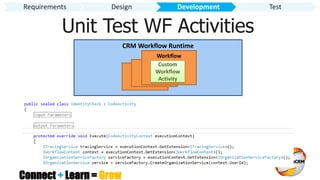
Unit Test WF Activities
CRM Workflow Runtime
Worflow
Worflow
Workflow
Custom
Workflow
Activity
Requirements Design Development Test
Connect + Learn = Grow
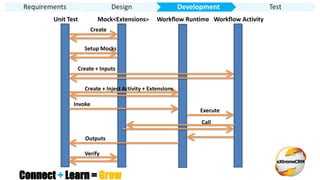
Unit Test Mock<Extensions> Workflow Runtime
Create
Setup Mocks
Create + Inputs
Create + Inject Activity + Extensions
Execute
Workflow Activity
Invoke
Call
Verify
Outputs
Requirements Design Development Test
Connect + Learn = Grow
Demo
How to test a custom
workflow activity
using
XRM Test Framework
Requirements Design Development Test
Connect + Learn = Grow
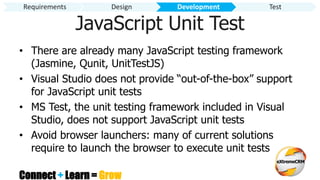
JavaScript Unit Test
• There are already many JavaScript testing framework
(Jasmine, Qunit, UnitTestJS)
• Visual Studio does not provide “out-of-the-box” support
for JavaScript unit tests
• MS Test, the unit testing framework included in Visual
Studio, does not support JavaScript unit tests
• Avoid browser launchers: many of current solutions
require to launch the browser to execute unit tests
Requirements Design Development Test
Connect + Learn = Grow
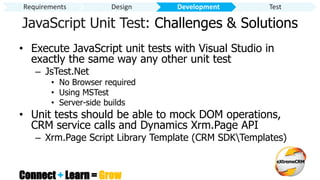
JavaScript Unit Test: Challenges & Solutions
• Execute JavaScript unit tests with Visual Studio in
exactly the same way any other unit test
– JsTest.Net
• No Browser required
• Using MSTest
• Server-side builds
• Unit tests should be able to mock DOM operations,
CRM service calls and Dynamics Xrm.Page API
– Xrm.Page Script Library Template (CRM SDKTemplates)
Requirements Design Development Test
Connect + Learn = Grow
Demo
JavaScript
Unit Test
Requirements Design Development Test
Connect + Learn = Grow
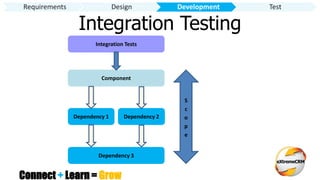
Integration Testing
Dependency 1
Component
Dependency 2
Integration Tests
Dependency 3
S
c
o
p
e
Requirements Design Development Test
Connect + Learn = Grow
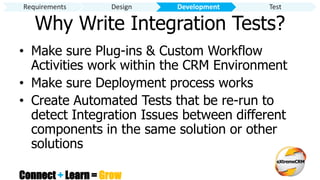
Why Write Integration Tests?
• Make sure Plug-ins & Custom Workflow
Activities work within the CRM Environment
• Make sure Deployment process works
• Create Automated Tests that be re-run to
detect Integration Issues between different
components in the same solution or other
solutions
Requirements Design Development Test
Connect + Learn = Grow
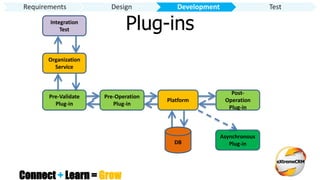
Plug-insIntegration
Test
Organization
Service
Pre-Validate
Plug-in
Pre-Operation
Plug-in
Platform
Post-
Operation
Plug-in
Asynchronous
Plug-inDB
Requirements Design Development Test
Connect + Learn = Grow
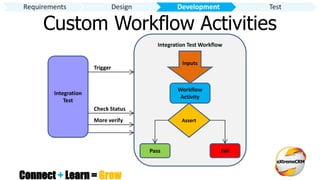
Custom Workflow Activities
Integration
Test
Integration Test Workflow
Inputs
Workflow
Activity
Assert
Pass Fail
Trigger
Check Status
Requirements Design Development Test
More verify
Connect + Learn = Grow
Requirements Design Development Test
Demo
Integration Test
Connect + Learn = Grow
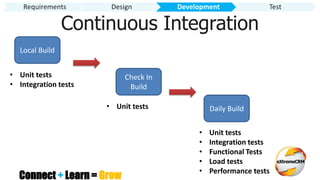
Continuous Integration
Requirements Design Development Test
Local Build
Check In
Build
Daily Build
• Unit tests
• Integration tests
• Unit tests
• Unit tests
• Integration tests
• Functional Tests
• Load tests
• Performance tests
Connect + Learn = Grow
Requirements Design Development Test
Demo
Continuous Integration
Connect + Learn = Grow
Formal Manual Testing
• Testing CRM manually by going through a set
of well defined steps
• Steps should be derived from the
requirements
• Steps make up a test case that validates one
or more requirement
• Raising bugs when defects are found
Requirements Design Development Test
Connect + Learn = Grow
Why do Manual Testing?
• Test for things that can’t be detected using
Unit or Integration Tests
– User Interface
– User Experience
– End to End use case execution
• Added human confidence
• System meets requirements
Requirements Design Development Test
Connect + Learn = Grow
Requirements Design Development Test
Demo
Manual Test
using
Microsoft Test Manager
Connect + Learn = Grow
Automating Manual Tests
• Once manual tests are stable consider automating
them to reduce testing time and focus on new
requirements
• Use Action Recording to record your Manual Test
• Convert Action Recording to Automated Coded UI
Tests that simulate user actions
• Run your Automated Tests as part of your
Continuous Integration
Requirements Design Development Test
Connect + Learn = Grow
Requirements Design Development Test
Demo
Coded UI Test
Connect + Learn = Grow
Web Performance Tests
• Test the performance of the system by
measuring HTTP response times required
to perform a certain use case
• Detect any bottle necks in the system
• Ensure system meets any non functional
SLA
Requirements Design Development Test
Connect + Learn = Grow
Load Tests
• Test performance of the system under a
typical or extreme user load using a mix of
different types of tests
• Ensure users get reasonable performance
under load
• Ensure system doesn’t crash under load
• Ensure system performs as expended under
load
Requirements Design Development Test
Connect + Learn = Grow
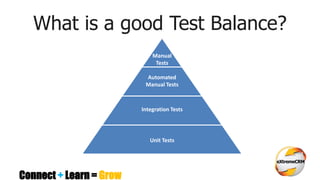
What is a good Test Balance?
Manual
Tests
Automated
Manual Tests
Integration Tests
Unit Tests
Connect + Learn = Grow
Conclusion
• Think about Testing all the way
• Test as Early as Possible
– Increased Confidence
– Detect Bugs Early -> Easier to Fix
– Improve Quality
– Happy Users
• Automate your Testing
• Use xRM Dev Framework to Improve Productivity
Connect + Learn = Grow
xRM Dev Framework
• Core Libraries
• Testing Platform for CRM components
• Continuous Integration TFS Templates and
Libraries
• Visual Studio Templates and Productivity
Tools
• http://xrmdevframework.codeplex.com

Testing CRM from a 360 View - extremeCRM Rome 2013

  • 1.
    Connect + Learn= Grow Dynamics under Control Testing CRM from a 360 View Wael Hamze Ramon Tebar
  • 2.
    Connect + Learn= Grow Wael Hamze • Enterprise Architect • LinkedIn: http://www.linkedin.com/in/waelhamze
  • 3.
    Connect + Learn= Grow Ramon Tebar • Solution Architect • Microsoft CRM MVP • http://www.ramontebar.com
  • 4.
    Connect + Learn= Grow Dynamics under Control?
  • 5.
    Connect + Learn= Grow Testing from a 360 View? Requirements Design Development Test Workflows Common Libraries User Interface Plugins Test Test Test Test
  • 6.
    Connect + Learn= Grow Quality Requirements • Capture Quality Requirements – Clear, Unambiguous, Traceable – Provide Use Cases • Test your requirements – No conflicts, Achievable, Business value • Track your requirements • Use your requirements as basis for the next stages Requirements Design Development Test
  • 7.
    Connect + Learn= Grow Demo Tracking Requirements Requirements Design Development Test
  • 8.
    Connect + Learn= Grow Design for Testability Requirements Design Development Test Common Per Solution Plug-ins Workflows External Components Common for All Solutions (Framework) CRM Platform
  • 9.
    Connect + Learn= Grow Solution Structure Requirements Design Development Test Demo
  • 10.
    Connect + Learn= Grow Unit Testing Dependency 1 Component Dependency 2 Unit Tests Mock 1 Mock 2 Requirements Design Development Test
  • 11.
    Connect + Learn= Grow Why Write Unit Tests? • Validate all components work on their own • Ability to Test Plug-ins & Custom Workflow Activities without CRM Environment • Ability to Test without Deployment • Tests run much quicker • Detect bugs very early and fix quickly • Debug locally with Visual Studio Requirements Design Development Test
  • 12.
    Connect + Learn= Grow Write Testable Code: Dependency Injection Plugin CRM Service Provider Uses CRM Platform CRM Service Provider Creates IServiceProviderPlugin Uses Implements Creates Requirements Design Development Test
  • 13.
    Connect + Learn= Grow Microsoft Fakes • Framework for isolating code under test released with .NET 4.5 • Create Mock object implementations for the required interfaces (Stub) and classes (Shim) • Mock any properties and methods by creating standard .NET delegates • Invoke the Mocked properties and methods as part of your Unit Test Requirements Design Development Test
  • 14.
    Connect + Learn= Grow How to test a plugin using Microsoft Fakes Requirements Design Development Test Demo
  • 15.
    Connect + Learn= Grow • It is definitely Possible • It is definitely Helpful • Too much effort using standard approach Requirements Design Development Test Unit Testing Comments
  • 16.
    Connect + Learn= Grow Unit Test StubIServiceProvider Plugin Create Setup Mocks Create Execute Call Verify / Assert Requirements Design Development Test
  • 17.
    Connect + Learn= Grow Demo How to test a plugin using xRM Test Framework Requirements Design Development Test
  • 18.
    Connect + Learn= Grow Unit Test WF Activities CRM Workflow Runtime Worflow Worflow Workflow Custom Workflow Activity Requirements Design Development Test
  • 19.
    Connect + Learn= Grow Unit Test Mock<Extensions> Workflow Runtime Create Setup Mocks Create + Inputs Create + Inject Activity + Extensions Execute Workflow Activity Invoke Call Verify Outputs Requirements Design Development Test
  • 20.
    Connect + Learn= Grow Demo How to test a custom workflow activity using XRM Test Framework Requirements Design Development Test
  • 21.
    Connect + Learn= Grow JavaScript Unit Test • There are already many JavaScript testing framework (Jasmine, Qunit, UnitTestJS) • Visual Studio does not provide “out-of-the-box” support for JavaScript unit tests • MS Test, the unit testing framework included in Visual Studio, does not support JavaScript unit tests • Avoid browser launchers: many of current solutions require to launch the browser to execute unit tests Requirements Design Development Test
  • 22.
    Connect + Learn= Grow JavaScript Unit Test: Challenges & Solutions • Execute JavaScript unit tests with Visual Studio in exactly the same way any other unit test – JsTest.Net • No Browser required • Using MSTest • Server-side builds • Unit tests should be able to mock DOM operations, CRM service calls and Dynamics Xrm.Page API – Xrm.Page Script Library Template (CRM SDKTemplates) Requirements Design Development Test
  • 23.
    Connect + Learn= Grow Demo JavaScript Unit Test Requirements Design Development Test
  • 24.
    Connect + Learn= Grow Integration Testing Dependency 1 Component Dependency 2 Integration Tests Dependency 3 S c o p e Requirements Design Development Test
  • 25.
    Connect + Learn= Grow Why Write Integration Tests? • Make sure Plug-ins & Custom Workflow Activities work within the CRM Environment • Make sure Deployment process works • Create Automated Tests that be re-run to detect Integration Issues between different components in the same solution or other solutions Requirements Design Development Test
  • 26.
    Connect + Learn= Grow Plug-insIntegration Test Organization Service Pre-Validate Plug-in Pre-Operation Plug-in Platform Post- Operation Plug-in Asynchronous Plug-inDB Requirements Design Development Test
  • 27.
    Connect + Learn= Grow Custom Workflow Activities Integration Test Integration Test Workflow Inputs Workflow Activity Assert Pass Fail Trigger Check Status Requirements Design Development Test More verify
  • 28.
    Connect + Learn= Grow Requirements Design Development Test Demo Integration Test
  • 29.
    Connect + Learn= Grow Continuous Integration Requirements Design Development Test Local Build Check In Build Daily Build • Unit tests • Integration tests • Unit tests • Unit tests • Integration tests • Functional Tests • Load tests • Performance tests
  • 30.
    Connect + Learn= Grow Requirements Design Development Test Demo Continuous Integration
  • 31.
    Connect + Learn= Grow Formal Manual Testing • Testing CRM manually by going through a set of well defined steps • Steps should be derived from the requirements • Steps make up a test case that validates one or more requirement • Raising bugs when defects are found Requirements Design Development Test
  • 32.
    Connect + Learn= Grow Why do Manual Testing? • Test for things that can’t be detected using Unit or Integration Tests – User Interface – User Experience – End to End use case execution • Added human confidence • System meets requirements Requirements Design Development Test
  • 33.
    Connect + Learn= Grow Requirements Design Development Test Demo Manual Test using Microsoft Test Manager
  • 34.
    Connect + Learn= Grow Automating Manual Tests • Once manual tests are stable consider automating them to reduce testing time and focus on new requirements • Use Action Recording to record your Manual Test • Convert Action Recording to Automated Coded UI Tests that simulate user actions • Run your Automated Tests as part of your Continuous Integration Requirements Design Development Test
  • 35.
    Connect + Learn= Grow Requirements Design Development Test Demo Coded UI Test
  • 36.
    Connect + Learn= Grow Web Performance Tests • Test the performance of the system by measuring HTTP response times required to perform a certain use case • Detect any bottle necks in the system • Ensure system meets any non functional SLA Requirements Design Development Test
  • 37.
    Connect + Learn= Grow Load Tests • Test performance of the system under a typical or extreme user load using a mix of different types of tests • Ensure users get reasonable performance under load • Ensure system doesn’t crash under load • Ensure system performs as expended under load Requirements Design Development Test
  • 38.
    Connect + Learn= Grow What is a good Test Balance? Manual Tests Automated Manual Tests Integration Tests Unit Tests
  • 39.
    Connect + Learn= Grow Conclusion • Think about Testing all the way • Test as Early as Possible – Increased Confidence – Detect Bugs Early -> Easier to Fix – Improve Quality – Happy Users • Automate your Testing • Use xRM Dev Framework to Improve Productivity
  • 40.
    Connect + Learn= Grow xRM Dev Framework • Core Libraries • Testing Platform for CRM components • Continuous Integration TFS Templates and Libraries • Visual Studio Templates and Productivity Tools • http://xrmdevframework.codeplex.com