For Microsoft Dynamics CRM Partners and Customers
Silverlight & Microsoft
CRM Development
Ramon Tebar Bueno
Wael Hamze
For Microsoft Dynamics CRM Partners and Customers
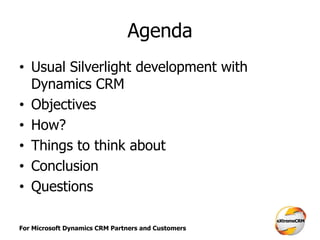
Agenda
• Usual Silverlight development with
Dynamics CRM
• Objectives
• How?
• Things to think about
• Conclusion
• Questions
For Microsoft Dynamics CRM Partners and Customers
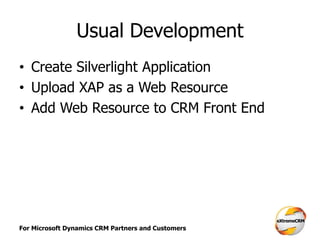
Usual Development
• Create Silverlight Application
• Upload XAP as a Web Resource
• Add Web Resource to CRM Front End
For Microsoft Dynamics CRM Partners and Customers
Demo
• Usual Silverlight CRM Development
For Microsoft Dynamics CRM Partners and Customers
Limitation of Usual Approach
• Create new Silverlight application from
scratch every time
– Effort + Time -> More Cost
• No common components
– Repeated Code
– Inconsistent Code
– Difficult to Maintain
• No standards & patterns
For Microsoft Dynamics CRM Partners and Customers
Objectives
• Improve productivity
– Less Effort, Less Time -> Less Cost
• Common Re-usable components
– Consistency
– Easier maintenance
• Standards & patterns
– Reduce learning curve
– Consistency
For Microsoft Dynamics CRM Partners and Customers
How?
• Frameworks & Patterns used
– Enterprise Library (Unity & Prism)
– MVVM
• Silverlight Framework
– Base Libraries
– Shell
– Modules
• Deployment using CRM Solutions
For Microsoft Dynamics CRM Partners and Customers
Demo…
For Microsoft Dynamics CRM Partners and Customers
Enterprise Library
• Unity
– Dependency Injection Framework
– Promotes using Interfaces and decoupling the
Interfaces from actual implementation
– Allows configuration by defining mappings
between interfaces and actual implementation
– Provides object factory for creating instance
of classes using interfaces
For Microsoft Dynamics CRM Partners and Customers
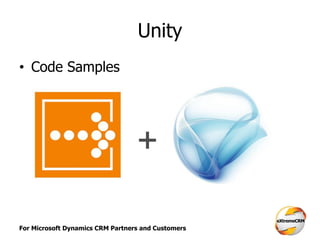
Unity
• Code Samples
For Microsoft Dynamics CRM Partners and Customers
Enterprise Library
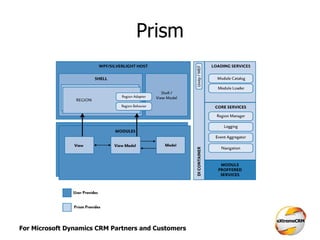
• Prism
– Composite UI Framework for Silverlight
– Provides a shell that is composed of
composite views using regions
– Provides the platform for building modular
and loose coupled UIs through the concept of
modules
– Provides the platform for building loose
coupled communication through Events
For Microsoft Dynamics CRM Partners and Customers
Prism
For Microsoft Dynamics CRM Partners and Customers
MVVM
• Design Pattern for building Silverlight UI
components
• Model
– Business Entity Model
• View
– Silverlight User Interface (XAML)
• View-Model
– Provides the logic and operations for the view
For Microsoft Dynamics CRM Partners and Customers
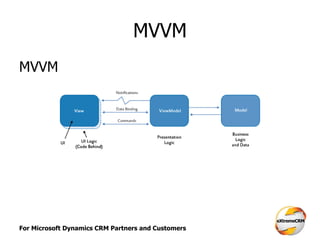
MVVM
MVVM
For Microsoft Dynamics CRM Partners and Customers
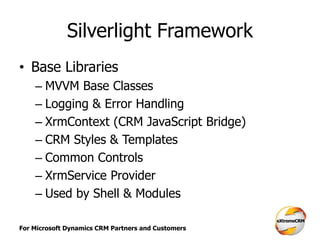
Silverlight Framework
• Base Libraries
– MVVM Base Classes
– Logging & Error Handling
– XrmContext (CRM JavaScript Bridge)
– CRM Styles & Templates
– Common Controls
– XrmService Provider
– Used by Shell & Modules
For Microsoft Dynamics CRM Partners and Customers
Demo…
• Base Libraries
For Microsoft Dynamics CRM Partners and Customers
Silverlight Framework
• Shell
– Main entry point into the application
– Loads the configuration
– Loads the required modules and views based
on the configuration
– Initializes the XrmContext
– Initializes the Logging Services
– Handles common Exceptions
For Microsoft Dynamics CRM Partners and Customers
Demo…
• Shell
For Microsoft Dynamics CRM Partners and Customers
Silverlight Framework
• Modules
– Contains the Views that will be displayed in
CRM
– Contains the implementation of Models &
View-Models to support the views
– Will be loaded by the Shell using the module
configuration file
– Can interact with CRM Page using XrmContext
– Can interact with CRM Platform Services
For Microsoft Dynamics CRM Partners and Customers
Demo…
• Module
For Microsoft Dynamics CRM Partners and Customers
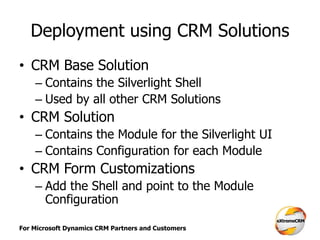
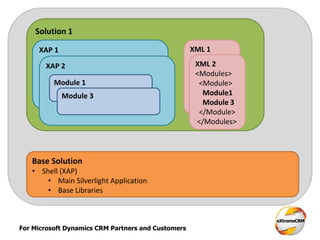
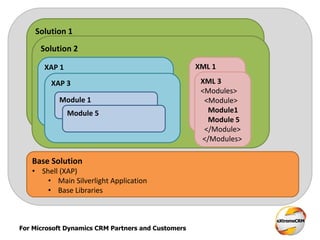
Deployment using CRM Solutions
• CRM Base Solution
– Contains the Silverlight Shell
– Used by all other CRM Solutions
• CRM Solution
– Contains the Module for the Silverlight UI
– Contains Configuration for each Module
• CRM Form Customizations
– Add the Shell and point to the Module
Configuration
For Microsoft Dynamics CRM Partners and Customers
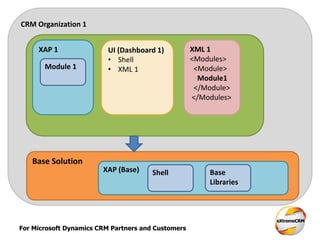
CRM Organization 1
Base Solution
Solution 1XAP 1 XML 1
<Modules>
<Module>
Module1
</Module>
</Modules>
Module 1
UI (Dashboard 1)
• Shell
• XML 1
XAP (Base) Shell Base
Libraries
For Microsoft Dynamics CRM Partners and Customers
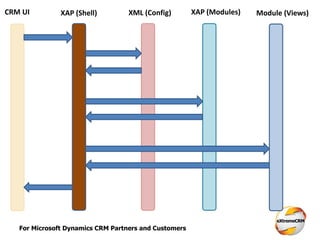
CRM UI XAP (Shell) XML (Config) XAP (Modules) Module (Views)
For Microsoft Dynamics CRM Partners and Customers
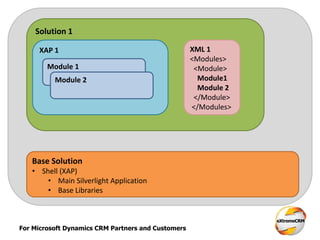
Base Solution
• Shell (XAP)
• Main Silverlight Application
• Base Libraries
Solution 1
XAP 1 XML 1
<Modules>
<Module>
Module1
Module 2
</Module>
</Modules>
Module 1
Module 2
For Microsoft Dynamics CRM Partners and Customers
Base Solution
• Shell (XAP)
• Main Silverlight Application
• Base Libraries
Solution 1
XAP 1 XML 1
<Modules>
<Module>
Module1
Module 2
</Module>
</Modules>
Module 1
Module 2
XAP 2
Module 1
Module 3
XML 2
<Modules>
<Module>
Module1
Module 3
</Module>
</Modules>
For Microsoft Dynamics CRM Partners and Customers
Base Solution
• Shell (XAP)
• Main Silverlight Application
• Base Libraries
Solution 1
XAP 1 XML 1
<Modules>
<Module>
Module1
Module 2
</Module>
</Modules>
Module 1
Module 2
XAP 2
Module 1
Module 3
XML 2
<Modules>
<Module>
Module1
Module 3
</Module>
</Modules>
Solution 2
XAP 1 XML 1
<Modules>
<Module>
Module1
Module 2
</Module>
</Modules>
XAP 3
Module 1
Module 5
XML 3
<Modules>
<Module>
Module1
Module 5
</Module>
</Modules>
For Microsoft Dynamics CRM Partners and Customers
Demo
• Silverlight Framework using Developer
Toolkit
For Microsoft Dynamics CRM Partners and Customers
Things to think about
For Microsoft Dynamics CRM Partners and Customers
Conclusion
• Improve productivity
– Use Framework & Concentrate on your
Module
• Common Re-usable components
– Base Libraries
– Shell
• Standards & patterns
– Common Development Model using Prism,
Modules & Re-use of Base Libraries
For Microsoft Dynamics CRM Partners and Customers
Questions?

Silverlight & Microsoft CRM Development - extremeCRM Berlin 2012

  • 1.
    For Microsoft DynamicsCRM Partners and Customers Silverlight & Microsoft CRM Development Ramon Tebar Bueno Wael Hamze
  • 2.
    For Microsoft DynamicsCRM Partners and Customers Agenda • Usual Silverlight development with Dynamics CRM • Objectives • How? • Things to think about • Conclusion • Questions
  • 3.
    For Microsoft DynamicsCRM Partners and Customers Usual Development • Create Silverlight Application • Upload XAP as a Web Resource • Add Web Resource to CRM Front End
  • 4.
    For Microsoft DynamicsCRM Partners and Customers Demo • Usual Silverlight CRM Development
  • 5.
    For Microsoft DynamicsCRM Partners and Customers Limitation of Usual Approach • Create new Silverlight application from scratch every time – Effort + Time -> More Cost • No common components – Repeated Code – Inconsistent Code – Difficult to Maintain • No standards & patterns
  • 6.
    For Microsoft DynamicsCRM Partners and Customers Objectives • Improve productivity – Less Effort, Less Time -> Less Cost • Common Re-usable components – Consistency – Easier maintenance • Standards & patterns – Reduce learning curve – Consistency
  • 7.
    For Microsoft DynamicsCRM Partners and Customers How? • Frameworks & Patterns used – Enterprise Library (Unity & Prism) – MVVM • Silverlight Framework – Base Libraries – Shell – Modules • Deployment using CRM Solutions
  • 8.
    For Microsoft DynamicsCRM Partners and Customers Demo…
  • 9.
    For Microsoft DynamicsCRM Partners and Customers Enterprise Library • Unity – Dependency Injection Framework – Promotes using Interfaces and decoupling the Interfaces from actual implementation – Allows configuration by defining mappings between interfaces and actual implementation – Provides object factory for creating instance of classes using interfaces
  • 10.
    For Microsoft DynamicsCRM Partners and Customers Unity • Code Samples
  • 11.
    For Microsoft DynamicsCRM Partners and Customers Enterprise Library • Prism – Composite UI Framework for Silverlight – Provides a shell that is composed of composite views using regions – Provides the platform for building modular and loose coupled UIs through the concept of modules – Provides the platform for building loose coupled communication through Events
  • 12.
    For Microsoft DynamicsCRM Partners and Customers Prism
  • 13.
    For Microsoft DynamicsCRM Partners and Customers MVVM • Design Pattern for building Silverlight UI components • Model – Business Entity Model • View – Silverlight User Interface (XAML) • View-Model – Provides the logic and operations for the view
  • 14.
    For Microsoft DynamicsCRM Partners and Customers MVVM MVVM
  • 15.
    For Microsoft DynamicsCRM Partners and Customers Silverlight Framework • Base Libraries – MVVM Base Classes – Logging & Error Handling – XrmContext (CRM JavaScript Bridge) – CRM Styles & Templates – Common Controls – XrmService Provider – Used by Shell & Modules
  • 16.
    For Microsoft DynamicsCRM Partners and Customers Demo… • Base Libraries
  • 17.
    For Microsoft DynamicsCRM Partners and Customers Silverlight Framework • Shell – Main entry point into the application – Loads the configuration – Loads the required modules and views based on the configuration – Initializes the XrmContext – Initializes the Logging Services – Handles common Exceptions
  • 18.
    For Microsoft DynamicsCRM Partners and Customers Demo… • Shell
  • 19.
    For Microsoft DynamicsCRM Partners and Customers Silverlight Framework • Modules – Contains the Views that will be displayed in CRM – Contains the implementation of Models & View-Models to support the views – Will be loaded by the Shell using the module configuration file – Can interact with CRM Page using XrmContext – Can interact with CRM Platform Services
  • 20.
    For Microsoft DynamicsCRM Partners and Customers Demo… • Module
  • 21.
    For Microsoft DynamicsCRM Partners and Customers Deployment using CRM Solutions • CRM Base Solution – Contains the Silverlight Shell – Used by all other CRM Solutions • CRM Solution – Contains the Module for the Silverlight UI – Contains Configuration for each Module • CRM Form Customizations – Add the Shell and point to the Module Configuration
  • 22.
    For Microsoft DynamicsCRM Partners and Customers CRM Organization 1 Base Solution Solution 1XAP 1 XML 1 <Modules> <Module> Module1 </Module> </Modules> Module 1 UI (Dashboard 1) • Shell • XML 1 XAP (Base) Shell Base Libraries
  • 23.
    For Microsoft DynamicsCRM Partners and Customers CRM UI XAP (Shell) XML (Config) XAP (Modules) Module (Views)
  • 24.
    For Microsoft DynamicsCRM Partners and Customers Base Solution • Shell (XAP) • Main Silverlight Application • Base Libraries Solution 1 XAP 1 XML 1 <Modules> <Module> Module1 Module 2 </Module> </Modules> Module 1 Module 2
  • 25.
    For Microsoft DynamicsCRM Partners and Customers Base Solution • Shell (XAP) • Main Silverlight Application • Base Libraries Solution 1 XAP 1 XML 1 <Modules> <Module> Module1 Module 2 </Module> </Modules> Module 1 Module 2 XAP 2 Module 1 Module 3 XML 2 <Modules> <Module> Module1 Module 3 </Module> </Modules>
  • 26.
    For Microsoft DynamicsCRM Partners and Customers Base Solution • Shell (XAP) • Main Silverlight Application • Base Libraries Solution 1 XAP 1 XML 1 <Modules> <Module> Module1 Module 2 </Module> </Modules> Module 1 Module 2 XAP 2 Module 1 Module 3 XML 2 <Modules> <Module> Module1 Module 3 </Module> </Modules> Solution 2 XAP 1 XML 1 <Modules> <Module> Module1 Module 2 </Module> </Modules> XAP 3 Module 1 Module 5 XML 3 <Modules> <Module> Module1 Module 5 </Module> </Modules>
  • 27.
    For Microsoft DynamicsCRM Partners and Customers Demo • Silverlight Framework using Developer Toolkit
  • 28.
    For Microsoft DynamicsCRM Partners and Customers Things to think about
  • 29.
    For Microsoft DynamicsCRM Partners and Customers Conclusion • Improve productivity – Use Framework & Concentrate on your Module • Common Re-usable components – Base Libraries – Shell • Standards & patterns – Common Development Model using Prism, Modules & Re-use of Base Libraries
  • 30.
    For Microsoft DynamicsCRM Partners and Customers Questions?