Test Driven
Development
Test Driven
Development
 Technique to design and develop software.
 Practice part of the Extreme Programming methodology — XP
 Based on three fundamental pillars.
TheThree
Pillars
 Implement the exact
functionality of the software.
 Reduce the number of defects
on the software – good quality
software
 Produce modular and highly
reusable software.
When Doing
TDD
 It’s not about just writing tests.
 Translate use cases to examples.
 Enough to describe the functionality without ambiguity.
 Architecture will eventually emerge.
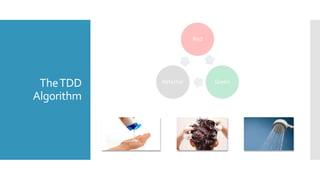
TheTDD
Algorithm
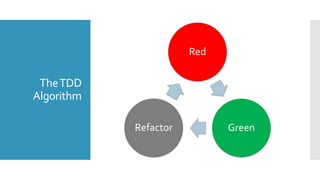
Red
GreenRefactor
TheTDD
Algorithm
Red
GreenRefactor
TDD InAction
With an example ;-)
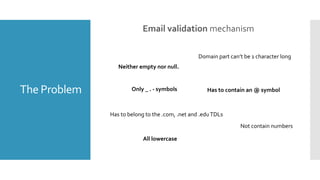
The Problem Email validation mechanism
The Problem
Email validation mechanism
The Problem
Email validation mechanism
Neither empty nor null.
Has to contain an @ symbol
Has to belong to the .com, .net and .eduTDLs
Domain part can’t be 1 character long
All lowercase
Not contain numbers
Only _ . - symbols
Before we
begin
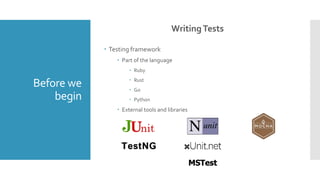
WritingTests
 Testing framework
 Part of the language
 Ruby
 Rust
 Go
 Python
 External tools and libraries
TestNG
MSTest
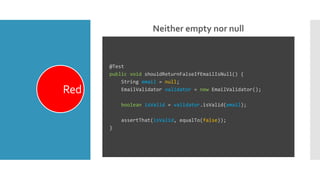
Neither empty nor null
Red
@Test
public void shouldReturnFalseIfEmailIsNull() {
String email = null;
EmailValidator validator = new EmailValidator();
boolean isValid = validator.isValid(email);
assertThat(isValid, equalTo(false));
}
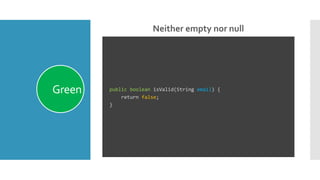
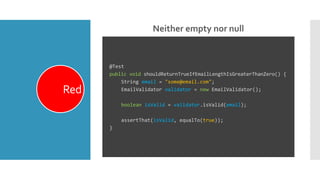
Neither empty nor null
Green public boolean isValid(String email) {
return false;
}
Neither empty nor null
Red
@Test
public void shouldReturnTrueIfEmailLengthIsGreaterThanZero() {
String email = "some@email.com";
EmailValidator validator = new EmailValidator();
boolean isValid = validator.isValid(email);
assertThat(isValid, equalTo(true));
}
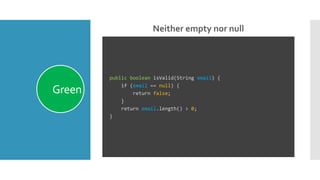
Neither empty nor null
Green
public boolean isValid(String email) {
if (email == null) {
return false;
}
return email.length() > 0;
}
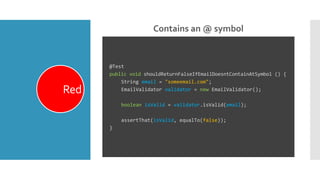
Contains an @ symbol
Red
@Test
public void shouldReturnFalseIfEmailDoesntContainAtSymbol () {
String email = "someemail.com";
EmailValidator validator = new EmailValidator();
boolean isValid = validator.isValid(email);
assertThat(isValid, equalTo(false));
}
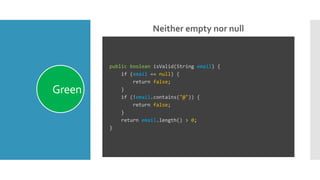
Neither empty nor null
Green
public boolean isValid(String email) {
if (email == null) {
return false;
}
if (!email.contains("@")) {
return false;
}
return email.length() > 0;
}
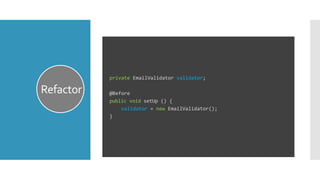
Refactor
private EmailValidator validator;
@Before
public void setUp () {
validator = new EmailValidator();
}
In the end…
 Components will behave exactly as we want.
 Tests will be the documentation of our system.
 Tests will break if changes compromise the system.
Thank you!
Carlos Andrés Oquendo
coquendo@thoughtworks.com
@andres19_05

Test Driven Development (TDD) Basics

  • 1.
  • 2.
    Test Driven Development  Techniqueto design and develop software.  Practice part of the Extreme Programming methodology — XP  Based on three fundamental pillars.
  • 3.
    TheThree Pillars  Implement theexact functionality of the software.  Reduce the number of defects on the software – good quality software  Produce modular and highly reusable software.
  • 4.
    When Doing TDD  It’snot about just writing tests.  Translate use cases to examples.  Enough to describe the functionality without ambiguity.  Architecture will eventually emerge.
  • 5.
  • 6.
  • 7.
  • 8.
    The Problem Emailvalidation mechanism
  • 9.
  • 10.
    The Problem Email validationmechanism Neither empty nor null. Has to contain an @ symbol Has to belong to the .com, .net and .eduTDLs Domain part can’t be 1 character long All lowercase Not contain numbers Only _ . - symbols
  • 11.
    Before we begin WritingTests  Testingframework  Part of the language  Ruby  Rust  Go  Python  External tools and libraries TestNG MSTest
  • 12.
    Neither empty nornull Red @Test public void shouldReturnFalseIfEmailIsNull() { String email = null; EmailValidator validator = new EmailValidator(); boolean isValid = validator.isValid(email); assertThat(isValid, equalTo(false)); }
  • 13.
    Neither empty nornull Green public boolean isValid(String email) { return false; }
  • 14.
    Neither empty nornull Red @Test public void shouldReturnTrueIfEmailLengthIsGreaterThanZero() { String email = "some@email.com"; EmailValidator validator = new EmailValidator(); boolean isValid = validator.isValid(email); assertThat(isValid, equalTo(true)); }
  • 15.
    Neither empty nornull Green public boolean isValid(String email) { if (email == null) { return false; } return email.length() > 0; }
  • 16.
    Contains an @symbol Red @Test public void shouldReturnFalseIfEmailDoesntContainAtSymbol () { String email = "someemail.com"; EmailValidator validator = new EmailValidator(); boolean isValid = validator.isValid(email); assertThat(isValid, equalTo(false)); }
  • 17.
    Neither empty nornull Green public boolean isValid(String email) { if (email == null) { return false; } if (!email.contains("@")) { return false; } return email.length() > 0; }
  • 18.
    Refactor private EmailValidator validator; @Before publicvoid setUp () { validator = new EmailValidator(); }
  • 19.
    In the end… Components will behave exactly as we want.  Tests will be the documentation of our system.  Tests will break if changes compromise the system.
  • 20.
    Thank you! Carlos AndrésOquendo coquendo@thoughtworks.com @andres19_05

Editor's Notes

  • #3 Design: * We normally rush to start coding a solution without thinking much about the problem itself.
  • #4 Exact functionality: *
  • #5 Examples: Traditionally we will code based on use cases that describe the functionality with natural language. Most of the times there is ambiguity expressed on them because of our language. The idea is to generate as much examples as needed in order to remove all the ambiguity. Architecture: Will emerge at a higher level. Depends on the type of application we are implementing and the technologies we are using. Not that we should not think on architectural decisions or concerns, but we will postpone them until they are necessary. Normally we design applications having several layers, transfer objects, factories and so on, but we may not need them. Freedom to the developer. In some contexts, all has to be coded the same way.
  • #6 Red We’ll start writing a test for a certain example. Why? Compilation errors Test failures Green We’ll implement the minimum possible functionality to cover the test case. We’ll be tempted to write a bit more code. We should be strong. Refactor We’ll revisit our test and implementation code to see if we can improve something without changing the functionality. What can we do? Clean the code Extract variables, Reduce duplication We should try to improve something, at least a bit. Sometimes it won’t be obvious, but we should spend a bit of time trying to refactor.
  • #10 What does email validation mean for this specific context? The fact is that validating an email, although sounds universal, may be very specific depending on the business context.
  • #12 To write tests we need some technology support, which is presented as a Testing Framework. Some languages and frameworks include some kind of unit testing support, such as … But in any case there are several unit testing frameworks we can use to write tests for our code, even if the language does provide some testing support. Just to name a few Java .NET JavaScript
  • #14 We’d like to refactor, but the code is so tiny…
  • #16 We’d like to refactor, but the code is so tiny…
  • #18 We’d like to refactor, but the code is so tiny…
  • #19 We’d like to refactor, but the code is so tiny…