C O L O R In Multimedia Applications …
The Science of Light Light is electromagnetic energy Produced by atoms Exists in a range of frequencies The visible range is COLOR
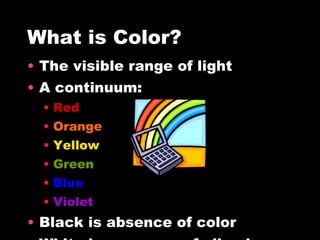
What is Color? The visible range of light A continuum: Red Orange Yellow Green Blue Violet Black is absence of color White is presence of all colors
Human Color Perception Light rays stimulate nerves Receptors are sensitive to red, green, and blue light Can interpret thousands of combinations
Screen Colors An  additive  process of combining colored light made of 3 primary colors: Red Green Blue Each pixel displays a single color with a specific  RGB   number
Print Colors A  subtractive  process of combining colored inks that reflect light: Each printed dot is made up of 3 primary colors: Cyan Magenta Yellow
Color Models There are several models to describe colors with a computer: RGB CMYK HSB/HSL Others
RGB Set red, green and blue to  values  in the range of 0 to 255 All colors are expressed as a  combination  of those 3 values
CMYK Used for print media Colors are mixed with different values of: Cyan Magenta Yellow Black
HSB/HSL Hue  is specified as an angle from 0 to 360 degrees Saturation and Brightness/Lightness are specified as percentages O% saturation is without color 50% lightness/brightness is a pure color (no black or white)
Other Models CIE describes color in terms of frequency, saturation, and illuminance YIQ/YUC are based on luminance and chrominance YCC represents digital information converted from photographic images
Monitors Color resolution will vary depending on: Screen resolution 800x600 1024x768 Hardware color depth 16 bit 24 bit 32 bit
Palettes Tables that define the color of a pixel: 1 bit = 2 colors 4 bits = 16 colors 8 bits = 256 colors 16 bits = 65k colors 24 bits = 16m colors
Dithering An image can contain many colors Monitors are limited in the number of colors displayed at once Image colors must be mapped to a palette
C O L O R …  adds a new dimension
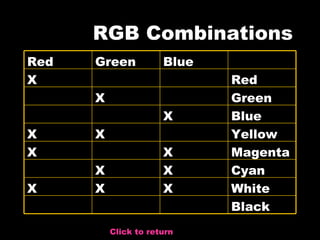
RGB Combinations Click to return Black White X X X Cyan X X Magenta X X Yellow X X Blue X Green X Red X Blue Green Red
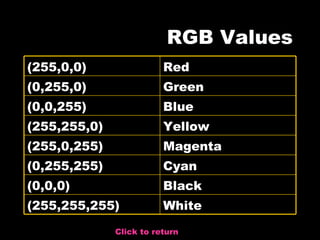
RGB Values Click to return White (255,255,255) Black (0,0,0) Cyan (0,255,255) Magenta (255,0,255) Yellow (255,255,0) Blue (0,0,255) Green (0,255,0) Red (255,0,0)
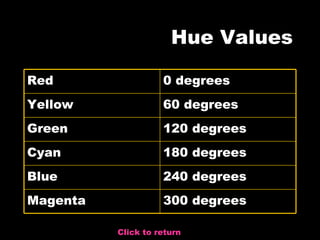
Hue Values Click to return 300 degrees Magenta 240 degrees Blue 180 degrees Cyan 120 degrees Green 60 degrees Yellow 0 degrees Red
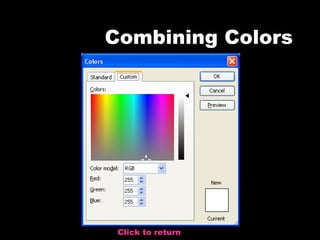
Combining Colors Click to return

test 1

  • 1.
    C O LO R In Multimedia Applications …
  • 2.
    The Science ofLight Light is electromagnetic energy Produced by atoms Exists in a range of frequencies The visible range is COLOR
  • 3.
    What is Color?The visible range of light A continuum: Red Orange Yellow Green Blue Violet Black is absence of color White is presence of all colors
  • 4.
    Human Color PerceptionLight rays stimulate nerves Receptors are sensitive to red, green, and blue light Can interpret thousands of combinations
  • 5.
    Screen Colors An additive process of combining colored light made of 3 primary colors: Red Green Blue Each pixel displays a single color with a specific RGB number
  • 6.
    Print Colors A subtractive process of combining colored inks that reflect light: Each printed dot is made up of 3 primary colors: Cyan Magenta Yellow
  • 7.
    Color Models Thereare several models to describe colors with a computer: RGB CMYK HSB/HSL Others
  • 8.
    RGB Set red,green and blue to values in the range of 0 to 255 All colors are expressed as a combination of those 3 values
  • 9.
    CMYK Used forprint media Colors are mixed with different values of: Cyan Magenta Yellow Black
  • 10.
    HSB/HSL Hue is specified as an angle from 0 to 360 degrees Saturation and Brightness/Lightness are specified as percentages O% saturation is without color 50% lightness/brightness is a pure color (no black or white)
  • 11.
    Other Models CIEdescribes color in terms of frequency, saturation, and illuminance YIQ/YUC are based on luminance and chrominance YCC represents digital information converted from photographic images
  • 12.
    Monitors Color resolutionwill vary depending on: Screen resolution 800x600 1024x768 Hardware color depth 16 bit 24 bit 32 bit
  • 13.
    Palettes Tables thatdefine the color of a pixel: 1 bit = 2 colors 4 bits = 16 colors 8 bits = 256 colors 16 bits = 65k colors 24 bits = 16m colors
  • 14.
    Dithering An imagecan contain many colors Monitors are limited in the number of colors displayed at once Image colors must be mapped to a palette
  • 15.
    C O LO R … adds a new dimension
  • 16.
    RGB Combinations Clickto return Black White X X X Cyan X X Magenta X X Yellow X X Blue X Green X Red X Blue Green Red
  • 17.
    RGB Values Clickto return White (255,255,255) Black (0,0,0) Cyan (0,255,255) Magenta (255,0,255) Yellow (255,255,0) Blue (0,0,255) Green (0,255,0) Red (255,0,0)
  • 18.
    Hue Values Clickto return 300 degrees Magenta 240 degrees Blue 180 degrees Cyan 120 degrees Green 60 degrees Yellow 0 degrees Red
  • 19.