Arduino Based Alarm Clock
Objective
 The main objective of this paper is to make an alarm
clock that is programmed using arduino. In this
Arduino based digital clock circuit, we have used
three major components which are IC DS1307, Arduino
Pro Mini Board and 16x2 LCD module.
Components
 DS 1307 RTC
It is a frequently used real time clock(RTC) IC for
clock and calendar. The clock function provides
seconds, minutes and hours while the calendar
function provides day, date, month and year values.
 Arduino Uno
The Arduino Uno is a microcontroller board based on the
ATmega328 (datasheet). It has 14 digital input/output pins
(of which 6 can be used as PWM outputs), 6 analog
inputs, a 16 MHz crystal oscillator, a USB connection, a
power jack, an ICSP header, and a reset button. It
contains everything needed to support the
microcontroller; simply connect it to a computer with
a USB cable or power it with a AC-to-DC adapter or
battery to get started.
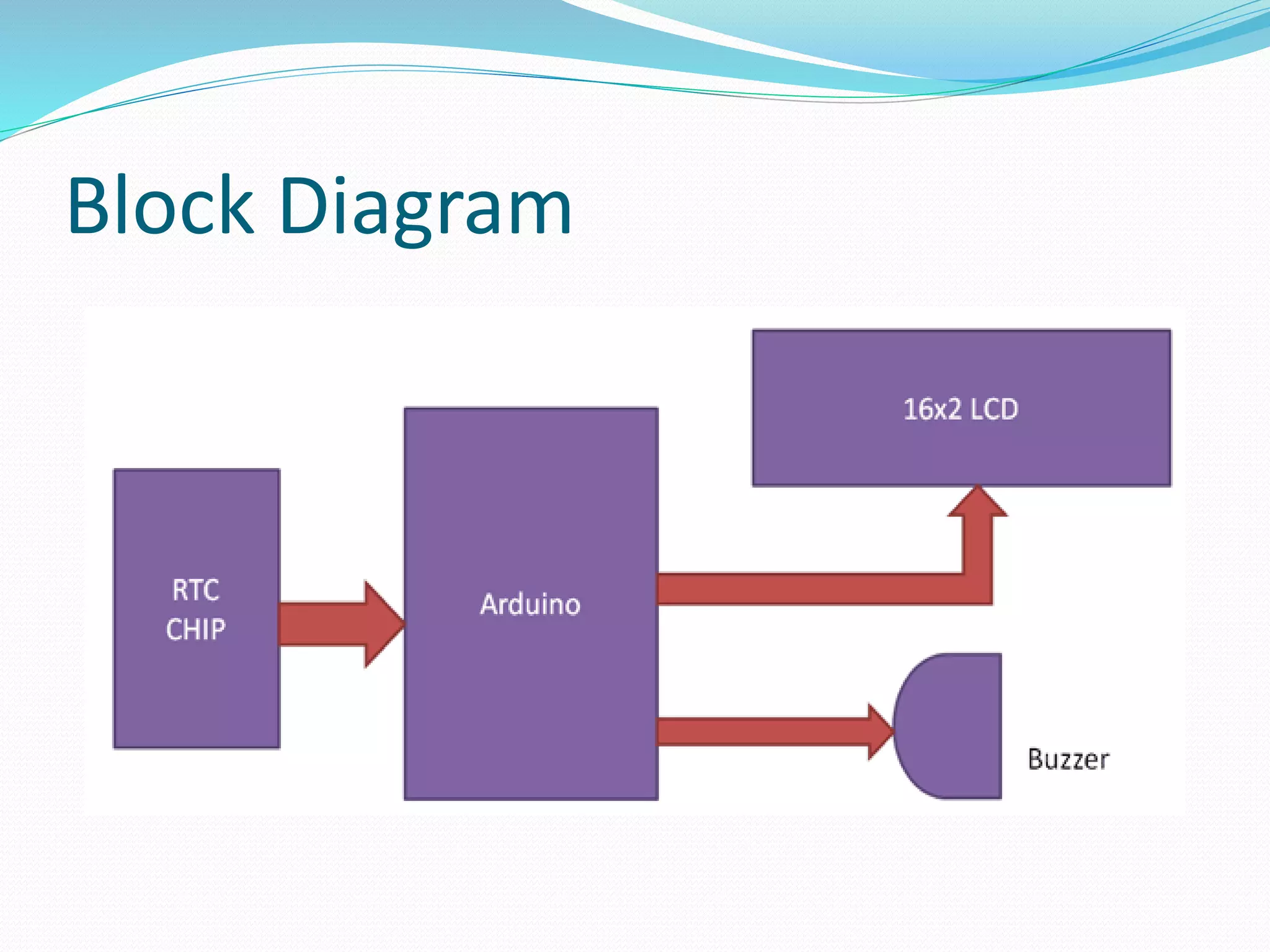
Block Diagram
Circuit Diagram
Circuit Design
 There are two pins on Arduino for I2C communication.
Analog pins 4 and 5 will act as SDA (Serial Data) and SCL
(Serial Clock).
 These are connected to respective SDA and SCL pins of
RTC. Both these pins of RTC are pulled high using 10KΩ
resistors that holds default value HIGH at data and clock
lines.
 32.768KHz crystal oscillator is connected with DS1307chip
for generating exact 1 second delay, and a 3 volt battery is
also connected to pin 3rd (BAT) of DS1307 which keeps time
running after electricity failure.
 An LCD is used to display the clock. 6 pins of LCD
must be connected to Arduino. RS, RW, En, D4, D5,
D6 and D7 (Pins 4, 6, 11, 12, 13 and 14) of LCD are
connected to pins 2, GND, 3, 4, 5, 6 and 7 of Arduino.
 Three buttons are used to set the alarm. These buttons
are connected to pins 8, 9 and 10 of Arduino. A buzzer
is connected to pin 11 of Arduino that acts as an alarm.
Working
 All the connections are made as per the shown circuit
diagram. The code for Arduino is uploaded and the
LCD displays the current date and time.
 Three buttons namely set, INC and Next are used for
setting alarm to pin 12, 11 and 10 of arduino in active
low mode. When we press set, alarm set mode
activates and now we need to set alarm by using INC
button and Next button is used for moving to digit.
 In order to set the alarm, we press the set button. It’ll
go to alarm mode and asks for hours with current time
being displayed. The increment button must be
pressed must be pressed to change the hours.
 As the clock is in 24 hour format, the hours will be
incremented between 0 and 23. Once the hours of the
alarm are set, we must press the next button to go to
minutes tab.
 Again increment button is pressed to change the
minutes. Once the alarm time is entered, set button is
pressed and the alarm is set.
 The values entered as alarm are stored in the EEPROM
of the Arduino. These values are continuously
compared with the present time.
 When the stored values and current value match, the
buzzer for the alarm will be triggered. In order to stop
the alarm, the next button is pressed.
Program Description
 To program for this real time clock, we have used some
libraries for extracting time/date from DS1307 and for
displaying on LCD, which are given below:
 #include <Wire.h>
 #include<EEPROM.h>
 #include <RTClib.h>
 #include <LiquidCrystal.h>
 And initialization of RTC, LCD and input output are
performed in setup loop.
 Rest of things like reading time, setting alarm is
performed in void loop section.
The End
THANK YOU

Term paper alarm clock

  • 1.
  • 2.
    Objective  The mainobjective of this paper is to make an alarm clock that is programmed using arduino. In this Arduino based digital clock circuit, we have used three major components which are IC DS1307, Arduino Pro Mini Board and 16x2 LCD module.
  • 3.
    Components  DS 1307RTC It is a frequently used real time clock(RTC) IC for clock and calendar. The clock function provides seconds, minutes and hours while the calendar function provides day, date, month and year values.
  • 4.
     Arduino Uno TheArduino Uno is a microcontroller board based on the ATmega328 (datasheet). It has 14 digital input/output pins (of which 6 can be used as PWM outputs), 6 analog inputs, a 16 MHz crystal oscillator, a USB connection, a power jack, an ICSP header, and a reset button. It contains everything needed to support the microcontroller; simply connect it to a computer with a USB cable or power it with a AC-to-DC adapter or battery to get started.
  • 6.
  • 7.
  • 8.
    Circuit Design  Thereare two pins on Arduino for I2C communication. Analog pins 4 and 5 will act as SDA (Serial Data) and SCL (Serial Clock).  These are connected to respective SDA and SCL pins of RTC. Both these pins of RTC are pulled high using 10KΩ resistors that holds default value HIGH at data and clock lines.  32.768KHz crystal oscillator is connected with DS1307chip for generating exact 1 second delay, and a 3 volt battery is also connected to pin 3rd (BAT) of DS1307 which keeps time running after electricity failure.
  • 9.
     An LCDis used to display the clock. 6 pins of LCD must be connected to Arduino. RS, RW, En, D4, D5, D6 and D7 (Pins 4, 6, 11, 12, 13 and 14) of LCD are connected to pins 2, GND, 3, 4, 5, 6 and 7 of Arduino.  Three buttons are used to set the alarm. These buttons are connected to pins 8, 9 and 10 of Arduino. A buzzer is connected to pin 11 of Arduino that acts as an alarm.
  • 10.
    Working  All theconnections are made as per the shown circuit diagram. The code for Arduino is uploaded and the LCD displays the current date and time.  Three buttons namely set, INC and Next are used for setting alarm to pin 12, 11 and 10 of arduino in active low mode. When we press set, alarm set mode activates and now we need to set alarm by using INC button and Next button is used for moving to digit.
  • 11.
     In orderto set the alarm, we press the set button. It’ll go to alarm mode and asks for hours with current time being displayed. The increment button must be pressed must be pressed to change the hours.  As the clock is in 24 hour format, the hours will be incremented between 0 and 23. Once the hours of the alarm are set, we must press the next button to go to minutes tab.  Again increment button is pressed to change the minutes. Once the alarm time is entered, set button is pressed and the alarm is set.
  • 12.
     The valuesentered as alarm are stored in the EEPROM of the Arduino. These values are continuously compared with the present time.  When the stored values and current value match, the buzzer for the alarm will be triggered. In order to stop the alarm, the next button is pressed.
  • 13.
    Program Description  Toprogram for this real time clock, we have used some libraries for extracting time/date from DS1307 and for displaying on LCD, which are given below:  #include <Wire.h>  #include<EEPROM.h>  #include <RTClib.h>  #include <LiquidCrystal.h>  And initialization of RTC, LCD and input output are performed in setup loop.  Rest of things like reading time, setting alarm is performed in void loop section.
  • 14.